The common IT outsourcing mistakes to avoid start with handing over work before you’ve defined what success looks like. Unclear responsibilities, weak service-level agreements, poor cultural fit and choosing functions without considering their business impact can all create avoidable friction. Outsourcing works best when expectations are clear from the start.
It is reasonable to expect an IT support provider to bring expertise and ease pressure on your team. A successful partnership still depends on clear goals, practical communication and careful decisions about which responsibilities to outsource.
This guide explains how to define service expectations, assess working styles and identify repeatable tasks that could be handled externally. It also shows how to keep the relationship on track, so the support you bring in strengthens your business rather than adding complexity.
Key Takeaways
- Compare providers on the reliability, security and practical value they bring, not price alone.
- Write service-level agreements around clear responsibilities, response times and measurable performance targets.
- Set shared communication habits early to reduce misunderstandings and build a productive working relationship.
- Start with repeatable tasks that are suitable to hand over, while keeping essential business decisions in-house.
1. What Are the Most Common Mistakes of Outsourcing?
The common IT outsourcing mistakes to avoid often start with choosing the lowest-priced provider without comparing service quality. Poorly planned outsourcing can cost up to 30% more than expected in its first year. Nearly 45% of outsourcing projects partially fail because of insufficient preparation or follow-up. Assess value through scope, experience, security procedures and measurable performance, not price alone.
Define the provider’s role before work begins. The Supply Chain Resource Cooperative recommends considering a programme’s purpose and scope, intended results and delivery approach. Specify which systems the provider supports, what your staff remain responsible for and how urgent issues are escalated. Clear boundaries reduce delays and help the partnership run smoothly.
For UK outsourcing, agreements should reflect applicable data protection and cybersecurity requirements. Set out who can access personal data, how access is controlled, which security procedures apply and how incidents are reported. Put these responsibilities in the contract instead of assuming the provider will interpret them as you do.
Compare costs on a like-for-like basis. Match each proposal’s scope, support hours and included tasks, and clarify charges for out-of-scope work, onboarding and changes. One of the common IT outsourcing mistakes to avoid is relying on a headline rate that excludes essential work. Comparing the full scope helps reveal additional costs.
Instructions need context, examples, owners and deadlines. For a system update, name the system, describe the outcome, identify the approver and set a completion date. Arrange early staff support, then use monthly training sessions to explain how an outsourced team’s platform or process works. This helps employees understand new responsibilities and reduces avoidable handover confusion.
Choose a provider whose experience and working approach fit the task. Testing the partnership before full outsourcing can reduce partnership failures by 45%. Use the trial to assess communication, delivery against agreed metrics and how the team handles exceptions. Address any gaps before expanding the scope.
2. Setting clear service-level agreements
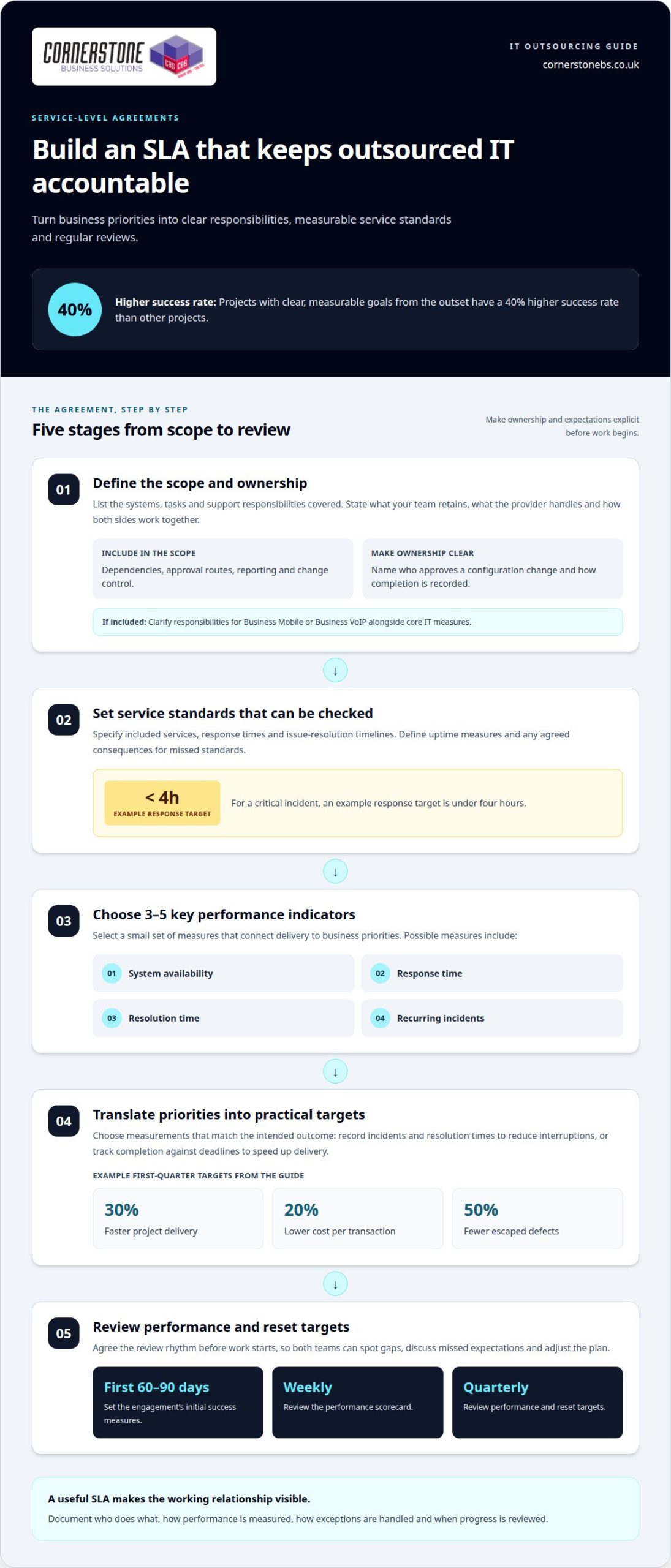
Define the scope by listing the systems, tasks and support responsibilities covered by the agreement. State what your team retains, what the provider handles and how both sides will work together to meet the objectives.
A service-level agreement should set expectations for included services, response times and issue-resolution timelines. It should also define uptime measures and any agreed consequences for missed standards. For a critical incident, an example response target is under four hours.
Choose three to five key performance indicators that connect delivery to business priorities. These could track system availability, response time, resolution time or recurring incidents. Projects with clear, measurable goals from the outset have a 40% higher success rate than other projects.
Agree how progress will be reviewed before work starts. Set success measures for the first 60–90 days of an engagement, review a performance scorecard weekly and use quarterly reviews to reset targets. Regular collaboration gives both teams a chance to address missed expectations and adjust the plan.
Scope should also cover dependencies, approval routes, reporting and change control. For example, specify who approves a configuration change and how the provider records its completion. This prevents small requests from becoming disputed extra work or delaying a wider project.
Where the agreement includes staff connectivity, clarify responsibilities for Business Mobile or Business VoIP alongside core IT measures. Explore business communications support as part of a joined-up service discussion.
3. Cultural compatibility and shared values
Culture shapes how an outsourced team communicates, makes decisions and handles pressure. Poor communication or insufficient cultural understanding accounts for 60% of tensions in international teams. That makes fit a practical delivery concern, not simply a question of whether people get along. Agree how both teams will raise risks and resolve disagreements.
Assess fit through practical examples, not broad claims about shared values. Ask the team to explain how it would handle a missed deadline, an urgent security concern or a change in priorities. Notice whether its responses are clear, candid and consistent with your organisation’s approach to accountability and customer care.
Different communication styles can create friction even when everyone shares the same goal. One team might flag a problem immediately, while another waits for a scheduled review. Agree on a channel for urgent updates, a regular meeting schedule and who makes decisions when the usual contact is unavailable.
Compare expectations around ownership and escalation. If your business expects staff to suggest improvements but the provider waits for detailed instructions, useful opportunities may be missed. Discuss a real task, such as restoring access after a user lockout, and agree who investigates, who updates colleagues and when the issue is escalated.
Language and time differences can also affect daily collaboration. Use plain wording, define technical terms and record decisions after meetings. If teams work across time zones, set realistic handover windows and identify an agreed contact for time-sensitive incidents. These steps help prevent delays caused by assumptions or unclear ownership.
Build feedback into the relationship from the start. During the initial engagement, hold brief retrospectives every two weeks to discuss what is working, where expectations differ and what should change. Keep the conversation specific: review one recent handover, identify the friction point and agree an action owner. Shared priorities become visible through consistent behaviour, not promises alone.
4. Deciding which core business functions to outsource
Start with tasks that are repeatable, documented and separate from core business decisions. Examples include routine account administration, device setup and recurring IT maintenance. Keep strategic choices, sensitive approvals and customer commitments under direct business ownership. The aim is to free your team for work that depends on its specialist knowledge.
List tasks that staff find difficult, are behind on or another team could handle more efficiently. Then assess each task by its business impact, security sensitivity, frequency and the effort needed to explain it. If a process is failing because nobody owns it, outsourcing alone will not fix the gap. Define an owner and a successful outcome first.
Managed, repeatable work is often easier to transfer than tasks requiring constant judgement. A documented new-starter setup, for example, can have clear inputs, steps and completion criteria. By contrast, deciding which customers receive priority service relies on business context and should remain closely controlled.
Outsourcing can cost up to 60% less than hiring additional staff in an office. Treat this as a possible comparison, not a promised saving: the right choice depends on the task, operating model and work location. Compare the full scope and responsibilities, not just the staffing alternative.
Protect access, data and intellectual property through written contract terms and controlled permissions. Specify who may access each system, limit access to what the work requires, and record how information will be returned or deleted at the end of the arrangement. Keep ownership of business data, documentation and credentials clear throughout.
Provider lock-in can make a change difficult if systems, records or processes cannot be transferred. Plan the exit before work starts: specify usable data exports, handover documentation, access transfer, transition responsibilities and how ongoing work will continue. This gives your business a practical route if the relationship ends.
Choose one suitable process for an initial handover, then review its quality, staff impact and operational risks before widening the scope. For help deciding which IT responsibilities to manage externally, discuss your managed IT support needs.
Cornerstone Business Solutions: Managed IT Support
Cornerstone Business Solutions provides Managed IT Support for businesses seeking dependable help with day-to-day technology and clear ownership of IT tasks. It can be a practical next step when internal teams are stretched, recurring issues interrupt work or responsibilities between staff and external support need to be defined.
Support can sit alongside Microsoft 365, Cyber Security and Business Mobile, helping businesses consider their technology needs together. The right scope depends on which systems need attention, what your team manages internally and where specialist support would make the biggest difference. Clear responsibilities and regular communication keep the working relationship aligned with your priorities.
If you are reviewing how your business manages IT, contact Cornerstone Business Solutions to discuss Managed IT Support.
Build outsourcing into your next stage of growth
Outsourcing decisions should evolve with your business. A process that works today may need a different level of support as your systems, team or customer needs change. Make ownership of the relationship part of your planning, not an afterthought.
Choose someone internally to keep business priorities visible, record decisions and raise changing needs. Use that perspective to spot when an outsourced arrangement no longer fits the work. Common IT outsourcing mistakes to avoid often begin when nobody revisits the original purpose. Regular reviews can help you decide whether to refine the arrangement, expand it or bring responsibilities back in-house.
Cornerstone Business Solutions can help you consider how managed IT support fits your organisation’s needs. Contact Cornerstone Business Solutions to explore a practical next step for your business. With clear ownership and a willingness to adapt, outsourcing can support a confident path forward.
Frequently Asked Questions
What Are the Most Common Mistakes of Outsourcing?
Common mistakes include unclear ownership, choosing a provider on price alone and treating handover as a one-off event. Another risk is assuming outsourced work removes your responsibility for business decisions. A provider might maintain a system, for example, while your team still approves access and decides which users receive it. Define those boundaries before work transfers.
What are the most common IT outsourcing mistakes businesses make?
Businesses can overlook the knowledge their staff hold about everyday exceptions. A process document may cover routine requests but miss what happens when an employee leaves without returning equipment. Record unusual cases and who handles each one before transferring the task. This helps prevent repeated queries, incomplete handovers and extra reliance on individual staff members.
How can you choose and vet an IT outsourcing provider in the UK?
Assess relevant experience, delivery arrangements and security procedures against the work you plan to outsource. Ask how long the provider has delivered outsourced services, whether it has its own operational presence, and how it measures uptime. Discuss a realistic scenario, such as a system outage, to understand how the team communicates, investigates and escalates issues.
What should an IT outsourcing contract and SLA include?
Include service boundaries, named responsibilities, escalation routes, reporting arrangements and a process for approving changes. Cover confidentiality, data access and how information will be returned at the end of the relationship. For example, specify who owns system documentation and who provides it during a handover. Make any service credits or other agreed remedies clear in the contract.
How can businesses manage communication, time zones and cultural differences with outsourced IT teams?
Agree on a shared handover format that records the issue, business impact, action taken and next owner. Mark urgent requests clearly and state the time zone for deadlines or meetings. For example, a Friday handover should name the person responsible for the next update. Written decisions also help colleagues who could not attend a meeting follow the same plan.
How should a business monitor outsourced IT performance and service quality?
Compare service results with an agreed starting point, then look for patterns rather than judging isolated incidents. Group tickets by type, business impact and recurrence. If password resets rise while account access issues persist, the trend may point to a process or training gap. Record corrective actions, assign owners and review whether the changes improve service.
When you’re comparing managed IT support options, the fastest helpdesk is not necessarily the best measure of service. Quick fixes matter, but so do prevention, clear accountability and support that fits your business. Finding a provider is a starting point; comparing what they actually deliver is what helps you make a confident choice.
Service packages can be difficult to compare, especially when helpdesk support, cybersecurity and cloud services are bundled in different ways. A lower headline price or a promise of rapid responses won’t tell you who owns an issue, how it gets escalated or whether your systems will be managed proactively.
This guide gives you a practical framework for assessing service scope, response commitments, security expertise and onboarding before you choose a partner. You’ll learn what to clarify in a service agreement, how to check that support connects with your Microsoft 365 and cloud needs, and what a structured transition should cover. The aim is a reliable, long-term support relationship that can adapt as your business changes, not just a provider that closes tickets.
Key Takeaways
- Managed IT support works best as an ongoing partnership with clear responsibilities, not just a response when something breaks.
- Compare providers by checking what each package includes and how support requests are handled and escalated.
- Look beyond response promises: clarify how providers monitor issues, report on service and distinguish response times from resolution times.
- A structured transition should cover discovery, documentation, access, system changes, validation and follow-up, with responsibilities agreed in advance.
- Assess whether managed support can connect with your Microsoft 365, cloud, cybersecurity and disaster recovery needs as your business evolves.
Managed IT Support Teesside: Table of Contents
When does managed IT support make sense for a business?
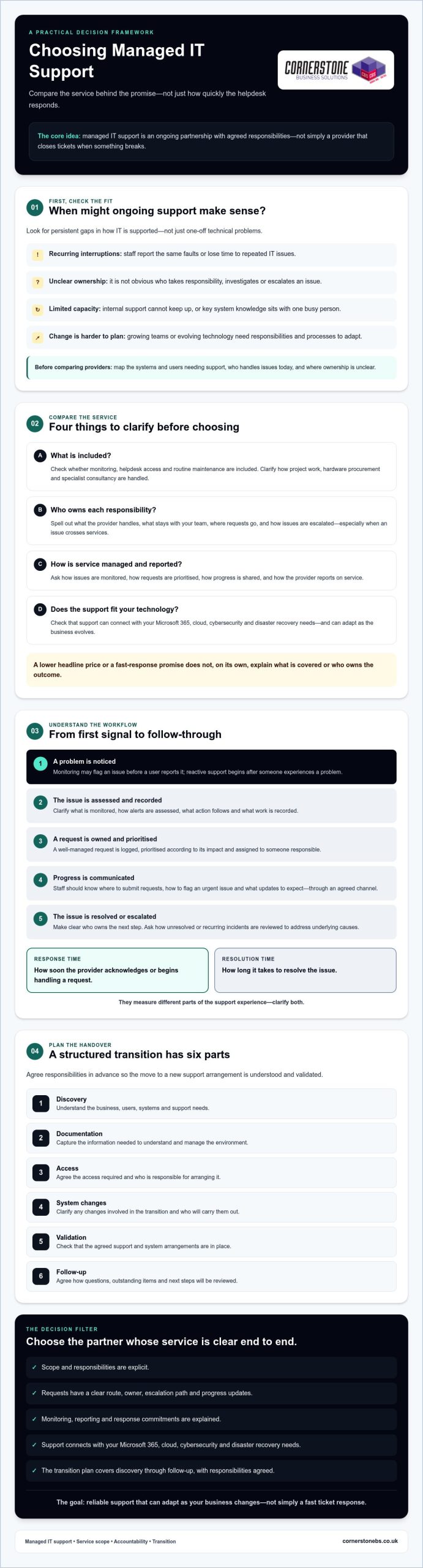
Recurring IT interruptions, uncertainty over who owns an issue and unanswered questions about technology risks can all point to a gap in support. If staff spend time reporting the same faults, or important systems rely on one busy person’s knowledge, it may be time to review how IT is managed. The key decision is whether ongoing external support fits the organisation’s needs better than its current arrangement.
Managed IT support is an ongoing service in which a provider takes responsibility for agreed IT support and management tasks, usually for a recurring fee, rather than only fixing problems when they occur. The agreed scope matters: it defines what the provider handles, what remains with your team and how issues are reported and escalated. For a neutral overview, see What are managed services.
Unlike an internal IT team, an external provider supports the business under an agreed service arrangement; the provider isn’t an employee embedded in the organisation. This can suit businesses that need dependable support but don’t need, or aren’t ready to employ, a full internal team. Break-fix support is different: assistance is generally requested when an issue arises, rather than forming part of ongoing management. Neither model is automatically right for every organisation. The choice depends on the work that needs covering and the accountability you expect.
What is included in managed IT support?
Scope varies, so ask providers to spell out whether monitoring, helpdesk access and routine maintenance are included, and what falls outside the agreement. Day-to-day user support is not necessarily the same as project work, hardware procurement or specialist consultancy. Confirm whether these are available separately, excluded or covered by a different agreement.
Cloud services, communications and cybersecurity may be coordinated with support or contracted separately. Clarify who manages each area, how responsibilities connect and who you contact if an issue crosses services. For example, if a user cannot access a cloud account, establish whether the helpdesk investigates it or passes it to another team. A clear answer helps prevent gaps between providers or teams.
Which businesses benefit from an ongoing support partner?
An ongoing partner may be worth considering when your internal capacity can’t keep up with user requests, recurring faults take time away from core work, or technology changes are becoming harder to plan. Small businesses may need access to broader support without building a full IT department. Growing teams may need responsibilities and processes to scale with them. Education organisations can have different user, device and operational needs, so the right scope should reflect their circumstances rather than a standard template.
Before comparing options, map the systems and users that need support, identify who currently handles issues and note where ownership is unclear. For a broader explanation of service fundamentals, read this managed IT services guide.
How should managed IT support work day to day?
Good support should be understandable from a user’s first request through to resolution and follow-up. Behind the scenes, monitoring may flag an issue before anyone reports it. The provider should assess the alert, decide whether action is needed, record what was done and make clear who owns the next step. For user-reported faults, staff should know where to raise a request and how they’ll hear about progress.
Proactive monitoring looks for signs of trouble in systems before users report a fault; reactive support starts after someone experiences a problem. Monitoring can help surface issues earlier, but ask what is monitored, how alerts are assessed and what action follows. The provider’s role and service scope should be explicit. The overview of What is a Managed Service Provider also explains the general model.
What should happen when an employee reports an IT issue?
A well-managed request should be logged, prioritised according to its impact, assigned to someone responsible and tracked until it’s resolved or escalated. Employees should know where to submit requests, how to flag an urgent issue and what updates to expect. Ask whether updates come through a helpdesk portal, email or another agreed channel. Also ask how unresolved or recurring incidents are reviewed to address underlying causes.
Response time and resolution time measure different things. Response time is how soon the provider acknowledges or begins handling a request. Resolution time is how long it takes to fix the issue, which can depend on its complexity or reliance on another supplier. Check how each is defined in the service agreement, and what status updates users receive if a fix takes longer than expected.
How do maintenance, security and cloud support connect?
Routine maintenance may include keeping systems updated, managing user accounts and checking that backups are being overseen. These activities can support continuity, but don’t assume they’re included in every support arrangement. Confirm the scope, who carries out each task and how completion or exceptions are reported.
Cybersecurity can overlap with everyday IT support. Clarify who handles suspicious activity, account access concerns and security-related incidents, and how these are escalated. Ask whether cloud support includes account administration, issue handling and coordination with other suppliers, or whether those responsibilities sit under separate agreements. For a deeper look at security considerations, read the cybersecurity services guide.
When assessing managed IT support, these day-to-day details are more useful than a broad promise of responsive service. Ask providers to walk through a typical request and a monitoring alert, including ownership, escalation and follow-up. You can learn more about Cornerstone Business Solutions and its support services.
How can you compare managed IT support providers fairly?
Comparing providers is easier when you assess the same responsibilities, not just package names or headline response promises. A side-by-side checklist can reveal what’s included, who owns each issue and how the service will be reviewed. A fast acknowledgement matters, but it doesn’t tell you how an issue is prioritised, escalated or resolved.
Use the same questions with each provider, then check the answers against the proposed agreement. If one quote includes an activity that another excludes, note the difference before comparing overall value.
| Area |
What to compare |
| Scope |
Which monitoring, maintenance, helpdesk and user onboarding tasks are included, and what’s excluded? |
| Support access |
Where do users raise requests, and how are urgent issues identified and prioritised? |
| Escalation |
Who owns a request if it can’t be resolved at first, and how are you kept informed? |
| Reporting |
What service information is shared, how often, and are recurring issues reviewed? |
| Contract review |
How are responsibilities, exclusions, changes and the process for reviewing the arrangement documented? |
Compare like with like. A package described as “full support” may not cover projects, hardware, licensing or out-of-hours requests. Ask how these are handled and whether they’re included, separately agreed or billed separately. Confirm reporting frequency, named contacts and who is accountable for escalation. Read the agreement carefully to make sure the proposal and written scope match.
Which questions reveal the real service scope?
Ask providers to explain what monitoring detects and what action follows an alert. Check whether maintenance includes routine updates, and whether helpdesk support covers all the users and devices you expect. Clarify how new starters are set up, what project work costs separately and how requests outside agreed support hours are treated. Ask to see examples of reports and service reviews rather than relying on broad package descriptions.
How do you assess security and business fit?
Explore how the provider coordinates cybersecurity, backup oversight, recovery planning and incident response, including where responsibilities sit with your team or another supplier. Ask about experience with comparable workflows, existing technology and relevant compliance needs. Check references from organisations with similar requirements, and request evidence for any claimed partner credentials or accreditations. Verify their relevance and current status; a badge alone doesn’t prove the service fits your business.
What should a managed IT support transition involve?
Changing IT support works best as a planned handover, not a sudden switch. Before any systems or responsibilities change, agree who owns each task, how staff will get help and how updates will be shared. This is especially important if you’re moving from an existing provider or relying on an internal team with knowledge that hasn’t been documented. Ask each provider to explain its transition process as well as its ongoing service.
A practical onboarding sequence should include:
- Discovery: Review your organisation’s needs, current systems, key workflows and known support challenges.
- Documentation: Create or check records for users, devices, software, networks, suppliers and unresolved issues.
- Access planning: Agree how administrator access and credentials will be transferred securely, and who is authorised to approve changes.
- Transition: Set out the handover steps, responsibilities and communication plan before making agreed changes.
- Validation: Check that users can access the systems they need and that support routes and agreed responsibilities are clear.
- Review: Discuss early requests, open risks and any gaps in documentation, then confirm priorities and next steps.
What information should you prepare before onboarding?
Start with an inventory of users, devices, software, networks and business-critical processes. Add current suppliers, administrator access arrangements, backup responsibilities and any open support issues. Note sensitive systems and busy operational periods, such as a term start or peak trading period, so the handover can be planned with care. You don’t need perfect records; flag what’s missing so it can be addressed together.
How can you check that the new arrangement is working?
Agree how early support requests, recurring faults and unresolved risks will be recorded and followed up. At an initial review, check that documentation and access are complete, priorities remain accurate and the delivered support matches the agreed scope. If the wider change includes moving to Microsoft 365, use this Microsoft 365 migration guide to explore planning considerations.
A clear transition gives both sides a shared starting point and helps prevent important tasks from falling between teams. Find out more about Cornerstone Business Solutions.
How can Cornerstone support your business beyond the helpdesk?
Choosing a provider is about more than resolving day-to-day issues. It’s also about finding support that can keep pace as your systems, team and priorities change. Cornerstone Business Solutions is one potential long-term partner to assess against the service scope and accountability criteria in this guide.
Cornerstone provides managed IT support alongside Microsoft 365, cloud solutions, cybersecurity and disaster recovery. Its wider services also include business communications, such as Business Mobile and Business VoIP. These areas can connect with everyday IT needs, but they don’t have to be taken as a single package. The right mix depends on your current setup, what your team needs help with and which responsibilities you want a provider to take on.
Cornerstone works with Microsoft, IBM and Cisco. These partnerships provide context about its technology relationships, but they aren’t a substitute for checking whether a proposed service matches your requirements. Ask what’s included, how responsibilities are divided and how the provider will keep you informed.
When could a connected IT services partner be useful?
A connected partner may be useful if support issues touch more than one part of your technology. For example, a user problem might involve Microsoft 365 access, cloud services or business communications. Knowing who coordinates the investigation can help avoid uncertainty over ownership. Similarly, discussing cybersecurity and disaster recovery alongside support can help you understand how security concerns and continuity planning fit into the overall arrangement.
That doesn’t mean every organisation needs every service. A business with established cloud arrangements may have different priorities from one reviewing its communications or recovery plans. Focus on the gaps you need to address now, while considering whether the support relationship can adapt if your requirements change.
What is a sensible next step when choosing support?
Before speaking with a provider, write down your current IT challenges, the systems and suppliers you rely on, your priorities and the outcomes you want. Include recurring issues, unclear responsibilities and any planned changes. This gives you a practical basis for comparing providers and discussing what belongs in scope, what sits outside it and how success will be reviewed.
A useful discussion should clarify your needs before you make a commitment. Review Cornerstone’s services at Cornerstone Business Solutions.
Choose support that can grow with your business
The right managed IT partner should do more than respond to faults. Compare what’s included, how responsibility and escalation work, and whether the support scope reflects your security, cloud and day-to-day needs. A clear onboarding plan and regular reviews help ensure the arrangement continues to fit as your organisation changes.
Cornerstone Business Solutions is a multi-award-winning IT services provider that works with Microsoft, IBM and Cisco. Its services include managed IT support, Microsoft 365, cybersecurity, cloud solutions and disaster recovery. Assess these against your own requirements, and ask how the proposed scope would address your priorities.
Before you choose, note your current challenges, priorities and essential systems. Then use that information to discuss responsibilities and agree what support should cover. Talk to Cornerstone about the right managed IT support for your business.
Frequently Asked Questions
What is managed IT support?
Managed IT support is an ongoing arrangement where a provider helps an organisation maintain and use its technology under an agreed scope. Depending on the agreement, it may cover helpdesk access, monitoring, maintenance and user support. It differs from paying for individual repairs only after something goes wrong. Before choosing a provider, check what’s included and excluded, how issues are escalated and how the service will be reviewed.
Is managed IT support worth it for a small business?
It can be worthwhile if recurring IT problems interrupt work, staff need dependable technical help or your business doesn’t have enough in-house capacity. The right choice depends on your systems, risks and support needs. Compare the proposed service with your priorities, then ask how the provider will communicate and report issues. Also discuss how the arrangement could adapt as your team, technology or business requirements change.
What does managed IT support include?
Managed IT support commonly includes some combination of helpdesk support, system monitoring, routine maintenance and user assistance. Cloud administration, cybersecurity, backups and strategic reviews may also be available, but they aren’t automatically part of every agreement. A general service description may not set out the full scope. Ask the provider to document specific inclusions, exclusions and responsibilities so you can see what’s covered and what requires a separate arrangement.
How do I choose a managed IT support provider?
Start by recording your users, systems, recurring issues and business priorities. Then compare providers on scope, request handling, escalation, reporting, security responsibilities, onboarding and service reviews. Look beyond a polished package description or a fast response claim. Ask for evidence of relevant experience, clarify how projects and out-of-scope work are handled, and make sure responsibilities and communication are clear.
How much does managed IT support cost?
Managed IT support costs depend on factors such as the users or devices covered, the services included, support requirements and contract structure. A headline figure alone won’t show whether two proposals offer equivalent coverage. Ask each provider for a written breakdown of inclusions, exclusions, licensing and any project work charged separately. You can then compare proposals against the support your organisation actually needs, rather than paying for assumptions or overlooking gaps.
Can I keep my existing IT systems when changing support provider?
Often, a new provider can work with existing systems, but compatibility, documentation and access need to be assessed first. Ask how the provider will review your setup, coordinate with current suppliers and handle the handover of relevant information. Some systems may need planned changes or remediation. Agree what happens first and who is responsible for each task. Transfer administrator access through an agreed, secure process, not informal messages or shared notes.
How long does it take to move to a managed IT support provider?
The transition timeline depends on your systems, the quality of existing documentation and how quickly current suppliers can provide necessary information or access. Discovery, system checks and handover planning can all affect the schedule. Ask for a transition plan that sets out responsibilities, milestones and communication points. The provider should explain what needs to be completed before support operates as agreed, and flag any dependencies or risks early.