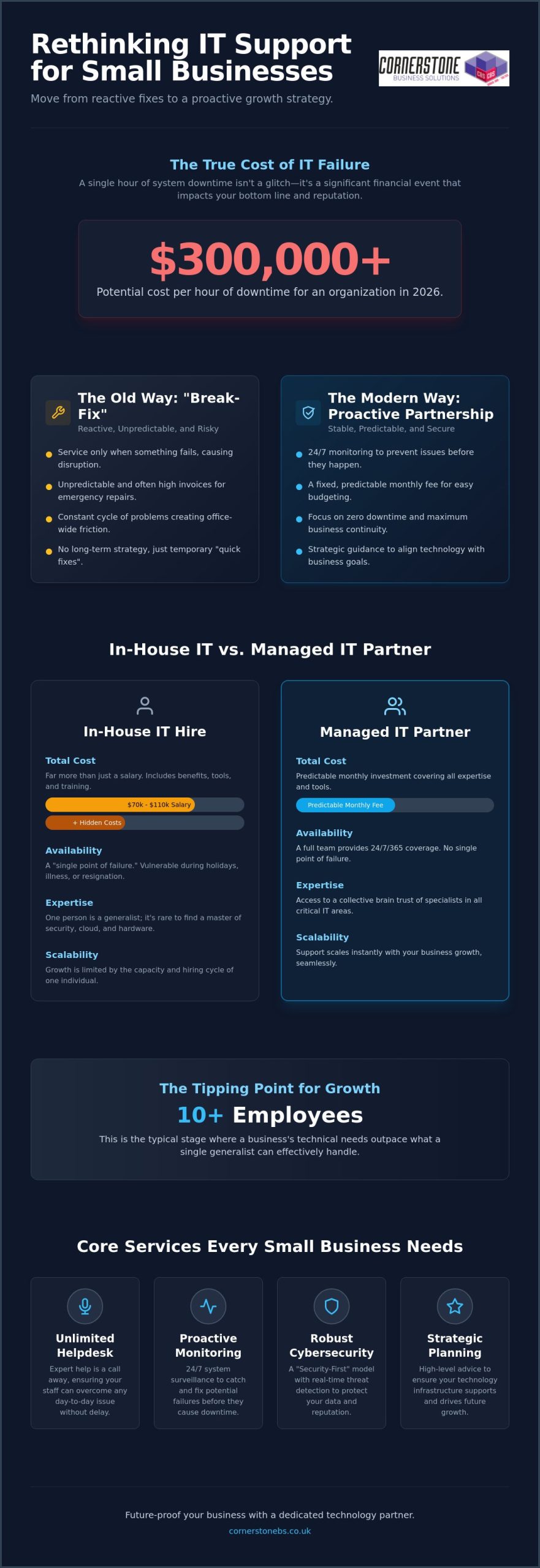
Did you know that a single hour of system downtime in 2026 can cost an organization over $300,000? For a growing company, that isn’t just a technical glitch; it’s a direct hit to your reputation and your bottom line. Most business owners we talk to are tired of the “break-fix” cycle where “quick fixes” fail to last and monthly bills remain a total mystery. If you’ve ever felt the weight of a potential data breach hanging over your office, you’re certainly not alone. Finding reliable outsourced IT support for small business shouldn’t feel like a gamble. It should feel like a partnership with a team that knows your community and your goals.
We agree that your technology should work as hard as you do without the constant fear of a security catastrophe. In this guide, we’ll show you how to eliminate technical friction, secure your vital data, and scale your operations with a proactive strategy. You’ll learn how to move from reactive repairs to a model that offers zero downtime and predictable monthly billing. We’re going to explore the modern standards for managed IT and how a dedicated technology partner can finally give you the freedom to grow.
Key Takeaways
- Move from a reactive “break-fix” mindset to a proactive partnership that stops technical issues before they disrupt your day.
- Evaluate the total cost of ownership and avoid the “single point of failure” risk associated with relying on a lone in-house IT hire.
- See how strategic outsourced IT support for small business turns unpredictable repair bills into a fixed monthly investment for better cash flow.
- Identify the essential markers of a quality partner, from robust Service Level Agreements to verified industry accolades and awards.
- Learn how proactive monitoring and unlimited helpdesk support provide the stability you need to scale your business with confidence.
What is Outsourced IT Support for Small Business?
At its core, outsourced IT support for small business is far more than just a number to call when your printer stops working. It’s a strategic partnership with a Managed Service Provider (MSP) that acts as a reliable extension of your own team. Instead of managing complex servers and software yourself, you lean on a group of experts who take full responsibility for your digital health. We define it simply: outsourced IT is the external management of digital infrastructure to ensure 24/7 business continuity.
In the past, many companies relied on a “break-fix” model. You only called for help when something was already broken, which often led to expensive downtime and unpredictable invoices. Modern Managed IT Services have flipped this script entirely. Today, the focus is on proactive management. We monitor your systems around the clock to stop faults before they turn into office-wide outages. This comprehensive approach covers everything from your daily helpdesk needs to complex cloud management and high-level strategic advice that helps you plan for the future.
The Evolution of IT Support in 2026
The landscape has shifted dramatically over the last few years. Hybrid work is no longer a perk; it’s a standard requirement that adds layers of complexity to your network and data access. At the same time, AI-driven threats have made cyber attacks more sophisticated and frequent than ever before. Because of this, basic technical help isn’t enough for modern SMEs. You now require a “Security-First” IT support model. This means security isn’t a secondary add-on; it’s built into every update, every login, and every piece of hardware your team uses to get the job done.
Core Services Every Small Business Needs
To stay competitive, your business needs a foundation that doesn’t crumble under pressure. This starts with unlimited helpdesk access. Your staff should feel confident that expert help is just a phone call away for any day-to-day issue, no matter how small. Reliability is built through proactive system monitoring. By catching a failing drive or a software conflict early, we prevent the productivity bleed that happens when systems lag or crash. Most importantly, you need robust cyber security services that include real-time threat detection and response. In 2026, protecting your data is exactly the same as protecting your hard-earned reputation.
Managed IT Services vs. In-House IT: Which is Better?
Deciding between a full-time hire and a managed partner is a major milestone for any growing company. It’s easy to assume that having a person in the office provides more control, but this often leads to a “single point of failure.” If your lone IT manager is on holiday, ill, or decides to move on, your business is suddenly vulnerable. High-quality outsourced IT support for small business removes this risk by providing a full team of experts who are always available, ensuring you never depend on one person’s schedule.
The Real Cost of an Internal IT Hire
The total cost of ownership for an internal hire goes far beyond the base salary. According to current research, the average salary for a single in-house IT professional is between $70,000 and $110,000 per year before benefits. On top of that, you must account for National Insurance, pension contributions, and recruitment fees. There’s also the cost of the tools themselves. A professional partner provides enterprise-grade Remote Monitoring and Management (RMM) software as part of the service. An internal hire would require you to purchase these licenses separately, adding thousands to your annual budget. By choosing a partner, you ensure your systems follow cybersecurity best practices without having to fund the expensive training and tools required to stay current.
When Outsourcing Becomes the Logical Choice
Most businesses hit a tipping point around the 10-employee mark. At this stage, your technical needs outpace what a single generalist can handle. You need deep expertise in hardware, security, and cloud solutions simultaneously. It’s rare to find one person who is a master of all three. An outsourced model allows you to tap into a collective brain trust of specialists who manage these complex environments every day.
Scaling becomes seamless when you aren’t tethered to a hiring cycle. As you add more staff, your IT support scales with you instantly. This 24/7/365 coverage means your systems are being watched while you sleep, preventing the midnight crashes that derail the next day’s productivity. Investing in outsourced IT support for small business ensures your systems are always ready for the next challenge. If you’re ready to move away from the stress of managing a department yourself, we can help you explore a more reliable path for your company’s technology.
Key Benefits of Outsourcing Your IT Support
Beyond the balance sheet, there is the invaluable factor of emotional security. Our proactive maintenance model means we’re constantly scanning your network for vulnerabilities or hardware fatigue. It’s the digital equivalent of a security team watching your office while you sleep. You no longer have to worry about a Monday morning meltdown because a server failed over the weekend. We’ve likely already spotted the issue and fixed it before your team even logged on.
Enhanced Security and Compliance
The regulatory environment for UK businesses is stricter than ever. Achieving Cyber Essentials certification has become a standard requirement for many contracts, and we help you reach that mark with ease. We implement robust disaster recovery protocols to ensure your data stays safe even in the worst-case scenarios. Staying ahead of evolving data protection laws is a full-time job. We take that burden off your shoulders so you can remain compliant without the constant worry of a breach.
Access to World-Class Expertise and Tools
How to Choose the Right IT Support Partner
Avoid “one-size-fits-all” packages. Your business has unique workflows, and your IT should reflect that. A truly bespoke approach ensures you aren’t paying for tools you don’t need while leaving critical gaps in your security. Communication is equally vital. You need a partner who speaks the language of business, not just the language of servers. If they can’t explain a complex concept simply, they aren’t the right fit for a growing SME. We believe in being a dedicated long-term partner, not just a voice on the end of a phone.
The 4-Stage Onboarding Process
A smooth transition is the foundation of a long-term partnership. We follow a clear, four-step path to ensure your outsourced IT support for small business delivers value from day one.
- Audit and Assessment: We begin with a deep dive into your current infrastructure. This isn’t just about checking boxes; it’s about identifying hidden vulnerabilities and “quick wins” that improve your immediate security and speed.
- Stabilisation: Once we know where the gaps are, our team works to fix lingering issues. We standardise your environment to ensure every device and user has a consistent, high-performance experience.
- Optimisation: This is where we implement a seamless Microsoft 365 migration and unlock cloud efficiencies that help your team work smarter.
- Ongoing Strategy: We provide monthly reviews and a long-term roadmap. This keeps your technology aligned with your commercial goals and ensures you’re always ready for what’s next.
Red Flags to Avoid in a Provider
Not every provider has your best interests at heart. Watch out for these common warning signs during your search:
- Long-term contracts that lock you in for years without clear performance clauses or exit strategies. You should stay with a provider because of their quality, not because of a legal loophole.
- Providers who hide behind “tech-jargon” to avoid answering direct business questions about costs or security.
- Surprise invoices for onsite visits or basic security patches that should be included as standard in a managed service.
If you want a partner who values transparency and local expertise, book a discovery call with our award-winning team.
Future-Proofing Your SME with Cornerstone Business Solutions
Your business deserves more than a reactive helpdesk that only shows up when things go wrong. At Cornerstone Business Solutions, we’ve built our reputation on being a dedicated long-term partner for UK small businesses. We don’t just fix computers; we provide the strategic engine that drives your resilience and competitive advantage. By choosing our outsourced IT support for small business, you’re securing a foundation that’s built to last, regardless of what the tech landscape throws at you next.
Our approach is built on two non-negotiable pillars: Unlimited Helpdesk access and Proactive Monitoring. These aren’t premium add-ons; they’re the standard for every client we serve. Our monitoring systems act as a silent guardian, catching faults before they impact your productivity. When your team does need help, they get through to a real person who understands your setup and your goals. This combination ensures that technology remains an asset rather than a source of friction.
Why Award-Winning Service Matters
We’re proud to be a multi-award-winning IT provider, but those accolades aren’t just for our trophy cabinet. They act as a recurring signature of quality and a promise of consistent, high-level performance. When you see our industry recognition, you’re seeing proof of a culture that blends professional authority with approachable, regional warmth. We take pride in our geographical roots and bring that community-focused energy to every project. We simplify complex technical concepts so you can focus on leading your company with total confidence.
Take the First Step Toward Stress-Free IT
Switching your IT provider shouldn’t feel like a leap into the unknown. We’ve refined our managed onboarding process to make the transition as smooth as possible. It starts with an informal conversation about your specific business challenges and growth ambitions. We listen first, then we build a bespoke technology solution that fits your unique requirements. There’s no jargon, no hidden fees, and no “one-size-fits-all” mentality.
If you’re tired of unpredictable costs and productivity loss from temporary fixes, it’s time for a different approach. We invite you to join us for a friendly chat about your current systems. Let’s explore how a proactive partnership can provide the emotional security and technical stability you need to scale. Secure your future today by booking a comprehensive technology audit with our expert team.
Secure Your Competitive Edge for the Years Ahead
Technology shouldn’t be an anchor that holds your company back; it should be the fuel that drives your growth. By moving away from the reactive break-fix model and embracing a proactive partnership, you’ve already taken the first step toward a more resilient future. You now understand that the right outsourced IT support for small business provides more than just technical fixes. It offers the strategic clarity and emotional security you need to lead with total confidence.
Book your free bespoke technology audit with our award-winning team today. We look forward to starting a conversation about your future.
Frequently Asked Questions
How much does outsourced IT support typically cost for a small business?
The cost is typically structured as a predictable monthly fee based on your number of users or devices. This model helps you avoid the high, unpredictable costs of “break-fix” repairs and allows for much better cash flow management. Your specific investment will depend on the complexity of your network, your security requirements, and the level of proactive monitoring needed to ensure zero downtime. We focus on providing a fixed-term contract that offers unlimited helpdesk access so you always know exactly what your budget looks like.
Will an outsourced IT company understand my niche industry requirements?
Yes, a quality provider builds a bespoke system tailored to your specific commercial goals and regulatory needs. We act as a dedicated long-term partner, taking the time to understand your unique workflows before implementing any changes. This ensures your technology supports your niche operations rather than forcing you into a generic, one-size-fits-all framework. Our experience across various sectors allows us to bring best practices from multiple industries to your specific business.
What happens if we have a major IT emergency outside of normal business hours?
Reliable outsourced IT support for small business relies on proactive monitoring to catch most emergencies before they disrupt your day. If an issue does arise, your Service Level Agreement (SLA) outlines exactly how quickly we respond to critical faults. This 24/7/365 oversight provides the emotional security of knowing experts are watching your network while you sleep. We aim to resolve faults before your team even logs on for the day.
Can an outsourced provider manage our existing Microsoft 365 and cloud subscriptions?
We can take full control of your existing Microsoft 365 and cloud environments to ensure they are configured for maximum security and efficiency. Many businesses have unoptimised settings or “zombie” accounts that waste money and create security gaps. We audit these subscriptions during the onboarding phase to streamline your costs and improve your overall system performance. It’s about making sure you get the most value out of the tools you already pay for.
How long does it take to switch from an old IT provider to a new one?
A standard transition typically takes between two and four weeks to ensure a seamless handover without disrupting your daily operations. This period includes a full audit, the stabilisation of your current systems, and the implementation of our proactive monitoring tools. We manage the entire process and communicate with your outgoing provider on your behalf. This removes the stress of switching and prevents any technical friction during the move.
Is outsourced IT support secure enough for businesses handling sensitive data?
Modern outsourced IT support for small business is specifically designed to handle sensitive data with higher security standards than most internal teams can maintain. We provide access to enterprise-grade threat detection and constant monitoring that stops attacks before they breach your network. By following strict compliance frameworks and achieving certifications like Cyber Essentials, we ensure your data remains protected and your business stays compliant with UK regulations.
Do I still need an internal “IT person” if I outsource to a managed service provider?
Most small businesses find they no longer need a dedicated internal hire once they have a full team of experts managing their infrastructure. While we can work alongside an existing IT manager to provide extra capacity, our service is designed to handle everything from helpdesk calls to high-level strategy. This removes the risk of a “single point of failure” that happens if your lone internal expert is ill, on holiday, or leaves the company.
What is the difference between remote support and onsite IT support?
Remote support allows us to fix software issues and user errors instantly by connecting to your device over the internet. It is the fastest way to solve the vast majority of daily technical problems without waiting for a technician to travel. Onsite support is reserved for physical hardware failures, network cabling, or complex infrastructure projects that require a hands-on presence at your office. We provide a blend of both to ensure your systems remain stable and your team stays productive.
Is paying more always better? When comparing Microsoft 365 Business Premium vs E3, many business owners assume the higher price tag of the Enterprise tier guarantees superior security. However, with the July 1, 2026, price increase pushing Microsoft 365 E3 to $39 per user, you might be surprised to learn that the $22 Business Premium plan often provides a more robust security suite for teams under 300 people. It’s a common misconception that can lead to significant overspending without the added protection you expect.
We understand the frustration of trying to manage a hybrid workforce while keeping IT costs under control. It’s stressful to worry about hitting the 300-user cap or wondering if your current setup leaves a backdoor open for cyber threats. You want a solution that works as hard as you do, backed by a partner who understands your needs. This article promises to clarify the critical differences in security, storage, and seat limits so you can make an informed, confident decision for your organization.
We’ll provide a clear decision framework to help you optimize your IT spend and strengthen your cyber security posture. From the “Security Paradox” to the latest 2026 pricing shifts, you’ll get the expert analysis needed to choose the right license for your long-term stability and growth.
Key Takeaways
- Identify why the “Security Paradox” often makes Business Premium a more comprehensive choice for cyber security than the standard E3 license.
- Master the 300-user threshold to avoid logistical headaches when choosing between Microsoft 365 Business Premium vs E3 as your organization scales.
- Compare storage and compliance features, such as E3’s 100GB mailboxes and unlimited archiving, to support your legal or financial data requirements.
- Learn how to implement a hybrid licensing strategy to maximize your ROI and keep your IT budget lean without sacrificing performance.
- Use our 2026 decision framework to select a license that protects your business continuity and supports your hybrid workforce efficiently.
Navigating the Microsoft 365 Licensing Maze in 2026
Choosing the right license for your team often feels like a full-time job. The Microsoft 365 suite has evolved significantly over the last few years, leading to a fundamental shift in how plans are categorized and sold. Many UK business owners see the “Enterprise” label on certain tiers and assume it’s the gold standard for every growing firm. That isn’t always the case. In 2026, the strategic debate usually centers on Microsoft 365 Business Premium vs E3, where the best choice depends more on your specific security needs and user count than just your company’s ambition.
The “Premium” tag in the Business tier is frequently overlooked by organizations on a growth trajectory. Some firms think they’ll outgrow it quickly, so they jump straight to Enterprise plans. However, for any organization with fewer than 300 employees, Business Premium is a powerhouse. It offers a level of protection that used to be reserved for the largest corporations. Many growing firms ignore this label, assuming it’s a mid-tier compromise. In reality, it’s a high-performance engine for businesses that value both security and efficiency. The decision between Microsoft 365 Business Premium vs E3 isn’t just a matter of price; it’s a strategic move for your digital infrastructure.
As a locally based partner, we focus on how these licenses fit into your daily operations and long-term goals. A proactive managed IT strategy isn’t just about fixing hardware when it fails. It’s about setting up a digital environment that grows with you. Both of these plans offer the core tools needed for UK business continuity, but they serve different logistical purposes. Choosing correctly now means you won’t face a sudden, expensive migration when your team expands or your security requirements change. We want to simplify these complex technical concepts so you can focus on running your business with total confidence.
What is Microsoft 365 Business Premium?
Think of this as the definitive “all-in-one” toolkit for the modern SME. It’s designed specifically for organizations with up to 300 users. You get the standard productivity apps you know, like Word and Excel, but the real value lies in advanced security and device management through Microsoft Intune. For local businesses looking for enterprise-grade protection without the enterprise-grade complexity, this is the absolute sweet spot for value and performance.
What is Microsoft 365 E3?
This is the entry-point for the Enterprise tier. It’s the mandatory choice once you hire your 301st employee because it has no seat limits. While it offers larger 100GB mailboxes and more advanced compliance tools, it doesn’t automatically include every security feature found in Business Premium. It requires a careful evaluation to ensure you aren’t paying more for less protection in specific areas. It’s a robust plan, but it works best when you truly need the scale of an enterprise environment.
The 300-User Threshold: Why Size Dictates Your Strategy
Size matters in the Microsoft ecosystem. If you’re currently weighing up Microsoft 365 Business Premium vs E3, your headcount is the first filter you must apply. Microsoft enforces a strict ceiling on its “Business” family of products, which includes Basic, Standard, and Premium tiers. Once you hit that 300th user, the door shuts on those specific licenses. It’s not a suggestion; it’s a technical hard stop that can catch growing firms off guard if they aren’t prepared for the logistical shift.
Planning for this transition is a hallmark of a proactive business leader. You don’t want to be in the middle of a major recruitment drive only to find your IT infrastructure has hit a wall. Moving from the Business tier to Enterprise isn’t just about changing a line item on an invoice; it’s about ensuring your team has uninterrupted access to the tools they need to stay productive. We often see local businesses struggle with the sudden jump in complexity, which is why we advocate for a clear roadmap well before you reach the limit.
The Hard Cap: 300 Users and Not One More
Microsoft counts seats across your entire tenant. If you have 150 users on Business Standard and 150 on Business Premium, you’ve reached the limit. You cannot add a 301st user on any Business plan. The 300-user limit is the primary differentiator between these two licenses. If you exceed this during a growth phase, you’ll need to move that additional staff member to an Enterprise license immediately to maintain service continuity.
Scaling Beyond 300: The Enterprise Leap
Moving to E3 becomes the mandatory baseline for larger UK workforces once they cross that 300-user mark. It’s a significant shift in your IT budget. Transitioning from Business Premium at $22 to E3 at $39, following the July 1, 2026 price increases, represents a 77% increase in per-user costs. This is where strategic oversight becomes vital. Utilizing Managed IT Support simplifies this transition, ensuring your licensing keeps pace with your recruitment without service drops. If you’re approaching this milestone, we’re always happy to have a chat about your growth plans to ensure your budget stays optimized.
Enterprise licenses like E3 offer total flexibility because they have no seat minimums or maximums. This makes them the ideal choice for firms that have moved past the SME stage and require the scale of a corporate environment. While the cost is higher, the removal of the seat cap provides the peace of mind that your growth will never be throttled by a licensing restriction.
The Security Paradox: Is Business Premium More Secure than E3?
Price doesn’t always equal protection. When comparing Microsoft 365 Business Premium vs E3, many leaders are shocked to find a “Security Gap” in the more expensive Enterprise plan. While Microsoft 365 E3 costs significantly more following the July 2026 price adjustments, it actually lacks some of the sophisticated security tools that come standard with Business Premium. This paradox exists because Microsoft designed Business Premium as a comprehensive “shield” for SMEs who might not have a dedicated, 24/7 security operations center.
The core of this difference lies in the version of Microsoft Defender included. Business Premium provides Defender for Business, a powerful tool that includes full Endpoint Detection and Response (EDR). In contrast, the standard E3 license only includes Defender for Endpoint Plan 1. To get the same level of protection in an Enterprise environment, you often need to purchase “Step-up” licenses or move all the way to E5. For a local firm looking to harden its cyber security posture, Business Premium often offers the most proactive defense for every pound spent.
Both plans utilize Microsoft Intune for device management, allowing you to wipe lost laptops or enforce security policies remotely. They also both support Conditional Access and Multi-Factor Authentication (MFA). These features are the bedrock of business resilience, ensuring that only the right people on the right devices can access your sensitive data. However, the way these tools are bundled makes Business Premium the clear winner for teams that want “out of the box” safety without managing complex add-ons.
Defender for Business: The SME Superpower
Business Premium’s inclusion of Defender for Business is a massive value win. It brings enterprise-grade EDR capabilities to smaller teams, allowing the system to identify and stop “zero-day” threats before they cause damage. Perhaps most importantly for lean IT teams, it features automated investigation and remediation. If a threat is detected, the system can automatically isolate the device and start the cleanup process, saving your team hours of manual work and reducing the risk of human error.
Information Protection and Compliance
Beyond Security: Mailboxes, Archiving, and Virtualization
While security is often the loudest part of the Microsoft 365 Business Premium vs E3 conversation, the practicalities of daily storage and infrastructure often decide the winner. For many local businesses, the choice comes down to how your team actually works. Do you have “digital hoarders” with decades of email? Are you running a remote desktop environment for a hybrid team? These operational needs are just as critical for business continuity as your firewall settings. We often see firms focus so much on the price per user that they forget to account for the logistical bottlenecks that stall productivity.
One of the most effective ways to manage your budget in 2026 is through a hybrid licensing strategy. You don’t have to assign the same license to every person in the building. By mixing and matching, you can provide E3 licenses to your power users while keeping standard office staff on Business Premium. This tailored approach ensures your IT spend remains lean without sacrificing performance. It’s a proactive way to manage growth while keeping your digital infrastructure agile and responsive to your specific needs.
Storage and Archiving for Long-term Compliance
Mailbox size is a frequent sticking point for growing organizations. Business Premium offers a 50GB mailbox, which is more than enough for most employees. However, power users in sectors like law or finance often find this limit restrictive as their history grows. E3 doubles this capacity to 100GB, providing significant breathing room for heavy communicators. Beyond the primary mailbox, E3 offers “In-Place Hold” and “Litigation Hold” features. These are essential for meeting strict UK regulatory standards during audits. While Business Premium is capped at 1.5TB of archive storage, E3 provides unlimited auto-expanding archiving to ensure you never lose a critical record.
Virtualization and Windows Enterprise Rights
If your firm uses Remote Desktop Services (RDS) or Citrix, virtualization rights become a non-negotiable factor. E3 includes “Shared Computer Activation,” which allows multiple users to access Office apps on a single virtual machine without licensing conflicts. It also grants rights to Windows 11 Enterprise, offering more granular control over desktop environments and updates than the Business version. This heavily impacts your Cloud Solutions architecture, especially when scaling a secure hybrid workforce. If you’re struggling to map out these technical requirements, our team is ready to help you design a custom licensing roadmap that fits your business perfectly.
Decision Framework: Which License Wins for Your Business?
Making the final choice between Microsoft 365 Business Premium vs E3 shouldn’t feel like a gamble. For the vast majority of UK SMEs with fewer than 300 employees, Business Premium is the undisputed value champion in 2026. It packs a punch with superior security features like Defender for Business while keeping your monthly overheads predictable. If your team is comfortably under the seat limit and you don’t require specialized virtualization or massive 100GB mailboxes, this plan offers everything you need to stay secure and productive.
However, growth often brings complexity. As you scale, you might find that “license bloat” starts to creep into your monthly invoice. This happens when businesses pay for high-tier enterprise features for every staff member, even those who only need basic email and document access. Auditing your current Microsoft 365 estate is a proactive way to trim the fat. We take pride in helping our partners identify these inefficiencies, ensuring that every pound of your IT budget is working toward your business continuity and success.
The Hybrid Licensing Strategy
You don’t have to choose just one path. Microsoft allows you to mix and match license types within a single environment. You can assign E3 licenses to your legal team for unlimited archiving and your remote engineers for virtualization rights, while keeping the rest of the staff on Business Premium. This approach maximizes your ROI by targeting high-capacity tools only where they’re actually needed. The key is maintaining a consistent Cyber Security posture across the whole firm, ensuring that no matter the license type, your data remains protected under a unified management policy.
Next Steps: Professional Licensing Audit
The July 2026 price increases mean that even small licensing errors can now cost thousands in unnecessary annual fees. A professional review of your tenant can uncover hidden savings and security gaps you might have missed. As a multi-award-winning Microsoft partner, we’ve built our reputation on simplifying these technical hurdles for our local community. We’d love to help you find the perfect balance for your team. You can book a Microsoft 365 licensing review with our experts today to ensure your organization is positioned for a stable, secure future.
Take Control of Your 2026 Licensing Strategy
Choosing between Microsoft 365 Business Premium vs E3 doesn’t have to be a headache. You now know that Business Premium often provides superior security value for teams under 300, while E3 offers the scale and storage needed for larger workforces. By adopting a hybrid licensing model, you can protect your bottom line without compromising on the tools your team needs to thrive. It’s about making your technology work for you, not the other way around.
As a multi-award-winning Microsoft Partner, we specialize in delivering bespoke technology solutions for UK businesses. Our proactive 24/7 monitoring and support ensure your systems stay stable, allowing you to focus on growth with absolute peace of mind. We’re proud of our regional roots and remain dedicated to acting as a long-term partner for your success. We want to simplify your digital infrastructure so you can lead with confidence.
Ready to stop overspending on unused features? Optimise your Microsoft 365 licensing with a free audit from Cornerstone today. Let’s have a friendly conversation about securing your organization’s future together.
Frequently Asked Questions
Can I upgrade from Business Premium to E3 without losing data?
You can upgrade from Business Premium to E3 without any data loss. Since both licenses exist within the same Microsoft 365 tenant, the transition is a simple administrative switch in your portal. Your emails, files, and settings remain exactly where they are. It’s a seamless process that ensures business continuity while your team scales beyond the 300-user limit.
Is Microsoft Defender for Endpoint included in Business Premium?
Business Premium includes Microsoft Defender for Business. This is a specialized version of Defender for Endpoint that provides enterprise-grade detection and response (EDR) for smaller firms. While it’s slightly different from the standalone Endpoint Plan 1 or 2, it offers more robust protection than the standard E3 package. It acts as a proactive shield for your company devices.
What happens to my E3 features if I have more than 300 users?
Your E3 features remain fully active regardless of how many users you have. Unlike Business plans, Enterprise tiers like E3 have no seat maximum. This makes E3 the mandatory choice once you hire your 301st employee. You keep all your advanced compliance, larger mailboxes, and virtualization rights as you continue to grow your workforce without any service interruptions.
Does Business Premium include Microsoft Teams and OneDrive?
Microsoft Teams and OneDrive are fully included in Business Premium. You get the same collaborative power for video calls and chat as larger enterprises. Each user also receives 1TB of OneDrive storage for their files. This ensures your team stays connected and productive whether they’re working from the office or a remote location. It’s a foundational part of a modern hybrid work environment.
Is E3 better for GDPR compliance than Business Premium?
E3 is often the better choice for strict GDPR compliance at scale. It includes advanced Data Loss Prevention (DLP) and eDiscovery tools that aren’t as comprehensive in the Business tier. If your firm handles sensitive financial or legal data across thousands of files, E3’s granular controls make it easier to meet UK regulatory requirements during a formal audit or data request.
Can I mix Business Premium and E3 licenses in the same organization?
You can absolutely mix Business Premium and E3 licenses within the same organization. This is a smart way to optimize your IT spend by assigning expensive Enterprise licenses only to power users who need 100GB mailboxes or virtualization. We frequently help our partners set up this “hybrid” approach to keep their digital infrastructure lean and efficient. It’s a proactive strategy for smart growth.
What is the price difference between Business Premium and E3 in 2026?
The price difference between Microsoft 365 Business Premium vs E3 is $17 per user, per month. As of July 1, 2026, E3 is priced at $39 while Business Premium remains at $22. This gap reflects the unlimited seat capacity and advanced compliance tools found in the Enterprise tier. Choosing the right plan ensures you aren’t overspending on features your team doesn’t actually use.
Does E3 include Windows 11 Enterprise?
Microsoft 365 E3 includes full rights to Windows 11 Enterprise. This version offers more advanced security and management features than the Pro or Business editions. It’s particularly useful for organizations requiring granular control over system updates and desktop environments. It provides a stable, uniform foundation for your entire corporate fleet, especially for those in high-compliance sectors needing extra control.