

The common IT outsourcing mistakes to avoid start with handing over work before you’ve defined what success looks like. Unclear responsibilities, weak service-level agreements, poor cultural fit and choosing functions without considering their business impact can all create avoidable friction. Outsourcing works best when expectations are clear from the start.
It is reasonable to expect an IT support provider to bring expertise and ease pressure on your team. A successful partnership still depends on clear goals, practical communication and careful decisions about which responsibilities to outsource.
This guide explains how to define service expectations, assess working styles and identify repeatable tasks that could be handled externally. It also shows how to keep the relationship on track, so the support you bring in strengthens your business rather than adding complexity.
Key Takeaways
- Compare providers on the reliability, security and practical value they bring, not price alone.
- Write service-level agreements around clear responsibilities, response times and measurable performance targets.
- Set shared communication habits early to reduce misunderstandings and build a productive working relationship.
- Start with repeatable tasks that are suitable to hand over, while keeping essential business decisions in-house.
1. What Are the Most Common Mistakes of Outsourcing?
The common IT outsourcing mistakes to avoid often start with choosing the lowest-priced provider without comparing service quality. Poorly planned outsourcing can cost up to 30% more than expected in its first year. Nearly 45% of outsourcing projects partially fail because of insufficient preparation or follow-up. Assess value through scope, experience, security procedures and measurable performance, not price alone.
Define the provider’s role before work begins. The Supply Chain Resource Cooperative recommends considering a programme’s purpose and scope, intended results and delivery approach. Specify which systems the provider supports, what your staff remain responsible for and how urgent issues are escalated. Clear boundaries reduce delays and help the partnership run smoothly.
For UK outsourcing, agreements should reflect applicable data protection and cybersecurity requirements. Set out who can access personal data, how access is controlled, which security procedures apply and how incidents are reported. Put these responsibilities in the contract instead of assuming the provider will interpret them as you do.
Compare costs on a like-for-like basis. Match each proposal’s scope, support hours and included tasks, and clarify charges for out-of-scope work, onboarding and changes. One of the common IT outsourcing mistakes to avoid is relying on a headline rate that excludes essential work. Comparing the full scope helps reveal additional costs.
Instructions need context, examples, owners and deadlines. For a system update, name the system, describe the outcome, identify the approver and set a completion date. Arrange early staff support, then use monthly training sessions to explain how an outsourced team’s platform or process works. This helps employees understand new responsibilities and reduces avoidable handover confusion.
Choose a provider whose experience and working approach fit the task. Testing the partnership before full outsourcing can reduce partnership failures by 45%. Use the trial to assess communication, delivery against agreed metrics and how the team handles exceptions. Address any gaps before expanding the scope.
2. Setting clear service-level agreements
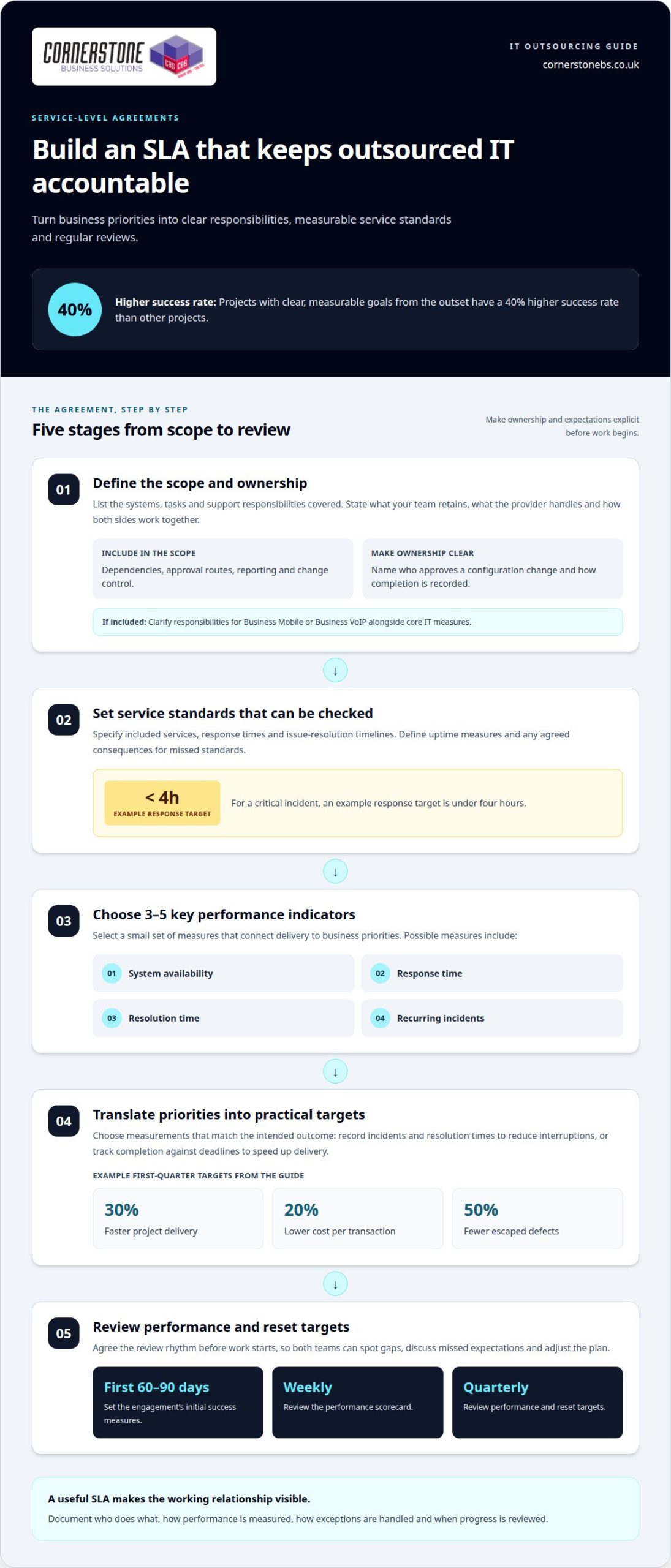
Define the scope by listing the systems, tasks and support responsibilities covered by the agreement. State what your team retains, what the provider handles and how both sides will work together to meet the objectives.
A service-level agreement should set expectations for included services, response times and issue-resolution timelines. It should also define uptime measures and any agreed consequences for missed standards. For a critical incident, an example response target is under four hours.
Choose three to five key performance indicators that connect delivery to business priorities. These could track system availability, response time, resolution time or recurring incidents. Projects with clear, measurable goals from the outset have a 40% higher success rate than other projects.
Make the measures practical. If your objective is fewer interruptions, record incidents and their resolution times. If the goal is faster delivery, track completion against agreed deadlines. Example first-quarter targets include 30% faster project delivery, 20% lower cost per transaction or 50% fewer escaped defects—areas where technical partners such as The Code Factory help teams maintain quality through production readiness reviews and code remediation.
Agree how progress will be reviewed before work starts. Set success measures for the first 60–90 days of an engagement, review a performance scorecard weekly and use quarterly reviews to reset targets. Regular collaboration gives both teams a chance to address missed expectations and adjust the plan.
Scope should also cover dependencies, approval routes, reporting and change control. For example, specify who approves a configuration change and how the provider records its completion. This prevents small requests from becoming disputed extra work or delaying a wider project.
Where the agreement includes staff connectivity, clarify responsibilities for Business Mobile or Business VoIP alongside core IT measures. Explore business communications support as part of a joined-up service discussion.
3. Cultural compatibility and shared values
Culture shapes how an outsourced team communicates, makes decisions and handles pressure. Poor communication or insufficient cultural understanding accounts for 60% of tensions in international teams. That makes fit a practical delivery concern, not simply a question of whether people get along. Agree how both teams will raise risks and resolve disagreements.
Assess fit through practical examples, not broad claims about shared values. Ask the team to explain how it would handle a missed deadline, an urgent security concern or a change in priorities. Notice whether its responses are clear, candid and consistent with your organisation’s approach to accountability and customer care.
Different communication styles can create friction even when everyone shares the same goal. One team might flag a problem immediately, while another waits for a scheduled review. Agree on a channel for urgent updates, a regular meeting schedule and who makes decisions when the usual contact is unavailable.
Compare expectations around ownership and escalation. If your business expects staff to suggest improvements but the provider waits for detailed instructions, useful opportunities may be missed. Discuss a real task, such as restoring access after a user lockout, and agree who investigates, who updates colleagues and when the issue is escalated.
Language and time differences can also affect daily collaboration. Use plain wording, define technical terms and record decisions after meetings. If teams work across time zones, set realistic handover windows and identify an agreed contact for time-sensitive incidents. These steps help prevent delays caused by assumptions or unclear ownership.
Build feedback into the relationship from the start. During the initial engagement, hold brief retrospectives every two weeks to discuss what is working, where expectations differ and what should change. Keep the conversation specific: review one recent handover, identify the friction point and agree an action owner. Shared priorities become visible through consistent behaviour, not promises alone.
4. Deciding which core business functions to outsource
Start with tasks that are repeatable, documented and separate from core business decisions. Examples include routine account administration, device setup and recurring IT maintenance. Keep strategic choices, sensitive approvals and customer commitments under direct business ownership. The aim is to free your team for work that depends on its specialist knowledge.
List tasks that staff find difficult, are behind on or another team could handle more efficiently. Then assess each task by its business impact, security sensitivity, frequency and the effort needed to explain it. If a process is failing because nobody owns it, outsourcing alone will not fix the gap. Define an owner and a successful outcome first.
Managed, repeatable work is often easier to transfer than tasks requiring constant judgement. A documented new-starter setup, for example, can have clear inputs, steps and completion criteria. By contrast, deciding which customers receive priority service relies on business context and should remain closely controlled.
Outsourcing can cost up to 60% less than hiring additional staff in an office. Treat this as a possible comparison, not a promised saving: the right choice depends on the task, operating model and work location. Compare the full scope and responsibilities, not just the staffing alternative.
Protect access, data and intellectual property through written contract terms and controlled permissions. Specify who may access each system, limit access to what the work requires, and record how information will be returned or deleted at the end of the arrangement. Keep ownership of business data, documentation and credentials clear throughout.
Provider lock-in can make a change difficult if systems, records or processes cannot be transferred. Plan the exit before work starts: specify usable data exports, handover documentation, access transfer, transition responsibilities and how ongoing work will continue. This gives your business a practical route if the relationship ends.
Choose one suitable process for an initial handover, then review its quality, staff impact and operational risks before widening the scope. For help deciding which IT responsibilities to manage externally, discuss your managed IT support needs.
Cornerstone Business Solutions: Managed IT Support
Cornerstone Business Solutions provides Managed IT Support for businesses seeking dependable help with day-to-day technology and clear ownership of IT tasks. It can be a practical next step when internal teams are stretched, recurring issues interrupt work or responsibilities between staff and external support need to be defined.
Support can sit alongside Microsoft 365, Cyber Security and Business Mobile, helping businesses consider their technology needs together. The right scope depends on which systems need attention, what your team manages internally and where specialist support would make the biggest difference. Clear responsibilities and regular communication keep the working relationship aligned with your priorities.
If you are reviewing how your business manages IT, contact Cornerstone Business Solutions to discuss Managed IT Support.
Build outsourcing into your next stage of growth
Outsourcing decisions should evolve with your business. A process that works today may need a different level of support as your systems, team or customer needs change. Make ownership of the relationship part of your planning, not an afterthought.
Choose someone internally to keep business priorities visible, record decisions and raise changing needs. Use that perspective to spot when an outsourced arrangement no longer fits the work. Common IT outsourcing mistakes to avoid often begin when nobody revisits the original purpose. Regular reviews can help you decide whether to refine the arrangement, expand it or bring responsibilities back in-house.
Cornerstone Business Solutions can help you consider how managed IT support fits your organisation’s needs. Contact Cornerstone Business Solutions to explore a practical next step for your business. With clear ownership and a willingness to adapt, outsourcing can support a confident path forward.
Frequently Asked Questions
What Are the Most Common Mistakes of Outsourcing?
Common mistakes include unclear ownership, choosing a provider on price alone and treating handover as a one-off event. Another risk is assuming outsourced work removes your responsibility for business decisions. A provider might maintain a system, for example, while your team still approves access and decides which users receive it. Define those boundaries before work transfers.
What are the most common IT outsourcing mistakes businesses make?
Businesses can overlook the knowledge their staff hold about everyday exceptions. A process document may cover routine requests but miss what happens when an employee leaves without returning equipment. Record unusual cases and who handles each one before transferring the task. This helps prevent repeated queries, incomplete handovers and extra reliance on individual staff members.
How can you choose and vet an IT outsourcing provider in the UK?
Assess relevant experience, delivery arrangements and security procedures against the work you plan to outsource. Ask how long the provider has delivered outsourced services, whether it has its own operational presence, and how it measures uptime. Discuss a realistic scenario, such as a system outage, to understand how the team communicates, investigates and escalates issues.
What should an IT outsourcing contract and SLA include?
Include service boundaries, named responsibilities, escalation routes, reporting arrangements and a process for approving changes. Cover confidentiality, data access and how information will be returned at the end of the relationship. For example, specify who owns system documentation and who provides it during a handover. Make any service credits or other agreed remedies clear in the contract.
How can businesses manage communication, time zones and cultural differences with outsourced IT teams?
Agree on a shared handover format that records the issue, business impact, action taken and next owner. Mark urgent requests clearly and state the time zone for deadlines or meetings. For example, a Friday handover should name the person responsible for the next update. Written decisions also help colleagues who could not attend a meeting follow the same plan.
How should a business monitor outsourced IT performance and service quality?
Compare service results with an agreed starting point, then look for patterns rather than judging isolated incidents. Group tickets by type, business impact and recurrence. If password resets rise while account access issues persist, the trend may point to a process or training gap. Record corrective actions, assign owners and review whether the changes improve service.