

The most useful benefits of IT automation for small business may come from fixing one everyday bottleneck, not adding more technology. Staff can lose time copying information, repeating routine checks and following manual steps. Automating a suitable task can free them to focus on work that needs their judgement and help routine operations run more consistently.
It’s sensible to be cautious. Automation can cause problems if it’s applied to a broken process or introduced without clear safeguards. Errors, security risks and disruption all matter, so the goal isn’t to automate everything. Look for a repetitive, rule-based task where the likely benefit justifies the effort, and keep people accountable for the outcome.
This guide covers practical tasks to consider, the benefits and limitations of automation, and safeguards for reliable operations. It also explains how to choose a manageable starting point and assess the results. Understanding your existing IT environment, alongside reliable managed IT support, can help you plan changes with confidence.
Key Takeaways
- Explore the benefits of IT automation for small business, including how standardised tasks can free staff time and reduce avoidable inconsistencies.
- Assess opportunities by how often a task occurs, how much time it takes, how consistent the process is and what could happen if it fails.
- Start with a stable, well-understood workflow rather than a critical process full of exceptions.
- Use a structured rollout: map the process, set a baseline, plan safeguards, pilot the change, then review and refine it.
- Understand existing systems and workflows, including through a site survey, before planning technology changes.
What IT Automation Means for a Small Business
In a small business, the same IT tasks can arise every day: setting up access, checking systems or arranging routine maintenance. Each may seem quick, but together they take time away from customer service and other priorities. The benefits of IT automation for small business begin with a practical question: can a repeatable task be handled more consistently while staff remain responsible for work that needs their judgement?
IT automation uses software to carry out repeatable tasks according to agreed rules. A defined trigger starts a set of steps, and the process produces an expected outcome. For example, a routine request could start a standard sequence of account-administration steps. The key is to specify the process in advance, rather than improvise it each time.
This differs from broader business process automation (BPA). BPA can cover workflows across an organisation, such as handling an invoice or coordinating a customer follow-up. IT automation focuses on technology operations and support tasks. The two can overlap, but they aren’t interchangeable. What is Business Process Automation? offers a wider introduction to how BPA applies across business activities.
Which IT tasks can automation handle?
Good candidates are frequent, predictable tasks with clear steps and outcomes. Common possibilities in small-business IT environments include:
- Applying standard settings during routine device setup.
- Completing defined steps in account administration.
- Scheduling regular backups according to an agreed plan.
- Running recurring system checks and flagging results for review.
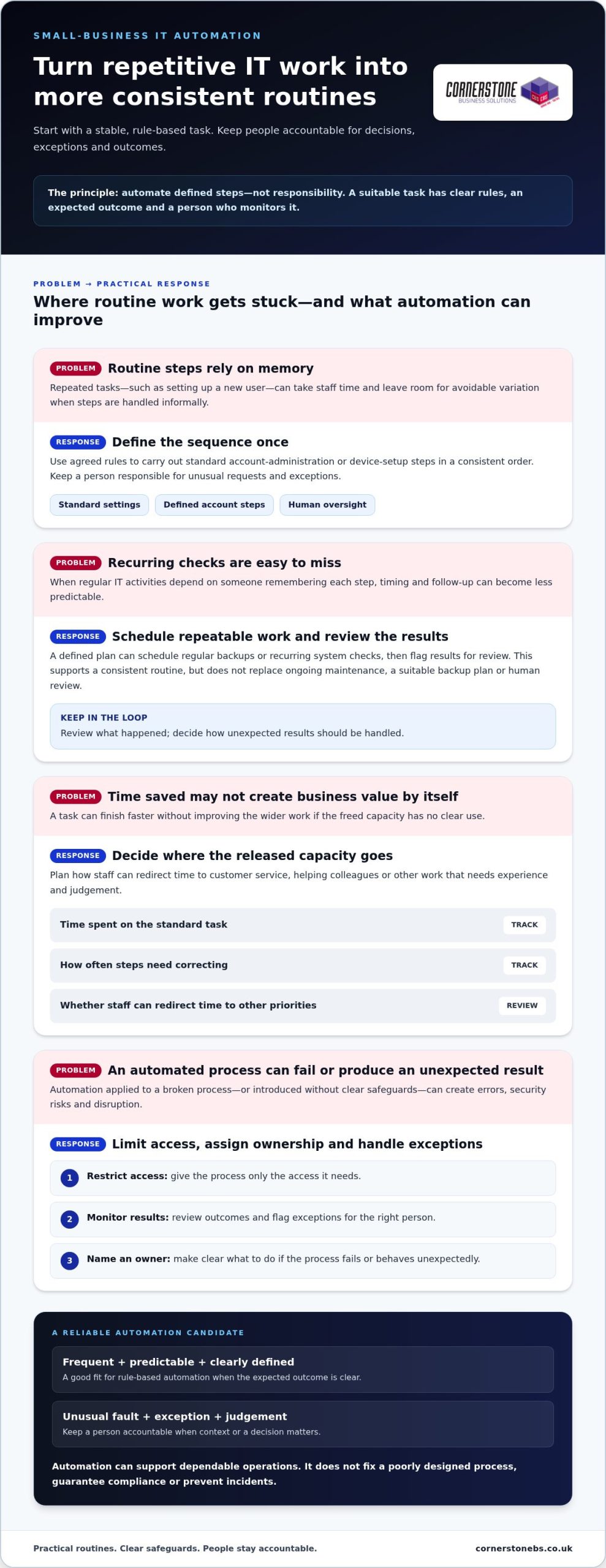
By contrast, investigating an unusual fault or deciding whether to grant an exception calls for context and judgement. Automation can handle routine steps around a task, but a person should remain accountable when decisions or exceptions matter.
How does IT automation differ from AI?
In either case, technology handles defined activities, not responsibility. People set the rules, monitor outcomes, manage exceptions and decide whether a process is working as intended. Keeping that distinction clear helps automation support dependable operations without replacing informed decisions.
The Main Benefits of IT Automation for Small Business
The value of automation isn’t simply that a task finishes faster. It can make routine IT work more consistent, free staff to focus on customers and make recurring processes easier to track. These benefits of IT automation for small business depend on choosing a suitable task and keeping people involved in oversight. Automation can support good operations, but it won’t fix a poorly designed process on its own.
Productivity, consistency and staff capacity
Consider repeatable user setup. If each new starter requires the same agreed steps, a defined process can help staff complete them in a consistent order instead of relying on memory or an informal checklist. This may reduce time spent repeating routine actions and lower the chance of avoidable variation. It doesn’t mean every setup will take the same time or that every exception can be handled automatically.
Freed capacity creates value when the team can put it to use. Staff might spend more time helping colleagues, responding to customers or handling work that requires experience. Before introducing automation, decide who will benefit from the time released and how. Otherwise, the task may be quicker without making a meaningful difference to the business.
“The value of automation is measured by what it improves in the task, not by a promised saving.” For user setup, track how long the standard process takes, how often steps need correcting and whether staff can redirect time to other priorities. These measures give you a more useful view than a general claim about productivity.
Reliability, security and business continuity
Regular IT activities are easier to plan when their steps and timing are clear. A scheduled check, for instance, can establish a consistent routine and make it easier to review what happened. Standardisation may also reduce reliance on individual memory, particularly when responsibilities are shared. This can support operational continuity, but it doesn’t replace a suitable backup plan, ongoing maintenance or human review.
Safeguards matter. Give an automated process access only to what it needs, monitor its results and decide how exceptions should be flagged or handled. Assign an owner and make clear what action to take if the process fails or produces an unexpected result. Automation can support security procedures, but it doesn’t guarantee compliance or prevent incidents.
For a small business, useful gains are often practical: clearer routines, less repetitive effort and more predictable handling of defined tasks. Results depend on the process, the oversight it receives and whether the team can use any capacity released. If you’re reviewing how your IT arrangements support those goals, managed IT support can help provide a foundation for maintaining business technology.
What Should a Small Business Automate First?
The best first candidate usually isn’t the most impressive technology project. It’s a recurring task that takes noticeable effort, follows stable steps and has a manageable impact if something goes wrong. This gives a small business a practical way to explore the benefits of IT automation for small business without starting with a complex, business-critical process.
A practical way to rank automation opportunities
Compare potential tasks using four questions: How often does the work happen? How much staff time does it take? Does it follow consistent rules? What could happen if it failed or handled an exception incorrectly? Give each task a simple low, medium or high rating for these factors, then discuss the strongest candidates with the people who do the work.
Check that the process has a clear owner and documented steps. Sensitive information, complex exceptions or serious operational consequences are reasons to pause for closer review, not necessarily reasons to rule a task out. Start with a stable, well-understood workflow. Avoid automating a process that is still changing or depends on frequent judgement calls.
| Task | Potential benefit | Oversight required | Suitable first step |
|---|---|---|---|
| Routing routine IT support requests | More consistent initial sorting | Review misrouted or unusual requests | Agree categories and an escalation route |
| Reporting backup completion status | A regular view of completed or flagged runs | Investigate failures and exceptions | Document who reviews the report and what action follows |
| Removing access when a staff member leaves | A repeatable offboarding sequence | Confirm approvals and check access changes | Map the current process before considering automation |
These examples are prompts for evaluation, not a recommendation to automate every task shown. The right choice depends on your systems, process and tolerance for risk. A lower-impact activity with clear rules may be a better starting point than a task that appears to save more effort but could interrupt essential operations.
Where human oversight still matters
Keep people accountable for approvals, unusual requests and security-sensitive decisions. Define who receives exceptions, how quickly they should review them and when the process must stop for intervention. Automation can assist a team, but it can’t take responsibility for business outcomes or replace the expertise needed to assess unfamiliar situations.
Reviewing existing workflows can help make these choices more grounded. Managed IT support can help businesses understand and maintain their technology as they assess potential changes.
How to Introduce IT Automation Without Unnecessary Disruption
A measured rollout helps you find out whether automation is useful before it becomes part of everyday operations. Start with a defined workflow, document how it works now and keep a person accountable throughout the test. This makes it easier to spot unintended effects early and adjust the plan before extending it.
Plan and test a small automation pilot
Before testing, record who owns the process, which permissions it needs, what outcome is expected and how exceptions will be handled. Then work through these steps in order:
- Map the process. Write down the existing steps, decision points, people involved and common exceptions. Clarify where the process starts and what counts as successful completion.
- Set a baseline. Record how long the task takes, how much staff effort it requires and how often errors or rework occur. Use a representative period to make the comparison fair.
- Plan safeguards. Limit permissions to what the task needs, decide who can review outcomes and set out how staff should escalate exceptions. Identify a manual alternative in case the pilot needs to stop.
- Run a pilot. Test one suitable workflow with a limited scope. Tell the staff involved what will change, what to look out for and who to contact if the process behaves unexpectedly.
- Review and refine. Compare results with the baseline and discuss them with the process owner. Resolve issues and adjust the rules before deciding whether to extend the approach.
Measure outcomes and manage the risks
Choose measures that reflect the task’s purpose. Completion time, staff effort, error frequency and rework can show whether the process has improved. A faster result isn’t automatically better if it creates more corrections or makes exceptions harder to handle. Consider feedback from the people doing the work alongside the recorded results.
Keep permissions, data handling, process ownership and available logs under review as the workflow changes. Make sure staff know what requires intervention, such as an unexpected result, a failed step or a request outside the agreed rules. A documented rollback or manual alternative can help the business continue the task while an issue is investigated.
Ongoing IT oversight helps keep a workflow aligned with the systems and processes around it. A managed IT services guide can help explain how wider support fits into business technology planning. For a practical conversation about your IT environment and possible next steps, speak with Cornerstone Business Solutions.
How the Right IT Support Can Help Automation Deliver Value
Automation depends on the systems, access and workflows already in place. Before deciding what to automate, a business needs a clear picture of how its technology fits together and where routine work happens. Managed IT support can help provide that foundation through support for planning, maintaining and reviewing business technology. It doesn’t mean every task needs automation. It helps make the decision more informed.
Start with the systems and processes you already have
Begin by recording recurring IT tasks, the systems involved, who owns each process and where information or approvals pass between people. This can reveal dependencies that aren’t obvious from a task list alone. For example, a routine process may rely on a particular workstation, server or network connection. Understanding those relationships helps teams consider potential disruption before making a change.
Cornerstone Business Solutions’ experienced sales engineers conduct site surveys assessing network cabling, workstations, servers, switches and internet devices. Reviewing these elements can help build a picture of the existing infrastructure, including interdependencies and equipment redundancy. That context can inform technology planning, but the process itself still needs to be assessed before choosing what to automate.
If a potential workflow depends on hosted systems or storage, understanding the wider environment matters too. The business cloud solutions guide provides related context on cloud technology, while the IT company solutions guide explores broader business IT considerations.
Make the next step practical and collaborative
Bring one recurring task to an initial discussion. Describe what starts it, the steps staff take, where delays or confusion occur and what can go wrong. Include the systems involved and the person responsible for the outcome. A specific example gives everyone a shared starting point for considering whether the process is stable, suitable and worth reviewing.
Cornerstone partners with Microsoft, IBM and Cisco and provides managed IT support to organisations across the UK. Its IT support and service is award-winning. Managed IT support can help organisations plan and maintain business technology as they assess how routine work is handled.
The benefits of IT automation for small business matter most when they fit the organisation’s systems and working practices. Discussing one task with an IT partner can help you consider its dependencies, safeguards and next steps together. Talk with Cornerstone Business Solutions about your business IT needs.
Make Your Next IT Improvement Count
Automation works best as part of an ongoing approach to improving how your organisation operates. As systems, responsibilities and priorities change, review whether automated processes still reflect how your team works. A useful workflow today may need different rules later. Regular review helps prevent a once-helpful process from becoming an overlooked source of friction.
The benefits of IT automation for small business aren’t measured by how much technology is introduced. They come from choosing changes that support your people and fit your operational needs. Give your team room to learn from each improvement and build on what works at a manageable pace.
Cornerstone Business Solutions takes a collaborative approach to business technology, helping organisations consider their IT needs in the context of wider operations. If you’re ready to explore a practical next step, discuss your business IT needs with Cornerstone. A considered conversation can help you move forward with clarity and confidence.
Frequently Asked Questions
What are the main benefits of IT automation for a small business?
The main benefits of IT automation for small business can include less time spent on repetitive tasks, more consistent handling of routine work and greater staff capacity for other responsibilities. For example, a clear process can make recurring tasks easier to track and hand over between colleagues. The results depend on the task and how well it’s managed. Compare effort and outcomes before and after a change rather than assuming it has saved time.
Which IT tasks can a small business automate?
Suitable candidates can include repeatable device setup, account administration, scheduled backups and routine system checks. A useful test is whether different staff members can follow the same steps and reach a predictable result. For instance, a standard device setup may be easier to assess than an unusual access request involving sensitive information. Consider the systems involved, who owns the task and how staff will handle cases that don’t follow the usual pattern.
Is IT automation suitable for a small business?
Yes, a small business can explore automation by focusing on one limited task rather than launching a large programme. Choose work that occurs regularly, is understood by the people doing it and has manageable exceptions. A small pilot lets the team learn how the change fits its normal working practices. Set the scope according to the organisation’s ability to supervise the process, respond to problems and maintain it as business needs change.
Can IT automation improve cyber security?
Automation may help staff carry out routine security-related steps consistently, but it can’t guarantee stronger security, compliance or protection from incidents. For example, a process that changes account access needs carefully controlled permissions and a clear approval route. Assign an owner to review activity and handle unexpected cases. Keep security-sensitive decisions accountable to people who understand the context, and review the process if systems, access needs or working practices change.
How should a small business get started with IT automation?
Start by selecting one recurring task and describing how staff complete it today. Note who owns the process, where delays or rework occur and what a successful result looks like. Before testing a change, decide who can access the systems involved and what staff should do if the process reaches an unusual case. After the pilot, discuss the result with the people involved and decide whether to adjust, continue or stop it.
Does IT automation replace employees?
No. IT automation handles defined steps; people remain responsible for priorities, approvals and outcomes. If a routine process flags an unusual request, a staff member can assess the context and decide what happens next. The time or capacity created doesn’t have to lead to a fixed staffing change. The business can decide how to use it, such as improving responses to internal requests or focusing on work that needs experience and judgement.
What are the risks of automating IT processes?
Risks include applying outdated rules, granting broader access than a task needs or failing to account for exceptions. A process that worked before a system or workflow changed may no longer produce the intended result. Reduce exposure by assigning an owner, testing realistic scenarios and keeping a manual way to complete the task if automation has to pause. Review permissions and results periodically, and after relevant changes to systems or responsibilities.
How can a business tell whether IT automation is working?
Compare the pilot with a baseline recorded before the change. Depending on the task, track completion time, staff effort, errors, rework or how often someone needs to intervene. Ask the staff using the process whether it has made their work clearer or created new steps. A positive result should improve the chosen task without adding unacceptable effort or risk. If the measures worsen or exceptions become harder to resolve, refine or reconsider the process.