

The biggest cloud setup isn’t automatically the best fit. If you’re searching for reliable cloud hosting, the right choice depends on what each workload needs, how much control your team wants and who will manage security and ongoing support.
Shared, virtual private, public, private and hybrid environments come with different trade-offs. Technical descriptions don’t always explain what happens when something goes wrong, or which responsibilities stay with your organisation. The key question is whether the setup supports your business priorities without adding unnecessary complexity.
This guide compares the main hosting models and sets out how to assess requirements workload by workload, including availability, security, management and future growth. Cornerstone Business Solutions brings Cloud Solutions together with wider IT Support and Cyber Security considerations. A full site survey can assess existing network cabling, workstations, servers, switches and internet devices, helping you understand the environment around your systems.
Key Takeaways
- Compare shared, dedicated and cloud infrastructure by control, scalability and who manages each part, not by labels alone.
- Cloud hosting decisions should start with each workload’s requirements and how it connects to existing systems.
- Separate provider responsibilities from your own duties for access, data and governance to clarify security and continuity.
- Assess workloads, dependencies, access, data, recovery needs and internal responsibilities before deciding which requirements are essential.
- Cornerstone’s Cloud Solutions can sit alongside IT Support, Cyber Security and Off-Site Backups as part of a joined-up approach.
What cloud hosting means for a business and when it helps
Cloud hosting uses computing resources provided through hosted infrastructure, rather than relying solely on servers managed at your business premises. Those resources can support business applications, files and online services, with access typically provided over a network. Search phrases such as “cloud hosting rotherham” can bring up different kinds of services, so focus on what the technology would do for your organisation rather than the label attached to it.
Cloud hosting isn’t one fixed setup. The infrastructure, applications, data and day-to-day management can involve different responsibilities, depending on the arrangement. A hosted environment may allow capacity to change as requirements evolve, or give staff access to systems away from the office. Those outcomes depend on the workload, design and support in place. Moving to hosted infrastructure doesn’t automatically make every system faster, easier to manage or more resilient.
How does cloud hosting work in practical terms?
A hosting environment supplies resources such as processing power, memory and storage. A business accesses the systems running on those resources through a network. The hosting environment is the foundation; the application is the tool people use, and the data is the information that tool stores or handles. Cloud computing covers a wider range of service and deployment models, which is why the word “cloud” alone doesn’t tell you exactly what’s included.
For example, a business might run a stock-management application on hosted infrastructure. Employees use the application to update stock records, while the hosting environment provides the computing resources it needs. The application, data and infrastructure are connected, but they are not the same thing. Understanding that distinction helps clarify what is managed, what staff need to access and where responsibility sits if a change or issue arises.
Which business situations can prompt a hosting review?
A review can make sense when existing servers are ageing, maintenance is becoming harder to plan, or a workload has changed. For instance, a business introducing a new service may need to consider whether its current setup can support the application and the people who rely on it. A team with changing demand may also want to understand whether capacity can be adjusted without replacing all its infrastructure.
Start with the business objective. Is the priority to support a particular application, make access more practical for staff, plan for growth, or improve how systems fit together? Then map dependencies, including network connections and other systems the workload relies on. These questions are more useful than choosing a setup simply because it is described as “cloud-first” or “modern”.
A hosting review doesn’t mean every system should move. Some workloads may suit hosted infrastructure; others may continue to meet business needs where they are. First establish what each workload does, who relies on it and what the organisation needs from it. That gives you a clearer basis for comparing options and deciding whether a change would solve a real business problem.
Cloud hosting models explained: shared, dedicated and cloud infrastructure
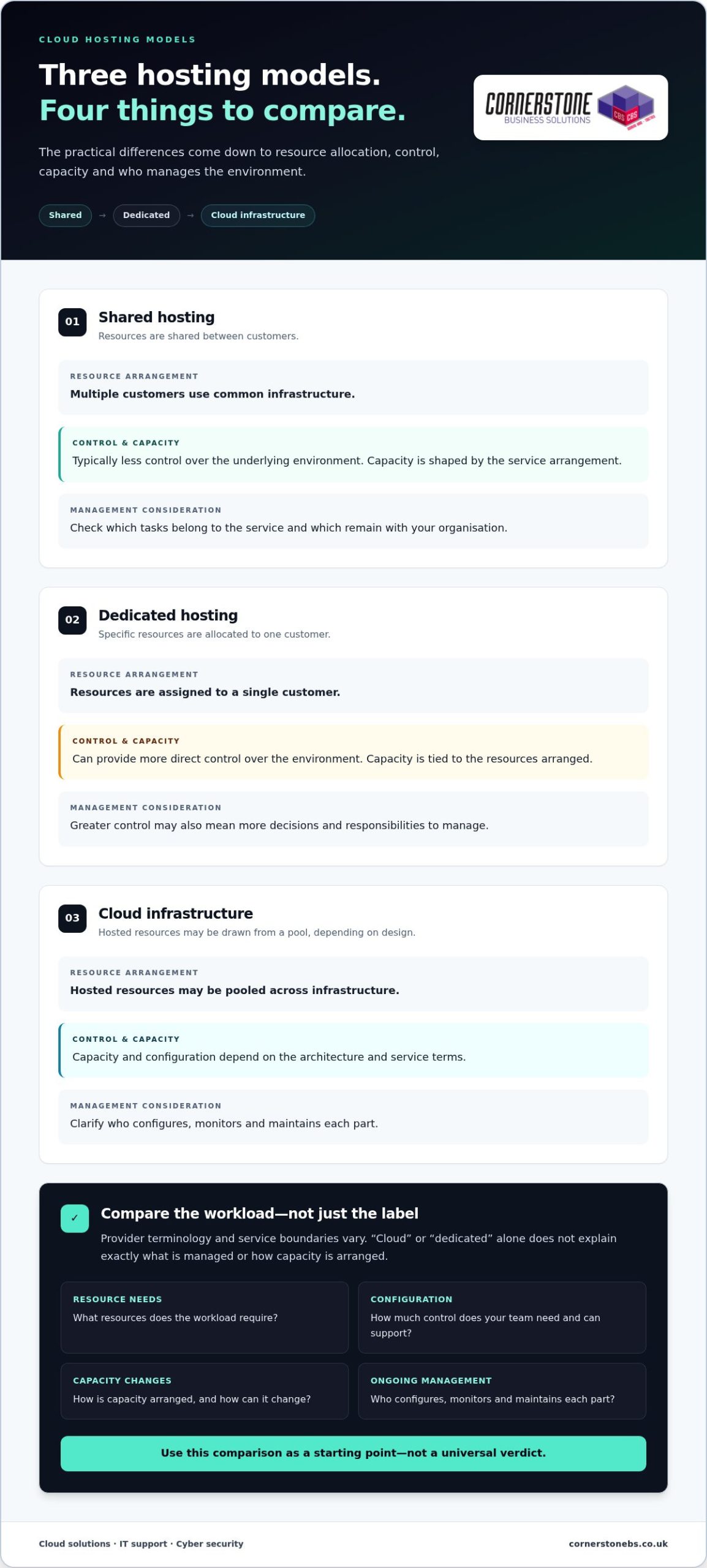
Hosting labels can sound similar, but the practical differences often come down to how resources are allocated, how much control you need and who manages the environment. Shared hosting places multiple customers on common infrastructure. Dedicated hosting allocates specific resources to one customer. Cloud infrastructure uses hosted resources that may be drawn from a pool, depending on its design.
Use this comparison as a starting point, not a universal verdict. Provider terminology and service boundaries vary, so “cloud” or “dedicated” alone won’t tell you exactly what’s managed or how capacity is arranged. Compare the same points for each option: resource allocation, configuration control, capacity changes and ongoing management.
| Model | Resource arrangement | Control and capacity | Management consideration |
|---|---|---|---|
| Shared hosting | Infrastructure is shared between customers. | Typically offers less control over the underlying environment; capacity is shaped by the service arrangement. | Check which tasks sit with the service and which remain with your organisation. |
| Dedicated hosting | Specific resources are allocated to one customer. | Can provide more direct control over the environment; capacity is tied to the resources arranged. | Greater control may also mean more decisions and responsibilities to manage. |
| Cloud infrastructure | Hosted resources may be pooled across infrastructure. | Capacity and configuration depend on the architecture and service terms. | Clarify who configures, monitors and maintains each part. |
What distinguishes shared hosting from dedicated hosting?
With shared hosting, customers use an environment that shares underlying resources. A dedicated arrangement assigns specific resources to one customer instead. That distinction may matter if a workload has particular configuration needs or requires clearer resource allocation. It doesn’t, by itself, predict how an application will perform. Consider the workload’s resource requirements, access needs and the level of control your team can support.
How does cloud infrastructure differ from a single hosted server?
A single hosted server is one defined computing environment. Cloud infrastructure can draw on a pool of hosted resources, but the architecture and ability to adjust capacity depend on its configuration. Management can range from customer-led to supported arrangements. Before comparing technical descriptions, map the workload’s dependencies, expected demand and management needs. That gives you a fairer basis for evaluating the setup.
For example, a steady internal application with predictable needs may call for a different balance of control and capacity from a service whose demand changes. Neither scenario automatically points to one model. In your “cloud hosting rotherham” research, compare the same criteria across options: resource allocation, configuration control, capacity changes, maintenance and the division of responsibilities.
For broader context on how cloud services fit into business technology, explore our cloud solutions guide. Cornerstone can help you consider a joined-up cloud and IT approach around your business requirements.
Cloud hosting concerns: security, control and business continuity
Moving systems into a hosted environment changes where some responsibilities sit, but it doesn’t automatically make security or continuity someone else’s problem. The hosting arrangement, the services included and your organisation’s own processes all matter. Understanding those boundaries helps you make practical decisions without assuming that cloud automatically means safer or more resilient.
Hosting security depends on configuration, clearly defined responsibilities and ongoing management. A provider may manage parts of the underlying infrastructure, while your business still needs to oversee who can access its systems, what information is stored and how accounts are managed. The exact division depends on the service and operating model.
Who is responsible for cloud hosting security?
Map responsibilities to the parts of the service. Clarify who looks after the hosting environment, who configures applications and who manages user access. Then identify who reviews permissions and responds when staff roles change. Shared responsibility doesn’t mean responsibility is unclear; it means each party needs to understand its part and how the handover works.
For your organisation, access controls and routine oversight are important considerations. Limit access according to people’s roles, review permissions as responsibilities change and establish a process for handling accounts that are no longer needed. Also define how data is governed internally, including who can use it and what processes apply. These steps remain relevant whether systems are hosted locally or remotely.
Security tools and provider controls can support a considered approach, but no hosting model is automatically secure or compliant. When comparing “cloud hosting rotherham” options, look beyond which one sounds most protected. Assess how configuration, access, oversight and responsibilities fit together for each workload.
How should hosting fit into business continuity planning?
Consider the effect of disruption before choosing a setup. Which applications must be available for essential work? How long could the organisation manage without them, and how much recent data could it afford to lose? These answers help define recovery needs and guide decisions about the systems and support processes that should sit around hosting.
Hosting, backups and disaster recovery are related, but they aren’t interchangeable. Hosting provides the environment in which systems run. A backup is a separate copy of data intended to support recovery, while disaster recovery concerns the broader process of restoring systems and services after disruption. A hosted workload still needs a suitable recovery plan; the hosting choice alone doesn’t describe that plan.
Useful questions to settle as part of planning include:
- Which workloads are essential to keep business operations moving?
- Who is responsible for maintaining access and reviewing permissions?
- How will important data and services be restored after disruption?
- Who coordinates the response across hosting, IT support and security?
For a wider view of how security supports resilience, explore the cyber security services guide. Bringing cloud decisions together with IT Support, Cyber Security and Off-Site Backups can help your organisation plan responsibilities as one connected picture.
How to assess cloud hosting needs before choosing a setup
A useful hosting review starts with the work your systems support, not a preferred technology label. Map each workload, its connections and the people who rely on it. Then separate essential requirements, such as access to a critical application, from desirable features that could be considered later. This keeps the decision grounded in business priorities and helps avoid planning a change before you understand what it needs to achieve.
Which workloads and dependencies should you map first?
Build an inventory of the applications under review, their users, connected systems and the data moving between them. Note who owns each application and how important it is to day-to-day operations. A system supporting a core business process may need different attention from a tool used occasionally. Mapping integrations and access needs also helps reveal dependencies that could affect operations if a component changes.
What should a cloud hosting readiness review cover?
Assess existing infrastructure alongside security priorities, access needs and continuity requirements. Cornerstone’s full site survey assesses network cabling, workstations, servers, switches and all internet devices, giving you a view of the environment around your workloads. This context can inform a considered cloud discussion without assuming migration is the right answer or that every system should move.
Use this sequence to organise your review:
- Workloads: List the applications and services under consideration, what each one does and how critical it is.
- Dependencies: Record connected systems, integrations, network links and data flows that support each workload.
- Access: Identify who needs access, from where, and what access controls the work requires.
- Data: Note what information each workload handles, where it is used and who is responsible for it.
- Recovery needs: Decide which services need restoring first after disruption and what level of interruption the business can accept.
- Internal responsibilities: Assign ownership for oversight, access changes, routine decisions and coordination with technical support.
Once the sequence is complete, mark each requirement as essential or desirable. For example, if staff need an application for daily operations, dependable access may be essential. A new feature that doesn’t address a defined business need may be optional. This distinction makes later comparisons clearer and helps keep the scope focused.
Existing equipment and network arrangements can influence what needs attention, but they don’t dictate a single migration path. A readiness review should clarify how the current environment supports each workload and where responsibilities sit. For a broader view of how ongoing support can fit into this planning, see the managed IT services guide.
If you’re assessing “cloud hosting rotherham” options, bring your workload inventory and priorities into a conversation with Cornerstone. Discuss your cloud hosting requirements as part of a joined-up view of your IT environment.
How Cornerstone can help shape a joined-up cloud approach
Cloud decisions work best when they account for the technology around each workload, not just where its computing resources sit. Cornerstone Business Solutions brings Cloud Solutions together with IT Support, Cyber Security and Off-Site Backups, helping businesses consider hosting alongside the wider systems and support that keep work moving.
A joined-up view can make the discussion more useful. A change to one workload may affect how people access it, how it connects to other systems and what the business needs if disruption occurs. The aim is to understand those connections and objectives before shaping an approach, rather than assume a particular hosting design is right from the outset.
What does a joined-up technology conversation cover?
Start with the business requirement. Which applications or services are in scope? Who relies on them, and what should the technology help the organisation do? From there, consider existing systems, access, security priorities and operational needs together. This keeps the focus on practical outcomes, not technical labels in isolation.
Cornerstone offers a one-call option across technical environments, including hardware, software, networking, cloud and security. This provides a connected way to discuss how different parts of an organisation’s technology relate to one another. Cornerstone partners with Microsoft, IBM and Cisco. These partnerships provide context for its technology work, but don’t mean a particular product or platform is automatically part of a cloud arrangement. The discussion should stay focused on your business requirements.
What is a practical next step for your organisation?
Before a conversation, gather notes about the workloads you’re considering and what each one supports. Include who needs access, the security concerns you want to address and what the organisation would need to recover after disruption. You don’t need a finished technical design. A clear picture of the business need is a useful place to begin.
Existing infrastructure matters too. Cornerstone’s full site survey assesses network cabling, workstations, servers, switches and all internet devices. This provides a structured view of the current environment to inform project discussions. It doesn’t assume that every system needs to move or prescribe a migration outcome in advance.
If you’re considering “cloud hosting rotherham”, bring your objectives and questions into a discussion that includes cloud, IT support and security requirements. Discuss your cloud requirements with Cornerstone.
Make your next cloud decision with confidence
The next step doesn’t need to be a commitment to a particular platform. Start by turning your business priorities into a brief: what needs to work, what could change and what would make a setup worthwhile. That gives your team a practical reference point as requirements evolve and keeps technology decisions connected to the way your organisation plans to grow.
If you’re considering “cloud hosting rotherham”, Cornerstone’s award-winning service can help you discuss how cloud needs fit with wider business technology. Bring your objectives and questions into focus without assuming the answer in advance.
Discuss your cloud requirements with Cornerstone and take a considered next step towards a setup that works for your organisation.
Frequently Asked Questions
What is cloud hosting?
Cloud hosting gives a business access to computing resources hosted away from its own premises. For example, a company might use a hosted environment to run a customer records application while staff connect to it over a network. The hosting resources support the application, but the application itself and the information it handles remain distinct parts of the setup. The precise arrangement depends on the service and its configuration.
Is cloud hosting suitable for small businesses?
It can suit a small business, but headcount alone doesn’t determine whether it’s a good fit. A small firm running a specialist application may have different requirements from one using basic online tools. Consider how essential each system is, who supports it and whether the business has the time and skills to manage its responsibilities. Compare options against those needs rather than assuming a smaller organisation needs a simpler setup.
Is cloud hosting secure?
Cloud hosting can be secure when the environment and business processes are configured and managed appropriately, but the label itself isn’t a security guarantee. A practical review should include who can create accounts, how access is removed when someone leaves and how unusual activity is handled. For example, a staff member changing roles may need different permissions. Define who oversees these tasks and how they fit into routine security management.
What is the difference between cloud hosting and a virtual server?
A virtual server is a software-based server environment, while cloud hosting describes a broader way of providing hosted computing resources. A virtual server may form part of a cloud arrangement, so the terms can overlap without meaning exactly the same thing. When comparing descriptions, look at how resources are provided, what can be adjusted and who manages the server environment. Those details matter more than the name used in a service description.
Can a business move existing workloads to cloud hosting?
Some existing workloads may be suitable to move, but each needs a compatibility review. Check whether the application depends on older software, a specific device or a connection to another system. For example, an accounts application linked to a local process may need more planning than a standalone tool. Document these dependencies and consider how the workload will be tested, accessed and supported before deciding whether a move makes sense.
How much does cloud hosting cost for a business?
There isn’t one cost that applies to every business. The amount depends on factors such as the workloads involved, resource requirements and the support or management included. To compare options fairly, list what each arrangement covers and separate initial setup from ongoing charges. Consider how usage could change as the business grows, too. That gives you a more useful comparison than a headline figure alone, since services may include different elements.
What should I prepare before discussing cloud hosting?
Bring a short inventory of the systems you use, who relies on them and what problems you want to solve. Note access requirements, connected equipment, security concerns and recovery priorities. Include relevant infrastructure details or a simple sketch of how systems connect. If you’re searching for “cloud hosting rotherham”, these notes can help make the conversation specific to your organisation, rather than focusing only on technical terminology.
Tags: business cloud, cloud hosting, cloud infrastructure, cloud migration, Cyber Security, Hybrid Cloud, It Support, Rotherham IT