Posted on: July 24th, 2026 by Cornerstone
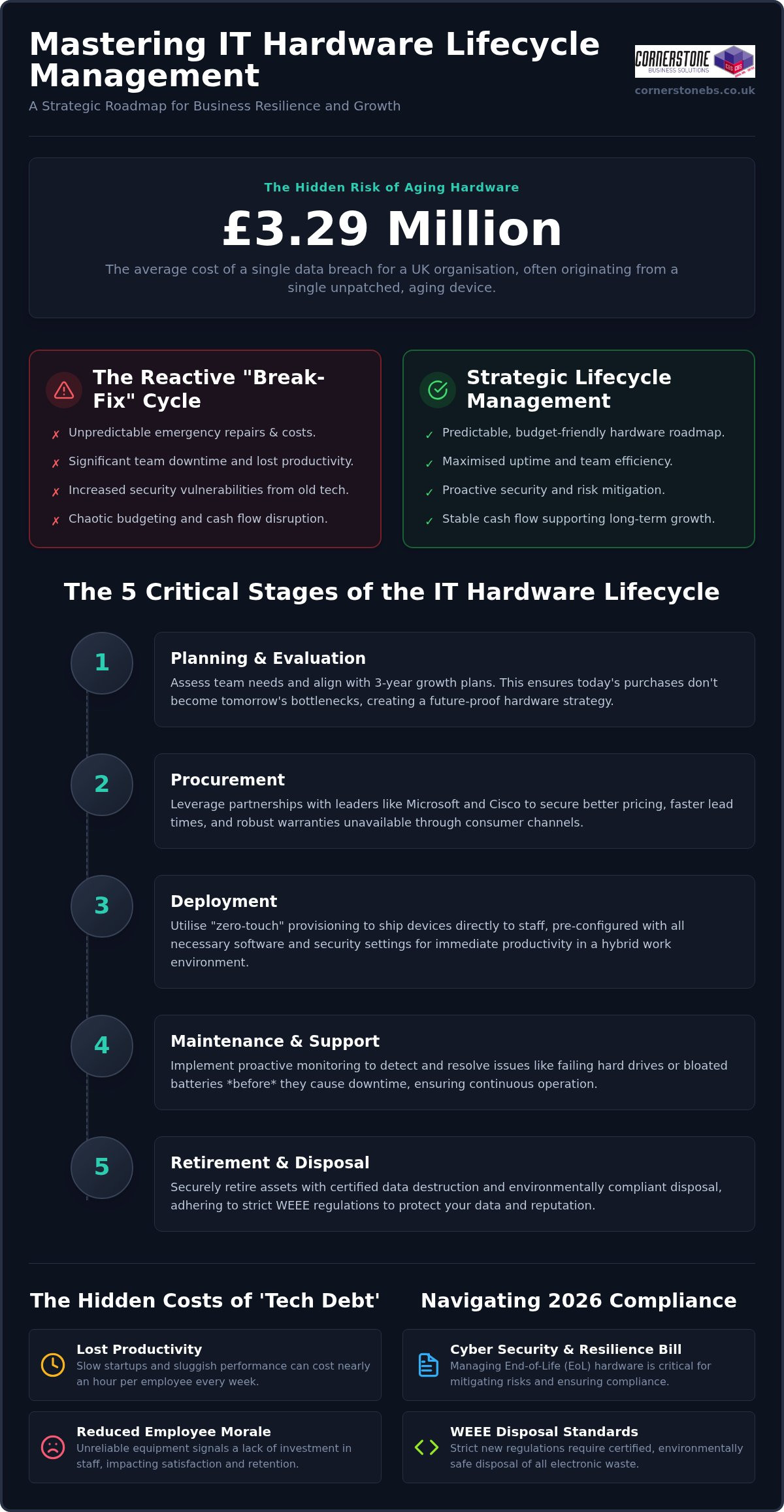
Did you know the average cost of a data breach for UK organisations has reached £3.29 million? This staggering figure often begins with something as simple as an unpatched, aging laptop left on a desk for one season too many. We know how frustrating it is when your team’s productivity stalls due to sluggish devices, or when an unexpected invoice for emergency repairs disrupts your monthly cash flow. It often feels like you’re playing a constant game of catch-up with your own technology. By mastering it hardware lifecycle management, you can stop reacting to these IT headaches and start building a resilient, secure foundation for your business.
Building on our recognition as a multi-award-winning service provider, we’ve helped local firms move from chaotic tech debt to streamlined efficiency. This 2026 guide reveals how to align your hardware roadmap with business growth while navigating strict new WEEE disposal standards and the latest requirements of the UK’s Cyber Security and Resilience Bill. You’ll learn how to create a predictable budget that eliminates downtime and protects your professional reputation. We’ll walk you through everything from procurement to certified data destruction, simplifying the technical details so you can lead your team with total confidence.
Key Takeaways
- Master the five critical stages of it hardware lifecycle management to turn unpredictable tech expenses into a strategic, budget-friendly roadmap.
- Identify the hidden triggers of ‘tech debt’ that lead to increased helpdesk calls and lost productivity for your team.
- Navigate the complexities of the 2026 WEEE regulations and the Cyber Security and Resilience Bill to keep your business compliant and secure.
- Learn how to transition from reactive ‘break-fix’ repairs to a predictable financial model that supports long-term business growth.
- Discover the security benefits of professional data destruction and why manufacturer ‘End-of-Life’ dates are a critical milestone for your risk management.
Why IT Hardware Lifecycle Management is the Backbone of Business Continuity
Many business owners view their servers and laptops as simple tools, much like office furniture. In reality, your hardware is the engine room of your entire operation. it hardware lifecycle management is the strategic process of overseeing an IT asset from the moment a need is identified until its final, secure disposal. It’s about moving away from a chaotic “break-fix” approach that leaves your team stranded when a critical device fails. Reactive models are silent budget killers; they force you to pay for emergency shipping and premium repair rates while your billable hours vanish. By the time you’ve identified a failure, the damage to your productivity is already done.
Effective IT asset management ensures that every piece of kit is accounted for, maintained, and replaced before it becomes a liability. We define hardware “Tech Debt” as the accumulated financial and operational cost of maintaining obsolete equipment that prevents your business from adopting more efficient, modern workflows. In the 2026 hybrid work era, the link between your hardware and your business resilience is unbreakable. If your infrastructure isn’t reliable, your business continuity plan is little more than a wish list.
Moving from Transactional Buying to Strategic Assets
Shifting from an “expense” mindset to an “investment” mindset changes how you grow. Instead of seeing a laptop as a one-off cost, we view it as a four-year productivity tool. A structured lifecycle prevents the “replacement shock” that happens when fifty laptops, all purchased during a previous expansion, fail within the same month. The right it company solutions provide a clear roadmap, ensuring your upgrades are staggered and your cash flow remains predictable. This proactive stance turns your IT from a source of stress into a foundation for stability.
The 2026 Productivity Gap: Why Old Tech Costs You Talent
Your team’s time is your most valuable resource. In 2026, business tools are increasingly AI-driven and require significant local processing power. When employees spend ten minutes every morning just waiting for a sluggish computer to start, you’re losing nearly an hour of productivity every week per person. Beyond the data, there’s a heavy psychological impact. Providing your staff with clunky, unreliable equipment sends a message that their time isn’t respected. To attract and keep the best talent, your hardware must be as fast and agile as the people using it. Modern hardware isn’t just a luxury; it’s a vital component of employee satisfaction and retention.
The 5 Critical Stages of the IT Hardware Lifecycle
Managing your technology shouldn’t feel like a series of emergencies. When you implement a formal it hardware lifecycle management strategy, you’re essentially creating a predictable rhythm for your business. This process isn’t just about buying and binning kit; it’s a circular journey that ensures every device in your office is performing at its peak. By breaking this down into five distinct stages, we can help you move away from guesswork and toward a stable, high-performing environment.
- Stage 1: Planning & Evaluation. We start by assessing what your team actually needs. A graphic designer requires a different set of specifications than a remote sales agent. We look at your growth plans for the next three years to ensure today’s purchase doesn’t become tomorrow’s bottleneck.
- Stage 2: Procurement. This is where we leverage our deep partnerships with global leaders like Microsoft, IBM, and Cisco. We don’t just find the best price; we secure better lead times and robust warranties that consumer-grade shops simply can’t offer.
- Stage 3: Deployment. Gone are the days of manually setting up every laptop. We use “zero-touch” provisioning to ship devices directly to your staff, pre-configured with your security tags and software. It’s efficient, professional, and perfect for the hybrid era.
- Stage 4: Maintenance & Support. We don’t wait for things to break. Our proactive monitoring catches a failing hard drive or a bloated battery before it causes a single minute of downtime for your staff.
- Stage 5: Retirement & Disposal. When a device reaches the end of its life, we handle the secure data wiping and WEEE-compliant recycling. This ensures your company data stays private and your environmental obligations are met.
Procurement: Why Your Choice of Vendor Matters
It’s tempting to grab a laptop from a high-street retailer when you’re in a rush. However, consumer-grade hardware isn’t built for the 40-plus hours of weekly use a professional environment demands. By standardising your fleet through a trusted partner, you simplify everything from spare parts management to software updates. If you’re looking to refresh your office kit, our team can help you select high-performance IT Hardware that’s built to last.
Proactive Maintenance: The Secret to Extending Asset Life
Stability is born from attention to detail. We use remote monitoring tools to track the health of your assets in real-time, looking at everything from storage capacity to firmware versions. Regular updates are non-negotiable; they keep your hardware stable and ensure your devices are compatible with our latest cyber security services. Catching a minor driver issue today prevents a total system crash next month, keeping your team focused on their work rather than their workstations.
Identifying the Hidden Costs of Tech Debt and Aging Assets
The true cost of an aging laptop isn’t just the price of a replacement. It’s the “iceberg” of hidden expenses lurking beneath the surface. We see it across the region every day: a business tries to save money by stretching a three-year-old fleet into its fifth year, only to find their support costs skyrocketing. Industry data indicates that devices older than three years generate three times as many helpdesk calls as newer models. These aren’t just quick fixes; they are often complex hardware failures or driver conflicts that pull your IT team away from high-value projects. This is where it hardware lifecycle management proves its worth by identifying these drains before they impact your bottom line.
Modern processors from Intel and AMD in 2026 are significantly more power-efficient than those from just a few years ago. For a company running dozens or hundreds of workstations, the extra electricity required to power “legacy” kit adds up. This isn’t just a financial issue; it directly affects your ESG (Environmental, Social, and Governance) goals. Furthermore, the risk of a cyber breach is higher than ever. With 43% of UK businesses identifying a breach in the last twelve months, cyber insurers have become incredibly strict. Many providers now refuse to renew coverage if you’re running “End-of-Life” hardware that no longer receives security patches at the BIOS or CPU level.
Calculating the Total Cost of Ownership (TCO)
Looking only at the sticker price of a new PC is a mistake. To understand the real impact on your budget, you must look at the Total Cost of Ownership. This includes the time spent on initial setup, ongoing support, software licensing, and even the cost of electricity. Year four is typically the “sweet spot” where the cost of maintaining a device exceeds the cost of replacing it. The Total Cost of Ownership for a standard business laptop is the sum of its initial procurement price plus the cumulative expenses of deployment, technical support, energy consumption, and secure disposal over its useful life.
The Environmental Cost: Green IT and WEEE Compliance
The UK generates 24.5 kg of e-waste per person, one of the highest rates globally. Because of this, the government has introduced stricter WEEE (Waste Electrical and Electronic Equipment) regulations for 2026. From October 2026, digital waste tracking becomes mandatory for all business hardware movements. Failing to comply can result in fines of up to £5,000 per offence. A professional approach to it hardware lifecycle management ensures you remain compliant while potentially recovering value. We often help clients gain credit for their old, functional hardware, which can then be put toward the purchase of new, energy-efficient equipment.
Security and Compliance: Managing the Risks of End-of-Life Hardware
The “End-of-Life” (EOL) trap is a silent threat to UK businesses in 2026. When a manufacturer stops providing security patches for a specific model, that device becomes a permanent open door for attackers. It’s not just about software anymore. Modern threats often target the BIOS and the Trusted Platform Module (TPM) at the hardware level. If your equipment is too old to receive these critical firmware updates, no amount of antivirus software can fully protect you. A proactive it hardware lifecycle management policy ensures that no device stays on your network past its safety expiration date.
Physical security is the other half of the battle. In a world of hybrid work, laptops and mobile devices are constantly moving between homes, offices, and coffee shops. You must be able to track every asset and ensure that company data doesn’t simply walk out the door. If a device is lost or stolen, having modern hardware with built-in encryption and remote-wipe capabilities is your last line of defence. This level of control provides the emotional security of knowing your reputation is protected, even when the worst happens.
Vulnerabilities You Can’t Patch
Older chips are often susceptible to hardware-level exploits that cannot be fixed with a simple download. These legacy systems struggle to run the latest, most secure cloud solutions, which often require modern hardware-based multi-factor authentication (MFA) to function correctly. The UK’s new Cyber Security and Resilience Bill, expected to receive Royal Assent in 2026, introduces a two-tier penalty system for breaches. Running unpatchable hardware is increasingly seen as negligence, potentially exposing your business to fines of up to 4% of global turnover.
Disposal as a Security Strategy
Simply deleting files or formatting a hard drive is not enough to meet the standards of the Data Use and Access Act 2025. To remain compliant with UK GDPR, you need certified data destruction that follows best practices like the NIST SP 800-88 Rev. 2 guidelines. We recommend a strict decommissioning checklist for every retired asset:
- Remove the device from all active network inventory and “ghost” accounts.
- Perform a NIST-compliant data wipe or physical shredding of the drive.
- Obtain a formal certificate of destruction for your compliance audit trail.
- Ensure the asset is recycled according to the latest 2026 WEEE standards.
Security is the foundation of business stability. If you’re concerned about the age of your current fleet, we invite you to talk to our local team about a secure hardware refresh.
How a Managed Partner Streamlines Your Hardware Strategy
Managing a fleet of devices is a full-time job that often falls on the shoulders of someone already stretched too thin. By choosing a dedicated partner for your it hardware lifecycle management, you effectively outsource the technical and administrative headaches. We track every warranty, monitor every refresh date, and handle the complex logistics of procurement so you don’t have to. This shift allows your business to move away from unpredictable capital expenditure (CapEx) and toward a stable, predictable operating expense (OpEx) model. You gain the clarity of knowing exactly what your IT spend will be months or even years in advance.
As a multi-award-winning provider, we use our deep-rooted partnerships with global leaders like Cisco, IBM, and Microsoft to give you access to enterprise-grade kit and support. We don’t just sell boxes; we build a bespoke roadmap that aligns your technology with your three-year business plan. This roadmap isn’t just a list of dates. It’s a strategic document that considers your cash flow, your hiring plans, and your specific industry requirements. We help you avoid the tech debt mentioned earlier by ensuring you’re always one step ahead of obsolescence, allowing you to focus on leading your team rather than managing your machines.
Proactive Monitoring vs. Reactive Repair
Our proactive system monitoring is designed to catch hardware failures before your users even notice a glitch. We maintain an automated inventory that tells us exactly what you own, where it is, and how it’s performing in real-time. If a workstation shows signs of a failing component, we can arrange a rapid replacement to keep your downtime to an absolute minimum. It’s about providing the emotional security that comes from knowing your systems are being watched by experts who care about your continuity. This level of oversight ensures that no “ghost” devices linger on your network to create security gaps.
Your Invitation to a Better Hardware Strategy
With the 2026 regulatory changes and the increasing demands of AI-driven tools, there has never been a better time to audit your current fleet for readiness. We are proud of our regional roots and our reputation for simplifying complex tech for our clients. We want to see your business succeed, and that starts with a stable, secure foundation. Let’s have a chat about your hardware lifecycle and how we can build a more resilient future together. Our team is ready to help you turn your IT from a source of stress into a powerful engine for growth.
Take Control of Your Business Resilience Today
Securing your business for the future isn’t just about software; it’s about the physical foundation of your office kit. By adopting a proactive approach to it hardware lifecycle management, you eliminate the surprise costs of failing devices and ensure your team has the power they need to stay productive. You’ll also stay ahead of the curve with 2026 WEEE regulations and the latest cyber security standards, protecting both your data and your professional reputation.
As a multi-award-winning IT service provider, we pride ourselves on being more than just a vendor. We’re a dedicated long-term partner. Our strategic partnerships with global brands like Microsoft, IBM, and Cisco allow us to bring enterprise-level technology to your local business. Combined with our expert proactive monitoring and support, we give you the peace of mind to focus on what you do best. It’s time to move away from reactive repairs and toward a stable, strategic roadmap. Ready to future-proof your business? Let’s talk about your IT strategy today.
Frequently Asked Questions
What is the typical lifespan of business IT hardware in 2026?
In 2026, the typical lifespan for business laptops and workstations is three to four years. For power users who rely on intensive AI-driven tools, a refresh cycle of two to three years is often necessary to maintain peak performance. Servers and networking equipment generally remain viable for five to six years with proper maintenance and proactive monitoring.
Is it cheaper to repair or replace a 4-year-old business laptop?
It’s almost always more cost-effective to replace a four-year-old laptop than to repair it. By the fourth year, the cumulative cost of maintenance, energy inefficiency, and lost productivity typically exceeds the price of a modern replacement. This is the stage where “tech debt” begins to drain your budget and frustrate your employees with sluggish performance.
What are the security risks of using ‘End-of-Life’ hardware?
Using “End-of-Life” hardware exposes your business to vulnerabilities at the BIOS and CPU level that software updates cannot fix. Many modern cyber insurance providers now refuse coverage for organisations running hardware that no longer receives manufacturer security patches. These legacy systems create an unpatchable entry point for attackers, significantly increasing your risk of a data breach.
How does hardware lifecycle management help with GDPR compliance?
Effective it hardware lifecycle management supports GDPR compliance by ensuring every device is tracked and every hard drive is professionally wiped. Under the Data Use and Access Act 2025, you must have a statutory data-protection process in place. This includes obtaining certificates of destruction for all retired assets to prove that personal data is irrecoverable and managed responsibly.
Can I lease IT hardware instead of buying it outright?
Yes, leasing is an excellent way to move your hardware costs from a large capital expenditure (CapEx) to a predictable operating expense (OpEx). This model ensures your team always has access to the latest technology without the “replacement shock” of buying a whole new fleet at once. It also simplifies the disposal process, as the leasing partner typically handles the retirement phase.
What is WEEE compliance and why does my business need it?
WEEE stands for Waste Electrical and Electronic Equipment, and it’s a legal requirement for UK businesses to dispose of tech responsibly. From October 2026, mandatory digital waste tracking comes into force, with fines of up to £5,000 for non-compliance. Following these standards protects the environment, supports your sustainability goals, and shields your business from significant legal and financial liability.
How do I start a hardware audit for my company?
You can start a hardware audit by creating a comprehensive inventory of every device on your network, including its age, specification, and current user. We recommend using remote monitoring tools to gather real-time data on battery health and storage capacity. This baseline allows you to identify which machines are nearing their “End-of-Life” and prioritize your refresh roadmap for the coming year.
What should be included in a hardware retirement policy?
A robust hardware retirement policy should include a strict decommissioning checklist that covers NIST-compliant data wiping and WEEE-certified recycling. It must also detail the removal of the device from your network inventory and all active security accounts. Finally, ensure you receive and file a formal certificate of destruction for every retired drive to maintain a clear audit trail for compliance purposes.
Posted on: July 2nd, 2026 by Cornerstone
Did you know that 43% of UK businesses faced a cyber security breach in the last year? It’s a sobering figure that proves traditional firewalls can’t protect a modern, mobile workforce. As your local IT partner, we know you need security that’s both ironclad and invisible. That’s why implementing conditional access policies for Microsoft 365 is the most important step you can take in 2026. These policies act as a digital security guard, using “if-then” logic to verify every login attempt based on the user’s location, device, and real-time risk level.
We understand the frustration of trying to balance tight security with the flexibility your team needs to stay productive. It’s easy to feel overwhelmed by endless settings or the fear of accidentally locking out your own staff. This guide will help you master Microsoft 365 security to create an automated environment that responds to threats instantly. We’ll walk through the latest 2026 feature updates for E3 and E5 suites, ensuring your business stays compliant with UK cyber security standards while your daily operations remain smooth and unhindered.
- Understand how the “if-then” logic of Microsoft 365 acts as an intelligent bouncer to verify every login attempt for your digital office.
- Learn to use real-time signals, such as device health and location, to make automated security decisions that protect your assets.
- Discover why conditional access policies for Microsoft 365 are now essential for meeting UK Cyber Essentials and NIS2 compliance standards.
- Identify the two most critical policies for your organisation, including mandatory multi-factor authentication for admins and blocking risky legacy protocols.
- See how a proactive security partner prevents accidental lockouts and ensures your defences evolve alongside the latest 2026 cyber threats.
Think of your digital office as a high-end club. In the past, a simple lock on the front door was enough to keep things safe. But now, your team works from home, local coffee shops, and on the move. You can’t just lock one door anymore. You need an intelligent bouncer who checks every single person trying to get in. This is exactly how What Are Conditional Access Policies work for your business. They use “if-then” logic to protect your data. For example: if a user tries to log in from an unknown country, then the system automatically requires extra verification or blocks them entirely. This automated approach ensures your conditional access policies for Microsoft 365 keep the bad actors out without slowing down your trusted employees.
Microsoft includes basic security defaults in most plans, but these are often a “one size fits all” solution. They can be too blunt, sometimes blocking legitimate work or failing to account for your specific business needs. Customisable policies allow us to tailor your security to your exact requirements. We can set rules that recognise your office IP address as a safe zone while being more cautious when someone logs in from a new device. It’s about moving away from the old idea of a physical office wall and focusing on the identity of the person at the keyboard. With the 2026 updates to Microsoft 365 E3 and E5 suites, these tools are now more powerful than ever, providing deeper integration with AI-driven threat detection to keep your business running smoothly.
The Evolution from Passwords to Identity
Traditional passwords aren’t a sufficient defence for UK businesses anymore. With phishing attacks affecting 38% of companies in the last year, a stolen password is a direct ticket into your systems. Identity has become the new security perimeter. We don’t just ask for a password. We ask who the user is, what device they’re using, and if this login is normal for them. Conditional Access serves as the central brain of Microsoft Entra ID, processing these questions in milliseconds to keep your environment secure. This shift is vital because modern hackers don’t “break in” anymore; they simply log in using compromised credentials.
Zero Trust: The Strategy Behind the Policy
The driving force behind these settings is a strategy called Zero Trust. It operates on a simple but powerful principle: never trust, always verify. Instead of assuming everything inside your network is safe, CA policies treat every login attempt as a potential risk until proven otherwise. This enforces a high level of security without requiring your IT team to manually approve every single sign-in. To learn more about building a resilient business, check out our guide on what is zero trust security. By automating these checks, you gain peace of mind knowing your assets are protected 24/7. It’s the difference between reactive firefighting and proactive, automated defence that scales with your business growth.
To understand how conditional access policies for Microsoft 365 actually protect your business, we need to look under the bonnet at the engine driving your security. The system operates on three core pillars: signals, decisions, and enforcement. This entire process happens in the blink of an eye. Every time a member of your team tries to open an email or access a file, Microsoft’s engine evaluates these pillars in milliseconds. It ensures that security never feels like a roadblock to your productivity while keeping your data under lock and key. It’s a proactive way to manage risk without needing a human to watch the logs 24/7.
Signals are the raw data points. Think of them as the evidence the system gathers before making a choice. As detailed in the Microsoft documentation on What is Conditional Access?, these signals include everything from the user’s identity to the specific device they’re holding. By looking at these data points together, the system gets a clear picture of whether the login attempt is safe or suspicious. If you’re feeling unsure about how these rules should look for your specific team, our Managed IT Support experts can help you map out a strategy that fits your unique local workflow.
Common Signals Your Business Should Monitor
We recommend focusing on four key areas to keep your data secure. First, look at User and Group Membership; you wouldn’t give every employee the keys to the finance safe, so CA policies allow you to restrict sensitive apps to specific roles. Second, monitor IP Location. With phishing affecting 38% of UK businesses, blocking logins from high-risk countries is a quick win for your security. Third, consider Device Health. We can set rules so only encrypted, company-managed laptops can access your client database. Finally, evaluate Application Risk by requiring stricter checks for your most sensitive portals like HR or payroll.
How the Policy Engine Makes Decisions
The engine typically reaches one of three conclusions based on the signals it receives. Full Access is granted if the employee is in the office, on a trusted laptop, and their identity is verified. They get straight to work without any friction. An MFA Challenge is triggered if someone logs in from a new location or an unrecognised network; the system simply asks for a quick multi-factor authentication check to be sure. Finally, the system can Block Access entirely. If a login attempt comes from a blacklisted region or a known malicious IP, the bouncer shuts the door immediately to prevent a breach.

The UK cyber landscape has shifted dramatically as we move through 2026. Statistics from the recent Cyber Security Breaches Survey reveal that 43% of UK businesses experienced a breach in the last 12 months. Phishing remains the primary weapon, affecting 38% of those organisations. For local firms, the risk is no longer theoretical; it’s a daily reality. Implementing conditional access policies for Microsoft 365 provides the automated defence needed to counter these sophisticated credential harvesting attacks. It ensures that even if a password is stolen, the attacker still can’t get past your security checks.
Compliance is another major driver for businesses in our region. Whether you’re aiming for Cyber Essentials certification or meeting the strict requirements of NIS2 standards, identity verification is a non-negotiable pillar. These frameworks demand that you prove who is accessing your data and from where. By using these policies, you create a clear, auditable trail of access that satisfies regulators and builds trust with your clients. It also supports the hybrid work model that so many of our local teams rely on, allowing for flexibility without compromising your data sovereignty or control.
Balancing Security with User Experience
We’ve all felt the frustration of being locked out of our own systems. Over-securing can be just as damaging as a breach if it grinds your productivity to a halt. The beauty of Common Conditional Access policies is their ability to stay out of the way. When your staff log in from a trusted office IP or a managed company laptop, the system stays silent. It only intervenes when it detects a risk, such as a login from an unusual location. This reduces “MFA fatigue” and keeps your team happy. We often use “Report-only” mode to test these rules first, ensuring they work perfectly before they go live across your organisation.
Protecting Against Modern Cyber Threats
Modern hackers have moved beyond simple password guessing. They now use session hijacking and man-in-the-middle attacks to bypass traditional security. Conditional access policies for Microsoft 365 are designed to thwart these advanced techniques by constantly re-evaluating the “health” of a session. If a device suddenly fails a compliance check, the system can revoke access instantly. This proactive stance is a foundational requirement for any modern business. To see how this fits into a wider strategy, explore our full range of cyber security services. It’s about building a resilient environment where your business can grow with total peace of mind.
Setting up security shouldn’t feel like guesswork. While Microsoft provides broad templates, we find that local businesses achieve the best results with a tailored “starter” set of rules. This approach secures your data without causing a support desk nightmare on Monday morning. Implementing the right conditional access policies for Microsoft 365 involves a few non-negotiable steps. We start by requiring Multi-Factor Authentication (MFA) for every administrative role. Since these accounts hold the keys to your entire digital kingdom, they need the highest level of protection. We also recommend blocking legacy authentication protocols. These older methods often bypass MFA entirely, making them a favourite target for hackers looking for an easy way in.
Your security should also be smart enough to recognise “impossible travel” scenarios. If a user logs in from Manchester at 9:00 AM and then tries again from an overseas location an hour later, the system should trigger an immediate alert or block. To keep things running smoothly, we require compliant devices for any access to sensitive cloud applications. Device compliance policies verify antivirus status and encryption levels before granting access to your data. Finally, always set up a “Break Glass” account. This is an emergency-only user that isn’t subject to your standard policies, ensuring you never face a total tenant lockout if a configuration error occurs.
The “Must-Have” Policy Set
The “Block Legacy Auth” policy is your most critical defence. It shuts down access for older apps that don’t support modern security prompts, effectively closing a massive back door into your system. To balance this, we configure “Trusted Locations” using your office IP addresses. This tells the system that logins from your physical building are safe, which streamlines productivity for your on-site team. By combining these two rules, you create a environment that is both incredibly tough to breach and easy for your staff to use every day.
Advanced Policies for High-Risk Scenarios
If your team uses Microsoft 365 E5 or Entra ID P2, you can use AI-driven User Risk and Sign-in Risk policies. These tools detect if a user’s credentials have been leaked online and can force an automatic password reset. For employees using personal, unmanaged devices, we often restrict access to web-only sessions. This prevents sensitive data from being downloaded onto a home computer that might lack proper security. You can also implement session frequency limits for your payroll or HR systems, requiring a fresh login every few hours to ensure the person at the screen is still the authorised user.
Building these defences correctly requires a deep understanding of your team’s daily habits. If you want to ensure your business is fully protected without the risk of accidental lockouts, we invite you to talk to us about our Cyber Security services.
Setting up conditional access policies for Microsoft 365 is a major win for your business security, but it isn’t a one-time task. Digital threats in 2026 move fast. A “set and forget” approach to security is a gamble that rarely pays off for growing organisations. As your business evolves, your team changes, and new remote work patterns emerge, your security rules must keep pace. Without active management, you risk two things: leaving a back door open for hackers or, just as frustratingly, locking out your own productive employees because a policy has become outdated. We believe security should be a silent partner in your success, not a constant source of friction.
Effective management means looking at the data behind the scenes. We provide proactive monitoring of your Conditional Access logs to spot anomalies before they turn into breaches. If a policy is triggering too many MFA prompts for a specific department, we see it and tune the logic. This level of detail ensures your digital perimeter remains strong while your staff stay focused on their work. Regular policy audits are also vital. We sit down with you to ensure your settings still align with your current business goals and UK compliance requirements. It’s about maintaining a balance between ironclad protection and the seamless flexibility your team expects.
The Cornerstone Approach to Microsoft 365 Security
We don’t treat security as an isolated project. Instead, we integrate these advanced policies into our wider Managed IT Support framework. This holistic view allows us to see how your security settings interact with your hardware, your network, and your mobile devices. Our process starts with a deep-dive audit of your existing Microsoft 365 tenant to identify hidden gaps. You get the reassurance of working with a multi-award-winning team that understands the local landscape. We’re proud of our regional roots and bring that community-focused care to every technical challenge we solve.
Next Steps for Your Business
If you’re unsure whether your current settings are actually protecting you, a security audit is the best place to start. We’ll look at your conditional access policies for Microsoft 365 and give you a clear, jargon-free report on where you stand. There’s no obligation, just a straightforward conversation about how to make your business more resilient. Our experts are here to help you navigate the technical details so you can get back to running your business with total confidence. We’ve helped countless local firms secure their future, and we’d love to do the same for you.
Speak to our Microsoft 365 experts today to secure your business and enjoy the peace of mind that comes with a professionally managed digital perimeter.
Mastering conditional access policies for Microsoft 365 isn’t just about ticking a security box; it’s about building a resilient foundation for your business growth. We’ve explored how these policies act as an intelligent bouncer, verifying every login attempt to keep your data safe while your team stays mobile and productive. By moving to an identity-first model, you effectively neutralise the threat of stolen passwords and ensure your organisation meets the latest UK cyber security standards with ease. It’s a proactive shift that transforms your security from a hidden risk into a visible strength.
You don’t have to manage this technical complexity alone. As a multi-award-winning IT provider and certified Microsoft Solutions Partner, we specialise in turning intricate security settings into business advantages. Our expert UK-based helpdesk support is always ready to guide you, ensuring your digital perimeter is monitored and maintained by specialists who care about your success. Secure your Microsoft 365 environment with Cornerstone today and let us help you protect what you’ve built. We’re here to ensure your technology works for you, giving you the freedom to lead your business with total peace of mind.
Do I need a specific Microsoft 365 licence for Conditional Access?
You need a Microsoft 365 Business Premium licence or higher to access these features. This includes the required Entra ID Plan 1 (formerly Azure AD P1) needed to build custom rules. If you’re currently on Business Basic or Standard, you’ll need to upgrade your plan or purchase a standalone add-on to begin using conditional access policies for Microsoft 365 effectively.
Can Conditional Access policies lock me out of my own account?
Yes, a misconfigured policy can accidentally lock out everyone, including administrators. We prevent this by always creating an emergency “Break Glass” account that is excluded from standard rules. It’s also vital to use “Report-only” mode when first creating policies. This allows us to see the impact of a rule in your logs before we actually turn it on for your team.
What is the difference between Security Defaults and Conditional Access?
Security Defaults are a basic, “one-size-fits-all” security toggle that Microsoft provides for every tenant. While they offer basic protection, they lack any customisation and apply to everyone equally. Conditional Access gives you granular control. You can create specific rules for different departments, locations, or high-risk applications, allowing you to balance tight security with your team’s daily productivity.
How do Conditional Access policies affect guest users and contractors?
You can apply these policies to every guest account and external contractor who accesses your data. We often set rules that require guests to perform an MFA check even if their own organisation doesn’t require it. This ensures that anyone touching your sensitive files meets your specific security standards, regardless of where they are based or what device they are using.
Can I use Conditional Access to block logins from specific countries?
You can absolutely block logins from specific countries or entire continents. We use geofencing to create “Named Locations” that define where your users are allowed to work. If your business only operates within the UK, we can block access from the rest of the world. This is a highly effective way to stop overseas hackers from even attempting to log into your systems.
What happens if a user’s device is not compliant with our policies?
If a device fails a compliance check, the system will automatically block or limit its access to your cloud apps. This might happen if a laptop is missing an antivirus update or doesn’t have disk encryption enabled. The user is usually prompted with a message explaining why they’ve been blocked. It’s a proactive way to ensure an unmanaged or “unhealthy” device doesn’t become a gateway for a breach.
Is it possible to test a policy before applying it to the whole company?
Yes, “Report-only” mode is the perfect tool for testing conditional access policies for Microsoft 365 without any risk. It records exactly what would have happened to a user’s login without actually enforcing the block or MFA challenge. We use these logs to fine-tune your settings. This ensures that when we finally go live, your security is ironclad but doesn’t cause any unexpected disruptions for your staff.
How often should we review our Microsoft 365 access policies?
We recommend a formal review of your policies at least once every quarter. Your business is dynamic; you hire new staff, adopt new apps, and your team’s working habits change over time. Regular audits ensure your security rules still align with your operational needs and the latest UK compliance standards. A proactive partner makes this easy by monitoring your logs and suggesting adjustments as your organisation grows.
Posted on: May 29th, 2026 by Cornerstone
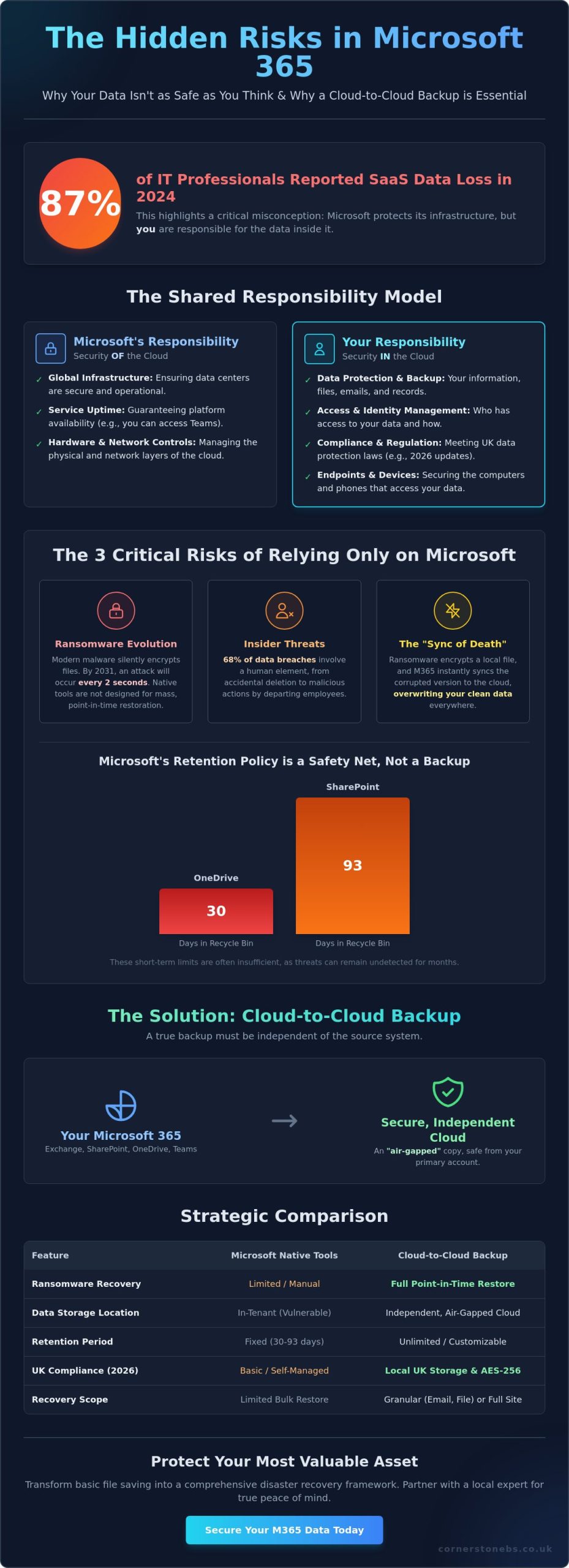
Did you know that 87% of IT professionals reported data loss within their SaaS applications in 2024? It is a startling figure that highlights a common misconception: the belief that Microsoft is solely responsible for your data. While Microsoft manages the platform infrastructure, you own the information inside it. If a ransomware attack encrypts your files or a team member accidentally deletes a critical folder, the default 93-day retention limit for SharePoint can expire before you even notice the gap. That is where a proactive cloud to cloud backup for Microsoft 365 becomes your most valuable asset.
We understand the pressure you face to stay compliant with the UK’s latest 2026 data protection updates while keeping your business resilient. It is natural to feel anxious about recovery limits, but you don’t have to face these risks alone. This guide explains exactly why third-party protection is essential for your business continuity and how to secure your Exchange and SharePoint environments. We will walk you through the Shared Responsibility Model and show you how to build a recovery plan that offers true peace of mind for your local team.
Key Takeaways
- Clarify the Shared Responsibility Model to understand exactly where Microsoft’s duties end and your data protection responsibilities begin.
- Protect your business from ransomware and internal errors by implementing a dedicated cloud to cloud backup for Microsoft 365.
- Evaluate the strategic benefits of storing backups in an independent cloud versus relying on native in-tenant retention policies.
- Stay ahead of 2026 UK compliance requirements by ensuring your sensitive data is stored locally and protected by AES-256 encryption.
- Learn how partnering with a local expert transforms basic file saving into a comprehensive disaster recovery framework for long-term stability.
The Shared Responsibility Model: Why Microsoft 365 Data Isn’t Automatically Safe
Many business owners believe that moving to the cloud solves every security headache. While it certainly simplifies your IT setup, it doesn’t remove your responsibility for the data itself. In 2026, the shared responsibility model remains the most important concept to understand. This framework clearly divides duties between you and Microsoft. They handle the “security of the cloud,” while you handle the “security in the cloud.” That is why cloud to cloud backup for Microsoft 365 is no longer optional for modern firms.
Think of it like a rented office. The landlord ensures the building is structurally sound, the locks work, and the electricity stays on. However, if you leave your laptop on a desk and someone steals it, the landlord isn’t responsible for your lost files. Microsoft provides the resilient “building” of their global infrastructure, but the digital assets you store inside are your business’s problem. Relying on the platform to protect itself is a gamble that 87% of IT professionals have lost at least once in recent years.
What Microsoft Guarantees (And What It Doesn’t)
Microsoft focuses heavily on uptime and service availability. They are world-class at ensuring you can log in to Outlook or Teams whenever you need to. But availability is not the same as data protection. If a file is deleted, Microsoft only holds it for a limited time. SharePoint data stays in the Recycle Bin for 93 days, while OneDrive data often disappears after just 30 days. These are short-term safety nets, not a backup strategy. If a ransomware attack strikes and stays hidden for months, those native tools won’t help you recover. They aren’t designed to combat sophisticated data encryption or malicious internal deletions.
The Definition of Cloud-to-Cloud Backup
A true backup must be independent of the source. Cloud-to-cloud backup works by taking a snapshot of your Microsoft 365 environment and mirroring it to a completely separate, secure cloud. This creates what we call an “air-gapped” copy. If your primary Microsoft account is compromised, your backup remains safe because it lives on a different platform with its own security protocols. Implementing a dedicated cloud to cloud backup for Microsoft 365 ensures your recovery points are stored independently. Cloud-to-cloud backup acts as a strategic safeguard that decouples your business data from the platform where it lives.
We see this as the foundation of business stability. By moving your recovery data to a separate environment, you gain the ability to restore individual emails or entire SharePoint sites within minutes. It’s about emotional security as much as technical necessity. Knowing your data is safe elsewhere allows you to focus on growth rather than worrying about the “sync of death” overwriting your good files with corrupted ones.
The 3 Critical Risks of Relying Solely on Native Retention
While Microsoft’s native tools offer a basic safety net, they aren’t a substitute for a true disaster recovery plan. Relying on them alone exposes your business to vulnerabilities that can lead to permanent data loss. The most dangerous scenario is the “sync of death.” This occurs when ransomware encrypts a file on a local device and Microsoft 365 instantly syncs that corrupted version to the cloud. Without a dedicated cloud to cloud backup for Microsoft 365, you risk losing your clean data forever as the encrypted files overwrite your healthy ones across the entire network.
Ransomware Evolution in 2026
Malware has become incredibly sophisticated and aggressive. By 2031, research from Invenio IT projects that a ransomware attack will occur every 2 seconds. Modern threats don’t just lock your screen; they silently encrypt your OneDrive and SharePoint libraries in the background. Native tools often struggle with mass-encryption events because they aren’t built for bulk, point-in-time restoration. You need the ability to “roll back” your entire digital environment to the exact minute before the infection took hold. This level of granularity is what separates a simple storage tool from a professional resilience strategy.
The Insider Threat: Accidental and Malicious Deletion
Human error remains a constant challenge for local businesses. According to the 2026 Verizon DBIR, 68% of data breaches involve a human element. This isn’t always a simple mistake. Sometimes, a departing employee might maliciously delete folders or purge the Recycle Bin to disrupt operations. Once those items are purged from the native bin, they are gone for good. Hunting for missing data costs your team hours of wasted productivity and unnecessary stress. A robust cloud to cloud backup for Microsoft 365 allows you to restore those assets instantly, regardless of what an individual does to the live environment.
There is also the risk of configuration errors. Many organizations forget that Entra ID (formerly Azure AD) settings and user permissions are just as vital as the files themselves. If these settings are lost or misconfigured, your entire workflow grinds to a halt. When you consider that Microsoft’s default retention for OneDrive is only 30 days, it is clear that native tools rarely meet strict UK compliance needs. Building a strong business case for data backups starts with acknowledging these functional gaps. If you are unsure where your current strategy stands, our team can help you evaluate your Managed IT Support needs to ensure your business resilience is fully up to date.
Cloud-to-Cloud Backup vs. Microsoft 365 Backup: A Strategic Comparison
Choosing between native tools and third-party solutions is a critical decision for your 2026 resilience strategy. Microsoft recently introduced its own native backup storage, which offers impressive speed for massive data sets. However, keeping your backups in the same tenant as your live data creates a single point of failure. If your entire Microsoft environment is compromised or suffers a major outage, your backups might be inaccessible right when you need them most. A dedicated cloud to cloud backup for Microsoft 365 removes this risk by storing your data in a completely independent environment.
We often talk to business owners who are surprised to learn about the “all eggs in one basket” risk. While native tools are convenient, they don’t provide the platform independence required for true disaster recovery. If the platform itself fails, you need a way to access your files from a separate location. This is where the strategic value of third-party services really shines, providing a safety net that operates entirely outside of the Microsoft ecosystem.
Native Microsoft 365 Backup: Pros and Cons
The primary advantage of Microsoft’s native solution is its integration. It lives directly within the Microsoft 365 Admin Center, making it easy for your internal IT team to manage. It is also built for speed, allowing you to recover entire site collections or large Exchange databases rapidly. But there’s a catch. Native storage is priced as a pay-as-you-go service at $0.15 per GB per month. For businesses with large archives, these costs can spiral quickly. More importantly, it doesn’t offer the air-gap protection that many compliance frameworks now require for sensitive data.
Third-Party C2C Backup: The Independent Advantage
Third-party solutions offer a different level of control. They provide much deeper granularity, allowing you to find and restore a single email or a specific version of a document without affecting the rest of the site. These services also capture vital metadata for Teams and SharePoint, ensuring that permissions and structures remain intact after a restore. Many of our clients find that cloud to cloud backup for Microsoft 365 is more cost-effective because it typically uses a flat-rate per-user model rather than charging for every gigabyte of storage.
Beyond just the files, these independent platforms often include advanced discovery tools. You can search across your entire backup history with ease, which is a massive help for legal requests or internal audits. If you are currently planning a Microsoft 365 migration for business UK, this is the perfect time to build independent backup into your new infrastructure. Decoupling your data from the platform it lives on isn’t just a technical preference; it’s a foundational element of business stability and emotional security for your team.
Choosing the Right C2C Solution for UK Compliance
Compliance is not just a box-ticking exercise; it is the backbone of your business’s legal and emotional security. For UK organisations, the regulatory landscape in 2026 has become more defined. On April 29, 2026, the ICO published updated guidance incorporating changes from the Data (Use and Access) Act 2025. These updates place a heavy emphasis on how you manage storage and access technologies. If your cloud to cloud backup for Microsoft 365 stores data in the wrong jurisdiction, you could inadvertently breach UK GDPR requirements. Choosing the right partner means ensuring your data stays within the lines of these evolving rules.
Data Sovereignty and UK Data Centres
Data sovereignty is a non-negotiable priority for local firms. You need to know exactly where your backup files live. Many global providers route data through overseas servers, which can complicate your compliance posture. Prioritising vendors with UK-based data centres ensures your information remains under the protection of UK law. This is a foundational element of our cyber security services. Beyond location, look for solutions that offer AES-256 encryption and mandatory Multi-Factor Authentication (MFA). These features act as a digital vault, keeping your sensitive business information safe from unauthorised eyes.
Evaluating Vendor Reliability and Support
A backup is only as good as its ability to restore. Automated daily backups are standard, but you should also look for on-demand snapshot capabilities for critical periods. During a data crisis, you don’t want to be stuck in a generic support queue. You need experts who understand the urgency of business continuity. We recommend performing a “Restore Drill” at least once a quarter to test your recovery speed and data integrity. This proactive approach ensures your team knows exactly what to do when the pressure is on.
Integration is the final piece of the puzzle. Your backup strategy should work in harmony with your wider managed IT services to create a seamless safety net. This ensures that if a breach occurs, your recovery is handled as a “restore-as-a-service” priority rather than a DIY technical headache. If you are ready to secure your digital assets with a partner who understands the local landscape, we invite you to contact our team for a conversation about your resilience strategy. Getting your cloud to cloud backup for Microsoft 365 right today prevents a compliance catastrophe tomorrow.
Securing Your Digital Assets with Cornerstone’s Managed Backup
Protecting your business data requires more than just a software subscription; it demands a strategy tailored to your specific operations. We don’t believe in one-size-fits-all solutions. Instead, our team builds bespoke frameworks that align with your unique risk profile and operational needs. By integrating a robust cloud to cloud backup for Microsoft 365 into your wider business continuity plan, we move you beyond simple file saving. We create a full disaster recovery framework designed to keep your business running, no matter what challenges the digital world throws your way.
Proactive care is the cornerstone of our service. While many providers wait for you to report a problem, our systems monitor your infrastructure proactively to catch potential issues. We aim to find and resolve glitches before they ever reach your desk or disrupt your team. This proactive stance ensures that your backups are always current, verified, and ready for immediate restoration. It turns a technical necessity into a foundational element of your emotional security, knowing that your digital assets are being watched over by a team that genuinely cares about your success.
Award-Winning Managed IT and Cloud Expertise
Our identity as a trusted regional expert is backed by years of industry recognition and accolades. We maintain strong partnerships with global leaders like Microsoft and Cisco, bringing world-class technology to our local community with a personal touch. Businesses across the UK trust our proactive system monitoring because we combine high-tech sophistication with a friendly, accessible face. Choosing a managed service from a dedicated partner provides the ultimate peace of mind, allowing you to focus on growth while we handle the complexities of your digital safety.
Start Your Resilience Conversation
Getting started is simpler than you might think. We begin with a tailored audit of your current Microsoft 365 environment to identify gaps in your retention policies and security settings. From there, we manage the entire migration to a professional cloud to cloud backup for Microsoft 365, ensuring zero disruption to your daily workflow. Our goal is to make your transition to a resilient infrastructure as smooth and efficient as possible. We invite you to take the first step toward total data security today. Let’s discuss your Microsoft 365 backup strategy and build a plan that protects your business for the long term.
Build Your 2026 Business Resilience Strategy
Taking ownership of your digital assets is the single most important step you can take for your organisation’s future. We have seen how the Shared Responsibility Model places the burden of data protection on your shoulders. You can’t afford to leave your data to chance. Without a dedicated cloud to cloud backup for Microsoft 365, your business remains exposed to ransomware syncs and evolving UK compliance risks. True stability comes from decoupling your data from the platform it lives on, creating a secure, air-gapped safety net for your team.
As a multi-award-winning IT provider and Microsoft Certified Partner, we pride ourselves on being a dedicated partner for local firms. Our proactive 24/7 system monitoring ensures your recovery points are always verified and ready for action. We invite you to secure your business data with a professional Microsoft 365 backup audit. It’s time to replace technical anxiety with the confidence of a professional disaster recovery framework. Let’s start a conversation today to ensure your business stays protected and resilient.
Frequently Asked Questions
Does Microsoft 365 back up my data automatically?
Microsoft does not provide a traditional point-in-time backup for your data. They focus on service availability and infrastructure resilience, ensuring the platform stays online. You are responsible for protecting the information you store within that platform. Without an external solution, data lost to user error or malicious intent can become unrecoverable once native retention windows close. This is why we recommend a proactive approach to data ownership.
How long does Microsoft keep deleted emails and files?
Retention periods depend on the specific application you are using. SharePoint and OneDrive typically keep deleted items in the Recycle Bin for 93 days before they are purged forever. Exchange Online usually holds deleted emails for 14 days by default, though this can be extended to 30 days. Once these periods expire, Microsoft cannot recover your files, making a separate recovery plan essential for long-term safety.
What is the difference between archiving and backup in Microsoft 365?
Archiving moves older data to a separate storage area within the live system, while backup creates a completely independent copy elsewhere. Archiving is great for managing mailbox quotas and keeping your workspace tidy. However, if the live environment is compromised, your archives are often at risk too. A true backup ensures your data survives even if the primary platform suffers a major failure or security breach.
Can cloud-to-cloud backup protect against ransomware?
Yes, a professional cloud to cloud backup for Microsoft 365 provides a vital layer of protection against ransomware. It stores an “air-gapped” copy of your files in a separate cloud environment that malware cannot infect. If your live data is encrypted, you can simply roll back to a clean version from a previous point in time. This allows your business to recover quickly without paying a ransom or losing weeks of work.
Does cloud-to-cloud backup include Microsoft Teams chats and files?
Yes, high-quality backup solutions protect your entire Teams environment. This includes the files shared in channels, conversation histories, and SharePoint site data associated with each team. Because Teams is a complex mix of different Microsoft services, a dedicated backup ensures all these moving parts are captured. You can restore specific chats or entire channels, keeping your collaborative projects on track even after an accidental deletion or malicious purge.
Is third-party backup a requirement for GDPR compliance?
GDPR requires organisations to have a plan for restoring access to personal data quickly after a technical incident. While the regulation doesn’t specify a brand of software, it places the responsibility for data availability on your business. Using an independent backup is the most effective way to demonstrate you have taken “appropriate technical measures” to protect sensitive information. It provides the documented recovery process that UK regulators expect to see from a responsible business.
What happens to my data if my Microsoft 365 subscription expires?
Your data is typically purged by Microsoft 90 days after a subscription is cancelled or expires. This deprovisioning process is permanent, and there is no way to retrieve files once the window closes. An independent backup allows you to keep a historical record of your business data for as long as you need. This is especially useful for meeting long-term retention requirements or managing business transitions smoothly without losing your digital legacy.
How often should cloud-to-cloud backups be performed?
We recommend performing backups at least three times every day to ensure your recovery points are as accurate as possible. Frequent snapshots reduce the amount of work your team has to redo if a restore is needed. Our cloud to cloud backup for Microsoft 365 runs automatically in the background, so you don’t have to worry about manual updates. This consistent rhythm is what builds true business resilience and emotional security for your local team.