
Cornerstone Business Solutions

UK GDPR

UK Data Sovereignty: 2026 Cloud Provider Buying Guide

Posted on: October 12th, 2026 by Cornerstone

Choosing a cloud provider for UK data sovereignty takes more than checking a server’s postcode. If your cloud data sits in a UK data centre, it’s still important to understand who can access it, where backups and metadata go, which subprocessors are involved, and what laws may apply to the provider.

UK GDPR and the Data Protection Act 2018 shape the data protection framework, but a UK location claim alone won’t show how a cloud service works in practice. You need evidence of the provider’s legal, technical and operational controls, without losing sight of the flexibility and functionality your business needs.

This guide explains how to set requirements around your data, users, workloads and risk, then compare providers using practical evidence rather than broad marketing promises. It covers data locations and flows, support access, legal exposure, encryption, permissions, backups and subprocessors. It also shows how to make sovereignty part of ongoing cloud governance, security and business continuity, rather than a one-off hosting decision.

Key Takeaways

  • Separate data residency, sovereignty and data protection to clarify what control your organisation actually needs.
  • When choosing a cloud provider for UK data sovereignty, assess documented controls and contractual protections, not just claims about UK hosting.
  • Compare public, private, hybrid and sovereign-cloud approaches against workload sensitivity, access, portability and resilience.
  • Set requirements for sensitive data, users and critical services, then document answers on locations, support access, subprocessors, backups and incidents.
  • Treat sovereignty as ongoing governance: review permissions, security and supplier arrangements as your workloads and business needs change.

What UK Data Sovereignty Means When Choosing a Cloud Provider

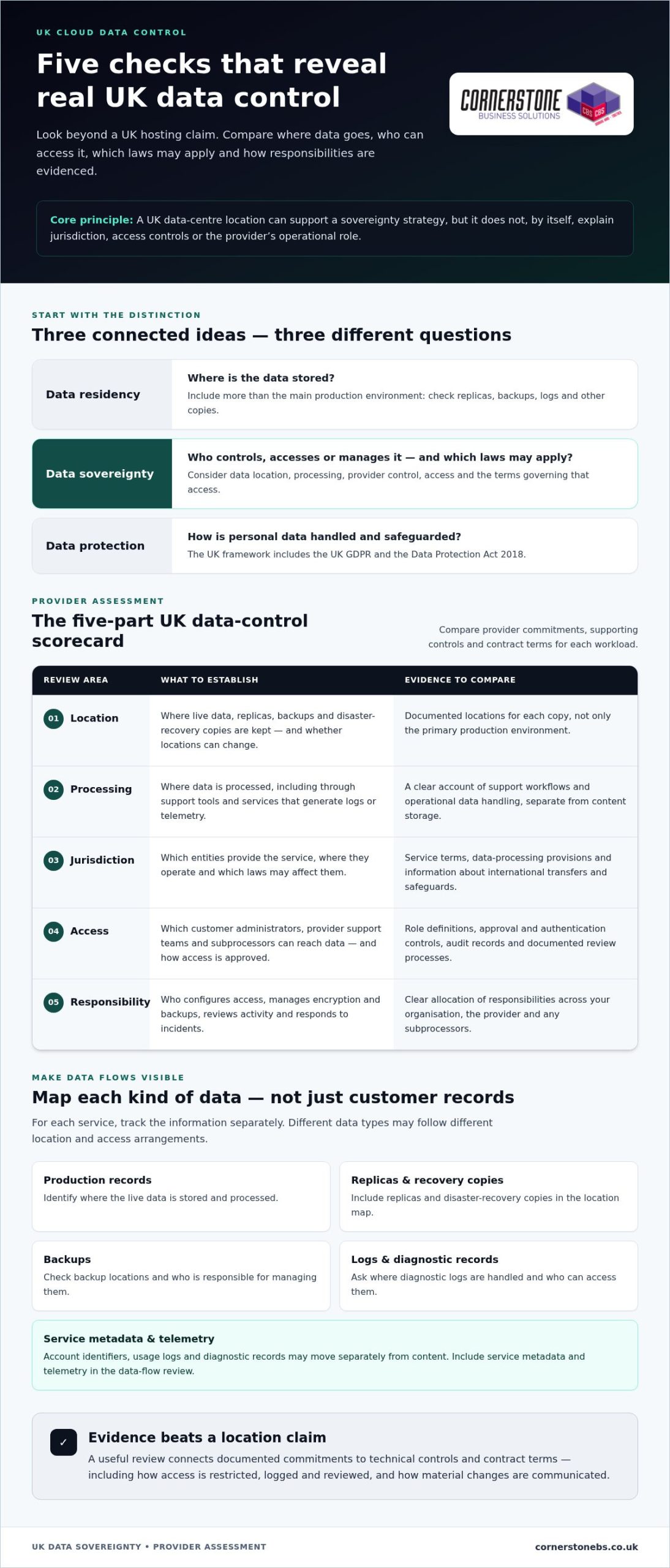
A UK data centre can support a sovereignty strategy, but it doesn’t settle every question. The provider’s corporate jurisdiction, where processing takes place, who can access the data, and the terms governing that access all matter. Start by separating three connected ideas: residency, sovereignty and data protection.

Data residency versus data sovereignty

Data residency describes where data is stored. Look beyond the main production environment to replicas, backups, logs and other copies. Data sovereignty considers the wider relationship between data, applicable laws, provider control and access. Digital sovereignty concerns meaningful control of digital infrastructure and data; the Wikipedia overview of digital sovereignty discusses how that control can apply to states, organisations and individuals.

UK data sovereignty means having clear, evidenced control over where data is stored and processed, which laws may apply, and who can access or manage it, rather than relying on a UK location alone. A service may store customer records in the UK while support staff access them remotely, or processing and service telemetry take place elsewhere. Metadata, such as account identifiers, usage logs or diagnostic records, may also move separately from content.

These distinctions have practical consequences. A business might keep working files and backups in UK regions but still need to know who can administer the environment, how support access is authorised, and where diagnostic information is handled. A location statement answers only part of the picture. It doesn’t, by itself, explain jurisdiction, access controls or the provider’s operational role.

Why sovereignty matters to UK organisations

Data protection focuses on how personal data is handled and safeguarded. In the UK, the central framework includes the UK GDPR and the Data Protection Act 2018. Data sovereignty is related but broader: it helps an organisation understand the legal and operational controls around its data, including when a cloud service involves several suppliers, teams or countries.

That understanding supports decisions about regulatory duties, contractual commitments and the expectations of customers, staff and partners. It can also help explain an organisation’s approach when reviewing security, continuity or supplier risk. The right level of control depends on the workload. Sensitive personal information may call for tighter access restrictions and a clearer picture of data flows than a low-risk internal collaboration tool.

There’s no single sovereignty setup for every organisation. Sector, data type, contractual terms, business impact and risk appetite all shape the requirement. Identify the information that matters most, then consider what could happen if it were accessed, unavailable or handled outside the expected boundaries. That gives you a practical basis for choosing a cloud provider for UK data sovereignty and turning broad concerns into requirements you can test and manage.

The Cloud Provider Criteria That Determine UK Data Control

A useful assessment turns broad promises into evidence you can compare. For each workload, record what the provider commits to, which technical controls support that commitment, and what the contract says if arrangements change. This makes choosing a cloud provider for UK data sovereignty a practical review, not a search for a reassuring label.

Use these criteria as a starting scorecard:

  • Location: Identify the regions used for live data, replicas, backups and disaster recovery, and whether locations can change.
  • Processing: Establish where data is processed, including through support tools and services that generate logs or telemetry.
  • Jurisdiction: Understand which entities provide the service, where they operate, and which laws may affect them.
  • Access: Map customer administrators, provider support teams and subprocessors, then record how permissions are restricted and approved.
  • Responsibility: Clarify who configures access, manages encryption and backups, reviews activity, and responds to incidents.

Where data moves and who can access it

Build a data-flow map for each service. Include production records, replicas, disaster-recovery copies, backups, diagnostic logs and service metadata. Track each as a separate flow: a provider may document a UK location for primary storage but use different arrangements for support workflows or operational data.

Next, trace access routes. Record which administrator roles and support teams can reach data, whether subprocessors are involved, and what approval or authentication controls apply. Look for evidence that access is restricted, logged and reviewed, such as role definitions, audit records and documented review processes. “Secure access” is less useful than a clear explanation of how access is controlled and evidenced.

Jurisdiction, contracts and assurance evidence

Review service terms, data-processing provisions and subprocessor disclosures alongside the technical information. Check how the provider describes international transfers, which safeguards or transfer mechanisms it relies on, and how it communicates material changes. Use current Information Commissioner’s Office guidance in your review, particularly where personal data may be accessed or transferred across borders. Legal and procurement teams can assess how those arrangements fit the organisation’s obligations.

Read assurance documents in context. Check which service, locations and controls an audit report covers, when it was issued, and whether any exclusions affect your workloads. Certifications can support a review, but they don’t prove that every configuration meets your needs. Distinguish the provider’s contractual commitments from controls you can verify in the service, such as permissions, encryption settings and access logs.

Keep the evidence with the workload decision, including assumptions and gaps that need attention. As systems, users and suppliers change, revisit the data-flow map and controls rather than treating approval as permanent. Cornerstone’s cloud solutions can bring provider evidence together with permissions, backup and continuity planning.
UK Data Sovereignty: 2026 Cloud Provider Buying Guide

How to Compare Sovereign Cloud Options Without Overlooking Trade-offs

No single cloud model automatically delivers the right balance of control, capability and resilience. Compare each option against the workload, the sensitivity of its data and the controls your organisation can operate consistently. A UK hosting location may support your requirements, but it isn’t proof on its own: assess the specific service, configuration, access arrangements and evidence.

Match cloud model to workload and risk

Separate workloads by purpose and sensitivity. A system holding highly sensitive records may need tighter access and retention controls than standard collaboration tools. A hybrid design can place workloads in different environments, but it also adds integration and management demands. Include user experience, links to existing systems, recovery arrangements and the effort needed to maintain controls in your comparison.

Use this table as a starting point, then assess each option against the service and contract under consideration. “Sovereign cloud” can describe different arrangements, so focus on documented boundaries rather than the label.

Model Jurisdiction Service scope Access model Portability Resilience Evidence to review
Public cloud Depends on selected regions and provider arrangements Broad range of services, subject to configuration Customer and provider roles need clear controls Review dependencies on provider-specific services Assess region design, backups and recovery Service terms, location details, access and audit records
Private cloud Depends on hosting and operating arrangements Dedicated environment, with scope shaped by design Can be tailored, but responsibilities must be explicit Review platform and migration dependencies Check separate recovery arrangements and testing Architecture, operating model, contract and assurance
Hybrid cloud Varies across connected environments Workloads can span multiple services Consistent identity and permissions become important Integration may add complexity Map dependencies and recovery across environments Data flows, access design and end-to-end recovery evidence
Sovereign cloud Defined by the specific service’s commitments May have a narrower service scope Review local operating and support controls Check service dependencies and exit arrangements Confirm recovery coverage and locations Contractual commitments and service-specific controls

Assess platforms and managed cloud approaches

Compare platforms on documented controls and workload fit, not brand recognition alone. Microsoft Azure is one option, but location, access and transfer commitments depend on the specific service and configuration. Review those details for the workloads in scope. Ongoing management matters too: permissions, security settings and cloud operations need regular oversight as users and business needs change.

Choosing a cloud provider for UK data sovereignty is a balance, not a hunt for a perfect label. A broader Cloud Solutions for UK Businesses guide can help frame general cloud decisions, while this comparison focuses on control, evidence and trade-offs. Choose an approach your team can manage, and include resilience and portability from the outset.

A Practical Due-Diligence Checklist for UK Cloud Buyers

A consistent process helps you compare providers against real requirements, especially when workloads have different levels of sensitivity. Start with the business need, gather evidence and record unresolved points. This gives technical, security and procurement teams a shared basis for making and reviewing the decision.

Five steps from requirements to shortlist

Work through these steps before approving a cloud service. They turn broad expectations into a practical assessment, clarify ownership and make remaining risks visible.

  1. Classify data and workloads. Identify sensitive information, who uses it, and the impact if it’s exposed, unavailable or altered. Separate critical services from lower-risk applications.
  2. Translate obligations into requirements. Review relevant legal, regulatory and contractual commitments with the appropriate people in your organisation. Convert them into assessable requirements, such as defined data locations, restricted support access or documented recovery arrangements.
  3. Compare providers consistently. Use the same questions for each option. Assess written commitments, service scope, technical controls and operational responsibilities rather than relying on marketing descriptions.
  4. Plan implementation and resilience. Map dependencies, migration steps, user access and testing. Include backup and recovery arrangements so the move supports business continuity as well as data control.
  5. Keep a decision log. Record the evidence reviewed, gaps, risk owners, approval decisions and a review date. Revisit the record when the service, supplier, users or workload changes.

Questions that turn claims into evidence

Use questions like these to assess the specific service and workloads in scope. Keep the responses and supporting documents with your assessment, and note who in your organisation owns each follow-up.

  • Where are production data, backups, logs and metadata stored and processed? Can their locations change, and how are changes communicated?
  • Which privileged roles, support routes and subprocessors can access data? How is access approved, restricted, logged and reviewed?
  • What audit reports or security assurance documents cover the service, and what locations, features or controls are excluded?
  • What do the contract and service terms say about international transfers, subprocessor changes, incident notification and responsibilities during an incident?
  • How can your organisation retrieve data, maintain portability, and arrange deletion when the service ends? What evidence describes these processes?

Use the ICO’s current guidance when assessing personal data handling and transfers, and involve legal or procurement specialists where arrangements affect your obligations. Connect the provider review to internal security governance, including permissions, incident handling and backup oversight. This gives teams a fuller view of how cloud choices affect day-to-day security.

For an overview of how these requirements fit across different workloads, read about Cornerstone’s cloud planning. A collaborative review can bring data control, security and continuity considerations into one manageable plan.

Choose a Cloud Provider That Fits Your UK Sovereignty Requirements

The strongest choice is the one that meets your organisation’s documented requirements, not the one with the most reassuring “UK cloud” label. Use your assessment evidence to decide which workloads belong in which environments, who is accountable for each control, and how you’ll respond if arrangements change. Choosing a cloud provider for UK data sovereignty is the start of an operating approach, not a one-off procurement decision.

Turn provider selection into an operating plan

Once you’ve selected an approach, assign roles for access reviews, configuration, supplier oversight and evidence retention. Keep a record of decisions and ownership so the team knows who is responsible for each control. Set review triggers for new workloads, regulatory changes, acquisitions or supplier changes. This makes sovereignty a repeatable practice rather than something that depends on one person’s knowledge.

Connect the plan to everyday resilience. Backup and recovery arrangements should reflect the business impact of losing access to a service, while incident response should make responsibilities clear across your organisation and suppliers. Review whether arrangements still fit as systems and users change. A well-governed cloud environment supports business continuity as well as data control.

Plan the next step with a managed cloud partner

Before agreeing a target design, bring together your requirements, provider evidence and unresolved risks. Note which workloads need separate controls, how existing systems connect, and what migration or recovery planning involves. Cornerstone works collaboratively with UK organisations to shape tailored cloud solutions around business needs and existing systems, supported by managed IT and cloud expertise.

If Microsoft 365 is part of the plan, include migration considerations alongside data handling, user access and continuity. The Microsoft 365 Migration for Business UK guide can inform that part of your planning; ensure the migration approach fits the sovereignty requirements set for the workload.

Keep the decision under review after implementation. Changes to services, permissions, suppliers or business priorities can affect whether the original controls remain suitable. Assign ownership for reviews, keep evidence accessible, and update the operating plan when your environment changes. Ongoing oversight helps make sovereignty part of secure, manageable cloud operations.

Ready to discuss your requirements? Talk with Cornerstone about your cloud plans and take the next step towards an environment designed around your organisation.

Make Data Control Part of Your Cloud’s Future

Your cloud environment will evolve as teams, services and business priorities shift. Build sovereignty into that evolution by treating each significant change as a reason to revisit ownership, controls and supporting evidence. That way, choosing a cloud provider for UK data sovereignty becomes a foundation for decisions, rather than a box ticked during procurement.

Cornerstone Business Solutions is a multi-award-winning UK IT services provider, bringing together cloud solutions and managed IT, cyber security and disaster recovery expertise. Its work with Microsoft, IBM and Cisco supports a collaborative approach to designing cloud environments around business requirements, existing systems and operational priorities.

Bring your priorities, workloads and key concerns to a conversation with Cornerstone. Together, you can explore a practical next step that connects cloud choices with security and continuity.

Talk to Cornerstone about a cloud approach built around your business requirements. A clear plan can help your organisation move forward with confidence.

Frequently Asked Questions

Does storing data in the UK automatically make it sovereign?

No. UK storage tells you where a particular copy is held, but it doesn’t by itself establish which laws may apply to the provider or who can access the data. A UK-based service could, for example, involve overseas support or service components. Check the specific service terms and operational arrangements, and distinguish evidence about storage location from evidence about access, processing and provider control.

Does UK GDPR require every business to store all personal data in the UK?

No. UK GDPR doesn’t generally require every organisation to keep all personal data within the UK. An organisation may use services that process data elsewhere, but it must consider the applicable rules for international transfers and its responsibilities for protecting personal data. The right assessment depends on the data and service involved. Use current Information Commissioner’s Office guidance and obtain appropriate legal advice for complex arrangements.

Can a cloud provider’s support team access data from outside the UK?

Yes, depending on the service and its support arrangements. Access might occur during troubleshooting, maintenance or incident response, so review how support requests are handled and whether staff can view customer content. Look for controls such as approval requirements, time-limited permissions and access logs. If support access is outside your acceptable risk boundary, make that a clear service requirement and assess the provider’s documented options.

Do cloud backups and metadata need to be included in a sovereignty assessment?

Yes. Backups can contain the same sensitive information as live systems, while metadata may reveal account details, activity or service use. For example, a collaboration platform’s files and diagnostic logs may follow different handling arrangements. Include both in your data inventory, and account for retention and deletion as well as storage. This helps avoid overlooking information outside the main application or production database.

How can a business check where its cloud data is processed?

Start with documentation for the exact cloud service and configuration, rather than relying on a general provider statement. Review service-specific data-location information, terms, subprocessor disclosures and transfer details. Compare these with your records of enabled features and integrations, since connected tools may introduce additional processing. When choosing a cloud provider for UK data sovereignty, keep the evidence with the workload decision and record unanswered questions for follow-up.

Is a sovereign cloud necessary for every UK business?

No. The appropriate model depends on the organisation’s data, sector, contracts, operational needs and risk appetite. A business with highly sensitive workloads or strict customer commitments may need stronger controls than one handling lower-risk information. Some organisations can use different approaches for different systems. Define the outcome you need first, then assess whether a sovereign cloud or another well-governed cloud arrangement can meet it.

Can a business use Microsoft Azure while assessing UK data sovereignty?

Yes. Azure can be part of a UK sovereignty assessment, but suitability depends on the specific services, configuration and operating arrangements involved. Review service-specific information about data handling, support access, backups and relevant contractual terms. Also assess how identity settings, permissions and integrations are configured in your tenant. A platform name alone can’t establish that a particular workload meets your organisation’s requirements.

How to Report a Business Data Breach in the UK: A 2026 Step-by-Step Guide

Posted on: June 17th, 2026 by Cornerstone

With one in four small businesses in the UK falling victim to a hack, the question isn’t just about prevention anymore; it’s about your immediate response. If you’ve just discovered a security incident, the pressure to understand how to report a business data breach UK can feel overwhelming while the clock ticks on your 72-hour ICO window. We understand that the fear of heavy GDPR fines or a damaged reputation is enough to keep any business owner awake. You want to protect your customers and your hard-earned local legacy, but the legal requirements can often seem like a complex maze.

We’re here to turn that uncertainty into a clear, actionable plan. This 2026 guide provides a professional roadmap to help you navigate the latest regulations, including the Data (Use and Access) Act, with the confidence of a dedicated partner. You’ll learn exactly how to qualify a breach, the specific steps for reporting to the Information Commissioner’s Office, and how to secure your digital infrastructure to prevent future issues. We will show you how to satisfy your legal obligations while keeping your business continuity and reputation firmly intact.

Key Takeaways

  • Identify which security incidents qualify as reportable under UK GDPR, including common 2026 threats like ransomware and unauthorised cloud access.
  • Navigate the 72-hour countdown with a step-by-step guide on how to report a business data breach UK using the ICO’s official reporting tools.
  • Learn to assess risks to individual rights and freedoms to determine when mandatory notification to the ICO and affected parties is legally required.
  • Implement immediate containment and recovery strategies to isolate compromised systems and restore business continuity without delay.
  • Build long-term resilience by moving from reactive reporting to a proactive security framework based on Cyber Essentials standards.

Understanding What Constitutes a Reportable Business Data Breach

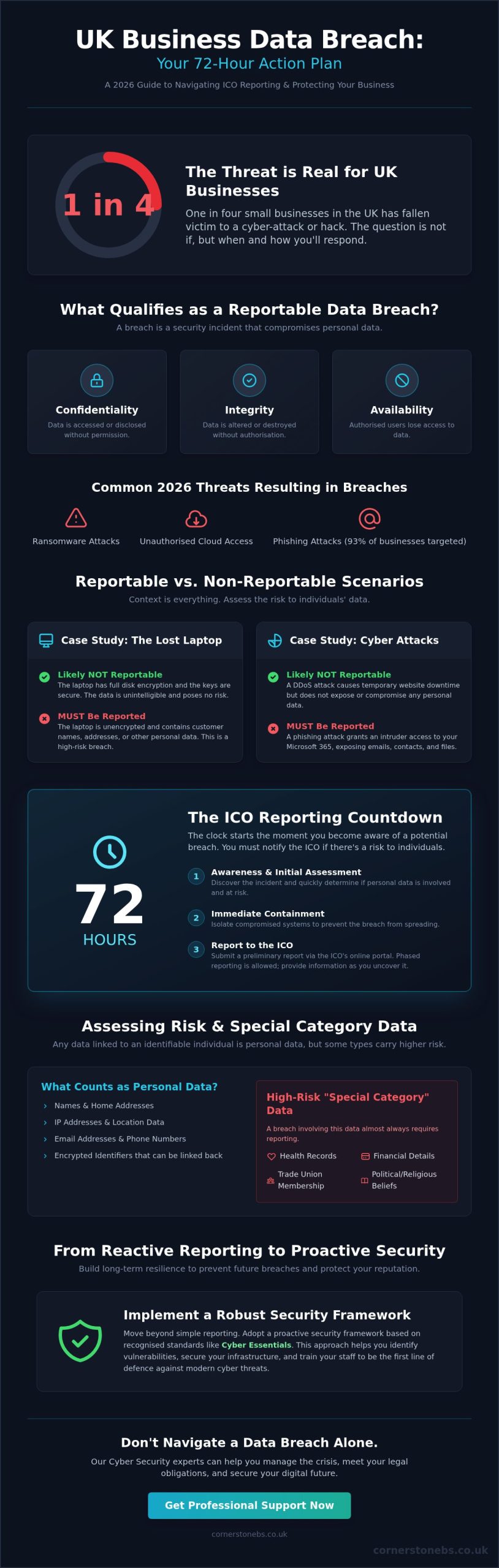
Not every IT glitch is a crisis, but knowing the difference is vital for your compliance. A personal data breach under UK GDPR is more than just a leak. It’s a security incident that compromises the confidentiality, integrity, or availability of personal information. If you are currently investigating an incident, your first priority is determining how to report a business data breach UK properly. This starts with a clear assessment of whether the data has been lost, destroyed, altered, or accessed without permission.

In 2026, the digital landscape presents new challenges for business owners. We see more sophisticated threats like unauthorised cloud access and complex ransomware attacks. These incidents don’t just steal data; they often lock you out of your own systems, which qualifies as a breach of “availability.” Gaining a foundational understanding of what a data breach is helps you separate a minor technical fault from a legal reporting obligation. Even if an employee accidentally sends a spreadsheet to the wrong client, you must conduct a formal assessment. The law doesn’t distinguish between a malicious hacker and a simple human error when it comes to your duty to protect data.

The Broad Definition of Personal Data

Personal data is any information that relates to an identifiable individual. This goes far beyond names and home addresses. In our modern infrastructure, this includes IP addresses, location data, and even encrypted identifiers that could be linked back to a person. According to the latest ICO guidance, personal data is any information relating to an identified or identifiable living individual. You should be particularly cautious with “special category” data. This includes health records, financial details, or trade union memberships, as these carry a much higher risk if exposed.

Examples of Reportable vs. Non-Reportable Incidents

Context is everything when deciding whether to notify the authorities. Consider these scenarios:

  • The Lost Laptop: If a staff member loses a laptop with full disk encryption and the keys are secure, it’s likely not reportable because the data is unintelligible. If that same laptop is unencrypted and contains customer names, you have a reportable breach.
  • Cyber Attacks: A DDoS attack that causes temporary website downtime but doesn’t expose data is a security incident, not a personal data breach. However, a phishing attack that grants an intruder access to your Microsoft 365 environment is almost certainly reportable.

The Cyber Security Breaches Survey 2025 found that 93% of businesses were targets of phishing. This highlights why a proactive assessment is necessary for every “near miss.” If the incident is likely to result in a risk to the rights and freedoms of your customers, the 72-hour clock begins the moment you become aware of it.

The ICO Reporting Process: The 72-Hour Countdown

The clock starts ticking the moment you realize something is wrong. Whether it’s a suspicious login or a missing folder, you have exactly 72 hours to notify the Information Commissioner’s Office if there’s a risk to individuals. This deadline is strict, but it shouldn’t cause panic. The goal is to provide the ICO with as much information as possible as early as possible. Many business owners wonder exactly how to report a business data breach UK when they don’t yet have all the facts. The ICO understands that forensic investigations take time, which is why they allow for phased reporting. You can submit a preliminary report and follow up as you uncover more details.

To start the process, you’ll need to visit the ICO data breach reporting portal. This online tool walks you through the necessary questions. You’ll be asked to describe the nature of the breach, the categories of data involved, and the approximate number of people affected. Learning how to report a business data breach UK involves understanding that the regulator values honesty and speed over a perfect, final report on day one. If you’re struggling to pull these logs together during a crisis, our team can provide the Cyber Security expertise needed to pinpoint the source of the leak quickly.

What to Include in Your ICO Report

Managing the Deadline During Weekends and Bank Holidays

Cybercriminals don’t work nine to five, and neither does the law. The 72-hour window includes weekends and bank holidays. If you discover a breach on a Friday evening, you cannot wait until Monday morning to start the clock. If you find yourself in a position where you must report late, you must provide a “reasoned justification” for the delay. The ICO may accept these reasons if they are valid, but it’s always better to submit a partial report within the timeframe than a complete one after the deadline has passed. Our local team is here to help you build a resilient infrastructure so you’re never caught off guard by these tight windows.

How to Report a Business Data Breach in the UK: A 2026 Step-by-Step Guide

Assessing Risk to the Rights and Freedoms of Individuals

Determining whether an incident crosses the line from a technical glitch to a legal obligation is the most critical part of your response. It’s not just about the volume of data lost. It’s about the impact on the real people behind those records. Under UK GDPR, you only need to notify the ICO if the breach is likely to result in a risk to the rights and freedoms of individuals. If you’re currently weighing up how to report a business data breach UK, your first step is a thorough risk assessment. You must evaluate the potential for physical, material, or non-material damage to your customers or staff.

What does this “risk” actually look like in a business context? It encompasses a wide range of potential harms. This includes identity theft, financial loss, and even reputational damage to the individual. If sensitive data like health records or financial details are exposed, the risk of discrimination or fraud increases significantly. We recommend using a risk matrix to standardise your approach. By plotting the severity of the potential harm against the likelihood of it occurring, you can make an objective decision about how to report a business data breach UK without letting panic cloud your judgment. This structured method ensures your response is proportionate and legally sound.

When is a Breach “High Risk”?

There’s a vital distinction between a reportable breach and a “high-risk” breach. While a reportable breach requires you to notify the ICO, a high-risk breach triggers the additional requirement to inform the affected individuals directly. This is necessary when the incident is likely to result in a high risk to their rights and freedoms. In these cases, high-risk breaches require notification “without undue delay” to allow individuals to take their own protective measures, such as changing passwords or alerting their banks. This transparency, while difficult, is essential for maintaining long-term trust with your community.

The Role of Internal Documentation

Even if your assessment concludes that a breach isn’t reportable to the ICO, your work isn’t finished. You must document every single personal data breach in an internal register. This log should include the facts of the incident, its effects, and the remedial action you took. The ICO has the authority to audit these records at any time to ensure you’re making the right calls. Maintaining these logs is much easier when you have proactive managed IT services in place to track system changes and access logs. Following the NCSC incident management guidance ensures your internal processes meet the highest national standards, providing you with a solid foundation of evidence if your decisions are ever questioned.

Immediate Technical Response and Containment Strategies

While the 72-hour clock is running for the ICO, your technical team is fighting a different battle. Containment is your absolute priority. You need to stop the data from leaving your network immediately. This often means making tough calls, like isolating affected servers or disabling compromised accounts across the board. If you’re currently investigating how to report a business data breach UK, remember that the ICO expects you to take these containment steps as part of your formal response. They want to see that you’ve acted decisively to limit the damage from the very start.

Finding “patient zero” is essential for a complete and accurate report. You need to know exactly how the intruder got in. Was it a weak password, a phishing link, or a misconfigured firewall? Digital forensics plays a huge role here. However, you must be careful not to destroy evidence while you’re fixing the problem. We work closely with our partners to ensure that logs and system states are preserved correctly. This evidence is vital if the ICO or the police need to conduct a deeper investigation later. Coordinating with an expert IT partner ensures that your recovery is both fast and legally compliant.

Securing Your Perimeter Post-Breach

Once the immediate threat is contained, you must harden your defences. Start by resetting credentials for every user, prioritising those with administrative privileges. It’s also the time to review your firewall logs and cloud solutions for any lingering backdoors. Hackers often leave small entry points to return later. We recommend implementing temporary, heightened monitoring to catch any secondary attempts at entry. This proactive approach ensures that once you’ve closed the door, it stays locked. It’s about restoring stability and peace of mind for your team.

Notifying Affected Individuals

If your risk assessment shows a high risk to individuals, you must tell them. Drafting this notice requires a balance of transparency and calm. Tell them exactly what happened, what data was involved, and what you’re doing to fix it. Most importantly, give them clear instructions on how they can protect themselves, such as monitoring their bank accounts or changing passwords. Whether you choose email, post, or a public notice depends on the scale of the breach. A clear, honest message often does more to protect your reputation than staying silent ever could.

If you’re currently facing a breach and need an expert team to lead the containment, our Cyber Security services are ready to help you secure your infrastructure and meet your reporting duties.

Building a Proactive Cyber Security Framework for 2026

Reporting a breach is a legal necessity, but the real goal is to ensure you never have to do it again. Transitioning from a reactive “emergency mode” to a proactive framework is the best way to protect your local reputation. When you understand how to report a business data breach UK, you quickly realize that the most successful businesses are those that invest in cyber security services before an incident occurs. In 2026, a “set and forget” approach to IT simply doesn’t work. You need a dynamic strategy that evolves alongside new threats.

The foundation of any UK business’s security should be Cyber Essentials or Cyber Essentials Plus. These government-backed certifications provide a clear baseline for your digital safety. Beyond these basics, we advocate for Multi-Factor Authentication (MFA) and Zero Trust architectures. These systems operate on the principle of “never trust, always verify;” they make it significantly harder for an intruder to move through your network even if they steal a password. Small changes in your digital infrastructure create massive barriers for cybercriminals.

Technology is only half the battle. Your team is your first line of defence. Regular staff training is essential to reduce the human error that leads to most data leaks. When your employees know how to spot a sophisticated phishing attempt, your risk drops immediately. We believe in empowering your staff. This turns them from a potential vulnerability into a strong asset for your business’s stability. It’s about creating a culture where security is everyone’s responsibility.

The Value of Managed Security Providers

Disaster Recovery and Business Continuity

A tested backup strategy is your ultimate safety net. If a breach does occur, knowing your data is safe and recoverable allows you to focus on the legalities of how to report a business data breach UK without the fear of total data loss. Regularly auditing your data protection impact assessments (DPIAs) keeps your compliance sharp and your risks low. These audits help you identify gaps in your data handling before they become liabilities. We invite you to a conversation about your current setup. Contact Cornerstone for a proactive security audit today, and let’s build a resilient future for your business together.

Secure Your Resilience and Future Growth

Understanding how to report a business data breach UK is the first step in protecting your customers and your company’s hard-earned reputation. You’ve seen that the 72-hour ICO window is non-negotiable and that a thorough risk assessment is your best defence against unnecessary panic. By prioritising immediate containment and documenting every incident, you satisfy legal requirements while maintaining essential business continuity. Moving from a reactive stance to a proactive security framework ensures that your organisation remains strong in the face of evolving digital threats.

Our team brings the confidence of a multi-award-winning IT provider, backed by strategic partnerships with Microsoft, IBM, and Cisco. We offer proactive 24/7 monitoring and support that acts as a dedicated shield for your digital assets. You deserve the peace of mind that comes from knowing your security is managed by experts who genuinely care about your success. We’re proud to be your local partners, helping you navigate the complexities of 2026 with total confidence.

Secure your business with Cornerstone’s award-winning cyber security services. Let’s work together to build a safe, stable, and prosperous future for your business.

Frequently Asked Questions

Do I have to report a data breach if no data was actually stolen?

You must report a breach even if no data is stolen if the incident affects the availability or integrity of personal information. For instance, if a server failure permanently deletes customer records or ransomware encrypts them, this is a breach of availability. The law requires you to assess the risk to individuals’ rights regardless of whether a third party actually accessed the files. Integrity breaches, where data is altered without permission, also count.

What are the penalties for failing to report a data breach to the ICO in 2026?

Failing to notify the ICO of a reportable breach can result in a fine of up to £8.7 million or 2% of your global turnover, whichever is higher. This is separate from the fine for the actual security failure, which can reach £17.5 million or 4% of turnover. These penalties reflect the regulator’s focus on transparency and accountability. Reporting early acts as a mitigating factor in any enforcement action.

How much does it cost to report a data breach to the Information Commissioner?

There is no financial cost to report a data breach to the Information Commissioner’s Office. The online reporting tool is a free service provided to help businesses comply with their legal obligations. While the reporting itself is free, you may incur costs related to forensic investigations or technical recovery. We always recommend focusing on speed and accuracy rather than worrying about administrative fees. It’s an investment in your company’s long-term compliance.

Can I be fined if the breach was caused by a third-party software provider?

Yes, you can still be fined if the breach occurs through a third-party provider, as you remain the data controller responsible for the personal information. You must ensure your suppliers have robust security measures in place. If a provider suffers a breach, you are still the one who needs to know how to report a business data breach UK to protect your own customers. Your contracts should clearly outline the provider’s duty to notify you immediately.

How do I know if a breach is “likely to result in a risk” to individuals?

A breach results in a risk if it could lead to physical, material, or non-material damage for the individuals involved. Examples include potential identity theft, financial loss, or damage to reputation. You should consider the sensitivity of the data and the volume of records affected. If the data could be used to cause harm or distress, you must treat the incident as a reportable event. Documenting your decision-making process is vital for future audits.

What happens after I submit a report to the ICO?

Once you submit your report, the ICO will acknowledge receipt and assign a case officer to review the details. They may ask for more information or provide specific advice on how to mitigate the impact. In many cases, if you’ve taken proactive steps to contain the breach and notify individuals, the ICO may simply record the incident without taking further enforcement action. Their goal is to ensure you’ve learned from the event and improved your systems.

Do small businesses have different reporting requirements than large corporations?

No, the legal requirements for reporting a breach are the same for all organisations, regardless of their size. Whether you’re a local sole trader or a multinational corporation, the 72-hour window and the risk assessment thresholds apply equally. However, the ICO often provides more tailored support and guidance for small and medium-sized enterprises. They understand that smaller teams may have fewer resources to manage a complex technical response. We’re here to bridge that gap for local firms.

What is the first thing I should do if I suspect a ransomware attack?

Your first step is to isolate the affected systems by disconnecting them from your network and the internet to stop the encryption from spreading. Do not turn off the machines, as this can destroy volatile evidence needed for recovery. Once isolated, you can begin your investigation into how to report a business data breach UK while your IT partner works on restoring your latest clean backups. Quick containment is the key to minimising downtime.


Copyright © 2026 Cornerstone Business Solutions