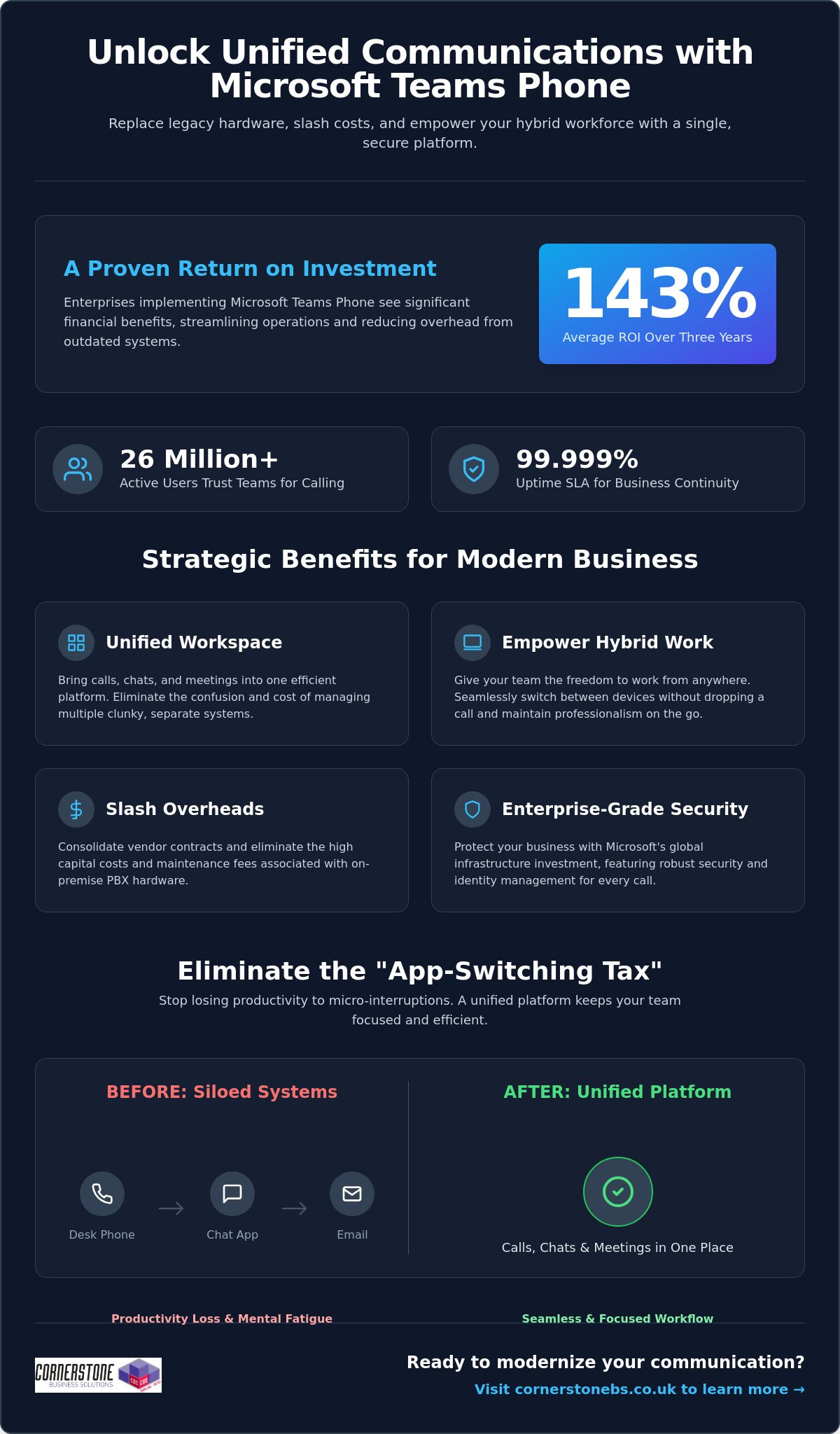
With the UK’s copper phone network scheduled for complete retirement on January 31, 2027, 2.4 million businesses are still searching for a reliable path forward. It’s a daunting deadline, especially when you’re already dealing with the high costs of traditional landlines and the frustration of disconnected remote teams. If you’ve found yourself managing a messy mix of communication vendors, you know it’s a drain on both your time and your budget. Implementing a microsoft teams phone system uk strategy isn’t just about avoiding the switch-off; it’s about finally bringing your calls, chats, and meetings into one seamless workspace.
We understand that changing your core infrastructure feels like a major hurdle. You want a solution that offers predictable UK calling costs and the security of a platform your team already knows. In this 2026 guide, we’ll show you how to transform your business communications into a cloud-based powerhouse that reduces monthly overheads. We’ll walk through the essential steps to migrate your existing numbers and explain how a unified system creates the stability your business needs to grow. It’s time to move beyond legacy hardware and embrace a communication style that works as hard as you do.
Key Takeaways
- Prepare for the 2027 PSTN switch-off by transitioning your legacy hardware to a resilient, cloud-based platform.
- Choose the best connectivity model for your microsoft teams phone system uk to balance technical flexibility with ease of management.
- Reduce monthly overheads and simplify your vendor list by integrating calls, chat, and meetings into one familiar interface.
- Execute a smooth migration using a structured five-step approach that protects your existing business numbers and call flows.
- Shift your telephony from a basic utility to a strategic asset with professional support and proactive system monitoring.
The Evolution of UK Business Telephony: Why Teams Phone is Non-Negotiable
The era of the dusty phone closet is officially coming to a close. For most UK businesses, the traditional Private Branch Exchange (PBX) was once a tangle of wires and high maintenance costs. Today, we’ve moved toward a software-defined model that prioritizes agility. A microsoft teams phone system uk implementation replaces that physical hardware with a cloud-based solution built directly into your Microsoft 365 ecosystem. It’s not just a new way to dial a number. It’s a fundamental shift in how your business stays reachable. By hosting your telephony in the cloud, you eliminate the need for expensive on-site engineers and hardware that dates the moment it’s installed.
The Impact of the UK PSTN Switch-Off
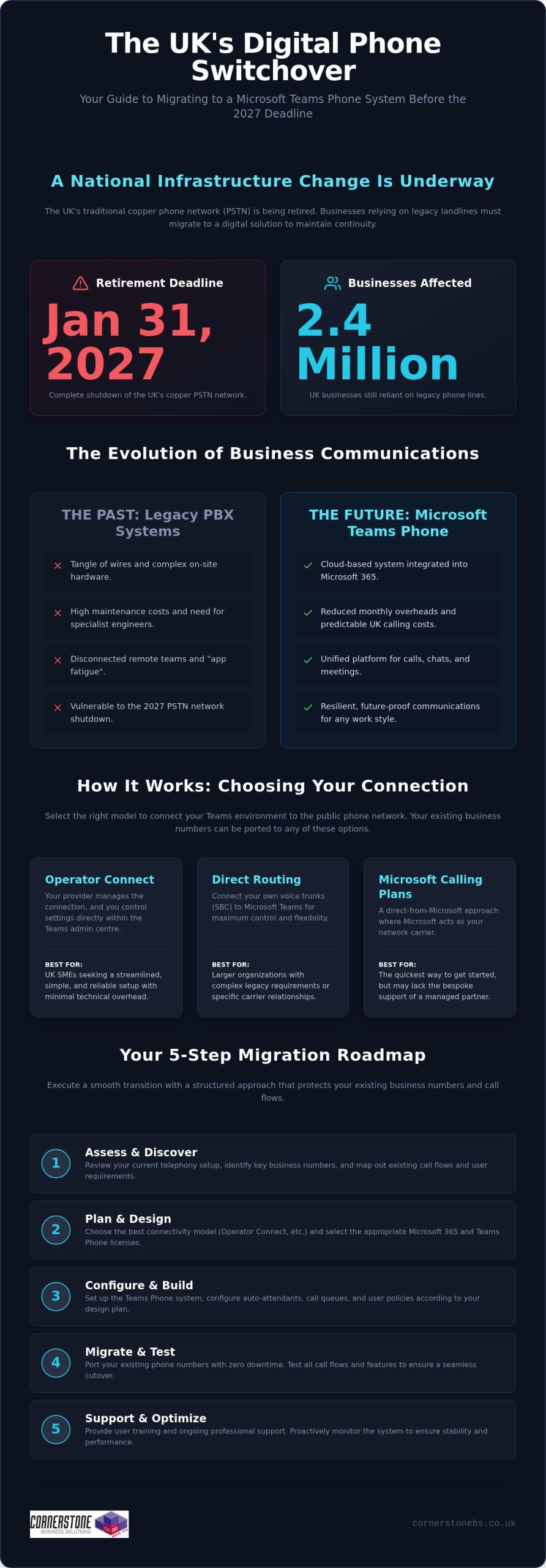
We’re currently in the final stretch of a massive national infrastructure change. The UK’s copper Public Switched Telephone Network (PSTN) will shut down completely on January 31, 2027. Recent data suggests that 2.4 million businesses are still reliant on these legacy lines. If you wait until the final months of 2026 to migrate, you’re taking a significant gamble with your business continuity. Lead times for digital installations will likely grow as the deadline nears, and support availability from providers will tighten. Moving to a cloud-based system now ensures your handsets don’t simply stop working when the network goes dark. It’s about future-proofing your operations today so you don’t have to scramble tomorrow.
Unified Communications: More Than Just a Dial Tone
Modern business requires more than just a voice connection; it requires total integration. We see many local firms struggling with “app fatigue,” where teams jump between multiple different platforms for chat, video, and file sharing. By adopting Microsoft Teams as your primary phone system, you consolidate these tools into one national infrastructure. This isn’t just about technical efficiency. It’s about the emotional security of your workforce. Knowing your team remains connected whether they’re in a city-centre office or working from home provides essential peace of mind. This transition is a core part of a modern it company solution that prioritizes stability. When your voice calls live in the same place as your project files, your business moves faster and more reliably.
The transition to a microsoft teams phone system uk strategy allows you to stop worrying about connectivity and start focusing on growth. It turns your telephony from a confusing utility bill into a strategic asset. As your long-term partner, we’ve seen how this clarity transforms day-to-day operations for small and medium-sized enterprises across the country.
How Microsoft Teams Phone System Works: Connectivity Options
Understanding how a microsoft teams phone system uk actually connects to the outside world is the first step toward a successful setup. You don’t need to be a technical genius to make the right choice, but you do need to understand the “pipes” that carry your voice data. One of the most common questions we hear from local business owners is about their existing phone numbers. Rest assured, number porting allows you to keep your established UK business presence while moving to a more modern infrastructure. This transition is a key part of navigating the future of landline calls as traditional networks fade away.
Operator Connect vs. Direct Routing
Choosing your connection method defines your daily management experience. Operator Connect has become the preferred choice for many UK SMEs because it’s streamlined. Your preferred provider manages the connection, and you control the settings directly within the Teams admin centre. It’s simple, fast, and reliable. For larger organizations with complex legacy requirements, Direct Routing offers maximum flexibility. It allows you to connect your own voice trunks, though it requires more technical oversight. Finally, Microsoft Calling Plans offer a “direct from the source” approach. This is often the quickest way to get started, but it might lack the bespoke support and regional expertise that a local partner provides.
Licensing Requirements Simplified
Getting your licensing right ensures you aren’t overpaying for features you don’t use. If your team is on Microsoft 365 Business Basic or Standard, you’ll typically need the Teams Phone Standard add-on. However, users on the E5 plan often find these features are already included. It’s worth having an expert audit your current Microsoft license usage to identify potential savings. We often find businesses paying for redundant services simply because their licensing hasn’t been reviewed in years. A quick conversation with our team can help you optimise your subscription costs before you begin the rollout.
Call quality isn’t just about the software; it’s about the foundation. To ensure crystal-clear audio, your business needs a robust cloud environment. Without a stable internet connection and proper network configuration, even the most advanced microsoft teams phone system uk will struggle. We focus on building that strength from the ground up, ensuring your voice calls are prioritised over standard web traffic. This proactive approach prevents the jitter and dropped calls that frustrate clients and staff alike.
Key Benefits of a Microsoft Teams Phone System in the UK
Transitioning to a microsoft teams phone system uk provides far more than just a replacement for your outgoing copper wires. It unlocks a level of operational agility that traditional hardware simply cannot match. You stop paying for physical infrastructure that sits idle in a closet and start using a communication tool that grows alongside your business. This shift turns your telephony into a proactive asset, ensuring your team stays reachable while keeping your overheads under control.
Financial Efficiency and Scalability
Moving from a CapEx to an OpEx model is a significant win for local business owners. Instead of sinking thousands into hardware that depreciates the moment it’s installed, you move to a predictable subscription. This flexibility allows you to scale user seats up or down instantly. If you expand your team or open a new branch, you don’t need to wait for a technician to install new lines. We also see a sharp reduction in IT helpdesk tickets after the switch. Because the interface is the same one your team uses for daily chat and meetings, the learning curve is nearly flat. This familiarity reduces the hidden costs of training and internal support, letting your staff focus on their actual work.
Empowering the Hybrid Workforce
Your team needs to maintain a professional image regardless of their location. With a microsoft teams phone system uk, a single business number follows an employee across their laptop, mobile app, and desk phone. Your clients see a consistent national presence rather than a fragmented collection of personal mobile numbers. This setup also provides vital business continuity. If a local network outage hits your main office, your staff can switch to mobile data and continue taking calls without missing a beat. It’s about providing the emotional security of a stable connection, ensuring that your customers can always reach a friendly, expert voice when they need it most.
Security remains a cornerstone of this digital transition. You benefit directly from Microsoft’s multi-billion dollar annual investment in cyber security, protecting your voice data with the same rigour as your sensitive business emails. Beyond safety, the system introduces cutting-edge productivity tools like Microsoft 365 Copilot. This integration allows for AI-driven call summaries, meaning your team spends less time taking manual notes and more time engaged in meaningful conversations. By consolidating your tools into one national infrastructure, you eliminate app fatigue and create a more focused, efficient workplace. For healthcare organizations looking to achieve this same level of digital unity, you can visit One Health Connect to explore specialized cloud-based radiology and health solutions.
Planning Your Migration: 5 Steps to a Successful Transition
Moving your business to a microsoft teams phone system uk requires a structured approach to ensure no client is left in the dark. It isn’t a simple case of flipping a switch. A successful migration is a journey that balances technical precision with the human element of your workforce. By following a proven roadmap, you can avoid the common pitfalls that lead to downtime or frustrated staff. We believe in getting it right the first time, turning a complex technical shift into a smooth operational upgrade.
The Audit and Discovery Phase
Every successful rollout begins with a deep dive into your existing setup. You need to identify more than just the handsets on your desks. Many UK businesses possess “hidden” phone lines for lifts, intruder alarms, or legacy fax machines that often go overlooked. These critical services must be addressed before the PSTN switch-off renders them useless. We also recommend mapping your current customer journey. How do people currently move through your phone menu? Evaluating your existing IT hardware for Teams compatibility at this stage prevents unexpected costs later. This audit ensures your new system mirrors your best business practices while stripping away redundant expenses.
Managing the UK number porting process is perhaps the most delicate step. You’ve spent years building your brand, and your phone number is a key part of that identity. We coordinate closely with existing providers to ensure your numbers move across without a second of downtime. Once the numbers are secured, we configure your call queues and auto-attendants. This ensures that even during peak times, your callers are greeted professionally and routed to the right expert immediately. Emergency routing is also prioritised, ensuring your team can always reach help when it matters most.
Ensuring User Adoption
Technical setup is only half the battle. Your team needs to feel confident using their new tools to truly see the benefits. A robust adoption program introduces staff to helpful features like “Consult then Transfer,” which allows for smoother handovers between departments. “Voicemail to Email” ensures no message is missed, even when your team is on the road. We also place a heavy emphasis on wellbeing. In a mobile-first world, staff can set “Quiet Hours” to protect their personal time. This balance ensures that while your business is more reachable than ever, your employees remain focused and energized. If you’re ready to start your journey, contact our local experts today for a tailored migration plan.
A microsoft teams phone system uk strategy is most effective when it feels like a natural extension of your team’s workflow. By focusing on these five steps, you move beyond basic connectivity and toward a truly unified communication culture. We’re here to guide you through every stage, providing the regional expertise and proactive support your business deserves.
Why Partner with a Managed IT Expert for Teams Phone
Telephony is no longer a standalone utility that lives on a separate bill. It’s a vital component of your digital infrastructure. Managing a microsoft teams phone system uk rollout requires more than just a software license; it demands a holistic approach that ensures your voice calls are as secure and reliable as your data backups. By shifting your perspective from a simple “dial tone” to a comprehensive it company solution, you gain the stability needed for long-term growth. We position ourselves as more than a service provider. We’re your dedicated long-term partner in a rapidly changing landscape.
Security isn’t an afterthought in a modern office. We integrate your phone system into your wider cyber security services strategy. This protects your business from modern threats like toll fraud, where unauthorized users hijack your lines to make expensive international calls at your expense. Our multi-award-winning expertise ensures your system maintains 99.99% uptime, giving you the confidence that your customers can always reach you. This level of resilience is only possible through proactive management and a deep understanding of cloud infrastructure.
Beyond the Initial Setup
A successful launch is just the beginning of our journey together. We provide ongoing optimization of your call data and cost reporting, helping you understand exactly how your team communicates. Regular security audits keep your system hardened against evolving threats. Perhaps most importantly, partnering with an expert gives you a single point of contact for all your communication needs. You don’t have to chase different vendors for internet, hardware, or phone issues. We handle it all under one roof, providing a seamless experience that respects your time and reduces operational friction.
The Cornerstone Approach
We take immense pride in our regional identity. That approachable, community-focused face is backed by national-scale reliability and industry-leading accolades. We’ve spent years simplifying complex technical concepts for UK business leaders because we believe technology should empower you, not overwhelm you. Our team provides 24/7 proactive monitoring and a national helpdesk ready to support your staff whenever they need it. This isn’t just about technical support; it’s about providing the emotional security that comes from knowing your business is in safe hands.
We invite you to a “no-jargon” conversation about your 2026 communication goals. Let’s discuss how a microsoft teams phone system uk can be tailored to your specific needs while maintaining the regional warmth you value. Our proactive attitude ensures your business stays ahead of the curve, turning technical challenges into competitive advantages.
Secure Your Business Communications for 2026 and Beyond
The transition to a digital infrastructure is no longer a choice for UK enterprises. By implementing a microsoft teams phone system uk, you’re doing more than just beating the PSTN switch-off deadline. You’re giving your team a single, secure space for every call and meeting while stripping away the unnecessary costs of legacy hardware. This shift provides the flexibility your hybrid workforce needs and the predictable overheads your budget requires. It’s about turning a technical necessity into a strategic advantage for your entire organization.
Success in this transition depends on having a partner who understands both the technical complexity and your specific business goals. As a specialist Microsoft 365 partner and multi-award-winning IT support provider, we bring national UK coverage with a proactive, regional approach. We’re here to ensure your migration is seamless and your uptime is guaranteed. It’s time to stop managing multiple vendors and start focusing on your growth. Book a free Microsoft Teams Phone consultation with our national experts today to start your no-jargon conversation. Let’s build a more connected future for your business together.
Frequently Asked Questions
Can I keep my existing UK business phone numbers with Microsoft Teams?
Yes, you can keep all your current numbers through a process called number porting. We manage the coordination with your existing provider to ensure your established business identity moves to the cloud without any downtime. This ensures your customers can always reach you on the numbers they already know and trust.
Do I need special desk phones to use Microsoft Teams Phone?
No, you don’t need physical desk phones to make or receive calls. The system works perfectly on laptops, tablets, and smartphones via the Teams app. However, if your team prefers a traditional setup, we can provide Teams-certified handsets that plug directly into your network. This flexibility allows you to tailor the workspace to your staff’s preferences.
What happens to my phone system if the internet goes down?
Your business stays connected even if your office internet fails. Because the system is cloud-based, calls automatically failover to the Teams mobile app on your staff’s smartphones using 4G or 5G data. This built-in disaster recovery ensures you never miss a vital client call due to local connectivity issues or power cuts.
Is Microsoft Teams Phone cheaper than a traditional VoIP system?
It often provides significant cost savings by consolidating your communication tools into a single subscription. You eliminate the need for separate line rentals and maintenance contracts for a standalone PBX. By adopting a microsoft teams phone system uk strategy, you leverage your existing Microsoft 365 investment to reduce monthly overheads and simplify your vendor management.
How long does it take to migrate a UK business to Teams Phone?
A typical migration takes between two to four weeks, depending on the complexity of your call flows. The timeline is usually dictated by the number porting process with your current carrier. We handle the technical configuration and staff training in the background so your business is ready to switch over the moment your numbers are released.
Does Microsoft Teams Phone support emergency 999 calls?
Yes, it fully supports emergency 999 and 112 calls within the UK. The system includes dynamic location routing, which provides your physical address to emergency services automatically. We prioritise this configuration during your setup to ensure your business remains compliant with safety regulations and your team stays protected at all times.
What is the difference between a Teams Meeting and a Teams Phone call?
Teams Meetings are for internal collaboration or scheduled video calls, while Teams Phone allows you to dial any external landline or mobile number. It adds a traditional dial pad to your app and assigns you a dedicated business number. This turns your existing microsoft teams phone system uk into a complete replacement for your old office hardware.
Can I record calls for training and compliance on Teams Phone?
Yes, the system includes robust recording features for quality assurance and regulatory compliance. You can record calls with a single click or set up automated recording for specific departments. These files are stored securely within your Microsoft 365 environment, making it easy to review conversations for training or to meet industry auditing requirements.