Did you know that 83% of CIOs are now planning to move at least some of their workloads back from the public cloud? It’s a striking shift that challenges the “cloud-first” mantra we’ve heard for years. As hardware costs from giants like Dell and Lenovo rise by up to 17% this year, you’re likely feeling the squeeze of balancing high-performance infrastructure with a healthy bottom line.
We understand the anxiety that comes with managing complex systems. You want a stable, scalable foundation without the constant worry of hardware failure or maintenance headaches. Choosing between a virtual server vs physical server isn’t just a technical box to tick; it’s a strategic decision that affects your long-term ROI and daily peace of mind. As a multi-award-winning IT provider, we’re here to act as your expert guide through these crossroads.
This guide provides a clear look at the technical and financial trade-offs of each path for 2026. We’ll show you how to reduce maintenance burdens and build a resilient infrastructure using modern Managed IT Support and Cloud Solutions. We’ll compare the reliability of physical hardware with the agility of Azure to ensure your business stays secure and productive.
Key Takeaways
Understand the fundamental differences between a virtual server vs physical server to determine which model aligns with your 2026 growth goals.
Discover how server consolidation through virtualization helps you do more with less hardware while significantly reducing your physical maintenance burden.
Learn why virtual snapshots are a foundational element of modern disaster recovery, providing business continuity that physical units often struggle to match.
Identify the specific scenarios, such as high-performance computing or strict regulatory compliance, where dedicated hardware remains the superior choice for your operations.
Get a clear strategy for auditing your current infrastructure and assessing your team’s capacity to manage a transition to more agile systems.
Understanding the Basics: Physical vs Virtual Server Definitions
Deciding on the right infrastructure starts with a clear look at the engine under the hood. For many years, the server was literally a box in the corner. It hummed away in a dedicated room, requiring its own air conditioning and a tangle of cables. Today, that setup is becoming a legacy concept. Modern businesses now view infrastructure as a flexible resource rather than just a piece of furniture. To make the right choice for your organisation, you need to understand the fundamental mechanics of a virtual server vs physical server.
What is a Physical Server?
A physical server, often called “bare-metal,” is a single-tenant hardware unit dedicated to one user or task. It contains all the standard physical components: a central processing unit (CPU), random access memory (RAM), and internal storage drives. Because it’s a single-tenant architecture, only one operating system runs on the hardware at any given time. This provides the user with direct access to all the machine’s resources.
While this offers raw power, it comes with physical demands that a modern office might find restrictive. You’ll need to account for:
Server rack space and the physical footprint within your building.
A consistent power supply and expensive backup generators.
Specialised cooling systems to prevent hardware degradation.
Manual hardware maintenance and the logistical challenge of part replacements.
What is a Virtual Server?
A virtual server is a software-defined instance that lives on a physical machine but operates independently. It uses a layer of software called a hypervisor to “abstract” the operating system from the hardware. This allows one physical machine to host dozens of virtual machines (VMs) simultaneously. Each VM thinks it’s a standalone server with its own dedicated resources. When comparing a virtual server vs physical server, this software layer is the key differentiator that provides the agility modern businesses crave.
This approach relies on resource pooling. Instead of one server sitting idle at 10% capacity, virtualisation allows you to share that physical power across multiple tasks. This is the core logic behind what a virtual private server is and why it’s so efficient. The hypervisor acts as a traffic controller, ensuring each VM gets exactly what it needs to run smoothly without interfering with others.
Many businesses are now moving these environments into Cloud Solutions like Microsoft Azure. This shift removes the need for on-site hardware entirely. You gain the benefits of a robust server environment without the stress of managing physical components or worrying about the office power grid. It’s about moving from owning a “box” to accessing a service that grows with you.
Performance, Cost, and Scalability: A Direct Comparison
Choosing the right path requires balancing raw power against operational agility. When we compare a virtual server vs physical server, we aren’t just looking at technical specs. We’re looking at how your business breathes and grows. Physical servers offer a dedicated “bare-metal” experience, while virtualisation provides a flexible, shared environment that adapts to your needs in real time.
The Performance and Reliability Factor
Physical servers excel in performance because they have no middleman. Your applications have direct, exclusive access to the CPU and RAM. Research indicates that the hypervisor layer required for what is virtualization typically consumes between 5% and 10% of the server’s resources. If you’re running high-frequency trading apps or massive, spiky databases, that 10% overhead might be a significant factor. However, for the vast majority of business workloads, this performance gap is barely noticeable.
Virtualisation wins on reliability and high availability. In a virtual environment, your server isn’t tied to one specific piece of hardware. If a physical component fails, our systems can automatically move your virtual server to a healthy host. This prevents the single points of failure that haunt traditional on-premise setups. Adding resources is also faster. While upgrading a physical machine requires ordering parts and scheduling downtime, we can scale a virtual server’s RAM or CPU in minutes.
TCO: The Total Cost of Ownership
The financial landscape for IT hardware changed significantly in early 2026. Hardware costs have surged. Dell increased list prices by approximately 17% in March, and a new dual-socket server now ranges between $14,000 and $18,000. These represent heavy upfront Capital Expenditures (CapEx) that lock your cash away. You also have to account for the 90-95% price hike in server DRAM contract prices seen earlier this year.
Virtual servers shift this burden to Operating Expenditure (OpEx). You avoid the “hidden” costs of physical ownership, such as high electricity bills for 24/7 cooling and the cost of physical floor space. By moving to virtualised managed IT services, you gain predictable monthly billing and a more stable ROI. This proactive approach ensures your infrastructure remains modern without the shock of sudden hardware failure costs. If you want to see how these savings apply to your specific setup, our team is ready to help you map out a cost-effective transition.
The Strategic Benefits of Virtualisation for Modern SMEs
For many business leaders, the choice between a virtual server vs physical server isn’t just a technical decision. It’s a strategic move toward agility. In a fast-paced market, you need infrastructure that acts as a catalyst for growth rather than a physical anchor. Virtualisation allows your business to consolidate multiple workloads onto a single physical machine. This means you do more with less hardware, reducing the complexity of your IT environment and the time your team spends on maintenance.
Disaster Recovery and Business Continuity
Because virtual machines are independent of the underlying hardware, we can move them between physical hosts almost instantly. If one host experiences a fault, your virtual server simply restarts on another. This rapid restoration is a foundational element of any modern disaster recovery strategy. It provides the emotional security you need to focus on your clients, knowing your systems are resilient and secure.
Flexibility for a Growing Workforce
In 2026, supporting a hybrid workforce is a standard requirement. Virtual servers provide the secure, high-performance environment your team needs to work from anywhere. When your business grows, you don’t want to wait weeks for new hardware to be delivered and configured. We can spin up new virtual instances in minutes, ensuring your new hires are productive from day one.
This flexibility also helps you manage seasonal demand. If your operations experience a peak period, we can temporarily allocate more RAM or CPU power to your virtual environment. Once the rush passes, we scale those resources back down. This ensures your infrastructure remains efficient and cost-effective, providing a better ROI on your technology spend without the waste of idle physical hardware.
Legacy and High-Performance: When Physical Servers Still Win
While the trend toward virtualisation is undeniable, physical servers remain a powerhouse for specific business needs. They aren’t going anywhere just yet. In fact, as of 2025, 45% of IT workloads were still running in corporate-owned facilities. For organisations dealing with massive databases or high-performance computing (HPC), direct access to hardware is a non-negotiable requirement. When you remove the hypervisor, you reclaim that 5-10% performance overhead we discussed earlier. This is vital when every millisecond of processing time impacts your bottom line.
Specialised Workloads and Compliance
Dedicated hardware eliminates the risk of “noisy neighbours.” In a shared virtual environment, a resource spike in one virtual machine can occasionally impact the performance of others on the same host. Physical servers provide absolute resource isolation. This is particularly important for bespoke peripheral equipment or legacy software that requires a direct connection to the hardware’s BIOS or specific ports. Some older applications simply refuse to run in a virtualised environment; this makes a physical unit the only reliable home for them.
Data sovereignty and strict regulatory compliance also play a major role. Certain industries, such as legal or financial services, may be required by law to keep specific datasets on isolated, physical hardware. This ensures a level of data isolation that virtual environments can’t always guarantee. It’s about having total control over where your data sits and who has access to the physical chassis. We provide the expert oversight needed to ensure these physical assets stay secure and efficient.
The Hybrid Infrastructure Model
The most successful organisations in 2026 don’t feel forced to choose just one side of the virtual server vs physical server debate. Instead, they adopt a hybrid model. This involves keeping core, sensitive data on a physical server while using cloud solutions to handle more flexible applications. You might even use your own physical hosts to build a private virtual cloud, giving you the security of “bare-metal” with the management ease of virtualisation.
This strategic placement allows you to scale securely without sacrificing performance. We often help our partners audit their current software lifecycle to see where physical hardware is still the smartest investment. If you’re unsure if your legacy systems are ready for the jump, speak with our local team to find the balance that secures your business continuity.
Making the Transition: Planning Your Server Infrastructure Strategy
Modernising your infrastructure requires more than just a budget; it demands a clear-eyed look at how your technology supports your daily operations. Whether you are leaning toward a virtual server vs physical server, the first step is always a thorough evaluation of your current environment. This isn’t just about the hardware in your server room. It’s about ensuring your systems are agile enough to support a hybrid workforce while remaining secure against evolving threats.
You also need to assess your internal team’s capacity. Managing physical hardware, cooling systems, and firmware updates is a time-consuming task that can pull your staff away from strategic growth projects. Moving toward a virtualised environment or a cloud-based model like Azure often simplifies management, but it requires a structured approach to avoid costly mistakes.
A 5-Step Infrastructure Audit
A successful strategy begins with data rather than guesswork. Before making a move, follow this structured audit to ensure your new setup is fit for purpose:
Step 1: Inventory all assets. Catalog every physical and virtual server to identify which units are reaching their end-of-life or warranty expiration.
Step 2: Identify software dependencies. Review your application licensing. Moving to a virtual environment can change your licensing requirements for Windows Server or SQL.
Step 3: Measure actual utilisation. Track your CPU and RAM peaks over a typical month. Many businesses find their physical servers are over-provisioned and under-utilised.
Step 4: Align with your 3-year plan. Consider your growth projections. Will you be hiring more remote staff or opening new locations that require decentralised access?
Step 5: Define your migration roadmap. Decide if your workloads are better suited for on-premises virtualisation or a public cloud solution like Microsoft Azure.
Partnering for Success
Server migrations are high-stakes projects. A “DIY” approach often leads to unexpected downtime that frustrates your team and stalls your service to clients. This is where professional managed IT support becomes a foundational asset for your business stability. We help you navigate the complexities of the virtual server vs physical server debate by providing an expert perspective tailored to your specific regional needs.
Secure Your Digital Foundation for 2026
Building a resilient business starts with choosing the right infrastructure. The debate between a virtual server vs physical server isn’t about finding a single winner; it’s about aligning technology with your operational goals. While virtualisation offers the agility and disaster recovery snapshots needed for a hybrid workforce, physical servers still provide the raw power required for high-performance databases and strict regulatory compliance.
Navigating these technical trade-offs doesn’t have to be a solo journey. As a multi-award-winning IT provider with national reach, we focus on bespoke solutions that simplify complexity. Our strategic partnerships with Microsoft, IBM, and Cisco ensure you receive world-class expertise with the personal, proactive care of a local team. We’re here to help you audit your environment and build a stable IT foundation that delivers a genuine return on your investment.
Is a virtual server more secure than a physical server?
Neither environment is inherently more secure; it’s all about how you manage it. Virtual servers offer a major advantage through isolation, as a compromise in one instance doesn’t automatically affect others on the same host. You also benefit from rapid snapshots, which allow you to roll back systems instantly after a cyber attack. We focus on a layered security approach to protect your data, regardless of the platform you choose.
How many virtual servers can run on one physical server?
The number of instances depends entirely on your hardware’s resources and the specific workload of each application. A modern server with high core counts and plenty of RAM can comfortably host dozens of lightweight virtual machines. However, resource-heavy tasks like massive databases will reduce that number. We measure your peak resource utilisation to ensure every virtual server vs physical server comparison accounts for performance overhead and future growth.
What is the cost difference between physical and virtual servers?
Physical servers require a high upfront investment, with new dual-socket units often costing between $14,000 and $18,000 in 2026. Virtualisation reduces these costs by letting you run multiple workloads on a single machine. This cuts down on hardware purchases, power usage, and cooling requirements. While you’ll have software licensing fees for hypervisors, the long-term ROI is usually much higher due to better resource efficiency across your entire estate.
Can I convert my existing physical server into a virtual one?
Yes, this process is known as Physical-to-Virtual (P2V) conversion. It involves creating a software image of your current physical machine and migrating it into a virtual environment. It’s an excellent way to preserve legacy applications while moving them onto more modern, agile hardware. Our team handles these transitions carefully to ensure your data remains intact and your applications continue to run smoothly without the need for a complete reinstallation.
Do I need a physical server to run a virtual environment?
Every virtual server must eventually sit on physical hardware. If you choose an on-premises virtual environment, you’ll still need a physical host machine in your building. However, many organisations now opt for Cloud Solutions like Microsoft Azure. In this model, the physical hardware lives in a secure data centre managed by the provider. This removes the need for you to own, power, or maintain any physical boxes yourself.
Which is better for a small business: physical or virtual?
For most small businesses, virtualisation or cloud-based environments are the superior choice. They offer a level of flexibility and disaster recovery that’s difficult to achieve with a single physical unit. You don’t have to worry about a single hardware failure bringing your entire operation to a halt. It’s an approachable way to access enterprise-grade stability and security without the massive upfront costs and complexity of managing a dedicated server room.
How does server virtualisation affect software licensing?
Virtualisation can make software licensing more complex, as vendors often have different rules for virtual environments. Some products are licensed by the number of virtual cores, while others are based on the physical host’s capacity. It’s easy to overspend or fall out of compliance if you don’t plan carefully. We provide the expert guidance needed to navigate these licensing models, ensuring you stay compliant while maximising your technology budget.
What happens if the physical host of a virtual server fails?
If a standalone physical host fails, the virtual servers running on it will go offline. This is why we recommend a “cluster” approach for business continuity. In a clustered environment, if one physical machine fails, your virtual servers automatically migrate to another healthy host in the system. This proactive setup ensures your team stays productive and your data remains accessible, providing the emotional security of knowing your systems are truly resilient.
If your primary site went dark this second, would your business be back online before your next cup of coffee cooled down? For many UK business owners, the reality of a ransomware attack or hardware failure still means days of grueling downtime and lost revenue. It’s a heavy burden to carry, especially when you’ve already invested in complex backup systems that often fail the moment they’re actually needed. We understand that your digital infrastructure isn’t just a technical requirement; it’s the foundation of your team’s stability and your own peace of mind. That’s why modern virtual server disaster recovery has shifted from a simple backup to an automated continuity engine designed for the high-stakes environment of 2026.
You deserve a recovery time objective (RTO) measured in minutes, not days. This guide explores how a proactive, fully managed approach eliminates the complexity of multi-vendor environments and ensures your data remains secure right here in the UK. We’ll walk through the latest failover capabilities and show you how to build a tested, resilient plan that works every single time. By the end of this article, you’ll know exactly how to protect your operations and keep your business moving forward, no matter what challenges the digital landscape throws your way.
Key Takeaways
Learn how virtual server disaster recovery transforms your strategy from simple file backups into a robust continuity engine that protects your entire operational environment.
Understand the technical power of snapshots and replication to capture your server’s exact state and store it safely off-site for near-instant failover.
Explore the cost-saving benefits of cloud-integrated solutions like Microsoft Azure to maintain a secure, scalable, and UK-based secondary site.
Define clear RTO and RPO targets to ensure your recovery times are measured in minutes, shielding your business from prolonged downtime.
Discover the peace of mind that comes with a fully managed plan, where proactive monitoring identifies and resolves risks before they become disasters.
What is Virtual Server Disaster Recovery and Why is it Essential in 2026?
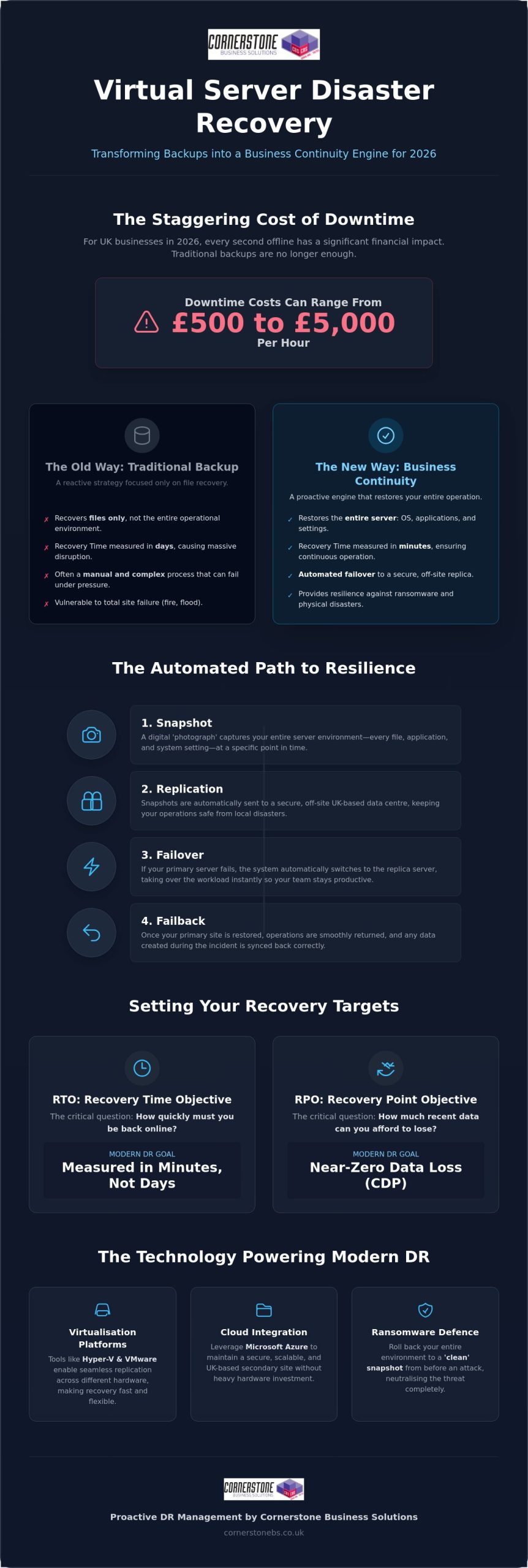
In the fast-paced business environment of 2026, simply having a copy of your files isn’t enough. Virtual server disaster recovery is the proactive process of replicating your entire virtual machine (VM) environment to a secure secondary site. This ensures that your operating systems, applications, and settings stay ready to go at a moment’s notice. It marks a vital shift from traditional data backup, which only stores files, to true business continuity, which restores your entire operation. We believe your digital infrastructure should be a source of confidence, not a cause for concern.
Think of it this way: traditional backup is like having a spare tyre in the boot, while business continuity is having a second car parked and running. For UK SMEs, the stakes have never been higher. Research shows that downtime costs in 2026 can range from £500 to £5,000 per hour. You can’t afford the ‘tape and transport’ recovery speeds of the past. Failover is the key mechanism here. It allows you to switch your operations to a replica server in seconds if your primary site fails. This strategy is built on fundamental disaster recovery principles that prioritise immediate uptime over slow, manual restoration.
Virtual vs. Physical Disaster Recovery: The Key Differences
The move to virtualisation has changed the game for resilience. Unlike physical recovery, which often requires identical hardware to be available, virtual machines are hardware-independent. This means your VMs can be restored to any host, anywhere. It eliminates the frantic search for matching server parts during a crisis. The speed of recovery is also incomparable. Instead of a manual OS reinstallation that takes hours, a VM can boot up almost instantly from a snapshot. This resource efficiency significantly reduces the cost of maintaining a secondary DR site, as you don’t need a 1:1 physical hardware match sitting idle.
The Role of Virtualisation in Modern Business Resilience
Platforms like Hyper-V and VMware have made seamless replication a reality for businesses of all sizes. These tools facilitate constant data movement across different hardware types, making it easier than ever to integrate a modern cloud solution that scales with your growth. As cybercriminals increasingly use AI to target SMEs, having ‘clean’ virtual snapshots becomes your best defence against ransomware. If an attack occurs, you don’t just recover data; you roll back your entire environment to a point before the infection took hold. This level of protection provides the emotional security and technical stability every business owner needs to thrive in 2026.
How Virtual DR Works: Replication, Snapshots, and Failover
Understanding the mechanics of your resilience provides the emotional security you need as a business owner. It starts with the snapshot. A snapshot is a digital ‘photograph’ of your entire server environment, capturing every file, application, and system setting at a specific microsecond. Unlike traditional file backups, this captures the state of the machine itself. It means you aren’t just saving data; you’re saving the ability to run that data immediately.
Once that snapshot is ready, the replication process takes over. This involves sending those snapshots to a secure, off-site location, such as a UK-based data centre. This ensures that even if your primary site is physically compromised, your operations stay safe. Failover is the automated process that kicks in when your primary server fails. Your replica server starts up instantly, taking over the workload so your team stays productive. Finally, failback allows you to return to normal operations once your primary site is restored, ensuring all data created during the incident is synced back correctly. If you’re unsure how these steps fit your current setup, our team can help you design a bespoke resilience strategy.
Continuous Data Protection (CDP) vs. Scheduled Backups
Continuous Data Protection (CDP) is the gold standard for businesses that can’t afford to lose a single transaction. It captures every change in real-time, offering near-zero data loss. In contrast, scheduled snapshots are better for less critical systems, balancing performance with protection. Point-in-Time Recovery is the ability to roll back your entire system to a specific healthy state before a corruption or infection occurred. This flexibility is a core benefit of modern virtual server disaster recovery, allowing you to choose the level of protection that fits each specific workload.
Ransomware Resilience Through Virtual Snapshots
In 2026, cybercriminals use AI to encrypt data at record speeds, making recovery a race against time. Immutable snapshots are your ultimate defence because they cannot be changed or deleted by ransomware once they’re written. We also use isolated ‘sandboxes’ to test these replicas before they go live. This ensures you aren’t just restoring an infected system back into your network. These robust cyber security services work hand-in-hand with your DR plan to provide a truly ‘clean’ recovery and total peace of mind.
Cloud-Integrated DR: Leveraging Azure for UK Business Continuity
Disaster Recovery as a Service (DRaaS) has fundamentally changed how UK businesses approach resilience. By moving your secondary site to the cloud, you eliminate the need for expensive physical hardware that sits idle in a back room. This cloud-integrated approach makes enterprise-level virtual server disaster recovery accessible for small and medium-sized firms. It removes the burden of maintaining a second set of servers, allowing you to focus on growing your business while we handle the technical heavy lifting. We see this as a foundational element of your emotional security, knowing your operations are backed by the world’s most robust infrastructure.
Microsoft Azure provides a scalable, secure secondary site that grows with your needs. One of the most compelling advantages is the ‘Pay-as-you-go’ model. In a traditional setup, you’d pay for the power and cooling of a secondary site 24/7. With Azure, you only pay for the storage of your replicas until a disaster occurs. You only pay for compute power when you actually trigger a failover or run a scheduled test. This efficiency ensures your budget is spent on active growth rather than ‘just in case’ hardware, providing a clear financial advantage for proactive organisations.
Data sovereignty remains a top priority in 2026, especially with the recent implementation of the Data (Use and Access) Act 2025. We ensure your virtual replicas remain strictly within UK borders. By utilising Azure’s UK South and UK West regions, we guarantee that your data never leaves the country. This compliance is essential for firms in regulated sectors like finance or legal, where data residency is a legal requirement. It’s about providing the clarity and trust you need to operate confidently in a complex regulatory landscape.
Hybrid Cloud DR Strategies
Combining your on-premise virtual servers with cloud-based recovery targets creates a flexible hybrid environment. This setup relies on high-speed connectivity to maintain low RPOs, ensuring your cloud replica is always just seconds behind your live data. Many of our partners choose to manage a Microsoft 365 migration alongside their server DR plan. This creates a unified, cloud-first strategy where your email, files, and server applications are all protected by the same resilient backbone.
Automating Failover with Azure Site Recovery
Azure Site Recovery (ASR) is the engine that automates the orchestration of complex server boots. In a crisis, you don’t want to be manually starting servers and checking dependencies. ASR uses ‘Recovery Plans’ to handle multi-tier applications, ensuring your database starts before your web server. Automation reduces human error during high-stress recovery events, which is when mistakes are most likely to happen. It turns a potential catastrophe into a controlled, predictable process that gets your team back to work in minutes.
Setting Your Targets: Understanding RTO and RPO Goals
Building a resilient business requires more than just buying software. It requires clear targets that reflect your specific operational needs. Your Recovery Time Objective (RTO) is the maximum amount of time your business can survive without its IT systems. Think of it as your “downtime tolerance.” On the other hand, your Recovery Point Objective (RPO) defines how much data you can afford to lose between backups. If you back up every hour, your RPO is 60 minutes. Setting these targets is a foundational step in any virtual server disaster recovery plan. It ensures your technical setup aligns with your commercial reality and provides the peace of mind you deserve.
Not every server needs the same level of protection. We recommend categorising your infrastructure into three distinct tiers to manage costs and recovery speeds effectively:
Mission Critical: Systems that must be restored in minutes, such as customer-facing portals or ERP systems.
Business Important: Systems that can stay offline for a few hours without halting the entire firm, like internal file shares.
Non-Essential: Systems that can wait a day or more for restoration, such as archived data or legacy reporting tools.
Calculating the financial impact of downtime is vital for your strategy. As we mentioned earlier, downtime for UK SMEs in 2026 can cost up to £5,000 per hour. If your business loses £2,000 per hour in productivity and sales, a 4-hour RTO could cost you £8,000 per incident. Understanding these numbers helps you justify the investment in a proactive managed service that keeps your doors open. If you need help mapping out these objectives for your team, our experts can guide you through a comprehensive business impact analysis.
The 3-2-1-1-0 Rule for Modern Data Protection
Modern threats require modern rules. In 2026, we follow the 3-2-1-1-0 rule to ensure total resilience for your virtual environment. This means keeping 3 copies of your data on 2 different media, with 1 copy stored off-site. The critical additions for today’s landscape are 1 “air-gapped” copy and 0 errors. An air-gapped virtual copy is physically or logically isolated from your network, making it impossible for ransomware to reach. To achieve “0 errors,” we implement automated verification. This ensures your data isn’t just stored; it’s actually bootable and corruption-free when you need it most.
Testing Your DR Plan Without Disrupting Production
A disaster recovery plan is only as good as its last successful test. If you haven’t tested your recovery process in the last 6 months, you’re essentially flying blind. Virtualisation offers a massive advantage here through non-disruptive testing. We can spin up your replica servers in an isolated network “sandbox” to verify everything works perfectly without touching your live production environment. This allows us to refine your “Disaster Recovery Playbook,” which is a step-by-step guide your internal team can follow during a crisis. It turns potential panic into a practiced, calm routine.
Cornerstone Business Solutions: Proactive DR Management
Choosing the right technology is only half the battle. The true strength of your resilience lies in the hands of those who manage it. As a multi-award-winning IT provider, we don’t just sell software; we deliver a promise of continuity. Our partnerships with global leaders like Microsoft, IBM, and Cisco ensure your virtual server disaster recovery strategy is built on a world-class technology stack. We take pride in being more than a service provider. We’re your long-term partner, dedicated to shielding your business from the unexpected while you focus on your next big milestone.
Our proactive approach is designed to stop disasters before they start. We provide 24/7 system monitoring that identifies potential points of failure, such as storage bottlenecks or replication lag, in real-time. By fixing these issues before they escalate, we remove the emotional burden that often comes with managing complex IT infrastructure. You can rest easy knowing that a team of local experts is watching over your systems, ensuring your failover capabilities are always ready to trigger at a moment’s notice.
Bespoke DR Solutions for UK SMEs
A one-size-fits-all software package rarely accounts for the unique workflows that make your business successful. We believe every organisation requires a customised touch. Our process begins with a deep-dive audit of your current environment, followed by the design and implementation of a plan that fits your specific RTO and RPO targets. We don’t just set it and forget it. We provide ongoing management and regular testing to ensure your plan remains effective as your business evolves.
For many of our partners, the most effective way to maintain this resilience is by integrating it into a wider Managed IT Support framework. This holistic approach ensures that your disaster recovery plan isn’t a standalone silo but a foundational part of your entire digital strategy. It creates a seamless experience where security, performance, and continuity all work together to support your growth.
The Cornerstone Advantage: Award-Winning Support
We’ve built our reputation on a blend of technical excellence and approachable, regional warmth. We know that IT can feel overwhelming, so we make it our mission to simplify complex concepts. You won’t find us hiding behind dense jargon. Instead, you’ll find a friendly team that speaks clearly about what your business needs to stay stable and secure. Our commitment to exceptional customer service has earned us numerous accolades, but our greatest reward is the trust and success of the businesses we support.
Is your current resilience plan ready for the challenges of 2026? We’d love to help you find out. We invite you to an informal, no-obligation conversation about your current setup and how we can help you achieve total peace of mind. Let’s work together to ensure your data is stored securely in the UK and your operations are protected by a partner who truly cares about your success.
Build a Resilient Future for Your Business
As a multi-award-winning IT provider and expert partner to Microsoft, IBM, and Cisco, we’re here to guide you. Our 24/7 proactive system monitoring identifies risks before they become disasters, giving you the freedom to focus on your growth. It’s time to move away from “set and forget” software and toward a partnership built on reliability and local expertise. We invite you to secure your business continuity with a bespoke Disaster Recovery plan from Cornerstone. Let’s have a conversation and get your resilience strategy right together.
Frequently Asked Questions
What is the difference between backup and disaster recovery?
Backup is the process of storing copies of your files, while disaster recovery is the strategy for restoring your entire operation. A backup allows you to retrieve a lost document, but it won’t help you run your business if your server hardware fails. Disaster recovery ensures your applications and operating systems are ready to boot up immediately, keeping your team productive while the primary issue is resolved.
How often should we test our virtual server disaster recovery plan?
We recommend testing your plan at least every six months. Your IT environment changes constantly as you add new users, software, or data. Regular testing ensures that your virtual server disaster recovery process remains valid and that your team knows exactly what to do during a crisis. Automated testing in isolated “sandboxes” allows us to verify your resilience without ever disrupting your live production systems.
Can we use virtual DR to recover from a ransomware attack?
Yes, virtual DR is one of the most effective ways to recover from a ransomware attack. By using immutable snapshots, we can roll your entire server environment back to a “clean” state from just before the infection took hold. This allows you to bypass the need for a decryption key and get your business back online without paying a ransom or losing weeks of progress.
Is virtual server disaster recovery more expensive than traditional methods?
Virtual disaster recovery is often more cost-effective than traditional methods because it eliminates the need for expensive, idle hardware. In the past, you needed a second physical server room with matching equipment. Today, cloud-based solutions allow you to pay only for the storage you use, with compute costs only kicking in during an actual disaster or a scheduled test. It’s a smarter way to manage your budget.
What is a ‘failover’ and how long does it typically take?
Failover is the automated process of switching your operations from a failed primary server to a healthy replica. In a well-designed virtual server disaster recovery setup, this typically takes just a few minutes. It ensures that your critical applications stay available to your staff and customers even if your main office loses power or suffers a major hardware failure.
Does my business need a secondary physical site for disaster recovery?
No, you don’t need a secondary physical site of your own. Modern cloud platforms like Microsoft Azure act as your secondary location. We replicate your servers to secure UK data centres, which removes the cost and complexity of maintaining your own off-site facility. This approach provides enterprise-level resilience for small and medium-sized businesses without the traditional overhead.
How does virtual server DR help with UK compliance and data regulations?
It ensures your data stays within UK borders to meet strict sovereignty requirements. With the implementation of the Data (Use and Access) Act 2025, knowing exactly where your replicas are stored is vital for compliance. We use UK-based data centres to ensure your business remains on the right side of the law while providing the high level of security your clients expect.
Can Cornerstone manage my disaster recovery if my servers are already in the cloud?
Yes, we can manage your disaster recovery even if your primary servers are already in the cloud. We provide proactive monitoring and management for cloud-to-cloud or hybrid environments. Our team ensures that your cloud replicas are healthy, tested, and ready to go. We act as your long-term partner, handling the technical complexity so you can focus entirely on running your business.
Would you still pay for a 50-seater bus if your team only had five people? Many North East business leaders are doing exactly that with their IT, running physical hardware at less than 15% capacity while footing the bill for 100% of the power and cooling. It’s an expensive way to operate, especially when a single hardware failure can halt your operations for days. At Cornerstone Business Solutions, we believe your virtual server strategy should be about efficiency and growth, not just keeping the lights on. You need technology that works as hard as you do, without the constant worry of a “server down” notification or the £5,000 bill for an emergency hardware replacement.
We agree that IT should provide total peace of mind rather than a mounting list of maintenance tasks. This guide explains how virtualisation transforms your infrastructure into a resilient, high-performance asset that scales instantly. You’ll discover the clear ROI of moving away from physical boxes, learn why software-defined systems outperform traditional hardware, and see how to build a foundation for a more agile business in 2026. We’re previewing the exact steps our award-winning team uses to reduce your IT footprint while significantly boosting your operational reliability.
Key Takeaways
Understand how a virtual server separates software from physical hardware to unlock greater flexibility and agility for your growing business.
Learn why moving away from the “one app, one box” model eliminates wasted resources and ensures your IT budget works harder for you.
Discover how virtualisation strengthens your business continuity by allowing seamless movement between hosts without costly downtime.
Explore how to consolidate aging infrastructure and extend the life of critical legacy applications using modern, high-performance environments.
See why a tailored migration plan from an award-winning managed partner provides the peace of mind needed for a successful transition.
Understanding the Virtual Server: A Simple Definition for Business Leaders
In the past, growing a company meant filling a cupboard with expensive, noisy hardware. Each new application often required its own physical box. A virtual server changes this dynamic by using software to emulate a physical computer. It’s a digital version of a server that runs on a physical host machine but acts exactly like an independent piece of hardware. This shift allows your IT setup to become more agile, reducing the need for sprawling server rooms that eat up your budget and office space.
The magic happens through a process called abstraction. This technology separates the operating system and applications from the physical metal of the machine. To understand how this works, think of your physical hardware as an apartment building. In the traditional model, one tenant occupied the entire building, wasting most of the space. With a virtual server, that same building is divided into several private, high-quality flats. Each flat has its own front door and security, but they all share the foundational resources of the building. For a foundational overview of these concepts, you can read about What is Virtualisation? via Wikipedia. This setup ensures your business stops paying for unused capacity.
The Role of the Hypervisor
The hypervisor acts as the building manager or a dedicated traffic warden for your hardware. It’s a thin layer of software that sits between the physical box and the virtual environments. It manages resources like CPU and RAM, handing them out to whichever “flat” needs them most at that moment. If one environment experiences a software crash, the others continue running without a hiccup. This isolation prevents a single failure from bringing down your entire network. Our award-winning team focuses on this stability to give North East business owners total peace of mind.
Virtual Server vs. Virtual Machine: Is There a Difference?
You’ll hear these terms used interchangeably in meetings. Technically, a Virtual Machine (VM) is the container technology itself. A virtual server is simply a VM that performs the role of a server. For a business leader, the distinction is minor. The outcome is a robust, tailored platform that scales as you do. Since 2022, data from Gartner shows that over 80% of server workloads are now virtualised. We treat this as the foundation for your business growth, ensuring you have a seamless platform that’s ready for 2026 and beyond.
Virtual vs. Physical Servers: Breaking Down the Core Differences
Traditional IT infrastructure once relied on the “one app, one box” model. If your business needed a new email server or a database, you bought a new physical machine. This approach is incredibly wasteful. Most physical servers sit 80% idle, consuming electricity and expensive rack space while doing very little. Our award-winning team here in the North East sees businesses transform their efficiency when they move away from this rigid setup. By using a virtual server, you run multiple applications on a single physical host, making every pound of your hardware budget work harder.
Understanding what a virtual server is helps clarify this shift. It’s about decoupling your software from the physical hardware. You no longer have to wait weeks for a courier to deliver a new server and then spend days configuring it. You can deploy a new environment in minutes. This agility is a primary reason why 92% of large enterprises now use virtualisation to stay competitive.
Some business owners worry about putting all their eggs in one basket. They fear a “single point of failure” where one hardware glitch takes down everything. In reality, modern virtualisation increases redundancy. Our setups use clusters that allow a virtual server to automatically jump to another physical host if a fault is detected. It’s more resilient than a standalone physical box ever could be. This proactive approach provides the peace of mind that your operations will stay online regardless of hardware hiccups.
Hardware Efficiency and Cost Savings
Consolidating your infrastructure means a much smaller physical footprint. You’ll see a direct reduction in cooling costs and power bills within your data centre environment. Virtualisation also extends the lifecycle of your investment. You aren’t forced to replace hardware every three years just to keep up with software demands. For a deeper look at maximising your equipment, explore The Ultimate Business IT Hardware Guide.
Scalability and Flexibility
Growth should be a celebration, not a technical headache. With a virtual setup, you can simply “dial up” RAM or CPU resources as your team expands. You avoid the dreaded “forklift upgrade” where old hardware is ripped out and replaced at great expense. This flexibility supports a “pay-as-you-grow” financial model, keeping your cash flow healthy as you scale. If you’re curious about how this fits your specific business goals, we’re always happy to have a quick chat about your infrastructure.
The Strategic Benefits: Why UK Businesses are Moving to Virtualisation
UK business leaders are prioritising resilience more than ever. Virtualisation delivers this through a feature called live migration. If a physical host requires maintenance or develops a fault, your virtual server moves to another machine instantly. This happens without any downtime for your staff. It transforms IT from a reactive “fix it when it breaks” cost centre into a proactive asset that supports 24/7 operations. Pairing this with comprehensive IT company solutions ensures your entire technology strategy is aligned with your business growth goals.
Security is another area where virtualisation excels. By isolating applications in their own dedicated environments, you contain risks. If one piece of software is compromised, the threat cannot easily spread to the rest of your network. This digital “sandboxing” provides a level of protection that physical setups struggle to match. It’s a core reason why our award-winning team recommends this approach for companies handling sensitive client data.
The “Snapshot” feature is perhaps the most popular tool for providing peace of mind. Before performing any major system updates, we take a point-in-time image of the server. If the update causes an unexpected conflict, we roll the entire system back to its previous state in seconds. It removes the risk from digital transformation. Common use cases for virtual servers often include these testing environments, ensuring your live production stays stable while you innovate.
Enhanced Disaster Recovery
Traditional backup methods are often slow and prone to human error. Virtualisation simplifies this by treating your entire virtual server as a single, portable file. This makes off-site replication fast and reliable. For many of our North East partners, this has reduced Recovery Time Objectives (RTO) from 24 hours to less than 15 minutes. This high-speed recovery is the foundation of a robust cloud solution that keeps your business running regardless of local hardware failures.
Simplified IT Management
Our centralised management consoles allow for a bird’s-eye view of your entire infrastructure. We monitor the health of your systems in real-time, often spotting and resolving hardware bottlenecks before your team even notices a slowdown. This efficiency has led to a 40% reduction in emergency on-site repairs for our clients. Instead of waiting for a technician to travel across the region, most optimisations happen remotely and instantly. It’s a cleaner, faster way to manage growth without the clutter of extra physical machines.
Common Use Cases: How Virtual Servers Solve Real-World IT Challenges
Server Consolidation
Imagine a typical local business running three separate, aging servers for Email, File Storage, and Accounts. Each unit consumes power, requires individual maintenance, and carries a risk of hardware failure. By moving these roles onto a single, robust physical host, you can run three independent virtual machines simultaneously. This move typically reduces hardware maintenance costs by up to 50% and slashes energy bills. While you might be weighing up the ROI of repairing laptop hardware for your team, centralising your server infrastructure offers a far more significant impact on your bottom line. It simplifies your backup routine and ensures your core business data is housed on modern, reliable equipment.
Legacy Support and Secure Testing
Business continuity often depends on specific software that only runs on older operating systems. You don’t have to risk your entire network to keep these tools alive. A virtual server allows you to host legacy applications in an isolated environment, keeping them away from your primary systems. This isolation is also perfect for testing. If you want to trial a new software update or a complex configuration, you can do it in a “sandbox” virtual machine. If it crashes, your live business operations remain completely unaffected. It provides the freedom to innovate without the fear of downtime. This is especially relevant for businesses planning a Windows 11 upgrade, where virtualisation allows you to test compatibility with legacy applications before committing to a full migration.
Remote Access and Hybrid Work
Our award-winning team frequently uses virtualisation to power the “anywhere office.” Through Virtual Desktop Infrastructure (VDI), your staff can access their familiar desktop environment from any location. This setup creates a seamless synergy with Microsoft Azure solutions, providing a hybrid cloud experience that feels local. The security benefits are clear. Because the data stays on the central server, it never actually lives on a staff member’s home device. Even if a laptop is lost in transit, your business intelligence remains locked safely behind your perimeter. It provides total peace of mind for the modern, mobile workforce.
Implementing Virtualisation: Why a Managed Partner is Key to Peace of Mind
Virtualisation is a powerful tool, but it isn’t a “set and forget” solution. While the core concept is straightforward, the execution requires award-winning expertise to ensure your infrastructure remains stable as you scale. We’ve seen that successful transitions depend on a strategy that balances technical precision with your specific business goals. Our role is to manage this complexity, allowing you to focus on your North East business while we handle the digital heavy lifting.
A “right-sized” migration plan is the foundation of a healthy IT budget. Many businesses over-provision resources, which can inflate hardware or cloud costs by 25% without delivering any performance gains. We analyse your actual usage patterns to ensure the resources allocated to your virtual server match your real-world needs. Once live, ongoing monitoring becomes the heartbeat of your system. We track metrics in real-time to maintain peak performance and prevent bottlenecks before they impact your staff.
The Migration Journey
Moving to a virtual environment is a structured process designed to protect your operations. We follow a proven four-step path to ensure a smooth transition:
Audit: We evaluate your existing physical hardware and software dependencies.
Design: Our team creates a bespoke virtual architecture tailored to your 2026 growth plans.
Pilot: We test the environment with non-critical workloads to verify stability.
Migration: The final move is executed with a focus on zero data loss and minimal downtime.
Physical to Virtual (P2V) migration is the standard industry transition that converts your physical server’s operating system and data into a digital format. This process ensures your legacy applications continue to run perfectly on modern, efficient hardware.
The Value of Managed IT Support
Our Managed IT Services provide a vital layer of security and performance tuning over your infrastructure. We don’t just wait for things to break. We use proactive 24/7 monitoring to spot potential issues, from security vulnerabilities to resource spikes, ensuring total peace of mind for your leadership team. It’s about building a robust foundation that supports your business day and night.
Technology should be an engine for your growth, not a source of stress. If you’re feeling limited by your current hardware or worried about the risks of a transition, we’re here to help. Let’s have a chat about your current infrastructure challenges and how we can build a more resilient future for your business together.
Future-Proof Your Business Infrastructure
As a multi-award-winning IT services provider, Cornerstone Business Solutions doesn’t just set up your tech. We act as your long-term partner. Our official partnerships with Microsoft, IBM, and Cisco mean your transition is backed by global expertise and local care. We provide proactive 24/7 system monitoring for total peace of mind, ensuring your systems stay online while you focus on your core goals. We’re here to simplify the complex so you can lead with confidence. Explore our full range of IT company solutions to see how a strategic technology partnership can deliver predictable costs and a secure environment tailored to your specific goals.
Is a virtual server more secure than a physical one?
Yes, a virtual server provides a more robust security posture by isolating your business functions into separate, secure environments. This means if one area faces a threat, the rest of your network remains protected. Our award-winning team ensures your data is backed up frequently, offering vital protection against the 400% increase in cyber-attacks reported by UK businesses in recent years.
Will my software run on a virtual server?
Almost certainly, as most modern business applications are designed to be virtual-aware from day one. You can even run legacy software on modern hardware by emulating the specific environment it needs. This approach gives you the peace of mind that your essential tools will continue to work perfectly as you upgrade your infrastructure.
How much does it cost to switch to a virtual server?
Switching typically results in a lower Total Cost of Ownership (TCO) because you’re buying less physical hardware. You’ll see immediate savings on electricity, cooling, and maintenance time, which can reduce IT operational costs by up to 30% according to industry benchmarks. We’ll help you build a tailored plan that fits your budget and supports your long-term growth.
Do I still need physical hardware if I use virtual servers?
You still need physical hardware to act as a host, but you’ll require far fewer machines than a traditional setup. Instead of running five separate servers for five different tasks, you can use just one or two robust physical hosts to run dozens of virtual servers. This efficiency is a core reason why 80% of UK mid-sized businesses have already adopted some form of virtualisation.
What happens if the physical host fails?
Your business stays online because modern virtualisation uses High Availability clusters to prevent downtime. If one physical host fails, your virtual servers automatically and instantly move to another host in the network. This proactive setup ensures zero or minimal interruption, keeping your team productive and your customers happy.
Is a virtual server the same as the “Cloud”?
They aren’t the same, but virtualisation is the underlying technology that makes the cloud possible. You can opt for a private cloud on your own North East premises or use a public cloud hosted by providers like Microsoft Azure. We’ll have a chat with you to decide which path offers the best partnership for your specific business goals.