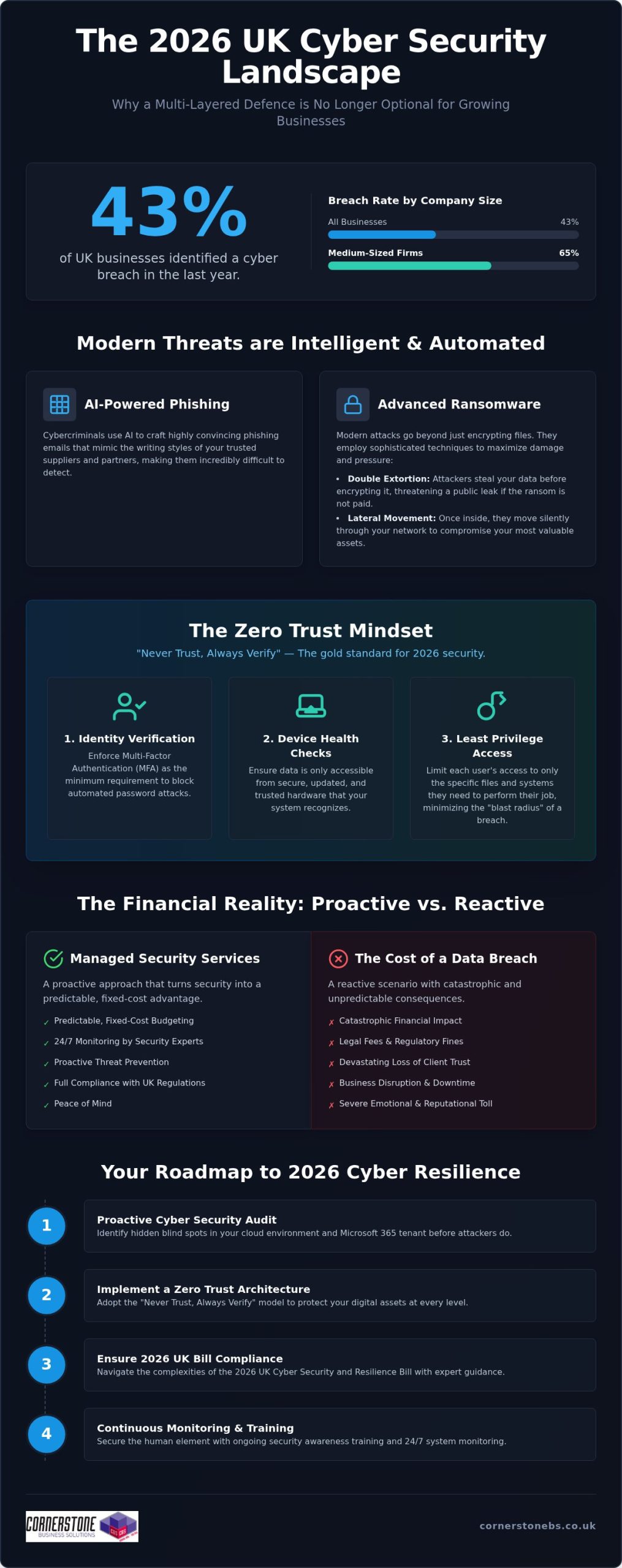
If you think a growing business is too small to be a target, consider that 43% of UK companies reported a breach in the last year alone. For any ambitious firm, cyber security newcastle services are no longer just a technical tick-box; it’s the foundation of your survival. It’s completely normal to feel overwhelmed by the constant threat of ransomware or the confusing jargon surrounding the new 2026 UK Cyber Security and Resilience Bill. You want to focus on your growth, not worry about whether your data is safe while you sleep.
This guide will show you how to build a multi-layered defence that protects your continuity and, more importantly, your emotional peace of mind. We’ll break down the latest 2026 compliance standards, demystify technical terms like Zero Trust, and provide a clear roadmap to ensure your systems are monitored every second of every day. By the end, you’ll see how security can integrate seamlessly with your daily workflow without slowing you down. Let’s work together to turn your security from a source of anxiety into a competitive advantage.
Key Takeaways
Understand why AI-driven phishing and sophisticated ransomware make every UK business a target in 2026, regardless of company size.
Learn how to implement a Zero Trust architecture to protect your digital assets, following the “Never Trust, Always Verify” principle.
Navigate the complexities of the 2026 UK Cyber Security and Resilience Bill with expert cyber security newcastle guidance to ensure full legal compliance.
Discover why a proactive cyber security audit is the first essential step toward securing your cloud environment and Microsoft 365 tenant.
Compare the predictable, fixed-cost benefits of managed security services against the catastrophic financial and emotional impact of a data breach.
The Reality of Modern Cyber Threats for UK Businesses
In 2026, the digital landscape has shifted from simple viruses to highly automated, intelligent threats. AI isn’t just a tool for business growth; it’s now the primary engine behind sophisticated phishing campaigns that mimic your suppliers’ writing styles with terrifying accuracy. According to the Cyber Security Breaches Survey 2025/2026, 43% of UK businesses identified a breach in the last year. This figure jumps to 65% for medium-sized firms. As a dedicated partner for cyber security newcastle, we see how these global threats target our local business community, proving that no company is too small to be a target.
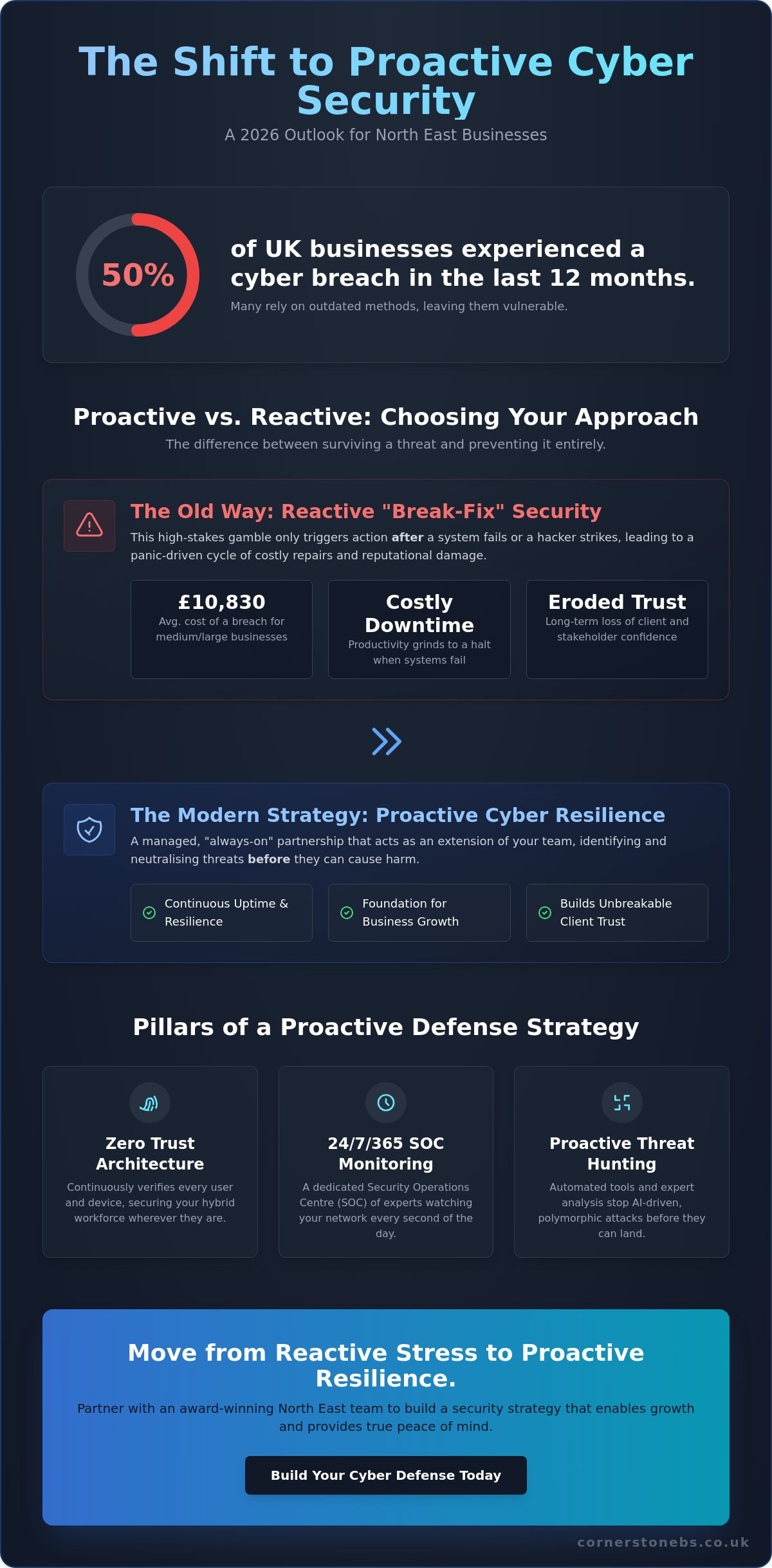
The damage from a modern attack extends far beyond a temporary IT glitch. You face the “hidden costs” of recovery, such as legal fees, regulatory fines under the 2026 Cyber Security and Resilience Bill, and a devastating loss of client trust. Moving from a reactive “firefighting” mode to a proactive security posture is the only way to protect your reputation. It’s about building a culture where security is a foundational element of your stability, not an afterthought.
The Anatomy of a 2026 Ransomware Attack
Modern ransomware has evolved to bypass traditional antivirus software by using “fileless” techniques that hide in your system’s legitimate processes. Attackers now favour “double extortion,” where they don’t just encrypt your files, they steal them first and threaten a public leak. This puts immense pressure on boards to pay, even if they have backups. Lateral movement is the technique where an attacker, after gaining initial access, spreads through your internal network to identify and compromise high-value assets and data. Once they’ve mapped your infrastructure, the damage is often done before you even see a ransom note.
Why Basic Protection is No Longer Enough
Off-the-shelf security software provides a false sense of security for a modern enterprise. These tools are often static and cannot adapt to the rapid pace of AI-driven attacks. Effective protection requires 24/7 monitoring because cybercriminals don’t work nine-to-five. Many global standards, such as the NIST Cybersecurity Framework, highlight that detection and response are just as vital as prevention. Human error remains a persistent vulnerability, with phishing experienced by 38% of UK businesses. Without expert cyber security newcastle guidance and continuous staff training, a single misplaced click can bypass even the most expensive firewall. Relying on basic tools leaves your business exposed to the unpredictable expenses of breach recovery.
Implementing a Multi-Layered Cyber Security Strategy
A single lock on your front door isn’t enough if someone has a master key. In the digital world, we call the solution “defense in depth.” This multi-layered approach ensures that if one security measure fails, others are ready to catch the threat. For businesses seeking reliable cyber security newcastle, this strategy is the gold standard for 2026. It moves away from the old idea of a “secure perimeter” and assumes that threats could already be inside your network. By integrating Microsoft 365 security features, you can set granular controls that protect your emails and files automatically. These tools act as a core foundation, providing encryption and threat protection that scales with your business growth. However, technology alone isn’t a silver bullet. You need regular cyber security audits to identify hidden blind spots in your infrastructure before attackers do.
The Core Pillars of Zero Trust
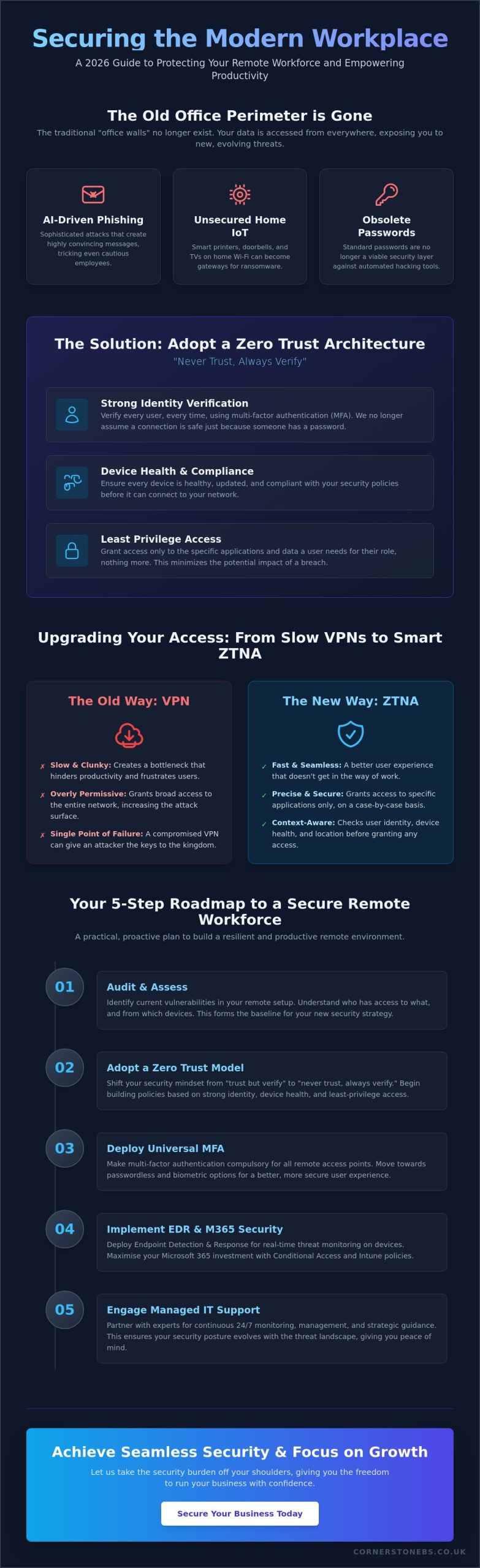
Zero Trust isn’t a single product; it’s a mindset that requires continuous verification. To make it work for your business, we focus on three specific areas that create a robust barrier against intruders.
Identity verification: Multi-Factor Authentication (MFA) is your absolute minimum requirement. It stops the vast majority of automated password attacks by requiring a second form of proof.
Device health checks: Your data should only be accessible from secure, updated hardware that your system recognises and trusts.
Least privilege access: Users should only have access to the specific files they need for their job. This simple step limits the “blast radius” if an account is ever compromised.
Securing the Human Element
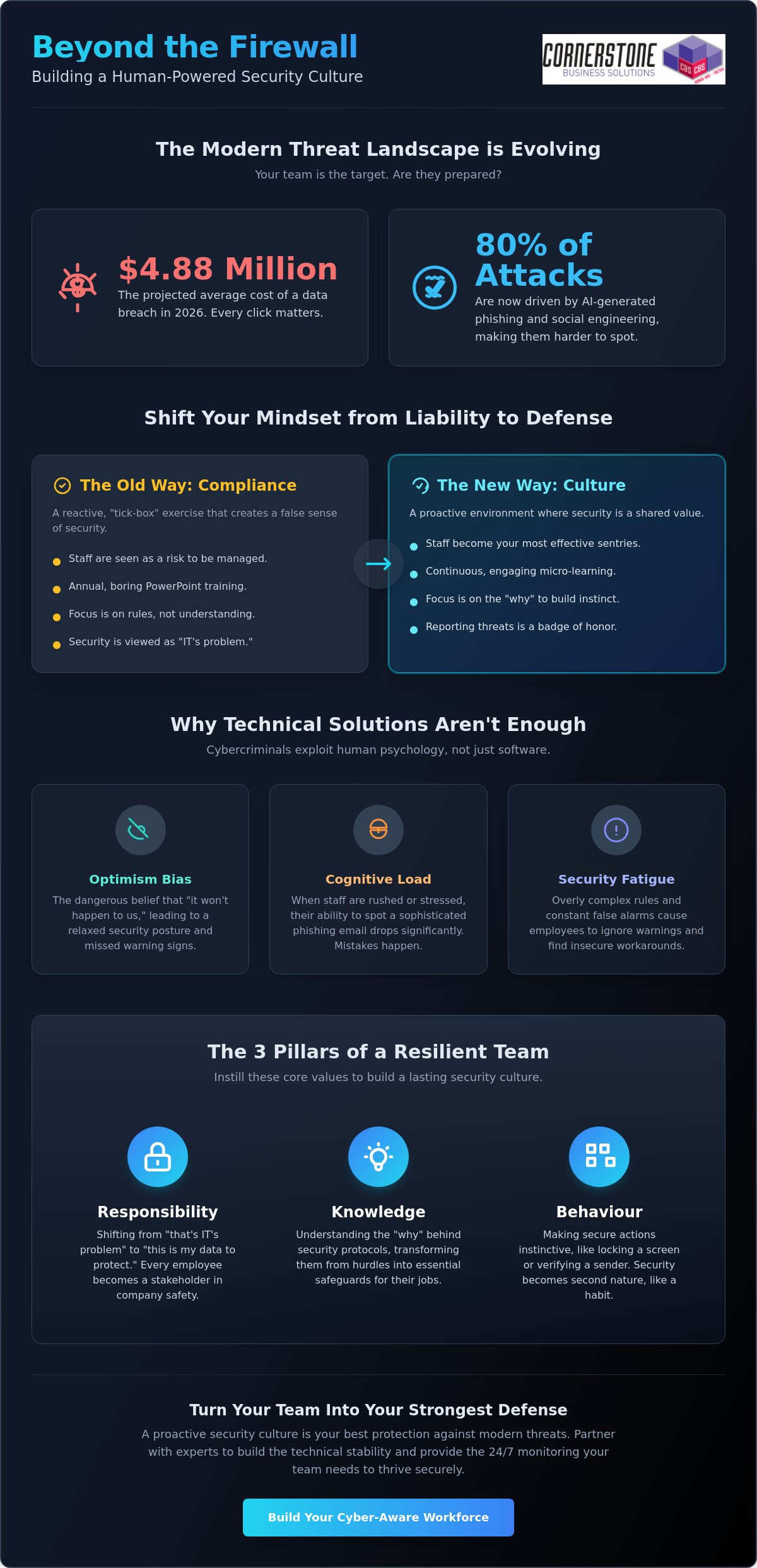
Technology provides the shield, but your team holds it. The NCSC’s Small Business Guide emphasizes that people are often the first line of defence. Security Awareness Training turns your employees from a potential vulnerability into a human firewall. We use simulated phishing attacks to help your team recognise real-world threats in a safe environment. This isn’t about catching people out; it’s about building confidence and awareness. When everyone takes responsibility for security, it creates a resilient culture that protects your business continuity. It’s about empowering your staff to be proactive and calm. If you’re looking to strengthen your cyber security newcastle, starting with your people is one of the smartest investments you can make. It builds a long-term partnership between your IT systems and the people who use them every day.
Managed Security Services vs. In-House Management
A SOC is a dedicated hub where experts monitor your digital environment every second of the day. It’s the difference between an automated alert that sits in an inbox and an expert-led incident response that stops a threat in its tracks. While basic software might flag a problem, our SOC team investigates the “why” and “how” to prevent a recurrence. You can explore our full range of cyber security services to see how this proactive monitoring forms the backbone of your business resilience.
Compliance and Regulatory Peace of Mind
Staying compliant with UK GDPR and the 2026 Cyber Security and Resilience Bill is a full-time job. We simplify this process by managing your Cyber Essentials certifications and ensuring your systems meet the latest legal standards. Using the NCSC Small Business Guide as a foundation, we help you navigate complex legal obligations with clarity. This proactive management doesn’t just protect you from fines; it also makes your annual insurance renewal much smoother. Insurers want to see that you have a professional partner handling your cyber security newcastle needs. It proves you’re a lower risk, which can lead to better coverage terms and total peace of mind.
Building Your 2026 Cyber Resilience Roadmap
Resilience isn’t a state of being; it’s a process of constant improvement. To stay ahead of modern threats, you need a clear, actionable plan that evolves alongside your business. For leaders seeking cyber security newcastle, this roadmap provides the structure needed for operational stability and long-term growth. It moves you away from “hope-based” security toward a model of verified protection. By following these four steps, you can transform your digital infrastructure from a potential liability into a robust asset.
Step 1: Conduct a comprehensive cyber security audit and risk assessment.
Step 2: Secure your cloud environment and Microsoft 365 tenant.
Step 3: Implement robust backup and disaster recovery protocols.
Step 4: Establish a continuous monitoring and improvement cycle.
The Audit: Finding Your Weakest Link
Backup and Disaster Recovery
Data protection is the final safety net for your business continuity. We adhere to the 3-2-1 backup rule, which is the national standard for data protection: three copies of your data, stored on two different media types, with at least one copy held securely off-site. However, having a backup is only half the battle. You must test your recovery speed to ensure your Recovery Time Objective (RTO) and Recovery Point Objective (RPO) align with your business needs. It’s about how quickly you can get back to work after an incident, not just how much data you saved. You can find more about our infrastructure support through our managed IT services. We’re here to ensure your cyber security newcastle strategy is backed by a rock-solid foundation. Book your security audit today to start building your own resilience roadmap.
Securing Your Future with Cornerstone Business Solutions
Choosing a security provider is about more than just buying software; it’s about choosing a long-term technology and security partner. We don’t just sell services. We build relationships. Our multi-award-winning approach to bespoke cyber security solutions is designed to adapt as the threat landscape shifts. By leveraging our elite partnerships with Microsoft, Cisco, and IBM, we provide you with the same level of protection used by global enterprises. We’re committed to simplifying technology. We strip away the jargon and provide clear, actionable insights so you can focus entirely on your business growth. Our role is to ensure your cyber security newcastle strategy remains invisible but invincible.
The Cornerstone Difference: Proactive Partnership
We lead with solutions and business outcomes. While some firms might focus on the “how,” we prioritize the “why.” Our philosophy is built on being an “approachable expert.” This means you get world-class technical authority delivered with genuine regional warmth. We understand the specific challenges faced by businesses in our community because we share those same roots. We provide a foundation for your emotional security, giving you the confidence to make bold business decisions. When your infrastructure is managed by a proactive partner, you gain the stability needed to scale without fear.
Start Your Security Conversation Today
Your journey to resilience starts with a simple conversation. We invite you to a no-obligation discussion where we can look at your current security posture together. This isn’t a sales pitch; it’s an expert analysis of your specific risks and opportunities. We tailor our managed IT support to align with your national goals, ensuring your technology is an accelerator, not a bottleneck. We’ll show you how to integrate cyber security newcastle into your daily operations seamlessly. Don’t wait for a breach to find out where your gaps are. Speak with our award-winning team today and discover how a dedicated partnership can protect your future.
Empowering Your Future Through Digital Resilience
Building a resilient business in 2026 requires more than just reactive fixes; it demands a proactive, intelligent strategy that scales with your ambition. We’ve explored how AI-driven threats and evolving compliance laws make a multi-layered defense essential for every organization. By adopting a Zero Trust mindset and leveraging the expertise of a dedicated partner, you can transform your digital infrastructure into a pillar of stability. It’s about moving from a state of constant worry to one of complete confidence.
As a multi-award-winning IT services provider and official partner to Microsoft, Cisco, and IBM, we provide the proactive 24/7 monitoring you need for total peace of mind. Our team combines technical authority with the regional warmth you’d expect from a local expert. We’re here to protect your emotional and operational security so you can focus on your next big milestone. Ready to find your hidden vulnerabilities? We invite you to Book a Cyber Security Audit with our award-winning team today. Let’s work together to ensure your cyber security newcastle strategy is ready for whatever comes next. You’ve built something special, and we’re here to help you keep it safe.
Frequently Asked Questions
What is the most common cyber threat for UK businesses in 2026?
Phishing remains the most common threat, experienced by 38% of UK businesses according to 2026 data. These attacks have evolved using generative AI to create contextually aware content that mimics trusted suppliers with terrifying accuracy. Many firms also face “multi-extortion” ransomware where data is both encrypted and stolen. By prioritizing employee training and 24/7 monitoring, you can identify these deceptive attempts before they breach your primary digital defenses.
How much does managed cyber security cost for a mid-sized firm?
Costs for managed services are typically structured as a fixed monthly fee based on the number of users or devices in your organization. This model provides absolute budget certainty compared to the unpredictable expenses of a data breach. While we don’t provide a single flat rate, these bespoke solutions ensure you only pay for the protection your specific infrastructure requires. This investment covers proactive monitoring and enterprise-grade tools from partners like Cisco and IBM.
Is Cyber Essentials certification mandatory for all UK businesses?
Cyber Essentials isn’t legally mandatory for every UK business, but it’s often a requirement for government contracts and supply chain partnerships. Achieving this certification demonstrates that you’ve implemented foundational security controls against common threats. In 2026, the cost for self-assessment ranges from £300 to £600 plus VAT depending on organization size. We help simplify this process as part of our broader cyber security newcastle services to ensure your compliance is maintained year-round.
How does Zero Trust security differ from a traditional firewall?
A traditional firewall focuses on protecting the perimeter of your network, acting like a locked front door. Zero Trust assumes that threats could already be inside and operates on the principle of “Never Trust, Always Verify.” It requires continuous identity verification, device health checks, and least-privilege access for every user. This granular approach provides significantly better protection for hybrid teams and cloud environments than a static, outdated perimeter defense strategy alone.
Can managed security services help with NIS2 or GDPR compliance?
Managed services are essential for navigating complex regulations like GDPR and the 2026 UK Cyber Security and Resilience Bill. We provide specialized cyber security audits that identify gaps in your data handling and reporting protocols. Proactive management ensures that you meet the new 24-hour initial notification deadlines for harmful breaches. By maintaining continuous compliance, you protect your business from significant regulatory fines and build long-term trust with your national client base.
What is the first thing I should do if I suspect a data breach?
You should immediately isolate the affected devices from your network to prevent the threat from spreading further. Don’t turn the machines off, as this can destroy vital forensic evidence needed for an investigation. Your next step is to contact your managed security partner to trigger your incident response plan. Under 2026 UK legislation, you may have legal obligations to report the breach within 24 hours, making professional expert guidance vital for a swift recovery.
How often should my business conduct a cyber security audit?
We recommend conducting a comprehensive cyber security audit at least once a year. However, you should also perform an assessment whenever you implement major infrastructure changes, such as moving to a new cloud environment or adopting a hybrid work model. Regular audits help uncover “Shadow IT” and unsecured entry points that naturally emerge over time. This proactive cycle ensures your cyber security newcastle strategy stays aligned with the latest 2026 threat intelligence.
Why is Microsoft 365 security a priority for modern businesses?
Microsoft 365 is the operational hub for most UK businesses, making it a primary target for credential theft and phishing. Securing your tenant with Multi-Factor Authentication and advanced threat protection is a foundational step in your resilience roadmap. Because it houses your emails, files, and communication data, a compromise here can be catastrophic. We leverage our official Microsoft partnership to implement bespoke security features that protect your cloud data without disrupting your workflow.
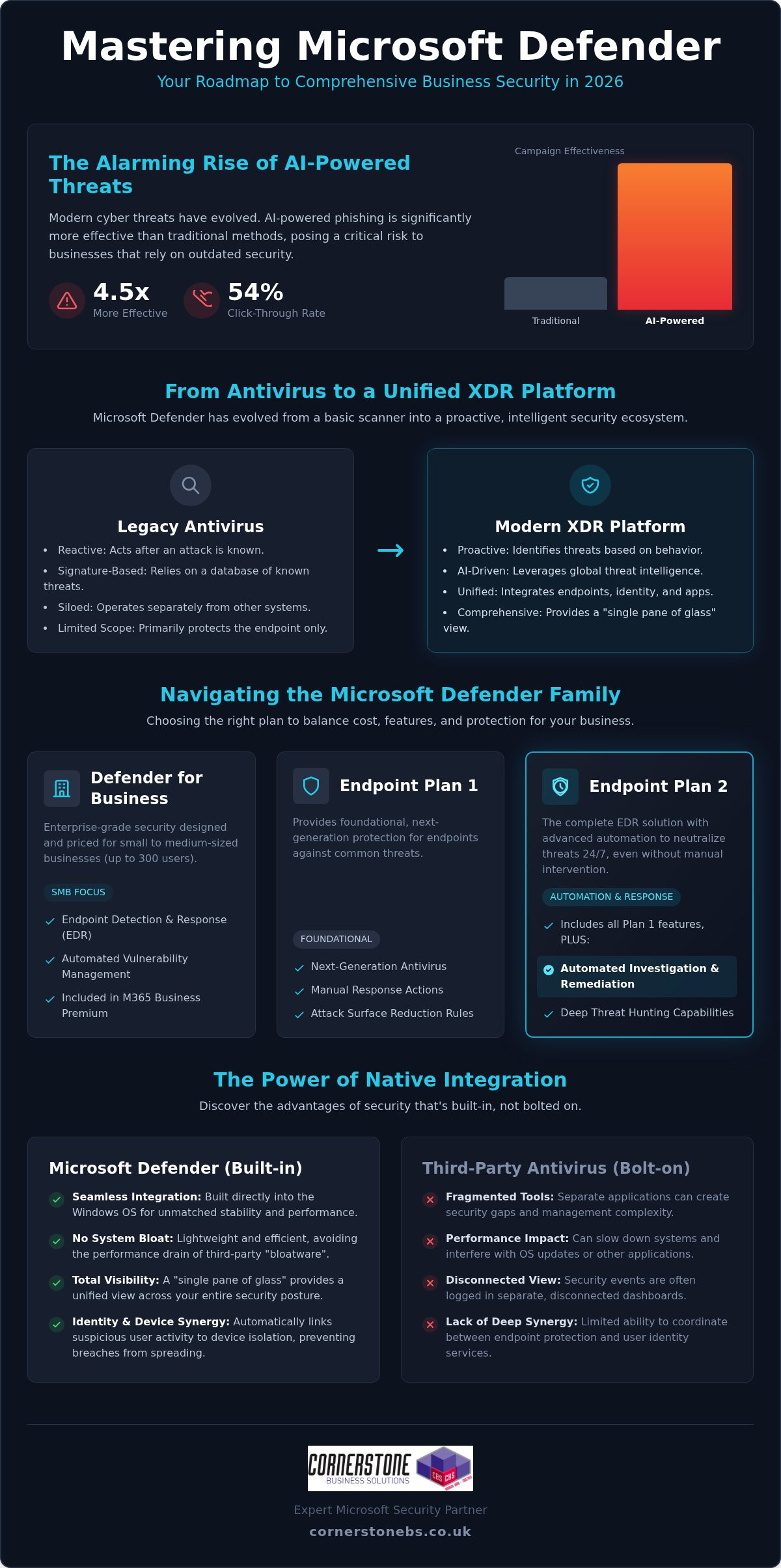
AI-powered phishing campaigns are now 4.5 times more effective than traditional methods, with click-through rates jumping to 54% in 2026. It’s a sobering reality that keeps many business owners awake at night, especially when paired with the constant threat of sophisticated ransomware. You likely already know that microsoft defender is a leader in the security world, but trying to navigate its confusing licensing tiers and complex policy configurations can feel like a full-time job you didn’t apply for.
We understand that you want robust protection without the headache of managing fragmented tools or worrying if your settings are actually correct. As a multi-award-winning Microsoft Partner, we’ve seen how the right setup provides true 24/7 peace of mind. This guide will help you master the entire Defender ecosystem, from Endpoint to Office 365. We’ll provide a clear roadmap for migrating from third-party antivirus software and explain exactly how to secure your infrastructure using expert-led insights. You’ll gain a straightforward strategy to keep your organisation resilient and your data safe.
Key Takeaways
Discover how microsoft defender has evolved into a comprehensive XDR platform that protects your business far beyond traditional, signature-based antivirus.
Clear the confusion around licensing tiers and identify exactly which version your organisation needs to balance cost with robust protection.
Learn why native integration offers a “single pane of glass” advantage, reducing system bloat while giving you total visibility over your security posture.
Establish a roadmap for enforcing a Zero Trust architecture, ensuring that every identity and device is verified before accessing your critical data.
Understand the vital role of expert configuration and proactive monitoring in transforming a security tool into a 24/7 managed defence system.
Beyond Antivirus: What is Microsoft Defender in 2026?
If you look at the history of Microsoft Defender, you’ll see a tool that began as a basic, reactive scanner for home users. Fast forward to 2026, and the landscape has changed completely. It has evolved into a sophisticated Extended Detection and Response (XDR) platform that serves as the bedrock for modern business security. It’s no longer just about catching a virus that’s already known to the world; it’s about providing a unified shield across your entire digital estate.
Modern cyber threats are far too fast for old-school, signature-based scanning. Attackers now use AI to create unique, never-before-seen malware every second. Because microsoft defender is part of a global threat intelligence network, it processes trillions of signals daily from around the world. When a new threat is detected in one corner of the globe, your systems are protected almost instantly. This scale of data allows your organisation to stay one step ahead of even the most sophisticated criminal groups.
The Shift from Reactive to Proactive Defence
Legacy antivirus waits for a match in a database before it acts. Modern endpoint protection, however, looks for patterns. By 2026, AI-powered phishing campaigns have become 4.5 times more effective than traditional methods, according to recent industry benchmarks. We use the advanced behavioral analysis within microsoft defender to spot these attacks before they execute. It identifies “zero-day” threats by monitoring what a file does, rather than just what it is. This proactive approach is essential for stopping ransomware before it can lock your critical data.
A Core Component of Microsoft 365
Security shouldn’t be an afterthought or a separate piece of “bloatware” that slows down your team’s laptops. Because Defender is built directly into the Windows operating system, it offers a level of performance and stability that third-party tools can’t match. It creates a seamless synergy between identity protection and device security. For example, if a user account shows suspicious login activity, the system can automatically isolate that specific device to prevent a breach from spreading through your network. Microsoft Defender is a unified security platform that provides real-time, AI-driven protection across your entire digital infrastructure in 2026.
This deep integration means your security policies follow your staff, whether they’re working from the office or a local coffee shop. It ensures your business continuity remains intact without requiring your team to manage complex, disconnected security apps.
Navigating the Microsoft Defender Family: Which Version Do You Need?
Choosing the right version of microsoft defender often feels like looking at a restaurant menu with too many options. For most UK businesses, the goal is simple: total protection without paying for enterprise features they’ll never use. The “Defender” brand covers a wide family of tools, each protecting a specific part of your digital environment. It’s about total visibility. We aim to help you cut through the noise and find the exact fit for your needs.
Microsoft Defender for Business (SMB Focus)
Defender for Endpoint Plan 1 vs. Plan 2
Understanding the difference between Plan 1 and Plan 2 is crucial for your long-term security roadmap. Plan 1 provides foundational protection, including next-generation antivirus and attack surface reduction. However, Plan 2 is where the real power lies. It introduces automated investigation and remediation, which means the system can automatically neutralise threats while your team sleeps. This is a game-changer for business continuity.
Plan 1: Best for basic security needs and standard device protection.
Plan 2: Essential for firms requiring deep threat hunting, sandboxing, and advanced forensics.
Choosing Plan 2 often helps organisations align more easily with national compliance standards like Cyber Essentials. It provides the detailed reporting and evidence needed to prove your security posture is robust. Protecting your devices is only half the battle. Defender for Office 365 focuses on your primary communication channels, shielding your team from malicious links in emails or dangerous files shared on Teams. If you’re unsure which tier fits your current growth stage, our team can provide a tailored cyber security assessment to clear up the confusion.
Microsoft Defender vs. Third-Party Antivirus: The 2026 Verdict
Many business owners ask if microsoft defender is truly “good enough” to replace long-standing names like Sophos or Norton. The short answer is yes. In fact, for most UK organisations, it’s often the superior choice. Managing multiple security consoles creates a fragmented view of your network. We call this “security sprawl,” and it’s a primary cause of missed alerts. Switching to a “single pane of glass” approach reduces the number of dashboards your team needs to monitor, ensuring that nothing slips through the cracks.
Performance is another critical factor. Third-party antivirus software often acts as “bloatware,” consuming significant system resources and fighting with the Windows kernel. Because Defender is built into the OS, it operates with surgical precision. It protects your devices without the sluggishness that frustrates staff. From a cost perspective, you’re likely already paying for these features through your existing Microsoft 365 seats. Cutting out redundant third-party subscriptions isn’t just about saving money; it’s about simplifying your entire IT infrastructure.
The Benefits of Ecosystem Integration
The real magic happens when you pair Defender with Microsoft Intune. This combination allows for seamless policy deployment across your entire fleet of devices. If a threat is detected, the system can trigger an automated response to neutralise the danger instantly. This closes the window of opportunity for attackers. It removes the manual “IT headache” of chasing down infected laptops. Your security posture becomes a proactive shield rather than a list of chores for your internal team.
Potential Drawbacks to Consider
We believe in being honest with our partners. Some worry about “putting all their eggs in one basket” by relying solely on Microsoft. While this is a valid concern, the depth of Microsoft’s global threat intelligence usually outweighs the risks of diversification. However, there is a learning curve. The advanced XDR features require expert setup to avoid “alert fatigue,” where your team becomes desensitised to constant notifications. Professional configuration ensures that only the most critical threats reach your desk. In high-risk industries, a benchmark from early 2026 showed that microsoft defender missed 59% fewer high-severity email threats than the next-closest secure email gateway. This level of accuracy is why we recommend it as the foundation of your cyber security strategy.
Implementation Strategy: Securing Your Infrastructure with Defender
A proper implementation doesn’t happen by accident. It begins with a comprehensive security audit to identify the hidden gaps in your current infrastructure. We treat microsoft defender as a precision tool, not a generic “install and forget” application. By mapping your specific risks, we can build a defence that supports your growth instead of hindering it. This proactive approach ensures that your security posture is robust from day one.
The Road to Zero Trust
The modern workspace is no longer confined to four walls. What is Zero Trust Security & Why Does It Matter? It’s a fundamental shift in how we handle access. Identity has become the new security perimeter. We use Defender for Identity to monitor user behaviour and stop credential theft in its tracks. Every single access request is verified, ensuring that being “on the network” no longer equates to having total trust. This model protects your data regardless of where your team is working.
We also enforce Attack Surface Reduction (ASR) rules to block the common infection vectors that hackers love. These rules stop malicious scripts and suspicious email attachments before they can cause damage. Crucially, we integrate this with a robust Multi-Factor Authentication (MFA) strategy. MFA is the foundation of your Defender ecosystem, providing an essential layer of emotional and technical security for your staff. It acts as the final lock on the door that keeps your business continuity intact.
Phased Deployment and Policy Tuning
Avoid the temptation to “flip the switch” on every policy at once. This often causes unnecessary friction for your team and can lead to blocked legitimate work. We prefer a phased rollout, starting with audit mode to monitor policy impacts without interrupting your daily operations. This allows us to tune alerts and eliminate “noise,” so your team only sees what truly matters. We focus on the following key areas during this phase:
Policy Calibration: Adjusting settings to match your specific business workflows.
Alert Refinement: Ensuring that your security dashboard is clear and actionable.
Mobile Protection: Extending your security umbrella to every smartphone and tablet through Defender for Mobile.
Ensuring your mobile fleet is protected provides consistent security across every device your team uses. If you want to ensure your setup is handled by a multi-award-winning Microsoft Partner, contact us for an expert cyber security consultation today.
Managed Security: Why Expert Configuration is Non-Negotiable
Owning a powerful tool like microsoft defender is only the first step toward true resilience. It’s like purchasing a high-performance engine; it only delivers its full potential when tuned by a specialist. Many organisations struggle with “alert fatigue” because their security settings aren’t calibrated to their specific workflows. This leads to a dangerous environment where critical warnings are buried under a mountain of minor notifications. Expert configuration ensures that your security system acts as a silent, effective guardian rather than a source of constant frustration.
Cyber attacks don’t follow a 9-to-5 schedule. In fact, many sophisticated ransomware incidents are launched during weekends or bank holidays when internal teams are likely to be offline. Continuous 24/7 monitoring is the “missing link” in most business security plans. It ensures that every signal processed by microsoft defender is assessed in real-time, providing a foundational layer of emotional and technical security for your staff.
We specialise in turning technical complexity into business stability. By leveraging our Managed IT Services, you ensure that every alert is investigated by a professional who knows your infrastructure inside out. Our status as a multi-award-winning Microsoft Partner acts as a recurring signature of quality. We don’t believe in one-size-fits-all fixes. Instead, we provide bespoke technology solutions tailored to your unique risks, ensuring your organisation remains robust and compliant in an increasingly digital world.
Taking the Next Step
Securing your future starts with a clear strategy. If you are considering a Microsoft 365 migration for business UK, it’s the perfect time to put security at the forefront of your digital estate. We invite you to start a conversation with our team to assess your current posture and identify any hidden vulnerabilities. We would love to chat with you during a no-obligation security consultation to help you build a more resilient and secure organisation.
Building a Resilient Future for Your Organisation
Cyber security in 2026 demands more than just a passive shield; it requires a proactive, integrated ecosystem that evolves as fast as modern threats. By mastering the microsoft defender suite, you’ve taken the first step toward reducing complexity and strengthening your digital perimeter. You now understand that the true power of this platform lies in its seamless integration with your existing Microsoft 365 tools and the implementation of a strict Zero Trust model.
However, technology alone isn’t a silver bullet. The difference between a vulnerable system and a resilient one often comes down to expert configuration and proactive monitoring. As a multi-award-winning technology provider and a trusted Microsoft Partner, we specialise in bridging that gap. We provide the 24/7 support and bespoke solutions needed to keep your business continuity secure while you focus on growth. Don’t leave your security to chance. We invite you to secure your business with a professional Microsoft Defender strategy from Cornerstone. Let’s work together to ensure your organisation stays protected, resilient, and ready for whatever the future holds.
Frequently Asked Questions
Is Microsoft Defender free for business use?
No, the business versions are not free. While a basic home version exists, microsoft defender for Business is a paid service typically included in Microsoft 365 Business Premium or available as a standalone subscription. These commercial versions provide the advanced endpoint detection and response (EDR) capabilities that organisations need to stay resilient. Investing in a paid license ensures your company benefits from enterprise-level security features and automated remediation.
Does Microsoft Defender replace the need for other antivirus software?
Yes, it absolutely replaces traditional antivirus software. It has evolved far beyond basic scanning into a full Extended Detection and Response (XDR) platform. By using a single, native tool, you eliminate the performance “bloat” often caused by third-party applications. This integration provides a “single pane of glass” view, allowing your team to monitor all security signals from one dashboard while cutting the costs of redundant security subscriptions.
What is the difference between Microsoft Defender and Windows Defender?
The primary difference is the scope and sophistication of the protection. Windows Defender was the original, basic antivirus built into older versions of Windows. Today, microsoft defender is a comprehensive family of security tools that protect identities, emails, and cloud applications alongside your devices. It uses global threat intelligence and AI-driven behavioural analysis to stop modern attacks that legacy signature-based scanners simply cannot detect.
Is Microsoft Defender for Business included in Business Premium?
Yes, it is a core component of that plan. Microsoft 365 Business Premium includes the full version of Defender for Business, which is specifically tailored for companies with up to 300 employees. This bundle offers the best value for UK SMEs, combining productivity tools with enterprise-grade security. It’s an efficient way to secure your organisation without the complexity of managing multiple separate licenses or vendors.
Can Microsoft Defender protect Mac and mobile devices?
Yes, it provides cross-platform protection. You can secure Mac, Android, and iOS devices using the same security policies you apply to your Windows fleet. This ensures a consistent security posture across your entire organisation, regardless of which hardware your team prefers. By 2026, maintaining this unified shield is essential for protecting mobile workers who access sensitive business data from various locations and devices.
How does Microsoft Defender protect against ransomware?
It uses a multi-layered approach to neutralise ransomware. First, Attack Surface Reduction (ASR) rules block common infection vectors like malicious scripts. Then, behavioural analysis identifies suspicious activity, such as mass file encryption, in real-time. If a threat is detected, the system can automatically isolate the affected device to prevent the attack from spreading. This automated response is vital for maintaining business continuity during a sophisticated cyber attack.
Do I need a managed service provider to set up Microsoft Defender?
While you can configure it internally, a managed service provider is highly recommended for optimal results. We ensure your security policies are correctly tuned to avoid “alert fatigue” and missed threats. As a multi-award-winning Microsoft Partner, we provide the proactive 24/7 monitoring and expert configuration that most internal teams lack. This partnership transforms a security tool into a foundational element of your business stability and emotional security.
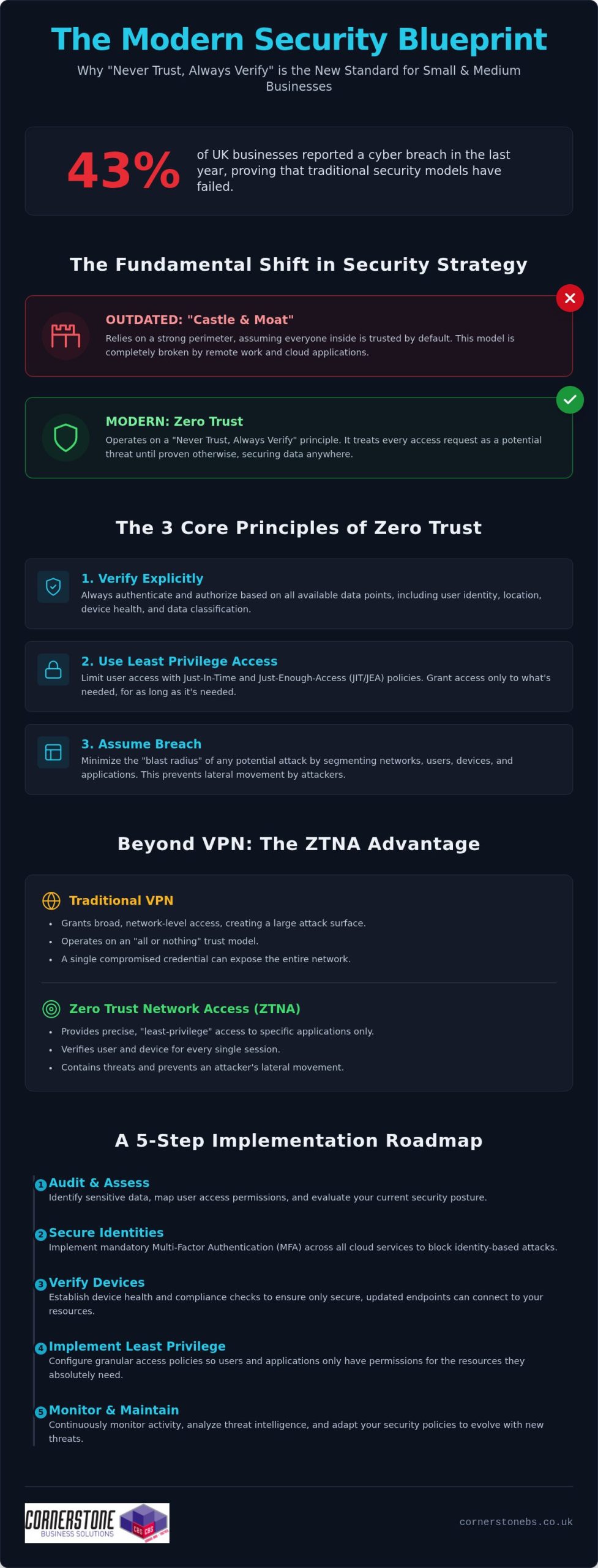
With 43% of UK businesses reporting a cyber breach in the last year, the old “castle and moat” security model has officially crumbled. If you feel overwhelmed by technical jargon or worry that your remote team is a walking security risk, you aren’t alone. Most small business owners feel caught between rising threats and tight budgets. We understand that your priority is growth, not deciphering complex code. That’s why zero trust implementation for smbs is no longer a luxury reserved for tech giants; it’s the foundation of a resilient, modern business in 2026.
We agree that security should feel like a supportive partner, not a confusing hurdle. You deserve the peace of mind that comes from knowing your data is secure in a hybrid world, without needing an enterprise-sized bank account to achieve it. This guide strips away the complexity to show you exactly how to move beyond outdated passwords to a “never trust, always verify” model. We’ll walk through a realistic, jargon-free roadmap that aligns with the latest 2026 NCSC guidance and the Data (Use and Access) Act 2025. You’ll discover how to protect your team and your reputation with practical steps you can start taking today.
Key Takeaways
Shift your security strategy from a “castle and moat” model to a “never trust, always verify” approach that secures data in a hybrid world.
Discover how zero trust implementation for smbs prioritises identity verification and device health to block unauthorised access before it happens.
Learn why modern Zero Trust Network Access (ZTNA) offers better protection than traditional VPNs by providing granular access to specific applications.
Follow a clear 5-step roadmap to audit your current permissions and implement mandatory multi-factor authentication across all cloud services.
Understand the value of a long-term partnership with a managed IT provider to ensure your security infrastructure is proactive and resilient.
What is Zero Trust Security and Why Does It Matter for SMBs?
Zero Trust isn’t just a technical upgrade. It’s a fundamental shift in how we protect your hard-earned business. For decades, the “Castle and Moat” model was the standard. You built a strong perimeter around your office and assumed everyone inside was safe. But in 2026, that wall has effectively disappeared. With teams working from home and data living in the cloud, there is no longer a single “inside” to protect. A Zero Trust Architecture operates on a simple, powerful rule: never trust, always verify. Every request for access is treated as a potential threat until the system proves otherwise.
We help our partners adopt an “Assume Breach” mindset. This isn’t about being pessimistic. It’s about being proactive. By designing your systems as if a threat is already present, you stop a single compromised password from becoming a company-wide disaster. For UK small businesses, zero trust implementation for smbs is the most effective way to protect your reputation and ensure long-term financial stability. It provides the peace of mind you need to focus on growth while we handle the digital heavy lifting.
The Three Core Principles of Zero Trust
To build a resilient business, we follow three non-negotiable rules. First, we verify explicitly. This means authenticating every user based on their identity, location, and device health every time they log in. Second, we apply least privilege access. We ensure your staff only have access to the specific data they need for their roles. This uses Just-In-Time and Just-Enough-Access (JIT/JEA) protocols to keep your most sensitive files locked away. Finally, we assume breach. We segment your network to minimise the “blast radius” of any potential attack, ensuring your core operations stay stable even during an incident.
Why Traditional Security is No Longer Enough
The old ways of working simply don’t match the modern threat environment. Sophisticated phishing and ransomware attacks now target UK small businesses with alarming precision. As you moved your operations to Microsoft 365 and other cloud platforms, the traditional security perimeter broke. Your data is now accessed from various devices and locations, making the “insider threat” a very real concern. Identity has become the new security boundary. Relying on a basic VPN or a single firewall leaves you vulnerable. If a hacker steals one set of credentials, they can often roam freely across your entire network. Zero Trust stops this movement in its tracks, keeping your data where it belongs.
The Core Pillars of a Zero Trust Implementation
A successful zero trust implementation for smbs relies on four foundational pillars: identity, devices, applications, and data. These elements must work in harmony to create a seamless security blanket around your organisation. While the technical details are complex, the goal is simple. We want to ensure that only the right people, using the right devices, can access your sensitive information at the right time. This framework aligns with the global standards defined in NIST Special Publication 800-207, which serves as the definitive guide for modern digital defences.
Identity: Every login attempt is a moment of truth. We use Multi-Factor Authentication (MFA) and biometrics to verify that your staff are who they say they are, every single time.
Devices: We check the “health” of every laptop, tablet, and phone. If a device is missing a critical update or lacks encryption, it doesn’t get in.
Applications: Whether you use cloud tools like Microsoft 365 and Xero or older on-premise software, access is granted on a per-app basis rather than giving away the keys to the whole network.
Identity as the New Perimeter
Passwords are no longer enough to keep your business safe in 2026. We move your team toward robust Multi-Factor Authentication (MFA) to block the vast majority of identity-based attacks. The real intelligence happens with Conditional Access policies. These “if, then” rules act as a smart filter for your business. For example, if a staff member tries to log in from an unrecognised location on an unmanaged device, the system can automatically block access or demand extra biometrics. Identity Protection is the gatekeeper of the modern business. By securing the user, we secure the primary entry point to your entire operation.
Securing the “Anywhere” Workforce with Endpoint Management
The rise of hybrid work has made unmanaged personal devices (BYOD) a significant risk for UK small businesses. If an employee’s personal tablet is infected with malware, it could easily spread to your company files the moment they log in. We solve this by using professional endpoint management tools like Microsoft Intune. This allows us to set and enforce strict security standards for any device touching your data. We automate updates and patches, closing the door on known vulnerabilities before hackers can exploit them. This proactive approach ensures your team can work from anywhere with total confidence. If you’re concerned about your current device security, our team can provide a clear cyber security review to help you identify any hidden gaps.
Zero Trust vs. Traditional VPNs: Making the Switch
Most UK small businesses still rely on traditional VPNs to connect their remote teams in 2026. While these tunnels were once the standard, they now represent a significant security gap. The problem is that VPNs usually grant “flat” network access. Once a user verifies their identity at the gate, they can often roam across your entire server. If a single device is compromised, your whole firm is at risk. Moving to a more modern approach isn’t just a technical upgrade; it’s a vital step for your long-term stability.
The Problem with “Trust but Verify”
Traditional firewalls struggle in a world where your data lives in the cloud and your staff work from various locations. They rely on a “trust but verify” model that is too easily exploited. Hackers love VPNs because they allow for lateral movement. This means one stolen credential can lead to a full-scale ransomware attack. By following the NCSC’s Zero Trust Architecture design principles, we help you move toward a model built for business resilience and peace of mind. It’s about ensuring an incident on one laptop doesn’t bring down your entire operation.
Zero Trust Network Access (ZTNA) Explained
Zero Trust Network Access (ZTNA) is the modern alternative that provides granular control. Instead of connecting a user to your whole network, ZTNA creates a “segment of one” for every session. Your staff only see the specific applications they need to do their jobs. A major benefit is that ZTNA hides your applications from the public internet entirely. Attackers can’t hack what they can’t see. This makes a zero trust implementation for smbs much more effective than simply patching an old, vulnerable VPN.
Making the switch also improves your daily operations. ZTNA is typically faster and more reliable than clunky VPN clients that frequently drop out. Your team will enjoy a smoother experience, and you’ll save money by retiring expensive, high-maintenance hardware. We recommend a phased approach for businesses with existing infrastructure. You don’t have to rip and replace everything overnight. We can start by securing your most sensitive cloud apps first, then gradually move your legacy systems over. This steady transition ensures your business remains stable while your security grows stronger.
A 5-Step Zero Trust Implementation Roadmap for SMBs
Step 1: Identity Discovery. We start by auditing every user account and permission level. You’ll likely find old accounts or “permission creep” where staff have access they no longer need. We enforce Multi-Factor Authentication (MFA) across all cloud services immediately. This aligns with the 2026 Cyber Essentials requirement where MFA is now mandatory for all cloud users.
Step 2: Device Inventory. We identify every device touching your company data. By setting strict health standards, we ensure that only encrypted, patched, and managed devices can connect to your systems.
Step 3: Implement Least Privilege. We remove local admin rights from standard user accounts. This simple step stops 90% of malware from installing itself silently. We restrict access to sensitive folders so staff only see what they need to do their jobs.
Step 4: Network Micro-segmentation. We break your network into smaller, isolated zones. If a breach occurs in one area, it’s trapped. The rest of your business stays safe and operational.
Step 5: Continuous Monitoring. We use proactive system monitoring to spot unusual behaviour in real-time. If a user logs in from an unexpected location or starts downloading unusual amounts of data, our tools flag it instantly.
Starting with Microsoft 365 Business Premium
For most UK small businesses, Microsoft 365 Business Premium is the ultimate “Zero Trust starter pack.” It provides enterprise-grade tools like Defender for Business and Intune at a price point that makes sense for smaller firms. You don’t need to juggle a dozen different third-party security tools when everything is integrated into one platform. If you’re planning a Microsoft 365 Migration for Business UK, choosing this license is the smartest move you can make for your 2026 security roadmap.
Building a Security-Centric Culture
Technology is only half the battle. A zero trust implementation for smbs fails if your team doesn’t understand the “why” behind the new rules. We help you frame security as a collaborative effort rather than a set of chores. When staff understand that verifying their identity protects their own work and the company’s reputation, they become your strongest line of defence. We recommend short, jargon-free training sessions that focus on practical tips for staying safe in a hybrid world. If you’re ready to secure your future, our managed IT support team is ready to help you build a roadmap that fits your specific business needs.
The Cornerstone Approach: Your Partner in Zero Trust
Choosing the right partner for your zero trust implementation for smbs is the difference between a box-ticking exercise and true business resilience. At Cornerstone, we don’t just act as a transactional supplier. We position ourselves as a dedicated long-term partner, invested in the stability and growth of your organisation. Our multi-award-winning team brings the confidence of global partnerships with industry leaders like Microsoft, IBM, and Cisco directly to your doorstep. We combine this high-level expertise with the approachable, regional warmth you expect from a local team that understands your specific challenges.
We know that every business operates differently. A “one size fits all” security plan usually fits no one well. We tailor our Zero Trust roadmap to match your specific data flows, staff requirements, and growth plans for 2026. Whether you are managing a fully remote team or a hybrid office, we design a framework that protects your assets without slowing down your people. To ensure complete transparency, our professional service project fees provide clear, upfront costs for your implementation. You can explore our full range of Cyber Security Services to see how we build resilience into every layer of your organisation.
Ready to Secure Your Future?
Moving toward a “never trust, always verify” model is a journey, not a single event. Our award-winning team is here to guide you through every step with a reassuring and proactive attitude. We pride ourselves on being highly organised and technologically advanced, yet we remain friendly and reachable for every client we serve. We invite you to have an informal conversation with us about your current security posture. It’s a chance to simplify the complex and see how modern security can actually empower your business. If you’re ready to take the first step toward a more secure 2026, you can contact Cornerstone for a Cyber Security Audit today. Let’s work together to make your company data the most secure it has ever been.
Secure Your Business Resilience for 2026 and Beyond
Transitioning to a modern security model is about more than just technology; it’s about protecting your company’s hard-earned reputation and future. We’ve explored how replacing clunky, vulnerable VPNs with granular, identity-based verification streamlines your operations while keeping hackers at bay. A successful zero trust implementation for smbs is not a one-time project but a proactive partnership that evolves alongside your business growth.
As a multi-award-winning IT support provider and Microsoft Solutions Partner, we have the expertise to simplify this journey for you. You gain unlimited proactive helpdesk access and a local team dedicated to your long-term stability. It’s time to replace outdated security models with a robust framework built for the modern, hybrid world. Book Your Proactive Cyber Security Audit Today and let’s start a conversation about your long-term success. We’re here to help you lead with confidence and total peace of mind.
Frequently Asked Questions
Is Zero Trust too expensive for a small business?
Zero Trust is highly cost-effective when managed correctly. Most small businesses already own the necessary tools through their existing Microsoft 365 subscriptions. Instead of expensive hardware, we focus on smart configuration and proactive monitoring. This approach makes zero trust implementation for smbs a strategic investment in business continuity rather than a drain on your budget. It protects you from the massive costs of data breaches and downtime.
Will implementing Zero Trust slow down my employees?
Modern security should empower your team, not hinder them. Zero Trust Network Access (ZTNA) is typically much faster and more reliable than traditional, clunky VPNs that often drop out. Features like biometrics and single sign-on (SSO) allow your staff to access their tools securely with just a touch or a glance. We aim to create a seamless experience where security happens in the background, keeping your workforce productive and happy.
Do I need to replace all my hardware to start a Zero Trust journey?
You don’t need to rip and replace your existing IT hardware to begin. We use cloud-based management tools to check the health and security status of your current laptops and mobile devices. If a device meets your security standards, it gets in. If it needs an update, the system prompts the user to fix it first. This allows you to build a resilient architecture while respecting your current technology investments.
How does Zero Trust help with UK data protection compliance?
Zero Trust is a powerful tool for meeting the latest UK data protection standards. By enforcing granular access and continuous verification, you stay in line with the Data (Use and Access) Act 2025 and NCSC design principles. This model provides the detailed auditing and control that the Information Commissioner’s Office (ICO) expects from modern businesses. It gives you the confidence that your company data is handled with the highest level of care.
Can I implement Zero Trust if I still have an on-site server?
You can absolutely implement this model with a hybrid setup. We don’t require you to move everything to the cloud at once. We secure your on-site server by placing it behind a Zero Trust gateway. This ensures that even staff in the office must be verified before they can access sensitive folders. It’s a practical way to modernise your security while maintaining the legacy systems your business relies on every day.
What is the first step an SMB should take toward Zero Trust?
The first step is always an identity and access audit. We help you identify exactly who has access to your data and remove any unnecessary permissions. Enforcing Multi-Factor Authentication (MFA) across all your accounts is the single most effective action you can take right now. This foundation allows us to build a more complex zero trust implementation for smbs over time, ensuring your most vulnerable entry points are locked down immediately.
How does Zero Trust protect against ransomware?
Zero Trust stops ransomware in its tracks by blocking “lateral movement.” In a traditional network, once a hacker gets inside, they can move freely to encrypt all your files. With Zero Trust, we segment your network into isolated zones. Even if one laptop is compromised, the threat is trapped in a “segment of one.” This limits the damage and ensures your core business operations can continue without interruption.
Does Zero Trust replace my existing antivirus and firewall?
It doesn’t replace them; it makes them smarter. Traditional firewalls and antivirus tools are still useful, but they aren’t enough on their own in 2026. Zero Trust adds a vital layer of identity and device health verification that traditional tools simply don’t have. We integrate these elements into a single, proactive system that monitors your entire digital environment. This creates a much stronger, multi-layered defence than relying on old-fashioned perimeter security alone.
A single misconfigured setting in your cloud environment could now cost your business up to £17.5 million or 4% of your global turnover. With the UK Data (Use and Access) Act 2025 now in full force, the stakes for your digital infrastructure have never been higher. It’s completely understandable if the sheer complexity of modern cloud settings feels overwhelming or if you’re worried that a small oversight might lead to a major exposure. You need a setup that protects your data and your reputation without breaking the bank or slowing your team down.
We’re here to help you master the latest azure security best practices to ensure your business remains resilient and compliant throughout 2026. This guide provides a clear roadmap to harden your environment against modern threats, giving you the peace of mind that your regional operations are backed by world-class protection. We will walk through the essential shift to TLS 1.2, the retirement of legacy tools like Azure Blueprints, and how to leverage AI-driven security within the unified Microsoft Defender portal to keep your business steady and secure.
Key Takeaways
Learn how the Shared Responsibility Model defines your role in securing the cloud versus Microsoft’s role in protecting the underlying infrastructure.
Discover why identity is the new perimeter and how to implement azure security best practices using Microsoft Entra ID for a mobile-first workforce.
Harden your network layer by moving toward a Zero Trust model with Network Security Groups and centralised Azure Firewall configurations.
Ensure strict data governance and compliance with UK standards by mastering encryption at rest and secure secret management with Azure Key Vault.
Bridge the “security gap” between having tools and using them correctly through proactive monitoring and expert managed support.
Understanding Azure Security: The Shared Responsibility Model in 2026
The foundation of any robust defence starts with knowing who holds the keys. In 2026, the shared responsibility model remains the absolute cornerstone of cloud safety. It’s a simple concept with massive implications: Microsoft secures the cloud, while you secure everything you put inside it. They take care of the physical data centres, the underlying hardware, and the global networking infrastructure. Your business, however, is solely responsible for the non-negotiable duties: your data, your user identities, and the devices accessing your network. Following azure security best practices isn’t just about ticking boxes; it’s about building a resilient culture where your data stays private and your systems stay online.
The Three Pillars of Responsibility
The level of control you have depends entirely on how you’ve built your environment. With Infrastructure as a Service (IaaS), you’ve got maximum control but also the heaviest workload. You’re responsible for patching the operating systems and managing the middleware. If you move to Platform as a Service (PaaS), Microsoft takes over the OS maintenance and patching, which lets your team focus on application logic. Finally, Software as a Service (SaaS) shifts almost everything to the provider, leaving you to focus purely on identity and data governance. Even in 2026, as serverless computing grows, you can’t outsource the liability for your data.
Why Default Security is Never Enough
It’s a common mistake to assume that because Azure is a world-class platform, it’s secure by default for your specific business needs. Microsoft builds its out-of-the-box settings for accessibility and ease of use. They want you to get up and running quickly. However, these generic configurations rarely meet the strict requirements of UK compliance or the specific threat profile of a growing enterprise. Implementing azure security best practices means moving beyond these defaults to protect your business from sophisticated modern threats.
Relying on standard settings often leaves gaps in your logging, monitoring, and access controls. You need a proactive, bespoke strategy that aligns with your specific operational risks. Working with a dedicated cloud solutions provider ensures your environment isn’t just running, but is actively defended. We help you bridge that gap, turning generic tools into a hardened shield that protects your business continuity and gives you total peace of mind.
Identity as the New Perimeter: Best Practices for Microsoft Entra ID
The physical office wall is no longer your primary line of defence. In 2026, identity has officially become the new perimeter. Whether your team is working remotely, on the go, or from various company locations, the way you verify their access determines your safety. This shift is why Microsoft transitioned from Azure AD to the more comprehensive Microsoft Entra ID. It’s a suite designed to handle the complexities of a mobile-first world where users access data from multiple devices and locations. Implementing these azure security best practices starts with a simple truth: if you can’t verify the user, you can’t trust the connection.
Multi-Factor Authentication (MFA) remains the single most effective deterrent against account takeovers. It’s a basic step, but it stops the vast majority of identity-based attacks. Pair this with Role-Based Access Control (RBAC) to enforce the principle of least privilege. This ensures that a marketing assistant doesn’t have the same permissions as your IT head. By following the Shared Responsibility Model, you take ownership of these identity settings while Microsoft handles the underlying directory infrastructure. This clarity allows you to build a security layer that is both firm and flexible.
Mastering Conditional Access Policies
Think of Conditional Access as the “if-then” engine of your cloud security. It allows you to set specific rules: if a user is logging in from an unmanaged device or an unusual location, then they must provide extra verification or be blocked entirely. This level of control is vital during Microsoft 365 migration for business UK projects. It ensures that as you move data to the cloud, your access rules move with it. You can restrict logins to specific UK IP addresses or require a healthy, patched device before allowing access to sensitive files.
Privileged Identity Management (PIM)
Permanent admin accounts are a massive risk. If one is compromised, the attacker has the keys to your entire digital estate. Mastering azure security best practices involves moving away from these “always-on” roles. Privileged Identity Management (PIM) solves this by providing “just-in-time” access. Admins only get elevated permissions when they actually need them, and only for a set period. This creates a detailed audit trail, which is essential for meeting strict UK compliance standards like GDPR. If you’re looking to tighten your defences, our team can help you review your current cyber security posture to ensure your admin roles are properly managed.
Hardening the Network Layer: From Firewalls to Zero Trust
Securing your network layer in 2026 requires a fundamental shift in mindset. We no longer rely on the outdated idea of a “trusted” internal network. Instead, we embrace the Zero Trust philosophy: “never trust, always verify.” Every connection request, whether it’s coming from inside or outside your virtual network, must be fully authenticated and authorised. This proactive approach is a cornerstone of modern azure security best practices, ensuring that your business remains resilient even if a single device is compromised.
Network Security Groups (NSGs) provide the essential filtering you need for your subnets and individual network interfaces. They act as a digital bouncer, checking every packet against your specific rules. However, for larger environments, you need a centralised solution. Azure Firewall offers a managed, cloud-based security service that protects your Azure Virtual Network resources. It’s highly available and scales automatically, providing the professional-grade protection your UK business deserves without the headache of managing physical hardware. By using micro-segmentation to isolate different parts of your network, you ensure that even if one area faces trouble, your entire operation doesn’t come to a standstill.
Implementing Azure Bastion for Secure Access
Leaving RDP or SSH ports open to the public internet is a critical risk that many businesses still overlook. It’s effectively an open invitation for brute-force attacks. Azure Bastion removes this vulnerability by providing secure, browser-based access to your virtual machines. You don’t need to assign public IP addresses to your servers, which drastically reduces your attack surface. It’s a clean, efficient way to manage your infrastructure while keeping the “bad actors” firmly on the outside. This small change provides massive peace of mind for your IT team.
DDoS Protection and Application Gateway
If your business relies on web applications, you can’t afford the downtime caused by a distributed denial-of-service (DDoS) attack. Azure’s native DDoS protection monitors your traffic and automatically mitigates threats to keep your services running. When you pair this with an Application Gateway and a Web Application Firewall (WAF), you gain a powerful shield against common exploits like SQL injection and cross-site scripting. These tools are foundational to the cyber security services we provide, ensuring your digital presence is hardened against the latest threats. This multi-layered defence ensures that your customer data remains safe and your services stay accessible, regardless of the pressure your network faces.
Data Governance and Operational Security: Encryption and Monitoring
Protecting the perimeter is vital, but your data is the ultimate prize for any attacker. Implementing azure security best practices means ensuring that your sensitive information is encrypted at every stage of its lifecycle. Azure Disk Encryption uses industry standard technology to protect your virtual machine disks, making the data unreadable to anyone without the proper keys. To manage these keys securely, we rely on Azure Key Vault. It acts as a highly secure digital safe for your secrets, certificates, and encryption keys, removing the dangerous habit of hardcoding passwords into your applications. This setup ensures that even if a breach occurs, your core business data remains locked away from prying eyes.
Security isn’t a “set and forget” task; it requires constant vigilance. Microsoft Defender for Cloud provides a continuous security health check for your entire environment. It identifies misconfigurations, such as open ports or unencrypted databases, and gives you clear, actionable steps to fix them. When you pair this with Azure Monitor, you gain deep visibility into your operations. By collecting and analysing logs from every resource, you can spot unusual patterns before they escalate into serious incidents. This proactive monitoring is what separates a vulnerable setup from a truly resilient one, giving you the confidence to grow your business without fear.
Ensuring GDPR and UK Compliance
Meeting strict UK compliance standards is a primary concern for local business owners. We use Azure Policy to enforce data residency, ensuring your files never leave the UK South or UK West data centres. This is a critical step for adhering to the UK Data (Use and Access) Act 2025. Additionally, Microsoft Purview helps you discover and classify your data, making it easier to manage privacy requests. By mapping these azure security best practices to Cyber Essentials Plus requirements, we provide a clear path to certification that proves your commitment to data safety to your clients and partners.
The Role of Automated Backups
Backups are your final line of defence against the growing threat of ransomware. If your primary data is compromised, a secure, immutable backup allows you to restore your operations without paying a penny to criminals. We configure Azure Backup to provide long-term data retention that cannot be altered or deleted by unauthorised users. These automated routines should be a core part of your wider it company solutions and disaster recovery plan. If you’re ready to ensure your business can weather any storm, our local team is here to help you build a recovery strategy that actually works when you need it most.
The Strategic Advantage of Managed Azure Security Services
Outsourcing your security to a dedicated partner is often more cost-efficient than trying to build a comparable team in-house. You gain access to a pool of multi-award-winning expertise without the overhead of multiple full-time salaries or expensive training programmes. At Cornerstone Business Solutions, we don’t just act as a service provider; we become your long-term partner. We understand the specific challenges facing UK businesses and tailor our approach to ensure your cloud infrastructure is a stable foundation for growth, not a source of worry. Our proactive stance means we’re always looking for ways to strengthen your posture, giving you the peace of mind to focus on your core objectives.
Bridging the Skills Gap with an MSP
Hiring and retaining top-tier cloud security talent in 2026 is a major challenge for many organisations. The demand for experts who truly understand the nuances of Microsoft Entra ID and Zero Trust architecture far outweighs the supply. Choosing managed IT services Teesside and national providers gives you instant access to 24/7 protection. Our team stays awake so you don’t have to. We perform regular security audits and vulnerability scanning to ensure your defences evolve as quickly as the threats do, keeping your local operations safe and compliant with the latest UK standards.
Continuous Improvement in a Shifting Landscape
Security is a journey, not a destination. The threats your business faces today will look different by next month. We stay ahead of 2026 threat vectors by using AI-enhanced tools that spot anomalies the human eye might miss. This proactive stance allows us to adjust your configurations in real-time, ensuring your environment remains a “hard target” for cyber criminals. A secure cloud infrastructure is the essential foundation for your business growth. When you trust your security to experts, you free up your time to focus on what you do best: running your business. Let’s start a conversation about how we can protect your future together.
Securing Your Business Future in the Azure Cloud
Building a hardened cloud environment isn’t just a technical task; it’s a strategic investment in your business’s continuity and growth. By mastering identity through Microsoft Entra ID and embracing a Zero Trust network model, you’ve already taken the most critical steps toward total resilience. Remember that the shared responsibility model puts the power in your hands to protect your data and meet the latest UK compliance standards. Implementing azure security best practices ensures that your digital estate remains a “hard target” against evolving 2026 threats.
As an award-winning Microsoft Partner, we specialise in bridging the gap between having the right tools and using them to their full potential. Our UK-based team of certified cloud architects provides the proactive 24/7 security monitoring you need for true peace of mind. We’re ready to help you identify any hidden vulnerabilities and strengthen your defences before they’re ever tested. Take the first step toward a more secure future today and Book a Comprehensive Azure Security Audit with Cornerstone. Let’s work together to keep your business safe, steady, and successful.
Frequently Asked Questions
What is the most important Azure security best practice?
Enforcing Multi-Factor Authentication (MFA) through Microsoft Entra ID is the single most effective step you can take to protect your business. While there are many azure security best practices, securing user identities is the priority because the vast majority of breaches start with compromised credentials. By requiring a second form of verification, you stop almost all automated identity attacks. This simple change provides an immediate boost to your resilience and ensures that your sensitive data remains accessible only to authorised personnel.
Is Azure more secure than on-premises servers?
Azure is generally more secure than on-premises servers because Microsoft invests billions in security research and physical infrastructure that few SMEs could ever match. You benefit from enterprise-grade protection and automated threat detection right out of the box. However, the level of safety ultimately depends on how you configure your specific environment. While Microsoft secures the physical hardware and the hypervisor, you remain responsible for managing your data and access rules effectively to keep your business safe.
How does Azure help with GDPR compliance for UK businesses?
Azure helps you meet GDPR and UK Data (Use and Access) Act 2025 requirements by offering robust data residency options. You can choose to store and process your data exclusively within UK-based data centres like UK South or UK West. Built-in tools for encryption and data classification through Microsoft Purview make it much easier to manage privacy requests and audits. This ensures your customer information stays protected and your business remains compliant with local regulations, avoiding the risk of heavy fines.
What is the difference between Azure AD and Microsoft Entra ID?
Microsoft Entra ID is the new, expanded name for what was formerly known as Azure AD. It isn’t just a rebranding; it’s a more comprehensive suite that includes identity protection, verified IDs, and permissions management. This change reflects a shift toward a more holistic approach to security in a mobile-first world. You still get all the features you’re used to, but with extra tools designed to handle modern, complex identity threats across all your cloud and on-premises applications.
Do I need a third-party firewall if I use Azure?
You don’t necessarily need a third-party firewall because Azure Firewall provides highly capable, cloud-native protection for your virtual networks. It’s built to scale automatically and offers sophisticated filtering that meets the needs of most UK businesses. Some organisations with very specific legacy requirements might choose a third-party appliance from the Azure Marketplace, but for most, Azure’s native tools offer a more integrated and cost-effective solution. Our team can help you decide which path fits your specific risk profile and business goals.
How much does it cost to secure an Azure environment?
The cost of securing your environment varies depending on the specific services you choose to enable and your data volume. Many foundational features, like basic MFA and security defaults, are often included in your existing Microsoft 365 or Azure subscriptions. More advanced tools like Azure Firewall or Microsoft Sentinel carry additional monthly fees based on your data usage and traffic. We recommend starting with a professional security audit to identify which investments will provide the most value for your specific business needs without overspending.
What is the Azure Shared Responsibility Model?
The Shared Responsibility Model is a framework that clarifies which security tasks belong to Microsoft and which belong to your business. Microsoft takes full responsibility for the physical security of data centres and the underlying hardware. You are responsible for protecting your data, managing user identities, and configuring your applications correctly. Understanding this division is a core part of azure security best practices because it ensures no part of your defence is left to chance, allowing you to focus your efforts where they matter most.
Can Azure protect my business from ransomware?
Azure provides several powerful layers of protection designed specifically to mitigate the threat of ransomware. Features like Azure Backup offer immutable storage, which means your backups cannot be altered or deleted by a hacker even if they gain access to your network. When you pair this with real-time threat detection in Microsoft Defender, you can spot and stop suspicious activity before it has a chance to encrypt your files. This multi-layered approach gives you a reliable safety net and ensures your business can recover quickly from an incident.
Did you know that 70% of medium-sized UK businesses faced a cyberattack in the last 12 months? With 80% of breaches now involving stolen credentials, the old way of defending your network perimeter is no longer enough. You might feel overwhelmed by technical jargon or worried about meeting strict NIS2 and DORA standards. It’s a common challenge, especially when you need to justify every penny of security spend to your board. Starting with a thorough zero trust assessment is the most effective way to move from a reactive security model to a proactive, data-centric fortress.
We understand that as a business leader, you want clarity and resilience rather than more complexity. We’re here to act as your dedicated partner, simplifying these high-tech concepts into a clear roadmap for your team. This guide helps you validate your current investments and achieve total compliance readiness. We’ll explore the NCSC design principles and the CISA 2.0 maturity model to simplify the path forward. By the end, you’ll see how shifting to a “never trust, always verify” model protects your growth and provides the stability you need to lead with confidence.
Key Takeaways
Adopt a “never trust, always verify” mindset to replace outdated perimeter defences with modern, identity-based security.
Conduct a zero trust assessment to map out your digital environment across six essential pillars, ensuring every device and user is validated.
Move from reactive, manual security to automated resilience by understanding your position on the Zero Trust Maturity Model.
Simplify compliance with NIS2 and DORA by creating a clear, evidence-based roadmap that justifies your security investments.
Work with a multi-award-winning regional partner to translate technical data into a robust, long-term strategy for business continuity.
What is Zero Trust Assessment & Why is it Vital in 2026?
The days of relying on a strong office firewall are over. In 2026, your team works from home, coffee shops, and client sites, meaning your data lives everywhere. This shift has made traditional perimeter security obsolete. Zero Trust is the modern answer. It moves away from the old “trust but verify” approach to a stricter “never trust, always verify” model. A zero trust assessment acts as a deep-dive audit of your entire digital environment. It evaluates how you handle identities, devices, and data against the latest security standards.
A zero trust assessment is a strategic roadmap that transforms your security posture into a proactive, data-centric fortress for modern cyber resilience. By examining your infrastructure through the lens of Zero Trust Architecture, we help you identify hidden vulnerabilities before they can be exploited. This isn’t just about ticking boxes; it’s about building a foundation that supports your business growth without compromising on safety.
The Core Philosophy: Never Trust, Always Verify
The heart of this model rests on three non-negotiable pillars. First, you must verify explicitly by always authenticating based on all available data points. Second, you use least privileged access to limit user permissions to only what’s necessary for their specific role. Finally, you assume breach. This means you design your systems as if an attacker is already inside. These principles significantly reduce the “blast radius” of any potential incident, ensuring one compromised password doesn’t lead to a total system failure. For a deeper look at how these layers protect you, explore our cyber security services designed for UK businesses.
Business Benefits Beyond Security
While protection is the primary goal, a zero trust assessment delivers massive operational wins. It streamlines user access, making it easier for your team to get what they need without jumping through unnecessary hoops. It’s also a powerful tool for meeting strict UK and international standards like NIS2 or DORA. Beyond compliance, it improves the daily employee experience. When security is seamless, your staff can work from anywhere with total confidence, knowing their tools are as mobile as they are. You get a more efficient workforce and a board that’s happy to see clear, validated returns on security spending.
The 6 Pillars of a Comprehensive Zero Trust Audit
A zero trust assessment isn’t just a quick scan of your firewall. It’s a holistic review of your entire digital ecosystem. To build a truly resilient business, we evaluate your infrastructure across several interconnected domains. This framework is largely built upon the NIST Special Publication 800-207, which serves as the global gold standard for modern security. By looking at these pillars individually, we ensure no stone is left unturned in your defence strategy.
Identity: This is your new perimeter. We verify every user through phishing-resistant multi-factor authentication (MFA) to ensure they are exactly who they claim to be before granting access.
Devices: Whether it’s a company-issued laptop or a staff member’s mobile, we monitor the health and compliance of every endpoint. If a device isn’t up to date, it doesn’t get in.
Applications: We secure the software and APIs your business relies on. This prevents “shadow IT” and ensures that data only flows through authorised, secure channels.
Data: Your information is your most valuable asset. We help you classify and protect it with robust encryption, whether it’s stored on a local server or moving through the cloud.
Infrastructure: We harden your servers, containers, and virtual environments. This proactive approach prevents unauthorised lateral movement if one part of your system is compromised.
Network and AI: The 2026 Frontiers
Traditional flat networks are a significant risk. Once an intruder gets past the front door, they can often roam freely. We focus on micro-segmentation, which creates secure internal zones to contain potential threats and protect your most sensitive areas. In 2026, your zero trust assessment must also account for the AI pillar. We ensure your team isn’t accidentally leaking proprietary data into public AI models while defending you against AI-powered phishing attacks. AI-driven assessments identify anomalies faster than manual audits, catching subtle patterns that human eyes might miss.
Mapping Pillars to Your Current Infrastructure
The real value of an audit lies in identifying your weakest links. You might have excellent identity controls but find your device management is lagging. Achieving a unified security posture requires cross-pillar visibility, where every layer of your defence communicates with the others. This joined-up thinking is the foundation of our managed IT services, where we handle the technical heavy lifting so you can focus on growth. If you want to see how these pillars fit your specific business needs, we’re always happy to have a chat about your security strategy.
How to Conduct a Zero Trust Assessment: Tools and Methodologies
Moving from theory to practice requires a structured approach. You can’t secure what you haven’t mapped, so a zero trust assessment begins with a clear, logical sequence. We follow a four-step methodology designed to give you total visibility without disrupting your daily operations. This process ensures your security strategy aligns with your actual business goals, rather than just technical checklists.
Step 2: Technical Execution. We use specialized tools like the Microsoft Zero Trust Assessment PowerShell module to pull raw configuration data. This provides a snapshot of your current security settings across identity, endpoints, and apps.
Step 3: Stakeholder Interviews. Tech only tells half the story. We talk to your team to understand how data actually flows through your business. This helps us spot “shadow IT” or manual workarounds that scripts might miss.
Step 4: Gap Analysis. Finally, we compare your “as-is” setup against “to-be” best practices. We use benchmarks like CISA’s Zero Trust Maturity Model to show exactly where you stand and what needs to change.
Automated vs. Expert-Led Assessments
Open-source PowerShell scripts are excellent for a quick health check. They’re fast and provide a wealth of data. However, they often return complex errors or technical flags that don’t account for your specific business logic. An automated tool might flag a vital legacy application as a risk, but it won’t tell you how to wrap it in a secure container. That’s where an expert-led audit adds real value. We provide a second pair of eyes to interpret the data, ensuring your security doesn’t become a barrier to productivity.
Key Tools for the 2026 Audit
We leverage the full power of the Microsoft stack to keep your audit precise. Microsoft Entra ID Protection helps us analyze identity risks, while Intune compliance checks ensure every mobile device meets your safety standards. We also utilize Azure Network security baselines to verify your cloud perimeters. For businesses looking to scale their infrastructure safely, our cloud solutions provide the perfect foundation for these advanced auditing tools. By combining these technologies, we create a zero trust assessment that’s both technically rigorous and business-focused.
Interpreting Your Results: The Zero Trust Maturity Model
Once your zero trust assessment is complete, you’re left with a wealth of technical data. The real challenge is turning those findings into a strategy your board can support. We use the maturity model to help you see exactly where you stand. Don’t worry if you aren’t at the top yet. Most UK businesses are currently moving through the earlier stages, and we’re here to guide you through each step of the journey.
Traditional Stage: Your security is largely reactive. You likely have a flat network where an intruder can move freely once they bypass the initial login. Configurations are mostly manual, and you might still rely on basic passwords for legacy systems.
Advanced Stage: You’ve started to automate your defences. You have basic multi-factor authentication (MFA) in place and have begun micro-segmenting your network to protect sensitive data. You’re starting to see a more proactive security posture.
Optimal Stage: This is the gold standard for resilience. Your system makes dynamic, real-time access decisions based on user behaviour and device health. All data is fully encrypted, whether it’s sitting on a server or moving through the cloud.
Adopting an “Assumption of Breach” mindset is a massive shift for most leaders. It means we stop pretending your perimeter is impenetrable. Instead, we design your systems to contain an incident the moment it happens. This approach fundamentally changes your disaster recovery planning. It ensures that if one part of your system is compromised, your entire business doesn’t grind to a halt. You gain emotional security knowing that your most vital assets are protected by layers of verification.
Prioritising Remediation: The Quick Wins
We don’t expect you to fix everything overnight. We focus on high-impact, low-effort changes that deliver immediate results. Implementing robust Conditional Access policies is often the best place to start. By addressing the “Identity” pillar through phishing-resistant MFA, you build a solid foundation for the rest of your security journey. Security is a journey, not a destination, requiring continuous re-assessment to stay ahead of evolving threats.
Long-Term Strategic Planning
A successful transition takes time and careful budgeting. We help you build a 12-24 month roadmap that aligns your security goals with your business growth. Many organisations are now moving from heavy upfront hardware costs (CAPEX) to predictable, monthly service models (OPEX). This shift makes it easier to justify security spend while ensuring you always have the latest protection. You can find more about how we integrate these strategies into our IT company solutions for local businesses. Ready to see where your business sits on the maturity scale? Book your zero trust assessment with our expert team today.
Expert Zero Trust Implementation with Cornerstone Business Solutions
We’ve explored the technical pillars and the maturity stages of modern security. Now, it’s time to focus on the execution. Interpreting the results of a zero trust assessment requires more than just technical knowledge; it needs a partner who understands your specific business goals. As a multi-award-winning IT provider, we don’t just hand you a report and walk away. We act as your long-term partner, translating complex security data into a clear, actionable strategy that protects your growth.
Our proactive approach sets us apart. Many providers simply run a diagnostic tool and highlight the red flags. We go deeper. We look at why those vulnerabilities exist and how they impact your daily operations. Whether you’re a small local firm or a larger regional enterprise, we tailor our bespoke solutions to fit your industry and scale. We ensure that your security doesn’t become a barrier to productivity, but rather a foundation for it.
Beyond the Assessment: Managed Remediation
The real work begins once the audit is complete. Cornerstone handles the technical heavy lifting of hardening your systems so your team can stay focused on what they do best. By partnering with global leaders like Microsoft and Cisco, we deliver robust security systems that stand up to the 2026 threat landscape. You aren’t just getting a set of tools; you’re getting the peace of mind that comes from a dedicated, UK-wide support team. We ensure your security posture evolves as new threats emerge, keeping your business stable and secure year-round.
Ready to Secure Your Future?
Cyber security isn’t a one-time fix. It’s a foundational element of your business stability and emotional security. Our proactive IT maintenance plans integrate Zero Trust principles into your daily operations, ensuring you stay ahead of strict compliance requirements like NIS2 and DORA. We invite you to have a friendly, no-pressure conversation with our experts to see how we can strengthen your defences. We speak with the clarity of experts who want to simplify complex concepts for your benefit.
Don’t leave your business resilience to chance. Start your journey toward a data-centric fortress today. Contact Cornerstone for a Zero Trust Consultation and let’s build a secure, reliable future together. We’re proud of our regional roots and even prouder of the success we help our clients achieve.
Take the Next Step Toward Verified Resilience
Securing your business in 2026 requires more than just better tools. It demands a fundamental shift in how you view every identity and device on your network. By focusing on the six pillars of security and moving away from the illusion of a safe perimeter, you’ve already started the vital work to protect your team’s future. A professional zero trust assessment provides the data-driven roadmap you need to justify security spend and meet strict compliance standards with total confidence.
As a multi-award-winning IT provider and proud partner of industry leaders like Microsoft, IBM, and Cisco, we’re here to help you navigate this transition. We offer UK-wide professional support that combines world-class expertise with the approachable face of a local team. Let’s work together to turn your security into a proactive fortress that supports your long-term growth and emotional security.
How long does a Zero Trust assessment typically take?
A standard zero trust assessment typically takes between one and two weeks to complete. The exact timeframe depends on the size of your digital environment and the number of users or devices we need to map. We focus on delivering a thorough report without disrupting your daily operations; ensuring you get a clear roadmap for improvement quickly and efficiently.
Do I need to be using Microsoft 365 to run a Zero Trust assessment?
You don’t need to be on Microsoft 365; although it offers excellent native tools for implementation. We work with a variety of platforms and can assess your security regardless of your current software stack. Our team has deep expertise in Cisco and IBM environments, so we can tailor the audit to your specific infrastructure and business needs.
Is Zero Trust only for large enterprises or does it apply to SMEs?
Zero Trust is essential for businesses of all sizes, especially as 70% of medium-sized UK firms faced attacks in the last year. Smaller organizations are often seen as easier targets by cybercriminals. We scale our approach to fit your business, providing the same high-level protection used by global enterprises but customized for a local SME’s budget and operational style.
What is the difference between a standard cyber audit and a Zero Trust assessment?
A standard audit often focuses on whether your firewall is active or if you’ve ticked specific compliance boxes. A zero trust assessment goes much deeper by assuming your perimeter has already been breached. It evaluates how you verify every single access request, ensuring that your security is data-centric rather than just network-based.
Can a Zero Trust assessment help with NIS2 or GDPR compliance?
Yes, it’s a powerful tool for meeting strict NIS2, DORA, and GDPR requirements. These regulations demand that you have robust, verifiable controls over who accesses your data. Our assessment provides the documented evidence you need to prove compliance to regulators and your board, showing that you’ve taken proactive steps to protect sensitive information.
How often should my business perform a Zero Trust assessment?
We recommend performing a full zero trust assessment at least once a year. You should also trigger a review if you make significant changes to your infrastructure, such as migrating to a new cloud platform or adopting a permanent hybrid work model. Regular checks ensure your defences evolve alongside new threats and that your configurations haven’t drifted from best practices.
What are the most common “red flags” found during an assessment?
The most common issues we find are a lack of phishing-resistant MFA and accounts with excessive permissions. We also frequently spot legacy systems that haven’t been properly isolated from the rest of the network. Identifying these “red flags” early allows us to implement quick wins that immediately lower your risk profile and strengthen your overall resilience.
Will implementing Zero Trust make it harder for my employees to work?
Implementing these principles actually makes work easier for your team. Modern Zero Trust tools use single sign-on (SSO) and seamless authentication, reducing the number of passwords your staff need to remember. By verifying device health in the background, we allow your employees to work securely from any location without facing frustrating technical barriers.
Did you know that 73% of organizations reported at least one ransomware attack in 2024, and by June 2026, the number of active threat groups reached 146? It’s a staggering figure that makes the fear of total data loss feel very real for any business owner. As a multi-award-winning national IT provider, we understand that you’re likely juggling the complexities of hybrid cloud systems while worrying about the $1.7 million average cost of recovery. You need a ransomware recovery plan that works as hard as you do, providing a clear path back to full operations without the uncertainty of legal ransom debates.
We’re here to help you turn that anxiety into a proactive strategy. You’ll discover how to build a roadmap that protects your data, slashes your recovery time objectives, and ensures every file is verified for integrity after an incident. This guide provides a step by step look at modern business continuity, from implementing immutable backups to meeting the latest 72 hour CIRCIA reporting mandates. It’s about giving your team the confidence to stay focused on growth, knowing your digital foundations are rock solid and your operations are resilient.
Key Takeaways
Understand why standard daily backups aren’t enough to stop modern triple-extortion tactics.
Discover how to build a robust ransomware recovery plan that ensures operational continuity and eliminates the need to pay a ransom.
Learn how immutable backups and Zero Trust architecture keep your data safe and unchangeable during an attack.
Master the specific steps to isolate infected systems and identify the entry point to minimize downtime.
See how proactive monitoring and specialized cyber security audits create a foundation for long-term business stability.
Why Your Business Needs a Ransomware Recovery Plan in 2026
The threat landscape has shifted dramatically over the last few years. To understand the foundational basics, you can explore What is Ransomware?, but for a business operating in 2026, the stakes are significantly higher than simple file encryption. Modern attackers now employ triple extortion tactics. They don’t just lock your systems; they steal sensitive data and threaten to leak it publicly or contact your clients directly to demand payment. This evolution means a traditional ransomware recovery plan must do more than just restore files. It has to manage a full scale business crisis while protecting your hard-earned reputation.
Daily backups were once the gold standard for safety. However, 2026 ransomware groups are more patient and calculated. They often spend weeks performing reconnaissance inside your network before launching an attack. Their first target is almost always your backup repository. If your data isn’t immutable or kept entirely separate from your main network, it’s a sitting duck. If your current strategy relies on a single daily sync, you’re essentially handing the keys to the burglars. Resilience requires a more sophisticated approach to data integrity.
The financial reality is sobering. Research shows the average cost to recover from a ransomware attack is now $1.7 million, and that doesn’t even include the ransom itself. When you factor in the median ransom demand of $1.32 million, the potential for total financial ruin is clear. Investing in a robust ransomware recovery plan isn’t just a technical expense. It’s a strategic move to protect your balance sheet. A documented plan minimizes the variables and gives your business the muscle memory to react instantly, which is the only way to keep downtime costs from spiralling out of control.
The Shift from Prevention to Resilience
Modern cyber security assumes a breach will happen. We call this the “when, not if” mentality. While stopping an attack is the goal, surviving one is what keeps you in business. A recovery plan acts as your digital insurance policy. It ensures that when a breach occurs, your team knows exactly how to keep the lights on. It’s the difference between a minor operational hiccup and a permanent closure. We focus on building the strength and customization needed to ensure your business remains standing, no matter what the digital world throws at it.
Regulatory Pressure and UK Compliance
The legal landscape is tightening for every UK business owner. The ICO maintains a strict stance on data protection, and failing to have a documented recovery process can lead to significant fines and legal scrutiny. Furthermore, many cyber insurance providers now demand a verified ransomware recovery plan before they’ll even consider issuing a policy. Following NCSC standards isn’t just about checking a box. It’s a foundational requirement for stability. We partner with you to ensure your systems meet these rigorous standards, providing emotional security alongside technical excellence.
The Anatomy of a Modern Ransomware Recovery Strategy
A modern ransomware recovery plan is much more than a technical backup script. It’s a coordinated playbook that aligns your technical response with your core business objectives. Think of it as an operational “muscle memory” exercise. When an attack occurs, your team shouldn’t be debating what to do; they should be executing a rehearsed series of steps. This strategy ensures that your business remains resilient, even when your primary systems are compromised.
To build this resilience, you must define two critical metrics: your Recovery Time Objective (RTO) and your Recovery Point Objective (RPO). RTO is the maximum amount of time your business can survive without its systems. RPO is the volume of data you can afford to lose, measured in time. For most modern enterprises, these numbers are now measured in minutes, not days. The “Golden Rule” of any strategy is simple: never rely on the attacker for decryption. Even if a ransom is paid, there is no guarantee of data recovery, and 69% of organizations now refuse to pay entirely. If you’re looking for a structured starting point, CISA’s Ransomware Guide provides excellent foundational checklists for these definitions.
Incident Response: The First 24 Hours
The first 24 hours are about containment and evidence. You must stop the malware from spreading laterally across your network. Don’t simply “wipe and reinstall” everything immediately. You need to preserve evidence to satisfy legal reporting requirements, such as the 72 hour CIRCIA mandate for critical infrastructure. Your Incident Response team should include IT experts, legal advisors, and senior leadership to ensure every decision is documented and compliant. If you need a partner to help manage these complexities, our Cyber Security services can provide the expert oversight required.
Disaster Recovery: The Restoration Phase
Restoration is a methodical process of bringing critical business functions back online. You don’t restore everything at once. Instead, you prioritise systems that are essential for revenue and operations. We advocate for the “Clean Room” concept. This involves restoring your data into a secure, isolated environment where it can be scanned and verified. This step is vital to ensure your “clean” backup doesn’t actually contain a dormant version of the original malware, preventing a secondary infection immediately after recovery.
Strategic Pillars: Immutable Backups and Zero Trust Architecture
A successful ransomware recovery plan relies on two non-negotiable pillars: data that cannot be deleted and an environment where no user is automatically trusted. In the past, having a copy of your data was enough. In 2026, that copy must be immutable. This means once the data is written, it cannot be changed, encrypted, or deleted for a set period. It creates a “gold copy” that remains untouched even if an attacker gains full administrative access to your network. Without immutability, your backups are just another target for the encryption process.
Identity resilience is the second half of this foundation. Attackers prioritize admin credentials because they provide the keys to the entire kingdom. We focus on protecting these identities through a Zero Trust model. This approach assumes that every user, device, and connection is a potential threat until proven otherwise. When you are recovering from a ransomware attack, a Zero Trust architecture ensures that the malware cannot piggyback on legitimate credentials to re-infect your systems during the restoration phase. It keeps your recovery environment isolated and clean.
Securing the Backup Infrastructure
Modern attackers hunt for backups before they ever trigger the encryption on your main servers. To counter this, we implement the 3-2-1-1 rule. This involves keeping three copies of your data on two different media types, with one copy offsite and one copy entirely immutable or air-gapped. Air-gapped storage remains physically or logically disconnected from the network, making it invisible to hackers. We also utilize Write-Once-Read-Many (WORM) storage, which provides a hardware-level guarantee that your records remain permanent and unalterable during a crisis.
Implementing Zero Trust in Recovery
Restoring data into a compromised network is like pouring clean water into a dirty bucket. Micro-segmentation allows us to divide your network into small, isolated zones. This prevents lateral movement, ensuring that if one segment is compromised, the rest of the business remains safe. Multi-Factor Authentication (MFA) is a non-negotiable requirement for every recovery tool and administrative login. Finally, we use continuous monitoring to detect any signs of re-infection while the data dump is in progress. This proactive oversight ensures that your ransomware recovery plan results in a stable, permanent restoration rather than a secondary breach.
Step-by-Step: Executing Your Ransomware Response and Restoration
When the red alert sounds, your ransomware recovery plan transitions from a strategic document into a vital lifeline. The first action is immediate containment. You must isolate the affected network segments to prevent the infection from reaching your clean backups or uncompromised servers. Once the spread is halted, your Incident Response team begins the forensic work of identifying the specific ransomware strain and the “patient zero” entry point. This knowledge is vital. It tells you if the attackers are still present and how to close the door behind them so they can’t return during the restoration.
Restoration follows a strict hierarchy. You don’t just flip a switch and hope for the best. Instead, you follow a methodical sequence to ensure stability:
Assess backup integrity: Select the most recent clean recovery point that predates the infection.
Restore foundational infrastructure: Prioritise Active Directory, DNS, and Email. Without these, nothing else works.
Business-line applications: Gradually bring these back online in order of their importance to revenue and operations.
This staged approach ensures that your core systems are stable before you attempt to resume full business activities, reducing the risk of a secondary crash.
Communication and Legal Obligations
Managing the human element is just as critical as the technical restoration. You need a clear internal communication strategy to keep staff informed without triggering a panic. Externally, you must decide when and how to notify stakeholders and clients. Transparency builds trust, but it must be handled with professional care. Remember, the ICO requires you to report significant data breaches within 72 hours. Failing to meet this deadline can lead to severe penalties and lasting damage to your reputation. Our team can help you manage these Disaster Recovery requirements with the precision your business deserves.
Testing the Plan: The Tabletop Exercise
A plan that only exists on paper is a liability. You must test your strategy under pressure through regular “Tabletop Exercises”. These simulations involve senior leadership and IT staff walking through a hypothetical attack scenario. It helps you identify bottlenecks, such as slow data transfer speeds or unclear decision-making chains. Refining your ransomware recovery plan based on these test failures ensures that when a real attack happens, your team acts with the confidence of a well-drilled unit. It turns a potential disaster into a managed operational challenge.
Building Cyber Resilience with Cornerstone Business Solutions
While the technical pillars of a ransomware recovery plan are essential, the success of your restoration depends on the team managing the process. We understand that every business has unique vulnerabilities and operational requirements. That’s why we move beyond generic security scripts to build a bespoke resilience strategy that aligns with your specific goals. Our proactive approach ensures that you aren’t just prepared for an attack; you’re equipped to thrive despite one. We act as your dedicated long-term partner, providing the expert oversight needed to turn a complex technical challenge into a manageable business process.
National businesses trust us because we provide more than just software. We deliver peace of mind through a unified recovery strategy that integrates your Cloud Solutions and Microsoft 365 environments into one resilient ecosystem. This holistic view is vital for modern hybrid-cloud setups where data is often spread across multiple platforms. By centralising your defence and restoration protocols, we eliminate the confusion that often follows a breach. Our goal is to ensure that your data remains integral and your operations continue without the need to ever consider a ransom payment.
Bespoke Technology Solutions
Take the First Step Toward Resilience
Future Proof Your Business Continuity
Building a ransomware recovery plan is about more than just data; it’s about protecting the future of your company and the people who depend on it. We’ve explored how shifting from simple prevention to true resilience, backed by immutable storage and Zero Trust principles, can eliminate the fear of total data loss. By treating recovery as a practiced muscle memory exercise rather than a technical afterthought, you ensure your operations stay stable even during a crisis.
As a multi-award-winning IT services provider and expert partner to Microsoft, IBM, and Cisco, we’re here to help you navigate these complexities. Our proactive 24/7 system monitoring ensures your infrastructure is always under a watchful eye, grounded in our commitment to the success of our local business community. We pride ourselves on being more than a vendor; we’re a dedicated partner in your long-term stability.
Should we ever pay the ransom to recover our data?
You shouldn’t pay the ransom because there’s no guarantee that attackers will actually provide the decryption key. Paying also marks your business as a profitable target for future extortion. A robust ransomware recovery plan ensures you can restore your own systems without ever opening your wallet to criminals. Refusing to pay is now the standard for 69% of organizations, according to 2026 industry data.
How long does a typical ransomware recovery take?
Recovery timelines depend entirely on your defined Recovery Time Objective (RTO) and the scale of the infection. While some critical systems can be back online within hours, a full restoration of non-essential data often takes several days. The speed of your response is determined by the “muscle memory” of your team and the efficiency of your isolated recovery environment. Proper planning ensures you aren’t starting from scratch during a crisis.
Is a cloud backup enough to protect us from ransomware?
A standard cloud backup isn’t enough because modern malware can often sync to and encrypt your cloud repositories. You need immutable cloud storage that prevents data from being altered or deleted once it’s written. We recommend the 3-2-1-1 rule, which includes keeping one copy entirely offline or air-gapped. This ensures a “gold copy” of your data remains safe regardless of what happens to your live network.
What is the first thing we should do if we suspect an attack?
You must isolate the suspected device from the network immediately by disconnecting the ethernet cable or disabling the Wi-Fi. This simple action prevents the malware from spreading laterally to other servers or your backup infrastructure. Once the threat is contained, you should activate your incident response team to begin forensic analysis. Don’t restart the machine or wipe it yet, as you need to preserve evidence for legal reporting.
Can ransomware infect our backup files?
Ransomware can absolutely infect your backups if they are connected to your primary network during the attack. In fact, 2026 threat groups specifically hunt for backup credentials as their first priority. This is why having a ransomware recovery plan that includes immutable storage and air-gapped backups is non-negotiable. Without these protections, your safety net can be destroyed before you even realize a breach has occurred.
How often should we test our ransomware recovery plan?
We recommend testing your plan at least quarterly through tabletop exercises and full restoration drills. Your IT environment changes constantly with new hardware and software updates, so a plan from six months ago might already be outdated. Regular testing identifies bottlenecks in your restoration speed and ensures your team stays sharp. It’s about building the confidence to act decisively when every minute of downtime costs your business money.
Does cyber insurance cover the cost of a ransomware recovery plan?
Cyber insurance typically covers the costs of recovery after an attack, but most carriers now require a documented recovery plan as a condition of your policy. They want to see that you have proactive controls like MFA and immutable backups in place before they offer coverage. While the insurance offsets financial loss, it’s your internal strategy that determines how quickly you can actually get back to serving your clients.
What are the reporting requirements for a ransomware attack in the UK?
You must report a significant data breach to the Information Commissioner’s Office (ICO) within 72 hours of becoming aware of it. If your business falls under critical infrastructure, you’re also subject to CIRCIA mandates, requiring a report within the same timeframe. Failing to meet these deadlines can result in heavy fines and legal scrutiny. Having a clear reporting protocol within your business continuity guide ensures you stay compliant under pressure.
Did you know that 43% of UK businesses faced a cyber security breach in the last year? It’s a sobering figure that proves traditional firewalls can’t protect a modern, mobile workforce. As your local IT partner, we know you need security that’s both ironclad and invisible. That’s why implementing conditional access policies for Microsoft 365 is the most important step you can take in 2026. These policies act as a digital security guard, using “if-then” logic to verify every login attempt based on the user’s location, device, and real-time risk level.
We understand the frustration of trying to balance tight security with the flexibility your team needs to stay productive. It’s easy to feel overwhelmed by endless settings or the fear of accidentally locking out your own staff. This guide will help you master Microsoft 365 security to create an automated environment that responds to threats instantly. We’ll walk through the latest 2026 feature updates for E3 and E5 suites, ensuring your business stays compliant with UK cyber security standards while your daily operations remain smooth and unhindered.
Understand how the “if-then” logic of Microsoft 365 acts as an intelligent bouncer to verify every login attempt for your digital office.
Learn to use real-time signals, such as device health and location, to make automated security decisions that protect your assets.
Discover why conditional access policies for Microsoft 365 are now essential for meeting UK Cyber Essentials and NIS2 compliance standards.
Identify the two most critical policies for your organisation, including mandatory multi-factor authentication for admins and blocking risky legacy protocols.
See how a proactive security partner prevents accidental lockouts and ensures your defences evolve alongside the latest 2026 cyber threats.
Think of your digital office as a high-end club. In the past, a simple lock on the front door was enough to keep things safe. But now, your team works from home, local coffee shops, and on the move. You can’t just lock one door anymore. You need an intelligent bouncer who checks every single person trying to get in. This is exactly how What Are Conditional Access Policies work for your business. They use “if-then” logic to protect your data. For example: if a user tries to log in from an unknown country, then the system automatically requires extra verification or blocks them entirely. This automated approach ensures your conditional access policies for Microsoft 365 keep the bad actors out without slowing down your trusted employees.
Microsoft includes basic security defaults in most plans, but these are often a “one size fits all” solution. They can be too blunt, sometimes blocking legitimate work or failing to account for your specific business needs. Customisable policies allow us to tailor your security to your exact requirements. We can set rules that recognise your office IP address as a safe zone while being more cautious when someone logs in from a new device. It’s about moving away from the old idea of a physical office wall and focusing on the identity of the person at the keyboard. With the 2026 updates to Microsoft 365 E3 and E5 suites, these tools are now more powerful than ever, providing deeper integration with AI-driven threat detection to keep your business running smoothly.
The Evolution from Passwords to Identity
Traditional passwords aren’t a sufficient defence for UK businesses anymore. With phishing attacks affecting 38% of companies in the last year, a stolen password is a direct ticket into your systems. Identity has become the new security perimeter. We don’t just ask for a password. We ask who the user is, what device they’re using, and if this login is normal for them. Conditional Access serves as the central brain of Microsoft Entra ID, processing these questions in milliseconds to keep your environment secure. This shift is vital because modern hackers don’t “break in” anymore; they simply log in using compromised credentials.
Zero Trust: The Strategy Behind the Policy
The driving force behind these settings is a strategy called Zero Trust. It operates on a simple but powerful principle: never trust, always verify. Instead of assuming everything inside your network is safe, CA policies treat every login attempt as a potential risk until proven otherwise. This enforces a high level of security without requiring your IT team to manually approve every single sign-in. To learn more about building a resilient business, check out our guide on what is zero trust security. By automating these checks, you gain peace of mind knowing your assets are protected 24/7. It’s the difference between reactive firefighting and proactive, automated defence that scales with your business growth.
To understand how conditional access policies for Microsoft 365 actually protect your business, we need to look under the bonnet at the engine driving your security. The system operates on three core pillars: signals, decisions, and enforcement. This entire process happens in the blink of an eye. Every time a member of your team tries to open an email or access a file, Microsoft’s engine evaluates these pillars in milliseconds. It ensures that security never feels like a roadblock to your productivity while keeping your data under lock and key. It’s a proactive way to manage risk without needing a human to watch the logs 24/7.
Signals are the raw data points. Think of them as the evidence the system gathers before making a choice. As detailed in the Microsoft documentation on What is Conditional Access?, these signals include everything from the user’s identity to the specific device they’re holding. By looking at these data points together, the system gets a clear picture of whether the login attempt is safe or suspicious. If you’re feeling unsure about how these rules should look for your specific team, our Managed IT Support experts can help you map out a strategy that fits your unique local workflow.
Common Signals Your Business Should Monitor
We recommend focusing on four key areas to keep your data secure. First, look at User and Group Membership; you wouldn’t give every employee the keys to the finance safe, so CA policies allow you to restrict sensitive apps to specific roles. Second, monitor IP Location. With phishing affecting 38% of UK businesses, blocking logins from high-risk countries is a quick win for your security. Third, consider Device Health. We can set rules so only encrypted, company-managed laptops can access your client database. Finally, evaluate Application Risk by requiring stricter checks for your most sensitive portals like HR or payroll.
How the Policy Engine Makes Decisions
The engine typically reaches one of three conclusions based on the signals it receives. Full Access is granted if the employee is in the office, on a trusted laptop, and their identity is verified. They get straight to work without any friction. An MFA Challenge is triggered if someone logs in from a new location or an unrecognised network; the system simply asks for a quick multi-factor authentication check to be sure. Finally, the system can Block Access entirely. If a login attempt comes from a blacklisted region or a known malicious IP, the bouncer shuts the door immediately to prevent a breach.
The UK cyber landscape has shifted dramatically as we move through 2026. Statistics from the recent Cyber Security Breaches Survey reveal that 43% of UK businesses experienced a breach in the last 12 months. Phishing remains the primary weapon, affecting 38% of those organisations. For local firms, the risk is no longer theoretical; it’s a daily reality. Implementing conditional access policies for Microsoft 365 provides the automated defence needed to counter these sophisticated credential harvesting attacks. It ensures that even if a password is stolen, the attacker still can’t get past your security checks.
Compliance is another major driver for businesses in our region. Whether you’re aiming for Cyber Essentials certification or meeting the strict requirements of NIS2 standards, identity verification is a non-negotiable pillar. These frameworks demand that you prove who is accessing your data and from where. By using these policies, you create a clear, auditable trail of access that satisfies regulators and builds trust with your clients. It also supports the hybrid work model that so many of our local teams rely on, allowing for flexibility without compromising your data sovereignty or control.
Balancing Security with User Experience
We’ve all felt the frustration of being locked out of our own systems. Over-securing can be just as damaging as a breach if it grinds your productivity to a halt. The beauty of Common Conditional Access policies is their ability to stay out of the way. When your staff log in from a trusted office IP or a managed company laptop, the system stays silent. It only intervenes when it detects a risk, such as a login from an unusual location. This reduces “MFA fatigue” and keeps your team happy. We often use “Report-only” mode to test these rules first, ensuring they work perfectly before they go live across your organisation.
Protecting Against Modern Cyber Threats
Modern hackers have moved beyond simple password guessing. They now use session hijacking and man-in-the-middle attacks to bypass traditional security. Conditional access policies for Microsoft 365 are designed to thwart these advanced techniques by constantly re-evaluating the “health” of a session. If a device suddenly fails a compliance check, the system can revoke access instantly. This proactive stance is a foundational requirement for any modern business. To see how this fits into a wider strategy, explore our full range of cyber security services. It’s about building a resilient environment where your business can grow with total peace of mind.
Setting up security shouldn’t feel like guesswork. While Microsoft provides broad templates, we find that local businesses achieve the best results with a tailored “starter” set of rules. This approach secures your data without causing a support desk nightmare on Monday morning. Implementing the right conditional access policies for Microsoft 365 involves a few non-negotiable steps. We start by requiring Multi-Factor Authentication (MFA) for every administrative role. Since these accounts hold the keys to your entire digital kingdom, they need the highest level of protection. We also recommend blocking legacy authentication protocols. These older methods often bypass MFA entirely, making them a favourite target for hackers looking for an easy way in.
Your security should also be smart enough to recognise “impossible travel” scenarios. If a user logs in from Manchester at 9:00 AM and then tries again from an overseas location an hour later, the system should trigger an immediate alert or block. To keep things running smoothly, we require compliant devices for any access to sensitive cloud applications. Device compliance policies verify antivirus status and encryption levels before granting access to your data. Finally, always set up a “Break Glass” account. This is an emergency-only user that isn’t subject to your standard policies, ensuring you never face a total tenant lockout if a configuration error occurs.
The “Must-Have” Policy Set
The “Block Legacy Auth” policy is your most critical defence. It shuts down access for older apps that don’t support modern security prompts, effectively closing a massive back door into your system. To balance this, we configure “Trusted Locations” using your office IP addresses. This tells the system that logins from your physical building are safe, which streamlines productivity for your on-site team. By combining these two rules, you create a environment that is both incredibly tough to breach and easy for your staff to use every day.
Advanced Policies for High-Risk Scenarios
If your team uses Microsoft 365 E5 or Entra ID P2, you can use AI-driven User Risk and Sign-in Risk policies. These tools detect if a user’s credentials have been leaked online and can force an automatic password reset. For employees using personal, unmanaged devices, we often restrict access to web-only sessions. This prevents sensitive data from being downloaded onto a home computer that might lack proper security. You can also implement session frequency limits for your payroll or HR systems, requiring a fresh login every few hours to ensure the person at the screen is still the authorised user.
Building these defences correctly requires a deep understanding of your team’s daily habits. If you want to ensure your business is fully protected without the risk of accidental lockouts, we invite you to talk to us about our Cyber Security services.
Setting up conditional access policies for Microsoft 365 is a major win for your business security, but it isn’t a one-time task. Digital threats in 2026 move fast. A “set and forget” approach to security is a gamble that rarely pays off for growing organisations. As your business evolves, your team changes, and new remote work patterns emerge, your security rules must keep pace. Without active management, you risk two things: leaving a back door open for hackers or, just as frustratingly, locking out your own productive employees because a policy has become outdated. We believe security should be a silent partner in your success, not a constant source of friction.
Effective management means looking at the data behind the scenes. We provide proactive monitoring of your Conditional Access logs to spot anomalies before they turn into breaches. If a policy is triggering too many MFA prompts for a specific department, we see it and tune the logic. This level of detail ensures your digital perimeter remains strong while your staff stay focused on their work. Regular policy audits are also vital. We sit down with you to ensure your settings still align with your current business goals and UK compliance requirements. It’s about maintaining a balance between ironclad protection and the seamless flexibility your team expects.
The Cornerstone Approach to Microsoft 365 Security
We don’t treat security as an isolated project. Instead, we integrate these advanced policies into our wider Managed IT Support framework. This holistic view allows us to see how your security settings interact with your hardware, your network, and your mobile devices. Our process starts with a deep-dive audit of your existing Microsoft 365 tenant to identify hidden gaps. You get the reassurance of working with a multi-award-winning team that understands the local landscape. We’re proud of our regional roots and bring that community-focused care to every technical challenge we solve.
Next Steps for Your Business
If you’re unsure whether your current settings are actually protecting you, a security audit is the best place to start. We’ll look at your conditional access policies for Microsoft 365 and give you a clear, jargon-free report on where you stand. There’s no obligation, just a straightforward conversation about how to make your business more resilient. Our experts are here to help you navigate the technical details so you can get back to running your business with total confidence. We’ve helped countless local firms secure their future, and we’d love to do the same for you.
Mastering conditional access policies for Microsoft 365 isn’t just about ticking a security box; it’s about building a resilient foundation for your business growth. We’ve explored how these policies act as an intelligent bouncer, verifying every login attempt to keep your data safe while your team stays mobile and productive. By moving to an identity-first model, you effectively neutralise the threat of stolen passwords and ensure your organisation meets the latest UK cyber security standards with ease. It’s a proactive shift that transforms your security from a hidden risk into a visible strength.
You don’t have to manage this technical complexity alone. As a multi-award-winning IT provider and certified Microsoft Solutions Partner, we specialise in turning intricate security settings into business advantages. Our expert UK-based helpdesk support is always ready to guide you, ensuring your digital perimeter is monitored and maintained by specialists who care about your success. Secure your Microsoft 365 environment with Cornerstone today and let us help you protect what you’ve built. We’re here to ensure your technology works for you, giving you the freedom to lead your business with total peace of mind.
Do I need a specific Microsoft 365 licence for Conditional Access?
You need a Microsoft 365 Business Premium licence or higher to access these features. This includes the required Entra ID Plan 1 (formerly Azure AD P1) needed to build custom rules. If you’re currently on Business Basic or Standard, you’ll need to upgrade your plan or purchase a standalone add-on to begin using conditional access policies for Microsoft 365 effectively.
Can Conditional Access policies lock me out of my own account?
Yes, a misconfigured policy can accidentally lock out everyone, including administrators. We prevent this by always creating an emergency “Break Glass” account that is excluded from standard rules. It’s also vital to use “Report-only” mode when first creating policies. This allows us to see the impact of a rule in your logs before we actually turn it on for your team.
What is the difference between Security Defaults and Conditional Access?
Security Defaults are a basic, “one-size-fits-all” security toggle that Microsoft provides for every tenant. While they offer basic protection, they lack any customisation and apply to everyone equally. Conditional Access gives you granular control. You can create specific rules for different departments, locations, or high-risk applications, allowing you to balance tight security with your team’s daily productivity.
How do Conditional Access policies affect guest users and contractors?
You can apply these policies to every guest account and external contractor who accesses your data. We often set rules that require guests to perform an MFA check even if their own organisation doesn’t require it. This ensures that anyone touching your sensitive files meets your specific security standards, regardless of where they are based or what device they are using.
Can I use Conditional Access to block logins from specific countries?
You can absolutely block logins from specific countries or entire continents. We use geofencing to create “Named Locations” that define where your users are allowed to work. If your business only operates within the UK, we can block access from the rest of the world. This is a highly effective way to stop overseas hackers from even attempting to log into your systems.
What happens if a user’s device is not compliant with our policies?
If a device fails a compliance check, the system will automatically block or limit its access to your cloud apps. This might happen if a laptop is missing an antivirus update or doesn’t have disk encryption enabled. The user is usually prompted with a message explaining why they’ve been blocked. It’s a proactive way to ensure an unmanaged or “unhealthy” device doesn’t become a gateway for a breach.
Is it possible to test a policy before applying it to the whole company?
Yes, “Report-only” mode is the perfect tool for testing conditional access policies for Microsoft 365 without any risk. It records exactly what would have happened to a user’s login without actually enforcing the block or MFA challenge. We use these logs to fine-tune your settings. This ensures that when we finally go live, your security is ironclad but doesn’t cause any unexpected disruptions for your staff.
How often should we review our Microsoft 365 access policies?
We recommend a formal review of your policies at least once every quarter. Your business is dynamic; you hire new staff, adopt new apps, and your team’s working habits change over time. Regular audits ensure your security rules still align with your operational needs and the latest UK compliance standards. A proactive partner makes this easy by monitoring your logs and suggesting adjustments as your organisation grows.
What if your team’s next click cost your business $4.88 million? With the average cost of a data breach reaching that staggering figure in 2026, the stakes for your local company have never been higher. You likely feel the frustration of staff skimming through mandatory training or clicking on the AI-generated phishing links that now drive 80% of attacks. It’s exhausting when security feels like just another IT chore rather than a shared responsibility. We know that building a security awareness culture at work isn’t about more PowerPoint slides; it’s about shifting the mindset of your most valuable asset.
We’re here to help you turn that liability into your strongest line of defense. This guide shows you how to move past the “compliance box-ticking” phase and create a proactive environment where reporting a suspicious email is a badge of honor. We’ll explore how leadership can simplify complex technical threats and foster a no-blame culture that reduces human error. From understanding the rise of AI-powered threats to implementing a Zero Trust mindset, you’ll learn how to protect your business continuity while keeping your team engaged and empowered.
What You Will Learn:
How to shift your perspective from seeing staff as a risk to treating them as your most effective sentries against digital threats.
The impact of “Optimism Bias” and how cognitive load leads to the human errors that bypass even the best technical firewalls.
Why building a security awareness culture at work creates a level of true safety that annual “tick-box” compliance training simply cannot match.
A clear, five-step framework to identify your internal Security Champions and baseline your organization’s current cyber attitudes.
The role professional Managed IT Support plays in providing the technical stability and 24/7 monitoring your team needs to feel confident.
Beyond the Firewall: What Building a Security Awareness Culture at Work Actually Means
The Three Pillars of a Cyber-Aware Workforce
To build a resilient team, you need to focus on three core areas that drive long-term change:
Responsibility: This is about individual ownership. It moves the needle from “that is an IT problem” to “this is my data to protect.” When every employee feels like a stakeholder in the company’s safety, your risk profile drops significantly.
Knowledge: Staff need to understand the “why” behind the rules. Using Security Awareness as a foundational concept helps them recognize that a protocol isn’t a hurdle to their productivity; it’s a safeguard for their livelihood.
Behaviour: The ultimate goal is to make secure actions instinctive. Locking a screen when walking away or double-checking a sender’s address should be second nature, much like putting on a seatbelt when you get into a car.
Why 2026 Demands a Cultural Shift
The threat landscape has evolved with terrifying speed. We are now seeing a massive rise in deepfake phishing and AI-generated social engineering attacks that look and sound exactly like a trusted colleague or manager. Hybrid working has also permanently removed the traditional “office perimeter,” making every home office and coffee shop a potential entry point for criminals. Modern cyber security services must be human-centric to be effective. Technology provides the essential foundation, but a proactive culture ensures that when AI-powered attacks try to trick your team, your people have the confidence and the presence of mind to say “no” and report the incident immediately.
The Psychology of Cyber Risk: Why Technical Solutions Aren’t Enough
Stress and cognitive load play a massive role in security failures. If your team is rushing to meet a Friday afternoon deadline, their ability to spot a fraudulent email drops significantly. They are mentally exhausted, and that’s when mistakes happen. 80% of phishing attacks now use AI to create highly personalized, convincing messages that target people when they are most distracted. We also have to combat “Security Fatigue.” When you force over-complicated password policies or bombard staff with constant, irrelevant alerts, they’ll naturally look for workarounds. They might start writing passwords on sticky notes or ignoring warnings just to get their work done. Creating a Culture of Security requires us to recognize these human limitations and design systems that support people rather than burden them.
Building Psychological Safety: The No-Blame Approach
Punishing an employee for clicking a suspicious link is a recipe for long-term disaster. If a staff member feels they will be reprimanded, they will hide their mistake. This gives a virus hours or even days to spread through your network undetected. Building a security awareness culture at work relies on psychological safety. You want a culture where “I think I made a mistake” is met with immediate support. By rewarding “near-miss” reporting, you turn every error into a learning opportunity and identify vulnerabilities before they can be exploited by criminals.
Overcoming the “Productivity vs. Security” Conflict
Compliance vs. Culture: Moving Beyond the ‘Tick-Box’ Training Mentality
When you create a culture of security, you bridge the gap between “knowing the rules” and “following them under pressure.” In the heat of a busy morning, an employee shouldn’t have to recall a slide from six months ago to know that an attachment looks suspicious. They need an instinctive sense of caution fostered through regular, bite-sized updates and open communication. Think of Cyber Essentials as your floor, not your ceiling. It sets the technical baseline, but your culture determines how high you can actually build your defenses.
Measuring What Matters: Beyond Phishing Click Rates
Many managers panic when a phishing simulation shows a high click rate. While a high number of clicks isn’t ideal, it’s not the only metric that matters. You should focus on your “Reporting Rate.” If ten people click but twenty people report the email to your IT team, your culture is actually performing well. Reporting rates show that your team is engaged and proactive. We also recommend using brief, anonymous surveys to gauge how important security feels to different departments. This data tells you where you need to focus your efforts more than a simple pass or fail test ever could.
The Role of Leadership in Setting the Tone
Security culture must start in the boardroom, not the server room. If the leadership team treats security as a nuisance, the rest of the staff will follow suit. One of the biggest cultural killers is the “Executive Exception.” This happens when directors bypass multi-factor authentication or share passwords because they’re “too busy” for the rules. This sends a clear message that security is optional for those at the top. When leaders lead by example, they turn protection into a core business value. This proactive stance transforms security from a burden into a competitive advantage, setting a standard for modern it company solutions that prioritize long-term resilience over quick fixes.
A Practical 5-Step Framework for Building a Cyber-Aware Workforce
Step 2: Identify Security Champions. Find the influential voices within your departments. These aren’t always your most technical staff; they’re the people others naturally turn to for guidance.
Step 3: Deploy micro-training. With 80% of phishing attacks now leveraging AI-generated content, your team needs up-to-date, bite-sized learning. Keep it short, relatable, and regular.
Step 4: Gamify the process. Introduce rewards for reporting suspicious activity. Turning security into a positive challenge encourages engagement rather than resentment.
Step 5: Review and iterate. Cyber threats move fast. Use real-world data from your network to tweak your training every quarter, ensuring it stays relevant to the risks you actually face.
Identifying and Empowering Security Champions
Your champions are the heartbeat of your security culture. They don’t need to be IT experts. Instead, look for staff members who are respected and approachable. When a peer mentions a secure habit, it carries more weight than a directive from the IT department. Give these champions the tools and authority to mentor their colleagues. They also act as a vital feedback loop, telling you which protocols are working and which ones are causing frustration on the front line.
Gamification: Making Security Engaging
Security doesn’t have to be dull. Use leaderboards or department challenges to foster healthy competition. You might offer a “Catch of the Month” award for the person who flags the most sophisticated phishing attempt. Keep the rewards low-cost but high-impact, like a coffee voucher or an early finish. It’s vital to keep the tone positive. You want to celebrate the “sentries” who protect the business, ensuring those who struggle feel supported rather than alienated. If you’re ready to see how a proactive approach can safeguard your business, reach out to our local team for a friendly conversation about your security strategy.
Scaling Your Security Culture with Professional Managed IT Support
Culture doesn’t exist in a vacuum. While the mindset of your team is the most critical variable, that mindset needs a stable, reliable foundation to thrive. This is where managed IT services Teesside play a pivotal role. By providing a robust technical framework, you remove the friction that often leads to “security fatigue.” When your systems work exactly as they should, your employees can focus on being vigilant sentries rather than fighting with their tools. Building a security awareness culture at work becomes much easier when your team knows that a dedicated group of experts is watching the perimeter 24/7. This creates a sense of emotional security, allowing staff to report concerns without the fear that they are “bothering” the IT department.
The Technical Safety Net
Cornerstone: Your Partner in Cyber Resilience
Secure Your Future by Empowering Your People
As a multi-award-winning IT provider partnered with industry leaders like Microsoft, IBM, and Cisco, we specialize in simplifying these complex transitions for local businesses. We provide the proactive 24/7 system monitoring and expert guidance you need to lead with total confidence. You don’t have to face these evolving cyber challenges alone. We’re here to act as your long-term partner in stability and growth. Book a free cyber security consultation with our award-winning team today to discuss how we can strengthen your business together. Your team is ready to step up; let’s give them the tools to succeed.
Frequently Asked Questions
How long does it take to build a security awareness culture?
Building a security awareness culture at work is a continuous journey rather than a one-time project. While you can implement technical changes in weeks, genuine behavioral shifts typically take 6 to 12 months to become fully embedded. This timeline depends on your starting point and the frequency of your engagement. We focus on steady, sustainable progress to ensure that secure habits become second nature for your team over the long term.
What is the most effective way to train employees on cyber security?
Continuous micro-learning is the most effective method for training your workforce. Traditional annual seminars are often forgotten within weeks. Instead, we recommend short, monthly updates and real-world simulations that reflect current 2026 threats like AI-driven phishing. This approach keeps security at the front of your team’s minds without overwhelming them. It turns complex technical concepts into manageable, daily habits that protect your business continuity.
How do I deal with employees who repeatedly fail phishing tests?
Supportive, targeted coaching is the best way to help repeat offenders. Punitive measures often backfire because they discourage staff from reporting real incidents. We suggest having a friendly, one-on-one conversation to understand why they are struggling. It might be a result of high workload or a specific misunderstanding of the threat. Providing extra resources or a “Security Champion” mentor can help turn these vulnerabilities into strengths.
Is security awareness training a legal requirement for UK businesses?
Yes, training is effectively a requirement under UK GDPR and various industry standards. GDPR mandates that organizations implement appropriate technical and organizational measures to protect data. This includes ensuring your staff are trained to handle information securely. Additionally, frameworks like Cyber Essentials highlight the importance of user awareness. Keeping your team informed isn’t just about safety; it’s a foundational element of your legal and regulatory obligations.
Can a small business afford a professional security culture programme?
What are the most common human errors that lead to data breaches?
Weak password management and clicking on sophisticated phishing links remain the most common errors. In 2026, we also see a rise in accidental data exposure through misconfigured cloud sharing settings. These mistakes often happen when employees are stressed or rushing. By building a security awareness culture at work, you help your team recognize these high-pressure moments and take the necessary steps to verify their actions before clicking.
How do I get senior management buy-in for security culture?
What role does HR play in building a security culture?
HR plays a central role in embedding security into the employee lifecycle. They handle everything from secure onboarding and offboarding to communicating clear acceptable use policies. Most importantly, HR helps foster the “no-blame” environment we discussed earlier. By working closely with your IT partner, HR ensures that security becomes a core part of your company’s values and a positive aspect of your workplace culture.
What if the greatest threat to your business data isn’t a hacker in a distant country, but a poorly secured printer in your employee’s spare room? As we move into 2026, the traditional office walls have dissolved, leaving many business owners feeling exposed to ransomware and the complexities of managing personal devices. We know that securing remote worker IT access is no longer just a “nice-to-have” feature; it is the backbone of your operational stability. We understand the frustration of slow VPNs that hinder productivity and the fear that a single home Wi-Fi connection could compromise years of hard work.
You likely agree that your team should be able to work from anywhere with the same speed and safety they enjoy at their desks. This guide promises to show you how to protect your sensitive information while empowering a truly productive, mobile workforce. We will preview the shift toward Zero Trust architectures, the role of modern authentication, and a practical roadmap to achieving a “set and forget” security posture that keeps you compliant with UK data standards. Let’s explore how to make your remote setup your strongest asset.
Key Takeaways
Learn why the old office perimeter is a dead concept and how to adopt a modern framework that protects data wherever your team chooses to work.
Discover why Zero Trust Network Access is the essential successor to slow VPNs, offering both better protection and a faster experience for your staff.
Explore the concept of “Seamless Security” to provide a background layer of protection that keeps employees productive without constant technical hurdles.
Follow our practical 5-step roadmap for securing remote worker IT access, including how to audit your systems and roll out multi-factor authentication.
See how award-winning managed IT support can take the security burden off your shoulders, giving you the freedom to focus on growing your business.
Understanding Secure Remote IT Access in a Post-Perimeter World
The concept of the “office perimeter” is officially a relic of the past. In 2026, your business network doesn’t stop at the front door; it extends to every home office, transit hub, and client site where your team logs in. Securing remote worker IT access is the comprehensive framework designed to protect your data the moment it leaves your physical server. It isn’t just about encryption anymore. It is about creating a consistent, safe environment for your staff, regardless of their postcode or the time of day they choose to work. This proactive stance ensures that your business remains resilient in a world where the traditional boundaries of the workplace have dissolved.
This modern approach stands on three essential pillars: Identity, Device, and Data. We no longer assume a connection is safe just because someone has the right password. Instead, we verify the person’s identity through multiple layers, check that their laptop is healthy and updated, and ensure the data they are accessing is appropriate for their role. This is the shift from “trust but verify” to “never trust, always verify.” It sounds strict, but it actually provides the emotional security you need to let your team work flexibly without staying up at night worrying about a breach. By verifying every request in real-time, we turn security into a silent, reliable partner in your daily operations.
The Evolution of Remote Work Risks in 2026
The landscape has shifted dramatically. AI-driven phishing attacks now use sophisticated frontier models to create highly convincing messages that can fool even the most cautious employees. We also see a rise in risks from domestic IoT devices. A smart doorbell or a home printer on an unsecured network can act as a silent gateway for ransomware. Because of these evolving threats, standard passwords are no longer a viable security layer. They are simply too easy to bypass in a world where automated hacking tools are constantly scanning for weaknesses. Keeping your team safe requires a move toward more robust, biometric-based protections.
Why a Strategic Approach Outperforms Ad-Hoc Solutions
Many businesses fall into the trap of “bolting on” security features only after a problem occurs. This ad-hoc approach is often more expensive and less effective than a unified strategy. A proactive plan for securing remote worker IT access actually improves your business continuity and can lead to lower cyber insurance premiums. We position security as a foundational element of your growth, not a barrier to it. When your systems are built with resilience in mind, you have the freedom to scale your team and your operations with total confidence. It is about building a stable platform for your future success.
The Core Technologies Powering Secure Remote Work
Building a resilient remote environment doesn’t require a massive enterprise budget; it requires the right tools used correctly. In 2026, the traditional VPN is fading away. It often grants too much access and slows down your team, creating a bottleneck for productivity. Instead, we recommend Zero Trust Network Access (ZTNA). Think of ZTNA as a smart digital bouncer. It checks who is trying to connect, which device they’re using, and their current location before granting access to specific apps. It’s precise, fast, and far more secure than older methods that once relied on a single point of entry.
Maximising Microsoft 365 for Remote Security
Most UK businesses already use Microsoft 365, but few use its full security potential. We help you set up Conditional Access policies, which allow you to block logins from suspicious locations or from devices that aren’t fully updated. Microsoft Intune takes this further by letting you manage every mobile and laptop from a central dashboard. A professional Microsoft 365 migration for business UK simplifies remote management by ensuring your cloud environment is built for security from the ground up. It turns a standard productivity tool into a powerful shield for your data.
Secure Hardware: Beyond the Software
Software is only half the battle. Securing remote worker IT access also depends on the physical kit your team uses. Business-grade laptops featuring TPM (Trusted Platform Module) chips provide hardware-level encryption that consumer models often lack. While “Bring Your Own Device” (BYOD) seems cost-effective, it is often a security nightmare. We find that company-issued hardware, pre-configured with encryption and security software, is the safest route. It ensures every device is protected the second it leaves the box. If you’re unsure if your current tech stack is up to the challenge, our team is happy to review your remote infrastructure and offer practical, local advice.
Balancing Robust Security with Employee Productivity
Many business owners worry that adding layers of protection will grind daily work to a halt. We’ve all heard the grumbles about slow VPNs or forgotten passwords that lock people out for hours. But securing remote worker IT access shouldn’t be a barrier to getting things done. We aim for “Seamless Security.” This means protection happens quietly in the background, allowing your staff to focus on their roles instead of wrestling with tech. By using Single Sign-On (SSO), we eliminate password fatigue. Your team logs in once and gains secure entry to all their essential business applications. It’s faster for them; it’s safer for you.
For cloud-heavy businesses, latency is the enemy. Modern access solutions provide much lower latency than legacy systems. This ensures that a staff member working from home in the morning feels just as connected as if they were sitting in your main office. A strategic approach to securing remote worker IT access prioritises the user experience just as much as the data protection protocols.
Reducing Friction with Modern Authentication
Moving to biometrics is a total game changer for staff morale. Using a fingerprint or facial recognition via Windows Hello or Touch ID is nearly instant and far more secure than a written password. We also implement context-aware security. If an employee is on a known device at their usual home address, the system stays quiet. It only prompts for extra verification if it detects something unusual, such as a login attempt from a different country. This reduces “verification fatigue” and keeps the workflow smooth and uninterrupted.
The Human Element: Training as a Security Layer
Even the best software can’t stop every mistake. That’s why we treat training as a vital security layer rather than a box-ticking exercise. We help you roll out bite-sized, regular cyber awareness training that fits into a busy day. It’s about building a culture where staff feel empowered, not policed. When your team understands the “why” behind the rules, they become your strongest line of defence. We encourage an open environment where reporting a suspicious email is met with a “thank you” rather than a reprimand. This collaborative approach is a foundational element of business stability and emotional security. If you’re concerned about how security is impacting your team’s output, we invite you to start a conversation with our local team today.
A 5-Step Roadmap to Securing Your Remote Workforce
Securing remote worker IT access shouldn’t feel like a guessing game. While the technology involves sophisticated layers, the path to implementation is straightforward when broken down into logical steps. We have developed a 5-step roadmap to help you move from a reactive posture to a resilient, modern framework that protects your team and your data without getting in the way of their work. This is about building a foundation for stability and growth.
Step 1: The Audit and Policy Phase
You can’t protect what you don’t know exists. We start by identifying “Shadow IT,” which often involves well-meaning staff using unapproved apps like personal Dropbox or WhatsApp to share sensitive business files. Clear remote work policies are vital. They define exactly what is expected of your team and how they should handle company data outside the office. Reviewing our cyber security services is a great way to benchmark your current posture against 2026 standards and identify where your biggest risks lie.
Step 2: Implement MFA. With 91% of companies now making multi-factor authentication compulsory, this is your baseline defence. It’s the simplest way to stop a stolen password from becoming a full-blown data breach.
Step 3: Standardise Hardware and Cloud. We recommend moving away from the “bring your own device” nightmare. Using company-issued, encrypted hardware and secure cloud platforms like Microsoft 365 ensures every device is managed under the same high standards.
Step 4: Deploy a Zero Trust Framework. It’s time to retire the legacy VPN. Replacing it with Zero Trust Network Access (ZTNA) ensures that your staff only access the specific files they need, keeping the rest of your network isolated and safe.
Step 5: Proactive Monitoring and Response
The final step is establishing ongoing oversight. Since your team might work irregular hours, 24/7 monitoring is essential to catch threats while you sleep. This isn’t just a “set and forget” task. It involves proactive threat hunting to stop attackers before they gain a foothold. Our managed IT services Teesside provide this level of national-standard protection with a friendly, local face. We act as your long-term partner, ensuring your systems stay healthy and your business remains compliant with UK data standards. If you are ready to move toward a more secure future, we invite you to book a remote security audit with our expert team today.
Why Managed IT Support is the Key to Long-Term Remote Security
Managing securing remote worker IT access in-house is a significant burden for most SMEs. It requires constant attention to emerging threats, software updates, and user support that can easily overwhelm a small team. When you partner with us, you gain access to award-winning expertise that stays ahead of the 2026 threat landscape. We act as your single point of contact for IT hardware, cloud infrastructure, and cyber security. This unified approach eliminates the gaps that often appear when using multiple different providers. It ensures that every part of your digital ecosystem is working in harmony to protect your business data.
24/7 Support for a 24/7 Workforce
Remote workers don’t always stick to a traditional nine-to-five schedule. Whether they are catching up on emails late at night or starting early to beat the school run, they need help that matches their rhythm. Our expert helpdesk provides immediate assistance regardless of where your staff are located. This level of support does more than just fix tech problems. It boosts remote employee morale by proving that they have the same reliable tools and backing as those in the office. Our tailored cloud solutions and managed support go hand-in-hand to ensure your digital workspace is always available and always secure.
Your Partner in Secure Growth
We don’t just set up your systems and walk away. We are here as your long-term partner to ensure securing remote worker IT access remains robust as your business evolves. As your remote team grows, we scale your security protocols and hardware deployment to match. There is a deep sense of reassurance that comes from working with a multi-award-winning IT provider deeply rooted in our local community. We take pride in our regional identity and our reputation for reliability. We handle the technical mechanisms so you can focus on your core business goals. We invite you to start a no-obligation conversation with our local team today about your remote setup.
Future-Proof Your Remote Strategy Today
Remote work is no longer a temporary fix. It’s a permanent pillar of modern business. We’ve seen how the old office perimeter has vanished and why a Zero Trust model is now the gold standard for protection. By focusing on identity and device health rather than just outdated passwords, you create a “seamless security” environment that keeps your team productive and your data safe. Implementing a clear 5-step roadmap ensures you aren’t just reacting to threats but building a resilient foundation for long-term growth.
Securing remote worker IT access is a journey that requires the right partner by your side. As a multi-award-winning IT services provider and official partners with Microsoft, IBM, and Cisco, we bring world-class expertise directly to our local community. Our proactive 24/7 system monitoring means we catch risks before they become breaches. We invite you to take the first step toward a more stable and secure future for your business.
What is the most secure way for remote employees to access the company network?
Zero Trust Network Access (ZTNA) is the gold standard for remote security in 2026. It operates on the principle of “least privilege,” meaning staff only gain access to the specific applications they need for their roles. By verifying every user and device identity before granting entry, it prevents hackers from moving laterally through your systems. This granular control is far more effective than traditional perimeter-based security methods.
Is a VPN still enough for remote work security in 2026?
A traditional VPN is rarely sufficient on its own for modern business needs. While they provide an encrypted tunnel, older VPNs often grant broad access to the entire network once a user is authenticated. This creates a significant risk if a single set of credentials is stolen. We recommend moving toward ZTNA or SASE models that offer more precise, identity-centric protection and better performance for your team.
How do I secure remote workers using their own personal laptops (BYOD)?
The most effective way to manage “Bring Your Own Device” (BYOD) is through Microsoft Intune and virtual desktop solutions. These tools allow you to create a secure, encrypted workspace on a personal laptop that is entirely separate from the employee’s private files. You can enforce strict security policies and wipe business data remotely if the device is lost, all without invading the staff member’s personal privacy.
What are the biggest security risks for employees working from home?
Unsecured home Wi-Fi and domestic smart devices are the primary vulnerabilities we see today. Many home routers use outdated encryption, and “backdoor” entries through smart doorbells or printers are becoming common. Securing remote worker IT access requires a focus on these domestic weak points. We help you implement stronger encryption standards and provide awareness training so your team can identify AI-generated phishing attempts before they cause damage.
Does securing remote access slow down internet speeds for my staff?
Modern security solutions actually tend to improve internet performance for your team. Older VPNs often “backhaul” all data through a central office server, which creates a frustrating bottleneck. Newer cloud-native frameworks connect your staff directly to their applications via the nearest secure data centre. This results in a faster, more responsive experience that feels just like being in the office, even when working from home.
How much does it cost to implement a secure remote access strategy?
The investment required depends on your current technology stack and the size of your remote workforce. We find that many UK businesses already own the necessary tools through their existing Microsoft 365 subscriptions but haven’t configured them for maximum safety. Our approach focuses on maximising your current assets first. We work with you to build a customised, scalable strategy that provides long-term stability without unnecessary overheads.
What is the difference between MFA and 2FA for remote logins?
Multi-Factor Authentication (MFA) is a more robust evolution of Two-Factor Authentication (2FA). While 2FA requires two forms of evidence, MFA uses three or more independent factors, such as a password, a physical security key, and a biometric scan. This layered approach is vital for securing remote worker IT access because it makes it statistically much harder for an attacker to bypass your defences, even if they steal a password.
Can I monitor my remote workers’ IT security without invading their privacy?
You can maintain a high security posture without monitoring your employees’ personal activities. We use endpoint detection tools that focus on identifying malicious software and unusual system behaviours rather than tracking individual user actions. This protects your business from threats while respecting the trust you’ve built with your team. It’s a proactive way to ensure business continuity while maintaining a healthy, positive workplace culture for everyone.
Did you know that 50% of UK businesses experienced a cyber attack in the last 12 months? You’ve likely felt the pressure of keeping your data safe while balancing the books, and it’s frustrating when reactive cyber security services lead to hidden costs rather than true protection. We understand that North East business owners want to focus on growth, not lose sleep over the latest NIS2 compliance update or the threat of a business-ending breach.
Our award-winning team is here to show you how proactive cyber security services protect your operations and simplify complex regulations. You’ll discover how to build a secure, “always-on” environment that provides the long-term peace of mind your business deserves. This guide breaks down the clear ROI of modern security and explains why a trusted North East partner is your best defense. Let’s look at how you can move from reactive stress to a resilient, expert-led strategy for 2026 and beyond.
Key Takeaways
Learn how proactive cyber security services move your business beyond the costly “break-fix” trap to ensure continuous uptime and operational resilience.
Discover why modern “Zero Trust” architectures and layered defenses are essential for protecting your critical data against 2026’s sophisticated digital threats.
Follow our 5-step framework to conduct a comprehensive security audit and identify potential entry points before they can be exploited.
Understand the value of partnering with an award-winning team that combines technical authority with a local, North East approach to your business security.
What are Cyber Security Services? Defining Resilience in 2026
Cyber security services represent a holistic set of proactive technologies and protocols designed to protect your digital assets before a breach occurs. In 2026, the old method of building a high wall around your office network is obsolete. Modern protection relies on “Zero Trust” architectures where every user and device must be continuously verified, regardless of their location. This shift prioritises business continuity over simple threat detection, ensuring your operations stay live even during an attempted exploit. For a foundational look at the field, Wikipedia’s overview of computer security provides an excellent breakdown of the core principles involved. Cyber Resilience is the ability to anticipate, withstand, and recover from attacks.
The Evolution of Managed Security
Traditional antivirus software can’t keep pace with the AI-driven threats we see today. Hackers now use automated tools to launch sophisticated, polymorphic attacks that bypass standard signatures. Our award-winning approach replaces passive software with 24/7 monitoring through a dedicated Security Operations Centre (SOC). This ensures that experts are watching your network every second of the day. Managed services create a seamless layer of protection for your remote and hybrid teams, securing home Wi-Fi and mobile devices as tightly as your main office. It’s about proactive intervention, not just reactive clean-up.
Why Proactive Security is a Business Enabler
Our North East based team understands that you need more than just a tech fix. You need a partner who ensures your business stays resilient. We simplify the complex world of cyber security services so you can focus on what you do best: growing your company.
Proactive threat hunting to stop attacks before they land.
Zero Trust frameworks to secure your hybrid workforce.
Continuous monitoring to provide 24/7 peace of mind.
Proactive vs. Reactive Security: Choosing the Right Approach
Many businesses still rely on the outdated “break-fix” model. This approach only triggers action after a system fails or a hacker strikes. It is a high-stakes gamble that often ends in costly downtime. Our award-winning cyber security services move your business away from this panic-driven cycle. Instead, we implement a managed proactive support system. We act as a seamless extension of your internal team, watching your network while you focus on growth. This partnership model ensures that potential threats are neutralised before they ever reach your front door.
Reactive security carries hidden burdens that go beyond a simple repair bill. When systems go dark, productivity stops. A 2024 UK government report found that the average cost of a cyber breach for medium and large businesses reached £10,830. For many North East SMEs, that is a hit that impacts the bottom line for years. Proactive monitoring identifies vulnerabilities, such as unpatched software or weak credentials, before attackers exploit them. It is the difference between installing a fire alarm and having a 24/7 fire marshal on site.
The Real Cost of a Data Breach
Financial losses are just the start. The long-term erosion of customer confidence is often much harder to repair. If a client’s data is compromised, they won’t remember how fast you fixed the server; they will remember that their trust was broken. Our proactive audits and ransomware protection for UK businesses are designed to stop these scenarios in their tracks. By identifying risks early, we protect your reputation as much as your data. If you’re unsure about your current setup, we’re always happy to have a quick chat about your needs.
Achieving Peace of Mind Through Automation
Modern cloud environments move too fast for manual checks. We use automated patch management to ensure every system update is applied the moment it is released. This automation significantly reduces the “Mean Time to Detect” (MTTD) an incident. A robust cyber resilience strategy relies on these always-on systems to provide 24/7 protection. Our local experts use these tools to provide real-time alerts, giving you the confidence that your business is secure even when your office lights are off. This level of automation is no longer a luxury; it is a foundational requirement for any business operating in 2026.
The Four Pillars of Robust Cyber Security Services
Building a resilient business in 2026 requires more than just a single piece of software. We view effective cyber security services as a layered defense strategy, often called Defense in Depth. This approach ensures that if one barrier fails, others are ready to catch the threat. It’s vital to remember that no single tool is a silver bullet for security; true protection comes from how these layers interact. By referencing resources like the CISA Services Catalog, our award-winning team helps you understand the breadth of protection required to keep your operations running smoothly. We focus on creating a “robust” environment where every digital door is locked and monitored.
Protecting Your People: The Human Firewall
Your employees are your first and last line of defense. Ongoing security awareness training transforms them into a “human firewall” capable of spotting sophisticated social engineering. Multi-Factor Authentication (MFA) remains a non-negotiable standard for any modern firm. Industry data from Microsoft suggests that MFA prevents 99.9% of bulk password attacks, making it one of the most effective tools in your arsenal. We also implement regular phishing simulations. These exercises build a security-first culture where staff feel confident identifying risks rather than falling victim to them. It turns a potential weakness into a proactive strength.
Securing the Network and Cloud Environment
The traditional office perimeter has evolved. Our approach combines next-generation firewalls with encrypted VPNs to create a secure tunnel for your data. As more North East firms adopt cloud solutions, we integrate security directly into the infrastructure. This allows for secure scaling without exposing your assets. Endpoint protection is equally critical. It secures every laptop, tablet, and smartphone used by your team, whether they’re working in Teesside or from a home office. This ensures your network remains airtight regardless of where your staff log in.
Governance, Risk, and Compliance (GRC)
Compliance is about more than just avoiding fines; it’s about establishing trust with your partners. Navigating the complexities of NIS2 and UK GDPR can feel overwhelming for a busy business owner. We simplify this by aligning your systems with the Cyber Essentials and Cyber Essentials Plus frameworks. These UK-backed certifications act as a badge of quality for your clients. Regular vulnerability scanning is a core part of this pillar. It helps us proactively identify and patch weaknesses before they can be exploited. This structured approach to cyber security services provides you with the long-term peace of mind you need to focus on growth.
Building Your Cyber Resilience Strategy: A 5-Step Framework
Resilience isn’t just about stopping attacks; it’s about how quickly your business bounces back. In 2026, the complexity of threats requires a structured, proactive approach. Our award-winning team uses a proven 5-step framework to ensure your cyber security services provide a solid foundation for growth.
Audit: We start with a comprehensive infrastructure assessment. According to the UK Government’s Cyber Security Breaches Survey 2024, 50% of UK businesses identified a breach or attack in the previous 12 months. An audit identifies these vulnerabilities before they’re exploited.
Identify: You can’t protect what you don’t know you have. We map out your critical data assets and every potential entry point, from remote laptops to cloud databases.
Protect: We deploy a tailored mix of hardware, software, and protocols. This isn’t a one-size-fits-all solution; it’s a robust shield designed for your specific operational needs.
Monitor: Security is a 24/7 job. We implement proactive surveillance and threat hunting to catch suspicious activity in real-time.
Review: The digital world moves fast. We regularly update your strategy to combat emerging 2026 threats, ensuring your protection never goes stale.
The Importance of a Security Audit
An external audit is essential because it uncovers “blind spots” that internal teams often overlook. When you’re involved in the day-to-day running of a business, it’s easy to miss a legacy server or an unpatched piece of software. A professional cyber security assessment provides a fresh, expert perspective on your digital estate. This process informs a bespoke technology roadmap. Instead of guessing which tools you need, you’ll have a clear plan based on hard data. It’s about spending your budget where it will have the most significant impact on your safety.
Disaster Recovery and Incident Response
Having a plan is just as important as having the protection itself. Many people confuse “backup” with “disaster recovery,” but they’re very different concepts. A backup is a copy of your data; disaster recovery is the entire process of getting your business back online after a crisis. If a server fails or ransomware hits, you need to know exactly who does what and how long it will take to be operational again. We focus on testing your response plan regularly. This ensures that if the worst happens, downtime is kept to an absolute minimum, protecting your reputation and your bottom line. It’s this level of preparation that provides true peace of mind for North East business owners.
Why Partner with an Award-Winning IT Security Provider?
Choosing the right team to manage your cyber security services determines how well you sleep at night. It’s about finding a partner who understands that technical jargon doesn’t solve problems; proactive action does. We bring a “can-do” attitude to every complex challenge, ensuring that your systems don’t just survive but thrive. Our approach combines a national reach with the heart of a local partner, specifically designed to support UK SMEs. We deliver this protection through robust managed IT services, creating a seamless foundation for your business growth.
Technology moves fast, but your security shouldn’t be a source of constant stress. We believe a trusted expert should simplify the complex. When you face a technical hurdle, our team doesn’t look for excuses. We find solutions. This proactive mindset is what separates a standard vendor from a true partner. For UK SMEs, this relationship is vital. You need the scale of a national provider to handle modern threats, but you deserve the attention of a local team that understands the British business environment and regulatory landscape.
Award-Winning Excellence as a Standard
Quality isn’t a vague promise; it’s a proven track record. Being a multi-award-winning provider means we’ve consistently met rigorous standards for service, innovation, and reliability. This recognition reflects our commitment to excellence in every ticket we close and every network we secure. We’ve built strong alliances with global leaders like Microsoft, Cisco, and IBM to bring enterprise-grade protection to your doorstep. These partnerships ensure we’re always at the forefront of the latest cyber security services and technological breakthroughs.
This isn’t just about high-level strategy. Our dedicated helpdesk offers immediate peace of mind for those small, everyday security queries that can otherwise cause big delays. Whether it’s a suspicious email or a multi-factor authentication glitch, our experts are ready to help. You get the backing of global technology with the personal touch of a North East team that knows your name and your business goals.
Direct Access: No gatekeepers, just expert engineers ready to solve problems.
Global Standards: Tier-one partnerships that provide the best tools in the industry.
Proven Results: Award-winning service that prioritises your uptime and safety.
Ready to Secure Your Business Future?
The shift from a simple service provider to a long-term technology partner changes everything. We don’t just fix what’s broken; we build what’s resilient. It starts with a simple conversation. We’d love to have a chat about your current security posture and where you want to take your business in 2026. This isn’t a high-pressure sales pitch. It’s an expert look at how to protect your hard work and ensure your team can work without fear of digital disruption. Speak to our award-winning team today for a tailored security review.
Secure Your Business Future in 2026 and Beyond
The digital landscape of 2026 demands more than just basic firewalls; it requires a culture of total resilience. By shifting from reactive fixes to a proactive 5-step framework, you’re not just protecting data. You’re securing your company’s reputation and long-term growth. Robust cyber security services are now the foundation of every successful UK enterprise. As a multi-award-winning IT provider based right here in the North East, Cornerstone Business Solutions brings the power of our partnerships with Microsoft, Cisco, and IBM directly to your doorstep.
We don’t believe in one-size-fits-all templates. We focus on bespoke strategies that keep you ahead of evolving threats. Our team provides proactive 24/7 monitoring to ensure you enjoy total peace of mind while you focus on what you do best. Don’t leave your digital assets to chance when expert help is just a conversation away. Book your bespoke cyber security audit with our award-winning team and let’s start building a safer, more resilient future for your business today.
Frequently Asked Questions
What are the most common cyber security services for UK businesses?
Managed firewalls, endpoint detection, and multi-factor authentication represent the most common defenses for UK firms. The 2024 Cyber Security Breaches Survey shows that 70% of medium businesses now prioritize these tools to block phishing and malware. We also focus on regular vulnerability scanning and employee awareness training to ensure your team becomes your strongest line of defense.
How much do managed cyber security services typically cost?
Costs depend on your specific infrastructure and the number of users you need to protect. Industry data from 2024 indicates that UK SMEs typically invest between £50 and £150 per user per month for comprehensive cyber security services. This proactive investment covers 24/7 monitoring and threat detection, which is significantly more cost-effective than the £1,100 average cost of a single breach for small firms.
Is my small business really a target for cyber criminals?
Small businesses are primary targets because they often lack the robust protection found in larger corporations. The Cyber Security Breaches Survey 2024 found that 50% of UK businesses experienced a breach or attack in the last 12 months. Criminals use automated bots to find any vulnerable entry point, meaning your size doesn’t protect you; only your security measures do.
What is the difference between IT support and cyber security services?
IT support focuses on keeping your systems operational and fixing day-to-day hardware or software issues. In contrast, cyber security services provide a specialized layer of defense dedicated to protecting your data from sophisticated threats. Think of IT support as the engine maintenance for your car, while cyber security is the high-tech alarm and tracking system that prevents theft.
How does Zero Trust security work in a practical business setting?
Zero Trust operates on the simple principle of “never trust, always verify.” In a practical office setting, this means every user and device must prove their identity before they can access any part of your network. We implement this through strict identity management and micro-segmentation, ensuring a single compromised password doesn’t give a hacker access to your entire business database.
Can cyber security services help with NIS2 or GDPR compliance?
Specialist security partners ensure your technical controls meet the strict legal requirements of GDPR and the 2024 NIS2 directive. We provide the encryption, access logs, and breach notification protocols required to keep you compliant. Since the ICO can issue fines up to £17.5 million or 4% of global turnover, these services act as a vital safeguard for your business reputation.
What should I look for when choosing a cyber security partner?
You should look for a partner with award-winning credentials and local North East roots who understands your specific regional challenges. It’s vital to choose a team that offers proactive monitoring rather than just reactive fixes. Check for certifications like Cyber Essentials Plus and ensure they offer a transparent roadmap that focuses on your long-term business resilience and peace of mind.
How often should my business undergo a cyber security audit?
You should conduct a full security audit at least once every 12 months to stay ahead of evolving digital threats. High-growth companies or those handling sensitive client data often benefit from quarterly reviews to catch new vulnerabilities. Regular audits identify gaps created by software updates or new hires, ensuring your defenses remain robust as your business continues to scale.