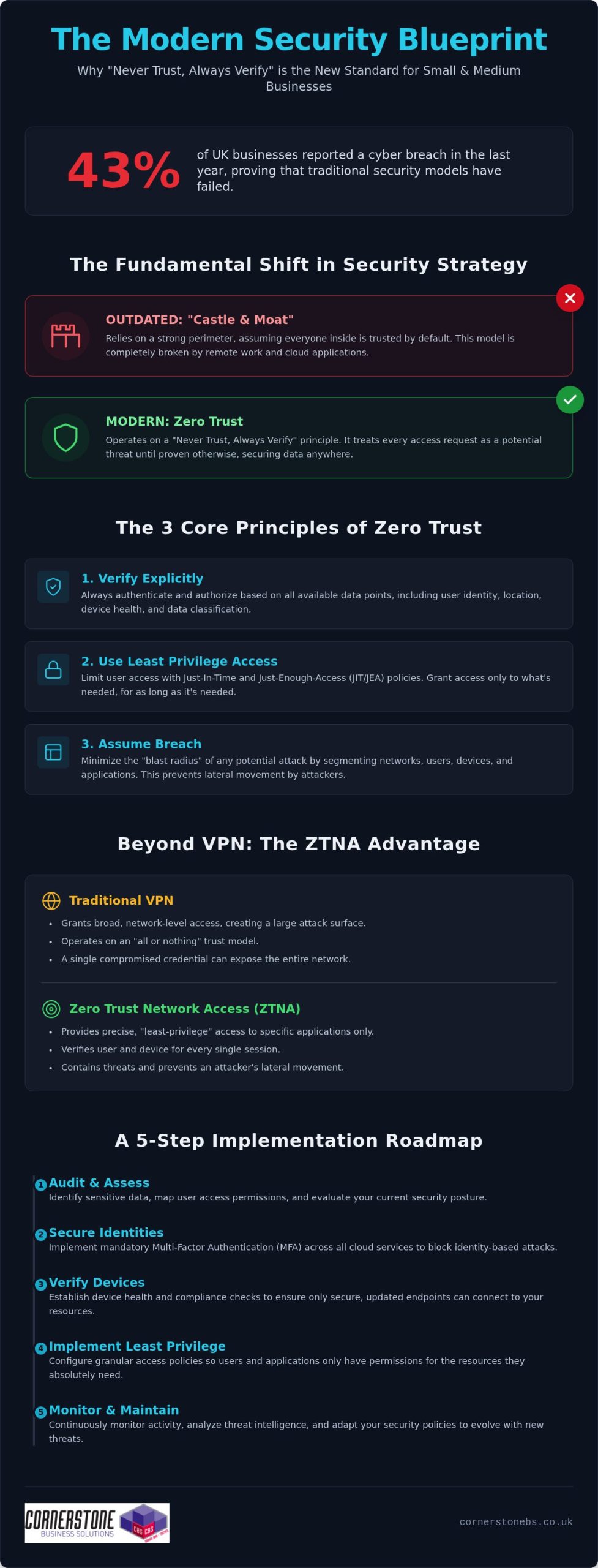
With 43% of UK businesses reporting a cyber breach in the last year, the old “castle and moat” security model has officially crumbled. If you feel overwhelmed by technical jargon or worry that your remote team is a walking security risk, you aren’t alone. Most small business owners feel caught between rising threats and tight budgets. We understand that your priority is growth, not deciphering complex code. That’s why zero trust implementation for smbs is no longer a luxury reserved for tech giants; it’s the foundation of a resilient, modern business in 2026.
We agree that security should feel like a supportive partner, not a confusing hurdle. You deserve the peace of mind that comes from knowing your data is secure in a hybrid world, without needing an enterprise-sized bank account to achieve it. This guide strips away the complexity to show you exactly how to move beyond outdated passwords to a “never trust, always verify” model. We’ll walk through a realistic, jargon-free roadmap that aligns with the latest 2026 NCSC guidance and the Data (Use and Access) Act 2025. You’ll discover how to protect your team and your reputation with practical steps you can start taking today.
Key Takeaways
- Shift your security strategy from a “castle and moat” model to a “never trust, always verify” approach that secures data in a hybrid world.
- Discover how zero trust implementation for smbs prioritises identity verification and device health to block unauthorised access before it happens.
- Learn why modern Zero Trust Network Access (ZTNA) offers better protection than traditional VPNs by providing granular access to specific applications.
- Follow a clear 5-step roadmap to audit your current permissions and implement mandatory multi-factor authentication across all cloud services.
- Understand the value of a long-term partnership with a managed IT provider to ensure your security infrastructure is proactive and resilient.
What is Zero Trust Security and Why Does It Matter for SMBs?
Zero Trust isn’t just a technical upgrade. It’s a fundamental shift in how we protect your hard-earned business. For decades, the “Castle and Moat” model was the standard. You built a strong perimeter around your office and assumed everyone inside was safe. But in 2026, that wall has effectively disappeared. With teams working from home and data living in the cloud, there is no longer a single “inside” to protect. A Zero Trust Architecture operates on a simple, powerful rule: never trust, always verify. Every request for access is treated as a potential threat until the system proves otherwise.
We help our partners adopt an “Assume Breach” mindset. This isn’t about being pessimistic. It’s about being proactive. By designing your systems as if a threat is already present, you stop a single compromised password from becoming a company-wide disaster. For UK small businesses, zero trust implementation for smbs is the most effective way to protect your reputation and ensure long-term financial stability. It provides the peace of mind you need to focus on growth while we handle the digital heavy lifting.
The Three Core Principles of Zero Trust
To build a resilient business, we follow three non-negotiable rules. First, we verify explicitly. This means authenticating every user based on their identity, location, and device health every time they log in. Second, we apply least privilege access. We ensure your staff only have access to the specific data they need for their roles. This uses Just-In-Time and Just-Enough-Access (JIT/JEA) protocols to keep your most sensitive files locked away. Finally, we assume breach. We segment your network to minimise the “blast radius” of any potential attack, ensuring your core operations stay stable even during an incident.
Why Traditional Security is No Longer Enough
The old ways of working simply don’t match the modern threat environment. Sophisticated phishing and ransomware attacks now target UK small businesses with alarming precision. As you moved your operations to Microsoft 365 and other cloud platforms, the traditional security perimeter broke. Your data is now accessed from various devices and locations, making the “insider threat” a very real concern. Identity has become the new security boundary. Relying on a basic VPN or a single firewall leaves you vulnerable. If a hacker steals one set of credentials, they can often roam freely across your entire network. Zero Trust stops this movement in its tracks, keeping your data where it belongs.
The Core Pillars of a Zero Trust Implementation
A successful zero trust implementation for smbs relies on four foundational pillars: identity, devices, applications, and data. These elements must work in harmony to create a seamless security blanket around your organisation. While the technical details are complex, the goal is simple. We want to ensure that only the right people, using the right devices, can access your sensitive information at the right time. This framework aligns with the global standards defined in NIST Special Publication 800-207, which serves as the definitive guide for modern digital defences.
- Identity: Every login attempt is a moment of truth. We use Multi-Factor Authentication (MFA) and biometrics to verify that your staff are who they say they are, every single time.
- Devices: We check the “health” of every laptop, tablet, and phone. If a device is missing a critical update or lacks encryption, it doesn’t get in.
- Applications: Whether you use cloud tools like Microsoft 365 and Xero or older on-premise software, access is granted on a per-app basis rather than giving away the keys to the whole network.
Identity as the New Perimeter
Passwords are no longer enough to keep your business safe in 2026. We move your team toward robust Multi-Factor Authentication (MFA) to block the vast majority of identity-based attacks. The real intelligence happens with Conditional Access policies. These “if, then” rules act as a smart filter for your business. For example, if a staff member tries to log in from an unrecognised location on an unmanaged device, the system can automatically block access or demand extra biometrics. Identity Protection is the gatekeeper of the modern business. By securing the user, we secure the primary entry point to your entire operation.
Securing the “Anywhere” Workforce with Endpoint Management
The rise of hybrid work has made unmanaged personal devices (BYOD) a significant risk for UK small businesses. If an employee’s personal tablet is infected with malware, it could easily spread to your company files the moment they log in. We solve this by using professional endpoint management tools like Microsoft Intune. This allows us to set and enforce strict security standards for any device touching your data. We automate updates and patches, closing the door on known vulnerabilities before hackers can exploit them. This proactive approach ensures your team can work from anywhere with total confidence. If you’re concerned about your current device security, our team can provide a clear cyber security review to help you identify any hidden gaps.
Zero Trust vs. Traditional VPNs: Making the Switch
Most UK small businesses still rely on traditional VPNs to connect their remote teams in 2026. While these tunnels were once the standard, they now represent a significant security gap. The problem is that VPNs usually grant “flat” network access. Once a user verifies their identity at the gate, they can often roam across your entire server. If a single device is compromised, your whole firm is at risk. Moving to a more modern approach isn’t just a technical upgrade; it’s a vital step for your long-term stability.
The Problem with “Trust but Verify”
Traditional firewalls struggle in a world where your data lives in the cloud and your staff work from various locations. They rely on a “trust but verify” model that is too easily exploited. Hackers love VPNs because they allow for lateral movement. This means one stolen credential can lead to a full-scale ransomware attack. By following the NCSC’s Zero Trust Architecture design principles, we help you move toward a model built for business resilience and peace of mind. It’s about ensuring an incident on one laptop doesn’t bring down your entire operation.
Zero Trust Network Access (ZTNA) Explained
Zero Trust Network Access (ZTNA) is the modern alternative that provides granular control. Instead of connecting a user to your whole network, ZTNA creates a “segment of one” for every session. Your staff only see the specific applications they need to do their jobs. A major benefit is that ZTNA hides your applications from the public internet entirely. Attackers can’t hack what they can’t see. This makes a zero trust implementation for smbs much more effective than simply patching an old, vulnerable VPN.
Making the switch also improves your daily operations. ZTNA is typically faster and more reliable than clunky VPN clients that frequently drop out. Your team will enjoy a smoother experience, and you’ll save money by retiring expensive, high-maintenance hardware. We recommend a phased approach for businesses with existing infrastructure. You don’t have to rip and replace everything overnight. We can start by securing your most sensitive cloud apps first, then gradually move your legacy systems over. This steady transition ensures your business remains stable while your security grows stronger.
A 5-Step Zero Trust Implementation Roadmap for SMBs
Step 1: Identity Discovery. We start by auditing every user account and permission level. You’ll likely find old accounts or “permission creep” where staff have access they no longer need. We enforce Multi-Factor Authentication (MFA) across all cloud services immediately. This aligns with the 2026 Cyber Essentials requirement where MFA is now mandatory for all cloud users.
Step 2: Device Inventory. We identify every device touching your company data. By setting strict health standards, we ensure that only encrypted, patched, and managed devices can connect to your systems.
Step 3: Implement Least Privilege. We remove local admin rights from standard user accounts. This simple step stops 90% of malware from installing itself silently. We restrict access to sensitive folders so staff only see what they need to do their jobs.
Step 4: Network Micro-segmentation. We break your network into smaller, isolated zones. If a breach occurs in one area, it’s trapped. The rest of your business stays safe and operational.
Step 5: Continuous Monitoring. We use proactive system monitoring to spot unusual behaviour in real-time. If a user logs in from an unexpected location or starts downloading unusual amounts of data, our tools flag it instantly.
Starting with Microsoft 365 Business Premium
For most UK small businesses, Microsoft 365 Business Premium is the ultimate “Zero Trust starter pack.” It provides enterprise-grade tools like Defender for Business and Intune at a price point that makes sense for smaller firms. You don’t need to juggle a dozen different third-party security tools when everything is integrated into one platform. If you’re planning a Microsoft 365 Migration for Business UK, choosing this license is the smartest move you can make for your 2026 security roadmap.
Building a Security-Centric Culture
Technology is only half the battle. A zero trust implementation for smbs fails if your team doesn’t understand the “why” behind the new rules. We help you frame security as a collaborative effort rather than a set of chores. When staff understand that verifying their identity protects their own work and the company’s reputation, they become your strongest line of defence. We recommend short, jargon-free training sessions that focus on practical tips for staying safe in a hybrid world. If you’re ready to secure your future, our managed IT support team is ready to help you build a roadmap that fits your specific business needs.
The Cornerstone Approach: Your Partner in Zero Trust
Choosing the right partner for your zero trust implementation for smbs is the difference between a box-ticking exercise and true business resilience. At Cornerstone, we don’t just act as a transactional supplier. We position ourselves as a dedicated long-term partner, invested in the stability and growth of your organisation. Our multi-award-winning team brings the confidence of global partnerships with industry leaders like Microsoft, IBM, and Cisco directly to your doorstep. We combine this high-level expertise with the approachable, regional warmth you expect from a local team that understands your specific challenges.
We know that every business operates differently. A “one size fits all” security plan usually fits no one well. We tailor our Zero Trust roadmap to match your specific data flows, staff requirements, and growth plans for 2026. Whether you are managing a fully remote team or a hybrid office, we design a framework that protects your assets without slowing down your people. To ensure complete transparency, our professional service project fees provide clear, upfront costs for your implementation. You can explore our full range of Cyber Security Services to see how we build resilience into every layer of your organisation.
Ready to Secure Your Future?
Moving toward a “never trust, always verify” model is a journey, not a single event. Our award-winning team is here to guide you through every step with a reassuring and proactive attitude. We pride ourselves on being highly organised and technologically advanced, yet we remain friendly and reachable for every client we serve. We invite you to have an informal conversation with us about your current security posture. It’s a chance to simplify the complex and see how modern security can actually empower your business. If you’re ready to take the first step toward a more secure 2026, you can contact Cornerstone for a Cyber Security Audit today. Let’s work together to make your company data the most secure it has ever been.
Secure Your Business Resilience for 2026 and Beyond
Transitioning to a modern security model is about more than just technology; it’s about protecting your company’s hard-earned reputation and future. We’ve explored how replacing clunky, vulnerable VPNs with granular, identity-based verification streamlines your operations while keeping hackers at bay. A successful zero trust implementation for smbs is not a one-time project but a proactive partnership that evolves alongside your business growth.
As a multi-award-winning IT support provider and Microsoft Solutions Partner, we have the expertise to simplify this journey for you. You gain unlimited proactive helpdesk access and a local team dedicated to your long-term stability. It’s time to replace outdated security models with a robust framework built for the modern, hybrid world. Book Your Proactive Cyber Security Audit Today and let’s start a conversation about your long-term success. We’re here to help you lead with confidence and total peace of mind.
Frequently Asked Questions
Is Zero Trust too expensive for a small business?
Zero Trust is highly cost-effective when managed correctly. Most small businesses already own the necessary tools through their existing Microsoft 365 subscriptions. Instead of expensive hardware, we focus on smart configuration and proactive monitoring. This approach makes zero trust implementation for smbs a strategic investment in business continuity rather than a drain on your budget. It protects you from the massive costs of data breaches and downtime.
Will implementing Zero Trust slow down my employees?
Modern security should empower your team, not hinder them. Zero Trust Network Access (ZTNA) is typically much faster and more reliable than traditional, clunky VPNs that often drop out. Features like biometrics and single sign-on (SSO) allow your staff to access their tools securely with just a touch or a glance. We aim to create a seamless experience where security happens in the background, keeping your workforce productive and happy.
Do I need to replace all my hardware to start a Zero Trust journey?
You don’t need to rip and replace your existing IT hardware to begin. We use cloud-based management tools to check the health and security status of your current laptops and mobile devices. If a device meets your security standards, it gets in. If it needs an update, the system prompts the user to fix it first. This allows you to build a resilient architecture while respecting your current technology investments.
How does Zero Trust help with UK data protection compliance?
Zero Trust is a powerful tool for meeting the latest UK data protection standards. By enforcing granular access and continuous verification, you stay in line with the Data (Use and Access) Act 2025 and NCSC design principles. This model provides the detailed auditing and control that the Information Commissioner’s Office (ICO) expects from modern businesses. It gives you the confidence that your company data is handled with the highest level of care.
Can I implement Zero Trust if I still have an on-site server?
You can absolutely implement this model with a hybrid setup. We don’t require you to move everything to the cloud at once. We secure your on-site server by placing it behind a Zero Trust gateway. This ensures that even staff in the office must be verified before they can access sensitive folders. It’s a practical way to modernise your security while maintaining the legacy systems your business relies on every day.
What is the first step an SMB should take toward Zero Trust?
The first step is always an identity and access audit. We help you identify exactly who has access to your data and remove any unnecessary permissions. Enforcing Multi-Factor Authentication (MFA) across all your accounts is the single most effective action you can take right now. This foundation allows us to build a more complex zero trust implementation for smbs over time, ensuring your most vulnerable entry points are locked down immediately.
How does Zero Trust protect against ransomware?
Zero Trust stops ransomware in its tracks by blocking “lateral movement.” In a traditional network, once a hacker gets inside, they can move freely to encrypt all your files. With Zero Trust, we segment your network into isolated zones. Even if one laptop is compromised, the threat is trapped in a “segment of one.” This limits the damage and ensures your core business operations can continue without interruption.
Does Zero Trust replace my existing antivirus and firewall?
It doesn’t replace them; it makes them smarter. Traditional firewalls and antivirus tools are still useful, but they aren’t enough on their own in 2026. Zero Trust adds a vital layer of identity and device health verification that traditional tools simply don’t have. We integrate these elements into a single, proactive system that monitors your entire digital environment. This creates a much stronger, multi-layered defence than relying on old-fashioned perimeter security alone.
What if the greatest threat to your business data isn’t a hacker in a distant country, but a poorly secured printer in your employee’s spare room? As we move into 2026, the traditional office walls have dissolved, leaving many business owners feeling exposed to ransomware and the complexities of managing personal devices. We know that securing remote worker IT access is no longer just a “nice-to-have” feature; it is the backbone of your operational stability. We understand the frustration of slow VPNs that hinder productivity and the fear that a single home Wi-Fi connection could compromise years of hard work.
You likely agree that your team should be able to work from anywhere with the same speed and safety they enjoy at their desks. This guide promises to show you how to protect your sensitive information while empowering a truly productive, mobile workforce. We will preview the shift toward Zero Trust architectures, the role of modern authentication, and a practical roadmap to achieving a “set and forget” security posture that keeps you compliant with UK data standards. Let’s explore how to make your remote setup your strongest asset.
Key Takeaways
- Learn why the old office perimeter is a dead concept and how to adopt a modern framework that protects data wherever your team chooses to work.
- Discover why Zero Trust Network Access is the essential successor to slow VPNs, offering both better protection and a faster experience for your staff.
- Explore the concept of “Seamless Security” to provide a background layer of protection that keeps employees productive without constant technical hurdles.
- Follow our practical 5-step roadmap for securing remote worker IT access, including how to audit your systems and roll out multi-factor authentication.
- See how award-winning managed IT support can take the security burden off your shoulders, giving you the freedom to focus on growing your business.
Understanding Secure Remote IT Access in a Post-Perimeter World
The concept of the “office perimeter” is officially a relic of the past. In 2026, your business network doesn’t stop at the front door; it extends to every home office, transit hub, and client site where your team logs in. Securing remote worker IT access is the comprehensive framework designed to protect your data the moment it leaves your physical server. It isn’t just about encryption anymore. It is about creating a consistent, safe environment for your staff, regardless of their postcode or the time of day they choose to work. This proactive stance ensures that your business remains resilient in a world where the traditional boundaries of the workplace have dissolved.
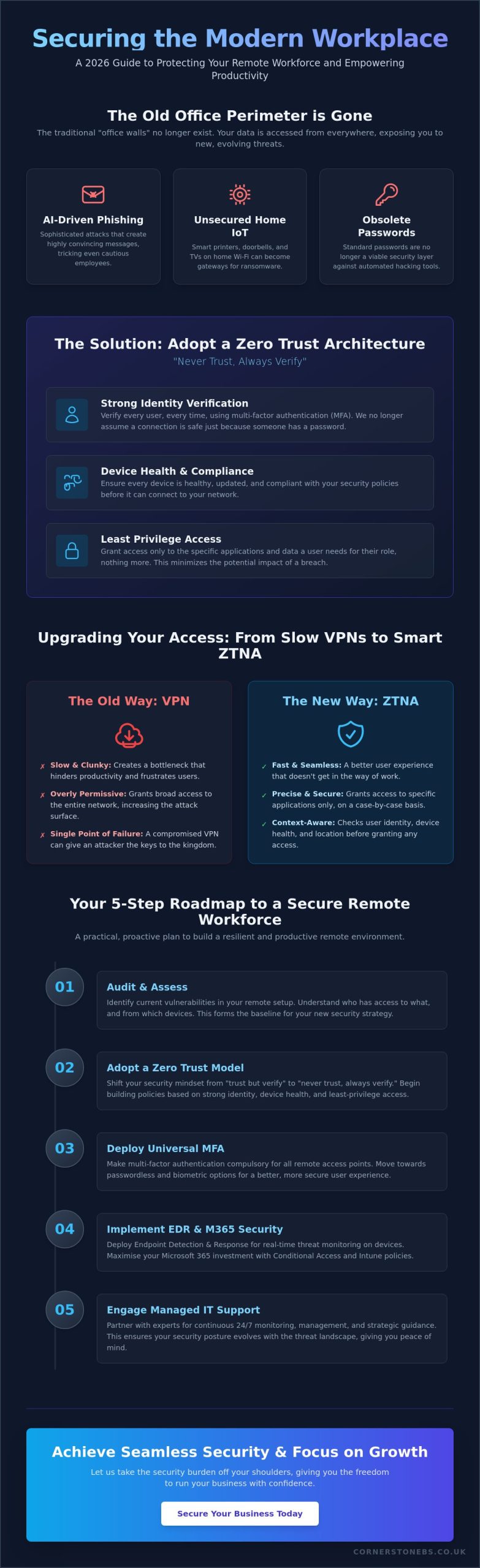
This modern approach stands on three essential pillars: Identity, Device, and Data. We no longer assume a connection is safe just because someone has the right password. Instead, we verify the person’s identity through multiple layers, check that their laptop is healthy and updated, and ensure the data they are accessing is appropriate for their role. This is the shift from “trust but verify” to “never trust, always verify.” It sounds strict, but it actually provides the emotional security you need to let your team work flexibly without staying up at night worrying about a breach. By verifying every request in real-time, we turn security into a silent, reliable partner in your daily operations.
The Evolution of Remote Work Risks in 2026
The landscape has shifted dramatically. AI-driven phishing attacks now use sophisticated frontier models to create highly convincing messages that can fool even the most cautious employees. We also see a rise in risks from domestic IoT devices. A smart doorbell or a home printer on an unsecured network can act as a silent gateway for ransomware. Because of these evolving threats, standard passwords are no longer a viable security layer. They are simply too easy to bypass in a world where automated hacking tools are constantly scanning for weaknesses. Keeping your team safe requires a move toward more robust, biometric-based protections.
Why a Strategic Approach Outperforms Ad-Hoc Solutions
Many businesses fall into the trap of “bolting on” security features only after a problem occurs. This ad-hoc approach is often more expensive and less effective than a unified strategy. A proactive plan for securing remote worker IT access actually improves your business continuity and can lead to lower cyber insurance premiums. We position security as a foundational element of your growth, not a barrier to it. When your systems are built with resilience in mind, you have the freedom to scale your team and your operations with total confidence. It is about building a stable platform for your future success.
The Core Technologies Powering Secure Remote Work
Building a resilient remote environment doesn’t require a massive enterprise budget; it requires the right tools used correctly. In 2026, the traditional VPN is fading away. It often grants too much access and slows down your team, creating a bottleneck for productivity. Instead, we recommend Zero Trust Network Access (ZTNA). Think of ZTNA as a smart digital bouncer. It checks who is trying to connect, which device they’re using, and their current location before granting access to specific apps. It’s precise, fast, and far more secure than older methods that once relied on a single point of entry.
Maximising Microsoft 365 for Remote Security
Most UK businesses already use Microsoft 365, but few use its full security potential. We help you set up Conditional Access policies, which allow you to block logins from suspicious locations or from devices that aren’t fully updated. Microsoft Intune takes this further by letting you manage every mobile and laptop from a central dashboard. A professional Microsoft 365 migration for business UK simplifies remote management by ensuring your cloud environment is built for security from the ground up. It turns a standard productivity tool into a powerful shield for your data.
Secure Hardware: Beyond the Software
Software is only half the battle. Securing remote worker IT access also depends on the physical kit your team uses. Business-grade laptops featuring TPM (Trusted Platform Module) chips provide hardware-level encryption that consumer models often lack. While “Bring Your Own Device” (BYOD) seems cost-effective, it is often a security nightmare. We find that company-issued hardware, pre-configured with encryption and security software, is the safest route. It ensures every device is protected the second it leaves the box. If you’re unsure if your current tech stack is up to the challenge, our team is happy to review your remote infrastructure and offer practical, local advice.
Balancing Robust Security with Employee Productivity
Many business owners worry that adding layers of protection will grind daily work to a halt. We’ve all heard the grumbles about slow VPNs or forgotten passwords that lock people out for hours. But securing remote worker IT access shouldn’t be a barrier to getting things done. We aim for “Seamless Security.” This means protection happens quietly in the background, allowing your staff to focus on their roles instead of wrestling with tech. By using Single Sign-On (SSO), we eliminate password fatigue. Your team logs in once and gains secure entry to all their essential business applications. It’s faster for them; it’s safer for you.
For cloud-heavy businesses, latency is the enemy. Modern access solutions provide much lower latency than legacy systems. This ensures that a staff member working from home in the morning feels just as connected as if they were sitting in your main office. A strategic approach to securing remote worker IT access prioritises the user experience just as much as the data protection protocols.
Reducing Friction with Modern Authentication
Moving to biometrics is a total game changer for staff morale. Using a fingerprint or facial recognition via Windows Hello or Touch ID is nearly instant and far more secure than a written password. We also implement context-aware security. If an employee is on a known device at their usual home address, the system stays quiet. It only prompts for extra verification if it detects something unusual, such as a login attempt from a different country. This reduces “verification fatigue” and keeps the workflow smooth and uninterrupted.
The Human Element: Training as a Security Layer
Even the best software can’t stop every mistake. That’s why we treat training as a vital security layer rather than a box-ticking exercise. We help you roll out bite-sized, regular cyber awareness training that fits into a busy day. It’s about building a culture where staff feel empowered, not policed. When your team understands the “why” behind the rules, they become your strongest line of defence. We encourage an open environment where reporting a suspicious email is met with a “thank you” rather than a reprimand. This collaborative approach is a foundational element of business stability and emotional security. If you’re concerned about how security is impacting your team’s output, we invite you to start a conversation with our local team today.
A 5-Step Roadmap to Securing Your Remote Workforce
Securing remote worker IT access shouldn’t feel like a guessing game. While the technology involves sophisticated layers, the path to implementation is straightforward when broken down into logical steps. We have developed a 5-step roadmap to help you move from a reactive posture to a resilient, modern framework that protects your team and your data without getting in the way of their work. This is about building a foundation for stability and growth.
Step 1: The Audit and Policy Phase
You can’t protect what you don’t know exists. We start by identifying “Shadow IT,” which often involves well-meaning staff using unapproved apps like personal Dropbox or WhatsApp to share sensitive business files. Clear remote work policies are vital. They define exactly what is expected of your team and how they should handle company data outside the office. Reviewing our cyber security services is a great way to benchmark your current posture against 2026 standards and identify where your biggest risks lie.
Step 2: Implement MFA. With 91% of companies now making multi-factor authentication compulsory, this is your baseline defence. It’s the simplest way to stop a stolen password from becoming a full-blown data breach.
Step 3: Standardise Hardware and Cloud. We recommend moving away from the “bring your own device” nightmare. Using company-issued, encrypted hardware and secure cloud platforms like Microsoft 365 ensures every device is managed under the same high standards.
Step 4: Deploy a Zero Trust Framework. It’s time to retire the legacy VPN. Replacing it with Zero Trust Network Access (ZTNA) ensures that your staff only access the specific files they need, keeping the rest of your network isolated and safe.
Step 5: Proactive Monitoring and Response
The final step is establishing ongoing oversight. Since your team might work irregular hours, 24/7 monitoring is essential to catch threats while you sleep. This isn’t just a “set and forget” task. It involves proactive threat hunting to stop attackers before they gain a foothold. Our managed IT services Teesside provide this level of national-standard protection with a friendly, local face. We act as your long-term partner, ensuring your systems stay healthy and your business remains compliant with UK data standards. If you are ready to move toward a more secure future, we invite you to book a remote security audit with our expert team today.
Why Managed IT Support is the Key to Long-Term Remote Security
Managing securing remote worker IT access in-house is a significant burden for most SMEs. It requires constant attention to emerging threats, software updates, and user support that can easily overwhelm a small team. When you partner with us, you gain access to award-winning expertise that stays ahead of the 2026 threat landscape. We act as your single point of contact for IT hardware, cloud infrastructure, and cyber security. This unified approach eliminates the gaps that often appear when using multiple different providers. It ensures that every part of your digital ecosystem is working in harmony to protect your business data.
24/7 Support for a 24/7 Workforce
Remote workers don’t always stick to a traditional nine-to-five schedule. Whether they are catching up on emails late at night or starting early to beat the school run, they need help that matches their rhythm. Our expert helpdesk provides immediate assistance regardless of where your staff are located. This level of support does more than just fix tech problems. It boosts remote employee morale by proving that they have the same reliable tools and backing as those in the office. Our tailored cloud solutions and managed support go hand-in-hand to ensure your digital workspace is always available and always secure.
Your Partner in Secure Growth
We don’t just set up your systems and walk away. We are here as your long-term partner to ensure securing remote worker IT access remains robust as your business evolves. As your remote team grows, we scale your security protocols and hardware deployment to match. There is a deep sense of reassurance that comes from working with a multi-award-winning IT provider deeply rooted in our local community. We take pride in our regional identity and our reputation for reliability. We handle the technical mechanisms so you can focus on your core business goals. We invite you to start a no-obligation conversation with our local team today about your remote setup.
Future-Proof Your Remote Strategy Today
Remote work is no longer a temporary fix. It’s a permanent pillar of modern business. We’ve seen how the old office perimeter has vanished and why a Zero Trust model is now the gold standard for protection. By focusing on identity and device health rather than just outdated passwords, you create a “seamless security” environment that keeps your team productive and your data safe. Implementing a clear 5-step roadmap ensures you aren’t just reacting to threats but building a resilient foundation for long-term growth.
Securing remote worker IT access is a journey that requires the right partner by your side. As a multi-award-winning IT services provider and official partners with Microsoft, IBM, and Cisco, we bring world-class expertise directly to our local community. Our proactive 24/7 system monitoring means we catch risks before they become breaches. We invite you to take the first step toward a more stable and secure future for your business.
Book a Free Remote Security Audit with our Award-Winning Team. We look forward to helping you build a workplace that is safe, efficient, and ready for whatever comes next.
Frequently Asked Questions
What is the most secure way for remote employees to access the company network?
Zero Trust Network Access (ZTNA) is the gold standard for remote security in 2026. It operates on the principle of “least privilege,” meaning staff only gain access to the specific applications they need for their roles. By verifying every user and device identity before granting entry, it prevents hackers from moving laterally through your systems. This granular control is far more effective than traditional perimeter-based security methods.
Is a VPN still enough for remote work security in 2026?
A traditional VPN is rarely sufficient on its own for modern business needs. While they provide an encrypted tunnel, older VPNs often grant broad access to the entire network once a user is authenticated. This creates a significant risk if a single set of credentials is stolen. We recommend moving toward ZTNA or SASE models that offer more precise, identity-centric protection and better performance for your team.
How do I secure remote workers using their own personal laptops (BYOD)?
The most effective way to manage “Bring Your Own Device” (BYOD) is through Microsoft Intune and virtual desktop solutions. These tools allow you to create a secure, encrypted workspace on a personal laptop that is entirely separate from the employee’s private files. You can enforce strict security policies and wipe business data remotely if the device is lost, all without invading the staff member’s personal privacy.
What are the biggest security risks for employees working from home?
Unsecured home Wi-Fi and domestic smart devices are the primary vulnerabilities we see today. Many home routers use outdated encryption, and “backdoor” entries through smart doorbells or printers are becoming common. Securing remote worker IT access requires a focus on these domestic weak points. We help you implement stronger encryption standards and provide awareness training so your team can identify AI-generated phishing attempts before they cause damage.
Does securing remote access slow down internet speeds for my staff?
Modern security solutions actually tend to improve internet performance for your team. Older VPNs often “backhaul” all data through a central office server, which creates a frustrating bottleneck. Newer cloud-native frameworks connect your staff directly to their applications via the nearest secure data centre. This results in a faster, more responsive experience that feels just like being in the office, even when working from home.
How much does it cost to implement a secure remote access strategy?
The investment required depends on your current technology stack and the size of your remote workforce. We find that many UK businesses already own the necessary tools through their existing Microsoft 365 subscriptions but haven’t configured them for maximum safety. Our approach focuses on maximising your current assets first. We work with you to build a customised, scalable strategy that provides long-term stability without unnecessary overheads.
What is the difference between MFA and 2FA for remote logins?
Multi-Factor Authentication (MFA) is a more robust evolution of Two-Factor Authentication (2FA). While 2FA requires two forms of evidence, MFA uses three or more independent factors, such as a password, a physical security key, and a biometric scan. This layered approach is vital for securing remote worker IT access because it makes it statistically much harder for an attacker to bypass your defences, even if they steal a password.
Can I monitor my remote workers’ IT security without invading their privacy?
You can maintain a high security posture without monitoring your employees’ personal activities. We use endpoint detection tools that focus on identifying malicious software and unusual system behaviours rather than tracking individual user actions. This protects your business from threats while respecting the trust you’ve built with your team. It’s a proactive way to ensure business continuity while maintaining a healthy, positive workplace culture for everyone.