

Can an external IT partner strengthen your internal team without taking over? That’s the promise of co-managed IT support UK businesses consider when day-to-day demands leave little room for strategic work.
If your internal team is stretched across user support, maintenance and longer-term projects, adding outside expertise can help. But shared support only works when everyone knows who owns each task. Without clear responsibilities, requests can be duplicated, delayed or left without a next step.
This guide explains how co-managed support complements your existing team, how it differs from fully managed and in-house IT, and what to define before putting a shared arrangement in place. You’ll learn how to map responsibilities for incidents and ongoing maintenance, identify where specialist support or extra capacity could help, and take practical steps towards a tailored model. The aim is to strengthen day-to-day technology support while keeping your organisation involved in decisions.
Key Takeaways
- Co-managed IT support UK gives internal teams a way to add external expertise while retaining a role in technology decisions.
- Map how requests move from reporting to resolution and follow-up, so hand-offs between teams are clear.
- Compare co-managed, fully managed and in-house support against your team’s capabilities, priorities and preferred level of control.
- Reduce the risk of missed tasks by assigning clear owners for routine support, maintenance, specialist work and business decisions.
- A practical overview of your infrastructure can help shape a tailored arrangement around the systems and support your organisation needs.
What does co-managed IT support in the UK actually mean?
An internal IT team can know an organisation’s systems and people inside out, yet still find its capacity stretched. Day-to-day user requests, routine maintenance and unexpected technical issues can leave limited time for specialist work or longer-term priorities. Co-managed IT support UK businesses use addresses this pressure by adding an external partner while keeping the internal team involved.
Co-managed IT support is a shared arrangement in which an organisation’s internal IT team and an external IT partner divide technology support responsibilities according to agreed needs. The organisation retains an internal IT role, while the partner contributes agreed operational capacity, technical expertise or both.
The division can look different from one organisation to another. Internal staff might retain responsibility for user relationships, business systems and technology decisions, while the partner supports network maintenance or provides specialist input on cloud and security. Alternatively, the partner might take on a defined part of routine support, with internal staff handling requests that depend on detailed knowledge of business processes.
The important point is that co-managed support isn’t a fixed package with identical boundaries everywhere. It is a way of organising work between two teams. The broader Managed Services model provides useful context: an external provider takes responsibility for agreed services, while a co-managed arrangement keeps the organisation’s own IT function involved in delivery and decisions.
How is co-managed IT different from fully outsourced support?
Co-managed support shares responsibilities between an internal team and an external partner. Fully outsourced support places broader IT duties externally, often for an organisation without its own IT staff. The exact division depends on the agreed scope, so the labels alone don’t tell you who handles every request or system. In a co-managed model, internal ownership can remain part of daily support, technical decisions and business planning.
Why do businesses consider a shared IT support model?
A shared model can help when the internal team has more work than capacity, or when a task calls for expertise that isn’t available in-house. The partner contributes support in agreed areas, while internal staff provide context about users, priorities and how technology supports the organisation’s work. This combination can align support more closely with business needs.
It can also offer a practical alternative to choosing between handling every IT responsibility internally and transferring the whole function to an external provider. Start by identifying where the pressure sits: recurring support requests, maintenance, specialist knowledge or time for planned work. That picture helps give external support a defined purpose, rather than adding it without a clear role.
How co-managed IT support works alongside an internal team
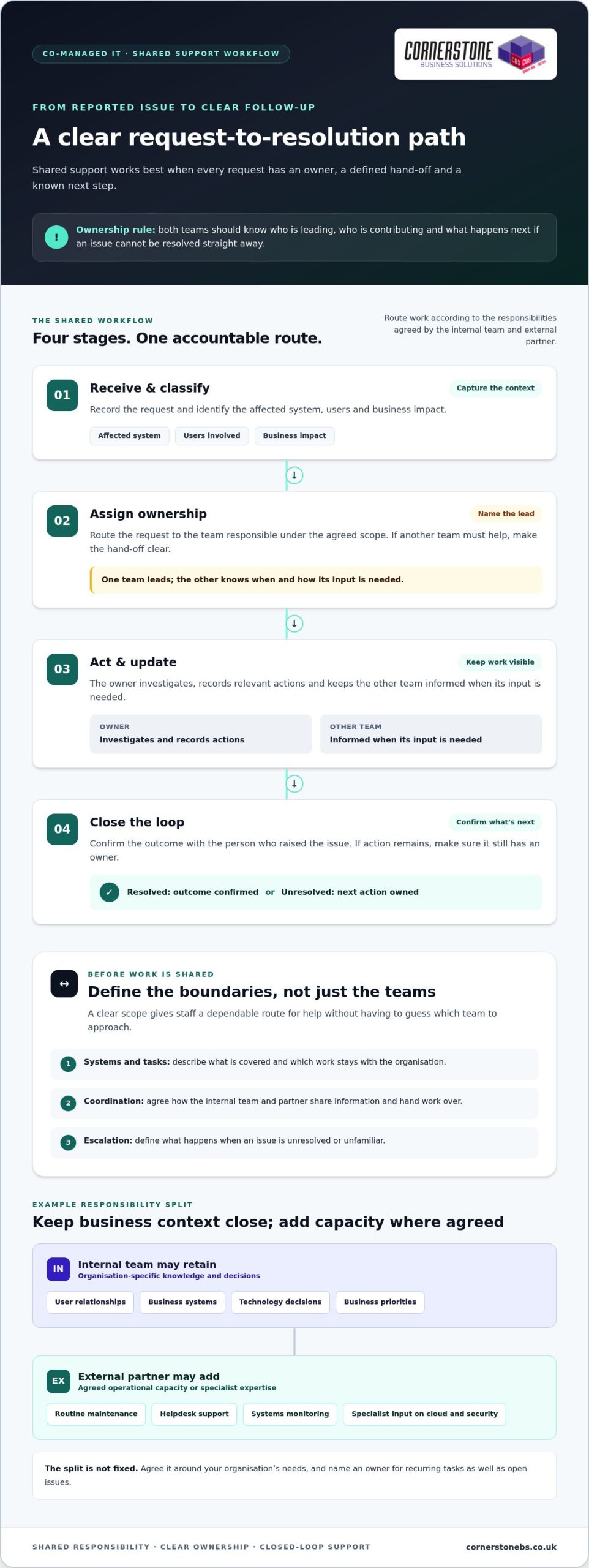
Shared support works best as a clear workflow, not a vague agreement to “work together”. A staff member reports an issue through the agreed route. The request is assigned to the internal team or external partner based on its type and the responsibilities they’ve agreed. The owner investigates, takes action or brings in the other team, then records the outcome and follows up where needed.
Clear ownership is essential to effective shared support: every request, task and unresolved issue needs a named owner. That doesn’t mean one team must handle everything. Both sides should know who is leading, who is contributing and what happens next if an issue can’t be resolved straight away.
- Receive and classify: Capture the request and identify the affected system, users and business impact.
- Assign ownership: Route it to the team responsible under the agreed scope, with a clear hand-off if another team needs to help.
- Act and update: The owner investigates, records relevant actions and keeps the other team informed when its input is needed.
- Close the loop: Confirm the outcome with the person who raised the issue, or make sure any remaining action has an owner.
The boundaries depend on the organisation’s priorities and the support arrangement. A clear scope should describe which systems and tasks are covered, how the teams coordinate, and how unresolved or unfamiliar issues are escalated. This gives staff a dependable route for seeking help without having to guess which team to approach.
Which responsibilities should the internal team retain?
Start with what the organisation wants to keep in-house. Internal staff may be best placed to make decisions based on business priorities, understand the impact of a change on particular teams, or manage relationships with users and senior leaders. Their knowledge of internal processes is valuable context for technical work. Name an owner for recurring tasks as well as issues that remain open after initial troubleshooting.
Where can an external IT partner add capacity?
Depending on the agreed scope, a partner may contribute to routine maintenance, provide another route for helpdesk support or assist with monitoring systems. Specialist input can also help the internal team assess a technical change while retaining its knowledge of how the organisation works. For example, planning a change to a cloud environment is smoother when technical considerations are weighed alongside user needs. A Microsoft 365 migration guide can help frame the questions involved.
Review the arrangement as systems and priorities change. If a task repeatedly passes between teams, or an issue has no clear next step, revisit the ownership map and adjust the scope. Organisations shaping joined-up managed IT support can use this workflow as a starting point for a practical discussion about their needs.
Co-managed vs Fully Managed vs In-house IT Models
Choosing an IT support model is less about finding a universal winner and more about deciding where capability and ownership should sit. A business with an experienced internal team may want targeted external support. An organisation with little internal IT capacity may need broader support from an external partner. The right arrangement should reflect the work that needs doing and the level of control the business wants to retain.
The key difference between IT support models is who retains day-to-day ownership of the work. This comparison offers a starting point, but responsibilities can vary within each model according to the agreed scope.
| Support model | Day-to-day ownership | Internal capacity |
|---|---|---|
| Co-managed | Shared between the internal team and an external IT partner, with responsibilities agreed between them. | An internal IT role remains. The partner adds capacity or expertise in selected areas. |
| Fully managed | Broader responsibility for IT operations sits with an external provider, within the agreed service scope. | Little or no internal IT capacity may be needed for work assigned externally, though the business still sets priorities and provides organisational context. |
| In-house | The organisation’s internal team manages and owns IT support and operations. | The business relies on its own staff and capabilities to deliver the required support. |
These are broad descriptions, not fixed contract templates. A fully managed arrangement still needs business input on priorities, while a co-managed arrangement can assign a substantial area of work to the partner. Compare the actual responsibilities, escalation routes and decision-making roles, rather than relying on a model name alone.
When might co-managed support be the best fit?
Co-managed support may suit an organisation with an internal IT function that understands its users and systems, but needs added capacity or specialist input in defined areas. The internal team can retain decisions shaped by business context while a partner contributes to agreed technical work. This can be especially relevant when preserving internal knowledge matters. The fit depends on requirements and clearly allocated responsibilities.
When should a business consider another support model?
If there’s limited internal IT capacity, a broader external arrangement may be more practical than dividing work between teams. Conversely, a capable internal team with the time and expertise to meet its needs may prefer to keep more responsibilities in-house. Neither choice is automatically better. Consider the work that must be covered, the skills available internally and how much operational control the organisation wants to retain.
To assess co-managed IT support UK businesses might use, list the work the internal team wants to own, the areas where it needs support, and the decisions that must remain within the organisation. This gives the comparison a practical foundation and helps shape a model around real business priorities.
Scoping Co-managed IT Without Ownership Gaps
A workable shared arrangement starts with a clear view of what the organisation uses and what it expects each team to do. A responsibility map turns that view into practical boundaries, helping prevent tasks from being duplicated or left unattended. For co-managed IT support UK organisations should document not just who handles a task, but how work moves between teams when circumstances change.
Use this sequence to build the scope:
- Map systems and infrastructure. Record key services, devices and connections, such as workstations, servers, switches, network cabling and internet devices. A site survey can help build a grounded picture of the infrastructure in use.
- Identify priorities. Separate routine user support, ongoing maintenance, specialist technical work and decisions that require business context. Note which areas need internal ownership and where additional support would be useful.
- Assign an owner to each area. Name the team responsible for leading the work, along with any supporting role. Avoid assigning ownership to “the IT team” if both internal staff and the partner could reasonably assume the other will act.
- Agree escalation and review. Document where issues go if the first owner can’t resolve them, who makes decisions that affect the business, and how open tasks are reviewed.
What should a responsibility map cover?
Make the map specific enough to use during everyday work. Include systems and user support, along with infrastructure areas such as networks, servers and workstations. Record ownership for security responsibilities too, including who handles routine security tasks, who assesses concerns and who makes business decisions about risk. A business cyber security guide can help frame the areas to consider without blurring technical responsibilities and organisational decisions.
For each area, note whether the internal team leads, the external partner leads, or the teams share the work. Document who can access relevant systems and information, how access is managed, and what must be passed on during a handover. If an issue remains unresolved, record the next owner and the information they need to continue. This makes escalation a defined route, not an informal message that can be overlooked.
How can teams prevent duplicated work and missed tasks?
Keep shared records of task ownership, progress, decisions and handovers so both teams can see what has happened and what remains open. At an agreed review, look for recurring issues, changes to systems or priorities, and responsibilities that have become unclear. Tailor the process to the organisation’s environment, then update it as that environment changes.
Cornerstone Business Solutions provides managed IT support and can help organisations understand their technology environment and shape a tailored support arrangement. Discuss your managed IT support needs and how responsibilities could be mapped across your systems.
How Cornerstone Business Solutions can support a co-managed approach
A shared IT arrangement needs a partner who can work alongside your internal team and tailor support to the organisation’s requirements. Cornerstone Business Solutions provides managed IT support and brings a broad technical perspective to help businesses consider how day-to-day support fits across their technology environment. The aim is to build a practical working relationship that complements internal knowledge and keeps responsibilities clear.
Cornerstone’s one-call approach covers technical environments across hardware, software, networking, cloud and security. This breadth can help create a joined-up support experience when an issue touches several areas. Your internal team can contribute its understanding of users and business priorities, while the support arrangement defines where the partner’s expertise and operational input fit. The scope is shaped around your needs, rather than assuming every organisation requires the same division of work.
Cornerstone describes its IT support and service as award-winning. For organisations considering co-managed IT support UK, the focus is on understanding the existing environment and creating a collaborative approach that supports business technology without overlooking internal ownership.
How a site survey can help establish the starting point
Before responsibilities can be shaped around the real environment, it helps to understand the technology in place. Cornerstone’s experienced sales engineers perform full site surveys that assess network cabling, workstations, servers, switches and all internet devices. This gives the support discussion a practical foundation: teams can consider how systems connect, where support needs sit and which parts of the environment should be reflected in the shared arrangement.
A clear picture of infrastructure can also help internal staff describe what they want to retain and where additional support would be useful. Rather than starting with a generic model, the conversation can account for the systems the organisation relies on and the existing knowledge held by its team.
What to prepare before discussing shared IT support
A little preparation can make the conversation more focused. Note which responsibilities the internal team currently handles, where recurring support needs arise, and what technology priorities are coming up. Include the tasks your team wants to retain, such as decisions that depend on business context, alongside areas where extra capacity or specialist input could help.
- Current ownership: Summarise who looks after user support, maintenance and key systems today.
- Recurring needs: Identify common requests, ongoing tasks and work that competes with planned priorities.
- Technology priorities: Highlight important systems and upcoming changes that could affect support responsibilities.
- Preferred involvement: Describe where your internal team wants to lead, contribute or remain informed.
These notes help shape an arrangement around your people, systems and priorities. Speak with Cornerstone Business Solutions to discuss your requirements and explore a tailored managed IT support approach.
Build a support model that grows with your needs
Treat shared IT support as a working relationship that can evolve alongside your organisation. Start with the responsibilities your team wants to retain, then identify where extra capacity or specialist input would make the greatest difference. A focused discussion can turn those priorities into a practical support approach without losing sight of internal knowledge and control.
Cornerstone Business Solutions brings award-winning IT support and service, accredited Apple and Microsoft engineers, and certified Apple support to its work with organisations. A full site survey can ground the discussion in your existing infrastructure, including network cabling, workstations, servers, switches and internet devices.
If you’re considering co-managed IT support UK businesses can tailor around their needs, prepare a short list of current responsibilities, recurring support needs and upcoming technology priorities. Then discuss your IT support requirements with Cornerstone Business Solutions. A clear starting point can help shape a collaborative arrangement that gives your internal team the support it needs to move forward with confidence.
Frequently Asked Questions
What is co-managed IT support?
Co-managed IT support is an arrangement where an organisation’s internal IT staff and an external partner share agreed support responsibilities. For example, internal staff might retain approval of business-impacting changes while the partner assists with a defined technical task. The exact split depends on the organisation’s needs. For co-managed IT support UK businesses should make sure staff understand who owns each task and where to direct requests.
Is co-managed IT support the same as fully managed IT?
No. Co-managed support keeps an internal IT role alongside an external partner, while fully managed support generally assigns a broader share of day-to-day IT duties externally. The distinction is about the operating arrangement, not a fixed list of tasks. A business may keep internal oversight of priorities under either model, but the amount of work handled by its own IT staff will differ.
Can a small business use co-managed IT support?
Yes. Business size alone doesn’t determine whether a shared model is suitable. A small organisation with someone handling IT internally might need extra expertise for a particular project or additional help with ongoing support. Before setting up the arrangement, identify what that internal role should retain and where outside input is useful. A defined scope helps keep the model manageable and relevant to the business.
Who is responsible for cyber security in a co-managed IT arrangement?
Responsibility should be allocated between the organisation and its IT partner, rather than assumed to sit entirely with one side. The arrangement can identify who carries out agreed security tasks, who decides how the business responds to a concern, and how that concern is escalated. Put these roles in writing and revisit them when systems, responsibilities or business priorities change.
How do you avoid duplicated work with co-managed IT support?
Give each recurring task and support request a clear owner, then record its status and any handover. If one team passes an issue to the other for investigation, the record should show why it was passed over and what still needs action. Review open items and repeated hand-offs together. This gives both teams a common view without requiring a particular software tool or service target.
What should a co-managed IT support agreement cover?
It should explain which systems and activities are in scope, who owns each responsibility, and how the teams coordinate. Include how requests are handed over, who can approve changes, how unresolved matters are escalated, and how access and work records are managed. It’s also useful to agree when the arrangement will be reviewed, such as after a significant change in business priorities or technology.
Can co-managed IT support include Microsoft 365 support?
Yes. Microsoft 365 can form part of a shared IT support arrangement, with responsibilities defined around the organisation’s needs. The teams can clarify who handles user-related requests, who coordinates technical work, and who approves changes that affect how staff work. Cornerstone Business Solutions provides Microsoft 365 services alongside managed IT support, so these requirements can be considered as part of a broader technology solution.
Tags: Business Technology, co-managed IT, hybrid IT support, internal IT, IT strategy, IT Support UK, Managed Services