
The best server for a small business is the one sized for its users, workloads and data, with room to grow. Choosing the right server for a small business means weighing an in-house system against cloud or hybrid options: for fewer than 10 employees with low data needs, cloud may be more cost-effective, while a hybrid setup can suit 10-25 employees with moderate data needs.
It’s easy to focus on headline specifications, but server capacity only makes sense when you know what your team needs it to do. A server for file sharing, for example, has different demands from one running several business applications.
This guide shows how to assess users and workloads, then match server capacity, processing power, memory and storage to those needs. It also explains how premises, connectivity and future growth affect the decision, helping you choose a setup that supports the business without paying for capacity you won’t use.
Key Takeaways
- Choose between cloud, hybrid and on-site options by weighing remote access, premises, budget and how your team works.
- Match CPU and memory to the applications people use, then plan storage around current data, backups and future growth.
- Start with the server’s main jobs and the number of users, so the setup fits real workloads rather than guesswork.
- Consider how tower, rack and compact systems suit your business today, while leaving room for changing needs.
How to choose a server for small business?
Choosing the right server for a small business starts with its applications, remote access needs and available premises. Compare cloud-hosted, hybrid and on-site options before deciding which hardware and management approach fits.
Cloud and On-Premises Hosting Options
A cloud-hosted server runs on a provider’s hardware and is accessed over the internet; an on-premises server runs at your premises. This distinction matters: local equipment needs suitable space and infrastructure, while remote access depends on connectivity.
Hybrid setups combine local hardware with cloud services, and colocation places your server in a data centre. Microsoft 365 subscriptions can handle major applications such as email without requiring an in-house email server. For example, a business might keep shared files on a local server while using cloud email.
Dedicated Servers and Cloud Infrastructure
A dedicated server reserves a physical machine for your business, while cloud infrastructure provides server resources over a network. The choice affects how much control you have, how you plan capacity and where the hardware is housed.
Windows Server and Linux Choices
Windows Server and Linux are operating systems that manage server hardware, users and applications. Windows Server may suit businesses using Microsoft software, while Linux supports workloads such as web hosting and databases.
Choose an operating system based on software compatibility, staff expertise and the applications the server must run. A business relying on Microsoft tools may prefer Windows, while an application designed for Linux may require a Linux environment. The operating system should suit both the workload and how the server will be managed.
Server Setup and Ongoing Costs
In the UK, server costs depend on the hardware, setup complexity, software licensing, connectivity and ongoing support required. When choosing the right server for a small business, compare those costs with the power, cooling and space needed for onsite equipment.
For an onsite server, plan for secure room access, reliable internet connectivity, physical installation and ongoing electricity use. Cloud hosting removes the physical equipment requirements from your premises, but access still depends on internet connectivity. Include administration, maintenance, security and backups in your decision, not just the initial hardware purchase.
CPU, memory and storage performance
Balance processing power, memory and storage against the applications employees use. File sharing and running several business applications place different demands on each resource.
Memory and Storage Needs
Server memory supports active applications and tasks, while storage holds files, databases and backups. The capacity you need depends on the workload, data volume and number of tasks running at once.
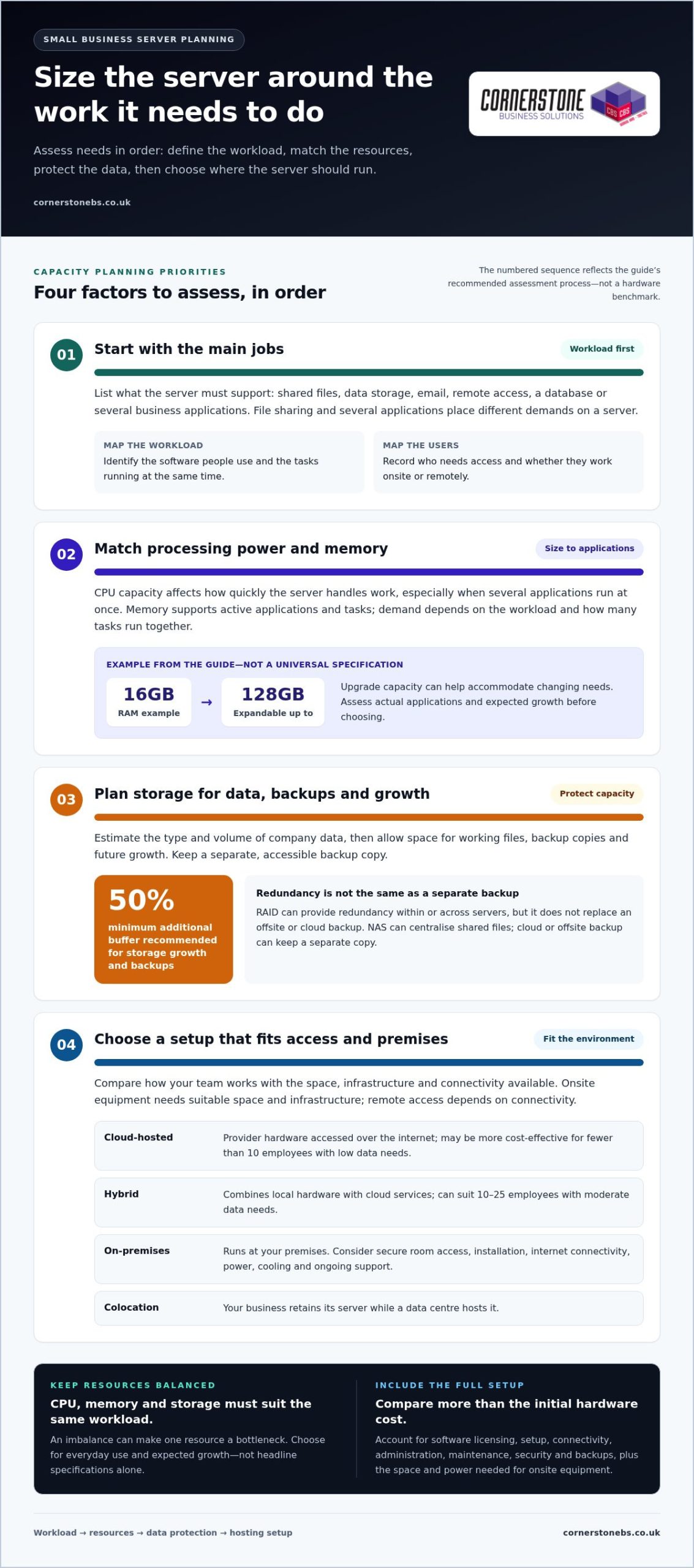
A budget server with 16GB of RAM, expandable up to 128GB, illustrates how upgrade capacity can support changing needs. Treat it as an example, not a universal specification. Windows applications, shared files and database activity all affect memory demand. Assess current workloads and expected growth before selecting hardware, so the server can handle everyday use without excess capacity.
Storage Capacity and Backups
Storage planning means allowing room for working data, duplicated copies and future growth. The guide recommends including at least a 50% buffer for storage growth and backups when planning a small business server.
Estimate the type and volume of company data, including space for backup copies. RAID can provide redundancy within a server or across servers, but it does not replace an offsite or cloud backup. Keep a separate, accessible backup copy to reduce reliance on a single machine if its storage fails.
CPU capacity affects how quickly a server handles work, especially when several applications run at once. File sharing and database workloads have different processing demands, so assess the tasks rather than choosing a processor by its headline specification alone. Check that memory, CPU and storage suit the same workload: an imbalance can make one resource a bottleneck.
For straightforward file storage and sharing, network-attached storage (NAS) provides dedicated storage accessible over the network. It can centralise documents for staff using different computers, while cloud or offsite backup keeps a separate copy. Compact servers can also store and share files, though their storage and computing capacity may be limited. Consider whether remote users need internet access to reach the files.
If shared files or server access are straining connectivity, business network infrastructure can be part of the solution.
Assessing business requirements and user numbers
Start with the work your server must support, then map it to your employees, software and access needs. This helps establish whether you need shared files, remote access, email, a database or several functions together.
Identifying Business Server Requirements
Assess server requirements by reviewing your existing network, current functionality, security and accessibility challenges. Buying hardware before understanding these needs can leave important tasks unsupported or result in a poor capacity match.
List the applications employees use, who needs access and whether they work onsite or remotely. A team sharing documents, for example, has different requirements from a business running enterprise resource planning software or an intranet. Identify the server’s primary purpose, such as file sharing, data storage, email or remote access, then account for other workloads.
Data Protection and Security Requirements
For UK data protection and security, plan how personal and business data will be protected, accessed and backed up. A server may hold sensitive files alongside everyday company documents, so account for both.
Use individual authentication for employees accessing a server remotely, restrict access to appropriate data and include backups in the setup. Match security measures to the information stored and how staff use it. For example, a shared folder containing sensitive records should have controlled permissions, not open access across the whole network.
Website hosting adds another workload to assess. A public website may require two servers: one to process incoming traffic and another to host the website database. This separates website requests from database activity. If your business also runs internal software, include its resource demands and access needs in the same planning exercise.
User numbers help define the scale, but tasks matter too. A small team using email and shared files has different needs from employees running a database or several applications at once. Fewer than 10 employees with low data needs may find a cloud solution more cost-effective, while a team of 10-25 employees with moderate data needs may suit a hybrid approach. Compare those patterns with your actual workloads and future growth.
Choosing an in-house server for business size
Choosing the right server for a small business means matching capacity to employee numbers, workloads and premises. User count is a useful starting point, but growth plans, cooling, connectivity and available IT staff also shape a workable in-house setup.
A NAS system can suit a small company with up to 10 users focused on shared storage. Tower servers may suit businesses with more than 10 users, supporting tasks such as email, database management, and file and print services. These options differ in capacity and role, so weigh the work the system must handle, not only the number of computers connecting to it.
For businesses with 25-200 staff, the guide recommends one or two Windows Standard edition servers with the Essentials Role. For businesses with over 200 staff, it recommends two or more Windows Standard servers. These figures offer size-based direction; actual workloads and future expansion still influence the infrastructure required.
Rack servers can provide a foundation that scales from a starter unit to a server room as needs grow. Planned upgrades may be easier to accommodate, but additional equipment also requires space, cooling, power and connectivity. A tower server may suit premises without room for a dedicated rack. Choose a format the business can support.
Businesses without a full-time server management team should consider systems with embedded or automated management software. Staff still need clear responsibility for maintenance, security and backup routines. A practical approach to choosing the right server for a small business is to map current and expected workloads, then compare them with available premises and management capacity before buying. Plan your business network infrastructure around those needs and future upgrades.
Cornerstone Business Solutions: Managed IT Support
Cornerstone Business Solutions provides Managed IT Support to help businesses manage the technology behind their day-to-day work. If you’re weighing an in-house server against cloud services, support can help align the setup with your users, applications, access needs and growth plans.
Server decisions connect with more than hardware. Microsoft 365 can support everyday business applications, while Cyber Security helps address the protection of systems and data. Bringing these needs into the same conversation can make it easier to plan infrastructure that fits how your team works.
If server management, security or planning your next upgrade is taking focus away from the business, speak with Cornerstone Business Solutions about Managed IT Support. Get in touch to discuss your needs or visit cornerstonebs.co.uk.
Make your next server decision with confidence
A server should support the way your business works now and adapt as that work changes. Treat the choice as part of wider technology planning, and review it when your team grows, applications change or remote working needs shift. This keeps your infrastructure aligned with the business instead of letting an outdated setup limit what staff can do.
Choosing the right server for a small business is easier with a clear view of workloads, access and security priorities. Cornerstone Business Solutions offers Managed IT Support to help businesses manage their IT, alongside Microsoft 365 and Cyber Security. These services can support a broader plan for the systems employees use and the information they handle.
Talk with Cornerstone Business Solutions about your server requirements and the next steps for your business. Contact Cornerstone Business Solutions to start the conversation and move forward with a setup that fits your needs.
Frequently Asked Questions
Need help buying a server?
Specialist input can help you avoid buying hardware that doesn’t suit your software or support needs. Before deciding, gather the applications you use, the number of people who need access and any compatibility requirements. Include installation, data migration and ongoing administration in your planning. This gives you a practical basis for comparing server options and identifying what the purchase needs to cover.
So, Professional Services or In-House Server?
Choose professional support if your team lacks the time or technical skills to maintain server hardware, accounts, updates and recovery processes. In-house management may suit a business with staff who can take clear responsibility for those tasks. Owning a server doesn’t mean managing everything yourself: you can retain equipment in-house and use Managed IT Support for maintenance and guidance.
What types of servers are suitable for a small business: on-premises, cloud, or hybrid?
Cloud, on-premises and hybrid setups can all suit a small business, depending on how staff work and which systems need to connect. A business with remote staff may favour services accessible over the internet, while one with applications tied to local equipment may keep some infrastructure onsite. A hybrid arrangement can combine the two. Consider how employees will access each system during normal operations and disruptions.
What server specifications does a small business need for its users and applications?
There’s no single specification that fits every business. Start with the software vendor’s requirements for each application, then consider how many people may use it at once. A database used by several employees has different demands from occasional document access. Check processor, memory, storage and network requirements together, and allow for workloads you expect to add.
When should a small business choose a NAS instead of a dedicated server?
Choose a NAS when the main requirement is shared access to files and documents, rather than running server applications. A team that needs a central place for project folders, for example, may not need a dedicated server for that task alone. Choose a dedicated server when the business needs to run applications, manage services or handle workloads beyond a storage device’s purpose.
What are the risks and disadvantages of buying and managing an in-house server?
With an in-house server, the business is responsible for its care. Hardware faults, missed updates, untested backups or damage to the premises could interrupt access to essential systems. Managing accounts, security and maintenance also takes staff time. Before buying, decide who owns each task and how employees will continue working if the server or its location becomes unavailable.
Tags: Business Growth, business servers, cloud computing, hybrid IT, IT infrastructure, server selection, server storage, small business technology