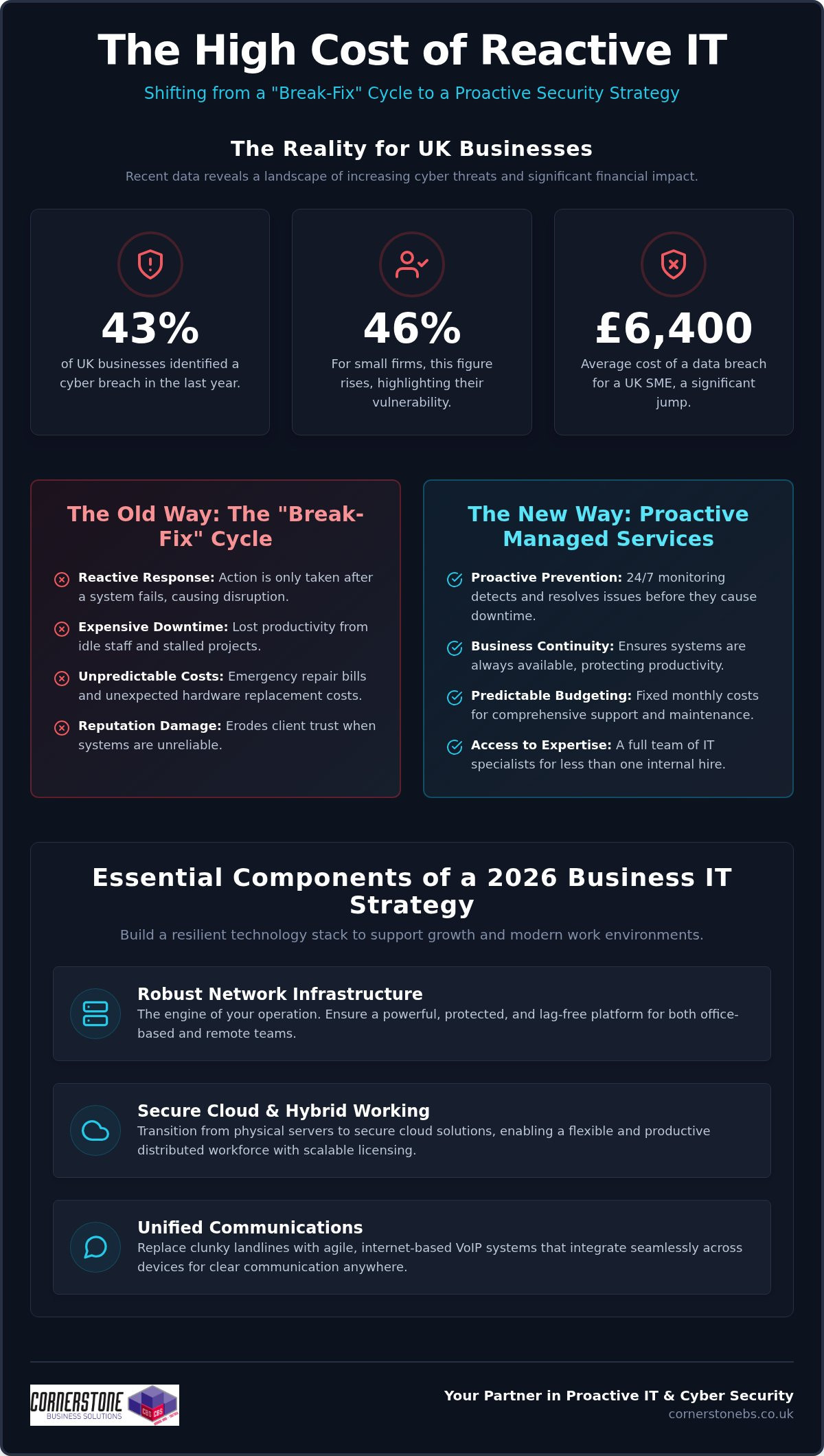
Did you know that 43% of UK businesses identified a cyber breach in the last year? For small firms, that figure hits 46%. It’s a sobering reality, especially as the average cost of a data breach for a UK SME jumped to £6,400 in 2025. If you’re running a company, you’ve likely felt the sting of frequent system downtime or the frustration of waiting hours for a helpdesk response. You deserve more than a reactive fix when things break. Securing reliable cyber security services for businesses is no longer just a technical tick-box; it’s the foundation of your stability.
We understand that hidden costs in IT contracts and the rising tide of sophisticated threats cause genuine anxiety. You want predictable monthly costs and technology that works without friction. This guide explores how to identify a proactive IT partner that doesn’t just react to problems but builds a long-term roadmap for your growth through 2026 and beyond. We’ll break down the latest UK regulations, including the Cyber Security and Resilience Bill, and show you how to turn your digital infrastructure into a competitive advantage.
Key Takeaways
Move away from the expensive break-fix cycle by adopting a proactive managed service model that prevents issues before they disrupt your operations.
Ensure your 2026 strategy includes robust network infrastructure and Microsoft 365 integration to support a seamless hybrid working environment.
Evaluate potential partners by their global credentials with brands like IBM and Cisco, alongside their ability to provide clear, human-led helpdesk support.
Discover why comprehensive cyber security services Stockton-on-Tees firms rely on are the essential foundation for data resilience and long-term business growth.
Build a tailored technology roadmap with an award-winning provider to ensure your IT investment directly supports your specific commercial goals through 2026.
The Evolution of Business IT Support: From Reactive to Proactive
The traditional way of handling technology was simple but fundamentally flawed. You waited for a server to fail or a laptop to crash, then called a technician to fix it. This “break-fix” model is inherently reactive, meaning your business only receives attention when it’s already suffering. Modern Managed IT Support flips this dynamic on its head. It’s a proactive partnership for business continuity that focuses on prevention rather than just repair. By choosing elite cyber security services Stockton-on-Tees companies can transition from a state of constant digital anxiety to one of total confidence.
Our approach involves 24/7 monitoring to catch minor glitches before they evolve into major outages. If a critical system shows signs of strain at midnight, our team is alerted immediately. We often resolve these issues before your staff even logs on for the day. This constant vigilance is a cornerstone of modern cybersecurity, keeping your data shielded and your operations fluid. When your technology is managed by experts who anticipate problems, you stop being a victim of circumstance and start being a master of your own productivity.
The Hidden Costs of IT Downtime
Adopting a managed service model provides the financial stability every growing business needs. You’ll enjoy predictable monthly budgeting through fixed-term IT maintenance contracts, removing the shock of unexpected hardware failures. This model also democratises access to high-level expertise. You get an entire department of specialists, including cloud experts and infrastructure engineers, for a fraction of the cost of one full-time internal hire. We don’t just keep the lights on; we align your technology performance with your long-term commercial goals. Your digital tools should drive your growth, not hold it back.
Essential Components of a 2026 Business IT Strategy
By 2026, a business is only as strong as its digital connection. A robust network infrastructure isn’t a luxury; it’s the engine room of your entire operation. Whether your team is based in a central office or working from home, they need a platform that doesn’t lag or leave them vulnerable to external threats. Integrating professional cyber security services Stockton-on-Tees ensures this engine room is both powerful and protected. It’s about creating a environment where technology accelerates your workflow instead of acting as a bottleneck.
Proactive system monitoring serves as your first line of defence against hardware failure. By identifying a failing drive or an overheating network switch before it crashes, we prevent the “break-fix” cycle mentioned earlier. This constant oversight provides the emotional security of knowing your systems are healthy. If you’re looking to upgrade your setup, we can help you build a resilient technology stack that grows with you.
Cloud Infrastructure and Hybrid Working
Physical servers are rapidly becoming relics of a less efficient era. Transitioning to secure cloud solutions allows your distributed workforce to access critical data from any location with total security. This flexibility is vital for maintaining productivity in a hybrid world. We recommend reviewing guidance such as the FTC’s advice on Cybersecurity for Small Business to understand the baseline protections your cloud environment requires. Scalable licensing for platforms like Microsoft 365 ensures you only pay for the seats you actually need, keeping your overheads lean and manageable.
Unified Communications for Business
Communication shouldn’t be fragmented across different devices and apps. Modern business VoIP systems replace clunky, expensive landlines with agile, internet-based calling that works everywhere. When you integrate these systems with business mobile data contracts, your team stays reachable on a single professional number. Streamlining these tools through Microsoft Teams integration means internal chats and external client calls live in one place. It simplifies your billing and, more importantly, it simplifies the way your staff interacts with the world.
Evaluating an IT Partner: A Professional Framework
Choosing an IT partner is one of the most critical decisions you’ll make for your business stability. It requires a delicate balance between technical muscle and genuine human connection. When you search for cyber security services Stockton-on-Tees, don’t settle for a provider that simply lists features. You need a framework to measure their true value. A great partner should act as an extension of your team, providing the emotional security that comes from knowing your systems are in safe, expert hands.
Since 2008, we’ve seen that the most successful collaborations are built on transparency and proven expertise. You shouldn’t have to guess if your provider is up to the task. Use the following criteria to evaluate whether a potential partner can actually support your growth through 2026.
Technical Credentials and Global Partnerships
Technical excellence isn’t just a claim; it’s a measurable standard. Look for a provider that maintains deep partnerships with global technology leaders like Microsoft, IBM, and Cisco. These relationships ensure your support team has direct access to the latest tools and high-level training. A professional partner will align their strategies with recognised global standards, such as the NIST Cybersecurity Framework. This structured approach ensures your defence isn’t just a collection of random software, but a cohesive shield designed to withstand evolving threats. Your provider should be equally comfortable managing your software ecosystem and procuring the specific IT hardware your infrastructure requires.
The Quality of Support and Communication
The human side of IT is where the real value is felt. When a staff member calls the helpdesk, they need speed, empathy, and technical clarity. Test the communication style of a potential partner. Do they use overly dense jargon to sound sophisticated, or do they simplify complex concepts so you can make informed decisions? A dedicated account manager is vital here. They should move beyond transactional language, using collaborative terminology to help you plan a long-term technology roadmap. This shift ensures your IT strategy is always aligned with your commercial objectives.
Finally, scrutinise the Service Level Agreement (SLA). Many providers promise “unlimited support” but hide costs in the small print for on-site visits or complex projects. A truly proactive partner offers predictable monthly budgeting with no hidden surprises. Industry recognition and multi-award-winning status serve as a recurring signature of quality, proving that the provider consistently delivers on its promises to the local business community.
Verify Partnerships: Ensure they are certified by brands like Microsoft and Cisco.
Test Response Times: Ask for audited data on their average helpdesk ticket resolution.
Check for Transparency: Confirm that their “unlimited” support covers both remote and on-site assistance.
Look for Longevity: A provider with a track record dating back to 2008 offers stability you can trust.
Integrating Cyber Security and Disaster Recovery into Growth
Many businesses view digital protection as a defensive shield, but the reality is that robust cyber security services are a vital engine for growth. When your systems are secure, you can scale with confidence, bid for larger contracts, and meet the stringent requirements of professional indemnity insurance. In 2026, simple antivirus software is no longer enough. You need a comprehensive security audit that identifies vulnerabilities before they can be exploited. By investing in elite cyber security services Stockton-on-Tees businesses protect their reputation and their bottom line simultaneously.
An antivirus program only looks for known threats. A security audit, however, examines your entire digital ecosystem, from outdated firmware to weak password policies. It’s the difference between a quick check-up and a full forensic analysis. This level of detail is essential for meeting modern compliance standards like the Cyber Security and Resilience Bill. A robust disaster recovery plan isn’t just about data; it’s about emotional security for you and your team. Knowing that your cyber security services Stockton-on-Tees partner has a proven recovery roadmap allows you to focus on your core business goals.
Proactive Threat Detection and Prevention
Relying on a reactive firewall is like locking your front door but leaving the windows wide open. We implement Zero Trust architectures, where every access request is verified, regardless of where it originates. This proactive stance is supported by active system monitoring that hunts for anomalies in real time. Technology is only half the battle. We also focus on educating your staff to spot social engineering and phishing attempts. Since 83% of incidents involve phishing, turning your employees into a “human firewall” is one of the most effective ways to prevent a breach before it starts.
Disaster Recovery and Business Continuity
Resilience means having a plan for when things go wrong. We follow the 3-2-1 backup rule: three copies of your data, stored on two different media types, with one copy kept off-site. This ensures data integrity even in the face of a total hardware failure or a ransomware attack. But a backup is only as good as your ability to restore it. We regularly test recovery times to ensure your business can resume operations within minutes, not days. This level of preparedness builds immense confidence with your stakeholders and clients. If you’re ready to secure your future, book a security audit with our team today.
Partnering with a National Award-Winning Provider
Since 2008, Cornerstone Business Solutions has focused on more than just fixing computers. We believe that technology should be a foundational element of your business stability and emotional security. By choosing our cyber security services Stockton-on-Tees, you aren’t just buying a software package; you’re gaining a multi-award-winning team that acts as a genuine extension of your own organisation. This commitment to technical excellence and approachable, regional warmth has been our signature for nearly two decades. We pride ourselves on being a modern, forward-thinking partner that remains deeply connected to its geographical origins. Our accolades from industry bodies provide third-party validation that we don’t just talk about quality; we deliver it consistently.
Bespoke Technology Solutions
Every industry has unique demands and regulatory pressures. A medical practice requires different data handling than a construction firm or a retail chain. We specialise in bespoke technology solutions that deliver maximum efficiency for your specific sector. Whether you are scaling from a small team to a large enterprise, our managed IT services ensure your infrastructure keeps pace with your ambition. We customise everything from hardware procurement to complex network infrastructure, ensuring you only pay for tools that actually drive your productivity. This tailored approach prevents the “hidden costs” often found in generic IT contracts. We lead with solutions that provide positive outcomes, explaining the technical mechanism only after we have shown you the benefit to your bottom line.
A Dedicated Long-Term Partner
We want to move your business away from transactional IT where you only hear from your provider when something breaks. Our goal is a collaborative relationship built on a long-term technology roadmap tailored to your specific growth goals. This proactive approach provides the emotional security business owners need to focus on their core mission without worrying about the next evolving cyber threat. Our multi-award-winning status acts as a recurring signature of quality, giving you confidence in our ability to deliver. We are proud but humble, sophisticated but accessible. We invite you to start an informal conversation about your 2026 technology strategy. Our friendly, local team of experts is ready to help you build a secure, stable, and prosperous future. We look forward to seeing how our partnership can support your business through 2026 and beyond.
Secure Your Business Future for 2026 and Beyond
The landscape of business technology is shifting rapidly. You’ve seen how moving from a reactive “break-fix” model to proactive managed support saves both time and money. By integrating robust cyber security services Stockton-on-Tees businesses can build a foundation that supports hybrid work and rapid growth. It’s about more than just software; it’s about a long-term partnership that provides emotional security and technical excellence. You deserve a technology stack that works as hard as you do.
Since 2008, we’ve focused on delivering bespoke solutions that simplify complex infrastructure. As multi-award-winning partners of Microsoft, IBM, and Cisco, we bring national expertise with a friendly, local face. You don’t have to navigate evolving threats alone. Our team is here to help you design a technology roadmap that keeps your data secure and your systems running smoothly. We’re proud of our regional roots and genuinely invested in your success.
What is managed IT support and how does it differ from a helpdesk?
Managed IT support is a comprehensive, proactive partnership that oversees your entire technology ecosystem, whereas a helpdesk is typically just one component focused on reactive troubleshooting. While a helpdesk fixes problems after they occur, managed support uses 24/7 monitoring to prevent failures before they impact your staff. This approach includes strategic planning, hardware procurement, and network infrastructure management, ensuring your technology aligns with your long-term business goals rather than just providing a quick fix.
How much does business IT support typically cost?
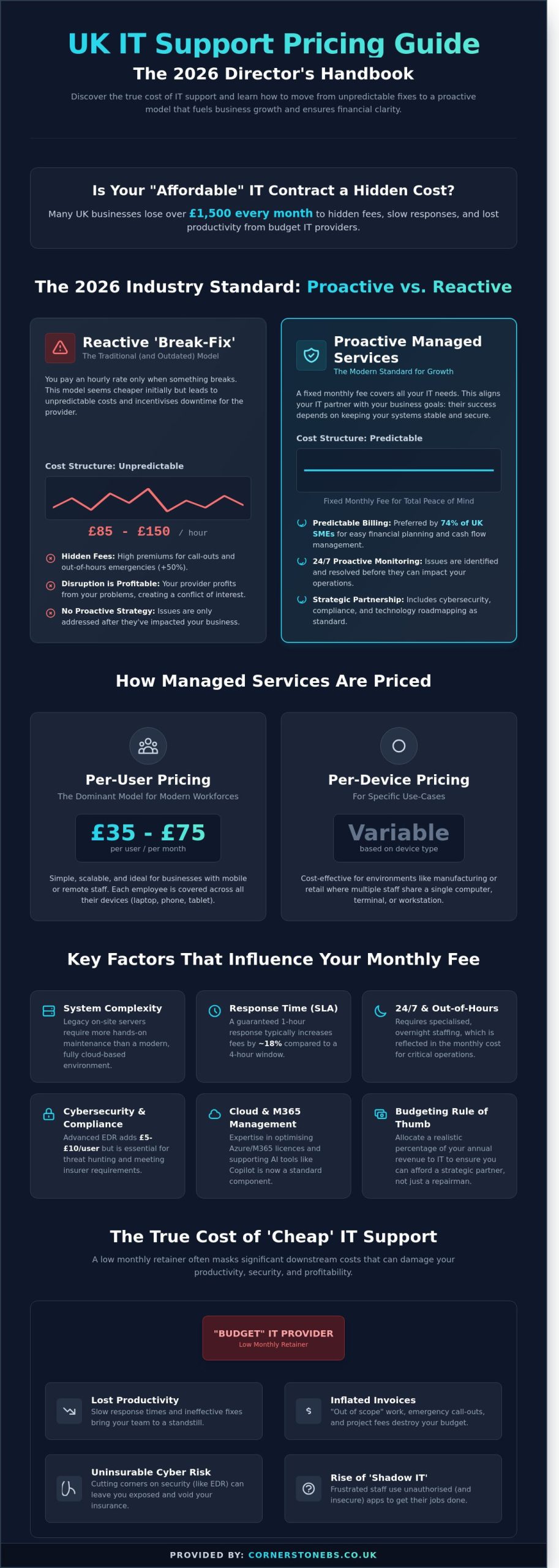
Costs for business IT support vary based on the size and complexity of your organisation. Nationally, small businesses with 1 to 50 staff often spend between £8,500 and £50,000 per year for comprehensive coverage. Most providers use a predictable monthly model based on the number of users or devices. This fixed-fee structure helps you avoid the shock of emergency repair bills and allows for much more accurate annual budgeting while ensuring your systems remain secure.
Can managed IT support help with hybrid and remote working?
Yes, modern managed support is specifically designed to facilitate seamless hybrid and remote working. We use Microsoft 365 and cloud solutions to ensure your team has secure access to data from any location. By integrating business VoIP and mobile data contracts, your staff can stay connected on a single professional number. This creates a unified ecosystem that maintains productivity and security, regardless of whether your employees are in a central office or working from home.
What is included in a standard IT maintenance plan?
A standard IT maintenance plan includes proactive system monitoring, unlimited helpdesk access, and regular security patching. It also covers essential background tasks like disaster recovery management and cloud infrastructure oversight. These plans are designed to provide total peace of mind by ensuring your hardware is healthy and your software is up to date. By bundling these services into a single contract, you receive a foundational layer of stability that protects your daily operations.
How quickly can I expect a response from an IT helpdesk?
Response times are governed by a Service Level Agreement (SLA), which defines how quickly an engineer will begin working on your request. While reactive providers might take hours to acknowledge a critical failure, a proactive partner often resolves issues before you even notice them. Our monitoring tools alert us to potential glitches 24/7, allowing us to intervene early. This focus on speed and technical clarity ensures your workforce experiences zero-friction technology and minimal interruptions.
Why is cyber security integrated into managed IT services?
Cyber security is integrated because it’s no longer possible to separate system performance from data protection. Every network infrastructure project or cloud migration must be secured from the ground up to prevent breaches. By choosing professional cyber security services Stockton-on-Tees companies ensure that their growth isn’t undermined by evolving threats. This integrated approach meets strict compliance standards and insurance requirements, providing a cohesive shield that simple antivirus software cannot match on its own.
What are the benefits of outsourcing IT vs hiring internally?
Outsourcing provides access to an entire department of specialists for a fraction of the cost of one internal hire. An in-house technician may have limited experience with specific cloud migrations or complex disaster recovery, but an outsourced team brings collective knowledge from across multiple industries. You benefit from 24/7 monitoring and a deeper bench of expertise, including partnerships with global brands like Cisco and IBM. This model delivers superior operational efficiency and a robust technology roadmap.
How do I switch from my current IT provider to Cornerstone?
Switching to Cornerstone is a structured, seamless process designed to eliminate downtime. We begin with a comprehensive audit of your current network infrastructure and security protocols to identify immediate risks. Our team then manages the entire transition, from data migration to setting up your new helpdesk access. We act as a dedicated long-term partner from day one, ensuring your staff feels supported and your technology is fully aligned with your 2026 growth objectives.
If your current IT strategy is still focused on fixing broken hardware rather than navigating the 2026 Cyber Security and Resilience Bill, is your business actually protected or just lucky? We know that managing a hybrid workforce while facing stricter incident reporting mandates feels like a constant uphill battle. Whether you’re seeking to fortify your operations or secure a national enterprise, Cornerstone Business Solutions is the partner who treats your stability as their own.
You likely agree that unpredictable technology costs and slow helpdesk response times are no longer just annoyances; they’re genuine risks to your growth. This strategic guide explores how proactive managed IT services and award-winning solutions provide the security you need to scale with confidence in 2026. We’ll show you how to trade tech anxiety for a predictable monthly spend and a robust three-year roadmap designed for the modern digital landscape. Discover how we simplify complex infrastructure to give you total peace of mind and the freedom to focus on your core business.
Key Takeaways
Move from reactive repairs to a proactive model that stops technical issues before they disrupt your team’s productivity.
Leverage award-winning it support sunderland to build a secure, high-performance digital infrastructure that’s ready for 2026 regulatory changes.
Transform your technology spend from unpredictable capital expenses into a manageable, fixed monthly fee that makes national budgeting effortless.
Learn how to vet potential partners by looking for global strategic alliances and industry accolades that guarantee a higher standard of service.
Build a bespoke three-year technology roadmap that aligns your IT systems with your long-term goals for scaling and business continuity.
The Evolution of Managed IT Support for Modern Organisations
The way we look at technology has changed dramatically since we established our roots in 2008. In the past, IT was something you only thought about when a printer jammed or a server went dark. Today, a professional Managed Services Definition describes a proactive, holistic approach to national technology management. It’s about staying ahead of the curve. For businesses seeking reliable it support sunderland, this means moving beyond simple hardware fixes to a model where your digital infrastructure is monitored 24/7 to prevent downtime before it even starts. We don’t just maintain your systems; we ensure they’re a catalyst for your success.
Why the ‘Break-Fix’ Model is Obsolete in 2026
The old “break-fix” mentality is a financial drain that most modern companies can’t afford. When you wait for a system to fail, you aren’t just paying for a repair. You’re paying for lost productivity, missed deadlines, and often, hefty emergency call-out fees. Modern digital infrastructures are simply too complex for occasional, ad-hoc maintenance. With the rise of hybrid working and sophisticated cloud environments, a single point of failure can ripple through your entire organisation. Without continuous monitoring, the risk of data loss or a security breach increases every hour a patch goes unapplied. It’s a reactive gamble that doesn’t fit the fast-paced UK market of 2026.
The Role of a Strategic Technology Partner
A true technology partner doesn’t just fix computers; they align your digital infrastructure with your commercial goals. This includes providing a clear 1-3 year technology roadmap to support your business growth. Whether it’s managing complex vendor relations with global brands like Microsoft and Cisco or planning a Microsoft 365 migration for business UK, we handle the technical heavy lifting so you don’t have to. When you choose a partner for it support sunderland, you’re investing in a team that takes ownership of your uptime. Managed IT is the foundational engine of modern business stability. It provides the emotional security of knowing your systems are resilient, secure, and ready for whatever the future holds. Our approach ensures your technology works for you, not the other way around.
Proactive Monitoring: We identify and resolve issues before they impact your staff.
Strategic Planning: We help you budget for the future with a clear technology roadmap.
Vendor Management: Our team handles the technical conversations with global providers on your behalf.
Business Continuity: We focus on keeping your operations running smoothly, no matter what happens.
Core Components of a High-Performance Digital Infrastructure
Cloud-First Strategies and Microsoft 365
Moving to a secure cloud environment is a strategic necessity in 2026. A successful Microsoft 365 migration for business UK allows your team to collaborate effortlessly through Teams and SharePoint. This isn’t just about storage; it’s about accessibility. Azure Virtual Desktop provides a secure way for your hybrid workforce to access their desktop environment from any location. It ensures that whether your staff are in the office or working remotely, their experience remains consistent and protected.
Cyber Security: Beyond the Basics
Basic antivirus software doesn’t cut it anymore. Modern cyber security services must include proactive threat hunting and multi-layered protection. This involves robust encryption and multi-factor authentication (MFA) as a standard baseline. We understand the Value of Proactive Technology for maintaining national business resilience. Regular security audits are essential to stay compliant with the 2026 Cyber Security and Resilience Bill. These mandates require stricter incident reporting and better management of supply chain risks, making expert oversight a foundational requirement rather than an optional extra.
Connectivity is the final piece of the puzzle. Integrating Business VoIP and mobile solutions creates a unified communications system. This allows your team to stay connected on a national scale without the friction of separate platforms. If you’re wondering how these pieces fit your specific business, it might be time for a chat with a team that knows it support sunderland inside out.
Proactive vs. Reactive Support: A Financial Value Comparison
Stop thinking about technology as a recurring repair bill. For many businesses looking for it support sunderland, the most significant shift in 2026 isn’t the software they use, but how they pay for it. The traditional “break-fix” model relies on unpredictable capital expenditure (CAPEX) that can wreck a monthly budget when a server fails. We help you transition to a predictable operational expenditure (OPEX) model. This move transforms your IT from a series of expensive surprises into a steady, manageable utility. It’s about giving you the clarity to plan for growth without worrying about the next technical crisis.
Implementing the right it company solutions correctly the first time is a strategic move that saves money in the long run. When your digital infrastructure aligns with the UK’s Digital Standards Strategy, you aren’t just following rules; you’re building a foundation for efficiency. This proactive approach ensures your systems are resilient enough to handle modern demands like AI integration and advanced cybersecurity protocols without requiring a total overhaul every few years.
The Hidden Costs of Unmanaged IT
Reactive support is often far more expensive than it appears on the surface. Consider the impact of a four-hour system outage on a typical UK SME. If twenty employees are unable to work, you’re losing hundreds of pounds in wages alone, before you even calculate lost sales or reputation damage. There’s also the cost of “shadow IT,” where frustrated staff use their own unapproved apps to get the job done. These workarounds create massive security holes and data silos. When you add in emergency call-out rates, which can quickly exceed the cost of an entire annual managed contract, the financial risk of staying reactive becomes clear.
Predictable Budgeting with Managed Fees
A fixed monthly fee per user simplifies your budgeting and protects your cash flow. Our “unlimited support” model means your costs don’t spike just because you’ve had a busy month or a technical hiccup. We also use hardware leasing and cloud subscriptions to smooth out technology refresh cycles, so you’re never hit with a massive bill for new laptops all at once. It’s a much more logical way to run a modern business. We believe IT should be viewed as a foundational investment in your team’s efficiency rather than a simple cost centre. This stability allows you to focus on your core goals while we handle the technical heavy lifting behind the scenes.
5 Critical Factors When Selecting a National IT Partner
Choosing a technology partner is a decision that dictates your operational stability for years to come. It’s not just about finding it support sunderland; it’s about finding a team that operates with national-level expertise while maintaining regional care. You need a partner who holds strategic alliances with global giants like Microsoft, IBM, and Cisco. These relationships ensure you receive cutting-edge solutions and priority support that smaller, unaligned providers simply can’t offer. A partner’s ability to pull on these global resources while understanding your local challenges is what creates a truly resilient business environment.
The Importance of Industry Recognition
Award-winning status isn’t just about vanity. It serves as a recurring signature of quality and reliability that sets a provider apart from the competition. When a team is recognized with national accolades, it proves they’ve met rigorous standards of service delivery and technical proficiency. You should always verify a provider’s certifications to ensure they’re current. For instance, being a Microsoft Solutions Partner isn’t just a badge. It’s a guarantee of expertise that protects your investment. Look for case studies and testimonials from diverse industry sectors across the UK to see how they’ve solved real-world problems for organisations at your specific scale.
Scalability and National Reach
Your IT partner must be able to support your growth, whether you’re adding five users in a single office or opening five new locations across the country. A provider that offers integrated solutions across cloud, comms, and hardware simplifies your daily operations. Having a single point of contact for your network infrastructure and business mobile prevents the finger-pointing that often happens with multiple vendors. You should also assess their response time guarantees. You need SLAs that provide confidence and proactive monitoring that catches issues before they escalate. A partner who can spot a failing hard drive or a network bottleneck before your staff even notices a slowdown is essential for business continuity.
We believe in building long-term partnerships that grow as you do. If you’re ready to see how a dedicated team can transform your technology and provide total peace of mind, chat with our experts about it support sunderland today. Our multi-award-winning team is ready to help you build a three-year roadmap that aligns your digital infrastructure with your commercial goals.
Future-Proofing Your Business with Cornerstone
Cornerstone Business Solutions isn’t just another name in a directory. We’re a multi-award-winning technology partner dedicated to your long-term stability. While we provide premier it support sunderland, our impact is felt on a national scale. We’ve spent years cultivating strategic global partnerships with industry leaders like Microsoft, IBM, and Cisco. These alliances mean you don’t just get a helpdesk; you get access to world-class innovation and priority resources. Our commitment to proactive system health ensures your business stays resilient against the evolving cyber threats of 2026.
We’ve been part of the regional business community since 2008. That longevity comes from treating every client as a partner, not a transaction. We believe that exceptional customer service is the foundation of any technical solution. By combining our nationwide support network with a humble, community-focused approach, we offer a level of reliability that’s rare in the high-tech world. Your business continuity is our primary metric for success.
Bespoke Solutions for Every Sector
Your Invitation to a Strategic Conversation
It’s time to move away from transactional IT support that only appears when things go wrong. We invite you to experience a collaborative partnership where your growth is the priority. Our onboarding process for new managed support clients is designed to be simple and stress-free. We start with a thorough audit of your current systems to identify hidden risks and immediate growth opportunities. This isn’t a high-pressure sales pitch. It’s a professional consultation to see how we can align your technology with your three-year roadmap.
Don’t let outdated systems or unpredictable costs hold back your potential. Whether you need local it support sunderland or a comprehensive national infrastructure overhaul, we’re ready to help. Start a conversation with our team today. We’ll show you how proactive monitoring and strategic insight can provide the total peace of mind you need to focus on what you do best.
Take Control of Your Technology Roadmap
Transitioning your digital infrastructure from a source of anxiety into a foundational pillar of stability is the most significant step you can take for your organisation this year. By moving away from the hidden costs of reactive repairs and embracing a proactive, fixed-fee model, you secure both your cash flow and your operational resilience. We’ve explored how the right strategic partnerships and a clear three-year roadmap turn IT into a powerful engine for growth rather than a recurring expense.
Whether you need dependable it support sunderland or comprehensive national infrastructure management, you deserve a partner who takes ownership of your success. As a multi-award-winning IT provider supporting UK businesses since 2008, we bring the expertise of strategic partners like Microsoft, Cisco, and IBM directly to your team. We combine this global technical muscle with the approachable, regional warmth you’d expect from a dedicated long-term partner.
We’re ready to help you simplify the complex and build a future-proof environment where your business can truly thrive. Let’s have a conversation about your goals and start building your resilient digital future together today.
Frequently Asked Questions
What is included in a Managed IT Support contract?
Our contracts provide a comprehensive suite of services designed for total business stability. You receive unlimited helpdesk access, proactive monitoring of your servers and network, and regular patch management. We also include strategic technology roadmaps to ensure your infrastructure scales with your growth. This fixed-fee model eliminates the surprise costs associated with old-fashioned repairs, giving you predictable monthly spending and absolute peace of mind.
How quickly can I expect a response to a critical IT issue?
Critical issues receive immediate priority through our robust Service Level Agreements (SLAs). We understand that downtime is a financial risk, so our team works to resolve major disruptions as quickly as possible. Often, our proactive monitoring identifies a potential failure before you even notice it. This allows us to intervene early, maintaining your business continuity and ensuring your team stays productive without long waits for assistance.
Can you support our business with Microsoft 365 migration?
Yes, we specialise in seamless Microsoft 365 migrations for organisations across the UK. As a strategic partner with Microsoft, we handle the entire transition, from initial data backup to user training on Teams and SharePoint. We ensure your email, files, and collaborative tools are moved securely without disrupting your daily operations. This migration provides a flexible, cloud-first foundation that is essential for modern hybrid working environments.
Do you provide cyber security audits for SMEs?
We provide detailed cyber security audits to identify vulnerabilities and strengthen your national resilience. Our team evaluates your current infrastructure against the latest 2026 standards, including the Cyber Security and Resilience Bill requirements. We focus on multi-layered protection, checking everything from encryption to multi-factor authentication. These audits ensure your SME is not just compliant, but genuinely protected against sophisticated modern threats.
Is 24/7 proactive monitoring included in your monthly fees?
Proactive monitoring is a foundational element of our service and is included in your fixed monthly fee. We don’t wait for you to call us; our systems watch your digital infrastructure 24/7 for signs of trouble. Whether you’re looking for it support sunderland or national coverage, this constant oversight allows us to apply updates and fix hardware bottlenecks remotely. It’s the most effective way to prevent downtime and keep your systems healthy.
Can you manage our business mobile and VoIP systems as well?
We offer fully integrated business mobile and VoIP solutions to create a unified communications environment. By managing your telecoms alongside your IT support, we eliminate the friction of dealing with multiple vendors. This approach ensures your team can communicate clearly from any location, with all devices secured under the same high standards. It’s a logical way to simplify your technology stack while improving your staff’s collaborative efficiency.
What makes an award-winning IT provider different from a standard helpdesk?
An award-winning provider acts as a long-term strategic partner rather than a transactional helpdesk. Our accolades are a recurring signature of quality, reflecting our deep expertise and commitment to customer success. We leverage global partnerships with IBM, Cisco, and Microsoft to provide cutting-edge solutions that standard providers can’t access. This combination of national-level technical muscle and approachable, regional warmth ensures you receive a superior standard of care.
How does Managed IT Support help with hybrid and remote working?
Managed support provides the secure infrastructure needed for a flexible, hybrid workforce. We implement cloud solutions like Microsoft 365 and Azure Virtual Desktop, ensuring your staff can access files safely from anywhere. Our team also manages mobile devices and remote security protocols to protect your data outside the office. Reliable it support sunderland ensures that your remote team receives the same fast, expert assistance as your on-site staff, keeping everyone connected.
Did you know that 65% of medium-sized UK businesses identified a cyber breach or attack in the last twelve months? For many businesses, technology has shifted from a silent engine of growth to a source of constant anxiety. Whether you’re struggling with unpredictable monthly bills or the fear of a ransomware attack, finding the right business IT support can feel like a high-stakes gamble. You deserve more than a technician who only shows up when things break; you need a strategic partner who understands the unique challenges businesses face and the global threats we all confront in 2026.
We at Cornerstone Business Solutions understand that your technology should be an enabler, not a bottleneck that slows your team down. You’re likely looking for a way to move away from reactive cycles and toward a model that offers fixed monthly costs and absolute peace of mind. This guide will show you exactly how to evaluate a high-performance IT partner that prioritises zero downtime and robust security. We’ll explore the critical 2026 standards, from the new Danzell Cyber Essentials framework to building a technology roadmap that actually drives your business growth.
Key Takeaways
Discover why the outdated “break-fix” model is a liability in 2026 and how a proactive partnership ensures your operations stay resilient.
Analyse the true ROI of outsourcing compared to the significant salary and overhead costs of an in-house IT hire.
Learn how to vet a provider for business IT support Darlington by identifying critical industry accreditations and guaranteed resolution times.
Gain the tools to evaluate Service Level Agreements (SLAs) that protect your productivity rather than just ticking a box.
Understand how a bespoke technology roadmap transforms your digital infrastructure from a bottleneck into a strategic engine for growth.
Beyond the Helpdesk: Why Strategic Business IT Support is Essential in 2026
In 2026, the traditional image of an IT technician arriving with a toolkit to fix a crashed server is a relic of the past. Modern Managed services represent a fundamental shift from reactive repairs to a continuous, strategic partnership. This model ensures your digital infrastructure is monitored every second of the day, catching vulnerabilities before they can be exploited by ransomware or hardware failure. Selecting high-quality business IT support Darlington means securing a team that acts as your virtual CTO, aligning your technology with your growth ambitions rather than just managing helpdesk tickets.
The old “break-fix” approach is now a significant liability. In a high-security environment, waiting for something to fail before acting leaves your data exposed and your operations at a standstill. Proactive monitoring provides the emotional peace of mind that comes from knowing experts are watching your systems 24/7. This strategic alignment doesn’t just keep the lights on. It ensures your business remains competitive on a national scale by leveraging enterprise-grade tools. Investing in reliable business IT support Darlington is the most effective way to secure this competitive edge.
The Hidden Cost of Reactive Technology
IT as a Foundation for Business Stability
Reliable technology is a primary driver of employee morale. Nothing frustrates a talented team more than slow systems or recurring technical glitches that prevent them from doing their jobs. By providing seamless tools, you improve staff retention and create a more energetic workplace. This stability extends to your clients too. In an era where 65% of medium-sized businesses face attacks, demonstrating that you have secure, stable systems builds immense trust. Whether they are interacting with your website or waiting for a quote, a consistent and fast experience is vital. Viewing your technology as a strategic asset rather than a monthly expense builds the resilience needed for long-term success.
Proactive Monitoring vs. Break-Fix: The Evolution of IT Maintenance
The days of calling a technician only after a server has failed are gone. In 2026, high-performance business IT support Darlington relies on AI-driven alerts that analyze system patterns in real-time. These intelligent tools identify anomalies, such as a hard drive showing signs of physical wear or a processor running at unusual temperatures, before they trigger an outage. By catching these signals early, we perform maintenance during scheduled windows rather than during your busiest trading hours. This proactive approach ensures your team stays productive and your customers receive uninterrupted service.
Regular system health checks complement these automated tools. We don’t just wait for an alert; we actively hunt for potential points of failure. This includes verifying that your hardware is operating within optimal parameters and that your network infrastructure is ready for future scaling. When you have unlimited helpdesk access, your staff can report minor glitches immediately. This prevents small annoyances from snowballing into major technical roadblocks, keeping the daily rhythm of your office steady and efficient.
Integrating Next-Gen Cyber Security
Modern support isn’t just about speed; it’s about resilience. Today, cyber security services are no longer an optional add-on but a foundational layer of all managed support. We’ve shifted toward a “Zero Trust” architecture, which is essential for Darlington firms managing remote or hybrid workforces. This framework operates on the principle of “never trust, always verify,” ensuring that every user and device is authenticated before accessing your data. Using international resources like Cybersecurity for Small Business as a benchmark for best practice helps us build robust defenses. Proactive patch management is a key part of this, as keeping software updated prevents over 90% of common cyber threats from gaining a foothold.
Predictable Budgeting with Managed Services
One of the biggest frustrations for business owners is the unpredictability of hourly IT billing. If a major problem occurs, you’re hit with a massive, unplanned invoice. Managed services flip this model on its head by providing a fixed-fee structure. This allows for accurate annual IT budget forecasting, giving you the clarity to invest in other areas of your business. You essentially gain an entire team of senior engineers and security specialists for a fraction of the cost of a single full-time hire. If you’re looking for a partner to provide these bespoke technology solutions, we’re here to help you move away from the stress of the break-fix cycle. This model aligns our goals with yours: we both want your systems to run perfectly 100% of the time.
The ROI of Outsourcing: In-House IT vs. Managed IT Partners
Choosing between an internal hire and an external partner is a pivotal decision for any growing firm. While having a dedicated person in the office feels reassuring, the financial reality in 2026 is often startling. A fully-loaded in-house IT manager with a £55,000 salary actually costs your business between £75,000 and £85,000 annually. This figure accounts for National Insurance, pension contributions, ongoing training, and the expensive software tools required to do the job. When you invest in business IT support Darlington, you gain an entire department of specialists for a fraction of that cost. It’s a move that replaces a significant fixed overhead with a scalable, predictable monthly fee.
Relying on a single internal employee also creates a “single point of failure.” If your IT lead is on annual leave or falls ill during a system crisis, your operations are left vulnerable. High-performance managed partners eliminate this risk by providing a deep bench of experts who are always available. This continuity is essential because The True Cost Of Downtime extends far beyond lost hours; it erodes customer trust and stalls your momentum. Outsourcing provides instant scalability, allowing you to deploy enterprise-grade cloud solutions without the massive upfront capital expenditure usually required for new infrastructure.
When the Hybrid Model Makes Sense
For larger organisations, the choice isn’t always binary. A co-managed approach allows your internal IT leads to focus on high-level business strategy while an MSP handles the “heavy lifting” of day-to-day maintenance. We take care of the relentless patch management, 24/7 monitoring, and helpdesk tickets. This partnership empowers your staff to drive innovation rather than being bogged down by password resets or server updates. It’s a collaborative way to strengthen your business IT support Darlington while keeping internal talent focused on growth.
Measuring Technology ROI
True ROI is found in the efficiency your team gains when their tools work perfectly. Reliable systems reduce the friction that slows down your workforce, leading to measurable gains in productivity. By looking at how managed IT services Teesside and Darlington providers drive competitive advantage, you’ll see a shift from capital expenditure (CapEx) to operational expenditure (OpEx). This keeps your cash flow healthy. You’re no longer paying for potential problems; you’re paying for guaranteed uptime and a secure foundation that supports long-term resilience.
The 2026 Selection Framework: How to Vet a High-Performance IT Partner
Selecting the right partner for your business IT support Darlington requires looking beneath the surface of a polished website. You need to scrutinise their Service Level Agreements (SLAs) with a critical eye. Many providers guarantee a “response time,” which simply means they’ve acknowledged your ticket. In 2026, you should demand “resolution times.” This is a commitment to how quickly the problem will actually be fixed. A high-performance partner also prioritises a bespoke technology roadmap. This isn’t a generic list of upgrades; it’s a strategic plan that aligns your digital infrastructure with your specific three-year growth goals.
Your chosen provider must demonstrate a heavy focus on proactive security and disaster recovery. Ask them to explain their recovery time objectives (RTO). If a server fails, exactly how many minutes will pass before your team is back online? This level of detail separates a basic service provider from a dedicated business partner. When your business IT support Darlington is handled by experts who plan for the worst, you gain the freedom to focus entirely on the best-case scenarios for your growth.
Vetting Technical Expertise and Partnerships
A partner’s technical depth is often proven by their official associations. Look for established partnerships with global leaders like Microsoft, Cisco, and IBM. These aren’t just badges; they represent access to high-level support and the latest enterprise-grade tools. For example, a successful Microsoft 365 migration for business UK requires specialist knowledge to ensure data integrity and security. Don’t be afraid to ask for case studies from companies at a similar growth stage to yours. Seeing how they’ve helped others in the region provides the reassurance you need to move forward. Our multi-award-winning status serves as a recurring signature of the quality you can expect.
Cultural Fit and Communication
Technical skill is only half the battle. You need a team that speaks your language, not a sea of confusing jargon. Clear, direct communication ensures that you always understand the “why” behind a technical recommendation. This is why a UK-based helpdesk is so valuable. It facilitates efficient problem-solving and ensures that your staff feel supported rather than intimidated by their own technology. Your IT provider should feel like an extension of your own team, sharing your regional pride and your drive for success. If you’re ready to see how a local expert can transform your operations, we invite you to start a conversation with our Darlington team today. We focus on building long-term relationships that provide the emotional security your business needs to thrive.
Future-Proofing with Cornerstone: Bespoke Technology Solutions for UK Growth
Your business doesn’t stand still, and your technology shouldn’t either. At Cornerstone Business Solutions, we specialise in creating bespoke technology roadmaps that act as a blueprint for your future longevity. We don’t believe in off-the-shelf packages that force your operations into a rigid box. Instead, our business IT support Darlington focuses on understanding your specific goals. As a multi-award-winning team, we provide the reassurance of unlimited, proactive support that keeps your systems resilient as you scale. This long-term partnership ensures that your digital foundation is always ready for the next challenge.
A truly modern infrastructure goes beyond just servers and security. It involves a seamless integration of all your communication tools. By unifying your systems through our it company solutions, you can bring Business VoIP and Business Mobile under one roof. This holistic approach eliminates the frustration of dealing with multiple vendors. When your IT hardware, cloud solutions, and communication channels work in perfect harmony, your team can collaborate more effectively, regardless of their location.
Scalable Infrastructure for National Success
Your Next Steps to Peace of Mind
Moving from a legacy setup or an unreliable provider can feel like a daunting task. We’ve refined our onboarding process to make the transition as smooth as possible. Our team handles the technical migration, ensuring that your data is secure and your workflow remains uninterrupted. We believe that high-quality business IT support Darlington should be accessible and transparent. This starts with a clear understanding of your current environment and where it can be improved to drive more value for your business.
We invite you to take the first step toward a more secure and efficient future. Let’s have a conversation about your goals and how our proactive approach can protect your bottom line. We offer a professional, jargon-free technology audit to identify exactly how we can strengthen your systems. Reach out to our Darlington team today to book your consultation and discover the peace of mind that comes with a truly dedicated IT partner.
Securing Your Digital Future in Darlington
The technological landscape is evolving rapidly. By 2026, simply reacting to technical failures is no longer a viable strategy for growth. We’ve seen how a proactive managed model eliminates the stress of unpredictable costs while providing the robust security your data requires. Selecting the right partner for business IT support Darlington is about more than just finding a helpdesk; it’s about securing a strategic ally that understands your regional roots and your national ambitions.
As a multi-award-winning national provider, we combine the strength of global partnerships with Microsoft, IBM, and Cisco with the personal touch of a local team. You’ll benefit from unlimited UK-based helpdesk support and a bespoke roadmap that ensures your systems are always ready for what’s next. We’re here to strip away the jargon and provide the clarity you need to make informed decisions for your business. Book a jargon-free IT consultation with our award-winning team today. Let’s work together to turn your technology into your greatest competitive advantage. We’re ready when you are.
Frequently Asked Questions
What is typically included in a business IT support contract?
A comprehensive contract usually covers proactive 24/7 monitoring, unlimited helpdesk access, and robust cyber security management. It’s designed to be a total safety net for your operations. You should also expect regular software patching, data backup verification, and strategic technology reviews to ensure your digital tools are always aligned with your business growth.
How much does managed IT support cost for a UK small business?
Managed IT support is typically structured as a fixed monthly fee per user or device. This model replaces the stress of unpredictable hourly billing with a predictable operational expense. While costs across the UK vary based on the complexity of your network infrastructure and security needs, the primary financial benefit is the significant reduction in downtime and the avoidance of expensive emergency repairs.
Do I need a local IT company if my team works remotely?
Yes, having a local partner is vital even for a distributed or remote workforce. While we resolve most technical issues through our helpdesk, a local presence is essential for physical hardware failures or network infrastructure upgrades. A regional partner also provides a higher level of accountability and understands the specific Darlington business environment in a way that national call centres cannot.
What is the difference between an IT helpdesk and managed IT services?
An IT helpdesk is primarily reactive, focusing on fixing technical problems after they have already disrupted your team. Managed services represent a proactive partnership where the goal is to prevent those problems from occurring in the first place. High-performance business IT support Darlington should always integrate both elements to ensure your systems stay resilient and your staff remain productive.
How quickly should an IT support company respond to a critical issue?
For a critical issue that stops your business from operating, you should expect an initial response within 15 to 30 minutes. These guarantees are clearly defined in your Service Level Agreement (SLA). It is important to look for a partner who distinguishes between “response time,” which is an acknowledgement of the ticket, and “resolution time,” which is the actual fix.
Does business IT support include protection against ransomware?
Modern IT support must include multi-layered cyber security as a foundational element. Because 43% of UK businesses identified a breach or attack in the last twelve months, we focus on proactive threat hunting, employee training, and secure disaster recovery plans. This ensures that even if an attack occurs, your data is protected and your business can be restored with minimal disruption.
Can an IT provider help with Microsoft 365 licensing and migration?
Yes, a qualified provider will manage your entire Microsoft 365 environment, from the initial migration to ongoing security and license optimisation. We ensure that your transition to the cloud is seamless and that your data remains fully protected throughout the process. This allows your team to leverage powerful collaboration tools without the headache of managing the underlying technical complexity.
What happens to our IT support if we move offices or expand?
Your IT support should scale effortlessly as your business grows or relocates. We handle the technical heavy lifting of office moves, including the setup of new network infrastructure and ensuring your cloud solutions are ready for the new location. This proactive planning prevents downtime during the move and ensures your technology is a foundational element of your expansion rather than a bottleneck.
Did you know that unplanned downtime can cost a local business anywhere from $8,000 to $25,000 every single hour? It’s a staggering figure, but it reflects the reality of how much we depend on our digital infrastructure. We understand the anxiety that comes with wondering if your backups are truly reliable or if a slow system is quietly draining your team’s productivity. You want your technology to be a silent partner in your growth, not a source of constant stress. This is exactly why a structured business server maintenance checklist is no longer just a technical chore; it’s a vital insurance policy for your company’s future.
At Cornerstone, we believe in being proactive rather than reactive. With Windows Server 2022 mainstream support ending in October 2026 and the new “Danzell” Cyber Essentials framework requiring stricter patching, staying ahead of the curve is essential. We’ve distilled our years of award-winning expertise into a clear, repeatable framework designed to protect your business from security breaches and maximize your hardware’s lifespan. We’ll walk you through a professional schedule that simplifies complex IT tasks, ensures you meet cyber insurance requirements, and keeps your systems performing at their peak.
Key Takeaways
Understand the true financial impact of server neglect and how proactive care extends the lifespan of your hardware investment.
Master our professional business server maintenance checklist to verify backup reliability beyond a simple “green tick” and maintain critical resource buffers.
Align your infrastructure with the 2026 Cyber Essentials “Danzell” framework by implementing disciplined patch management and strict user account hygiene.
Evaluate the hidden costs of DIY IT and learn how a managed partnership provides the scalable stability needed for business growth.
Why Server Maintenance is Non-Negotiable for Business Continuity
Your server is the engine room of your entire operation. When it stops, everything from customer service to payroll grinds to a halt. In 2026, the financial stakes are higher than ever. Research indicates that unplanned downtime can cost a small business anywhere from $8,000 to $25,000 per hour. Beyond the immediate lost revenue, the reputational damage and the stress placed on your team can be even harder to recover from. Relying on a “set and forget” mentality is a dangerous gamble that few local businesses can afford to take.
Proactive care is the only way to protect your hardware investment. While the recommended replacement cycle for physical servers is typically 5 to 7 years, reaching that milestone without performance degradation requires consistent attention. A dedicated system administrator or a managed partner looks for the subtle signs of wear that an untrained eye might miss. By following a rigorous business server maintenance checklist, you ensure that your hardware lives its longest, most productive life, delaying expensive capital outlays until they are truly necessary.
Preventing the ‘Blue Screen’ Crisis
Hardware fatigue rarely happens overnight. It starts with small warning signs like increased fan noise or slight drops in processing speed. Often, the culprit is as simple as dust accumulation or poor thermal management. Servers generate significant heat, and if airflow is restricted, internal components cook themselves from the inside out. Regular physical inspections and performance monitoring provide the psychological peace of mind that comes with knowing your infrastructure is stable and cool.
Meeting UK Compliance and Cyber Standards
The regulatory landscape in the UK has become significantly stricter. The April 2026 update to the Cyber Essentials scheme, known as the “Danzell” framework, mandates a 14-day window for applying critical security patches. Failure to meet this window can lead to an automatic assessment failure. Beyond compliance, detailed documentation of your maintenance is vital. Should a security incident occur, your server logs become the primary tool for forensic audits, helping you understand exactly what happened and ensuring you meet your GDPR reporting obligations with clarity and confidence.
The Essential Daily and Weekly Server Health Checklist
Consistency is the cornerstone of reliability. A high-performing business server maintenance checklist begins with the tasks you perform when you first sit at your desk. These daily and weekly habits act as an early warning system. They catch minor glitches before they snowball into critical failures. By staying proactive, you ensure your team stays productive without the frustration of sluggish applications or sudden disconnects.
High-Frequency Backup Verification
We’ve seen it happen too often: a backup system reports a “successful” status, but the data itself is corrupted. Relying on a green tick alone is a risk your business shouldn’t take. We recommend performing random file restoration tests at least once a week to ensure your data is actually recoverable. This practice aligns perfectly with the Cyber Essentials scheme, which emphasizes demonstrable security controls. You should also check the sync status of your cloud solutions to confirm off-site copies are current. Always verify that backup windows don’t overlap with your busiest business hours. Overlapping tasks can throttle system performance when your staff needs it most.
Performance and Resource Monitoring
Servers need breathing room to function efficiently. Monitor your CPU and RAM usage to identify memory leaks or “resource hogs” that drain speed in real-time. A golden rule we follow is the 20% disk space rule. Never let your primary drives fill beyond 80% capacity. Running too close to the limit causes system instability and can even prevent critical security updates from installing. If you find these manual checks are consuming too much of your morning, our Managed IT Support team can automate these alerts for you. This ensures you only spend time on the issues that truly matter.
Don’t ignore the “silent” messages your server sends. Reviewing system logs weekly can reveal failed login attempts. These are often the first sign of a brute-force attack. Finally, remember the physical environment. Check your server room’s temperature and humidity levels. A failing air conditioning unit or a UPS with a depleted battery can take your business offline just as effectively as a cyber threat. Keeping these physical factors in check is a simple but vital part of your business server maintenance checklist.
Monthly and Quarterly Maintenance: Deep Infrastructure Audits
Daily checks keep the lights on, but monthly and quarterly audits ensure the building stays standing. This phase of your business server maintenance checklist focuses on deep infrastructure health. It’s the time to look beyond the dashboard and get hands-on with both your physical hardware and your underlying software architecture. In 2026, the complexity of hybrid environments means these deep dives are the only way to catch mounting issues before they trigger a catastrophic failure.
Patch Management and OS Updates
Patching is an art, not a chore. The “Danzell” update to Cyber Essentials mandates critical patches within 14 days, but blind updates can break custom applications. We recommend a staged rollout. First, apply patches in a sandbox environment to see how they interact with your specific setup. Don’t click “update” on a production server on a Friday afternoon. You don’t want to spend your weekend in the server room. Managing firmware for RAID controllers and network interfaces is equally vital during these monthly windows to maintain peak data throughput.
Hardware Health and Redundancy Testing
Physical neglect is a silent killer. Every quarter, your team should execute the “Deep Clean” protocol. This involves a visual inspection of cables, connectors, and airflow paths to prevent thermal throttling. Dust accumulation inside a server chassis acts as an insulator, cooking sensitive components. Beyond cleaning, test your Uninterruptible Power Supplies (UPS) and battery health. A UPS that hasn’t been load-tested is just a heavy paperweight. Check your RAID array consistency too. Identifying a failing drive now is much easier than recovering a failed array later.
Warranties and the 2026 Support Cliff
Quarterly audits must include a review of your hardware warranties and software support status. A major milestone for 2026 is the end of mainstream support for Windows Server 2022 on October 13. If your infrastructure relies on this version, your quarterly plan should already include a migration strategy. Deciding whether to handle these complex transitions internally or through Managed IT services is a strategic choice for any business owner. Proactive planning ensures you aren’t forced into a rushed, expensive upgrade when support finally vanishes. Finally, run a simulated disaster recovery drill. Proving your team can restore from a total failure in under four hours is the ultimate validation of your maintenance efforts.
Security-First Maintenance: Aligning with Cyber Essentials
Maintenance is often viewed through the lens of performance, but in 2026, it’s your primary line of defense. With the introduction of the “Danzell” assessment framework in April 2026, the UK’s Cyber Essentials scheme now demands demonstrable evidence of security controls. This means your business server maintenance checklist must prioritize identity and access management. Security isn’t a one-time setup; it’s a continuous cycle of hardening your environment against evolving threats. By treating security as a maintenance task, you turn your server from a potential liability into a secure fortress.
One of the most overlooked risks in modern infrastructure is “ghost accounts.” These are active credentials belonging to ex-employees or former contractors that haven’t been purged. We recommend a monthly audit of all active users to ensure only current staff have access. Alongside this, you should enforce the Principle of Least Privilege. This ensures that users only have access to the specific folders and databases required for their roles. Regularly updating your cyber security services definitions and firewall rules ensures that your automated defenses are prepared for the latest zero-day vulnerabilities.
User Audit and Access Control
Offboarding should be an immediate maintenance action. When a staff member leaves, their access must be revoked across all systems instantly. As part of your weekly checks, verify that Multi-Factor Authentication (MFA) is active and enforced for all administrative roles, as this is now a mandatory requirement under the latest standards. We also suggest reviewing remote access logs for your VPN or RDP connections. Look for suspicious geographic patterns or login attempts at odd hours, as these are often the first signs of a compromised credential.
Hardening the Server Environment
A secure server has a small attack surface. This involves disabling any unused ports or services that aren’t essential for your daily operations. During your quarterly deep dive, check the expiry dates of your SSL certificates. An expired certificate doesn’t just look unprofessional; it can cause total service interruptions for your clients and staff. Finally, ensure your anti-malware and Endpoint Detection and Response (EDR) tools are active and reporting correctly. If you want to ensure your infrastructure meets these rigorous standards without the internal headache, we invite you to explore our Managed IT Support for a proactive partnership.
Shadow IT is another growing concern. Staff often install unauthorised software to solve a quick problem, unaware that these applications can bypass your security protocols. Scanning for these installations should be a standard part of your business server maintenance checklist. When you maintain a clean, authorised software environment, you reduce the risk of conflicting applications and hidden backdoors, keeping your business stability and emotional security intact.
Implementing Your Maintenance Plan: In-House vs. Managed IT
The transition from a reactive “break-fix” model to a proactive one is where the real value lies. Waiting for something to fail before fixing it is a gamble that leads back to those high downtime costs we discussed earlier. Proactive monitoring means identifying a memory leak or a failing drive at 2:00 AM before your staff even logs in. This level of oversight transforms your IT from a stressful cost centre into a silent, reliable engine for growth.
Building a Sustainable Internal Schedule
If you choose to keep maintenance in-house, you must build a sustainable calendar. Consistency is your best defense. Don’t schedule deep audits or staged patch rollouts during your peak sales periods or end-of-month financial reporting. You should also assign clear accountability for every item on your checklist. When responsibility is vague, critical tasks like backup restoration tests often slip through the cracks. Standardising your documentation is equally vital. It ensures that if your primary technical person is away, the rest of the team isn’t left in the dark during a crisis.
The Cornerstone Approach to Proactive Care
At Cornerstone, we believe your technology should provide emotional security, not just technical utility. Our multi-award-winning team takes the heavy lifting off your shoulders by managing the entire business server maintenance checklist on your behalf. We leverage our elite partnerships with Microsoft, Cisco, and IBM to ensure your systems are always optimised and compliant with the latest 2026 standards. This collaborative approach allows you to focus on your business while we ensure your foundation remains rock-solid.
Choosing managed IT services Teesside means partnering with a local team that truly cares about your regional success. We don’t just provide a service; we act as your long-term technology partner. We invite you to have a friendly, no-obligation conversation with our experts. We can conduct a thorough audit of your current server infrastructure to identify any hidden risks and help you build a more resilient future. Let’s work together to ensure your business stays protected, compliant, and ready for whatever comes next.
Securing Your Infrastructure for a Resilient 2026
A high-performing server environment is the foundation of your business stability. By following a structured business server maintenance checklist, you protect your company from the staggering costs of unplanned downtime and ensure your hardware lives its longest, most productive life. You also stay ahead of strict UK compliance requirements like the Danzell framework, keeping your data secure and your insurance valid. Moving from a reactive mindset to proactive, expert-led care is the smartest investment you’ll make for your team’s productivity.
At Cornerstone, we pride ourselves on being more than just a service provider. As a multi-award-winning UK support team and proud partners with Microsoft, IBM, and Cisco, we have the expertise to manage your digital infrastructure with absolute precision. Our managed services include 24/7 proactive monitoring to catch issues before they disrupt your day. We’d love to help you simplify your IT and focus on what you do best. Book a free IT infrastructure audit with our award-winning team today to see how we can strengthen your business foundation. Your peace of mind is just a conversation away.
Frequently Asked Questions
How often should a business server be maintained?
Maintenance frequency follows a tiered approach to ensure maximum reliability. You should perform daily and weekly tasks for health monitoring and backup verification, while monthly and quarterly intervals are reserved for deep infrastructure audits and physical cleaning. A consistent business server maintenance checklist ensures you catch minor glitches before they escalate into costly downtime. This regular rhythm provides the proactive stability your business needs to grow without technical interruptions.
Can I perform server maintenance while staff are working?
We recommend performing major maintenance tasks outside of core business hours. Tasks such as OS updates or hardware reboots require system downtime, which can immediately halt staff productivity. By scheduling these interventions during evenings or weekends, you ensure your team isn’t disrupted. For minor checks, our proactive monitoring tools work silently in the background, keeping your operations smooth and your data secure while you work.
What happens if I skip a critical security patch?
Skipping a critical security patch leaves your business exposed to known vulnerabilities. Under the April 2026 Cyber Essentials “Danzell” update, you have a mandatory 14-day window to apply high-risk patches. Failure to meet this deadline can result in an automatic assessment failure. Beyond compliance, unpatched servers are the primary target for ransomware, making timely updates a foundational element of your emotional and financial security.
How much disk space should I leave free on a business server?
You should aim to leave at least 20% of your disk space free at all times. When a server drive exceeds 80% capacity, performance begins to degrade and system errors become more frequent. Adequate headroom is also necessary for installing critical software updates and managing temporary system files. Monitoring this buffer is a vital part of any business server maintenance checklist to prevent sudden system instability.
Do virtual servers and cloud environments need maintenance?
What is the difference between a backup and a disaster recovery plan?
A backup is simply a copy of your data, while a disaster recovery plan is the comprehensive strategy for resuming operations after a failure. Backups are the ingredients, but disaster recovery is the recipe. A true plan outlines how quickly you can be back online and the specific steps required to restore your systems. This distinction is critical for business continuity and meeting the expectations of modern cyber insurance providers.
How do I know if my server hardware is reaching its end of life?
Hardware typically reaches its end of life between five and seven years of service. You’ll notice signs like increased fan noise, frequent errors in logs, or a general drop in processing speed. Software support dates are also a major indicator. For example, mainstream support for Windows Server 2022 ends on October 13, 2026. Tracking these dates helps you plan upgrades before your infrastructure becomes a liability to your daily operations.
Is server maintenance a requirement for cyber insurance?
Most modern cyber insurance policies strictly require regular server maintenance as a condition of coverage. Providers often demand proof that security patches are applied within specific timeframes and that backups are verified regularly. If a breach occurs and your maintenance logs are incomplete or non-existent, your insurer may refuse to settle the claim. Proactive care isn’t just a technical necessity; it’s a critical requirement for maintaining your financial protection.
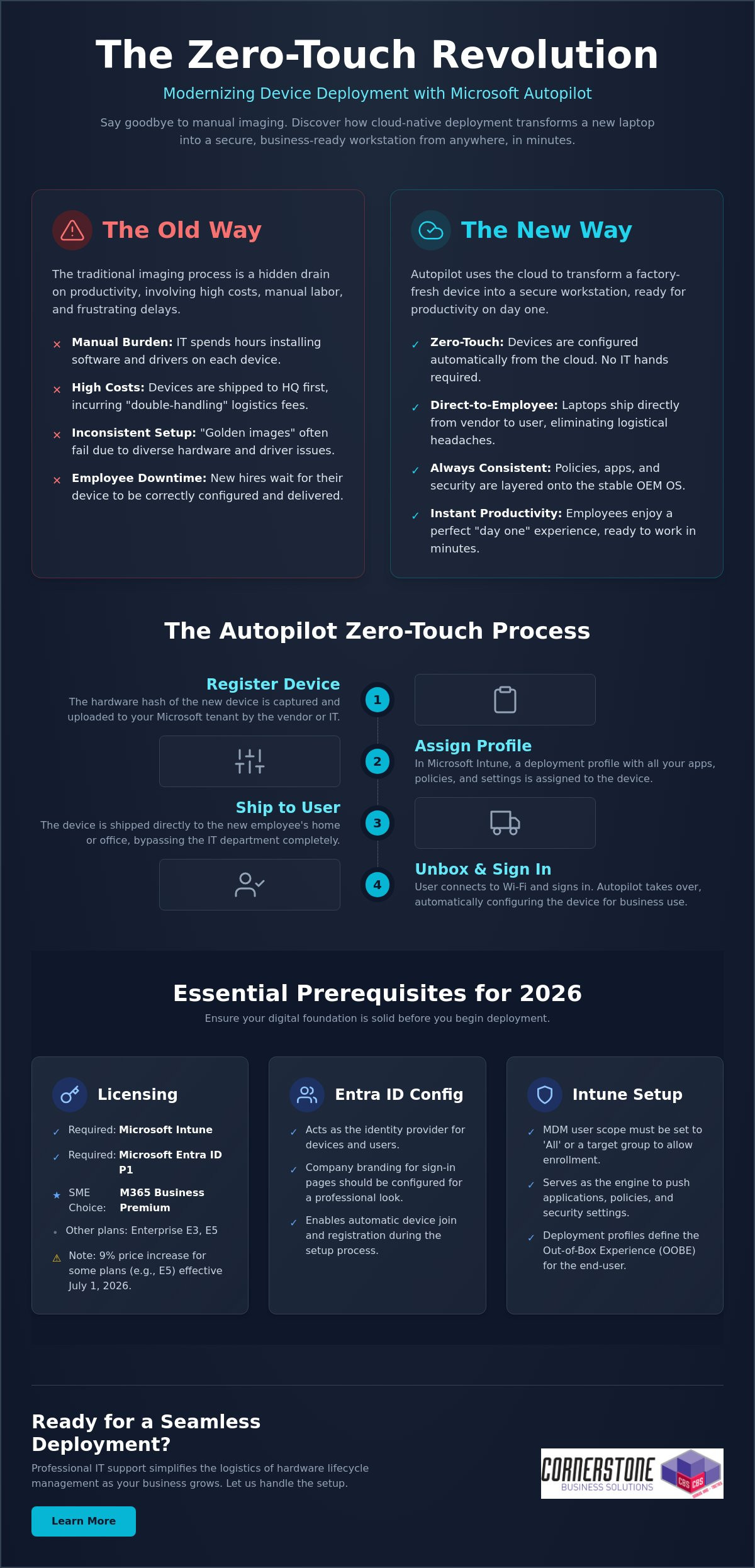
Your IT team shouldn’t have to touch a new laptop to get it ready for a new hire. For many local businesses, the traditional imaging process is a hidden drain on productivity. It involves high shipping costs to bring devices to headquarters and hours of manual software installation. You’ve likely felt the frustration of a new starter waiting around because their device wasn’t configured correctly or didn’t arrive on time. It’s a clunky way to work in a world that demands speed and reliability.
We believe technology should empower your growth, not slow it down. By setting up Microsoft Autopilot, you can transform your hardware deployment into a seamless, zero-touch cloud process that works from anywhere. This complete 2026 guide will show you how to reduce IT overhead and ensure every employee enjoys a perfect “day one” experience. We’ll walk through the latest Windows 11 26H1 requirements, the new Device Preparation method, and how to navigate the July 2026 licensing changes. You’ll gain a clear roadmap to a more efficient, cloud-native future for your business infrastructure.
Microsoft Autopilot isn’t just another IT tool; it represents a fundamental shift in how we handle business hardware. Traditionally, IT teams spent days “imaging” laptops. They would wipe the factory software and manually install a custom build. Windows Autopilot changes this entirely by using the cloud to configure the device that’s already in the box. When you’re setting up Microsoft Autopilot, you’re moving away from manual labor toward a dynamic, automated system. It turns a generic laptop into a secure, business-ready workstation in minutes. This process is proactive and designed for the speed of modern commerce.
The Death of Traditional Device Imaging
Maintaining “Golden Images” or WIM files used to be a full-time job. IT managers had to capture a perfect snapshot of a system and force it onto every new machine. This worked when every laptop was the same model, but today’s hardware fleets are diverse. Driver compatibility issues often break these static images, leading to blue screens and wasted hours. Autopilot kills this cycle. It leaves the OEM-installed Windows version intact and simply layers your apps, settings, and security policies on top. It’s cleaner, faster, and far more resilient for your team.
The Zero-Touch Deployment Concept
The “zero-touch” dream is now a reality for businesses across our region. Imagine ordering a laptop from a vendor and having it shipped directly to a new hire’s home. They open the lid, connect to Wi-Fi, and sign in. The cloud takes over from there. It automatically installs Microsoft 365, applies your Cyber Security protocols, and configures your Network Infrastructure access. There’s no need for the device to ever visit your office first. This removes the “middleman” of the IT department for basic setup tasks. It’s the gold standard for hybrid teams because it ensures every device is consistent, regardless of where it’s unboxed.
By 2026, the transition to Windows 11 is largely complete for most professional organizations. With the 2025 end-of-life for older systems now in the rearview mirror, the focus has shifted to modern management. Setting up Microsoft Autopilot is the final piece of that modernization puzzle. It reduces shipping costs by eliminating “double-handling” and ensures your team stays productive from their very first hour on the job. We see this as a foundational element of business stability and emotional security for your employees. They get a premium “day one” experience, and you get the peace of mind that their device is secure and ready for work.
Before you begin setting up Microsoft Autopilot, you need to ensure your digital foundation is rock solid. It’s incredibly frustrating to start a deployment only to hit a licensing wall or a network block halfway through. We focus on getting these details right from the start to ensure your transition to modern management is predictable and stress-free. Think of this as the “site prep” before you build your new cloud-native office. It’s about creating a stable environment where your technology works for you, not the other way around.
Navigating the Microsoft Licensing Maze
Microsoft offers several paths to unlock Autopilot, but they aren’t all created equal for small and medium enterprises. While Enterprise E3 and E5 plans are robust, Microsoft 365 Business Premium is often the most cost-effective choice for our regional partners. It bundles Intune, Entra ID P1, and advanced security features into one cohesive package. You should also be aware that several Microsoft 365 plans, including Enterprise E5, are scheduled for a 9% price increase effective July 1, 2026. To use Autopilot in 2026, you must have a subscription that includes both Microsoft Intune and Microsoft Entra ID P1. You can find the full list of Autopilot software and licensing requirements on the official documentation site to double-check your specific tenant.
Configuring Your Entra ID and Intune Environment
Your identity provider is the brain of the operation. Microsoft Entra ID handles the device identity while Intune acts as the engine that pushes your apps and policies. You’ll need to set your MDM user scope to “All” or a specific group within the Intune portal to allow devices to enroll automatically. This ensures that when a user signs in for the first time, the system recognizes them and triggers the deployment profile. If you’re feeling overwhelmed by these backend configurations, our team specializes in tailored cloud solutions that take the complexity out of the process.
Network stability and hardware compatibility are your final hurdles. Your firewall must allow traffic to Microsoft’s deployment endpoints; otherwise, the process will stall during the initial handshake. Finally, ensure your hardware is running a professional version of Windows 11, such as Pro, Enterprise, or Education. Home editions don’t support the management features required for a true zero-touch experience. Getting these prerequisites in order provides the emotional security of knowing your systems are built on a firm foundation. If you’d like an expert eye to review your current environment, we’re always here for a friendly conversation about your IT strategy.
The journey from a boxed laptop to a fully configured workstation follows a specific, logical path. When you’re setting up Microsoft Autopilot, clarity is your best friend. By breaking the process into manageable steps, you ensure that no security policy or application is left behind. We often help local firms bridge the gap between technical theory and practical implementation, ensuring their IT systems are as reliable as a firm handshake. Follow this structured workflow to get your deployment off the ground:
Step 1: Gathering and uploading device Hardware Hashes. This is the unique digital fingerprint for every laptop.
Step 2: Creating and assigning Autopilot Deployment Profiles. These profiles define exactly how the device behaves when it’s first turned on.
Step 3: Configuring the Enrollment Status Page (ESP). This provides a visual progress bar for the user while apps and policies install.
Step 4: Assigning devices to specific user groups. Use Entra ID groups to ensure the right people get the right software.
Step 5: Testing the deployment with a “pilot” device. Never roll out to the whole team without a successful dry run.
Creating Your First Deployment Profile
Your deployment profile is the blueprint for the user experience. For most professional environments, “User-driven” mode is the standard choice. It allows the employee to sign in with their own credentials while the system handles the rest. If you’re configuring shared kiosks or digital signage, “Self-deploying” mode is better. You can use these profiles to hide tedious Out-of-Box Experience (OOBE) steps like privacy settings and EULAs. You can even automate device naming conventions, such as “UK-LAPTOP-%SERIAL%”, to keep your inventory organized without manual data entry.
Managing Hardware Hashes and OEM Partnerships
The “Hardware Hash” is often the biggest hurdle for IT managers. For devices you already own, you can use a PowerShell script, specifically Get-WindowsAutopilotInfo, to extract this data into a CSV file for upload. However, the most efficient way to manage this is through an OEM partnership. Major vendors like Dell, HP, and Lenovo can upload hashes directly to your tenant when you purchase new IT Hardware. Once a device shows as “Autopilot Registered” in your Intune portal, it’s officially linked to your organization. This proactive approach eliminates manual registration and ensures that even if a device is wiped, it will always return to your business’s control. It provides a level of emotional security that traditional imaging simply cannot match.
Testing is the final, vital piece of the puzzle. Grab a spare laptop, reset it to factory settings, and walk through the process as if you were a new hire. This allows you to spot any network timeouts or missing app dependencies before they affect your staff. If the pilot goes smoothly, you’re ready to scale your zero-touch deployment across the entire company.
Even with a solid plan, technology sometimes throws a curveball. We know how frustrating it is when a “seamless” process hits a snag. Troubleshooting isn’t just about reading logs; it’s about understanding the logic of the system. Most issues when setting up Microsoft Autopilot stem from three areas: network stability, app packaging, or timing out during the Enrollment Status Page (ESP). By identifying these early, you can keep your deployment moving without losing hours to guesswork. Our goal is to provide the reassurance that every technical hurdle has a logical solution.
One common headache is the network timeout. If a user is on a slow home connection, the device might give up before the essential apps finish downloading. You can optimize this by only requiring “critical” apps during the initial setup. Push non-essential software or secondary creative tools to install in the background after the user reaches the desktop. This simple shift speeds up the “day one” experience and gets your team working faster. It’s a proactive way to manage expectations and reduce the emotional friction of a new tech rollout.
The “Red Screen” of Death: Fixing ESP Failures
If you see a red screen during setup, don’t panic. This usually means a specific policy or app failed to install within the allotted time. First, determine if it’s a software or a configuration issue. You can use the “Shift+F10” shortcut at any time during the process to open a Command Prompt. This allows you to check local logs or even run a quick ping test to ensure the device still has an active internet connection. We recommend setting the “Block device use until all apps are installed” feature only for a handful of mission-critical applications. This prevents the entire process from hanging just because one minor update failed to sync. It’s a small change that makes a massive difference in reliability.
Best Practices for App Deployment
Consistency is the foundation of business stability. We recommend using Microsoft 365 Apps for Enterprise as your primary productivity layer. For more complex software, the Intune Management Extension is your best friend. It allows you to package Win32 apps, such as custom accounting software or legacy tools, so they deploy just as smoothly as a modern cloud app. Getting this mix right is a key part of our it company solutions, ensuring your infrastructure is both flexible and secure. We focus on these technical details so you can focus on running your business.
If you’re seeing persistent error codes like 0x800705b4, it’s often a sign that your security baselines are conflicting with the Autopilot profile. These technical hurdles are exactly why many local firms partner with us to manage their deployment lifecycle. If you want to ensure your next hardware rollout is error-free and professionally managed, reach out to our local team today for expert support.
While setting up Microsoft Autopilot provides a powerful foundation, maintaining that momentum as your company grows requires a different level of oversight. Many local businesses find that managing hardware hashes and complex deployment profiles becomes a significant drain on internal resources. We see IT management as a dedicated partnership where we handle the technical heavy lifting so you can focus on your regional growth. A managed approach ensures that your device deployment isn’t just a one-time project, but a sustainable, secure part of your business continuity plan.
We take the stress out of the hardware lifecycle by managing the direct relationships with major OEMs. Whether you’re ordering five laptops or fifty, we ensure they’re registered in your tenant before they even leave the warehouse. This proactive coordination is the secret to our “Ready to Work” device guarantee. It means your employees receive a machine that is fully configured and integrated with our cyber security services, providing emotional security for your team from the moment they power on. You get the confidence of an expert-led rollout without the typical IT headaches.
Beyond Setup: Ongoing Management and Security
True stability comes from what happens after the unboxing. We use advanced Intune reporting to monitor device health and compliance in real-time. If a security patch fails or a device falls out of sync, we often know about it before your user does. This level of automation is a natural extension of a successful Microsoft 365 migration for business UK, turning your digital infrastructure into a silent, reliable engine of productivity. We manage the updates and the security baselines so your systems remain as strong as the day they were deployed.
Partnering with Cornerstone for Your Microsoft Strategy
As a multi-award-winning team with deep roots in our local community, we pride ourselves on being more than just a service provider. We’re your dedicated technology partner. We bring the clarity of an expert to the complexities of setting up Microsoft Autopilot, ensuring your business stays ahead of the 2026 technology curve. Our proactive attitude means we’re always looking for ways to streamline your operations and strengthen your hardware defenses. We invite you to experience this level of care firsthand by booking a no-obligation technology audit with our local experts. Let’s have a friendly conversation about how we can make your next hardware deployment your easiest one yet.
As a multi-award-winning Microsoft Certified Partner, we’re here to ensure your technology works as hard as you do. We provide the proactive 24/7 monitoring and expert support needed to keep your systems stable and your employees productive. You don’t have to navigate these technical complexities alone. We’d love to help you build a deployment strategy that feels effortless and secure. Book a Free Microsoft 365 Strategy Session with Cornerstone today and let’s get your business moving forward. Your journey to a more streamlined IT environment starts with a simple conversation. We’re ready when you are.
What is the difference between Microsoft Autopilot and Intune?
Autopilot is the technology used to customise the initial unboxing and setup experience, while Intune is the engine that manages the device once it’s running. Think of Autopilot as the automated process that prepares the laptop for work and Intune as the ongoing manager that pushes updates and security policies. They work together to ensure your hardware is always compliant and secure without manual IT intervention.
Can I use Microsoft Autopilot with existing older laptops?
You can use Autopilot with existing devices as long as they support a compatible version of Windows 11. Since these older machines weren’t registered by the manufacturer at the time of purchase, you’ll need to manually harvest their hardware hashes using a PowerShell script. This is an excellent way to modernise your current fleet and bring older kit under a unified, cloud-native management system.
Do I need a specific Microsoft 365 license to use Autopilot?
Yes, you must have a subscription that includes both Microsoft Intune and Microsoft Entra ID P1. For the local businesses we support, Microsoft 365 Business Premium is usually the most cost-effective path. Other valid options include Microsoft 365 Enterprise E3 or E5, and various Academic or Frontline worker licenses. These plans provide the foundational security and management features required for a professional deployment.
How long does a typical Microsoft Autopilot setup take for a user?
A typical deployment usually takes between 20 and 60 minutes from the moment the user connects to Wi-Fi. The exact duration depends on the speed of their internet connection and the total volume of apps you’ve assigned. By only requiring mission-critical software during the initial phase, you can get your employees to their desktop quickly while secondary tools install quietly in the background.
What happens if a device is stolen? Can Autopilot help?
Autopilot provides a powerful layer of theft protection by hard-coding the device to your organisation’s tenant. Even if a thief performs a full factory reset, the laptop will automatically recognize it belongs to your business as soon as it hits the internet. When setting up Microsoft Autopilot, you gain the peace of mind that you can remotely wipe sensitive data and keep the hardware locked to your company.
Can I deploy non-Microsoft apps like Zoom or Chrome via Autopilot?
You can deploy almost any third-party application your team relies on, including Chrome, Zoom, or bespoke industry software. These are typically packaged as Win32 apps and pushed through the Intune management extension. This ensures that every tool your staff needs for their specific role is pre-installed and ready to go, creating a seamless “day one” experience for every new hire.
Is Microsoft Autopilot available for Mac or only Windows?
Microsoft Autopilot is a Windows-only technology designed for PC deployment. While you can manage Mac devices using Intune, the specific “zero-touch” unboxing experience for Apple hardware requires a different system called Apple Business Manager. We often help our partners integrate both platforms to ensure their entire hardware fleet is managed through a single, cohesive cloud strategy.
What is a hardware hash and why is it necessary for Autopilot?
A hardware hash is a unique digital fingerprint generated from a device’s internal components. It acts as a secure identifier that tells Microsoft’s servers that a specific machine belongs to your business. This is a critical step in setting up Microsoft Autopilot because it allows the cloud to trigger your custom deployment profile the moment the device is powered on for the first time.
What if the biggest threat to your North East business in 2026 isn’t a competitor, but the operating system your team uses every single day? You likely know that Windows 10 reached its official end of life on 14 October 2025, yet many organisations still feel the pressure of that transition. It’s natural to worry about legacy software breaking or the potential for costly downtime during a windows 11 upgrade. We understand that your priority is keeping your team productive and your data secure without unnecessary headaches.
As an award-winning IT partner, we believe technology should empower your growth rather than create hurdles. We’ve designed this comprehensive guide to give you total peace of mind during your migration. You’ll learn how to navigate hardware requirements and secure your infrastructure without the risk of system failures. We’ll walk you through a proven, step-by-step process to modernise your workplace while keeping your daily operations completely undisrupted.
Key Takeaways
Understand why the 2026 Windows 10 end-of-life makes a windows 11 upgrade a critical security necessity rather than just a cosmetic update.
Navigate the non-negotiable TPM 2.0 hardware requirements and learn why this “chip-to-cloud” security is vital for protecting your business data.
Discover a secure step-by-step migration roadmap, from essential system backups to auditing your line-of-business software for total compatibility.
Evaluate the ROI of repairing existing hardware versus replacing it, ensuring you make the most cost-effective decision for your firm’s budget.
Learn how an award-winning proactive approach can provide the peace of mind needed to transition your entire team without the risk of downtime.
Why Upgrading to Windows 11 is Critical for Business in 2026
By 2026, the grace period for legacy systems has officially ended. Microsoft retired Windows 10 on 14 October 2025, meaning any business still running the older OS is now operating without a safety net. This windows 11 upgrade isn’t a cosmetic choice or a simple UI refresh. It’s a fundamental security mandate for any UK firm that values its data. Operating on an unsupported system in 2026 leaves your entire network open to zero-day exploits that will never receive a patch. We’ve seen how quickly vulnerabilities are exploited once official support vanishes. This Windows 11 overview details the foundational hardware shifts that make this new level of protection possible.
Staying on legacy systems doesn’t just invite hackers; it kills your compliance status. For businesses handling sensitive client information, running end-of-life software often breaches insurance requirements and industry regulations like GDPR. Our award-winning team at Cornerstone knows that proactive migration is the only way to maintain peace of mind. We don’t just look at the software; we look at how modern it company solutions integrate with your OS to drive performance. A seamless transition ensures your team stays protected while benefiting from a system built for the 2026 threat landscape.
The Security Advantage: Beyond the Interface
Windows 11 shifts the security baseline by mandating TPM 2.0 hardware. This creates a hardware-based root of trust that’s much harder for malware to bypass than software-only solutions. UK firms benefit from enhanced phishing protection and Credential Guard, which isolate secrets so only privileged system software can access them. These features are vital for preventing the credential theft that leads to most modern data breaches.
End of Life definition: In the context of OS support, End of Life marks the point where a developer stops providing security patches and technical assistance, creating significant business risk through unfixable system vulnerabilities.
Productivity Gains in a Hybrid World
Efficiency is the engine of any North East business. Windows 11 introduces snap layouts and multiple desktops that allow your staff to tailor their workspace for specific tasks. This reduces the cognitive load of switching between apps. Integration with Microsoft 365 is now deeper and more intuitive, ensuring your cloud tools and local files work in total harmony.
In 2026, AI is no longer a futuristic concept but a daily tool. Copilot is baked directly into the Windows 11 ecosystem to help your team automate routine admin and find information faster. This windows 11 upgrade gives your staff the tools they need to stay competitive in a fast-moving market. We’re here to help you make the switch smoothly, acting as your long-term partner rather than just a one-off service provider. Let’s have a chat about how we can secure your business future today.
Understanding Hardware Requirements and the TPM 2.0 Hurdle
Upgrading your business fleet isn’t just about clicking a button anymore. Microsoft set a higher bar for the windows 11 upgrade to ensure your data stays safe. Every machine in your office needs a compatible 64-bit processor, at least 4GB of RAM, and 64GB of storage. You can find the full list of minimum hardware requirements on the official Microsoft documentation site. While these specs seem modest, the processor compatibility list is strict, often excluding CPUs released before 2018.
The real sticking point for many North East firms is the TPM 2.0 requirement. This Trusted Platform Module is a dedicated chip on the motherboard that handles cryptographic keys. It provides “chip-to-cloud” security, protecting user identities and sensitive data at the hardware level. Since 2025, cyber threats have become more sophisticated; this hardware-based security is now a non-negotiable layer of protection for your business continuity.
Don’t guess which machines are ready for the transition. Use the PC Health Check app to scan your devices individually. If you’re managing a larger fleet across multiple sites, our award-winning team can perform a proactive audit to map out your migration path. We’ve seen some users attempt workarounds to install Windows 11 on unsupported hardware. We strongly advise against this. These “hacks” often result in system instability and, more importantly, may prevent your systems from receiving critical security updates. For a professional environment, the risk to your data isn’t worth the temporary cost saving.
The Role of UEFI and Secure Boot
Legacy BIOS served the industry well for decades, but it lacks the security features needed for 2026’s threat environment. Windows 11 requires Unified Extensible Firmware Interface (UEFI) and Secure Boot. This technology ensures your PCs only boot using software trusted by the manufacturer. It effectively blocks rootkits and boot-level malware from hijacking your system before the antivirus even loads. Check our ultimate business IT hardware guide for a deeper look at the specs that drive performance.
Virtualisation and Modern Infrastructure
Windows 11 relies heavily on hardware virtualisation to isolate sensitive OS functions from potential attacks. This is a game-changer for remote teams who need to access company resources securely from various locations. If you’re running older hardware, you might find that enabling these features impacts system speed. For those managing older on-site hardware, it’s helpful to understand what is a virtual server and how modern infrastructure supports your OS migration. If you’re worried about your hardware’s lifespan, chat with our local experts to find a tailored solution.
Step-by-Step: How to Perform a Secure Windows 11 Upgrade
Upgrading your fleet isn’t just about clicking a button; it’s about protecting your business continuity. At Cornerstone, our award-winning team follows a strict protocol to ensure your windows 11 upgrade is seamless and secure. We focus on getting it right the first time so your staff stay productive.
Step 1: Secure your data. Never start a migration without a full system backup. We recommend an off-site, encrypted copy of all critical files. If the power fails or a hardware glitch occurs during installation, you need a way to roll back instantly without losing a single invoice or client record.
Step 2: Audit your software stack. Check that your line-of-business applications are fully compatible. While 99.7% of Windows 10 apps work on the new OS according to Microsoft, that 0.3% could include your bespoke CRM or legacy accounting software. Verify this with your vendors before you commit.
Step 3: Choose your deployment route. Small offices might use the Installation Assistant for a single machine. Larger North East firms usually require ISO files or managed deployment tools to handle multiple machines simultaneously. This ensures every device receives the same configuration and security baseline.
Step 4: Time the execution. Run your upgrades during off-peak hours. A typical windows 11 upgrade can take between 30 minutes and two hours depending on the hardware. Schedule this for an evening or weekend to avoid stopping your team mid-task and losing billable hours.
Step 5: Conduct a post-migration audit. Once the desktop appears, the job isn’t done. Verify that drivers for specialist hardware are active, security settings like BitLocker are engaged, and user access permissions remain intact. This final check provides the peace of mind that your “new” machines are just as secure as the old ones.
Pre-Migration Checklist for UK SMEs
Success lies in the details. Before you start, verify these three critical factors to avoid common pitfalls:
Bandwidth check: Each download is roughly 4GB or more. If you’re upgrading ten PCs on a standard 30Mbps connection, your office internet will crawl. Plan for staggered downloads or use a local distribution point.
Administrator rights: You’ll need full local admin permissions to change the OS. Ensure your IT lead or partner has these credentials ready before starting the process.
Peripheral compatibility: Don’t assume your five-year-old plotter or label printer will just work. Check the manufacturer’s website for Windows 11 drivers today.
Managed vs. Manual Deployment
Manual upgrades are risky for any North East business with more than 5 devices. Handling each machine individually leads to “version drift,” where different PCs run different updates. This makes troubleshooting a nightmare for your support team and leaves gaps in your cybersecurity.
Our proactive approach uses Remote Monitoring and Management (RMM) tools. This technology lets us push the update to your entire fleet at once from our local base. It ensures every laptop in your company is on the same version, providing a uniform security posture across the whole organization. We view this as a partnership, ensuring your technology supports your growth rather than slowing it down.
The ROI Dilemma: Repairing Hardware vs. Replacing for Windows 11
Deciding whether to patch up your current fleet or invest in new kit is the biggest hurdle for a successful windows 11 upgrade. By 2026, many North East businesses will face the “TPM 2.0 wall.” This security requirement is non-negotiable. If your processors date back to before 2018, Microsoft simply won’t let you install the OS. You’re looking at a hard ceiling where “making do” isn’t just frustrating; it’s a security risk. Our award-winning team often sees firms trying to squeeze life out of 2019-era machines, only to find the cost of downtime far exceeds the price of a new device.
The hidden costs of aging hardware are silent profit killers. Battery degradation alone can drop mobile productivity by 30% for field-based staff. Relying on legacy hardware creates a productivity tax that costs UK businesses approximately £2,700 per employee every year in wasted wait times. We recommend a phased hardware refresh to spread these costs. By replacing 25% of your oldest machines every quarter, you balance your cash flow while ensuring your migration stays on track for the October 2025 Windows 10 end-of-life deadline.
When to Repair Existing Laptops
Repairing is a smart move if your device is under 3 years old and already houses a compatible CPU. A simple RAM boost to 16GB or a fresh NVMe SSD can make a 2023 model feel brand new for a fraction of the cost of a replacement. This approach also supports your ESG goals. Extending hardware life reduces e-waste, which is a growing priority for businesses across the UK. Read our guide on repairing vs replacing laptop hardware for a full ROI breakdown.
The Case for a Clean Start with New Hardware
New hardware delivers immediate peace of mind through manufacturer warranties. This drastically reduces helpdesk tickets, as our local support team spends less time fixing hardware failures and more time on proactive strategy. Modern 2026-spec laptops are also roughly 40% more energy-efficient than 2020 models. This lowers your office energy bills and supports a more mobile workforce. A seamless transition to new devices ensures your team stays happy and focused on growth.
Navigating Your Business Transition with Cornerstone’s Expert Support
A successful windows 11 upgrade shouldn’t keep you awake at night. At Cornerstone Business Solutions, we provide a peace of mind approach that turns a complex technical shift into a smooth business improvement. Our North East team takes full ownership of the process, acting as your dedicated long term partner rather than a one-off contractor. We understand that every hour of downtime costs your business money, so we focus on proactive stability.
Our award-winning proactive monitoring tools are central to this strategy. We don’t wait for things to break; we identify hardware and software compatibility issues before they reach your end users. By 2026, legacy systems will face increased security risks, making this foresight vital. We build bespoke technology solutions that align your new OS environment with your specific industry requirements, whether you’re in manufacturing, finance, or retail. This tailored fit ensures your team has the exact tools they need from day one.
Seamless Migration with Zero Downtime
We eliminate the risk of operational paralysis through our night-shift deployment strategy. Our engineers perform your windows 11 upgrade while your office is empty, ensuring your team arrives to fully functional workstations. We back this with a total data integrity guarantee. Every file, email, and database remains secure and accessible throughout the transition. To bridge the gap between the old and new, we provide hands-on user training. We help your staff master the new interface quickly, turning potential frustration into immediate productivity gains.
Night-Shift Deployment: Upgrades completed outside of your core business hours.
Data Integrity: Tiered backup protocols to prevent any loss of company information.
Interface Training: Guided sessions to familiarise staff with the new Windows 11 layout.
Ready for a Modern Business Environment?
The 14th of October 2025 marks the end of support for Windows 10, making 2026 the critical year to finalise your digital transformation. Staying on unsupported software leaves your business vulnerable to cyber threats that cost UK SMEs an average of £4,200 per attack. Cornerstone simplifies this transition by managing your licensing, hardware procurement, and comprehensive cyber security audits. We ensure your infrastructure is robust enough to handle modern demands. We’d love to help you plan your next steps. Let’s have a chat about your specific migration roadmap and how we can support your growth.
Our Migration Support Includes:
Full hardware compatibility audits across your entire fleet.
Procurement of Windows 11 ready devices at competitive UK rates.
Strategic licensing reviews to reduce unnecessary software spend.
Post-migration support from our local, award-winning service desk.
Secure Your Business Success Beyond 2025
The October 14, 2025, end-of-life date for Windows 10 isn’t just a technical milestone; it’s a firm deadline for your business continuity. Navigating a windows 11 upgrade requires a proactive approach to hardware audits and TPM 2.0 requirements to avoid sudden capital expenditure or security vulnerabilities. By planning your migration now, you turn a potential IT headache into a competitive advantage through faster performance and robust, modern features.
At Cornerstone, we’re more than just a multi-award-winning IT services provider. As a Microsoft Gold Partner with deep North East roots, we act as your long-term partner to simplify complex transitions. Our team provides proactive 24/7 system monitoring, ensuring your move to new infrastructure is seamless and secure. We’ll help you decide whether to repair or replace, keeping your budget on track while delivering total peace of mind. Let’s have a chat and get your migration moving today.
Is the Windows 11 upgrade still free for businesses in 2026?
Yes, your Windows 11 upgrade remains free for eligible business devices already running a genuine version of Windows 10. Microsoft hasn’t set an official expiry date for this transition yet. You’ll simply need to ensure your hardware meets the minimum specifications. Our award-winning team suggests checking your fleet early to avoid the rush. It’s a straightforward way to keep your North East business secure without extra licensing costs.
What happens if I continue to use Windows 10 after the 2026 deadline?
You’ll stop receiving free security patches and technical support because Microsoft ended standard support on 14 October 2025. Running unsupported software exposes your business to 3x higher cyberattack risks according to industry data. You can pay for Extended Security Updates (ESU), which start at approximately £50 per device for the first year. However, this is a temporary fix. Upgrading ensures your systems stay robust and compliant.
Can I downgrade back to Windows 10 if my business apps don’t work?
You have a 10-day window to roll back to Windows 10 while keeping your files and data. This built-in recovery feature allows you to test critical software without risk. If you miss this 10-day period, a clean installation is required to go back. We recommend testing your bespoke business apps on a single machine first. Our proactive approach ensures your peace of mind before a full rollout across your office.
How long does the Windows 11 installation actually take for a standard office PC?
A standard installation typically takes between 30 and 60 minutes on a modern office PC with an SSD. This timing excludes the initial download, which depends on your local North East internet speeds. You can continue working while the update downloads in the background. We schedule these updates out of hours for our partners to ensure zero downtime. It’s an efficient way to modernise your workspace without disruption.
Do I need to buy new Microsoft 365 licenses when I upgrade to Windows 11?
No, your existing Microsoft 365 subscriptions carry over seamlessly to your new operating system. Windows 11 is designed to integrate with your current Business Standard or Premium plans without any price hikes. You’ll gain better performance in apps like Teams and Outlook. We help local firms manage these licenses to ensure you’re getting the best value. Your digital tools will feel faster and more reliable after the switch.
Will Windows 11 slow down my older business laptops?
Your laptops won’t slow down if they meet the 8th Gen Intel or AMD Ryzen 2000 processor requirements. Windows 11 actually manages memory 20% more efficiently than its predecessor. This means your apps wake from sleep faster and respond more quickly. If your hardware is older than 2018, it might struggle or fail the compatibility check. We’ll provide a tailored audit of your current kit to ensure everything stays fast.
What is the ‘Installation Assistant’ and is it safe for business use?
The Installation Assistant is an official Microsoft tool designed for manual upgrades on individual PCs. It’s safe for small businesses, but we don’t recommend it for larger fleets. Manually updating 20 or 30 machines is time-consuming and prone to human error. For a more robust solution, use managed deployment tools. Our award-winning experts prefer a centralised approach to keep your North East operations running smoothly and securely.
How do I check if my PC has a TPM 2.0 chip enabled?
Press the Windows Key + R, type “tpm.msc”, and hit enter to see your status. You’ll see “Specification Version: 2.0” if your device is ready for the windows 11 upgrade. If it says “Compatible TPM cannot be found,” it might just be disabled in your BIOS settings. Most business-grade PCs built after 2018 include this chip as standard. We can help you verify this across your entire network for total confidence.
What if the “affordable” IT contract you signed last year is actually costing your business over £1,500 every month in hidden fees and lost productivity? It’s a frustrating reality for many directors who find that a low monthly retainer often leads to slow response times and a constant fear of the next cyber attack. You deserve to know exactly how much should I pay for IT support UK wide to ensure your business stays protected and profitable.
We understand that you want technology to be a silent, reliable partner that supports your growth rather than a drain on your resources. This 2026 pricing guide provides the clarity you need to move away from transactional fixes and toward a proactive model that delivers genuine value. Our award-winning team has helped hundreds of North East firms transform their IT from a confusing cost centre into a robust foundation for success.
You’ll discover current UK pricing benchmarks and a clear framework to justify your IT spend to the board. We will also show you how to achieve predictable monthly billing that eliminates financial surprises once and for all.
Key Takeaways
Discover why proactive managed services have overtaken reactive ‘Break-Fix’ models as the 2026 industry standard for reliable business growth.
Compare typical hourly rates against managed fees to determine exactly how much should I pay for IT support UK to ensure long-term value.
Uncover the “true cost” of budget-tier support and how hidden factors like ‘Shadow IT’ can silently inflate your total cost of ownership.
Master your IT budgeting by learning how to allocate a realistic percentage of revenue and compare MSP quotes like-for-like.
Learn how partnering with an award-winning, North East-based expert provides the peace of mind and technical expertise your business deserves.
Understanding IT Support Pricing Models in the UK (2026)
Choosing a technology partner requires more than just a quick price comparison. You’re likely asking, “how much should I pay for IT support UK” to ensure your business remains competitive and secure. By 2026, the industry has firmly shifted away from reactive fixes. Most UK businesses now prioritise proactive managed services to avoid the disruption of unexpected downtime. Our award-winning team sees this daily; firms that invest in strategic partnerships grow faster than those stuck in a cycle of emergency repairs.
Ad-hoc or “Break-Fix” support typically costs between £85 and £150 per hour in the UK. While this might seem cheaper on paper, it often results in higher long-term costs due to unpredictable invoices and emergency premiums. Modern Technical support models now focus on “Strategic IT” which includes AI implementation and regular cyber security auditing as standard features. A fixed monthly fee provides the predictable cash flow that 74% of UK SMEs now prefer for their financial planning. It’s a shift from just keeping the lights on to using technology as a genuine engine for growth.
Break-Fix vs. Fully Managed IT Support
The break-fix model is riddled with hidden expenses. You’ll often find yourself facing call-out fees and 50% premiums for out-of-hours emergencies. Our “All-You-Can-Eat” managed service model eliminates these surprises by covering everything from remote helpdesk support to complex server maintenance. Managed IT Support is a proactive insurance policy for business continuity that prevents downtime before it impacts your profit. It’s about peace of mind, knowing our North East based experts are monitoring your systems 24/7 to catch issues before they escalate.
Per-User vs. Per-Device Pricing Structures
Per-user pricing is now the dominant model for the modern, mobile-first UK workforce. It’s simple and scales as you hire. Typical 2026 benchmarks range from £35 to £75 per user per month, depending on the depth of cyber security and cloud integration required. Per-device pricing still holds value in specific sectors like manufacturing or retail where multiple staff members share a single workstation on a factory floor. We’ll help you decide which structure fits your specific local operations during a quick chat about your goals. We’re here to simplify the complex and make sure your investment delivers real value.
Key Factors That Influence Your Monthly IT Support Fees
Your IT environment’s complexity is the primary driver of cost. A business running legacy on-site servers requires more hands-on maintenance than one fully migrated to the cloud. When calculating how much should I pay for IT support UK, you’ll find that Service Level Agreements (SLAs) also play a massive role. Opting for a guaranteed 1-hour response time instead of a 4-hour window typically increases monthly fees by 18%. This investment ensures your team stays productive during critical failures. Our award-winning status reflects a commitment to reducing your long-term risk, which often saves businesses £2,400 per year in avoided downtime. If your operations require 24/7 monitoring or out-of-hours support, expect your bill to reflect the specialised staffing needed to keep your systems robust overnight.
Cyber Security and Compliance Requirements
In 2026, basic antivirus is no longer enough to protect your reputation. Most reputable providers now include Cyber Essentials and NIS2 compliance monitoring as standard to meet strict UK regulations. There’s a clear cost difference between entry-level protection and advanced Endpoint Detection and Response (EDR). While EDR might add £5 to £10 per user, it provides the proactive threat hunting required by modern insurers. Cutting costs here creates uninsurable risks that could bankrupt a small firm. Following the NCSC’s Small Business Guide to Cyber Security is a brilliant starting point for baseline safety, but professional managed services ensure these standards are met every single day without fail. This proactive approach provides the peace of mind you need to focus on growth.
Cloud Management and Microsoft 365 Integration
The role of a Managed Service Provider (MSP) has shifted heavily towards software optimisation. We spend a significant portion of our time managing complex Microsoft 365 licencing and Azure environments to ensure you aren’t overpaying for seats you don’t use. Supporting advanced AI tools like Microsoft Copilot requires specialised expertise that is now a standard billable component of modern IT contracts. Since January 2026, we’ve seen a 40% increase in demand for AI-specific support as businesses look to boost efficiency. We handle the heavy lifting of Azure management and AI integration, which you can explore further in our Cloud Solutions guide. This ensures your infrastructure remains scalable and secure as your team expands. If you’re unsure which level of support fits your current setup, you can always have a quick chat with our North East team for some tailored advice.
The ‘True Cost’ of Cheap IT Support: Beyond the Monthly Invoice
Opting for the cheapest quote often creates a financial trap that costs your business more in the long run. When you ask how much should I pay for IT support UK, you’re looking for a figure that protects your profit, not just a low-cost line item. A “budget” provider usually operates on a reactive model. They wait for things to break before they act. This leads to a higher Total Cost of Ownership (TCO) because you’re paying for emergency fixes rather than preventing them.
Our award-winning team frequently sees the fallout of “Shadow IT” in North East businesses. This happens when frustrated employees try to fix technical glitches themselves. Research indicates that the average UK worker loses 21 days a year to tech issues. If your staff spends three hours a week playing amateur IT technician, you’re paying full salary for zero output. Poor maintenance also shortens hardware lifespans. Systems that aren’t proactively patched or cleaned fail 30% sooner, forcing you into unexpected capital expenditure for new servers or workstations.
Reputational damage is the final, most expensive hidden cost. For UK service industries, a system failure during a client deadline isn’t just a nuisance; it’s a breach of trust. One afternoon of “offline” status can lead to negative reviews and lost contracts that take years to rebuild.
Calculating the Cost of Business Downtime
You can’t manage what you don’t measure. To understand the stakes, use this simple formula: (Number of Employees x Average Hourly Rate) + Lost Revenue per Hour = Total Downtime Cost. If you have 20 employees earning an average of £25 per hour and you lose £1,000 in sales every hour you’re offline, a four-hour outage costs you £3,000. Suddenly, a £500 monthly support contract looks like a bargain compared to a £3,000 afternoon of total silence. Our proactive managed services aim to eliminate these “invisible” costs by stopping issues before they reach your staff.
The Productivity Drain of Unresolved Issues
Persistent IT niggles create a “frustration factor” that destroys office morale. When a helpdesk takes 48 hours to respond to a simple password reset or a printer error, it creates a bottleneck for your entire operation. This lag time often leads to talented staff looking for roles elsewhere. High employee turnover is a massive expense for any UK business. Balancing your budget requires understanding that how much should I pay for IT support UK depends entirely on the level of risk your business can afford to take. Efficient IT support is the foundation of a high-performance work culture. It provides the peace of mind your team needs to focus on growth rather than troubleshooting.
Want to stop the drain on your productivity? Let’s have a chat about a tailored plan that protects your North East business.
How to Budget for IT Support: A Guide for UK Business Leaders
Budgeting for technology shouldn’t feel like a guessing game. For most UK SMEs, a realistic IT spend sits between 4% and 7% of total annual revenue. This range ensures your infrastructure supports growth rather than hindering it. When you’re asking how much should I pay for IT support UK, remember that the lowest headline price often masks hidden costs. To compare quotes effectively, you must compare “apples with apples.” Look beyond the monthly per-user fee. Check if the price includes proactive monitoring, security patches, and unlimited remote support. A cheaper quote that charges extra for every phone call will quickly exceed a fixed-price premium service.
Expect to pay an initial onboarding fee. This isn’t a simple “plug-and-play” charge. Our award-winning team uses this phase to conduct deep-dive audits, create comprehensive documentation, and establish a robust security baseline. It’s about setting you up for long-term success from day one. This initial investment prevents expensive “fire-fighting” later on, providing the peace of mind you need to focus on your core business goals.
Scaling Your IT Costs with Business Growth
Fixed, rigid contracts are a relic of the past. You need a flexible agreement that allows you to add or remove users as your team changes. This agility protects your cash flow during seasonal shifts or rapid expansion. You also need to plan for the future. Most hardware and server environments require a refresh every 3 to 5 years to maintain peak performance. For a deeper look at how these cycles impact your bottom line, read our Managed IT Services pillar.
Questions to Ask Your Potential IT Partner
Don’t settle for a mere supplier. You want a partner who cares about your North East business as much as you do. Ask these specific questions before signing any contract:
Are backup and disaster recovery included? Many MSPs list these as additional extras, which can add £100s to your monthly bill.
What is your track record? Look for award-winning accolades as proof of service quality and reliability.
How often do we have technology strategy meetings? You need regular reviews to ensure your IT roadmap aligns with your 2026 business targets.
A true partner provides more than just a helpdesk; they offer a foundation for stability. They help you see IT as an investment in efficiency rather than just a technical necessity. Chat with our local team today to see how we can tailor a proactive support package for your business.
Why Cornerstone Offers the Best Value for UK IT Support
Finding the right balance between cost and quality is the biggest challenge for any business owner. When you ask yourself how much should I pay for IT support UK, the answer shouldn’t just be a fixed monthly fee. It’s about the return on investment you get from a stable, secure, and high-performing infrastructure. Since our founding in 2004, Cornerstone has spent over two decades refining a model that moves beyond the traditional ticket-based system. We act as your strategic partner, ensuring your technology drives your business growth rather than holding it back.
Award-Winning Support You Can Trust
We’re proud of our North East roots and our reputation as a multi-award-winning service provider. This isn’t just about trophies on a shelf; it’s a guarantee of technical excellence and a “can-do” attitude that has led to a 98% client retention rate. We maintain top-tier partnerships with global giants like Microsoft, IBM, and Cisco, giving you access to enterprise-grade solutions at a price point that makes sense for SMEs. Our team brings a human face to complex technology. We don’t hide behind jargon. Instead, we focus on faster resolutions and proactive maintenance that prevents 85% of common IT issues before they ever impact your workflow.
Next Steps: Let’s Have a Chat
Every business is unique, which is why we don’t believe in “one size fits all” packages. We take the time to understand your specific goals and challenges before proposing a solution. Whether you’re looking to migrate to the cloud or need a total security overhaul, we’ll design a bespoke plan that fits your requirements perfectly. Understanding how much should I pay for IT support UK starts with a simple, no-obligation conversation about your needs. We’re here to listen, not to sell. Book a consultation with our award-winning team today and find out how we can simplify your technology and help your business thrive.
Secure Your Business Growth with Smart IT Investment
Choosing the right technology partner is a defining decision for your company’s trajectory in 2026. You’ve seen that while entry-level remote support often starts around £25 per user, the most resilient UK businesses opt for fully managed services that protect their bottom line. When considering how much should I pay for IT support UK market trends suggest that investing in quality saves significant money over time. A single day of downtime can cost a small firm over £5,000; making cheap support a risky gamble that your budget shouldn’t have to carry.
Cornerstone delivers a multi-award-winning service that blends global expertise with our proud North East roots. Our strategic partnerships with Microsoft, IBM, and Cisco ensure your infrastructure remains world-class at every level. We provide proactive 24/7 monitoring to stop problems before they disrupt your team, giving you total peace of mind to focus on your core goals. We don’t just fix hardware; we build the foundations for your success through a genuine partnership. It’s time to stop worrying about your tech and start focusing on your growth.
We’re ready to help your business reach its full potential.
Frequently Asked Questions
What is the average cost of IT support per user in the UK for 2026?
In 2026, you should expect to pay between £45 and £90 per user per month for comprehensive managed IT services. This pricing range depends on your specific requirements for response times and the complexity of your network. Our award-winning team provides tailored packages that ensure your North East business stays productive. Determining how much should I pay for IT support UK wide often depends on the level of proactive monitoring included in your partnership.
Are there any hidden costs I should look out for in an IT support contract?
Watch out for setup fees, hardware disposal charges, and on-site travel expenses that aren’t mentioned upfront. Some providers hide these costs in the small print, but we believe in total transparency for our partners. Initial onboarding often incurs a one-off fee equal to 100% of one month’s service. Always ask if emergency call-outs are bundled or billed at a premium rate to avoid unexpected 20% budget spikes.
Is it cheaper to hire an in-house IT person or outsource to an MSP?
Outsourcing to a Managed Service Provider is typically 40% more cost-effective than hiring a dedicated in-house technician. A qualified UK IT Manager earns an average salary of £48,000, excluding National Insurance and pension contributions. For a smaller monthly investment, you gain access to our entire award-winning department. This partnership gives you 24/7 expertise without the heavy overheads of a full-time employee.
These staffing considerations extend beyond just the IT department. If your business needs strategic support with wider employment matters, from hiring and retention to managing overall staffing costs, you can check out Pioneer HR.
Does IT support pricing include the cost of software licences like Microsoft 365?
Most IT support contracts exclude the direct cost of software licences like Microsoft 365 or Adobe Creative Cloud. You’ll typically see these as a separate line item on your monthly invoice. For example, Microsoft 365 Business Premium currently costs approximately £18.10 per user. We handle the administration and seat management for you. This ensures your team always has the right tools without paying for unused accounts.
How much should a UK small business spend on cyber security within their IT budget?
Small businesses should allocate 12% to 15% of their total IT spend specifically to cyber security measures. Protecting your data is a foundational necessity for any modern company. With 2024 government data showing that the average cost of a breach for UK SMEs is £4,200, proactive protection is a vital investment. We build these robust defences into our core services to give you total peace of mind.
Can I get a fixed-price quote for a one-off IT project?
You can certainly get a fixed-price quote for defined projects like cloud migrations or office moves. We provide clear, upfront pricing so you don’t face budget creep halfway through the job. Project rates often start at £150 for simple tasks, while complex infrastructure upgrades can exceed £5,000. It’s the most reliable way to keep your capital expenditure predictable while benefiting from our award-winning expertise.
What happens to the price if we need support outside of standard UK business hours?
Support outside of standard UK business hours usually incurs a surcharge of 25% to 50% on your monthly retainer. Most businesses operate between 09:00 and 17:00, but we know technical issues don’t always stick to a schedule. If you need 24/7 coverage, we offer tailored extensions to your contract. This ensures our local experts are ready to help whenever your team is working, day or night.
Is IT support a tax-deductible business expense for UK companies?
IT support is a 100% tax-deductible business expense for UK companies. HMRC classifies these professional services as allowable operating costs, which means you can deduct the full amount from your turnover when calculating Corporation Tax. When considering how much should I pay for IT support UK businesses find that these tax savings make professional managed services even more affordable. It’s a smart way to invest in your long-term growth.