

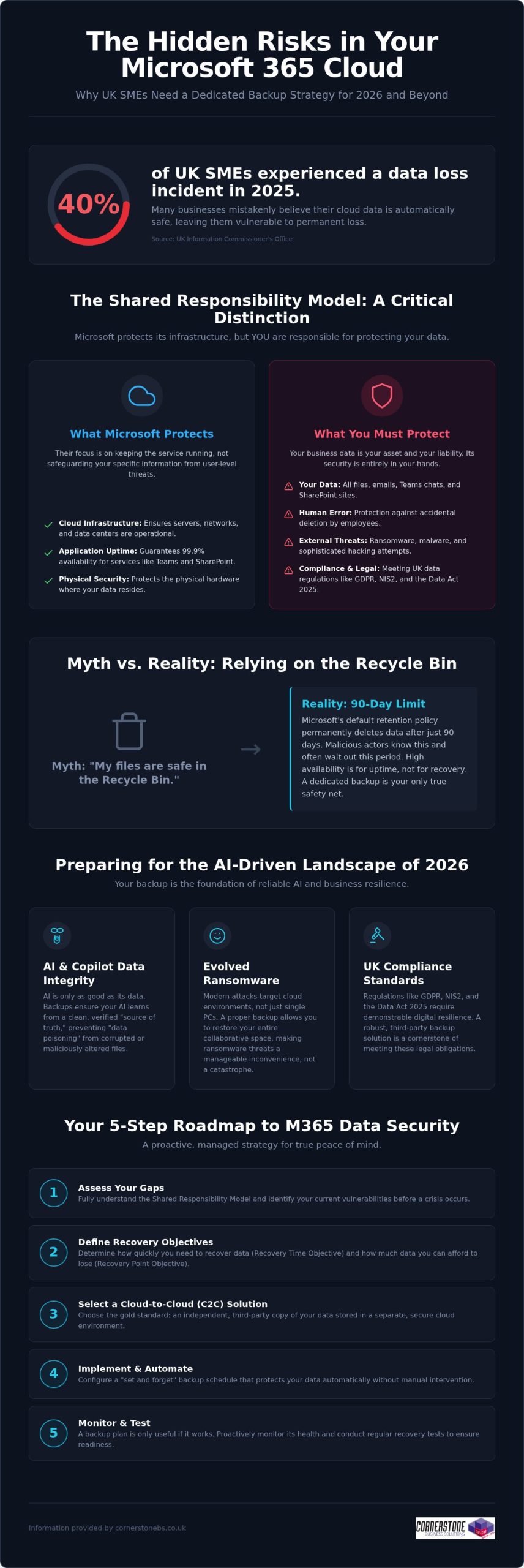
Did you know that 40% of UK small and medium-sized enterprises experienced at least one data-loss incident in 2025? It’s a startling figure from the Information Commissioner’s Office, especially since many business owners still believe Microsoft handles all their cloud backups automatically. While Microsoft manages the infrastructure, the “shared responsibility model” means you’re responsible for the data itself. Implementing reliable Microsoft 365 backup solutions for business is now a foundational requirement for any local firm that values its continuity. You need a proactive strategy that guards against ransomware and ensures you’re ready for the AI-driven landscape of 2026.
We know you want technical peace of mind without the jargon. You’ve likely felt the pressure of the Data (Use and Access) Act 2025 or worried about how to protect the data feeding your AI tools like Copilot. This guide promises a comprehensive roadmap to secure your business continuity and AI-readiness. We’ll preview the essential steps to achieve fast recovery times, meet UK compliance standards, and move toward a “set and forget” backup environment. Let’s explore how a modern data strategy can protect your reputation and your bottom line.
Key Takeaways
- Grasp the nuances of the shared responsibility model to ensure your business continuity plan covers the security gaps Microsoft leaves behind.
- Explore the vital link between clean historical data and the reliability of AI tools like Microsoft 365 Copilot in 2026.
- Determine why Cloud-to-Cloud (C2C) backup has become the gold standard for UK firms needing to meet the latest regulatory requirements.
- Access a practical 5-step roadmap for selecting Microsoft 365 backup solutions for business that offer granular, point-in-time recovery.
- Shift from a reactive mindset to a proactive, managed strategy that provides peace of mind through award-winning expert monitoring.
The Reality of Microsoft 365 Data Protection in 2026
Microsoft does a brilliant job of keeping the lights on. They ensure SharePoint, Teams, and Exchange are available 99.9% of the time, providing a robust platform for your daily operations. However, their “Shared Responsibility Model” draws a clear line in the sand that many business owners overlook. Microsoft protects the underlying cloud infrastructure, but you remain the sole owner of the data living inside it. If that data is deleted, encrypted by a hacker, or corrupted by a faulty third-party app, the recovery is entirely your responsibility. A professional M365 backup is an independent, third-party copy of your cloud data. Without this safety net, your business is essentially working without a harness.
Debunking the ‘Microsoft Backs Everything Up’ Myth
Confusion often stems from the concept of “high availability.” This ensures your files are accessible from anywhere, but it isn’t the same as a comprehensive data backup strategy. Microsoft’s default retention policy for the recycle bin is typically 90 days. After that window closes, your data is permanently purged from their systems. For a busy SME, 90 days passes in a blink. If an employee accidentally deletes a critical folder and nobody notices for three months, there’s no “undo” button. Malicious actors also know this; they often target cloud files specifically because they know many firms lack external protection, making dedicated Microsoft 365 backup solutions for business a necessity rather than a luxury.
The 2026 Cost of Data Loss
In 2026, ransomware has evolved to specifically hunt for cloud-based synchronization gaps. It doesn’t just lock a single laptop; it can potentially lock your entire collaborative environment. When your team can’t access their shared files, productivity doesn’t just slow down; it stops entirely. This downtime carries a heavy price tag in lost revenue and fractured customer trust, especially when you consider that 40% of UK SMEs experienced a data-loss incident in 2025 according to the ICO. Integrating robust Microsoft 365 backup solutions for business into your wider managed IT support plan ensures that a single error doesn’t become a company-wide catastrophe. We’ve found that proactive monitoring catches these threats before they escalate, turning a potential disaster into a minor, manageable speed bump.
Why Dedicated Backup is Essential for 2026 AI-Readiness
By 2026, AI tools like Microsoft 365 Copilot have moved from novelty to necessity for UK SMEs. However, an AI is only as reliable as the data it consumes. If your source data is corrupted, deleted, or “poisoned” by incorrect inputs, the AI will generate flawed insights that could misguide your business decisions. This is where Microsoft 365 backup solutions for business play a pivotal role. They don’t just save files; they preserve the historical context and data integrity that AI models need to function accurately.
Modern AI-readiness also requires protecting the “Identity” layer. This includes the complex web of permissions and configurations that determine who can access what. If a ransomware attack resets these permissions or if they’re accidentally wiped, your AI could inadvertently expose sensitive payroll data or intellectual property to the wrong users. Robust backup ensures you can roll back to a known-good state of both data and access rights, preventing your automation from turning into a liability.
Ensuring AI and Copilot Data Integrity
Data poisoning is a growing concern in the 2026 landscape. If a malicious actor gains access and subtly alters your spreadsheets or documents, your AI will learn from this “bad” data. Independent backup acts as the ultimate source of truth, ensuring your AI systems learn from verified, clean data rather than corrupted or accidental deletions. Versioning is equally critical. It allows you to compare current AI outputs against historical datasets to ensure accuracy. If you’re unsure about your current setup, our team can help you assess your cloud resilience to ensure your data architecture is ready for full automation.
Meeting UK Compliance Standards (GDPR & NIS2)
Compliance isn’t a static target. The Data (Use and Access) Act 2025 and the tightening of NIS2 requirements mean UK businesses must demonstrate high levels of digital resilience. Adopting professional Microsoft 365 backup solutions for business ensures you stay aligned with UK data protection rules. These regulations demand that personal data is not only protected but also recoverable in a timely manner.
Beyond legal mandates, having a verifiable backup process is a core requirement for achieving Cyber Essentials Plus certification. It proves to your clients and insurers that you take data sovereignty seriously. This level of protection perfectly complements our broader cyber security services, creating a multi-layered defence that keeps your business stable and secure. We believe that a proactive approach to backup is the only way to maintain emotional security in a high-tech world.
Evaluating Microsoft 365 Backup Solutions for UK Businesses
Selecting the right Microsoft 365 backup solutions for business requires looking beyond basic file storage. In 2026, Cloud-to-Cloud (C2C) backup has emerged as the definitive gold standard for resilience. It creates a secure bridge between your Microsoft environment and a separate, air-gapped cloud vault. This approach ensures that even if your primary credentials are compromised, your backup remains untouched and ready for a point-in-time recovery. It’s the most proactive way to ensure your business stays operational during a crisis without relying on vulnerable local hardware.
Cloud-to-Cloud vs. Local Backup Models
Many firms consider backing up cloud data to a local on-premise server, but this is often counter-productive. It introduces a physical bottleneck and increases your hardware maintenance costs. By contrast, C2C models offer superior scalability and ransomware protection through air-gapping. As a multi-award-winning provider, we carefully vet cloud solutions for our national clients to ensure they provide the speed and security modern UK businesses demand. We focus on systems that provide a “clean” environment, isolated from your primary network.
Granularity: Restoring More Than Just Files
A common pitfall is choosing a solution that only protects emails and documents. True resilience requires granularity. You need the ability to restore specific Teams chats, SharePoint sites, or even individual Planner boards without performing a full-tenant “bulk restore.” Bulk restores are often messy and overwrite recent work, whereas granular restores allow you to pluck a single missing item from the past and drop it back into the present. Ensure your chosen Microsoft 365 backup solutions for business also preserve metadata and user permissions. Losing these configurations can cause hours of manual reconfiguration and downtime.
Data residency is another non-negotiable factor for UK firms. To stay aligned with the Information Commissioner’s Office (ICO) guidelines, your backup data should ideally reside in UK-based data centres. This simplifies your compliance with UK GDPR and ensures you aren’t subject to conflicting international data laws. Finally, consider the frequency of your protection. While automated daily backups are standard, businesses with high transaction volumes should look for Continuous Data Protection (CDP). This captures changes in near real-time, ensuring your Recovery Point Objective (RPO) is measured in minutes rather than hours, providing the ultimate emotional security for your team.
A 5-Step Roadmap for Implementing M365 Backup
Implementing a robust defence for your cloud data doesn’t have to be a complex headache. We’ve simplified the journey into a clear, five-step roadmap designed to help you deploy Microsoft 365 backup solutions for business with total confidence. This strategy ensures your organisation stays protected against modern ransomware while remaining firmly within UK regulatory boundaries. By following these steps, you move from a reactive posture to a proactive, resilient one.
- Step 1: Data Audit. Start by identifying what’s critical. Not every temporary file needs long-term storage, but your financial records, legal contracts, and intellectual property certainly do.
- Step 2: Define RPO and RTO. Set clear recovery expectations. Determine how much data you can afford to lose (Recovery Point Objective) and how quickly you need your systems back online (Recovery Time Objective) following an incident.
- Step 3: Solution Selection. Choose a partner that understands the UK landscape. Match specific features to your industry requirements, ensuring you’re ready for the 2026 NIS2 compliance standards.
- Step 4: Secure Configuration. Don’t leave the back door open. Implement Multi-Factor Authentication (MFA) and end-to-end encryption to protect the backup itself from unauthorised access.
- Step 5: Testing and Validation. Schedule regular “fire drills.” A backup remains a theoretical safety net until you’ve proven it can actually restore your data under pressure.
Selecting the right Microsoft 365 backup solutions for business is the foundation of your continuity plan. It’s about more than just insurance; it’s about ensuring your team can keep working, no matter what happens in the wider digital world.
Auditing for Compliance and Efficiency
Mapping your data footprint is the first step toward total resilience. It’s about understanding how information flows through Teams, SharePoint, and Exchange. This alignment with it company solutions best practices ensures you aren’t just ticking a box, but actually improving your operational efficiency. Identifying sensitive data early also allows you to apply longer retention periods where they’re legally required, keeping your business on the right side of the ICO.
The Importance of Regular Recovery Testing
We often tell our clients that a backup is only as good as its last successful restore. In a fast-moving cloud environment, configurations change and data volumes grow. Regular, non-disruptive recovery tests ensure your business continuity plan actually works when it’s needed most. Automated reporting provides the verifiable proof of backup validation that stakeholders and insurers now demand for Cyber Essentials Plus. If you’re ready to secure your infrastructure, our award-winning national team can help you design a custom backup strategy that provides true peace of mind.
Partnering for Resilience: The Cornerstone Managed Approach
Software alone isn’t a strategy. While many providers offer Microsoft 365 backup solutions for business as a standalone product, at Cornerstone Business Solutions, we believe true resilience comes from a dedicated partnership. A DIY approach often leaves the heavy lifting of monitoring and recovery to your internal team, who are already stretched thin. Our award-winning managed approach shifts that burden to our experts. We don’t just set up the software; we proactively monitor every backup cycle. If a sync fails at 2 am, our team is already working on the fix before your staff even log in for the day.
This proactive stance is a foundational element of our service. We integrate data protection into your wider Microsoft 365 migration and support plan, ensuring that security is baked in from day one. Should the worst happen, you have instant access to our unlimited UK helpdesk. You won’t be navigating a complex recovery wizard alone. You’ll be talking to a local expert who understands your business and is committed to getting you back on track immediately. This level of support provides the emotional security every business leader needs in a high-stakes digital environment.
Bespoke Solutions for National UK Enterprises
We recognise that a law firm has different retention needs than a retail chain. Our team customises your backup policies to match your specific UK industry requirements and internal workflows. As your UK headcount grows, your backup infrastructure scales seamlessly with you. This is the “Cornerstone Difference.” We provide the professional authority of a Microsoft partner combined with the approachable, community-focused service that defines our national team. We focus on building long-term relationships rather than just closing transactions.
Beyond Backup: A Foundation for Growth
Our commitment to your success extends beyond the initial setup. We conduct quarterly technology reviews to ensure your 2026 strategy remains future-proof as new threats emerge. These sessions integrate your Microsoft 365 backup solutions for business with wider cyber security audits, providing a holistic view of your digital health. We want you to feel confident that your infrastructure is a solid foundation for growth, not a point of failure. We invite you to start a conversation about securing your Microsoft 365 backup today and discover how a proactive partner can help your business thrive.
Building a Resilient Digital Foundation for 2026
Protecting your cloud data is no longer a choice; it’s a fundamental requirement for business stability. We’ve explored how the shared responsibility model places the burden of protection on your shoulders and why clean data is the essential fuel for your AI tools. By choosing professional Microsoft 365 backup solutions for business, you move beyond the limitations of the recycle bin and secure your compliance with UK laws like NIS2. This proactive approach ensures your team stays productive even if a crisis strikes.
As a multi-award-winning IT provider and trusted Microsoft Partner, we’re here to ensure your transition to a “set and forget” backup strategy is seamless. Our national team provides unlimited proactive UK helpdesk support, catching failures before they impact your operations. Secure your business data with Cornerstone’s managed backup solutions and gain the peace of mind that comes from knowing your continuity is in expert hands. We’re ready to help you thrive in an increasingly complex digital landscape.
Frequently Asked Questions
Does Microsoft 365 include a full backup for business users?
Microsoft does not provide a comprehensive backup service as part of its standard subscriptions. They follow a Shared Responsibility Model where they ensure the service’s availability, but you remain responsible for the data stored within it. If data is deleted or corrupted, Microsoft’s native tools are limited. This is why investing in dedicated Microsoft 365 backup solutions for business is essential to ensure your company remains resilient against permanent data loss.
How long is data kept in the Microsoft 365 recycle bin?
By default, items in the Microsoft 365 recycle bin are kept for 93 days before being permanently deleted. This window is often much shorter than business owners realise. If a file is deleted and the error isn’t discovered within this three-month period, the data is gone forever from Microsoft’s systems. Relying on this temporary storage isn’t a substitute for a true backup strategy that offers long-term retention and easy recovery.
Can a Microsoft 365 backup protect against ransomware?
Yes, an independent backup is one of your strongest defences against ransomware. Professional Microsoft 365 backup solutions for business create an air-gapped copy of your data that sits outside your primary Microsoft environment. If hackers encrypt your live files, you can perform a point-in-time restore. This allows you to roll your data back to a clean version from just before the attack, bypassing the need to pay a ransom or lose critical files.
What is the difference between archiving and backup in Microsoft 365?
Archiving and backup serve two different purposes. Archiving is about moving older data out of your primary mailbox to save space or meet legal discovery requirements. Backup creates a separate copy of your active data so you can recover it quickly after a deletion or cyberattack. You need both to be fully protected. While archiving helps with organisation, only a backup ensures business continuity when things go wrong and files are missing.
How often should a UK business backup its Microsoft 365 data?
Most UK businesses should aim for at least one automated backup every 24 hours. However, if your team handles high volumes of sensitive data or frequent transactions, daily backups might not be enough. In these cases, we recommend Continuous Data Protection (CDP) which captures changes in near real-time. Frequent backups significantly reduce your Recovery Point Objective (RPO), ensuring that only a few minutes of work are at risk in the event of a system failure.
Is it better to backup Microsoft 365 to the cloud or a local server?
Cloud-to-Cloud (C2C) backup is generally far superior to local server options. Backing up cloud data to a physical server in your office creates a bottleneck and introduces risks like fire, theft, or hardware failure. C2C solutions keep your data in a secure, geographically separate data centre. This ensures your recovery speeds are faster and your data remains accessible from anywhere, which is vital for modern and flexible UK workforces that rely on the cloud.
Does a backup include Microsoft Teams and SharePoint data?
A professional backup service should absolutely include Teams and SharePoint. Native Microsoft tools often struggle to capture the complex web of permissions, tabs, and private chats within Teams. A robust solution ensures that not just the files, but the entire collaborative structure is preserved. This includes SharePoint sites, Planner boards, and OneNote files. Recovering a file is helpful, but recovering a whole project environment is what truly saves your team’s productivity and time.
How much does a professional Microsoft 365 backup solution cost in the UK?
The cost of protecting your data depends on several factors, including your total headcount and the volume of data you need to store. Most providers use a per-user, per-month model, while others charge based on the total gigabytes protected. While price is always a consideration, it’s important to weigh the monthly fee against the potential cost of downtime. We focus on providing bespoke value that scales with your business as your UK headcount grows.
Tags: Business Continuity, Data Compliance, Data Protection, M365 Backup, Microsoft 365, Microsoft Copilot, Ransomware, UK business