Posted on: September 10th, 2026 by Cornerstone
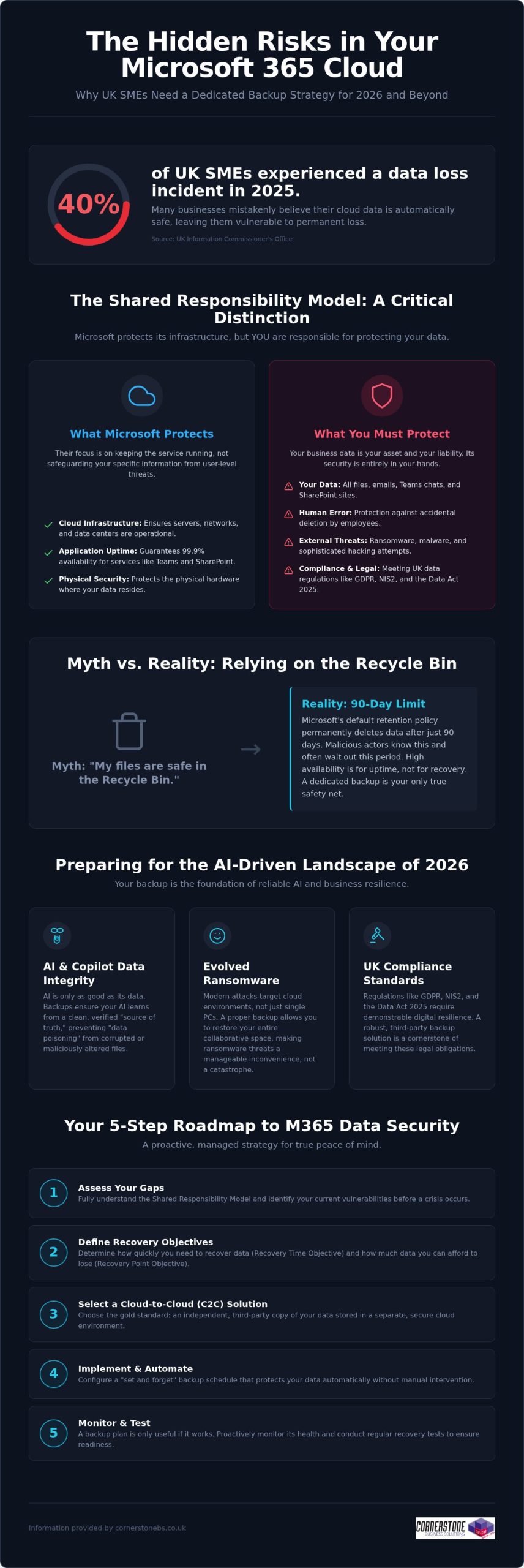
Did you know that 40% of UK small and medium-sized enterprises experienced at least one data-loss incident in 2025? It’s a startling figure from the Information Commissioner’s Office, especially since many business owners still believe Microsoft handles all their cloud backups automatically. While Microsoft manages the infrastructure, the “shared responsibility model” means you’re responsible for the data itself. Implementing reliable Microsoft 365 backup solutions for business is now a foundational requirement for any local firm that values its continuity. You need a proactive strategy that guards against ransomware and ensures you’re ready for the AI-driven landscape of 2026.
We know you want technical peace of mind without the jargon. You’ve likely felt the pressure of the Data (Use and Access) Act 2025 or worried about how to protect the data feeding your AI tools like Copilot. This guide promises a comprehensive roadmap to secure your business continuity and AI-readiness. We’ll preview the essential steps to achieve fast recovery times, meet UK compliance standards, and move toward a “set and forget” backup environment. Let’s explore how a modern data strategy can protect your reputation and your bottom line.
Key Takeaways
- Grasp the nuances of the shared responsibility model to ensure your business continuity plan covers the security gaps Microsoft leaves behind.
- Explore the vital link between clean historical data and the reliability of AI tools like Microsoft 365 Copilot in 2026.
- Determine why Cloud-to-Cloud (C2C) backup has become the gold standard for UK firms needing to meet the latest regulatory requirements.
- Access a practical 5-step roadmap for selecting Microsoft 365 backup solutions for business that offer granular, point-in-time recovery.
- Shift from a reactive mindset to a proactive, managed strategy that provides peace of mind through award-winning expert monitoring.
The Reality of Microsoft 365 Data Protection in 2026
Microsoft does a brilliant job of keeping the lights on. They ensure SharePoint, Teams, and Exchange are available 99.9% of the time, providing a robust platform for your daily operations. However, their “Shared Responsibility Model” draws a clear line in the sand that many business owners overlook. Microsoft protects the underlying cloud infrastructure, but you remain the sole owner of the data living inside it. If that data is deleted, encrypted by a hacker, or corrupted by a faulty third-party app, the recovery is entirely your responsibility. A professional M365 backup is an independent, third-party copy of your cloud data. Without this safety net, your business is essentially working without a harness.
Debunking the ‘Microsoft Backs Everything Up’ Myth
Confusion often stems from the concept of “high availability.” This ensures your files are accessible from anywhere, but it isn’t the same as a comprehensive data backup strategy. Microsoft’s default retention policy for the recycle bin is typically 90 days. After that window closes, your data is permanently purged from their systems. For a busy SME, 90 days passes in a blink. If an employee accidentally deletes a critical folder and nobody notices for three months, there’s no “undo” button. Malicious actors also know this; they often target cloud files specifically because they know many firms lack external protection, making dedicated Microsoft 365 backup solutions for business a necessity rather than a luxury.
The 2026 Cost of Data Loss
In 2026, ransomware has evolved to specifically hunt for cloud-based synchronization gaps. It doesn’t just lock a single laptop; it can potentially lock your entire collaborative environment. When your team can’t access their shared files, productivity doesn’t just slow down; it stops entirely. This downtime carries a heavy price tag in lost revenue and fractured customer trust, especially when you consider that 40% of UK SMEs experienced a data-loss incident in 2025 according to the ICO. Integrating robust Microsoft 365 backup solutions for business into your wider managed IT support plan ensures that a single error doesn’t become a company-wide catastrophe. We’ve found that proactive monitoring catches these threats before they escalate, turning a potential disaster into a minor, manageable speed bump.
Why Dedicated Backup is Essential for 2026 AI-Readiness
By 2026, AI tools like Microsoft 365 Copilot have moved from novelty to necessity for UK SMEs. However, an AI is only as reliable as the data it consumes. If your source data is corrupted, deleted, or “poisoned” by incorrect inputs, the AI will generate flawed insights that could misguide your business decisions. This is where Microsoft 365 backup solutions for business play a pivotal role. They don’t just save files; they preserve the historical context and data integrity that AI models need to function accurately.
Modern AI-readiness also requires protecting the “Identity” layer. This includes the complex web of permissions and configurations that determine who can access what. If a ransomware attack resets these permissions or if they’re accidentally wiped, your AI could inadvertently expose sensitive payroll data or intellectual property to the wrong users. Robust backup ensures you can roll back to a known-good state of both data and access rights, preventing your automation from turning into a liability.
Ensuring AI and Copilot Data Integrity
Data poisoning is a growing concern in the 2026 landscape. If a malicious actor gains access and subtly alters your spreadsheets or documents, your AI will learn from this “bad” data. Independent backup acts as the ultimate source of truth, ensuring your AI systems learn from verified, clean data rather than corrupted or accidental deletions. Versioning is equally critical. It allows you to compare current AI outputs against historical datasets to ensure accuracy. If you’re unsure about your current setup, our team can help you assess your cloud resilience to ensure your data architecture is ready for full automation.
Meeting UK Compliance Standards (GDPR & NIS2)
Compliance isn’t a static target. The Data (Use and Access) Act 2025 and the tightening of NIS2 requirements mean UK businesses must demonstrate high levels of digital resilience. Adopting professional Microsoft 365 backup solutions for business ensures you stay aligned with UK data protection rules. These regulations demand that personal data is not only protected but also recoverable in a timely manner.
Beyond legal mandates, having a verifiable backup process is a core requirement for achieving Cyber Essentials Plus certification. It proves to your clients and insurers that you take data sovereignty seriously. This level of protection perfectly complements our broader cyber security services, creating a multi-layered defence that keeps your business stable and secure. We believe that a proactive approach to backup is the only way to maintain emotional security in a high-tech world.
Evaluating Microsoft 365 Backup Solutions for UK Businesses
Selecting the right Microsoft 365 backup solutions for business requires looking beyond basic file storage. In 2026, Cloud-to-Cloud (C2C) backup has emerged as the definitive gold standard for resilience. It creates a secure bridge between your Microsoft environment and a separate, air-gapped cloud vault. This approach ensures that even if your primary credentials are compromised, your backup remains untouched and ready for a point-in-time recovery. It’s the most proactive way to ensure your business stays operational during a crisis without relying on vulnerable local hardware.
Cloud-to-Cloud vs. Local Backup Models
Many firms consider backing up cloud data to a local on-premise server, but this is often counter-productive. It introduces a physical bottleneck and increases your hardware maintenance costs. By contrast, C2C models offer superior scalability and ransomware protection through air-gapping. As a multi-award-winning provider, we carefully vet cloud solutions for our national clients to ensure they provide the speed and security modern UK businesses demand. We focus on systems that provide a “clean” environment, isolated from your primary network.
Granularity: Restoring More Than Just Files
A common pitfall is choosing a solution that only protects emails and documents. True resilience requires granularity. You need the ability to restore specific Teams chats, SharePoint sites, or even individual Planner boards without performing a full-tenant “bulk restore.” Bulk restores are often messy and overwrite recent work, whereas granular restores allow you to pluck a single missing item from the past and drop it back into the present. Ensure your chosen Microsoft 365 backup solutions for business also preserve metadata and user permissions. Losing these configurations can cause hours of manual reconfiguration and downtime.
Data residency is another non-negotiable factor for UK firms. To stay aligned with the Information Commissioner’s Office (ICO) guidelines, your backup data should ideally reside in UK-based data centres. This simplifies your compliance with UK GDPR and ensures you aren’t subject to conflicting international data laws. Finally, consider the frequency of your protection. While automated daily backups are standard, businesses with high transaction volumes should look for Continuous Data Protection (CDP). This captures changes in near real-time, ensuring your Recovery Point Objective (RPO) is measured in minutes rather than hours, providing the ultimate emotional security for your team.
A 5-Step Roadmap for Implementing M365 Backup
Implementing a robust defence for your cloud data doesn’t have to be a complex headache. We’ve simplified the journey into a clear, five-step roadmap designed to help you deploy Microsoft 365 backup solutions for business with total confidence. This strategy ensures your organisation stays protected against modern ransomware while remaining firmly within UK regulatory boundaries. By following these steps, you move from a reactive posture to a proactive, resilient one.
- Step 1: Data Audit. Start by identifying what’s critical. Not every temporary file needs long-term storage, but your financial records, legal contracts, and intellectual property certainly do.
- Step 2: Define RPO and RTO. Set clear recovery expectations. Determine how much data you can afford to lose (Recovery Point Objective) and how quickly you need your systems back online (Recovery Time Objective) following an incident.
- Step 3: Solution Selection. Choose a partner that understands the UK landscape. Match specific features to your industry requirements, ensuring you’re ready for the 2026 NIS2 compliance standards.
- Step 4: Secure Configuration. Don’t leave the back door open. Implement Multi-Factor Authentication (MFA) and end-to-end encryption to protect the backup itself from unauthorised access.
- Step 5: Testing and Validation. Schedule regular “fire drills.” A backup remains a theoretical safety net until you’ve proven it can actually restore your data under pressure.
Selecting the right Microsoft 365 backup solutions for business is the foundation of your continuity plan. It’s about more than just insurance; it’s about ensuring your team can keep working, no matter what happens in the wider digital world.
Auditing for Compliance and Efficiency
Mapping your data footprint is the first step toward total resilience. It’s about understanding how information flows through Teams, SharePoint, and Exchange. This alignment with it company solutions best practices ensures you aren’t just ticking a box, but actually improving your operational efficiency. Identifying sensitive data early also allows you to apply longer retention periods where they’re legally required, keeping your business on the right side of the ICO.
The Importance of Regular Recovery Testing
We often tell our clients that a backup is only as good as its last successful restore. In a fast-moving cloud environment, configurations change and data volumes grow. Regular, non-disruptive recovery tests ensure your business continuity plan actually works when it’s needed most. Automated reporting provides the verifiable proof of backup validation that stakeholders and insurers now demand for Cyber Essentials Plus. If you’re ready to secure your infrastructure, our award-winning national team can help you design a custom backup strategy that provides true peace of mind.
Partnering for Resilience: The Cornerstone Managed Approach
Software alone isn’t a strategy. While many providers offer Microsoft 365 backup solutions for business as a standalone product, at Cornerstone Business Solutions, we believe true resilience comes from a dedicated partnership. A DIY approach often leaves the heavy lifting of monitoring and recovery to your internal team, who are already stretched thin. Our award-winning managed approach shifts that burden to our experts. We don’t just set up the software; we proactively monitor every backup cycle. If a sync fails at 2 am, our team is already working on the fix before your staff even log in for the day.
This proactive stance is a foundational element of our service. We integrate data protection into your wider Microsoft 365 migration and support plan, ensuring that security is baked in from day one. Should the worst happen, you have instant access to our unlimited UK helpdesk. You won’t be navigating a complex recovery wizard alone. You’ll be talking to a local expert who understands your business and is committed to getting you back on track immediately. This level of support provides the emotional security every business leader needs in a high-stakes digital environment.
Bespoke Solutions for National UK Enterprises
We recognise that a law firm has different retention needs than a retail chain. Our team customises your backup policies to match your specific UK industry requirements and internal workflows. As your UK headcount grows, your backup infrastructure scales seamlessly with you. This is the “Cornerstone Difference.” We provide the professional authority of a Microsoft partner combined with the approachable, community-focused service that defines our national team. We focus on building long-term relationships rather than just closing transactions.
Beyond Backup: A Foundation for Growth
Our commitment to your success extends beyond the initial setup. We conduct quarterly technology reviews to ensure your 2026 strategy remains future-proof as new threats emerge. These sessions integrate your Microsoft 365 backup solutions for business with wider cyber security audits, providing a holistic view of your digital health. We want you to feel confident that your infrastructure is a solid foundation for growth, not a point of failure. We invite you to start a conversation about securing your Microsoft 365 backup today and discover how a proactive partner can help your business thrive.
Building a Resilient Digital Foundation for 2026
Protecting your cloud data is no longer a choice; it’s a fundamental requirement for business stability. We’ve explored how the shared responsibility model places the burden of protection on your shoulders and why clean data is the essential fuel for your AI tools. By choosing professional Microsoft 365 backup solutions for business, you move beyond the limitations of the recycle bin and secure your compliance with UK laws like NIS2. This proactive approach ensures your team stays productive even if a crisis strikes.
As a multi-award-winning IT provider and trusted Microsoft Partner, we’re here to ensure your transition to a “set and forget” backup strategy is seamless. Our national team provides unlimited proactive UK helpdesk support, catching failures before they impact your operations. Secure your business data with Cornerstone’s managed backup solutions and gain the peace of mind that comes from knowing your continuity is in expert hands. We’re ready to help you thrive in an increasingly complex digital landscape.
Frequently Asked Questions
Does Microsoft 365 include a full backup for business users?
Microsoft does not provide a comprehensive backup service as part of its standard subscriptions. They follow a Shared Responsibility Model where they ensure the service’s availability, but you remain responsible for the data stored within it. If data is deleted or corrupted, Microsoft’s native tools are limited. This is why investing in dedicated Microsoft 365 backup solutions for business is essential to ensure your company remains resilient against permanent data loss.
How long is data kept in the Microsoft 365 recycle bin?
By default, items in the Microsoft 365 recycle bin are kept for 93 days before being permanently deleted. This window is often much shorter than business owners realise. If a file is deleted and the error isn’t discovered within this three-month period, the data is gone forever from Microsoft’s systems. Relying on this temporary storage isn’t a substitute for a true backup strategy that offers long-term retention and easy recovery.
Can a Microsoft 365 backup protect against ransomware?
Yes, an independent backup is one of your strongest defences against ransomware. Professional Microsoft 365 backup solutions for business create an air-gapped copy of your data that sits outside your primary Microsoft environment. If hackers encrypt your live files, you can perform a point-in-time restore. This allows you to roll your data back to a clean version from just before the attack, bypassing the need to pay a ransom or lose critical files.
What is the difference between archiving and backup in Microsoft 365?
Archiving and backup serve two different purposes. Archiving is about moving older data out of your primary mailbox to save space or meet legal discovery requirements. Backup creates a separate copy of your active data so you can recover it quickly after a deletion or cyberattack. You need both to be fully protected. While archiving helps with organisation, only a backup ensures business continuity when things go wrong and files are missing.
How often should a UK business backup its Microsoft 365 data?
Most UK businesses should aim for at least one automated backup every 24 hours. However, if your team handles high volumes of sensitive data or frequent transactions, daily backups might not be enough. In these cases, we recommend Continuous Data Protection (CDP) which captures changes in near real-time. Frequent backups significantly reduce your Recovery Point Objective (RPO), ensuring that only a few minutes of work are at risk in the event of a system failure.
Is it better to backup Microsoft 365 to the cloud or a local server?
Cloud-to-Cloud (C2C) backup is generally far superior to local server options. Backing up cloud data to a physical server in your office creates a bottleneck and introduces risks like fire, theft, or hardware failure. C2C solutions keep your data in a secure, geographically separate data centre. This ensures your recovery speeds are faster and your data remains accessible from anywhere, which is vital for modern and flexible UK workforces that rely on the cloud.
Does a backup include Microsoft Teams and SharePoint data?
A professional backup service should absolutely include Teams and SharePoint. Native Microsoft tools often struggle to capture the complex web of permissions, tabs, and private chats within Teams. A robust solution ensures that not just the files, but the entire collaborative structure is preserved. This includes SharePoint sites, Planner boards, and OneNote files. Recovering a file is helpful, but recovering a whole project environment is what truly saves your team’s productivity and time.
How much does a professional Microsoft 365 backup solution cost in the UK?
The cost of protecting your data depends on several factors, including your total headcount and the volume of data you need to store. Most providers use a per-user, per-month model, while others charge based on the total gigabytes protected. While price is always a consideration, it’s important to weigh the monthly fee against the potential cost of downtime. We focus on providing bespoke value that scales with your business as your UK headcount grows.
Posted on: July 12th, 2026 by Cornerstone
UK companies are currently facing an average of 1,988 cyberattacks every single day. It’s a sobering statistic that highlights why simply “having” the cloud isn’t the same as being truly protected. If you feel overwhelmed by complex admin menus or worry that a single data breach could damage your hard-earned reputation, you aren’t alone. Many local leaders find the sheer volume of security settings exhausting. However, mastering microsoft 365 security best practices uk standards doesn’t have to be a headache. It’s about moving from a “set and forget” mindset to a proactive, managed configuration that stands up to 2026’s AI-powered threats.
We agree that your focus should be on running your business, not decoding technical manuals. You deserve the peace of mind that comes from knowing your data is safe. This guide promises to strip away the confusion and provide a clear, NCSC-aligned roadmap to secure your operations. We’ll explore the essential configurations that reduce ransomware risks, clarify which licenses actually offer the best protection, and ensure you stay compliant with the latest UK data laws. By the end of this article, you’ll have the confidence to turn your digital workspace into a resilient fortress.
Key Takeaways
- Understand the 2026 threat landscape and why AI-powered phishing makes a robust security configuration more critical than ever for UK firms.
- Master the microsoft 365 security best practices uk organisations rely on by following the NCSC’s latest framework for secure cloud configurations.
- Evaluate the security gap between Microsoft 365 Business Standard and Premium to ensure your chosen license provides the protection your data deserves.
- Implement five essential security steps, from phishing-resistant MFA to automated device management, to proactively reduce your risk of ransomware.
- Discover why shifting from a DIY setup to a managed security partnership offers the long-term stability and expert support your business needs to grow safely.
The UK Cyber Threat Landscape for Microsoft 365 in 2026
UK companies currently face an average of 1,988 cyberattacks every single day. According to the Cyber Security Breaches Survey published in April 2026, 43% of UK businesses reported a breach in the last year. This figure rises to 65% for medium sized firms. These aren’t just global trends; they are local realities affecting businesses in our own communities. Microsoft 365 is the primary target because it holds the keys to your financial data, client lists, and internal communications. Relying on a reactive “break-fix” approach is no longer sustainable. You need a proactive strategy built on recognized information security standards to keep your operations running smoothly.
The Rise of AI-Driven Phishing in the UK
Attackers are now using generative AI to craft incredibly convincing emails that mimic local UK dialects and specific business contexts. In 2026, Business Email Compromise (BEC) is defined as a highly targeted attack where criminals use AI-generated deepfakes or perfectly written messages to impersonate trusted partners and divert business payments. Traditional spam filters often fail to catch these because they lack the obvious spelling errors or awkward phrasing of the past. Relying on basic filters alone is no longer a sufficient defence for your team.
The Impact of Downtime on Business Continuity
Technical security is vital, but emotional security matters just as much. As a business owner, you need to sleep soundly knowing your systems won’t vanish overnight. Ransomware was present in 48% of all data breaches in 2026, often leading to days or even weeks of total paralysis. The hidden costs of this downtime go far beyond the ransom itself. They include lost productivity, missed deadlines, and the immense stress of rebuilding your digital infrastructure from scratch. Our cyber security services focus on preventing this chaos before it starts. By adopting a robust microsoft 365 security best practices uk roadmap, you protect both your bottom line and your team’s peace of mind.
Aligning with the NCSC Secure Configuration Blueprint
The National Cyber Security Centre (NCSC) provides a definitive roadmap called the Secure Configuration Blueprint. While originally designed for government bodies, its latest version (Version 3.0) is a vital resource for any local business aiming to implement microsoft 365 security best practices uk experts recommend. It moves away from generic advice and offers a tiered “Good, Better, Best” framework. Most SMEs should aim for “Better” as a starting point. This level aligns closely with the Cyber Essentials scheme, which was updated in April 2026 to require all critical vulnerabilities to be patched within 14 days. Achieving this certification isn’t just about ticking boxes; it’s a powerful way to prove to your customers that their data is in safe, capable hands.
In the past, security was about building a wall around your office network. In 2026, that wall has disappeared. Your staff work from home, on the road, and in the cloud. This makes identity the new security perimeter. If a criminal steals a password, they are effectively inside your building. Shifting your focus to identity management ensures that only the right people have access to your sensitive information, regardless of where they are working. It’s a proactive shift that follows global information security standards while remaining grounded in the practical needs of a growing UK firm.
Identity and Access Management (IAM) Essentials
Passwords alone are a relic of the past. Today, we use Microsoft Entra ID to provide a sophisticated layer of verification that looks at more than just a string of characters. It evaluates the user’s location, the health of their device, and the sensitivity of the data they’re trying to reach. To meet the NCSC recommendation for administrative account protection, you must ensure that admin accounts are never used for day-to-day tasks like checking email or browsing the web. This simple separation of duties drastically reduces the chance of a high-level breach. If you’re curious about how your current setup measures up, our local team is always happy to help with a quick assessment.
Zero Trust Architecture for UK Businesses
Zero Trust might sound like a harsh term, but it’s actually a very reassuring concept for business owners. It follows a “never trust, always verify” mindset. Instead of assuming everything inside your network is safe, every single request is checked for legitimacy. This prevents a small breach in one area from spreading across your entire company. This architecture is a foundational part of modern cloud solutions that prioritize both growth and resilience. By adopting these microsoft 365 security best practices uk businesses can ensure that even if one account is compromised, the rest of the organization remains shielded.
Microsoft 365 Business Standard vs. Premium: The Security Gap
As of July 2026, the cost of Microsoft 365 Business Standard has increased to approximately £10.75 – £11.70 per user. Meanwhile, Business Premium pricing remains stable at around £16.90 – £18.60. This narrowing price gap makes the upgrade more compelling for local firms than ever before. While Standard provides the essential tools to get the job done, it lacks the advanced protection required to defend against 2026’s sophisticated attacks. Choosing Premium is the most effective way to adopt the microsoft 365 security best practices uk SMEs need for genuine resilience. It isn’t just an expense; it’s an investment in your company’s survival.
One of the biggest differences lies in device management. Microsoft Intune, which is included in the Premium tier, allows you to secure company data on personal phones and laptops. If an employee leaves or a device is lost in the local high street, you can remotely wipe only the business data without touching their personal photos. This balance of privacy and protection is essential for modern business continuity. When you compare the small monthly cost difference to the average financial impact of a breach, the return on investment for Premium is clear. It provides the automated investigation and response capabilities that smaller teams simply don’t have the time to manage manually.
Advanced Threat Protection (ATP) Explained
Defender for Business in the Premium tier introduces Safe Links and Safe Attachments. These tools scan every link and file in real-time, even if they’ve already landed in your inbox. If a link becomes malicious an hour after the email arrives, Premium blocks it instantly. This automated response reduces the burden on your team to be perfect every time they click. Any successful microsoft 365 security best practices uk strategy should start with the right foundation, which is why a Microsoft 365 migration should always include a full security audit to ensure your license tier matches your risk profile.
Information Protection and Data Loss Prevention (DLP)
Protecting sensitive UK client data is a legal requirement under the Data (Use and Access) Act 2025. Business Premium uses sensitivity labels to classify and protect files based on their content. For example, Data Loss Prevention (DLP) policies can automatically detect and block the accidental sharing of National Insurance (NI) numbers or financial details via email. This doesn’t slow your team down; it provides a safety net that catches human error before it becomes a breach. It allows your staff to work productively while you maintain the highest standards of data integrity.
5 Critical Security Steps Every UK Firm Should Take
Securing your digital environment doesn’t have to be an overwhelming task. By focusing on a few high-impact changes, you can significantly reduce your risk profile. These five steps form the backbone of microsoft 365 security best practices uk businesses use to stay resilient in 2026. They align with the NCSC’s Secure Configuration Blueprint and provide a clear path toward Cyber Essentials compliance. Taking these steps proactively ensures your team can work safely from anywhere without compromising your sensitive data.
- Enforce Phishing-Resistant MFA: Move beyond basic passwords and SMS codes to more secure methods like the Microsoft Authenticator app or FIDO2 security keys.
- Secure Every Endpoint: Use Microsoft Intune to manage every laptop, tablet, and smartphone that accesses your data, ensuring they meet your security standards before they connect.
- Apply the Principle of Least Privilege (PoLP): Limit administrative access to only those who absolutely need it, and ensure they use standard accounts for their daily work.
- Enable Audit Logging: Configure your system to record activity across your environment. This allows for proactive monitoring and provides a vital trail if an incident occurs.
MFA: The Single Most Effective Defence
In 2026, SMS-based multi-factor authentication is no longer considered a reliable barrier. Attackers can easily bypass it through SIM swapping or interception. Transitioning your team to the Microsoft Authenticator app or hardware-based FIDO2 keys is a critical upgrade. Conditional Access is a set of rules that determines whether a user is granted access based on their location, device health, and risk level. By implementing these microsoft 365 security best practices uk leaders can ensure that a stolen password isn’t enough to compromise the entire firm.
Securing the Mobile Workforce
The rise of remote work has made “Bring Your Own Device” (BYOD) a standard practice, but it also introduces significant risks. Without proper management, a lost personal phone could mean a major data breach. Microsoft Intune allows you to separate business and personal data, giving you remote wipe capabilities to protect company information if a device goes missing. Managing this hardware effectively requires robust it company solutions that integrate seamlessly with your security posture. If you’re unsure if your current mobile policy is “secure enough,” reach out for a proactive security review with our local experts today.
Why Managed Security is the Proactive Choice for 2026
Managing your own digital defences can feel like a full-time job you never actually applied for. In 2026, the technical landscape moves at lightning speed. A “set and forget” approach to your cloud environment simply isn’t enough to stop modern, AI-driven threats. While the settings we’ve discussed are vital, the real challenge lies in keeping those configurations updated as new vulnerabilities emerge. This is where moving from a DIY mindset to a managed security model makes all the difference for a growing firm. It shifts the burden of constant vigilance from your shoulders to a team of dedicated experts.
As a multi-award-winning UK IT provider and Microsoft partner, we believe that security should be a foundational element of your business stability. We don’t just look at support as a transactional service. Instead, we aim to be your long-term technology partner. By implementing microsoft 365 security best practices uk organisations can trust, we ensure your systems are resilient enough to handle whatever the future holds. This collaborative approach means we work alongside you to understand your specific goals, tailoring our microsoft 365 security best practices uk roadmap to fit your unique regional roots and operational needs.
Beyond the Settings: Proactive Monitoring
Real-time alert monitoring is the difference between stopping a breach in its tracks and discovering a disaster weeks too late. Our managed services provide continuous oversight of your environment, catching suspicious login attempts or unusual data movements the moment they happen. We also provide regular security audits and compliance reporting to ensure you’re always meeting the latest UK data protection standards. This proactive stance allows you to stop worrying about technical glitches and focus entirely on your business growth. You gain the freedom to lead, backed by the emotional security of a protected workspace.
Your Invitation to a Security Conversation
Every bespoke security solution starts with a simple, expert-led discussion. We pride ourselves on offering professional authority with a sense of regional warmth that makes complex tech feel approachable. We’re a local team that understands the challenges faced by UK SMEs because we live and work in the same communities. Our promise is to provide the clarity and reliability you need to feel confident in your digital future. We’d love to hear about your current setup and explore how we can strengthen your posture together. We invite you to start a conversation with one of our specialists today to see how we can build a more resilient business for 2026 and beyond.
Building a Resilient Foundation for Your UK Business
As a multi-award-winning UK IT services provider and certified partner for both Microsoft and Cisco, we specialize in bespoke technology solutions designed for growth. We believe in providing more than just technical support; we offer the emotional security that comes from a dedicated partnership. You don’t have to navigate these complex security menus alone. Secure your business with a multi-award-winning partner, let’s talk about your Microsoft 365 security today. Our local team is ready to help you grow with absolute confidence.
Frequently Asked Questions
Is Microsoft 365 security included in my basic subscription?
Foundation security is included in every subscription, but basic levels often lack the advanced tools needed for 2026 threats. While you get standard anti-spam and basic multi-factor authentication, features like automated threat investigation and remote device wiping are reserved for higher tiers. Relying on basic settings alone can leave your business vulnerable to sophisticated phishing attacks that bypass standard filters.
What is the most common Microsoft 365 security mistake UK businesses make?
The most frequent error is failing to move beyond default “out of the box” settings. Many firms don’t enforce phishing-resistant MFA or block legacy authentication, which accounts for a significant portion of successful breaches. Implementing microsoft 365 security best practices uk leaders recommend means actively closing these gaps through custom policies that reflect your specific risk profile and operational needs.
Does Microsoft 365 comply with UK GDPR requirements?
Microsoft 365 provides the necessary infrastructure for compliance, but the responsibility for correct configuration lies with your business. You must ensure that sensitivity labels and data loss prevention policies are active to meet the standards set by the Data (Use and Access) Act 2025. Properly managed settings allow you to control data residency and access, ensuring you meet your legal obligations to protect client information.
How often should my business perform a Microsoft 365 security audit?
We recommend conducting a full security audit at least every quarter to stay ahead of evolving threats. Regular reviews are essential for identifying inactive accounts, checking for “Shadow AI” usage, and ensuring your configurations still align with the latest NCSC guidance. This proactive rhythm helps you catch minor vulnerabilities before they can be exploited by attackers targeting UK SMEs.
Can I secure Microsoft 365 without hindering my employees’ productivity?
You can definitely maintain a high level of security without slowing your team down. By using Conditional Access, you only require extra verification when a login attempt appears risky, such as from an unrecognized device or location. This creates a seamless experience for your staff during their normal workday while keeping a robust shield in place behind the scenes.
What happens if a UK business suffers a data breach in Microsoft 365?
You are legally required to report significant breaches to the Information Commissioner’s Office (ICO) within 72 hours. Beyond potential fines, a breach often leads to expensive downtime and long-term damage to your professional reputation. Having a managed security plan ensures you have the audit logs and recovery protocols needed to respond quickly and minimize the impact on your business continuity.
Is Cyber Essentials certification required for UK government contracts?
Cyber Essentials is now a mandatory requirement for the vast majority of UK government and public sector contracts. The certification process was updated in April 2026 to include stricter rules on vulnerability patching and device management. Aligning your microsoft 365 security best practices uk with these standards is a practical way to prove your reliability to both the government and private sector clients.
How does Microsoft 365 Business Premium improve my security over Standard?
Business Premium introduces enterprise-grade tools like Microsoft Intune and Defender for Business that are missing from the Standard tier. These features allow you to manage every device that accesses your data and provide automated responses to detected threats. This extra layer of protection is increasingly seen as the minimum viable security baseline for local businesses operating in a high-risk digital landscape.
Posted on: June 25th, 2026 by Cornerstone
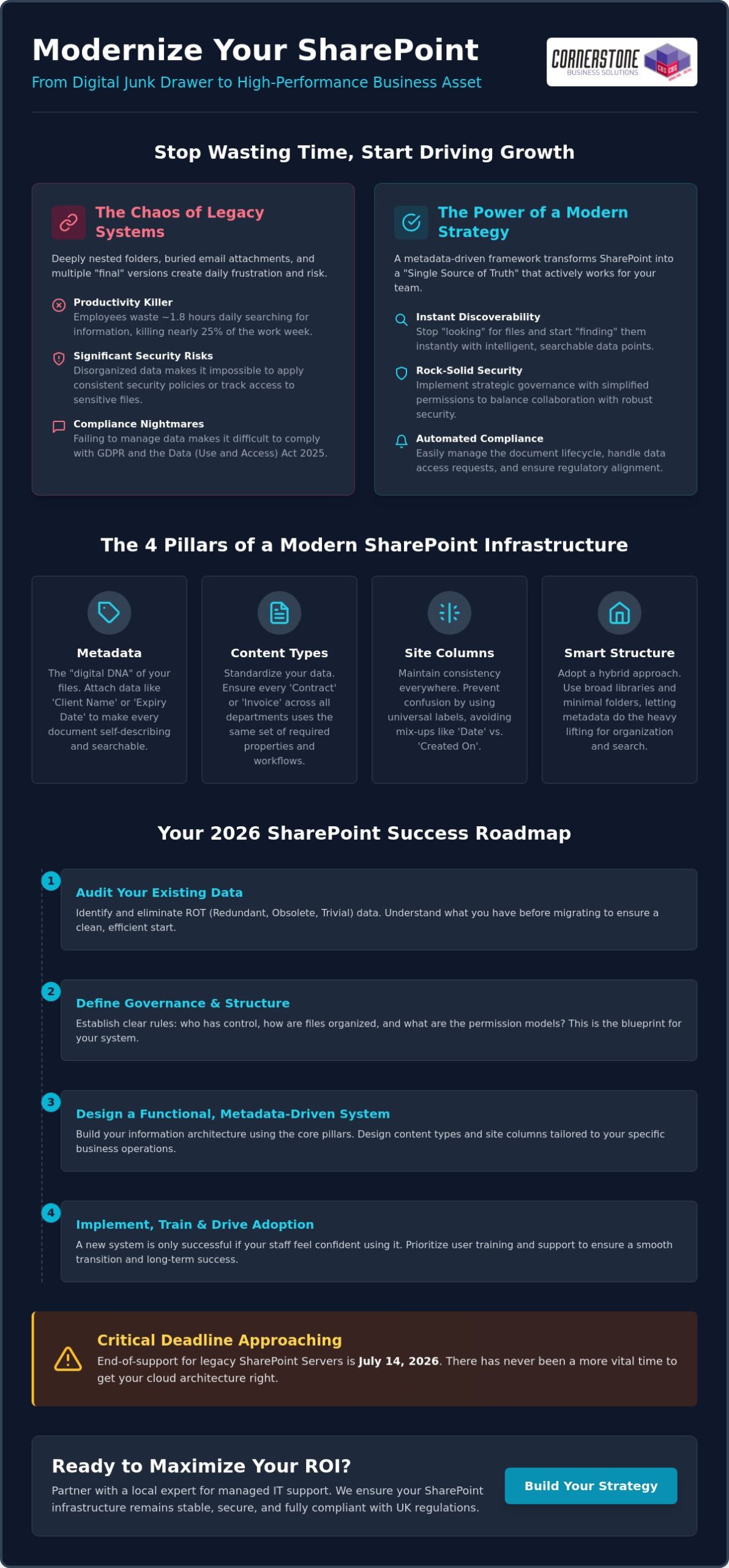
Have you ever watched a critical deadline slip away because your team spent forty minutes hunting for a “final” contract that was actually buried in an old email attachment? It’s a common headache for many UK firms, but implementing a modern SharePoint document management strategy can turn that chaos into a genuine competitive advantage. We understand the frustration of seeing employees revert to local drives because your central system feels like a digital junk drawer. With the July 14, 2026, end-of-support deadline for legacy SharePoint Servers fast approaching, there’s never been a more vital time to get your cloud architecture right.
We agree that your technology should work for you, not the other way around. This article promises to help you transform your SharePoint from a cluttered storage space into a high-performance business asset using a strategic, metadata-driven framework. We’ll walk you through how to break down information silos, fix broken permissions, and ensure compliance with the Data (Use and Access) Act 2025. By the end, you’ll have a clear roadmap to a “Single Source of Truth” that automates your document lifecycle and keeps your team focused on growth.
Key Takeaways
- Discover how to shift your mindset from basic cloud storage to a robust information architecture that supports long-term business growth.
- Learn to build a high-performance SharePoint document management strategy by turning static files into intelligent, searchable data points using metadata.
- Master the art of strategic governance to balance seamless external collaboration with rock-solid security and simplified permission controls.
- Follow our 2026 roadmap to audit your existing data and design a functional system tailored specifically to your business operations.
- Understand why partnering with a local expert for managed IT support ensures your infrastructure remains stable, secure, and fully compliant with UK regulations.
What is a SharePoint Document Management Strategy?
A SharePoint document management strategy is more than just a place to put your files; it’s a comprehensive framework that dictates how your business captures, stores, secures, and retrieves every piece of digital information. If you’re currently asking What is SharePoint?, it’s essentially a platform designed to foster collaboration. However, without a clear strategy, it quickly becomes a digital landfill. We believe that true efficiency comes from moving away from simple cloud storage and embracing a dedicated information architecture. This shift ensures your data isn’t just sitting in the cloud, but is actively working for your team.
Why Traditional Folder Structures Fail in 2026
Deeply nested folders are a productivity killer. When you have hierarchies buried ten levels deep, search functions struggle and sync errors become a daily occurrence for your team. This “Nested Folder” trap also allows Redundant, Obsolete, and Trivial (ROT) data to accumulate unnoticed, taking up valuable space and making it harder to find what’s relevant. Beyond the clutter, poor structure is a significant risk factor for your cyber security services. If your data is scattered and unorganised, applying consistent security policies or tracking who has accessed sensitive information becomes nearly impossible.
The Business Benefits of a Strategic Approach
The Core Pillars of a Modern SharePoint Infrastructure
Building a resilient SharePoint environment requires more than just uploading files. It’s about creating a structure where every document is self-describing and easy to locate. To achieve this, your SharePoint document management strategy must move beyond the limitations of traditional file shares. We focus on four technical pillars that turn a simple storage space into a high-performance engine: metadata, content types, site columns, and the smart use of libraries versus lists. When these elements work in harmony, your team stops “looking” for files and starts “finding” them instantly.
Metadata is the digital DNA of your files. Instead of relying on a file name to tell the whole story, you attach specific data points like “Project Code,” “Client Name,” or “Expiry Date.” Content types take this further by standardising these properties across your entire organisation. For instance, every “Contract” across every department can share the same set of requirements and workflows. By using site columns, you ensure these labels remain consistent, preventing the confusion that occurs when one team uses “Date” and another uses “Created On.” If you’re looking to refine these technical foundations, our team of Microsoft 365 experts can help you map out a structure that fits your specific business rhythm.
Metadata vs. Folders: Finding the Middle Ground
The debate between using folders or metadata doesn’t have to be binary. While deep, nested folders often break search functionality and lead to sync issues, a completely “flat” structure can sometimes feel alien to staff. We recommend a hybrid approach. Use a few broad folders to provide a familiar starting point, but rely on metadata for the heavy lifting. This “secret sauce” makes your data searchable from any angle. To keep things tidy, we implement Managed Metadata, which provides a pre-defined list of terms. This prevents “tagging chaos” where different employees invent their own labels for the same thing.
Automating the Document Lifecycle
In 2026, managing data manually is no longer sustainable. A modern strategy incorporates Strategic SharePoint Governance to automate the lifecycle of every file. Retention policies ensure that old documents are automatically archived or deleted after their legal shelf life, which is vital for keeping your storage costs low and your compliance high. We also use sensitivity labels to protect confidential data at the file level, ensuring that even if a document is shared externally, it remains encrypted. By layering in workflow automation, you can move documents through approval stages without a single manual email, keeping your business moving at pace.
Strategic Governance: Balancing Accessibility with Security
Effective governance is the glue that holds your SharePoint document management strategy together. It’s about ensuring your team can access what they need without leaving the digital front door wide open. We often see businesses struggle when they over-complicate their security settings. The goal is to create an environment where collaboration feels seamless, but sensitive data remains locked down. This balance is a core part of any modern cloud solutions framework, where security is treated as a foundational element rather than an afterthought.
A common pitfall we encounter is the frequent “breaking” of permission inheritance. While it might seem like a quick fix to secure a specific folder, it quickly turns into a management nightmare. When every folder has unique rules, auditing your environment becomes nearly impossible. Instead, we lean on the principles of SharePoint Information Architecture to group content by its sensitivity and purpose. This allows you to manage access at the site or library level, making your system much easier to maintain as your business grows.
In 2026, a “Zero Trust” approach is the gold standard for UK businesses. This means we never assume a request is safe just because it comes from inside the network. Every access attempt is verified through Microsoft Entra ID. This is particularly vital for external sharing. You don’t have to choose between security and collaboration. By using guest access controls and expiring sharing links, you can work with partners safely without losing control of your intellectual property.
Standardising Permissions and Groups
We strongly advise against assigning permissions to individual users. It’s a manual process that leads to “permission creep” and security gaps when staff change roles. Instead, use Microsoft 365 Groups to manage access. When you add a new team member to a group, they automatically get the right level of access to the right files. We also recommend regular reviews of your audit logs. These logs provide a clear trail of who accessed, edited, or deleted files, giving you total visibility over your digital assets.
Information Protection and DLP
Data Loss Prevention (DLP) is a critical component of SharePoint security that identifies, monitors, and automatically protects sensitive information across your digital environment. It acts as an automated safety net, preventing employees from accidentally sharing PII or financial data with the wrong people. We also implement sensitivity labels that stay with the document regardless of where it goes. If a confidential file is downloaded or emailed, it remains encrypted and only accessible to authorised users, ensuring your business stays compliant with the latest UK data regulations.
Step-by-Step: Building Your 2026 SharePoint Roadmap
Successful execution of a SharePoint document management strategy requires a shift from technical setup to business alignment. You can’t just build a site and hope for the best; you need a structured roadmap that mirrors how your team actually works. We’ve seen many projects stall because they skipped the planning phase. Our approach focuses on deep preparation, ensuring that when you finally flip the switch, your system is ready to perform from day one. It’s about building a foundation that lasts.
The first step is moving beyond the “click and upload” mentality. We recommend a phased approach that starts with a clear audit and ends with a comprehensive launch. By following these steps, you ensure your new environment is clean, efficient, and tailored to your specific needs:
- Audit your data: Identify what needs to move and, more importantly, what should be deleted.
- Design for function: Build your architecture around business processes, not just departmental charts.
- Pilot your vision: Test your metadata and workflows with a small, focused team before the full rollout.
- Professional migration: Use industry-standard tools to move data while preserving critical metadata and timestamps.
- Launch with purpose: Roll out a dedicated adoption programme to ensure every staff member feels confident.
If you’re feeling overwhelmed by the technical requirements, our managed IT support team can handle the heavy lifting for you, ensuring your migration is seamless and secure.
The Audit and Inventory Phase
User Training and Adoption Strategies
Training is about showing someone which buttons to press, but adoption is about changing how they work. To make your SharePoint document management strategy a success, you need both. We suggest identifying “SharePoint Champions” within different departments. these are staff members who understand the new system and can offer peer-to-peer support. Finally, don’t treat your launch as the finish line. Review your architecture after 90 days of live use to see where you can make improvements based on real-world feedback.
Maximising ROI: How Managed IT Support Simplifies SharePoint
A successful SharePoint document management strategy isn’t a “set and forget” project. While the architecture we’ve discussed provides the blueprint, maintaining that high-performance business asset requires ongoing attention. This is where bespoke managed IT services become invaluable. We don’t just set up your sites; we act as your long-term partner to ensure your system evolves alongside your business. By providing proactive monitoring and regular governance reviews, we help you avoid the digital clutter that often creeps back into unmanaged environments. This ensures your initial investment continues to pay dividends as your team grows.
As a dedicated Microsoft 365 partner, Cornerstone Business Solutions bridges the gap between technical potential and your daily business reality. We understand that you’re busy running a company, not managing metadata tags. Our role is to handle the complex technical infrastructure so you can focus on growth. We provide the emotional security of knowing your data is safe, organised, and fully compliant with UK regulations. This proactive approach ensures your infrastructure remains a source of stability rather than a technical burden.
The Value of Expert Implementation
Expert implementation is about more than just moving files. It’s about avoiding common migration pitfalls that can lead to data corruption or lost version histories. We customise your SharePoint environment to meet industry-specific compliance needs, whether you’re in legal, finance, or construction. Beyond that, we ensure your document management system integrates perfectly with other it company solutions, such as your cyber security protocols and business VoIP systems. This creates a unified digital ecosystem that works for your team, not against them.
Next Steps: Starting Your Transformation
The journey to a better SharePoint experience starts with an honest evaluation of your current Microsoft 365 maturity level. Are you currently using it as a simple file dump, or is it starting to look like a structured asset? We recommend setting clear KPIs for your project, such as reducing time spent searching for documents or eliminating duplicate files. Once you have a goal, the path forward becomes much clearer. We’re proud of our regional roots and our reputation for simplifying complex tech for local business owners. If you’re ready to move away from messy folders and toward a high-performance SharePoint document management strategy, we invite you to have a no-obligation strategy conversation with our UK-based experts today. Let’s build something that actually works for your business.
Transforming your digital workspace isn’t just about moving files to the cloud; it’s about creating a system that actually grows with you. We’ve explored how a metadata-driven approach and robust governance can eliminate the daily frustration of lost documents and security gaps. By moving away from deep, confusing folder structures and embracing a modern SharePoint document management strategy, you’re investing in your team’s long-term productivity and peace of mind. Your data should be a high-performance asset, not a source of stress.
As a multi-award-winning Microsoft Partner, we specialise in delivering bespoke technology solutions that bridge the gap between complex technical concepts and your business goals. Our proactive UK-based helpdesk support is always on hand to ensure your systems remain stable, secure, and ready for whatever 2026 brings. We take pride in our regional roots and our ability to help local firms thrive through better technology. Book a SharePoint Strategy Consultation with our multi-award-winning team to start your digital transformation today. We’re ready to help you build a reliable foundation for your future success.
Frequently Asked Questions
Is SharePoint better than a traditional file server for document management?
SharePoint is significantly better because it enables real-time co-authoring and remote access without the need for a clunky VPN. Unlike a traditional server, it provides a full audit trail and version history for every file, making it a far more dynamic tool for modern teams. It transforms your data from a static list of files into a collaborative business asset.
Should I use folders or metadata in SharePoint in 2026?
We recommend a hybrid approach where you use a few broad folders for familiarity but rely on metadata for the heavy lifting. Metadata is the engine behind a successful SharePoint document management strategy because it allows your team to filter and find files by project, client, or date instantly. It prevents the “nested folder” trap that often breaks search functionality.
How much does it cost to implement a SharePoint document management strategy?
The cost of implementation depends on your data volume, the complexity of your current filing system, and how much cleanup is required before migration. While Microsoft sets the monthly licensing fees, the investment in a professional strategy covers the vital audit, architecture design, and staff training. We focus on delivering a system that provides long-term value and stability for your business.
Can SharePoint handle large volumes of documents (100,000+ files)?
SharePoint is built to handle millions of items across its libraries. However, you must structure your sites correctly to manage the 5,000-item view limit effectively. By using proper indexing and metadata, your system remains fast and responsive even as your library grows into hundreds of thousands of documents.
How do I secure sensitive documents in SharePoint from external users?
You secure sensitive data using sensitivity labels and guest access controls managed through Microsoft Entra ID. This allows you to collaborate with partners on specific files while ensuring they don’t have access to your wider internal environment. You can also set sharing links to expire automatically, keeping you in total control of your intellectual property.
What is the difference between OneDrive and SharePoint for business storage?
OneDrive is your personal digital briefcase for drafts and individual tasks, while SharePoint is the company’s central, shared filing cabinet. If a document needs to be accessed by a team or stored as a permanent business record, it belongs in SharePoint. This distinction helps keep your collaborative spaces organised and your personal work private.
How long does a SharePoint migration typically take for a UK SME?
A typical migration for a UK SME usually takes between four and twelve weeks. This timeframe allows us to complete a thorough audit of your current data, design a bespoke architecture, and run a pilot test with a small group. We ensure the process is steady and efficient so there’s minimal disruption to your daily operations.
What happens if an employee accidentally deletes a document in SharePoint?
Deleted documents are moved to a two-stage recycle bin where they stay for 93 days before being permanently removed. This gives you a generous window to restore any files that were binned by mistake. For total emotional security, we always recommend pairing SharePoint with a dedicated disaster recovery solution to protect your data against any scenario.
Posted on: May 22nd, 2026 by Cornerstone
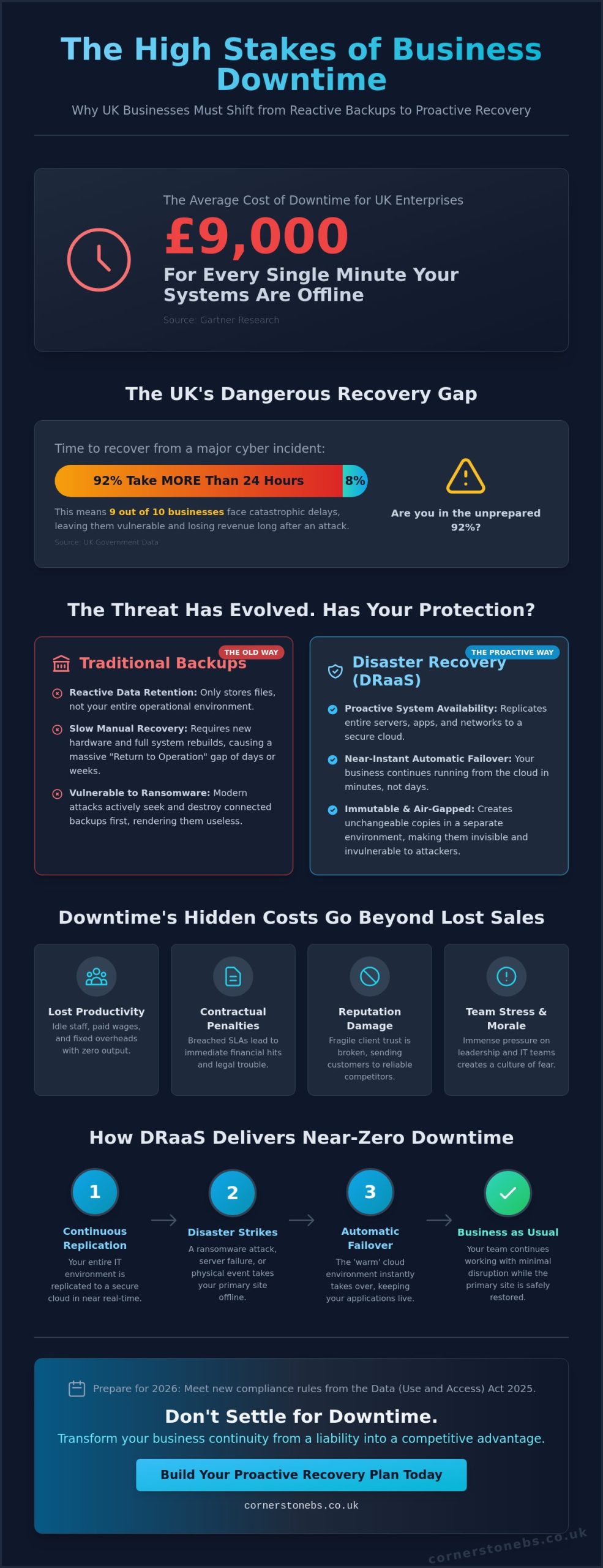
Could your business survive a bill of £9,000 for every single minute your systems stay offline? For many UK enterprises, that is the staggering cost of downtime according to Gartner research. Despite this, recent government data shows that 92% of UK businesses still require more than 24 hours to recover from a major cyber incident. You shouldn’t have to settle for that kind of risk. By adopting a proactive strategy for disaster recovery as a service (DRaaS) UK, you can transform a potential catastrophe into a minor hiccup with near-instant recovery.
We understand the anxiety that comes with rising ransomware threats and the frustration of paying for expensive standby hardware that just sits idle. It’s a complex landscape to manage alone, especially with the Data (Use and Access) Act 2025 now introducing strict new requirements for 2026. This guide will show you how to achieve near-zero downtime through automatic cloud failover. We’ll explain how a managed approach keeps your data secure and compliant; allowing a dedicated local partner to handle the technical heavy lifting while you focus on your business.
Key Takeaways
- Understand the true financial impact of downtime and why modern ransomware threats require a more resilient approach than traditional backups.
- Learn the core mechanics of continuous data replication and how it keeps your business running during a primary system failure.
- Discover how to set precise recovery targets that align with the latest 2026 data sovereignty rules for disaster recovery as a service (DRaaS) UK.
- Follow a step-by-step implementation roadmap, starting with a Business Impact Analysis to identify and protect your most critical IT infrastructure.
- Shift from a reactive “break-fix” mentality to a proactive managed partnership that prioritises your long-term business continuity and growth.
The High Stakes of Downtime: Why UK Businesses Need DRaaS in 2026
The digital environment in 2026 has moved faster than many local businesses could have predicted. While traditional backup methods like physical tapes or basic offsite storage were once the gold standard, they simply cannot keep up with modern operational speeds. If your servers fail today, waiting days to retrieve data from a physical location isn’t just an inconvenience; it’s a business-ending event. This is why more organisations are turning to disaster recovery as a service (DRaaS) UK to bridge the gap between failure and restoration. You need a solution that doesn’t just store data but restores your entire work environment in minutes.
Ransomware: The Primary Driver for Disaster Recovery
Cyber threats have become industrialised. Ransomware-as-a-Service (RaaS) allows even low-level criminals to launch sophisticated attacks that easily bypass traditional perimeter defences. These modern breaches don’t just encrypt your files; they actively seek out and destroy your backups first. To counter this, a “recovery-first” mindset is essential. We focus on immutable backups, which are data copies that cannot be altered or deleted by any external threat. Understanding What is Recovery as a Service helps clarify how these cloud-native tools provide a secure, separate environment. This allows your business to reboot almost instantly while your primary site is scrubbed clean, ensuring you don’t have to pay a ransom to get back to work.
The True Cost of Business Interruption
Most business owners think of downtime in terms of lost sales. However, the “hidden costs” are often much more damaging to your bottom line. You have to consider staff productivity. When your systems are dark, your team sits idle while you continue to pay their wages and fixed overheads. In B2B environments, the stakes are even higher. A prolonged outage often triggers contractual penalties or breaches of Service Level Agreements (SLAs). These lead to immediate financial hits and potential legal headaches that can haunt a company for years.
Beyond the balance sheet, there is a heavy psychological toll. The stress placed on leadership and IT teams during a total system collapse is immense. It erodes morale and creates a culture of fear. Perhaps most importantly, client trust is fragile. If a customer can’t access your services, they won’t just wait; they’ll look for a competitor who invested in a more reliable infrastructure. We believe your business deserves better than a “best effort” recovery. You need a proactive strategy that treats continuity as a foundational element of your brand’s reputation and emotional security.
What is Disaster Recovery as a Service (DRaaS)? Definition and Core Mechanics
In simple terms, disaster recovery as a service (DRaaS) UK is a cloud computing model that creates a virtual safety net for your entire IT infrastructure. Unlike traditional methods that only save individual files, DRaaS replicates your servers, applications, and networking configurations to a secure, third-party cloud environment. This shift moves your business away from heavy capital expenditure (CAPEX) on idle standby hardware. Instead, you benefit from a predictable operational expense (OPEX) model. You only pay for the protection you actually need, ensuring your budget stays as resilient as your data.
DRaaS vs. Cloud Backup: Understanding the Critical Difference
It’s a common mistake to assume that having a backup means you have a disaster recovery plan. Backup is primarily about data retention; it’s your digital filing cabinet. If your primary site fails, a standard backup requires you to find new hardware and manually reinstall every piece of software. This creates a massive “Return to Operation” (RTO) gap that can keep your business offline for days. In contrast, DRaaS is about system availability. It ensures that your critical applications stay live even if your physical office is inaccessible. For a truly robust cloud solutions strategy, you need both: backups for long-term records and DRaaS for immediate survival.
How DRaaS Works in Real-Time
The process relies on a powerful replication engine. Rather than taking occasional “point-in-time” snapshots that might miss several hours of work, modern engines send data to the cloud in near real-time. This keeps your secondary site “warm” and ready to take over at a moment’s notice. As highlighted in IBM’s guide to DRaaS, this involves a sophisticated orchestration layer. This layer automates the boot order of your complex applications, ensuring your databases start before your front-end software to prevent system errors.
When a disaster strikes, you initiate a “failover.” This is the digital switch that redirects your users to the cloud-based replica. Your team continues working via their standard internet connections, often without even noticing a change in the underlying infrastructure. Once your primary site is repaired, a “failback” process synchronises any new data back to your local servers. This ensures a seamless return to normal operations without data gaps. If you’re ready to move beyond basic backups, our disaster recovery experts are here to help you build a plan that fits your specific regional needs.
Strategic Planning: RTO, RPO, and UK Data Sovereignty
Planning for the worst doesn’t have to be a dark or daunting task. Instead, think of it as defining the boundaries of your business’s resilience. To build an effective strategy for disaster recovery as a service (DRaaS) UK, you must first master two critical metrics: Recovery Time Objective (RTO) and Recovery Point Objective (RPO). RTO is your stopwatch. It measures how many minutes or hours your business can realistically stay offline before the damage becomes irreversible. RPO is your history book. It determines how much data loss you can tolerate. For a professional services firm, losing an hour of billable work might be a crisis. For a local retailer, a few minutes of transaction data could be the limit. We work with you to find the sweet spot where protection meets your specific budget.
Data Sovereignty and UK Regulations
UK businesses face a unique set of rules in 2026. Since the full implementation of the Data (Use and Access) Act 2025 in June 2026, where your data lives matters more than ever. If your DR provider stores your replicas in a different jurisdiction, you might inadvertently breach UK GDPR or the latest NIS2 standards. Choosing a partner with UK-based data centres ensures your information remains under local legal protection. This isn’t just about avoiding fines; it’s about maintaining cyber security services compliance that your clients expect. A local infrastructure also reduces latency, meaning your systems can failover faster when every second counts.
Setting Realistic Recovery Targets
Not all data is created equal. You shouldn’t pay the same premium to protect archived emails as you do for your live ERP system. We suggest tiering your workloads. Assign aggressive RTOs to your mission-critical applications while allowing more relaxed targets for non-essential systems. This tiered approach keeps costs manageable without sacrificing safety. It’s also vital to check your business insurance policy. Many modern providers now require documented RTO and RPO targets as a condition of coverage.
You can research how other firms handle these technical challenges by looking at Gartner DRaaS market reviews. Finally, remember that your office bandwidth dictates your RPO. If your internet connection is slow, replicating large volumes of data in real-time becomes difficult. We’ll help you audit your current infrastructure to ensure your recovery goals stay realistic and achievable. By aligning your technical settings with your business needs, you create a recovery plan that is both powerful and practical.
A Roadmap to Implementing DRaaS for Your Business
Implementing a strategy for disaster recovery as a service (DRaaS) UK requires more than just signing a contract. It’s a structured journey that starts with a deep dive into how your business actually functions. You can’t protect what you haven’t mapped out. We recommend starting with a thorough audit of your existing it company solutions and hardware. Are your current servers reaching end-of-life? Is your network infrastructure capable of handling high-speed replication? A proactive audit prevents technical bottlenecks from stalling your recovery when you need it most.
The Business Impact Analysis (BIA)
A Business Impact Analysis is the cornerstone of any disaster recovery plan. This process identifies the complex dependencies between different software and departments. For instance, your sales team might be unable to process orders if the inventory database stays down, even if their email is working. By estimating the financial impact of downtime per department, you can prioritise which systems must come back online first. This ensures your budget is spent protecting the areas that keep your revenue flowing.
Testing and Validation Protocols
In 2026, a static recovery document is a liability rather than an asset. You need active validation to ensure your plan actually works. Sandboxed testing allows us to spin up your recovery environment in a secure bubble. This lets us verify that every application boots correctly without affecting your live production data. Automated testing schedules are now the industry standard, ensuring your plan stays valid as your infrastructure evolves. We always review and update the DR plan after any significant infrastructure changes to maintain your resilience.
Choosing the right partner is the final piece of the puzzle. You should ask potential providers specific questions about their support levels and the frequency of their recovery drills. A partner who understands the unique challenges of UK businesses will prioritise proactive monitoring over a simple “break-fix” response. They should act as an extension of your team, not just another vendor. If you’re ready to secure your business future with a trusted local expert, reach out to us today to discuss our disaster recovery solutions.
The Cornerstone Approach: DRaaS as a Partnership for Growth
We believe that disaster recovery as a service (DRaaS) UK is far more than a technical insurance policy. It is a commitment to your business’s long-term growth and stability. Many providers treat disaster recovery as a transactional, set-and-forget product. We take a different path. We move entirely beyond the outdated “break-fix” mentality. Instead, we prioritise proactive system monitoring to identify and resolve potential vulnerabilities before they ever result in an outage. This forward-thinking approach integrates perfectly with our managed IT services. It creates a unified shield for your digital assets, providing the total peace of mind you need to focus on your core operations.
Choosing a multi-award-winning UK partner means you benefit from enterprise-level expertise delivered with genuine regional warmth. We’re proud of our geographical roots and our reputation for clarity. We speak the language of business owners, not just IT technicians. You get a dedicated UK team you can actually talk to; professionals who understand the local market and the specific pressures facing SMEs in 2026. This human connection is what transforms a service provider into a trusted ally.
Bespoke Solutions for Every Business
A “one size fits all” strategy is often the fastest route to failure in disaster recovery. Your workflows, data dependencies, and compliance needs are unique to your organisation. We specialise in customising DRaaS for complex hybrid environments. Whether you’re balancing on-premise hardware with cloud applications or finalising a Microsoft 365 migration strategy, we tailor the replication to fit. We ensure your recovery plan evolves alongside your infrastructure, so you’re never left with an obsolete safety net.
24/7/365 Proactive Resilience
Our helpdesk serves as the frontline of your business survival. We don’t just wait for an alarm to go off. We leverage our high-level global partnerships with industry leaders like Microsoft and Cisco to bring world-class resilience tools to your local doorstep. This provides a layer of emotional security that a simple backup drive can’t match. You’ll know that if the worst happens, an expert team is already executing a proven plan to get you back online. We see technical support as a foundational element of your business stability. It’s about more than just fixing servers; it’s about protecting your livelihood. We invite you to start a conversation with our friendly, local team today to see how a proactive disaster recovery as a service (DRaaS) UK strategy can secure your future.
Securing Your Business Future with Confidence
The digital landscape of 2026 doesn’t leave room for “what-ifs.” We’ve explored how the high costs of downtime and the complexity of new UK data regulations make a robust strategy for disaster recovery as a service (DRaaS) UK a necessity rather than a luxury. By defining clear recovery targets and moving to a managed cloud model, you shift the technical burden to a partner dedicated to your survival.
As a multi-award-winning IT services provider, we take pride in our regional identity and our ability to simplify complex infrastructure. We leverage strategic partnerships with industry leaders like Microsoft, IBM, and Cisco to deliver world-class resilience. Our team provides proactive monitoring and support to ensure your systems remain stable, no matter what challenges the future holds. We believe technical support is a foundational element of your business stability and emotional security.
Don’t wait for a crisis to test your business’s limits. We invite you to Book a Disaster Recovery Audit with our UK experts today and gain the security of a proven recovery plan. Let’s work together to keep your business moving forward.
Frequently Asked Questions
Is DRaaS the same as cloud backup?
No, they serve very different roles in your business continuity plan. Cloud backup is designed for long-term data retention; it’s where you go to find a file deleted three months ago. Disaster recovery as a service (DRaaS) UK is about system availability and speed. While backup requires you to manually rebuild your servers, DRaaS allows you to switch your entire operation to the cloud in minutes. It’s the difference between having a backup of your files and having a second, virtual office ready to go.
How much does DRaaS cost for a UK SME?
Pricing is always bespoke because it depends on your specific infrastructure. Factors that influence the cost include the number of servers you need to protect, the total volume of data being replicated, and your required recovery speed. Because this model uses a subscription-based OPEX structure, you don’t have to worry about the massive capital costs of purchasing and maintaining spare hardware. We provide a clear, predictable monthly fee that scales as your business grows.
Will DRaaS protect my business from ransomware?
Yes, it’s one of the most effective ways to recover from a sophisticated cyber-attack. If ransomware locks your primary systems, we can initiate a failover to a clean version of your environment from a point in time before the breach. This allows your staff to keep working while our experts sanitise your local network. By using immutable backups within the DRaaS framework, we ensure that your recovery data remains safe from encryption or deletion by hackers.
How often should we test our disaster recovery plan?
You should aim to test your plan at least twice a year, though many of our clients prefer quarterly drills. Regular testing is vital because your IT environment isn’t static; software updates and new hardware can change how your systems interact. We perform automated, sandboxed tests that don’t disrupt your live operations. These drills give you the confidence that your boot sequences and data links will work perfectly when a real emergency strikes.
Does my data have to stay in the UK for compliance?
What is a good RTO (Recovery Time Objective) for a small business?
A good RTO depends entirely on how much an hour of downtime costs your specific business. For mission-critical systems like your payment gateway or primary database, you should aim for an RTO of less than 30 minutes. Less vital systems, such as archived files, might have a longer window of several hours. We help you categorise your workloads so you don’t pay for premium recovery speeds on data that isn’t essential for your immediate survival.
Can DRaaS handle both physical and virtual servers?
Yes, modern disaster recovery as a service (DRaaS) UK solutions are built for the hybrid reality of today’s businesses. We can replicate data from physical on-site servers, virtual machines, and even existing cloud platforms into a unified recovery environment. This ensures that no matter where your applications live, they can be restored together in the correct order. This holistic approach is the only way to guarantee that your complex business workflows will actually function during a failover.
How long does it take to implement a full DRaaS solution?
A typical implementation usually takes between four and eight weeks from the initial audit to the first successful test. This time allows us to conduct a proper Business Impact Analysis and configure the replication engine to match your specific needs. We don’t believe in cutting corners when it comes to your business survival. Once the initial setup and validation are complete, your systems are protected by proactive monitoring that stays active every second of the year.