Posted on: September 10th, 2026 by Cornerstone
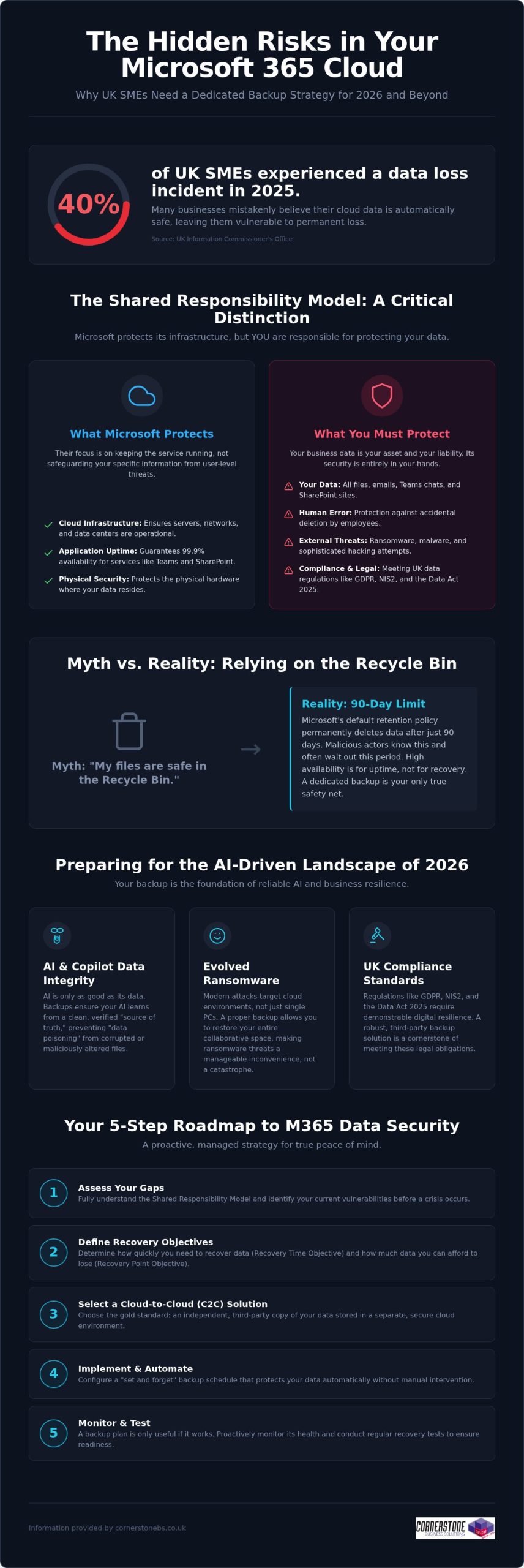
Did you know that 40% of UK small and medium-sized enterprises experienced at least one data-loss incident in 2025? It’s a startling figure from the Information Commissioner’s Office, especially since many business owners still believe Microsoft handles all their cloud backups automatically. While Microsoft manages the infrastructure, the “shared responsibility model” means you’re responsible for the data itself. Implementing reliable Microsoft 365 backup solutions for business is now a foundational requirement for any local firm that values its continuity. You need a proactive strategy that guards against ransomware and ensures you’re ready for the AI-driven landscape of 2026.
We know you want technical peace of mind without the jargon. You’ve likely felt the pressure of the Data (Use and Access) Act 2025 or worried about how to protect the data feeding your AI tools like Copilot. This guide promises a comprehensive roadmap to secure your business continuity and AI-readiness. We’ll preview the essential steps to achieve fast recovery times, meet UK compliance standards, and move toward a “set and forget” backup environment. Let’s explore how a modern data strategy can protect your reputation and your bottom line.
Key Takeaways
- Grasp the nuances of the shared responsibility model to ensure your business continuity plan covers the security gaps Microsoft leaves behind.
- Explore the vital link between clean historical data and the reliability of AI tools like Microsoft 365 Copilot in 2026.
- Determine why Cloud-to-Cloud (C2C) backup has become the gold standard for UK firms needing to meet the latest regulatory requirements.
- Access a practical 5-step roadmap for selecting Microsoft 365 backup solutions for business that offer granular, point-in-time recovery.
- Shift from a reactive mindset to a proactive, managed strategy that provides peace of mind through award-winning expert monitoring.
The Reality of Microsoft 365 Data Protection in 2026
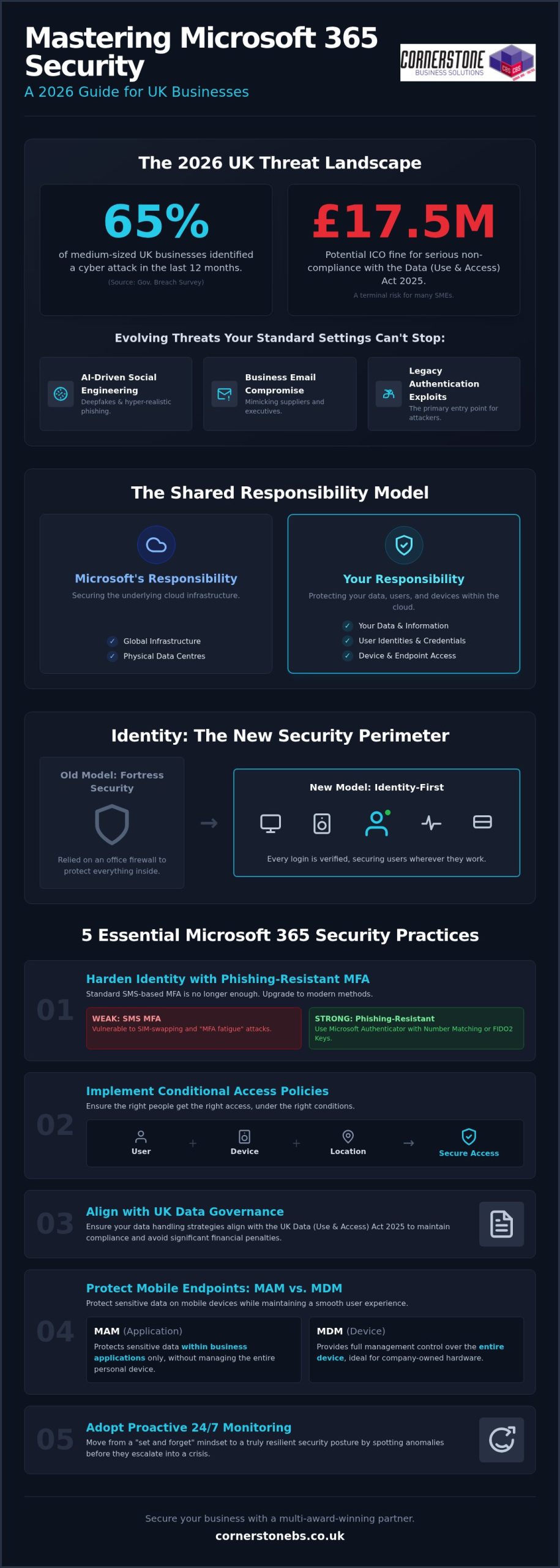
Microsoft does a brilliant job of keeping the lights on. They ensure SharePoint, Teams, and Exchange are available 99.9% of the time, providing a robust platform for your daily operations. However, their “Shared Responsibility Model” draws a clear line in the sand that many business owners overlook. Microsoft protects the underlying cloud infrastructure, but you remain the sole owner of the data living inside it. If that data is deleted, encrypted by a hacker, or corrupted by a faulty third-party app, the recovery is entirely your responsibility. A professional M365 backup is an independent, third-party copy of your cloud data. Without this safety net, your business is essentially working without a harness.
Debunking the ‘Microsoft Backs Everything Up’ Myth
Confusion often stems from the concept of “high availability.” This ensures your files are accessible from anywhere, but it isn’t the same as a comprehensive data backup strategy. Microsoft’s default retention policy for the recycle bin is typically 90 days. After that window closes, your data is permanently purged from their systems. For a busy SME, 90 days passes in a blink. If an employee accidentally deletes a critical folder and nobody notices for three months, there’s no “undo” button. Malicious actors also know this; they often target cloud files specifically because they know many firms lack external protection, making dedicated Microsoft 365 backup solutions for business a necessity rather than a luxury.
The 2026 Cost of Data Loss
In 2026, ransomware has evolved to specifically hunt for cloud-based synchronization gaps. It doesn’t just lock a single laptop; it can potentially lock your entire collaborative environment. When your team can’t access their shared files, productivity doesn’t just slow down; it stops entirely. This downtime carries a heavy price tag in lost revenue and fractured customer trust, especially when you consider that 40% of UK SMEs experienced a data-loss incident in 2025 according to the ICO. Integrating robust Microsoft 365 backup solutions for business into your wider managed IT support plan ensures that a single error doesn’t become a company-wide catastrophe. We’ve found that proactive monitoring catches these threats before they escalate, turning a potential disaster into a minor, manageable speed bump.
Why Dedicated Backup is Essential for 2026 AI-Readiness
By 2026, AI tools like Microsoft 365 Copilot have moved from novelty to necessity for UK SMEs. However, an AI is only as reliable as the data it consumes. If your source data is corrupted, deleted, or “poisoned” by incorrect inputs, the AI will generate flawed insights that could misguide your business decisions. This is where Microsoft 365 backup solutions for business play a pivotal role. They don’t just save files; they preserve the historical context and data integrity that AI models need to function accurately.
Modern AI-readiness also requires protecting the “Identity” layer. This includes the complex web of permissions and configurations that determine who can access what. If a ransomware attack resets these permissions or if they’re accidentally wiped, your AI could inadvertently expose sensitive payroll data or intellectual property to the wrong users. Robust backup ensures you can roll back to a known-good state of both data and access rights, preventing your automation from turning into a liability.
Ensuring AI and Copilot Data Integrity
Data poisoning is a growing concern in the 2026 landscape. If a malicious actor gains access and subtly alters your spreadsheets or documents, your AI will learn from this “bad” data. Independent backup acts as the ultimate source of truth, ensuring your AI systems learn from verified, clean data rather than corrupted or accidental deletions. Versioning is equally critical. It allows you to compare current AI outputs against historical datasets to ensure accuracy. If you’re unsure about your current setup, our team can help you assess your cloud resilience to ensure your data architecture is ready for full automation.
Meeting UK Compliance Standards (GDPR & NIS2)
Compliance isn’t a static target. The Data (Use and Access) Act 2025 and the tightening of NIS2 requirements mean UK businesses must demonstrate high levels of digital resilience. Adopting professional Microsoft 365 backup solutions for business ensures you stay aligned with UK data protection rules. These regulations demand that personal data is not only protected but also recoverable in a timely manner.
Beyond legal mandates, having a verifiable backup process is a core requirement for achieving Cyber Essentials Plus certification. It proves to your clients and insurers that you take data sovereignty seriously. This level of protection perfectly complements our broader cyber security services, creating a multi-layered defence that keeps your business stable and secure. We believe that a proactive approach to backup is the only way to maintain emotional security in a high-tech world.
Evaluating Microsoft 365 Backup Solutions for UK Businesses
Selecting the right Microsoft 365 backup solutions for business requires looking beyond basic file storage. In 2026, Cloud-to-Cloud (C2C) backup has emerged as the definitive gold standard for resilience. It creates a secure bridge between your Microsoft environment and a separate, air-gapped cloud vault. This approach ensures that even if your primary credentials are compromised, your backup remains untouched and ready for a point-in-time recovery. It’s the most proactive way to ensure your business stays operational during a crisis without relying on vulnerable local hardware.
Cloud-to-Cloud vs. Local Backup Models
Many firms consider backing up cloud data to a local on-premise server, but this is often counter-productive. It introduces a physical bottleneck and increases your hardware maintenance costs. By contrast, C2C models offer superior scalability and ransomware protection through air-gapping. As a multi-award-winning provider, we carefully vet cloud solutions for our national clients to ensure they provide the speed and security modern UK businesses demand. We focus on systems that provide a “clean” environment, isolated from your primary network.
Granularity: Restoring More Than Just Files
A common pitfall is choosing a solution that only protects emails and documents. True resilience requires granularity. You need the ability to restore specific Teams chats, SharePoint sites, or even individual Planner boards without performing a full-tenant “bulk restore.” Bulk restores are often messy and overwrite recent work, whereas granular restores allow you to pluck a single missing item from the past and drop it back into the present. Ensure your chosen Microsoft 365 backup solutions for business also preserve metadata and user permissions. Losing these configurations can cause hours of manual reconfiguration and downtime.
Data residency is another non-negotiable factor for UK firms. To stay aligned with the Information Commissioner’s Office (ICO) guidelines, your backup data should ideally reside in UK-based data centres. This simplifies your compliance with UK GDPR and ensures you aren’t subject to conflicting international data laws. Finally, consider the frequency of your protection. While automated daily backups are standard, businesses with high transaction volumes should look for Continuous Data Protection (CDP). This captures changes in near real-time, ensuring your Recovery Point Objective (RPO) is measured in minutes rather than hours, providing the ultimate emotional security for your team.
A 5-Step Roadmap for Implementing M365 Backup
Implementing a robust defence for your cloud data doesn’t have to be a complex headache. We’ve simplified the journey into a clear, five-step roadmap designed to help you deploy Microsoft 365 backup solutions for business with total confidence. This strategy ensures your organisation stays protected against modern ransomware while remaining firmly within UK regulatory boundaries. By following these steps, you move from a reactive posture to a proactive, resilient one.
- Step 1: Data Audit. Start by identifying what’s critical. Not every temporary file needs long-term storage, but your financial records, legal contracts, and intellectual property certainly do.
- Step 2: Define RPO and RTO. Set clear recovery expectations. Determine how much data you can afford to lose (Recovery Point Objective) and how quickly you need your systems back online (Recovery Time Objective) following an incident.
- Step 3: Solution Selection. Choose a partner that understands the UK landscape. Match specific features to your industry requirements, ensuring you’re ready for the 2026 NIS2 compliance standards.
- Step 4: Secure Configuration. Don’t leave the back door open. Implement Multi-Factor Authentication (MFA) and end-to-end encryption to protect the backup itself from unauthorised access.
- Step 5: Testing and Validation. Schedule regular “fire drills.” A backup remains a theoretical safety net until you’ve proven it can actually restore your data under pressure.
Selecting the right Microsoft 365 backup solutions for business is the foundation of your continuity plan. It’s about more than just insurance; it’s about ensuring your team can keep working, no matter what happens in the wider digital world.
Auditing for Compliance and Efficiency
Mapping your data footprint is the first step toward total resilience. It’s about understanding how information flows through Teams, SharePoint, and Exchange. This alignment with it company solutions best practices ensures you aren’t just ticking a box, but actually improving your operational efficiency. Identifying sensitive data early also allows you to apply longer retention periods where they’re legally required, keeping your business on the right side of the ICO.
The Importance of Regular Recovery Testing
We often tell our clients that a backup is only as good as its last successful restore. In a fast-moving cloud environment, configurations change and data volumes grow. Regular, non-disruptive recovery tests ensure your business continuity plan actually works when it’s needed most. Automated reporting provides the verifiable proof of backup validation that stakeholders and insurers now demand for Cyber Essentials Plus. If you’re ready to secure your infrastructure, our award-winning national team can help you design a custom backup strategy that provides true peace of mind.
Partnering for Resilience: The Cornerstone Managed Approach
Software alone isn’t a strategy. While many providers offer Microsoft 365 backup solutions for business as a standalone product, at Cornerstone Business Solutions, we believe true resilience comes from a dedicated partnership. A DIY approach often leaves the heavy lifting of monitoring and recovery to your internal team, who are already stretched thin. Our award-winning managed approach shifts that burden to our experts. We don’t just set up the software; we proactively monitor every backup cycle. If a sync fails at 2 am, our team is already working on the fix before your staff even log in for the day.
This proactive stance is a foundational element of our service. We integrate data protection into your wider Microsoft 365 migration and support plan, ensuring that security is baked in from day one. Should the worst happen, you have instant access to our unlimited UK helpdesk. You won’t be navigating a complex recovery wizard alone. You’ll be talking to a local expert who understands your business and is committed to getting you back on track immediately. This level of support provides the emotional security every business leader needs in a high-stakes digital environment.
Bespoke Solutions for National UK Enterprises
We recognise that a law firm has different retention needs than a retail chain. Our team customises your backup policies to match your specific UK industry requirements and internal workflows. As your UK headcount grows, your backup infrastructure scales seamlessly with you. This is the “Cornerstone Difference.” We provide the professional authority of a Microsoft partner combined with the approachable, community-focused service that defines our national team. We focus on building long-term relationships rather than just closing transactions.
Beyond Backup: A Foundation for Growth
Our commitment to your success extends beyond the initial setup. We conduct quarterly technology reviews to ensure your 2026 strategy remains future-proof as new threats emerge. These sessions integrate your Microsoft 365 backup solutions for business with wider cyber security audits, providing a holistic view of your digital health. We want you to feel confident that your infrastructure is a solid foundation for growth, not a point of failure. We invite you to start a conversation about securing your Microsoft 365 backup today and discover how a proactive partner can help your business thrive.
Building a Resilient Digital Foundation for 2026
Protecting your cloud data is no longer a choice; it’s a fundamental requirement for business stability. We’ve explored how the shared responsibility model places the burden of protection on your shoulders and why clean data is the essential fuel for your AI tools. By choosing professional Microsoft 365 backup solutions for business, you move beyond the limitations of the recycle bin and secure your compliance with UK laws like NIS2. This proactive approach ensures your team stays productive even if a crisis strikes.
As a multi-award-winning IT provider and trusted Microsoft Partner, we’re here to ensure your transition to a “set and forget” backup strategy is seamless. Our national team provides unlimited proactive UK helpdesk support, catching failures before they impact your operations. Secure your business data with Cornerstone’s managed backup solutions and gain the peace of mind that comes from knowing your continuity is in expert hands. We’re ready to help you thrive in an increasingly complex digital landscape.
Frequently Asked Questions
Does Microsoft 365 include a full backup for business users?
Microsoft does not provide a comprehensive backup service as part of its standard subscriptions. They follow a Shared Responsibility Model where they ensure the service’s availability, but you remain responsible for the data stored within it. If data is deleted or corrupted, Microsoft’s native tools are limited. This is why investing in dedicated Microsoft 365 backup solutions for business is essential to ensure your company remains resilient against permanent data loss.
How long is data kept in the Microsoft 365 recycle bin?
By default, items in the Microsoft 365 recycle bin are kept for 93 days before being permanently deleted. This window is often much shorter than business owners realise. If a file is deleted and the error isn’t discovered within this three-month period, the data is gone forever from Microsoft’s systems. Relying on this temporary storage isn’t a substitute for a true backup strategy that offers long-term retention and easy recovery.
Can a Microsoft 365 backup protect against ransomware?
Yes, an independent backup is one of your strongest defences against ransomware. Professional Microsoft 365 backup solutions for business create an air-gapped copy of your data that sits outside your primary Microsoft environment. If hackers encrypt your live files, you can perform a point-in-time restore. This allows you to roll your data back to a clean version from just before the attack, bypassing the need to pay a ransom or lose critical files.
What is the difference between archiving and backup in Microsoft 365?
Archiving and backup serve two different purposes. Archiving is about moving older data out of your primary mailbox to save space or meet legal discovery requirements. Backup creates a separate copy of your active data so you can recover it quickly after a deletion or cyberattack. You need both to be fully protected. While archiving helps with organisation, only a backup ensures business continuity when things go wrong and files are missing.
How often should a UK business backup its Microsoft 365 data?
Most UK businesses should aim for at least one automated backup every 24 hours. However, if your team handles high volumes of sensitive data or frequent transactions, daily backups might not be enough. In these cases, we recommend Continuous Data Protection (CDP) which captures changes in near real-time. Frequent backups significantly reduce your Recovery Point Objective (RPO), ensuring that only a few minutes of work are at risk in the event of a system failure.
Is it better to backup Microsoft 365 to the cloud or a local server?
Cloud-to-Cloud (C2C) backup is generally far superior to local server options. Backing up cloud data to a physical server in your office creates a bottleneck and introduces risks like fire, theft, or hardware failure. C2C solutions keep your data in a secure, geographically separate data centre. This ensures your recovery speeds are faster and your data remains accessible from anywhere, which is vital for modern and flexible UK workforces that rely on the cloud.
Does a backup include Microsoft Teams and SharePoint data?
A professional backup service should absolutely include Teams and SharePoint. Native Microsoft tools often struggle to capture the complex web of permissions, tabs, and private chats within Teams. A robust solution ensures that not just the files, but the entire collaborative structure is preserved. This includes SharePoint sites, Planner boards, and OneNote files. Recovering a file is helpful, but recovering a whole project environment is what truly saves your team’s productivity and time.
How much does a professional Microsoft 365 backup solution cost in the UK?
The cost of protecting your data depends on several factors, including your total headcount and the volume of data you need to store. Most providers use a per-user, per-month model, while others charge based on the total gigabytes protected. While price is always a consideration, it’s important to weigh the monthly fee against the potential cost of downtime. We focus on providing bespoke value that scales with your business as your UK headcount grows.
Posted on: September 5th, 2026 by Cornerstone
Attackers targeted backup repositories in 96% of ransomware incidents over the last year, and they successfully breached them in 76% of those cases. It’s a sobering reality that keeps many UK business owners awake at night. You’ve likely felt the pressure of rising hardware costs and the headache of trying to decode complex technical jargon, but finding the right cloud backup solutions for business shouldn’t feel like a chore. We understand that your data isn’t just a collection of files; it’s the foundation of your hard-earned reputation and the lifeblood of your community presence.
This guide simplifies the path forward. You’ll learn how to secure your business data, ensure continuity, and scale your infrastructure with modern cloud backup strategies. We’re moving beyond simple storage to explore a 2026 strategy focused on true cyber resilience. We’ll cover everything from immutable backups to the shared responsibility model, giving you a clear, jargon-free roadmap to lower your IT overheads and protect your organisation’s future. It’s about more than just technology; it’s about the emotional security that comes from knowing your business is safe.
Key Takeaways
- Understand how automated, off-site data preservation converts heavy capital expenditure into a flexible, scalable operational strategy for your organisation.
- Learn to distinguish between SaaS, IaaS, and PaaS to create a bespoke technology stack that avoids the limitations of generic, off-the-shelf bundles.
- Compare public, private, and hybrid deployment models to find the right balance of data sovereignty, performance, and long-term cost-efficiency.
- Access a step-by-step framework for implementing cloud backup solutions for business that protects your continuity from the initial audit through to post-migration support.
- Discover the value of a collaborative partnership with a multi-award-winning national expert who prioritises proactive helpdesk support over reactive troubleshooting.
Why Cloud Backup Solutions are Critical for Business Resilience in 2026
Resilience in 2026 isn’t just about surviving a crisis; it’s about staying operational while others stumble. A modern remote backup service is an automated, off-site data preservation strategy that keeps your files safe in a secure, secondary location. These cloud backup solutions for business have evolved from simple storage into the backbone of organisational stability. By moving away from capital-heavy physical servers, you can shift costs to a predictable operational model that fits your budget perfectly.
This flexibility is vital for supporting the UK’s hybrid workforce. When your team works from various locations, your data shouldn’t stay locked in a physical box in a quiet office. You need a system that moves as fast as your people do. However, don’t fall for the “set and forget” myth. While the technology is automated, proactive monitoring is the only way to ensure your recovery points remain valid and ready when you need them most.
The Decline of the Physical Server
Cloud leaders like Microsoft and IBM now provide enterprise-grade encryption that was once only available to global corporations. This level of protection ensures your data is unreadable to anyone without the correct keys, even during transit. Automated patching is another silent hero here. It eliminates human error by ensuring your systems are always up to date with the latest security fixes without a manual check. Most SME premises can’t compete with the physical security of a dedicated data centre, which features biometric access and 24/7 surveillance to keep your digital assets safe. Choosing modern cloud backup solutions for business means you’re inheriting these world-class security standards as part of your standard setup.
The Three Pillars of Cloud Strategy: SaaS, IaaS, and PaaS Explained
Cloud jargon can feel like a barrier. However, it’s really just a way to categorise how your business uses technology to grow. Instead of settling for generic bundles, we focus on building a bespoke technology stack that fits your specific workflow. These three pillars work together to create a secure digital environment, often forming a core part of any robust Disaster Recovery Plan (DRP). Understanding these layers helps you choose the right cloud backup solutions for business without paying for features you don’t need.
Each pillar serves a different purpose, but they all share a common goal: removing the physical limitations of traditional IT. Whether you’re looking for better collaboration or a total infrastructure overhaul, these models provide the flexibility required for 2026. For a broader look at how these integrate with your physical setup, our guide on IT company solutions offers practical advice on hardware and software synergy.
Software as a Service (SaaS): Your Daily Tools
Software as a Service is likely what your team interacts with most. A prime example is Microsoft 365. It enables your national team to collaborate in real-time, whether they’re in a home office or on a site visit. One common misconception is that data in a SaaS platform is automatically backed up forever. It isn’t. Dedicated cloud backup solutions for business are essential here because they protect you against accidental deletion or internal threats that native tools might miss. SaaS keeps your tools accessible across every device while keeping your overheads low.
Infrastructure as a Service (IaaS): Virtual Foundations
Infrastructure as a Service is the virtual equivalent of your old server room. By using platforms like Microsoft Azure, you remove the need for noisy, hot hardware that requires constant maintenance and expensive electricity. You’re essentially renting the processing power and storage you need from a world-class data centre. IaaS allows businesses to adjust resources in real-time, meaning you only pay for what you actually use. This virtual foundation makes scaling your business much smoother than waiting for new physical hardware to arrive and be configured.
Platform as a Service (PaaS): Fueling Innovation
Platform as a Service is where custom innovation happens. It allows your business to develop and deploy custom applications without the headache of managing the underlying hardware or operating systems. This reduces the complexity and cost of bespoke software development significantly. You might transition to PaaS when standard SaaS tools no longer fit your unique business processes and you need something tailored to your specific industry. If you’re ready to build a more resilient foundation, consider how our bespoke IT solutions can streamline your transition to these modern cloud pillars.
Public, Private, or Hybrid? Navigating Your Strategic Path
Choosing the right architecture for your cloud backup solutions for business is a strategic decision that impacts your daily operations and long-term security. It’s not a one-size-fits-all choice. You need to balance the cost-efficiency of shared systems with the strict control required for sensitive data. Many business owners worry that public clouds are less secure than private ones, but this is a common misconception. In reality, the most resilient organisations often use a mix of both. Before committing to a path, you must audit your data sensitivity. Categorise your files into “critical and sensitive” versus “general operational data” to see where a hybrid approach might serve you best.
Public Cloud: Cost-Efficiency and Global Scale
Public cloud models use shared infrastructure to deliver incredible scale at a lower cost. They’re perfect for non-sensitive data and general applications that need to be accessible from anywhere. If you’re looking for the fastest route to digital transformation, this is it. Our Cloud Solutions simplify national expansion by removing the need for local hardware at every new site. It’s a plug-and-play model that grows with you. You don’t need to worry about hardware maintenance, as the provider handles all the heavy lifting behind the scenes.
Private and Hybrid: Tailored Control and Compliance
For regulated industries like finance or healthcare, the isolation of a private cloud is often a legal or operational necessity. You get dedicated resources that aren’t shared with any other organisation. However, many UK firms are now adopting a “Hybrid First” strategy. This allows you to keep sensitive legacy software on a local or private server while utilising the immense power of the cloud for everything else. It’s the best of both worlds. You maintain total control over your most sensitive assets while benefiting from the scalability of modern cloud backup solutions for business.
Managing this split environment doesn’t have to double your workload if you have the right management tools in place. Understanding Why Enterprise Recovery Plans Fail often reveals that architectural mismatches are the primary culprit. By aligning your deployment model with your specific compliance needs, you create a foundation that won’t buckle under pressure. We help you bridge the gap between your existing systems and the cloud, ensuring your data moves safely between environments without any service interruptions.
A Practical Framework for Implementing Cloud Backup and Migration
Moving your data to the cloud is a significant milestone for any UK organisation. It’s not just about moving files from one place to another; it’s about building a foundation that supports your future growth and stability. We follow a structured framework that takes you from an initial audit through to post-migration support. This proactive approach ensures your business stays online while implementing the best cloud backup solutions for business for your specific needs. Professional project management is the secret to a smooth transition, as it keeps every technical detail aligned with your commercial goals.
The Infrastructure Audit: Knowing What You Have
Before we move a single byte, we need to understand your current landscape. This involves evaluating your available bandwidth and identifying any legacy applications that might not play nicely with modern environments. We also look at the age of your hardware to see what’s worth keeping and what’s ready for retirement. This audit helps us decide which workloads are “cloud-ready” and which might need refactoring to work efficiently. By setting clear KPIs, such as specific cost reductions or improved access speeds, we ensure the migration delivers measurable value to your team.
Disaster Recovery: Planning for the Unexpected
A successful migration must have security at its core. We integrate our Cyber Security Services from day one to protect your data while it’s in transit. This is also the time to define your Recovery Point Objectives (RPO) and Recovery Time Objectives (RTO). These metrics tell us exactly how much data you can afford to lose and how quickly you need to be back online after an incident. Cloud-based disaster recovery ensures your business maintains continuity even during a total local hardware failure.
We don’t believe in “set and forget” systems. Automated, regular backup testing is a non-negotiable part of our framework. It’s the only way to guarantee data integrity and give you total peace of mind. When you choose modern cloud backup solutions for business, you’re investing in a system that’s actively monitored and tested against the latest threats. We’re here to manage the complexity so you can focus on running your business. Talk to us about your cloud migration today to ensure a secure transition.
Choosing a Long-Term Partner for Your Bespoke Cloud Infrastructure
Finding the right technology is only half the battle. The real value lies in the hands that manage it. As a multi-award-winning national IT provider, we don’t just sell cloud backup solutions for business; we build the digital safety nets that allow your organisation to thrive. We’ve spent years refining a proactive helpdesk model that prioritises prevention over cure. While others wait for a ticket to arrive, we’re already working behind the scenes to ensure your systems remain stable. This shift from reactive to proactive isn’t just a technical choice. It’s a commitment to your emotional security and business continuity.
Our status as a trusted partner is backed by deep relationships with industry giants like Microsoft, IBM, and Cisco. These global partnerships give us the tools to build world-class infrastructure, but it’s our regional warmth and community-focused style that makes the difference. We translate these high-level technologies into clear, benefit-driven strategies that any business owner can understand. It’s about making the complex feel simple and the uncertain feel secure. We position IT support as the foundational element of your stability, not just a technical necessity.
Bespoke Solutions vs. One-Size-Fits-All
Clarity and transparency are the hallmarks of our award-winning support. We believe that you should always know exactly how your data is being protected without having to wade through dense technical manuals. Our national reach ensures we have the resources to provide 24/7 proactive monitoring, catching potential issues before they become expensive problems. This constant vigilance provides a level of peace of mind that a standard helpdesk simply can’t match. We’re proud of our accolades and the trust we’ve built across the UK, and we’d love to help you secure your future.
Your journey to a more resilient, scalable cloud environment starts with a single conversation. We invite you to reach out to our team of experts to discuss how a bespoke cloud strategy can transform your operations. Let’s move away from transactional IT and toward a collaborative partnership that puts your success first. We’re ready to help you build a foundation that grows with your organisation.
Build a Resilient Foundation for 2026 and Beyond
Securing your data is no longer a back-office task; it’s the architectural insurance policy that keeps your organisation running. We’ve explored how the right mix of SaaS, IaaS, and PaaS creates a flexible environment that grows with you. By moving away from capital-heavy physical hardware and adopting a proactive framework, you can lower your IT overheads while gaining total peace of mind. Implementing modern cloud backup solutions for business ensures that your recovery points are always tested and ready, protecting your reputation from the ever-present threat of ransomware.
As a multi-award-winning national IT provider, we pride ourselves on being more than just a supplier. Our strategic partnerships with Microsoft, IBM, and Cisco allow us to deliver bespoke, proactive technology solutions that simplify the complex. We’re here to act as your long-term partner, providing the emotional security you need to focus on your core business goals. You don’t have to navigate these technical transitions alone. We invite you to Book a Cloud Strategy Consultation with Cornerstone Business Solutions to start your journey. Let’s work together to make your business more stable, scalable, and secure.
Frequently Asked Questions
What are the main benefits of cloud backup for a small business?
Cloud backup solutions for business provide automated protection without the need for manual intervention. You gain off-site security that keeps your data safe from local disasters or hardware failure. It also shifts your IT spending from heavy capital investment in servers to a predictable monthly operational cost. This flexibility allows your small business to scale resources as you grow, ensuring you only pay for the protection you actually use.
Is cloud storage the same as a cloud backup solution?
No, they serve different purposes. Cloud storage focuses on daily file access, syncing, and collaboration across your team. A cloud backup solution is designed for data preservation and disaster recovery. It creates a secure, versioned copy of your entire system that stays protected even if the original files are deleted or encrypted by ransomware. Backup provides the safety net you need to restore your operations quickly after a significant data loss event.
How much do cloud backup solutions cost for a UK SME?
Costs for a UK SME are typically calculated based on the number of users, devices, or the total volume of data being protected. Most providers offer these as monthly managed services, including proactive monitoring and helpdesk support. This subscription model helps you avoid large upfront hardware costs. While exact pricing depends on your bespoke requirements and data sensitivity, it remains a scalable investment that aligns with your organisation’s specific growth and security needs.
How secure is my data in a cloud environment compared to on-premise?
Data in the cloud is often more secure than on-premise hardware due to enterprise-grade encryption and 24/7 physical security at data centres. Global leaders like Microsoft and IBM invest billions in security infrastructure that most SMEs cannot replicate locally. These environments feature automated patching and advanced threat detection to stop breaches before they happen. By moving to the cloud, your business inherits these world-class standards, providing a much stronger defense against modern cyber threats.
What happens to our cloud backup if our internet connection goes down?
If your connection drops, most modern systems use local caching to store data changes temporarily. Once your internet is restored, the backup resumes automatically and syncs the new information to the cloud. You don’t lose any data during the downtime. For businesses that require constant uptime, we often recommend redundant connectivity options as part of a wider disaster recovery strategy to ensure your team stays productive even during a local outage.
Can we migrate our existing legacy software to a cloud solution?
Yes, most legacy applications can be migrated using Infrastructure as a Service (IaaS) platforms like Microsoft Azure. We start with a thorough infrastructure audit to check compatibility and determine if your software needs any refactoring for the best performance. This allows you to keep using the bespoke tools your business relies on while gaining the scalability and security of the cloud. It’s a practical way to modernise your operations without losing your existing workflows.
How do cloud solutions support remote and hybrid working?
Cloud solutions provide your team with secure access to their files and daily tools from any location with an internet connection. Platforms like Microsoft 365 enable real-time collaboration, allowing staff to work together seamlessly whether they’re in the office or at home. This removes the physical limitations of a central server, ensuring your national workforce stays connected. It also provides the emotional security of knowing your data is protected regardless of where your employees are working.
What is the difference between Azure, AWS, and Google Cloud for business?
Microsoft Azure is often the preferred choice for UK businesses because it integrates perfectly with existing Microsoft 365 environments. AWS offers a vast range of services and is popular for heavy development tasks, while Google Cloud excels in high-speed data analytics and machine learning. We focus on Azure for our clients because it provides a familiar, robust foundation that simplifies management and enhances security across your entire business stack without adding unnecessary complexity.
Posted on: September 4th, 2026 by Cornerstone
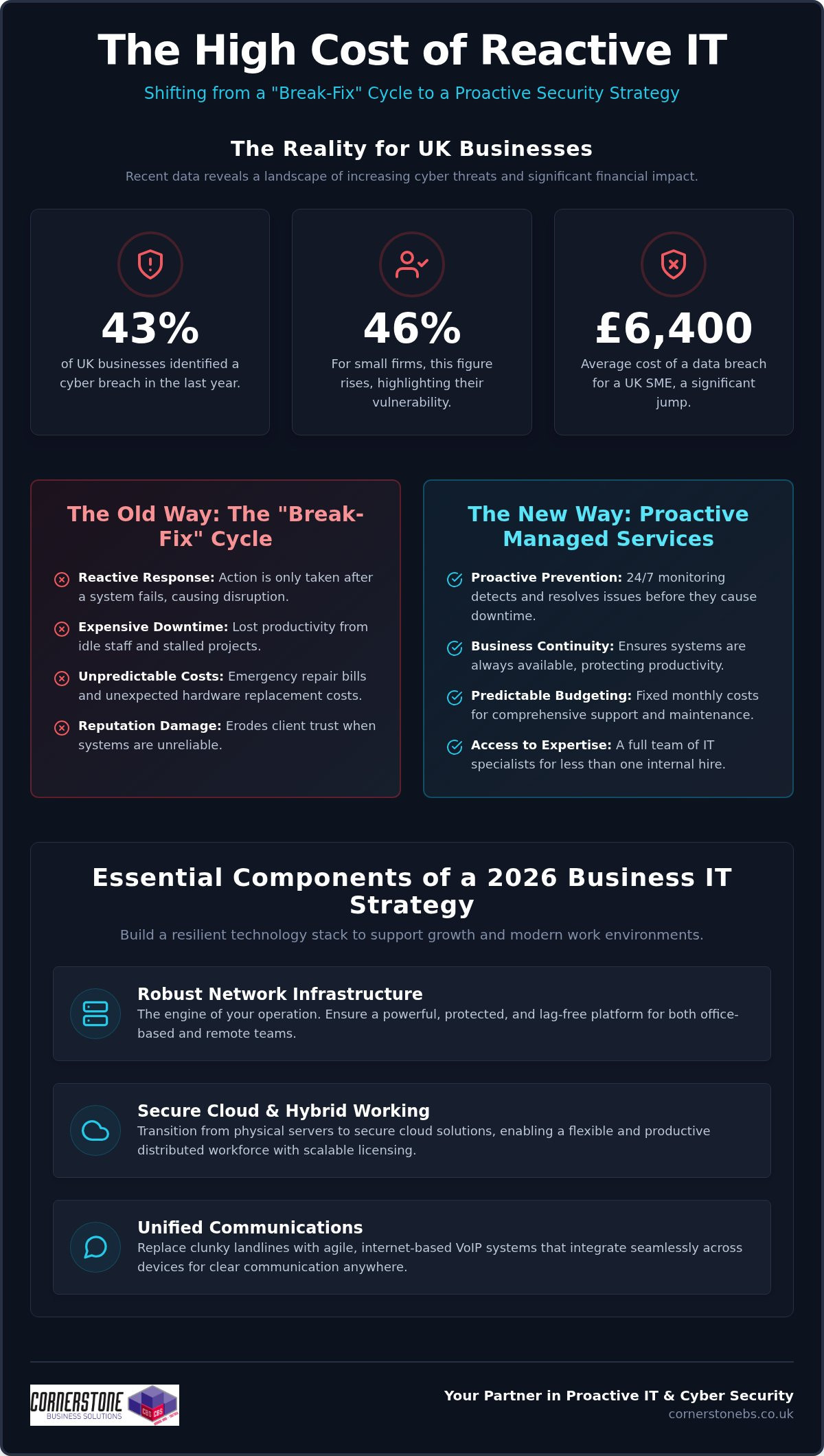
Did you know that 43% of UK businesses identified a cyber breach in the last year? For small firms, that figure hits 46%. It’s a sobering reality, especially as the average cost of a data breach for a UK SME jumped to £6,400 in 2025. If you’re running a company, you’ve likely felt the sting of frequent system downtime or the frustration of waiting hours for a helpdesk response. You deserve more than a reactive fix when things break. Securing reliable cyber security services for businesses is no longer just a technical tick-box; it’s the foundation of your stability.
We understand that hidden costs in IT contracts and the rising tide of sophisticated threats cause genuine anxiety. You want predictable monthly costs and technology that works without friction. This guide explores how to identify a proactive IT partner that doesn’t just react to problems but builds a long-term roadmap for your growth through 2026 and beyond. We’ll break down the latest UK regulations, including the Cyber Security and Resilience Bill, and show you how to turn your digital infrastructure into a competitive advantage.
Key Takeaways
- Move away from the expensive break-fix cycle by adopting a proactive managed service model that prevents issues before they disrupt your operations.
- Ensure your 2026 strategy includes robust network infrastructure and Microsoft 365 integration to support a seamless hybrid working environment.
- Evaluate potential partners by their global credentials with brands like IBM and Cisco, alongside their ability to provide clear, human-led helpdesk support.
- Discover why comprehensive cyber security services Stockton-on-Tees firms rely on are the essential foundation for data resilience and long-term business growth.
- Build a tailored technology roadmap with an award-winning provider to ensure your IT investment directly supports your specific commercial goals through 2026.
The Evolution of Business IT Support: From Reactive to Proactive
The traditional way of handling technology was simple but fundamentally flawed. You waited for a server to fail or a laptop to crash, then called a technician to fix it. This “break-fix” model is inherently reactive, meaning your business only receives attention when it’s already suffering. Modern Managed IT Support flips this dynamic on its head. It’s a proactive partnership for business continuity that focuses on prevention rather than just repair. By choosing elite cyber security services Stockton-on-Tees companies can transition from a state of constant digital anxiety to one of total confidence.
Our approach involves 24/7 monitoring to catch minor glitches before they evolve into major outages. If a critical system shows signs of strain at midnight, our team is alerted immediately. We often resolve these issues before your staff even logs on for the day. This constant vigilance is a cornerstone of modern cybersecurity, keeping your data shielded and your operations fluid. When your technology is managed by experts who anticipate problems, you stop being a victim of circumstance and start being a master of your own productivity.
The Hidden Costs of IT Downtime
Adopting a managed service model provides the financial stability every growing business needs. You’ll enjoy predictable monthly budgeting through fixed-term IT maintenance contracts, removing the shock of unexpected hardware failures. This model also democratises access to high-level expertise. You get an entire department of specialists, including cloud experts and infrastructure engineers, for a fraction of the cost of one full-time internal hire. We don’t just keep the lights on; we align your technology performance with your long-term commercial goals. Your digital tools should drive your growth, not hold it back.
Essential Components of a 2026 Business IT Strategy
By 2026, a business is only as strong as its digital connection. A robust network infrastructure isn’t a luxury; it’s the engine room of your entire operation. Whether your team is based in a central office or working from home, they need a platform that doesn’t lag or leave them vulnerable to external threats. Integrating professional cyber security services Stockton-on-Tees ensures this engine room is both powerful and protected. It’s about creating a environment where technology accelerates your workflow instead of acting as a bottleneck.
Proactive system monitoring serves as your first line of defence against hardware failure. By identifying a failing drive or an overheating network switch before it crashes, we prevent the “break-fix” cycle mentioned earlier. This constant oversight provides the emotional security of knowing your systems are healthy. If you’re looking to upgrade your setup, we can help you build a resilient technology stack that grows with you.
Cloud Infrastructure and Hybrid Working
Physical servers are rapidly becoming relics of a less efficient era. Transitioning to secure cloud solutions allows your distributed workforce to access critical data from any location with total security. This flexibility is vital for maintaining productivity in a hybrid world. We recommend reviewing guidance such as the FTC’s advice on Cybersecurity for Small Business to understand the baseline protections your cloud environment requires. Scalable licensing for platforms like Microsoft 365 ensures you only pay for the seats you actually need, keeping your overheads lean and manageable.
Unified Communications for Business
Communication shouldn’t be fragmented across different devices and apps. Modern business VoIP systems replace clunky, expensive landlines with agile, internet-based calling that works everywhere. When you integrate these systems with business mobile data contracts, your team stays reachable on a single professional number. Streamlining these tools through Microsoft Teams integration means internal chats and external client calls live in one place. It simplifies your billing and, more importantly, it simplifies the way your staff interacts with the world.
Evaluating an IT Partner: A Professional Framework
Choosing an IT partner is one of the most critical decisions you’ll make for your business stability. It requires a delicate balance between technical muscle and genuine human connection. When you search for cyber security services Stockton-on-Tees, don’t settle for a provider that simply lists features. You need a framework to measure their true value. A great partner should act as an extension of your team, providing the emotional security that comes from knowing your systems are in safe, expert hands.
Since 2008, we’ve seen that the most successful collaborations are built on transparency and proven expertise. You shouldn’t have to guess if your provider is up to the task. Use the following criteria to evaluate whether a potential partner can actually support your growth through 2026.
Technical Credentials and Global Partnerships
Technical excellence isn’t just a claim; it’s a measurable standard. Look for a provider that maintains deep partnerships with global technology leaders like Microsoft, IBM, and Cisco. These relationships ensure your support team has direct access to the latest tools and high-level training. A professional partner will align their strategies with recognised global standards, such as the NIST Cybersecurity Framework. This structured approach ensures your defence isn’t just a collection of random software, but a cohesive shield designed to withstand evolving threats. Your provider should be equally comfortable managing your software ecosystem and procuring the specific IT hardware your infrastructure requires.
The Quality of Support and Communication
The human side of IT is where the real value is felt. When a staff member calls the helpdesk, they need speed, empathy, and technical clarity. Test the communication style of a potential partner. Do they use overly dense jargon to sound sophisticated, or do they simplify complex concepts so you can make informed decisions? A dedicated account manager is vital here. They should move beyond transactional language, using collaborative terminology to help you plan a long-term technology roadmap. This shift ensures your IT strategy is always aligned with your commercial objectives.
Finally, scrutinise the Service Level Agreement (SLA). Many providers promise “unlimited support” but hide costs in the small print for on-site visits or complex projects. A truly proactive partner offers predictable monthly budgeting with no hidden surprises. Industry recognition and multi-award-winning status serve as a recurring signature of quality, proving that the provider consistently delivers on its promises to the local business community.
- Verify Partnerships: Ensure they are certified by brands like Microsoft and Cisco.
- Test Response Times: Ask for audited data on their average helpdesk ticket resolution.
- Check for Transparency: Confirm that their “unlimited” support covers both remote and on-site assistance.
- Look for Longevity: A provider with a track record dating back to 2008 offers stability you can trust.
Integrating Cyber Security and Disaster Recovery into Growth
Many businesses view digital protection as a defensive shield, but the reality is that robust cyber security services are a vital engine for growth. When your systems are secure, you can scale with confidence, bid for larger contracts, and meet the stringent requirements of professional indemnity insurance. In 2026, simple antivirus software is no longer enough. You need a comprehensive security audit that identifies vulnerabilities before they can be exploited. By investing in elite cyber security services Stockton-on-Tees businesses protect their reputation and their bottom line simultaneously.
An antivirus program only looks for known threats. A security audit, however, examines your entire digital ecosystem, from outdated firmware to weak password policies. It’s the difference between a quick check-up and a full forensic analysis. This level of detail is essential for meeting modern compliance standards like the Cyber Security and Resilience Bill. A robust disaster recovery plan isn’t just about data; it’s about emotional security for you and your team. Knowing that your cyber security services Stockton-on-Tees partner has a proven recovery roadmap allows you to focus on your core business goals.
Proactive Threat Detection and Prevention
Relying on a reactive firewall is like locking your front door but leaving the windows wide open. We implement Zero Trust architectures, where every access request is verified, regardless of where it originates. This proactive stance is supported by active system monitoring that hunts for anomalies in real time. Technology is only half the battle. We also focus on educating your staff to spot social engineering and phishing attempts. Since 83% of incidents involve phishing, turning your employees into a “human firewall” is one of the most effective ways to prevent a breach before it starts.
Disaster Recovery and Business Continuity
Resilience means having a plan for when things go wrong. We follow the 3-2-1 backup rule: three copies of your data, stored on two different media types, with one copy kept off-site. This ensures data integrity even in the face of a total hardware failure or a ransomware attack. But a backup is only as good as your ability to restore it. We regularly test recovery times to ensure your business can resume operations within minutes, not days. This level of preparedness builds immense confidence with your stakeholders and clients. If you’re ready to secure your future, book a security audit with our team today.
Partnering with a National Award-Winning Provider
Since 2008, Cornerstone Business Solutions has focused on more than just fixing computers. We believe that technology should be a foundational element of your business stability and emotional security. By choosing our cyber security services Stockton-on-Tees, you aren’t just buying a software package; you’re gaining a multi-award-winning team that acts as a genuine extension of your own organisation. This commitment to technical excellence and approachable, regional warmth has been our signature for nearly two decades. We pride ourselves on being a modern, forward-thinking partner that remains deeply connected to its geographical origins. Our accolades from industry bodies provide third-party validation that we don’t just talk about quality; we deliver it consistently.
Bespoke Technology Solutions
Every industry has unique demands and regulatory pressures. A medical practice requires different data handling than a construction firm or a retail chain. We specialise in bespoke technology solutions that deliver maximum efficiency for your specific sector. Whether you are scaling from a small team to a large enterprise, our managed IT services ensure your infrastructure keeps pace with your ambition. We customise everything from hardware procurement to complex network infrastructure, ensuring you only pay for tools that actually drive your productivity. This tailored approach prevents the “hidden costs” often found in generic IT contracts. We lead with solutions that provide positive outcomes, explaining the technical mechanism only after we have shown you the benefit to your bottom line.
A Dedicated Long-Term Partner
We want to move your business away from transactional IT where you only hear from your provider when something breaks. Our goal is a collaborative relationship built on a long-term technology roadmap tailored to your specific growth goals. This proactive approach provides the emotional security business owners need to focus on their core mission without worrying about the next evolving cyber threat. Our multi-award-winning status acts as a recurring signature of quality, giving you confidence in our ability to deliver. We are proud but humble, sophisticated but accessible. We invite you to start an informal conversation about your 2026 technology strategy. Our friendly, local team of experts is ready to help you build a secure, stable, and prosperous future. We look forward to seeing how our partnership can support your business through 2026 and beyond.
Secure Your Business Future for 2026 and Beyond
The landscape of business technology is shifting rapidly. You’ve seen how moving from a reactive “break-fix” model to proactive managed support saves both time and money. By integrating robust cyber security services Stockton-on-Tees businesses can build a foundation that supports hybrid work and rapid growth. It’s about more than just software; it’s about a long-term partnership that provides emotional security and technical excellence. You deserve a technology stack that works as hard as you do.
Since 2008, we’ve focused on delivering bespoke solutions that simplify complex infrastructure. As multi-award-winning partners of Microsoft, IBM, and Cisco, we bring national expertise with a friendly, local face. You don’t have to navigate evolving threats alone. Our team is here to help you design a technology roadmap that keeps your data secure and your systems running smoothly. We’re proud of our regional roots and genuinely invested in your success.
Take the first step toward a more stable and efficient digital environment. Book your free IT support consultation with our award-winning team today. We look forward to helping your business thrive.
Frequently Asked Questions
What is managed IT support and how does it differ from a helpdesk?
Managed IT support is a comprehensive, proactive partnership that oversees your entire technology ecosystem, whereas a helpdesk is typically just one component focused on reactive troubleshooting. While a helpdesk fixes problems after they occur, managed support uses 24/7 monitoring to prevent failures before they impact your staff. This approach includes strategic planning, hardware procurement, and network infrastructure management, ensuring your technology aligns with your long-term business goals rather than just providing a quick fix.
How much does business IT support typically cost?
Costs for business IT support vary based on the size and complexity of your organisation. Nationally, small businesses with 1 to 50 staff often spend between £8,500 and £50,000 per year for comprehensive coverage. Most providers use a predictable monthly model based on the number of users or devices. This fixed-fee structure helps you avoid the shock of emergency repair bills and allows for much more accurate annual budgeting while ensuring your systems remain secure.
Can managed IT support help with hybrid and remote working?
Yes, modern managed support is specifically designed to facilitate seamless hybrid and remote working. We use Microsoft 365 and cloud solutions to ensure your team has secure access to data from any location. By integrating business VoIP and mobile data contracts, your staff can stay connected on a single professional number. This creates a unified ecosystem that maintains productivity and security, regardless of whether your employees are in a central office or working from home.
What is included in a standard IT maintenance plan?
A standard IT maintenance plan includes proactive system monitoring, unlimited helpdesk access, and regular security patching. It also covers essential background tasks like disaster recovery management and cloud infrastructure oversight. These plans are designed to provide total peace of mind by ensuring your hardware is healthy and your software is up to date. By bundling these services into a single contract, you receive a foundational layer of stability that protects your daily operations.
How quickly can I expect a response from an IT helpdesk?
Response times are governed by a Service Level Agreement (SLA), which defines how quickly an engineer will begin working on your request. While reactive providers might take hours to acknowledge a critical failure, a proactive partner often resolves issues before you even notice them. Our monitoring tools alert us to potential glitches 24/7, allowing us to intervene early. This focus on speed and technical clarity ensures your workforce experiences zero-friction technology and minimal interruptions.
Why is cyber security integrated into managed IT services?
Cyber security is integrated because it’s no longer possible to separate system performance from data protection. Every network infrastructure project or cloud migration must be secured from the ground up to prevent breaches. By choosing professional cyber security services Stockton-on-Tees companies ensure that their growth isn’t undermined by evolving threats. This integrated approach meets strict compliance standards and insurance requirements, providing a cohesive shield that simple antivirus software cannot match on its own.
What are the benefits of outsourcing IT vs hiring internally?
Outsourcing provides access to an entire department of specialists for a fraction of the cost of one internal hire. An in-house technician may have limited experience with specific cloud migrations or complex disaster recovery, but an outsourced team brings collective knowledge from across multiple industries. You benefit from 24/7 monitoring and a deeper bench of expertise, including partnerships with global brands like Cisco and IBM. This model delivers superior operational efficiency and a robust technology roadmap.
How do I switch from my current IT provider to Cornerstone?
Switching to Cornerstone is a structured, seamless process designed to eliminate downtime. We begin with a comprehensive audit of your current network infrastructure and security protocols to identify immediate risks. Our team then manages the entire transition, from data migration to setting up your new helpdesk access. We act as a dedicated long-term partner from day one, ensuring your staff feels supported and your technology is fully aligned with your 2026 growth objectives.
Posted on: August 31st, 2026 by Cornerstone
What if your next major contract is currently stalled on a procurement officer’s desk, simply waiting for proof of your security credentials? In 2026, iso 27001 compliance for uk businesses has shifted from a competitive edge to a non-negotiable requirement for entering enterprise supply chains. You’ve likely felt the mounting pressure from clients to demonstrate your certification, yet the prospect of managing the 93 Annex A controls while maintaining your daily operations can feel like an impossible balancing act.
We know the concern that the high costs and time commitment of iso 27001 compliance for uk businesses might seem daunting, particularly when you’re already stretched thin. This strategy guide clarifies the complexities, offering a practical roadmap to secure your sensitive data and successfully navigate rigorous UK tenders. You’ll discover the genuine ROI of certification and learn how a proactive approach to iso 27001 compliance for uk businesses builds a resilient framework that supports your long-term growth. We’ll preview the essential technical pillars and show you how to find a partner to handle the complex infrastructure requirements.
Key Takeaways
- Understand why 2026 is a pivotal year for updating your Information Security Management System to the latest 2022 standard.
- Master the 93 Annex A controls to streamline iso 27001 compliance for uk businesses and secure your digital infrastructure.
- Position your organisation to win lucrative UK public sector tenders by proving your commitment to robust data security.
- Follow a clear roadmap from initial gap analysis to proactive risk treatment to ensure a successful audit.
- Explore how managed services automate technical maintenance, providing the continuous evidence needed to sustain your certification.
What is ISO 27001 Compliance for UK Businesses in 2026?
Understanding What is ISO/IEC 27001? provides the foundation for your entire security strategy. It’s the globally recognised standard for an Information Security Management System (ISMS). While the 2013 version served the industry for a decade, the transition period officially ended in autumn 2025. This makes 2026 the first year where every new certification or renewal must align with the ISO/IEC 27001:2022 update. This version is specifically designed to address modern threats, focusing heavily on cloud security and complex supply chain risks.
We define an ISMS as a living framework of people, processes, and technology that evolves alongside your business risks. It’s not a static folder on a server; it’s the digital backbone of your organisation.
The Three Pillars of Information Security
Every control within the framework supports three core goals, often called the CIA triad. Balancing these ensures your security doesn’t get in the way of your productivity.
- Confidentiality: This ensures that only authorised users can access sensitive information. We help you implement strict access controls so your data stays in the right hands.
- Integrity: This protects your data from being altered or deleted by unauthorised parties. It’s about ensuring the information you rely on is accurate and untampered with.
- Availability: Security is useless if you can’t get to your data. This pillar ensures your IT systems are reliable, resilient, and accessible whenever your team needs them.
ISO 27001 vs. Cyber Essentials: Which Does Your Business Need?
Cyber Essentials is a fantastic starting point for any UK business. It focuses on basic technical controls like firewalls, secure configuration, and patch management. It’s your “digital front door” security. ISO 27001 is far more comprehensive. It moves beyond technical fixes to look at how your management team handles risk, training, and continuous improvement.
The Core Requirements of the ISO 27001:2022 Framework
Risk assessment sits at the very centre of the framework. It’s the pulse that keeps your security strategy relevant and effective. Instead of blindly applying every rule, you evaluate your specific threats and decide how to treat them. This proactive approach is what makes iso 27001 compliance for uk businesses so powerful; it’s tailored to your unique risks. The standard is split into two distinct parts: the mandatory management clauses (4-10) and the Annex A controls.
Clauses 4 through 10 establish the “Management” in Information Security Management System. They require your leadership to show commitment, set clear objectives, and provide the necessary resources to keep data safe. You’ll also need to prove you’re evaluating your performance and constantly looking for ways to improve your defences. It’s about building a culture of security, not just a list of rules.
Then come the 93 Annex A controls. These are the practical safeguards you put in place to mitigate risks. The 2022 update simplified these into four clear categories: Organisational, People, Physical, and Technological. For a deeper look at the transition to these updated controls, the BSI guide to ISO 27001 certification offers excellent technical detail on the international expectations for modern businesses.
Defining Your ISMS Scope
You must decide exactly which parts of your business the certification covers. This is your “scope.” If your scope is too narrow, you might fail to satisfy a client who wants to see your entire operation secured. If it’s too broad, you’ll spend more time and money than necessary. Modern cloud solutions have changed the game here. They often blur the lines of your traditional network perimeter, meaning you must carefully define where your responsibility ends and your provider’s begins.
The Statement of Applicability (SoA) Explained
The SoA is the most vital document during an audit. It lists every Annex A control and states whether it applies to your business. If you exclude a control, you must justify why. For example, if your team works entirely remotely, you might exclude certain physical controls related to on-site data centres. It’s not a “set and forget” document. It requires continuous documentation to prove you’re still managing those risks effectively as your business grows.
Keeping your SoA up to date can feel like a full-time job. Our managed IT support ensures your technical documentation stays current, so you’re always ready for an auditor’s visit.
Why UK Businesses Prioritise ISO 27001 Compliance
We’ve seen that businesses with a robust Information Security Management System (ISMS) recover faster from incidents. They have a clear plan, defined roles, and a roadmap for continuity. This level of preparation turns a potential disaster into a managed event, protecting your reputation when it matters most.
Financial Resilience and Risk Mitigation
Let’s talk about the bottom line. The cost of a data breach for a UK SME can be devastating. Beyond the immediate technical recovery, you face legal fees, loss of reputation, and potential fines. Implementing the standard provides a framework to meet and exceed UK GDPR requirements. For official guidance on these obligations, the ICO’s Guide to Data Security is the essential resource for understanding the “security principle” of data protection. It bridges the gap between legal necessity and technical excellence.
Investing in compliance builds long-term stability. It ensures your team follows repeatable, secure processes that protect your most valuable assets. This proactive stance can also lead to direct savings on professional indemnity and cyber security services insurance premiums. Insurers are much more likely to offer better rates to companies that can prove they have a robust, audited ISMS in place. Protecting your client confidentiality is no longer just a defensive move; it’s a proactive growth strategy that secures your future.
A Step-by-Step Roadmap to Achieving ISO 27001 Compliance
- Phase 1: Gap Analysis. We identify exactly where your current security posture fails to meet the standard’s 93 controls.
- Phase 2: Risk Assessment & Treatment. You decide how to handle identified threats, whether that’s through technical fixes, insurance, or process changes.
- Phase 3: Documentation & ISMS Build. This is where we create the policies and technical evidence needed to satisfy an auditor.
- Phase 4: Internal Audit. A vital “dress rehearsal” where you test your own systems to find flaws before the official visit.
- Phase 5: External Audit. The final Stage 1 (documentation review) and Stage 2 (evidence of practice) certification process.
Conducting a Meaningful Gap Analysis
You can’t fix what you haven’t found. Relying on internal guesswork often leads to “blind spots” that cause audit failures. We recommend using a professional eye to compare your current it company solutions against the rigorous Annex A controls. This phase gives you a realistic timeline for remediation. It ensures you don’t waste resources on unnecessary tools, focusing instead on the specific gaps that matter most to your business continuity.
Preparing for the Stage 1 and Stage 2 Audits
The external audit is a two-part evaluation. Stage 1 is a high-level review to ensure your ISMS is designed correctly. Stage 2 is the deep dive. The auditor will ask for proof that your team actually follows the policies you’ve written. If they find “non-conformities,” see them as a roadmap for improvement rather than a failure. Certification is a three-year cycle, requiring annual surveillance visits to ensure your standards don’t slip. It’s a commitment to being better every single day.
Our experts are here to handle the technical heavy lifting, ensuring your systems are audit-ready from day one. Let’s start building your resilient information security framework today.
How Managed IT Support Simplifies ISO 27001 Maintenance
Maintaining iso 27001 compliance for uk businesses shouldn’t be a manual burden for your internal team. While the audit focuses heavily on your policies, those policies only hold weight if your technical infrastructure supports them every single day. This is where managed support transforms from a utility into a strategic partnership. We provide the “continuous logging” and proactive monitoring required by Annex A, ensuring you have a digital paper trail for every event on your network. It’s about having the right evidence ready before an auditor even asks for it.
Technical Controls and Evidence Collection
Auditors don’t just want to hear about your security; they want to see the data. Our Managed IT services generate the granular reports needed to prove your multi-factor authentication (MFA) and encryption protocols are active. We take the heavy lifting of technical documentation off your shoulders. Instead of your staff spending hours pulling logs, we provide a streamlined stream of evidence. This allows your team to focus on their core roles while we maintain the technical backbone of your iso 27001 compliance for uk businesses.
The Role of Professional Services in Remediation
Sometimes, the initial gap analysis reveals that your legacy network infrastructure isn’t up to the task. We use professional services to overhaul your systems, ensuring they meet the rigorous standards of the 2022 framework. This often involves implementing robust cloud backup solutions as part of a comprehensive disaster recovery plan. Business continuity is a core requirement of the standard, and we ensure your data is recoverable even in a worst-case scenario. We don’t just find the problems; we build the solutions that keep you compliant.
We’re proud to act as the technical engine for our clients’ success. Contact Cornerstone for a friendly, no-pressure consultation on how our bespoke technology solutions support your compliance goals. Let’s have a conversation about securing your business for the long term.
Building a Secure Future for Your Business
As the digital landscape evolves, staying ahead of security threats is no longer optional. We’ve explored how the transition to the 2022 standard and the new Data (Use and Access) Act 2025 have reshaped the requirements for iso 27001 compliance for uk businesses. By following a structured roadmap and leveraging technical automation, you can transform a complex audit into a repeatable, efficient process that wins tenders and protects your reputation. It’s about more than just a certificate; it’s about the stability of knowing your data is safe.
Our multi-award-winning cyber security expertise ensures your organisation isn’t just following rules but building genuine resilience. We provide bespoke technology solutions tailored to UK compliance standards, backed by proactive managed IT support for long-term resilience that handles the technical evidence so you don’t have to. We’re proud to act as a dedicated partner for our clients, simplifying the technical heavy lifting so you can focus on growth.
Secure your business and start your journey to ISO 27001 compliance with Cornerstone today. We’re here to help you turn security into your strongest competitive advantage and look forward to having a conversation about your specific needs.
Frequently Asked Questions
How much does ISO 27001 compliance cost for a UK business?
External certification fees from UKAS-accredited bodies typically range between £6,800 and £10,000 for a small UK business in 2026. The total investment depends on your organisation’s size and current technical maturity. While these audit fees are paid to the certifying body, you also need to account for the internal resources or professional support required to build your framework. We focus on providing the robust technical infrastructure that ensures you’re ready for that investment.
How long does it take to become ISO 27001 certified?
Most UK organisations take between six and twelve months to achieve full certification. This timeline depends on the complexity of your operations and the results of your initial gap analysis. Small businesses with simple IT setups might move faster, while larger enterprises require more time for documentation and staff training. It’s vital to allow enough time for the “evidence of practice” phase before your official Stage 2 audit begins.
Can a small business achieve ISO 27001 compliance?
Is ISO 27001 a legal requirement in the UK?
ISO 27001 is the main standard that contains the requirements for your management system and is the only one you can be certified against. ISO 27002 is a supporting document that provides detailed guidance on how to implement the 93 controls found in Annex A. Think of 27001 as the “what” you must achieve and 27002 as the “how” you actually put those security measures into practice across your company.
Does ISO 27001 cover UK GDPR requirements?
It covers many aspects but not everything. ISO 27001 is excellent for meeting the “security of processing” requirements under UK GDPR, but it doesn’t specifically address data subject rights or lawful bases for processing. We recommend using the standard as a robust technical foundation for your privacy strategy. It ensures your data is protected, which makes meeting your broader legal obligations under the Data (Use and Access) Act 2025 much simpler.
What happens if we fail an ISO 27001 audit?
Failing an audit usually means the auditor has found “non-conformities.” Major non-conformities mean your certification is paused until you fix the issue and undergo a follow-up visit. Minor non-conformities won’t stop you from getting certified, provided you create a clear plan to address them before the next surveillance visit. It’s a collaborative process designed to improve your systems, and we’re here to help you remediate any technical gaps found during the audit.
How often do we need to renew our ISO 27001 certification?
Your certificate is valid for three years, but you must undergo annual surveillance audits to keep it active. These smaller audits ensure your organisation is still following its policies and adapting to new threats. At the end of the three-year cycle, you’ll complete a full recertification audit. This cycle encourages continuous improvement, ensuring that iso 27001 compliance for uk businesses remains a living part of your organisation’s culture and provides the long-term resilience your clients expect.
Posted on: August 29th, 2026 by Cornerstone
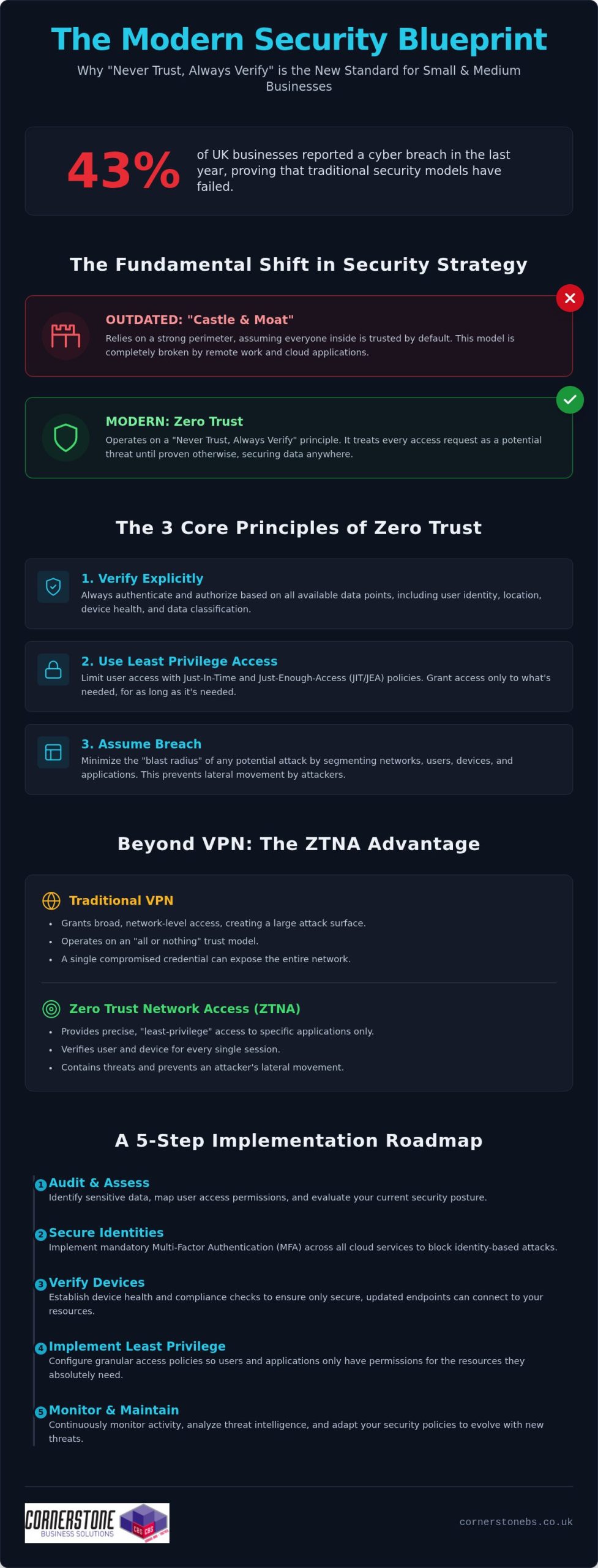
With 43% of UK businesses reporting a cyber breach in the last year, the old “castle and moat” security model has officially crumbled. If you feel overwhelmed by technical jargon or worry that your remote team is a walking security risk, you aren’t alone. Most small business owners feel caught between rising threats and tight budgets. We understand that your priority is growth, not deciphering complex code. That’s why zero trust implementation for smbs is no longer a luxury reserved for tech giants; it’s the foundation of a resilient, modern business in 2026.
We agree that security should feel like a supportive partner, not a confusing hurdle. You deserve the peace of mind that comes from knowing your data is secure in a hybrid world, without needing an enterprise-sized bank account to achieve it. This guide strips away the complexity to show you exactly how to move beyond outdated passwords to a “never trust, always verify” model. We’ll walk through a realistic, jargon-free roadmap that aligns with the latest 2026 NCSC guidance and the Data (Use and Access) Act 2025. You’ll discover how to protect your team and your reputation with practical steps you can start taking today.
Key Takeaways
- Shift your security strategy from a “castle and moat” model to a “never trust, always verify” approach that secures data in a hybrid world.
- Discover how zero trust implementation for smbs prioritises identity verification and device health to block unauthorised access before it happens.
- Learn why modern Zero Trust Network Access (ZTNA) offers better protection than traditional VPNs by providing granular access to specific applications.
- Follow a clear 5-step roadmap to audit your current permissions and implement mandatory multi-factor authentication across all cloud services.
- Understand the value of a long-term partnership with a managed IT provider to ensure your security infrastructure is proactive and resilient.
What is Zero Trust Security and Why Does It Matter for SMBs?
Zero Trust isn’t just a technical upgrade. It’s a fundamental shift in how we protect your hard-earned business. For decades, the “Castle and Moat” model was the standard. You built a strong perimeter around your office and assumed everyone inside was safe. But in 2026, that wall has effectively disappeared. With teams working from home and data living in the cloud, there is no longer a single “inside” to protect. A Zero Trust Architecture operates on a simple, powerful rule: never trust, always verify. Every request for access is treated as a potential threat until the system proves otherwise.
We help our partners adopt an “Assume Breach” mindset. This isn’t about being pessimistic. It’s about being proactive. By designing your systems as if a threat is already present, you stop a single compromised password from becoming a company-wide disaster. For UK small businesses, zero trust implementation for smbs is the most effective way to protect your reputation and ensure long-term financial stability. It provides the peace of mind you need to focus on growth while we handle the digital heavy lifting.
The Three Core Principles of Zero Trust
To build a resilient business, we follow three non-negotiable rules. First, we verify explicitly. This means authenticating every user based on their identity, location, and device health every time they log in. Second, we apply least privilege access. We ensure your staff only have access to the specific data they need for their roles. This uses Just-In-Time and Just-Enough-Access (JIT/JEA) protocols to keep your most sensitive files locked away. Finally, we assume breach. We segment your network to minimise the “blast radius” of any potential attack, ensuring your core operations stay stable even during an incident.
Why Traditional Security is No Longer Enough
The old ways of working simply don’t match the modern threat environment. Sophisticated phishing and ransomware attacks now target UK small businesses with alarming precision. As you moved your operations to Microsoft 365 and other cloud platforms, the traditional security perimeter broke. Your data is now accessed from various devices and locations, making the “insider threat” a very real concern. Identity has become the new security boundary. Relying on a basic VPN or a single firewall leaves you vulnerable. If a hacker steals one set of credentials, they can often roam freely across your entire network. Zero Trust stops this movement in its tracks, keeping your data where it belongs.
The Core Pillars of a Zero Trust Implementation
A successful zero trust implementation for smbs relies on four foundational pillars: identity, devices, applications, and data. These elements must work in harmony to create a seamless security blanket around your organisation. While the technical details are complex, the goal is simple. We want to ensure that only the right people, using the right devices, can access your sensitive information at the right time. This framework aligns with the global standards defined in NIST Special Publication 800-207, which serves as the definitive guide for modern digital defences.
- Identity: Every login attempt is a moment of truth. We use Multi-Factor Authentication (MFA) and biometrics to verify that your staff are who they say they are, every single time.
- Devices: We check the “health” of every laptop, tablet, and phone. If a device is missing a critical update or lacks encryption, it doesn’t get in.
- Applications: Whether you use cloud tools like Microsoft 365 and Xero or older on-premise software, access is granted on a per-app basis rather than giving away the keys to the whole network.
Identity as the New Perimeter
Passwords are no longer enough to keep your business safe in 2026. We move your team toward robust Multi-Factor Authentication (MFA) to block the vast majority of identity-based attacks. The real intelligence happens with Conditional Access policies. These “if, then” rules act as a smart filter for your business. For example, if a staff member tries to log in from an unrecognised location on an unmanaged device, the system can automatically block access or demand extra biometrics. Identity Protection is the gatekeeper of the modern business. By securing the user, we secure the primary entry point to your entire operation.
Securing the “Anywhere” Workforce with Endpoint Management
The rise of hybrid work has made unmanaged personal devices (BYOD) a significant risk for UK small businesses. If an employee’s personal tablet is infected with malware, it could easily spread to your company files the moment they log in. We solve this by using professional endpoint management tools like Microsoft Intune. This allows us to set and enforce strict security standards for any device touching your data. We automate updates and patches, closing the door on known vulnerabilities before hackers can exploit them. This proactive approach ensures your team can work from anywhere with total confidence. If you’re concerned about your current device security, our team can provide a clear cyber security review to help you identify any hidden gaps.
Zero Trust vs. Traditional VPNs: Making the Switch
Most UK small businesses still rely on traditional VPNs to connect their remote teams in 2026. While these tunnels were once the standard, they now represent a significant security gap. The problem is that VPNs usually grant “flat” network access. Once a user verifies their identity at the gate, they can often roam across your entire server. If a single device is compromised, your whole firm is at risk. Moving to a more modern approach isn’t just a technical upgrade; it’s a vital step for your long-term stability.
The Problem with “Trust but Verify”
Traditional firewalls struggle in a world where your data lives in the cloud and your staff work from various locations. They rely on a “trust but verify” model that is too easily exploited. Hackers love VPNs because they allow for lateral movement. This means one stolen credential can lead to a full-scale ransomware attack. By following the NCSC’s Zero Trust Architecture design principles, we help you move toward a model built for business resilience and peace of mind. It’s about ensuring an incident on one laptop doesn’t bring down your entire operation.
Zero Trust Network Access (ZTNA) Explained
Zero Trust Network Access (ZTNA) is the modern alternative that provides granular control. Instead of connecting a user to your whole network, ZTNA creates a “segment of one” for every session. Your staff only see the specific applications they need to do their jobs. A major benefit is that ZTNA hides your applications from the public internet entirely. Attackers can’t hack what they can’t see. This makes a zero trust implementation for smbs much more effective than simply patching an old, vulnerable VPN.
Making the switch also improves your daily operations. ZTNA is typically faster and more reliable than clunky VPN clients that frequently drop out. Your team will enjoy a smoother experience, and you’ll save money by retiring expensive, high-maintenance hardware. We recommend a phased approach for businesses with existing infrastructure. You don’t have to rip and replace everything overnight. We can start by securing your most sensitive cloud apps first, then gradually move your legacy systems over. This steady transition ensures your business remains stable while your security grows stronger.
A 5-Step Zero Trust Implementation Roadmap for SMBs
Step 1: Identity Discovery. We start by auditing every user account and permission level. You’ll likely find old accounts or “permission creep” where staff have access they no longer need. We enforce Multi-Factor Authentication (MFA) across all cloud services immediately. This aligns with the 2026 Cyber Essentials requirement where MFA is now mandatory for all cloud users.
Step 2: Device Inventory. We identify every device touching your company data. By setting strict health standards, we ensure that only encrypted, patched, and managed devices can connect to your systems.
Step 3: Implement Least Privilege. We remove local admin rights from standard user accounts. This simple step stops 90% of malware from installing itself silently. We restrict access to sensitive folders so staff only see what they need to do their jobs.
Step 4: Network Micro-segmentation. We break your network into smaller, isolated zones. If a breach occurs in one area, it’s trapped. The rest of your business stays safe and operational.
Step 5: Continuous Monitoring. We use proactive system monitoring to spot unusual behaviour in real-time. If a user logs in from an unexpected location or starts downloading unusual amounts of data, our tools flag it instantly.
Starting with Microsoft 365 Business Premium
For most UK small businesses, Microsoft 365 Business Premium is the ultimate “Zero Trust starter pack.” It provides enterprise-grade tools like Defender for Business and Intune at a price point that makes sense for smaller firms. You don’t need to juggle a dozen different third-party security tools when everything is integrated into one platform. If you’re planning a Microsoft 365 Migration for Business UK, choosing this license is the smartest move you can make for your 2026 security roadmap.
Building a Security-Centric Culture
Technology is only half the battle. A zero trust implementation for smbs fails if your team doesn’t understand the “why” behind the new rules. We help you frame security as a collaborative effort rather than a set of chores. When staff understand that verifying their identity protects their own work and the company’s reputation, they become your strongest line of defence. We recommend short, jargon-free training sessions that focus on practical tips for staying safe in a hybrid world. If you’re ready to secure your future, our managed IT support team is ready to help you build a roadmap that fits your specific business needs.
The Cornerstone Approach: Your Partner in Zero Trust
Choosing the right partner for your zero trust implementation for smbs is the difference between a box-ticking exercise and true business resilience. At Cornerstone, we don’t just act as a transactional supplier. We position ourselves as a dedicated long-term partner, invested in the stability and growth of your organisation. Our multi-award-winning team brings the confidence of global partnerships with industry leaders like Microsoft, IBM, and Cisco directly to your doorstep. We combine this high-level expertise with the approachable, regional warmth you expect from a local team that understands your specific challenges.
We know that every business operates differently. A “one size fits all” security plan usually fits no one well. We tailor our Zero Trust roadmap to match your specific data flows, staff requirements, and growth plans for 2026. Whether you are managing a fully remote team or a hybrid office, we design a framework that protects your assets without slowing down your people. To ensure complete transparency, our professional service project fees provide clear, upfront costs for your implementation. You can explore our full range of Cyber Security Services to see how we build resilience into every layer of your organisation.
Ready to Secure Your Future?
Moving toward a “never trust, always verify” model is a journey, not a single event. Our award-winning team is here to guide you through every step with a reassuring and proactive attitude. We pride ourselves on being highly organised and technologically advanced, yet we remain friendly and reachable for every client we serve. We invite you to have an informal conversation with us about your current security posture. It’s a chance to simplify the complex and see how modern security can actually empower your business. If you’re ready to take the first step toward a more secure 2026, you can contact Cornerstone for a Cyber Security Audit today. Let’s work together to make your company data the most secure it has ever been.
Secure Your Business Resilience for 2026 and Beyond
Transitioning to a modern security model is about more than just technology; it’s about protecting your company’s hard-earned reputation and future. We’ve explored how replacing clunky, vulnerable VPNs with granular, identity-based verification streamlines your operations while keeping hackers at bay. A successful zero trust implementation for smbs is not a one-time project but a proactive partnership that evolves alongside your business growth.
As a multi-award-winning IT support provider and Microsoft Solutions Partner, we have the expertise to simplify this journey for you. You gain unlimited proactive helpdesk access and a local team dedicated to your long-term stability. It’s time to replace outdated security models with a robust framework built for the modern, hybrid world. Book Your Proactive Cyber Security Audit Today and let’s start a conversation about your long-term success. We’re here to help you lead with confidence and total peace of mind.
Frequently Asked Questions
Is Zero Trust too expensive for a small business?
Zero Trust is highly cost-effective when managed correctly. Most small businesses already own the necessary tools through their existing Microsoft 365 subscriptions. Instead of expensive hardware, we focus on smart configuration and proactive monitoring. This approach makes zero trust implementation for smbs a strategic investment in business continuity rather than a drain on your budget. It protects you from the massive costs of data breaches and downtime.
Will implementing Zero Trust slow down my employees?
Modern security should empower your team, not hinder them. Zero Trust Network Access (ZTNA) is typically much faster and more reliable than traditional, clunky VPNs that often drop out. Features like biometrics and single sign-on (SSO) allow your staff to access their tools securely with just a touch or a glance. We aim to create a seamless experience where security happens in the background, keeping your workforce productive and happy.
Do I need to replace all my hardware to start a Zero Trust journey?
You don’t need to rip and replace your existing IT hardware to begin. We use cloud-based management tools to check the health and security status of your current laptops and mobile devices. If a device meets your security standards, it gets in. If it needs an update, the system prompts the user to fix it first. This allows you to build a resilient architecture while respecting your current technology investments.
How does Zero Trust help with UK data protection compliance?
Zero Trust is a powerful tool for meeting the latest UK data protection standards. By enforcing granular access and continuous verification, you stay in line with the Data (Use and Access) Act 2025 and NCSC design principles. This model provides the detailed auditing and control that the Information Commissioner’s Office (ICO) expects from modern businesses. It gives you the confidence that your company data is handled with the highest level of care.
Can I implement Zero Trust if I still have an on-site server?
You can absolutely implement this model with a hybrid setup. We don’t require you to move everything to the cloud at once. We secure your on-site server by placing it behind a Zero Trust gateway. This ensures that even staff in the office must be verified before they can access sensitive folders. It’s a practical way to modernise your security while maintaining the legacy systems your business relies on every day.
What is the first step an SMB should take toward Zero Trust?
The first step is always an identity and access audit. We help you identify exactly who has access to your data and remove any unnecessary permissions. Enforcing Multi-Factor Authentication (MFA) across all your accounts is the single most effective action you can take right now. This foundation allows us to build a more complex zero trust implementation for smbs over time, ensuring your most vulnerable entry points are locked down immediately.
How does Zero Trust protect against ransomware?
Zero Trust stops ransomware in its tracks by blocking “lateral movement.” In a traditional network, once a hacker gets inside, they can move freely to encrypt all your files. With Zero Trust, we segment your network into isolated zones. Even if one laptop is compromised, the threat is trapped in a “segment of one.” This limits the damage and ensures your core business operations can continue without interruption.
Does Zero Trust replace my existing antivirus and firewall?
It doesn’t replace them; it makes them smarter. Traditional firewalls and antivirus tools are still useful, but they aren’t enough on their own in 2026. Zero Trust adds a vital layer of identity and device health verification that traditional tools simply don’t have. We integrate these elements into a single, proactive system that monitors your entire digital environment. This creates a much stronger, multi-layered defence than relying on old-fashioned perimeter security alone.
Posted on: August 28th, 2026 by Cornerstone
Would your business survive if a sophisticated AI-powered phishing attack bypassed your team’s defenses tomorrow morning? It’s a sobering thought that keeps many UK business owners awake at night. As the Data (Use and Access) Act 2025 introduces stricter requirements for handling data protection complaints, the stakes for your digital infrastructure have never been higher. You likely already know that Microsoft’s own data shows MFA blocks over 99% of account compromise attacks, yet managing these settings across a remote workforce feels increasingly complex. We believe that robust security is the foundation of your emotional and business stability. That’s why we’ve developed this guide to microsoft 365 security best practices, designed to help you build a resilient environment that protects your team and your reputation.
You’ll gain a clear, expert-led roadmap to navigate the complexities of modern identity protection and evolving UK cyber standards. We’ll walk you through the non-negotiable settings you need right now, including the mandatory April 2026 Cyber Essentials MFA requirements and the shift toward passwordless authentication. By the end of this guide, you’ll have a proactive strategy to secure your data and the confidence of a long-term partner standing by your side. Let’s simplify these technical challenges and turn your security into a source of strength.
Key Takeaways
- Secure your digital perimeter by shifting to phishing-resistant authentication that meets the latest UK Cyber Essentials standards.
- Manage the Data (Use and Access) Act 2025 with confidence by aligning your governance policies with current UK legal requirements.
- Implement microsoft 365 security best practices to protect your team from sophisticated, AI-generated deepfake phishing attacks.
- Automate your data protection with sensitivity labels to ensure your confidential information stays secure across Teams, email, and SharePoint.
- Partner with a multi-award-winning team to transform your IT from a simple helpdesk into a proactive security foundation that provides true peace of mind.
Why Microsoft 365 Security is No Longer Optional in 2026
The traditional castle-and-moat security model is officially a relic of the past. In our hybrid work era, the office walls no longer define your security boundary. Your team works from home, local hubs, and on the move, which makes identity the new perimeter. Relying on the standard, out-of-the-box setup of the Microsoft 365 platform leaves gaps that modern attackers are incredibly quick to exploit. We’ve seen many businesses assume that a subscription alone equals safety. It doesn’t. Microsoft provides the tools, but you remain responsible for the configuration.
By 2026, the threat landscape has shifted gears. We’re now seeing a surge in AI-driven phishing that’s virtually indistinguishable from legitimate business emails. Automated credential harvesting tools can test thousands of stolen passwords in seconds, looking for any crack in your armor. If you’re still using default settings, you’re essentially leaving your front door unlocked. Implementing microsoft 365 security best practices is the only way to ensure your business stays resilient against these evolving tactics.
A breach isn’t just a technical headache. It’s a financial and reputational crisis that can halt your operations overnight. For a UK business, the fallout includes recovery costs, lost client trust, and potential fines under the Data (Use and Access) Act 2025. We believe that robust security is the foundation of your emotional and business stability. It’s about protecting the hard work you’ve put into your company and ensuring your team feels safe while they work.
The Concept of Zero Trust in Microsoft 365
Zero Trust is the gold standard for modern protection. It operates on a simple, proactive principle: never trust, always verify. Trust is a risk. Every access request, regardless of where it originates, is fully authenticated and authorized before any data is shared. This approach is vital because it prevents lateral movement within your network. If one account is compromised, the attacker can’t easily jump to your most sensitive financial files or client databases. It creates the layered defense you need for true peace of mind. You can find more detail on this in our guide on Zero Trust security.
Compliance Requirements for UK Businesses
Securing the Digital Front Door: Identity and Access Management
Identity is the master key that unlocks your entire business. In 2026, it’s no longer enough to guard your network; you must guard the person behind the screen. Microsoft Entra ID provides the centralised control you need to manage every user, device, and application from a single, secure location. This visibility is essential for maintaining microsoft 365 security best practices while ensuring your team stays productive. We understand that adding security can sometimes feel like adding friction. However, with the right setup, you can protect your data without slowing down your people. It’s about creating a environment where safety and efficiency work hand in hand.
Implementing Phishing-Resistant MFA
Standard Multi-Factor Authentication (MFA) using SMS is no longer the gold standard. Attackers have found ways to intercept codes or trick users into approving fake prompts through “push bombing.” To meet the April 2026 Cyber Essentials mandate, MFA must be active on all cloud services that support it. Following CISA’s security recommendations, we suggest moving toward phishing-resistant methods to prevent credential theft.
- Step 1: Audit current methods. Identify which users are still relying on vulnerable SMS or voice call authentication.
- Step 2: Disable legacy protocols. Turn off older authentication methods that allow attackers to bypass your MFA prompts entirely.
- Step 3: Move to Authenticator or FIDO2. Roll out the Microsoft Authenticator app or physical FIDO2 keys for a more secure, passwordless experience.
- Step 4: Educate your team. Train users to recognise “MFA fatigue” so they don’t accidentally approve a fraudulent login attempt.
Conditional Access: The Smart Way to Manage Risk
Conditional Access is the intelligent bouncer for your business data. Instead of a simple “yes or no” to a password, it evaluates every login attempt in real-time based on specific signals. You can create policies that check user location, device health, and login risk levels before granting access. For instance, you can automatically block logins from high-risk countries or prevent access from unmanaged devices that haven’t been patched. This proactive approach ensures that only the right people, on the right devices, get to your sensitive information. If you’re looking for a partner to help configure these complex settings, our experts at Cornerstone can design a bespoke framework that fits your unique workflow. Implementing these microsoft 365 security best practices creates a foundation of trust that allows your business to grow without fear.
Protecting Your Assets: Data Governance and DLP Strategies
Once you’ve secured the digital front door, you must ensure the data inside doesn’t slip out the back. Accidental data leaks through email, Teams, or SharePoint are often the result of simple human error rather than malice. To prevent this, we recommend following a prioritized security roadmap that focuses on automated protection. Sensitivity labels are a cornerstone of this approach. They allow you to classify documents based on their level of confidentiality, ensuring that a “Highly Confidential” file cannot be shared with external stakeholders without proper encryption and authorization. This creates a safety net that protects your team while they focus on their daily tasks.
Securing your data is about more than just preventing leaks; it’s about ensuring your business can bounce back if the worst happens. Our team focuses on building microsoft 365 security best practices into the very fabric of your organization. This includes integrating robust cloud solutions and backup strategies to ensure business continuity. When your data is protected and backed up, you gain the emotional security of knowing your hard work is safe from both cyber threats and accidental deletion.
Licensing for Security: Business Premium vs. Enterprise
Choosing the right license is a strategic decision for your business stability. For most UK small and medium enterprises, Microsoft 365 Business Premium is the “sweet spot” for security. It includes essential tools like Intune for device management and Defender for Business, which were previously only available in more expensive Enterprise tiers. The ROI is clear: the cost of a higher-tier license is a fraction of the potential financial fallout from a single data breach.
| Feature |
Business Standard |
Business Premium |
Enterprise (E5) |
| Conditional Access |
No |
Yes |
Yes |
| Intune Device Management |
No |
Yes |
Yes |
| Defender for Business |
No |
Yes |
Yes |
| Data Loss Prevention (DLP) |
Basic |
Full |
Advanced |
| Sensitivity Labels |
Manual |
Automated |
Advanced AI |
Data Loss Prevention (DLP) Policies That Work
DLP policies act as a silent guardian for your sensitive information. You can configure rules that automatically detect and block the sharing of National Insurance numbers or credit card data across your microsoft 365 security best practices framework. We favor using “Override” options where appropriate. This allows a user to share data if they provide a valid business reason, turning a potential security block into a teachable moment that improves awareness without halting productivity. It’s about being proactive and supportive, rather than just restrictive.
Defending Against AI-Driven Threats and Phishing
By 2026, the days of spotting a phishing attempt by its poor grammar or blurry logos are long gone. Attackers now use generative AI to create perfectly written, highly personalised spear-phishing emails that can fool even the most tech-savvy professionals. We’re also seeing a rise in “Deepfake” phishing, where AI-generated audio or video mimics a senior leader to authorise urgent wire transfers. Staying ahead of these sophisticated tactics requires more than just luck. It demands the consistent application of microsoft 365 security best practices to build a multi-layered defence that protects your team and your assets.
The integration of Microsoft Copilot brings incredible productivity gains, but it also introduces new risks. AI tools are exceptionally good at finding and summarising information, which means they can inadvertently surface sensitive data to unauthorised users if your permissions aren’t tight. This is known as the “over-sharing” problem. Before you fully embrace AI, you must audit your internal permissions to ensure users only have access to the data they truly need for their roles. Establishing clear company policies for Generative AI use is a vital step in your microsoft 365 security best practices framework, ensuring your innovation doesn’t come at the cost of your security.
Phishing Simulations and Staff Training
Technology alone isn’t enough to stop a determined attacker. We’ve found that monthly phishing simulations are far more effective than annual training sessions. These brief, realistic exercises keep security at the front of your team’s minds, helping them recognise the subtle signs of modern social engineering. We encourage a “no-blame” culture where staff feel comfortable reporting suspicious activity immediately, rather than hiding a potential mistake out of fear. This transparency is essential for a quick response and long-term resilience. The Human Firewall is the final line of defence against modern social engineering.
Building a secure environment is a journey we take together as partners. If you want to ensure your AI tools are configured safely and your team is ready for 2026 threats, contact our expert team at Cornerstone for a bespoke security review. We’re here to provide the professional authority and regional warmth you need to feel truly secure.
Implementing a Proactive Security Posture with Cornerstone
Security isn’t a one-time project; it’s a continuous commitment to your business’s future. While we’ve discussed the technical aspects of microsoft 365 security best practices, the real challenge lies in consistent, expert management. This is where Cornerstone steps in. We don’t just act as a reactive helpdesk that waits for things to break. Instead, we position ourselves as your dedicated long-term partner, providing the proactive oversight needed to keep your operations stable. Our multi-award-winning approach to managed IT services ensures that your digital infrastructure is built on a foundation of strength and reliability.
Every business has unique risks. A generic checklist won’t provide the protection you deserve. We conduct bespoke security audits to tailor Microsoft 365 to your specific operational needs. Our team provides 24/7 proactive monitoring, allowing us to identify and neutralise threats before they can impact your team. This rapid incident response is designed to give you total peace of mind, knowing that national-level experts are watching over your data around the clock. We’re proud of our Microsoft Solutions Partner status, which reflects our deep expertise and commitment to quality.
Our Microsoft 365 Management Framework
We use a structured framework to maintain your security posture. This includes regular reviews of your Microsoft Secure Score, where we identify and implement optimisations to harden your environment. If you’re currently using older systems, we provide comprehensive M365 migration support to move your team to a more secure, modern platform safely. Beyond the technical setup, we host ongoing strategy sessions. These meetings ensure your leadership team understands the evolving threat landscape and how microsoft 365 security best practices can support your long-term growth.
Next Steps: Secure Your Business Today
Ready to move beyond basic protection? Getting started is as simple as scheduling a professional security audit. We’ll look under the hood of your current configuration, identify any gaps in your “Human Firewall,” and provide a clear roadmap for improvement. The Cornerstone promise is simple: we provide reliable, award-winning expertise with a friendly, accessible face. We’re a national provider with deep roots, and we’re genuinely interested in the success of your business. We’d love to invite you to a friendly, informal conversation about your IT needs. Let’s work together to build a secure foundation that gives you the confidence to lead your team forward.
Securing Your Business Future with Confidence
Securing your business in 2026 is about more than just checking boxes. It’s about building a resilient environment where your team can thrive without the constant fear of a data breach. We’ve explored how shifting to identity-based protection and automating your data governance through microsoft 365 security best practices creates a solid foundation for growth. By staying ahead of AI-driven phishing and deepfake threats, you protect not just your files, but your reputation and your team’s hard work.
As a multi-award-winning IT provider and Microsoft Solutions Partner, we’re here to turn these complex technical challenges into a clear roadmap for success. Our proactive 24/7 monitoring ensures that your systems remain stable, giving you the emotional security to focus on what you do best. We’d love to help you take the next step toward a more secure digital future. Please Book a Microsoft 365 Security Audit with Our Award-Winning Team today. Let’s start a friendly conversation about how we can protect your business together. You’ve built something great; let’s make sure it’s built to last.
Frequently Asked Questions
Is Microsoft 365 secure enough for my business by default?
Microsoft 365 is not fully secure by default because of the shared responsibility model. While Microsoft protects the physical datacenters and underlying software, you are responsible for securing your data, devices, and user identities. Leaving settings at their factory defaults often leaves doors open for attackers. We work with you to configure microsoft 365 security best practices that close these gaps and ensure your environment is tailored to your specific business needs.
What is the single most important security setting in Microsoft 365?
Multi-factor authentication (MFA) is the single most important security setting you can enable. It blocks over 99% of account compromise attacks by requiring a second form of verification. In 2026, we recommend moving beyond simple SMS codes to phishing-resistant methods like the Microsoft Authenticator app or physical FIDO2 keys. This simple step provides an immediate and massive boost to your overall business stability and provides true peace of mind.
How much does it cost to implement professional M365 security?
The cost of implementing professional security depends on your current licensing and the complexity of your team’s setup. Many UK businesses find that upgrading to Microsoft 365 Business Premium offers the best value, as it bundles advanced tools like Intune and Defender into a single monthly cost. Investing in a managed partnership ensures these tools are actually configured correctly, which is far more cost-effective than dealing with the fallout of a breach.
Will MFA make it harder for my staff to do their jobs?
MFA shouldn’t hinder your team’s productivity if you use Conditional Access policies correctly. These smart settings only prompt for a second factor when something changes, such as a login from a new device or an unusual location. For a standard day at the office on a trusted machine, your staff won’t be constantly interrupted. It’s about finding that perfect balance between high-level security and a smooth, efficient workflow for your busy professionals.
What is the difference between Microsoft 365 Business Standard and Premium security?
Microsoft 365 Business Premium is the baseline for security-conscious organisations. While Business Standard provides core productivity apps, Premium adds essential protection layers like Microsoft Intune for device management and Defender for Business for advanced threat protection. It also includes Conditional Access, which acts as an intelligent bouncer for your data. For most UK SMEs, the additional security features in Premium provide a much higher return on investment and greater business resilience.
Can Microsoft 365 protect my business from ransomware?
Yes, Microsoft 365 provides several layers of protection against ransomware. Microsoft Defender for Office 365 scans attachments for malicious code, while OneDrive and SharePoint include versioning features that allow you to roll back files to a point before they were encrypted. However, technology alone isn’t a silver bullet. A proactive strategy that includes regular backups and staff training is essential to ensure your business can recover quickly from any sophisticated attack.
How do I know if my Microsoft 365 environment has already been compromised?
You can identify a compromise by monitoring your Entra ID sign-in logs for unusual activity, such as “impossible travel” logins. Other red flags include:
- Unexpected mailbox forwarding rules.
- Sudden drops in your Microsoft Secure Score.
- Unfamiliar devices appearing in your management portal.
Our proactive 24/7 monitoring service tracks these signals in real-time, allowing us to neutralise unauthorised access before any significant damage is done to your business.
Do I still need a separate antivirus if I use Microsoft Defender?
You typically don’t need a separate antivirus if you’re using Microsoft Defender, as it’s consistently ranked as a leading endpoint detection and response (EDR) solution. It provides robust, built-in protection that’s deeply integrated with the rest of the microsoft 365 security best practices framework. The real value comes from having a professional partner monitor the alerts Defender generates, ensuring that potential threats are investigated and resolved with the expert authority your business requires.
Posted on: August 22nd, 2026 by Cornerstone
Did you know that the ICO now has the power to issue fines of up to £17.5 million for simple communication breaches? With the Data (Use and Access) Act 2025 now in full effect, staying ahead of the law requires more than just basic firewalls. It’s easy to feel overwhelmed by these shifting rules, especially when you’re trying to find a reliable it compliance checklist for uk businesses that actually makes sense for your daily operations. You need a strategy that protects your reputation and your bottom line without slowing down your team.
We understand that you want peace of mind, not a legal textbook. Our award-winning team has developed a guide that replaces uncertainty with absolute confidence. This framework simplifies complex technical requirements into clear, actionable steps that benefit your business. We break down the latest “Danzell” Cyber Essentials updates, explain the new 30-day data subject complaint window, and show you how proactive managed IT support acts as a continuous compliance engine. Let’s move past the jargon and ensure your business is resilient, legal, and ready for growth.
Key Takeaways
- Learn why being “secure” isn’t the same as being “compliant” and how to avoid the ICO’s increased £17.5 million fining powers.
- Get up to speed with the Data (Use and Access) Act 2025, including the strict new 30-day timeline for handling data subject complaints.
- Follow our it compliance checklist for uk businesses to perform essential operational audits on user permissions and hardware lifecycles.
- See how the latest Cyber Essentials “Danzell” update mandates Multi-Factor Authentication for all cloud users, not just admins.
- Shift from a “set and forget” mindset to a proactive model that uses managed IT services to maintain continuous operational resilience.
Understanding IT Compliance in the 2026 UK Landscape
We’ve moved beyond the original 2018 General Data Protection Regulation (GDPR) baseline. Since February 5, 2026, the Data (Use and Access) Act 2025 has introduced stricter requirements for data subject complaints and incident reporting. This shift means your it compliance checklist for uk businesses needs to account for these updated mandates. For directors, this is about more than just avoiding legal trouble. It’s about emotional security. Knowing your systems are robust and compliant allows you to focus on growth without the constant fear of a regulatory audit hanging over your head.
The Consequences of Non-Compliance
The Data Protection Pillar: GDPR and the 2025 Data Act
The Data (Use and Access) Act 2025 (DUAA) officially became the primary influence on UK data protection on February 5, 2026. It’s not a total rewrite of the rules you already know. Instead, it amends the UK GDPR and the Data Protection Act 2018 to better suit our modern economy. For any business owner, this means your it compliance checklist for uk businesses must account for these specific refinements. The Act aims to reduce “red tape” for low-risk data usage while strengthening the protections around sensitive personal information. One of the biggest shifts involves how you justify data collection. You need to re-audit your “Lawful Basis for Processing” to ensure your reasons for holding data still align with the streamlined definitions provided by the new Act.
Handling Subject Access Requests (SARs) and data complaints has also become more structured. As of June 19, 2026, you’re legally required to acknowledge any data subject complaint within 30 days. You then have to provide a full response without undue delay. This isn’t just about avoiding fines; it’s about showing your customers that you value their privacy. We always recommend following the official ICO guidance on UK GDPR to stay on the right side of these evolving expectations. Clear communication builds the foundation of a long-term partnership with your clients.
The 72-Hour Breach Reporting Rule
Speed is your best friend when a security incident occurs. Under the current 2026 guidelines, you must report any breach that risks the rights and freedoms of individuals to the ICO within 72 hours. This window is incredibly tight if you’re relying on manual checks. We use automated monitoring to detect anomalies instantly, giving you the best chance to meet this deadline. A proactive response plan ensures your team knows exactly who to call and what to do the moment a red flag appears. If you’re worried about your current detection speed, our Cyber Security audits can identify gaps before they turn into reportable incidents.
Data Governance and Documentation
Cyber Essentials is no longer just a “nice to have” recommendation. It’s the bedrock of any it compliance checklist for uk businesses. Since the Danzell update took effect in April 2026, the requirements have sharpened significantly to meet modern threats. We view this certification as a quality signature. It proves to your partners and customers that you take their digital safety seriously. While the standard version involves a verified self-assessment, we often recommend Cyber Essentials Plus for businesses handling sensitive data. This higher tier includes a hands-on technical audit, providing the absolute certainty that your defences are as strong as you claim.
Even if your business is strictly UK-based, you’re likely part of a broader supply chain affected by international shifts. Regulations like NIS2 and the Digital Operational Resilience Act (DORA) are rippling through the UK market in 2026. These mandates require larger firms to prove their suppliers are secure. Meeting the Cyber Essentials scheme standards ensures you don’t get locked out of lucrative contracts due to compliance gaps. It positions your company as a reliable, long-term partner in a competitive landscape.
Technical Controls for Compliance
Modern compliance demands concrete technical evidence rather than vague promises. Multi-Factor Authentication (MFA) is now a mandatory check under the Danzell update for all cloud services. It’s not enough to enable it for administrators; every single user must have it active to pass an audit. We also focus on robust encryption for data both at rest and in transit. This prevents unauthorized access even if data is intercepted. Patch management is another critical area with zero room for error. You must apply all high-risk and critical security updates within 14 days of release. Failing to do so results in an automatic assessment failure, leaving your business both vulnerable and non-compliant.
Zero Trust Architecture in 2026
The Step-by-Step IT Compliance Checklist for 2026
Phase 1: Discovery and Documentation
Once you have a clear map, you must harden your defences. Enforce Multi-Factor Authentication (MFA) across all cloud subscriptions, including Microsoft 365 and Azure environments, to meet the mandatory Danzell update requirements. Standardise device encryption for all business mobiles and laptops to protect data in transit. This phase also involves an operational audit of user access levels. We advocate for “Least Privilege” policies, ensuring staff only have access to the data they need for their specific roles. To maintain this standard without manual effort, consider setting up automated patch management via Managed IT Support. This ensures critical security updates are applied within the required 14-day window.
Phase 3: Training and Culture
Technology alone isn’t enough; your people are your first line of defence. Deliver quarterly cyber security awareness training to help staff recognise evolving threats like AI-driven phishing. We recommend simulating phishing attacks to test your organisational resilience in a safe environment. The goal is to create a transparent culture where reporting a mistake is encouraged over hiding a breach. Finally, ensure your disaster recovery plan is more than just a document. Test your backup restoration at least annually to guarantee you can recover quickly from any incident. If you want to ensure your infrastructure meets every requirement, request a comprehensive IT audit from our expert team today.
Maintaining Compliance with Managed IT Services
Compliance isn’t a destination; it’s a constant state of readiness. The dangerous myth of “set and forget” compliance often leads to the very breaches and ICO fines we’ve discussed. In a 2026 regulatory environment, your digital infrastructure changes every day. New patches are released, user permissions shift, and data flows evolve. To stay legal and secure, you need a system that breathes with your business. Proactive monitoring identifies non-compliance markers before they escalate into a reportable incident. This approach transforms your it compliance checklist for uk businesses from a static document into a living, breathing shield for your organization.
At Cornerstone Business Solutions, we act as your long-term compliance partner. We don’t just fix things when they break; we ensure they’re built to meet the highest standards from the ground up. We leverage our multi-award-winning expertise to simplify complex technical audits, giving you the clarity you need to make informed decisions. By positioning managed IT support as your “continuous compliance engine,” we provide the emotional security that comes from knowing your systems are always under expert watch.
The Benefits of a Managed Compliance Approach
Taking a managed approach to your regulatory obligations offers several strategic advantages that benefit your bottom line. You gain predictable monthly costs, which is a far better alternative to the high price of emergency compliance fixes after a failed audit. You also get direct access to our team of Microsoft and Cisco certified engineers who understand the nuances of the 2025 Data Act. Our service includes:
- Expert Guidance: Real-time advice on how new technologies impact your legal standing.
- Regular Reporting: Clear, jargon-free documentation for your board of directors or stakeholders.
- Automated Safeguards: Systems that enforce MFA and encryption standards without manual intervention.
Next Steps: Your Compliance Audit
Navigating the 2026 regulatory environment doesn’t have to be a source of constant anxiety for your leadership team. We’ve shown that staying ahead of the Data (Use and Access) Act 2025 and the latest “Danzell” Cyber Essentials updates is about building a culture of resilience. By following a structured it compliance checklist for uk businesses, you protect your professional reputation and your bottom line. It’s about moving away from a reactive mindset and embracing a proactive partnership that supports your long-term growth and stability. Compliance is the foundation that allows you to innovate with absolute confidence.
As a multi-award-winning IT provider and certified Microsoft and Cisco partner, we’re trusted by businesses and educational institutions nationwide to simplify these complex technical hurdles. We understand the pressure of meeting 30-day complaint windows and 72-hour breach reporting rules. Our team is here to provide the clarity and emotional security you need to focus on your core goals. Book your 2026 IT Compliance Audit with our award-winning team today. Let’s start a conversation about securing your digital future and ensuring your systems are as robust as your ambitions. You’ve built a great business; let’s work together to keep it protected and compliant.
Frequently Asked Questions
Is GDPR still relevant in the UK in 2026?
Yes, UK GDPR remains the foundational law for data protection, though it was amended by the Data (Use and Access) Act 2025. It still dictates how you collect, store, and process personal information. While the 2025 Act streamlined some administrative tasks, the core principles of transparency and security remain. You must continue to document your processing activities to stay on the right side of the ICO’s current enforcement policies.
What is the Data (Use and Access) Act 2025 and how does it affect my business?
The Data (Use and Access) Act 2025 is the latest evolution of UK data law, coming into full force on February 5, 2026. It introduces a formal process for data subject complaints and requires an acknowledgment within 30 days. It also clarifies the lawful basis for processing for common business tasks. This act aims to reduce red tape while maintaining high standards, making it a key part of any it compliance checklist for uk businesses.
Does my small business really need Cyber Essentials certification?
Yes, Cyber Essentials is a critical baseline for any organization, as the NCSC estimates it can block 80% of common cyberattacks. In 2026, many government and private sector contracts require this certification as a mandatory condition. The “Danzell” update now requires Multi-Factor Authentication for all cloud users. Beyond securing your systems, it acts as a quality signature that builds trust with your clients and professional partners.
How often should we conduct an IT compliance audit?
You should conduct a comprehensive IT compliance audit at least once a year, or whenever you make significant changes to your infrastructure. Regulatory environments move fast, and a set and forget approach is dangerous. Regular audits identify gaps in hardware lifecycles or software patches before they become liabilities. For businesses in high-risk sectors like finance or law, quarterly reviews are often the gold standard for maintaining continuous operational resilience.
Can Managed IT services help with legal compliance?
Managed IT services act as a continuous compliance engine by providing proactive monitoring and automated security updates. We handle the technical heavy lifting, such as enforcing encryption and managing patch cycles within the required 14-day window. This ensures your it compliance checklist for uk businesses is always up to date. By partnering with experts, you gain the emotional security of knowing your legal obligations are met without distracting from your core business goals.
What are the penalties for a data breach in the UK in 2026?
The ICO has enhanced powers in 2026, with maximum fines reaching £17.5 million or 4% of global turnover. These penalties now apply to breaches of the Privacy and Electronic Communications Regulations (PECR) as well as GDPR. Beyond the financial cost, you face permanent reputational damage and potential service shutdowns. Regulators are now moving from policy reviews to verifying evidence, so having a proactive response plan is essential to minimize these risks.
Is Microsoft 365 automatically compliant with UK laws?
No, Microsoft 365 provides the tools for compliance, but the responsibility for correct configuration lies with your business. You must actively enable features like Multi-Factor Authentication and data loss prevention policies to meet UK standards. Simply purchasing a subscription doesn’t satisfy the Data (Use and Access) Act 2025. We work as certified partners to harden your Microsoft 365 environment, ensuring your cloud setup is both secure and legally robust.
What should be included in an IT disaster recovery plan for compliance?
A compliant disaster recovery plan must include a clear restoration timeline, a communication strategy for stakeholders, and a full hardware inventory. You are legally required to test your backup restoration at least annually to prove your business can recover from an incident. The plan should detail how you’ll meet the 72-hour breach reporting window. Having these documented processes ensures continuity and provides the evidence regulators look for during a formal audit.
Posted on: August 14th, 2026 by Cornerstone
Did you know that 65% of medium-sized UK businesses reported a cyber breach in the last year? It’s a sobering figure that highlights why a professional business cyber security audit is no longer just a “nice to have” for your peace of mind. With the Cyber Security and Resilience Bill 2026 now in full effect, the pressure to prove your security measures to insurers and regulators has never been higher. We understand that staring down complex compliance jargon and the fear of a devastating data leak can feel overwhelming for any local business owner.
You probably already know that your digital assets are the lifeblood of your company, yet finding the time to check every lock and bolt on your virtual doors is difficult. We’re here to simplify that process. This guide explains how a professional audit identifies hidden vulnerabilities and provides a clear, strategic roadmap to protect your reputation. You’ll discover the specific steps to achieve compliance with UK regulations, understand the realistic costs for SMEs, and learn how to turn security gaps into a rock-solid foundation for growth.
Key Takeaways
- Understand why the 2026 landscape requires moving beyond basic antivirus to a full digital health check that supports long-term business continuity.
- Learn how to identify gaps in your “digital front door” and secure your internal network against threats that bypass initial defences.
- Discover why a professional business cyber security audit provides the independent validation needed to satisfy UK insurers and maintain client trust.
- Get a step-by-step preparation plan, including how to identify your “Crown Jewels”: the critical data your business cannot survive without.
- Master the “Traffic Light” system to prioritise security risks and turn your audit report into a living roadmap for stability and growth.
Why Every UK Business Needs a Cyber Security Audit in 2026
Think of a business cyber security audit as a comprehensive health check for your company’s digital nervous system. It isn’t just a quick scan of your antivirus software. It’s a deep, professional review of your entire infrastructure, your staff’s habits, and your data handling processes. In 2026, the digital world moves faster than ever. Basic security measures that worked two years ago are now easily bypassed by modern threats. If you aren’t looking for the cracks in your floorboards, someone else certainly will.
The introduction of the Cyber Security and Resilience Bill 2026 has shifted the goalposts for every UK business owner. You’re now operating in an environment where mandatory incident reporting is the norm and regulatory scrutiny is at an all-time high. Beyond legalities, a professional audit is your ticket to the big table. Most high-value contracts and professional insurers now require proof of a robust security posture before they’ll even consider a partnership. We see this as an opportunity to move from a defensive crouch to a position of strength.
Moving Beyond Compliance to Business Resilience
Ticking a box for GDPR or Cyber Essentials is a great start, but it isn’t the same as being truly resilient. Compliance tells you what you must do; an audit tells you what you can do to thrive. When your clients know their data is handled by a multi-award-winning level of care, their trust in your brand grows. This reliability becomes a foundational element of your business growth. A secure infrastructure doesn’t just stop attacks. It provides the stable platform you need to scale without the constant fear of a catastrophic setback.
The Cost of Inaction vs. The Value of Prevention
According to the GOV.UK Cyber Security Breaches Survey 2025/2026, 43% of UK businesses experienced a breach or attack in the last 12 months. For those who haven’t prepared, the fallout often includes expensive emergency IT spend and significant downtime. We believe that proactive audits are far more cost-effective than reactive firefighting. By identifying vulnerabilities early, you avoid the hidden costs of lost productivity and damaged reputations. More importantly, it gives you the emotional security of knowing your business is protected by experts who treat your systems with the same care as their own. It’s about protecting your livelihood and the community you serve.
The Core Components of a Comprehensive Security Assessment
A thorough business cyber security audit covers every angle of your operation. It isn’t just a technical checklist; it’s a holistic review. We start at your “digital front door” with external perimeter testing. This identifies gaps in your firewalls or web servers that an attacker might exploit from the outside. But we don’t stop there. Internal network analysis examines what happens if a threat actually gets inside your system. We look at how easily a virus or intruder could move through your folders and databases once they’ve bypassed your initial defences.
Technical Vulnerability Scanning and Penetration Testing
Automated tools are excellent for catching “low-hanging fruit” like outdated software or weak credentials. However, they lack the intuition of a human expert. Our cyber security services combine these automated scans with manual penetration testing. This means we think like a hacker to find the complex vulnerabilities that software alone misses. It’s about proactive system monitoring that keeps you one step ahead of 2026’s evolving threats. If you’re unsure where your biggest risks lie, it might be time for a friendly chat with our local security experts.
User Access and Identity Management
Internal vs. Professional Audits: Choosing the Right Depth
Choosing between a DIY approach and a professional business cyber security audit often comes down to the level of risk you’re willing to accept. Many growing firms start with basic “DIY” security checklists found online. While these are better than nothing, they rarely go deep enough to satisfy modern requirements. A checklist might tell you to change your passwords, but it won’t tell you if your encrypted backups are actually recoverable after a ransomware attack. Relying solely on internal checks often creates a false sense of security.
There is also the “Conflict of Interest” problem to consider. It’s difficult for an internal IT team to audit their own work with total objectivity. They might overlook a configuration error they made six months ago because they’ve grown accustomed to the system’s quirks. Professional auditors bring a fresh, independent perspective. This third-party validation is now a strict requirement for many UK insurers in 2026. Without an external certificate or report, you might find your premiums skyrocketing or your coverage denied entirely when you need it most.
When to Opt for a Bespoke Security Audit
If your business handles sensitive client data in the legal, financial, or educational sectors, a standard off-the-shelf package isn’t enough. You need a bespoke assessment that accounts for your specific regulatory landscape. We often see businesses outgrow their initial security setups as they scale. This is where managed IT services become invaluable. By integrating ongoing security into your daily operations, you ensure that your infrastructure remains resilient between formal audit periods. It’s about building a long-term partnership rather than just ticking a box once a year.
The ROI of Professional Expertise
The true value of a professional audit lies in identifying “logic flaws” that automated tools simply miss. A scanner might see a secure server, but an expert auditor will notice if the process for granting access to that server is fundamentally broken. You don’t just get a list of problems; you receive a prioritised Action Plan. We use our award-winning expertise to simplify these complex technical findings into clear, jargon-free steps. This allows you to focus your budget on the most critical gaps first. It turns a technical necessity into a strategic roadmap for your business stability and emotional peace of mind.
How to Prepare Your Infrastructure for a Security Audit
Preparation shouldn’t be a source of stress. It’s simply about giving the auditing team the clearest possible map of your digital territory. Start by collating your existing IT policies and network diagrams. If these documents are currently missing or outdated, don’t worry. A business cyber security audit often provides the perfect opportunity to build these essential records from scratch. Next, identify your “Crown Jewels”. This refers to the specific data your business simply cannot survive without, such as your client database, financial records, or proprietary designs. Knowing exactly what matters most allows us to prioritise your defences where they are needed most.
You should also notify your key stakeholders well in advance. Ensure your IT lead or office manager is available to answer questions during the process to avoid delays. Finally, perform a quick physical audit of your premises. Make sure all hardware, from your main server racks to those forgotten laptops tucked away in a cupboard, is accounted for and physically accessible to the auditor. This transparency ensures nothing is missed during the assessment.
Documentation and Access Requirements
Modern UK businesses rely heavily on the web to stay competitive. Create a comprehensive list of every cloud service and third-party software provider your team uses daily. In 2026, cloud solutions require a specific security focus. Since your data often lives outside your physical office, we must verify that these providers meet your resilience standards. We’ll need administrative access to these platforms to check your permission settings and encryption levels. Having these logins ready ensures the process moves quickly, which respects both your time and your budget.
Setting Clear Objectives for the Audit
Every organisation has different priorities. What does success look like for you? Perhaps you’re facing pressure from insurers to prove your security, or maybe you’re aiming for a high-value contract that requires Cyber Essentials Plus. Communicate these goals and your biggest security fears to your auditor upfront. We always foster a “no-blame” culture. The goal isn’t to point fingers at past mistakes or technical oversights. We’re here as your dedicated long-term partner to identify gaps and build a stronger, more secure future for your company. If you’re ready to protect your reputation and assets, talk to our local security experts about your next steps.
Turning Audit Results into a Proactive Security Strategy
Receiving your final report is just the beginning of your journey toward true resilience. We use a clear “Traffic Light” system to help you make sense of the findings without the headache of technical jargon. Critical (Red) risks require immediate action to prevent an imminent breach. High and Medium (Amber) risks are significant but allow for planned remediation over the coming weeks. This prioritised approach ensures you don’t feel overwhelmed by a long list of tasks. Instead, you get a clear, manageable path forward that respects your time and your budget.
Think of your business cyber security audit report as a living document for your business strategy. It shouldn’t sit in a drawer gathering dust. It’s a powerful tool you can use to justify IT budget requests or necessary infrastructure upgrades to your stakeholders. When you have hard data showing exactly where your vulnerabilities lie, it’s much easier to secure the investment needed for modern hardware. It moves the conversation from “we might need this” to “we definitely need this to stay safe.” We believe that a secure business is a stable business, and this report is your blueprint for that stability.
Building a Roadmap for Remediation
We always recommend starting with “Quick Wins” to lower your risk profile immediately. These are often high-impact changes, such as enforcing stricter password policies or closing unused network ports, that don’t require a massive financial investment. These findings should feed directly into your broader it company solutions plan. To maintain a high security posture, we suggest establishing a cycle of “micro-audits” throughout the year. These smaller, regular checks ensure that new devices or staff members don’t accidentally introduce fresh gaps into your system between major assessments.
Partnering for Long-Term Resilience
Managing post-audit upgrades is much easier with a dedicated IT partner by your side. We don’t just hand over a report and walk away; we act as an extension of your own team. We’re here to help you implement the changes and provide the reassuring, proactive support you need to thrive. If a threat does emerge in the future, you’ll have the confidence that your systems are robust and your local experts are ready to act. We pride ourselves on being more than a service provider. We’re a part of your business continuity. We invite you to have a friendly conversation with our team to see how we can transform your audit data into a rock-solid foundation for growth.
Securing Your Digital Future with Confidence
A business cyber security audit is far more than a technical hurdle; it’s a strategic investment in your company’s longevity. By moving beyond basic compliance and identifying your most critical digital assets, you create a rock-solid foundation for growth. You’ve seen how professional validation satisfies insurers and how a clear roadmap turns overwhelming risks into manageable tasks. It’s about replacing the fear of the unknown with the peace of mind that comes from expert preparation. We believe every local business deserves to operate without the constant shadow of a digital threat.
As a multi-award-winning IT provider trusted by businesses across the UK, we’re proud to be strategic partners with Microsoft and Cisco. We don’t just find gaps; we build long-term partnerships that keep your systems resilient and your reputation intact. Our team is ready to help you navigate the complexities of 2026 with clarity and regional warmth. We invite you to book a conversation with our security experts today. Let’s work together to ensure your business remains secure, stable, and ready for whatever comes next.
Frequently Asked Questions
How long does a business cyber security audit typically take?
A standard business cyber security audit typically takes between one and two weeks to complete. This timeframe includes the initial information gathering, technical testing, and the final report delivery. For larger organisations with complex cloud infrastructure, it might take slightly longer. We work efficiently to ensure you receive your strategic roadmap quickly. This allows you to address any gaps without unnecessary delays to your daily operations or your team’s schedule.
Will an audit cause downtime for my staff or customers?
A professional audit is designed to be non-disruptive, so your staff and customers shouldn’t experience any downtime. We perform technical scans and network analysis in the background while your team continues their work. If we need to test specific systems that carry a minor risk of interruption, we’ll always schedule these at a time that suits your business. Our goal is to enhance your security without hindering your current productivity or reputation.
What is the difference between a vulnerability scan and a full security audit?
A vulnerability scan is an automated tool that looks for known technical weaknesses, whereas a full business cyber security audit is a comprehensive human-led review. The audit includes manual penetration testing, policy reviews, and an assessment of your staff’s security awareness. While scans are useful for regular checks, only a full audit provides the deep strategic insight needed to protect your assets. It identifies the complex logic flaws that automated software often misses.
Do small businesses really need a professional security audit?
Small businesses are often primary targets because they frequently have weaker defences than larger corporations. According to the GOV.UK Cyber Security Breaches Survey 2025/2026, 42% of micro businesses and 46% of small businesses identified a breach in the last year. A professional assessment ensures you aren’t an easy target for attackers. It provides the same level of protection used by global brands, scaled perfectly to fit your specific needs and budget.
How often should my business undergo a cyber security assessment?
Can a security audit help reduce my business insurance premiums?
Yes, many UK insurers now offer lower premiums to businesses that can demonstrate a proactive approach to security. By providing an independent audit report, you prove to your insurer that you’ve identified and mitigated your biggest risks. This third-party validation makes your business a much lower risk to cover. In some cases, having a recent professional audit is a mandatory requirement just to secure a policy or renew your existing cover.
What happens if the audit finds critical vulnerabilities in our system?
If we find critical vulnerabilities, we’ll alert you immediately through our “Traffic Light” prioritisation system. These “Red” risks become the top priority in your remediation roadmap. We don’t just point out the problems; we provide the expert support needed to fix them quickly. Identifying a gap during an audit is a positive outcome. It allows us to close the door before a real attacker finds and exploits the same weakness.
Is a cyber security audit a legal requirement for UK businesses?
While not every UK company is legally mandated to have an audit, the Cyber Security and Resilience Bill 2026 makes them a necessity for many sectors. This includes Managed Service Providers and entities handling critical data. Even if you aren’t legally required to have one, the UK GDPR still mandates that you implement appropriate technical measures to protect personal data. A documented audit is the best way to prove you’ve met these obligations.
Posted on: August 11th, 2026 by Cornerstone
Did you know that 65% of medium-sized UK businesses identified a cyber attack in the last 12 months? It is a sobering statistic from the latest Government breach survey, and it makes implementing robust microsoft 365 security best practices for uk business more critical than ever. You likely feel the pressure of staying compliant with the new Data (Use and Access) Act 2025 while trying to decode which Microsoft licenses actually offer the protection you need. It is frustrating to manage complex settings when you should be focusing on leading your team.
We believe security should be proactive and empowering, not a source of constant stress. You deserve to know your data is safe from the £17.5 million fine potential of the ICO without spending every weekend in an admin portal. As a multi-award-winning partner, we are here to simplify the technical jargon into a strategy that actually works for your specific regional operations and goals.
This 2026 guide will help you master your security configurations from the ground up. We will cover everything from NCSC-backed passwordless logins to the latest Microsoft Teams protection updates. By the end, you will have a clear, actionable roadmap to ensure your business remains secure, compliant, and resilient in a changing digital landscape.
Key Takeaways
- Identify the critical gaps in your current setup by mastering microsoft 365 security best practices for uk business that move beyond standard, out-of-the-box settings.
- Learn how to implement phishing-resistant authentication and essential Conditional Access policies to secure your business identity against AI-driven social engineering.
- Ensure your data governance strategies align with the latest UK Data (Use and Access) Act 2025 to maintain compliance and avoid significant financial penalties.
- Discover the difference between MAM and MDM to protect sensitive business information on mobile devices while maintaining a smooth experience for your team.
- Understand why proactive, 24/7 monitoring is the only way to move from a “set and forget” mindset to a truly resilient security posture.
The 2026 UK Threat Landscape: Why Standard Microsoft 365 Settings Aren’t Enough
Standard Microsoft 365 settings are built for convenience, not a 2026 threat environment. Relying on “out-of-the-box” configurations leaves your business exposed to sophisticated attacks that simple filters can’t catch. We’ve seen a massive shift toward AI-driven social engineering where hackers use deepfake technology to impersonate executives and trusted partners. Adopting microsoft 365 security best practices for uk business isn’t just a technical task; it’s a vital step to protect your local reputation and bottom line. A breach isn’t just an IT headache. Under the Data (Use and Access) Act 2025, the ICO can issue fines up to £17.5 million for serious non-compliance. For a UK SME, that financial hit combined with a lost reputation can be terminal.
Understanding the Shared Responsibility Model
A common mistake many UK directors make is assuming that Microsoft is responsible for all aspects of cloud safety. This isn’t the case. While Microsoft manages the physical data centres and global infrastructure, you are responsible for the data you store and the people who access it. Learning the basics of cloud security fundamentals helps you see where Microsoft’s job ends and yours begins. Without proper configuration, your sensitive files are essentially sitting in a secure building with the front door left unlocked.
The Shared Responsibility Model is a framework where Microsoft secures the underlying cloud infrastructure while you remain fully responsible for protecting your data, user identities, and device access.
Evolution of Cyber Threats in 2026
The 2026 threat landscape is dominated by Business Email Compromise (BEC) and “Shadow AI” risks. According to the UK Government Cyber Security Breaches Survey 2025/2026, 65% of medium-sized businesses identified a breach last year. Hackers no longer just send “dodgy” links; they use AI to draft perfectly phrased emails that mimic your suppliers. Legacy authentication remains the primary entry point for these criminals, as it lacks the modern safeguards needed to stop credential theft. Integrating professional cyber security services provides the proactive monitoring required to spot these anomalies before they escalate into a full-scale crisis.
Identity is now the new perimeter. We’ve moved past the days when a strong office firewall was enough. In a remote or hybrid world, your users’ credentials are the only thing standing between a hacker and your financial records. If you don’t secure the identity, you don’t have a perimeter. This identity-first approach ensures that every login attempt is verified, regardless of where the employee is working in the UK. It’s about moving from a reactive “on/off” switch to a proactive, identity-first governance model.
Hardening Identity: Implementing MFA and Conditional Access
Identity is the foundation of your digital estate. If a hacker steals a password, they essentially have a key to your office. In 2026, relying on a password alone is a massive risk. Implementing microsoft 365 security best practices for uk business starts with a robust identity strategy that assumes every login attempt could be a threat. We’ve moved past simple security; we now need “Identity-First” governance that verifies every user, every time, from every location.
Phishing-Resistant Multi-Factor Authentication
SMS-based multi-factor authentication (MFA) is no longer sufficient. Cybercriminals now use “MFA fatigue” attacks and SIM swapping to bypass these basic checks. For 2026, we recommend phishing-resistant methods. Microsoft Authenticator with Number Matching is now the standard. It requires the user to enter a specific code shown on the login screen into their phone app. This simple step prevents accidental approvals. For high-privilege accounts, like your global admins, using FIDO2 security keys provides the highest level of protection available. These physical keys ensure that even if a user is tricked by a fake login page, the attacker cannot gain access.
Conditional Access: The “If/Then” of Security
Conditional Access is the most powerful tool in your security arsenal. Think of it as an intelligent security guard that evaluates every login based on specific rules. It uses “If/Then” logic: If a user is logging in from an unknown country, then block access. For most UK SMEs, restricting logins to UK-only IP addresses is a quick win that stops thousands of automated offshore attacks. When planning a Microsoft 365 migration for business UK, auditing your existing identities and setting these rules early is vital for long-term stability.
Every UK business should implement these five essential Conditional Access policies:
- Require MFA for all users: No exceptions, especially for guest accounts.
- Block legacy authentication: Disable older protocols like IMAP or POP3 that hackers use to bypass MFA.
- Geo-blocking: Restrict access to the UK unless your staff are actively travelling.
- Device Compliance: Only allow access from managed, healthy devices that meet your security standards.
- Risk-based sign-ins: Automatically block or challenge “impossible travel” attempts, such as a login from London followed by one from New York ten minutes later.
Eliminating legacy authentication is a non-negotiable step. These older protocols are the #1 entry point for credential theft because they simply don’t support modern MFA. By turning them off, you close a massive door that attackers love to exploit. If you’re unsure where to start with these configurations, our team can help you review your current identity posture to ensure you’re fully protected.
Data governance is often the missing piece in microsoft 365 security best practices for uk business. While hardening your identity stops intruders at the front door, governance ensures that your sensitive information doesn’t slip out through the back. With the Data (Use and Access) Act 2025 now in full effect, the Information Commissioner’s Office (ICO) has enhanced powers to penalise businesses that fail to manage data complaints or protect personal records. Proper configuration within Microsoft 365 isn’t just about safety; it’s about staying on the right side of UK law.
UK GDPR and Cyber Essentials Alignment
Data Loss Prevention (DLP) Strategies
Data Loss Prevention acts like a digital sieve, catching sensitive information before it leaves your network. We recommend setting up specific DLP policies that scan for UK-specific identifiers, such as National Insurance numbers and credit card details. If an employee tries to email a spreadsheet containing these details to a personal address, the system can automatically block the message or prompt for a justification. When we build bespoke cloud solutions for our partners, we prioritise these internal safeguards to mitigate the risk of “insider threats,” whether they are malicious or just accidental mistakes.
To truly master your data lifecycle, you should implement these three core governance tools:
- Sensitivity Labels: Tag documents as “Confidential” or “Internal Only.” These labels follow the file wherever it goes, ensuring encryption remains active even if the document is shared externally.
- Automated Retention Policies: UK GDPR requires that you don’t keep data longer than necessary. Set policies to automatically delete old CVs or project files after a set period, reducing your “data surface area” in the event of a breach.
- Bulk-Download Alerts: Configure Microsoft Defender for Cloud Apps to trigger an alert if a user suddenly downloads an unusual volume of files. This is often the first sign of an employee preparing to leave or a compromised account.
Managing these settings manually can be a full-time job. By automating your retention and labelling, you take the guesswork out of compliance. It gives you the peace of mind that your business is meeting its legal obligations without requiring constant manual intervention from your team.
Endpoint and Collaboration Security: Protecting Teams and Devices
Securing your identity and data is only half the battle. Your employees interact with your business every day through endpoints: laptops, smartphones, and collaboration tools like Microsoft Teams. Implementing microsoft 365 security best practices for uk business means extending your protection to these digital workspaces. In 2026, hackers have shifted their focus to high-trust environments where users are more likely to click a link or download a file without a second thought. This makes the security of your collaboration apps just as vital as your office firewall.
Securing the “New Office”: Microsoft Teams
Microsoft Teams has become the primary hub for UK business communication. However, its default settings often allow external users to initiate contact, opening the door for sophisticated social engineering. As of January 12, 2026, Microsoft Teams automatically blocks high-risk file types by default, but you must still manage your guest access permissions. We recommend using private channels for sensitive department data to ensure that only specific team members can view financial or HR documents. Monitoring for malicious files is essential, as phishing remains the most common attack vector for UK organisations according to the 2026 Cyber Security Breaches Survey.
Managing the Remote Workforce with Intune
The rise of hybrid work across the UK has made the “Bring Your Own Device” (BYOD) model a standard practice. This creates a unique challenge: how do you protect business data on a personal phone? This is where the choice between Mobile Device Management (MDM) and Mobile Application Management (MAM) becomes vital. MDM gives you full control over a company-owned laptop, allowing for “Remote Wipe” capabilities if hardware is lost on a commute or stolen. MAM, however, allows you to secure only the business apps like Outlook and Teams on an employee’s personal device without touching their private photos or messages.
Enforcing BitLocker encryption on all business laptops is a non-negotiable step for 2026. Microsoft Defender for Business now provides enterprise-grade protection for SMEs, identifying vulnerabilities before they are exploited. Managing this level of detail across a growing team can be overwhelming. Our it company solutions simplify this process by automating device enrollment and policy enforcement. This ensures every device that touches your network is healthy and compliant from day one. If you want to ensure your remote team is truly secure, reach out to our local experts for a comprehensive device security audit today.
Proactive Protection: How Managed IT Support Sustains Your Security
Many businesses mistakenly believe that ticking the boxes for MFA and DLP means the security job is finished. It isn’t. Maintaining microsoft 365 security best practices for uk business is an ongoing journey that requires constant adjustments as the 2026 threat landscape shifts. A “set and forget” mindset often leads to configuration drift, where small changes over time create massive gaps in your defense. Proactive management ensures your settings stay hardened against new vulnerabilities the moment they emerge.
The Value of Continuous Security Monitoring
Microsoft 365 produces thousands of log entries every hour. While AI filters catch obvious threats, sophisticated attackers often hide in the “grey area” of legitimate-looking activity. Human expert analysis is what turns raw data into actionable intelligence. By leveraging specialised managed IT services, you gain access to specialists who monitor these patterns around the clock across the UK. This proactive stance slashes your Mean Time to Detect (MTTD), ensuring that if an anomaly occurs, it is neutralised before it can cause reputational damage or lead to a heavy ICO fine. Rapid incident response is the difference between a minor blip and a total system shutdown.
Building a Human Firewall
Your employees are your greatest asset, but they can also be your biggest vulnerability if they aren’t prepared for modern social engineering. We focus on bridging the gap between technical configurations and user behaviour. This involves ongoing security awareness training that feels relevant and accessible, rather than a dry compliance exercise. We use simulated phishing attacks to give your team hands-on experience in spotting the latest AI-generated lures. These simulations identify which staff members might need extra support, allowing us to strengthen your “human firewall” before a real attacker comes calling. Professional IT support is a foundational investment in your business stability and emotional security, providing the expert oversight needed to let you focus on your core goals.
Regular security audits are the final piece of the puzzle. These deep dives ensure your tenant remains aligned with the latest NCSC guidance and UK GDPR requirements. We don’t just look at the switches and toggles; we look at how your people interact with data every day. This holistic approach ensures that your Microsoft 365 environment remains a secure, productive space that supports your long-term growth. If you are ready to move beyond basic settings and embrace a truly resilient strategy, Cornerstone Business Solutions is here to guide you every step of the way.
Securing Your Business Future in a Changing Landscape
Securing your business for the challenges of 2026 is an ongoing journey, not a one-time task. We’ve explored why standard settings aren’t enough and how hardening your identity with phishing-resistant MFA is now a non-negotiable step. By aligning your data governance with the latest UK regulations, you protect both your reputation and your bottom line. Implementing microsoft 365 security best practices for uk business ensures that your team can collaborate safely without the fear of a costly breach.
As an Official Microsoft Partner, we pride ourselves on being more than just a provider; we’re your long-term security ally. Our multi-award-winning IT support team provides proactive 24/7 system monitoring to catch threats before they impact your operations. You don’t have to manage these complex configurations alone. We invite you to Book your expert Microsoft 365 security audit with Cornerstone Business Solutions today and take the first step toward total peace of mind. Let’s work together to build a resilient and secure future for your business.
Frequently Asked Questions
How much does Microsoft 365 security cost for a UK business?
The cost of security is primarily determined by your license choice. As of July 2026, Microsoft 365 Business Premium costs £16.90 per user per month, while Enterprise E5 is £47.80. While basic security features are included in lower tiers, the advanced protection needed for microsoft 365 security best practices for uk business typically requires the Premium or E5 levels. You should also factor in professional management to ensure these tools are configured correctly.
Is Microsoft 365 GDPR compliant for UK companies?
Microsoft 365 provides the tools to be GDPR compliant, but it isn’t compliant “out of the box.” You are responsible for configuring data residency, retention policies, and access controls. With the Data (Use and Access) Act 2025 now in force, you must use Microsoft Purview to manage Subject Access Requests and acknowledge them within 30 days. Compliance is a shared effort between the platform’s infrastructure and your specific internal settings.
What is the difference between Microsoft 365 Business Premium and Standard security?
Business Standard focuses on productivity apps and basic cloud storage. Business Premium is the true security tier for SMEs, adding Microsoft Intune for device management and Defender for Business for endpoint protection. Crucially, Premium includes Conditional Access, which allows you to set “If/Then” rules for logins. This makes it the minimum recommended level for any UK business that needs to protect sensitive data and manage a remote workforce effectively.
Can I secure Microsoft 365 without an IT department?
You can technically enable basic settings yourself, but the complexity of modern threats makes this risky for most business owners. Missing a single toggle in the admin portal can leave your data exposed to AI-driven phishing. Most UK SMEs find that partnering with a local expert is more efficient than hiring a full internal team. It provides the peace of mind that your systems are monitored 24/7 by specialists who understand the 2026 landscape.
How often should we perform a Microsoft 365 security audit?
We recommend a comprehensive security audit at least once a year. However, if you operate in the legal or financial sectors, quarterly reviews are much safer. Frequent audits help you stay ahead of “configuration drift,” where small changes by users or new feature releases create unintended vulnerabilities. Regular check-ups ensure your microsoft 365 security best practices for uk business remain aligned with the latest NCSC guidance and evolving cyber threats.
What is the best way to prevent ransomware in Microsoft 365?
Preventing ransomware requires a multi-layered approach. Start by enforcing phishing-resistant MFA and blocking legacy authentication protocols that hackers use to bypass security. Microsoft Defender for Business plays a vital role by identifying and isolating suspicious file behaviour in real-time. Combining these technical controls with regular employee awareness training creates a “human firewall” that is significantly harder for ransomware groups to penetrate. Proactive monitoring is your best defense against these attacks.
Does Microsoft 365 backup my data automatically?
No, Microsoft does not provide a traditional backup for your data. They ensure the service is available, but they aren’t responsible for data lost due to accidental deletion or ransomware. You need a dedicated Disaster Recovery solution to ensure your emails and files are recoverable. Relying solely on the Recycle Bin is a dangerous strategy that leaves your business vulnerable to permanent data loss if a breach occurs or a file is corrupted.
Is MFA mandatory for UK businesses using Microsoft 365?
While not a legal requirement for all, MFA is now a “pass or fail” requirement for Cyber Essentials certification as of April 2026. This means if you want to bid for government contracts or demonstrate a high level of security to your clients, MFA is mandatory. Beyond certification, the NCSC strongly advises all organisations to adopt it. It is the single most effective way to stop 99% of bulk credential attacks today.
Posted on: August 5th, 2026 by Cornerstone
What if your business could recover from a total ransomware lockdown in minutes, without paying a penny in ransom or facing those dreaded hidden egress fees? You likely feel the weight of protecting your team’s hard work while managing the complexities of the UK’s Data (Use and Access) Act 2025. It’s a common worry, especially when managing remote teams makes your data perimeter feel more porous than ever. You need cloud backup solutions for business that act as a proactive insurance policy rather than just a passive storage bin.
We agree that you shouldn’t have to choose between high-level security and a predictable budget. This guide will show you exactly how to protect your critical data with scalable, secure solutions designed for modern business continuity. We’ll explore how to achieve a zero data loss guarantee, remain compliant with the latest UK regulations, and simplify your backup management. We’re here to help you move away from transactional IT and toward a partnership that prioritises your stability. You’ll gain a clear roadmap to a more resilient, locally supported infrastructure that respects your bottom line and ensures your operations never skip a beat.
Key Takeaways
- Understand why professional cloud backup solutions for business offer a resilient safety net that simple file storage just can’t match.
- Identify the critical features, such as automated synchronisation and end-to-end encryption, that protect your team from ransomware and human error.
- Evaluate public, private, and hybrid models to ensure your data stays within UK borders for total compliance and peace of mind.
- Implement the 3-2-1 rule to create a robust disaster recovery plan that guarantees business continuity even in the worst-case scenarios.
- Discover how bespoke technology builds and strategic global partnerships provide a more secure foundation than off-the-shelf software.
What Are Cloud Backup Solutions for Business?
Think of a remote backup service as a digital safety net that works silently in the background. It doesn’t just save a copy of a spreadsheet; it preserves your entire digital environment. This ensures that if the worst happens, you aren’t just recovering files, you are recovering your entire operation. As a multi-award-winning provider, we’ve seen how this transition transforms a business from being reactive to being resilient. We partner with global leaders like Microsoft, IBM, and Cisco to ensure that your “bespoke technology build” isn’t just a buzzword, it’s a fortified foundation for your future.
The Shift from CapEx to OpEx
Why Traditional Backups Fail
Essential Features of Enterprise-Grade Cloud Backup
Selecting the right cloud backup solutions for business requires looking beyond basic storage capacity. To truly protect your organisation, you need features that ensure your data is always available and completely secure. Automated, real-time data synchronisation is the first pillar of this protection. It eliminates “backup gaps” by instantly capturing changes as they happen, ensuring you don’t lose a morning’s work if a system fails at lunch. This proactive approach is exactly what we focus on when building bespoke solutions for our partners. We ensure your systems work for you, not the other way around.
Security isn’t just a checkbox; it’s the bedrock of your reputation. High-quality solutions use end-to-end encryption, specifically AES-256, which is the industry standard for keeping data unreadable to unauthorised parties. Following UK government cyber security guidance is essential here. It’s not just about having a backup, but ensuring that the backup itself cannot be compromised. We also utilise global deduplication. This clever technology identifies duplicate data across your entire network, only storing unique blocks. This reduces your storage footprint, lowers your monthly costs, and ensures your bandwidth isn’t wasted on redundant files.
Flexibility during a crisis is just as important as the backup itself. Granular recovery options allow you to restore a single, accidentally deleted file in seconds, rather than having to roll back an entire server. However, if a total site disaster occurs, you also need the ability to restore a full server image to get your team back online. This balance of speed and depth is what separates a professional tool from a consumer-grade one.
Ransomware Protection and Immutable Backups
Modern threats require modern defences. Ransomware often targets backup files first to leave you with no choice but to pay. We implement immutable backups, which are “locked” so that once data is written, it cannot be altered or deleted by hackers for a set period. Versioning is equally critical. It allows you to roll back your data to a specific point in time before an infection took hold. To see how these tools fit into a wider safety net, explore our cyber security services for a complete view of business resilience.
Bandwidth Optimisation
We know that slow internet can cripple a busy office. That’s why we use WAN acceleration and intelligent scheduling to ensure heavy data transfers don’t interfere with your core business hours. Our proactive monitoring team spots potential failures before they become problems, giving you the emotional security to focus on growth. If you’re looking for a partner to manage these complexities for you, our managed IT support team is always ready for a chat about your specific needs.
Comparing Cloud Models: Public, Private, and Hybrid
Choosing the right architecture for your data is about more than just picking a brand. It’s about understanding how your organisation breathes. While some providers push a one-size-fits-all approach, we believe that cloud backup solutions for business must be tailored to your specific operational needs. Public cloud services, such as Microsoft Azure, are highly scalable and cost-effective for most UK SMEs. They allow you to dial your resources up or down as your team grows. This flexibility ensures you aren’t paying for empty digital space that you don’t yet need.
The Microsoft Azure Advantage
Azure provides enterprise-level reliability backed by a global network of data centres. It offers seamless integration for businesses already using Microsoft 365 and Windows, making it a natural choice for many. If you’re planning a transition, our guide on Microsoft 365 migration for business UK provides a strategic starting point. This ecosystem ensures your backups are not only reliable but also easy for your IT team to manage within a familiar interface.
Bespoke Cloud Environments
Off-the-shelf cloud backup often leads to “shelfware,” where you waste budget on features your team will never use. We focus on customising storage tiers based on how often you actually need to access specific data. For example, your active project files need high-speed access, while five-year-old archives can sit in more cost-effective “cold” storage. Ensuring your cloud solution integrates with your existing it company solutions is vital for long-term stability. This bespoke approach ensures every pound you spend contributes directly to your business continuity and growth.
Security, Compliance, and the 3-2-1 Backup Rule
A backup strategy is only as strong as its weakest link. We advocate for the 3-2-1 rule because it provides a multi-layered defence that physical storage alone cannot match. This strategy requires you to keep three copies of your data, stored on two different media types, with at least one copy held off-site. In a modern environment, cloud backup solutions for business serve as that vital off-site pillar. This ensures that even if your local office faces a catastrophic event, your digital assets remain untouched and ready for restoration. We don’t just set this up and walk away; we conduct regular recovery testing to prove that your data is actually restorable when you need it most.
Data sovereignty is a non-negotiable requirement for many of our partners. Following the implementation of the Data (Use and Access) Act 2025 on 5 February 2026, UK businesses must be more diligent than ever about where their information lives. Storing your data within UK borders isn’t just about speed; it’s a legal necessity for compliance. As a multi-award-winning provider, we ensure your bespoke cloud builds utilise UK-based data centres. This keeps you on the right side of the law and simplifies your regulatory reporting. If you want to ensure your infrastructure meets these rigorous standards, you can explore our disaster recovery options to build a truly resilient business.
Meeting UK GDPR Standards
Compliance is a moving target. Since 19 June 2026, individuals have had a statutory right to file data protection complaints directly with organisations. This makes your ability to manage and protect data even more critical. Our solutions help you satisfy the “Right to Erasure” within your archives, a task that is notoriously difficult with legacy tape backups. We use high-level encryption for data both in transit and at rest. This proactive security ensures that even if data is intercepted, it remains completely unreadable to unauthorised parties, satisfying both your regulators and your clients.
The Human Element of Security
Why Cornerstone is the Leading Choice for Cloud Backup
We don’t just provide software; we deliver a managed insurance policy for your business continuity. As a multi-award-winning provider, we’ve built our reputation on delivering bespoke cloud backup solutions for business that prioritise your specific operational needs over generic, off-the-shelf products. Our strategic partnerships with global leaders like Microsoft, IBM, and Cisco mean you receive the muscle of world-class infrastructure combined with our approachable, national expertise. This unique blend ensures your data is protected by the best technology available while you enjoy the personal touch of a dedicated long-term partner.
Bespoke Solutions for Every Industry
We understand that a law firm’s data needs differ vastly from those of a primary school or a manufacturing hub. That’s why we tailor every cloud environment to align with your specific growth and recovery objectives. Whether you are an SME looking for cost-effective scalability or a large organisation requiring complex private cloud architecture, we build the right fit for you. Our dedicated managed IT services team acts as the engine for this support, providing UK-based experts who understand the UK business landscape. We help you move away from transactional IT and toward a collaborative partnership that grows alongside your business.
Start Your Cloud Journey Today
Transitioning to the cloud shouldn’t feel like a leap into the unknown. We start with a comprehensive cloud readiness audit to identify your current strengths and any potential gaps in your resilience. From there, we manage the entire migration process to ensure zero disruption to your daily operations. Our team handles the technical heavy lifting so your staff can keep working without missing a beat. If you’re ready to secure your future with cloud backup solutions for business that you can actually trust, we invite you to contact Cornerstone for a bespoke cloud solutions consultation today. Let’s have a conversation about how we can protect your hard work together.
Secure Your Digital Future Today
As a multi-award-winning IT services provider and official partners with Microsoft, IBM, and Cisco, we bring global expertise to your doorstep. We don’t just set up your systems; we stay by your side with unlimited proactive helpdesk support to ensure your operations never skip a beat. Reliability isn’t just a technical goal for us; it’s the foundation of the emotional security we provide to our partners.
Ready to build a more stable foundation for your team? Book a Cloud Strategy Consultation with our Award-Winning Team to start your journey toward zero data loss. Let’s work together to make your business continuity as reliable as it is simple.
Frequently Asked Questions
What is the difference between a cloud backup and a physical server?
Cloud backup stores your data on a network of secure, remote servers, while a physical server keeps everything in one hardware box at your office. This means the cloud protects you from local disasters like fires, floods, or thefts that would destroy a physical server. It’s the difference between keeping your business assets in a high-security bank vault or a shoebox under your desk.
Is my business data safe in the cloud compared to on-site storage?
Your data is typically far more secure in the cloud because professional data centres use enterprise-grade encryption and 24/7 physical security. We use AES-256 encryption to ensure that even if data was intercepted, it would be unreadable to unauthorised parties. Modern cloud backup solutions for business provide a level of protection that most small on-site setups simply cannot afford to build or maintain.
How long does a typical cloud migration take for a UK business?
A typical cloud migration for a UK SME usually takes between two to four weeks, depending on your total data volume and connection speed. We handle the technical heavy lifting in the background to ensure your team stays productive throughout the transition. Our goal is always a seamless move with zero downtime, tailored specifically to your operational rhythm.
Will our existing legacy software work with a new cloud backup solution?
Most legacy software integrates perfectly with modern backup tools, though some older systems might require a hybrid setup. We audit your current technology stack during our readiness check to identify any potential hurdles. If a direct cloud link isn’t possible, we can often use image-based backups to capture your entire environment, legacy applications and all.
What happens to our cloud backups if our office internet goes down?
If your office internet fails, local backups continue to run on your network, and the cloud synchronisation resumes automatically once you’re back online. Because your primary data is safely off-site, you can still access critical files from any other location with a connection. This ensures your business stays mobile even when your primary site faces a connectivity issue.
How do cloud solutions help with UK GDPR compliance?
Cloud solutions simplify compliance by ensuring your data remains within UK borders and is protected by high-level encryption. We use UK-based data centres to satisfy data sovereignty requirements under the Data (Use and Access) Act 2025. This makes it easier to respond to subject access requests and ensures you meet the strict availability standards required by UK regulators.
Can we migrate to the cloud in stages or does it happen all at once?
You can absolutely migrate in stages, and we often recommend this phased approach to minimise any impact on your staff. We might start with your most critical databases before moving archived files or secondary systems. This allows your team to get comfortable with the new environment while we ensure every byte is accounted for and secure.
Are cloud backup solutions more expensive than traditional IT in the long run?
Traditional IT often carries massive hidden costs in hardware refreshes, electricity, and manual maintenance that cloud models eliminate. While there’s a monthly subscription, the lack of upfront Capital Expenditure often results in significant long-term savings. Professional cloud backup solutions for business turn your IT spend into a predictable, scalable cost that grows only when your organisation does.