
Cornerstone Business Solutions

Microsoft Copilot

Microsoft 365 Backup for UK Business: 2026 Strategy Guide

Posted on: September 10th, 2026 by Cornerstone

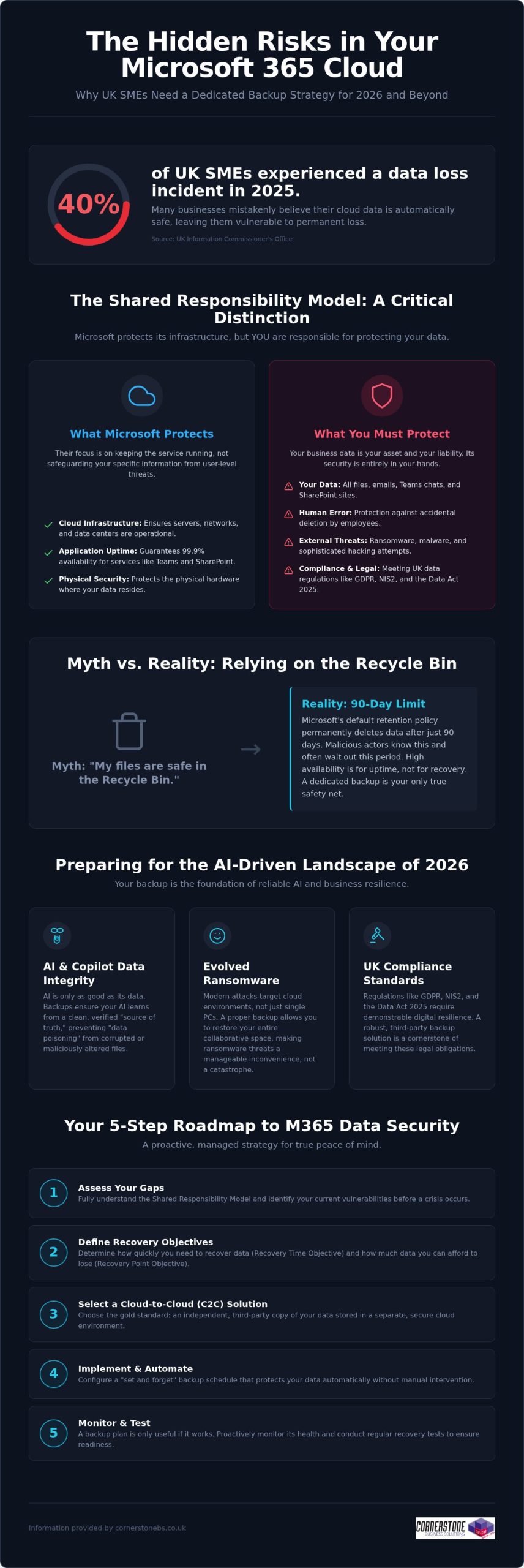
Did you know that 40% of UK small and medium-sized enterprises experienced at least one data-loss incident in 2025? It’s a startling figure from the Information Commissioner’s Office, especially since many business owners still believe Microsoft handles all their cloud backups automatically. While Microsoft manages the infrastructure, the “shared responsibility model” means you’re responsible for the data itself. Implementing reliable Microsoft 365 backup solutions for business is now a foundational requirement for any local firm that values its continuity. You need a proactive strategy that guards against ransomware and ensures you’re ready for the AI-driven landscape of 2026.

We know you want technical peace of mind without the jargon. You’ve likely felt the pressure of the Data (Use and Access) Act 2025 or worried about how to protect the data feeding your AI tools like Copilot. This guide promises a comprehensive roadmap to secure your business continuity and AI-readiness. We’ll preview the essential steps to achieve fast recovery times, meet UK compliance standards, and move toward a “set and forget” backup environment. Let’s explore how a modern data strategy can protect your reputation and your bottom line.

Key Takeaways

  • Grasp the nuances of the shared responsibility model to ensure your business continuity plan covers the security gaps Microsoft leaves behind.
  • Explore the vital link between clean historical data and the reliability of AI tools like Microsoft 365 Copilot in 2026.
  • Determine why Cloud-to-Cloud (C2C) backup has become the gold standard for UK firms needing to meet the latest regulatory requirements.
  • Access a practical 5-step roadmap for selecting Microsoft 365 backup solutions for business that offer granular, point-in-time recovery.
  • Shift from a reactive mindset to a proactive, managed strategy that provides peace of mind through award-winning expert monitoring.

The Reality of Microsoft 365 Data Protection in 2026

Microsoft does a brilliant job of keeping the lights on. They ensure SharePoint, Teams, and Exchange are available 99.9% of the time, providing a robust platform for your daily operations. However, their “Shared Responsibility Model” draws a clear line in the sand that many business owners overlook. Microsoft protects the underlying cloud infrastructure, but you remain the sole owner of the data living inside it. If that data is deleted, encrypted by a hacker, or corrupted by a faulty third-party app, the recovery is entirely your responsibility. A professional M365 backup is an independent, third-party copy of your cloud data. Without this safety net, your business is essentially working without a harness.

Debunking the ‘Microsoft Backs Everything Up’ Myth

Confusion often stems from the concept of “high availability.” This ensures your files are accessible from anywhere, but it isn’t the same as a comprehensive data backup strategy. Microsoft’s default retention policy for the recycle bin is typically 90 days. After that window closes, your data is permanently purged from their systems. For a busy SME, 90 days passes in a blink. If an employee accidentally deletes a critical folder and nobody notices for three months, there’s no “undo” button. Malicious actors also know this; they often target cloud files specifically because they know many firms lack external protection, making dedicated Microsoft 365 backup solutions for business a necessity rather than a luxury.

The 2026 Cost of Data Loss

In 2026, ransomware has evolved to specifically hunt for cloud-based synchronization gaps. It doesn’t just lock a single laptop; it can potentially lock your entire collaborative environment. When your team can’t access their shared files, productivity doesn’t just slow down; it stops entirely. This downtime carries a heavy price tag in lost revenue and fractured customer trust, especially when you consider that 40% of UK SMEs experienced a data-loss incident in 2025 according to the ICO. Integrating robust Microsoft 365 backup solutions for business into your wider managed IT support plan ensures that a single error doesn’t become a company-wide catastrophe. We’ve found that proactive monitoring catches these threats before they escalate, turning a potential disaster into a minor, manageable speed bump.

Why Dedicated Backup is Essential for 2026 AI-Readiness

By 2026, AI tools like Microsoft 365 Copilot have moved from novelty to necessity for UK SMEs. However, an AI is only as reliable as the data it consumes. If your source data is corrupted, deleted, or “poisoned” by incorrect inputs, the AI will generate flawed insights that could misguide your business decisions. This is where Microsoft 365 backup solutions for business play a pivotal role. They don’t just save files; they preserve the historical context and data integrity that AI models need to function accurately.

Modern AI-readiness also requires protecting the “Identity” layer. This includes the complex web of permissions and configurations that determine who can access what. If a ransomware attack resets these permissions or if they’re accidentally wiped, your AI could inadvertently expose sensitive payroll data or intellectual property to the wrong users. Robust backup ensures you can roll back to a known-good state of both data and access rights, preventing your automation from turning into a liability.

Ensuring AI and Copilot Data Integrity

Data poisoning is a growing concern in the 2026 landscape. If a malicious actor gains access and subtly alters your spreadsheets or documents, your AI will learn from this “bad” data. Independent backup acts as the ultimate source of truth, ensuring your AI systems learn from verified, clean data rather than corrupted or accidental deletions. Versioning is equally critical. It allows you to compare current AI outputs against historical datasets to ensure accuracy. If you’re unsure about your current setup, our team can help you assess your cloud resilience to ensure your data architecture is ready for full automation.

Meeting UK Compliance Standards (GDPR & NIS2)

Compliance isn’t a static target. The Data (Use and Access) Act 2025 and the tightening of NIS2 requirements mean UK businesses must demonstrate high levels of digital resilience. Adopting professional Microsoft 365 backup solutions for business ensures you stay aligned with UK data protection rules. These regulations demand that personal data is not only protected but also recoverable in a timely manner.

Beyond legal mandates, having a verifiable backup process is a core requirement for achieving Cyber Essentials Plus certification. It proves to your clients and insurers that you take data sovereignty seriously. This level of protection perfectly complements our broader cyber security services, creating a multi-layered defence that keeps your business stable and secure. We believe that a proactive approach to backup is the only way to maintain emotional security in a high-tech world.
Microsoft 365 Backup for UK Business: 2026 Strategy Guide

Evaluating Microsoft 365 Backup Solutions for UK Businesses

Selecting the right Microsoft 365 backup solutions for business requires looking beyond basic file storage. In 2026, Cloud-to-Cloud (C2C) backup has emerged as the definitive gold standard for resilience. It creates a secure bridge between your Microsoft environment and a separate, air-gapped cloud vault. This approach ensures that even if your primary credentials are compromised, your backup remains untouched and ready for a point-in-time recovery. It’s the most proactive way to ensure your business stays operational during a crisis without relying on vulnerable local hardware.

Cloud-to-Cloud vs. Local Backup Models

Many firms consider backing up cloud data to a local on-premise server, but this is often counter-productive. It introduces a physical bottleneck and increases your hardware maintenance costs. By contrast, C2C models offer superior scalability and ransomware protection through air-gapping. As a multi-award-winning provider, we carefully vet cloud solutions for our national clients to ensure they provide the speed and security modern UK businesses demand. We focus on systems that provide a “clean” environment, isolated from your primary network.

Granularity: Restoring More Than Just Files

A common pitfall is choosing a solution that only protects emails and documents. True resilience requires granularity. You need the ability to restore specific Teams chats, SharePoint sites, or even individual Planner boards without performing a full-tenant “bulk restore.” Bulk restores are often messy and overwrite recent work, whereas granular restores allow you to pluck a single missing item from the past and drop it back into the present. Ensure your chosen Microsoft 365 backup solutions for business also preserve metadata and user permissions. Losing these configurations can cause hours of manual reconfiguration and downtime.

Data residency is another non-negotiable factor for UK firms. To stay aligned with the Information Commissioner’s Office (ICO) guidelines, your backup data should ideally reside in UK-based data centres. This simplifies your compliance with UK GDPR and ensures you aren’t subject to conflicting international data laws. Finally, consider the frequency of your protection. While automated daily backups are standard, businesses with high transaction volumes should look for Continuous Data Protection (CDP). This captures changes in near real-time, ensuring your Recovery Point Objective (RPO) is measured in minutes rather than hours, providing the ultimate emotional security for your team.

A 5-Step Roadmap for Implementing M365 Backup

Implementing a robust defence for your cloud data doesn’t have to be a complex headache. We’ve simplified the journey into a clear, five-step roadmap designed to help you deploy Microsoft 365 backup solutions for business with total confidence. This strategy ensures your organisation stays protected against modern ransomware while remaining firmly within UK regulatory boundaries. By following these steps, you move from a reactive posture to a proactive, resilient one.

  • Step 1: Data Audit. Start by identifying what’s critical. Not every temporary file needs long-term storage, but your financial records, legal contracts, and intellectual property certainly do.
  • Step 2: Define RPO and RTO. Set clear recovery expectations. Determine how much data you can afford to lose (Recovery Point Objective) and how quickly you need your systems back online (Recovery Time Objective) following an incident.
  • Step 3: Solution Selection. Choose a partner that understands the UK landscape. Match specific features to your industry requirements, ensuring you’re ready for the 2026 NIS2 compliance standards.
  • Step 4: Secure Configuration. Don’t leave the back door open. Implement Multi-Factor Authentication (MFA) and end-to-end encryption to protect the backup itself from unauthorised access.
  • Step 5: Testing and Validation. Schedule regular “fire drills.” A backup remains a theoretical safety net until you’ve proven it can actually restore your data under pressure.

Selecting the right Microsoft 365 backup solutions for business is the foundation of your continuity plan. It’s about more than just insurance; it’s about ensuring your team can keep working, no matter what happens in the wider digital world.

Auditing for Compliance and Efficiency

Mapping your data footprint is the first step toward total resilience. It’s about understanding how information flows through Teams, SharePoint, and Exchange. This alignment with it company solutions best practices ensures you aren’t just ticking a box, but actually improving your operational efficiency. Identifying sensitive data early also allows you to apply longer retention periods where they’re legally required, keeping your business on the right side of the ICO.

The Importance of Regular Recovery Testing

We often tell our clients that a backup is only as good as its last successful restore. In a fast-moving cloud environment, configurations change and data volumes grow. Regular, non-disruptive recovery tests ensure your business continuity plan actually works when it’s needed most. Automated reporting provides the verifiable proof of backup validation that stakeholders and insurers now demand for Cyber Essentials Plus. If you’re ready to secure your infrastructure, our award-winning national team can help you design a custom backup strategy that provides true peace of mind.

Partnering for Resilience: The Cornerstone Managed Approach

Software alone isn’t a strategy. While many providers offer Microsoft 365 backup solutions for business as a standalone product, at Cornerstone Business Solutions, we believe true resilience comes from a dedicated partnership. A DIY approach often leaves the heavy lifting of monitoring and recovery to your internal team, who are already stretched thin. Our award-winning managed approach shifts that burden to our experts. We don’t just set up the software; we proactively monitor every backup cycle. If a sync fails at 2 am, our team is already working on the fix before your staff even log in for the day.

This proactive stance is a foundational element of our service. We integrate data protection into your wider Microsoft 365 migration and support plan, ensuring that security is baked in from day one. Should the worst happen, you have instant access to our unlimited UK helpdesk. You won’t be navigating a complex recovery wizard alone. You’ll be talking to a local expert who understands your business and is committed to getting you back on track immediately. This level of support provides the emotional security every business leader needs in a high-stakes digital environment.

Bespoke Solutions for National UK Enterprises

We recognise that a law firm has different retention needs than a retail chain. Our team customises your backup policies to match your specific UK industry requirements and internal workflows. As your UK headcount grows, your backup infrastructure scales seamlessly with you. This is the “Cornerstone Difference.” We provide the professional authority of a Microsoft partner combined with the approachable, community-focused service that defines our national team. We focus on building long-term relationships rather than just closing transactions.

Beyond Backup: A Foundation for Growth

Our commitment to your success extends beyond the initial setup. We conduct quarterly technology reviews to ensure your 2026 strategy remains future-proof as new threats emerge. These sessions integrate your Microsoft 365 backup solutions for business with wider cyber security audits, providing a holistic view of your digital health. We want you to feel confident that your infrastructure is a solid foundation for growth, not a point of failure. We invite you to start a conversation about securing your Microsoft 365 backup today and discover how a proactive partner can help your business thrive.

Building a Resilient Digital Foundation for 2026

Protecting your cloud data is no longer a choice; it’s a fundamental requirement for business stability. We’ve explored how the shared responsibility model places the burden of protection on your shoulders and why clean data is the essential fuel for your AI tools. By choosing professional Microsoft 365 backup solutions for business, you move beyond the limitations of the recycle bin and secure your compliance with UK laws like NIS2. This proactive approach ensures your team stays productive even if a crisis strikes.

As a multi-award-winning IT provider and trusted Microsoft Partner, we’re here to ensure your transition to a “set and forget” backup strategy is seamless. Our national team provides unlimited proactive UK helpdesk support, catching failures before they impact your operations. Secure your business data with Cornerstone’s managed backup solutions and gain the peace of mind that comes from knowing your continuity is in expert hands. We’re ready to help you thrive in an increasingly complex digital landscape.

Frequently Asked Questions

Does Microsoft 365 include a full backup for business users?

Microsoft does not provide a comprehensive backup service as part of its standard subscriptions. They follow a Shared Responsibility Model where they ensure the service’s availability, but you remain responsible for the data stored within it. If data is deleted or corrupted, Microsoft’s native tools are limited. This is why investing in dedicated Microsoft 365 backup solutions for business is essential to ensure your company remains resilient against permanent data loss.

How long is data kept in the Microsoft 365 recycle bin?

By default, items in the Microsoft 365 recycle bin are kept for 93 days before being permanently deleted. This window is often much shorter than business owners realise. If a file is deleted and the error isn’t discovered within this three-month period, the data is gone forever from Microsoft’s systems. Relying on this temporary storage isn’t a substitute for a true backup strategy that offers long-term retention and easy recovery.

Can a Microsoft 365 backup protect against ransomware?

Yes, an independent backup is one of your strongest defences against ransomware. Professional Microsoft 365 backup solutions for business create an air-gapped copy of your data that sits outside your primary Microsoft environment. If hackers encrypt your live files, you can perform a point-in-time restore. This allows you to roll your data back to a clean version from just before the attack, bypassing the need to pay a ransom or lose critical files.

What is the difference between archiving and backup in Microsoft 365?

Archiving and backup serve two different purposes. Archiving is about moving older data out of your primary mailbox to save space or meet legal discovery requirements. Backup creates a separate copy of your active data so you can recover it quickly after a deletion or cyberattack. You need both to be fully protected. While archiving helps with organisation, only a backup ensures business continuity when things go wrong and files are missing.

How often should a UK business backup its Microsoft 365 data?

Most UK businesses should aim for at least one automated backup every 24 hours. However, if your team handles high volumes of sensitive data or frequent transactions, daily backups might not be enough. In these cases, we recommend Continuous Data Protection (CDP) which captures changes in near real-time. Frequent backups significantly reduce your Recovery Point Objective (RPO), ensuring that only a few minutes of work are at risk in the event of a system failure.

Is it better to backup Microsoft 365 to the cloud or a local server?

Cloud-to-Cloud (C2C) backup is generally far superior to local server options. Backing up cloud data to a physical server in your office creates a bottleneck and introduces risks like fire, theft, or hardware failure. C2C solutions keep your data in a secure, geographically separate data centre. This ensures your recovery speeds are faster and your data remains accessible from anywhere, which is vital for modern and flexible UK workforces that rely on the cloud.

Does a backup include Microsoft Teams and SharePoint data?

A professional backup service should absolutely include Teams and SharePoint. Native Microsoft tools often struggle to capture the complex web of permissions, tabs, and private chats within Teams. A robust solution ensures that not just the files, but the entire collaborative structure is preserved. This includes SharePoint sites, Planner boards, and OneNote files. Recovering a file is helpful, but recovering a whole project environment is what truly saves your team’s productivity and time.

How much does a professional Microsoft 365 backup solution cost in the UK?

The cost of protecting your data depends on several factors, including your total headcount and the volume of data you need to store. Most providers use a per-user, per-month model, while others charge based on the total gigabytes protected. While price is always a consideration, it’s important to weigh the monthly fee against the potential cost of downtime. We focus on providing bespoke value that scales with your business as your UK headcount grows.


Microsoft 365 User Adoption Plan: A Strategic Guide for 2026

Posted on: July 6th, 2026 by Cornerstone

Did you know that as of early 2026, the workplace adoption rate for Microsoft 365 Copilot is only 35.8%? This means fewer than four in ten employees with access are actually using the tool. It’s a startling figure that highlights a common challenge for local business owners: paying for powerful technology that sits idle while subscription costs continue to climb. With the July 2026 price increases affecting everything from Business Basic to E5 plans, simply assigning licenses isn’t a viable strategy anymore. To get the most from your investment, you need a proactive Microsoft 365 user adoption plan that turns reluctant staff into confident power users.

We know how draining it is to see your team struggle with fragmented communication or rely on unapproved “shadow IT” apps because they find official tools too complex. It’s more than just a software issue; it’s about business stability and emotional security for your workforce. This guide will show you how to move beyond simple licensing to create a robust framework that ensures your team actually benefits from the suite. We’ll walk you through the steps to achieve full ROI, strengthen your security through official tool usage, and foster seamless collaboration across your entire organization.

Key Takeaways

  • Avoid the “Licence Trap” by ensuring your team uses every capability of your subscription, moving beyond just basic email.
  • Discover how a structured Microsoft 365 user adoption plan shifts the focus from technical features to solving your specific business challenges.
  • Overcome common barriers like security friction and time constraints through targeted micro-learning and visible executive leadership.
  • Implement a proven four-step roadmap to build internal excitement and establish clear governance before your official launch.
  • Partner with a multi-award-winning team to turn your IT infrastructure into a foundation for long-term reliability and growth.

Why Your Microsoft 365 User Adoption Plan is the Key to ROI

Buying a subscription is only the first step. A Microsoft 365 user adoption plan is a structured strategy designed to change user behaviour and maximise the utility of the tools you already pay for. Too many businesses fall into what we call the ‘Licence Trap.’ They invest in premium seats like Microsoft 365 E3 or E5, which saw price increases to $39.00 and $60.00 per user respectively in July 2026, yet their staff only use the software for basic email. Paying for high-end features that go untouched is a significant drain on your resources.

In 2026, the landscape has shifted. Adoption is no longer just about knowing how to use Excel or Word. It now involves mastering AI agents and Microsoft Copilot to stay competitive. Technical deployment is simply the ‘plumbing’ of the system. True adoption is the cultural integration that ensures your team feels confident and capable. To understand this shift, we can look at the Technology Acceptance Model, which highlights that perceived usefulness and ease of use are the primary drivers of whether technology is actually used. Ultimately, a Microsoft 365 user adoption plan is the bridge between technical capability and business performance.

The Hidden Cost of Poor Adoption

When staff aren’t trained properly, they often find their own workarounds. This leads to ‘Shadow IT,’ where team members use personal WhatsApp groups or Dropbox accounts to share sensitive company data. These security vulnerabilities put your business at risk. Additionally, poor adoption creates data silos. Information gets trapped in individual inboxes instead of being accessible in shared SharePoint sites. This fragmented communication eventually hurts employee morale and can even impact staff retention as frustration grows.

Defining Success Beyond the ‘Go-Live’ Date

The ‘go-live’ date is just the beginning of the journey. The first 90 days post-migration are critical for setting the habits that define your long-term success. You need to establish clear KPIs to track progress. We look at several factors to measure real success:

  • Usage frequency across key apps like SharePoint, OneNote, and Planner.
  • Active participation in Microsoft Teams channels rather than private chats.
  • A measurable reduction in internal email volume as collaboration moves to official platforms.

If these metrics aren’t improving, your adoption strategy needs adjustment. Focusing on these outcomes ensures your technology investment delivers the reliable, productive environment your business deserves.

The Core Pillars of a Successful Adoption Framework

A robust Microsoft 365 user adoption plan relies on more than just high-quality software. It requires a foundation built on human behaviour and clear leadership. Executive sponsorship is the first and most vital pillar. If your leadership team continues to send internal updates via traditional email attachments instead of using Teams or SharePoint, your staff will likely follow suit. When directors lead by example, they validate the new digital workspace. This visibility creates a ripple effect, signaling that the move to a modern environment is a permanent, beneficial shift for the whole company.

Beyond leadership, you must maintain continuous communication to keep the momentum going long after the initial rollout. This is especially true in 2026, as tools like Microsoft Copilot and autonomous AI agents become standard. Keeping the “buzz” alive through regular updates about new features or success stories prevents the technology from becoming stagnant. Building a strong business case for accessibility and user adoption helps justify the ongoing investment in these resources, ensuring that your digital infrastructure remains a source of stability and growth.

Building Your Champion Network

Identifying “tech-forward” employees across every department is a game-changer for long-term success. These Champions shouldn’t just be from your IT team. Look for the savvy administrator in Sales or the organized project lead in Operations. These individuals act as your first line of support, speaking the specific “language” of their departments. By providing Champions with early access to new features and direct lines to technical support, you empower them to solve problems locally. They are perfectly positioned to identify “friction points” in daily workflows that an external consultant might miss. If you want to see how this fits into a broader rollout, our guide to Microsoft 365 migration for business UK provides the necessary groundwork.

Scenario-Led Training vs. Feature Lists

Ditch the long lists of buttons and menus. Modern training must be scenario-based to be effective. Instead of teaching “how to use OneDrive,” show your team “how to collaborate on a client proposal in real-time without version control issues.” This approach focuses on problem-solving rather than technical theory. We aim for “Quick Wins” that save employees at least 15 minutes a day immediately. When staff see a direct benefit to their personal productivity, resistance vanishes. If you are feeling overwhelmed by the technical setup required to reach this stage, our team provides managed IT support designed to simplify these complex transitions for local businesses.

Microsoft 365 User Adoption Plan: A Strategic Guide for 2026

Overcoming Resistance: Common Adoption Barriers in 2026

Resistance to new technology is rarely about staff being difficult. Most of the time, it’s about time. We frequently hear the “too busy to learn” excuse from exhausted teams who feel they can’t spare a moment to explore new features while managing their daily workload. To solve this, your Microsoft 365 user adoption plan should lean heavily on micro-learning. Instead of forcing staff into hour-long training sessions, provide bite-sized tips that take less than two minutes to consume. This approach respects their schedule while slowly building their confidence in the new environment.

Technical friction is another major hurdle, particularly “MFA Fatigue” and the confusion surrounding file storage. Users often feel overwhelmed by security prompts or get lost trying to decide whether a document belongs in Teams, SharePoint, or OneDrive. Clear, simple rules are the antidote to this anxiety. Teams is for active collaboration; SharePoint is for your department’s “source of truth”; and OneDrive is for your personal working drafts. Following Microsoft’s official adoption guide can help you establish these boundaries early, ensuring that security doesn’t feel like a barrier to productivity.

You also need to account for the generational gap in your workforce. Digital natives might embrace AI agents and Copilot instinctively, but traditional workers often prefer the reliability of the tools they’ve used for decades. Tailoring your support to meet people where they are ensures that everyone feels included in the transition. When you provide a clear path forward, you remove the fear of the unknown that often drives resistance.

Combating Shadow IT and Unauthorised Apps

When users stray from official tools to use personal WhatsApp groups or Dropbox accounts, it’s usually about convenience, not malice. They use these apps because they feel easier than the “official” way. A successful Microsoft 365 user adoption plan makes the official tools the easiest path for every task. By streamlining your internal processes, you naturally reduce the risks associated with unauthorised software. This transition is a vital component of our cyber security services, as keeping data within your managed environment is the best way to maintain business resilience.

The ‘Old Habits’ Barrier

“We’ve always done it this way” is perhaps the most dangerous phrase in modern business. Breaking these cycles requires more than just a manual; it requires a bit of fun. We recommend using gamification and “Winner, Winner” incentives to reward employees who actively switch to new workflows. Whether it’s a small prize for the first department to move all their internal comms to Teams or a shout-out for the best use of a Copilot prompt, positive reinforcement works wonders. Ultimately, resistance is usually a symptom of poor communication, not poor technology.

A 4-Step Roadmap for Your 2026 Adoption Strategy

Success doesn’t happen by accident. It requires a clear, repeatable process that moves your team from curiosity to competence. A well-structured Microsoft 365 user adoption plan breaks this journey down into manageable stages, ensuring no one feels left behind. By following a proven roadmap, you can transform your digital environment into a powerhouse of productivity and collaboration. It’s about building a foundation that supports your staff while protecting your business interests.

Step 1: Readiness Assessment and Governance. Before you roll out new tools, you must set the rules. This stage involves defining who can create Teams, how data is classified, and what security protocols are in place. Setting these boundaries early prevents the “digital wild west” scenario that often leads to frustration and data leaks. It’s the essential first step in creating a safe space for your team to work.

Step 2: The ‘Buzz’ Phase. You need to sell the benefits to your team before the “Go-Live” date. Use internal marketing to build excitement. Highlight how these tools will solve specific daily headaches, like endless email chains or lost documents. When people understand the “why” behind the change, they’re far more likely to engage with the “how.”

Step 3: Multi-Modal Training. People learn in different ways. Your Microsoft 365 user adoption plan should combine live workshops with on-demand video tutorials and interactive “Learning Pathways.” This variety ensures that whether someone is a visual learner or prefers hands-on practice, they have the resources they need to succeed.

Step 4: Measure and Iterate. Use data to guide your progress. The Microsoft Adoption Score is a vital tool here. As of January 2026, the “Technology experiences” score was retired, meaning the maximum possible score is now 600. Use these metrics to identify which departments are thriving and which might need a little extra support to get over the finish line.

Phase 1: Governance and AI Readiness

Preparing for the future means getting your data ready for Microsoft Copilot today. You must ensure your permissions and policies are watertight so that AI results remain accurate and secure. This isn’t just a technical task; it’s a strategic one. We recommend consulting with it company solutions to align your technical rules with your long-term business goals. If you’re ready to start this journey, reach out to our local team for a conversation about your specific needs.

Phase 2: Launch and Gamification

Make your launch date feel like an event. Involve your leadership team to show that this is a company-wide priority. You can use “digital badges” or small prizes to reward the first team that successfully migrates their files to SharePoint. We also suggest creating a dedicated “M365 Help” channel in Teams. This encourages peer-to-peer support, allowing your internal Champions to shine while reducing the pressure on your formal IT support channels.

How Cornerstone Business Solutions Drives Long-Term Adoption

Technology should be a foundation for stability, not a source of frustration. At Cornerstone, we position ourselves as your proactive partner, moving far beyond the traditional “break-fix” helpdesk model. A successful Microsoft 365 user adoption plan isn’t a one-time project; it’s a continuous commitment to your team’s growth. We simplify the complex stream of Microsoft updates, ensuring your staff always knows how to use the latest productivity features without feeling overwhelmed by technical jargon.

Our multi-award-winning approach to managed IT services Teesside focuses on real-world outcomes that respect your time. We don’t just hand over the keys and walk away. Through ongoing licensing management and quarterly business reviews, we track your adoption KPIs to ensure you’re getting full value from every subscription. If a department is struggling to move away from legacy processes, we identify the specific roadblock and provide the support needed to clear it. This ensures your investment in Microsoft 365 translates directly into business continuity and efficiency.

Beyond the Migration: Proactive Support

Our support doesn’t stop once your files are moved. We use proactive monitoring to ensure your Microsoft 365 environment remains healthy, fast, and secure. You’ll work with a dedicated team that understands your unique business culture and goals. This personal connection provides the emotional security of knowing that expert help is always reachable and local. We invite you to an informal, no-obligation conversation about your current usage to see where we can unlock more value for your business.

Tailored Solutions for UK Businesses

A “one size fits all” strategy often fails SMEs because it ignores the specific workflows that make your business unique. We’re committed to delivering bespoke technology solutions that drive actual growth rather than just adding technical noise. By aligning your Microsoft 365 user adoption plan with your commercial objectives, we turn a software suite into a strategic asset. Our local experts are ready to help you bridge the gap between simply having the tools and truly mastering them. Let’s work together to build a more collaborative and secure future for your team.

Book a Microsoft 365 Adoption Consultation with Cornerstone Today

Unlocking the True Value of Your Digital Workspace

Maximise your Microsoft 365 investment with a bespoke adoption plan from Cornerstone.

Your team deserves technology that works as hard as they do. Let’s start building that future today.

Frequently Asked Questions

What is a Microsoft 365 user adoption plan?

A Microsoft 365 user adoption plan is a structured strategy designed to help your team transition from simply having access to tools to actively using them to solve business problems. It focuses on human behaviour rather than just technical setup. By aligning software features with specific daily tasks, you ensure that your investment in the platform delivers tangible improvements in productivity and collaboration across your entire organisation.

How long does a typical M365 adoption phase take?

Most organisations see significant shifts in behaviour within the first 90 days of a structured plan. The initial “buzz” and training phases usually occur over four to six weeks, followed by a period of reinforcement and habit-building. However, adoption is an ongoing process. As Microsoft releases new features or AI capabilities, your plan should evolve to help staff integrate these updates into their existing workflows seamlessly.

Do we need a user adoption plan if we are already using Office 365?

Yes, because having the tools is very different from mastering them. Many businesses only use a fraction of their subscription, often sticking to basic email and file storage. With the 2026 price increases for plans like Business Standard and E3, a proactive strategy is essential to justify the higher costs. It helps your team move beyond legacy habits and start using advanced collaboration and AI tools effectively.

What are the most common reasons Microsoft 365 rollouts fail?

Rollouts often fail due to a lack of executive sponsorship and insufficient user training. If leadership doesn’t lead by example, staff often view the new tools as optional rather than essential. Other common barriers include “MFA fatigue” and the confusion caused by not having clear governance rules. When employees don’t understand where to save files or how to communicate, they often revert to unauthorised “shadow IT” apps for convenience.

How do you measure the success of a user adoption plan?

Success is measured through a combination of technical metrics and cultural feedback. You can use the Microsoft Adoption Score to track active usage across Teams, SharePoint, and OneDrive. Beyond the data, look for a measurable reduction in internal email volume and the elimination of unauthorised third-party apps. High engagement in your dedicated “Help” channels and positive feedback during quarterly business reviews are also strong indicators of a successful Microsoft 365 user adoption plan.

Can we outsource our Microsoft 365 adoption strategy?

You can certainly partner with an expert to manage the strategic and technical aspects of adoption. Outsourcing to a proactive IT provider allows you to leverage their experience in managing complex migrations and training programs. They can handle the heavy lifting of governance, security setup, and micro-learning delivery. This allows your internal leadership to focus on driving the cultural shift while the technical partner ensures the systems remain fast and reliable.

How does Microsoft Copilot affect our adoption plan in 2026?

In 2026, Copilot has become the primary interface for many users, shifting the focus from manual tasks to AI-driven goal setting. Your adoption plan must now include specific training on prompt engineering and the use of autonomous agents. Since fewer than four in ten employees currently use Copilot actively, your strategy should focus on showing staff how AI can save them time on repetitive administrative work and complex data analysis.

What is the role of a ‘Champion’ in M365 adoption?

A Champion is a tech-forward employee who acts as a local expert and advocate within their specific department. They provide peer-to-peer support, helping colleagues solve minor issues without needing to contact the formal helpdesk. Champions are vital for identifying department-specific friction points and sharing success stories. Their involvement humanises the technology and makes the transition feel more approachable for staff who might otherwise be resistant to change.


Copyright © 2026 Cornerstone Business Solutions