

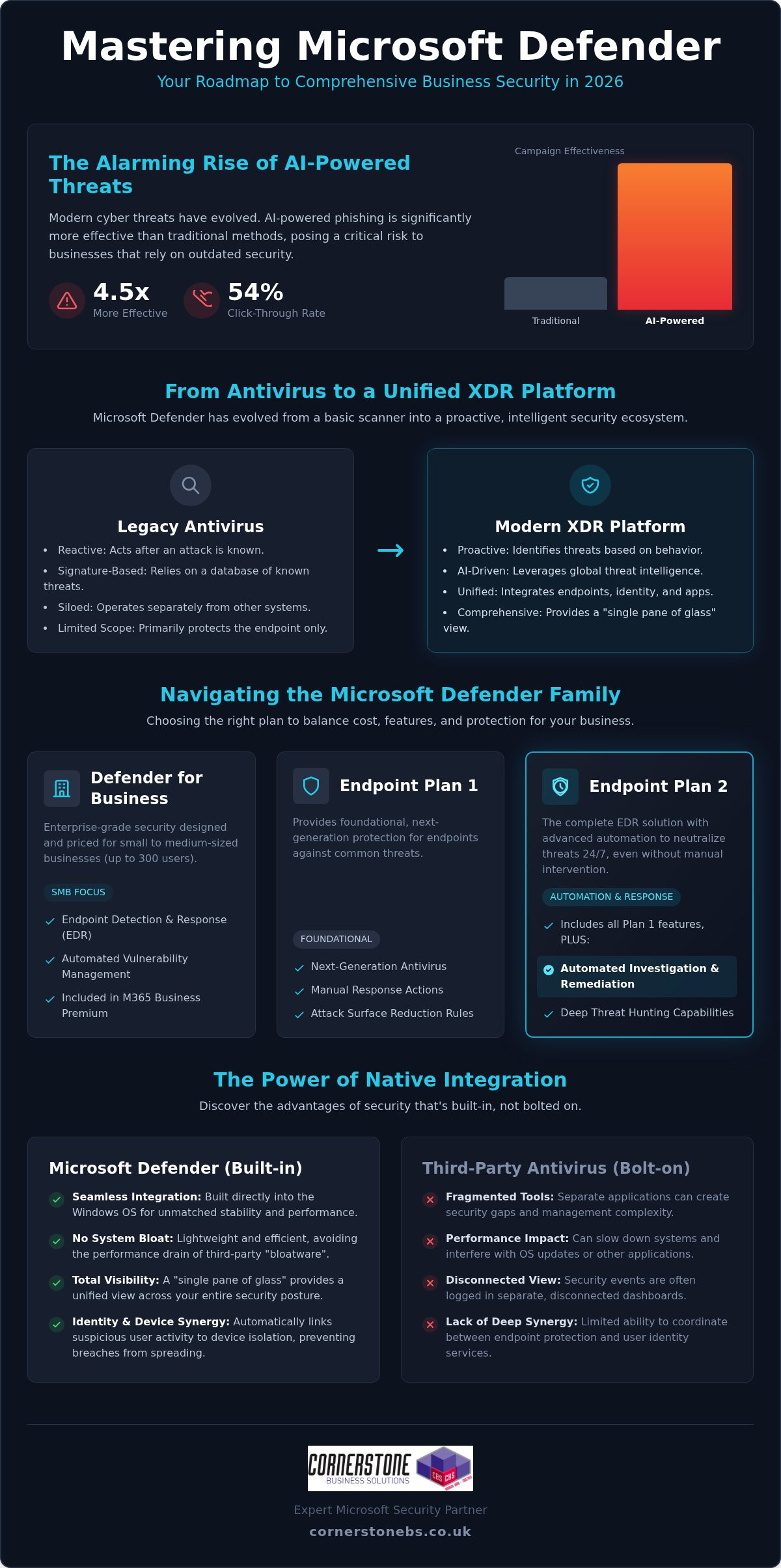
AI-powered phishing campaigns are now 4.5 times more effective than traditional methods, with click-through rates jumping to 54% in 2026. It’s a sobering reality that keeps many business owners awake at night, especially when paired with the constant threat of sophisticated ransomware. You likely already know that microsoft defender is a leader in the security world, but trying to navigate its confusing licensing tiers and complex policy configurations can feel like a full-time job you didn’t apply for.
We understand that you want robust protection without the headache of managing fragmented tools or worrying if your settings are actually correct. As a multi-award-winning Microsoft Partner, we’ve seen how the right setup provides true 24/7 peace of mind. This guide will help you master the entire Defender ecosystem, from Endpoint to Office 365. We’ll provide a clear roadmap for migrating from third-party antivirus software and explain exactly how to secure your infrastructure using expert-led insights. You’ll gain a straightforward strategy to keep your organisation resilient and your data safe.
Key Takeaways
- Discover how microsoft defender has evolved into a comprehensive XDR platform that protects your business far beyond traditional, signature-based antivirus.
- Clear the confusion around licensing tiers and identify exactly which version your organisation needs to balance cost with robust protection.
- Learn why native integration offers a “single pane of glass” advantage, reducing system bloat while giving you total visibility over your security posture.
- Establish a roadmap for enforcing a Zero Trust architecture, ensuring that every identity and device is verified before accessing your critical data.
- Understand the vital role of expert configuration and proactive monitoring in transforming a security tool into a 24/7 managed defence system.
Beyond Antivirus: What is Microsoft Defender in 2026?
If you look at the history of Microsoft Defender, you’ll see a tool that began as a basic, reactive scanner for home users. Fast forward to 2026, and the landscape has changed completely. It has evolved into a sophisticated Extended Detection and Response (XDR) platform that serves as the bedrock for modern business security. It’s no longer just about catching a virus that’s already known to the world; it’s about providing a unified shield across your entire digital estate.
Modern cyber threats are far too fast for old-school, signature-based scanning. Attackers now use AI to create unique, never-before-seen malware every second. Because microsoft defender is part of a global threat intelligence network, it processes trillions of signals daily from around the world. When a new threat is detected in one corner of the globe, your systems are protected almost instantly. This scale of data allows your organisation to stay one step ahead of even the most sophisticated criminal groups.
The Shift from Reactive to Proactive Defence
Legacy antivirus waits for a match in a database before it acts. Modern endpoint protection, however, looks for patterns. By 2026, AI-powered phishing campaigns have become 4.5 times more effective than traditional methods, according to recent industry benchmarks. We use the advanced behavioral analysis within microsoft defender to spot these attacks before they execute. It identifies “zero-day” threats by monitoring what a file does, rather than just what it is. This proactive approach is essential for stopping ransomware before it can lock your critical data.
A Core Component of Microsoft 365
Security shouldn’t be an afterthought or a separate piece of “bloatware” that slows down your team’s laptops. Because Defender is built directly into the Windows operating system, it offers a level of performance and stability that third-party tools can’t match. It creates a seamless synergy between identity protection and device security. For example, if a user account shows suspicious login activity, the system can automatically isolate that specific device to prevent a breach from spreading through your network. Microsoft Defender is a unified security platform that provides real-time, AI-driven protection across your entire digital infrastructure in 2026.
This deep integration means your security policies follow your staff, whether they’re working from the office or a local coffee shop. It ensures your business continuity remains intact without requiring your team to manage complex, disconnected security apps.
Navigating the Microsoft Defender Family: Which Version Do You Need?
Choosing the right version of microsoft defender often feels like looking at a restaurant menu with too many options. For most UK businesses, the goal is simple: total protection without paying for enterprise features they’ll never use. The “Defender” brand covers a wide family of tools, each protecting a specific part of your digital environment. It’s about total visibility. We aim to help you cut through the noise and find the exact fit for your needs.
Microsoft Defender for Business (SMB Focus)
Defender for Endpoint Plan 1 vs. Plan 2
Understanding the difference between Plan 1 and Plan 2 is crucial for your long-term security roadmap. Plan 1 provides foundational protection, including next-generation antivirus and attack surface reduction. However, Plan 2 is where the real power lies. It introduces automated investigation and remediation, which means the system can automatically neutralise threats while your team sleeps. This is a game-changer for business continuity.
- Plan 1: Best for basic security needs and standard device protection.
- Plan 2: Essential for firms requiring deep threat hunting, sandboxing, and advanced forensics.
Choosing Plan 2 often helps organisations align more easily with national compliance standards like Cyber Essentials. It provides the detailed reporting and evidence needed to prove your security posture is robust. Protecting your devices is only half the battle. Defender for Office 365 focuses on your primary communication channels, shielding your team from malicious links in emails or dangerous files shared on Teams. If you’re unsure which tier fits your current growth stage, our team can provide a tailored cyber security assessment to clear up the confusion.
Microsoft Defender vs. Third-Party Antivirus: The 2026 Verdict
Many business owners ask if microsoft defender is truly “good enough” to replace long-standing names like Sophos or Norton. The short answer is yes. In fact, for most UK organisations, it’s often the superior choice. Managing multiple security consoles creates a fragmented view of your network. We call this “security sprawl,” and it’s a primary cause of missed alerts. Switching to a “single pane of glass” approach reduces the number of dashboards your team needs to monitor, ensuring that nothing slips through the cracks.
Performance is another critical factor. Third-party antivirus software often acts as “bloatware,” consuming significant system resources and fighting with the Windows kernel. Because Defender is built into the OS, it operates with surgical precision. It protects your devices without the sluggishness that frustrates staff. From a cost perspective, you’re likely already paying for these features through your existing Microsoft 365 seats. Cutting out redundant third-party subscriptions isn’t just about saving money; it’s about simplifying your entire IT infrastructure.
The Benefits of Ecosystem Integration
The real magic happens when you pair Defender with Microsoft Intune. This combination allows for seamless policy deployment across your entire fleet of devices. If a threat is detected, the system can trigger an automated response to neutralise the danger instantly. This closes the window of opportunity for attackers. It removes the manual “IT headache” of chasing down infected laptops. Your security posture becomes a proactive shield rather than a list of chores for your internal team.
Potential Drawbacks to Consider
We believe in being honest with our partners. Some worry about “putting all their eggs in one basket” by relying solely on Microsoft. While this is a valid concern, the depth of Microsoft’s global threat intelligence usually outweighs the risks of diversification. However, there is a learning curve. The advanced XDR features require expert setup to avoid “alert fatigue,” where your team becomes desensitised to constant notifications. Professional configuration ensures that only the most critical threats reach your desk. In high-risk industries, a benchmark from early 2026 showed that microsoft defender missed 59% fewer high-severity email threats than the next-closest secure email gateway. This level of accuracy is why we recommend it as the foundation of your cyber security strategy.
Implementation Strategy: Securing Your Infrastructure with Defender
A proper implementation doesn’t happen by accident. It begins with a comprehensive security audit to identify the hidden gaps in your current infrastructure. We treat microsoft defender as a precision tool, not a generic “install and forget” application. By mapping your specific risks, we can build a defence that supports your growth instead of hindering it. This proactive approach ensures that your security posture is robust from day one.
The Road to Zero Trust
The modern workspace is no longer confined to four walls. What is Zero Trust Security & Why Does It Matter? It’s a fundamental shift in how we handle access. Identity has become the new security perimeter. We use Defender for Identity to monitor user behaviour and stop credential theft in its tracks. Every single access request is verified, ensuring that being “on the network” no longer equates to having total trust. This model protects your data regardless of where your team is working.
We also enforce Attack Surface Reduction (ASR) rules to block the common infection vectors that hackers love. These rules stop malicious scripts and suspicious email attachments before they can cause damage. Crucially, we integrate this with a robust Multi-Factor Authentication (MFA) strategy. MFA is the foundation of your Defender ecosystem, providing an essential layer of emotional and technical security for your staff. It acts as the final lock on the door that keeps your business continuity intact.
Phased Deployment and Policy Tuning
Avoid the temptation to “flip the switch” on every policy at once. This often causes unnecessary friction for your team and can lead to blocked legitimate work. We prefer a phased rollout, starting with audit mode to monitor policy impacts without interrupting your daily operations. This allows us to tune alerts and eliminate “noise,” so your team only sees what truly matters. We focus on the following key areas during this phase:
- Policy Calibration: Adjusting settings to match your specific business workflows.
- Alert Refinement: Ensuring that your security dashboard is clear and actionable.
- Mobile Protection: Extending your security umbrella to every smartphone and tablet through Defender for Mobile.
Ensuring your mobile fleet is protected provides consistent security across every device your team uses. If you want to ensure your setup is handled by a multi-award-winning Microsoft Partner, contact us for an expert cyber security consultation today.
Managed Security: Why Expert Configuration is Non-Negotiable
Owning a powerful tool like microsoft defender is only the first step toward true resilience. It’s like purchasing a high-performance engine; it only delivers its full potential when tuned by a specialist. Many organisations struggle with “alert fatigue” because their security settings aren’t calibrated to their specific workflows. This leads to a dangerous environment where critical warnings are buried under a mountain of minor notifications. Expert configuration ensures that your security system acts as a silent, effective guardian rather than a source of constant frustration.
Cyber attacks don’t follow a 9-to-5 schedule. In fact, many sophisticated ransomware incidents are launched during weekends or bank holidays when internal teams are likely to be offline. Continuous 24/7 monitoring is the “missing link” in most business security plans. It ensures that every signal processed by microsoft defender is assessed in real-time, providing a foundational layer of emotional and technical security for your staff.
We specialise in turning technical complexity into business stability. By leveraging our Managed IT Services, you ensure that every alert is investigated by a professional who knows your infrastructure inside out. Our status as a multi-award-winning Microsoft Partner acts as a recurring signature of quality. We don’t believe in one-size-fits-all fixes. Instead, we provide bespoke technology solutions tailored to your unique risks, ensuring your organisation remains robust and compliant in an increasingly digital world.
Taking the Next Step
Securing your future starts with a clear strategy. If you are considering a Microsoft 365 migration for business UK, it’s the perfect time to put security at the forefront of your digital estate. We invite you to start a conversation with our team to assess your current posture and identify any hidden vulnerabilities. We would love to chat with you during a no-obligation security consultation to help you build a more resilient and secure organisation.
Building a Resilient Future for Your Organisation
Cyber security in 2026 demands more than just a passive shield; it requires a proactive, integrated ecosystem that evolves as fast as modern threats. By mastering the microsoft defender suite, you’ve taken the first step toward reducing complexity and strengthening your digital perimeter. You now understand that the true power of this platform lies in its seamless integration with your existing Microsoft 365 tools and the implementation of a strict Zero Trust model.
However, technology alone isn’t a silver bullet. The difference between a vulnerable system and a resilient one often comes down to expert configuration and proactive monitoring. As a multi-award-winning technology provider and a trusted Microsoft Partner, we specialise in bridging that gap. We provide the 24/7 support and bespoke solutions needed to keep your business continuity secure while you focus on growth. Don’t leave your security to chance. We invite you to secure your business with a professional Microsoft Defender strategy from Cornerstone. Let’s work together to ensure your organisation stays protected, resilient, and ready for whatever the future holds.
Frequently Asked Questions
Is Microsoft Defender free for business use?
No, the business versions are not free. While a basic home version exists, microsoft defender for Business is a paid service typically included in Microsoft 365 Business Premium or available as a standalone subscription. These commercial versions provide the advanced endpoint detection and response (EDR) capabilities that organisations need to stay resilient. Investing in a paid license ensures your company benefits from enterprise-level security features and automated remediation.
Does Microsoft Defender replace the need for other antivirus software?
Yes, it absolutely replaces traditional antivirus software. It has evolved far beyond basic scanning into a full Extended Detection and Response (XDR) platform. By using a single, native tool, you eliminate the performance “bloat” often caused by third-party applications. This integration provides a “single pane of glass” view, allowing your team to monitor all security signals from one dashboard while cutting the costs of redundant security subscriptions.
What is the difference between Microsoft Defender and Windows Defender?
The primary difference is the scope and sophistication of the protection. Windows Defender was the original, basic antivirus built into older versions of Windows. Today, microsoft defender is a comprehensive family of security tools that protect identities, emails, and cloud applications alongside your devices. It uses global threat intelligence and AI-driven behavioural analysis to stop modern attacks that legacy signature-based scanners simply cannot detect.
Is Microsoft Defender for Business included in Business Premium?
Yes, it is a core component of that plan. Microsoft 365 Business Premium includes the full version of Defender for Business, which is specifically tailored for companies with up to 300 employees. This bundle offers the best value for UK SMEs, combining productivity tools with enterprise-grade security. It’s an efficient way to secure your organisation without the complexity of managing multiple separate licenses or vendors.
Can Microsoft Defender protect Mac and mobile devices?
Yes, it provides cross-platform protection. You can secure Mac, Android, and iOS devices using the same security policies you apply to your Windows fleet. This ensures a consistent security posture across your entire organisation, regardless of which hardware your team prefers. By 2026, maintaining this unified shield is essential for protecting mobile workers who access sensitive business data from various locations and devices.
How does Microsoft Defender protect against ransomware?
It uses a multi-layered approach to neutralise ransomware. First, Attack Surface Reduction (ASR) rules block common infection vectors like malicious scripts. Then, behavioural analysis identifies suspicious activity, such as mass file encryption, in real-time. If a threat is detected, the system can automatically isolate the affected device to prevent the attack from spreading. This automated response is vital for maintaining business continuity during a sophisticated cyber attack.
Do I need a managed service provider to set up Microsoft Defender?
While you can configure it internally, a managed service provider is highly recommended for optimal results. We ensure your security policies are correctly tuned to avoid “alert fatigue” and missed threats. As a multi-award-winning Microsoft Partner, we provide the proactive 24/7 monitoring and expert configuration that most internal teams lack. This partnership transforms a security tool into a foundational element of your business stability and emotional security.
Tags: Business Security, Cybersecurity, Defender for Endpoint, Microsoft Defender, Microsoft Security, Office 365 Security, XDR, Zero Trust