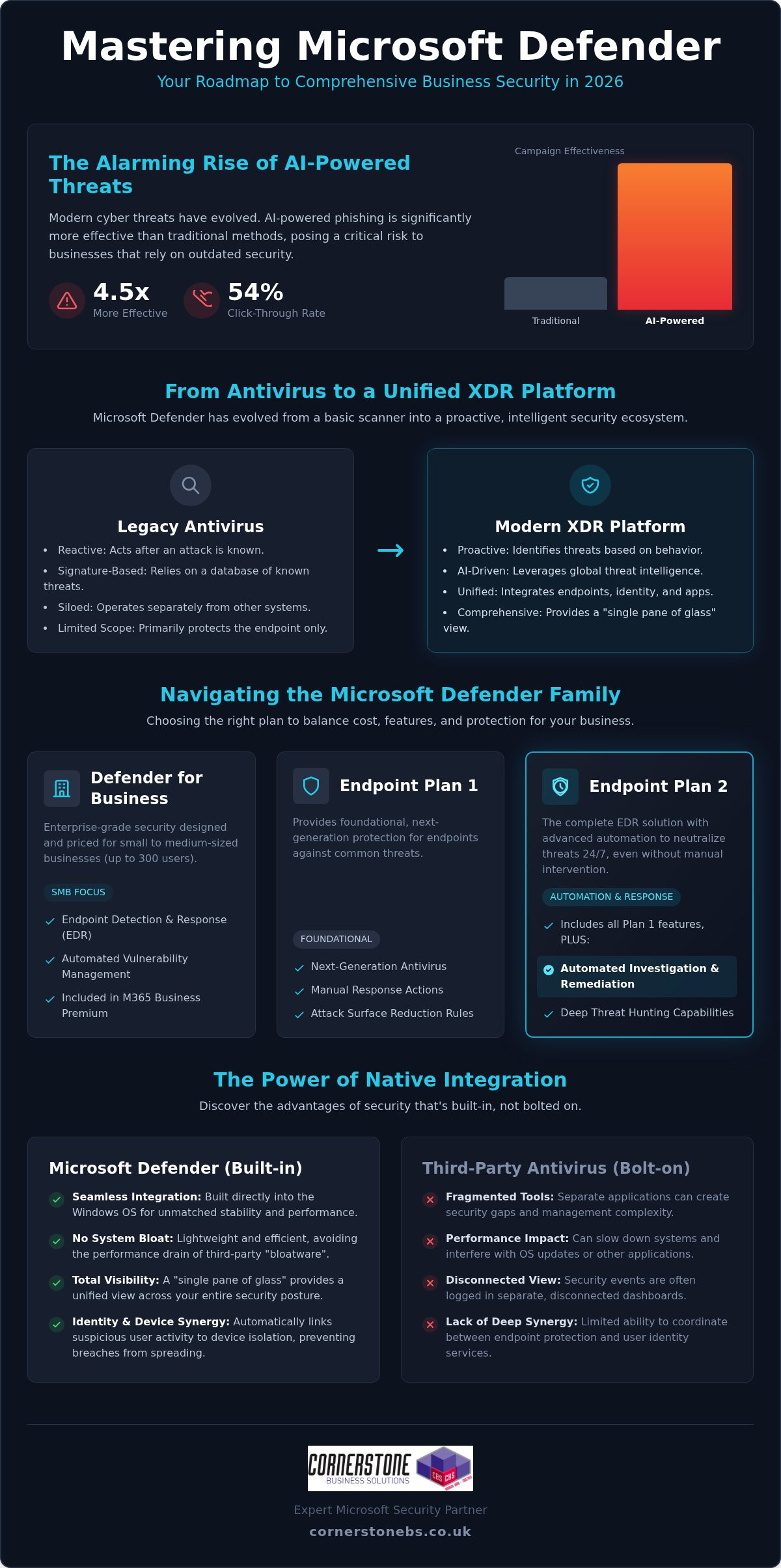
AI-powered phishing campaigns are now 4.5 times more effective than traditional methods, with click-through rates jumping to 54% in 2026. It’s a sobering reality that keeps many business owners awake at night, especially when paired with the constant threat of sophisticated ransomware. You likely already know that microsoft defender is a leader in the security world, but trying to navigate its confusing licensing tiers and complex policy configurations can feel like a full-time job you didn’t apply for.
We understand that you want robust protection without the headache of managing fragmented tools or worrying if your settings are actually correct. As a multi-award-winning Microsoft Partner, we’ve seen how the right setup provides true 24/7 peace of mind. This guide will help you master the entire Defender ecosystem, from Endpoint to Office 365. We’ll provide a clear roadmap for migrating from third-party antivirus software and explain exactly how to secure your infrastructure using expert-led insights. You’ll gain a straightforward strategy to keep your organisation resilient and your data safe.
Key Takeaways
- Discover how microsoft defender has evolved into a comprehensive XDR platform that protects your business far beyond traditional, signature-based antivirus.
- Clear the confusion around licensing tiers and identify exactly which version your organisation needs to balance cost with robust protection.
- Learn why native integration offers a “single pane of glass” advantage, reducing system bloat while giving you total visibility over your security posture.
- Establish a roadmap for enforcing a Zero Trust architecture, ensuring that every identity and device is verified before accessing your critical data.
- Understand the vital role of expert configuration and proactive monitoring in transforming a security tool into a 24/7 managed defence system.
Beyond Antivirus: What is Microsoft Defender in 2026?
If you look at the history of Microsoft Defender, you’ll see a tool that began as a basic, reactive scanner for home users. Fast forward to 2026, and the landscape has changed completely. It has evolved into a sophisticated Extended Detection and Response (XDR) platform that serves as the bedrock for modern business security. It’s no longer just about catching a virus that’s already known to the world; it’s about providing a unified shield across your entire digital estate.
Modern cyber threats are far too fast for old-school, signature-based scanning. Attackers now use AI to create unique, never-before-seen malware every second. Because microsoft defender is part of a global threat intelligence network, it processes trillions of signals daily from around the world. When a new threat is detected in one corner of the globe, your systems are protected almost instantly. This scale of data allows your organisation to stay one step ahead of even the most sophisticated criminal groups.
The Shift from Reactive to Proactive Defence
Legacy antivirus waits for a match in a database before it acts. Modern endpoint protection, however, looks for patterns. By 2026, AI-powered phishing campaigns have become 4.5 times more effective than traditional methods, according to recent industry benchmarks. We use the advanced behavioral analysis within microsoft defender to spot these attacks before they execute. It identifies “zero-day” threats by monitoring what a file does, rather than just what it is. This proactive approach is essential for stopping ransomware before it can lock your critical data.
A Core Component of Microsoft 365
Security shouldn’t be an afterthought or a separate piece of “bloatware” that slows down your team’s laptops. Because Defender is built directly into the Windows operating system, it offers a level of performance and stability that third-party tools can’t match. It creates a seamless synergy between identity protection and device security. For example, if a user account shows suspicious login activity, the system can automatically isolate that specific device to prevent a breach from spreading through your network. Microsoft Defender is a unified security platform that provides real-time, AI-driven protection across your entire digital infrastructure in 2026.
This deep integration means your security policies follow your staff, whether they’re working from the office or a local coffee shop. It ensures your business continuity remains intact without requiring your team to manage complex, disconnected security apps.
Navigating the Microsoft Defender Family: Which Version Do You Need?
Choosing the right version of microsoft defender often feels like looking at a restaurant menu with too many options. For most UK businesses, the goal is simple: total protection without paying for enterprise features they’ll never use. The “Defender” brand covers a wide family of tools, each protecting a specific part of your digital environment. It’s about total visibility. We aim to help you cut through the noise and find the exact fit for your needs.
Microsoft Defender for Business (SMB Focus)
Defender for Endpoint Plan 1 vs. Plan 2
Understanding the difference between Plan 1 and Plan 2 is crucial for your long-term security roadmap. Plan 1 provides foundational protection, including next-generation antivirus and attack surface reduction. However, Plan 2 is where the real power lies. It introduces automated investigation and remediation, which means the system can automatically neutralise threats while your team sleeps. This is a game-changer for business continuity.
- Plan 1: Best for basic security needs and standard device protection.
- Plan 2: Essential for firms requiring deep threat hunting, sandboxing, and advanced forensics.
Choosing Plan 2 often helps organisations align more easily with national compliance standards like Cyber Essentials. It provides the detailed reporting and evidence needed to prove your security posture is robust. Protecting your devices is only half the battle. Defender for Office 365 focuses on your primary communication channels, shielding your team from malicious links in emails or dangerous files shared on Teams. If you’re unsure which tier fits your current growth stage, our team can provide a tailored cyber security assessment to clear up the confusion.
Microsoft Defender vs. Third-Party Antivirus: The 2026 Verdict
Many business owners ask if microsoft defender is truly “good enough” to replace long-standing names like Sophos or Norton. The short answer is yes. In fact, for most UK organisations, it’s often the superior choice. Managing multiple security consoles creates a fragmented view of your network. We call this “security sprawl,” and it’s a primary cause of missed alerts. Switching to a “single pane of glass” approach reduces the number of dashboards your team needs to monitor, ensuring that nothing slips through the cracks.
Performance is another critical factor. Third-party antivirus software often acts as “bloatware,” consuming significant system resources and fighting with the Windows kernel. Because Defender is built into the OS, it operates with surgical precision. It protects your devices without the sluggishness that frustrates staff. From a cost perspective, you’re likely already paying for these features through your existing Microsoft 365 seats. Cutting out redundant third-party subscriptions isn’t just about saving money; it’s about simplifying your entire IT infrastructure.
The Benefits of Ecosystem Integration
The real magic happens when you pair Defender with Microsoft Intune. This combination allows for seamless policy deployment across your entire fleet of devices. If a threat is detected, the system can trigger an automated response to neutralise the danger instantly. This closes the window of opportunity for attackers. It removes the manual “IT headache” of chasing down infected laptops. Your security posture becomes a proactive shield rather than a list of chores for your internal team.
Potential Drawbacks to Consider
We believe in being honest with our partners. Some worry about “putting all their eggs in one basket” by relying solely on Microsoft. While this is a valid concern, the depth of Microsoft’s global threat intelligence usually outweighs the risks of diversification. However, there is a learning curve. The advanced XDR features require expert setup to avoid “alert fatigue,” where your team becomes desensitised to constant notifications. Professional configuration ensures that only the most critical threats reach your desk. In high-risk industries, a benchmark from early 2026 showed that microsoft defender missed 59% fewer high-severity email threats than the next-closest secure email gateway. This level of accuracy is why we recommend it as the foundation of your cyber security strategy.
Implementation Strategy: Securing Your Infrastructure with Defender
A proper implementation doesn’t happen by accident. It begins with a comprehensive security audit to identify the hidden gaps in your current infrastructure. We treat microsoft defender as a precision tool, not a generic “install and forget” application. By mapping your specific risks, we can build a defence that supports your growth instead of hindering it. This proactive approach ensures that your security posture is robust from day one.
The Road to Zero Trust
The modern workspace is no longer confined to four walls. What is Zero Trust Security & Why Does It Matter? It’s a fundamental shift in how we handle access. Identity has become the new security perimeter. We use Defender for Identity to monitor user behaviour and stop credential theft in its tracks. Every single access request is verified, ensuring that being “on the network” no longer equates to having total trust. This model protects your data regardless of where your team is working.
We also enforce Attack Surface Reduction (ASR) rules to block the common infection vectors that hackers love. These rules stop malicious scripts and suspicious email attachments before they can cause damage. Crucially, we integrate this with a robust Multi-Factor Authentication (MFA) strategy. MFA is the foundation of your Defender ecosystem, providing an essential layer of emotional and technical security for your staff. It acts as the final lock on the door that keeps your business continuity intact.
Phased Deployment and Policy Tuning
Avoid the temptation to “flip the switch” on every policy at once. This often causes unnecessary friction for your team and can lead to blocked legitimate work. We prefer a phased rollout, starting with audit mode to monitor policy impacts without interrupting your daily operations. This allows us to tune alerts and eliminate “noise,” so your team only sees what truly matters. We focus on the following key areas during this phase:
- Policy Calibration: Adjusting settings to match your specific business workflows.
- Alert Refinement: Ensuring that your security dashboard is clear and actionable.
- Mobile Protection: Extending your security umbrella to every smartphone and tablet through Defender for Mobile.
Ensuring your mobile fleet is protected provides consistent security across every device your team uses. If you want to ensure your setup is handled by a multi-award-winning Microsoft Partner, contact us for an expert cyber security consultation today.
Managed Security: Why Expert Configuration is Non-Negotiable
Owning a powerful tool like microsoft defender is only the first step toward true resilience. It’s like purchasing a high-performance engine; it only delivers its full potential when tuned by a specialist. Many organisations struggle with “alert fatigue” because their security settings aren’t calibrated to their specific workflows. This leads to a dangerous environment where critical warnings are buried under a mountain of minor notifications. Expert configuration ensures that your security system acts as a silent, effective guardian rather than a source of constant frustration.
Cyber attacks don’t follow a 9-to-5 schedule. In fact, many sophisticated ransomware incidents are launched during weekends or bank holidays when internal teams are likely to be offline. Continuous 24/7 monitoring is the “missing link” in most business security plans. It ensures that every signal processed by microsoft defender is assessed in real-time, providing a foundational layer of emotional and technical security for your staff.
We specialise in turning technical complexity into business stability. By leveraging our Managed IT Services, you ensure that every alert is investigated by a professional who knows your infrastructure inside out. Our status as a multi-award-winning Microsoft Partner acts as a recurring signature of quality. We don’t believe in one-size-fits-all fixes. Instead, we provide bespoke technology solutions tailored to your unique risks, ensuring your organisation remains robust and compliant in an increasingly digital world.
Taking the Next Step
Securing your future starts with a clear strategy. If you are considering a Microsoft 365 migration for business UK, it’s the perfect time to put security at the forefront of your digital estate. We invite you to start a conversation with our team to assess your current posture and identify any hidden vulnerabilities. We would love to chat with you during a no-obligation security consultation to help you build a more resilient and secure organisation.
Building a Resilient Future for Your Organisation
Cyber security in 2026 demands more than just a passive shield; it requires a proactive, integrated ecosystem that evolves as fast as modern threats. By mastering the microsoft defender suite, you’ve taken the first step toward reducing complexity and strengthening your digital perimeter. You now understand that the true power of this platform lies in its seamless integration with your existing Microsoft 365 tools and the implementation of a strict Zero Trust model.
However, technology alone isn’t a silver bullet. The difference between a vulnerable system and a resilient one often comes down to expert configuration and proactive monitoring. As a multi-award-winning technology provider and a trusted Microsoft Partner, we specialise in bridging that gap. We provide the 24/7 support and bespoke solutions needed to keep your business continuity secure while you focus on growth. Don’t leave your security to chance. We invite you to secure your business with a professional Microsoft Defender strategy from Cornerstone. Let’s work together to ensure your organisation stays protected, resilient, and ready for whatever the future holds.
Frequently Asked Questions
Is Microsoft Defender free for business use?
No, the business versions are not free. While a basic home version exists, microsoft defender for Business is a paid service typically included in Microsoft 365 Business Premium or available as a standalone subscription. These commercial versions provide the advanced endpoint detection and response (EDR) capabilities that organisations need to stay resilient. Investing in a paid license ensures your company benefits from enterprise-level security features and automated remediation.
Does Microsoft Defender replace the need for other antivirus software?
Yes, it absolutely replaces traditional antivirus software. It has evolved far beyond basic scanning into a full Extended Detection and Response (XDR) platform. By using a single, native tool, you eliminate the performance “bloat” often caused by third-party applications. This integration provides a “single pane of glass” view, allowing your team to monitor all security signals from one dashboard while cutting the costs of redundant security subscriptions.
What is the difference between Microsoft Defender and Windows Defender?
The primary difference is the scope and sophistication of the protection. Windows Defender was the original, basic antivirus built into older versions of Windows. Today, microsoft defender is a comprehensive family of security tools that protect identities, emails, and cloud applications alongside your devices. It uses global threat intelligence and AI-driven behavioural analysis to stop modern attacks that legacy signature-based scanners simply cannot detect.
Is Microsoft Defender for Business included in Business Premium?
Yes, it is a core component of that plan. Microsoft 365 Business Premium includes the full version of Defender for Business, which is specifically tailored for companies with up to 300 employees. This bundle offers the best value for UK SMEs, combining productivity tools with enterprise-grade security. It’s an efficient way to secure your organisation without the complexity of managing multiple separate licenses or vendors.
Can Microsoft Defender protect Mac and mobile devices?
Yes, it provides cross-platform protection. You can secure Mac, Android, and iOS devices using the same security policies you apply to your Windows fleet. This ensures a consistent security posture across your entire organisation, regardless of which hardware your team prefers. By 2026, maintaining this unified shield is essential for protecting mobile workers who access sensitive business data from various locations and devices.
How does Microsoft Defender protect against ransomware?
It uses a multi-layered approach to neutralise ransomware. First, Attack Surface Reduction (ASR) rules block common infection vectors like malicious scripts. Then, behavioural analysis identifies suspicious activity, such as mass file encryption, in real-time. If a threat is detected, the system can automatically isolate the affected device to prevent the attack from spreading. This automated response is vital for maintaining business continuity during a sophisticated cyber attack.
Do I need a managed service provider to set up Microsoft Defender?
While you can configure it internally, a managed service provider is highly recommended for optimal results. We ensure your security policies are correctly tuned to avoid “alert fatigue” and missed threats. As a multi-award-winning Microsoft Partner, we provide the proactive 24/7 monitoring and expert configuration that most internal teams lack. This partnership transforms a security tool into a foundational element of your business stability and emotional security.
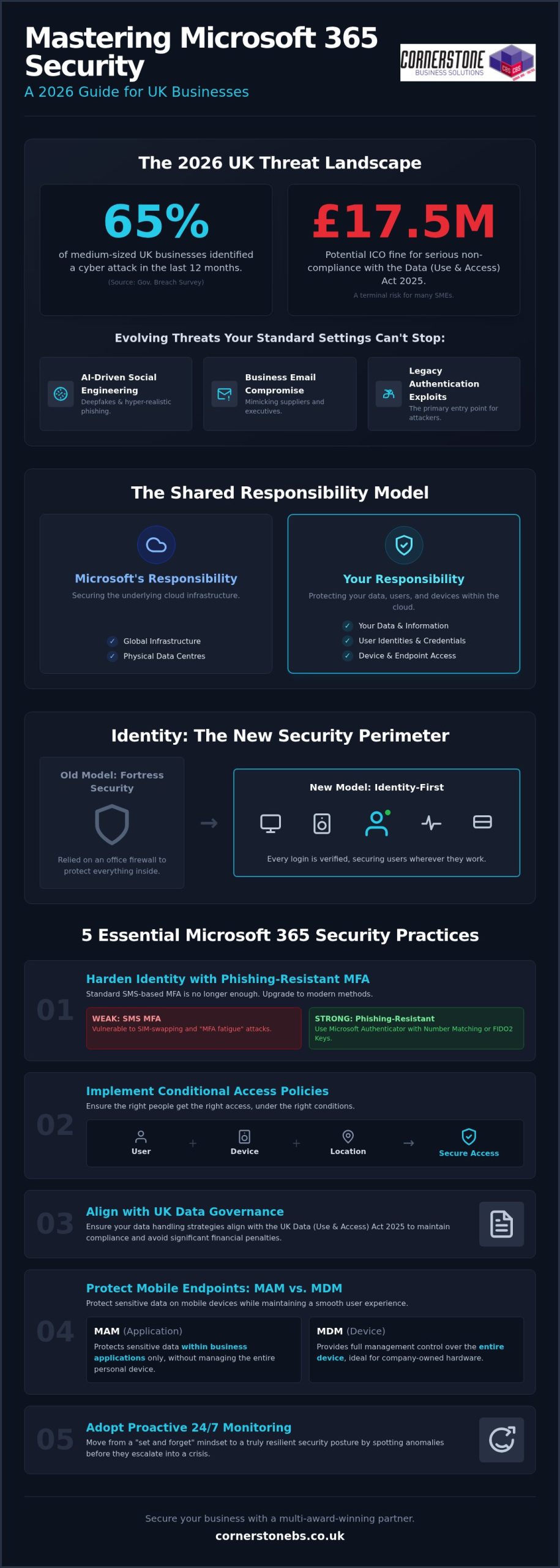
Did you know that 65% of medium-sized UK businesses identified a cyber attack in the last 12 months? It is a sobering statistic from the latest Government breach survey, and it makes implementing robust microsoft 365 security best practices for uk business more critical than ever. You likely feel the pressure of staying compliant with the new Data (Use and Access) Act 2025 while trying to decode which Microsoft licenses actually offer the protection you need. It is frustrating to manage complex settings when you should be focusing on leading your team.
We believe security should be proactive and empowering, not a source of constant stress. You deserve to know your data is safe from the £17.5 million fine potential of the ICO without spending every weekend in an admin portal. As a multi-award-winning partner, we are here to simplify the technical jargon into a strategy that actually works for your specific regional operations and goals.
This 2026 guide will help you master your security configurations from the ground up. We will cover everything from NCSC-backed passwordless logins to the latest Microsoft Teams protection updates. By the end, you will have a clear, actionable roadmap to ensure your business remains secure, compliant, and resilient in a changing digital landscape.
Key Takeaways
- Identify the critical gaps in your current setup by mastering microsoft 365 security best practices for uk business that move beyond standard, out-of-the-box settings.
- Learn how to implement phishing-resistant authentication and essential Conditional Access policies to secure your business identity against AI-driven social engineering.
- Ensure your data governance strategies align with the latest UK Data (Use and Access) Act 2025 to maintain compliance and avoid significant financial penalties.
- Discover the difference between MAM and MDM to protect sensitive business information on mobile devices while maintaining a smooth experience for your team.
- Understand why proactive, 24/7 monitoring is the only way to move from a “set and forget” mindset to a truly resilient security posture.
The 2026 UK Threat Landscape: Why Standard Microsoft 365 Settings Aren’t Enough
Standard Microsoft 365 settings are built for convenience, not a 2026 threat environment. Relying on “out-of-the-box” configurations leaves your business exposed to sophisticated attacks that simple filters can’t catch. We’ve seen a massive shift toward AI-driven social engineering where hackers use deepfake technology to impersonate executives and trusted partners. Adopting microsoft 365 security best practices for uk business isn’t just a technical task; it’s a vital step to protect your local reputation and bottom line. A breach isn’t just an IT headache. Under the Data (Use and Access) Act 2025, the ICO can issue fines up to £17.5 million for serious non-compliance. For a UK SME, that financial hit combined with a lost reputation can be terminal.
Understanding the Shared Responsibility Model
A common mistake many UK directors make is assuming that Microsoft is responsible for all aspects of cloud safety. This isn’t the case. While Microsoft manages the physical data centres and global infrastructure, you are responsible for the data you store and the people who access it. Learning the basics of cloud security fundamentals helps you see where Microsoft’s job ends and yours begins. Without proper configuration, your sensitive files are essentially sitting in a secure building with the front door left unlocked.
The Shared Responsibility Model is a framework where Microsoft secures the underlying cloud infrastructure while you remain fully responsible for protecting your data, user identities, and device access.
Evolution of Cyber Threats in 2026
The 2026 threat landscape is dominated by Business Email Compromise (BEC) and “Shadow AI” risks. According to the UK Government Cyber Security Breaches Survey 2025/2026, 65% of medium-sized businesses identified a breach last year. Hackers no longer just send “dodgy” links; they use AI to draft perfectly phrased emails that mimic your suppliers. Legacy authentication remains the primary entry point for these criminals, as it lacks the modern safeguards needed to stop credential theft. Integrating professional cyber security services provides the proactive monitoring required to spot these anomalies before they escalate into a full-scale crisis.
Identity is now the new perimeter. We’ve moved past the days when a strong office firewall was enough. In a remote or hybrid world, your users’ credentials are the only thing standing between a hacker and your financial records. If you don’t secure the identity, you don’t have a perimeter. This identity-first approach ensures that every login attempt is verified, regardless of where the employee is working in the UK. It’s about moving from a reactive “on/off” switch to a proactive, identity-first governance model.
Hardening Identity: Implementing MFA and Conditional Access
Identity is the foundation of your digital estate. If a hacker steals a password, they essentially have a key to your office. In 2026, relying on a password alone is a massive risk. Implementing microsoft 365 security best practices for uk business starts with a robust identity strategy that assumes every login attempt could be a threat. We’ve moved past simple security; we now need “Identity-First” governance that verifies every user, every time, from every location.
Phishing-Resistant Multi-Factor Authentication
SMS-based multi-factor authentication (MFA) is no longer sufficient. Cybercriminals now use “MFA fatigue” attacks and SIM swapping to bypass these basic checks. For 2026, we recommend phishing-resistant methods. Microsoft Authenticator with Number Matching is now the standard. It requires the user to enter a specific code shown on the login screen into their phone app. This simple step prevents accidental approvals. For high-privilege accounts, like your global admins, using FIDO2 security keys provides the highest level of protection available. These physical keys ensure that even if a user is tricked by a fake login page, the attacker cannot gain access.
Conditional Access: The “If/Then” of Security
Conditional Access is the most powerful tool in your security arsenal. Think of it as an intelligent security guard that evaluates every login based on specific rules. It uses “If/Then” logic: If a user is logging in from an unknown country, then block access. For most UK SMEs, restricting logins to UK-only IP addresses is a quick win that stops thousands of automated offshore attacks. When planning a Microsoft 365 migration for business UK, auditing your existing identities and setting these rules early is vital for long-term stability.
Every UK business should implement these five essential Conditional Access policies:
- Require MFA for all users: No exceptions, especially for guest accounts.
- Block legacy authentication: Disable older protocols like IMAP or POP3 that hackers use to bypass MFA.
- Geo-blocking: Restrict access to the UK unless your staff are actively travelling.
- Device Compliance: Only allow access from managed, healthy devices that meet your security standards.
- Risk-based sign-ins: Automatically block or challenge “impossible travel” attempts, such as a login from London followed by one from New York ten minutes later.
Eliminating legacy authentication is a non-negotiable step. These older protocols are the #1 entry point for credential theft because they simply don’t support modern MFA. By turning them off, you close a massive door that attackers love to exploit. If you’re unsure where to start with these configurations, our team can help you review your current identity posture to ensure you’re fully protected.
Data governance is often the missing piece in microsoft 365 security best practices for uk business. While hardening your identity stops intruders at the front door, governance ensures that your sensitive information doesn’t slip out through the back. With the Data (Use and Access) Act 2025 now in full effect, the Information Commissioner’s Office (ICO) has enhanced powers to penalise businesses that fail to manage data complaints or protect personal records. Proper configuration within Microsoft 365 isn’t just about safety; it’s about staying on the right side of UK law.
UK GDPR and Cyber Essentials Alignment
Data Loss Prevention (DLP) Strategies
Data Loss Prevention acts like a digital sieve, catching sensitive information before it leaves your network. We recommend setting up specific DLP policies that scan for UK-specific identifiers, such as National Insurance numbers and credit card details. If an employee tries to email a spreadsheet containing these details to a personal address, the system can automatically block the message or prompt for a justification. When we build bespoke cloud solutions for our partners, we prioritise these internal safeguards to mitigate the risk of “insider threats,” whether they are malicious or just accidental mistakes.
To truly master your data lifecycle, you should implement these three core governance tools:
- Sensitivity Labels: Tag documents as “Confidential” or “Internal Only.” These labels follow the file wherever it goes, ensuring encryption remains active even if the document is shared externally.
- Automated Retention Policies: UK GDPR requires that you don’t keep data longer than necessary. Set policies to automatically delete old CVs or project files after a set period, reducing your “data surface area” in the event of a breach.
- Bulk-Download Alerts: Configure Microsoft Defender for Cloud Apps to trigger an alert if a user suddenly downloads an unusual volume of files. This is often the first sign of an employee preparing to leave or a compromised account.
Managing these settings manually can be a full-time job. By automating your retention and labelling, you take the guesswork out of compliance. It gives you the peace of mind that your business is meeting its legal obligations without requiring constant manual intervention from your team.
Endpoint and Collaboration Security: Protecting Teams and Devices
Securing your identity and data is only half the battle. Your employees interact with your business every day through endpoints: laptops, smartphones, and collaboration tools like Microsoft Teams. Implementing microsoft 365 security best practices for uk business means extending your protection to these digital workspaces. In 2026, hackers have shifted their focus to high-trust environments where users are more likely to click a link or download a file without a second thought. This makes the security of your collaboration apps just as vital as your office firewall.
Securing the “New Office”: Microsoft Teams
Microsoft Teams has become the primary hub for UK business communication. However, its default settings often allow external users to initiate contact, opening the door for sophisticated social engineering. As of January 12, 2026, Microsoft Teams automatically blocks high-risk file types by default, but you must still manage your guest access permissions. We recommend using private channels for sensitive department data to ensure that only specific team members can view financial or HR documents. Monitoring for malicious files is essential, as phishing remains the most common attack vector for UK organisations according to the 2026 Cyber Security Breaches Survey.
Managing the Remote Workforce with Intune
The rise of hybrid work across the UK has made the “Bring Your Own Device” (BYOD) model a standard practice. This creates a unique challenge: how do you protect business data on a personal phone? This is where the choice between Mobile Device Management (MDM) and Mobile Application Management (MAM) becomes vital. MDM gives you full control over a company-owned laptop, allowing for “Remote Wipe” capabilities if hardware is lost on a commute or stolen. MAM, however, allows you to secure only the business apps like Outlook and Teams on an employee’s personal device without touching their private photos or messages.
Enforcing BitLocker encryption on all business laptops is a non-negotiable step for 2026. Microsoft Defender for Business now provides enterprise-grade protection for SMEs, identifying vulnerabilities before they are exploited. Managing this level of detail across a growing team can be overwhelming. Our it company solutions simplify this process by automating device enrollment and policy enforcement. This ensures every device that touches your network is healthy and compliant from day one. If you want to ensure your remote team is truly secure, reach out to our local experts for a comprehensive device security audit today.
Proactive Protection: How Managed IT Support Sustains Your Security
Many businesses mistakenly believe that ticking the boxes for MFA and DLP means the security job is finished. It isn’t. Maintaining microsoft 365 security best practices for uk business is an ongoing journey that requires constant adjustments as the 2026 threat landscape shifts. A “set and forget” mindset often leads to configuration drift, where small changes over time create massive gaps in your defense. Proactive management ensures your settings stay hardened against new vulnerabilities the moment they emerge.
The Value of Continuous Security Monitoring
Microsoft 365 produces thousands of log entries every hour. While AI filters catch obvious threats, sophisticated attackers often hide in the “grey area” of legitimate-looking activity. Human expert analysis is what turns raw data into actionable intelligence. By leveraging specialised managed IT services, you gain access to specialists who monitor these patterns around the clock across the UK. This proactive stance slashes your Mean Time to Detect (MTTD), ensuring that if an anomaly occurs, it is neutralised before it can cause reputational damage or lead to a heavy ICO fine. Rapid incident response is the difference between a minor blip and a total system shutdown.
Building a Human Firewall
Your employees are your greatest asset, but they can also be your biggest vulnerability if they aren’t prepared for modern social engineering. We focus on bridging the gap between technical configurations and user behaviour. This involves ongoing security awareness training that feels relevant and accessible, rather than a dry compliance exercise. We use simulated phishing attacks to give your team hands-on experience in spotting the latest AI-generated lures. These simulations identify which staff members might need extra support, allowing us to strengthen your “human firewall” before a real attacker comes calling. Professional IT support is a foundational investment in your business stability and emotional security, providing the expert oversight needed to let you focus on your core goals.
Regular security audits are the final piece of the puzzle. These deep dives ensure your tenant remains aligned with the latest NCSC guidance and UK GDPR requirements. We don’t just look at the switches and toggles; we look at how your people interact with data every day. This holistic approach ensures that your Microsoft 365 environment remains a secure, productive space that supports your long-term growth. If you are ready to move beyond basic settings and embrace a truly resilient strategy, Cornerstone Business Solutions is here to guide you every step of the way.
Securing Your Business Future in a Changing Landscape
Securing your business for the challenges of 2026 is an ongoing journey, not a one-time task. We’ve explored why standard settings aren’t enough and how hardening your identity with phishing-resistant MFA is now a non-negotiable step. By aligning your data governance with the latest UK regulations, you protect both your reputation and your bottom line. Implementing microsoft 365 security best practices for uk business ensures that your team can collaborate safely without the fear of a costly breach.
As an Official Microsoft Partner, we pride ourselves on being more than just a provider; we’re your long-term security ally. Our multi-award-winning IT support team provides proactive 24/7 system monitoring to catch threats before they impact your operations. You don’t have to manage these complex configurations alone. We invite you to Book your expert Microsoft 365 security audit with Cornerstone Business Solutions today and take the first step toward total peace of mind. Let’s work together to build a resilient and secure future for your business.
Frequently Asked Questions
How much does Microsoft 365 security cost for a UK business?
The cost of security is primarily determined by your license choice. As of July 2026, Microsoft 365 Business Premium costs £16.90 per user per month, while Enterprise E5 is £47.80. While basic security features are included in lower tiers, the advanced protection needed for microsoft 365 security best practices for uk business typically requires the Premium or E5 levels. You should also factor in professional management to ensure these tools are configured correctly.
Is Microsoft 365 GDPR compliant for UK companies?
Microsoft 365 provides the tools to be GDPR compliant, but it isn’t compliant “out of the box.” You are responsible for configuring data residency, retention policies, and access controls. With the Data (Use and Access) Act 2025 now in force, you must use Microsoft Purview to manage Subject Access Requests and acknowledge them within 30 days. Compliance is a shared effort between the platform’s infrastructure and your specific internal settings.
What is the difference between Microsoft 365 Business Premium and Standard security?
Business Standard focuses on productivity apps and basic cloud storage. Business Premium is the true security tier for SMEs, adding Microsoft Intune for device management and Defender for Business for endpoint protection. Crucially, Premium includes Conditional Access, which allows you to set “If/Then” rules for logins. This makes it the minimum recommended level for any UK business that needs to protect sensitive data and manage a remote workforce effectively.
Can I secure Microsoft 365 without an IT department?
You can technically enable basic settings yourself, but the complexity of modern threats makes this risky for most business owners. Missing a single toggle in the admin portal can leave your data exposed to AI-driven phishing. Most UK SMEs find that partnering with a local expert is more efficient than hiring a full internal team. It provides the peace of mind that your systems are monitored 24/7 by specialists who understand the 2026 landscape.
How often should we perform a Microsoft 365 security audit?
We recommend a comprehensive security audit at least once a year. However, if you operate in the legal or financial sectors, quarterly reviews are much safer. Frequent audits help you stay ahead of “configuration drift,” where small changes by users or new feature releases create unintended vulnerabilities. Regular check-ups ensure your microsoft 365 security best practices for uk business remain aligned with the latest NCSC guidance and evolving cyber threats.
What is the best way to prevent ransomware in Microsoft 365?
Preventing ransomware requires a multi-layered approach. Start by enforcing phishing-resistant MFA and blocking legacy authentication protocols that hackers use to bypass security. Microsoft Defender for Business plays a vital role by identifying and isolating suspicious file behaviour in real-time. Combining these technical controls with regular employee awareness training creates a “human firewall” that is significantly harder for ransomware groups to penetrate. Proactive monitoring is your best defense against these attacks.
Does Microsoft 365 backup my data automatically?
No, Microsoft does not provide a traditional backup for your data. They ensure the service is available, but they aren’t responsible for data lost due to accidental deletion or ransomware. You need a dedicated Disaster Recovery solution to ensure your emails and files are recoverable. Relying solely on the Recycle Bin is a dangerous strategy that leaves your business vulnerable to permanent data loss if a breach occurs or a file is corrupted.
Is MFA mandatory for UK businesses using Microsoft 365?
While not a legal requirement for all, MFA is now a “pass or fail” requirement for Cyber Essentials certification as of April 2026. This means if you want to bid for government contracts or demonstrate a high level of security to your clients, MFA is mandatory. Beyond certification, the NCSC strongly advises all organisations to adopt it. It is the single most effective way to stop 99% of bulk credential attacks today.