A lost work phone doesn’t have to leave company data exposed. For UK businesses, mobile device management (MDM) solutions can enforce security policies, control approved apps, deploy settings, and remotely lock or wipe enrolled devices. They give IT teams a central way to manage devices and check whether they meet company requirements.
This matters when staff work across different locations or use a mix of phones, tablets, and laptops. MDM can make device setup more consistent, helping teams apply policies and install work apps without configuring every device by hand. This guide explains how mobile device management works, including remote activation, automated policies, app controls, and what to consider when choosing an approach for your business.
Key Takeaways
- Set clear rules for work-owned and personal devices, including which data and applications the business manages.
- Plan device enrolment and policy automation to make setup more consistent for staff working in different locations.
- Use app controls and compliance checks to help protect company information while keeping work and personal use distinct.
- Map the phones, tablets and computers your team uses before deciding how to manage them centrally.
- Understand how managed IT Support can help bring device management into a wider approach to business technology and security.
What does mobile device management do?
Mobile device management applies central controls to enrolled phones, tablets, and computers. IT teams use it to configure settings, enforce security policies, and respond remotely if a device is lost or no longer complies with requirements.
Device Security Policies
MDM policies define the conditions a device must meet to access work systems. For example, an administrator can require a password or PIN, restrict a work device to approved applications, and apply standard security settings during deployment. Policies can also control access based on an IP address or location.
For company-owned devices, define approved apps, access rules, and the response to a missing device. Apply the same baseline consistently, then monitor compliance centrally. This makes configuration repeatable instead of relying on each employee to set protections correctly. The right policy balances secure access with the work people need to do.
BYOD Privacy and Employment Rules
BYOD means employees use their personal phones or tablets for work, sometimes connecting them to a corporate wireless network. About 82 percent of organisations allow employee-owned phones and tablets on corporate networks. According to UK legislation, GDPR requires organisations to protect personal and business data on every device, including leased hardware.
For a BYOD policy, make clear which work data and applications are managed, what security settings apply, and what happens when access ends. MDM can separate corporate and personal data, allowing IT to control work information without treating every personal app as company property. Set out these boundaries in the device policy so staff understand how work access affects their personal device.
Providers offering UK-based support, UK data hosting and reseller services should be assessed across those separate capabilities. Support location, data storage arrangements and the reseller relationship each affect how the service fits an organisation’s operational needs.
Remote Lock and Wipe
If a device is lost or stolen, MDM can remotely lock it or wipe data to reduce the risk of unauthorised access. Administrators can also remove work access from a device that no longer meets policy. These controls help protect company information when a phone is away from the office or outside direct IT oversight.
Remote wiping can also remove personal content from an employee-owned device if it targets the whole device. That risk makes clear separation of work and personal data important. Define who can authorise a wipe, which data it affects, and how staff should report a missing device. MDM can also deploy apps and settings, monitor compliance, and support two-factor authentication for users and management access.
Remote device activation and policy automation
Preparing each phone by hand slows deployment and can lead to inconsistent settings. Mobile device management can enrol devices before delivery, so required software and security policies apply when staff first switch them on. For a growing team, devices can arrive ready for their intended business role.
Remote configuration also helps IT teams update settings, deploy apps, and troubleshoot enrolled devices without handling each one in person. For example, administrators can send a revised Wi-Fi profile to a team’s devices centrally, then monitor whether the change was received and whether devices meet the organisation’s policies.
A practical automated deployment can follow this sequence:
- Enrol each device before it reaches the employee, where the setup process allows.
- Assign a profile for its role, such as sales, field service or office work.
- Apply the relevant settings and install required business applications.
- Monitor compliance and update the profile when business requirements change.
Android Enterprise Essentials supports remote device activation and automated policies to reduce manual configuration. An administrator can use a standard setup for a group of Android devices, then adjust assigned policies as roles change. Applying settings consistently can simplify deployment across a distributed team.
Automation doesn’t remove the need for oversight. IT teams still need to decide which devices belong in each group, what access each role requires, and how policy changes affect staff. A sales employee may need business email and approved sales apps, while someone in another role needs a different set. Clear profiles help prevent the wrong configuration being applied.
Remote monitoring gives administrators a view of enrolment status and policy compliance. If a device hasn’t completed setup or received an update, IT can investigate remotely and guide the user through the next step. This can help resolve configuration problems without waiting for the device to return to the office.
Automating device management with MDM can save over 25 hours of IT work per month. The practical benefit depends on reducing repeated manual tasks, such as configuring settings and deploying approved apps. It also gives IT staff a more consistent process to follow when devices are added or reassigned.
For teams that need help aligning remote setup with day-to-day IT processes, Managed IT Support can provide a route to coordinated device management.
App management and corporate data protection
MDM links app access, device settings, and business data protection through centrally managed policies. The right configuration helps staff use work tools while keeping company information under control.
App Management
Administrators can deploy approved apps, restrict downloads, and remove applications from enrolled devices. For example, a Windows policy can add or remove apps according to a device’s role. Before deployment, decide which apps staff need, who approves changes, and how access ends when a device leaves the fleet.
Platforms such as Microsoft Intune can be part of an organisation’s wider device-management approach. MDM policies can monitor whether devices meet requirements, helping teams identify a non-compliant device before it accesses work resources. Align app controls with real tasks: blocking an unapproved app should not prevent employees from completing essential work.
Corporate Data Protection and Encryption
MDM can help protect information by applying encryption and security settings to managed devices. Windows management can configure protections such as BitLocker, alongside access settings for Wi-Fi, VPN, email and applications. For Microsoft 365, consider how device compliance and access policies work together, so business accounts remain tied to devices meeting the organisation’s standards.
Separate work and personal data where employees use their own devices. That distinction helps administrators manage company information without treating personal content as business data. Organisations with robust MDM strategies can reduce potential security breaches by up to 60 per cent compared with unmanaged fleets.
Employee Monitoring and Data Rules
UK GDPR and the Data Protection Act 2018 form the data-protection framework to consider when managing devices and monitoring employees. According to UK legislation, organisations must protect personal and business data on every device, including leased hardware. In practice, define the work purpose for monitoring, the device information collected and who can access it.
Make the monitoring approach clear to employees, especially for BYOD. MDM can separate work and personal profiles, allowing IT to control work-related apps and data while employees continue using personal apps. This makes the scope of management easier to explain and apply consistently.
Plan data handling beyond daily access. MDM supports CSV and Excel data exports, which can help teams review device records and compliance information. Define who can export those records and where they should be stored. When a device is retired or reassigned, remove its work access and sanitise business data using a process suited to the device and its data. For Microsoft 365 accounts, include access removal in the same offboarding steps, rather than relying only on wiping the handset.
Android Enterprise Essentials includes screen-lock enforcement and continuous malware protection. The supplier states that data is held on infrastructure within Tier 3+ data centres.
The page says real-time compliance monitoring and audit trails support the GDPR framework. A healthcare organisation with nurses across more than 100 facilities used a secure workspace for access to a HIPAA-regulated application on personal laptops.
Centralised management of company smartphones, tablets and laptops
Centralised management gives an organisation one place to apply settings and review enrolled devices. The right approach depends on its device mix, employee roles, and security requirements.
Device Compatibility and System Requirements
Start by listing the devices employees use, including smartphones, tablets, laptops, desktops, and connected IoT devices. Modern MDM platforms support iOS, Android, Windows, and macOS, but compatibility can vary by device and operating system version. Check that platform support matches your actual fleet before planning deployment.
Identify the controls each device needs. For Windows, MDM can manage BitLocker encryption, update schedules, Wi-Fi, VPN, email settings, and application access. If your organisation handles sensitive data, check that the platform can apply the required settings across its Windows devices, not just register them centrally.
Apple, Android and Windows Coverage
MDM can manage Apple devices running iOS, Android phones and tablets, and Windows computers through central policies. Administrators can group devices by operating system or business role, then apply relevant settings and app access. This helps employees use familiar equipment while giving IT a consistent view of the fleet.
For example, a Windows laptop may need BitLocker and a defined update schedule, while a smartphone needs approved applications and secure access to work email. MDM can add or remove apps on enrolled Windows devices and apply business compliance policies. Check that policies reflect each platform’s capabilities and the organisation’s needs.
Small businesses, schools, NHS organisations, and large enterprises should choose according to their device mix, access rules, and management workload. There isn’t one best solution for every UK organisation.
Solution Comparison
Compare MobiControl and Endpoint Manager against the same practical requirements, rather than relying on product names alone. Assess support for your Apple, Android, and Windows devices, the settings administrators can control, and how clearly the platform shows device compliance.
Then consider how each option fits the organisation’s existing systems and IT processes. For Windows fleets, check requirements such as BitLocker management, update schedules, and application access. For mixed fleets, compare how administrators assign policies across operating systems and roles. A structured comparison makes strengths and gaps easier to identify without assuming either platform suits every organisation.
Choosing and Deploying an MDM Solution
Begin with an inventory of devices, operating systems, owners, and business uses. Then define the policies each group needs, such as encryption for laptops or restricted application access for company phones. Include what should happen if a device is lost or stolen, or when an employee changes role.
Deploy in stages: test policies with a small group, review how the settings affect daily work, then expand to the wider fleet. Monitor enrolled devices and compliance as deployment progresses. This approach helps identify technical issues early and gives employees a clear process for using managed devices.
What mobile device management is
Mobile device management, or MDM, administers enrolled devices through central software instead of configuring each one separately. An administrator applies settings and rules from a management console, and devices receive the configuration over a network. For example, a business can organise its phones, tablets, and laptops into groups that match employee roles.
The useful distinction is between owning a device and managing its work access. An organisation might own a Windows laptop, issue a work phone, or allow an employee to use a personal tablet for work. In each case, enrolment connects the device to management controls. Depending on the setup, those controls can apply to the whole device or focus on work information and applications.
MDM also provides a repeatable process. A typical device lifecycle includes enrolment, configuration, ongoing monitoring, changes when an employee’s role changes, and removal of work access when the device is retired. For instance, moving a staff member from sales to administration may mean changing approved applications and access settings without rebuilding the device from scratch.
The software acts as a management layer between IT administrators and the device fleet. It can deliver policies and apps, collect compliance information, and let administrators respond remotely to device issues. Modern MDM platforms can manage iOS, Android, Windows, and macOS devices, although the controls available differ. A policy designed for a Windows laptop may not apply in the same way to an Android phone.
For UK organisations, mobile device management (MDM) solutions in the UK should be judged by how well they fit daily operations, not just by their feature lists. MDM connects device configuration, work access, and operational communication in a process IT can apply consistently. A field employee’s phone may need business email and approved applications, while a laptop used for sensitive work may require encryption settings.
Before choosing mobile device management (MDM) solutions in the UK, map the fleet and decide what management needs to achieve. Identify the devices and operating systems in use, the work applications people need, and the settings required for each role. Then define how administrators will handle new devices, policy changes, and employee departures. These decisions make platform comparisons more relevant to your organisation.
- Use device groups that reflect actual employee roles.
- Match each platform’s settings to the device’s operating system.
- Plan enrolment, changes and removal of work access as one lifecycle.
- Review whether the controls support how employees use their devices.
For help bringing device management into everyday IT operations, discuss Managed IT Support as a practical next step.
Cornerstone Business Solutions: Managed IT Support
Cornerstone Business Solutions helps businesses connect device management decisions with their wider IT needs through Managed IT Support. Turn to the team when phones, laptops, user access, and security policies need to work together as part of a clear support plan.
For example, a business using Microsoft 365 can consider how device access fits its account and working arrangements. Cyber Security can also help address the wider protection of company systems and information. The right approach starts with understanding your devices, how employees use them, and the practical controls your organisation needs.
If you’d like to discuss your business’s IT needs, contact Cornerstone Business Solutions.
Make device management part of your next IT plan
Decide who owns device policies, how changes are approved, and how those decisions fit your wider IT roadmap. A clear operational plan keeps device management aligned as teams, tools, and working practices evolve. Choosing mobile device management (MDM) solutions for UK businesses is not just a technical decision; it also means making responsibilities and day-to-day processes clear.
Cornerstone Business Solutions can support that wider picture through Managed IT Support, Microsoft 365 and Cyber Security. Bringing these areas together can help your organisation consider device access alongside its broader IT environment, rather than treating mobile management as an isolated task.
If you’re ready to discuss a practical approach for your business, contact Cornerstone Business Solutions. A thoughtful plan can give your team a clear foundation to build on.
Frequently Asked Questions
How Much Does MDM Cost?
MDM cost depends on the licensing model, fleet size and management requirements. Some services charge per device, while others structure licences around users or bundled capabilities. Additional cost factors can include supported operating systems, app controls, deployment work and ongoing administration. The price depends on the case and is given after a quote request. Compare what the licence covers, not just its headline unit, to understand the likely total.
WHY Should You Use MDM Solutions?
Use MDM when your organisation needs consistent control over work access across its devices. For example, a new starter can receive a device configured for their role, while a departing employee’s work access can be removed as part of offboarding. A defined process also helps staff understand which apps and settings are required. This is particularly useful when employees work across different locations or use several device types.
Why is MDM important?
MDM matters because a single unmanaged device can create a gap in an organisation’s security and support processes. Central management gives IT a way to apply consistent requirements and identify devices that need attention. For example, if a department changes its approved work applications, administrators can align managed devices with that decision instead of relying on employees to make changes individually.
How do leading MDM platforms compare on features, supported devices and ease of use?
Compare platforms such as Microsoft Intune, MobiControl, and Endpoint Manager against your actual tasks. Check support for your operating systems, available device controls and app policies, and how easily administrators can assign different rules to different groups. To assess ease of use, consider everyday tasks: enrolling a device, finding a compliance issue, and changing access. A short, role-based evaluation helps reveal practical differences.
What do MDM solutions cost in the UK per user or device?
UK MDM pricing may be based on each device or each user, so identify the billing unit before comparing quotes. Per-device pricing can suit fleets where staff use different numbers of devices; per-user pricing may be simpler when each employee has a consistent set. The final price depends on fleet size, required features, deployment and management needs, and is provided after a quote request.
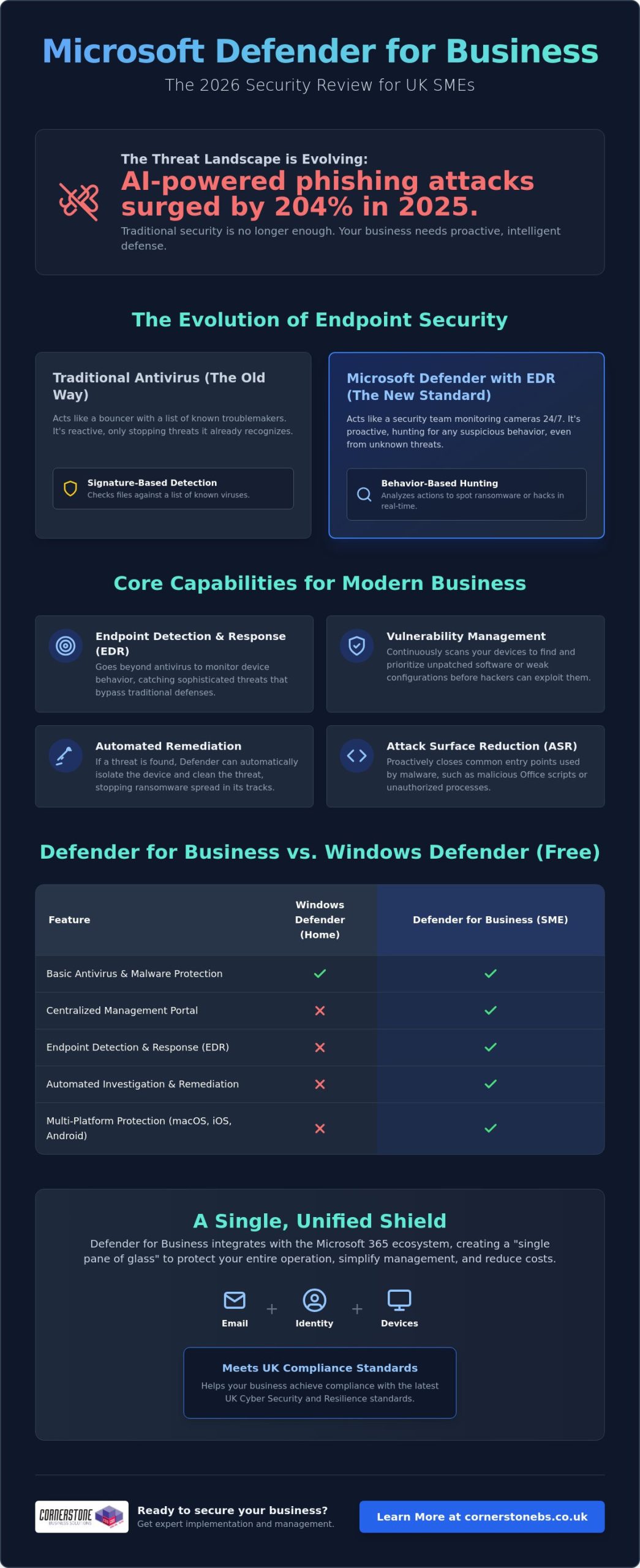
Did you know that AI-powered phishing attacks surged by 204% in 2025? For many UK business owners, keeping up with these sophisticated threats while managing a remote team and juggling multiple software subscriptions feels like an uphill struggle. You need enterprise-grade security that doesn’t break the bank or complicate your workday. This Microsoft Defender for Business review provides an expert, independent look at whether Microsoft’s 2026 security suite offers the robust protection your local business needs to stay safe and compliant.
It’s a common concern that “built-in” tools might not be enough to stop a modern ransomware attack. We’ll show you exactly how this platform has evolved into a sophisticated powerhouse. You’ll learn how features like automatic attack disruption and the new Defender Suite for Business Premium can help you consolidate your security stack to save money. We’ll also examine how it helps you meet the standards of the upcoming UK Cyber Security and Resilience Bill. By the end, you’ll know if this is the right foundation for your company’s stability and emotional security.
In this article, you will discover:
- How our Microsoft Defender for Business review identifies its evolution from a basic antivirus into a sophisticated EDR powerhouse for UK SMEs.
- The technical mechanism behind endpoint detection and response (EDR) and why it’s vital for spotting threats that bypass traditional perimeters.
- Ways to simplify your security management using the “single pane of glass” approach to consolidate email, identity, and device protection.
- A clear comparison of the true ROI between Microsoft’s integrated suite and third-party rivals like Sophos or CrowdStrike.
- Expert guidance on whether consolidating your security stack will help you achieve compliance with the latest UK cyber standards.
Microsoft Defender for Business isn’t just a basic antivirus tool. It’s a comprehensive, enterprise-grade security platform tailored for the specific needs of UK SMEs. If you’re running a company with up to 300 employees, this is Microsoft’s definitive answer to the sophisticated ransomware and phishing threats we see daily. You can access it as a standalone subscription or as a core component of the Microsoft 365 Business Premium package. This flexibility is a major reason why this Microsoft Defender for Business review ranks the tool so highly for growing teams.
The platform represents a massive shift in how we think about digital protection. Looking back at the history of Microsoft’s security software, the journey from basic scanners to a full Endpoint Detection and Response (EDR) system is impressive. In 2026, it doesn’t just wait for a virus to appear. It actively hunts for suspicious behaviour. EDR is the real game-changer here. Traditional antivirus only checks files against a list of known “bad” signatures. EDR looks at actions. If a laptop suddenly starts encrypting files at 2 AM, Defender for Business recognises that as ransomware behaviour and shuts it down instantly.
Defender for Business vs. Windows Defender
While the “free” Windows Defender is great for home users, it lacks the professional tools your business requires for compliance and oversight. Microsoft Defender for Business includes a centralised management portal. This allows your IT team or partner to see the health of every device from one screen. It also brings automated investigation and remediation to the table. This means the system can often fix a security issue before you even know it exists. Crucially, it protects your entire fleet. It covers macOS, iOS, and Android devices, not just your Windows PCs.
The 2026 Feature Set: AI and Beyond
In 2026, Microsoft Copilot for Security acts as an intelligent assistant that helps you understand and respond to complex technical threats using natural language queries. This AI integration works alongside next-generation protection and Attack Surface Reduction (ASR) rules to harden your devices against common entry points for hackers. Because it’s part of the wider Microsoft 365 ecosystem, it shares data seamlessly with your email and identity settings. This Microsoft Defender for Business review finds that this level of integration creates a unified shield that’s incredibly difficult for attackers to penetrate. It turns your security from a collection of separate tools into a single, proactive defence system.
Traditional antivirus is like a lock on your front door. It’s useful, but it won’t stop someone who has already climbed through the window. That’s why this Microsoft Defender for Business review focuses heavily on Endpoint Detection and Response (EDR). Instead of just looking for known viruses, EDR monitors the behaviour of your devices. If a laptop suddenly starts communicating with a suspicious server in the middle of the night, the system flags it as a potential breach. This allows you to catch threats that have already bypassed your initial defences, providing a much higher level of security for your business data.
Vulnerability management is another heavy hitter in the 2026 feature set. Most successful attacks exploit unpatched software. Defender for Business constantly scans your entire fleet to identify outdated applications or weak configurations. It gives you a clear, prioritised list of what needs fixing. You don’t have to be a security expert to understand where your risks lie. The system also uses Attack Surface Reduction (ASR) rules to close the common “doors” hackers use, such as blocking malicious scripts in Office apps or stopping unauthorised processes from running on your servers.
The real magic happens with automated remediation. If the system detects a high-risk threat, it can “self-heal” by automatically isolating the infected device from the rest of your network. This stops the spread of ransomware in its tracks while the system investigates and cleans the threat. For a deeper look at how this performs in complex environments, The MSP Reality Check for Defender highlights how these automated tools save hours of manual investigation. If you’re looking to strengthen your local infrastructure, our team can help you implement these tools through managed IT support tailored for your specific needs.
Real-World Threat Protection
In 2026, Defender’s AI-driven alerts have significantly reduced “notification fatigue” for business owners. The system is smart enough to group related events into a single incident, so you aren’t buried under a mountain of minor warnings. It performs exceptionally well against zero-day exploits and modern ransomware variants. This proactive stance aligns perfectly with the UK National Cyber Security Centre (NCSC) guidelines for effective incident management and protective monitoring.
Cross-Platform Capabilities
Managing a hybrid team across the UK shouldn’t feel like a security nightmare. Defender for Business provides a consistent experience whether your staff are using company laptops or their own mobile devices (BYOD). It offers robust protection across Windows, Linux, macOS, iOS, and Android. You can manage every device from a single dashboard, ensuring your security standards remain high even when your team is working from a home office or a local coffee shop. This Microsoft Defender for Business review finds that this cross-platform reach is essential for modern, flexible UK SMEs.
Managing security shouldn’t feel like a second job for a busy business owner. One of the standout findings in our Microsoft Defender for Business review is the “single pane of glass” advantage. Instead of hopping between five different websites to check your antivirus, email filters, and user passwords, everything lives in one central portal. This level of integration is a breath of fresh air for teams that are already stretched thin. It allows your IT team or partner to see exactly what’s happening across your entire network without the friction of multiple logins.
Microsoft provides a simplified setup wizard that gets you up and running quickly. This is great for a start, but “set and forget” is a dangerous myth in the world of cyber security. While the wizard applies sensible defaults, it doesn’t understand the specific software your local business relies on. We often see companies struggle when a default policy accidentally blocks a legitimate line-of-business application. True security requires fine-tuning these policies to balance ironclad protection with daily productivity. Proactive monitoring is essential to ensure that your “exposure score” remains low as new threats emerge.
As a managed IT support provider, we use these tools to provide proactive care for our clients. We don’t just wait for an alarm to go off. We use the vulnerability management data to patch systems before a hacker can exploit them. This proactive stance is what turns a piece of software into a genuine business asset. It’s about creating an atmosphere of reliability where your staff can work without fear of a digital disaster.
Integration with Microsoft 365 Business Premium
The bundle is the most popular choice for UK SMEs because it offers incredible value. When you combine Defender with identity protection and conditional access, you create a ring-fence around your data. If you’re considering making the switch, our Microsoft 365 Migration for Business UK guide outlines how to move your team safely. This all-in-one approach ensures that security settings follow your staff, whether they’re in the office or working remotely across the UK.
The Learning Curve for Small Teams
Let’s be honest about the technical side. Defender for Business is a professional tool. While the interface is clean, the depth of features can be overwhelming for someone without a technical background. A common pitfall during initial deployment is misconfiguring the automated response levels, which can lead to unnecessary business downtime. If you don’t have a dedicated internal IT person, the platform’s advanced settings might feel a bit daunting. This is when a managed security service becomes a smart investment, giving you peace of mind that experts are handling the complexity for you.
The “Hidden Cost” of third-party suites often goes beyond the subscription fee. You have to account for the time your team spends on training, the complexity of integrating different platforms, and the potential for “blind spots” between disconnected tools. In 2026, performance benchmarks show that Defender for Business stacks up impressively against industry giants like Sophos and CrowdStrike. While those rivals offer excellent “best of breed” features, Microsoft wins on integration ROI. For a typical 50-user UK business, the Total Cost of Ownership (TCO) is significantly lower when security is baked into the existing productivity ecosystem rather than bolted on as an afterthought.
Feature Comparison: Integrated vs. Standalone
- EDR Capabilities: Defender for Business offers full endpoint detection and response, matching the sophisticated threat hunting found in premium standalone suites.
- AI Integration: Microsoft’s 2026 AI-driven alerts group related events together, reducing the manual workload compared to standard AV tools.
- Mobile Protection: While some niche rivals require extra plugins for mobile, Defender provides native protection for iOS and Android as part of the core package.
- Specialised Features: Standard AV might offer specific legacy support, but Microsoft wins on seamless identity and cloud integration.
ROI for UK SMEs
The return on investment isn’t just about lower software bills. It’s about business resilience. Implementing a robust EDR platform is a major step toward achieving Cyber Essentials certification. This can often lead to lower cyber insurance premiums for UK businesses. When you move away from fragmented security, you reduce the risk of a successful breach and the devastating downtime that follows. You can explore how these tools fit into a broader strategy in our Cyber Security Services guide. If you want to see how much you could save by consolidating your stack, chat with our local team today for a professional evaluation.
Our comprehensive Microsoft Defender for Business review concludes that for the vast majority of UK SMEs, this platform is the most logical choice for 2026. If your team already relies on the Microsoft 365 ecosystem for daily work, the integration benefits are simply too strong to ignore. You aren’t just buying another security tool; you’re activating a proactive defence system that understands your users, your data, and your devices. It’s the ideal fit for business owners who want to consolidate their technology stack and remove the “noise” of managing multiple, disconnected subscriptions.
This solution is best for SMEs looking to achieve enterprise-level protection without the enterprise-level price tag or complexity. It provides the peace of mind that comes from knowing your “front door” is locked and your internal systems are being monitored for suspicious behaviour. However, it might not be the right fit for highly specialised environments that require deep, non-Microsoft technical hooks or legacy support for very old, proprietary systems. For everyone else, the combination of EDR, automated remediation, and mobile protection makes it a foundational element of a modern business strategy.
Next Steps for Your Business
Auditing your current setup is the first logical step. You might be surprised to find you’re already paying for features you aren’t using; or worse, that you have overlapping subscriptions creating unnecessary complexity. Once you have a clear picture of your current licensing, you can plan a phased migration. We recommend starting with a pilot group to fine-tune your policies before rolling out Defender to your entire fleet. This ensures that your security stays tight without interrupting the flow of your business. We always invite local business owners to a conversation about bespoke security audits to help identify these hidden opportunities for improvement.
The Cornerstone Advantage
At Cornerstone, we pride ourselves on being more than just a service provider. We are a dedicated long-term partner for UK businesses. Our multi-award-winning expertise allows us to deliver bespoke technology solutions that are tailored to your geographical roots and specific industry needs. We view proactive monitoring as a foundational element of business stability and emotional security for our clients. We’re proud of our regional identity and our ability to simplify complex technical concepts for the benefit of the business owner. If you’re ready to strengthen your posture, you can book a Microsoft 365 Security Review with our experts to ensure your company remains resilient in the face of modern threats.
Protecting your company in 2026 requires more than just a passive antivirus; it demands a proactive, integrated defence system. We have seen how consolidating your security within the Microsoft ecosystem eliminates “blind spots” and reduces the unnecessary costs of multiple subscriptions. This Microsoft Defender for Business review confirms that the platform provides the enterprise-grade EDR and automated remediation necessary to keep your team safe, whether they’re in the office or working remotely across the UK.
As a multi-award-winning IT provider and Microsoft Gold Partner, we combine national-level expertise with the approachable, regional warmth you expect from a local partner. We believe that robust security is the foundation of your business stability and peace of mind. Our team is ready to help you navigate these technical choices and ensure your infrastructure is resilient enough to meet the latest UK standards. Secure your business with a Microsoft 365 expert today and take the first step toward a simpler, safer digital environment. We look forward to helping your business thrive with confidence.
Is Microsoft Defender for Business included in Microsoft 365 Business Standard?
No, it isn’t included in the Business Standard plan. To access these advanced security features, you need to upgrade to Microsoft 365 Business Premium or purchase it as a standalone subscription. While Business Standard offers basic productivity tools, it lacks the enterprise-grade endpoint detection and response (EDR) capabilities that our Microsoft Defender for Business review highlights as essential for modern protection.
Does Microsoft Defender for Business replace the need for an IT support company?
No, it’s a powerful tool that requires expert management to be effective. Think of it as a high-performance engine; it still needs a skilled driver to navigate complex threats and ensure the settings match your specific business needs. A managed IT support partner provides the proactive monitoring, strategic planning, and rapid incident response that software alone cannot offer. We handle the technical heavy lifting so you can focus on running your business with peace of mind.
Can I use Microsoft Defender for Business on my Mac or iPhone?
How much does Microsoft Defender for Business cost for a UK business in 2026?
The cost is based on a monthly per-user subscription model, which makes it highly scalable for growing teams. Because the pricing can vary based on your existing licensing and any current Microsoft promotions, we recommend checking the latest rates through a certified partner. This Microsoft Defender for Business review finds that the integrated nature of the suite often leads to significant savings by allowing you to cancel expensive third-party security contracts.
Does it protect against ransomware as well as third-party software?
Yes, it often outperforms traditional third-party antivirus because of its advanced EDR and automatic attack disruption features. In 2025, phishing attacks increased by 204%, and Defender has evolved specifically to counter these AI-powered threats. It doesn’t just scan for known viruses; it monitors for suspicious behaviour and can automatically isolate infected devices to stop ransomware from spreading through your network.
What happens if I have more than 300 employees?
If your team grows beyond 300 users, you’ll need to move to Microsoft’s enterprise-grade security solutions, such as Defender for Endpoint P1 or P2. These versions are designed for larger organisations with more complex infrastructure needs. We can help you manage this transition smoothly, ensuring your security remains robust and compliant as your business scales to the next level.
Is it difficult to migrate from my current antivirus to Defender?
The migration process is straightforward if you have a clear plan and the right technical guidance. Microsoft provides tools like Intune to help automate the deployment across your fleet. We often manage this in phases to ensure there’s no downtime for your team. By using a structured approach, we can move your devices from your old antivirus to Defender without leaving your data vulnerable during the switch.
Do I need a server to run Microsoft Defender for Business?
No, it’s a cloud-based solution that doesn’t require any on-site server hardware. This makes it an ideal choice for modern UK businesses that have moved away from traditional office servers in favour of cloud flexibility. All the management and monitoring happen through a central web portal. If you do still run on-premises servers, there’s an optional add-on available to extend your protection to those specific machines.
Posted on: June 4th, 2026 by Cornerstone
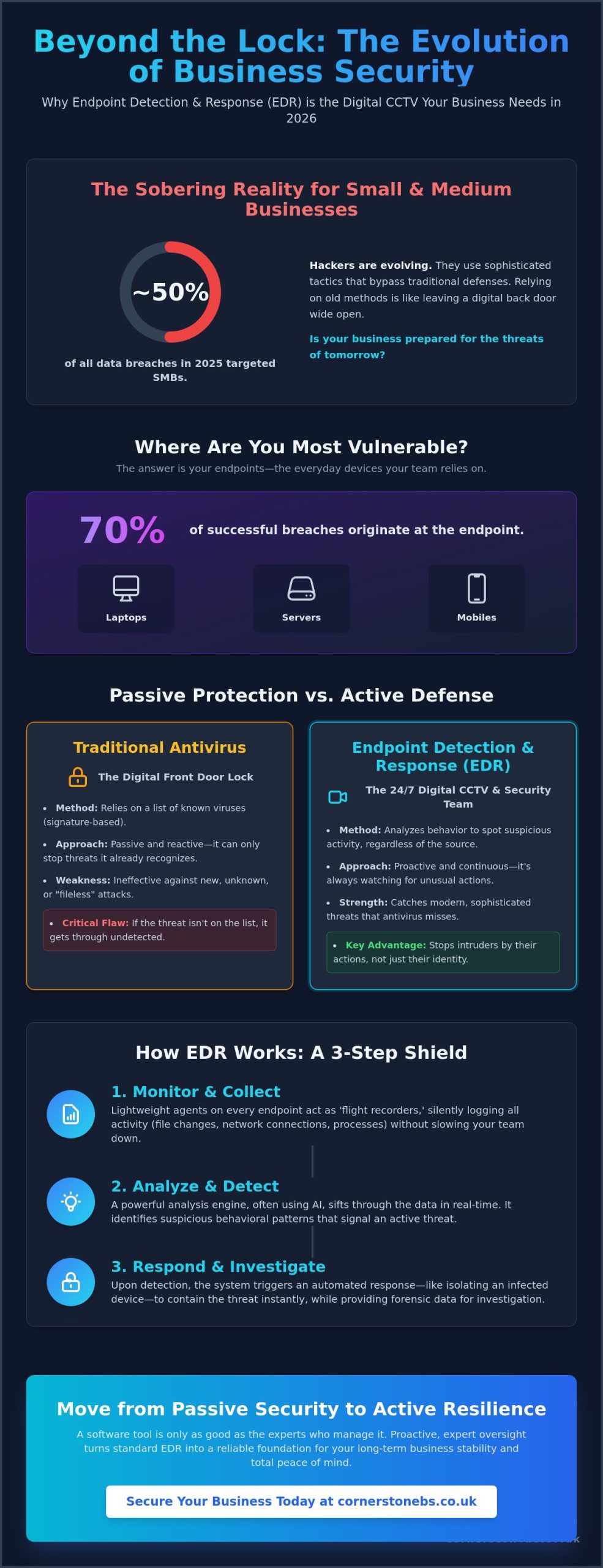
Did you know that in 2025, small and medium sized businesses accounted for nearly half of all data breaches? It is a sobering reality that traditional antivirus often misses the sophisticated tactics used by modern hackers. This is why implementing endpoint detection and response (EDR) for business has become a foundational element of stability rather than just a technical luxury. You likely feel overwhelmed by the constant stream of cybersecurity jargon and the persistent anxiety of a potential ransomware attack. It is exhausting for a small IT team to monitor every device around the clock while trying to run a successful local company.
We are here to simplify the complex and help you secure your digital infrastructure with confidence. Discover exactly how EDR acts as the digital CCTV your business needs to stop threats that traditional tools miss. We provide a clear framework for choosing the right level of protection and a step by step 2026 strategy to ensure your endpoints are monitored every single hour of the day. Let’s move from passive security to active business resilience together.
Key Takeaways
- Understand why laptops and servers are the primary targets for modern attacks and how to secure them effectively.
- Learn how endpoint detection and response (EDR) for business identifies strange behavior to catch threats that traditional antivirus tools often miss.
- Discover the difference between passive protection and active monitoring to ensure your security strategy matches the risks of 2026.
- Follow a practical framework for auditing your devices and choosing a platform that balances high level security with smooth system performance.
- Explore how proactive, expert oversight turns a standard software tool into a reliable foundation for your long term business stability.
What is Endpoint Detection and Response (EDR) for Business?
Think of your business network as a secure office building. While your traditional antivirus acts like a sturdy lock on the front door, endpoint detection and response (EDR) for business is the sophisticated CCTV system and internal security team that monitors every hallway. It is a security solution specifically designed to monitor end-user devices, such as laptops, mobiles, and servers, to detect and respond to cyber threats that have already managed to bypass initial defenses.
The reason we focus so heavily on these devices is simple: endpoints are the primary target for approximately 70% of successful breaches. Hackers know that your team members are busy and might occasionally click a suspicious link or use an unsecured network. In the 2026 threat landscape, relying solely on passive prevention is no longer enough. You need a system that acts like a flight data recorder, capturing every file change, process start, and network connection across your entire local infrastructure. This visibility allows us to see exactly what happened during an incident, providing the clarity you need to maintain business continuity.
The Evolution of Endpoint Security
Security has moved far beyond the days of simple blacklisting. In the past, antivirus software worked by recognizing a list of known “bad” files. If a virus wasn’t on that list, it got through. Modern cyber security services now prioritize behavioral analysis. Instead of looking for a specific file name, EDR looks for suspicious actions, like a spreadsheet suddenly trying to encrypt your entire hard drive.
Traditional antivirus is no longer a set and forget solution. As your dedicated regional partner, we understand that hackers evolve their tactics daily. Endpoint detection and response (EDR) represents a shift toward active detection, where the goal is to catch an intruder the moment they step foot inside your network, rather than waiting for them to trip a static alarm.
Key Components of an EDR System
To provide this level of protection, EDR relies on three foundational elements that work together seamlessly to keep your business safe:
- Data collection agents: These are the eyes and ears installed on every device. They record activity in real time without slowing down your team’s workflow.
- Analysis engine: This is the brain of the operation. It identifies patterns and anomalies that signal a breach might be in progress, often using AI to stay ahead of new threats.
- Forensic capabilities: If a threat is detected, these tools allow us to see the how and why. We can trace the path of an attack back to its source, ensuring we close the gap for good.
How EDR Works: From Silent Monitoring to Rapid Response
Your business needs a security system that never blinks. While standard tools wait for a match in a database, endpoint detection and response (EDR) for business works by maintaining a constant, silent watch over every digital interaction. It records everything. Every file change, process execution, and network connection is logged. This continuous monitoring creates a rich history of activity, which is vital for spotting the subtle breadcrumbs an intruder leaves behind.
This approach moves beyond simple virus signatures. It focuses on behavioral detection. By spotting “strange” activity, the system can flag a threat even if it has never been seen before. If a user’s workstation suddenly starts scanning your internal network for open ports, the EDR system recognizes this as a deviation from normal business operations. It acts as an automated first responder, often isolating an infected device before a human technician even sees the alert. This speed is critical for stopping a minor incident from becoming a full scale disaster.
Proactive threat hunting is another core feature of a modern setup. Instead of just waiting for an alarm, we can use the EDR data to look for vulnerabilities or hidden indicators of compromise that haven’t been triggered yet. It’s about staying one step ahead of the adversary to protect your local company’s reputation and data.
The Detection Phase: Spotting the Invisible
Cyber criminals often use lateral movement to navigate your network. They might compromise a single low-level laptop and then attempt to jump to your more sensitive servers. EDR identifies these suspicious leaps instantly. It also excels at catching fileless malware. These are sophisticated attacks that hide in a computer’s memory rather than on the hard drive, making them invisible to traditional scanners. Behavioral analysis is the study of software actions over time. By focusing on what a program does rather than what it is, we can protect your Cyber Security infrastructure from the most elusive threats.
The Response Phase: Neutralising the Threat
Detection is only half the battle; the real value lies in the rapid response. When a compromise is confirmed, the system can trigger network isolation. This instantly cuts off a compromised laptop from the rest of your network and the internet, preventing the spread of ransomware. Many modern EDR platforms also feature rollback capabilities. This allows us to revert a device to its healthy state before a ransomware infection took hold, saving hours of manual recovery time. Finally, the remediation process ensures every trace of the intruder is wiped clean, restoring total stability to your local operations.
EDR vs Antivirus vs MDR: Clearing the Confusion
Choosing between security layers shouldn’t feel like a guessing game. To understand the value of endpoint detection and response (EDR) for business, it helps to look at your office security as a series of levels. Antivirus is your front door lock. It keeps out anyone without a key. EDR is the security guard patrolling the hallways. Even if someone slips through the door, the guard spots the suspicious behavior. Managed Detection and Response (MDR) is the remote monitoring station where experts watch your cameras. Finally, Extended Detection and Response (XDR) connects the cameras in your office to your cloud storage and email, giving you a single, unified view of your entire network.
Each level serves a distinct purpose in protecting your business continuity. While antivirus stops the known threats we’ve seen before, EDR focuses on the unknown. It looks for patterns that don’t fit your normal daily operations. This proactive stance is what separates a modern, resilient company from one that is constantly reacting to crises. We want to help you build a foundation that feels stable and secure, no matter how the threat landscape changes.
Why Antivirus Alone is a High-Risk Strategy
Relying on antivirus alone is a high-risk strategy in 2026. Attackers now use zero-day exploits that bypass traditional filters because the software hasn’t learned to recognize them yet. They also use “living off the land” techniques, which involve using legitimate business tools to carry out malicious tasks. This makes the attack look like normal work to a basic scanner. Our it company solutions help you see how security fits into your wider digital infrastructure, ensuring no gaps are left open for intruders to exploit.
Choosing the Right Level for Your Business
Every local company has a unique risk profile. If you handle sensitive client data or financial records, a basic lock on the door isn’t enough. SMEs are now the primary target for automated cyber attacks. In 2025, small and medium sized businesses accounted for nearly half of all data breaches. You must decide between a “DIY” approach, where your own team manages the alerts, or a managed service. For most, the peace of mind that comes from expert oversight far outweighs the cost of trying to handle complex security in-house. We are here to help you find that perfect balance of protection and performance.
Implementing EDR: A Practical Guide for UK Businesses
Moving from understanding the theory to putting it into practice is where many local business owners feel the most pressure. We’ve designed this guide to ensure your implementation of endpoint detection and response (EDR) for business is smooth and effective. Success starts with a comprehensive audit. You cannot protect what you cannot see. This means cataloging every laptop, server, and mobile phone that touches your corporate data, whether it’s in the office or used remotely.
Once you have a clear map of your endpoints, select a platform that balances high level protection with your specific hardware capabilities. After selection, you must configure your policies to set clear rules of engagement. For instance, you might decide that any device showing signs of ransomware should be isolated automatically at any time of day. Don’t forget to train your team. When staff understand that a blocked action is a sign of the system working to keep them safe, they feel more secure rather than frustrated. Integrating these insights into your wider managed IT services strategy ensures your defenses evolve as fast as the threats do.
Overcoming Common Implementation Hurdles
Implementation often brings up two main worries: false positives and system slowdowns. We understand that you can’t have security getting in the way of your daily operations. A well configured system minimizes these interruptions by learning what “normal” looks like for your specific business over time. Regarding performance, you can rest easy knowing that modern EDR agents are designed to be incredibly lightweight. Most reputable solutions use less than 1% of a device’s CPU power. This means even your older office hardware can stay protected without a noticeable drop in speed.
Compliance and Regulatory Benefits
For UK businesses, the regulatory landscape is shifting toward demonstrable resilience. Implementing endpoint detection and response (EDR) for business is a significant step toward meeting the latest Cyber Essentials and Cyber Essentials Plus requirements. These tools provide the granular visibility needed to satisfy GDPR obligations, especially regarding the mandatory reporting of significant cyber events. Beyond legal requirements, having detailed endpoint logs is a huge advantage during professional insurance audits. It proves to underwriters that you are a low risk, proactive organization, which can help keep your premiums manageable. Talk to our friendly team to see how we can streamline your security transition and provide the peace of mind you deserve.
The Cornerstone Approach: Managed EDR for Total Peace of Mind
Even the most advanced software is only as effective as the person monitoring it. While endpoint detection and response (EDR) for business provides the raw data, it’s the expert analysis that truly protects your livelihood. A software alert at 3 AM is useless if there’s no one there to interpret it. At Cornerstone Business Solutions, we combine industry leading technology with award winning support to ensure that every warning is met with a swift, professional response. We act as your dedicated internal security team, catching threats while you sleep so you can wake up to a business that’s ready to grow.
Our approach is built on seamless integration. If you already use Microsoft 365, our EDR solutions fit perfectly into your existing environment. This reduces friction and ensures that your security doesn’t come at the cost of productivity. We are proud of our national reach, but we never forget our community focused roots. You get the professional authority of a top tier provider delivered with the friendly, approachable face of a local partner who genuinely cares about your success.
Your Long-Term Cyber Security Partner
We believe in a collaborative partnership rather than a transactional service. Our goal is to simplify the complex technical world of endpoint detection and response (EDR) for business so you can focus on what you do best: running your company. Cornerstone Business Solutions doesn’t just sell you a license; we provide a foundational element of your business stability. By moving from reactive support to proactive monitoring, we help you build emotional security alongside digital safety. It’s about knowing your systems are reliable and your data is protected by people who know your name.
Ready to Secure Your Business Future?
The journey to total resilience begins with a clear understanding of your current status. We recommend a comprehensive security audit of your endpoints as the first step toward modernizing your defense. This audit identifies where you’re strong and where you’re vulnerable, allowing us to tailor a strategy specifically for your needs. Whether you are currently planning a Microsoft 365 migration or simply want to upgrade your existing protection, we are here to help. Let’s have a friendly chat about your security needs today.
Securing Your Business Growth with Confidence
As a multi-award-winning IT provider and proud partner of Microsoft, IBM, and Cisco, we bring global expertise to our local community. Our UK-based proactive support team is ready to help you navigate these technical shifts with clarity and ease. We believe that security should feel like a partnership, not just a service. If you are ready to take the next step toward total peace of mind, book a free cybersecurity health check with our expert team today. Let’s work together to make your business more resilient and secure for the future.
Frequently Asked Questions
What is the difference between EDR and traditional antivirus?
Traditional antivirus relies on a database of known threats to stop attacks, whereas EDR monitors the behavior of your devices in real time. It doesn’t just look for “bad” files; it looks for “bad” actions. This allows it to catch sophisticated, unknown threats that haven’t been recorded in a standard antivirus database yet. It’s the difference between a simple lock on your door and a security guard watching your hallways.
Will EDR slow down my employees’ computers or laptops?
You won’t notice a drop in performance because modern EDR agents are designed to be incredibly lightweight. They typically use less than 1% of a computer’s processing power. This ensures your team stays productive and focused on their daily tasks while the security software works silently in the background to keep your local company safe from digital intruders.
Does my small business really need EDR, or is it just for big corporations?
Small businesses are actually the primary target for many automated attacks because hackers assume their defenses are weaker. Implementing endpoint detection and response (EDR) for business is now a foundational requirement for any local organization handling sensitive data. It provides the high level of protection once reserved for global enterprises at a scale that fits your specific business needs.
Can EDR protect my staff while they are working remotely or from home?
Yes, EDR is perfectly suited for the modern hybrid workforce. Since the protection is installed directly on the laptop or mobile device, it stays active no matter where your staff connects to the internet. Whether your team is in the office or working from home, they receive the same proactive monitoring and rapid response capabilities to keep your corporate data secure.
How much does EDR cost for a typical UK business?
The investment for EDR depends on the number of endpoints you need to secure and whether you choose a self managed or fully managed service. Most local business owners find that the cost is a small price to pay for the emotional security and business continuity it provides. It’s a strategic investment that helps you avoid the massive financial and reputational costs associated with a data breach.
Is EDR a requirement for Cyber Essentials certification?
While EDR isn’t strictly mandatory for the basic Cyber Essentials certificate, it is a powerful tool for meeting the stricter requirements of Cyber Essentials Plus. It helps you demonstrate the active monitoring and incident response capabilities that the scheme expects. Having these logs available also makes the audit process much smoother for your team and provides evidence of your commitment to resilience.
What happens if EDR detects a threat on one of our devices?
The system acts instantly by following pre-set rules, which often includes isolating the compromised device from the rest of your network. This stops a threat like ransomware from spreading to other computers or your main server. At the same time, an alert is sent to our experts so we can investigate the root cause and clean up any traces left behind by the intruder.
Do I need a dedicated IT team to manage an EDR system?
You don’t need to hire your own cybersecurity experts if you choose a managed approach. We handle all the complex monitoring, alert filtering, and threat hunting for you. This allows you to focus on running your business with total peace of mind, knowing that your digital infrastructure is being watched over by a team of friendly, local specialists.