

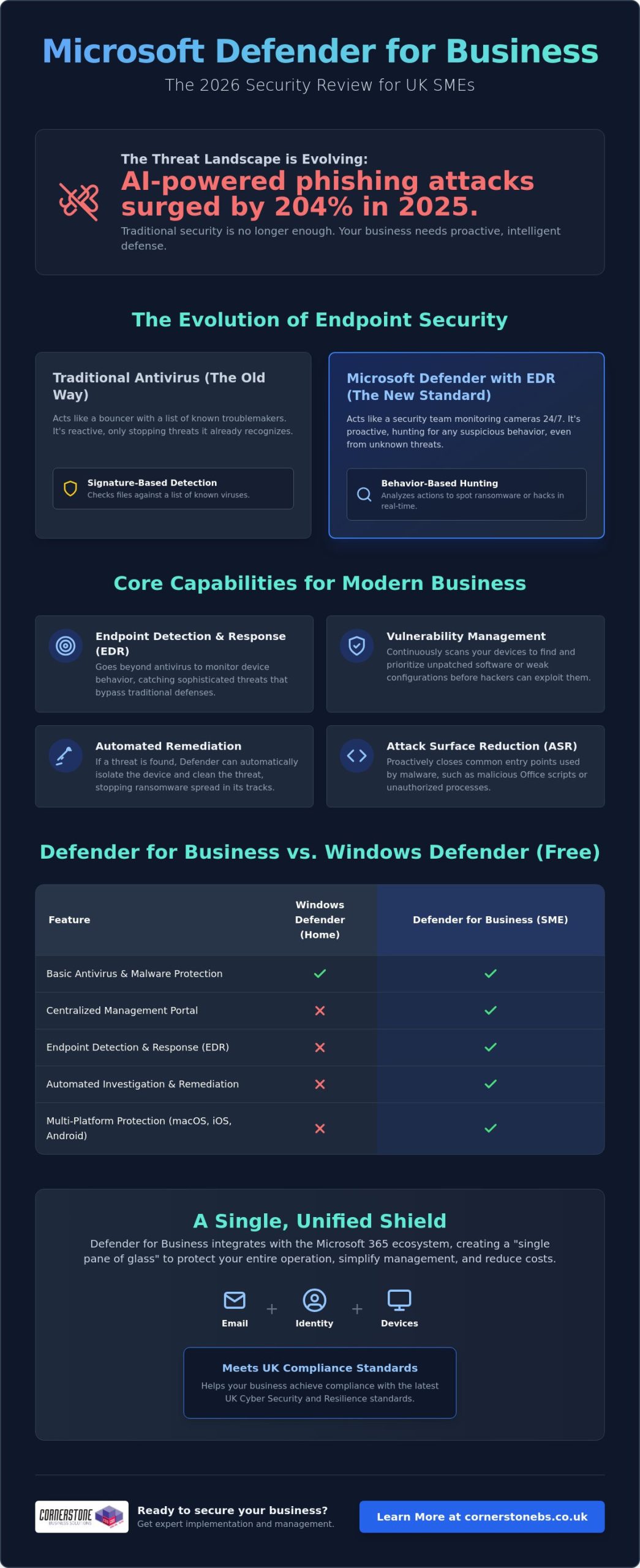
Did you know that AI-powered phishing attacks surged by 204% in 2025? For many UK business owners, keeping up with these sophisticated threats while managing a remote team and juggling multiple software subscriptions feels like an uphill struggle. You need enterprise-grade security that doesn’t break the bank or complicate your workday. This Microsoft Defender for Business review provides an expert, independent look at whether Microsoft’s 2026 security suite offers the robust protection your local business needs to stay safe and compliant.
It’s a common concern that “built-in” tools might not be enough to stop a modern ransomware attack. We’ll show you exactly how this platform has evolved into a sophisticated powerhouse. You’ll learn how features like automatic attack disruption and the new Defender Suite for Business Premium can help you consolidate your security stack to save money. We’ll also examine how it helps you meet the standards of the upcoming UK Cyber Security and Resilience Bill. By the end, you’ll know if this is the right foundation for your company’s stability and emotional security.
In this article, you will discover:
- How our Microsoft Defender for Business review identifies its evolution from a basic antivirus into a sophisticated EDR powerhouse for UK SMEs.
- The technical mechanism behind endpoint detection and response (EDR) and why it’s vital for spotting threats that bypass traditional perimeters.
- Ways to simplify your security management using the “single pane of glass” approach to consolidate email, identity, and device protection.
- A clear comparison of the true ROI between Microsoft’s integrated suite and third-party rivals like Sophos or CrowdStrike.
- Expert guidance on whether consolidating your security stack will help you achieve compliance with the latest UK cyber standards.
What is Microsoft Defender for Business in 2026?
Microsoft Defender for Business isn’t just a basic antivirus tool. It’s a comprehensive, enterprise-grade security platform tailored for the specific needs of UK SMEs. If you’re running a company with up to 300 employees, this is Microsoft’s definitive answer to the sophisticated ransomware and phishing threats we see daily. You can access it as a standalone subscription or as a core component of the Microsoft 365 Business Premium package. This flexibility is a major reason why this Microsoft Defender for Business review ranks the tool so highly for growing teams.
The platform represents a massive shift in how we think about digital protection. Looking back at the history of Microsoft’s security software, the journey from basic scanners to a full Endpoint Detection and Response (EDR) system is impressive. In 2026, it doesn’t just wait for a virus to appear. It actively hunts for suspicious behaviour. EDR is the real game-changer here. Traditional antivirus only checks files against a list of known “bad” signatures. EDR looks at actions. If a laptop suddenly starts encrypting files at 2 AM, Defender for Business recognises that as ransomware behaviour and shuts it down instantly.
Defender for Business vs. Windows Defender
While the “free” Windows Defender is great for home users, it lacks the professional tools your business requires for compliance and oversight. Microsoft Defender for Business includes a centralised management portal. This allows your IT team or partner to see the health of every device from one screen. It also brings automated investigation and remediation to the table. This means the system can often fix a security issue before you even know it exists. Crucially, it protects your entire fleet. It covers macOS, iOS, and Android devices, not just your Windows PCs.
The 2026 Feature Set: AI and Beyond
In 2026, Microsoft Copilot for Security acts as an intelligent assistant that helps you understand and respond to complex technical threats using natural language queries. This AI integration works alongside next-generation protection and Attack Surface Reduction (ASR) rules to harden your devices against common entry points for hackers. Because it’s part of the wider Microsoft 365 ecosystem, it shares data seamlessly with your email and identity settings. This Microsoft Defender for Business review finds that this level of integration creates a unified shield that’s incredibly difficult for attackers to penetrate. It turns your security from a collection of separate tools into a single, proactive defence system.
Core Features & Performance: Beyond Traditional Antivirus
Traditional antivirus is like a lock on your front door. It’s useful, but it won’t stop someone who has already climbed through the window. That’s why this Microsoft Defender for Business review focuses heavily on Endpoint Detection and Response (EDR). Instead of just looking for known viruses, EDR monitors the behaviour of your devices. If a laptop suddenly starts communicating with a suspicious server in the middle of the night, the system flags it as a potential breach. This allows you to catch threats that have already bypassed your initial defences, providing a much higher level of security for your business data.
Vulnerability management is another heavy hitter in the 2026 feature set. Most successful attacks exploit unpatched software. Defender for Business constantly scans your entire fleet to identify outdated applications or weak configurations. It gives you a clear, prioritised list of what needs fixing. You don’t have to be a security expert to understand where your risks lie. The system also uses Attack Surface Reduction (ASR) rules to close the common “doors” hackers use, such as blocking malicious scripts in Office apps or stopping unauthorised processes from running on your servers.
The real magic happens with automated remediation. If the system detects a high-risk threat, it can “self-heal” by automatically isolating the infected device from the rest of your network. This stops the spread of ransomware in its tracks while the system investigates and cleans the threat. For a deeper look at how this performs in complex environments, The MSP Reality Check for Defender highlights how these automated tools save hours of manual investigation. If you’re looking to strengthen your local infrastructure, our team can help you implement these tools through managed IT support tailored for your specific needs.
Real-World Threat Protection
In 2026, Defender’s AI-driven alerts have significantly reduced “notification fatigue” for business owners. The system is smart enough to group related events into a single incident, so you aren’t buried under a mountain of minor warnings. It performs exceptionally well against zero-day exploits and modern ransomware variants. This proactive stance aligns perfectly with the UK National Cyber Security Centre (NCSC) guidelines for effective incident management and protective monitoring.
Cross-Platform Capabilities
Managing a hybrid team across the UK shouldn’t feel like a security nightmare. Defender for Business provides a consistent experience whether your staff are using company laptops or their own mobile devices (BYOD). It offers robust protection across Windows, Linux, macOS, iOS, and Android. You can manage every device from a single dashboard, ensuring your security standards remain high even when your team is working from a home office or a local coffee shop. This Microsoft Defender for Business review finds that this cross-platform reach is essential for modern, flexible UK SMEs.
Is It Easy to Manage? The MSP Perspective
Managing security shouldn’t feel like a second job for a busy business owner. One of the standout findings in our Microsoft Defender for Business review is the “single pane of glass” advantage. Instead of hopping between five different websites to check your antivirus, email filters, and user passwords, everything lives in one central portal. This level of integration is a breath of fresh air for teams that are already stretched thin. It allows your IT team or partner to see exactly what’s happening across your entire network without the friction of multiple logins.
Microsoft provides a simplified setup wizard that gets you up and running quickly. This is great for a start, but “set and forget” is a dangerous myth in the world of cyber security. While the wizard applies sensible defaults, it doesn’t understand the specific software your local business relies on. We often see companies struggle when a default policy accidentally blocks a legitimate line-of-business application. True security requires fine-tuning these policies to balance ironclad protection with daily productivity. Proactive monitoring is essential to ensure that your “exposure score” remains low as new threats emerge.
As a managed IT support provider, we use these tools to provide proactive care for our clients. We don’t just wait for an alarm to go off. We use the vulnerability management data to patch systems before a hacker can exploit them. This proactive stance is what turns a piece of software into a genuine business asset. It’s about creating an atmosphere of reliability where your staff can work without fear of a digital disaster.
Integration with Microsoft 365 Business Premium
The bundle is the most popular choice for UK SMEs because it offers incredible value. When you combine Defender with identity protection and conditional access, you create a ring-fence around your data. If you’re considering making the switch, our Microsoft 365 Migration for Business UK guide outlines how to move your team safely. This all-in-one approach ensures that security settings follow your staff, whether they’re in the office or working remotely across the UK.
The Learning Curve for Small Teams
Let’s be honest about the technical side. Defender for Business is a professional tool. While the interface is clean, the depth of features can be overwhelming for someone without a technical background. A common pitfall during initial deployment is misconfiguring the automated response levels, which can lead to unnecessary business downtime. If you don’t have a dedicated internal IT person, the platform’s advanced settings might feel a bit daunting. This is when a managed security service becomes a smart investment, giving you peace of mind that experts are handling the complexity for you.
Value for Money: Defender vs. Third-Party Rivals
The “Hidden Cost” of third-party suites often goes beyond the subscription fee. You have to account for the time your team spends on training, the complexity of integrating different platforms, and the potential for “blind spots” between disconnected tools. In 2026, performance benchmarks show that Defender for Business stacks up impressively against industry giants like Sophos and CrowdStrike. While those rivals offer excellent “best of breed” features, Microsoft wins on integration ROI. For a typical 50-user UK business, the Total Cost of Ownership (TCO) is significantly lower when security is baked into the existing productivity ecosystem rather than bolted on as an afterthought.
Feature Comparison: Integrated vs. Standalone
- EDR Capabilities: Defender for Business offers full endpoint detection and response, matching the sophisticated threat hunting found in premium standalone suites.
- AI Integration: Microsoft’s 2026 AI-driven alerts group related events together, reducing the manual workload compared to standard AV tools.
- Mobile Protection: While some niche rivals require extra plugins for mobile, Defender provides native protection for iOS and Android as part of the core package.
- Specialised Features: Standard AV might offer specific legacy support, but Microsoft wins on seamless identity and cloud integration.
ROI for UK SMEs
The return on investment isn’t just about lower software bills. It’s about business resilience. Implementing a robust EDR platform is a major step toward achieving Cyber Essentials certification. This can often lead to lower cyber insurance premiums for UK businesses. When you move away from fragmented security, you reduce the risk of a successful breach and the devastating downtime that follows. You can explore how these tools fit into a broader strategy in our Cyber Security Services guide. If you want to see how much you could save by consolidating your stack, chat with our local team today for a professional evaluation.
Verdict: Is Microsoft Defender for Business Right for You?
Our comprehensive Microsoft Defender for Business review concludes that for the vast majority of UK SMEs, this platform is the most logical choice for 2026. If your team already relies on the Microsoft 365 ecosystem for daily work, the integration benefits are simply too strong to ignore. You aren’t just buying another security tool; you’re activating a proactive defence system that understands your users, your data, and your devices. It’s the ideal fit for business owners who want to consolidate their technology stack and remove the “noise” of managing multiple, disconnected subscriptions.
This solution is best for SMEs looking to achieve enterprise-level protection without the enterprise-level price tag or complexity. It provides the peace of mind that comes from knowing your “front door” is locked and your internal systems are being monitored for suspicious behaviour. However, it might not be the right fit for highly specialised environments that require deep, non-Microsoft technical hooks or legacy support for very old, proprietary systems. For everyone else, the combination of EDR, automated remediation, and mobile protection makes it a foundational element of a modern business strategy.
Next Steps for Your Business
Auditing your current setup is the first logical step. You might be surprised to find you’re already paying for features you aren’t using; or worse, that you have overlapping subscriptions creating unnecessary complexity. Once you have a clear picture of your current licensing, you can plan a phased migration. We recommend starting with a pilot group to fine-tune your policies before rolling out Defender to your entire fleet. This ensures that your security stays tight without interrupting the flow of your business. We always invite local business owners to a conversation about bespoke security audits to help identify these hidden opportunities for improvement.
The Cornerstone Advantage
At Cornerstone, we pride ourselves on being more than just a service provider. We are a dedicated long-term partner for UK businesses. Our multi-award-winning expertise allows us to deliver bespoke technology solutions that are tailored to your geographical roots and specific industry needs. We view proactive monitoring as a foundational element of business stability and emotional security for our clients. We’re proud of our regional identity and our ability to simplify complex technical concepts for the benefit of the business owner. If you’re ready to strengthen your posture, you can book a Microsoft 365 Security Review with our experts to ensure your company remains resilient in the face of modern threats.
Secure Your Digital Future with Confidence
Protecting your company in 2026 requires more than just a passive antivirus; it demands a proactive, integrated defence system. We have seen how consolidating your security within the Microsoft ecosystem eliminates “blind spots” and reduces the unnecessary costs of multiple subscriptions. This Microsoft Defender for Business review confirms that the platform provides the enterprise-grade EDR and automated remediation necessary to keep your team safe, whether they’re in the office or working remotely across the UK.
As a multi-award-winning IT provider and Microsoft Gold Partner, we combine national-level expertise with the approachable, regional warmth you expect from a local partner. We believe that robust security is the foundation of your business stability and peace of mind. Our team is ready to help you navigate these technical choices and ensure your infrastructure is resilient enough to meet the latest UK standards. Secure your business with a Microsoft 365 expert today and take the first step toward a simpler, safer digital environment. We look forward to helping your business thrive with confidence.
Common Questions About Microsoft Defender for Business
Is Microsoft Defender for Business included in Microsoft 365 Business Standard?
No, it isn’t included in the Business Standard plan. To access these advanced security features, you need to upgrade to Microsoft 365 Business Premium or purchase it as a standalone subscription. While Business Standard offers basic productivity tools, it lacks the enterprise-grade endpoint detection and response (EDR) capabilities that our Microsoft Defender for Business review highlights as essential for modern protection.
Does Microsoft Defender for Business replace the need for an IT support company?
No, it’s a powerful tool that requires expert management to be effective. Think of it as a high-performance engine; it still needs a skilled driver to navigate complex threats and ensure the settings match your specific business needs. A managed IT support partner provides the proactive monitoring, strategic planning, and rapid incident response that software alone cannot offer. We handle the technical heavy lifting so you can focus on running your business with peace of mind.
Can I use Microsoft Defender for Business on my Mac or iPhone?
How much does Microsoft Defender for Business cost for a UK business in 2026?
The cost is based on a monthly per-user subscription model, which makes it highly scalable for growing teams. Because the pricing can vary based on your existing licensing and any current Microsoft promotions, we recommend checking the latest rates through a certified partner. This Microsoft Defender for Business review finds that the integrated nature of the suite often leads to significant savings by allowing you to cancel expensive third-party security contracts.
Does it protect against ransomware as well as third-party software?
Yes, it often outperforms traditional third-party antivirus because of its advanced EDR and automatic attack disruption features. In 2025, phishing attacks increased by 204%, and Defender has evolved specifically to counter these AI-powered threats. It doesn’t just scan for known viruses; it monitors for suspicious behaviour and can automatically isolate infected devices to stop ransomware from spreading through your network.
What happens if I have more than 300 employees?
If your team grows beyond 300 users, you’ll need to move to Microsoft’s enterprise-grade security solutions, such as Defender for Endpoint P1 or P2. These versions are designed for larger organisations with more complex infrastructure needs. We can help you manage this transition smoothly, ensuring your security remains robust and compliant as your business scales to the next level.
Is it difficult to migrate from my current antivirus to Defender?
The migration process is straightforward if you have a clear plan and the right technical guidance. Microsoft provides tools like Intune to help automate the deployment across your fleet. We often manage this in phases to ensure there’s no downtime for your team. By using a structured approach, we can move your devices from your old antivirus to Defender without leaving your data vulnerable during the switch.
Do I need a server to run Microsoft Defender for Business?
No, it’s a cloud-based solution that doesn’t require any on-site server hardware. This makes it an ideal choice for modern UK businesses that have moved away from traditional office servers in favour of cloud flexibility. All the management and monitoring happen through a central web portal. If you do still run on-premises servers, there’s an optional add-on available to extend your protection to those specific machines.
Tags: Cyber Compliance, Cybersecurity, EDR, Endpoint Security, Microsoft Defender, ransomware protection, SME security, UK business