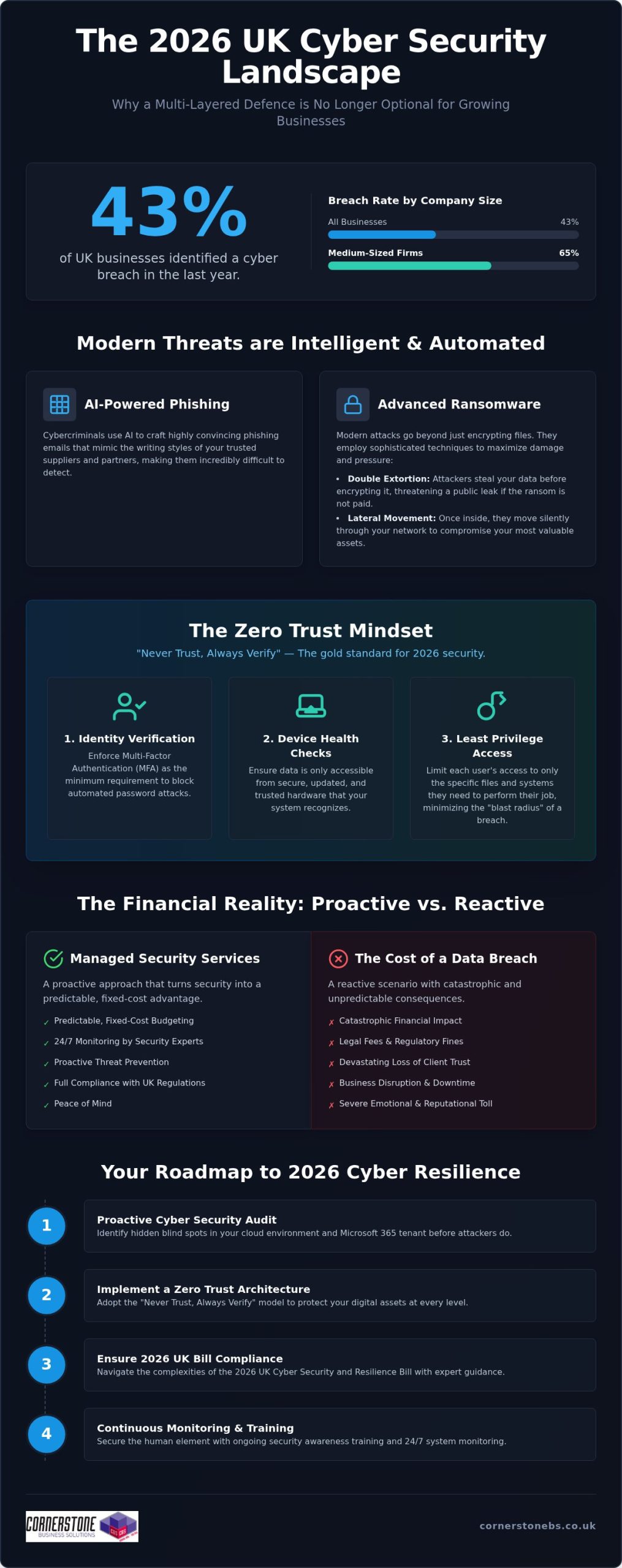
If you think a growing business is too small to be a target, consider that 43% of UK companies reported a breach in the last year alone. For any ambitious firm, cyber security newcastle services are no longer just a technical tick-box; it’s the foundation of your survival. It’s completely normal to feel overwhelmed by the constant threat of ransomware or the confusing jargon surrounding the new 2026 UK Cyber Security and Resilience Bill. You want to focus on your growth, not worry about whether your data is safe while you sleep.
This guide will show you how to build a multi-layered defence that protects your continuity and, more importantly, your emotional peace of mind. We’ll break down the latest 2026 compliance standards, demystify technical terms like Zero Trust, and provide a clear roadmap to ensure your systems are monitored every second of every day. By the end, you’ll see how security can integrate seamlessly with your daily workflow without slowing you down. Let’s work together to turn your security from a source of anxiety into a competitive advantage.
Key Takeaways
- Understand why AI-driven phishing and sophisticated ransomware make every UK business a target in 2026, regardless of company size.
- Learn how to implement a Zero Trust architecture to protect your digital assets, following the “Never Trust, Always Verify” principle.
- Navigate the complexities of the 2026 UK Cyber Security and Resilience Bill with expert cyber security newcastle guidance to ensure full legal compliance.
- Discover why a proactive cyber security audit is the first essential step toward securing your cloud environment and Microsoft 365 tenant.
- Compare the predictable, fixed-cost benefits of managed security services against the catastrophic financial and emotional impact of a data breach.
The Reality of Modern Cyber Threats for UK Businesses
In 2026, the digital landscape has shifted from simple viruses to highly automated, intelligent threats. AI isn’t just a tool for business growth; it’s now the primary engine behind sophisticated phishing campaigns that mimic your suppliers’ writing styles with terrifying accuracy. According to the Cyber Security Breaches Survey 2025/2026, 43% of UK businesses identified a breach in the last year. This figure jumps to 65% for medium-sized firms. As a dedicated partner for cyber security newcastle, we see how these global threats target our local business community, proving that no company is too small to be a target.
The damage from a modern attack extends far beyond a temporary IT glitch. You face the “hidden costs” of recovery, such as legal fees, regulatory fines under the 2026 Cyber Security and Resilience Bill, and a devastating loss of client trust. Moving from a reactive “firefighting” mode to a proactive security posture is the only way to protect your reputation. It’s about building a culture where security is a foundational element of your stability, not an afterthought.
The Anatomy of a 2026 Ransomware Attack
Modern ransomware has evolved to bypass traditional antivirus software by using “fileless” techniques that hide in your system’s legitimate processes. Attackers now favour “double extortion,” where they don’t just encrypt your files, they steal them first and threaten a public leak. This puts immense pressure on boards to pay, even if they have backups. Lateral movement is the technique where an attacker, after gaining initial access, spreads through your internal network to identify and compromise high-value assets and data. Once they’ve mapped your infrastructure, the damage is often done before you even see a ransom note.
Why Basic Protection is No Longer Enough
Off-the-shelf security software provides a false sense of security for a modern enterprise. These tools are often static and cannot adapt to the rapid pace of AI-driven attacks. Effective protection requires 24/7 monitoring because cybercriminals don’t work nine-to-five. Many global standards, such as the NIST Cybersecurity Framework, highlight that detection and response are just as vital as prevention. Human error remains a persistent vulnerability, with phishing experienced by 38% of UK businesses. Without expert cyber security newcastle guidance and continuous staff training, a single misplaced click can bypass even the most expensive firewall. Relying on basic tools leaves your business exposed to the unpredictable expenses of breach recovery.
Implementing a Multi-Layered Cyber Security Strategy
A single lock on your front door isn’t enough if someone has a master key. In the digital world, we call the solution “defense in depth.” This multi-layered approach ensures that if one security measure fails, others are ready to catch the threat. For businesses seeking reliable cyber security newcastle, this strategy is the gold standard for 2026. It moves away from the old idea of a “secure perimeter” and assumes that threats could already be inside your network. By integrating Microsoft 365 security features, you can set granular controls that protect your emails and files automatically. These tools act as a core foundation, providing encryption and threat protection that scales with your business growth. However, technology alone isn’t a silver bullet. You need regular cyber security audits to identify hidden blind spots in your infrastructure before attackers do.
The Core Pillars of Zero Trust
Zero Trust isn’t a single product; it’s a mindset that requires continuous verification. To make it work for your business, we focus on three specific areas that create a robust barrier against intruders.
- Identity verification: Multi-Factor Authentication (MFA) is your absolute minimum requirement. It stops the vast majority of automated password attacks by requiring a second form of proof.
- Device health checks: Your data should only be accessible from secure, updated hardware that your system recognises and trusts.
- Least privilege access: Users should only have access to the specific files they need for their job. This simple step limits the “blast radius” if an account is ever compromised.
Securing the Human Element
Technology provides the shield, but your team holds it. The NCSC’s Small Business Guide emphasizes that people are often the first line of defence. Security Awareness Training turns your employees from a potential vulnerability into a human firewall. We use simulated phishing attacks to help your team recognise real-world threats in a safe environment. This isn’t about catching people out; it’s about building confidence and awareness. When everyone takes responsibility for security, it creates a resilient culture that protects your business continuity. It’s about empowering your staff to be proactive and calm. If you’re looking to strengthen your cyber security newcastle, starting with your people is one of the smartest investments you can make. It builds a long-term partnership between your IT systems and the people who use them every day.
Managed Security Services vs. In-House Management
Hiring a full-time cyber expert in 2026 is a massive challenge. Demand far outstrips supply, and most businesses find it nearly impossible to recruit and retain top-tier talent. This is where cyber security newcastle experts become your greatest asset. We act as an extension of your team, providing professional authority without the overhead of a permanent salary. You get the strength of an entire department for a fraction of the cost, allowing you to reinvest those savings into your core business operations.
A SOC is a dedicated hub where experts monitor your digital environment every second of the day. It’s the difference between an automated alert that sits in an inbox and an expert-led incident response that stops a threat in its tracks. While basic software might flag a problem, our SOC team investigates the “why” and “how” to prevent a recurrence. You can explore our full range of cyber security services to see how this proactive monitoring forms the backbone of your business resilience.
Compliance and Regulatory Peace of Mind
Staying compliant with UK GDPR and the 2026 Cyber Security and Resilience Bill is a full-time job. We simplify this process by managing your Cyber Essentials certifications and ensuring your systems meet the latest legal standards. Using the NCSC Small Business Guide as a foundation, we help you navigate complex legal obligations with clarity. This proactive management doesn’t just protect you from fines; it also makes your annual insurance renewal much smoother. Insurers want to see that you have a professional partner handling your cyber security newcastle needs. It proves you’re a lower risk, which can lead to better coverage terms and total peace of mind.
Building Your 2026 Cyber Resilience Roadmap
Resilience isn’t a state of being; it’s a process of constant improvement. To stay ahead of modern threats, you need a clear, actionable plan that evolves alongside your business. For leaders seeking cyber security newcastle, this roadmap provides the structure needed for operational stability and long-term growth. It moves you away from “hope-based” security toward a model of verified protection. By following these four steps, you can transform your digital infrastructure from a potential liability into a robust asset.
- Step 1: Conduct a comprehensive cyber security audit and risk assessment.
- Step 2: Secure your cloud environment and Microsoft 365 tenant.
- Step 3: Implement robust backup and disaster recovery protocols.
- Step 4: Establish a continuous monitoring and improvement cycle.
The Audit: Finding Your Weakest Link
Every network has a weakest link, and it’s rarely where you expect it. We often find “Shadow IT” lurking in growing businesses. This refers to unauthorized applications or personal devices used for work that bypass your official security policies. With the rise of remote and hybrid work, these unsecured entry points have become the primary targets for global threat actors. A professional audit uncovers these hidden risks, ensuring your hybrid team stays productive without exposing your data. Investing in a security audit delivers a clear return by identifying vulnerabilities that could otherwise lead to the median £4,000 cost of a disruptive breach.
Backup and Disaster Recovery
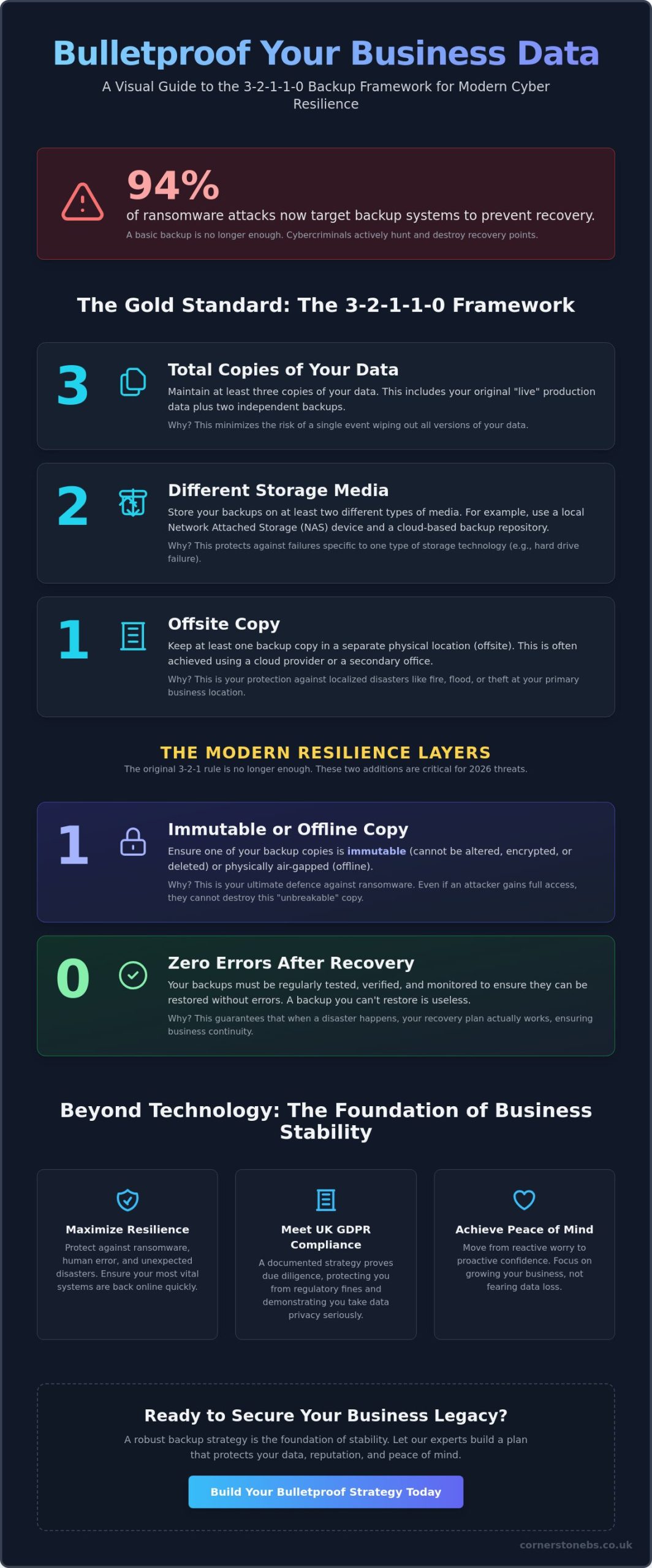
Data protection is the final safety net for your business continuity. We adhere to the 3-2-1 backup rule, which is the national standard for data protection: three copies of your data, stored on two different media types, with at least one copy held securely off-site. However, having a backup is only half the battle. You must test your recovery speed to ensure your Recovery Time Objective (RTO) and Recovery Point Objective (RPO) align with your business needs. It’s about how quickly you can get back to work after an incident, not just how much data you saved. You can find more about our infrastructure support through our managed IT services. We’re here to ensure your cyber security newcastle strategy is backed by a rock-solid foundation. Book your security audit today to start building your own resilience roadmap.
Securing Your Future with Cornerstone Business Solutions
Choosing a security provider is about more than just buying software; it’s about choosing a long-term technology and security partner. We don’t just sell services. We build relationships. Our multi-award-winning approach to bespoke cyber security solutions is designed to adapt as the threat landscape shifts. By leveraging our elite partnerships with Microsoft, Cisco, and IBM, we provide you with the same level of protection used by global enterprises. We’re committed to simplifying technology. We strip away the jargon and provide clear, actionable insights so you can focus entirely on your business growth. Our role is to ensure your cyber security newcastle strategy remains invisible but invincible.
The Cornerstone Difference: Proactive Partnership
We lead with solutions and business outcomes. While some firms might focus on the “how,” we prioritize the “why.” Our philosophy is built on being an “approachable expert.” This means you get world-class technical authority delivered with genuine regional warmth. We understand the specific challenges faced by businesses in our community because we share those same roots. We provide a foundation for your emotional security, giving you the confidence to make bold business decisions. When your infrastructure is managed by a proactive partner, you gain the stability needed to scale without fear.
Start Your Security Conversation Today
Your journey to resilience starts with a simple conversation. We invite you to a no-obligation discussion where we can look at your current security posture together. This isn’t a sales pitch; it’s an expert analysis of your specific risks and opportunities. We tailor our managed IT support to align with your national goals, ensuring your technology is an accelerator, not a bottleneck. We’ll show you how to integrate cyber security newcastle into your daily operations seamlessly. Don’t wait for a breach to find out where your gaps are. Speak with our award-winning team today and discover how a dedicated partnership can protect your future.
Empowering Your Future Through Digital Resilience
Building a resilient business in 2026 requires more than just reactive fixes; it demands a proactive, intelligent strategy that scales with your ambition. We’ve explored how AI-driven threats and evolving compliance laws make a multi-layered defense essential for every organization. By adopting a Zero Trust mindset and leveraging the expertise of a dedicated partner, you can transform your digital infrastructure into a pillar of stability. It’s about moving from a state of constant worry to one of complete confidence.
As a multi-award-winning IT services provider and official partner to Microsoft, Cisco, and IBM, we provide the proactive 24/7 monitoring you need for total peace of mind. Our team combines technical authority with the regional warmth you’d expect from a local expert. We’re here to protect your emotional and operational security so you can focus on your next big milestone. Ready to find your hidden vulnerabilities? We invite you to Book a Cyber Security Audit with our award-winning team today. Let’s work together to ensure your cyber security newcastle strategy is ready for whatever comes next. You’ve built something special, and we’re here to help you keep it safe.
Frequently Asked Questions
What is the most common cyber threat for UK businesses in 2026?
Phishing remains the most common threat, experienced by 38% of UK businesses according to 2026 data. These attacks have evolved using generative AI to create contextually aware content that mimics trusted suppliers with terrifying accuracy. Many firms also face “multi-extortion” ransomware where data is both encrypted and stolen. By prioritizing employee training and 24/7 monitoring, you can identify these deceptive attempts before they breach your primary digital defenses.
How much does managed cyber security cost for a mid-sized firm?
Costs for managed services are typically structured as a fixed monthly fee based on the number of users or devices in your organization. This model provides absolute budget certainty compared to the unpredictable expenses of a data breach. While we don’t provide a single flat rate, these bespoke solutions ensure you only pay for the protection your specific infrastructure requires. This investment covers proactive monitoring and enterprise-grade tools from partners like Cisco and IBM.
Is Cyber Essentials certification mandatory for all UK businesses?
Cyber Essentials isn’t legally mandatory for every UK business, but it’s often a requirement for government contracts and supply chain partnerships. Achieving this certification demonstrates that you’ve implemented foundational security controls against common threats. In 2026, the cost for self-assessment ranges from £300 to £600 plus VAT depending on organization size. We help simplify this process as part of our broader cyber security newcastle services to ensure your compliance is maintained year-round.
How does Zero Trust security differ from a traditional firewall?
A traditional firewall focuses on protecting the perimeter of your network, acting like a locked front door. Zero Trust assumes that threats could already be inside and operates on the principle of “Never Trust, Always Verify.” It requires continuous identity verification, device health checks, and least-privilege access for every user. This granular approach provides significantly better protection for hybrid teams and cloud environments than a static, outdated perimeter defense strategy alone.
Can managed security services help with NIS2 or GDPR compliance?
Managed services are essential for navigating complex regulations like GDPR and the 2026 UK Cyber Security and Resilience Bill. We provide specialized cyber security audits that identify gaps in your data handling and reporting protocols. Proactive management ensures that you meet the new 24-hour initial notification deadlines for harmful breaches. By maintaining continuous compliance, you protect your business from significant regulatory fines and build long-term trust with your national client base.
What is the first thing I should do if I suspect a data breach?
You should immediately isolate the affected devices from your network to prevent the threat from spreading further. Don’t turn the machines off, as this can destroy vital forensic evidence needed for an investigation. Your next step is to contact your managed security partner to trigger your incident response plan. Under 2026 UK legislation, you may have legal obligations to report the breach within 24 hours, making professional expert guidance vital for a swift recovery.
How often should my business conduct a cyber security audit?
We recommend conducting a comprehensive cyber security audit at least once a year. However, you should also perform an assessment whenever you implement major infrastructure changes, such as moving to a new cloud environment or adopting a hybrid work model. Regular audits help uncover “Shadow IT” and unsecured entry points that naturally emerge over time. This proactive cycle ensures your cyber security newcastle strategy stays aligned with the latest 2026 threat intelligence.
Why is Microsoft 365 security a priority for modern businesses?
Microsoft 365 is the operational hub for most UK businesses, making it a primary target for credential theft and phishing. Securing your tenant with Multi-Factor Authentication and advanced threat protection is a foundational step in your resilience roadmap. Because it houses your emails, files, and communication data, a compromise here can be catastrophic. We leverage our official Microsoft partnership to implement bespoke security features that protect your cloud data without disrupting your workflow.
Attackers targeted backup repositories in 96% of ransomware incidents over the last year, and they successfully breached them in 76% of those cases. It’s a sobering reality that keeps many UK business owners awake at night. You’ve likely felt the pressure of rising hardware costs and the headache of trying to decode complex technical jargon, but finding the right cloud backup solutions for business shouldn’t feel like a chore. We understand that your data isn’t just a collection of files; it’s the foundation of your hard-earned reputation and the lifeblood of your community presence.
This guide simplifies the path forward. You’ll learn how to secure your business data, ensure continuity, and scale your infrastructure with modern cloud backup strategies. We’re moving beyond simple storage to explore a 2026 strategy focused on true cyber resilience. We’ll cover everything from immutable backups to the shared responsibility model, giving you a clear, jargon-free roadmap to lower your IT overheads and protect your organisation’s future. It’s about more than just technology; it’s about the emotional security that comes from knowing your business is safe.
Key Takeaways
- Understand how automated, off-site data preservation converts heavy capital expenditure into a flexible, scalable operational strategy for your organisation.
- Learn to distinguish between SaaS, IaaS, and PaaS to create a bespoke technology stack that avoids the limitations of generic, off-the-shelf bundles.
- Compare public, private, and hybrid deployment models to find the right balance of data sovereignty, performance, and long-term cost-efficiency.
- Access a step-by-step framework for implementing cloud backup solutions for business that protects your continuity from the initial audit through to post-migration support.
- Discover the value of a collaborative partnership with a multi-award-winning national expert who prioritises proactive helpdesk support over reactive troubleshooting.
Why Cloud Backup Solutions are Critical for Business Resilience in 2026
Resilience in 2026 isn’t just about surviving a crisis; it’s about staying operational while others stumble. A modern remote backup service is an automated, off-site data preservation strategy that keeps your files safe in a secure, secondary location. These cloud backup solutions for business have evolved from simple storage into the backbone of organisational stability. By moving away from capital-heavy physical servers, you can shift costs to a predictable operational model that fits your budget perfectly.
This flexibility is vital for supporting the UK’s hybrid workforce. When your team works from various locations, your data shouldn’t stay locked in a physical box in a quiet office. You need a system that moves as fast as your people do. However, don’t fall for the “set and forget” myth. While the technology is automated, proactive monitoring is the only way to ensure your recovery points remain valid and ready when you need them most.
The Decline of the Physical Server
Cloud leaders like Microsoft and IBM now provide enterprise-grade encryption that was once only available to global corporations. This level of protection ensures your data is unreadable to anyone without the correct keys, even during transit. Automated patching is another silent hero here. It eliminates human error by ensuring your systems are always up to date with the latest security fixes without a manual check. Most SME premises can’t compete with the physical security of a dedicated data centre, which features biometric access and 24/7 surveillance to keep your digital assets safe. Choosing modern cloud backup solutions for business means you’re inheriting these world-class security standards as part of your standard setup.
The Three Pillars of Cloud Strategy: SaaS, IaaS, and PaaS Explained
Cloud jargon can feel like a barrier. However, it’s really just a way to categorise how your business uses technology to grow. Instead of settling for generic bundles, we focus on building a bespoke technology stack that fits your specific workflow. These three pillars work together to create a secure digital environment, often forming a core part of any robust Disaster Recovery Plan (DRP). Understanding these layers helps you choose the right cloud backup solutions for business without paying for features you don’t need.
Each pillar serves a different purpose, but they all share a common goal: removing the physical limitations of traditional IT. Whether you’re looking for better collaboration or a total infrastructure overhaul, these models provide the flexibility required for 2026. For a broader look at how these integrate with your physical setup, our guide on IT company solutions offers practical advice on hardware and software synergy.
Software as a Service (SaaS): Your Daily Tools
Software as a Service is likely what your team interacts with most. A prime example is Microsoft 365. It enables your national team to collaborate in real-time, whether they’re in a home office or on a site visit. One common misconception is that data in a SaaS platform is automatically backed up forever. It isn’t. Dedicated cloud backup solutions for business are essential here because they protect you against accidental deletion or internal threats that native tools might miss. SaaS keeps your tools accessible across every device while keeping your overheads low.
Infrastructure as a Service (IaaS): Virtual Foundations
Infrastructure as a Service is the virtual equivalent of your old server room. By using platforms like Microsoft Azure, you remove the need for noisy, hot hardware that requires constant maintenance and expensive electricity. You’re essentially renting the processing power and storage you need from a world-class data centre. IaaS allows businesses to adjust resources in real-time, meaning you only pay for what you actually use. This virtual foundation makes scaling your business much smoother than waiting for new physical hardware to arrive and be configured.
Platform as a Service (PaaS): Fueling Innovation
Platform as a Service is where custom innovation happens. It allows your business to develop and deploy custom applications without the headache of managing the underlying hardware or operating systems. This reduces the complexity and cost of bespoke software development significantly. You might transition to PaaS when standard SaaS tools no longer fit your unique business processes and you need something tailored to your specific industry. If you’re ready to build a more resilient foundation, consider how our bespoke IT solutions can streamline your transition to these modern cloud pillars.
Public, Private, or Hybrid? Navigating Your Strategic Path
Choosing the right architecture for your cloud backup solutions for business is a strategic decision that impacts your daily operations and long-term security. It’s not a one-size-fits-all choice. You need to balance the cost-efficiency of shared systems with the strict control required for sensitive data. Many business owners worry that public clouds are less secure than private ones, but this is a common misconception. In reality, the most resilient organisations often use a mix of both. Before committing to a path, you must audit your data sensitivity. Categorise your files into “critical and sensitive” versus “general operational data” to see where a hybrid approach might serve you best.
Public Cloud: Cost-Efficiency and Global Scale
Public cloud models use shared infrastructure to deliver incredible scale at a lower cost. They’re perfect for non-sensitive data and general applications that need to be accessible from anywhere. If you’re looking for the fastest route to digital transformation, this is it. Our Cloud Solutions simplify national expansion by removing the need for local hardware at every new site. It’s a plug-and-play model that grows with you. You don’t need to worry about hardware maintenance, as the provider handles all the heavy lifting behind the scenes.
Private and Hybrid: Tailored Control and Compliance
For regulated industries like finance or healthcare, the isolation of a private cloud is often a legal or operational necessity. You get dedicated resources that aren’t shared with any other organisation. However, many UK firms are now adopting a “Hybrid First” strategy. This allows you to keep sensitive legacy software on a local or private server while utilising the immense power of the cloud for everything else. It’s the best of both worlds. You maintain total control over your most sensitive assets while benefiting from the scalability of modern cloud backup solutions for business.
Managing this split environment doesn’t have to double your workload if you have the right management tools in place. Understanding Why Enterprise Recovery Plans Fail often reveals that architectural mismatches are the primary culprit. By aligning your deployment model with your specific compliance needs, you create a foundation that won’t buckle under pressure. We help you bridge the gap between your existing systems and the cloud, ensuring your data moves safely between environments without any service interruptions.
A Practical Framework for Implementing Cloud Backup and Migration
Moving your data to the cloud is a significant milestone for any UK organisation. It’s not just about moving files from one place to another; it’s about building a foundation that supports your future growth and stability. We follow a structured framework that takes you from an initial audit through to post-migration support. This proactive approach ensures your business stays online while implementing the best cloud backup solutions for business for your specific needs. Professional project management is the secret to a smooth transition, as it keeps every technical detail aligned with your commercial goals.
The Infrastructure Audit: Knowing What You Have
Before we move a single byte, we need to understand your current landscape. This involves evaluating your available bandwidth and identifying any legacy applications that might not play nicely with modern environments. We also look at the age of your hardware to see what’s worth keeping and what’s ready for retirement. This audit helps us decide which workloads are “cloud-ready” and which might need refactoring to work efficiently. By setting clear KPIs, such as specific cost reductions or improved access speeds, we ensure the migration delivers measurable value to your team.
Disaster Recovery: Planning for the Unexpected
A successful migration must have security at its core. We integrate our Cyber Security Services from day one to protect your data while it’s in transit. This is also the time to define your Recovery Point Objectives (RPO) and Recovery Time Objectives (RTO). These metrics tell us exactly how much data you can afford to lose and how quickly you need to be back online after an incident. Cloud-based disaster recovery ensures your business maintains continuity even during a total local hardware failure.
We don’t believe in “set and forget” systems. Automated, regular backup testing is a non-negotiable part of our framework. It’s the only way to guarantee data integrity and give you total peace of mind. When you choose modern cloud backup solutions for business, you’re investing in a system that’s actively monitored and tested against the latest threats. We’re here to manage the complexity so you can focus on running your business. Talk to us about your cloud migration today to ensure a secure transition.
Choosing a Long-Term Partner for Your Bespoke Cloud Infrastructure
Finding the right technology is only half the battle. The real value lies in the hands that manage it. As a multi-award-winning national IT provider, we don’t just sell cloud backup solutions for business; we build the digital safety nets that allow your organisation to thrive. We’ve spent years refining a proactive helpdesk model that prioritises prevention over cure. While others wait for a ticket to arrive, we’re already working behind the scenes to ensure your systems remain stable. This shift from reactive to proactive isn’t just a technical choice. It’s a commitment to your emotional security and business continuity.
Our status as a trusted partner is backed by deep relationships with industry giants like Microsoft, IBM, and Cisco. These global partnerships give us the tools to build world-class infrastructure, but it’s our regional warmth and community-focused style that makes the difference. We translate these high-level technologies into clear, benefit-driven strategies that any business owner can understand. It’s about making the complex feel simple and the uncertain feel secure. We position IT support as the foundational element of your stability, not just a technical necessity.
Bespoke Solutions vs. One-Size-Fits-All
Clarity and transparency are the hallmarks of our award-winning support. We believe that you should always know exactly how your data is being protected without having to wade through dense technical manuals. Our national reach ensures we have the resources to provide 24/7 proactive monitoring, catching potential issues before they become expensive problems. This constant vigilance provides a level of peace of mind that a standard helpdesk simply can’t match. We’re proud of our accolades and the trust we’ve built across the UK, and we’d love to help you secure your future.
Your journey to a more resilient, scalable cloud environment starts with a single conversation. We invite you to reach out to our team of experts to discuss how a bespoke cloud strategy can transform your operations. Let’s move away from transactional IT and toward a collaborative partnership that puts your success first. We’re ready to help you build a foundation that grows with your organisation.
Build a Resilient Foundation for 2026 and Beyond
Securing your data is no longer a back-office task; it’s the architectural insurance policy that keeps your organisation running. We’ve explored how the right mix of SaaS, IaaS, and PaaS creates a flexible environment that grows with you. By moving away from capital-heavy physical hardware and adopting a proactive framework, you can lower your IT overheads while gaining total peace of mind. Implementing modern cloud backup solutions for business ensures that your recovery points are always tested and ready, protecting your reputation from the ever-present threat of ransomware.
As a multi-award-winning national IT provider, we pride ourselves on being more than just a supplier. Our strategic partnerships with Microsoft, IBM, and Cisco allow us to deliver bespoke, proactive technology solutions that simplify the complex. We’re here to act as your long-term partner, providing the emotional security you need to focus on your core business goals. You don’t have to navigate these technical transitions alone. We invite you to Book a Cloud Strategy Consultation with Cornerstone Business Solutions to start your journey. Let’s work together to make your business more stable, scalable, and secure.
Frequently Asked Questions
What are the main benefits of cloud backup for a small business?
Cloud backup solutions for business provide automated protection without the need for manual intervention. You gain off-site security that keeps your data safe from local disasters or hardware failure. It also shifts your IT spending from heavy capital investment in servers to a predictable monthly operational cost. This flexibility allows your small business to scale resources as you grow, ensuring you only pay for the protection you actually use.
Is cloud storage the same as a cloud backup solution?
No, they serve different purposes. Cloud storage focuses on daily file access, syncing, and collaboration across your team. A cloud backup solution is designed for data preservation and disaster recovery. It creates a secure, versioned copy of your entire system that stays protected even if the original files are deleted or encrypted by ransomware. Backup provides the safety net you need to restore your operations quickly after a significant data loss event.
How much do cloud backup solutions cost for a UK SME?
Costs for a UK SME are typically calculated based on the number of users, devices, or the total volume of data being protected. Most providers offer these as monthly managed services, including proactive monitoring and helpdesk support. This subscription model helps you avoid large upfront hardware costs. While exact pricing depends on your bespoke requirements and data sensitivity, it remains a scalable investment that aligns with your organisation’s specific growth and security needs.
How secure is my data in a cloud environment compared to on-premise?
Data in the cloud is often more secure than on-premise hardware due to enterprise-grade encryption and 24/7 physical security at data centres. Global leaders like Microsoft and IBM invest billions in security infrastructure that most SMEs cannot replicate locally. These environments feature automated patching and advanced threat detection to stop breaches before they happen. By moving to the cloud, your business inherits these world-class standards, providing a much stronger defense against modern cyber threats.
What happens to our cloud backup if our internet connection goes down?
If your connection drops, most modern systems use local caching to store data changes temporarily. Once your internet is restored, the backup resumes automatically and syncs the new information to the cloud. You don’t lose any data during the downtime. For businesses that require constant uptime, we often recommend redundant connectivity options as part of a wider disaster recovery strategy to ensure your team stays productive even during a local outage.
Can we migrate our existing legacy software to a cloud solution?
Yes, most legacy applications can be migrated using Infrastructure as a Service (IaaS) platforms like Microsoft Azure. We start with a thorough infrastructure audit to check compatibility and determine if your software needs any refactoring for the best performance. This allows you to keep using the bespoke tools your business relies on while gaining the scalability and security of the cloud. It’s a practical way to modernise your operations without losing your existing workflows.
How do cloud solutions support remote and hybrid working?
Cloud solutions provide your team with secure access to their files and daily tools from any location with an internet connection. Platforms like Microsoft 365 enable real-time collaboration, allowing staff to work together seamlessly whether they’re in the office or at home. This removes the physical limitations of a central server, ensuring your national workforce stays connected. It also provides the emotional security of knowing your data is protected regardless of where your employees are working.
What is the difference between Azure, AWS, and Google Cloud for business?
Microsoft Azure is often the preferred choice for UK businesses because it integrates perfectly with existing Microsoft 365 environments. AWS offers a vast range of services and is popular for heavy development tasks, while Google Cloud excels in high-speed data analytics and machine learning. We focus on Azure for our clients because it provides a familiar, robust foundation that simplifies management and enhances security across your entire business stack without adding unnecessary complexity.
UK companies are currently facing an average of 1,988 cyberattacks every single day. It’s a sobering statistic that highlights why simply “having” the cloud isn’t the same as being truly protected. If you feel overwhelmed by complex admin menus or worry that a single data breach could damage your hard-earned reputation, you aren’t alone. Many local leaders find the sheer volume of security settings exhausting. However, mastering microsoft 365 security best practices uk standards doesn’t have to be a headache. It’s about moving from a “set and forget” mindset to a proactive, managed configuration that stands up to 2026’s AI-powered threats.
We agree that your focus should be on running your business, not decoding technical manuals. You deserve the peace of mind that comes from knowing your data is safe. This guide promises to strip away the confusion and provide a clear, NCSC-aligned roadmap to secure your operations. We’ll explore the essential configurations that reduce ransomware risks, clarify which licenses actually offer the best protection, and ensure you stay compliant with the latest UK data laws. By the end of this article, you’ll have the confidence to turn your digital workspace into a resilient fortress.
Key Takeaways
- Understand the 2026 threat landscape and why AI-powered phishing makes a robust security configuration more critical than ever for UK firms.
- Master the microsoft 365 security best practices uk organisations rely on by following the NCSC’s latest framework for secure cloud configurations.
- Evaluate the security gap between Microsoft 365 Business Standard and Premium to ensure your chosen license provides the protection your data deserves.
- Implement five essential security steps, from phishing-resistant MFA to automated device management, to proactively reduce your risk of ransomware.
- Discover why shifting from a DIY setup to a managed security partnership offers the long-term stability and expert support your business needs to grow safely.
The UK Cyber Threat Landscape for Microsoft 365 in 2026
UK companies currently face an average of 1,988 cyberattacks every single day. According to the Cyber Security Breaches Survey published in April 2026, 43% of UK businesses reported a breach in the last year. This figure rises to 65% for medium sized firms. These aren’t just global trends; they are local realities affecting businesses in our own communities. Microsoft 365 is the primary target because it holds the keys to your financial data, client lists, and internal communications. Relying on a reactive “break-fix” approach is no longer sustainable. You need a proactive strategy built on recognized information security standards to keep your operations running smoothly.
The Rise of AI-Driven Phishing in the UK
Attackers are now using generative AI to craft incredibly convincing emails that mimic local UK dialects and specific business contexts. In 2026, Business Email Compromise (BEC) is defined as a highly targeted attack where criminals use AI-generated deepfakes or perfectly written messages to impersonate trusted partners and divert business payments. Traditional spam filters often fail to catch these because they lack the obvious spelling errors or awkward phrasing of the past. Relying on basic filters alone is no longer a sufficient defence for your team.
The Impact of Downtime on Business Continuity
Technical security is vital, but emotional security matters just as much. As a business owner, you need to sleep soundly knowing your systems won’t vanish overnight. Ransomware was present in 48% of all data breaches in 2026, often leading to days or even weeks of total paralysis. The hidden costs of this downtime go far beyond the ransom itself. They include lost productivity, missed deadlines, and the immense stress of rebuilding your digital infrastructure from scratch. Our cyber security services focus on preventing this chaos before it starts. By adopting a robust microsoft 365 security best practices uk roadmap, you protect both your bottom line and your team’s peace of mind.
Aligning with the NCSC Secure Configuration Blueprint
The National Cyber Security Centre (NCSC) provides a definitive roadmap called the Secure Configuration Blueprint. While originally designed for government bodies, its latest version (Version 3.0) is a vital resource for any local business aiming to implement microsoft 365 security best practices uk experts recommend. It moves away from generic advice and offers a tiered “Good, Better, Best” framework. Most SMEs should aim for “Better” as a starting point. This level aligns closely with the Cyber Essentials scheme, which was updated in April 2026 to require all critical vulnerabilities to be patched within 14 days. Achieving this certification isn’t just about ticking boxes; it’s a powerful way to prove to your customers that their data is in safe, capable hands.
In the past, security was about building a wall around your office network. In 2026, that wall has disappeared. Your staff work from home, on the road, and in the cloud. This makes identity the new security perimeter. If a criminal steals a password, they are effectively inside your building. Shifting your focus to identity management ensures that only the right people have access to your sensitive information, regardless of where they are working. It’s a proactive shift that follows global information security standards while remaining grounded in the practical needs of a growing UK firm.
Identity and Access Management (IAM) Essentials
Passwords alone are a relic of the past. Today, we use Microsoft Entra ID to provide a sophisticated layer of verification that looks at more than just a string of characters. It evaluates the user’s location, the health of their device, and the sensitivity of the data they’re trying to reach. To meet the NCSC recommendation for administrative account protection, you must ensure that admin accounts are never used for day-to-day tasks like checking email or browsing the web. This simple separation of duties drastically reduces the chance of a high-level breach. If you’re curious about how your current setup measures up, our local team is always happy to help with a quick assessment.
Zero Trust Architecture for UK Businesses
Zero Trust might sound like a harsh term, but it’s actually a very reassuring concept for business owners. It follows a “never trust, always verify” mindset. Instead of assuming everything inside your network is safe, every single request is checked for legitimacy. This prevents a small breach in one area from spreading across your entire company. This architecture is a foundational part of modern cloud solutions that prioritize both growth and resilience. By adopting these microsoft 365 security best practices uk businesses can ensure that even if one account is compromised, the rest of the organization remains shielded.
Microsoft 365 Business Standard vs. Premium: The Security Gap
As of July 2026, the cost of Microsoft 365 Business Standard has increased to approximately £10.75 – £11.70 per user. Meanwhile, Business Premium pricing remains stable at around £16.90 – £18.60. This narrowing price gap makes the upgrade more compelling for local firms than ever before. While Standard provides the essential tools to get the job done, it lacks the advanced protection required to defend against 2026’s sophisticated attacks. Choosing Premium is the most effective way to adopt the microsoft 365 security best practices uk SMEs need for genuine resilience. It isn’t just an expense; it’s an investment in your company’s survival.
One of the biggest differences lies in device management. Microsoft Intune, which is included in the Premium tier, allows you to secure company data on personal phones and laptops. If an employee leaves or a device is lost in the local high street, you can remotely wipe only the business data without touching their personal photos. This balance of privacy and protection is essential for modern business continuity. When you compare the small monthly cost difference to the average financial impact of a breach, the return on investment for Premium is clear. It provides the automated investigation and response capabilities that smaller teams simply don’t have the time to manage manually.
Advanced Threat Protection (ATP) Explained
Defender for Business in the Premium tier introduces Safe Links and Safe Attachments. These tools scan every link and file in real-time, even if they’ve already landed in your inbox. If a link becomes malicious an hour after the email arrives, Premium blocks it instantly. This automated response reduces the burden on your team to be perfect every time they click. Any successful microsoft 365 security best practices uk strategy should start with the right foundation, which is why a Microsoft 365 migration should always include a full security audit to ensure your license tier matches your risk profile.
Information Protection and Data Loss Prevention (DLP)
Protecting sensitive UK client data is a legal requirement under the Data (Use and Access) Act 2025. Business Premium uses sensitivity labels to classify and protect files based on their content. For example, Data Loss Prevention (DLP) policies can automatically detect and block the accidental sharing of National Insurance (NI) numbers or financial details via email. This doesn’t slow your team down; it provides a safety net that catches human error before it becomes a breach. It allows your staff to work productively while you maintain the highest standards of data integrity.
5 Critical Security Steps Every UK Firm Should Take
Securing your digital environment doesn’t have to be an overwhelming task. By focusing on a few high-impact changes, you can significantly reduce your risk profile. These five steps form the backbone of microsoft 365 security best practices uk businesses use to stay resilient in 2026. They align with the NCSC’s Secure Configuration Blueprint and provide a clear path toward Cyber Essentials compliance. Taking these steps proactively ensures your team can work safely from anywhere without compromising your sensitive data.
- Enforce Phishing-Resistant MFA: Move beyond basic passwords and SMS codes to more secure methods like the Microsoft Authenticator app or FIDO2 security keys.
- Secure Every Endpoint: Use Microsoft Intune to manage every laptop, tablet, and smartphone that accesses your data, ensuring they meet your security standards before they connect.
- Apply the Principle of Least Privilege (PoLP): Limit administrative access to only those who absolutely need it, and ensure they use standard accounts for their daily work.
- Enable Audit Logging: Configure your system to record activity across your environment. This allows for proactive monitoring and provides a vital trail if an incident occurs.
MFA: The Single Most Effective Defence
In 2026, SMS-based multi-factor authentication is no longer considered a reliable barrier. Attackers can easily bypass it through SIM swapping or interception. Transitioning your team to the Microsoft Authenticator app or hardware-based FIDO2 keys is a critical upgrade. Conditional Access is a set of rules that determines whether a user is granted access based on their location, device health, and risk level. By implementing these microsoft 365 security best practices uk leaders can ensure that a stolen password isn’t enough to compromise the entire firm.
Securing the Mobile Workforce
The rise of remote work has made “Bring Your Own Device” (BYOD) a standard practice, but it also introduces significant risks. Without proper management, a lost personal phone could mean a major data breach. Microsoft Intune allows you to separate business and personal data, giving you remote wipe capabilities to protect company information if a device goes missing. Managing this hardware effectively requires robust it company solutions that integrate seamlessly with your security posture. If you’re unsure if your current mobile policy is “secure enough,” reach out for a proactive security review with our local experts today.
Why Managed Security is the Proactive Choice for 2026
Managing your own digital defences can feel like a full-time job you never actually applied for. In 2026, the technical landscape moves at lightning speed. A “set and forget” approach to your cloud environment simply isn’t enough to stop modern, AI-driven threats. While the settings we’ve discussed are vital, the real challenge lies in keeping those configurations updated as new vulnerabilities emerge. This is where moving from a DIY mindset to a managed security model makes all the difference for a growing firm. It shifts the burden of constant vigilance from your shoulders to a team of dedicated experts.
As a multi-award-winning UK IT provider and Microsoft partner, we believe that security should be a foundational element of your business stability. We don’t just look at support as a transactional service. Instead, we aim to be your long-term technology partner. By implementing microsoft 365 security best practices uk organisations can trust, we ensure your systems are resilient enough to handle whatever the future holds. This collaborative approach means we work alongside you to understand your specific goals, tailoring our microsoft 365 security best practices uk roadmap to fit your unique regional roots and operational needs.
Beyond the Settings: Proactive Monitoring
Real-time alert monitoring is the difference between stopping a breach in its tracks and discovering a disaster weeks too late. Our managed services provide continuous oversight of your environment, catching suspicious login attempts or unusual data movements the moment they happen. We also provide regular security audits and compliance reporting to ensure you’re always meeting the latest UK data protection standards. This proactive stance allows you to stop worrying about technical glitches and focus entirely on your business growth. You gain the freedom to lead, backed by the emotional security of a protected workspace.
Your Invitation to a Security Conversation
Every bespoke security solution starts with a simple, expert-led discussion. We pride ourselves on offering professional authority with a sense of regional warmth that makes complex tech feel approachable. We’re a local team that understands the challenges faced by UK SMEs because we live and work in the same communities. Our promise is to provide the clarity and reliability you need to feel confident in your digital future. We’d love to hear about your current setup and explore how we can strengthen your posture together. We invite you to start a conversation with one of our specialists today to see how we can build a more resilient business for 2026 and beyond.
Building a Resilient Foundation for Your UK Business
As a multi-award-winning UK IT services provider and certified partner for both Microsoft and Cisco, we specialize in bespoke technology solutions designed for growth. We believe in providing more than just technical support; we offer the emotional security that comes from a dedicated partnership. You don’t have to navigate these complex security menus alone. Secure your business with a multi-award-winning partner, let’s talk about your Microsoft 365 security today. Our local team is ready to help you grow with absolute confidence.
Frequently Asked Questions
Is Microsoft 365 security included in my basic subscription?
Foundation security is included in every subscription, but basic levels often lack the advanced tools needed for 2026 threats. While you get standard anti-spam and basic multi-factor authentication, features like automated threat investigation and remote device wiping are reserved for higher tiers. Relying on basic settings alone can leave your business vulnerable to sophisticated phishing attacks that bypass standard filters.
What is the most common Microsoft 365 security mistake UK businesses make?
The most frequent error is failing to move beyond default “out of the box” settings. Many firms don’t enforce phishing-resistant MFA or block legacy authentication, which accounts for a significant portion of successful breaches. Implementing microsoft 365 security best practices uk leaders recommend means actively closing these gaps through custom policies that reflect your specific risk profile and operational needs.
Does Microsoft 365 comply with UK GDPR requirements?
Microsoft 365 provides the necessary infrastructure for compliance, but the responsibility for correct configuration lies with your business. You must ensure that sensitivity labels and data loss prevention policies are active to meet the standards set by the Data (Use and Access) Act 2025. Properly managed settings allow you to control data residency and access, ensuring you meet your legal obligations to protect client information.
How often should my business perform a Microsoft 365 security audit?
We recommend conducting a full security audit at least every quarter to stay ahead of evolving threats. Regular reviews are essential for identifying inactive accounts, checking for “Shadow AI” usage, and ensuring your configurations still align with the latest NCSC guidance. This proactive rhythm helps you catch minor vulnerabilities before they can be exploited by attackers targeting UK SMEs.
Can I secure Microsoft 365 without hindering my employees’ productivity?
You can definitely maintain a high level of security without slowing your team down. By using Conditional Access, you only require extra verification when a login attempt appears risky, such as from an unrecognized device or location. This creates a seamless experience for your staff during their normal workday while keeping a robust shield in place behind the scenes.
What happens if a UK business suffers a data breach in Microsoft 365?
You are legally required to report significant breaches to the Information Commissioner’s Office (ICO) within 72 hours. Beyond potential fines, a breach often leads to expensive downtime and long-term damage to your professional reputation. Having a managed security plan ensures you have the audit logs and recovery protocols needed to respond quickly and minimize the impact on your business continuity.
Is Cyber Essentials certification required for UK government contracts?
Cyber Essentials is now a mandatory requirement for the vast majority of UK government and public sector contracts. The certification process was updated in April 2026 to include stricter rules on vulnerability patching and device management. Aligning your microsoft 365 security best practices uk with these standards is a practical way to prove your reliability to both the government and private sector clients.
How does Microsoft 365 Business Premium improve my security over Standard?
Business Premium introduces enterprise-grade tools like Microsoft Intune and Defender for Business that are missing from the Standard tier. These features allow you to manage every device that accesses your data and provide automated responses to detected threats. This extra layer of protection is increasingly seen as the minimum viable security baseline for local businesses operating in a high-risk digital landscape.
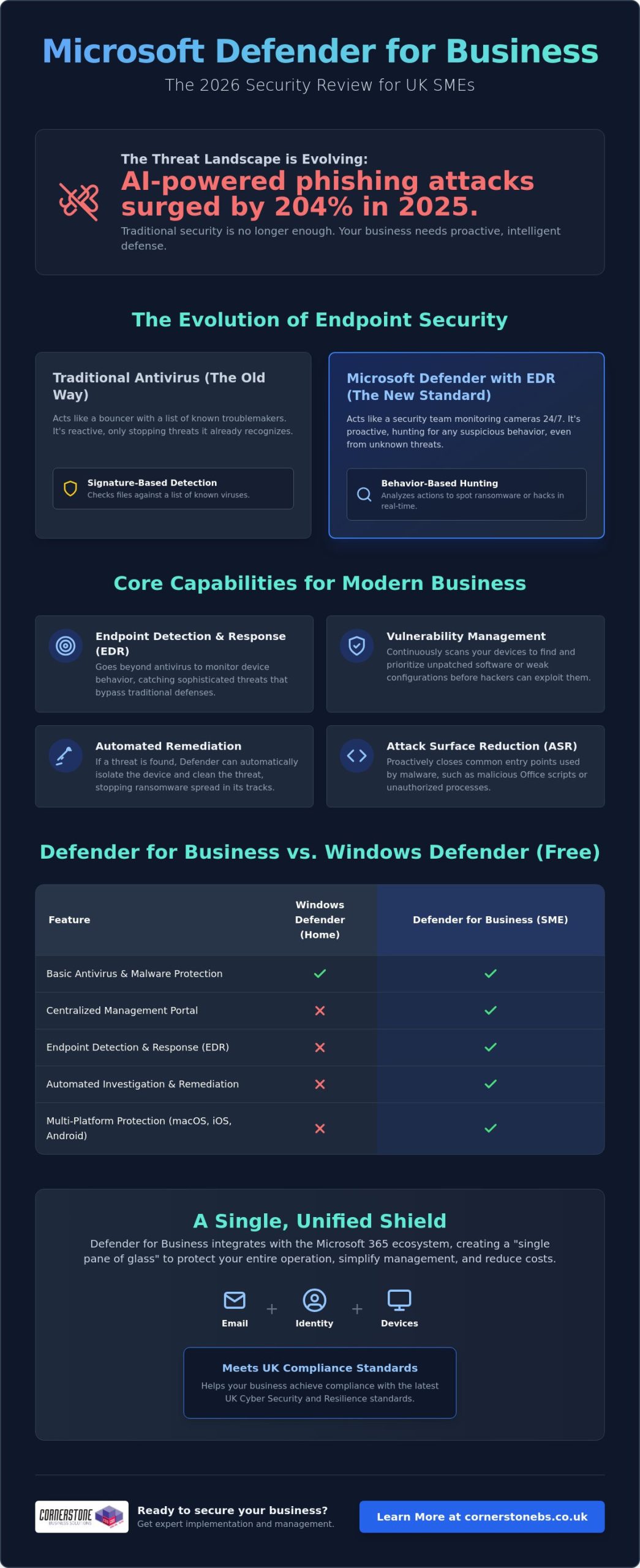
Did you know that AI-powered phishing attacks surged by 204% in 2025? For many UK business owners, keeping up with these sophisticated threats while managing a remote team and juggling multiple software subscriptions feels like an uphill struggle. You need enterprise-grade security that doesn’t break the bank or complicate your workday. This Microsoft Defender for Business review provides an expert, independent look at whether Microsoft’s 2026 security suite offers the robust protection your local business needs to stay safe and compliant.
It’s a common concern that “built-in” tools might not be enough to stop a modern ransomware attack. We’ll show you exactly how this platform has evolved into a sophisticated powerhouse. You’ll learn how features like automatic attack disruption and the new Defender Suite for Business Premium can help you consolidate your security stack to save money. We’ll also examine how it helps you meet the standards of the upcoming UK Cyber Security and Resilience Bill. By the end, you’ll know if this is the right foundation for your company’s stability and emotional security.
In this article, you will discover:
- How our Microsoft Defender for Business review identifies its evolution from a basic antivirus into a sophisticated EDR powerhouse for UK SMEs.
- The technical mechanism behind endpoint detection and response (EDR) and why it’s vital for spotting threats that bypass traditional perimeters.
- Ways to simplify your security management using the “single pane of glass” approach to consolidate email, identity, and device protection.
- A clear comparison of the true ROI between Microsoft’s integrated suite and third-party rivals like Sophos or CrowdStrike.
- Expert guidance on whether consolidating your security stack will help you achieve compliance with the latest UK cyber standards.
Microsoft Defender for Business isn’t just a basic antivirus tool. It’s a comprehensive, enterprise-grade security platform tailored for the specific needs of UK SMEs. If you’re running a company with up to 300 employees, this is Microsoft’s definitive answer to the sophisticated ransomware and phishing threats we see daily. You can access it as a standalone subscription or as a core component of the Microsoft 365 Business Premium package. This flexibility is a major reason why this Microsoft Defender for Business review ranks the tool so highly for growing teams.
The platform represents a massive shift in how we think about digital protection. Looking back at the history of Microsoft’s security software, the journey from basic scanners to a full Endpoint Detection and Response (EDR) system is impressive. In 2026, it doesn’t just wait for a virus to appear. It actively hunts for suspicious behaviour. EDR is the real game-changer here. Traditional antivirus only checks files against a list of known “bad” signatures. EDR looks at actions. If a laptop suddenly starts encrypting files at 2 AM, Defender for Business recognises that as ransomware behaviour and shuts it down instantly.
Defender for Business vs. Windows Defender
While the “free” Windows Defender is great for home users, it lacks the professional tools your business requires for compliance and oversight. Microsoft Defender for Business includes a centralised management portal. This allows your IT team or partner to see the health of every device from one screen. It also brings automated investigation and remediation to the table. This means the system can often fix a security issue before you even know it exists. Crucially, it protects your entire fleet. It covers macOS, iOS, and Android devices, not just your Windows PCs.
The 2026 Feature Set: AI and Beyond
In 2026, Microsoft Copilot for Security acts as an intelligent assistant that helps you understand and respond to complex technical threats using natural language queries. This AI integration works alongside next-generation protection and Attack Surface Reduction (ASR) rules to harden your devices against common entry points for hackers. Because it’s part of the wider Microsoft 365 ecosystem, it shares data seamlessly with your email and identity settings. This Microsoft Defender for Business review finds that this level of integration creates a unified shield that’s incredibly difficult for attackers to penetrate. It turns your security from a collection of separate tools into a single, proactive defence system.
Traditional antivirus is like a lock on your front door. It’s useful, but it won’t stop someone who has already climbed through the window. That’s why this Microsoft Defender for Business review focuses heavily on Endpoint Detection and Response (EDR). Instead of just looking for known viruses, EDR monitors the behaviour of your devices. If a laptop suddenly starts communicating with a suspicious server in the middle of the night, the system flags it as a potential breach. This allows you to catch threats that have already bypassed your initial defences, providing a much higher level of security for your business data.
Vulnerability management is another heavy hitter in the 2026 feature set. Most successful attacks exploit unpatched software. Defender for Business constantly scans your entire fleet to identify outdated applications or weak configurations. It gives you a clear, prioritised list of what needs fixing. You don’t have to be a security expert to understand where your risks lie. The system also uses Attack Surface Reduction (ASR) rules to close the common “doors” hackers use, such as blocking malicious scripts in Office apps or stopping unauthorised processes from running on your servers.
The real magic happens with automated remediation. If the system detects a high-risk threat, it can “self-heal” by automatically isolating the infected device from the rest of your network. This stops the spread of ransomware in its tracks while the system investigates and cleans the threat. For a deeper look at how this performs in complex environments, The MSP Reality Check for Defender highlights how these automated tools save hours of manual investigation. If you’re looking to strengthen your local infrastructure, our team can help you implement these tools through managed IT support tailored for your specific needs.
Real-World Threat Protection
In 2026, Defender’s AI-driven alerts have significantly reduced “notification fatigue” for business owners. The system is smart enough to group related events into a single incident, so you aren’t buried under a mountain of minor warnings. It performs exceptionally well against zero-day exploits and modern ransomware variants. This proactive stance aligns perfectly with the UK National Cyber Security Centre (NCSC) guidelines for effective incident management and protective monitoring.
Cross-Platform Capabilities
Managing a hybrid team across the UK shouldn’t feel like a security nightmare. Defender for Business provides a consistent experience whether your staff are using company laptops or their own mobile devices (BYOD). It offers robust protection across Windows, Linux, macOS, iOS, and Android. You can manage every device from a single dashboard, ensuring your security standards remain high even when your team is working from a home office or a local coffee shop. This Microsoft Defender for Business review finds that this cross-platform reach is essential for modern, flexible UK SMEs.
Managing security shouldn’t feel like a second job for a busy business owner. One of the standout findings in our Microsoft Defender for Business review is the “single pane of glass” advantage. Instead of hopping between five different websites to check your antivirus, email filters, and user passwords, everything lives in one central portal. This level of integration is a breath of fresh air for teams that are already stretched thin. It allows your IT team or partner to see exactly what’s happening across your entire network without the friction of multiple logins.
Microsoft provides a simplified setup wizard that gets you up and running quickly. This is great for a start, but “set and forget” is a dangerous myth in the world of cyber security. While the wizard applies sensible defaults, it doesn’t understand the specific software your local business relies on. We often see companies struggle when a default policy accidentally blocks a legitimate line-of-business application. True security requires fine-tuning these policies to balance ironclad protection with daily productivity. Proactive monitoring is essential to ensure that your “exposure score” remains low as new threats emerge.
As a managed IT support provider, we use these tools to provide proactive care for our clients. We don’t just wait for an alarm to go off. We use the vulnerability management data to patch systems before a hacker can exploit them. This proactive stance is what turns a piece of software into a genuine business asset. It’s about creating an atmosphere of reliability where your staff can work without fear of a digital disaster.
Integration with Microsoft 365 Business Premium
The bundle is the most popular choice for UK SMEs because it offers incredible value. When you combine Defender with identity protection and conditional access, you create a ring-fence around your data. If you’re considering making the switch, our Microsoft 365 Migration for Business UK guide outlines how to move your team safely. This all-in-one approach ensures that security settings follow your staff, whether they’re in the office or working remotely across the UK.
The Learning Curve for Small Teams
Let’s be honest about the technical side. Defender for Business is a professional tool. While the interface is clean, the depth of features can be overwhelming for someone without a technical background. A common pitfall during initial deployment is misconfiguring the automated response levels, which can lead to unnecessary business downtime. If you don’t have a dedicated internal IT person, the platform’s advanced settings might feel a bit daunting. This is when a managed security service becomes a smart investment, giving you peace of mind that experts are handling the complexity for you.
The “Hidden Cost” of third-party suites often goes beyond the subscription fee. You have to account for the time your team spends on training, the complexity of integrating different platforms, and the potential for “blind spots” between disconnected tools. In 2026, performance benchmarks show that Defender for Business stacks up impressively against industry giants like Sophos and CrowdStrike. While those rivals offer excellent “best of breed” features, Microsoft wins on integration ROI. For a typical 50-user UK business, the Total Cost of Ownership (TCO) is significantly lower when security is baked into the existing productivity ecosystem rather than bolted on as an afterthought.
Feature Comparison: Integrated vs. Standalone
- EDR Capabilities: Defender for Business offers full endpoint detection and response, matching the sophisticated threat hunting found in premium standalone suites.
- AI Integration: Microsoft’s 2026 AI-driven alerts group related events together, reducing the manual workload compared to standard AV tools.
- Mobile Protection: While some niche rivals require extra plugins for mobile, Defender provides native protection for iOS and Android as part of the core package.
- Specialised Features: Standard AV might offer specific legacy support, but Microsoft wins on seamless identity and cloud integration.
ROI for UK SMEs
The return on investment isn’t just about lower software bills. It’s about business resilience. Implementing a robust EDR platform is a major step toward achieving Cyber Essentials certification. This can often lead to lower cyber insurance premiums for UK businesses. When you move away from fragmented security, you reduce the risk of a successful breach and the devastating downtime that follows. You can explore how these tools fit into a broader strategy in our Cyber Security Services guide. If you want to see how much you could save by consolidating your stack, chat with our local team today for a professional evaluation.
Our comprehensive Microsoft Defender for Business review concludes that for the vast majority of UK SMEs, this platform is the most logical choice for 2026. If your team already relies on the Microsoft 365 ecosystem for daily work, the integration benefits are simply too strong to ignore. You aren’t just buying another security tool; you’re activating a proactive defence system that understands your users, your data, and your devices. It’s the ideal fit for business owners who want to consolidate their technology stack and remove the “noise” of managing multiple, disconnected subscriptions.
This solution is best for SMEs looking to achieve enterprise-level protection without the enterprise-level price tag or complexity. It provides the peace of mind that comes from knowing your “front door” is locked and your internal systems are being monitored for suspicious behaviour. However, it might not be the right fit for highly specialised environments that require deep, non-Microsoft technical hooks or legacy support for very old, proprietary systems. For everyone else, the combination of EDR, automated remediation, and mobile protection makes it a foundational element of a modern business strategy.
Next Steps for Your Business
Auditing your current setup is the first logical step. You might be surprised to find you’re already paying for features you aren’t using; or worse, that you have overlapping subscriptions creating unnecessary complexity. Once you have a clear picture of your current licensing, you can plan a phased migration. We recommend starting with a pilot group to fine-tune your policies before rolling out Defender to your entire fleet. This ensures that your security stays tight without interrupting the flow of your business. We always invite local business owners to a conversation about bespoke security audits to help identify these hidden opportunities for improvement.
The Cornerstone Advantage
At Cornerstone, we pride ourselves on being more than just a service provider. We are a dedicated long-term partner for UK businesses. Our multi-award-winning expertise allows us to deliver bespoke technology solutions that are tailored to your geographical roots and specific industry needs. We view proactive monitoring as a foundational element of business stability and emotional security for our clients. We’re proud of our regional identity and our ability to simplify complex technical concepts for the benefit of the business owner. If you’re ready to strengthen your posture, you can book a Microsoft 365 Security Review with our experts to ensure your company remains resilient in the face of modern threats.
Protecting your company in 2026 requires more than just a passive antivirus; it demands a proactive, integrated defence system. We have seen how consolidating your security within the Microsoft ecosystem eliminates “blind spots” and reduces the unnecessary costs of multiple subscriptions. This Microsoft Defender for Business review confirms that the platform provides the enterprise-grade EDR and automated remediation necessary to keep your team safe, whether they’re in the office or working remotely across the UK.
As a multi-award-winning IT provider and Microsoft Gold Partner, we combine national-level expertise with the approachable, regional warmth you expect from a local partner. We believe that robust security is the foundation of your business stability and peace of mind. Our team is ready to help you navigate these technical choices and ensure your infrastructure is resilient enough to meet the latest UK standards. Secure your business with a Microsoft 365 expert today and take the first step toward a simpler, safer digital environment. We look forward to helping your business thrive with confidence.
Is Microsoft Defender for Business included in Microsoft 365 Business Standard?
No, it isn’t included in the Business Standard plan. To access these advanced security features, you need to upgrade to Microsoft 365 Business Premium or purchase it as a standalone subscription. While Business Standard offers basic productivity tools, it lacks the enterprise-grade endpoint detection and response (EDR) capabilities that our Microsoft Defender for Business review highlights as essential for modern protection.
Does Microsoft Defender for Business replace the need for an IT support company?
No, it’s a powerful tool that requires expert management to be effective. Think of it as a high-performance engine; it still needs a skilled driver to navigate complex threats and ensure the settings match your specific business needs. A managed IT support partner provides the proactive monitoring, strategic planning, and rapid incident response that software alone cannot offer. We handle the technical heavy lifting so you can focus on running your business with peace of mind.
Can I use Microsoft Defender for Business on my Mac or iPhone?
How much does Microsoft Defender for Business cost for a UK business in 2026?
The cost is based on a monthly per-user subscription model, which makes it highly scalable for growing teams. Because the pricing can vary based on your existing licensing and any current Microsoft promotions, we recommend checking the latest rates through a certified partner. This Microsoft Defender for Business review finds that the integrated nature of the suite often leads to significant savings by allowing you to cancel expensive third-party security contracts.
Does it protect against ransomware as well as third-party software?
Yes, it often outperforms traditional third-party antivirus because of its advanced EDR and automatic attack disruption features. In 2025, phishing attacks increased by 204%, and Defender has evolved specifically to counter these AI-powered threats. It doesn’t just scan for known viruses; it monitors for suspicious behaviour and can automatically isolate infected devices to stop ransomware from spreading through your network.
What happens if I have more than 300 employees?
If your team grows beyond 300 users, you’ll need to move to Microsoft’s enterprise-grade security solutions, such as Defender for Endpoint P1 or P2. These versions are designed for larger organisations with more complex infrastructure needs. We can help you manage this transition smoothly, ensuring your security remains robust and compliant as your business scales to the next level.
Is it difficult to migrate from my current antivirus to Defender?
The migration process is straightforward if you have a clear plan and the right technical guidance. Microsoft provides tools like Intune to help automate the deployment across your fleet. We often manage this in phases to ensure there’s no downtime for your team. By using a structured approach, we can move your devices from your old antivirus to Defender without leaving your data vulnerable during the switch.
Do I need a server to run Microsoft Defender for Business?
No, it’s a cloud-based solution that doesn’t require any on-site server hardware. This makes it an ideal choice for modern UK businesses that have moved away from traditional office servers in favour of cloud flexibility. All the management and monitoring happen through a central web portal. If you do still run on-premises servers, there’s an optional add-on available to extend your protection to those specific machines.
Posted on: June 4th, 2026 by Cornerstone
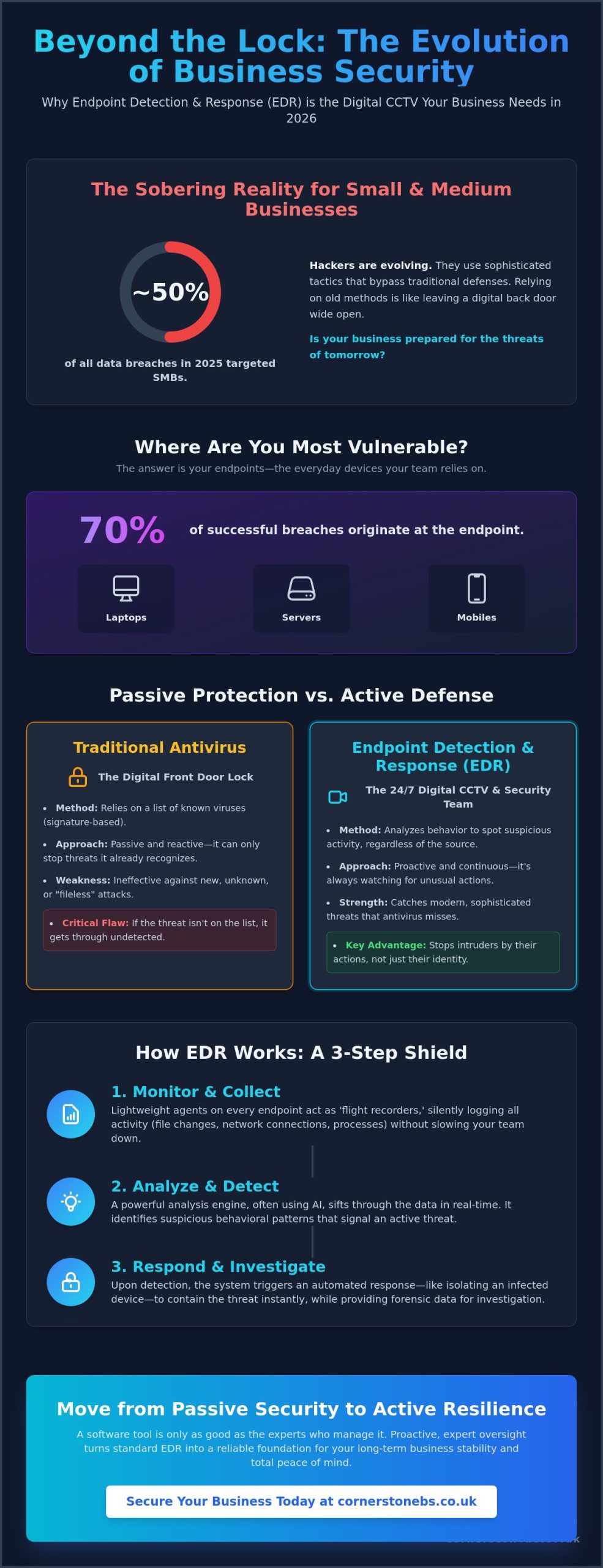
Did you know that in 2025, small and medium sized businesses accounted for nearly half of all data breaches? It is a sobering reality that traditional antivirus often misses the sophisticated tactics used by modern hackers. This is why implementing endpoint detection and response (EDR) for business has become a foundational element of stability rather than just a technical luxury. You likely feel overwhelmed by the constant stream of cybersecurity jargon and the persistent anxiety of a potential ransomware attack. It is exhausting for a small IT team to monitor every device around the clock while trying to run a successful local company.
We are here to simplify the complex and help you secure your digital infrastructure with confidence. Discover exactly how EDR acts as the digital CCTV your business needs to stop threats that traditional tools miss. We provide a clear framework for choosing the right level of protection and a step by step 2026 strategy to ensure your endpoints are monitored every single hour of the day. Let’s move from passive security to active business resilience together.
Key Takeaways
- Understand why laptops and servers are the primary targets for modern attacks and how to secure them effectively.
- Learn how endpoint detection and response (EDR) for business identifies strange behavior to catch threats that traditional antivirus tools often miss.
- Discover the difference between passive protection and active monitoring to ensure your security strategy matches the risks of 2026.
- Follow a practical framework for auditing your devices and choosing a platform that balances high level security with smooth system performance.
- Explore how proactive, expert oversight turns a standard software tool into a reliable foundation for your long term business stability.
What is Endpoint Detection and Response (EDR) for Business?
Think of your business network as a secure office building. While your traditional antivirus acts like a sturdy lock on the front door, endpoint detection and response (EDR) for business is the sophisticated CCTV system and internal security team that monitors every hallway. It is a security solution specifically designed to monitor end-user devices, such as laptops, mobiles, and servers, to detect and respond to cyber threats that have already managed to bypass initial defenses.
The reason we focus so heavily on these devices is simple: endpoints are the primary target for approximately 70% of successful breaches. Hackers know that your team members are busy and might occasionally click a suspicious link or use an unsecured network. In the 2026 threat landscape, relying solely on passive prevention is no longer enough. You need a system that acts like a flight data recorder, capturing every file change, process start, and network connection across your entire local infrastructure. This visibility allows us to see exactly what happened during an incident, providing the clarity you need to maintain business continuity.
The Evolution of Endpoint Security
Security has moved far beyond the days of simple blacklisting. In the past, antivirus software worked by recognizing a list of known “bad” files. If a virus wasn’t on that list, it got through. Modern cyber security services now prioritize behavioral analysis. Instead of looking for a specific file name, EDR looks for suspicious actions, like a spreadsheet suddenly trying to encrypt your entire hard drive.
Traditional antivirus is no longer a set and forget solution. As your dedicated regional partner, we understand that hackers evolve their tactics daily. Endpoint detection and response (EDR) represents a shift toward active detection, where the goal is to catch an intruder the moment they step foot inside your network, rather than waiting for them to trip a static alarm.
Key Components of an EDR System
To provide this level of protection, EDR relies on three foundational elements that work together seamlessly to keep your business safe:
- Data collection agents: These are the eyes and ears installed on every device. They record activity in real time without slowing down your team’s workflow.
- Analysis engine: This is the brain of the operation. It identifies patterns and anomalies that signal a breach might be in progress, often using AI to stay ahead of new threats.
- Forensic capabilities: If a threat is detected, these tools allow us to see the how and why. We can trace the path of an attack back to its source, ensuring we close the gap for good.
How EDR Works: From Silent Monitoring to Rapid Response
Your business needs a security system that never blinks. While standard tools wait for a match in a database, endpoint detection and response (EDR) for business works by maintaining a constant, silent watch over every digital interaction. It records everything. Every file change, process execution, and network connection is logged. This continuous monitoring creates a rich history of activity, which is vital for spotting the subtle breadcrumbs an intruder leaves behind.
This approach moves beyond simple virus signatures. It focuses on behavioral detection. By spotting “strange” activity, the system can flag a threat even if it has never been seen before. If a user’s workstation suddenly starts scanning your internal network for open ports, the EDR system recognizes this as a deviation from normal business operations. It acts as an automated first responder, often isolating an infected device before a human technician even sees the alert. This speed is critical for stopping a minor incident from becoming a full scale disaster.
Proactive threat hunting is another core feature of a modern setup. Instead of just waiting for an alarm, we can use the EDR data to look for vulnerabilities or hidden indicators of compromise that haven’t been triggered yet. It’s about staying one step ahead of the adversary to protect your local company’s reputation and data.
The Detection Phase: Spotting the Invisible
Cyber criminals often use lateral movement to navigate your network. They might compromise a single low-level laptop and then attempt to jump to your more sensitive servers. EDR identifies these suspicious leaps instantly. It also excels at catching fileless malware. These are sophisticated attacks that hide in a computer’s memory rather than on the hard drive, making them invisible to traditional scanners. Behavioral analysis is the study of software actions over time. By focusing on what a program does rather than what it is, we can protect your Cyber Security infrastructure from the most elusive threats.
The Response Phase: Neutralising the Threat
Detection is only half the battle; the real value lies in the rapid response. When a compromise is confirmed, the system can trigger network isolation. This instantly cuts off a compromised laptop from the rest of your network and the internet, preventing the spread of ransomware. Many modern EDR platforms also feature rollback capabilities. This allows us to revert a device to its healthy state before a ransomware infection took hold, saving hours of manual recovery time. Finally, the remediation process ensures every trace of the intruder is wiped clean, restoring total stability to your local operations.
EDR vs Antivirus vs MDR: Clearing the Confusion
Choosing between security layers shouldn’t feel like a guessing game. To understand the value of endpoint detection and response (EDR) for business, it helps to look at your office security as a series of levels. Antivirus is your front door lock. It keeps out anyone without a key. EDR is the security guard patrolling the hallways. Even if someone slips through the door, the guard spots the suspicious behavior. Managed Detection and Response (MDR) is the remote monitoring station where experts watch your cameras. Finally, Extended Detection and Response (XDR) connects the cameras in your office to your cloud storage and email, giving you a single, unified view of your entire network.
Each level serves a distinct purpose in protecting your business continuity. While antivirus stops the known threats we’ve seen before, EDR focuses on the unknown. It looks for patterns that don’t fit your normal daily operations. This proactive stance is what separates a modern, resilient company from one that is constantly reacting to crises. We want to help you build a foundation that feels stable and secure, no matter how the threat landscape changes.
Why Antivirus Alone is a High-Risk Strategy
Relying on antivirus alone is a high-risk strategy in 2026. Attackers now use zero-day exploits that bypass traditional filters because the software hasn’t learned to recognize them yet. They also use “living off the land” techniques, which involve using legitimate business tools to carry out malicious tasks. This makes the attack look like normal work to a basic scanner. Our it company solutions help you see how security fits into your wider digital infrastructure, ensuring no gaps are left open for intruders to exploit.
Choosing the Right Level for Your Business
Every local company has a unique risk profile. If you handle sensitive client data or financial records, a basic lock on the door isn’t enough. SMEs are now the primary target for automated cyber attacks. In 2025, small and medium sized businesses accounted for nearly half of all data breaches. You must decide between a “DIY” approach, where your own team manages the alerts, or a managed service. For most, the peace of mind that comes from expert oversight far outweighs the cost of trying to handle complex security in-house. We are here to help you find that perfect balance of protection and performance.
Implementing EDR: A Practical Guide for UK Businesses
Moving from understanding the theory to putting it into practice is where many local business owners feel the most pressure. We’ve designed this guide to ensure your implementation of endpoint detection and response (EDR) for business is smooth and effective. Success starts with a comprehensive audit. You cannot protect what you cannot see. This means cataloging every laptop, server, and mobile phone that touches your corporate data, whether it’s in the office or used remotely.
Once you have a clear map of your endpoints, select a platform that balances high level protection with your specific hardware capabilities. After selection, you must configure your policies to set clear rules of engagement. For instance, you might decide that any device showing signs of ransomware should be isolated automatically at any time of day. Don’t forget to train your team. When staff understand that a blocked action is a sign of the system working to keep them safe, they feel more secure rather than frustrated. Integrating these insights into your wider managed IT services strategy ensures your defenses evolve as fast as the threats do.
Overcoming Common Implementation Hurdles
Implementation often brings up two main worries: false positives and system slowdowns. We understand that you can’t have security getting in the way of your daily operations. A well configured system minimizes these interruptions by learning what “normal” looks like for your specific business over time. Regarding performance, you can rest easy knowing that modern EDR agents are designed to be incredibly lightweight. Most reputable solutions use less than 1% of a device’s CPU power. This means even your older office hardware can stay protected without a noticeable drop in speed.
Compliance and Regulatory Benefits
For UK businesses, the regulatory landscape is shifting toward demonstrable resilience. Implementing endpoint detection and response (EDR) for business is a significant step toward meeting the latest Cyber Essentials and Cyber Essentials Plus requirements. These tools provide the granular visibility needed to satisfy GDPR obligations, especially regarding the mandatory reporting of significant cyber events. Beyond legal requirements, having detailed endpoint logs is a huge advantage during professional insurance audits. It proves to underwriters that you are a low risk, proactive organization, which can help keep your premiums manageable. Talk to our friendly team to see how we can streamline your security transition and provide the peace of mind you deserve.
The Cornerstone Approach: Managed EDR for Total Peace of Mind
Even the most advanced software is only as effective as the person monitoring it. While endpoint detection and response (EDR) for business provides the raw data, it’s the expert analysis that truly protects your livelihood. A software alert at 3 AM is useless if there’s no one there to interpret it. At Cornerstone Business Solutions, we combine industry leading technology with award winning support to ensure that every warning is met with a swift, professional response. We act as your dedicated internal security team, catching threats while you sleep so you can wake up to a business that’s ready to grow.
Our approach is built on seamless integration. If you already use Microsoft 365, our EDR solutions fit perfectly into your existing environment. This reduces friction and ensures that your security doesn’t come at the cost of productivity. We are proud of our national reach, but we never forget our community focused roots. You get the professional authority of a top tier provider delivered with the friendly, approachable face of a local partner who genuinely cares about your success.
Your Long-Term Cyber Security Partner
We believe in a collaborative partnership rather than a transactional service. Our goal is to simplify the complex technical world of endpoint detection and response (EDR) for business so you can focus on what you do best: running your company. Cornerstone Business Solutions doesn’t just sell you a license; we provide a foundational element of your business stability. By moving from reactive support to proactive monitoring, we help you build emotional security alongside digital safety. It’s about knowing your systems are reliable and your data is protected by people who know your name.
Ready to Secure Your Business Future?
The journey to total resilience begins with a clear understanding of your current status. We recommend a comprehensive security audit of your endpoints as the first step toward modernizing your defense. This audit identifies where you’re strong and where you’re vulnerable, allowing us to tailor a strategy specifically for your needs. Whether you are currently planning a Microsoft 365 migration or simply want to upgrade your existing protection, we are here to help. Let’s have a friendly chat about your security needs today.
Securing Your Business Growth with Confidence
As a multi-award-winning IT provider and proud partner of Microsoft, IBM, and Cisco, we bring global expertise to our local community. Our UK-based proactive support team is ready to help you navigate these technical shifts with clarity and ease. We believe that security should feel like a partnership, not just a service. If you are ready to take the next step toward total peace of mind, book a free cybersecurity health check with our expert team today. Let’s work together to make your business more resilient and secure for the future.
Frequently Asked Questions
What is the difference between EDR and traditional antivirus?
Traditional antivirus relies on a database of known threats to stop attacks, whereas EDR monitors the behavior of your devices in real time. It doesn’t just look for “bad” files; it looks for “bad” actions. This allows it to catch sophisticated, unknown threats that haven’t been recorded in a standard antivirus database yet. It’s the difference between a simple lock on your door and a security guard watching your hallways.
Will EDR slow down my employees’ computers or laptops?
You won’t notice a drop in performance because modern EDR agents are designed to be incredibly lightweight. They typically use less than 1% of a computer’s processing power. This ensures your team stays productive and focused on their daily tasks while the security software works silently in the background to keep your local company safe from digital intruders.
Does my small business really need EDR, or is it just for big corporations?
Small businesses are actually the primary target for many automated attacks because hackers assume their defenses are weaker. Implementing endpoint detection and response (EDR) for business is now a foundational requirement for any local organization handling sensitive data. It provides the high level of protection once reserved for global enterprises at a scale that fits your specific business needs.
Can EDR protect my staff while they are working remotely or from home?
Yes, EDR is perfectly suited for the modern hybrid workforce. Since the protection is installed directly on the laptop or mobile device, it stays active no matter where your staff connects to the internet. Whether your team is in the office or working from home, they receive the same proactive monitoring and rapid response capabilities to keep your corporate data secure.
How much does EDR cost for a typical UK business?
The investment for EDR depends on the number of endpoints you need to secure and whether you choose a self managed or fully managed service. Most local business owners find that the cost is a small price to pay for the emotional security and business continuity it provides. It’s a strategic investment that helps you avoid the massive financial and reputational costs associated with a data breach.
Is EDR a requirement for Cyber Essentials certification?
While EDR isn’t strictly mandatory for the basic Cyber Essentials certificate, it is a powerful tool for meeting the stricter requirements of Cyber Essentials Plus. It helps you demonstrate the active monitoring and incident response capabilities that the scheme expects. Having these logs available also makes the audit process much smoother for your team and provides evidence of your commitment to resilience.
What happens if EDR detects a threat on one of our devices?
The system acts instantly by following pre-set rules, which often includes isolating the compromised device from the rest of your network. This stops a threat like ransomware from spreading to other computers or your main server. At the same time, an alert is sent to our experts so we can investigate the root cause and clean up any traces left behind by the intruder.
Do I need a dedicated IT team to manage an EDR system?
You don’t need to hire your own cybersecurity experts if you choose a managed approach. We handle all the complex monitoring, alert filtering, and threat hunting for you. This allows you to focus on running your business with total peace of mind, knowing that your digital infrastructure is being watched over by a team of friendly, local specialists.
Posted on: May 25th, 2026 by Cornerstone
Did you know that 94% of ransomware attacks now specifically target backup systems to ensure you can’t recover? It’s a sobering reality that has many local business owners questioning if their current setup is truly secure. You’ve likely felt that nagging worry about whether your files are actually safe or if a single hardware failure could bring your operations to a standstill. Learning how to create a business data backup strategy is no longer just a technical tick-box exercise. It’s the foundation of your company’s long-term resilience and emotional security.
As a trusted local partner recognized for reliable service, we believe that protecting your hard work should be straightforward and stress-free. This guide will show you how to build a bulletproof 3-2-1-1-0 framework that guards against ransomware, human error, and unexpected disasters. We’ll walk through the balance between cloud and on-premise costs while ensuring you stay compliant with UK data protection standards. You’ll learn exactly how to achieve zero downtime and the total peace of mind that comes from knowing your recovery plan is tested, verified, and ready for anything.
Key Takeaways
- Adopt the 3-2-1-1-0 framework to ensure your data is not just backed up, but immutable and verified against 2026 cyber threats.
- Learn how to create a business data backup strategy that balances your recovery speed with your budget for maximum operational resilience.
- Categorise your data into mission-critical and archival tiers to ensure your most vital systems are back online first during a crisis.
- Move beyond simple backups to a proactive disaster recovery model that protects your business from the high costs of extended downtime.
Understanding the High Stakes of Business Data Backup in 2026
Your data is the heartbeat of your business. In 2026, it’s likely more valuable than your physical office or your fleet of vehicles. Yet, many local business owners still view data backup as a task for a rainy day. The threats have changed. We aren’t just worried about a dusty server failing or a spilled cup of tea on a laptop. Today, we face AI-driven ransomware that can bypass traditional filters in seconds. When you lose access to your files, you don’t just lose information. You lose time, client trust, and your hard-earned reputation. Learning how to create a business data backup strategy is about more than technology. It’s about protecting your legacy and ensuring your team can sleep soundly at night.
The Reality of Data Loss in the Modern Workplace
Most data loss isn’t a Hollywood-style heist. It’s often a simple mistake, like an employee clicking a malicious link or a disgruntled insider deleting folders. Human error remains a leading cause of downtime. We often talk to owners who believe their files are safe because they use cloud storage. This is a dangerous misconception. While tools like OneDrive are great for collaboration, they aren’t backups. If ransomware hits your primary machine, it can encrypt your synced files in the cloud before you even notice. This is why we integrate cyber security services with a true backup solution to ensure multiple layers of protection.
Compliance and Legal Obligations for UK SMEs
The 3-2-1-1-0 Framework: The Gold Standard for Modern Data Protection
Years ago, the 3-2-1 rule was the gold standard. It was simple. You kept three copies of your data, on two different types of media, with one copy stored offsite. In 2026, this is simply the baseline. Cybercriminals now actively hunt for your backups to ensure you can’t recover without paying a ransom. This is why understanding how to create a business data backup strategy today requires the 3-2-1-1-0 framework. It adds two critical layers: one immutable or offline copy and zero restoration errors. It’s a proactive approach that moves you from basic storage to true cyber resilience. We see it as a foundational element of your business stability.
Let’s break down these numbers into actionable steps. You start with three copies of your data. This includes your primary live data and two separate backups. You should use at least two different media types, such as a local server and a cloud repository. One of these must be kept offsite to protect against physical disasters like fire or theft. By following data backup and security best practices, you ensure that no single point of failure can wipe out your business history. However, the real magic happens with the final two digits: 1 and 0.
The Power of Immutable Backups
An immutable backup is essentially “unbreakable” data. Once written, it cannot be altered, encrypted, or deleted for a set period. This uses Write-Once-Read-Many (WORM) technology. Even if a hacker gains administrative access to your network, they can’t touch these files. It’s your ultimate safety net against ransomware. We often recommend this as a core part of your how to create a business data backup strategy because it removes the “what if” from your security plan. If you’re concerned about your current protection levels, our team can help you explore cyber security services that include these modern safeguards.
Air-Gapping and Offline Security
Air-gapping takes security a step further by physically or logically disconnecting a backup from your main network. If there’s no path to the data, a virus can’t reach it. While old-school tape backups were the original air-gap, modern cloud air-gapping offers the same protection with much faster recovery times. This “reset button” ensures that even in a total network collapse, you have a clean copy of your business ready to go. The “0” in the framework stands for zero errors. This means your backups are automatically tested and verified every single day. A backup you haven’t tested isn’t a backup; it’s just a wish. We focus on these details so you can focus on running your business with total confidence.
Defining Your Recovery Objectives: RTO, RPO, and Technology Selection
A backup plan without clear recovery goals is like a ship without a compass. You might have the data, but you won’t know how to get it back in time to save your business. When deciding how to create a business data backup strategy, you must first define your recovery boundaries. These are measured by two critical metrics: Recovery Time Objective (RTO) and Recovery Point Objective (RPO). These aren’t just technical terms. They represent the heartbeat of your operations. RTO is the duration of time your business can survive being offline. If your systems go down at 9:00 AM, can you wait until 5:00 PM to be back up, or do you need to be running in minutes? RPO, on the other hand, defines how much data you can afford to lose. If your last backup was at midnight and you crash at noon, you’ve lost twelve hours of work. For a local pharmacy or a law firm, that loss could be devastating.
Balancing these objectives requires a honest look at your budget and your risks. High-speed, near-instant recovery costs more, but the price of downtime often far outweighs the investment. Many businesses fall into the trap of a “one size fits all” approach. They treat their archival files the same as their live customer database. This leads to wasted budget on low-priority data and dangerous gaps for mission-critical systems. By following established NIST data protection guidelines, we help you categorise your information so your resources go exactly where they are needed most.
Choosing the Right Backup Technology
The tools you choose must match your RTO and RPO goals. For many of our clients, this involves protecting Microsoft 365 and other SaaS data through cloud-to-cloud backups. It’s a common myth that cloud providers handle all your backups for you. In reality, you are still responsible for your data. Hybrid solutions are often the best fit for UK SMEs. They combine the local speed of on-site hardware with the long-term resilience of cloud solutions. This setup ensures that if a single file is lost, you can grab it instantly from your local network, but if your office is flooded, your entire business is safe in the cloud.
Evaluating On-Premise vs. Cloud Storage
Deciding between on-premise hardware and cloud storage is a matter of scale and stability. Local devices like NAS or SAN offer incredible speed for immediate recovery. However, they require physical maintenance and “Capex” investment in hardware. Cloud storage in UK-based data centres offers an “Opex” subscription model that scales as you grow. These facilities provide levels of physical security and power redundancy that most small businesses simply couldn’t afford on their own. We often recommend a blend of both to ensure your how to create a business data backup strategy is as robust as possible, giving you the best of both worlds without the overhead of managing it all yourself.
A Step-by-Step Roadmap to Implementing Your Backup Strategy
Execution is where many great plans falter. Knowing the theory of the 3-2-1-1-0 rule is a fantastic start, but the real protection comes from a structured rollout. Learning how to create a business data backup strategy that actually works requires a disciplined, step-by-step approach. It’s about moving from a vague idea of “saving files” to a documented, automated, and verified system that guards your business. We believe a clear roadmap is the best way to replace anxiety with confidence. By following these five essential steps, you’ll build a resilient foundation that stands up to 2026 cyber threats.
- Step 1: Data Audit. You can’t protect what you don’t know you have. Categorise your data by its importance to your daily operations.
- Step 2: Assign Ownership. Clearly define who is responsible for managing the backups and, more importantly, who leads the recovery process.
- Step 3: Establish the Schedule. Remove the risk of human error by automating your backups. Modern systems can run every few minutes without slowing you down.
- Step 4: Secure the Perimeter. Ensure all backup data is encrypted both while it’s moving (in transit) and while it’s stored (at rest).
- Step 5: Document the Plan. Create a physical and digital “What If” handbook that outlines every step your team needs to take during a crisis.
Conducting a Comprehensive Data Audit
The first hurdle is often “Shadow IT.” This refers to data stored on personal Dropbox accounts, local desktops, or even staff mobile phones. If it’s not on the map, it’s not being backed up. We recommend mapping all data flows across your it company solutions to identify every storage point. Prioritise your “Mission Critical” items first, such as live databases, financial records, and customer PII. Archival data is still important, but it shouldn’t jump the queue during a recovery event. This clarity ensures your resources are focused where they matter most.
The Testing Hierarchy: Is Your Data Actually Recoverable?
A “Backup Successful” email is a notification, not a guarantee. To be truly secure, you must move through a testing hierarchy. We suggest monthly file-level restores where you pick a random document and ensure it opens correctly. On a broader scale, you should perform an annual full-system disaster simulation. This tests your team’s response time and the integrity of your entire network. Using a “Sandbox” environment allows you to run these tests safely without affecting your live operations. If you want to ensure your business stays online no matter what, our team can help you design a custom Disaster Recovery plan that includes rigorous, automated testing.
Why Managed Backup is the Foundation of Business Stability
Building a resilient business shouldn’t be a lonely endeavour. While the technical steps of how to create a business data backup strategy are now clear, the day-to-day management can quickly become a heavy burden for a busy team. The old ‘break-fix’ model of IT is no longer enough to survive the threats of 2026. You need proactive managed resilience. This shift means that instead of waiting for a failure and then scrambling to fix it, we identify and resolve potential issues before they ever affect your operations. It turns a technical necessity into a foundational pillar of your business stability and emotional security.
Expert monitoring is the silent guardian of your data. We catch backup failures, storage bottlenecks, and connectivity issues in real-time. This level of oversight ensures that when you reach for that ‘reset button’ we discussed earlier, it actually works. Having a team of UK-based experts at your side means you aren’t shouting into a void during a crisis. Every second counts when your reputation is on the line. We see ourselves as more than just a service provider. We are your dedicated long-term partner, focused on your growth and the safety of your digital assets.
Freeing Your Team to Focus on Growth
Removing the weight of daily backup management allows your internal staff to focus on what they do best: driving your business forward. You gain access to enterprise-grade technology and high-level security without the massive enterprise-grade price tag. Our managed IT services provide a scalable path that evolves alongside your company. Whether you are expanding your local team or adopting a hybrid work model, your data protection remains constant, reliable, and invisible.
Taking the First Step Toward Total Peace of Mind
Now is the perfect time to audit your current backup effectiveness. Don’t wait for a hardware failure or a ransomware alert to discover the gaps in your armour. The Cornerstone promise is simple: we provide professional authority balanced with approachable, regional warmth. We speak clearly, avoid the dense jargon, and focus on the outcomes that matter to your bottom line. We invite you to start an informal conversation with our local team about your data resilience. Let’s work together to ensure your business is protected, compliant, and ready for whatever the future holds. It’s time to move forward with the confidence that your hard work is safe.
Secure Your Business Future with Proactive Resilience
Protecting your business legacy starts with a single, proactive decision. We’ve explored the necessity of the 3-2-1-1-0 framework and the vital importance of defining your recovery objectives to stay resilient against 2026 threats. Understanding how to create a business data backup strategy is the first step toward ensuring your operations never miss a beat during a crisis. It’s about more than just files; it’s about the stability of your team and the trust of your clients.
As a multi-award-winning IT services provider, we combine strategic partnerships with industry leaders like Microsoft, IBM, and Cisco to deliver world-class protection with a local, approachable face. Our experts provide proactive 24/7 system monitoring and a dedicated UK-based helpdesk to catch potential failures before they ever become disasters. Don’t leave your continuity to chance. We invite you to book a proactive data resilience audit with our expert team today to secure your growth. We’re ready to be your long-term partner in technology, helping you move forward with total peace of mind.
Frequently Asked Questions
What is the difference between data backup and disaster recovery?
Data backup is the process of creating a copy of your files, while disaster recovery is the comprehensive plan for how you use those copies to restore operations. Think of backup as the spare tyre in your boot and disaster recovery as the toolkit and knowledge needed to change it and get back on the road. Without a clear recovery plan, your backups are just stored data that might take days or weeks to reconfigure correctly.
How often should my business perform data backups?
You should perform backups as often as your business creates data you cannot afford to lose. For most UK SMEs, this means at least daily backups, though mission-critical systems often require continuous data protection that saves changes every few minutes. When you are learning how to create a business data backup strategy, your Recovery Point Objective (RPO) will dictate this schedule to ensure minimal work is lost during a crash.
Is cloud backup secure enough for sensitive financial data?
Cloud backup is highly secure for financial data when it includes end-to-end encryption and is stored in UK-based data centres. Modern providers use advanced security protocols that often exceed the physical and digital protection available in a standard office server room. We ensure your sensitive records are encrypted before they even leave your network, keeping you compliant with strict financial regulations and UK GDPR standards.
What is an immutable backup and why does my business need one?
An immutable backup is a version of your data that cannot be altered, encrypted, or deleted for a specific period after it is created. You need this because a vast majority of ransomware attacks now target backup files to prevent you from recovering without paying. By keeping an immutable copy, you ensure that even if a hacker gains admin access to your network, your “gold” copy remains untouched and ready for restoration.
Can I just use an external hard drive for my business backups?
Using only an external hard drive is not a recommended strategy because it creates a single point of failure and is vulnerable to physical theft, fire, or mechanical damage. While a drive can serve as one of your local copies, it doesn’t provide the automation, offsite resilience, or encryption needed for modern security. A professional approach involves automated systems that remove the risk of someone forgetting to plug in the drive at the end of the day.
How long does it typically take to recover data after a ransomware attack?
Recovery time varies based on your infrastructure and data volume, but a well-planned strategy can reduce downtime from weeks to just a few hours. Without a documented plan, businesses often face a median downtime of 18 days following a ransomware event. By investing in high-speed recovery tools and regular testing, we help you meet your specific Recovery Time Objective (RTO) to keep your team productive and your clients happy.
Do I need to back up my Microsoft 365 data separately?
Yes, you must back up your Microsoft 365 data separately because Microsoft’s primary focus is on service availability rather than long-term data retention. Their “Shared Responsibility Model” explicitly states that the data itself is your responsibility. If an employee accidentally deletes a folder or a mailbox is compromised, having an independent backup ensures you can restore that information quickly without relying on limited native recovery windows.
What should be included in a business disaster recovery plan?
A business disaster recovery plan should include a clear hierarchy of mission-critical systems, a hardware inventory, and a detailed list of staff responsibilities. It acts as a step-by-step manual that anyone on your team can follow when systems go down. When determining how to create a business data backup strategy, ensure your plan also includes emergency contact details for your IT partners and a verified timeline for restoring each department’s access.