Posted on: August 30th, 2026 by Cornerstone
What if your mobile workforce never had to worry about a hardware failure or a security breach during a critical client pitch? Most business owners understand the headache of unpredictable repair costs and the genuine risk of unpatched remote devices. It’s a constant struggle to balance employee productivity with the technical demands of robust business laptop support. As an award-winning IT partner, we believe your technology should provide emotional security, not just technical utility. We’ve seen how the right strategy transforms a fleet from a liability into a competitive advantage.
This guide reveals how proactive management and strategic fleet planning can eliminate downtime while securing your remote team. You’ll discover how to extend the lifespan of your assets and maintain predictable IT budgets through 2026 and beyond. We’ll preview the latest standards in endpoint protection, including the governance requirements of NIST CSF 2.0 and the impact of the Digital Operational Resilience Act (DORA). It’s time to turn your hardware into a reliable, high-performance engine for your business growth. Let’s look at how a modern strategy keeps your team moving forward.
Key Takeaways
- Understand why proactive business laptop support has evolved into a critical security-first model for the modern mobile workforce.
- Explore the technical pillars of fleet health, including how AI-driven threat hunting replaces traditional antivirus to protect remote endpoints.
- Compare the stability of managed support against the “single point of failure” risks inherent in small, in-house IT departments.
- Follow our five-step strategy to audit and standardise your hardware assets, ensuring predictable budgets and extended device lifespans.
- Learn how partnering with an award-winning UK expert provides the multi-vendor knowledge needed to keep your business resilient and high-performing.
Why Business Laptop Support is the Foundation of Modern Work in 2026
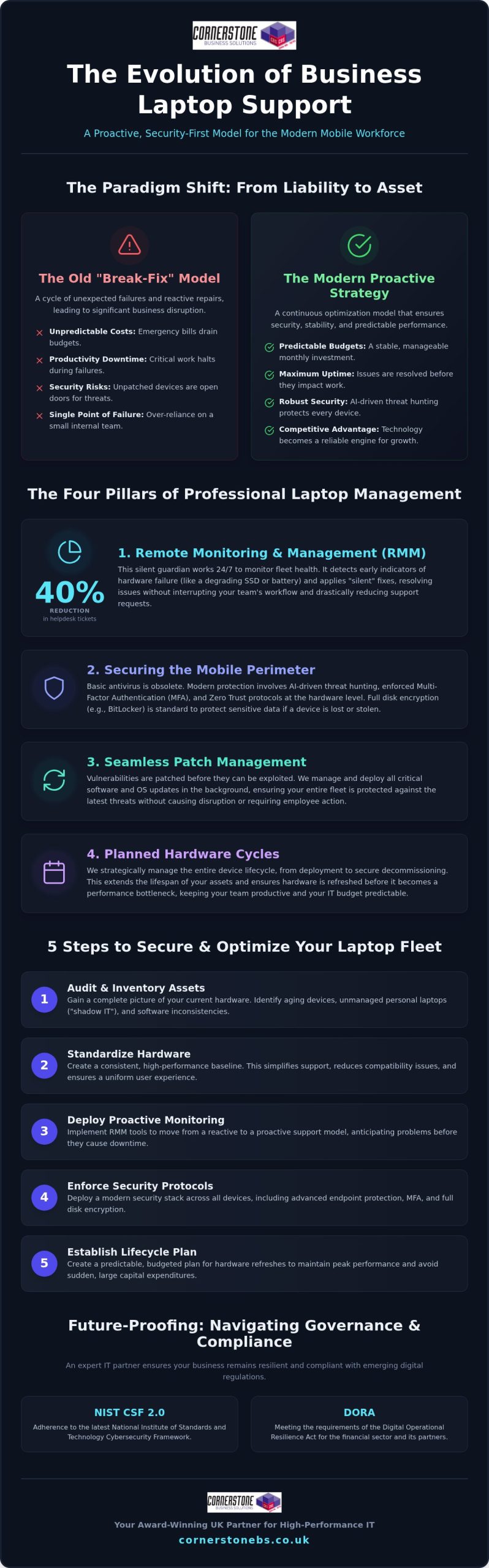
In 2026, the traditional office has dissolved into a network of portable powerhouses. Every laptop in your fleet isn’t just a piece of hardware; it’s a critical business endpoint that carries your company’s data, reputation, and productivity. This shift means that business laptop support is no longer a reactive “fix it when it breaks” service. It has evolved into a proactive, security-first management model that ensures your team stays connected regardless of where they work. We’ve moved beyond simple technical support into an era of continuous optimization. This approach provides the emotional security of knowing that your mobile workforce is backed by award-winning experts who anticipate problems before they cause downtime. It’s about building a foundation where technology empowers your staff rather than slowing them down with avoidable glitches.
The Difference Between Residential and Professional Support
Many business owners mistakenly assume that a local consumer-grade repair shop can handle their fleet. However, these shops rarely understand the stringent Service Level Agreement (SLA) requirements that a modern company demands. Professional support prioritizes data sovereignty and strict GDPR compliance, ensuring that sensitive client information never leaves a secure environment. Unlike a high-street shop, a dedicated IT partner manages the entire lifecycle of the device, from deployment to secure decommissioning. Business laptop support is a strategic operational necessity that protects your digital assets and keeps your operations fluid.
Addressing the #1 Objection: The Cost of Proactivity vs. Reactivity
It’s easy to view IT costs through the lens of individual repairs, but this overlooks the hidden financial drain of “shadow IT” and unmanaged devices. When employees use unpatched laptops, they open doors to security risks that can lead to a cascading failure of your entire network infrastructure. A proactive strategy avoids these pitfalls by identifying hardware fatigue and software vulnerabilities early. By investing in comprehensive Managed IT Support, you replace unpredictable emergency bills with a stable, manageable budget. This transition from a reactive “break-fix” mindset to a long-term partnership ensures your fleet remains a high-performance asset rather than a liability. It’s the difference between waiting for a disaster and preventing one. We don’t just fix tools; we secure your company’s ability to thrive in a competitive market.
The Technical Pillars of Professional Laptop Management
Remote Monitoring and Management (RMM) Explained
Think of RMM as the silent guardian of your hardware health. It works in the background, constantly checking for signs of trouble that an employee might miss. For instance, our systems can detect early indicators of SSD failure or battery degradation before they lead to a total system crash. This allows our award-winning team to apply “silent” fixes that resolve issues without ever interrupting your staff’s workday. By catching these problems early, proactive RMM can reduce your total helpdesk tickets by as much as 40%. It’s about maintaining a steady rhythm of productivity instead of reacting to sudden hardware failures.
Securing the Mobile Perimeter
In 2026, the perimeter of your office is wherever your team opens their laptops. Basic antivirus software is no longer enough to stop modern, AI-driven threats. We implement robust cyber security services that move beyond simple signatures to active threat hunting. This includes enforcing Multi-Factor Authentication (MFA) and Zero Trust protocols at the hardware level. We also ensure every device uses disk encryption, such as BitLocker, to protect your data if a device is lost or stolen. If you’re concerned about your current security posture, you can always start a conversation with our team about your fleet’s resilience.
Patch management is another critical pillar of our strategy. With a mobile workforce, you can’t rely on users to click “update” on their own. Our centralized system pushes critical security patches to every device, regardless of their location or connection type. This ensures your fleet remains compliant with the latest standards, such as the 2026 NIST CSF 2.0 guidelines. Finally, we handle hardware lifecycle management. By tracking the age and performance of every unit, we help you plan for obsolescence. This prevents the “crisis” of a sudden, large-scale hardware failure that could cripple your operations. It’s a structured approach that provides both technical stability and emotional security for your business.
Evaluating the Commercial Impact: In-House vs. Managed Laptop Support
Choosing between an internal hire and an external partner is a pivotal decision for any growing UK business. Small in-house IT teams often create a “Single Point of Failure” that puts your operations at risk. If your only IT technician is away or overwhelmed, a single hardware failure can bring a department to a standstill. Professional business laptop support removes this bottleneck by providing a team of experts rather than a solitary individual. You gain immediate access to multi-vendor expertise through our established partnerships with industry leaders like Microsoft, IBM, and Cisco. This collaborative approach ensures that no matter how complex the issue, we have the specialized knowledge to resolve it quickly. It’s about moving away from a transactional relationship and into a long-term partnership that prioritizes your stability.
Scalability is another major commercial advantage. As your company grows, your fleet expands, but your IT management shouldn’t require a constant increase in headcount. Managed support scales effortlessly with your business, allowing you to add new users and devices without the overhead of hiring additional staff. This shift also transforms your financial outlook. You move from unpredictable Capital Expenditure (CapEx) on emergency repairs and hardware to a predictable, monthly Operational Expenditure (OpEx). This clarity allows for better long-term budgeting and ensures that your technology remains an asset rather than a financial drain.
The Real Cost of Downtime
A dedicated support partner helps you maximize the Return on Investment (ROI) for every device you purchase. We guide you through selecting hardware that actually suits your team’s workload, avoiding the trap of over-speccing or buying underpowered consumer units. We prioritize business-grade warranties and “Next Business Day” on-site support to minimize disruption. This strategic oversight is a core component of our comprehensive IT company solutions. By planning for the full lifecycle of your hardware, we ensure your mobile fleet remains high-performing and secure throughout its entire lifespan.
5 Steps to Securing and Optimising Your Business Laptop Fleet
Optimising your fleet requires a structured roadmap. It’s not just about buying the latest gear. It’s about making sure every device contributes to your stability. By following these five steps, you can turn a chaotic collection of devices into a streamlined, high-performance engine. In 2026, this process includes managing the unique security requirements of AI-enabled hardware, which often carries sensitive data within local models. Our business laptop support ensures these advanced features remain an asset rather than a vulnerability.
Step 1: The Fleet Audit
Start with a comprehensive audit of your current hardware. You need to identify “end-of-life” devices that no longer receive critical firmware updates. These units are a major security risk. We also look for software bloatware that drains battery life and frustrates your employees. By documenting battery health and storage capacity across your entire organisation, we can predict which laptops will fail next. This allows you to replace hardware on your terms, not during an emergency. It’s about taking control of your technology lifecycle before it takes control of your schedule.
Step 2: Standardisation and Security
Step 3: Centralised Policy and Refresh Cycles
Implement a centralised endpoint security policy with enforced Multi-Factor Authentication (MFA). This ensures that your data remains safe even if a laptop is stolen from a train or a café. Beyond security, you must establish a 3-to-5-year hardware refresh cycle. Laptops used daily often see a performance drop-off after the three-year mark. Planning these refreshes prevents the “performance tax” that slow computers levy on your staff. Finally, you should partner with a multi-award-winning IT provider for proactive 24/7 monitoring. This gives you the emotional security of knowing an expert team always has your back. You can secure your hardware fleet with Cornerstone to ensure your business stays resilient and high-performing.
Future-Proofing Your Mobile Workforce with Cornerstone Business Solutions
Transitioning from an unpredictable reactive model to a professional managed service is a smooth, guided process. We handle the migration and setup, ensuring there’s zero disruption to your team’s daily productivity. You’ll quickly experience the emotional security and peace of mind that comes with having a multi-award-winning UK-based support team on your side. We’ve seen firsthand how a secure, high-performance fleet boosts employee morale and safeguards sensitive company data. It’s time to move away from technical anxiety and embrace absolute operational confidence. We invite you to start a conversation with our experts today for a comprehensive fleet health check. Let’s ensure your business laptop support is a robust engine for your future growth.
Your mobile fleet should be a catalyst for growth, not a source of technical anxiety. We’ve explored how shifting from reactive repairs to a proactive management model ensures your team stays productive and your data remains secure. By implementing technical pillars like RMM and AI-driven endpoint protection, you turn every device into a reliable asset. Professional business laptop support is the foundation of this stability, providing the emotional security that comes from expert oversight.
As a multi-award-winning IT services provider with deep partnerships with Microsoft, IBM, and Cisco, our UK-based expert helpdesk is ready to simplify your tech. We’re here to help you move away from the break-fix cycle and into a long-term partnership built on trust. It’s time to ensure your hardware is ready for the challenges of 2026. We’ve seen how the right strategy protects your bottom line and empowers your workforce.
Book a Fleet Health Check with Cornerstone’s Award-Winning Support Team and let’s start a conversation about your business resilience. Your team deserves technology that works as hard as they do.
Frequently Asked Questions
What is included in a typical business laptop support contract?
A comprehensive contract typically includes proactive system monitoring, unlimited helpdesk access, and hardware lifecycle management. Our award-winning team handles security patches, endpoint protection, and remote troubleshooting to ensure your technology remains stable. We focus on bespoke solutions that simplify your tech while protecting your business continuity. This ensures your business laptop support is a foundational element of your stability rather than a reactive expense.
How does remote laptop support work for employees who are travelling?
Remote support works through secure Remote Monitoring and Management software installed on every device. This allows our expert team to diagnose and fix software issues over any stable internet connection, regardless of where your employee is working. We use encrypted tunnels to ensure data privacy during the support session. If a hardware failure occurs while someone is travelling, we coordinate rapid assistance to keep them productive.
Is it better to repair an old business laptop or replace it?
How can I secure my company’s laptops against a data breach?
Securing your fleet requires a multi-layered approach starting with disk encryption and Multi-Factor Authentication. We implement AI-driven endpoint protection that hunts for threats in real-time rather than relying on old antivirus signatures. Our business laptop support also includes enforcing strict Zero Trust policies. This ensures that only authorised users can access your sensitive data, protecting your perimeter wherever your team chooses to work.
Does managed laptop support include software updates and licensing?
Yes, our managed services cover the full lifecycle of your software, including automated patching and license management for platforms like Microsoft 365. We track your subscriptions to ensure you aren’t paying for unused seats while keeping your applications updated against vulnerabilities. This proactive oversight is included in our monthly fees, allowing you to move from unpredictable costs to a stable, manageable IT budget.
What happens if a managed laptop is lost or stolen?
If a laptop is lost or stolen, our team can initiate a remote wipe command to erase sensitive data immediately. Because we enforce BitLocker disk encryption as a standard, your information remains unreadable to unauthorised parties even if they have physical access to the device. We then work with you to deploy a pre-configured replacement, ensuring your employee is back to work with minimal disruption.
Can you support a mix of Windows and Apple Mac hardware?
We provide expert support for both Windows and Apple Mac hardware to ensure your entire team stays productive. Our partnerships with global brands like Microsoft and Cisco give us the multi-vendor knowledge needed to manage diverse fleets. We apply the same high standards of security and proactive monitoring to every device. This unified approach simplifies your IT management and provides a consistent experience for all employees.
How quickly can an IT support provider respond to a hardware failure?
Response times are governed by a Service Level Agreement that prioritises critical issues to keep your business moving. For hardware failures, we often provide Next Business Day on-site support or immediate access to a loaner device programme. Our goal is to eliminate downtime by having a pre-configured laptop ready for your employee as soon as a problem is reported. This rapid response is a hallmark of our service.
Posted on: May 23rd, 2026 by Cornerstone
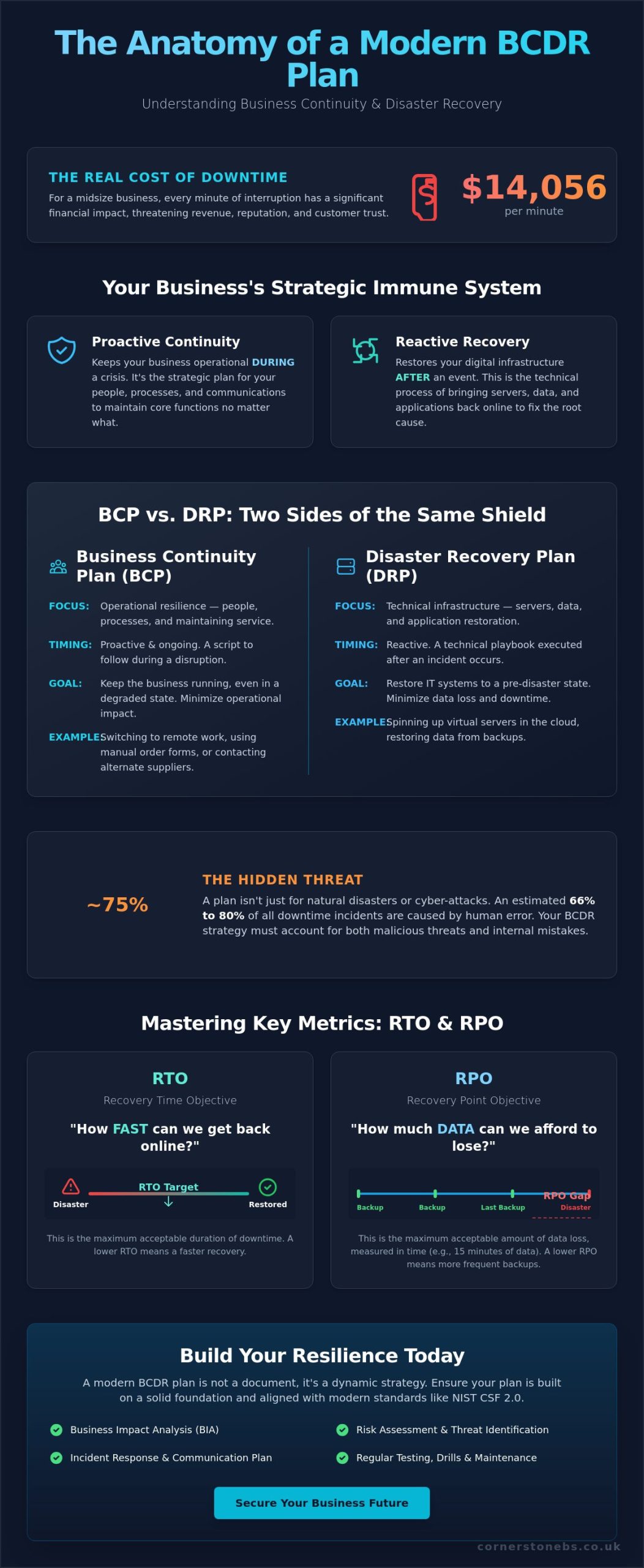
Did you know that for a midsize business, the average cost of IT downtime has climbed to a staggering $14,056 per minute? It’s a terrifying figure that keeps many local business owners awake at night. You likely already feel the weight of this risk every time a server lags or a new cyber threat hits the headlines. To protect your future, you need to understand exactly what is a business continuity and disaster recovery plan and how it serves as your company’s strategic immune system. Between the fear of data loss and the confusion of technical jargon like RTO and RPO, it’s easy to feel like you’re just waiting for the next crisis to strike.
We’re here to clear the air and provide a clear roadmap for your protection. You’ll discover how a unified BCDR strategy keeps your doors open, your data safe, and your team productive. We will break down the essential components of a modern plan, from the latest NIST CSF 2.0 standards to the May 2026 updates for NIST SP 800-172. Our goal is to replace that anxiety with the peace of mind that comes from knowing your business is built to survive and thrive right here in our community.
Key Takeaways
- Gain a clear understanding of what is a business continuity and disaster recovery plan and why it’s the foundation of modern business resilience.
- Learn the vital difference between proactive continuity planning and reactive technical recovery to keep your operations running smoothly during a crisis.
- Calculate the true impact of downtime on your revenue and brand reputation to prioritize your most critical business functions.
- Master essential metrics like RTO and RPO to set clear, achievable targets for getting your digital infrastructure back online.
- Identify how a professional audit reveals hidden blind spots in your current setup, ensuring your long-term stability and peace of mind.
Defining Business Continuity and Disaster Recovery (BCDR)
Think of your business as a living organism. In a world where digital threats and physical disruptions are constant, your organization needs more than just a simple backup. It needs an immune system. To truly understand what is a business continuity and disaster recovery plan, you have to look at it as a unified strategy for resilience. A healthy immune system doesn’t just wait for a virus to strike. It constantly monitors for threats, responds instantly when an intrusion occurs, and manages the recovery process so the body can return to full strength. BCDR performs these exact functions for your company.
The “Business Continuity” Element
Business continuity is the operational side of the shield. Its primary goal is to keep the lights on while a crisis is unfolding. This involves your people, your processes, and your communication channels. It’s about maintaining operational resilience so that your core functions don’t grind to a halt. Business continuity planning ensures that every team member knows their role when the unexpected occurs. It provides a clear script for a difficult day, reducing panic and protecting your brand’s integrity.
- Remote Work Shifts: Instantly moving your team to home-based setups if your office becomes inaccessible.
- Manual Workarounds: Having processes in place to take orders or provide service even if specific software is temporarily offline.
The “Disaster Recovery” Element
While continuity focuses on the “now,” disaster recovery focuses on the “how.” This is the technical restoration of your digital infrastructure after an event. It’s the process of bringing your servers, data, and applications back online in a prioritized, orderly fashion. Disaster recovery is what fixes the underlying cause of the disruption. Modern cloud solutions have revolutionized this process. By leveraging secure off-site environments, we can often spin up virtual versions of your entire network in minutes. This ensures that your technical heartbeat remains strong, even if your physical hardware fails.
BCP vs DRP: Understanding the Critical Differences
Many business owners ask what is a business continuity and disaster recovery plan, often assuming these two terms are interchangeable. They aren’t. While they share the same goal of protecting your livelihood, they operate on different levels. Think of Business Continuity (BCP) as the strategy for your people and processes. It’s the proactive roadmap that keeps your operations moving during a crisis. Disaster Recovery (DRP), on the other hand, is the technical subset. It’s the reactive process of restoring your digital heartbeat after an event has occurred. You don’t just need one or the other; you need a unified strategy that bridges the gap between your staff and your servers.
| Feature |
Business Continuity (BCP) |
Disaster Recovery (DRP) |
| Focus |
Operational resilience and people |
Technical infrastructure and data |
| Timing |
Immediate and ongoing |
Post-event restoration |
| Stakeholders |
HR, Operations, Management |
IT Team, Vendors, Support Partners |
| Primary Goal |
Keeping the business open |
Restoring specific IT systems |
Scope and Timing: Who Does What and When?
The moment a disruption is detected, your BCP springs into action. This plan dictates how your team communicates and where they go to work. It’s about containment and survival. Once the initial crisis is stable, your DRP kicks in to handle the heavy lifting of data restoration. This phase involves your technical partners working to bring your servers and applications back online. It’s a relay race where the BCP handles the first lap and the DRP brings you across the finish line. If you’re ready to create a business continuity plan, you must involve both your operations managers and your IT experts from day one.
Why One Cannot Succeed Without the Other
Restoring your data is a technical victory, but it’s hollow if your staff don’t know how to access it from a remote location. Conversely, having a perfect remote work policy is useless if your servers are offline and your files are inaccessible. This is why a unified managed IT services approach is so valuable. It ensures your technical recovery and operational plans are perfectly synchronized. When these two elements work in harmony, you eliminate the confusion that often leads to costly delays. We’ve seen that businesses with integrated plans recover significantly faster than those that treat IT and operations as separate silos. If you’re concerned about your current setup, a quick conversation with a local expert can often reveal simple ways to tighten these connections.
The Real Cost of Downtime: Why Your Business Needs a Plan
Operating without a plan is like driving without a seatbelt. You might be fine for years, but the one time you need it, nothing else matters. We’ve seen that over 90% of midsize and large companies report that just one hour of downtime costs them more than $300,000. These figures are why local business owners are increasingly treating BCDR as a foundational investment rather than an optional expense. By securing your operations today, you’re not just buying software; you’re buying the future of your company.
Beyond the Ransomware Threat
While ransomware gets the headlines, it’s often the simpler things that bring a business to its knees. Network outages account for 31% of all IT service incidents. Even more common is human error, which contributes to between 66% and 80% of all downtime. This is where our cyber security services integrate directly with your recovery strategy. We don’t just build walls; we build paths for recovery. Resilience is the ability to absorb a shock and keep moving. It means that when a server fails or a staff member clicks the wrong link, your operations don’t collapse. Instead, your systems adapt and recover without the customer ever noticing a glitch.
The Emotional Security of a Robust Plan
There’s an often-overlooked human element to what is a business continuity and disaster recovery plan: emotional security. When a crisis hits, the “panic factor” in the boardroom can be just as damaging as the technical failure itself. A robust plan provides a clear, step-by-step script that replaces chaos with calm, decisive action. Your leadership team can breathe easier knowing exactly what happens next. Your staff feel supported because they have the tools and instructions to keep working safely, even during major operational shifts. By staying steady when others might falter, you turn a potential disaster into a powerful demonstration of your reliability. It shows your clients that you’re a stable, long-term partner they can depend on, no matter what happens in the wider world.
Key Components of an Effective BCDR Strategy
Building a resilient business requires more than just good intentions. It demands a structured approach. When you look at what is a business continuity and disaster recovery plan from a practical perspective, it’s actually a collection of five core pillars. These pillars ensure that your response isn’t based on guesswork but on verified data and pre-defined steps. Without these components, even the most talented team will struggle to stay organized during a major outage. We focus on building these foundations so you can lead with confidence when it matters most.
Understanding RTO and RPO: The Two Most Important Metrics
These are the two most important technical metrics in your strategy. Recovery Time Objective (RTO) defines how quickly you must be back up and running. Recovery Point Objective (RPO) determines how much data loss your business can actually tolerate. For example, if your RPO is 4 hours, you cannot afford to lose more than 4 hours of work. If you only back up once every 24 hours, your RPO is 24 hours. That’s a catastrophic gap for most modern firms. We work with you to align these technical targets with your real-world business needs.
The Business Impact Analysis (BIA) Framework
Building these components into a unified strategy is how we help local businesses stay strong. If you aren’t sure where your current recovery targets stand, our team can help you define these goals with a professional disaster recovery assessment.
Implementing BCDR with a Managed IT Partner
You now have a clear picture of what is a business continuity and disaster recovery plan, but the real challenge lies in execution. DIY strategies often fail because they lack the rigorous testing and maintenance that a complex digital environment requires. It’s easy to overlook a small configuration error that could lead to a massive data loss during a crisis. An external audit provides the fresh perspective needed to find these blind spots before they become liabilities. As an award-winning team with deep regional roots, we take pride in being a proactive partner for our clients. We don’t just fix problems; we build systems that prevent them from occurring in the first place.
Moving from transactional IT support to a long-term resilience partnership is a strategic shift for any business owner. It means you aren’t just calling someone when a server breaks. Instead, you have an expert team constantly refined by industry accolades and local experience working to secure your future. This collaborative approach ensures that your technical support is a foundational element of your business stability. We want you to feel the confidence that comes from knowing your operations are backed by a team that truly cares about your success in our community.
The Advantage of Proactive Monitoring
Our proactive monitoring doesn’t just respond to disasters; it stops them before they happen. Through predictive maintenance, we identify potential hardware failures or network bottlenecks before they cause downtime. This level of oversight is a foundational element of your emotional security. For instance, a successful Microsoft 365 migration must include built-in backup protocols to ensure your cloud data is just as protected as your on-site files. Expert oversight means you don’t have to worry about whether your backups ran last night. We’ve already verified them for you.
Next Steps: From Strategy to Action
Taking action is the only way to secure your business future. We recommend starting with a comprehensive resilience audit to benchmark your current state against industry standards. This isn’t a one-size-fits-all process. We customize every strategy to your specific industry and risk profile, ensuring your plan is as unique as your business. It’s time to replace anxiety with a clear roadmap. We invite you to book a consultation with our expert team for a friendly conversation about your continuity goals. Let’s work together to make sure your business stays strong, no matter what challenges come our way.
Building Your Business’s Strategic Immune System
You’ve seen the data and the risks. Protecting your operations means moving beyond simple backups toward a unified strategy that bridges the gap between your people and your technical infrastructure. Now that you understand what is a business continuity and disaster recovery plan, you have the knowledge to move from a reactive stance to a proactive one. Every minute saved during an outage protects your reputation and your revenue. Resilience isn’t just about surviving a crisis; it’s about maintaining the trust you’ve built with your customers and your community.
As a multi-award-winning IT services provider with deep regional roots, we’re here to help you navigate these complexities. Our partnerships with industry leaders like Microsoft, IBM, and Cisco ensure you receive world-class solutions tailored to your local needs. We use proactive system monitoring to identify threats before they impact your workflow. Secure your business resilience with a professional BCDR audit from Cornerstone. Taking this first step gives you the peace of mind that your company is built to last. Let’s start a conversation today to ensure your organization remains strong, stable, and ready for whatever comes next.
Frequently Asked Questions
What is the main difference between business continuity and disaster recovery?
Business continuity keeps your operations running during a disruption while disaster recovery restores your technical infrastructure afterward. Think of continuity as the plan for your staff to work from home using business mobile devices. Disaster recovery is the technical process of spinning up your servers from a cloud backup. Both are essential parts of a unified resilience strategy for any local organization.
How much does a business continuity plan cost to implement?
The cost varies based on your business size, complexity, and the specific recovery targets you set. Factors include the volume of data you protect and the speed of recovery required. We recommend a professional audit to determine the right investment for your specific risk profile. This ensures you aren’t overspending on unnecessary tools while leaving critical gaps in your security and operational stability.
Does my business need a BCDR plan if we use cloud services like Microsoft 365?
Yes, because cloud providers are responsible for the infrastructure while you remain responsible for your own data. Microsoft 365 protects against their system failures, but it doesn’t protect you from accidental deletion or ransomware within your own account. A formal plan ensures you have independent backups and a roadmap to restore access if your primary cloud login is compromised by a cyber threat.
How often should we test our disaster recovery plan?
You should test your plan at least once or twice a year, or whenever you make significant changes to your IT environment. Regular “fire drills” ensure that your staff remembers their roles and that your technical backups actually work. Testing reveals hidden bottlenecks in your recovery process before a real emergency strikes. It turns a theoretical document into a proven operational tool you can trust.
What is a Recovery Time Objective (RTO) and why does it matter?
RTO is the maximum amount of time your business can afford to be offline before the damage becomes terminal. It matters because it dictates the type of technology you need to invest in. A short RTO might require instant failover systems, while a longer RTO allows for slower restoration from off-site storage. Defining this clearly helps you balance your budget with your actual survival needs.
Can a small business survive without a formal BCDR plan?
While some survive by luck, most small firms struggle to recover from a major data loss or a week of downtime. Without a plan, the “panic factor” often leads to poor decisions that escalate the initial crisis. A formal strategy provides the structure needed to stay calm and follow a proven path to recovery. It is the difference between a temporary setback and a permanent closure.
What are the most common causes of business disruption in 2026?
Who should be responsible for the BCDR plan within our company?
Responsibility should be shared between a senior leader who understands business priorities and an IT partner who manages the technical execution. This ensures that the plan covers both operational needs and digital infrastructure. While the leadership team makes the final decisions on recovery objectives, your managed IT provider handles the day to day monitoring and testing. Collaboration is the key to a plan that actually works.
Posted on: May 15th, 2026 by Cornerstone
What if the technology meant to power your business is actually the biggest bottleneck in your day? Most local business owners we speak with are tired of unpredictable monthly invoices and helpdesks that seem to vanish when a crisis hits. You deserve better than a reactive fix for your business IT support packages; you need a strategic foundation that lets you sleep soundly. We understand that tech jargon often makes these decisions feel like a gamble, but choosing the right plan is the smartest move you can make for your team’s productivity.
We agree that your focus should be on your customers, not on whether your server will survive the afternoon. This guide will show you exactly how to evaluate and select an IT plan that secures your continuity and fuels your growth in 2026. We’ll explore the latest security standards like NIST CSF 2.0, explain why proactive management beats the old break-fix model, and give you a clear framework to find a partner that treats your business goals as their own. It is time to move past the fear of cyber attacks and start building a resilient future with a team that truly knows your name.
Key Takeaways
- Understand why the reactive “break-fix” model is a liability in 2026 and how proactive management acts as an insurance policy for your digital assets.
- Learn to identify the core components of modern business IT support packages, focusing on unlimited helpdesk access and multi-layered cyber security.
- Evaluate the difference between user-based and device-based billing to select the most cost-effective structure for your specific team size.
- Spot hidden “out-of-scope” charges before you sign, ensuring your monthly fee remains fixed and predictable.
- Discover why bespoke technology plans outperform rigid pricing tiers by aligning your IT infrastructure with your actual business growth goals.
The Evolution of Business IT Support Packages: Why Break-Fix is a Risk in 2026
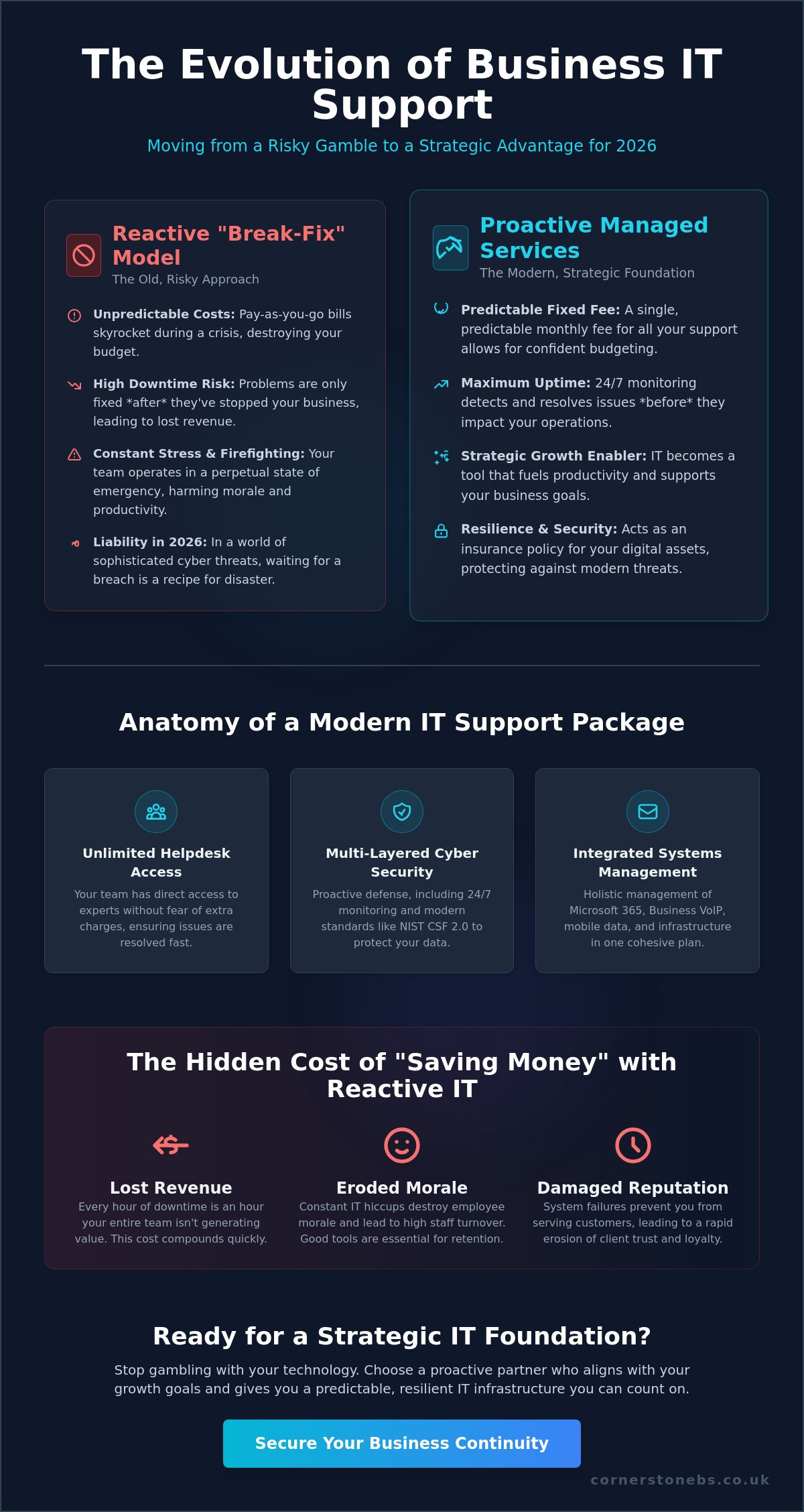
Ten years ago, you called an IT person when your computer wouldn’t turn on. Today, that approach is a recipe for disaster. Modern business IT support packages have evolved into a proactive insurance policy for your digital assets. We don’t just wait for things to break; we ensure they stay running. This shift is driven by the sheer complexity of modern networks and the speed at which cyber threats move. If you’re waiting for a system to fail before you fix it, you’re already losing money. You need a partner who sees the storm coming before the first raindrop hits.
The transition toward Managed services represents a fundamental change in how local businesses view their technology. It’s no longer a utility you pay for only when it fails. It’s a strategic partnership. Our award-winning support team focuses on building resilience, ensuring your infrastructure is strong enough to handle rapid growth. We identify bottlenecks in your network before your staff even notices a slowdown. This keeps productivity high and your team focused on what they do best. By investing in the right business IT support packages, you’re choosing stability over chaos.
Understanding Proactive vs. Reactive Support
Reactive IT is inherently stressful. It leads to unpredictable monthly bills and hidden financial leaks that drain your budget. When a server goes down, the cost isn’t just the repair bill; it’s the hours of lost work. We embrace an “Always-On” mentality. Through 24/7 monitoring, we spot a failing hard drive or a suspicious login attempt at 3:00 AM. By the time your team starts work at 9:00 AM, the issue is often already resolved. This moves IT from a cost centre that eats your profits to a growth enabler that supports your scaling.
The True Cost of Downtime
The Anatomy of a Modern IT Support Package: What’s Actually Inside?
One often overlooked element is the synergy between communication and infrastructure. While some providers treat your phone system and your internet as separate entities, a truly modern support plan merges them. We integrate Business VoIP and mobile solutions into your core IT strategy. This means your team stays connected whether they are in the office or on the road. When your business IT support packages cover the full spectrum of your digital needs, you eliminate the finger-pointing that often happens between different vendors. If you are curious about how this fits your specific setup, you can always explore our approach to regional support.
The Core Pillar: Unlimited Managed IT Support
True ‘unlimited’ support means exactly that. There are no hidden overages or surprise invoices at the end of the month. This predictable cost model allows you to budget with confidence while knowing your infrastructure is in expert hands. We leverage partnerships with global leaders like Microsoft, IBM, and Cisco to bring enterprise-grade stability to local firms. Robust managed IT services act as the bedrock for your entire operation, ensuring that your hardware and network infrastructure remain fast and reliable. When you remove the ‘per-ticket’ cost barrier, your staff feels empowered to report small issues before they grow into expensive problems.
Security and Disaster Recovery
In 2026, security isn’t an optional add-on. It’s the most critical part of the package. Comprehensive cyber security services must be baked into every level of your support. This goes far beyond basic antivirus. We include multi-layered protection, automated backups, and regular security audits as standard features. Following best practices, like those found in the FTC cybersecurity guide, ensures your business stays resilient against evolving threats. If the worst happens, our disaster recovery protocols ensure you’re back on your feet in minutes. We provide the emotional and operational security you need to scale with confidence.
How to Evaluate and Compare IT Support Plans for Your Organisation
Choosing between different business IT support packages shouldn’t feel like a guessing game. You need a clear framework to compare apples with apples. Start by looking at how you’re billed. Most providers offer “per-user” or “per-device” pricing. If your team uses multiple gadgets, like a laptop, tablet, and smartphone, a per-user model is often more cost-effective. Conversely, if you have shared workstations in a warehouse or retail setting, per-device billing might save you money. We help you map out these requirements so your plan fits your actual workflow, not a generic template.
Scalability is another non-negotiable factor. Your technology should never be a ceiling on your growth. Ask yourself if the provider can easily add new staff members or support a second location without a complete contract overhaul. A local partner who understands the regional market will be more agile in helping you expand. You also need to strike the right balance between on-site and remote support. While 90% of issues are now fixed remotely, having an expert who can be at your office quickly when hardware fails provides invaluable peace of mind. High-quality business IT support packages must provide this safety net.
The SLA Trap: Response vs. Resolution
Many contracts boast a “one-hour response time,” but you should be careful. A response often just means an automated email or a quick “we’ve received your ticket” from a dispatcher. What actually matters to your bottom line is the resolution time. You need a partner committed to getting you back up and running, not just acknowledging the problem. Check the fine print on emergency on-site visits to ensure they aren’t hidden behind extra fees. We provide a dedicated account manager who learns your specific business goals. This human connection ensures that when you call, you’re talking to someone who already knows your infrastructure inside out.
Infrastructure and Hardware Integration
Your choice of support should align with your physical tech. Effective IT company solutions should include hardware procurement and lifecycle management. It’s frustrating to buy a top-tier support plan only to find your existing network infrastructure can’t handle the load. We assess your cabling, routers, and servers to ensure they’re up to the task. There’s also a massive efficiency gain in using a single provider for your IT, mobile, and telecommunications. It simplifies your billing, reduces vendor finger-pointing, and ensures every piece of your tech stack works in perfect harmony.
Beyond the Price Tag: Identifying Hidden Costs and Value-Adds
Don’t let a low monthly headline price fool you. When comparing business IT support packages, the real value lies in what happens when you need something outside of the daily grind. Many providers lure you in with a cheap rate, only to hit you with ‘out-of-scope’ fees the moment you want to set up a new workstation or move an office. We believe in total transparency. A truly collaborative partner identifies these potential traps early, ensuring your budget remains predictable even as your needs change. It’s about looking beyond the initial invoice to see the long-term impact on your bottom line.
A thorough onboarding process is another area where quality shines. While some might see an initial audit fee as a hurdle, it is actually a vital investment. This deep dive into your infrastructure allows us to find the ‘ghosts in the machine’ that cause recurring issues. We also take the burden of vendor management off your shoulders. Instead of you spending hours on the phone with an internet provider or a software company, we handle those conversations for you. This frees your time to focus on regional growth while we manage the technical heavy lifting. If you want to see how a transparent plan can work for your team, view our full range of support options.
Strategic IT Consulting
Your support plan should include regular ‘vCIO’ (Virtual CIO) sessions to ensure your tech stays aligned with your business goals. These meetings help you plan for major milestones, such as Microsoft 365 migrations, without the stress of an emergency spend. By mapping out a clear technology roadmap, you avoid ‘technical debt’—the costly habit of patching up old systems rather than investing in modern solutions. We act as your long-term partner, helping you choose the right tools today so you don’t have to replace them tomorrow.
Training and Empowerment
Modern business IT support packages should focus on people as much as hardware. We provide cyber security awareness training that significantly reduces the number of support tickets caused by accidental clicks. When your staff understands how to use cloud solutions effectively, they become more productive and less frustrated. An educated workforce that understands digital risks becomes your business’s strongest and most cost-effective firewall. We take pride in simplifying complex concepts so your team feels confident and empowered every time they log in.
Choosing a partner is an act of trust. That trust is why we lead with our multi-award-winning service and third-party validation as a prefix to everything we do. It isn’t just about technical skill; it is about the confidence that comes from working with a regional expert who has a proven track record of excellence. When you move away from a transactional relationship to a partnership model, the first 90 days are transformative. We spend this time stabilising your environment, eliminating recurring “niggles,” and setting a clear baseline for your future tech strategy. You aren’t just buying a service; you’re gaining a dedicated team that cares about your success.
The Power of Bespoke Design
Your Next Steps to Tech Stability
The path to a more reliable future starts with a simple, informal conversation. We don’t believe in high-pressure sales; we believe in solving problems. Our process begins with a comprehensive audit to uncover the gaps in your existing support and identify where your current tech might be holding you back. This isn’t just a technical check; it’s a strategic review of how your systems impact your staff’s daily lives.
- Initiate a Conversation: Tell us about the bottlenecks that frustrate your team.
- The Audit Process: We conduct a deep dive into your infrastructure to find hidden risks.
- Collaborative Roadmap: We build a plan that aligns your IT with your business goals for 2026.
Moving away from transactional IT means you no longer have to worry about the “what ifs.” You can focus on your regional community and your customers while we ensure your digital world remains secure, fast, and always on.
Take Control of Your Digital Future Today
Choosing between different business IT support packages is about more than just comparing prices; it’s about finding a dedicated partner who understands your regional roots and your global ambitions. You’ve seen how the move from reactive “break-fix” repairs to proactive management creates a foundation for genuine stability. By prioritising bespoke solutions over rigid tiers, you ensure every part of your tech stack, from Microsoft 365 to your network infrastructure, works for your bottom line. Transparency in your contract and a focus on resolution times will protect you from hidden costs and unnecessary downtime.
As a multi-award-winning IT services provider, we take pride in our strong partnerships with industry leaders like Microsoft, IBM, and Cisco. We don’t believe in one-size-fits-all. We believe in building resilient, custom-tailored systems that give you the emotional and operational security to focus on your growth. It’s time to stop worrying about your technology and start leveraging it as a competitive advantage. Ready for a bespoke IT solution? Let’s start a conversation today. We look forward to helping you build a stronger, more secure future for your team.
Frequently Asked Questions
What are business IT support packages?
Business IT support packages are bundled service agreements where a provider takes full responsibility for your digital environment for a fixed monthly fee. They replace the old, expensive model of paying for every individual repair. You receive a suite of services including helpdesk access, network monitoring, and security management. This approach provides the operational stability you need to focus on your core business goals.
How much do business IT support packages typically cost?
The investment for these plans varies based on your total number of users and the specific level of security your industry requires. Most providers use per-user or per-device billing models to keep your costs predictable and transparent. We don’t believe in generic pricing because every local business has unique infrastructure needs. We focus on creating a bespoke plan that delivers the best value for your specific growth strategy.
Is unlimited helpdesk support really unlimited?
Yes, in a genuine managed service model, unlimited helpdesk support means your staff can reach out for remote assistance as often as they need. There are no surprise invoices or “per-ticket” charges that discourage your team from seeking help. This open line of communication allows us to fix small glitches before they cause major downtime. It’s a collaborative way to keep your productivity high and your tech frustration low.
Do IT support packages include hardware repairs?
Can I change my IT support package as my business grows?
Flexibility is a major advantage of modern business IT support packages. You can easily scale your plan up or down as your team size changes or as you move into new premises. We design our solutions to be agile, ensuring your technology supports your expansion rather than holding you back. It’s easy to add new services like Microsoft 365 seats or Business VoIP as your needs evolve.
What is the difference between remote and on-site IT support?
Remote support allows our technicians to fix software and configuration issues instantly via a digital connection. It is the fastest way to resolve the majority of daily tech hurdles. On-site support involves a physical visit to your office for hardware repairs or network infrastructure tasks. A quality plan provides both, giving you the speed of remote fixes and the security of a local expert on your doorstep when needed.
Are cyber security services included in standard IT support plans?
Foundational security like antivirus and email filtering is often part of a standard plan, but we recommend more robust protection in 2026. High-quality business IT support packages should integrate multi-layered cyber security services to defend against evolving threats. We bake these protections into your infrastructure to ensure your data remains secure and your business stays compliant with the latest industry regulations.
How do I switch from my current IT provider to a new support package?
Switching to a new provider is a managed, stress-free process that we handle on your behalf. We perform a thorough audit of your current systems and work with your existing vendor to transfer all necessary credentials and documentation. Our goal is to ensure zero downtime during the transition. You’ll feel the difference of a proactive partnership from the very first day of your new agreement.