Posted on: July 17th, 2026 by Cornerstone
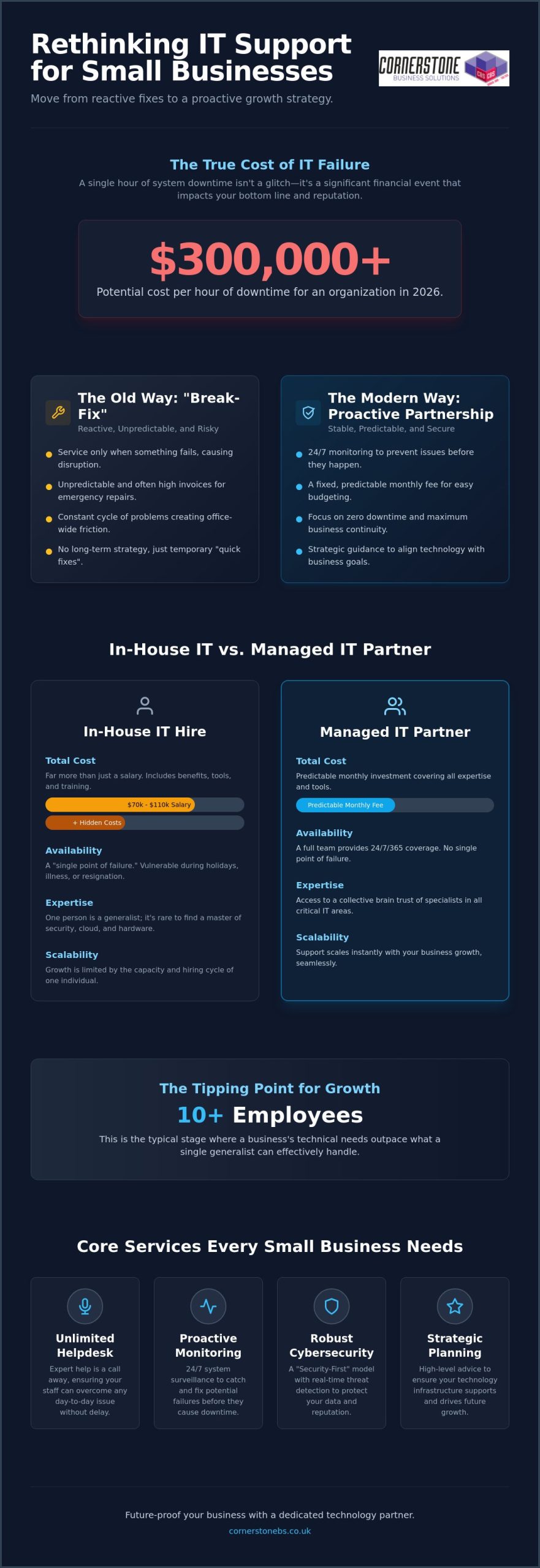
Did you know that a single hour of system downtime in 2026 can cost an organization over $300,000? For a growing company, that isn’t just a technical glitch; it’s a direct hit to your reputation and your bottom line. Most business owners we talk to are tired of the “break-fix” cycle where “quick fixes” fail to last and monthly bills remain a total mystery. If you’ve ever felt the weight of a potential data breach hanging over your office, you’re certainly not alone. Finding reliable outsourced IT support for small business shouldn’t feel like a gamble. It should feel like a partnership with a team that knows your community and your goals.
We agree that your technology should work as hard as you do without the constant fear of a security catastrophe. In this guide, we’ll show you how to eliminate technical friction, secure your vital data, and scale your operations with a proactive strategy. You’ll learn how to move from reactive repairs to a model that offers zero downtime and predictable monthly billing. We’re going to explore the modern standards for managed IT and how a dedicated technology partner can finally give you the freedom to grow.
Key Takeaways
- Move from a reactive “break-fix” mindset to a proactive partnership that stops technical issues before they disrupt your day.
- Evaluate the total cost of ownership and avoid the “single point of failure” risk associated with relying on a lone in-house IT hire.
- See how strategic outsourced IT support for small business turns unpredictable repair bills into a fixed monthly investment for better cash flow.
- Identify the essential markers of a quality partner, from robust Service Level Agreements to verified industry accolades and awards.
- Learn how proactive monitoring and unlimited helpdesk support provide the stability you need to scale your business with confidence.
What is Outsourced IT Support for Small Business?
At its core, outsourced IT support for small business is far more than just a number to call when your printer stops working. It’s a strategic partnership with a Managed Service Provider (MSP) that acts as a reliable extension of your own team. Instead of managing complex servers and software yourself, you lean on a group of experts who take full responsibility for your digital health. We define it simply: outsourced IT is the external management of digital infrastructure to ensure 24/7 business continuity.
In the past, many companies relied on a “break-fix” model. You only called for help when something was already broken, which often led to expensive downtime and unpredictable invoices. Modern Managed IT Services have flipped this script entirely. Today, the focus is on proactive management. We monitor your systems around the clock to stop faults before they turn into office-wide outages. This comprehensive approach covers everything from your daily helpdesk needs to complex cloud management and high-level strategic advice that helps you plan for the future.
The Evolution of IT Support in 2026
The landscape has shifted dramatically over the last few years. Hybrid work is no longer a perk; it’s a standard requirement that adds layers of complexity to your network and data access. At the same time, AI-driven threats have made cyber attacks more sophisticated and frequent than ever before. Because of this, basic technical help isn’t enough for modern SMEs. You now require a “Security-First” IT support model. This means security isn’t a secondary add-on; it’s built into every update, every login, and every piece of hardware your team uses to get the job done.
Core Services Every Small Business Needs
To stay competitive, your business needs a foundation that doesn’t crumble under pressure. This starts with unlimited helpdesk access. Your staff should feel confident that expert help is just a phone call away for any day-to-day issue, no matter how small. Reliability is built through proactive system monitoring. By catching a failing drive or a software conflict early, we prevent the productivity bleed that happens when systems lag or crash. Most importantly, you need robust cyber security services that include real-time threat detection and response. In 2026, protecting your data is exactly the same as protecting your hard-earned reputation.
Managed IT Services vs. In-House IT: Which is Better?
Deciding between a full-time hire and a managed partner is a major milestone for any growing company. It’s easy to assume that having a person in the office provides more control, but this often leads to a “single point of failure.” If your lone IT manager is on holiday, ill, or decides to move on, your business is suddenly vulnerable. High-quality outsourced IT support for small business removes this risk by providing a full team of experts who are always available, ensuring you never depend on one person’s schedule.
The Real Cost of an Internal IT Hire
The total cost of ownership for an internal hire goes far beyond the base salary. According to current research, the average salary for a single in-house IT professional is between $70,000 and $110,000 per year before benefits. On top of that, you must account for National Insurance, pension contributions, and recruitment fees. There’s also the cost of the tools themselves. A professional partner provides enterprise-grade Remote Monitoring and Management (RMM) software as part of the service. An internal hire would require you to purchase these licenses separately, adding thousands to your annual budget. By choosing a partner, you ensure your systems follow cybersecurity best practices without having to fund the expensive training and tools required to stay current.
When Outsourcing Becomes the Logical Choice
Most businesses hit a tipping point around the 10-employee mark. At this stage, your technical needs outpace what a single generalist can handle. You need deep expertise in hardware, security, and cloud solutions simultaneously. It’s rare to find one person who is a master of all three. An outsourced model allows you to tap into a collective brain trust of specialists who manage these complex environments every day.
Scaling becomes seamless when you aren’t tethered to a hiring cycle. As you add more staff, your IT support scales with you instantly. This 24/7/365 coverage means your systems are being watched while you sleep, preventing the midnight crashes that derail the next day’s productivity. Investing in outsourced IT support for small business ensures your systems are always ready for the next challenge. If you’re ready to move away from the stress of managing a department yourself, we can help you explore a more reliable path for your company’s technology.
Key Benefits of Outsourcing Your IT Support
Beyond the balance sheet, there is the invaluable factor of emotional security. Our proactive maintenance model means we’re constantly scanning your network for vulnerabilities or hardware fatigue. It’s the digital equivalent of a security team watching your office while you sleep. You no longer have to worry about a Monday morning meltdown because a server failed over the weekend. We’ve likely already spotted the issue and fixed it before your team even logged on.
Enhanced Security and Compliance
The regulatory environment for UK businesses is stricter than ever. Achieving Cyber Essentials certification has become a standard requirement for many contracts, and we help you reach that mark with ease. We implement robust disaster recovery protocols to ensure your data stays safe even in the worst-case scenarios. Staying ahead of evolving data protection laws is a full-time job. We take that burden off your shoulders so you can remain compliant without the constant worry of a breach.
Access to World-Class Expertise and Tools
How to Choose the Right IT Support Partner
Avoid “one-size-fits-all” packages. Your business has unique workflows, and your IT should reflect that. A truly bespoke approach ensures you aren’t paying for tools you don’t need while leaving critical gaps in your security. Communication is equally vital. You need a partner who speaks the language of business, not just the language of servers. If they can’t explain a complex concept simply, they aren’t the right fit for a growing SME. We believe in being a dedicated long-term partner, not just a voice on the end of a phone.
The 4-Stage Onboarding Process
A smooth transition is the foundation of a long-term partnership. We follow a clear, four-step path to ensure your outsourced IT support for small business delivers value from day one.
- Audit and Assessment: We begin with a deep dive into your current infrastructure. This isn’t just about checking boxes; it’s about identifying hidden vulnerabilities and “quick wins” that improve your immediate security and speed.
- Stabilisation: Once we know where the gaps are, our team works to fix lingering issues. We standardise your environment to ensure every device and user has a consistent, high-performance experience.
- Optimisation: This is where we implement a seamless Microsoft 365 migration and unlock cloud efficiencies that help your team work smarter.
- Ongoing Strategy: We provide monthly reviews and a long-term roadmap. This keeps your technology aligned with your commercial goals and ensures you’re always ready for what’s next.
Red Flags to Avoid in a Provider
Not every provider has your best interests at heart. Watch out for these common warning signs during your search:
- Long-term contracts that lock you in for years without clear performance clauses or exit strategies. You should stay with a provider because of their quality, not because of a legal loophole.
- Providers who hide behind “tech-jargon” to avoid answering direct business questions about costs or security.
- Surprise invoices for onsite visits or basic security patches that should be included as standard in a managed service.
If you want a partner who values transparency and local expertise, book a discovery call with our award-winning team.
Future-Proofing Your SME with Cornerstone Business Solutions
Your business deserves more than a reactive helpdesk that only shows up when things go wrong. At Cornerstone Business Solutions, we’ve built our reputation on being a dedicated long-term partner for UK small businesses. We don’t just fix computers; we provide the strategic engine that drives your resilience and competitive advantage. By choosing our outsourced IT support for small business, you’re securing a foundation that’s built to last, regardless of what the tech landscape throws at you next.
Our approach is built on two non-negotiable pillars: Unlimited Helpdesk access and Proactive Monitoring. These aren’t premium add-ons; they’re the standard for every client we serve. Our monitoring systems act as a silent guardian, catching faults before they impact your productivity. When your team does need help, they get through to a real person who understands your setup and your goals. This combination ensures that technology remains an asset rather than a source of friction.
Why Award-Winning Service Matters
We’re proud to be a multi-award-winning IT provider, but those accolades aren’t just for our trophy cabinet. They act as a recurring signature of quality and a promise of consistent, high-level performance. When you see our industry recognition, you’re seeing proof of a culture that blends professional authority with approachable, regional warmth. We take pride in our geographical roots and bring that community-focused energy to every project. We simplify complex technical concepts so you can focus on leading your company with total confidence.
Take the First Step Toward Stress-Free IT
Switching your IT provider shouldn’t feel like a leap into the unknown. We’ve refined our managed onboarding process to make the transition as smooth as possible. It starts with an informal conversation about your specific business challenges and growth ambitions. We listen first, then we build a bespoke technology solution that fits your unique requirements. There’s no jargon, no hidden fees, and no “one-size-fits-all” mentality.
If you’re tired of unpredictable costs and productivity loss from temporary fixes, it’s time for a different approach. We invite you to join us for a friendly chat about your current systems. Let’s explore how a proactive partnership can provide the emotional security and technical stability you need to scale. Secure your future today by booking a comprehensive technology audit with our expert team.
Secure Your Competitive Edge for the Years Ahead
Technology shouldn’t be an anchor that holds your company back; it should be the fuel that drives your growth. By moving away from the reactive break-fix model and embracing a proactive partnership, you’ve already taken the first step toward a more resilient future. You now understand that the right outsourced IT support for small business provides more than just technical fixes. It offers the strategic clarity and emotional security you need to lead with total confidence.
Book your free bespoke technology audit with our award-winning team today. We look forward to starting a conversation about your future.
Frequently Asked Questions
How much does outsourced IT support typically cost for a small business?
The cost is typically structured as a predictable monthly fee based on your number of users or devices. This model helps you avoid the high, unpredictable costs of “break-fix” repairs and allows for much better cash flow management. Your specific investment will depend on the complexity of your network, your security requirements, and the level of proactive monitoring needed to ensure zero downtime. We focus on providing a fixed-term contract that offers unlimited helpdesk access so you always know exactly what your budget looks like.
Will an outsourced IT company understand my niche industry requirements?
Yes, a quality provider builds a bespoke system tailored to your specific commercial goals and regulatory needs. We act as a dedicated long-term partner, taking the time to understand your unique workflows before implementing any changes. This ensures your technology supports your niche operations rather than forcing you into a generic, one-size-fits-all framework. Our experience across various sectors allows us to bring best practices from multiple industries to your specific business.
What happens if we have a major IT emergency outside of normal business hours?
Reliable outsourced IT support for small business relies on proactive monitoring to catch most emergencies before they disrupt your day. If an issue does arise, your Service Level Agreement (SLA) outlines exactly how quickly we respond to critical faults. This 24/7/365 oversight provides the emotional security of knowing experts are watching your network while you sleep. We aim to resolve faults before your team even logs on for the day.
Can an outsourced provider manage our existing Microsoft 365 and cloud subscriptions?
We can take full control of your existing Microsoft 365 and cloud environments to ensure they are configured for maximum security and efficiency. Many businesses have unoptimised settings or “zombie” accounts that waste money and create security gaps. We audit these subscriptions during the onboarding phase to streamline your costs and improve your overall system performance. It’s about making sure you get the most value out of the tools you already pay for.
How long does it take to switch from an old IT provider to a new one?
A standard transition typically takes between two and four weeks to ensure a seamless handover without disrupting your daily operations. This period includes a full audit, the stabilisation of your current systems, and the implementation of our proactive monitoring tools. We manage the entire process and communicate with your outgoing provider on your behalf. This removes the stress of switching and prevents any technical friction during the move.
Is outsourced IT support secure enough for businesses handling sensitive data?
Modern outsourced IT support for small business is specifically designed to handle sensitive data with higher security standards than most internal teams can maintain. We provide access to enterprise-grade threat detection and constant monitoring that stops attacks before they breach your network. By following strict compliance frameworks and achieving certifications like Cyber Essentials, we ensure your data remains protected and your business stays compliant with UK regulations.
Do I still need an internal “IT person” if I outsource to a managed service provider?
Most small businesses find they no longer need a dedicated internal hire once they have a full team of experts managing their infrastructure. While we can work alongside an existing IT manager to provide extra capacity, our service is designed to handle everything from helpdesk calls to high-level strategy. This removes the risk of a “single point of failure” that happens if your lone internal expert is ill, on holiday, or leaves the company.
What is the difference between remote support and onsite IT support?
Remote support allows us to fix software issues and user errors instantly by connecting to your device over the internet. It is the fastest way to solve the vast majority of daily technical problems without waiting for a technician to travel. Onsite support is reserved for physical hardware failures, network cabling, or complex infrastructure projects that require a hands-on presence at your office. We provide a blend of both to ensure your systems remain stable and your team stays productive.
Posted on: May 30th, 2026 by Cornerstone
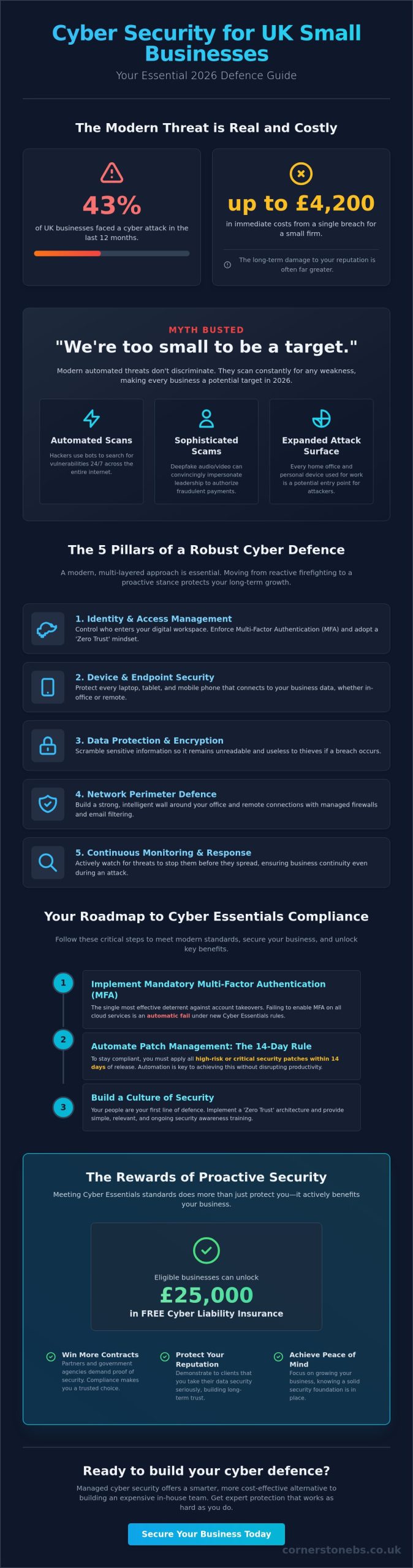
Did you know that 43% of UK businesses faced a cyber attack in the last 12 months? For a small firm, a single breach can cost up to £4,200 in immediate losses, but the damage to your hard earned reputation often hurts much more. You’re likely balancing the fear of data breaches with the confusion of shifting regulations like the latest Cyber Essentials updates. It’s frustrating when you want to stay secure but don’t have the budget for a massive, in-house IT department. We know you need protection that works as hard as you do.
This cyber security for small business UK guide offers a comprehensive roadmap to secure your digital assets, meet the latest 2026 standards, and gain total peace of mind. We’ll show you how to implement vital protections, from mandatory multi-factor authentication to the 14-day patching rule, without hindering your daily productivity. We’ll also explain how meeting these standards can even unlock £25,000 in free cyber liability insurance for eligible businesses. Let’s build a plan that turns security into a solid foundation for your future growth.
Key Takeaways
- Understand why modern automated threats mean no business is “too small” to target in 2026.
- Discover a proactive five-pillar framework that shifts your focus from simple antivirus to complete business stability.
- Follow our cyber security for small business UK guide to navigate Cyber Essentials compliance and secure your digital infrastructure.
- Learn how managed cyber security and proactive monitoring offer a smarter, more cost-effective alternative to building an expensive in-house team.
- Get a clear, actionable roadmap to protect your growth and achieve total peace of mind for your team and your customers.
The 2026 Cyber Threat Landscape for UK Small Businesses
In 2026, cyber security isn’t just a technical checkbox. It’s the engine room of your business continuity. For small firms across the UK, protecting your digital assets means protecting your ability to open the doors tomorrow morning. This cyber security for small business UK guide moves past the old idea that “it won’t happen to us.” Modern threats have changed. Five years ago, a clumsy email was the standard risk. Today, attackers use automated tools to scan for weaknesses every second of every day. Security is now about safeguarding your cash flow and your hard earned reputation.
Why 2026 is a Turning Point for SME Security
Small teams are facing a new level of sophistication. Deepfake technology now allows criminals to mimic the voice or even the video of a director in a call to the finance department. These “urgent” requests for bank transfers are incredibly convincing. Your hybrid workforce has also permanently expanded your attack surface. Every home office, personal laptop, and mobile device is a potential entry point for hackers. Additionally, larger partners and government agencies now demand proof of your security before signing contracts. Many businesses look to the Cyber Essentials scheme as a baseline to prove they’re a safe pair of hands for sensitive data.
The True Cost of a Breach in the UK
A breach costs much more than just the immediate recovery fee. While the average incident for a small firm ranges between £1,600 and £4,200 according to recent government data, the hidden costs are often far higher. These include:
- Lost Productivity: Days of downtime where your team can’t access files or email.
- Reputational Damage: The long term loss of trust from clients and partners.
- Legal Fees: Costs associated with data protection compliance and potential fines.
Recovering from that reputational hit takes years, not days. Partnering with a local expert for managed IT services helps you spot these threats before they become disasters. True cyber resilience is the ability to keep your business operating even while an attack is happening. It’s about staying strong and steady when things get difficult.
The Five Essential Pillars of a Robust SME Cyber Defence
Many business owners think a simple antivirus subscription is enough to keep them safe. In reality, modern protection requires a multi-layered approach that covers every corner of your operations. We use a structured framework to ensure no gaps are left open. This cyber security for small business UK guide breaks down your defence into five logical pillars. By focusing on these areas, you move from reactive “firefighting” to a proactive stance that protects your long term growth.
This approach aligns perfectly with the NCSC’s Small Business Guide, which provides the gold standard for UK firms. The five pillars are:
- Identity and Access Management: Controlling exactly who enters your digital workspace.
- Device and Endpoint Security: Protecting every laptop, tablet, and mobile phone your team uses.
- Data Protection and Encryption: Scrambling sensitive information so it remains useless to thieves.
- Network Perimeter Defence: Building a strong, intelligent wall around your office and remote connections.
- Continuous Monitoring and Response: Knowing exactly when a threat arrives so you can stop it before it spreads.
Securing the Human Element
Your people are your first line of defence. Multi-Factor Authentication (MFA) is the single most effective deterrent against account takeovers. Under the 2026 Cyber Essentials rules, failing to enable MFA on cloud services results in an automatic fail. We also advocate for a ‘Zero Trust’ architecture. This means your system never assumes a user is safe just because they’ve logged in once; it verifies every single request. This keeps your data secure even if a password is compromised. You can build a culture of security awareness by keeping training simple, relevant, and free from technical jargon.
Technical Safeguards Every SME Needs
Your hardware must be as smart as your team. Managed firewalls and advanced email filtering act as a digital sieve, catching the vast majority of phishing attempts before they ever reach an inbox. Automated patch management is also vital. To stay compliant in 2026, you must apply all high-risk security patches within 14 days of release. Integrating cloud solutions with built-in security protocols ensures your team stays productive from anywhere without leaving the door open. If you’re curious about how these layers fit your specific setup, our local cyber security team is always happy to help you find the right balance.
Debunking the ‘Too Small to Target’ Myth
One of the most dangerous phrases we hear in our local business community is: “We’re too small for hackers to care about.” It is a common belief that cyber criminals only chase big banks or global retailers. In reality, modern cyber crime is rarely personal. Most attacks are launched by automated bots that scan the entire internet for any open door. These scripts don’t check your turnover or your head count before they strike. For a hacker, a small business with weak defences is the perfect ‘low-hanging fruit’. It is an easy win that requires almost no effort compared to breaching a major corporation.
Think of these bots as digital burglars walking down a street, rattling every door handle. They don’t care if the house is a mansion or a bungalow. They only care about finding the one door that’s been left unlocked. This cyber security for small business UK guide is here to help you make sure your door is bolted tight. Security isn’t a luxury for the big players; it’s a fundamental requirement for staying in business today.
The SME as a Gateway
Your business might be a stepping stone to a much larger prize. Attackers frequently use a technique called ‘island hopping.’ They breach a smaller, less secure supplier to steal credentials or plant malware that eventually gives them access to a larger corporate partner’s network. Being identified as the ‘weak link’ in a supply chain can destroy your professional reputation overnight. This is why robust cyber security services are now a prerequisite for many UK tenders. If you cannot prove your systems are secure, you risk being locked out of lucrative contracts and partnerships.
Ransomware: The Equal Opportunity Threat
You might think your data isn’t worth stealing, but it is always valuable to you. Ransomware doesn’t necessarily aim to sell your data on the dark web. Instead, it locks you out of your own essential files. Imagine arriving at work to find your invoices, customer records, and emails are all encrypted and inaccessible. The psychological toll of seeing your operations grind to a halt is immense. According to the UK Government’s Cyber Security Breaches Survey 2025/2026, 43% of UK businesses experienced a cybersecurity breach or attack in the past 12 months. This statistic proves that no one is invisible. To help you build a solid foundation against these threats, the NCSC’s Small Business Guide provides a trusted starting point for protecting your livelihood.
A Practical Roadmap to UK Cyber Essentials and Compliance
Achieving a high standard of protection doesn’t have to be overwhelming. This cyber security for small business UK guide provides a clear path to securing your operations while building trust with your customers. By following a structured roadmap, you can transform your security from a source of anxiety into a competitive advantage. We recommend a step by step approach to ensure your defences are both thorough and manageable.
- Step 1: Conduct a comprehensive audit. You can’t protect what you don’t know you have. Start by listing all hardware, software, and cloud services your team uses.
- Step 2: Secure your internet connection. Use a managed firewall to create a boundary between your internal network and the outside world. Ensure all routers have their default passwords changed to something complex.
- Step 3: Control access. Limit admin privileges to only those who absolutely need them. Most staff should use standard user accounts for daily tasks to prevent accidental system wide changes.
- Step 4: Protect against malware. Deploy professional grade security software across all devices. This goes beyond simple antivirus to include active threat detection and email filtering.
- Step 5: Keep systems updated. As we mentioned earlier, applying high risk security patches within 14 days is essential. This prevents hackers from exploiting known vulnerabilities in your software.
Why Cyber Essentials Matters in 2026
Your certification is a badge of honour. It tells your partners, suppliers, and customers that you take their data seriously. Holding a government backed certification often gives you a commercial edge when bidding for new contracts. Many UK insurers also look favourably on certified firms, which can lead to more competitive premiums for your business. While the basic certification is a great start, Cyber Essentials Plus involves a hands on technical audit for even greater peace of mind.
Navigating UK GDPR and NIS2
Compliance is about more than just avoiding fines; it is about respecting the privacy of your clients. For small firms, this means having clear records of where data is stored and who can see it. A documented Incident Response Plan is also vital. It ensures your team knows exactly what to do if a breach occurs, which significantly reduces the impact on your business. Implementing a Microsoft 365 migration can help automate many of these compliance tasks by using built in labels and data protection policies. If you’re ready to secure your future, speak with our local cyber security experts today to start your journey toward total compliance.
Moving Beyond DIY: The Value of Managed Cyber Security
Managing your own digital safety is a full-time job. Many directors start with a “Break-Fix” mindset, only calling for help when something stops working or a file won’t open. This cyber security for small business UK guide highlights that reactive thinking is a dangerous gamble in 2026. Proactive Managed IT Support shifts the burden from your shoulders to a dedicated team of experts. We use continuous monitoring and threat detection to spot anomalies before they turn into business ending breaches. It’s the difference between calling the fire brigade and having a state-of-the-art sprinkler system already in place.
Cornerstone’s Proactive Shield
We’ve built our reputation on an award-winning approach to bespoke security. Our team doesn’t just provide a service; we act as your dedicated long-term partner. We take pride in our regional roots and our ability to simplify complex technical infrastructure into clear business benefits. We speak your language, not just “IT-speak.” This collaborative mindset ensures that your security feels like a foundational element of your stability rather than a technical hurdle. We’re here to help you navigate the 2026 landscape with confidence and clarity.
Taking the First Step Toward Security
A comprehensive security audit is the essential starting point for any ambitious growth strategy. It allows us to see exactly where you stand and what needs to be done to achieve total compliance. We’d love to have an informal conversation about your business goals and how we can help you protect them. There’s no pressure, just expert advice from a local team that cares about your success. When you’re ready to secure your digital assets for the long term, Book a Cyber Security Audit with Cornerstone Today and let’s start the conversation.
Secure Your Business Future and Fuel Your Growth
Cyber security in 2026 is no longer just a technical necessity; it’s the bedrock of your business’s emotional and financial stability. We’ve shown that automated threats don’t discriminate based on size and that proactive compliance is your ticket to better contracts and lower insurance. This cyber security for small business UK guide has outlined the roadmap, but you don’t have to walk it alone. Managing these risks yourself takes valuable time away from your core goals.
As a multi-award-winning IT services provider and strategic partner with Microsoft, IBM, and Cisco, we bring world-class expertise to our local community. Our UK-based helpdesk and proactive system monitoring ensure your operations stay smooth while you focus on what you do best. Let’s turn your digital defences into a powerful engine for long term growth. Secure your business future with a bespoke Cyber Security Audit from Cornerstone. We’re ready to help you build a safer, more resilient business today.
Frequently Asked Questions
Is cyber security expensive for a UK small business?
Cyber security is far less expensive than the cost of a successful breach. While there is an initial investment in tools like managed firewalls or email filtering, these costs are predictable and manageable compared to the average £4,200 loss a small firm faces after an attack. Implementing basic cyber security for small business UK guide practices, such as strong password policies and multi-factor authentication, actually costs very little but prevents the vast majority of common threats.
What is the most common cyber attack on UK SMEs?
Phishing is currently the most frequent threat, affecting 85% of UK businesses that reported a breach in the last year. These attacks use deceptive emails to trick your staff into revealing sensitive passwords or making fraudulent payments. Because these threats target people rather than just software, they require a combination of smart technical filters and regular awareness training for your team to stay safe.
Does my business really need Cyber Essentials certification?
Yes, holding this certification is rapidly becoming a standard requirement for doing business in the UK. Many government contracts and large corporate supply chains now insist on it as a minimum security baseline. Beyond opening doors to new tenders, it provides a clear framework that reduces your overall risk and can even help lower your professional indemnity insurance premiums.
How can I tell if my business has already been breached?
Signs of a breach are often subtle, such as unexpected password reset emails, slow system performance, or new software icons appearing without your permission. You might also hear from a client that they’ve received a suspicious email from your account. Proactive cyber security for small business UK guide monitoring is the most reliable way to catch these anomalies early before they cause significant damage to your operations.
Is antivirus software enough to protect my business in 2026?
Antivirus alone is no longer sufficient to stop modern, sophisticated cyber criminals. Today’s attacks often use “fileless” malware or social engineering tactics that can bypass traditional scanners entirely. You need a multi-layered defence strategy that includes managed firewalls, secure cloud solutions, and identity management to ensure your business remains resilient against evolving threats.
What should I do if I suspect a phishing email has been opened?
Disconnect the affected device from your network immediately to stop any potential malware from spreading. You should then change all passwords associated with that user from a different, secure device and alert your IT provider to perform a deep system scan. Reporting the incident to Action Fraud helps the wider UK business community by tracking these criminal patterns.
How does managed IT support differ from hiring an in-house IT person?
Managed IT support gives you access to a whole team of specialists with a wide range of skills for a fraction of the cost of one full-time salary. You don’t have to worry about holiday cover, training costs, or recruitment headaches. It is a scalable solution that provides high-level expertise and proactive monitoring, ensuring your systems stay stable as your business grows.
Can cyber security help me win more business contracts?
Absolutely, robust security is a major competitive advantage in the modern marketplace. Potential partners and clients are much more likely to trust a firm that can prove its data is handled securely. By demonstrating high security standards and certifications, you position your business as a reliable, low-risk partner, which is often the deciding factor in winning lucrative new contracts.
Posted on: May 25th, 2026 by Cornerstone
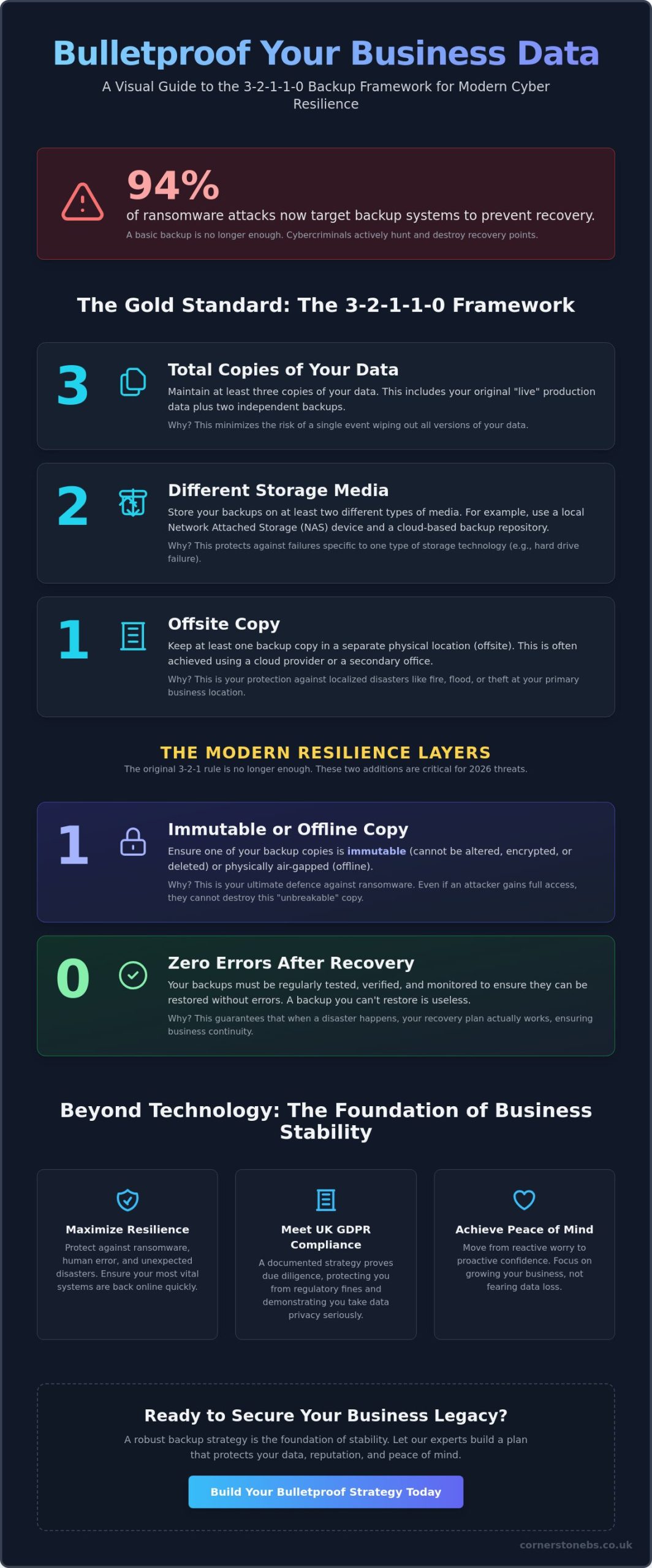
Did you know that 94% of ransomware attacks now specifically target backup systems to ensure you can’t recover? It’s a sobering reality that has many local business owners questioning if their current setup is truly secure. You’ve likely felt that nagging worry about whether your files are actually safe or if a single hardware failure could bring your operations to a standstill. Learning how to create a business data backup strategy is no longer just a technical tick-box exercise. It’s the foundation of your company’s long-term resilience and emotional security.
As a trusted local partner recognized for reliable service, we believe that protecting your hard work should be straightforward and stress-free. This guide will show you how to build a bulletproof 3-2-1-1-0 framework that guards against ransomware, human error, and unexpected disasters. We’ll walk through the balance between cloud and on-premise costs while ensuring you stay compliant with UK data protection standards. You’ll learn exactly how to achieve zero downtime and the total peace of mind that comes from knowing your recovery plan is tested, verified, and ready for anything.
Key Takeaways
- Adopt the 3-2-1-1-0 framework to ensure your data is not just backed up, but immutable and verified against 2026 cyber threats.
- Learn how to create a business data backup strategy that balances your recovery speed with your budget for maximum operational resilience.
- Categorise your data into mission-critical and archival tiers to ensure your most vital systems are back online first during a crisis.
- Move beyond simple backups to a proactive disaster recovery model that protects your business from the high costs of extended downtime.
Understanding the High Stakes of Business Data Backup in 2026
Your data is the heartbeat of your business. In 2026, it’s likely more valuable than your physical office or your fleet of vehicles. Yet, many local business owners still view data backup as a task for a rainy day. The threats have changed. We aren’t just worried about a dusty server failing or a spilled cup of tea on a laptop. Today, we face AI-driven ransomware that can bypass traditional filters in seconds. When you lose access to your files, you don’t just lose information. You lose time, client trust, and your hard-earned reputation. Learning how to create a business data backup strategy is about more than technology. It’s about protecting your legacy and ensuring your team can sleep soundly at night.
The Reality of Data Loss in the Modern Workplace
Most data loss isn’t a Hollywood-style heist. It’s often a simple mistake, like an employee clicking a malicious link or a disgruntled insider deleting folders. Human error remains a leading cause of downtime. We often talk to owners who believe their files are safe because they use cloud storage. This is a dangerous misconception. While tools like OneDrive are great for collaboration, they aren’t backups. If ransomware hits your primary machine, it can encrypt your synced files in the cloud before you even notice. This is why we integrate cyber security services with a true backup solution to ensure multiple layers of protection.
Compliance and Legal Obligations for UK SMEs
The 3-2-1-1-0 Framework: The Gold Standard for Modern Data Protection
Years ago, the 3-2-1 rule was the gold standard. It was simple. You kept three copies of your data, on two different types of media, with one copy stored offsite. In 2026, this is simply the baseline. Cybercriminals now actively hunt for your backups to ensure you can’t recover without paying a ransom. This is why understanding how to create a business data backup strategy today requires the 3-2-1-1-0 framework. It adds two critical layers: one immutable or offline copy and zero restoration errors. It’s a proactive approach that moves you from basic storage to true cyber resilience. We see it as a foundational element of your business stability.
Let’s break down these numbers into actionable steps. You start with three copies of your data. This includes your primary live data and two separate backups. You should use at least two different media types, such as a local server and a cloud repository. One of these must be kept offsite to protect against physical disasters like fire or theft. By following data backup and security best practices, you ensure that no single point of failure can wipe out your business history. However, the real magic happens with the final two digits: 1 and 0.
The Power of Immutable Backups
An immutable backup is essentially “unbreakable” data. Once written, it cannot be altered, encrypted, or deleted for a set period. This uses Write-Once-Read-Many (WORM) technology. Even if a hacker gains administrative access to your network, they can’t touch these files. It’s your ultimate safety net against ransomware. We often recommend this as a core part of your how to create a business data backup strategy because it removes the “what if” from your security plan. If you’re concerned about your current protection levels, our team can help you explore cyber security services that include these modern safeguards.
Air-Gapping and Offline Security
Air-gapping takes security a step further by physically or logically disconnecting a backup from your main network. If there’s no path to the data, a virus can’t reach it. While old-school tape backups were the original air-gap, modern cloud air-gapping offers the same protection with much faster recovery times. This “reset button” ensures that even in a total network collapse, you have a clean copy of your business ready to go. The “0” in the framework stands for zero errors. This means your backups are automatically tested and verified every single day. A backup you haven’t tested isn’t a backup; it’s just a wish. We focus on these details so you can focus on running your business with total confidence.
Defining Your Recovery Objectives: RTO, RPO, and Technology Selection
A backup plan without clear recovery goals is like a ship without a compass. You might have the data, but you won’t know how to get it back in time to save your business. When deciding how to create a business data backup strategy, you must first define your recovery boundaries. These are measured by two critical metrics: Recovery Time Objective (RTO) and Recovery Point Objective (RPO). These aren’t just technical terms. They represent the heartbeat of your operations. RTO is the duration of time your business can survive being offline. If your systems go down at 9:00 AM, can you wait until 5:00 PM to be back up, or do you need to be running in minutes? RPO, on the other hand, defines how much data you can afford to lose. If your last backup was at midnight and you crash at noon, you’ve lost twelve hours of work. For a local pharmacy or a law firm, that loss could be devastating.
Balancing these objectives requires a honest look at your budget and your risks. High-speed, near-instant recovery costs more, but the price of downtime often far outweighs the investment. Many businesses fall into the trap of a “one size fits all” approach. They treat their archival files the same as their live customer database. This leads to wasted budget on low-priority data and dangerous gaps for mission-critical systems. By following established NIST data protection guidelines, we help you categorise your information so your resources go exactly where they are needed most.
Choosing the Right Backup Technology
The tools you choose must match your RTO and RPO goals. For many of our clients, this involves protecting Microsoft 365 and other SaaS data through cloud-to-cloud backups. It’s a common myth that cloud providers handle all your backups for you. In reality, you are still responsible for your data. Hybrid solutions are often the best fit for UK SMEs. They combine the local speed of on-site hardware with the long-term resilience of cloud solutions. This setup ensures that if a single file is lost, you can grab it instantly from your local network, but if your office is flooded, your entire business is safe in the cloud.
Evaluating On-Premise vs. Cloud Storage
Deciding between on-premise hardware and cloud storage is a matter of scale and stability. Local devices like NAS or SAN offer incredible speed for immediate recovery. However, they require physical maintenance and “Capex” investment in hardware. Cloud storage in UK-based data centres offers an “Opex” subscription model that scales as you grow. These facilities provide levels of physical security and power redundancy that most small businesses simply couldn’t afford on their own. We often recommend a blend of both to ensure your how to create a business data backup strategy is as robust as possible, giving you the best of both worlds without the overhead of managing it all yourself.
A Step-by-Step Roadmap to Implementing Your Backup Strategy
Execution is where many great plans falter. Knowing the theory of the 3-2-1-1-0 rule is a fantastic start, but the real protection comes from a structured rollout. Learning how to create a business data backup strategy that actually works requires a disciplined, step-by-step approach. It’s about moving from a vague idea of “saving files” to a documented, automated, and verified system that guards your business. We believe a clear roadmap is the best way to replace anxiety with confidence. By following these five essential steps, you’ll build a resilient foundation that stands up to 2026 cyber threats.
- Step 1: Data Audit. You can’t protect what you don’t know you have. Categorise your data by its importance to your daily operations.
- Step 2: Assign Ownership. Clearly define who is responsible for managing the backups and, more importantly, who leads the recovery process.
- Step 3: Establish the Schedule. Remove the risk of human error by automating your backups. Modern systems can run every few minutes without slowing you down.
- Step 4: Secure the Perimeter. Ensure all backup data is encrypted both while it’s moving (in transit) and while it’s stored (at rest).
- Step 5: Document the Plan. Create a physical and digital “What If” handbook that outlines every step your team needs to take during a crisis.
Conducting a Comprehensive Data Audit
The first hurdle is often “Shadow IT.” This refers to data stored on personal Dropbox accounts, local desktops, or even staff mobile phones. If it’s not on the map, it’s not being backed up. We recommend mapping all data flows across your it company solutions to identify every storage point. Prioritise your “Mission Critical” items first, such as live databases, financial records, and customer PII. Archival data is still important, but it shouldn’t jump the queue during a recovery event. This clarity ensures your resources are focused where they matter most.
The Testing Hierarchy: Is Your Data Actually Recoverable?
A “Backup Successful” email is a notification, not a guarantee. To be truly secure, you must move through a testing hierarchy. We suggest monthly file-level restores where you pick a random document and ensure it opens correctly. On a broader scale, you should perform an annual full-system disaster simulation. This tests your team’s response time and the integrity of your entire network. Using a “Sandbox” environment allows you to run these tests safely without affecting your live operations. If you want to ensure your business stays online no matter what, our team can help you design a custom Disaster Recovery plan that includes rigorous, automated testing.
Why Managed Backup is the Foundation of Business Stability
Building a resilient business shouldn’t be a lonely endeavour. While the technical steps of how to create a business data backup strategy are now clear, the day-to-day management can quickly become a heavy burden for a busy team. The old ‘break-fix’ model of IT is no longer enough to survive the threats of 2026. You need proactive managed resilience. This shift means that instead of waiting for a failure and then scrambling to fix it, we identify and resolve potential issues before they ever affect your operations. It turns a technical necessity into a foundational pillar of your business stability and emotional security.
Expert monitoring is the silent guardian of your data. We catch backup failures, storage bottlenecks, and connectivity issues in real-time. This level of oversight ensures that when you reach for that ‘reset button’ we discussed earlier, it actually works. Having a team of UK-based experts at your side means you aren’t shouting into a void during a crisis. Every second counts when your reputation is on the line. We see ourselves as more than just a service provider. We are your dedicated long-term partner, focused on your growth and the safety of your digital assets.
Freeing Your Team to Focus on Growth
Removing the weight of daily backup management allows your internal staff to focus on what they do best: driving your business forward. You gain access to enterprise-grade technology and high-level security without the massive enterprise-grade price tag. Our managed IT services provide a scalable path that evolves alongside your company. Whether you are expanding your local team or adopting a hybrid work model, your data protection remains constant, reliable, and invisible.
Taking the First Step Toward Total Peace of Mind
Now is the perfect time to audit your current backup effectiveness. Don’t wait for a hardware failure or a ransomware alert to discover the gaps in your armour. The Cornerstone promise is simple: we provide professional authority balanced with approachable, regional warmth. We speak clearly, avoid the dense jargon, and focus on the outcomes that matter to your bottom line. We invite you to start an informal conversation with our local team about your data resilience. Let’s work together to ensure your business is protected, compliant, and ready for whatever the future holds. It’s time to move forward with the confidence that your hard work is safe.
Secure Your Business Future with Proactive Resilience
Protecting your business legacy starts with a single, proactive decision. We’ve explored the necessity of the 3-2-1-1-0 framework and the vital importance of defining your recovery objectives to stay resilient against 2026 threats. Understanding how to create a business data backup strategy is the first step toward ensuring your operations never miss a beat during a crisis. It’s about more than just files; it’s about the stability of your team and the trust of your clients.
As a multi-award-winning IT services provider, we combine strategic partnerships with industry leaders like Microsoft, IBM, and Cisco to deliver world-class protection with a local, approachable face. Our experts provide proactive 24/7 system monitoring and a dedicated UK-based helpdesk to catch potential failures before they ever become disasters. Don’t leave your continuity to chance. We invite you to book a proactive data resilience audit with our expert team today to secure your growth. We’re ready to be your long-term partner in technology, helping you move forward with total peace of mind.
Frequently Asked Questions
What is the difference between data backup and disaster recovery?
Data backup is the process of creating a copy of your files, while disaster recovery is the comprehensive plan for how you use those copies to restore operations. Think of backup as the spare tyre in your boot and disaster recovery as the toolkit and knowledge needed to change it and get back on the road. Without a clear recovery plan, your backups are just stored data that might take days or weeks to reconfigure correctly.
How often should my business perform data backups?
You should perform backups as often as your business creates data you cannot afford to lose. For most UK SMEs, this means at least daily backups, though mission-critical systems often require continuous data protection that saves changes every few minutes. When you are learning how to create a business data backup strategy, your Recovery Point Objective (RPO) will dictate this schedule to ensure minimal work is lost during a crash.
Is cloud backup secure enough for sensitive financial data?
Cloud backup is highly secure for financial data when it includes end-to-end encryption and is stored in UK-based data centres. Modern providers use advanced security protocols that often exceed the physical and digital protection available in a standard office server room. We ensure your sensitive records are encrypted before they even leave your network, keeping you compliant with strict financial regulations and UK GDPR standards.
What is an immutable backup and why does my business need one?
An immutable backup is a version of your data that cannot be altered, encrypted, or deleted for a specific period after it is created. You need this because a vast majority of ransomware attacks now target backup files to prevent you from recovering without paying. By keeping an immutable copy, you ensure that even if a hacker gains admin access to your network, your “gold” copy remains untouched and ready for restoration.
Can I just use an external hard drive for my business backups?
Using only an external hard drive is not a recommended strategy because it creates a single point of failure and is vulnerable to physical theft, fire, or mechanical damage. While a drive can serve as one of your local copies, it doesn’t provide the automation, offsite resilience, or encryption needed for modern security. A professional approach involves automated systems that remove the risk of someone forgetting to plug in the drive at the end of the day.
How long does it typically take to recover data after a ransomware attack?
Recovery time varies based on your infrastructure and data volume, but a well-planned strategy can reduce downtime from weeks to just a few hours. Without a documented plan, businesses often face a median downtime of 18 days following a ransomware event. By investing in high-speed recovery tools and regular testing, we help you meet your specific Recovery Time Objective (RTO) to keep your team productive and your clients happy.
Do I need to back up my Microsoft 365 data separately?
Yes, you must back up your Microsoft 365 data separately because Microsoft’s primary focus is on service availability rather than long-term data retention. Their “Shared Responsibility Model” explicitly states that the data itself is your responsibility. If an employee accidentally deletes a folder or a mailbox is compromised, having an independent backup ensures you can restore that information quickly without relying on limited native recovery windows.
What should be included in a business disaster recovery plan?
A business disaster recovery plan should include a clear hierarchy of mission-critical systems, a hardware inventory, and a detailed list of staff responsibilities. It acts as a step-by-step manual that anyone on your team can follow when systems go down. When determining how to create a business data backup strategy, ensure your plan also includes emergency contact details for your IT partners and a verified timeline for restoring each department’s access.