43% of UK businesses experienced a cyber security breach or attack in the past year, according to the UK Government Cyber Security Breaches Survey 2025/26. If you’re researching business IT support, security is only part of the picture. Recurring tech issues can interrupt staff, slow customer service and leave you unsure whether your backups will work when needed.
IT support should do more than fix problems after they appear. Effective support combines responsive help with proactive care, shaped around how your organisation works. That means a clearer view of the risks, protections and ongoing support involved, as well as fewer avoidable disruptions.
This guide explains what business IT support can cover, how monitoring and maintenance help keep systems running, and how cyber security, cloud solutions and disaster recovery contribute to resilience. It also outlines what a tailored managed support relationship with Cornerstone Business Solutions can look like, so you can assess how it could support day-to-day productivity and business continuity.
Key Takeaways
See how business IT support North East searches connect to broader questions about keeping systems secure, dependable and productive.
Understand how helpdesk support and proactive monitoring can reduce disruption and help prevent recurring IT issues.
Compare in-house, ad hoc and managed support to clarify differences in ownership, continuity and cost structure.
Prepare for a move to managed support by recording your users, devices, key systems and current IT challenges.
Discover how a tailored, long-term support relationship can bring technology care in line with your organisation’s needs.
What does business IT support cover, and why does it matter?
A recurring fault, a staff member locked out of an account or uncertainty about whether important files are protected can quickly disrupt a working day. Business IT support covers both the technical help needed to resolve issues and the ongoing care that helps keep an organisation’s technology dependable. This can include user assistance, device and system maintenance, cyber security, cloud services and recovery planning.
For organisations searching for business IT support North East, an important question is what happens after the immediate problem is fixed. One-off troubleshooting addresses issues as they arise. Managed IT support adds continuing oversight and helpdesk access, giving staff a clear route to report problems while systems receive regular attention. The Managed Services model describes this ongoing approach, in contrast with relying solely on break-fix support.
Reliable technology helps staff focus on their work, serve customers and keep essential processes moving. Support cannot remove every risk or prevent every outage, but a considered approach can help an organisation respond to issues with less disruption and plan for continuity.
What is managed IT support?
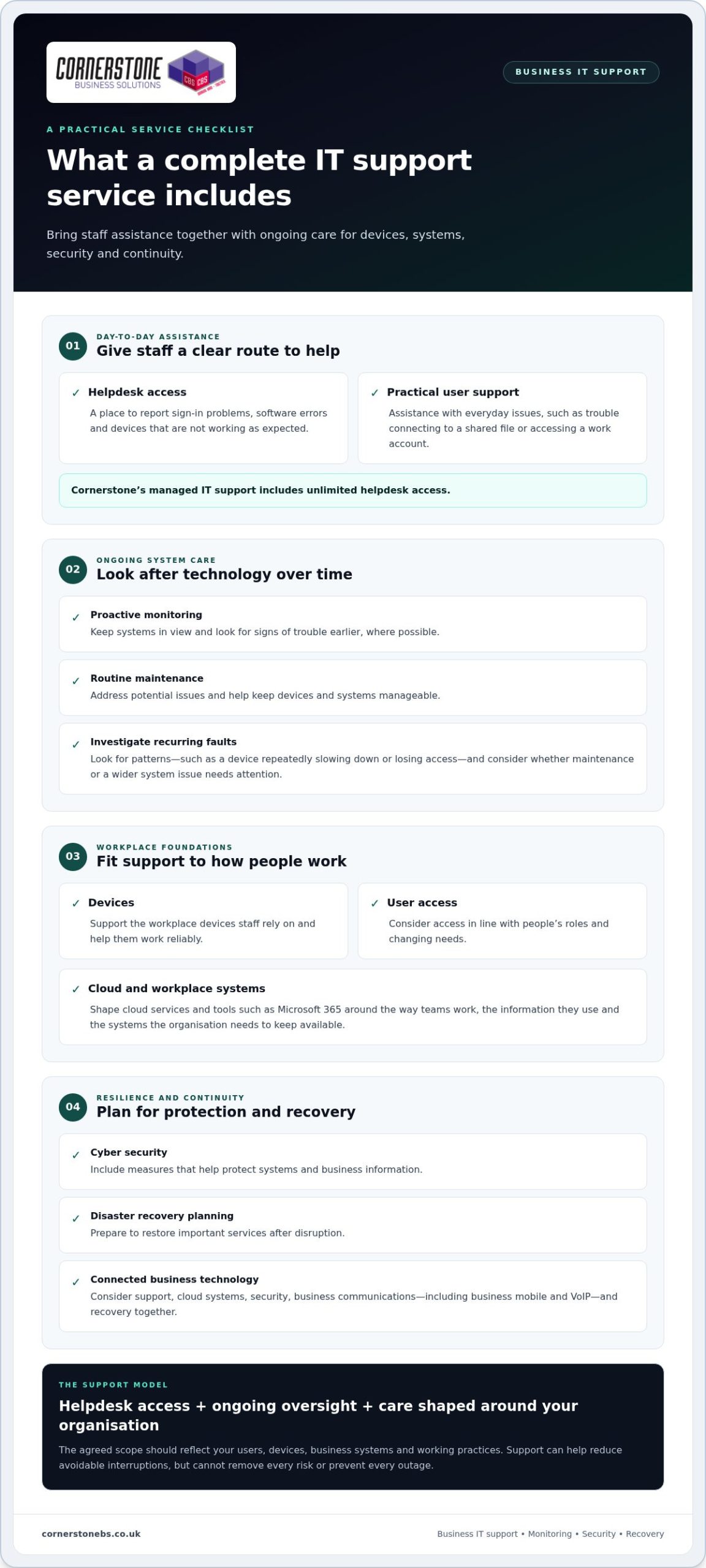
Managed support combines user assistance with ongoing technical oversight. Depending on the agreed scope, it can include system monitoring, maintenance and helpdesk access. The right arrangement reflects how the organisation operates, including its users, devices, business systems and working practices.
A helpdesk gives staff a route to report sign-in problems, software errors or a device that is not working as expected. With managed support, this day-to-day assistance sits alongside continuing care rather than being limited to isolated fixes. Cornerstone’s bespoke managed IT support combines proactive monitoring with unlimited helpdesk access, tailored to organisational needs.
Reactive support versus proactive support
Reactive support starts after something goes wrong. Proactive support looks for signs of trouble earlier and addresses issues where possible, helping reduce avoidable interruptions without promising that every incident can be prevented.
For example, if a team member’s device repeatedly slows down or loses access to a shared system, a reactive approach may treat each occurrence separately. A proactive approach can investigate the pattern and consider whether maintenance or a wider system issue needs attention. Addressing the cause can help the team spend less time working around faults and more time serving customers.
What should a complete business IT support service include?
A dependable service brings day-to-day help together with the care that keeps technology manageable over time. For organisations looking for business IT support North East, core elements include a staff helpdesk, proactive system monitoring, routine maintenance and support for workplace devices and user access. The scope should fit the organisation’s systems and working practices rather than assume every business has the same needs.
Helpdesk, monitoring, and IT maintenance
Staff need a straightforward way to report issues, from a laptop that will not connect to a shared file to trouble signing in to a work account. Cornerstone’s managed IT support includes unlimited helpdesk access, giving employees a route to practical technical assistance. Monitoring and maintenance complement that help by keeping systems in view and addressing potential issues earlier, where possible.
Good support also considers everyday details. Devices need to work reliably, and user access should reflect people’s roles and changing needs. Together, these measures help create a consistent environment across the tools staff rely on.
Cloud, security, and business continuity
Support can extend beyond devices and troubleshooting. Cloud services help businesses access and manage systems, while platforms such as Microsoft 365 bring familiar workplace tools together. The right setup depends on how teams work, the information they use and the systems the organisation needs to keep available.
Security and recovery planning are also important to a resilient setup. Cyber security measures help protect systems and business information, while disaster recovery planning prepares the organisation to restore important services after disruption. The NCSC’s Small Business Guide offers practical guidance for small businesses looking to strengthen their cyber security. For a deeper look at how these measures support resilience, explore cyber security services for business resilience.
Business communications, including business mobile and VoIP, can form part of the wider technology picture. Considering support, cloud systems, security, communications and recovery together helps align day-to-day tools with continuity needs. Cornerstone provides managed IT support alongside Microsoft 365, cloud solutions, cyber security, business mobile, VoIP and disaster recovery. For an overview of how support can be tailored to your organisation, visit Cornerstone’s business IT support.
How can businesses assess the value of managed IT support?
The right support arrangement depends on what your organisation needs to keep working, not simply how many computers it owns. In-house IT offers direct oversight, while ad hoc help can suit occasional issues. Managed support provides an ongoing relationship with agreed responsibilities and access to a broader range of expertise. For businesses considering business IT support North East, comparing how each model handles continuity and planning can clarify what fits.
What does a business actually need from IT support?
Start with your organisation’s day-to-day requirements: team size, critical systems, working patterns and the technical expertise already available internally. Consider which services would cause the most disruption if unavailable and how quickly staff need help to keep work moving. A small number of essential systems may need more attention than a high device count alone suggests.
A fixed, generic package can miss those priorities. A tailored scope should reflect how people work, the systems they rely on and where internal teams need additional support.
Support model
Scope and ownership
Planning and cost structure
In-house
Your organisation employs and directs its IT staff.
Planning sits internally; costs commonly include employment and associated overheads.
Ad hoc
Support is brought in to address specific issues, with your organisation retaining overall responsibility.
Usually reactive; costs may be charged by time or individual task.
Managed
An external support partner delivers an agreed, continuing scope of services.
Can include proactive planning; fees are commonly structured around an ongoing service agreement.
How do support costs and business value relate?
Managed support fees vary with the number of users and devices, the organisation’s requirements and the agreed scope. Compare like with like: identify what support covers, what remains your team’s responsibility and how the service will be reviewed as the business changes. Clear documentation helps prevent misunderstandings about included services and ownership.
Value also depends on the operational impact of unresolved, recurring issues. A low-cost response to each fault may not address the underlying cause, leaving staff to lose time to repeated disruption. Compare that with a planned service that includes continuing oversight and a clear route to support.
Planned IT support can help reduce avoidable interruptions by addressing issues earlier, giving teams more room to focus on their work. It cannot guarantee savings or prevent every problem, but it gives the organisation a clearer basis for managing technology and continuity. To explore a tailored approach, read about Cornerstone’s managed IT support.
What happens when a business moves to managed IT support?
A move to managed IT support should start with understanding how technology supports your organisation, not simply installing monitoring tools. For businesses exploring business IT support North East, a structured transition helps establish what needs attention, who is responsible and how staff will get help. The process can be broken into clear stages tailored to your systems and priorities.
Preparing systems and staff for the transition
Begin by building an accurate picture of the current environment. Useful information includes:
Users and access: staff accounts, roles and the systems each person needs.
Devices and infrastructure: computers, mobile devices, network equipment and key connections.
Business-critical systems: the platforms and services teams rely on to serve customers and complete essential work.
Existing concerns: recurring faults, known security or backup questions, and issues that regularly interrupt work.
Good records make it easier to see how systems connect and where support should focus. They also help identify who owns accounts and access, which is useful when staff join, change roles or leave. Share what you know about current problems, even if the cause is unclear.
Staff need practical guidance too. Tell them how to raise a support request, which details to include and where to go if an issue affects their work. Explaining the process can reduce confusion and help the support team understand the problem sooner.
Setting expectations for ongoing support
Once the current environment is understood, the organisation and support team can agree the service scope. Set out which systems and users are covered, how requests are submitted, what responsibilities remain with your team and how updates will be shared. Clear expectations help everyone work from the same understanding.
Support can then be established around the agreed environment and priorities. Reviewing key systems, recurring issues and upcoming changes helps keep the arrangement relevant as the organisation evolves. New starters, additional devices or a change to a core platform may affect what staff need from support.
A successful transition is more than a handover of technical information. It creates a working relationship focused on your organisation’s needs, with clear communication and a shared view of dependable support. To discuss a tailored approach, discuss your managed IT support requirements with Cornerstone.
How Cornerstone delivers business IT support as a long-term partner
Technology should support the way your organisation works, not force your team into a standard setup. Cornerstone provides bespoke managed IT support shaped around your users, systems and operational priorities. For organisations researching business IT support North East, this means looking beyond individual fixes to build a support relationship focused on day-to-day continuity and changing business needs.
A tailored support relationship for different organisations
The relationship combines unlimited helpdesk access with proactive system monitoring. Staff have a route to raise technical issues, while ongoing oversight helps the support team keep the organisation’s systems in view. This can make it easier to understand recurring needs, plan for changes and keep support aligned with how people work. It does not guarantee every fault or interruption can be avoided, but it provides a continuing framework for managing technology.
Cornerstone is a multi-award-winning IT services provider, founded in 2008. Its technology partnerships include Microsoft, IBM and Cisco. The focus is practical: understand the organisation’s needs and provide support that fits them.
Bringing connected technology services together
Managed IT support can sit alongside cloud solutions, cyber security, business communications and disaster recovery. These areas connect in everyday operations. Staff may depend on cloud platforms to access work, business communications to stay connected with customers, and recovery planning to restore important systems after disruption. Considering these needs together can help create a more coherent technology environment.
Cornerstone’s wider services let organisations consider related technology as part of their planning while keeping the support approach tailored to their priorities. As systems, teams and working practices change, an ongoing partnership can help keep those priorities in view.
Build a more dependable foundation for your business
Effective IT support is more than fixing faults. It combines a clear route for staff to get help with proactive care, security and recovery planning shaped around the way your organisation works. Choosing the right scope means looking at the systems your team relies on, the disruption recurring problems can cause and the expertise available to support them.
For businesses exploring business IT support North East, a managed relationship can bring these priorities together and adapt as needs change. Cornerstone Business Solutions provides bespoke managed IT support as a long-term partner, supporting organisations across the UK. Cornerstone is a multi-award-winning IT services provider, with technology partnerships including Microsoft, IBM and Cisco.
You do not need every technical detail worked out before taking the next step. A conversation about your systems, current challenges and business priorities can help clarify what tailored support could cover. Talk to Cornerstone about business IT support and take a practical step towards more confident, productive day-to-day technology.
Frequently Asked Questions
What does business IT support include?
Business IT support can include helpdesk assistance, system monitoring, maintenance, user and device support, and guidance on keeping technology reliable. Managed support may also connect with cloud services, cyber security, communications and recovery planning. The scope should reflect the organisation’s systems and requirements. Before support begins, agree which services are covered, who is responsible for each task, and how staff can report issues and receive help.
What is the difference between managed IT support and break-fix support?
Break-fix support generally starts when a fault occurs, while managed IT support is an ongoing arrangement that can combine issue resolution with helpdesk access, monitoring and planned maintenance. The difference is whether support mainly responds after disruption or also includes continuing oversight. Managed arrangements can vary, so agree what is included, how responsibilities are divided and how staff raise requests.
How does managed IT support help reduce downtime?
Managed IT support can help reduce avoidable disruption by combining user assistance with monitoring and maintenance. If a staff member reports a recurring sign-in or device issue, the support team can investigate it and look for causes that may affect other users. No support approach can guarantee outages will never happen. Recovery planning and clear escalation routes can help a business prepare for incidents and restore important work.
Is outsourced IT support suitable for a small business?
Outsourced IT support can suit a small business that needs technical assistance, ongoing system care or access to expertise without building a large internal IT team. The right scope depends on users, devices, systems and working practices, not just headcount. A tailored arrangement should set out how staff get help and which responsibilities are covered. It can also work alongside an existing employee or team handling internal IT tasks.
How much does business IT support cost?
Business IT support costs vary according to factors such as the number of users or devices, the services required and the complexity of the technology environment. Some arrangements use recurring fees, while project work may be scoped separately. Rather than relying on a generic figure, compare the proposed services, responsibilities and support model with your organisation’s needs. Cornerstone tailors technology solutions to each business’s requirements.
What should a business expect when moving to managed IT support?
A move to managed IT support typically begins with understanding the organisation’s users, devices, key systems and existing issues. The business and support team then agree the service scope, responsibilities and routes for requesting help. Staff should know how to report problems and what information to provide. The transition should also identify important systems and continuity needs, with expectations agreed directly rather than based on assumptions about timing or outcomes.
A phone policy that focuses only on security can still leave your business exposed. Managing company mobile devices means overseeing the full lifecycle, from setting up access and supporting staff to responding to a lost phone or an employee leaving the organisation.
It’s understandable to want stronger control over business information without making everyday work harder. That balance can be more complicated when employees use personal phones, devices are shared, or responsibility for configuration and support is unclear. A clear approach helps protect business accounts while respecting staff privacy and giving people the flexibility they need.
This guide explains how to build a practical mobile-device policy for your UK organisation. You’ll learn how Mobile Device Management (MDM) differs from Mobile Application Management (MAM), what to consider when choosing company-owned devices or BYOD, and how to plan for security, access, support and device changes. It also covers how mobile services, cyber security and wider IT support can work together as your workforce grows.
Key Takeaways
Managing company mobile devices means planning for setup, everyday support and device changes, not just security settings.
Match device, account and app controls to your business needs, and make staff usage rules clear.
Compare company-owned, BYOD and mixed approaches against privacy, flexibility and the support each requires.
Pilot your approach with a representative group, then review and refine it before a wider rollout.
Consider whether an IT partner could help coordinate mobile services, cyber security and ongoing support as your organisation grows.
What does managing company mobile devices involve?
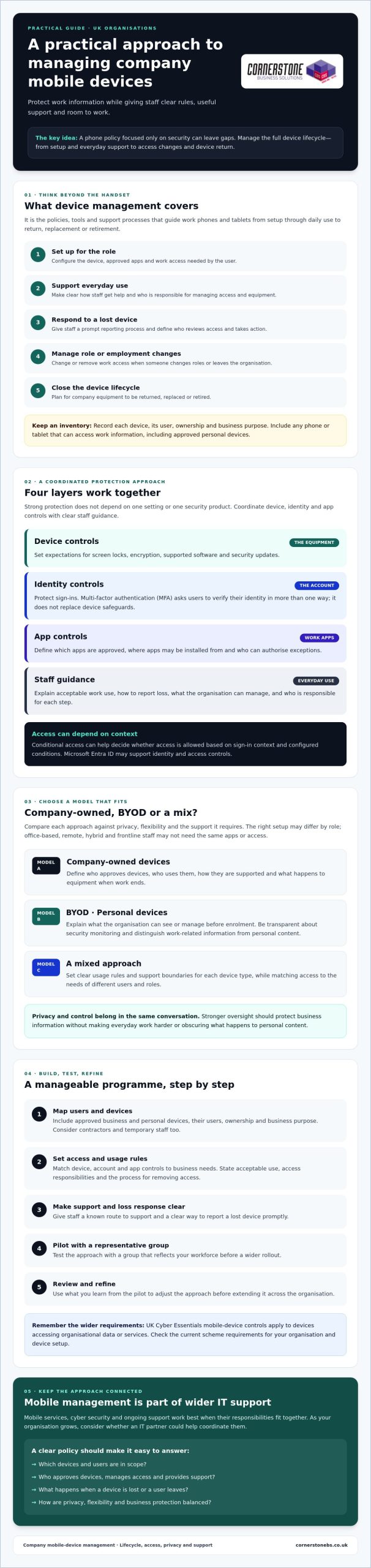
Managing company mobile devices means setting the policies, tools and support processes that guide work devices from setup through everyday use to return, replacement or retirement. It can cover smartphones and tablets, the business apps installed on them, user accounts, and access to company email, files and other information.
That’s broader than buying handsets or paying mobile network bills. Those tasks provide hardware and connectivity. A management approach defines how each device is configured, who can use it, how staff get help and what happens when access needs to change. A consistent process makes setup more reliable, keeps access organised and gives staff a clear route to support. It also clarifies who approves devices, manages access and handles equipment when a device is lost or a user leaves.
Which devices and users should a company include?
Start with every phone or tablet that can access work information, whether it belongs to the business or is an approved personal device. Consider how office-based, remote, hybrid and frontline staff work. One setup may not suit every role. Contractors and temporary staff also need defined access, support boundaries, and a process for removing access and returning company equipment when their work ends.
Keep an inventory that records each device, its user, ownership and business purpose. This can reveal untracked devices and help you apply suitable rules to different roles, rather than assuming every employee needs the same apps or access.
What is mobile device management in plain English?
Mobile device management is central oversight of approved phones and tablets, their settings and their access to work apps and information. The term Mobile device management (MDM) describes this approach to managing devices across an organisation.
In practice, authorised staff can apply standard configurations, make approved apps available and set security requirements. Depending on the tools in use, they may also be able to take remote action, such as restricting a device’s access to work resources. The aim is to make devices dependable and safer to use without adding unnecessary barriers.
Effective management connects technical settings with clear staff guidance. For example, a new starter’s phone should be prepared for their role, given only the access they need and covered by a known support process. If it’s lost or the user leaves, the organisation should know who reviews access and what steps to take. This makes device management part of wider IT support and business continuity, rather than a one-off purchasing decision.
How do mobile device management tools and policies protect business data?
Strong protection comes from layers that work together. Device controls secure the phone or tablet. Identity controls check who is signing in, app controls govern which tools can access work information, and staff guidance explains how to use those tools safely. Managing company mobile devices effectively means coordinating all four, rather than relying on one setting or security product.
A practical policy should set expectations for screen locks, encryption, operating-system updates and approved apps. It should explain how staff report a lost device, what counts as acceptable work use, and how access changes when someone changes roles or leaves. Keep the rules clear enough to follow, and state who is responsible for each step.
Which controls belong in a company mobile-device policy?
Set a process for keeping devices on supported software and applying security updates promptly. Limit app installation to trusted, approved sources, and decide who can authorise exceptions. For personal devices, explain what the organisation can see or manage before enrolment. Make security monitoring transparent, distinguishing work-related security information from personal content.
UK Cyber Essentials requirements may also be relevant: its mobile-device controls apply to devices accessing organisational data or services. Check the current scheme requirements for your organisation and device setup before setting policy. Your written process should also cover prompt loss reporting and removing work access when it’s no longer needed.
How do identity and device controls work together?
Identity controls protect accounts, while device controls protect the equipment accessing them. Multi-factor authentication (MFA) adds an account safeguard by asking a user to verify their identity in more than one way. It doesn’t replace a screen lock, encryption or software updates. Conditional access can help an organisation decide whether to allow access based on sign-in context and configured conditions. Microsoft Entra ID may support identity and access controls, but available features depend on configuration and licensing. Check your current setup before relying on them.
Device management can reduce risk by combining encryption, screen locks, timely updates, approved apps, controlled account access and clear loss-reporting steps. It can’t prevent every incident: phishing, malicious apps, unsafe networks, theft and human error remain possible.
For a broader view of the people, processes and technology involved, explore business cyber security guidance alongside your mobile-device policy. If you’re reviewing how mobile services and security fit into wider IT support, Cornerstone Business Solutions’ information on business mobile and cyber security may help you consider the services together.
Which company mobile-device management model suits your workforce?
The right choice depends on the information staff need, how they work and how much support your organisation can provide. A finance team handling sensitive records may need tighter standardisation than staff who use a phone only for basic work communication. There’s no single model that suits every business.
Use this comparison to start your decision:
Company-owned: The business selects and configures devices, which makes consistent setup easier and gives it more control. Employees may have less separation between work and personal use if they also use the phone privately. The organisation takes on purchasing, administration and support responsibilities.
Bring your own device (BYOD): Staff use a personal phone or tablet for work. This can offer flexibility, but the business has less control over the whole device and must clearly separate work access from personal use. Agree what support covers and what happens to work information when access ends.
Mixed model: The organisation provides devices for roles with specific security, support or operational needs, while allowing approved personal devices for other work. This can suit different roles, but requires clear rules so users and support teams understand which arrangements apply.
Assess each option against five practical factors: control over device settings, employee privacy, support workload, flexibility for staff and the work the device must perform. Managing company mobile devices is easier to sustain when the model fits real working patterns instead of forcing every employee into the same setup.
Company-owned devices versus bring your own device
When should a business consider unified endpoint management?
Unified endpoint management (UEM) is an approach to coordinating oversight of different endpoint types, such as phones, tablets and computers. It may suit a workforce using several kinds of devices if consistent policies and administration would make support clearer. Before adopting a broader approach, consider whether your current tools and team can manage the range of devices effectively. UEM isn’t automatically necessary for every organisation.
As device needs grow, review how mobile management fits with managed IT support for growing businesses. The right model should protect business access while remaining practical for employees and the people supporting them.
How to set up a manageable company mobile-device programme
A workable rollout starts with business needs, not a tool purchase. Use this sequence to clarify responsibilities and test the approach before it affects everyone.
Inventory needs. Record devices, owners, operating systems, users, work apps and the information each role needs to access. Note where staff share devices or work away from the office.
Choose a model. Decide which roles need company-owned devices, whether approved personal devices are suitable, or whether a mix fits best.
Write the rules. Set out enrolment, acceptable use, updates, support ownership, lost-device reporting, and how access and equipment are handled when someone changes role or leaves.
Check and configure. Confirm the chosen tools work with your devices and apps. Check compatibility and licensing before committing to specific controls or costs, then configure settings to match the policy.
Enrol and pilot. Prepare a representative group of users and devices, including different roles or working patterns. Give them setup instructions and a clear way to report access problems or a lost device.
Review and refine. Collect feedback, check whether the process works as intended and adjust avoidable friction before extending the rollout. Revisit the inventory and rules as your workforce or technology changes.
This checklist gives each stage an owner and a clear outcome. It also connects device setup with onboarding and offboarding, rather than treating enrolment as a one-off technical task.
How can staff privacy and adoption be protected?
Explain what administrators can manage, what information they can see and what remains private. Be specific about the difference between work data and personal content, especially for BYOD. Give staff straightforward instructions for setup, replacing a device and resolving access problems. Clear communication builds trust and helps people follow the process.
During the pilot, ask participants what worked and where controls interrupted legitimate tasks. Use their feedback to improve guidance or configuration before wider enrolment. Keep a defined support route, and make sure staff know who to contact if a device goes missing. Clear instructions support day-to-day work and a consistent response when circumstances change.
Managing company mobile devices is easier to sustain when the policy, configuration and support process are designed together. Cornerstone Business Solutions offers Business Mobile, Cyber Security and Managed IT Support. Find out more about its services when considering how these areas could fit your organisation’s requirements.
When should you manage mobile devices with an IT partner?
Consider additional support if device setup varies between teams, staff aren’t sure where to report a problem, or access changes are difficult to coordinate when someone changes roles or leaves. Your internal team may also need extra capacity or specialist knowledge as the number of devices, platforms or working arrangements grows. The goal isn’t to outsource by default. It’s to make ownership and support dependable.
With internal management, your team retains direct responsibility and can work closely with existing processes, but must have the time and knowledge to maintain them. External support may add capacity and help coordinate mobile services with wider IT and security arrangements. The division of responsibility matters: agree who owns policy decisions, handles user requests and manages each task, and clarify what response arrangements apply. Don’t assume a provider’s service includes specific devices, platforms or management tools without checking.
What should you ask a mobile-management support provider?
Before agreeing a scope, ask who handles device enrolment and configuration, user support, security incidents and access changes. Confirm which operating systems, devices and business apps are covered, and what falls outside the arrangement. Ask how issues are escalated, what reporting you’ll receive and how mobile support connects with your existing IT and security processes. Get responsibilities in writing, including what remains with your own team.
How does mobile management fit into wider IT support?
A phone’s work access relies on more than its settings. User accounts, business applications, security policies and staff onboarding all need to line up. For example, setting up a new starter may involve preparing an approved device and arranging the right account access. Offboarding needs a clear process for withdrawing that access. If your organisation uses Microsoft 365, include account and application requirements in the conversation. Microsoft 365 planning for business can help frame those wider considerations.
Look for an approach that connects mobile support with the rest of your technology, rather than leaving staff to navigate separate processes. Ask how incidents are handed between teams and who keeps the device inventory and access arrangements up to date.
Cornerstone Business Solutions provides Business Mobile, Managed IT Support and Cyber Security for organisations across the UK. Before choosing an arrangement, discuss your workforce, existing processes and support needs, and confirm which responsibilities the service would cover.
Build a mobile approach your team can grow with
Managing company mobile devices works best as an ongoing business process, not a one-off technology decision. The right approach gives staff practical access to the tools they need while making responsibilities, support and security expectations clear. Choose a model that fits your workforce, then review it as roles and requirements change.
Keep the focus on a workable balance: protect business information, respect employee privacy and make it straightforward for people to get help. A consistent plan can support smoother day-to-day work and give your organisation a clearer foundation for managing change.
Cornerstone Business Solutions is a multi-award-winning IT services provider, with services in Business Mobile, Managed IT Support and Cyber Security. Its technology partnerships include Microsoft, IBM and Cisco. If you’re considering how these areas could work together for your organisation, contact Cornerstone to discuss a practical mobile-device approach for your business.
Frequently Asked Questions
What is the best way to manage company mobile devices?
Start by listing the devices, users and business information that need protection. Choose a company-owned, personal-device or mixed approach, then document clear rules for access, updates, support and lost-device reporting. Select tools that fit your existing environment, explain privacy boundaries before enrolment and review the policy when your workforce or technology changes. Assigning an owner to each step helps make managing company mobile devices a consistent process.
Can a business manage personal phones used for work?
Yes, a business can manage work access on personal phones if it explains the boundaries clearly. Tell employees which work apps and data are managed, what administrators can see or change, and how work access will be removed when someone leaves. Exact controls depend on the device, platform and configuration. Check those capabilities and explain them before asking staff to enrol a personal device, so expectations are clear from the start.
What happens if a company phone is lost or stolen?
Staff should report a lost or stolen phone promptly using the contact route in your policy. The business can assess which accounts and information may be at risk, restrict access where appropriate and use available device controls. Options vary by platform and configuration. Keep a record of actions taken and follow your incident process. Tell employees in advance who to contact and what information to provide when reporting a missing device.
Does mobile device management let an employer see personal data?
Not necessarily, but what an administrator can access depends on device ownership, operating system, configuration and the apps used. Don’t promise that all personal information is hidden or assume every activity is monitored. Before enrolment, explain the actual settings, what information administrators can access and the purpose of any monitoring. Check the platform documentation and relevant legal obligations, particularly for personal devices used for work.
What is the difference between MDM and UEM?
Mobile device management (MDM) generally focuses on administering and securing phones and tablets. Unified endpoint management (UEM) describes a broader approach that can coordinate management across different endpoint types, including mobile devices and computers. These terms describe categories, not a guarantee of particular features. Before choosing a solution or service, check which operating systems, controls, devices and support tasks it actually covers.
How often should a company review its mobile-device policy?
Set a regular review schedule, and revisit the policy sooner if devices, working practices, apps or security risks change. A lost-device incident or staff feedback may also reveal unclear instructions. Check that enrolment, access, update, privacy and offboarding procedures still match how the organisation works. Record any revisions and explain them to staff, so employees know what’s changed and where to find the current guidance.
Can an IT support provider manage company phones and tablets?
Some providers offer mobile support, but the scope varies. Confirm which devices and platforms are covered, who handles setup and user queries, how incidents are escalated and whether security tasks are included. Ask how the service connects with your existing IT and cyber security processes. Cornerstone Business Solutions lists Business Mobile, Managed IT Support and Cyber Security among its services. Confirm the specific support responsibilities before agreeing an arrangement.
Why are you still spending £1,200 every three years to replace physical laptops that only frustrate your team with laggy VPN connections? It’s a costly cycle that drains your capital and leaves your data exposed when staff log in from personal devices. We understand that keeping your team productive while securing your sensitive information feels like a constant balancing act. As Cornerstone Business Solutions, an award-winning IT partner trusted by businesses across the UK, we’ve seen how azure virtual desktop transforms this struggle into a major competitive advantage. You can finally ditch the expensive hardware refresh cycle and give your team a seamless, ‘work from anywhere’ environment that just works.
This guide explains how to reduce your IT infrastructure costs by up to 35% while gaining a robust, cloud-based workspace that fits your specific needs. We’ll walk through the technical setup, the vital security benefits, and how this integration with Microsoft 365 provides the predictable monthly spending your business needs to thrive in 2026. Let’s explore how to bring total peace of mind to your digital estate through a modern cloud partnership.
Key Takeaways
Modernise your business operations by discovering how a cloud-based workspace provides your team with seamless, secure access to apps from any location.
Reduce capital expenditure by learning how to extend the life of your existing hardware through the high-performance capabilities of azure virtual desktop.
Upgrade your security posture by moving away from vulnerable VPNs to a granular system where sensitive data stays protected within the cloud.
Gain peace of mind regarding compliance by understanding how to meet strict GDPR and Cyber Essentials requirements through a shared responsibility model.
See how an award-winning IT partner can manage your transition with a proactive approach that prioritises your long-term business continuity.
What is Azure Virtual Desktop (AVD)?
Azure Virtual Desktop is a flexible service for desktop and app virtualisation that runs entirely in the Microsoft Azure cloud. It represents a major leap from its 2019 predecessor, Windows Virtual Desktop. This evolution allows your team to access a full Windows 11 experience from any device, whether they are in a Middlesbrough office or working remotely. According to this overview of What is Azure Virtual Desktop?, the platform simplifies management while providing a secure, productive environment for employees. It’s currently the only service that offers Windows 11 multi-session capabilities. This means multiple users can share the same virtual machine simultaneously, which significantly reduces your licensing and infrastructure costs.
How Cloud Desktops Differ from Traditional PCs
Traditional setups rely on a physical tower sitting under a desk. With an azure virtual desktop, that computer lives in a secure, high-spec data centre. Your local laptop or tablet becomes a simple gateway to a much more powerful system. This shifts your IT spending from heavy capital expenditure (CapEx) on hardware to a manageable, monthly operational expenditure (OpEx). By 2025, 85% of organisations are expected to adopt a cloud-first principle, ensuring they only pay for the resources they actually use. Understanding the benefits of cloud environments for modern businesses helps explain why this transition is becoming essential for competitive advantage. Key differences include:
Security: Data stays in the cloud, not on a physical hard drive that can be lost or stolen.
Performance: Access high-end computing power from basic hardware.
Maintenance: Centralised updates mean no more individual PC patching.
The Role of Microsoft Azure in Modern Business
Azure is the engine behind the curtain. It provides a global infrastructure with a 99.9% uptime guarantee, giving your business the enterprise-grade reliability usually reserved for multinational corporations. Our award-winning team sees more UK businesses prioritising these cloud-first strategies as we head into 2026 to ensure 24/7 availability. It’s about building a robust foundation. This setup offers total peace of mind, knowing your data is protected by Microsoft’s multi-billion pound annual security investment. If you are looking to modernise, let’s have a chat about how this fits your North East business.
The Core Benefits of Switching to a Virtual Workspace
Shifting your operations to a virtual environment is a strategic move that protects both your bottom line and your sensitive data. By centralising management, azure virtual desktop ensures business information stays within the secure Microsoft cloud rather than on individual hardware. This Zero Trust model means that if a staff member loses a tablet while working off-site, your data remains completely inaccessible to outsiders. It provides the genuine peace of mind that every North East business owner needs to sleep soundly at night.
Transitioning to this cloud-based model offers several immediate advantages for your organisation:
Making this strategic move successful, however, first requires a clear digital roadmap. A thorough assessment of current operations and future goals ensures that the technology serves core business objectives. This is where expert consultancy from firms like Business Analysis & Solutions becomes invaluable, providing the foundational analysis that underpins a successful transition.
Enhanced Security: Data is stored in a centralised vault with multi-factor authentication, reducing the risk of local breaches.
Hardware Longevity: You can extend the life of older PCs and laptops by using them as simple gateways to the cloud.
Operational Agility: Your IT team can deploy new applications or security patches to every user simultaneously from a single dashboard.
Reliable Performance: Users get high-speed computing power regardless of the age or spec of their physical device.
Our award-winning team helps clients extend their hardware refresh cycles by up to 24 months. Instead of replacing a fleet of £950 laptops every three years, you can use budget-friendly Thin Clients to access high-performance cloud power. Research into the Total Economic Impact of Azure Virtual Desktop highlights how these efficiencies lead to substantial cost reductions in physical infrastructure. It’s a proactive way to ensure your IT budget goes further while maintaining a robust, modern security posture.
Boosting Productivity with a Seamless User Experience
The favourite feature for most users is the identical desktop experience across every device. Whether your team is using a tablet on a train or a desktop in the office, their files, background, and apps look exactly the same. Deep integration with Microsoft 365 means Teams and Outlook perform flawlessly without the frustrating lag found in older remote solutions. If you’re curious about how this could work for your team, you can book a chat with our local specialists for a tailored walkthrough.
Scalability: Growing Your Business Without the Growing Pains
Scaling a business shouldn’t depend on how quickly a courier can deliver a new laptop. Using azure virtual desktop allows you to add 15 new starters in minutes, making it perfect for seasonal peaks or rapid expansion. You only pay for the resources your team actually consumes through a flexible, pay-as-you-go model. Auto-scaling is a mechanism that reduces costs by automatically turning off unused virtual machines during out-of-office hours.
This level of technical flexibility pairs perfectly with modern staffing strategies. For instance, companies can leverage virtual staffing agencies like WorkStaff360 to quickly onboard dedicated remote professionals, ensuring that both the digital workspace and the team can scale on demand.
AVD vs. Traditional VPNs: Why the Cloud Wins
Traditional VPNs served us well for years, but they weren’t built for the modern North East workforce. When your team uses a VPN, they’re essentially creating a direct tunnel from their kitchen table straight into your server room. This “all-or-nothing” approach is inherently risky. If a single home device is compromised, your entire network is exposed. Azure Virtual Desktop changes this dynamic completely. It provides granular control, letting you grant access to specific apps rather than the whole kingdom. Our award-winning team helps you move away from these clunky connections toward a centralised cloud dashboard that makes IT management a breeze.
The Security Risk of Traditional Remote Access
VPNs can inadvertently act as a motorway for ransomware. In 2023, 66% of organisations faced ransomware attacks, and many of these breaches originated from poorly secured remote endpoints. Because What is Azure Virtual Desktop? keeps all data within the secure Microsoft cloud, nothing is ever stored on the local laptop. This solves the “bring your own device” (BYOD) nightmare. We integrate Multi-Factor Authentication (MFA) into every setup, providing the peace of mind that your business remains a fortress.
Data Sovereignty: Company information stays in the cloud; it never touches the local hard drive.
Granular Access: Permissions mean users only see the specific tools they need to work.
Identity Protection: MFA adds a vital layer of protection against stolen credentials.
Performance and Latency: Ending the ‘Slow Connection’ Complaint
We’ve all heard the complaints about “slow” remote systems. These issues usually stem from a home user’s upload speed, which can be as low as 10Mbps in rural areas. AVD bypasses this by using Microsoft’s 10Gbps high-speed backbone. The heavy processing happens in the data centre, not on the employee’s hardware. We utilise “short-path” technology to reduce the physical distance data travels, ensuring Microsoft Teams calls stay crystal clear. This proactive approach to performance means your team stays productive, whether they’re in Middlesbrough or Manchester.
By switching to a cloud-first strategy, you give your staff a 10Gbps environment that feels local. It’s a seamless experience that removes the technical barriers to remote working. If you’re tired of troubleshooting VPN drops, let’s have a chat about how we can modernise your setup to ensure your business continuity.
Security, Compliance, and Cost Management
Your business data is your most valuable asset. Protecting it requires more than just a password. Our award-winning team implements a Zero Trust architecture for every azure virtual desktop deployment. This framework operates on a simple principle: never trust, always verify. Every access request is fully authenticated and encrypted before granting entry, significantly reducing the risk of a data breach.
Security in the cloud is a shared journey. Microsoft manages the physical hardware and underlying infrastructure. As your dedicated IT partner, we handle the virtual machine configuration and security patches. You retain ownership of your data and user identities. This Shared Responsibility model provides a clear map of accountability, ensuring no security gaps are left to chance.
Meeting UK Regulatory Standards
Staying compliant with GDPR and Cyber Essentials is straightforward with a centralised system. Because files aren’t stored on local hard drives, data protection audits become a simplified, stress-free process. We ensure your data resides in UK-based data centres, such as UK South or UK West, to satisfy strict residency requirements. This setup also bolsters your disaster recovery plan. If a local office faces a hardware failure, your team can resume work in minutes from any secure location.
Hidden Ways to Optimise Your Azure Spend
Waste is the enemy of a healthy IT budget. We use “Start/Stop” automation to ensure you aren’t paying for virtual machines at 3 AM when your team is asleep. By switching to Azure Reserved Instances, businesses can slash their monthly cloud spend by up to 72% compared to standard pay-as-you-go rates. We also leverage multi-session Windows 11. This allows multiple employees to share a single virtual machine resource without compromising performance, drastically reducing the total number of VMs you need to fund.
“Cost optimisation in Azure is an ongoing process of refinement, not a one-time setup.”
Our proactive approach ensures your azure virtual desktop environment remains lean and efficient. We constantly monitor usage patterns to right-size your resources, ensuring you never pay for more power than you actually use. This focus on efficiency provides the peace of mind that your technology is driving growth, not just adding overhead.
Implementing Azure Virtual Desktop with Cornerstone
Choosing the right partner for your cloud journey is as vital as the technology itself. Cornerstone Business Solutions stands as your award-winning partner for cloud migration, bringing years of expertise to every project. We’ve successfully migrated over 150 North East businesses to the cloud, ensuring their infrastructure is robust and future-proof. Our team doesn’t just set up your azure virtual desktop environment; we actively monitor it. We use proactive management tools to identify and resolve 98% of potential system bottlenecks before they ever reach your screen. This creates a “Peace of Mind” atmosphere for your staff, whether they’re working from a home office in Teesside or a central hub in Newcastle. Our helpdesk is always ready to assist, resolving 85% of user queries on the very first call. We believe in bespoke technology, meaning your setup is specifically tailored to hit your 2024 growth targets.
Our Award-Winning Migration Process
We begin with a comprehensive audit of your existing infrastructure. This phase involves a detailed assessment of your current software and hardware to ensure 100% compatibility with the cloud. We don’t believe in guesswork. Our transition period is meticulously planned to ensure zero downtime for your team, often performing the heavy lifting during out-of-hours windows to protect your productivity. Success doesn’t end at “go-live” day. We provide ongoing training and dedicated support to ensure your staff feel confident and capable. Recent data shows that teams who undergo our structured onboarding report a 45% increase in digital proficiency within the first thirty days.
Why a Managed Partnership Trumps Self-Management
The complexity of Microsoft licensing can be a significant headache for many business owners. We simplify this entire process, often identifying cost-saving opportunities that reduce monthly spend by up to 22% through resource right-sizing. Instead of a faceless ticketing system, you get a dedicated account manager. This expert understands your business behaviour, knowing exactly when you need to scale your azure virtual desktop resources up or down based on seasonal demand. We’d love to have a friendly chat to explore your options and show you how we can streamline your operations. It’s time to move away from transactional IT and embrace a partnership that prioritises your success.
Future-Proof Your UK Business with Azure Virtual Desktop
The workplace of 2026 demands more than just a basic remote connection. Moving to azure virtual desktop ensures your team stays productive from any location while keeping your sensitive data locked down behind enterprise-grade security. By ditching outdated VPNs, you’ll reduce infrastructure costs and eliminate the performance lag that often frustrates staff. It’s about providing a seamless experience that scales effortlessly as your business grows.
At Cornerstone, we’re more than just a service provider; we’re your long-term partners in growth. As a multi-award-winning IT provider and certified Microsoft Solutions Partner, we handle the technical heavy lifting so you don’t have to. Our team provides proactive 24/7 system monitoring to ensure your operations never miss a beat. We’re proud of our North East roots and bring that local, “can-do” attitude to every project we manage. We’ve helped hundreds of UK firms transition to the cloud with zero downtime. As businesses prepare for major infrastructure changes like the PSTN switch off in 2026, having a robust cloud infrastructure becomes even more critical for maintaining business continuity. Alongside cloud migration, many businesses are also modernising their communications by implementing a VoIP telephone system to ensure seamless voice communications in the cloud-first era.
Ready to modernise your workspace and gain total peace of mind? Contact our award-winning team for a tailored AVD quote and let’s have a chat about your business goals. We’ll help you build a robust, scalable foundation for the years ahead.
Frequently Asked Questions
Is Azure Virtual Desktop secure for sensitive financial data?
Yes, Azure Virtual Desktop is highly secure for financial data. It meets over 90 compliance certifications, including ISO 27001 and GDPR requirements. We implement multi-factor authentication and conditional access to ensure only authorised users reach your data. This provides the peace of mind your business needs. Your sensitive files stay in the cloud rather than on local devices, reducing data leak risks by 70% compared to traditional setups.
Can I run my old legacy desktop applications on AVD?
You can absolutely run legacy applications on this platform. Microsoft’s App Assure programme guarantees that 99% of Windows 10 and 11 apps work seamlessly on azure virtual desktop. If an app worked on your old server, our award-winning team will ensure it performs perfectly in the cloud. This saves you the £5,000 to £10,000 cost of a full software rebuild while keeping your workflows consistent and reliable.
What internet speed do my employees need for a smooth AVD experience?
Your team needs a minimum download speed of 5 Mbps per user for a smooth experience. For tasks involving high-definition video or graphic design, we recommend 15 Mbps to 25 Mbps. Modern UK fibre connections usually exceed these requirements; the average home broadband speed reached 69.4 Mbps in 2023 according to Ofcom. We’ll test your connection to ensure your staff enjoy a lag-free workday from any location in the North East.
Does Azure Virtual Desktop replace the need for a physical server?
Yes, it effectively replaces the need for an on-site physical server for most businesses. By moving your infrastructure to the cloud, you eliminate the £3,000 upfront cost of new hardware and the ongoing £500 annual maintenance fees. Our proactive managed services handle all the backend updates. This transition reduces your local hardware footprint while providing a robust, scalable environment that grows alongside your company as a dedicated long-term partner.
How much does Azure Virtual Desktop cost per user in 2026?
Expect to pay between £15 and £30 per user per month in 2026 for the infrastructure and licensing. This estimate accounts for the 9% price adjustment Microsoft implemented in April 2023 and projected annual inflation. Costs vary based on your specific compute needs and whether you use multi-session Windows 11. We provide tailored azure virtual desktop quotes to ensure you only pay for the exact resources your team uses every day.
What happens if the Microsoft Azure cloud goes down?
Microsoft provides a 99.9% Service Level Agreement (SLA) for the service, meaning downtime is extremely rare. If a regional issue occurs, we configure your setup with cross-region disaster recovery to keep you online. In 2024, Azure’s core services maintained an uptime that exceeded these targets. Our local experts monitor your system 24/7 to ensure any minor blips don’t disrupt your business operations or your team’s productivity.
Can I use AVD on an Apple Mac or a Chromebook?
You can use the service on almost any device, including Macs, Chromebooks, and iPads. The Microsoft Remote Desktop app provides a native experience on macOS; Chromebook users can connect via any HTML5-compatible web browser. This flexibility allows your staff to use their preferred hardware without compromising security. It’s a perfect solution for the 85% of UK businesses that now support some form of hybrid or flexible working arrangements.
Is AVD better than Windows 365 (Cloud PC) for my business?
It depends on your specific needs, but AVD offers more flexibility for complex environments. While Windows 365 has a fixed monthly price, AVD allows for multi-session usage, which can reduce your monthly spend by up to 30% for larger teams. If you need deep customisation and control over your infrastructure, our award-winning team usually recommends this route. We’ll help you choose the most cost-effective path during a friendly chat about your goals.