

For a law firm, an IT outage is never just an IT problem. It can stall fee-earner work, disrupt client communication and put access to confidential matter information under pressure. When comparing options for “IT support for legal firms UK,” look beyond the helpdesk: the right arrangement should support continuity, security and day-to-day service together.
If you’re weighing up managed support, you’ll want clear answers on what’s covered, how issues are handled and how your firm’s information is protected. Technology should help your team focus on clients, not leave them wondering what happens when something goes wrong.
This guide compares the key elements of managed IT support and provides a practical checklist for assessing service scope, user support, cybersecurity, Microsoft 365, cloud services and disaster recovery. Use it to match support to your firm’s needs and make a clearer plan for protecting its work, information and client service.
Key Takeaways
- Assess IT support for legal firms UK by how well it supports fee-earner productivity, confidential information and client service.
- Compare support for users, devices, infrastructure, cloud services, security and recovery against a practical checklist.
- Reduce switching risk by planning the transition, assigning responsibilities and keeping oversight throughout the changeover.
- Map your firm’s information and systems, then prioritise security and recovery measures in line with relevant UK GDPR, ICO and SRA guidance.
- Consider how managed IT, Microsoft 365, cloud, cybersecurity and disaster recovery can be shaped around your firm’s users, systems and priorities.
Why IT support for legal firms in the UK must protect fee-earner productivity
Keeping fee-earners productive while protecting confidential client and matter information is a daily balancing act. Legal work relies on several technologies working together: email for client and colleague communication, dependable access to matter documents, stable connectivity and timely help when a device or account causes trouble. If any part fails, a task can stall, coordination can slow down and keeping a client updated can become harder.
Legal technology extends beyond specialist legal software. It can include document and case management systems, cloud services, business communications and the devices staff use to access them. This Legal technology overview offers a broad introduction to the field. When assessing IT support for legal firms UK-wide, focus on whether the underlying technology reliably supports the work people need to do.
Which day-to-day legal workflows depend on reliable IT?
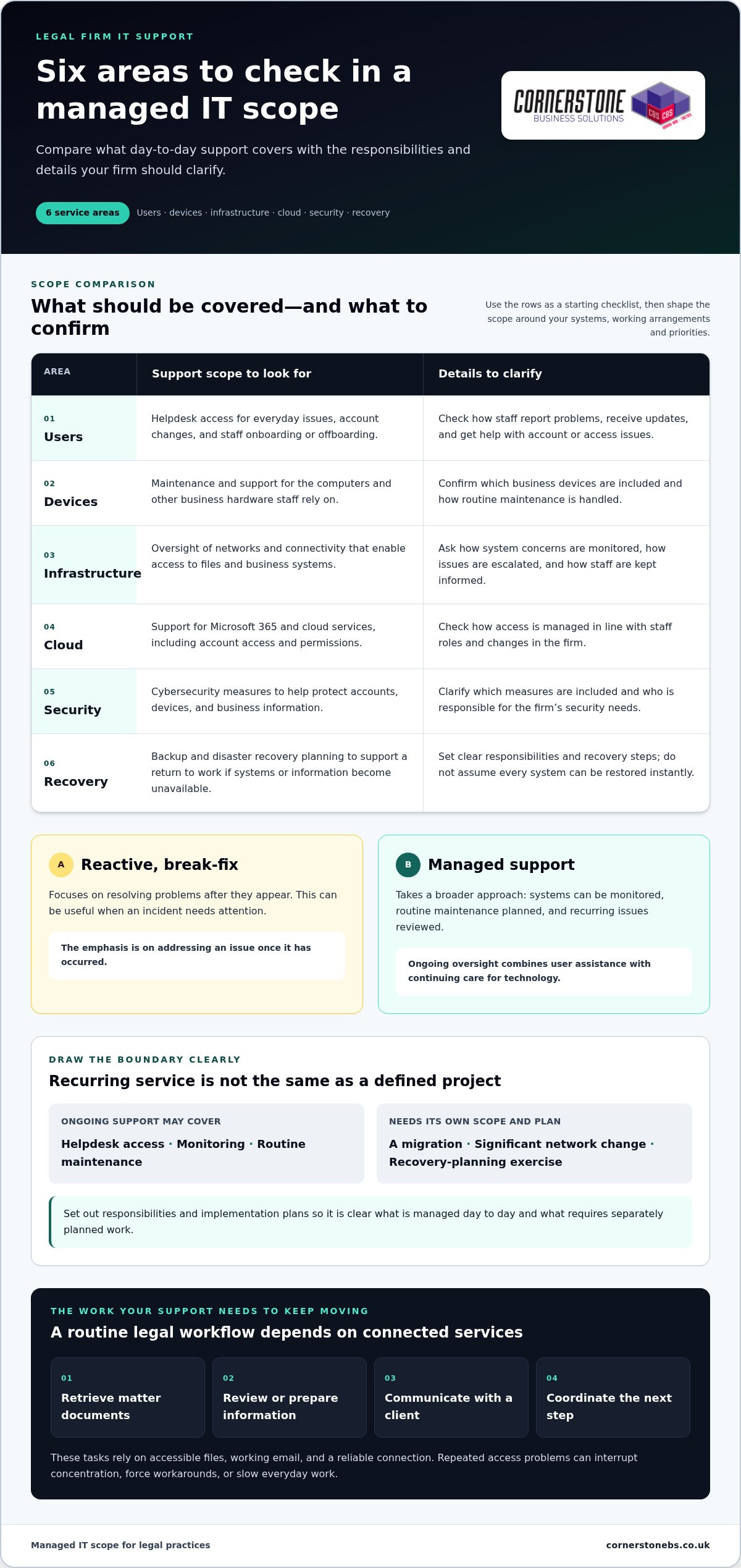
Consider a routine chain of work: a fee-earner retrieves matter documents, reviews or prepares information, contacts a client, then coordinates the next step with colleagues. Whether a firm handles conveyancing, family matters, commercial work or a mix of practice areas, these tasks depend on accessible files, working email and a reliable connection.
Repeated access problems can force staff to retry tasks, find workarounds or wait for assistance. One incident may be manageable, but recurring issues can interrupt concentration and slow everyday work. Dependable support helps keep essential workflows moving, while security measures help protect the information those workflows rely on.
Why does a legal firm need more than a reactive helpdesk?
Reactive, break-fix assistance focuses on resolving problems after they appear. That can be useful when an incident needs attention. Managed support takes a broader approach: systems can be monitored, routine maintenance planned and recurring issues reviewed before they cause further disruption. The approaches meet different needs, but a firm that depends on technology throughout the working day may benefit from ongoing oversight.
Managed IT support for a legal practice is an ongoing service that helps keep its users, systems and information accessible, supported and ready for day-to-day legal work.
Support also needs to work for the people using the technology. A clear helpdesk route gives staff somewhere to turn, while ongoing support builds familiarity with the firm’s systems and priorities. Cornerstone’s managed IT support includes proactive monitoring and helpdesk access, bringing user assistance and continuing technology care into one arrangement.
What managed IT support for a UK legal practice should cover
A useful support arrangement reflects how your firm works, rather than offering a generic list of technical services. When assessing IT support for legal firms UK practices should consider the full chain: staff need help using systems, devices need maintenance, networks and connectivity need oversight, and cloud services, security and recovery need clear ownership.
Use this checklist as a starting point, then shape the scope around your systems, working arrangements and risk priorities:
- Users: Helpdesk access for everyday issues, account changes and staff onboarding or offboarding.
- Devices: Maintenance and support for the computers and other business hardware staff rely on.
- Infrastructure: Oversight of networks and connectivity that enable access to files and business systems.
- Cloud: Support for Microsoft 365 and cloud services, including account access and permissions.
- Security: Cybersecurity measures to help protect accounts, devices and business information. For more detail, read this cyber security services guide.
- Recovery: Backup and disaster recovery planning to support a return to work if systems or information become unavailable.
Distinguish recurring support from defined projects. Ongoing support may cover helpdesk access, monitoring and routine maintenance. A migration, significant network change or recovery-planning exercise needs its own scope, responsibilities and implementation plan. Clear boundaries show what is managed day to day and what requires separately planned work.
How should helpdesk, monitoring and maintenance work together?
Staff need a clear route to report a problem and receive updates, whether they’re dealing with an account issue or a device that won’t connect. Monitoring can help identify system concerns, and planned maintenance keeps technology looked after. Neither replaces responsive user support. Set out the service scope, escalation route and communication process in writing, so staff and decision-makers know what to expect.
Where do Microsoft 365, cloud and recovery fit?
Accounts and permissions affect who can access email, shared files and other cloud services. Manage them in line with staff roles and changes in the firm. Treat backup and disaster recovery as planned capabilities, with clear responsibilities and recovery steps, rather than assuming every system can be restored instantly.
If you’re considering a platform change, the Microsoft 365 migration guide can help frame the planning involved. Cornerstone provides managed IT, Microsoft 365, cloud, cybersecurity and disaster recovery services that can be tailored to a firm’s requirements. Explore Cornerstone’s managed IT support as you consider how these areas could work together for your practice.
How to compare IT support for legal firms and reduce switching risk
Changing IT support can feel daunting when staff rely on familiar systems and need ongoing access to matter information. A changeover can be planned rather than left unmanaged. Comparing service scope, responsibilities and transition processes helps your firm understand what it is choosing and how continuity will be considered.
For IT support for legal firms UK practices, compare documented processes rather than broad promises. Use the table to guide discussions and check what the service agreement explicitly includes.
| Area | What to compare |
|---|---|
| Service scope | Which routine user, device, network and cloud issues are covered, and what counts as project work? |
| Support access | How do staff report issues, receive updates and escalate a problem? |
| Security | Who manages access, permissions, maintenance and security-related incidents? |
| Recovery | How are backup responsibilities, recovery planning and restoration steps documented? |
| Reporting | What information does the firm receive about support activity, recurring issues and system oversight? |
| Transition | How will discovery, documentation, access and handover be managed, and who owns each step? |
Which questions reveal the real scope of a support agreement?
Ask how routine requests are handled, what triggers escalation and how work is reported. Clarify who manages user onboarding and leavers, permission changes and device updates. Read the written agreement for the actual scope and service commitments. A feature mentioned informally is not the same as a responsibility recorded in the terms.
Look for clear ownership, too. If a staff member changes role, for example, the process should identify who updates their access and how the change is recorded. This supports smooth working and appropriate access to information.
How can a firm reduce disruption when changing IT support?
A controlled IT support transition is a planned, staged handover that documents systems, access, responsibilities and priorities before support changes. Start with discovery: record key systems, suppliers, devices and points of contact. Review administrative access and identify gaps in documentation. Then agree owners, milestones and staff communications, prioritising the firm’s working needs.
A staged handover gives the firm a structured way to track progress and raise issues as they arise. It does not mean the change will be disruption-free or follow an unverified timescale. For a managed support arrangement tailored to your practice, talk with Cornerstone about your firm’s IT requirements.
How to assess security, continuity and compliance needs before choosing
Security and continuity decisions are more useful when they start with how the firm handles information in practice. Before comparing IT support for legal firms UK-wide, map the systems staff use, the information they hold and what the firm would need to keep working if a key service became unavailable.
Work through these steps:
- Map information and systems: Identify where matter information is stored, how staff access it and which systems support core work.
- Identify risks: Consider account access, devices, cloud services, suppliers and the impact of disruption or unauthorised access.
- Prioritise controls: Agree which safeguards need attention first, based on the firm’s systems, responsibilities and risk priorities.
- Plan recovery: Set out which services must return first, who makes decisions and how the firm will coordinate recovery.
UK GDPR, guidance from the Information Commissioner’s Office (ICO) and relevant Solicitors Regulation Authority (SRA) materials may help frame the firm’s responsibilities. Their applicability depends on the circumstances, so check the latest guidance and seek appropriate professional advice where needed. An IT provider can help implement and manage technical controls, but it does not replace legal advice or the firm’s own accountability for its decisions.
How should a firm review access, devices and security controls?
Review who can access accounts, systems and shared information, and whether permissions still fit each person’s role. Include authentication, device management and the processes for staff joining, changing roles or leaving. Regular reviews can help identify access that no longer matches responsibilities. No single control guarantees compliance or prevents every incident, so consider how safeguards work together across the firm’s environment.
Cloud access is part of this picture: permissions, connectivity and service dependencies can affect both information security and the ability to work. The cloud solutions guide explores how cloud services can support access and resilience.
What should a usable continuity and recovery plan include?
List critical systems and their dependencies, then agree recovery priorities and decision-makers. For example, a file service may depend on user accounts, network access and a cloud platform, so restoring one component alone may not restore the workflow. Assign clear ownership for backup arrangements and recovery procedures, then test those procedures to identify gaps and refine the plan.
A backup is a copy of data; a recovery plan explains how the firm will restore access, systems and essential work. Cornerstone provides managed IT, cybersecurity, cloud solutions and disaster recovery to align with your firm’s priorities. Discuss a tailored IT support arrangement for your practice.
How Cornerstone can support a UK legal firm with managed IT
A dependable technology setup brings day-to-day support, security and continuity into a practical plan. Cornerstone Business Solutions works with organisations across the UK, providing managed IT support alongside Microsoft 365, cloud solutions, cybersecurity and disaster recovery. The right combination depends on your firm’s users, systems, working arrangements and priorities.
How can joined-up IT services support dependable legal work?
Helpdesk access and IT maintenance give staff a route to support while technology receives ongoing attention. Proactive monitoring can help identify system issues, and cybersecurity can be considered alongside the services staff use to access and share information. Give each element a clear role within the wider support arrangement.
Microsoft 365 and cloud solutions can support access to work and collaboration, with account management and permissions considered as part of the firm’s setup. Disaster recovery planning helps prepare for disruption by setting out how systems and services may be restored. It supports readiness, but cannot eliminate every risk or interruption.
For firms assessing IT support for legal firms UK, the value lies in shaping these capabilities around actual business needs rather than treating them as disconnected items. Cornerstone’s bespoke solutions can align ongoing support and related technology services with a firm’s environment.
What information should a firm prepare for an initial conversation?
A short, practical overview helps make an initial discussion focused. Consider bringing together:
- Users and working arrangements: Approximate user needs and where staff work, including different access requirements.
- Key systems: The main platforms, devices and services staff depend on in their daily work.
- Current concerns: Recurring technology issues, security questions or support gaps the firm wants to address.
- Essential workflows: The activities that need dependable access to information and communication tools.
- Recovery arrangements: Existing backup responsibilities, recovery procedures and any areas that need review.
This gives both sides a clearer starting point for discussing service scope, priorities and how support could fit the practice. It also helps separate immediate needs from longer-term improvements, such as changes to cloud services or recovery planning.
Cornerstone brings managed support, Microsoft 365, cloud, cybersecurity and disaster recovery into a tailored approach for your firm. Discuss managed IT support with Cornerstone and explore an arrangement shaped around your people, systems and priorities.
Build a support arrangement around your firm’s priorities
Choosing IT support for legal firms UK-wide means looking beyond issue resolution. Assess how support helps day-to-day work, how service scope and responsibilities are documented, and whether security and recovery planning reflect your firm’s systems and risks. A structured transition plan can also make a change in support provider more manageable.
Cornerstone Business Solutions supports organisations across the UK with bespoke IT services, including managed IT support, Microsoft 365, cybersecurity, cloud solutions and disaster recovery. Its technology partnerships include Microsoft, IBM and Cisco. These capabilities can be shaped around your users, systems and priorities to create a joined-up foundation for dependable day-to-day work.
Start with a clear picture of your essential workflows, current technology and areas you want to strengthen. Talk with Cornerstone about managed IT support for your firm and explore an approach tailored to your needs. With the right partnership in place, your team can spend more energy supporting clients and less time worrying about technology.
Frequently Asked Questions
Is managed IT support suitable for a small law firm?
Yes. Managed IT support can suit firms of different sizes when its scope matches their users, systems and working practices. A smaller practice may value access to technical help and proactive maintenance without needing to build every capability in-house. Consider your information-handling needs, current priorities and plans for growth. The arrangement should fit the practice rather than assume every firm needs identical tools or levels of support.
What should IT support for a legal firm include?
IT support for a legal firm commonly covers user helpdesk support, system monitoring, maintenance, device and account administration, cloud services, cybersecurity and recovery planning. The precise scope depends on the firm’s systems and workflows. Clarify how routine issues, escalations, access changes, backups and reporting are managed. Check that responsibilities are documented, including which activities fall within ongoing support and which, such as a migration or network change, are treated as separate projects.
Can a general managed IT provider support a law firm?
Yes, a managed IT provider can support a law firm if its services fit the practice’s operational and information-security requirements. Legal software expertise and broader IT management are related but distinct capabilities. Assess how support covers access controls, cloud services, security and recovery, and how the provider will learn the firm’s systems. Look for documented scope and working processes rather than relying on broad claims about experience or capability alone.
How much does IT support for a legal firm cost?
The cost depends on factors such as user and device numbers, support scope, existing systems, security requirements and project work. Ongoing managed support may be priced differently from one-off changes. Compare proposals by reviewing what’s included, how additional work is handled and whether cloud licensing or other recurring services are separate. A clearly defined scope based on your firm’s requirements makes it easier to understand what a proposed arrangement covers.
Will changing IT support disrupt a law firm?
A change can be managed through planned discovery, documentation, access reviews, priority setting and a staged handover. Before work begins, agree who owns each task, how staff will be kept informed and what milestones will guide the transition. Include active workflows and staff needs, not just hardware and software. No transition should be described as entirely risk-free, but preparation helps identify dependencies and reduce avoidable surprises.
How can a legal firm protect client information with managed IT support?
Start by mapping where information is stored, who can access it and which systems support essential work. Managed IT support can help administer accounts, devices, security controls and recovery arrangements. The firm remains accountable for its decisions and obligations, so connect technical planning with current guidance from relevant sources, including the ICO and SRA where applicable. Check how guidance applies to your firm’s circumstances and seek appropriate advice when needed.
Does managed IT support include disaster recovery?
Disaster recovery may form part of a managed support arrangement or be scoped as a separate project, so review the written agreement. A useful plan identifies essential systems, dependencies, recovery priorities, responsibilities, backups and testing arrangements. Backup alone does not explain how the firm will resume operations. Make sure the recovery process has clear ownership, and review it as systems, staff and business priorities change.