

The cloud isn’t automatically the cheaper choice. The pros and cons of data centre vs cloud hosting depend on how steady your workloads are, how much control you need and how quickly your business must scale. Cloud hosting can be more cost-efficient to start and easier to adjust as demand changes, while a data centre may offer better long-term value for large, stable workloads.
It’s understandable to weigh flexibility against control, especially when security and access matter to daily operations. This guide compares cost, scalability, security responsibilities and connectivity to help you decide which setup best fits your business. You’ll also learn when a hybrid approach can combine local infrastructure with cloud services, rather than forcing an all-or-nothing decision.
Key Takeaways
- Match the hosting model to your workload: cloud offers room to scale, while steady, demanding workloads may favour dedicated infrastructure over time.
- Separate provider-managed security from the safeguards your business still needs to configure and maintain.
- Consider a hybrid setup to keep selected systems on-premises or in colocation while using cloud resources where flexibility matters.
- Weigh colocation’s hardware and setup commitments against the physical access and control it can provide.
Security responsibilities
Cloud security follows a shared responsibility model: the provider manages its infrastructure, while your organisation secures the services it uses. The split depends on the service model, so identify who handles access controls, software updates, data protection and recovery before choosing. Cloud providers may apply security updates and use encryption, access controls and audits. Those measures don’t remove your responsibility for account permissions, safe data handling or suitable settings.
For data centre security, the International Organization for Standardization identifies ISO 27001 as an example of an industry standard. Colocation customers retain ownership of their servers and software settings, and must configure and secure them. The facility can provide physical protections, such as security monitoring, but responsibility for the equipment’s configuration remains with the customer. Under the European Union’s GDPR, organisations must also consider requirements for data handling, storage and security.
Cloud hosting and data centres can both support backups, but the arrangements differ. Cloud storage providers may offer redundancy, failover, backup, logging and monitoring, but customers still need a recovery plan suited to their systems. On-premises infrastructure needs power, backup power and a separate storage backup system. With colocation, businesses remain responsible for their servers and backup setup, even when the facility supplies power, cooling and bandwidth.
| Option | Security responsibility | Backup and access | Performance consideration |
|---|---|---|---|
| Cloud hosting | Shared between provider and customer | Provider may supply backup features; access depends on the internet | Resources and responsibilities vary by service model |
| Colocation | Customer configures and secures owned servers | Customer manages server backups; connectivity uses facility bandwidth | Customer controls server settings |
| On-premises data centre | Organisation manages its infrastructure | Organisation supplies backup power and storage backups | Local systems can offer predictable performance |
Choose by mapping each critical workload to its security owner, recovery method and internet needs, then confirm those responsibilities in service agreements.
Cloud storage cost, elasticity and flexibility
Cloud computing makes it easier to match storage and computing capacity to changing demand. The trade-off is between flexible usage and the long-term value of infrastructure sized for steady workloads.
Scalability and Flexibility
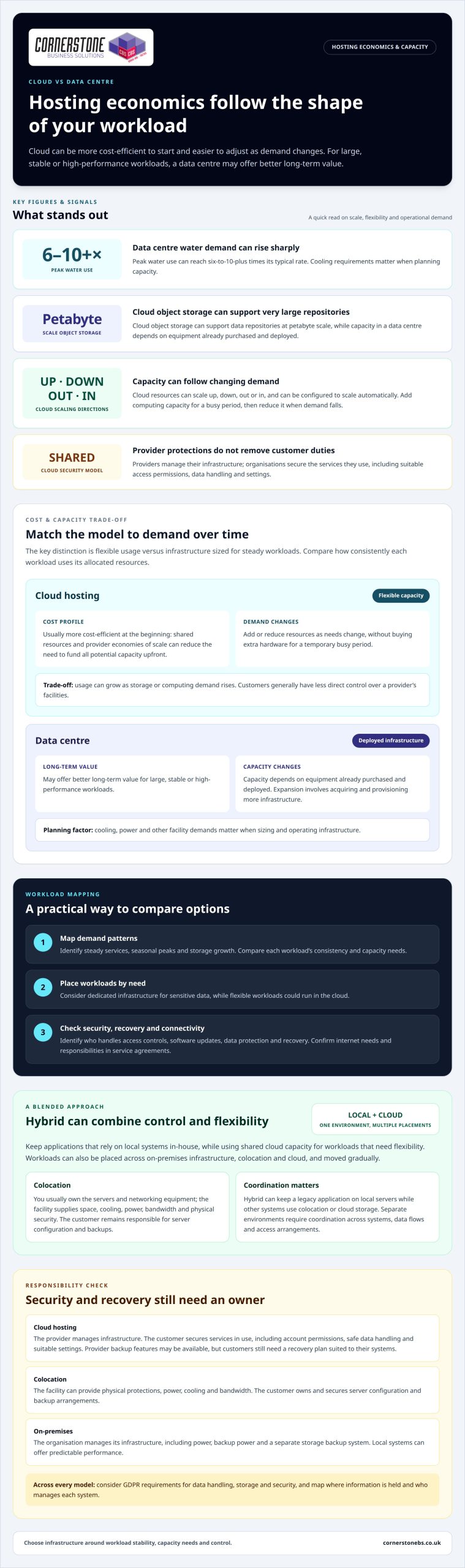
Cloud resources can scale up, down, out or in, and can be configured to scale automatically. An organisation can add computing capacity for a busy period, then reduce it when demand falls, without buying extra hardware. Cloud object storage can also support data repositories at petabyte scale. A data centre’s capacity, by contrast, depends on equipment already purchased and deployed, so expansion involves acquiring and provisioning more infrastructure.
Cloud Cost Flexibility
Cloud computing is usually more cost-efficient at the beginning because providers share resources and benefit from economies of scale. Customers can add resources as needs change, rather than funding all potential capacity upfront. Usage can still grow as storage or computing demand rises. For large, stable or high-performance workloads, a data centre may offer better long-term value. The comparison depends on how consistently each workload uses its allocated resources.
Infrastructure also has practical resource demands. Data centre peak water use can reach six-to-10-plus times its typical rate, so cooling requirements matter when planning capacity. Some communities incentivise data centres to join demand-response programmes, which can help manage electricity peaks and renewable energy. Cloud customers generally have less direct control over a provider’s facilities, while shared infrastructure can spread operational demands across services.
To compare options, map workloads by demand: identify steady services, seasonal peaks and storage growth. Then consider whether sensitive data needs dedicated infrastructure, while flexible workloads could run in the cloud. A hybrid approach can combine those choices, but adds coordination between environments. Cloud solutions can help shape a setup around the organisation’s workload and capacity needs.
Data Center vs Cloud: Which Is Better for Your Business?
The right choice depends on workload, control and how systems connect. A hybrid model can combine the advantages of both.
Hybrid Cloud and In-House Models
A hybrid model combines infrastructure on your premises with public cloud services. Keep applications that rely on local systems in-house, while using shared cloud capacity for workloads that need flexibility. This differs from an entirely in-house model, where your organisation owns or leases physical infrastructure, and from cloud-only hosting, where a provider manages the infrastructure. Hybrid deployment also lets organisations move workloads gradually.
On-Premise and Colocation Use
On-premises infrastructure is built, owned and operated within your business. In colocation, you usually own the servers and networking equipment, while the facility supplies space, cooling, power, bandwidth and physical security. A hybrid arrangement could keep a legacy application on local servers while placing other systems in colocation or cloud storage. It offers control over selected workloads, but maintaining separate environments requires coordination.
For UK GDPR, consider data handling, storage and security across every hosting model. Your hosting choice doesn’t remove the need to understand where information is held, who manages each system and how responsibilities are divided. Map data flows and access arrangements across on-premises, colocation and cloud components before deciding where each workload belongs.
A data centre houses physical servers that an organisation owns or leases; cloud hosting provides computing resources through a third-party provider. Cloud hosting can scale quickly and reduce upfront infrastructure needs, but access depends on the internet and responsibilities are shared. A data centre offers more direct control, but requires you to manage hardware, power and maintenance.
Moving between models can be straightforward for some applications and more involved for others. Dependencies on local file servers, software settings, data volumes and connectivity shape the work. Map those dependencies and prioritise workloads, then migrate in stages where systems can operate safely during the transition.
Colocation access and start-up costs
In the UK, cloud hosting usually needs less upfront infrastructure investment, while data centres require hardware and ongoing operation. Setup and running costs depend on capacity, workloads, equipment, power, space and resource use.
Provider-Dependent Accessibility
Cloud storage keeps files on a provider’s infrastructure, with remote access through cloud services and an internet connection. The provider’s service design determines how users access files and which tools are available. A stable, fast connection helps teams work with large files; transfer times can rise when bandwidth is limited. Plan file access around where staff work and how much data their workloads move.
On-premises storage gives onsite staff access to local files without an internet connection, but remote access needs additional arrangements. Colocation keeps your servers in a provider’s facility, so physical access depends on the facility’s processes. Staff can access physical servers for maintenance or troubleshooting, while cloud customers rely on provider-managed access and service availability.
Setup and Ongoing Costs
Building an on-premises data centre means funding servers, networking equipment, power, backup power and storage backup. Colocation avoids building the facility, but businesses still own or lease equipment and pay for space, cooling, power, bandwidth and physical security. Those commitments can suit steady workloads, although increasing capacity may mean procuring and installing more hardware.
Cloud hosting can lower initial costs because organisations add resources as needed instead of buying all hardware upfront. Ongoing spend follows resource use, so storage growth and computing demand affect the total. For large, stable workloads, owned infrastructure may provide better long-term value. Project costs depend on the case and are provided after a quote request; they are shaped by capacity, equipment, power, space and required services.
Compare access needs alongside the full cost model: consider remote work, large-file transfers, backup capacity and hardware ownership. Discuss cloud hosting requirements to explore an approach suited to your workloads.
Cornerstone Business Solutions: Cloud Solutions
Cornerstone Business Solutions can help you assess whether cloud hosting fits your workloads, access needs and plans for growth. Its Cloud Solutions sit alongside Managed IT Support, Microsoft 365 and Cyber Security, helping businesses consider infrastructure and security together rather than in isolation.
Turn to Cornerstone Business Solutions when you’re weighing a move from on-premises systems, planning a hybrid setup or reviewing how cloud services fit your day-to-day operations. The right choice depends on your applications, data, connectivity and the responsibilities your organisation can manage. A practical discussion can clarify these factors and identify a suitable next step.
For a conversation about your hosting requirements, contact Cornerstone Business Solutions.
Build a hosting plan that can grow with you
Make your infrastructure decision part of a business plan, not a one-off technical choice. Set out which applications support daily work, where they need to run and what could change as your organisation grows. Revisit that plan when workloads, staffing or business priorities shift. This keeps future decisions grounded in how your team actually works.
The data centre vs cloud hosting pros and cons become easier to weigh when you connect them to practical priorities: continuity, access, oversight and the skills available to manage systems. Cornerstone Business Solutions can bring that wider view through Managed IT Support, Microsoft 365 and Cyber Security, helping align technology decisions with everyday operations.
Start a conversation about your next step. Contact Cornerstone Business Solutions to discuss a hosting approach that supports your business as it moves forward.
Frequently Asked Questions
What are the advantages of on premise?
On-premises hosting gives your organisation direct control over its servers, configurations and maintenance choices. Local applications can remain available to staff on site even if the internet connection fails. This can suit specialist systems tied to office equipment or established workflows. It also lets your technical team schedule changes around business operations, rather than relying solely on a cloud provider’s service options.
What are the disadvantages of on premise?
On-premises systems need people, equipment and operational planning to keep them running. Your organisation must maintain servers, arrange repairs, manage updates and plan for power interruptions. Adding capacity can mean purchasing and installing hardware before it is usable. For example, a business preparing for growth must account for space, power and support expertise, not just a server’s technical specifications.
What are the pros and cons of hosting in an owned or colocation data centre?
An owned data centre offers control over the facility and equipment, but the organisation is responsible for maintaining both. Colocation places customer-owned servers in a provider’s facility, which supplies building services and physical protections. This can avoid operating an entire facility, but the customer still configures its hardware and plans equipment access. The better fit depends on how much infrastructure responsibility the business can manage.
How do cloud hosting and data centres compare for performance, latency and reliability?
Performance and latency depend on the workload, network route and location of users and systems. A data centre can deliver consistent performance for workloads running close to local users or applications. Cloud performance varies with the chosen service and connectivity. To weigh the data centre vs cloud hosting pros and cons for reliability, compare power, network links, backup arrangements and recovery plans for each workload.
How do scalability and capacity planning differ between cloud hosting and data centre hosting?
Cloud capacity can be added or removed as workloads change, while data centre growth depends on equipment already installed. The data centre vs cloud hosting pros and cons become clearer when you map which applications need steady resources and which experience variable demand. For example, a seasonal service may suit adjustable cloud capacity, while a consistently busy system may need dedicated infrastructure planned around storage and computing needs.
What are the energy use and carbon footprint differences between cloud hosting and data centres?
Energy use and carbon impact depend on the facility, cooling approach, electricity supply and how efficiently workloads use hardware. With an owned data centre, your organisation has more direct influence over equipment choices and operating practices. Cloud infrastructure shares provider resources across customers, but its environmental impact depends on the facilities and energy behind the service. Compare workload efficiency and available environmental reporting, not hosting labels alone.
Tags: cloud hosting, Cloud Security, colocation, data centres, hosting costs, Hybrid Cloud, IT infrastructure, Scalability