Posted on: June 16th, 2026 by Cornerstone
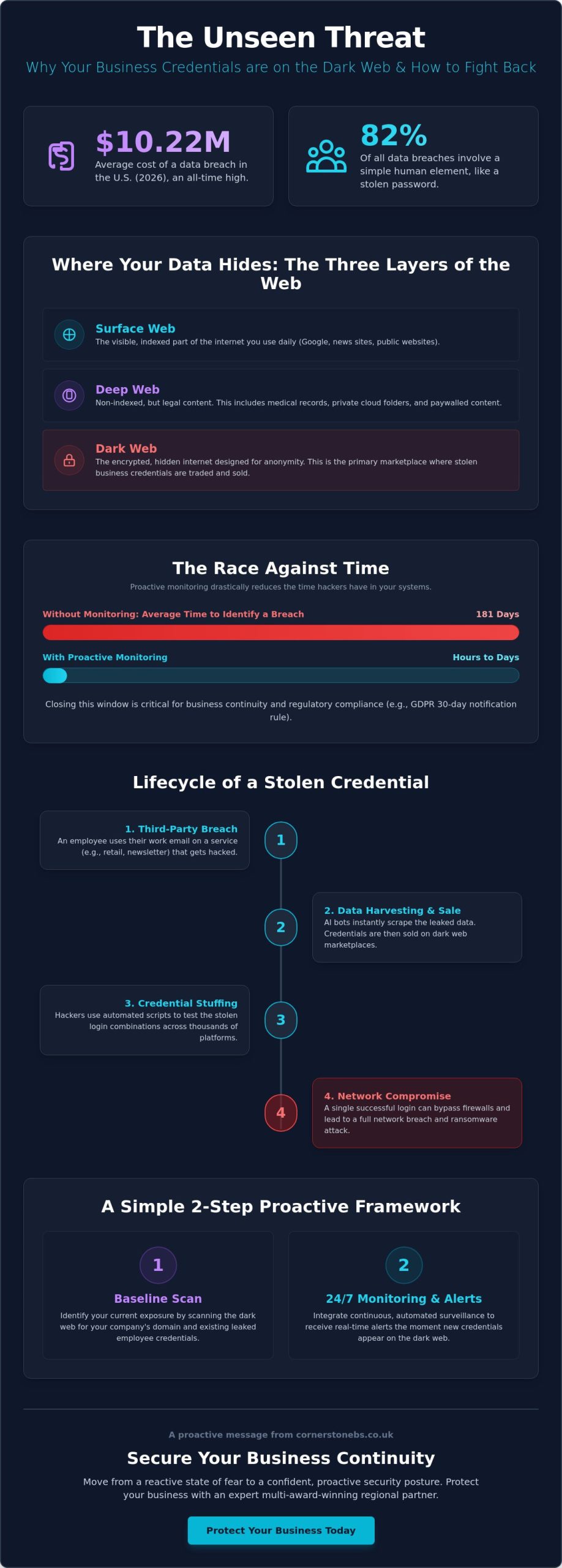
Did you know the average cost of a data breach in the U.S. has reached an all-time high of $10.22 million in 2026? It is a staggering figure that weighs on every business owner, especially when you realize that 82% of these breaches still involve a simple human element. We understand the anxiety that comes with managing a team’s password hygiene while trying to decipher complex technical jargon. You want to focus on growing your company, not worrying about what might be lurking in the hidden corners of the internet.
That is why proactive dark web monitoring for business credentials is your most vital line of defense. Think of it as a dedicated early warning system that spots your stolen data before a crisis begins. In this guide, we’ll explore how to move from a reactive state of fear to a confident, proactive security posture. You’ll discover exactly how clear alerts protect your business continuity and provide the peace of mind you deserve from a local partner who’s dedicated to your long-term success.
Key Takeaways
- Understand why proactive dark web monitoring for business credentials is your most effective early warning system against modern cyber threats.
- Learn how monitoring helps identify “Shadow IT” risks where employees use work emails for personal accounts, leaving your infrastructure vulnerable.
- Discover why real-time alerts outperform periodic audits by closing the window of opportunity for hackers to use leaked data.
- Follow a clear, two-step framework to establish a baseline scan and integrate 24/7 monitoring into your existing security operations.
- Explore how partnering with a multi-award-winning regional expert ensures your business continuity is protected by a team that understands your local needs.
What is Dark Web Monitoring for Business Credentials?
Think of dark web monitoring for business credentials as a digital smoke detector for your company’s identity. It is a proactive security service that identifies stolen login information before it can be used to bypass your defenses. This isn’t a one-off scan that you perform once a year and forget about. In 2026, security is a living process. It requires 24/7 automated surveillance to catch leaks the moment they happen. We focus specifically on business credentials because your professional emails, passwords, and sensitive employee data are the keys to your commercial kingdom.
The landscape has shifted dramatically this year. AI-driven credential harvesting has made manual checks and basic password policies obsolete. Criminals now use sophisticated bots to scrape data from breaches instantly. This means your information could be for sale within minutes of a leak. Without automated monitoring, you are essentially flying blind in a storm. Our goal is to provide the clarity you need to stay ahead of these automated threats and maintain your business continuity.
The Three Layers of the Web: Where Your Data Hides
Understanding where your data lives is the first step toward securing it. Most people only interact with a small fraction of the internet, but your business footprint is much larger than you might realize. To get a better grasp of the environment, it is useful to look at what the dark web is in the context of the entire digital landscape.
- Surface Web: These are the indexed sites we use daily, like Google, Bing, and public company websites.
- Deep Web: This consists of non-indexed but perfectly legal data. It includes your paywalled content, internal medical records, and private cloud folders.
- Dark Web: This is the encrypted, hidden portion of the internet. It is specifically designed for anonymity and is the primary marketplace where stolen business credentials are traded and sold.
Why Credentials are the “Gold Standard” for Cybercriminals
You might wonder why a simple password is so valuable. For a cybercriminal, a single stolen password can lead to a full network compromise, allowing them to bypass firewalls and encryption. This has created a booming market for “Initial Access Brokers.” These are specialists who do the hard work of finding a way into your business network and then sell that access to other hackers who carry out ransomware attacks. They don’t need to be technical geniuses; they just need one legitimate login.
Credential stuffing is a primary 2026 threat where attackers use automated scripts to test stolen username and password combinations across thousands of different platforms at once. It only takes one match to put your entire business infrastructure at risk. By monitoring the dark web, we find those matches before the hackers do, giving you the chance to reset passwords and secure your accounts before an intrusion begins.
How Credential Monitoring Protects Your Business Infrastructure
Proactive protection isn’t just about building higher walls. It’s about knowing when someone has already stolen the keys. Effective dark web monitoring for business credentials acts as a sophisticated early warning system. It catches data leaks in the gap between when a breach occurs and when a criminal actually attempts to log into your network. By closing this window, you prevent the theft from turning into a full-scale intrusion.
This approach significantly reduces your Mean Time to Identify (MTTI). According to 2025 research from DeepStrike and Swif, the average time to identify a breach is 181 days. That is nearly half a year for a hacker to roam your systems undetected. Monitoring cuts this time down to hours or days. This speed is vital for regulatory compliance. Under regulations like GDPR or the 2026 California SB 446, companies must notify affected individuals within 30 days of discovery. Proactive alerts ensure you aren’t the last to know about your own data exposure.
We often find that “Shadow IT” is a major culprit in business leaks. Employees frequently use their work email addresses to sign up for personal services, such as retail sites or industry newsletters. When those third-party sites suffer a breach, your business domain ends up on a dark web marketplace. Monitoring helps us identify these risky habits, allowing you to strengthen your cyber security posture through better employee education and policy enforcement.
The Lifecycle of a Stolen Business Credential
- Step 1: The Third-Party Breach. A service your employee uses is compromised, leaking their email and password.
- Step 2: The Dark Web Dump. The data is bundled with millions of other records and sold on underground forums.
- Step 3: Automated Verification. AI bots or “checkers” test the credentials against business portals to see if they still work.
Beyond Passwords: What Else is Being Monitored?
A comprehensive strategy looks at more than just login pairs. We monitor for leaked corporate IP addresses and domain names that could be used to target your network. We also watch for employee Personally Identifiable Information (PII) that criminals use to craft convincing social engineering attacks. In 2026, we are seeing a rise in leaked API keys and cloud infrastructure configurations. These technical assets provide a direct path into your digital infrastructure, making their protection a foundational element of your business stability and emotional security.
Real-Time Alerts vs. Periodic Audits: Choosing Your Strategy
Choosing how to watch over your data is as important as the act of watching itself. Many business owners rely on periodic audits, thinking a thorough check every few months is enough. We see these audits as “snapshots” in time. They capture a single moment of your security status, but they leave dangerous windows of vulnerability wide open. If a breach happens the day after your audit, you could be exposed for months without knowing it. In 2026, the speed of cyberattacks means that dark web monitoring for business credentials must be a continuous stream, not a collection of still photos.
Real-time monitoring allows for immediate action. When a leak is detected, you don’t wait for a quarterly report to find out. You get an alert instantly, allowing you to reset passwords and secure accounts before a criminal can even try to log in. This proactive approach moves you away from the anxiety of the unknown. It replaces technical jargon with clear, actionable intelligence. Instead of handed a raw data dump of thousands of leaked emails, you receive a specific notification about which account is at risk and exactly what steps to take next.
The Risks of the “Snapshot” Approach
A scan performed today offers zero protection against a breach that occurs tomorrow. Modern hackers are efficient; credentials found on the dark web are often tested and used within hours of appearing. Relying on outdated data creates a false sense of security that can be more dangerous than having no monitoring at all. It leaves your business continuity at risk while you assume everything is fine. As a local partner, we’ve seen how this gap can devastate small and medium-sized enterprises that don’t have the luxury of a 24/7 internal security team.
Comparing Monitoring Methods for SMEs
For most businesses, the choice comes down to self-service tools versus managed monitoring. Self-service tools are often cheaper, but they require your team to have the expertise to filter through the noise. You are left to decide which alerts are real threats and which are just background noise. Managed monitoring includes expert analysis. Our team filters the data for you, ensuring you only hear about what actually matters. This reduces the “alert fatigue” that often overwhelms busy professionals and ensures your security posture remains strong without draining your internal resources.
| Feature |
Manual Scans |
Automated Tools |
Managed Security |
| Frequency |
Periodic/Occasional |
Continuous |
Continuous |
| Analysis Level |
None (Raw Data) |
High (Automated Noise) |
Expert (Actionable) |
| Response Speed |
Very Slow |
Medium |
Very High |
| Resource Needs |
High Internal Effort |
Moderate Internal Effort |
Low Internal Effort |
Implementing a Robust Credential Security Framework
Knowing that your data is exposed is only half the battle. The real value lies in what you do next. Building a resilient defense requires a structured framework that turns raw alerts into defensive actions. We recommend a five-step approach to ensure your dark web monitoring for business credentials actually stops attackers in their tracks. It starts with a baseline scan. This initial audit identifies which of your business domains already have exposed data, giving you a clear starting point for remediation.
Once you understand your current exposure, you must move to 24/7 monitoring. This shouldn’t exist in a vacuum. Integrating these alerts with your Security Information and Event Management (SIEM) or Security Operations Centre (SOC) ensures that a credential leak triggers an immediate response from your technical team. You also need a predefined incident response plan. When a credential is found, your team should have a checklist ready: immediately lock the account, force a password reset, and audit recent login logs for any suspicious activity. Finally, never underestimate the human element. Educating your employees on the dangers of password reuse is essential for long-term stability.
The Critical Role of Multi-Factor Authentication (MFA)
Monitoring combined with MFA is the “Gold Standard” for security in 2026. Even if a cybercriminal manages to buy a valid password on a dark web marketplace, MFA acts as a final, unyielding barrier. We focus heavily on implementing robust MFA strategies as a primary defense for UK businesses. The industry is currently moving toward “phishing-resistant” MFA methods, such as biometrics or physical security keys, which are much harder for attackers to bypass than traditional SMS codes. This layer of protection provides the emotional security you need to run your business without constant fear.
Integrating Monitoring with Microsoft 365
Your security tools should talk to each other. By integrating dark web alerts with your Microsoft 365 environment, you can trigger automated conditional access policies. For example, if a user’s credentials appear in a leak, the system can automatically require an extra layer of verification or block access from unfamiliar locations until the threat is resolved. This creates a unified identity management system that secures the modern workplace. Protecting these environments is a core part of our secure cloud solutions, ensuring your infrastructure scales without opening new doors to criminals.
Building this framework doesn’t have to be overwhelming. We are here to help you simplify these complex steps into a clear, manageable strategy. If you’re ready to move beyond basic scans, we invite you to chat with our local experts about strengthening your business defenses today.
Securing Your Future with Cornerstone’s Cyber Security Services
Cornerstone Business Solutions isn’t just another IT company. We are a multi-award-winning partner for businesses across the UK, deeply rooted in our community. We believe that technology should be a foundation for growth, not a source of stress. Our team combines professional authority with the approachable warmth of a local expert. We don’t hide behind complex technical terms. Instead, we speak with clarity so you can make informed decisions for your company’s future.
Integrating dark web monitoring for business credentials into our managed IT services is a key part of our security strategy. Most providers simply send you an automated report when a breach is found. Cornerstone Business Solutions takes a different path. We don’t just alert you; we fix the problem. Our engineers work behind the scenes to secure compromised accounts, update policies, and ensure your infrastructure remains stable. This proactive stance is backed by our strong partnerships with global industry leaders like Microsoft, IBM, and Cisco. These relationships give us access to world-class tools and intelligence, which we use to protect your regional business.
Proactive Protection, Not Just Reactive Alerts
Our commitment is to your business continuity. We know that a data breach is more than just a technical failure. It is an emotional burden for business owners. Our multi-award-winning status reflects our dedication to excellence and our ability to provide high-level security that feels personal. As a national provider with a dedicated helpdesk, Cornerstone Business Solutions offers the scale of a large organization with the responsiveness of a local team. You aren’t just a ticket number to us; you are a partner in the success of our region. We manage the technical details so you can enjoy the emotional security of knowing your data is safe.
Taking the Next Step Toward Resilience
Ready to strengthen your defenses? We invite you to a “no-jargon” conversation about your current security posture. Getting started is simple. We can conduct a comprehensive audit to identify your existing vulnerabilities and build a custom plan to address them. You deserve to feel confident that your business is protected by experts who truly care. Cornerstone Business Solutions focuses on building long-term relationships, not just transactional support. Protect your credentials with Cornerstone Business Solutions’ Cyber Security Services today and let us handle the complexities of the digital world while you focus on what you do best.
Take Control of Your Digital Security Today
Protecting your business in 2026 requires more than just reactive fixes. It demands a strategy where you identify threats before they reach your front door. By implementing dark web monitoring for business credentials, you’ve taken the first step toward a proactive security posture that preserves your business continuity. You now understand how real-time alerts outperform periodic audits and why integrating MFA is non-negotiable for modern infrastructure.
Ready to see where you stand? We’d love to invite you to a conversation about your needs. Secure your business with a professional Cyber Security Audit and gain the confidence that your digital identity is in expert hands. Let Cornerstone Business Solutions work together with you to protect your future.
Frequently Asked Questions
Is dark web monitoring worth it for small businesses?
Yes, it is an essential investment for companies of all sizes. Statistics show that 60% of small businesses close their doors within six months of a major cyberattack. Monitoring provides a cost-effective way to stop breaches before they escalate into financial disasters. It gives smaller teams the same level of protection as large enterprises without needing a massive internal security department.
How do I know if my business credentials are on the dark web?
You cannot see this information through standard search engines like Google. Specialized dark web monitoring for business credentials is required to scan encrypted marketplaces and forums where stolen data is traded. We use these tools to identify if your company’s email addresses or passwords have been leaked, allowing us to secure your accounts before they are exploited by criminals.
What should I do if my password is found on the dark web?
Change the password immediately across all platforms where it was used. You should also enable Multi-Factor Authentication (MFA) to add an extra layer of defense. Our team recommends auditing your recent login logs to ensure no unauthorized access has already occurred. Acting quickly is the best way to turn a potential crisis into a simple security update.
Can dark web monitoring prevent a ransomware attack?
It acts as a vital preventative measure. Most ransomware attacks begin with a stolen login sold by “Initial Access Brokers” on the dark web. By identifying and resetting these credentials early, you close the door on hackers before they can deploy malicious software. It is a proactive step that protects your business continuity and saves you from devastating downtime.
How often should a business scan the dark web for leaks?
A continuous, 24/7 approach is far superior to occasional scans. A one-off scan only tells you what happened in the past; it doesn’t protect you from a leak that happens tomorrow. Automated monitoring ensures you receive an alert the moment your data appears on a hidden forum. This constant vigilance is the only way to keep up with the speed of modern cybercriminals.
Does dark web monitoring cover personal email accounts used for work?
Our monitoring focuses on any credentials tied to your official business domains. However, if employees use their work emails for personal accounts, those leaks will still trigger an alert. This helps identify “Shadow IT” risks where personal habits might compromise your professional infrastructure. Educating your team about keeping work and personal accounts separate is a foundational part of our collaborative approach.
What is the difference between a data breach and a credential leak?
A data breach is the actual event where a system is compromised by an attacker. A credential leak is the specific result where usernames and passwords are exposed and traded online. While a breach might involve many types of data, a credential leak is particularly dangerous because it provides a direct, legitimate-looking path for hackers to enter your network undetected.
Is dark web monitoring a legal requirement in the UK?
There is no specific law that names “dark web monitoring,” but regulations like GDPR and NIS2 require you to take proactive steps to secure personal data. If a breach occurs and you haven’t taken reasonable measures to protect your infrastructure, you could face significant fines. Using these tools demonstrates a commitment to security that helps meet your legal and ethical obligations to your clients.
Posted on: June 14th, 2026 by Cornerstone
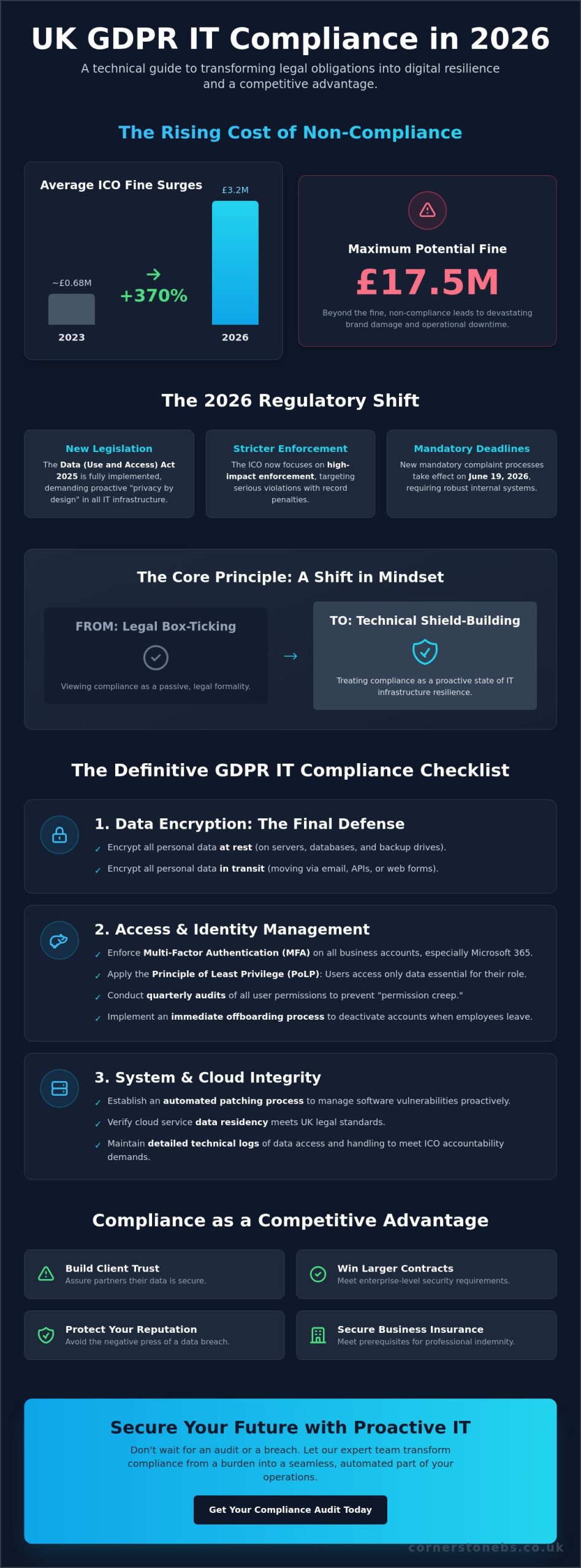
Did you know the average ICO fine has surged to nearly £3.2 million in 2026? That is a staggering 370% increase since 2023, proving that maintaining a GDPR IT compliance checklist for UK businesses is no longer just a legal formality; it’s a fundamental pillar of your digital resilience. As a local team that prides itself on keeping our regional partners secure, we know how daunting these shifting regulations and high-stakes penalties can feel.
It’s perfectly natural to feel overwhelmed by the technical jargon of the Data (Use and Access) Act 2025 or to worry about the complexities of cloud data residency. You want to focus on serving your customers, not on the fear of a £17.5 million penalty. This guide moves past the legalese to provide a clear, technical to-do list for your modern infrastructure. We’ll walk you through the essential system updates, from automated decision-making safeguards to the mandatory complaint processes taking effect on June 19, 2026. You’ll gain a robust framework for business continuity and the peace of mind that comes from being truly prepared for the year ahead.
Key Takeaways
- Move beyond legal theory by treating compliance as a proactive technical state of IT infrastructure resilience.
- Build a secure foundation using essential technical controls, specifically focusing on advanced encryption for data at rest and in transit.
- Use our GDPR IT compliance checklist for UK businesses to audit your hardware and software assets and locate every piece of personal data.
- Navigate cloud complexities with confidence by verifying your data residency meets the specific requirements of the latest UK legal standards.
- Ensure long-term stability by positioning managed IT support as a proactive monitoring strategy rather than just a technical necessity.
Understanding UK GDPR IT Compliance in 2026
Think of UK GDPR IT compliance as the digital fortress that surrounds your business operations. It isn’t just about having a privacy policy tucked away in a filing cabinet; it’s the technical implementation of every data protection principle within your actual network. While the Data Protection Act 2018 provides the legal foundation, IT compliance is the mechanism that enforces those laws through encryption, access controls, and secure backups. In 2026, the gap between “saying” you are compliant and “being” compliant has never been wider.
Why Compliance is a Competitive Advantage
The Role of the ICO in 2026
The ICO’s current focus is on high-impact enforcement, targeting the most serious violations with record-breaking penalties. The accountability principle now demands that you maintain detailed technical logs to prove exactly how data is accessed and handled. If you can’t show the logs, the ICO assumes the protection wasn’t there. Beyond the £17.5 million maximum fine, the real cost of non-compliance lies in the devastating blow to your brand and the operational downtime that follows a breach. We want to help you avoid that stress by making compliance a seamless, proactive part of your daily operations.
Technical Controls: The Foundation of Digital Privacy
While legal policies provide the rules, technical controls are the actual locks on your digital doors. In 2026, the ICO expects more than just a signed document; they want to see robust, active defenses. Any effective GDPR IT compliance checklist for UK businesses must start with the hardware and software settings that protect your data from the inside out. We help our local partners move beyond theory by implementing the specific technical measures that keep sensitive information out of the wrong hands.
Encryption acts as your final line of defense. You must ensure that all personal data is encrypted both at rest, such as on your servers and backup drives, and in transit, when it’s moving through email or web forms. This ensures that even if a data packet is intercepted, it remains completely unreadable. Coupling this with Multi-Factor Authentication (MFA) across every business account creates a formidable barrier. MFA is no longer an optional extra. It’s a fundamental requirement for securing your Microsoft 365 environment and preventing unauthorized access from stolen credentials.
Hackers look for the easiest path. Often, that’s through unpatched software. A proactive approach to vulnerability management means your systems aren’t left open to known exploits. Regular, automated patching keeps your infrastructure resilient and stable. If managing these technical layers feels like a full-time job, our team provides the expert Cyber Security support you need to stay ahead of emerging threats without losing focus on your daily operations.
Access Control and Identity Management
We recommend the Principle of Least Privilege (PoLP) for every business network. This means users only have access to the specific data required for their job role, and nothing more. For those using Microsoft 365 or local servers, you should audit user permissions quarterly to prevent “permission creep.” When an employee leaves your organization, their accounts must be deactivated immediately. Leaving a dormant account active is a massive security hole that the ICO’s Guide to the GDPR specifically warns against.
Endpoint Security and Device Management
Hybrid work has made endpoint security a top priority. Laptops and mobile devices are easily lost or stolen, making them high-risk targets. You should use Mobile Device Management (MDM) to maintain control over these assets, allowing for remote data wiping if a device disappears. To meet strict compliance standards, you must implement full-disk encryption on all portable hardware to ensure data remains protected even if the physical device is compromised. These small technical steps provide immense emotional and financial security for your business.
Cloud Infrastructure and Data Residency Requirements
Storing your data in the cloud isn’t just about convenience; it’s about geography. Data residency refers to the physical location where your information sits. For UK businesses, ensuring your cloud provider uses UK-based data centers is a vital part of any modern GDPR IT compliance checklist for UK businesses. Platforms like Microsoft Azure and Microsoft 365 allow you to select specific UK data regions. This keeps your client information within our borders, which simplifies your legal obligations and provides a clear audit trail for the ICO. You should also remember that using any SaaS provider makes them a “data processor.” This requires a solid third-party agreement to ensure they meet the same high standards for security and privacy that you do.
Managing these cloud environments requires a proactive approach to ensure data doesn’t drift into unapproved regions. We help our local partners configure their cloud settings to prioritize regional storage, providing the peace of mind that comes from knowing exactly where your data lives. This technical oversight is a foundational element of business stability. It ensures you aren’t caught out by shifting international data transfer rules that can change without much notice.
Microsoft 365 Compliance Features
Microsoft 365 is more than just a set of productivity tools. It includes powerful security features like Microsoft Purview and Data Loss Prevention (DLP) settings. These tools allow you to set up auto-labeling, which automatically detects and protects sensitive business data like financial records or personal IDs. If you’re planning a move to a more secure environment, our Microsoft 365 Migration for Business UK guide offers a complete strategy for a secure transition. These built-in features help you stay organized and demonstrate your commitment to data protection.
Backup and Disaster Recovery as a GDPR Requirement
GDPR isn’t just about privacy; it’s about availability. If your systems go down and you can’t access personal data when a customer requests it, you’re technically in breach. A simple backup is a great start, but a compliant disaster recovery plan ensures your business can actually keep running during a crisis. We align our Cloud Solutions for UK Businesses with the NCSC’s 10 Steps to Cyber Security to ensure your infrastructure is resilient. This level of technical support provides the emotional and financial security you need to focus on growth. It transforms a technical necessity into a long-term partnership for success.
The Definitive GDPR IT Compliance Checklist for UK Businesses
While we’ve discussed the theory and cloud residency, compliance ultimately comes down to the specific settings on your devices and servers. To help you build a resilient foundation, we’ve compiled this GDPR IT compliance checklist for UK businesses. It moves beyond paperwork to focus on the technical enforcement required to satisfy the ICO in 2026. Start by auditing every piece of hardware and software in your building. You must identify exactly where personal data resides, whether it’s on a local desktop, a legacy server, or a staff member’s mobile phone.
Your next step is implementing end-to-end encryption for all email communications and file sharing. This ensures that sensitive information remains secure from the moment it leaves your network until it reaches the intended recipient. Combine this with a strict password policy and universal MFA deployment across every single business application. Finally, don’t wait for a crisis to test your defenses. Schedule regular Cyber Security audits and penetration testing to find the cracks before a hacker does. Proactive testing isn’t just a technical necessity; it’s a foundational element of your business stability.
Data Mapping and Asset Discovery
You can’t protect what you can’t see. “Shadow IT” often creeps into organisations when staff use unauthorized personal apps or hardware for work tasks. To combat this, create a technical data flow diagram for your IT network that maps every point where personal data enters, moves through, and leaves your systems. Robust IT inventory management is the only way to ensure your GDPR IT compliance checklist for UK businesses covers 100% of your digital footprint. It gives you the clarity of an expert and the confidence of a leader.
The 72-Hour Breach Notification Rule
The law requires you to report most data breaches within 72 hours, but you can’t report what you haven’t detected. This requires real-time technical monitoring to catch unauthorized access as it happens. Under technical guidelines, a reportable breach is defined as any security incident that leads to the accidental or unlawful destruction, loss, alteration, or unauthorized disclosure of personal data. If you aren’t sure if your current systems can spot these triggers, our Cyber Security Services provide the proactive monitoring you need for true peace of mind. We invite you to have a conversation with our local team to see how we can strengthen your defenses today at cornerstonebs.co.uk.
Securing Your Future: Proactive Managed IT as a Compliance Strategy
Completing a GDPR IT compliance checklist for UK businesses is a fantastic milestone, but true data protection is never a “one and done” task. Compliance is a living state of your infrastructure. To maintain the high standards required by the ICO in 2026, your systems need constant, proactive oversight. Managed IT Support bridges the gap between having a plan and actually living it. It provides the continuous monitoring necessary to detect unauthorized access attempts or system vulnerabilities the moment they appear, rather than weeks after a breach has occurred.
Think of an outsourced partner as providing “compliance-as-a-service.” At Cornerstone Business Solutions, we deliver bespoke technology solutions that go beyond generic software fixes. We understand that every organisation has a unique digital footprint. Our multi-award-winning expertise allows us to navigate complex technical audits with the clarity of a long-term partner. We don’t just sell you a license; we build a resilient framework that supports your business continuity and provides the emotional security you need to lead with confidence.
From Reactive Repairs to Proactive Compliance
The old “break-fix” model of IT support is now a major compliance risk. If you only call for help when something stops working, you’ve likely already left a window open for a data breach. GDPR demands “availability” and “integrity,” which are impossible to guarantee with reactive repairs. Moving to a fixed-term contract ensures your system health and security patches are always current. While we are proud of our roots and provide industry-leading Managed IT Services in Teesside, our technical reach and compliance expertise support businesses on a national scale. This proactive approach keeps your network stable and your data locked down tight.
Your Next Steps for 2026
The most effective way to start your journey toward total resilience is with a professional security audit. We’ll help you identify the specific gaps in your current setup and refine your GDPR IT compliance checklist for UK businesses to match your actual operational needs. Our award-winning support team is ready to simplify the technical hurdles of the Data (Use and Access) Act 2025, turning complex regulations into a clear path forward. We invite you to a conversation about your digital future. It’s time to move away from the fear of fines and toward the peace of mind that comes from expert protection. Book a consultation with our compliance experts today and let’s build something secure together.
Build a Resilient Future Through Technical Excellence
The transition toward strict technical enforcement in 2026 proves that data protection is no longer just a legal task. It’s a fundamental part of your business’s digital health. By moving from reactive repairs to a proactive GDPR IT compliance checklist for UK businesses, you ensure your infrastructure remains stable, secure, and ready for growth. You’ve learned that robust encryption, regional data residency, and universal MFA are the pillars of modern privacy by design.
We believe that every local business deserves the peace of mind that comes from expert protection. As a multi-award-winning IT services provider and strategic partner with industry leaders like Microsoft, IBM, and Cisco, we offer the 24/7 proactive monitoring required to stay ahead of evolving threats. We don’t just fix problems; we prevent them from happening in the first place. This collaborative approach turns a regulatory necessity into a powerful engine for client trust and operational stability.
Your journey toward total resilience starts with a single conversation. Start your journey to total technical compliance with a Cornerstone IT audit. Let’s work together to secure your data and protect your reputation for the long term. You’ve got this, and we are right here to support you every step of the way.
Frequently Asked Questions
Is UK GDPR compliance different from EU GDPR in 2026?
Yes, the Data (Use and Access) Act 2025 has created a distinct UK framework that diverges from the EU version. While the core principles of privacy remain, the UK has relaxed rules on automated decision-making and introduced “recognised legitimate interests” to simplify processing for specific cases like crime prevention. It is vital to ensure your systems reflect these specific UK legislative updates rather than relying on generic EU guidance.
Does a small business with fewer than 10 employees need a GDPR IT checklist?
Absolutely, because data protection laws apply to every organisation regardless of its size. A GDPR IT compliance checklist for UK businesses ensures that even the smallest team protects sensitive client data from rising cyber threats. Smaller businesses are often targeted because they lack robust defenses, so having a clear technical plan provides essential security and prevents devastating financial penalties.
What are the technical requirements for “Privacy by Design”?
Privacy by Design requires you to integrate data protection into your system architecture from the moment of purchase or development. This includes implementing pseudonymisation, setting automatic data deletion periods, and ensuring that default settings are always the most private options available. It moves privacy from a manual task to an automated technical standard within your network infrastructure.
Can I store UK customer data on US-based cloud servers?
You can store data in the US, provided you use appropriate safeguards like the UK-US Data Bridge or specific standard contractual clauses. However, the most reliable way to ensure compliance is to select a UK-based data region within your cloud platform. This keeps your information within our borders and simplifies your residency requirements under current UK law.
How often should we conduct a technical GDPR audit?
We recommend a full technical audit at least once a year or whenever you implement significant changes to your IT infrastructure. Regular quarterly reviews of user permissions and software patches are also essential. This proactive rhythm ensures your GDPR IT compliance checklist for UK businesses stays relevant as new cyber threats emerge throughout the year.
Is Multi-Factor Authentication (MFA) a legal requirement under GDPR?
While the law doesn’t name “MFA” specifically, it mandates that you use “appropriate technical measures” to protect personal data. In 2026, the ICO considers MFA a basic industry standard for any business network. Failing to implement it can be viewed as negligence, making it much harder to defend your actions if a breach occurs via stolen credentials.
What happens if our business suffers a data breach but we followed the checklist?
Following a technical checklist demonstrates that you took “reasonable and proportionate” steps to protect your data. While you must still report a reportable breach to the ICO within 72 hours, having a documented audit trail of your technical controls significantly reduces the likelihood of heavy fines. It proves you acted as a responsible and proactive data controller.
How does Managed IT Support help with GDPR accountability?
Managed IT Support provides the technical logging and continuous monitoring required to prove your compliance to regulators. By outsourcing to a local expert, you gain a detailed audit trail of every security patch, backup, and access request. This satisfies the accountability principle by providing concrete evidence that your systems are actively managed and secured 24/7.
Posted on: June 13th, 2026 by Cornerstone
What if the greatest threat to your business data isn’t a hacker in a distant country, but a poorly secured printer in your employee’s spare room? As we move into 2026, the traditional office walls have dissolved, leaving many business owners feeling exposed to ransomware and the complexities of managing personal devices. We know that securing remote worker IT access is no longer just a “nice-to-have” feature; it is the backbone of your operational stability. We understand the frustration of slow VPNs that hinder productivity and the fear that a single home Wi-Fi connection could compromise years of hard work.
You likely agree that your team should be able to work from anywhere with the same speed and safety they enjoy at their desks. This guide promises to show you how to protect your sensitive information while empowering a truly productive, mobile workforce. We will preview the shift toward Zero Trust architectures, the role of modern authentication, and a practical roadmap to achieving a “set and forget” security posture that keeps you compliant with UK data standards. Let’s explore how to make your remote setup your strongest asset.
Key Takeaways
- Learn why the old office perimeter is a dead concept and how to adopt a modern framework that protects data wherever your team chooses to work.
- Discover why Zero Trust Network Access is the essential successor to slow VPNs, offering both better protection and a faster experience for your staff.
- Explore the concept of “Seamless Security” to provide a background layer of protection that keeps employees productive without constant technical hurdles.
- Follow our practical 5-step roadmap for securing remote worker IT access, including how to audit your systems and roll out multi-factor authentication.
- See how award-winning managed IT support can take the security burden off your shoulders, giving you the freedom to focus on growing your business.
Understanding Secure Remote IT Access in a Post-Perimeter World
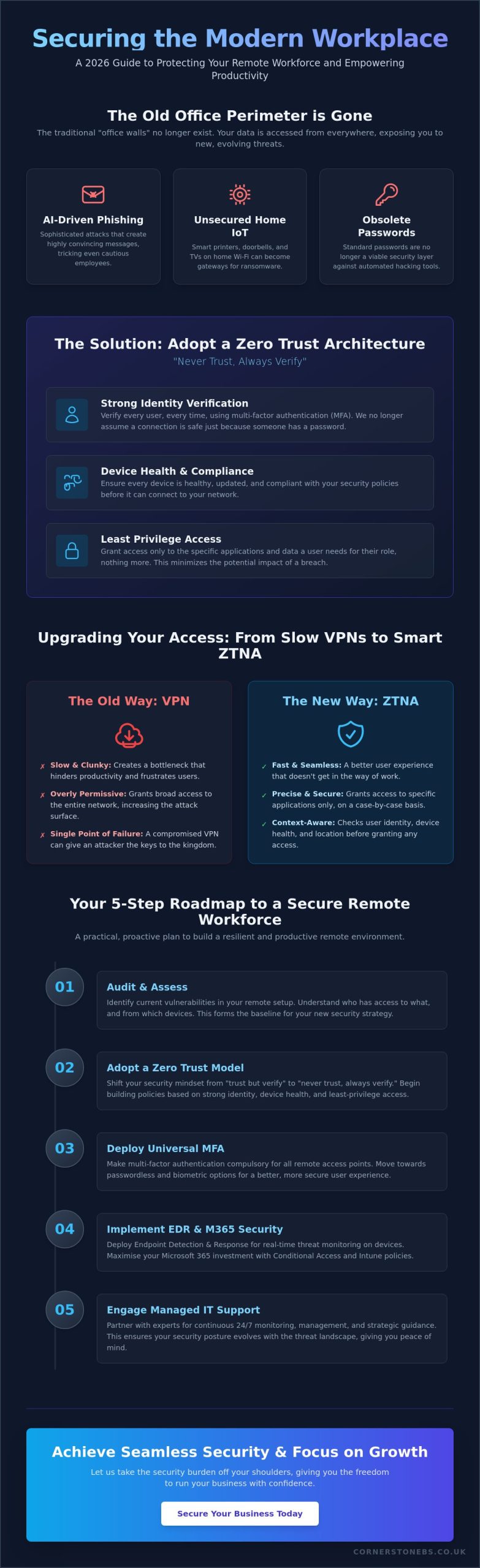
The concept of the “office perimeter” is officially a relic of the past. In 2026, your business network doesn’t stop at the front door; it extends to every home office, transit hub, and client site where your team logs in. Securing remote worker IT access is the comprehensive framework designed to protect your data the moment it leaves your physical server. It isn’t just about encryption anymore. It is about creating a consistent, safe environment for your staff, regardless of their postcode or the time of day they choose to work. This proactive stance ensures that your business remains resilient in a world where the traditional boundaries of the workplace have dissolved.
This modern approach stands on three essential pillars: Identity, Device, and Data. We no longer assume a connection is safe just because someone has the right password. Instead, we verify the person’s identity through multiple layers, check that their laptop is healthy and updated, and ensure the data they are accessing is appropriate for their role. This is the shift from “trust but verify” to “never trust, always verify.” It sounds strict, but it actually provides the emotional security you need to let your team work flexibly without staying up at night worrying about a breach. By verifying every request in real-time, we turn security into a silent, reliable partner in your daily operations.
The Evolution of Remote Work Risks in 2026
The landscape has shifted dramatically. AI-driven phishing attacks now use sophisticated frontier models to create highly convincing messages that can fool even the most cautious employees. We also see a rise in risks from domestic IoT devices. A smart doorbell or a home printer on an unsecured network can act as a silent gateway for ransomware. Because of these evolving threats, standard passwords are no longer a viable security layer. They are simply too easy to bypass in a world where automated hacking tools are constantly scanning for weaknesses. Keeping your team safe requires a move toward more robust, biometric-based protections.
Why a Strategic Approach Outperforms Ad-Hoc Solutions
Many businesses fall into the trap of “bolting on” security features only after a problem occurs. This ad-hoc approach is often more expensive and less effective than a unified strategy. A proactive plan for securing remote worker IT access actually improves your business continuity and can lead to lower cyber insurance premiums. We position security as a foundational element of your growth, not a barrier to it. When your systems are built with resilience in mind, you have the freedom to scale your team and your operations with total confidence. It is about building a stable platform for your future success.
The Core Technologies Powering Secure Remote Work
Building a resilient remote environment doesn’t require a massive enterprise budget; it requires the right tools used correctly. In 2026, the traditional VPN is fading away. It often grants too much access and slows down your team, creating a bottleneck for productivity. Instead, we recommend Zero Trust Network Access (ZTNA). Think of ZTNA as a smart digital bouncer. It checks who is trying to connect, which device they’re using, and their current location before granting access to specific apps. It’s precise, fast, and far more secure than older methods that once relied on a single point of entry.
Maximising Microsoft 365 for Remote Security
Most UK businesses already use Microsoft 365, but few use its full security potential. We help you set up Conditional Access policies, which allow you to block logins from suspicious locations or from devices that aren’t fully updated. Microsoft Intune takes this further by letting you manage every mobile and laptop from a central dashboard. A professional Microsoft 365 migration for business UK simplifies remote management by ensuring your cloud environment is built for security from the ground up. It turns a standard productivity tool into a powerful shield for your data.
Secure Hardware: Beyond the Software
Software is only half the battle. Securing remote worker IT access also depends on the physical kit your team uses. Business-grade laptops featuring TPM (Trusted Platform Module) chips provide hardware-level encryption that consumer models often lack. While “Bring Your Own Device” (BYOD) seems cost-effective, it is often a security nightmare. We find that company-issued hardware, pre-configured with encryption and security software, is the safest route. It ensures every device is protected the second it leaves the box. If you’re unsure if your current tech stack is up to the challenge, our team is happy to review your remote infrastructure and offer practical, local advice.
Balancing Robust Security with Employee Productivity
Many business owners worry that adding layers of protection will grind daily work to a halt. We’ve all heard the grumbles about slow VPNs or forgotten passwords that lock people out for hours. But securing remote worker IT access shouldn’t be a barrier to getting things done. We aim for “Seamless Security.” This means protection happens quietly in the background, allowing your staff to focus on their roles instead of wrestling with tech. By using Single Sign-On (SSO), we eliminate password fatigue. Your team logs in once and gains secure entry to all their essential business applications. It’s faster for them; it’s safer for you.
For cloud-heavy businesses, latency is the enemy. Modern access solutions provide much lower latency than legacy systems. This ensures that a staff member working from home in the morning feels just as connected as if they were sitting in your main office. A strategic approach to securing remote worker IT access prioritises the user experience just as much as the data protection protocols.
Reducing Friction with Modern Authentication
Moving to biometrics is a total game changer for staff morale. Using a fingerprint or facial recognition via Windows Hello or Touch ID is nearly instant and far more secure than a written password. We also implement context-aware security. If an employee is on a known device at their usual home address, the system stays quiet. It only prompts for extra verification if it detects something unusual, such as a login attempt from a different country. This reduces “verification fatigue” and keeps the workflow smooth and uninterrupted.
The Human Element: Training as a Security Layer
Even the best software can’t stop every mistake. That’s why we treat training as a vital security layer rather than a box-ticking exercise. We help you roll out bite-sized, regular cyber awareness training that fits into a busy day. It’s about building a culture where staff feel empowered, not policed. When your team understands the “why” behind the rules, they become your strongest line of defence. We encourage an open environment where reporting a suspicious email is met with a “thank you” rather than a reprimand. This collaborative approach is a foundational element of business stability and emotional security. If you’re concerned about how security is impacting your team’s output, we invite you to start a conversation with our local team today.
A 5-Step Roadmap to Securing Your Remote Workforce
Securing remote worker IT access shouldn’t feel like a guessing game. While the technology involves sophisticated layers, the path to implementation is straightforward when broken down into logical steps. We have developed a 5-step roadmap to help you move from a reactive posture to a resilient, modern framework that protects your team and your data without getting in the way of their work. This is about building a foundation for stability and growth.
Step 1: The Audit and Policy Phase
You can’t protect what you don’t know exists. We start by identifying “Shadow IT,” which often involves well-meaning staff using unapproved apps like personal Dropbox or WhatsApp to share sensitive business files. Clear remote work policies are vital. They define exactly what is expected of your team and how they should handle company data outside the office. Reviewing our cyber security services is a great way to benchmark your current posture against 2026 standards and identify where your biggest risks lie.
Step 2: Implement MFA. With 91% of companies now making multi-factor authentication compulsory, this is your baseline defence. It’s the simplest way to stop a stolen password from becoming a full-blown data breach.
Step 3: Standardise Hardware and Cloud. We recommend moving away from the “bring your own device” nightmare. Using company-issued, encrypted hardware and secure cloud platforms like Microsoft 365 ensures every device is managed under the same high standards.
Step 4: Deploy a Zero Trust Framework. It’s time to retire the legacy VPN. Replacing it with Zero Trust Network Access (ZTNA) ensures that your staff only access the specific files they need, keeping the rest of your network isolated and safe.
Step 5: Proactive Monitoring and Response
The final step is establishing ongoing oversight. Since your team might work irregular hours, 24/7 monitoring is essential to catch threats while you sleep. This isn’t just a “set and forget” task. It involves proactive threat hunting to stop attackers before they gain a foothold. Our managed IT services Teesside provide this level of national-standard protection with a friendly, local face. We act as your long-term partner, ensuring your systems stay healthy and your business remains compliant with UK data standards. If you are ready to move toward a more secure future, we invite you to book a remote security audit with our expert team today.
Why Managed IT Support is the Key to Long-Term Remote Security
Managing securing remote worker IT access in-house is a significant burden for most SMEs. It requires constant attention to emerging threats, software updates, and user support that can easily overwhelm a small team. When you partner with us, you gain access to award-winning expertise that stays ahead of the 2026 threat landscape. We act as your single point of contact for IT hardware, cloud infrastructure, and cyber security. This unified approach eliminates the gaps that often appear when using multiple different providers. It ensures that every part of your digital ecosystem is working in harmony to protect your business data.
24/7 Support for a 24/7 Workforce
Remote workers don’t always stick to a traditional nine-to-five schedule. Whether they are catching up on emails late at night or starting early to beat the school run, they need help that matches their rhythm. Our expert helpdesk provides immediate assistance regardless of where your staff are located. This level of support does more than just fix tech problems. It boosts remote employee morale by proving that they have the same reliable tools and backing as those in the office. Our tailored cloud solutions and managed support go hand-in-hand to ensure your digital workspace is always available and always secure.
Your Partner in Secure Growth
We don’t just set up your systems and walk away. We are here as your long-term partner to ensure securing remote worker IT access remains robust as your business evolves. As your remote team grows, we scale your security protocols and hardware deployment to match. There is a deep sense of reassurance that comes from working with a multi-award-winning IT provider deeply rooted in our local community. We take pride in our regional identity and our reputation for reliability. We handle the technical mechanisms so you can focus on your core business goals. We invite you to start a no-obligation conversation with our local team today about your remote setup.
Future-Proof Your Remote Strategy Today
Remote work is no longer a temporary fix. It’s a permanent pillar of modern business. We’ve seen how the old office perimeter has vanished and why a Zero Trust model is now the gold standard for protection. By focusing on identity and device health rather than just outdated passwords, you create a “seamless security” environment that keeps your team productive and your data safe. Implementing a clear 5-step roadmap ensures you aren’t just reacting to threats but building a resilient foundation for long-term growth.
Securing remote worker IT access is a journey that requires the right partner by your side. As a multi-award-winning IT services provider and official partners with Microsoft, IBM, and Cisco, we bring world-class expertise directly to our local community. Our proactive 24/7 system monitoring means we catch risks before they become breaches. We invite you to take the first step toward a more stable and secure future for your business.
Book a Free Remote Security Audit with our Award-Winning Team. We look forward to helping you build a workplace that is safe, efficient, and ready for whatever comes next.
Frequently Asked Questions
What is the most secure way for remote employees to access the company network?
Zero Trust Network Access (ZTNA) is the gold standard for remote security in 2026. It operates on the principle of “least privilege,” meaning staff only gain access to the specific applications they need for their roles. By verifying every user and device identity before granting entry, it prevents hackers from moving laterally through your systems. This granular control is far more effective than traditional perimeter-based security methods.
Is a VPN still enough for remote work security in 2026?
A traditional VPN is rarely sufficient on its own for modern business needs. While they provide an encrypted tunnel, older VPNs often grant broad access to the entire network once a user is authenticated. This creates a significant risk if a single set of credentials is stolen. We recommend moving toward ZTNA or SASE models that offer more precise, identity-centric protection and better performance for your team.
How do I secure remote workers using their own personal laptops (BYOD)?
The most effective way to manage “Bring Your Own Device” (BYOD) is through Microsoft Intune and virtual desktop solutions. These tools allow you to create a secure, encrypted workspace on a personal laptop that is entirely separate from the employee’s private files. You can enforce strict security policies and wipe business data remotely if the device is lost, all without invading the staff member’s personal privacy.
What are the biggest security risks for employees working from home?
Unsecured home Wi-Fi and domestic smart devices are the primary vulnerabilities we see today. Many home routers use outdated encryption, and “backdoor” entries through smart doorbells or printers are becoming common. Securing remote worker IT access requires a focus on these domestic weak points. We help you implement stronger encryption standards and provide awareness training so your team can identify AI-generated phishing attempts before they cause damage.
Does securing remote access slow down internet speeds for my staff?
Modern security solutions actually tend to improve internet performance for your team. Older VPNs often “backhaul” all data through a central office server, which creates a frustrating bottleneck. Newer cloud-native frameworks connect your staff directly to their applications via the nearest secure data centre. This results in a faster, more responsive experience that feels just like being in the office, even when working from home.
How much does it cost to implement a secure remote access strategy?
The investment required depends on your current technology stack and the size of your remote workforce. We find that many UK businesses already own the necessary tools through their existing Microsoft 365 subscriptions but haven’t configured them for maximum safety. Our approach focuses on maximising your current assets first. We work with you to build a customised, scalable strategy that provides long-term stability without unnecessary overheads.
What is the difference between MFA and 2FA for remote logins?
Multi-Factor Authentication (MFA) is a more robust evolution of Two-Factor Authentication (2FA). While 2FA requires two forms of evidence, MFA uses three or more independent factors, such as a password, a physical security key, and a biometric scan. This layered approach is vital for securing remote worker IT access because it makes it statistically much harder for an attacker to bypass your defences, even if they steal a password.
Can I monitor my remote workers’ IT security without invading their privacy?
You can maintain a high security posture without monitoring your employees’ personal activities. We use endpoint detection tools that focus on identifying malicious software and unusual system behaviours rather than tracking individual user actions. This protects your business from threats while respecting the trust you’ve built with your team. It’s a proactive way to ensure business continuity while maintaining a healthy, positive workplace culture for everyone.
Posted on: June 8th, 2026 by Cornerstone
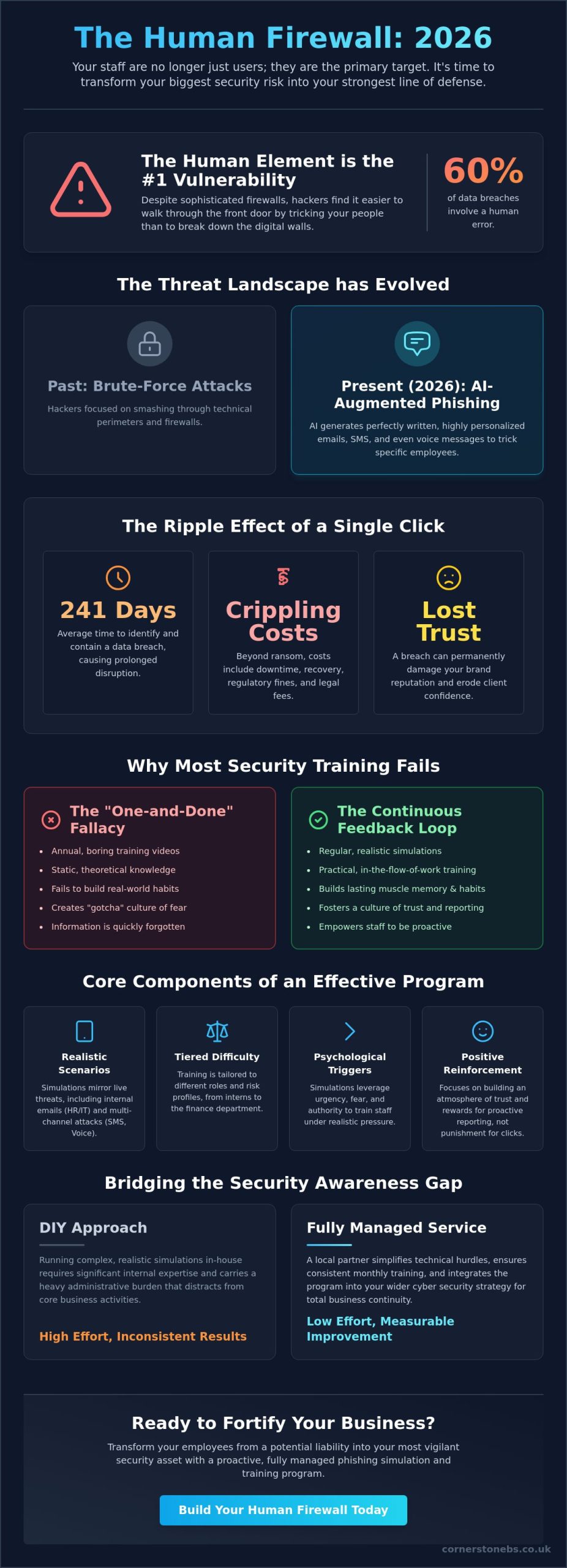
Did you know that 60% of data breaches still involve a human element, despite the sophisticated technical firewalls we use today? It’s a sobering reality for any business owner. You likely feel the weight of responsibility to protect your company from ransomware downtime, yet you’re frustrated by “boring” training sessions that your staff simply ignore. Implementing effective phishing simulation and training for employees is no longer just a technical checkbox; it’s about building a culture of genuine awareness. We understand that you might lack the internal expertise to run complex, realistic simulations every month. You need a local partner who can simplify these technical hurdles and keep your business secure.
In this 2026 guide, you’ll learn how to transform your staff from your biggest security risk into your strongest line of defense. We promise to show you the path to a measurable reduction in click rates and a culture where employees proactively report suspicious emails instead of falling victim to them. We’ll preview the latest trends in AI-driven personalization and multi-channel simulations, giving you the peace of mind that comes with a fully managed security strategy.
Key Takeaways
- Learn why modern hackers target your people instead of your firewall and how AI-generated threats are changing the security landscape in 2026.
- Master the art of phishing simulation and training for employees by using realistic templates that turn “teachable moments” into lasting habits.
- Compare the benefits of fully managed security services against the heavy administrative burden of trying to run complex simulations in-house.
- Build an atmosphere of trust and proactive reporting by using transparency and rewards rather than “gotcha” tactics that alienate your team.
- Discover how to integrate your training program with wider cyber security measures like Microsoft 365 and cloud solutions for total business continuity.
Why Your Employees Are the Primary Target for Phishing Attacks in 2026
Modern firewalls and technical filters are more robust than ever, but they can’t stop a user from handing over their digital keys. Hackers know this. They’ve shifted their focus from trying to smash through your technical perimeter to simply walking through the front door by tricking your staff. This “human perimeter” is now the most exploited vulnerability in any business. Understanding what phishing is and how it has evolved is the first step toward securing your company’s future.
In 2026, the threat has become significantly more sophisticated. We’ve seen a massive rise in AI-augmented attacks where generative tools create perfectly written, highly personalized emails that lack the classic spelling errors of the past. These aren’t just generic “click here” messages; they’re tailored social engineering attempts that might mimic your CEO’s voice or reference a specific local project. Because 60% of breaches still involve a human element, implementing consistent phishing simulation and training for employees is the only way to keep pace with these evolving tactics.
The stakes couldn’t be higher. A single, ill-advised click can bypass millions of pounds worth of security software, leading directly to a business-wide ransomware infection. Think of it as a digital safety drill. Just as you wouldn’t expect your team to know how to evacuate a building without practice, you shouldn’t expect them to spot a deepfake email without regular exposure to realistic scenarios.
The True Cost of a Successful Phish
The financial impact of a breach often goes far beyond the initial ransom demand. When your systems go dark, your revenue stops, but your overheads don’t. According to 2025 data, the average data breach lifecycle is 241 days, meaning the “hidden” costs of investigation and recovery can haunt your balance sheet for months. You also face the devastating loss of client trust. For many UK businesses, the legal and compliance implications under current regulations mean that a single successful phish can lead to heavy fines and a permanent stain on your brand reputation.
Why Traditional Security Awareness Training Fails
Most businesses fall into the “one-and-done” fallacy. They show a boring training video once a year and hope for the best. This approach fails because it doesn’t change daily habits. Information overload happens quickly, and static videos don’t reflect the high-pressure environment where most mistakes occur. Real learning happens when the training is practical and delivered in the flow of work. Phishing simulation is a continuous behavioural feedback loop. By making phishing simulation and training for employees a regular part of your routine, you move away from theoretical knowledge and toward genuine, proactive defence.
The Core Components of Effective Phishing Simulation and Training
A robust strategy for phishing simulation and training for employees isn’t just about how many emails you send. It’s about the quality of the lessons they teach. We focus on creating a supportive environment where your team feels empowered rather than tested. Effective programs rely on several core pillars that bridge the gap between technical security and human behaviour. By focusing on these components, you can build a resilient culture that adapts to threats as they emerge.
To be truly effective, simulations must mirror the actual threats landing in inboxes today. This means using templates based on live intelligence rather than outdated, generic examples. For those seeking a step-by-step guide to building these programs, the priority should always be relevance. We recommend tiered difficulty levels. You wouldn’t give a finance director the same test as a new intern; each department faces unique risks that require tailored scenarios to stay sharp.
Simulating Real-World Scenarios
Attackers often pose as trusted internal departments like HR or IT Support. These sources carry inherent authority, making them highly effective for social engineering. Simulations should also exploit psychological triggers like urgency and fear. If an email claims a payroll error requires an immediate login, logic often takes a backseat to panic. Modern programs now extend beyond email to include SMS (smishing) and voice (vishing) simulations. This multi-channel approach ensures your team is ready for every angle an attacker might take, regardless of the platform they use.
The ‘Teachable Moment’ Methodology
When an employee clicks a simulated link, they shouldn’t face a disciplinary meeting. Instead, they should encounter an immediate teachable moment. This is a non-punitive, educational pop-up that explains exactly what they missed while the experience is still fresh. We find that micro-learning works best. Delivering short, impactful content in the flow of work ensures staff actually remember the lesson without feeling overwhelmed. Implementing phishing simulation and training for employees allows you to turn a simple mistake into a valuable learning opportunity that strengthens your overall security posture.
Tracking success requires looking beyond simple click rates. While a reduction in clicks is great, a high report rate is often a better indicator of a healthy security culture. It shows your staff are actively looking for threats and know how to flag them. If you’re ready to move beyond basic checklists and start building real resilience, our team at Cornerstone can help you design a proactive strategy that keeps your business stable and your team confident.
Managed Services vs. DIY: Bridging the Security Awareness Gap
Many business owners assume that phishing simulation and training for employees is a simple software purchase. You buy a subscription, tick a box, and the problem is solved. In reality, the hidden administrative burden of running these programs internally is significant. Between designing realistic scenarios, managing whitelists so your own filters don’t block the tests, and responding to worried staff members, the DIY route quickly drains your IT team’s time. Without a dedicated expert to steer the ship, these programs often become a source of frustration rather than a pillar of security.
The real value of a managed approach lies in expert analysis. While you can find a step-by-step guide to phishing simulation training to help you understand the basics, a security partner interprets the data behind the clicks. We don’t just look at who failed; we look at why they failed. Is your finance team particularly vulnerable to invoice fraud? Does your HR department struggle to spot malicious resumes? This level of customization allows us to build business-specific threat models that address your actual risks, moving far beyond the generic templates found in basic automated tools.
The Problem with ‘Set and Forget’ Automation
Automated platforms often promise efficiency, but they frequently lead to ‘simulation fatigue’. When employees receive the same style of fake email at the same time every month, they stop learning and start playing a game of ‘spot the bot’. These predictable patterns make the training feel like a chore rather than a vital safety drill. Human oversight is essential to ensure your simulations remain varied and challenging. We also make sure these tests don’t interfere with critical business operations, avoiding high-pressure deadlines where a simulation might cause unnecessary stress or operational delays.
The Cornerstone Advantage: Award-Winning Managed Security
We believe that your IT team should focus on growth, not on managing training schedules. As a trusted regional partner, we take the full management of these simulations off your plate. We integrate phishing simulation and training for employees into our wider cyber security services, ensuring your human firewall is as robust as your technical one. This proactive approach means we constantly monitor your results and refine your strategy based on the latest 2026 threat intelligence. You get the benefit of our industry-recognised expertise and a security posture that evolves as quickly as the hackers do.
By choosing a managed service, you’re not just buying a tool. You’re entering a partnership that prioritises your business stability. We provide the clarity you need to understand your risks without the technical jargon that often makes security feel overwhelming. Our goal is to give you peace of mind, knowing that your staff are prepared, your data is protected, and your business is resilient against the sophisticated social engineering tactics of today.
How to Implement a Phishing Program Without Alienating Staff
Implementing phishing simulation and training for employees shouldn’t feel like a trap. If your staff feel like you’re trying to “catch them out,” trust evaporates instantly. This is why we advocate for a human-centric approach that prioritises transparency. Tell your team about the program before it launches. Explain that the goal isn’t to monitor them, but to protect the entire company from the devastating impact of ransomware. When people understand the “why” behind the simulations, they’re much more likely to engage with the process.
We’ve found that gamification is one of the most effective ways to keep morale high. Instead of focusing on mistakes, use rewards and recognition to celebrate the “saves.” A small incentive for the first person to report a simulated threat can turn a security chore into a friendly competition. This proactive engagement is bolstered by simple technical tools. Providing a one-click reporting button in their email client makes flagging suspicious activity effortless. Simplified reporting tools significantly reduce the volume of manual tickets hitting your helpdesk by automating the initial threat analysis.
Building a ‘Reporting Culture’ Over a ‘Click Culture’
The number one metric that defines your success isn’t just a low click rate. It’s your reporting rate. We want to see how many employees spotted the phish and took the time to flag it. This shift in focus turns your staff into active defenders rather than passive targets. Celebrating your “security heroes” who identify particularly sophisticated threats builds a sense of collective responsibility. It moves the conversation away from individual failure and toward a shared victory in keeping the business stable and secure.
Maintaining Trust and Morale
Setting clear boundaries on your simulations is vital for maintaining long-term trust. Avoid “cruel” scenarios that exploit sensitive topics like salary reviews, bonus announcements, or redundancy notices. These tactics might get a high click rate, but they cause deep resentment. For those who do click on a simulation, especially repeat clickers, we recommend empathy over discipline. Often, these individuals are simply working under high pressure or in roles that involve high-volume email processing. They need targeted, supportive training that helps them build confidence without fear of reprimand.
Linking your security awareness efforts to the company’s long-term stability helps everyone see the bigger picture. When your team knows they’re playing a vital role in business continuity, they become much more vigilant. If you want to build a security culture that feels like a partnership rather than a police state, our experts at Cornerstone can help you design a program that respects your staff while protecting your data. We’ll work with you to refine your strategy based on real feedback, ensuring your phishing simulation and training for employees remains effective and engaging for years to come.
Fortifying Your Business with Cornerstone’s Proactive Cyber Security
While we’ve explored the critical role of the human perimeter, it’s important to remember that phishing simulation and training for employees is just one piece of a much larger puzzle. To achieve true resilience, your training program must work in harmony with your technical infrastructure. At Cornerstone, we view security as an integrated ecosystem. Our managed IT services ensure that while your staff are learning to spot threats, your systems are actively working to block them.
This integration is particularly powerful when applied to your cloud solutions. Modern platforms like Microsoft 365 offer sophisticated security features that can be configured to catch the “near-misses” before they ever reach an inbox. As a multi-award-winning partner, we take the time to understand your specific business goals. We don’t just provide tools; we provide a strategy that protects your continuity and fuels your growth. Our proactive approach means you aren’t just reacting to threats; you’re staying several steps ahead of them.
A Holistic Approach to Cyber Resilience
We believe in a “defence in depth” strategy. This means combining your human-centric phishing simulation and training for employees with robust technical controls like Multi-Factor Authentication (MFA) and Zero Trust architectures. These layers ensure that even if a password is accidentally shared, the attacker’s progress is halted. If your current setup feels outdated, a Microsoft 365 migration is often the best way to unlock these modern security features. We’re committed to delivering bespoke technology solutions that are as unique as the businesses we serve across the region.
Ready for a Conversation?
Starting your journey toward a phish-proof workforce doesn’t have to be overwhelming. It begins with a simple, no-obligation chat about where you are now and where you want to be. We’re proud of our regional roots and our ability to provide national-level expertise with a friendly, local face. We’ve helped countless organisations simplify their technical challenges and build a culture of confidence. Our team is here to act as your long-term partner, providing the clarity and reliability you need to focus on what you do best.
Your business security is too important to leave to chance or “boring” annual videos. Let’s work together to transform your staff into your strongest line of defence. Book your security audit with our award-winning team today and take the first step toward total peace of mind. We look forward to showing you how proactive, human-centric security can stabilise your operations and protect your future.
Secure Your Human Perimeter and Protect Your Future
Building a resilient business in 2026 requires more than just the latest hardware. It demands a culture where every team member feels confident identifying and reporting digital threats. By moving away from punitive tactics and embracing a managed approach, you turn your staff into a proactive shield. We’ve seen how expert analysis and realistic scenarios provide the “teachable moments” necessary for lasting behavioural change. This shift from a “click culture” to a “reporting culture” is the foundation of modern business stability.
Effective phishing simulation and training for employees is a continuous journey that bridges the gap between technical controls and human intuition. As a multi-award-winning IT provider partnered with industry leaders like Microsoft, IBM, and Cisco, we bring world-class expertise to our local community. We don’t just set up software; we provide proactive 24/7 system monitoring and tailored strategies that align with your specific growth goals. You can trust us to keep your systems stable and your data secure.
You don’t have to manage these complex security challenges alone. Our team is ready to help you simplify the technical and focus on building a secure environment where your business can thrive. Secure your business with a bespoke phishing simulation program from Cornerstone. Let’s start a conversation today and build a stronger, more resilient future for your company together.
Frequently Asked Questions
Will phishing simulations make my employees feel like I don’t trust them?
Transparency is the key to maintaining trust and building a positive culture. By explaining that the program is a digital safety drill designed to protect the company, you build a sense of shared responsibility. Most employees appreciate the proactive step once they understand it’s about business continuity and protecting their own work environment. We focus on education, not trickery, to ensure your team feels supported throughout the process.
How often should we run phishing simulations for our staff?
We recommend running simulations at least once a month. This frequency keeps security at the front of mind without causing the “simulation fatigue” often seen with daily or weekly tests. Monthly cycles allow us to adapt scenarios to the latest 2026 threats, such as AI-generated emails or deepfake voice notes. It’s a steady rhythm that builds long-term habits without disrupting your daily operations or causing unnecessary stress.
What happens if an employee repeatedly fails the phishing tests?
Is phishing training a legal requirement for businesses in the UK?
While no single law mandates it for every sector, training is often essential for meeting GDPR and Cyber Essentials requirements. It serves as evidence that your business is taking “reasonable steps” to protect sensitive data. For specific industries, new 2026 mandates like the U.S. Coast Guard mandate show a global trend where cybersecurity training is becoming a formal requirement. In the UK, it remains a foundational element of regulatory compliance and data protection.
Can phishing simulations be customised for different departments?
Yes, customisation is a vital part of effective phishing simulation and training for employees. We tailor scenarios so your finance team sees fake invoices while your HR team might see malicious resumes or payroll updates. This relevance makes the training much more engaging. It ensures that each department is prepared for the specific social engineering tactics they are most likely to encounter in their daily work routines.
How do we measure the return on investment (ROI) for security training?
You measure ROI by tracking the reduction in successful “clicks” and the increase in proactive reporting rates. Avoiding the global average data breach cost of $4.44 million provides a clear financial incentive for any business. Beyond the numbers, you gain significant value from protected brand reputation and client trust. Knowing your staff are acting as a resilient human firewall provides a level of business stability that is hard to quantify but essential for growth.
What is the difference between phishing and spear-phishing simulations?
Standard phishing is a broad “net” cast to many users at once with a generic message. Spear-phishing is a highly targeted attack that uses specific, personal details to trick a particular individual or department. Our simulations cover both styles to ensure your team can spot everything from generic spam to sophisticated social engineering attempts designed to mimic a trusted colleague, a manager, or even your CEO.
Does phishing training protect against threats on mobile devices?
Absolutely. Modern phishing simulation and training for employees now incorporates smishing (SMS) and vishing (voice) scenarios to reflect how hackers operate in 2026. Since many staff use mobile devices for work, training them to spot malicious links or fraudulent calls on their phones is a foundational part of our approach. We ensure your team is protected across every communication channel they use, whether they’re in the office or on the move.
Posted on: June 4th, 2026 by Cornerstone
Did you know that in 2025, small and medium sized businesses accounted for nearly half of all data breaches? It is a sobering reality that traditional antivirus often misses the sophisticated tactics used by modern hackers. This is why implementing endpoint detection and response (EDR) for business has become a foundational element of stability rather than just a technical luxury. You likely feel overwhelmed by the constant stream of cybersecurity jargon and the persistent anxiety of a potential ransomware attack. It is exhausting for a small IT team to monitor every device around the clock while trying to run a successful local company.
We are here to simplify the complex and help you secure your digital infrastructure with confidence. Discover exactly how EDR acts as the digital CCTV your business needs to stop threats that traditional tools miss. We provide a clear framework for choosing the right level of protection and a step by step 2026 strategy to ensure your endpoints are monitored every single hour of the day. Let’s move from passive security to active business resilience together.
Key Takeaways
- Understand why laptops and servers are the primary targets for modern attacks and how to secure them effectively.
- Learn how endpoint detection and response (EDR) for business identifies strange behavior to catch threats that traditional antivirus tools often miss.
- Discover the difference between passive protection and active monitoring to ensure your security strategy matches the risks of 2026.
- Follow a practical framework for auditing your devices and choosing a platform that balances high level security with smooth system performance.
- Explore how proactive, expert oversight turns a standard software tool into a reliable foundation for your long term business stability.
What is Endpoint Detection and Response (EDR) for Business?
Think of your business network as a secure office building. While your traditional antivirus acts like a sturdy lock on the front door, endpoint detection and response (EDR) for business is the sophisticated CCTV system and internal security team that monitors every hallway. It is a security solution specifically designed to monitor end-user devices, such as laptops, mobiles, and servers, to detect and respond to cyber threats that have already managed to bypass initial defenses.
The reason we focus so heavily on these devices is simple: endpoints are the primary target for approximately 70% of successful breaches. Hackers know that your team members are busy and might occasionally click a suspicious link or use an unsecured network. In the 2026 threat landscape, relying solely on passive prevention is no longer enough. You need a system that acts like a flight data recorder, capturing every file change, process start, and network connection across your entire local infrastructure. This visibility allows us to see exactly what happened during an incident, providing the clarity you need to maintain business continuity.
The Evolution of Endpoint Security
Security has moved far beyond the days of simple blacklisting. In the past, antivirus software worked by recognizing a list of known “bad” files. If a virus wasn’t on that list, it got through. Modern cyber security services now prioritize behavioral analysis. Instead of looking for a specific file name, EDR looks for suspicious actions, like a spreadsheet suddenly trying to encrypt your entire hard drive.
Traditional antivirus is no longer a set and forget solution. As your dedicated regional partner, we understand that hackers evolve their tactics daily. Endpoint detection and response (EDR) represents a shift toward active detection, where the goal is to catch an intruder the moment they step foot inside your network, rather than waiting for them to trip a static alarm.
Key Components of an EDR System
To provide this level of protection, EDR relies on three foundational elements that work together seamlessly to keep your business safe:
- Data collection agents: These are the eyes and ears installed on every device. They record activity in real time without slowing down your team’s workflow.
- Analysis engine: This is the brain of the operation. It identifies patterns and anomalies that signal a breach might be in progress, often using AI to stay ahead of new threats.
- Forensic capabilities: If a threat is detected, these tools allow us to see the how and why. We can trace the path of an attack back to its source, ensuring we close the gap for good.
How EDR Works: From Silent Monitoring to Rapid Response
Your business needs a security system that never blinks. While standard tools wait for a match in a database, endpoint detection and response (EDR) for business works by maintaining a constant, silent watch over every digital interaction. It records everything. Every file change, process execution, and network connection is logged. This continuous monitoring creates a rich history of activity, which is vital for spotting the subtle breadcrumbs an intruder leaves behind.
This approach moves beyond simple virus signatures. It focuses on behavioral detection. By spotting “strange” activity, the system can flag a threat even if it has never been seen before. If a user’s workstation suddenly starts scanning your internal network for open ports, the EDR system recognizes this as a deviation from normal business operations. It acts as an automated first responder, often isolating an infected device before a human technician even sees the alert. This speed is critical for stopping a minor incident from becoming a full scale disaster.
Proactive threat hunting is another core feature of a modern setup. Instead of just waiting for an alarm, we can use the EDR data to look for vulnerabilities or hidden indicators of compromise that haven’t been triggered yet. It’s about staying one step ahead of the adversary to protect your local company’s reputation and data.
The Detection Phase: Spotting the Invisible
Cyber criminals often use lateral movement to navigate your network. They might compromise a single low-level laptop and then attempt to jump to your more sensitive servers. EDR identifies these suspicious leaps instantly. It also excels at catching fileless malware. These are sophisticated attacks that hide in a computer’s memory rather than on the hard drive, making them invisible to traditional scanners. Behavioral analysis is the study of software actions over time. By focusing on what a program does rather than what it is, we can protect your Cyber Security infrastructure from the most elusive threats.
The Response Phase: Neutralising the Threat
Detection is only half the battle; the real value lies in the rapid response. When a compromise is confirmed, the system can trigger network isolation. This instantly cuts off a compromised laptop from the rest of your network and the internet, preventing the spread of ransomware. Many modern EDR platforms also feature rollback capabilities. This allows us to revert a device to its healthy state before a ransomware infection took hold, saving hours of manual recovery time. Finally, the remediation process ensures every trace of the intruder is wiped clean, restoring total stability to your local operations.
EDR vs Antivirus vs MDR: Clearing the Confusion
Choosing between security layers shouldn’t feel like a guessing game. To understand the value of endpoint detection and response (EDR) for business, it helps to look at your office security as a series of levels. Antivirus is your front door lock. It keeps out anyone without a key. EDR is the security guard patrolling the hallways. Even if someone slips through the door, the guard spots the suspicious behavior. Managed Detection and Response (MDR) is the remote monitoring station where experts watch your cameras. Finally, Extended Detection and Response (XDR) connects the cameras in your office to your cloud storage and email, giving you a single, unified view of your entire network.
Each level serves a distinct purpose in protecting your business continuity. While antivirus stops the known threats we’ve seen before, EDR focuses on the unknown. It looks for patterns that don’t fit your normal daily operations. This proactive stance is what separates a modern, resilient company from one that is constantly reacting to crises. We want to help you build a foundation that feels stable and secure, no matter how the threat landscape changes.
Why Antivirus Alone is a High-Risk Strategy
Relying on antivirus alone is a high-risk strategy in 2026. Attackers now use zero-day exploits that bypass traditional filters because the software hasn’t learned to recognize them yet. They also use “living off the land” techniques, which involve using legitimate business tools to carry out malicious tasks. This makes the attack look like normal work to a basic scanner. Our it company solutions help you see how security fits into your wider digital infrastructure, ensuring no gaps are left open for intruders to exploit.
Choosing the Right Level for Your Business
Every local company has a unique risk profile. If you handle sensitive client data or financial records, a basic lock on the door isn’t enough. SMEs are now the primary target for automated cyber attacks. In 2025, small and medium sized businesses accounted for nearly half of all data breaches. You must decide between a “DIY” approach, where your own team manages the alerts, or a managed service. For most, the peace of mind that comes from expert oversight far outweighs the cost of trying to handle complex security in-house. We are here to help you find that perfect balance of protection and performance.
Implementing EDR: A Practical Guide for UK Businesses
Moving from understanding the theory to putting it into practice is where many local business owners feel the most pressure. We’ve designed this guide to ensure your implementation of endpoint detection and response (EDR) for business is smooth and effective. Success starts with a comprehensive audit. You cannot protect what you cannot see. This means cataloging every laptop, server, and mobile phone that touches your corporate data, whether it’s in the office or used remotely.
Once you have a clear map of your endpoints, select a platform that balances high level protection with your specific hardware capabilities. After selection, you must configure your policies to set clear rules of engagement. For instance, you might decide that any device showing signs of ransomware should be isolated automatically at any time of day. Don’t forget to train your team. When staff understand that a blocked action is a sign of the system working to keep them safe, they feel more secure rather than frustrated. Integrating these insights into your wider managed IT services strategy ensures your defenses evolve as fast as the threats do.
Overcoming Common Implementation Hurdles
Implementation often brings up two main worries: false positives and system slowdowns. We understand that you can’t have security getting in the way of your daily operations. A well configured system minimizes these interruptions by learning what “normal” looks like for your specific business over time. Regarding performance, you can rest easy knowing that modern EDR agents are designed to be incredibly lightweight. Most reputable solutions use less than 1% of a device’s CPU power. This means even your older office hardware can stay protected without a noticeable drop in speed.
Compliance and Regulatory Benefits
For UK businesses, the regulatory landscape is shifting toward demonstrable resilience. Implementing endpoint detection and response (EDR) for business is a significant step toward meeting the latest Cyber Essentials and Cyber Essentials Plus requirements. These tools provide the granular visibility needed to satisfy GDPR obligations, especially regarding the mandatory reporting of significant cyber events. Beyond legal requirements, having detailed endpoint logs is a huge advantage during professional insurance audits. It proves to underwriters that you are a low risk, proactive organization, which can help keep your premiums manageable. Talk to our friendly team to see how we can streamline your security transition and provide the peace of mind you deserve.
The Cornerstone Approach: Managed EDR for Total Peace of Mind
Even the most advanced software is only as effective as the person monitoring it. While endpoint detection and response (EDR) for business provides the raw data, it’s the expert analysis that truly protects your livelihood. A software alert at 3 AM is useless if there’s no one there to interpret it. At Cornerstone Business Solutions, we combine industry leading technology with award winning support to ensure that every warning is met with a swift, professional response. We act as your dedicated internal security team, catching threats while you sleep so you can wake up to a business that’s ready to grow.
Our approach is built on seamless integration. If you already use Microsoft 365, our EDR solutions fit perfectly into your existing environment. This reduces friction and ensures that your security doesn’t come at the cost of productivity. We are proud of our national reach, but we never forget our community focused roots. You get the professional authority of a top tier provider delivered with the friendly, approachable face of a local partner who genuinely cares about your success.
Your Long-Term Cyber Security Partner
We believe in a collaborative partnership rather than a transactional service. Our goal is to simplify the complex technical world of endpoint detection and response (EDR) for business so you can focus on what you do best: running your company. Cornerstone Business Solutions doesn’t just sell you a license; we provide a foundational element of your business stability. By moving from reactive support to proactive monitoring, we help you build emotional security alongside digital safety. It’s about knowing your systems are reliable and your data is protected by people who know your name.
Ready to Secure Your Business Future?
The journey to total resilience begins with a clear understanding of your current status. We recommend a comprehensive security audit of your endpoints as the first step toward modernizing your defense. This audit identifies where you’re strong and where you’re vulnerable, allowing us to tailor a strategy specifically for your needs. Whether you are currently planning a Microsoft 365 migration or simply want to upgrade your existing protection, we are here to help. Let’s have a friendly chat about your security needs today.
Securing Your Business Growth with Confidence
As a multi-award-winning IT provider and proud partner of Microsoft, IBM, and Cisco, we bring global expertise to our local community. Our UK-based proactive support team is ready to help you navigate these technical shifts with clarity and ease. We believe that security should feel like a partnership, not just a service. If you are ready to take the next step toward total peace of mind, book a free cybersecurity health check with our expert team today. Let’s work together to make your business more resilient and secure for the future.
Frequently Asked Questions
What is the difference between EDR and traditional antivirus?
Traditional antivirus relies on a database of known threats to stop attacks, whereas EDR monitors the behavior of your devices in real time. It doesn’t just look for “bad” files; it looks for “bad” actions. This allows it to catch sophisticated, unknown threats that haven’t been recorded in a standard antivirus database yet. It’s the difference between a simple lock on your door and a security guard watching your hallways.
Will EDR slow down my employees’ computers or laptops?
You won’t notice a drop in performance because modern EDR agents are designed to be incredibly lightweight. They typically use less than 1% of a computer’s processing power. This ensures your team stays productive and focused on their daily tasks while the security software works silently in the background to keep your local company safe from digital intruders.
Does my small business really need EDR, or is it just for big corporations?
Small businesses are actually the primary target for many automated attacks because hackers assume their defenses are weaker. Implementing endpoint detection and response (EDR) for business is now a foundational requirement for any local organization handling sensitive data. It provides the high level of protection once reserved for global enterprises at a scale that fits your specific business needs.
Can EDR protect my staff while they are working remotely or from home?
Yes, EDR is perfectly suited for the modern hybrid workforce. Since the protection is installed directly on the laptop or mobile device, it stays active no matter where your staff connects to the internet. Whether your team is in the office or working from home, they receive the same proactive monitoring and rapid response capabilities to keep your corporate data secure.
How much does EDR cost for a typical UK business?
The investment for EDR depends on the number of endpoints you need to secure and whether you choose a self managed or fully managed service. Most local business owners find that the cost is a small price to pay for the emotional security and business continuity it provides. It’s a strategic investment that helps you avoid the massive financial and reputational costs associated with a data breach.
Is EDR a requirement for Cyber Essentials certification?
While EDR isn’t strictly mandatory for the basic Cyber Essentials certificate, it is a powerful tool for meeting the stricter requirements of Cyber Essentials Plus. It helps you demonstrate the active monitoring and incident response capabilities that the scheme expects. Having these logs available also makes the audit process much smoother for your team and provides evidence of your commitment to resilience.
What happens if EDR detects a threat on one of our devices?
The system acts instantly by following pre-set rules, which often includes isolating the compromised device from the rest of your network. This stops a threat like ransomware from spreading to other computers or your main server. At the same time, an alert is sent to our experts so we can investigate the root cause and clean up any traces left behind by the intruder.
Do I need a dedicated IT team to manage an EDR system?
You don’t need to hire your own cybersecurity experts if you choose a managed approach. We handle all the complex monitoring, alert filtering, and threat hunting for you. This allows you to focus on running your business with total peace of mind, knowing that your digital infrastructure is being watched over by a team of friendly, local specialists.
Posted on: May 26th, 2026 by Cornerstone
Did you know that 43% of UK businesses experienced a cyber attack in the last year, with many now facing potential fines of up to £17 million under new regulations? You likely feel the pressure of the upcoming Cyber Security and Resilience Bill, especially with its mandatory 24-hour incident reporting requirements. Securing the right ransomware recovery services UK business leaders need is no longer a luxury; it’s the foundation of your operational survival. We understand that the fear of total data loss and crippling downtime keeps many local business owners awake at night.
We agree that the stakes have never been higher, particularly as the UK government moves toward a partial ban on ransomware payments. This guide provides a comprehensive roadmap to help you navigate the recovery process, restore your systems, and ensure long-term digital resilience. You’ll learn how to handle the new reporting mandates, minimize your downtime through robust disaster recovery, and maintain full compliance with evolving UK data laws. We’ve designed this guide to turn technical complexity into a clear path forward for your business stability and peace of mind.
Key Takeaways
- Stop the spread immediately by isolating infected systems and using forensic tools to identify the specific ransomware strain within the first hour.
- Ensure guaranteed data restoration by leveraging immutable backups and full system imaging instead of relying on unstable decryption keys from criminals.
- Navigate complex 2026 regulations with professional ransomware recovery services UK to meet strict ICO reporting windows and protect your reputation.
- Shift from emergency recovery to proactive digital strength by integrating award-winning Cyber Security and Disaster Recovery into your daily operations.
The first hour of a ransomware attack is often the most stressful period a business owner will ever face. You might see strange file extensions appearing in your folders or a glaring ransom note on your desktop. Stay calm. Your first job is to stop the bleeding. You must isolate infected machines immediately to prevent the malware from moving laterally through your network infrastructure. If you don’t act fast, a single infected device can compromise your entire server array. This is where the right ransomware recovery services UK expertise becomes the difference between a minor hiccup and a total shutdown.
Identifying the specific strain is the next priority. Using professional forensic tools helps determine if there’s a known remedy for the What is Ransomware? variant you’re facing. Our local team focuses on documenting every screen, message, and timestamp. This evidence is essential for your insurance claim and your 24-hour reporting mandate under the 2026 Cyber Security and Resilience Bill. You should avoid the temptation to speak with attackers directly. They’re professional manipulators, and direct contact often leads to higher ransom demands or further security risks. We’re here to help you manage these initial steps with the clarity of a long-term partner.
The Critical Containment Phase
Containment acts as the digital tourniquet for business survival, stopping the spread before it claims your entire network. You need to physically disconnect ethernet cables and disable Wi-Fi protocols on all suspected devices. It’s also vital to suspend your automated backup syncs immediately. If your system keeps syncing during an active attack, you risk overwriting your clean archives with encrypted data. Halting these processes preserves the integrity of your Disaster Recovery points and keeps your clean data safe from corruption.
Initial Assessment and Triage
Once the spread is contained, we assess the scope of the breach. We differentiate between files that are simply locked and data that has been exfiltrated to external servers. Our experts look across your UK-based servers and Microsoft 365 cloud environments to map the infection accurately. We then help you prioritise your restoration queue. By focusing on critical business functions first, we ensure your most important operations are back online while we continue the deeper cleaning process. This structured approach helps you maintain business continuity even under extreme pressure.
Technical Recovery Mechanisms: Restoring Business Continuity
Restoring your business operations involves much more than just clicking ‘undo’ on a hacker’s encryption. While many focus solely on data, true continuity requires a structured approach to rebuilding your entire digital environment. Leading ransomware recovery services UK providers rely on immutable backups as the first line of defence. These backups are specifically designed to be unchangeable; once written, they cannot be modified or deleted, even by someone with stolen administrative credentials. This ensures you always have a clean, untouchable copy of your history to fall back on.
We distinguish between simple file-level recovery and full system imaging. File-level recovery works for accidental deletions, but after a total ransomware sweep, you need system imaging. This process restores your entire server environment, including the operating system and configurations, onto clean hardware. By utilising cloud-based Disaster Recovery, we can often spin up these images in a virtual environment, allowing your team to work while we sanitise your physical on-site servers. This dual-track approach slashes the time you spend in operational limbo.
Understanding RTO and RPO in 2026
Success in recovery is measured by two vital metrics: RTO and RPO. Think of the Recovery Time Objective (RTO) as the ‘clock of downtime.’ It’s the maximum amount of time your business can survive without its systems before the damage becomes irreversible. Recovery Point Objective (RPO) is your ‘threshold of data loss,’ representing how much work you’re willing to lose between your last backup and the attack. We work as your long-term partner to align these metrics with your specific commercial needs, ensuring your protection matches your pace of growth.
The Forensic Clean-Up Process
You can’t simply restore data into an environment that might still be compromised. We follow UK government guidance on mitigating ransomware by thoroughly sanitising every server and workstation. This involves identifying ‘sleeper’ malware that may have been lurking in your backup sets for weeks before the final payload was delivered. By extracting data into sandboxed environments, we verify its integrity before it ever touches your live network. This rigorous verification process ensures that when you reconnect to the UK internet backbone, you do so with total confidence in your system’s purity.
Professional Recovery Services vs. Paying the Ransom
When you’re staring at a frozen screen and a multi-million pound demand, the pressure to pay can feel overwhelming. You want your business back, and the hackers promise a quick fix. However, paying a ransom is a high-stakes gamble that rarely delivers the clean break you’re hoping for. Statistics from early 2026 show that only 17% of UK organisations chose to pay the ransom, a sharp decline from previous years. This shift isn’t just about ethics; it’s about the cold reality that partnering with ransomware recovery services UK experts is a more reliable investment in your business’s future. Paying doesn’t just fund criminal enterprises; it marks your company as a “proven payer,” often leading to repeat attacks within months.
The technical reality is that decryption keys provided by attackers are notoriously unstable. They’re often poorly coded and can corrupt your files during the decryption process. Research from 2025 indicates that only about 60% of organisations that pay a ransom successfully recover all their data. You might spend $1.5 million (the median UK ransom payment in 2025) and still end up with a shattered database. Beyond the data loss, you face the risk of “double extortion,” where criminals take your money but still leak your sensitive information or demand a second payment to stop a public data dump. Investing in professional restoration through your Managed IT Support partner ensures your systems are rebuilt on a clean, secure foundation rather than a patched-up crime scene.
The Myth of the “Honest Hacker”
Don’t fall for the idea that hackers have a reputation to uphold. They aren’t service providers; they’re criminals. Even if they give you a key, they often leave “sleeper” malware behind. These backdoors allow them to bypass your Cyber Security and strike again once you’ve resumed operations. Professional recovery focuses on a “clean start” by wiping infected environments and restoring from immutable backups. This method ensures that no hidden threats remain to jeopardise your long-term stability.
Legal Risks for UK Businesses
The legal landscape in the UK has become significantly more complex. You must consider the UK government financial sanctions guidance before even discussing a payment. Paying a ransom to a sanctioned entity can lead to severe legal penalties, regardless of your intentions. Additionally, many UK insurance providers now exclude ransomware payments from their coverage. Working with a certified recovery partner is often a prerequisite for a successful insurance claim, as it proves you’ve taken reasonable steps to mitigate the damage through legitimate channels.
UK Regulatory Obligations and Data Breach Compliance
Recovering your data is only half the battle. In the UK, the legal aftermath of a ransomware attack can be just as daunting as the technical breach itself. You’re likely aware of the UK GDPR requirements, but the 2026 regulatory landscape has added new layers of urgency. Under the Cyber Security and Resilience Bill, many organisations now face a mandatory 24-hour incident reporting window. This sits alongside the existing 72-hour ICO notification requirement for personal data breaches. If you miss these deadlines, or if you can’t prove you took “reasonable care” to protect your infrastructure, the financial penalties can be staggering.
Engaging professional ransomware recovery services UK experts ensures you aren’t just restoring files; you’re building a robust legal defence. We help you document every step of the incident, from the initial discovery to the final system sanitisation. This detailed paper trail is vital when you communicate the breach to clients, stakeholders, and your employees. Transparency is your best tool for preserving trust. We ensure your response aligns with the latest National Cyber Security Centre (NCSC) standards, providing the structured approach that regulators expect from a responsible business.
Navigating the ICO Reporting Process
Reporting a breach shouldn’t be a guessing game. The ICO notification form requires specific details about the nature of the breach, the categories of data involved, and your mitigation steps. We guide you through this process, ensuring your technical recovery documentation supports your claim of proactive management. By being clear and transparent in your UK-wide communication, you manage the narrative and reduce the risk of long-term reputational fallout. This structured approach helps satisfy the authorities while protecting your brand’s integrity.
Compliance as a Recovery Milestone
A successful recovery is the perfect time to harden your defences for the long term. Many of our clients use this transition to achieve Cyber Security Services certification, turning a vulnerability into a verified strength. We’ll help you update your internal data processing registers and ensure you’re aligned with standards like NIS2 or DORA if your sector requires it. This isn’t just about ticking boxes; it’s about building a resilient future where your business is better protected than ever before. If you’re concerned about your current compliance posture, reach out for a chat with our local experts to see how we can strengthen your digital foundations.
Building a Ransomware-Resilient Future with Cornerstone
Surviving a cyber attack is a major milestone, but the ultimate goal is ensuring it never happens again. We believe that the most effective ransomware recovery services UK businesses rely on should lead directly into a proactive security posture. Our multi-award-winning support isn’t just about reacting to alarms; it’s about building a digital fortress around your daily operations. We help you transition from the stress of emergency recovery to the stability of managed IT. By implementing a Zero Trust architecture across your network, we ensure that every user and device is verified. This strategy significantly reduces the risk of lateral movement, keeping your core assets safe even if a single endpoint is compromised.
Proactive Monitoring and Threat Hunting
We leverage elite global partnerships with industry leaders like Cisco and Microsoft to bring world-class protection to your local network. Our UK-based helpdesk monitors your systems around the clock, identifying anomalies and hunting for “sleeper” threats before they have a chance to encrypt your files. For many local leaders, this journey toward total resilience starts with Managed IT Services Teesside to establish a rock-solid foundation. We act as your dedicated security eyes and ears, allowing you to focus on your commercial goals with total confidence.
Tailored Disaster Recovery Planning
True resilience requires moving beyond basic backups into a sophisticated Cloud Solutions environment. We customise your recovery protocols to match your specific RTO and RPO requirements. We don’t just hope the plan works; we run regular “fire drill” testing to prove it. These simulations ensure that your team knows exactly what to do and that your data can be restored within minutes. We’d love to invite you to a no-pressure conversation about your current risk level. Let’s have a friendly chat about how we can strengthen your digital foundations for the years ahead.
Secure Your Digital Legacy and Business Continuity
Navigating a ransomware attack is one of the toughest challenges any business leader will face. We’ve explored how immediate containment, technical restoration through immutable backups, and strict adherence to UK regulatory reporting can turn a potential disaster into a managed recovery. By choosing professional restoration over the risks of paying a ransom, you protect your business from double extortion and ensure your systems are rebuilt on a clean, secure foundation. Securing the right ransomware recovery services UK experts provide is the most effective way to meet the 2026 reporting mandates while preserving your professional reputation.
As a multi-award-winning IT provider and strategic partner with Microsoft, IBM, and Cisco, we’re here to be your long-term technology partner. Our UK-based proactive support team focuses on building a resilient future for your organisation, moving you from emergency response to a Zero Trust environment. Don’t wait for a crisis to test your defences. We invite you to talk to our award-winning UK experts about your recovery plan and discover how we can strengthen your digital foundations together. Your business stability is our priority, and we’re ready to help you thrive with confidence.
Frequently Asked Questions
Is it illegal for a UK business to pay a ransomware demand?
Paying a ransom isn’t universally illegal, but it’s a high-risk legal minefield that the UK government strongly discourages. If you unknowingly pay a group that is on the UK’s financial sanctions list, your business could face criminal prosecution. Under the 2026 Cyber Security and Resilience Bill, organisations must also report any intention to pay a ransom to the authorities before the transaction occurs. We focus on restoration through secure backups to keep your business on the right side of the law.
How long does professional ransomware recovery typically take?
Recovery timelines depend on the volume of data and the complexity of your network, but 59% of UK businesses achieved a full recovery within one week in 2025. While simple file restoration might happen quickly, a full forensic sanitisation of your servers ensures that no “sleeper” malware remains. Our local team prioritises your most critical business functions so you can resume operations while the deeper cleaning of your infrastructure continues in the background.
Will my cyber insurance cover the cost of recovery services?
Most cyber insurance policies cover the professional fees for ransomware recovery services UK providers offer to rebuild your systems. However, a growing number of UK insurers now specifically exclude the cost of the ransom payment itself. You should review your policy to confirm it covers digital forensics, data restoration, and the temporary hardware needed to maintain business continuity during the rebuild. Working with a recognised partner often makes the claims process much smoother.
Can ransomware infect my cloud backups like Microsoft 365 or Azure?
Yes, ransomware can compromise cloud environments if your automated sync processes remain active during an attack. If your local files are encrypted, the cloud service may simply sync those “changes,” overwriting your clean versions with encrypted ones. We prevent this by using immutable cloud backups and Disaster Recovery solutions that are isolated from your live sync environment. This ensures you always have a version of your data that the malware cannot touch.
What is the difference between data recovery and ransomware recovery?
Data recovery is the technical act of retrieving lost or deleted files, while ransomware recovery is a comprehensive strategic restoration of your entire business environment. Ransomware recovery involves forensic analysis to find the entry point, sanitising the network to remove backdoors, and verifying the integrity of every system. It’s a structured move toward long-term resilience rather than just a simple file restore. We treat it as a business continuity project to ensure your digital foundations are stronger than before.
Do I need to report a ransomware attack to the police or the ICO?
You must report any breach involving personal data to the ICO within 72 hours under the UK GDPR. For many sectors, the 2026 regulations have shortened this to a 24-hour mandatory reporting window for the initial incident. You should also report the attack to Action Fraud, which is the UK’s national reporting centre for cybercrime. These reports are essential for your legal compliance and can be vital when making a claim on your cyber insurance policy.
How can I tell if my backups are safe from a current infection?
Your backups are only truly safe if they are immutable or physically air-gapped from your primary network. We use forensic scanning tools to check your backup sets for “sleeper” malware that might have been planted weeks before the attack. If your backups were connected to the network during the infection without specific write-protection, there’s a risk they could be compromised. Regular “fire drill” testing is the most reliable way to verify your recovery points.
What are the first three things I should do if I see a ransom note?
First, isolate the infected devices by disconnecting ethernet cables and disabling Wi-Fi to stop the spread. Second, take photos of the ransom note and any on-screen messages to provide evidence for the police and your insurance provider. Third, contact your Managed IT Support partner immediately to begin the professional containment phase. These steps act as a digital tourniquet, protecting your remaining network infrastructure from lateral movement while you prepare for a secure restoration.
Posted on: May 25th, 2026 by Cornerstone
Did you know that 94% of ransomware attacks now specifically target backup systems to ensure you can’t recover? It’s a sobering reality that has many local business owners questioning if their current setup is truly secure. You’ve likely felt that nagging worry about whether your files are actually safe or if a single hardware failure could bring your operations to a standstill. Learning how to create a business data backup strategy is no longer just a technical tick-box exercise. It’s the foundation of your company’s long-term resilience and emotional security.
As a trusted local partner recognized for reliable service, we believe that protecting your hard work should be straightforward and stress-free. This guide will show you how to build a bulletproof 3-2-1-1-0 framework that guards against ransomware, human error, and unexpected disasters. We’ll walk through the balance between cloud and on-premise costs while ensuring you stay compliant with UK data protection standards. You’ll learn exactly how to achieve zero downtime and the total peace of mind that comes from knowing your recovery plan is tested, verified, and ready for anything.
Key Takeaways
- Adopt the 3-2-1-1-0 framework to ensure your data is not just backed up, but immutable and verified against 2026 cyber threats.
- Learn how to create a business data backup strategy that balances your recovery speed with your budget for maximum operational resilience.
- Categorise your data into mission-critical and archival tiers to ensure your most vital systems are back online first during a crisis.
- Move beyond simple backups to a proactive disaster recovery model that protects your business from the high costs of extended downtime.
Understanding the High Stakes of Business Data Backup in 2026
Your data is the heartbeat of your business. In 2026, it’s likely more valuable than your physical office or your fleet of vehicles. Yet, many local business owners still view data backup as a task for a rainy day. The threats have changed. We aren’t just worried about a dusty server failing or a spilled cup of tea on a laptop. Today, we face AI-driven ransomware that can bypass traditional filters in seconds. When you lose access to your files, you don’t just lose information. You lose time, client trust, and your hard-earned reputation. Learning how to create a business data backup strategy is about more than technology. It’s about protecting your legacy and ensuring your team can sleep soundly at night.
The Reality of Data Loss in the Modern Workplace
Most data loss isn’t a Hollywood-style heist. It’s often a simple mistake, like an employee clicking a malicious link or a disgruntled insider deleting folders. Human error remains a leading cause of downtime. We often talk to owners who believe their files are safe because they use cloud storage. This is a dangerous misconception. While tools like OneDrive are great for collaboration, they aren’t backups. If ransomware hits your primary machine, it can encrypt your synced files in the cloud before you even notice. This is why we integrate cyber security services with a true backup solution to ensure multiple layers of protection.
Compliance and Legal Obligations for UK SMEs
The 3-2-1-1-0 Framework: The Gold Standard for Modern Data Protection
Years ago, the 3-2-1 rule was the gold standard. It was simple. You kept three copies of your data, on two different types of media, with one copy stored offsite. In 2026, this is simply the baseline. Cybercriminals now actively hunt for your backups to ensure you can’t recover without paying a ransom. This is why understanding how to create a business data backup strategy today requires the 3-2-1-1-0 framework. It adds two critical layers: one immutable or offline copy and zero restoration errors. It’s a proactive approach that moves you from basic storage to true cyber resilience. We see it as a foundational element of your business stability.
Let’s break down these numbers into actionable steps. You start with three copies of your data. This includes your primary live data and two separate backups. You should use at least two different media types, such as a local server and a cloud repository. One of these must be kept offsite to protect against physical disasters like fire or theft. By following data backup and security best practices, you ensure that no single point of failure can wipe out your business history. However, the real magic happens with the final two digits: 1 and 0.
The Power of Immutable Backups
An immutable backup is essentially “unbreakable” data. Once written, it cannot be altered, encrypted, or deleted for a set period. This uses Write-Once-Read-Many (WORM) technology. Even if a hacker gains administrative access to your network, they can’t touch these files. It’s your ultimate safety net against ransomware. We often recommend this as a core part of your how to create a business data backup strategy because it removes the “what if” from your security plan. If you’re concerned about your current protection levels, our team can help you explore cyber security services that include these modern safeguards.
Air-Gapping and Offline Security
Air-gapping takes security a step further by physically or logically disconnecting a backup from your main network. If there’s no path to the data, a virus can’t reach it. While old-school tape backups were the original air-gap, modern cloud air-gapping offers the same protection with much faster recovery times. This “reset button” ensures that even in a total network collapse, you have a clean copy of your business ready to go. The “0” in the framework stands for zero errors. This means your backups are automatically tested and verified every single day. A backup you haven’t tested isn’t a backup; it’s just a wish. We focus on these details so you can focus on running your business with total confidence.
Defining Your Recovery Objectives: RTO, RPO, and Technology Selection
A backup plan without clear recovery goals is like a ship without a compass. You might have the data, but you won’t know how to get it back in time to save your business. When deciding how to create a business data backup strategy, you must first define your recovery boundaries. These are measured by two critical metrics: Recovery Time Objective (RTO) and Recovery Point Objective (RPO). These aren’t just technical terms. They represent the heartbeat of your operations. RTO is the duration of time your business can survive being offline. If your systems go down at 9:00 AM, can you wait until 5:00 PM to be back up, or do you need to be running in minutes? RPO, on the other hand, defines how much data you can afford to lose. If your last backup was at midnight and you crash at noon, you’ve lost twelve hours of work. For a local pharmacy or a law firm, that loss could be devastating.
Balancing these objectives requires a honest look at your budget and your risks. High-speed, near-instant recovery costs more, but the price of downtime often far outweighs the investment. Many businesses fall into the trap of a “one size fits all” approach. They treat their archival files the same as their live customer database. This leads to wasted budget on low-priority data and dangerous gaps for mission-critical systems. By following established NIST data protection guidelines, we help you categorise your information so your resources go exactly where they are needed most.
Choosing the Right Backup Technology
The tools you choose must match your RTO and RPO goals. For many of our clients, this involves protecting Microsoft 365 and other SaaS data through cloud-to-cloud backups. It’s a common myth that cloud providers handle all your backups for you. In reality, you are still responsible for your data. Hybrid solutions are often the best fit for UK SMEs. They combine the local speed of on-site hardware with the long-term resilience of cloud solutions. This setup ensures that if a single file is lost, you can grab it instantly from your local network, but if your office is flooded, your entire business is safe in the cloud.
Evaluating On-Premise vs. Cloud Storage
Deciding between on-premise hardware and cloud storage is a matter of scale and stability. Local devices like NAS or SAN offer incredible speed for immediate recovery. However, they require physical maintenance and “Capex” investment in hardware. Cloud storage in UK-based data centres offers an “Opex” subscription model that scales as you grow. These facilities provide levels of physical security and power redundancy that most small businesses simply couldn’t afford on their own. We often recommend a blend of both to ensure your how to create a business data backup strategy is as robust as possible, giving you the best of both worlds without the overhead of managing it all yourself.
A Step-by-Step Roadmap to Implementing Your Backup Strategy
Execution is where many great plans falter. Knowing the theory of the 3-2-1-1-0 rule is a fantastic start, but the real protection comes from a structured rollout. Learning how to create a business data backup strategy that actually works requires a disciplined, step-by-step approach. It’s about moving from a vague idea of “saving files” to a documented, automated, and verified system that guards your business. We believe a clear roadmap is the best way to replace anxiety with confidence. By following these five essential steps, you’ll build a resilient foundation that stands up to 2026 cyber threats.
- Step 1: Data Audit. You can’t protect what you don’t know you have. Categorise your data by its importance to your daily operations.
- Step 2: Assign Ownership. Clearly define who is responsible for managing the backups and, more importantly, who leads the recovery process.
- Step 3: Establish the Schedule. Remove the risk of human error by automating your backups. Modern systems can run every few minutes without slowing you down.
- Step 4: Secure the Perimeter. Ensure all backup data is encrypted both while it’s moving (in transit) and while it’s stored (at rest).
- Step 5: Document the Plan. Create a physical and digital “What If” handbook that outlines every step your team needs to take during a crisis.
Conducting a Comprehensive Data Audit
The first hurdle is often “Shadow IT.” This refers to data stored on personal Dropbox accounts, local desktops, or even staff mobile phones. If it’s not on the map, it’s not being backed up. We recommend mapping all data flows across your it company solutions to identify every storage point. Prioritise your “Mission Critical” items first, such as live databases, financial records, and customer PII. Archival data is still important, but it shouldn’t jump the queue during a recovery event. This clarity ensures your resources are focused where they matter most.
The Testing Hierarchy: Is Your Data Actually Recoverable?
A “Backup Successful” email is a notification, not a guarantee. To be truly secure, you must move through a testing hierarchy. We suggest monthly file-level restores where you pick a random document and ensure it opens correctly. On a broader scale, you should perform an annual full-system disaster simulation. This tests your team’s response time and the integrity of your entire network. Using a “Sandbox” environment allows you to run these tests safely without affecting your live operations. If you want to ensure your business stays online no matter what, our team can help you design a custom Disaster Recovery plan that includes rigorous, automated testing.
Why Managed Backup is the Foundation of Business Stability
Building a resilient business shouldn’t be a lonely endeavour. While the technical steps of how to create a business data backup strategy are now clear, the day-to-day management can quickly become a heavy burden for a busy team. The old ‘break-fix’ model of IT is no longer enough to survive the threats of 2026. You need proactive managed resilience. This shift means that instead of waiting for a failure and then scrambling to fix it, we identify and resolve potential issues before they ever affect your operations. It turns a technical necessity into a foundational pillar of your business stability and emotional security.
Expert monitoring is the silent guardian of your data. We catch backup failures, storage bottlenecks, and connectivity issues in real-time. This level of oversight ensures that when you reach for that ‘reset button’ we discussed earlier, it actually works. Having a team of UK-based experts at your side means you aren’t shouting into a void during a crisis. Every second counts when your reputation is on the line. We see ourselves as more than just a service provider. We are your dedicated long-term partner, focused on your growth and the safety of your digital assets.
Freeing Your Team to Focus on Growth
Removing the weight of daily backup management allows your internal staff to focus on what they do best: driving your business forward. You gain access to enterprise-grade technology and high-level security without the massive enterprise-grade price tag. Our managed IT services provide a scalable path that evolves alongside your company. Whether you are expanding your local team or adopting a hybrid work model, your data protection remains constant, reliable, and invisible.
Taking the First Step Toward Total Peace of Mind
Now is the perfect time to audit your current backup effectiveness. Don’t wait for a hardware failure or a ransomware alert to discover the gaps in your armour. The Cornerstone promise is simple: we provide professional authority balanced with approachable, regional warmth. We speak clearly, avoid the dense jargon, and focus on the outcomes that matter to your bottom line. We invite you to start an informal conversation with our local team about your data resilience. Let’s work together to ensure your business is protected, compliant, and ready for whatever the future holds. It’s time to move forward with the confidence that your hard work is safe.
Secure Your Business Future with Proactive Resilience
Protecting your business legacy starts with a single, proactive decision. We’ve explored the necessity of the 3-2-1-1-0 framework and the vital importance of defining your recovery objectives to stay resilient against 2026 threats. Understanding how to create a business data backup strategy is the first step toward ensuring your operations never miss a beat during a crisis. It’s about more than just files; it’s about the stability of your team and the trust of your clients.
As a multi-award-winning IT services provider, we combine strategic partnerships with industry leaders like Microsoft, IBM, and Cisco to deliver world-class protection with a local, approachable face. Our experts provide proactive 24/7 system monitoring and a dedicated UK-based helpdesk to catch potential failures before they ever become disasters. Don’t leave your continuity to chance. We invite you to book a proactive data resilience audit with our expert team today to secure your growth. We’re ready to be your long-term partner in technology, helping you move forward with total peace of mind.
Frequently Asked Questions
What is the difference between data backup and disaster recovery?
Data backup is the process of creating a copy of your files, while disaster recovery is the comprehensive plan for how you use those copies to restore operations. Think of backup as the spare tyre in your boot and disaster recovery as the toolkit and knowledge needed to change it and get back on the road. Without a clear recovery plan, your backups are just stored data that might take days or weeks to reconfigure correctly.
How often should my business perform data backups?
You should perform backups as often as your business creates data you cannot afford to lose. For most UK SMEs, this means at least daily backups, though mission-critical systems often require continuous data protection that saves changes every few minutes. When you are learning how to create a business data backup strategy, your Recovery Point Objective (RPO) will dictate this schedule to ensure minimal work is lost during a crash.
Is cloud backup secure enough for sensitive financial data?
Cloud backup is highly secure for financial data when it includes end-to-end encryption and is stored in UK-based data centres. Modern providers use advanced security protocols that often exceed the physical and digital protection available in a standard office server room. We ensure your sensitive records are encrypted before they even leave your network, keeping you compliant with strict financial regulations and UK GDPR standards.
What is an immutable backup and why does my business need one?
An immutable backup is a version of your data that cannot be altered, encrypted, or deleted for a specific period after it is created. You need this because a vast majority of ransomware attacks now target backup files to prevent you from recovering without paying. By keeping an immutable copy, you ensure that even if a hacker gains admin access to your network, your “gold” copy remains untouched and ready for restoration.
Can I just use an external hard drive for my business backups?
Using only an external hard drive is not a recommended strategy because it creates a single point of failure and is vulnerable to physical theft, fire, or mechanical damage. While a drive can serve as one of your local copies, it doesn’t provide the automation, offsite resilience, or encryption needed for modern security. A professional approach involves automated systems that remove the risk of someone forgetting to plug in the drive at the end of the day.
How long does it typically take to recover data after a ransomware attack?
Recovery time varies based on your infrastructure and data volume, but a well-planned strategy can reduce downtime from weeks to just a few hours. Without a documented plan, businesses often face a median downtime of 18 days following a ransomware event. By investing in high-speed recovery tools and regular testing, we help you meet your specific Recovery Time Objective (RTO) to keep your team productive and your clients happy.
Do I need to back up my Microsoft 365 data separately?
Yes, you must back up your Microsoft 365 data separately because Microsoft’s primary focus is on service availability rather than long-term data retention. Their “Shared Responsibility Model” explicitly states that the data itself is your responsibility. If an employee accidentally deletes a folder or a mailbox is compromised, having an independent backup ensures you can restore that information quickly without relying on limited native recovery windows.
What should be included in a business disaster recovery plan?
A business disaster recovery plan should include a clear hierarchy of mission-critical systems, a hardware inventory, and a detailed list of staff responsibilities. It acts as a step-by-step manual that anyone on your team can follow when systems go down. When determining how to create a business data backup strategy, ensure your plan also includes emergency contact details for your IT partners and a verified timeline for restoring each department’s access.
Posted on: May 24th, 2026 by Cornerstone
Did you know that 58% of backups fail during the actual recovery process? It is a sobering reality for many business owners who believe they are protected, especially since 96% of ransomware attacks now specifically target backup repositories. We understand the pressure you feel to prove your resilience to stakeholders while managing a complex IT environment. You need more than just a digital safety net. You need the certainty that your operations can resume within hours of a failure.
This 2026 guide and disaster recovery plan testing checklist provides the expert led framework you need to move beyond simple backups and achieve true business resilience. We have designed this roadmap to help you meet UK data protection requirements and insurance mandates with ease. You will gain a clear, step by step strategy for conducting realistic simulations without draining your team’s limited time. We are here to simplify these complex technical challenges, giving you the confidence to lead your business forward with the support of a dedicated local partner.
Key Takeaways
- Understand why a written document alone cannot guarantee survival and how testing bridges the gap between a plan and a proven recovery capability.
- Follow our expert-led disaster recovery plan testing checklist to ensure your infrastructure, data, and team are fully prepared for any IT failure.
- Learn how to turn test failures into strategic advantages by conducting effective post-mortem meetings that strengthen your business resilience.
- Discover the benefits of shifting from complex DIY simulations to a managed disaster recovery strategy that provides proactive protection and peace of mind.
Why a Disaster Recovery Plan is Useless Without Regular Testing
Having a document titled “Disaster Recovery Plan” doesn’t mean your business is resilient. It just means you have a plan. In our experience as a local IT partner, we see a massive gap between having a strategy on paper and possessing a proven recovery capability. Many organizations realize too late that their documentation is outdated or that “shadow IT” apps, used by staff without central oversight, were never included in the original scope. If you haven’t verified your strategy against a disaster recovery plan testing checklist, you’re essentially gambling with your company’s future.
The 2026 threat landscape has made the “false sense of security” trap more dangerous than ever. Traditional backups are no longer enough because 96% of modern ransomware attacks now attempt to infect backup repositories first. Relying on an untested system is a risk your stakeholders won’t appreciate. Beyond just staying online, regular testing helps lower business insurance premiums. Insurers now demand evidence of proactive resilience before offering favorable rates. Proving you can recover isn’t just about IT; it’s a foundational element of your commercial stability and emotional security.
Backup vs. Disaster Recovery: The Critical Distinction
A successful backup notification in your inbox only tells you that data was copied. It doesn’t tell you if that data can be restored into a working environment within a useful timeframe. This is where Business Continuity Planning becomes vital. You must define your Recovery Time Objective (RTO) and Recovery Point Objective (RPO) to set clear expectations. Recovery Time Objective (RTO) defines the maximum duration your business can stay offline, while Recovery Point Objective (RPO) specifies the maximum age of files that must be recovered from backup for operations to resume. Without testing, these numbers are just guesses.
The Real Cost of Testing Failure
When recovery fails, the clock starts ticking on your bank balance. While specific costs vary, verified data shows that government entities lose approximately $83,600 for every single day of downtime. For a UK SME, the hourly cost of an outage can quickly spiral when you account for lost staff productivity and missed sales opportunities. The financial hit is often secondary to the reputational damage. Once client trust is broken due to a failed recovery, it’s incredibly difficult to win back. You may also face legal consequences if you fail to meet the Service Level Agreements (SLAs) promised to your own customers. Testing ensures these promises remain unbroken.
Pre-Test Phase: Setting the Stage for a Successful DR Drill
Preparation is the difference between a controlled drill and a chaotic scramble. Before you even look at your disaster recovery plan testing checklist, you must define exactly what you’re testing. Are you checking the recovery of a single critical database or simulating a total site failure? Narrowing your scope prevents your team from becoming overwhelmed and ensures the results are actually measurable. Industry reports show that many organizations still struggle with formal and consistent DR testing, often because they try to do too much at once without a clear starting point.
You also need the right people in the room. This isn’t just an IT task. Your DR team should include department heads who understand business workflows and external partners who manage your infrastructure. We recommend starting with a Tabletop Exercise where you talk through the scenario before moving to a Full-Scale Simulation. To keep your business running during the drill, always use an isolated sandbox environment. This protects your live production data from accidental corruption while you prove your systems can stand back up. If you’re unsure where to start, our team can help you design a safe testing environment tailored to your setup.
Inventory and Cloud Asset Mapping
Modern businesses rely on a complex web of cloud solutions and on-premises hardware. Your inventory must map every critical application, including Microsoft 365 and Azure environments. Don’t forget the hidden dependencies. If your CRM relies on a third-party API to process payments, that integration needs to be part of your disaster recovery plan testing checklist. Verifying your backup status across these platforms before you begin is a non-negotiable first step.
Establishing Success Criteria
A test is only successful if you know what a “pass” looks like. In 2026, stakeholders expect more than just a green light; they want data-driven proof of resilience. You need to set realistic timeframes for restoration based on your current infrastructure and staff availability. It’s also vital to define a Point of No Return. This is a pre-determined threshold where you stop the test if it risks impacting live operations. Clear boundaries protect your business and give your team the confidence to push the simulation to its limits.
The Essential Disaster Recovery Plan Testing Checklist for 2026
An effective disaster recovery plan testing checklist must be more than a technical to-do list; it’s a blueprint for business survival that bridges the gap between IT staff and non-technical managers. To gain true resilience, you must prioritise tasks based on their impact on immediate operations. We recommend timestamping every single action during your test. This creates a clear audit trail for regulators and helps you identify precisely where delays occur in your recovery timeline. This level of detail transforms a simple drill into a powerful tool for continuous improvement.
Technical and Infrastructure Verification
Your first priority is confirming that your core systems can actually stand back up. You should verify server restoration from cloud-based disaster recovery platforms to ensure your data is accessible. Once servers are live, check network connectivity and VPN access for your remote staff. It’s not enough for the server to be “on”; your team needs to reach it. Don’t forget to test the integrity of restored databases and file structures to ensure no data corruption occurred. Testing Multi-Factor Authentication (MFA) during a disaster recovery drill is vital because secure access must remain intact even when you’re working from secondary systems or unfamiliar networks.
Communication and Personnel Checklist
Technology often fails because people don’t know where to turn. Start by triggering your emergency notification system to all relevant staff to see if the message actually lands. You should validate the effectiveness of your “Call Tree” or automated alert system to ensure no one is left in the dark. A critical but often overlooked step is checking that staff can access the physical or digital DR plan document without relying on the main network. If your plan is stored on the very server that just went down, your recovery will stall before it even begins. We focus on these human elements because they are just as important as the digital ones.
Application and End-User Testing
The final proof of success lies with your users. Invite “Power Users” from different departments to log in to restored systems and verify core business functions. You need to know if printing, email, and VOIP systems are fully operational in the recovery environment. For businesses using modern cloud productivity tools, you must test the synchronisation of Microsoft 365 migration for business UK data. Ensuring that your latest documents and emails are present in the restored environment is the only way to guarantee your team can pick up exactly where they left off without losing a day of productivity.
Analyzing Results: Turning Test Failures into Business Resilience
Finding a flaw in your disaster recovery plan testing checklist during a simulation is a massive win for your security. It means you’ve identified a vulnerability in a safe, controlled environment rather than during a live crisis. We view every “failure” as a vital piece of intelligence that strengthens your business. Once the drill is complete, you must gather your team for a Post-Mortem meeting. This session isn’t about assigning blame. It’s about looking at the data objectively to see what went right and where the process stalled. These insights allow you to update your Master DR Plan, ensuring it remains a living document that evolves alongside your technology.
Documenting the Gap Analysis
The core of your analysis involves comparing your achieved results against your original targets. Did you meet your Recovery Time Objective (RTO)? If your target was four hours but it took six, you need to know why. Often, bottlenecks aren’t technical. They might stem from human error, slow internet speeds, or a lack of clear instructions for a specific piece of software. Identify these gaps and assign remediation tasks with firm deadlines to your IT team. This ensures that the same mistake never happens twice and that your recovery window continues to shrink.
Satisfying UK Regulatory Requirements
For UK firms, regular testing is no longer optional. Modern frameworks like NIS2 and DORA require businesses to prove they have a functional recovery strategy in place. Proving your resilience through testing data is also a key requirement for maintaining cyber insurance coverage in 2026. Aligning your results with cyber security services best practices ensures you meet these legal obligations while protecting your commercial reputation. We help local businesses bridge this gap, turning complex compliance into a straightforward, manageable process.
How Cornerstone’s Managed Disaster Recovery Provides Absolute Peace of Mind
Managing a disaster recovery plan testing checklist internally often feels like a full-time job. It is a complex cycle of documentation, simulation, and remediation that can easily distract you from your core business goals. We believe you shouldn’t have to choose between technical security and operational growth. Our multi-award-winning team takes the heavy lifting off your shoulders by moving your business from a DIY approach to a fully managed, proactive resilience strategy. We don’t just give you a list of tasks; we execute them alongside you as a dedicated long-term partner.
By integrating your DR testing into our wider managed IT services Teesside framework, we ensure your recovery capability remains as modern as your infrastructure. We understand the specific needs of local businesses because we share the same geographical roots. This regional focus, combined with our global technical expertise, allows us to provide a level of customization that generic providers cannot match. Our accolades act as a recurring signature of quality, proving that we have the skills to manage even the most complex IT failures with speed and precision.
Bespoke Technology Solutions for Recovery
We use enterprise-grade tools from industry leaders like Microsoft and Cisco to build your digital safety net. Every recovery plan we create is bespoke. We tailor the strategy to your specific industry requirements and user count, ensuring your protection is never a “one size fits all” solution. Our proactive monitoring means we catch potential issues before they require a recovery event. This keeps your disaster recovery plan testing checklist relevant and actionable as your business grows. We handle the technical mechanisms so you can enjoy the positive outcomes of a stable, reliable environment.
Start Your Resilience Conversation Today
We invite you to an informal chat about your current IT risks. A professional audit from our team can reveal hidden vulnerabilities in your backup strategy that might otherwise go unnoticed until it is too late. We want to remove the fear of technical failure from your daily operations. This allows you to lead your company with confidence and clarity. Our team is proud of our geographical roots and genuinely interested in the success of our clients. Reach out to us today to see how a local expert can provide the absolute peace of mind and foundational security your business deserves.
Build Your Business Resilience for a Confident Future
True business continuity isn’t found in a dusty folder on a shelf. It’s built through the rigorous, regular application of a disaster recovery plan testing checklist. You have learned that testing is the only way to bridge the gap between a written strategy and a proven recovery capability. By focusing on both your technical infrastructure and your people, you turn potential vulnerabilities into documented strengths that satisfy stakeholders and UK regulators alike.
As a multi-award-winning IT provider, we bring the expertise of a national UK partner with the personal touch of a local team. We are proud to be partnered with industry giants like Microsoft, IBM, and Cisco, ensuring your resilience strategy uses the most robust tools available. We invite you to move beyond the fear of data loss and focus on your business growth. Secure your business future with a professional Disaster Recovery Audit from Cornerstone. Let’s start a conversation today to ensure your operations remain stable, secure, and ready for whatever the future holds.
Frequently Asked Questions
How often should we test our disaster recovery plan?
You should test your plan at least once every six months to ensure it remains effective. Verified research shows that only 24% of organizations currently meet this standard, leaving many vulnerable to outdated strategies. Regular testing allows you to account for new hardware, software updates, and staff changes. This consistent schedule transforms your recovery document from a static file into a proactive shield for your business operations.
Is disaster recovery testing a legal requirement for UK businesses?
Yes, testing is a mandatory requirement for many sectors under regulations like NIS2 and DORA. Beyond specific industry laws, UK data protection standards and cyber insurance providers often require proof of regular testing to maintain your coverage. Providing a documented disaster recovery plan testing checklist serves as vital evidence that you are taking reasonable steps to protect sensitive client data and maintain business continuity.
What is the difference between a backup test and a full DR test?
A backup test only verifies that your data was copied correctly and isn’t corrupted. A full disaster recovery test evaluates your entire ability to resume operations, including network connectivity, staff communication, and application functionality. While backup tests are a great first step, only a full DR simulation proves that your business can actually function and serve customers during a major IT failure.
Do we need to shut down our business to run a DR test?
No, you don’t need to pause your operations to conduct a successful simulation. We use isolated sandbox environments to run tests without touching your live production data. This approach allows your team to practice recovery procedures in a realistic setting while your business continues to run as normal. It provides a safe way to identify weaknesses without risking accidental downtime or data loss.
What are the most common reasons a disaster recovery test fails?
Outdated documentation and “shadow IT” applications are the most frequent causes of failure. When staff use unauthorized software that isn’t included in the disaster recovery plan testing checklist, those critical tools are often missed during recovery. Other common issues include forgotten passwords, expired security certificates, and simple human error. Identifying these gaps during a test is exactly why we recommend regular simulations.
How much time should a typical DR test take to complete?
The duration varies based on your scope, but a tabletop exercise usually takes two to four hours. Full-scale simulations might require a dedicated day to complete a thorough walkthrough of all systems. We suggest starting with smaller, focused tests of critical servers before moving to more complex scenarios. This gradual approach builds your team’s confidence and ensures that every minute spent testing provides maximum value.
Can we outsource disaster recovery testing to a managed service provider?
Yes, many local businesses choose to outsource this task to gain access to expert-led frameworks and enterprise-grade tools. A managed partner handles the technical heavy lifting and coordination, which respects the limited time of your internal team. We act as a dedicated partner, providing the professional authority and proactive support needed to ensure your business remains resilient against modern cyber threats and hardware failures.
What documentation is required after a DR test is finished?
You must produce a detailed Post-Mortem report that records your achieved recovery times and any identified bottlenecks. This document should be paired with an updated Master DR Plan that incorporates the lessons learned during the simulation. This evidence trail is essential for satisfying insurance requirements and regulatory audits. It also provides your stakeholders with clear proof that your business is prepared for any technical challenge.
Posted on: May 23rd, 2026 by Cornerstone
Did you know that for a midsize business, the average cost of IT downtime has climbed to a staggering $14,056 per minute? It’s a terrifying figure that keeps many local business owners awake at night. You likely already feel the weight of this risk every time a server lags or a new cyber threat hits the headlines. To protect your future, you need to understand exactly what is a business continuity and disaster recovery plan and how it serves as your company’s strategic immune system. Between the fear of data loss and the confusion of technical jargon like RTO and RPO, it’s easy to feel like you’re just waiting for the next crisis to strike.
We’re here to clear the air and provide a clear roadmap for your protection. You’ll discover how a unified BCDR strategy keeps your doors open, your data safe, and your team productive. We will break down the essential components of a modern plan, from the latest NIST CSF 2.0 standards to the May 2026 updates for NIST SP 800-172. Our goal is to replace that anxiety with the peace of mind that comes from knowing your business is built to survive and thrive right here in our community.
Key Takeaways
- Gain a clear understanding of what is a business continuity and disaster recovery plan and why it’s the foundation of modern business resilience.
- Learn the vital difference between proactive continuity planning and reactive technical recovery to keep your operations running smoothly during a crisis.
- Calculate the true impact of downtime on your revenue and brand reputation to prioritize your most critical business functions.
- Master essential metrics like RTO and RPO to set clear, achievable targets for getting your digital infrastructure back online.
- Identify how a professional audit reveals hidden blind spots in your current setup, ensuring your long-term stability and peace of mind.
Defining Business Continuity and Disaster Recovery (BCDR)
Think of your business as a living organism. In a world where digital threats and physical disruptions are constant, your organization needs more than just a simple backup. It needs an immune system. To truly understand what is a business continuity and disaster recovery plan, you have to look at it as a unified strategy for resilience. A healthy immune system doesn’t just wait for a virus to strike. It constantly monitors for threats, responds instantly when an intrusion occurs, and manages the recovery process so the body can return to full strength. BCDR performs these exact functions for your company.
The “Business Continuity” Element
Business continuity is the operational side of the shield. Its primary goal is to keep the lights on while a crisis is unfolding. This involves your people, your processes, and your communication channels. It’s about maintaining operational resilience so that your core functions don’t grind to a halt. Business continuity planning ensures that every team member knows their role when the unexpected occurs. It provides a clear script for a difficult day, reducing panic and protecting your brand’s integrity.
- Remote Work Shifts: Instantly moving your team to home-based setups if your office becomes inaccessible.
- Manual Workarounds: Having processes in place to take orders or provide service even if specific software is temporarily offline.
The “Disaster Recovery” Element
While continuity focuses on the “now,” disaster recovery focuses on the “how.” This is the technical restoration of your digital infrastructure after an event. It’s the process of bringing your servers, data, and applications back online in a prioritized, orderly fashion. Disaster recovery is what fixes the underlying cause of the disruption. Modern cloud solutions have revolutionized this process. By leveraging secure off-site environments, we can often spin up virtual versions of your entire network in minutes. This ensures that your technical heartbeat remains strong, even if your physical hardware fails.
BCP vs DRP: Understanding the Critical Differences
Many business owners ask what is a business continuity and disaster recovery plan, often assuming these two terms are interchangeable. They aren’t. While they share the same goal of protecting your livelihood, they operate on different levels. Think of Business Continuity (BCP) as the strategy for your people and processes. It’s the proactive roadmap that keeps your operations moving during a crisis. Disaster Recovery (DRP), on the other hand, is the technical subset. It’s the reactive process of restoring your digital heartbeat after an event has occurred. You don’t just need one or the other; you need a unified strategy that bridges the gap between your staff and your servers.
| Feature |
Business Continuity (BCP) |
Disaster Recovery (DRP) |
| Focus |
Operational resilience and people |
Technical infrastructure and data |
| Timing |
Immediate and ongoing |
Post-event restoration |
| Stakeholders |
HR, Operations, Management |
IT Team, Vendors, Support Partners |
| Primary Goal |
Keeping the business open |
Restoring specific IT systems |
Scope and Timing: Who Does What and When?
The moment a disruption is detected, your BCP springs into action. This plan dictates how your team communicates and where they go to work. It’s about containment and survival. Once the initial crisis is stable, your DRP kicks in to handle the heavy lifting of data restoration. This phase involves your technical partners working to bring your servers and applications back online. It’s a relay race where the BCP handles the first lap and the DRP brings you across the finish line. If you’re ready to create a business continuity plan, you must involve both your operations managers and your IT experts from day one.
Why One Cannot Succeed Without the Other
Restoring your data is a technical victory, but it’s hollow if your staff don’t know how to access it from a remote location. Conversely, having a perfect remote work policy is useless if your servers are offline and your files are inaccessible. This is why a unified managed IT services approach is so valuable. It ensures your technical recovery and operational plans are perfectly synchronized. When these two elements work in harmony, you eliminate the confusion that often leads to costly delays. We’ve seen that businesses with integrated plans recover significantly faster than those that treat IT and operations as separate silos. If you’re concerned about your current setup, a quick conversation with a local expert can often reveal simple ways to tighten these connections.
The Real Cost of Downtime: Why Your Business Needs a Plan
Operating without a plan is like driving without a seatbelt. You might be fine for years, but the one time you need it, nothing else matters. We’ve seen that over 90% of midsize and large companies report that just one hour of downtime costs them more than $300,000. These figures are why local business owners are increasingly treating BCDR as a foundational investment rather than an optional expense. By securing your operations today, you’re not just buying software; you’re buying the future of your company.
Beyond the Ransomware Threat
While ransomware gets the headlines, it’s often the simpler things that bring a business to its knees. Network outages account for 31% of all IT service incidents. Even more common is human error, which contributes to between 66% and 80% of all downtime. This is where our cyber security services integrate directly with your recovery strategy. We don’t just build walls; we build paths for recovery. Resilience is the ability to absorb a shock and keep moving. It means that when a server fails or a staff member clicks the wrong link, your operations don’t collapse. Instead, your systems adapt and recover without the customer ever noticing a glitch.
The Emotional Security of a Robust Plan
There’s an often-overlooked human element to what is a business continuity and disaster recovery plan: emotional security. When a crisis hits, the “panic factor” in the boardroom can be just as damaging as the technical failure itself. A robust plan provides a clear, step-by-step script that replaces chaos with calm, decisive action. Your leadership team can breathe easier knowing exactly what happens next. Your staff feel supported because they have the tools and instructions to keep working safely, even during major operational shifts. By staying steady when others might falter, you turn a potential disaster into a powerful demonstration of your reliability. It shows your clients that you’re a stable, long-term partner they can depend on, no matter what happens in the wider world.
Key Components of an Effective BCDR Strategy
Building a resilient business requires more than just good intentions. It demands a structured approach. When you look at what is a business continuity and disaster recovery plan from a practical perspective, it’s actually a collection of five core pillars. These pillars ensure that your response isn’t based on guesswork but on verified data and pre-defined steps. Without these components, even the most talented team will struggle to stay organized during a major outage. We focus on building these foundations so you can lead with confidence when it matters most.
Understanding RTO and RPO: The Two Most Important Metrics
These are the two most important technical metrics in your strategy. Recovery Time Objective (RTO) defines how quickly you must be back up and running. Recovery Point Objective (RPO) determines how much data loss your business can actually tolerate. For example, if your RPO is 4 hours, you cannot afford to lose more than 4 hours of work. If you only back up once every 24 hours, your RPO is 24 hours. That’s a catastrophic gap for most modern firms. We work with you to align these technical targets with your real-world business needs.
The Business Impact Analysis (BIA) Framework
Building these components into a unified strategy is how we help local businesses stay strong. If you aren’t sure where your current recovery targets stand, our team can help you define these goals with a professional disaster recovery assessment.
Implementing BCDR with a Managed IT Partner
You now have a clear picture of what is a business continuity and disaster recovery plan, but the real challenge lies in execution. DIY strategies often fail because they lack the rigorous testing and maintenance that a complex digital environment requires. It’s easy to overlook a small configuration error that could lead to a massive data loss during a crisis. An external audit provides the fresh perspective needed to find these blind spots before they become liabilities. As an award-winning team with deep regional roots, we take pride in being a proactive partner for our clients. We don’t just fix problems; we build systems that prevent them from occurring in the first place.
Moving from transactional IT support to a long-term resilience partnership is a strategic shift for any business owner. It means you aren’t just calling someone when a server breaks. Instead, you have an expert team constantly refined by industry accolades and local experience working to secure your future. This collaborative approach ensures that your technical support is a foundational element of your business stability. We want you to feel the confidence that comes from knowing your operations are backed by a team that truly cares about your success in our community.
The Advantage of Proactive Monitoring
Our proactive monitoring doesn’t just respond to disasters; it stops them before they happen. Through predictive maintenance, we identify potential hardware failures or network bottlenecks before they cause downtime. This level of oversight is a foundational element of your emotional security. For instance, a successful Microsoft 365 migration must include built-in backup protocols to ensure your cloud data is just as protected as your on-site files. Expert oversight means you don’t have to worry about whether your backups ran last night. We’ve already verified them for you.
Next Steps: From Strategy to Action
Taking action is the only way to secure your business future. We recommend starting with a comprehensive resilience audit to benchmark your current state against industry standards. This isn’t a one-size-fits-all process. We customize every strategy to your specific industry and risk profile, ensuring your plan is as unique as your business. It’s time to replace anxiety with a clear roadmap. We invite you to book a consultation with our expert team for a friendly conversation about your continuity goals. Let’s work together to make sure your business stays strong, no matter what challenges come our way.
Building Your Business’s Strategic Immune System
You’ve seen the data and the risks. Protecting your operations means moving beyond simple backups toward a unified strategy that bridges the gap between your people and your technical infrastructure. Now that you understand what is a business continuity and disaster recovery plan, you have the knowledge to move from a reactive stance to a proactive one. Every minute saved during an outage protects your reputation and your revenue. Resilience isn’t just about surviving a crisis; it’s about maintaining the trust you’ve built with your customers and your community.
As a multi-award-winning IT services provider with deep regional roots, we’re here to help you navigate these complexities. Our partnerships with industry leaders like Microsoft, IBM, and Cisco ensure you receive world-class solutions tailored to your local needs. We use proactive system monitoring to identify threats before they impact your workflow. Secure your business resilience with a professional BCDR audit from Cornerstone. Taking this first step gives you the peace of mind that your company is built to last. Let’s start a conversation today to ensure your organization remains strong, stable, and ready for whatever comes next.
Frequently Asked Questions
What is the main difference between business continuity and disaster recovery?
Business continuity keeps your operations running during a disruption while disaster recovery restores your technical infrastructure afterward. Think of continuity as the plan for your staff to work from home using business mobile devices. Disaster recovery is the technical process of spinning up your servers from a cloud backup. Both are essential parts of a unified resilience strategy for any local organization.
How much does a business continuity plan cost to implement?
The cost varies based on your business size, complexity, and the specific recovery targets you set. Factors include the volume of data you protect and the speed of recovery required. We recommend a professional audit to determine the right investment for your specific risk profile. This ensures you aren’t overspending on unnecessary tools while leaving critical gaps in your security and operational stability.
Does my business need a BCDR plan if we use cloud services like Microsoft 365?
Yes, because cloud providers are responsible for the infrastructure while you remain responsible for your own data. Microsoft 365 protects against their system failures, but it doesn’t protect you from accidental deletion or ransomware within your own account. A formal plan ensures you have independent backups and a roadmap to restore access if your primary cloud login is compromised by a cyber threat.
How often should we test our disaster recovery plan?
You should test your plan at least once or twice a year, or whenever you make significant changes to your IT environment. Regular “fire drills” ensure that your staff remembers their roles and that your technical backups actually work. Testing reveals hidden bottlenecks in your recovery process before a real emergency strikes. It turns a theoretical document into a proven operational tool you can trust.
What is a Recovery Time Objective (RTO) and why does it matter?
RTO is the maximum amount of time your business can afford to be offline before the damage becomes terminal. It matters because it dictates the type of technology you need to invest in. A short RTO might require instant failover systems, while a longer RTO allows for slower restoration from off-site storage. Defining this clearly helps you balance your budget with your actual survival needs.
Can a small business survive without a formal BCDR plan?
While some survive by luck, most small firms struggle to recover from a major data loss or a week of downtime. Without a plan, the “panic factor” often leads to poor decisions that escalate the initial crisis. A formal strategy provides the structure needed to stay calm and follow a proven path to recovery. It is the difference between a temporary setback and a permanent closure.
What are the most common causes of business disruption in 2026?
Who should be responsible for the BCDR plan within our company?
Responsibility should be shared between a senior leader who understands business priorities and an IT partner who manages the technical execution. This ensures that the plan covers both operational needs and digital infrastructure. While the leadership team makes the final decisions on recovery objectives, your managed IT provider handles the day to day monitoring and testing. Collaboration is the key to a plan that actually works.
Posted on: May 19th, 2026 by Cornerstone
Your technology should be a growth engine, not a ball and chain that drags down your momentum. It’s frustrating when disconnected systems don’t talk to each other or when tech debt slows your team to a crawl just as you’re ready to scale. You’ve likely felt the sting of unpredictable IT costs or the nagging worry that a cyber attack could derail your progress. Developing a clear IT strategy roadmap for growing businesses is the only way to stop reacting to fires and start building for the future.
We understand that as a local business leader, you need clarity, not technical jargon. This guide shows you how to build a 12 to 36 month plan that ensures your technology investments actually align with your commercial goals. We’ll explore how to achieve seamless scalability and predictable spending while protecting your reputation with modern security standards like the NIST Cybersecurity Framework 2.0. By the end, you’ll have a blueprint for a secure, future-proof infrastructure that gives you total peace of mind.
Key Takeaways
- Align your technology investments with specific business milestones to avoid the expensive growth trap of accumulated tech debt.
- Discover how to build a scalable IT strategy roadmap for growing businesses that uses cloud solutions to create a resilient, flexible foundation.
- Protect your reputation as you expand by moving from basic antivirus to a modern Zero Trust framework.
- Compare the hidden costs of relying on a single internal IT manager against the stability of a multi-disciplinary managed IT support team.
- Follow a clear, five-step process to audit your current hardware and software while mapping your tech to your three-year commercial goals.
What is an IT Strategy Roadmap and Why Does Your Growth Depend on It?
Scaling a business is exciting, but it often reveals hidden cracks in your foundation. If you’ve ever felt like your technology is holding you back rather than pushing you forward, you’re likely caught in the “Growth Trap.” This happens when companies add software or hardware as a reaction to immediate problems, creating a tangled mess of systems that don’t communicate. An IT strategy roadmap for growing businesses changes this dynamic. It’s a long-term vision that aligns every pound spent on technology with your specific business milestones.
Think of it as a Technology Roadmap that serves as a single source of truth for your leadership team. It moves your business away from the stressful “break-fix” cycle where you only call for help when something stops working. Instead, it fosters a proactive partnership where your IT infrastructure is built to support your expansion before it happens. This approach simplifies complex technical concepts so you can focus on your clients and your community.
The Core Objectives of a Growth-Focused Roadmap
A roadmap isn’t just about picking the right tools; it’s about achieving three critical outcomes that protect your business continuity and peace of mind:
- Operational Efficiency: We remove the friction from daily workflows. This means your team spends less time fighting with slow logins and more time delivering value to your customers.
- Scalability: We ensure your systems can handle 2x or 5x growth without requiring a total overhaul or causing massive downtime.
- Risk Mitigation: As your reputation grows, so does your profile as a target for cyber threats. A solid roadmap builds security into the foundation of your expansion.
IT Strategy vs. IT Planning: Understanding the Difference
Many leaders confuse these two terms. An IT plan is a list of tasks, like a hardware replacement cycle or a software update schedule. It tells you what you’re doing. An IT strategy explains why you’re doing it. It focuses on business transformation rather than just keeping the lights on. An IT strategy roadmap is the bridge between your current technical capability and your future business ambition. It ensures that when you invest in Managed IT Support or Cloud Solutions, you’re doing so because it directly supports your 2026 growth blueprint.
The 4 Pillars of a Scalable IT Infrastructure in 2026
Building a scalable foundation requires more than just buying new laptops. It’s about four specific pillars that form your 2026 growth blueprint. When you follow a proven strategic plan template, you ensure that every technical decision supports your long-term commercial objectives. For many local firms, an IT strategy roadmap for growing businesses begins with shifting away from physical limitations and toward digital flexibility.
Modern infrastructure relies on cloud solutions that grow with you. This isn’t just about storage; it’s about creating a resilient foundation that allows your team to work from anywhere without losing performance. We also focus on unified communication. By integrating Business VoIP and Business Mobile, your hybrid workforce stays connected whether they’re in the office or on the road. Finally, data management becomes your secret weapon. A successful Microsoft 365 migration for business UK ensures your team can collaborate efficiently while keeping your sensitive information organized and accessible.
Cloud-First but Not Cloud-Only Environments
Security as a Growth Enabler, Not a Barrier
Many business owners view security as a series of “no’s” that slow them down. We see it differently. Robust cyber security services act as an insurance policy for your brand’s reputation. By moving to a Zero Trust framework, you protect your growing firm from increasingly sophisticated threats. Implementing multi-factor authentication (MFA) and high-level encryption should be your standard, not an afterthought. This proactive stance prepares you for compliance as you move into larger contracts and more regulated industries. If you’re unsure where your current security stands, you can always reach out to our local experts for a friendly chat about your options.
Your IT strategy roadmap for growing businesses should simplify these complex pillars into actionable steps. By focusing on infrastructure, security, communication, and data, you transform your IT from a cost center into a competitive advantage. This clarity allows you to lead with confidence, knowing your tech is ready for whatever 2026 brings.
The Strategic Dilemma: Internal Management vs. Managed IT Support
Many local firms reach a critical crossroads as they scale. You might have a dedicated IT person who has been with you since the start, often referred to as the “lone wolf.” While their loyalty is invaluable, this model often becomes a bottleneck for an IT strategy roadmap for growing businesses. The hidden costs of relying on one person include limited availability during holidays and a lack of specialized knowledge in rapidly changing fields. When your business expands, you need a depth of expertise that a single individual simply cannot provide alone.
The “Expertise Gap” is a very real challenge in 2026. One person cannot realistically be a master of cyber security, cloud architecture, and unified communications all at once. By transitioning to managed IT services, you gain access to a multi-disciplinary team of experts who live and breathe these technologies. This move replaces the “sticker shock” of emergency project work with predictable monthly fees. When you refine your IT strategic plan, you’ll find that having a team of specialists at your fingertips provides a level of stability that an internal manager can’t match.
When to Pivot to Managed IT Support
You’ll know it’s time to make a change when your internal team is drowning in a backlog of basic support tickets. If they’re too busy resetting passwords to discuss your three-year growth goals, your strategic progress has stalled. A Managed Service Provider (MSP) offers proactive maintenance and monitoring that catches issues before they cause downtime. We act as your virtual CIO, providing the high-level guidance you need to ensure your national operations remain seamless and secure.
Maximizing ROI Through Strategic Partnerships
Success comes from treating your IT provider as a long-term partner rather than just another utility vendor. This collaborative approach allows you to leverage our established relationships with global brands like Microsoft, Cisco, and IBM. We help you navigate complex licensing and hardware procurement so you always get the best value for your investment. Implementing comprehensive it company solutions reduces your total cost of ownership by streamlining your infrastructure and preventing expensive, reactive repairs. This partnership ensures your technology remains a foundational element of your business stability and emotional security as you reach for new milestones.
5 Steps to Building Your IT Strategy Roadmap
Step 1: The IT Audit. You can’t plan your journey without knowing your starting point. We begin by assessing your current hardware, software, and security posture. This identifies hidden risks and immediate needs. Step 2: Business Alignment. This is where we look at your commercial goals. If you plan to double your headcount or expand into new regions, your tech must be ready to scale with you. Step 3: Gap Analysis. We determine exactly what is missing between your current capability and your future ambition. Step 4: Prioritisation and Budgeting. We create a phased roll-out that respects your cash flow. You don’t need to do everything at once. Step 5: Execution and Review. We set quarterly milestones to keep the roadmap on track. It’s a living document that adapts as your business evolves.
Conducting a Meaningful IT Audit
A proper audit goes deeper than just counting laptops. We review legacy hardware to identify “end-of-life” risks that could cause sudden downtime. We also audit your software licenses to eliminate waste and close security loopholes. Finally, we assess your network infrastructure for capacity and speed bottlenecks. This ensures your foundation is strong enough to support modern tools like Business VoIP and cloud-based collaboration. If you haven’t looked under the bonnet of your IT lately, book a comprehensive IT audit with our locally based team to get started.
Phasing Your Implementation
We believe in a “crawl, walk, run” approach to technology. We start with Quick Wins. These address critical security gaps and immediate productivity killers that frustrate your team. Once the foundation is secure, we move to Medium-Term goals. This usually involves cloud migrations and communication upgrades that improve flexibility. Long-Term objectives focus on advanced data analytics and AI-driven automation. This phased approach ensures your IT strategy roadmap for growing businesses remains affordable and effective, providing the emotional security that comes from knowing your systems are built to last.
Future-Proofing Your Growth with Cornerstone Business Solutions
Building an IT strategy roadmap for growing businesses requires more than just technical knowledge; it demands a partner who understands the unique challenges of the UK business landscape. At Cornerstone Business Solutions, our multi-award-winning approach is designed specifically for firms that are ready to scale without the friction of technical debt. We don’t believe in one-size-fits-all packages. Instead, we provide bespoke technology solutions that align perfectly with your commercial milestones and regional roots.
The “Cornerstone Difference” lies in our proactive attitude. We don’t wait for systems to fail before we step in. Our team utilizes advanced monitoring to identify and resolve potential issues before they impact your team’s productivity. This proactive stance bridges the gap between complex digital infrastructure and your business objectives. We translate technical requirements into clear business benefits, ensuring you always understand the value behind every technology investment.
A Partnership Built on Trust and Accolades
We’ve built our reputation on a foundation of trust and consistent industry recognition. Our established partnerships with global tech leaders like Microsoft and Cisco mean we bring enterprise-level expertise directly to your doorstep. While we’re proud of our geographical origins, our national reach ensures your business is supported wherever your expansion takes you. You gain the peace of mind that comes from a dedicated, expert helpdesk that treats your business stability as a top priority.
Get Started on Your 2026 Roadmap Today
Don’t let technical frustration hold your ambition back. Moving from a reactive “firefighting” mode to strategic clarity is simpler than you might think. We’re here to help you navigate the complexities of Cyber Security, Cloud Solutions, and Network Infrastructure so you can lead with confidence. We invite you to an informal, no-obligation conversation about your business goals and how technology can help you reach them faster.
Your journey toward a more stable, secure, and scalable future starts with a single step. Whether you need to overhaul your communication with Business VoIP or protect your data through Disaster Recovery, we have the specialized expertise to lead the way. Contact our expert team to begin your strategic IT journey today and discover how we can help you build a resilient foundation for the years ahead.
Build Your Foundation for a Scalable Future
Your business deserves a technical foundation that supports your ambition rather than slowing it down. By shifting from reactive fixes to a proactive IT strategy roadmap for growing businesses, you ensure your infrastructure is ready to handle whatever the market brings in 2026. We’ve explored how aligning your technology with commercial milestones eliminates expensive tech debt. This approach provides the emotional security your leadership team needs to scale with confidence and clarity.
As a multi-award-winning IT services provider, we take pride in simplifying complex infrastructure for our local partners. Our deep relationships with global leaders like Microsoft, IBM, and Cisco allow us to bring enterprise-level strength to your unique roadmap. With our proactive 24/7 system monitoring, we catch potential issues before they impact your operations, keeping your growth on a steady, predictable path. It’s time to move beyond technical frustration and start building for the future.
Ready to transform your technology into a competitive advantage? Book a Strategic IT Consultation with our Award-Winning Team today. Let’s have a conversation about how we can support your long-term success with a plan that fits your business perfectly.
Frequently Asked Questions
How long should an IT strategy roadmap cover?
A standard IT strategy roadmap for growing businesses should cover a period of 12 to 36 months. This timeframe allows you to align technology investments with your medium-term commercial goals while remaining flexible enough to adapt to rapid market changes. A 12-month focus handles immediate security and efficiency needs; the 36-month view prepares your infrastructure for significant scaling and larger capital investments.
What is the biggest mistake businesses make when building an IT roadmap?
The most common error is viewing technology as an isolated expense rather than a growth engine. Many firms purchase software or hardware reactively to solve a single problem without considering how it fits into the wider ecosystem. This creates disconnected systems that don’t talk to each other. A successful roadmap requires you to start with your business objectives first, then select the tools that help you reach them.
How much does it cost to implement a professional IT strategy?
Can we build an IT roadmap if we already have an internal IT person?
Absolutely, and a roadmap often makes your internal IT person more effective. It provides them with a clear set of priorities and a strategic framework to follow. Many growing firms use a hybrid model where we provide high-level guidance and specialized support in areas like Cyber Security or Cloud Solutions. This partnership allows your internal staff to focus on daily operations while we handle the complex, long-term technical architecture.
How often should we review and update our IT strategy?
You should review your roadmap quarterly to ensure your projects remain on track and aligned with your current business performance. While the core strategy provides a long-term vision, the technical landscape changes quickly. An annual deep-dive update is essential to incorporate new advancements, such as AI-driven automation or updated security protocols. This regular rhythm ensures your technology remains a foundational element of your stability rather than becoming an outdated burden.
What are the most important IT priorities for a growing business in 2026?
In 2026, the top priorities are robust security, seamless scalability, and unified communication. Implementing a Zero Trust framework is no longer optional as cyber threats become more sophisticated. You also need cloud-first infrastructure that allows your team to collaborate effectively from any location. Finally, ensuring your Business VoIP and mobile systems are fully integrated supports a professional image and maintains client trust as you expand your national reach.
How does an IT roadmap help with cyber security compliance?
Is an IT roadmap necessary for a business with fewer than 50 employees?
Yes, a roadmap is arguably more critical for smaller teams where every investment must deliver maximum value. Without a plan, a business with fewer than 50 employees can easily outgrow its basic systems within months, leading to expensive and disruptive migrations. Starting with a clear strategy ensures you build your infrastructure correctly the first time. This saves money, reduces frustration, and allows your small team to compete with much larger organizations.