What if your IT manager could finally switch off their phone for a fortnight without the nagging worry of a system crash or a security breach? For many local businesses, the reality is much more stressful. Your in-house team is likely buried under a mountain of daily helpdesk tickets, leaving critical strategic projects stalled and specialized tasks like advanced cyber security left to chance. It’s a heavy burden to carry alone, especially as the 2026 regulatory landscape grows more complex with mandatory CMMC 2.0 Phase 2 certifications and updated ISO standards. You know your team is talented, but even the best experts can’t be in two places at once or know everything about every emerging threat.
We believe technology should be a foundation for your stability, not a source of emotional exhaustion. This guide explores how co-managed IT support services act as a force multiplier for your existing staff, giving them the breathing room to focus on growth while an external team handles the technical heavy lifting. You’ll discover how to access enterprise-grade tools and constant network monitoring without the overhead of new full-time hires. We’re going to break down the shared responsibility model and show you exactly how a local partnership can turn your IT department into a scalable, secure powerhouse that’s ready for whatever the year ahead brings.
Key Takeaways
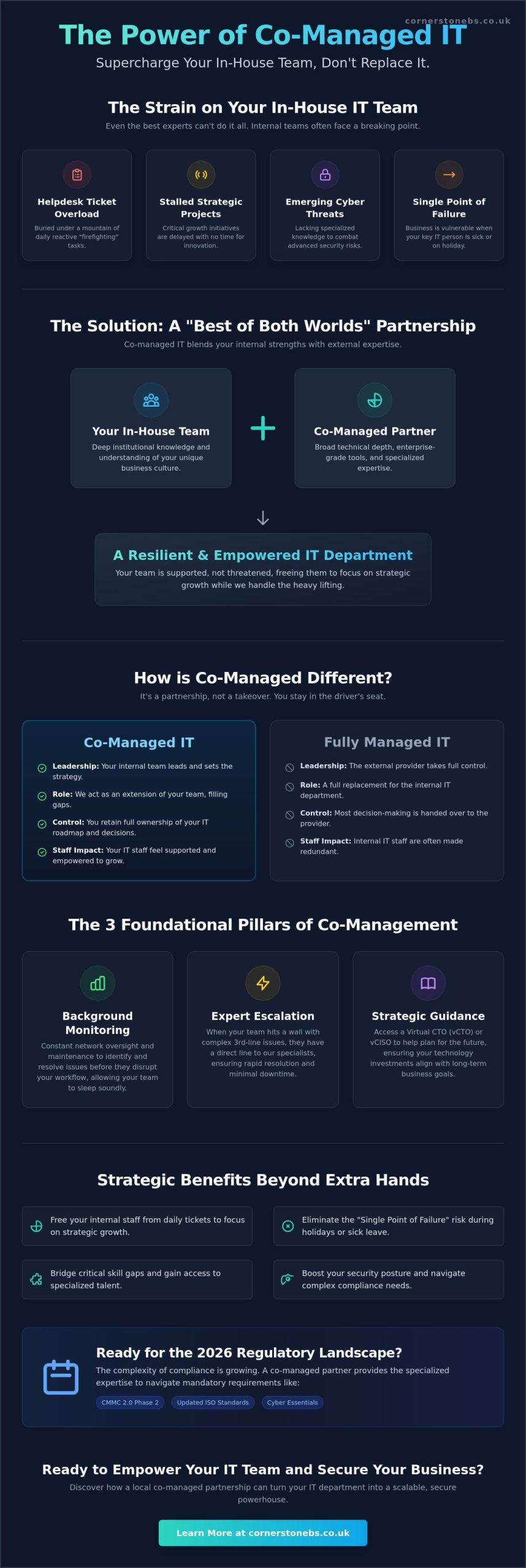
Understand how a hybrid model blends your team’s institutional knowledge with external technical depth to create a more resilient IT department.
Learn how co-managed IT support services eliminate the “single point of failure” risk, ensuring your systems remain stable even when your lead IT person is on holiday.
Discover the power of a clear Responsibility Assignment Matrix (RACI) to free your internal staff from daily tickets so they can focus on strategic growth.
Explore how to boost your security posture and navigate complex 2026 compliance requirements like Cyber Essentials with help from dedicated specialists.
See how an award-winning onboarding process integrates advanced tools and collaborative expertise seamlessly into your existing business operations.
At its heart, co-managed IT support services represent a collaborative partnership between your existing internal staff and an external Managed service provider. This isn’t a replacement strategy. It’s a hybrid model designed to bolster your current resources. With managed services expected to account for 22.97% of the total IT services market in 2026, more businesses are realizing they don’t have to choose between keeping IT in-house or outsourcing it entirely. You keep your trusted IT manager, but you give them a team of experts to lean on when things get complex.
The Core Components of a Co-managed Model
A successful co-managed partnership is built on three foundational pillars that work silently in the background to protect your business stability:
Background Monitoring: We provide constant network oversight and maintenance. This identifies issues before they disrupt your workflow, allowing your internal team to sleep soundly.
Expert Escalation: When your team hits a wall with complex 3rd-line technical issues, they have a direct line to our specialists. This ensures problems are solved quickly without long periods of downtime.
Strategic Guidance: You gain access to a Virtual CTO (vCTO) or vCISO. These experts help you plan for the future, ensuring your technology investments align with your long-term business goals.
How it Differs from Fully Managed IT
The biggest difference lies in who holds the reins. In a fully managed model, the provider takes over the entire IT function. With co-managed IT support services, your internal team leads the way. We act as an extension of their capabilities, not a replacement for their roles. This creates a significant emotional difference within your company. Instead of feeling threatened, your IT staff feel supported and empowered. You get the flexibility to choose which tasks stay in-house and which ones you’d rather hand over to us. Whether you need help with out-of-hours coverage or specific cyber security projects, the split is always customized to suit your strengths.
Why Internal IT Teams are Turning to Co-managed Partnerships
One of the biggest risks we see is the “Single Point of Failure.” If your entire IT infrastructure sits in the head of one person, your business is vulnerable every time they take a holiday or catch a cold. A co-managed partnership provides a safety net. It ensures that your systems remain stable and your users remain supported, regardless of who is in the office. This model also bridges the critical skill gaps that are becoming harder to fill. As the Gartner Market Guide for security services highlights, the demand for specialized talent is outstripping supply. By partnering with us, you gain immediate access to experts in cyber security services without the massive overhead of hiring a full-time specialist.
Combating IT Manager Burnout
The “always on” culture is taking a heavy toll on IT professionals. When a solo manager is responsible for everything from forgotten passwords to server migrations, burnout is inevitable. Offloading the repetitive “noise” of basic helpdesk tickets to a partner significantly improves staff retention. It allows your team to feel like professionals again, rather than just a reactive fix-it crew. Providing this support network creates a healthier work environment where your internal staff can thrive. If you’re seeing signs of fatigue in your team, it might be time to have a chat with local IT experts about a better way forward.
Access to Enterprise-Grade Technology
Small and medium-sized businesses often struggle to justify the cost of high-end IT management tools. Through a co-managed model, you leverage our investment in advanced Remote Monitoring and Management (RMM) and Professional Services Automation (PSA) software. These tools provide a “single version of truth” for your IT data, allowing both your internal team and our specialists to see exactly what’s happening in real-time. This standardizes your security protocols and ensures that your hardware and network infrastructure are always operating at peak efficiency.
Defining the Boundaries: How Responsibilities are Shared
One of the biggest hurdles in any partnership is the “who does what” question. Without a clear map, tasks can slip through the cracks or, conversely, both teams might end up working on the same ticket. To avoid this, we use a framework called a Responsibility Assignment Matrix (RACI). This ensures everyone knows who is Responsible, Accountable, Consulted, and Informed for every part of your infrastructure. When implementing co-managed IT support services, this document becomes the heartbeat of our collaboration. It turns a vague idea of “help” into a precise, high-performance engine that respects your internal team’s authority while providing the backup they need.
The beauty of this model is its total flexibility. We don’t believe in rigid, one-size-fits-all templates. Instead, we ensure our it company solutions are bespoke to your specific workflow. Whether you need us to step in only during out-of-hours periods or you want us to handle specific complex tasks, the boundary is wherever you draw it. Most importantly, we maintain a unified front for your employees. To your end-users, it shouldn’t feel like they’re dealing with two separate entities. It should feel like one single, highly capable IT department that’s always there when they need it.
The “Tiered” Support Strategy
Most businesses choose to split responsibilities by technical “tiers.” In a traditional setup, your internal team might handle Tier 1 issues like password resets or basic hardware setups because they’re on-site and can react with lightning speed. Our team then handles the Tier 2 and Tier 3 escalations, such as server crashes or complex network architecture, which require deep, specialized knowledge. However, we also see a growing trend of “reverse tiering.” In this scenario, we handle the repetitive Tier 1 tickets to clear the “noise,” allowing your internal staff to focus on high-level Tier 3 strategic projects and proprietary systems.
Specialised Focus Areas
Another effective way to share the load is by assigning specific technology silos to the experts. Many local firms choose to hand over the management of their cloud solutions and cyber security to us. This makes sense because these areas require constant, specialized training that is difficult for a solo IT manager to maintain. This leaves your internal team free to focus on user training and the proprietary software that is unique to your industry. When it’s time for large-scale infrastructure upgrades, we work side-by-side in a collaborative project management style, combining our technical depth with your team’s institutional knowledge.
The Strategic Benefits: Beyond Just Extra Hands
While clearing the helpdesk backlog is an immediate win, the true power of co-managed IT support services lies in strategic acceleration. We help you move from simply maintaining the status quo to driving digital transformation. This happens through shared tooling. By integrating your internal team into our enterprise-grade Professional Services Automation (PSA) and Remote Monitoring and Management (RMM) platforms, we eliminate the communication silos that typically stall complex projects. You get a real-time, shared view of your entire network. This allows for rapid decision-making and collective brainpower on large-scale infrastructure upgrades.
This partnership also transforms your financial predictability. Instead of facing erratic, break-fix repair bills or the sudden cost of an emergency server replacement, you move to a fixed monthly fee. This covers your essential maintenance, security monitoring, and strategic support. It makes your IT spend a manageable operational expense rather than a series of capital shocks. It’s about creating a stable foundation for your business to grow without technical debt holding you back. When your budgeting is predictable, your leadership team can plan for the future with total confidence.
Continuous Security Monitoring
In the 2026 threat landscape, the idea of a single IT person monitoring a network 24/7 is no longer realistic. Cyber insurance providers now demand more rigorous standards, often requiring proof of continuous operation for security controls. We implement a Zero Trust model as a baseline, ensuring every device and user is verified before accessing your data. By deploying advanced Endpoint Detection and Response (EDR), we catch threats that traditional antivirus misses. Regular security audits and Cyber Essentials compliance become a standard part of your routine, rather than a stressful annual scramble.
Business Continuity and vCTO Services
Strategic growth requires a 3-5 year technology roadmap. Our Virtual CTO (vCTO) services provide the high-level guidance needed to plan hardware lifecycles and complex projects, such as a Microsoft 365 migration for business UK. This ensures your technology evolves alongside your commercial goals. Perhaps most importantly, it protects your business continuity. You’re never held to ransom by the institutional knowledge of a single staff member. If you want to see how a strategic partnership can secure your future, reach out to our local team for a conversation about your goals.
Implementing Co-managed IT with Cornerstone Business Solutions
Choosing to integrate an external partner into your internal team is a significant decision. We understand that for many IT managers, there’s a lingering worry that “co-managed” is just a polite word for “replacement.” At Cornerstone Business Solutions, our award-winning approach is built on the exact opposite philosophy. We don’t replace. We reinforce. We’ve spent years honing a collaborative technology model that treats your in-house staff as the heroes of the story. Our goal is to provide the specialized tools and extra hands they need to shine, ensuring your business remains stable and secure in an increasingly complex 2026 digital environment.
The journey begins with a seamless onboarding process designed to build confidence from day one. We start with a comprehensive audit of your current infrastructure to identify any immediate risks or performance bottlenecks. Following this, we move into tool integration, where we sync our professional management platforms with your existing systems. This creates a shared workspace where your team and ours can see the same data in real-time. Finally, we focus on team introductions. We don’t just send over a login; we sit down with your staff to understand their daily challenges and establish a culture of mutual respect. This ensures that our co-managed IT support services feel like a natural extension of your company culture.
A Partnership Built on Trust
We’re proud of our regional roots, and that local warmth defines how we work. We speak your language, providing jargon-free support that simplifies even the most daunting technical concepts. Our commitment to transparent communication means you’ll always have access to shared documentation and clear reporting. We see ourselves as a mentor and a resource for your internal staff. Whether they need a second opinion on a complex network configuration or help navigating new compliance standards, we’re here to provide professional authority without the ego. It’s about providing emotional security for your team as much as technical security for your servers.
Next Steps to Scale Your IT
Scaling your department shouldn’t be a stressful ordeal. The first step is often a “Gap Analysis,” which allows us to see exactly where your team is stretched thin and where our expertise can provide the most value. We invite you to have an informal discovery call with our expert team to discuss your specific needs. From there, we can customize a co-managed contract that fits your 2026 goals and beyond. We’re here to help you build a proactive, resilient IT department that’s ready for growth. If you’re ready to eliminate the burnout and bridge the skill gaps in your organization, reach out for a chat today.
Empower Your Team for a Secure and Scalable Future
Your internal IT staff shouldn’t have to choose between their mental health and your business security. By embracing co-managed IT support services, you provide them with a professional safety net that eliminates the single point of failure risk and stops the cycle of endless firefighting. You’ve seen how this model provides access to enterprise-grade tools and specialized expertise in cyber security, all while keeping your trusted team in control of the strategic roadmap.
As a multi-award-winning IT service provider and strategic partner with Microsoft, IBM, and Cisco, we bring a wealth of technical depth to your doorstep. Our UK-based helpdesk and proactive 24/7 monitoring ensure your infrastructure remains stable every hour of every day. We aren’t just here to fix things; we’re here to help your business thrive. Technology should be the foundation of your stability, not a source of stress.
What is the main difference between managed and co-managed IT?
Managed IT is a total handover of your technology department to an external provider. In contrast, co-managed IT support services represent a collaborative partnership where we work alongside your existing staff. You keep your internal IT manager to lead strategy and culture while we provide the extra hands and specialized skills needed for complex infrastructure or security tasks. It’s a hybrid model that blends institutional knowledge with broad technical depth.
Will my internal IT manager lose their job if we use co-managed services?
No, the goal is to reinforce your IT manager, not replace them. We take over the repetitive helpdesk tickets and background maintenance that often lead to burnout. This frees your manager to focus on high-level projects that actually grow your business. Most IT professionals find the partnership reduces their stress and provides them with a valuable support network of fellow experts to lean on when things get tough.
How does the co-managed model handle security and compliance?
We act as a specialized layer of defense that operates 24/7. While your internal team handles daily user needs, we manage advanced security protocols like Zero Trust and endpoint detection. This is particularly vital for meeting 2026 compliance standards like Cyber Essentials. We provide the constant monitoring and detailed documentation that’s often too time-consuming for a solo IT manager to maintain alone, ensuring your business stays secure and audit-ready.
Do we have to use the same IT tools as the MSP?
Not necessarily, but we usually integrate your team into our professional management platforms to ensure maximum efficiency. This creates a “single version of truth” where both teams see the same network data in real-time. Using our enterprise-grade RMM and PSA tools avoids communication silos and allows for faster response times. We’ll discuss the best fit for your workflow during our initial discovery call to ensure a seamless technical fit.
Can we use co-managed IT support for specific projects only?
Yes, the model is highly flexible and can be tailored to specific high-impact initiatives. Many local firms partner with us for one-off projects like network infrastructure upgrades or Microsoft 365 migrations. This allows your internal staff to maintain daily operations without being overwhelmed by a massive technical transition. Once the project is complete, you can choose to continue with ongoing support or return to your standard internal operations.
Is co-managed IT support more cost-effective than hiring a new employee?
It’s typically much more cost-effective than adding a senior engineer to your payroll. You gain access to an entire team of specialists for a fixed monthly fee, avoiding the high recruitment costs, training expenses, and benefits packages associated with a new full-time hire. It’s a scalable way to grow your department’s capabilities and access enterprise-level tools without the long-term overhead of increasing your internal headcount.
How do you prevent friction between the internal team and the MSP?
We prevent friction by establishing clear boundaries from day one. Using a Responsibility Assignment Matrix (RACI), we define exactly who handles which tasks so there’s no confusion or overlap. We foster a culture of mutual respect and act as a resource for your staff, not a competitor. Our regional, approachable style ensures we build a genuine relationship with your team, focusing on shared success rather than technical ego.
What happens when my internal IT person goes on holiday?
We provide a reliable safety net that ensures your business stays running while your staff are away. Our UK-based helpdesk steps in to handle all daily tickets and system monitoring, so your manager can enjoy their break without checking their phone. This eliminates the “single point of failure” risk. You’ll have total peace of mind knowing that a team of experts who already know your systems is keeping things stable in their absence.
What if the technology meant to power your business is actually the biggest bottleneck in your day? Most local business owners we speak with are tired of unpredictable monthly invoices and helpdesks that seem to vanish when a crisis hits. You deserve better than a reactive fix for your business IT support packages; you need a strategic foundation that lets you sleep soundly. We understand that tech jargon often makes these decisions feel like a gamble, but choosing the right plan is the smartest move you can make for your team’s productivity.
We agree that your focus should be on your customers, not on whether your server will survive the afternoon. This guide will show you exactly how to evaluate and select an IT plan that secures your continuity and fuels your growth in 2026. We’ll explore the latest security standards like NIST CSF 2.0, explain why proactive management beats the old break-fix model, and give you a clear framework to find a partner that treats your business goals as their own. It is time to move past the fear of cyber attacks and start building a resilient future with a team that truly knows your name.
Key Takeaways
Understand why the reactive “break-fix” model is a liability in 2026 and how proactive management acts as an insurance policy for your digital assets.
Learn to identify the core components of modern business IT support packages, focusing on unlimited helpdesk access and multi-layered cyber security.
Evaluate the difference between user-based and device-based billing to select the most cost-effective structure for your specific team size.
Spot hidden “out-of-scope” charges before you sign, ensuring your monthly fee remains fixed and predictable.
Discover why bespoke technology plans outperform rigid pricing tiers by aligning your IT infrastructure with your actual business growth goals.
The Evolution of Business IT Support Packages: Why Break-Fix is a Risk in 2026
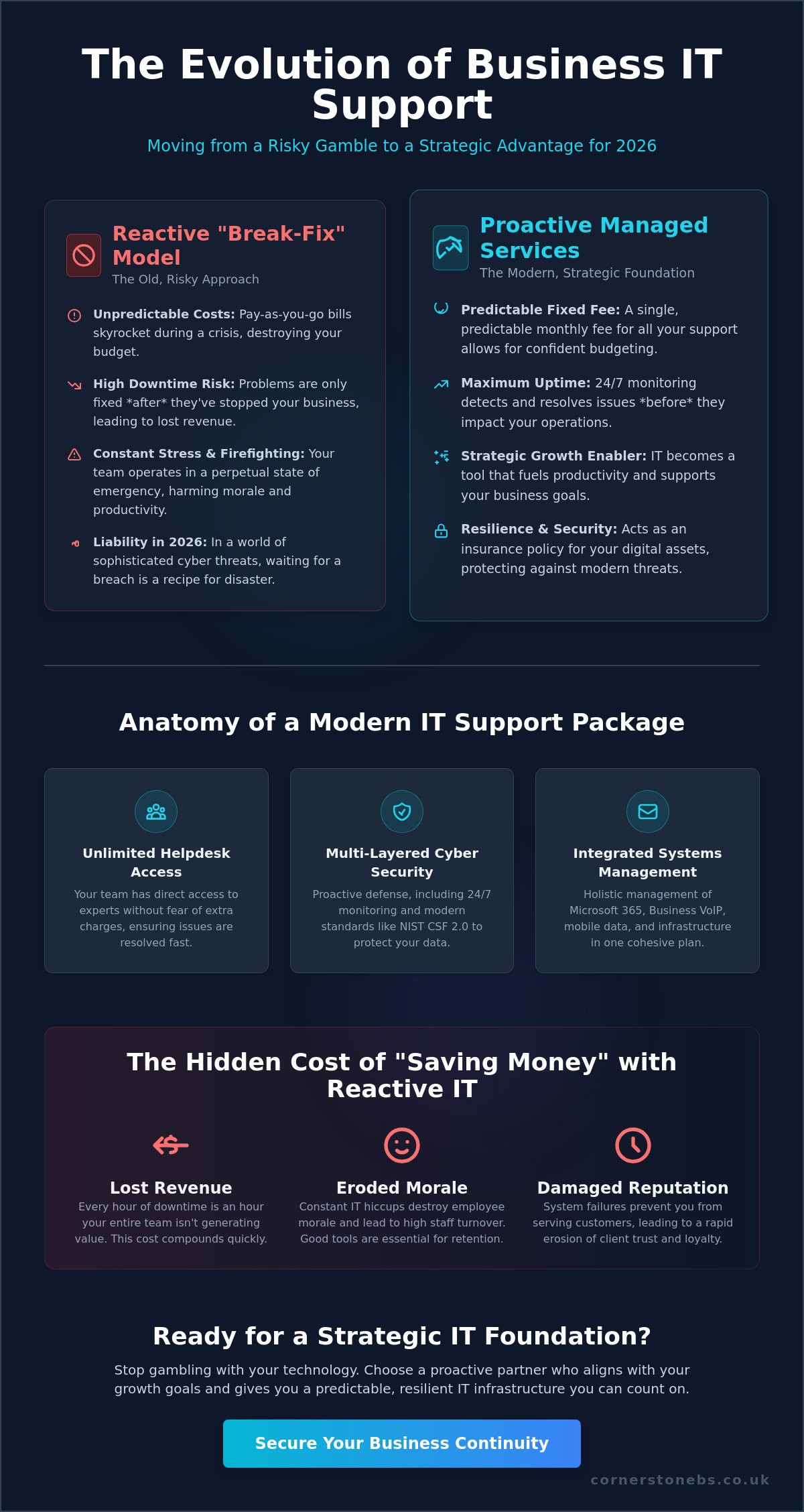
Ten years ago, you called an IT person when your computer wouldn’t turn on. Today, that approach is a recipe for disaster. Modern business IT support packages have evolved into a proactive insurance policy for your digital assets. We don’t just wait for things to break; we ensure they stay running. This shift is driven by the sheer complexity of modern networks and the speed at which cyber threats move. If you’re waiting for a system to fail before you fix it, you’re already losing money. You need a partner who sees the storm coming before the first raindrop hits.
The transition toward Managed services represents a fundamental change in how local businesses view their technology. It’s no longer a utility you pay for only when it fails. It’s a strategic partnership. Our award-winning support team focuses on building resilience, ensuring your infrastructure is strong enough to handle rapid growth. We identify bottlenecks in your network before your staff even notices a slowdown. This keeps productivity high and your team focused on what they do best. By investing in the right business IT support packages, you’re choosing stability over chaos.
Understanding Proactive vs. Reactive Support
Reactive IT is inherently stressful. It leads to unpredictable monthly bills and hidden financial leaks that drain your budget. When a server goes down, the cost isn’t just the repair bill; it’s the hours of lost work. We embrace an “Always-On” mentality. Through 24/7 monitoring, we spot a failing hard drive or a suspicious login attempt at 3:00 AM. By the time your team starts work at 9:00 AM, the issue is often already resolved. This moves IT from a cost centre that eats your profits to a growth enabler that supports your scaling.
The True Cost of Downtime
The Anatomy of a Modern IT Support Package: What’s Actually Inside?
One often overlooked element is the synergy between communication and infrastructure. While some providers treat your phone system and your internet as separate entities, a truly modern support plan merges them. We integrate Business VoIP and mobile solutions into your core IT strategy. This means your team stays connected whether they are in the office or on the road. When your business IT support packages cover the full spectrum of your digital needs, you eliminate the finger-pointing that often happens between different vendors. If you are curious about how this fits your specific setup, you can always explore our approach to regional support.
The Core Pillar: Unlimited Managed IT Support
True ‘unlimited’ support means exactly that. There are no hidden overages or surprise invoices at the end of the month. This predictable cost model allows you to budget with confidence while knowing your infrastructure is in expert hands. We leverage partnerships with global leaders like Microsoft, IBM, and Cisco to bring enterprise-grade stability to local firms. Robust managed IT services act as the bedrock for your entire operation, ensuring that your hardware and network infrastructure remain fast and reliable. When you remove the ‘per-ticket’ cost barrier, your staff feels empowered to report small issues before they grow into expensive problems.
Security and Disaster Recovery
In 2026, security isn’t an optional add-on. It’s the most critical part of the package. Comprehensive cyber security services must be baked into every level of your support. This goes far beyond basic antivirus. We include multi-layered protection, automated backups, and regular security audits as standard features. Following best practices, like those found in the FTC cybersecurity guide, ensures your business stays resilient against evolving threats. If the worst happens, our disaster recovery protocols ensure you’re back on your feet in minutes. We provide the emotional and operational security you need to scale with confidence.
How to Evaluate and Compare IT Support Plans for Your Organisation
Choosing between different business IT support packages shouldn’t feel like a guessing game. You need a clear framework to compare apples with apples. Start by looking at how you’re billed. Most providers offer “per-user” or “per-device” pricing. If your team uses multiple gadgets, like a laptop, tablet, and smartphone, a per-user model is often more cost-effective. Conversely, if you have shared workstations in a warehouse or retail setting, per-device billing might save you money. We help you map out these requirements so your plan fits your actual workflow, not a generic template.
Scalability is another non-negotiable factor. Your technology should never be a ceiling on your growth. Ask yourself if the provider can easily add new staff members or support a second location without a complete contract overhaul. A local partner who understands the regional market will be more agile in helping you expand. You also need to strike the right balance between on-site and remote support. While 90% of issues are now fixed remotely, having an expert who can be at your office quickly when hardware fails provides invaluable peace of mind. High-quality business IT support packages must provide this safety net.
The SLA Trap: Response vs. Resolution
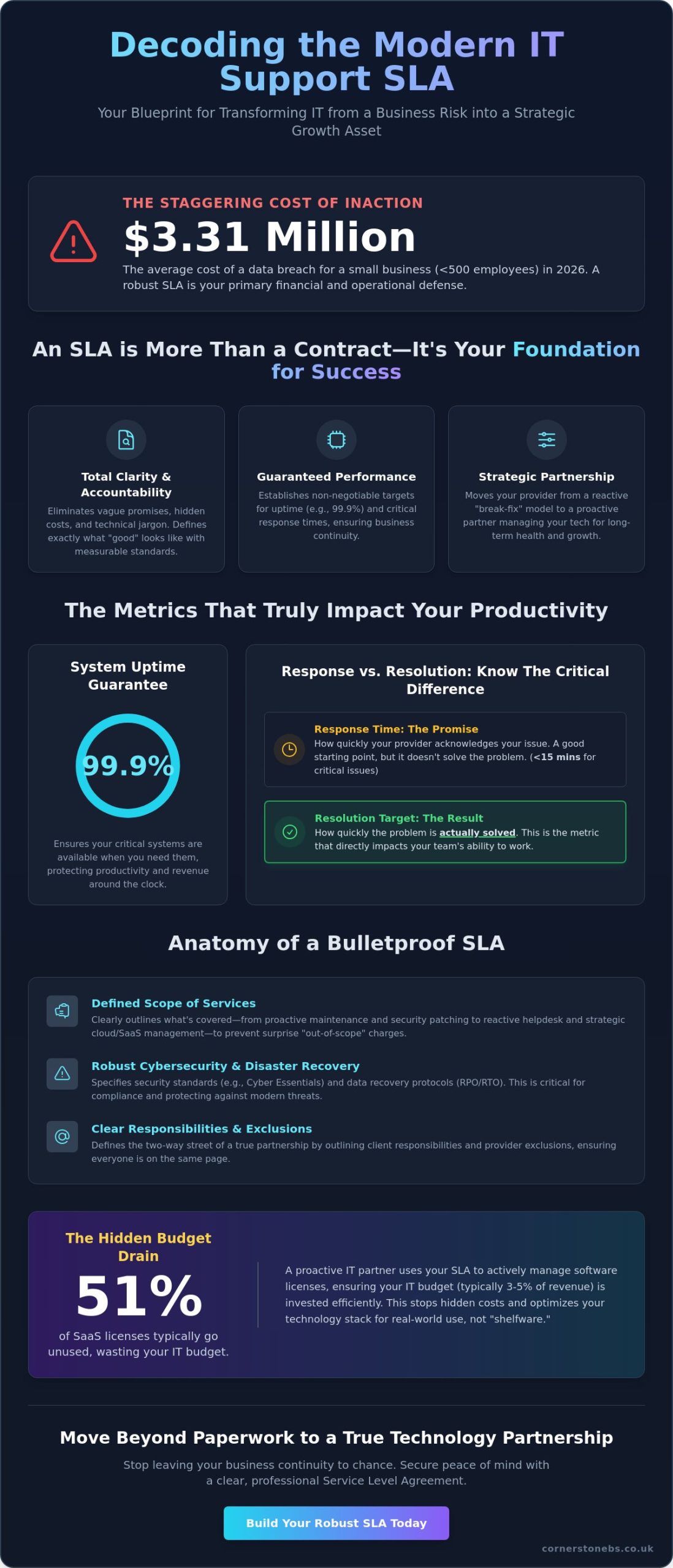
Many contracts boast a “one-hour response time,” but you should be careful. A response often just means an automated email or a quick “we’ve received your ticket” from a dispatcher. What actually matters to your bottom line is the resolution time. You need a partner committed to getting you back up and running, not just acknowledging the problem. Check the fine print on emergency on-site visits to ensure they aren’t hidden behind extra fees. We provide a dedicated account manager who learns your specific business goals. This human connection ensures that when you call, you’re talking to someone who already knows your infrastructure inside out.
Infrastructure and Hardware Integration
Your choice of support should align with your physical tech. Effective IT company solutions should include hardware procurement and lifecycle management. It’s frustrating to buy a top-tier support plan only to find your existing network infrastructure can’t handle the load. We assess your cabling, routers, and servers to ensure they’re up to the task. There’s also a massive efficiency gain in using a single provider for your IT, mobile, and telecommunications. It simplifies your billing, reduces vendor finger-pointing, and ensures every piece of your tech stack works in perfect harmony.
Beyond the Price Tag: Identifying Hidden Costs and Value-Adds
Don’t let a low monthly headline price fool you. When comparing business IT support packages, the real value lies in what happens when you need something outside of the daily grind. Many providers lure you in with a cheap rate, only to hit you with ‘out-of-scope’ fees the moment you want to set up a new workstation or move an office. We believe in total transparency. A truly collaborative partner identifies these potential traps early, ensuring your budget remains predictable even as your needs change. It’s about looking beyond the initial invoice to see the long-term impact on your bottom line.
A thorough onboarding process is another area where quality shines. While some might see an initial audit fee as a hurdle, it is actually a vital investment. This deep dive into your infrastructure allows us to find the ‘ghosts in the machine’ that cause recurring issues. We also take the burden of vendor management off your shoulders. Instead of you spending hours on the phone with an internet provider or a software company, we handle those conversations for you. This frees your time to focus on regional growth while we manage the technical heavy lifting. If you want to see how a transparent plan can work for your team, view our full range of support options.
Strategic IT Consulting
Your support plan should include regular ‘vCIO’ (Virtual CIO) sessions to ensure your tech stays aligned with your business goals. These meetings help you plan for major milestones, such as Microsoft 365 migrations, without the stress of an emergency spend. By mapping out a clear technology roadmap, you avoid ‘technical debt’—the costly habit of patching up old systems rather than investing in modern solutions. We act as your long-term partner, helping you choose the right tools today so you don’t have to replace them tomorrow.
Training and Empowerment
Modern business IT support packages should focus on people as much as hardware. We provide cyber security awareness training that significantly reduces the number of support tickets caused by accidental clicks. When your staff understands how to use cloud solutions effectively, they become more productive and less frustrated. An educated workforce that understands digital risks becomes your business’s strongest and most cost-effective firewall. We take pride in simplifying complex concepts so your team feels confident and empowered every time they log in.
Choosing a partner is an act of trust. That trust is why we lead with our multi-award-winning service and third-party validation as a prefix to everything we do. It isn’t just about technical skill; it is about the confidence that comes from working with a regional expert who has a proven track record of excellence. When you move away from a transactional relationship to a partnership model, the first 90 days are transformative. We spend this time stabilising your environment, eliminating recurring “niggles,” and setting a clear baseline for your future tech strategy. You aren’t just buying a service; you’re gaining a dedicated team that cares about your success.
The Power of Bespoke Design
Your Next Steps to Tech Stability
The path to a more reliable future starts with a simple, informal conversation. We don’t believe in high-pressure sales; we believe in solving problems. Our process begins with a comprehensive audit to uncover the gaps in your existing support and identify where your current tech might be holding you back. This isn’t just a technical check; it’s a strategic review of how your systems impact your staff’s daily lives.
Initiate a Conversation: Tell us about the bottlenecks that frustrate your team.
The Audit Process: We conduct a deep dive into your infrastructure to find hidden risks.
Collaborative Roadmap: We build a plan that aligns your IT with your business goals for 2026.
Moving away from transactional IT means you no longer have to worry about the “what ifs.” You can focus on your regional community and your customers while we ensure your digital world remains secure, fast, and always on.
Take Control of Your Digital Future Today
Choosing between different business IT support packages is about more than just comparing prices; it’s about finding a dedicated partner who understands your regional roots and your global ambitions. You’ve seen how the move from reactive “break-fix” repairs to proactive management creates a foundation for genuine stability. By prioritising bespoke solutions over rigid tiers, you ensure every part of your tech stack, from Microsoft 365 to your network infrastructure, works for your bottom line. Transparency in your contract and a focus on resolution times will protect you from hidden costs and unnecessary downtime.
As a multi-award-winning IT services provider, we take pride in our strong partnerships with industry leaders like Microsoft, IBM, and Cisco. We don’t believe in one-size-fits-all. We believe in building resilient, custom-tailored systems that give you the emotional and operational security to focus on your growth. It’s time to stop worrying about your technology and start leveraging it as a competitive advantage. Ready for a bespoke IT solution? Let’s start a conversation today. We look forward to helping you build a stronger, more secure future for your team.
Frequently Asked Questions
What are business IT support packages?
Business IT support packages are bundled service agreements where a provider takes full responsibility for your digital environment for a fixed monthly fee. They replace the old, expensive model of paying for every individual repair. You receive a suite of services including helpdesk access, network monitoring, and security management. This approach provides the operational stability you need to focus on your core business goals.
How much do business IT support packages typically cost?
The investment for these plans varies based on your total number of users and the specific level of security your industry requires. Most providers use per-user or per-device billing models to keep your costs predictable and transparent. We don’t believe in generic pricing because every local business has unique infrastructure needs. We focus on creating a bespoke plan that delivers the best value for your specific growth strategy.
Is unlimited helpdesk support really unlimited?
Yes, in a genuine managed service model, unlimited helpdesk support means your staff can reach out for remote assistance as often as they need. There are no surprise invoices or “per-ticket” charges that discourage your team from seeking help. This open line of communication allows us to fix small glitches before they cause major downtime. It’s a collaborative way to keep your productivity high and your tech frustration low.
Do IT support packages include hardware repairs?
Can I change my IT support package as my business grows?
Flexibility is a major advantage of modern business IT support packages. You can easily scale your plan up or down as your team size changes or as you move into new premises. We design our solutions to be agile, ensuring your technology supports your expansion rather than holding you back. It’s easy to add new services like Microsoft 365 seats or Business VoIP as your needs evolve.
What is the difference between remote and on-site IT support?
Remote support allows our technicians to fix software and configuration issues instantly via a digital connection. It is the fastest way to resolve the majority of daily tech hurdles. On-site support involves a physical visit to your office for hardware repairs or network infrastructure tasks. A quality plan provides both, giving you the speed of remote fixes and the security of a local expert on your doorstep when needed.
Are cyber security services included in standard IT support plans?
Foundational security like antivirus and email filtering is often part of a standard plan, but we recommend more robust protection in 2026. High-quality business IT support packages should integrate multi-layered cyber security services to defend against evolving threats. We bake these protections into your infrastructure to ensure your data remains secure and your business stays compliant with the latest industry regulations.
How do I switch from my current IT provider to a new support package?
Switching to a new provider is a managed, stress-free process that we handle on your behalf. We perform a thorough audit of your current systems and work with your existing vendor to transfer all necessary credentials and documentation. Our goal is to ensure zero downtime during the transition. You’ll feel the difference of a proactive partnership from the very first day of your new agreement.
Switching your IT support provider shouldn’t feel like a high-stakes gamble with your business continuity. Many business owners delay a necessary change because they aren’t sure how to switch IT support providers UK without triggering a technical meltdown or exposing sensitive data. It is a valid concern. You have likely stayed with a mediocre partner longer than you should have just to avoid the headache of migration or those dreaded hidden exit fees.
We understand that anxiety, especially with the 2026 updates to the Data (Use and Access) Act and the new Cyber Essentials v3.3 standards making compliance more complex. This guide will show you how to navigate a stress-free transition to a superior, proactive IT partner without risking data loss or operational downtime. We have built our reputation as a trusted local expert by simplifying these transitions for growing businesses. You are about to discover a clear roadmap for a seamless migration that keeps your team productive and your infrastructure secure from day one.
Key Takeaways
Identify the critical warning signs that your current partnership is failing, from sluggish response times to a reactive ‘break-fix’ mindset.
Learn exactly how to switch IT support providers UK using a proven five-step roadmap that guarantees zero operational downtime.
Navigate complex contractual obligations with confidence by identifying hidden exit fees and managing notice periods effectively.
Discover why industry accolades and global vendor partnerships are essential benchmarks for selecting a reliable technology partner in 2026.
Protect your business continuity with a structured onboarding process that prioritizes data security and emotional peace of mind.
Signs It’s Time to Switch Your IT Support Provider
Your technology should work as hard as you do. If you feel like you are constantly shouting into a void when a system fails, you aren’t alone. Many UK businesses tolerate subpar service because they fear the transition process. However, staying with a provider that only reacts when things break is a recipe for stagnation. Learning how to switch IT support providers UK starts with identifying the friction points that are quietly draining your productivity and profit.
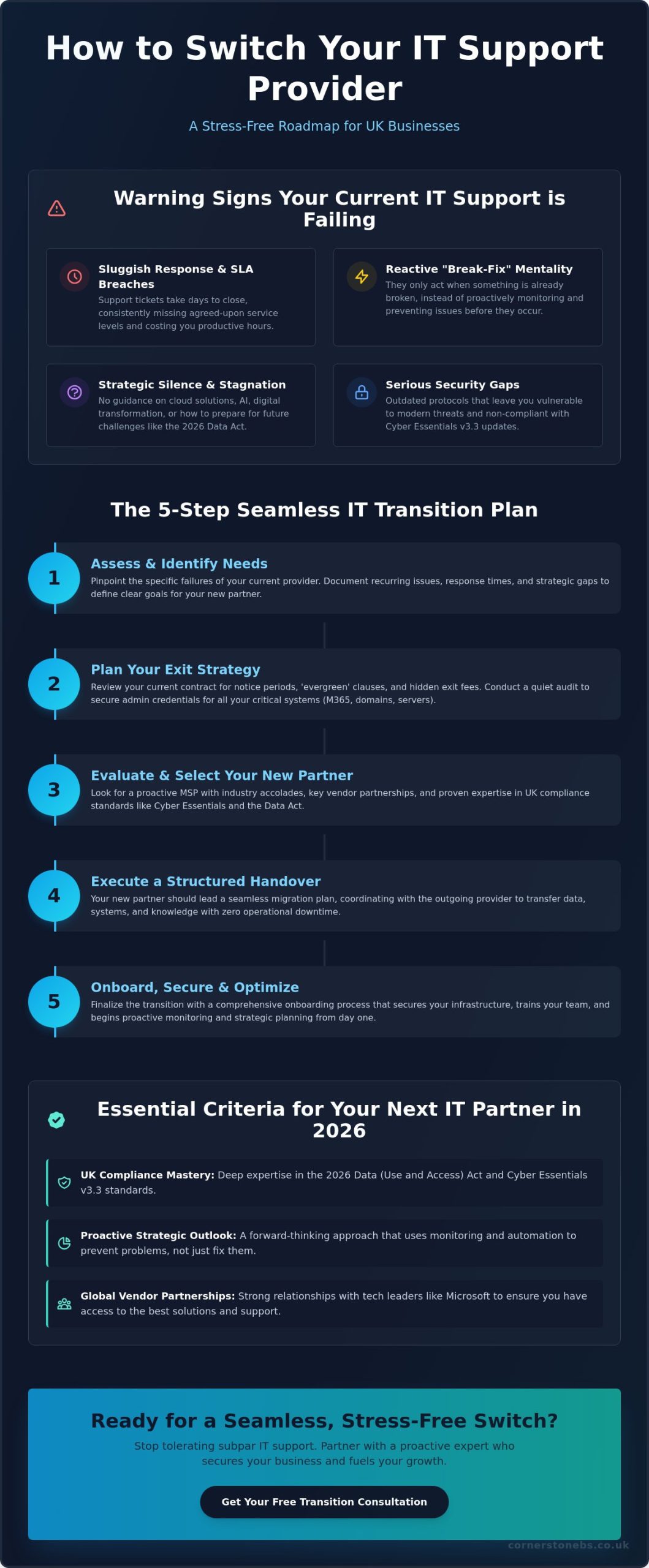
Signs of trouble often start small. Maybe it’s a support ticket that takes three days to close, or a recurring ‘glitch’ that never quite gets fixed. Eventually, these small annoyances become systemic failures. In 2026, the stakes are higher than ever. If your provider hasn’t mentioned the April 2026 Cyber Essentials v3.3 updates or helped you navigate the Data (Use and Access) Act 2025, they are leaving you legally and financially exposed. Common red flags include:
A persistent ‘break-fix’ mentality: They only show up when something is already broken, rather than preventing the issue in the first place.
SLA breaches: Slow response times that consistently miss the targets agreed upon in your contract.
Strategic silence: A total lack of guidance on cloud solutions, digital transformation, or how to use AI to drive efficiency.
Security gaps: Outdated protocols that don’t account for modern threats like deepfake vishing or sophisticated ransomware.
The Cost of Outgrowing Your Current Provider
The Proactivity Test: Is Your IT Support Reactive?
A true Managed Service Provider (MSP) doesn’t wait for your phone call to start working. They use proactive monitoring to kill problems in the cradle. In 2026, waiting for a system to fail is a high-risk strategy that leads to emergency repair costs and reputational damage. There is a massive difference between a basic helpdesk and a strategic technology partner. While a helpdesk fixes what is broken, a partner looks at your three-year growth plan and builds the infrastructure to support it. Proactive maintenance doesn’t just save time; it provides the emotional security of knowing your systems are resilient and ready for whatever comes next.
Navigating Contractual Obligations and Offboarding Requirements
Contracts shouldn’t feel like handcuffs. Yet, many business owners find themselves trapped in agreements with hidden exit fees or restrictive notice periods. Understanding how to switch IT support providers UK requires a clinical look at your current paperwork before you make a move. Start by identifying your notice period. While 30 to 90 days is standard, some contracts include ‘evergreen’ clauses that automatically renew your commitment for another year if you miss a narrow cancellation window. Spotting these traps early is the best way to ensure your exit remains on your terms.
Beyond the timeline, look for financial hurdles. Some providers charge ‘offboarding fees’ to release your data or return hardware. Knowing these costs upfront prevents budget surprises during your transition. As highlighted in the Forbes guide on Breaking Up With Your Managed Services Provider, the goal is a clean break that protects your operational integrity. If you are unsure about the fine print, our team at Cornerstone Business Solutions can help you review your current agreement to identify potential risks.
The Asset and Credentials Audit
Who actually owns your digital assets? You’d be surprised how often businesses discover they don’t have the global admin rights to their own Microsoft 365 tenant or domain names. Before giving notice, conduct a quiet audit of your credentials. You must secure administrative access to your firewall, local servers, and cloud accounts. If your current provider holds these ‘keys to the kingdom’ exclusively, you may face delays during the handover. Ensure you have a documented list of all third-party vendor relationships, such as your internet service provider or business VoIP host, to maintain continuity.
Managing the Notice Period Professionally
Once you decide to move, keep the communication professional and transparent. You still rely on your outgoing provider for support during the notice period, so maintaining a collaborative tone is vital. Clearly outline your expectations for the handover, including the transfer of technical documentation and the decommissioning of remote monitoring tools. Legal considerations for data portability are also paramount. Under the 2026 UK data protection standards, your outgoing provider has a responsibility to facilitate a ‘reasonable and proportionate’ transfer of information. A structured handover protocol ensures that no data is lost in the gap between the old contract and the new partnership.
Evaluating Your Next Partner: Criteria for UK Businesses in 2026
Selecting a new technology partner is one of the most significant decisions you will make for your business stability this year. It’s not a mere swap of service tickets. It’s a strategic upgrade. When researching how to switch IT support providers UK, you must look beyond basic helpdesk functions. You need a partner who combines regional warmth with the technical muscle of a national leader. In 2026, the benchmark for excellence is defined by those who hold multi-award-winning status and maintain deep partnerships with global innovators like Microsoft, IBM, and Cisco.
Avoid ‘one-size-fits-all’ packages that treat your unique infrastructure like a commodity. Your business deserves a bespoke solution tailored to your specific growth goals. A superior provider doesn’t just maintain your hardware; they integrate robust cyber security into every layer of your network. This unified approach ensures that your Managed IT Support, Business VoIP, and Cloud Solutions work in harmony, creating a resilient foundation for your daily operations. You aren’t just buying support; you’re investing in a team that values your uptime as much as you do.
Accreditations and Security Standards
Compliance is no longer optional. In 2026, ISO certifications and Cyber Essentials Plus are the baseline for trust. Your new partner must demonstrate a deep understanding of the evolving UK regulatory environment. This includes navigating the complexities of the NIS2 directive and the Digital Operational Resilience Act (DORA) if you operate within critical supply chains. These standards protect your reputation. We recommend choosing a provider that undergoes regular third-party quality audits. This validation proves they don’t just claim to be the best; they have the accolades to back it up.
The Partnership Approach vs. Transactional Support
The 5-Step Seamless IT Transition Plan
A successful transition is built on precision, not luck. When you are figuring out how to switch IT support providers UK, you need a methodology that eliminates the ‘fear of the unknown’. We treat every onboarding as a structured project rather than a reactive event. This ensures that your team stays productive while we migrate your systems to a more robust, proactive environment. Our multi-award-winning team follows a clear roadmap to guarantee that your business continuity remains the top priority from the first conversation to the final optimization.
Step 1: The Discovery Phase – We perform a deep dive into your current infrastructure to identify every asset, software licence, and potential bottleneck.
Step 2: Coordination – We establish a clear timeline and communicate with your outgoing provider to ensure a professional, documented handover.
Step 3: Security & Data Migration – We move your digital assets with zero data loss, prioritizing your critical business information and sensitive client records.
Step 4: The Onboarding – We set up your new helpdesk and deploy our proactive monitoring tools across your entire network.
Step 5: Post-Switch Review – We optimize every system for peak performance, ensuring your technology aligns perfectly with your 2026 growth goals.
Step 1: The Comprehensive IT Audit
You can’t protect what you haven’t mapped. Our discovery phase identifies legacy hardware or outdated software that might be holding you back or creating security vulnerabilities. Performing a comprehensive pre-switch audit prevents unexpected downtime by uncovering hidden technical debt before it can disrupt the migration process. We map out your entire network infrastructure to create a stable foundation for future it company solutions. This level of detail ensures that when the switch happens, there are no surprises.
Ensuring Zero Downtime During Migration
Operational silence is the goal of any switch. Modern cloud solutions allow us to facilitate seamless data transfers without pulling the plug on your daily work. We often use redundant systems during the critical ‘cut-over’ period. This dual-running strategy means your team can continue accessing Microsoft 365 and your business VoIP systems while we finalize the back-end transition. It’s about maintaining momentum and removing the emotional stress of a ‘big bang’ switch. If you want to see how this roadmap fits your specific business, invite our team for an informal conversation about your current setup.
Experience a Stress-Free Switch with Cornerstone Business Solutions
Choosing a new technology partner is more than a technical migration. It’s a commitment to your future growth. We understand that the process of how to switch IT support providers UK can feel daunting, which is why we’ve refined our onboarding to be as quiet and efficient as the systems we manage. You won’t find any hidden ‘onboarding fees’ or long-term contractual traps here. Instead, you get a dedicated team focused on maintaining your business continuity while we build a more resilient infrastructure for your team.
Our multi-award-winning approach is built on the belief that technology should empower people, not frustrate them. We provide bespoke technology solutions that integrate your cloud environment, business communications, and cyber security services into one seamless platform. This unified strategy removes the friction of managing multiple vendors. By lead-loading our expertise during the transition, we ensure that your systems are optimized for performance from the very first day of our partnership.
Award-Winning Support for Every UK Sector
We take immense pride in our regional roots and our ability to support a diverse range of organizations. From fast-growing SMEs to large educational institutions, our team delivers the same level of professional authority and approachable warmth. Our global partnerships with industry leaders like Microsoft and Cisco ensure you receive world-class technology, while our local presence means we are always reachable when you need us most. It’s about bringing global standards to your doorstep with a community-focused heart.
Your Invitation to a Better IT Experience
Our clients don’t just see us as a supplier. They view us as a foundational element of their business stability. This shift from transactional support to a collaborative partnership provides the emotional security you need to focus on your core goals. You shouldn’t have to worry about your data security or system uptime; that’s our job. We offer a proactive, forward-thinking service that anticipates challenges before they impact your bottom line. It’s time to move away from the anxiety of reactive IT and experience the peace of mind that comes with a truly dedicated partner.
Secure Your Business Future with a Seamless Transition
Transitioning to a new IT partner is a strategic move that protects your bottom line and your team’s sanity. By following a structured audit and managing your notice period with professional clarity, you eliminate the risks of data loss or downtime. You’ve seen that understanding how to switch IT support providers UK is less about technical complexity and more about choosing a partner that prioritizes your growth. Since 2008, we’ve delivered bespoke solutions that replace reactive helpdesks with proactive, multi-award-winning support.
As official partners with Microsoft, IBM, and Cisco, we bring global technical excellence to our local community. We don’t just fix computers; we build resilient foundations that allow you to scale with confidence. You deserve a partner that cares about your business continuity as much as you do. Our team is ready to guide you through every step of the migration with the regional warmth and expert authority you expect.
Switch to an award-winning IT partner today and experience the difference of a truly collaborative relationship. We’re here to make your next chapter the most stable and successful one yet.
Frequently Asked Questions
How long does it typically take to switch IT providers in the UK?
A full transition usually takes between 30 and 90 days, depending primarily on the notice period in your current contract. While our technical team can complete the onboarding and data migration in as little as two to four weeks, we align our roadmap with your existing agreement to ensure you don’t pay for two services at once. This timeframe allows for a deep-dive audit and a relaxed training period for your staff.
Will there be any downtime for my staff during the transition?
You should experience zero downtime during a professionally managed switch. We use a parallel onboarding process where our proactive monitoring tools and security protocols are deployed while your old service is still active. This redundant approach ensures that the final “cut-over” of your network and cloud solutions is seamless, often taking place outside of your core business hours to protect your productivity.
What happens if my current IT company refuses to hand over passwords?
Your outgoing provider is legally obligated to return your digital assets, but we recommend securing your global administrative credentials before you formally give notice. If a provider becomes uncooperative, our experts can often work directly with vendors like Microsoft to verify your ownership and regain control of your tenants. Knowing how to switch IT support providers UK safely involves having a partner who understands these technical recovery protocols.
How do I know if a new MSP is actually proactive or just selling a dream?
A truly proactive partner will provide transparent reporting on issues they have resolved before you even knew they existed. Look for multi-award-winning providers who hold current Cyber Essentials Plus and ISO certifications. These accolades are third-party proof that the company invests in the sophisticated monitoring tools and automated workflows required to maintain your system stability 24/7, rather than just waiting for your call.
Is it possible to switch IT providers mid-contract?
Yes, you can switch mid-contract, though it typically involves a financial settlement for the remaining term. We often help business owners review their current agreements to identify any persistent SLA breaches that might allow for an earlier, penalty-free exit. Even if fees apply, many businesses find that the productivity gains from a superior service far outweigh the one-off cost of leaving a failing partnership.
What is the most important document I need from my outgoing provider?
The Technical Site Documentation is the most vital asset you need for a smooth handover. This document should include your full network map, administrative logins for all hardware, and an up-to-date software licence register. Having this information ready is a cornerstone of how to switch IT support providers UK without friction, as it allows your new partner to support your infrastructure from day one without guesswork.
How does a new provider handle my existing Microsoft 365 or cloud licences?
We manage your existing Microsoft 365 or cloud environment through a simple administrative transfer. There is no need to move data, change email addresses, or deal with user downtime. We simply take over the billing and management of your current tenant through our partner portal. This back-end swap is invisible to your employees and ensures that all your files and collaborative tools remain fully intact.
Can I switch my business phone system at the same time as my IT support?
Absolutely, and consolidating these services is often the most efficient way to upgrade your technology stack. Integrating your Business VoIP and Business Mobile with your Managed IT Support creates a unified communication strategy. This reduces the number of vendors you have to manage and ensures that your connectivity is just as secure and resilient as your core computer network, all supported by a single local team.
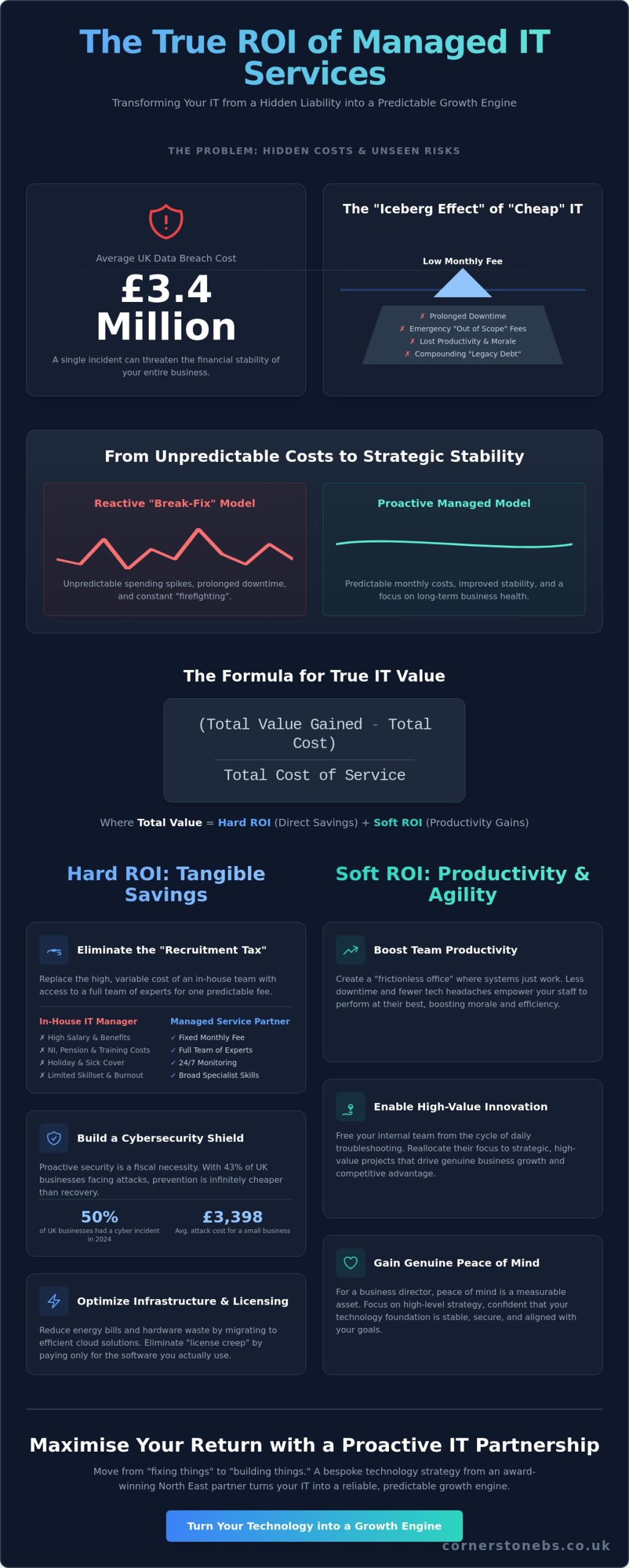
Did you know the average cost of a data breach in the UK has reached a staggering £3.4 million? For many business owners, calculating the ROI of managed IT services feels like a guessing game while facing rising recruitment costs and unpredictable repair bills. You likely see IT as a necessary expense rather than a tool for growth. We agree that technology should never be a “black hole” for your budget or a source of constant financial stress.
As an award-winning partner with deep North East roots, we’re here to help you move from “fixing things” to “building things.” This guide provides the exact financial and strategic framework you need to measure the true return on your IT partnership. You’ll learn how to account for the new Data (Use and Access) Act 2025 requirements and use a clear formula to prove that proactive support reduces your total cost of ownership. We’ll show you how to turn your technology into a predictable growth engine that offers genuine peace of mind. Let’s dive into the numbers and see what your business is really capable of.
Key Takeaways
Master a comprehensive framework for calculating the ROI of managed IT services that accounts for direct savings, productivity gains, and long-term risk reduction.
Learn how to eliminate the “recruitment tax” and reallocate your internal team’s focus from daily troubleshooting to high-value business innovation.
Uncover the true cost of “legacy debt” and see how migrating to proactive cloud solutions reduces hardware waste while boosting your team’s daily efficiency.
Protect your bottom line by understanding the financial impact of 2026 UK compliance requirements and the vital role of proactive security in preventing data breaches.
Discover how a bespoke technology strategy turns your IT infrastructure into a reliable growth engine that provides genuine peace of mind for your business.
Beyond the Monthly Invoice: A Framework for Calculating IT ROI
Most business owners look at their monthly IT bill and see a line item that takes money away from the bottom line. At Cornerstone, we see things differently. We believe that technology is an engine for growth, not a drain on resources. Moving away from the old “Break-Fix” model is the first step toward financial clarity. In a reactive model, you only pay when something breaks, which creates unpredictable spikes in spending and leaves you vulnerable to “legacy debt.” By contrast, a proactive managed model focuses on stability and long-term health. Before diving into the numbers, it helps to understand the basics of What are Managed IT Services? and how they differ from traditional, transactional support. We use the concept of Total Cost of Ownership (TCO) to help our partners see the full picture of their technology spend. Ultimately, IT ROI is the measurable impact of technical stability on business profitability.
The Basic ROI Formula for Managed Services
When calculating the ROI of managed IT services, you need a formula that captures more than just surface-level costs. The standard calculation we use is: (Total Value Gained – Total Cost of Service) / Total Cost of Service. Total value isn’t just about the money you didn’t spend on a new server. It’s the sum of direct savings, risk reduction, and productivity gains. We distinguish between “Hard ROI” and “Soft ROI” to give you a complete picture. Hard ROI includes tangible cash in hand, such as reduced energy bills from cloud migration or lower recruitment costs. Soft ROI measures the “frictionless office” where employee morale and speed increase because systems just work. Don’t fall into the trap of looking at a 12-month snapshot. A 3-year strategic view is much more accurate. It accounts for the avoided costs of major hardware failures and the steady compounding of increased staff efficiency.
Why ‘Cheap’ IT Often Yields the Lowest ROI
A low-cost provider might look attractive on a spreadsheet, but these contracts often suffer from the “Iceberg Effect.” The low monthly fee is just the tip. Beneath the surface, you’ll often find hidden emergency fees, “out of scope” charges, and the massive cost of prolonged downtime. Our award-winning support is designed to prevent this “revolving door” of technical debt. When you choose a partner based solely on the lowest price, you often end up paying three times more in lost productivity and emergency repairs. For a North East business director, peace of mind is a measurable asset. It allows you to focus on high-level strategy rather than worrying if your systems will hold up during a busy Tuesday. High ROI comes from a robust, tailored partnership that eliminates surprises and keeps your team moving forward.
The Hard Numbers: Direct Cost Savings and Risk Mitigation
Numbers don’t lie. When you begin calculating the ROI of managed IT services, the first place to look is your balance sheet. Most companies are leaking cash through what we call the “Recruitment Tax.” In the UK, the cost of hiring a single IT Manager isn’t just the salary. Once you add National Insurance, pensions, ongoing training, and holiday cover, the figure often spirals. Compare that to a fixed monthly fee for an entire award-winning team of experts. You get 24/7 monitoring and a deep bench of specialist skills without the heavy payroll burden.
Financial institutions like Fidelity offer standard frameworks for how to calculate Return on Investment, but IT requires a more nuanced approach that includes “avoided costs.” We often find “license creep” in Microsoft 365 environments where businesses pay for features they never use. Proactive licensing governance can trim this waste immediately. Then there is the financial shield of cybersecurity. With the average UK data breach cost hitting £3.4 million, and 43% of UK businesses facing attacks in the past year, managed security isn’t just a technical choice. It’s a fiscal necessity.
Infrastructure optimization also plays a massive role in your hard savings. When you are calculating the ROI of managed IT services, you must account for the 50% of UK businesses that experienced a cyber incident in 2024. By moving away from power-hungry on-site servers to tailored cloud solutions, you reduce energy costs and hardware waste. A small UK business faces an average attack cost of £3,398. Preventing just one of these incidents pays for months of support. These are not just theoretical gains. They are direct reductions in your total cost of ownership.
Staffing and Operational Overhead Savings
Hiring one person gives you one set of eyes. Partnering with us gives you a proactive team that never takes a sick day. You eliminate the overhead of internal HR management and gain access to robust network infrastructure experts instantly. This shift allows you to maintain 24/7 monitoring without the 24/7 internal payroll expense. It’s a smarter way to scale your North East business without the growing pains of a bloated department.
Quantifying the Cost of System Downtime
Downtime is the ultimate ROI killer. To find your “Cost Per Hour,” simply divide your annual revenue by your total working hours. If your systems go dark, that’s the money vanishing every sixty minutes. Beyond the immediate loss, downtime erodes client trust and risks long-term contracts. Our approach to managed IT services Teesside reduces mean-time-to-recovery (MTTR) by identifying bottlenecks before they cause a crash. If you’re ready to stop the leaks, it might be time for a quick chat about your IT budget.
The ‘Soft’ ROI: Boosting Productivity and Business Agility
Strategic reallocation is another massive win for your bottom line. If you have an internal IT person, their time is too valuable to spend on “fixing printers” or resetting passwords. By partnering with a proactive team, you free up your internal experts to focus on high-level innovation. They can finally work on projects that actually grow the business, such as data analysis or process automation. This shift transforms your IT department from a cost centre into a genuine growth engine. It’s about moving from a state of constant firefighting to a state of strategic movement.
Reclaiming Employee Productivity Hours
Reclaiming just ten minutes of technical frustration per day for every employee creates a massive return. This efficiency is driven by high-speed cloud solutions that allow for seamless remote and hybrid work. When your team has unlimited helpdesk access, problems are resolved in minutes rather than hours. This rapid resolution keeps your projects on track and keeps your team focused on their actual jobs. It’s a simple way to boost your output without increasing your headcount.
Agility and Competitive Advantage
Being “first-to-market” is often the difference between winning and losing a contract. Our tailored it company solutions allow SMEs to punch well above their weight by deploying enterprise-grade tech rapidly. When calculating the ROI of managed IT services, consider the value of proactive technology roadmapping. Instead of reactive patching, you get a clear plan for the future. This foresight ensures your business stays ahead of the curve and ready for whatever 2026 throws your way.
Calculating the Cost of Inaction: Legacy Debt and Cybersecurity Risks
Choosing to do nothing is still a financial decision, and in 2026, it is often the most expensive one you can make. Many business owners fall into the trap of the “if it isn’t broken, don’t fix it” mindset. However, the “Legacy Tax” on aging hardware is a silent profit killer. Research shows that maintaining on-site servers older than five years can cost three times more than migrating to a secure cloud environment. These costs hide in spiked energy bills, constant emergency repairs, and the slow drain of system lag. When calculating the ROI of managed IT services, you must weigh the price of a proactive partnership against the snowballing cost of technical neglect.
Cyber insurance has also become a major financial hurdle for North East firms. In the current landscape, insurers demand proof of robust, active monitoring before they even offer a quote. Without professional management, your premiums can skyrocket, or worse, you could be denied coverage entirely. A managed security approach keeps these costs predictable and manageable. Beyond the premiums, there is the “Brand Damage” variable. A public-facing technical failure or data leak causes unrecoverable damage to your reputation. While you can eventually fix a server, you cannot easily buy back the trust of a client who feels their data was handled carelessly.
The Financial Burden of Technical Debt
Technical debt is the cumulative cost of “quick fixes” and outdated patches that pile up over time. Every time you delay an upgrade, you add to this invisible debt. Our award-winning cyber security services act as an audit-ready foundation that clears this debt. We help you move from unpredictable capital expenditure (CAPEX) to a steady, predictable operational expenditure (OPEX) model. This shift allows you to budget with confidence while knowing your systems are always current and secure.
Regulatory and Legal Safeguards
The UK’s regulatory landscape has tightened significantly with the implementation of the Data (Use and Access) Act 2025. Compliance is no longer optional; it is a core business requirement. Professional data governance helps you avoid the heavy fines associated with non-compliance. When calculating the ROI of managed IT services, the value of an “avoided fine” can often justify the entire annual cost of the service. Proactive maintenance ensures genuine peace of mind for company directors, knowing that their legal obligations are met without constant manual oversight. If you are worried about your current compliance status, it’s time to book a strategic IT audit with our local team.
Maximising Your Return: The Cornerstone Approach to Managed IT
At Cornerstone, we believe that technology should work for you, not the other way around. True value isn’t found in a basic helpdesk contract; it’s found in a strategic partnership. We favor a “Partner, Not Provider” philosophy that aligns your IT strategy directly with your 2026 business goals. When calculating the ROI of managed IT services, you need to see how every technical decision supports your growth. We avoid the ROI-killing “one size fits all” approach that many national providers use. Instead, we offer bespoke technology solutions tailored to the specific needs of your North East business. This ensures you only pay for the infrastructure and support that actually adds value to your operations.
Our award-winning proactive monitoring acts as a financial safeguard for your organization. By catching potential system failures before they impact your bottom line, we eliminate the expensive “firefighting” cycles common in reactive IT models. You’ll see this impact clearly through our transparent reporting. We don’t hide behind technical jargon. During every quarterly review, we demonstrate measurable ROI by showing you exactly how your systems are performing and where we’ve prevented costly downtime. It’s about providing the clarity you need to make informed financial decisions for your company’s future.
The Value of Award-Winning Expertise
Choosing a partner with a multi-award-winning status translates to significantly lower risk for your organization. Our accolades aren’t just for show; they are a recurring signature of the quality and reliability we bring to every client. We leverage global partnerships with industry leaders like Microsoft, IBM, and Cisco to bring enterprise-grade tech to local SMEs. You get direct access to senior experts who understand the unique challenges of the UK business environment. This high-level expertise ensures your network infrastructure is robust, secure, and ready to scale. It’s a level of support that provides genuine peace of mind for directors who want to focus on their core business.
Your ROI Roadmap: Getting Started
Every successful partnership starts with a clear understanding of the present. We begin with a comprehensive IT audit to baseline your current “true cost” of technology. This audit uncovers hidden inefficiencies, security gaps, and wasted licensing fees that might be draining your budget. From there, we build a tailored roadmap that prioritises high-ROI technical upgrades. We focus on the “quick wins” first, such as optimising your Microsoft 365 environment or securing your remote access. This strategic approach ensures your IT spend is always an investment, never just an expense. If you’re ready to see what your technology can really do, we’d love to have a “chat” about your specific systems and growth plans. Let’s work together to turn your IT into a powerful engine for success.
Take Control of Your Technology Budget Today
Transforming your IT from a cost centre into a growth engine starts with a clear shift in perspective. You now understand how proactive support eliminates hidden “Recruitment Taxes” and protects your business from the £3.4 million average cost of a UK data breach. Mastering the process of calculating the ROI of managed IT services ensures that every pound spent on your infrastructure contributes directly to your long-term stability and success.
As a multi-award-winning provider with deep North East roots, we combine our local commitment with global strategic partnerships with Microsoft, IBM, and Cisco. Our proactive 24/7 monitoring and unlimited helpdesk support are designed to provide total peace of mind. We don’t just fix problems; we build the robust systems your business deserves. If you’re ready to see the real-world impact of a dedicated technical partnership, we’re here to help.
What is the average ROI for managed IT services in the UK?
Most UK businesses see a reduction in overall IT costs of 25% to 45% when moving from a reactive “break-fix” model to proactive support. Calculating the ROI of managed IT services involves looking at both these direct savings and the value of avoided risks. While every business is different, the return usually justifies the investment through increased uptime and improved staff efficiency.
How long does it take to see a positive ROI after switching to managed IT?
You will likely notice “soft” ROI, such as improved employee morale and faster system speeds, within the first month. The “hard” financial return typically becomes clear on your balance sheet within 12 to 18 months. This timeframe allows you to move past initial onboarding and start seeing the compounding benefits of reduced emergency repair bills and optimized cloud licensing.
Is managed IT support cheaper than hiring an internal IT person?
Managed IT is almost always more cost-effective for small and medium-sized enterprises. A full award-winning support team costs significantly less than a single senior IT manager’s salary when you factor in National Insurance, pensions, and ongoing training. You also gain a deep bench of specialist skills that one person simply cannot provide alone.
Can managed IT services help reduce our cyber insurance premiums?
Yes, a robust security posture is now a primary requirement for competitive insurance rates in the UK. Insurers demand proof of active monitoring, multi-factor authentication, and verified disaster recovery plans. Our proactive approach helps you meet these strict criteria, which can lead to lower premiums and easier policy renewals for your organization.
How do I calculate the cost of downtime for my specific business?
Start by dividing your annual turnover by your total annual working hours to find your hourly revenue. Add the hourly wage of every employee who cannot work during an outage. This total represents your baseline cost per hour of downtime. It doesn’t even include the long-term damage to your brand reputation or potential regulatory fines.
What are the hidden costs I should look for in an IT support contract?
Watch out for setup fees, travel expenses for on-site visits, and surcharges for “out of hours” assistance. Some contracts also exclude certain types of project work or hardware procurement. We believe in transparent partnership, which is why we provide clear reporting so you always know exactly what is included in your fixed monthly fee.
Does a Microsoft 365 migration offer a measurable ROI?
A migration offers a high return by eliminating the high energy and maintenance costs of on-site servers. Calculating the ROI of managed IT services for Microsoft 365 also includes the productivity gains from seamless remote collaboration. You’ll also save money through proactive licensing governance, ensuring you never pay for features your team doesn’t actually use.
How does proactive maintenance actually save money compared to fixing things when they break?
Proactive maintenance identifies and resolves technical bottlenecks before they cause a total system crash. Fixing things only when they break results in expensive emergency call-out fees and the massive cost of idle staff. Preventing a single major data breach or a day of total downtime often pays for an entire year of managed support.
What if the most expensive part of your IT contract isn’t the monthly fee, but the silence you hear when a critical system fails? We’ve seen too many local businesses struggle with sluggish response times and “out of scope” invoices that make budgeting impossible. You likely feel the weight of rising cyber threats and want a partner who offers clear security guidance rather than just jargon. Finding the right fit starts with the specific questions to ask a potential IT support company to ensure they can handle the complexities of 2026.
We promise to provide a comprehensive vetting framework that identifies a proactive, secure, and strategic partner for your business. Whether it’s managing new regulations like the Texas Responsible AI Governance Act or shifting from old-school SLAs to modern Experience-Level Agreements, you need an award-winning team that stays ahead of the curve. This guide previews 21 essential questions designed to help you secure predictable costs and total peace of mind. Let’s find an IT partnership that supports your growth and keeps your North East business thriving.
Key Takeaways
Learn how to move beyond reactive “break-fix” support by choosing a partner that aligns with your specific industry growth goals.
Master the essential questions to ask a potential IT support company to uncover hidden costs in hardware, licensing, or site visits.
Ensure your business stays resilient and compliant with 2026 regulations by vetting a provider’s internal security standards and expertise.
Discover the difference between simple response times and actual resolution times to keep your team productive.
Identify the red flags in IT contracts and what an award-winning, seamless onboarding process should look like for your business.
The Vetting Process: Why Asking the Right IT Questions Matters in 2026
The days of calling a technician only when a server goes dark are long gone. In 2026, business moves too fast for reactive “break-fix” models that only address problems after they’ve caused damage. You need a proactive approach that stops issues before they interrupt your morning coffee. This shift defines why your vetting process is so critical. When you prepare your list of questions to ask a potential IT support company, you aren’t just looking for a repairman. You’re searching for a long-term technology partner who understands your specific North East business goals and regional challenges.
Choosing the wrong provider based solely on a low monthly invoice often leads to hidden costs that dwarf the initial savings. A single afternoon of downtime can cost thousands in lost productivity and missed opportunities. We believe IT should be a predictable investment, not a source of constant financial surprises. By asking the right questions now, you ensure your technology acts as a sturdy foundation rather than a fragile ceiling. It’s about finding a team that values your uptime as much as you do.
Moving Beyond the Helpdesk
Technical expertise has become a baseline requirement. Most providers can reset a password or set up a laptop without much trouble. What differentiates an award-winning managed service provider is their ability to align technology with your commercial strategy. They should speak your language, not just code. This partnership-first mindset means they care about your bottom line and your future scalability. A strategic IT partner acts as a powerful catalyst for your business growth.
The Consequences of Getting It Wrong
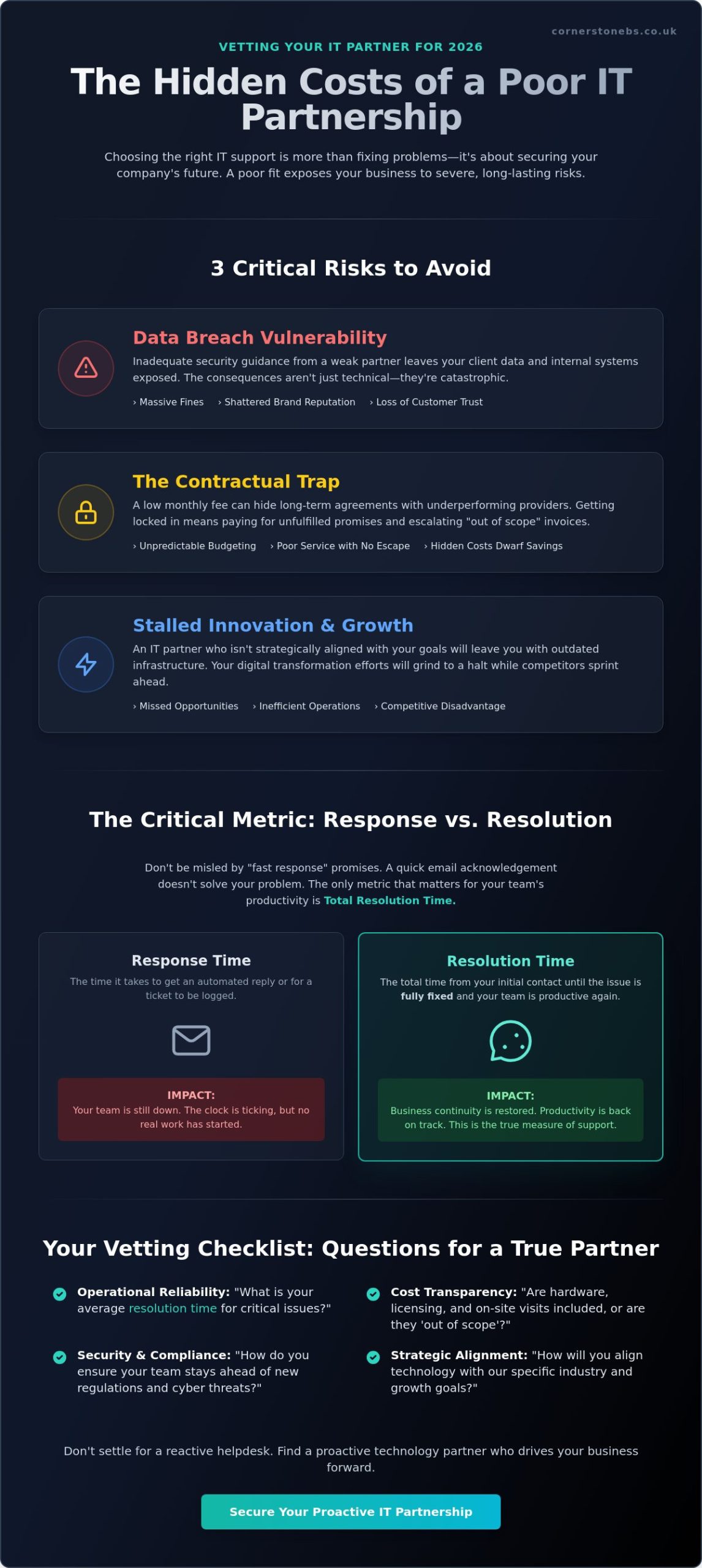
A poor fit doesn’t just mean slow internet or a grumpy helpdesk. It exposes your business to severe risks that can take years to recover from. Consider these common pitfalls of a weak partnership:
Data Breach Vulnerability: Inadequate security guidance leaves your client data exposed, leading to massive fines and a shattered brand reputation.
Contractual Trap: Many businesses find themselves locked into long-term agreements with underperforming providers who don’t deliver on their promises.
Stalled Innovation: If your IT infrastructure is outdated, your digital transformation efforts will grind to a halt while competitors sprint ahead.
Essential Operational Questions: Testing Reliability and Response Times
When your systems go down, every minute feels like an hour. You need more than just a friendly voice on the other end of the line; you need results. As you gather questions to ask a potential IT support company, focus on the mechanics of their daily operations. It’s easy to promise fast support, but delivering it consistently requires a robust infrastructure and a dedicated team. We’ve found that the best partnerships are built on transparency and clear expectations from day one.
The first hurdle is distinguishing between response and resolution. A provider might promise a “15-minute response,” but if that’s just an automated email saying your ticket was received, it doesn’t help your team get back to work. Ask specifically: “What is your average resolution time for critical issues?” This helps you evaluate your ideal technology partner based on tangible outcomes rather than marketing slogans. You should also verify how they handle emergencies outside of the standard 9-to-5. If your server fails on a Sunday night, will someone be working on it before your staff arrives Monday morning?
Understanding Service Level Agreements (SLAs)
Don’t let the technical jargon in an SLA overwhelm you. Look past the “guaranteed” 99.9% uptime figures and find out what happens when things actually break. Does “response” mean a ticket was logged, or that a qualified engineer has started working on the fix? A proactive partner will link these metrics directly to your business continuity and peace of mind. This clarity ensures you aren’t left guessing while your productivity stalls. We believe an SLA should be a promise of performance, not just a legal shield for the provider.
Account Management and Communication
Reliability isn’t just about fixing broken PCs; it’s about strategic guidance. Ask if you’ll have a dedicated account manager who understands your business history or if you’ll be treated as just another number in a general helpdesk queue. We believe in the power of regular strategic reviews, often called vCIO services, to ensure your technology evolves with your goals. For example, our approach to managed IT services Teesside demonstrates how deep regional expertise creates a more tailored experience for local firms. If you’re tired of explaining your setup to a different person every time you call, it’s time for a more personal touch. You can always chat with our award-winning team to see how a dedicated partnership feels.
Finally, always ask for recent case studies or references from your specific sector. A provider who excels in retail might not understand the compliance nuances of a law firm or the high-speed demands of a manufacturing plant. Seeing how they’ve solved problems for businesses like yours is the ultimate proof of their reliability. This level of sector-specific insight is what separates a generic service from a tailored, award-winning solution.
Proactive Strategy and Security: Vetting for Resilience and Compliance
Disaster recovery is another area where generic answers won’t cut it. Ask for specific Recovery Time Objectives (RTO) and Recovery Point Objectives (RPO). If your system fails, how quickly are you back online and how much data might you lose? We believe in setting these targets clearly so you have total peace of mind. Additionally, find out how they use AI and automation. In 2026, global spending on AI infrastructure has surged. Your provider should be using these tools to detect threats faster and automate routine tasks to boost your team’s efficiency.
The Cyber Security Baseline
Security isn’t an optional add-on; it’s the bedrock of every service we provide. Every provider you interview should be a vocal advocate for robust cyber security services. They should move you toward a Zero Trust architecture where every access request is verified, not just assumed safe. Check their backup protocols too. We recommend off-site storage and frequent testing to ensure your data is actually recoverable when you need it most. It’s about building layers of protection that keep your North East business safe from evolving threats.
Future-Proofing and Scalability
Your business won’t stay the same size forever, and your IT shouldn’t either. Ask how they manage cloud solutions to help you scale without massive hardware costs. A partner with strong ties to global leaders like Microsoft and Cisco can offer better insights into emerging tech. Most importantly, ask about their 3-5 year roadmap for your technology. A proactive partner doesn’t just react to today’s problems. They prepare you for tomorrow’s opportunities, ensuring your infrastructure is always one step ahead of your growth plans.
The Onboarding and Contract Framework: Spotting Red Flags Early
The honeymoon period of a new partnership often ends the moment the contract is signed. To avoid a messy breakup later, you need total clarity on the transition process before you commit. When reviewing questions to ask a potential IT support company, pay close attention to how they handle the first 90 days. A professional onboarding isn’t just a quick software install; it’s a deep dive into your network infrastructure to document every device, user, and security gap. If a provider can’t give you a clear, written timeline for this phase, they likely don’t have a repeatable process for success.
Cost transparency is where many local businesses get caught out. We’ve seen providers lure clients in with low monthly fees, only to hit them with unexpected invoices for site visits or “emergency” hardware setups. A good answer to your cost questions should be all-encompassing. It should cover everything from Microsoft 365 licensing to how they handle the transition from your current provider. You want a partner who takes full responsibility for the handover, ensuring no data is lost and no downtime occurs during the switch. This proactive approach is what provides true peace of mind.
Contract Transparency and Costs
Avoid the trap of “per-incident” billing. This model creates a conflict of interest where your provider makes more money when your systems fail. Instead, look for fixed-fee managed services that align your goals with theirs. You should also explore it company solutions that offer hardware leasing. This keeps your technology fresh without huge upfront capital outlays. An award-winning partner will also audit your Microsoft 365 environment regularly to ensure you aren’t paying for licenses your team no longer uses.
Red Flags to Watch For
Keep a sharp eye out for “The Ghost.” This is the provider who is incredibly attentive during the sales process but disappears the moment you need support. If they lack clear documentation or use proprietary hardware locks to keep you from leaving, walk away immediately. Another warning sign is a vague SLA that doesn’t define what “emergency” support actually looks like. If they seem under-staffed for a business of your size, your tickets will inevitably sit in a queue while your team stays idle. We believe in being an open book from the start. If you want a partner who values honesty and regional expertise, book a discovery call with Cornerstone today.
Finally, always ask about notice periods and exit fees. A confident provider doesn’t need to “trap” you with predatory exit clauses or data migration fees. They should earn your business every month through high-quality service and robust security. If the contract feels one-sided, it probably is. Your IT support should be a foundational element of your business growth, not a legal anchor that holds you back.
Finding Your Long-Term Technology Partner with Cornerstone
Choosing the right partner is about more than just a list of questions to ask a potential IT support company; it’s about finding a team that truly cares about your success. At Cornerstone Business Solutions, we don’t just fix computers. We build robust, award-winning bespoke technology foundations that empower North East businesses to thrive. Our proactive approach means we’re monitoring your systems every second of the day. We identify and resolve potential issues before they ever reach your desk, giving you the peace of mind to focus on your core operations.
Our elite partnerships with global leaders like Microsoft, Cisco, and IBM give our clients a distinct competitive edge. You gain direct access to enterprise-grade expertise and cutting-edge tools, all delivered with our signature regional warmth. We combine this professional authority with a genuine “can-do” attitude that simplifies the most complex technical challenges. Whether you need seamless cloud migrations or a more reliable network infrastructure, our team acts as a dedicated extension of your own staff.
Bespoke Solutions for Every Sector
We understand that a manufacturing plant in Teesside has different needs than a professional services firm in Newcastle. That’s why we tailor our IT maintenance and mobile communications specifically for UK SMEs. We’re committed to exceptional customer service and clear, jargon-free communication that keeps everyone on the same page. Cornerstone Business Solutions is a multi-award-winning provider known for simplifying complex technology into reliable business results. We take pride in our North East roots and the long-term partnerships we’ve built across the region.
Next Steps: Start a Conversation
Ready to move beyond a generic helpdesk? The next step is booking a strategic IT audit with our expert team. During your first consultation, we’ll perform a deep dive into your current setup to identify security gaps and efficiency bottlenecks. We won’t just hand you a sales pitch; we’ll provide a roadmap for how technology can support your specific goals over the next three years. It’s an opportunity to see how our proactive strategy can transform your daily operations.
If you’re tired of slow response times and want to secure your company’s future, we’re here to help. We’d love to hear about your business goals and show you how a true technology partnership feels. Invite our team for a chat today and let’s get your IT working exactly the way it should.
Secure Your Business Future with the Right Partnership
As a multi-award-winning IT services provider with deep North East roots, we’re ready to help you turn these insights into action. Our elite partnerships with industry leaders like Microsoft, IBM, and Cisco allow us to deliver enterprise-grade solutions tailored for local SMEs. We offer unlimited helpdesk access and a “can-do” attitude that simplifies your digital transformation. It’s time to gain total peace of mind and focus on what you do best. Book a free strategic IT consultation with our award-winning team today. Let’s start a conversation that moves your business forward.
Frequently Asked Questions
How much should business IT support cost in the UK?
Managed IT services typically range between £75 and £250 per user per month depending on your specific security and compliance requirements. Basic support plans usually sit at the lower end of that scale; however, comprehensive packages that include advanced cyber security and disaster recovery often reach £200 or more. For small businesses, the average monthly investment generally falls between £95 and £230 per user. We always suggest a fixed-fee model to ensure your costs remain predictable and transparent.
Is it better to have an in-house IT person or an outsourced company?
Outsourcing to a managed service provider offers a broader range of expertise and 24/7 coverage that a single in-house hire simply cannot match. While an internal staff member knows your office culture, an outsourced team provides a deep bench of specialists in cloud solutions and network infrastructure. You benefit from the collective knowledge of an award-winning team for a fraction of the cost of a senior engineer’s salary. This approach provides better scalability as your North East business grows.
What is a typical response time for a managed IT service provider?
A reputable provider should acknowledge critical issues within 15 to 60 minutes to minimize business disruption. You should distinguish between a simple ticket acknowledgement and actual resolution time. High-performing partners aim to resolve most remote issues within four hours; this keeps your team productive and your systems stable. We focus on these resolution outcomes to provide true peace of mind for our partners.
Can I switch IT providers if I am currently in a contract?
You can switch providers, but you’ll need to review your current agreement for notice periods and potential exit fees. Most professional contracts require a 30 to 90-day notice period to facilitate a seamless handover of credentials and system documentation. We frequently manage this transition for new clients by coordinating directly with their outgoing provider. This ensures there are no security gaps or service drops during the migration process.
What certifications should a reputable IT support company have?
Look for providers holding Cyber Essentials Plus and ISO 27001 certifications to verify their commitment to robust data security. These credentials prove the company follows strict government and industry standards for protecting client information. It’s also essential to check for elite partnerships with global brands like Microsoft and Cisco. These relationships demonstrate high-level technical competence and ensure your provider has direct access to the latest technology roadmaps.
How does an IT company handle data security for remote workers?
We secure remote teams by implementing Zero Trust architecture and mandatory multi-factor authentication (MFA) for all applications. This ensures every access request is verified regardless of the user’s location. Proactive monitoring tools allow us to manage security patches on remote laptops and secure company data on business mobiles. We provide the same level of robust protection for a home office as we do for your main headquarters.
What happens to my data if I leave my IT support provider?
Your data always belongs to you, and a professional provider should facilitate a clean, documented export of all files and configurations. You must ensure there are no proprietary hardware locks that would prevent a new partner from managing your systems. One of the most vital questions to ask a potential IT support company is how they handle the offboarding process and credential handovers. A confident partner will never use your data as a “hostage” to prevent you from leaving.
Do IT support companies provide hardware as well as software support?
Yes, a full-service provider manages both your software environment and your physical network infrastructure. This includes everything from Microsoft 365 management to the maintenance of servers, firewalls, and business VoIP hardware. By handling both aspects, we act as a single point of contact for all your technology needs. This unified approach simplifies troubleshooting and ensures your entire system works together seamlessly.
Did you know that for a business with under 500 employees, the average cost of a data breach has climbed to $3.31 million in 2026? It’s a staggering figure that highlights why your technology needs more than just a “best efforts” promise. You need a robust IT support service level agreement template that transforms your IT setup from a source of stress into a seamless foundation for growth. We understand that you’re likely frustrated with vague contracts and response times that stall your team’s productivity.
As an award-winning partner to businesses across the North East, we believe you deserve total clarity on your technology investment. You’re right to expect 99.9% uptime and critical response times within 15 minutes, rather than a sea of technical jargon that leaves you guessing. This guide will show you how to structure an SLA that eliminates hidden costs and ensures your provider manages your systems proactively. We’ll walk through the essential metrics and accountability frameworks you need to secure genuine peace of mind for your business continuity.
An Service-level agreement (SLA) is far more than a dry legal contract. It’s a proactive commitment between your business and your technology partner that defines exactly what “good” looks like. While a Master Service Agreement (MSA) handles the broad commercial relationship, the SLA focuses on the daily reality of your operations. It sets the measurable standards for uptime, response times, and problem resolution. For any professional managed IT services provider, this document is the foundation of trust. It ensures you aren’t just paying for “support,” but for guaranteed business continuity.
Starting with a clear IT support service level agreement template allows you to skip the guesswork. It moves the conversation away from vague promises of “fast help” toward concrete figures like 99.9% system availability. Without this clarity, disputes are almost inevitable. When a server goes down at 2:00 PM on a Friday, you don’t want to be debating contract terms. You want to know that your provider is already working on a fix within the agreed window. This level of transparency is exactly how our award-winning team builds long-term partnerships across the North East.
The Purpose of an SLA in Modern Business
Accountability is the core of any successful partnership. A robust SLA provides a transparent framework to measure whether your provider is actually delivering value. Since research shows that 51% of SaaS licenses often go unused, a proactive agreement helps align your IT spending with your actual needs. It ensures every pound of your 3-5% annual revenue IT budget is working toward your growth.
Key benefits of a defined SLA include:
Clearer budgeting without hidden emergency costs.
Guaranteed response times for critical issues, typically between 15 and 60 minutes.
A roadmap for long-term technology scaling and infrastructure health.
Who Needs a Formal IT Service Agreement?
Every organisation that relies on digital tools needs a formal agreement, but it’s critical for SMEs scaling their operations. If you’re handling sensitive data, an SLA ensures you meet strict compliance standards like GDPR or Cyber Essentials. With the average cost of a data breach for small firms hitting $3.31 million in 2026, you can’t afford a reactive approach. Using a professional IT support service level agreement template ensures your remote infrastructure remains as robust and secure as your main office network. It provides peace of mind for leaders who need their technology to just work.
A standard IT support service level agreement template often misses the mark because it treats technology as a static utility. In reality, your business is a living thing that needs room to breathe and grow. A robust SLA should clearly outline the service scope, performance metrics, and the mutual responsibilities that make a partnership work. By following best practices for service-level agreements, you can ensure that your contract isn’t just a defensive document but a roadmap for high performance. It’s about setting the stage for a seamless experience where everyone knows exactly what to expect.
Defining the Scope of Services
Clarity is your best friend when defining what your IT partner actually does. Your IT support service level agreement template must distinguish between proactive maintenance and reactive helpdesk support. While fixing a broken laptop is important, your agreement should also cover the strategic management of cloud solutions and SaaS licenses. This prevents the common 2026 issue where 51% of software licenses go unused. Whether it’s managing your server infrastructure or ensuring end-user devices are patched and secure, the scope needs to be exhaustive to avoid “out-of-scope” surcharges that bloat your budget.
Responsibilities and Exclusions
Great IT support is a two-way street. A professional SLA outlines the client’s duties, such as providing physical access to on-site hardware or maintaining a suitable environment for server rooms. It also clearly states exclusions. Most providers won’t cover issues caused by unapproved hardware modifications or third-party software that hasn’t been vetted. You should also look for specific provisions regarding emergency support. In 2026, emergency rates typically range from $200 to $350 per hour. Knowing how these after-hours premiums are billed before you need them is vital for your peace of mind.
Performance metrics are the heartbeat of the agreement. We don’t just look at uptime guarantees of 99.9%. We look at the granular details that keep your team productive. This includes a sliding scale for service credits, a 2026 trend where compensation increases exponentially the longer a system stays down. This ensures your provider is financially incentivised to get you back online fast. If you’re wondering if your current setup measures up, we’re always here for a friendly chat about your business goals.
Finally, ensure the agreement includes clear termination and compensation clauses. You need a straightforward exit strategy if performance consistently dips below the agreed benchmarks. A partnership should be based on ongoing value, not a restrictive contract that holds your business hostage. By defining these terms upfront, you protect your investment and ensure your IT provider remains a dedicated, long-term partner in your success.
Many business owners get caught in the trap of “Response Time” guarantees. A provider might promise to answer your ticket within 15 minutes, but if that response is just an automated email saying “we’re looking into it,” your business is still at a standstill. When you look at an IT support service level agreement template, you must focus on Resolution Targets. This is the actual window of time it takes to fix the underlying issue and get your team back to work. In 2026, the benchmark for critical issues is a 15-minute to 1-hour first response, paired with a 2-4 hour resolution window. Anything less is just a vanity metric that doesn’t protect your bottom line.
Uptime is another critical figure that impacts your daily operations. A standard guarantee of 99.9% sounds impressive, but it still allows for nearly nine hours of downtime every year. For a North East firm, those hours can mean thousands in lost revenue. We aim for proactive management that prevents these outages before they occur. By categorising issues correctly, your provider can allocate resources where they matter most, ensuring that a minor glitch doesn’t take priority over a failing server infrastructure.
The Priority Matrix: How IT Issues Are Categorised
A professional matrix ensures your IT partner reacts with the appropriate urgency. We typically break these down into four levels:
P1 Critical: A total system failure affecting all users, such as a complete network collapse. In 2026, these require a resolution within 4 hours.
P2 High: A partial failure affecting a specific department or a critical business function, like your Business VoIP system going offline.
P3 Standard: Individual user issues that are frustrating but don’t stop the whole business. A 24-business-hour resolution is the standard benchmark here.
P4 Low: Minor requests or “how-to” questions that have no impact on service quality.
Service Credits and Accountability
An IT support service level agreement template is only effective if there are consequences for missing targets. A Service Credit is a pre-agreed financial penalty for SLA breaches. In 2026, we see a move toward sliding scales for these credits. If a provider misses a resolution target by an hour, you might receive a small credit. If they miss it by four hours, that credit increases exponentially. This keeps your IT partner focused on your success rather than just ticking boxes.
Accountability shouldn’t just happen when things go wrong. Regular service review meetings are essential to audit these metrics and ensure your technology is actually supporting your growth. It’s about having a “chat” about the data, not just the disasters. This award-winning approach ensures that your IT setup remains robust, tailored, and ready for whatever the business world throws at you next.
Signing a generic IT support service level agreement template is a risk you don’t need to take. While a standard document might cover the basics, it often fails to reflect the specific risk profile of your business. Most one-size-fits-all contracts are designed to protect the service provider’s margins rather than your operational uptime. You need a tailored agreement that evolves with your company. We’ve seen local firms across the North East struggle with contracts that lack the nuance required for modern, high-growth environments. Customisation isn’t just about adding clauses; it’s about ensuring your technology remains a seamless asset.
A major pitfall is ignoring the integration of cyber security services within the SLA. With data breach costs for small firms averaging $3.31 million in 2026, your agreement must specify incident response protocols and recovery time objectives. You should also watch out for hidden “fair use” clauses. Some providers cap the number of support tickets you can raise each month. This can lead to unexpected surcharges when you need help the most. Ensure your agreement explicitly includes data protection and GDPR compliance to safeguard your reputation and your bank balance.
Addressing Cloud and Hybrid Work Environments
In 2026, work happens everywhere. Your SLA must reflect this reality by defining support boundaries for employees working from home. Does your provider support home Wi-Fi issues, or only company-owned hardware? You should also demand clear uptime expectations for Microsoft 365 and Azure. If you’ve recently executed a Microsoft 365 migration, your SLA should align with your new cloud strategy. This ensures that your remote team stays productive and secure, no matter where they log in from.
The Importance of Flexibility and Scalability
Don’t settle for a contract that leaves you vulnerable to hidden costs or slow response times. Our award-winning team is ready to help you build a framework that offers true peace of mind. Contact Cornerstone Business Solutions today to discuss an IT partnership that actually fits your business goals.
An IT support service level agreement template provides a necessary legal framework, but it shouldn’t be the ceiling of your expectations. A contract exists to protect you when things go wrong; a true partnership exists to ensure they go right in the first place. We’ve seen many North East businesses get stuck in a cycle of “policing” their IT provider. They spend more time auditing response times than they do growing their operations. Our award-winning philosophy is different. We believe that if you’re constantly checking your SLA for breach penalties, the relationship has already lost its value. Peace of mind comes from knowing your systems are managed by a team that cares about your success as much as you do.
A proactive approach naturally reduces the need for SLA enforcement. When your technology is robust and tailored to your specific goals, the “break-fix” drama disappears. This shift in focus allows you to treat IT as a foundational element of your business continuity rather than a technical necessity that occasionally fails. By choosing a local partner who understands the regional landscape, you gain an ally who is invested in the community’s economic health. We don’t just hit targets; we aim to exceed them so your team can work without interruption.
The Cornerstone Approach to Service Excellence
We remove the “ticking clock” from your technology support. By offering unlimited helpdesk access, we encourage your staff to report minor glitches before they escalate into P1 critical failures. This transparency is backed by our proactive monitoring systems that work 24/7 to identify vulnerabilities. In 2026, the trend is moving toward predictable, flat-fee pricing models that range between $100 and $200 per user. This approach aligns our incentives with yours. We’re financially motivated to keep your systems running perfectly, not to wait for something to break so we can bill for extra hours.
Starting Your Journey to Better IT Support
Your first step toward better technology management is a thorough audit of your current agreement. Look for gaps where your current provider might be falling short, such as neglected hardware lifecycles or a lack of clear resolution targets. Most organisations should budget 3-5% of their annual revenue for IT costs, and you deserve to know exactly how that investment is being protected. We invite you to have a “chat” with our team about your current challenges and your long-term vision for growth.
Don’t let a vague contract hold your business back. It’s time to transition to a service model that prioritises your uptime and security above all else. Our experts are ready to help you build a framework that offers genuine reliability and support. Book a discovery session with our experts today to see how a proactive partnership can transform your business technology.
Your technology should be a silent engine for growth, not a source of constant frustration. By moving beyond a generic IT support service level agreement template, you ensure that your provider is held to resolution targets that actually protect your productivity. We’ve explored how prioritising proactive monitoring over reactive models can save your business from the $3.31 million average cost of a data breach. It’s about building a framework that offers total transparency and eliminates the fear of hidden costs or technical jargon.
As a multi-award-winning IT services provider, we’re proud of our North East roots and our status as partners with industry leaders like Microsoft, IBM, and Cisco. We don’t just provide paperwork; we deliver peace of mind through unlimited helpdesk access and a commitment to your long-term success. It’s time to demand more from your technology partner and secure the robust infrastructure your team deserves to stay competitive in 2026.
An SLA is the formal agreement between a provider and a client, while an SLO (Service Level Objective) is a specific target within that contract. Think of the SLA as the overarching promise of quality and the SLO as the individual goal, such as a 99.9% uptime benchmark. While the SLA defines the consequences of failure, the SLO provides the technical team with a clear metric to track during daily operations.
How do I calculate service credits for an IT outage?
Service credits are usually calculated as a percentage of your monthly fee, based on the duration of the service breach. In 2026, many providers use a sliding scale where the credit amount increases the longer your systems remain offline. You apply these percentages to your total monthly spend as defined in your IT support service level agreement template, ensuring you’re financially compensated for lost productivity.
What is a typical response time for a P1 critical IT issue?
A typical response time for a P1 critical issue in 2026 ranges from 15 minutes to one hour. This metric confirms that an expert has acknowledged the ticket and begun active troubleshooting. It’s important to remember that this is just the “first response” window. You should also ensure your agreement includes a resolution target, which is typically set between two and four hours for total system failures.
Can I negotiate the terms in a standard IT support SLA template?
You can and should negotiate the terms in any IT support service level agreement template to reflect your unique business risks. Standard documents often miss the nuance of hybrid work or specific industry compliance requirements. Tailoring the metrics ensures your provider is accountable for the areas that matter most to your operations, rather than just following a generic list of services that might not fit your goals.
Does an SLA cover hardware replacement costs?
A standard SLA usually covers the labour and expertise required to resolve an issue, but it rarely includes the cost of new hardware parts. Unless you’ve opted for a specific managed hardware plan, you’ll likely be responsible for the price of replacement components. However, a proactive partner will monitor your infrastructure to identify aging hardware, helping you budget for replacements before they cause a critical system failure.
How often should an IT service level agreement be reviewed?
You should review your agreement at least once every 12 months to ensure it still aligns with your technology stack. As your business scales or adopts new cloud solutions, your support needs will change. Annual reviews help you identify unused SaaS licenses, which currently affect 51% of businesses, and allow you to update your security protocols to meet the latest 2026 industry standards and regulations.
What happens if my IT provider consistently misses their SLA targets?
Consistent failures typically trigger a series of financial penalties through service credits, eventually leading to a right-to-terminate clause. If a provider misses their targets for three consecutive months, most modern contracts allow you to exit the partnership without facing early termination fees. It’s essential to have these accountability measures clearly defined to ensure your business continuity isn’t compromised by poor performance or slow resolutions.
Is cyber security response usually included in a standard IT SLA?
Cyber security response is often treated as a tiered addition rather than a basic inclusion in standard agreements. With the average cost of a small business data breach reaching $3.31 million in 2026, you shouldn’t leave this to chance. Check that your agreement specifically outlines incident response times for security threats and disaster recovery protocols. This ensures your provider is ready to act immediately if your data is compromised.
What if your next IT upgrade costs 20% more than your last one, yet fails to handle the AI tools your team needs by next Christmas? With DRAM contract prices jumping by over 60% in early 2026, securing a robust business hardware supply is no longer just about buying boxes; it’s about protecting the entry points to your entire digital ecosystem. You’ve likely felt the frustration of lead times stretching into months or discovered that your new laptops don’t play nice with your existing cloud software. It’s a headache that drains your budget and slows down your team’s momentum.
Our award-winning team knows that technology should provide peace of mind, not a pile of invoices. This guide helps you master your procurement strategy so you can choose, secure, and manage high-performance gear that actually lasts. We’ll show you how to reduce downtime and improve ROI despite the current market volatility. From meeting the new NIST CSF 2.0 standards to hitting the UK’s 532,882-tonne WEEE collection target, we’ve got the expert insights you need to keep your business moving forward. Let’s have a chat about how to build a hardware foundation that works as hard as you do.
Key Takeaways
Learn why treating hardware procurement as a strategic partnership directly improves employee productivity and long-term retention across your team.
Discover how to tailor your business hardware supply using specific user personas and the latest Neural Processing Units (NPUs) to future-proof your tech.
Secure your digital ecosystem from the ground up with essential hardware-level defences like TPM 2.0 chips and encrypted storage.
Maximise your ROI by moving to a proactive refresh cycle and standardising your fleet for easier maintenance and significantly less downtime.
See how an award-winning local partner provides the peace of mind you need by simplifying the complex procurement minefield.
The Strategic Role of Business Hardware Supply in 2026
Successful procurement in 2026 isn’t a race to the bottom on price. It’s a calculated investment in your company’s future. When you view business hardware supply as a strategic partnership rather than a simple transaction, you gain a competitive edge that keeps your operations stable. Modern e-procurement strategies now focus on long-term value, ensuring your team has the tools to excel without fighting their equipment every morning. Our award-winning team at Cornerstone Business Solutions knows that the right gear doesn’t just sit on a desk; it powers your growth.
Business-Grade vs. Consumer-Grade: The Real Difference
Next Business Day onsite support: Minimises downtime by getting a technician to your door immediately.
Pro-version operating systems: Essential for network management, advanced security, and seamless integration.
Standardised internal parts: Simplifies maintenance and ensures your entire fleet remains consistent.
The Cost of “Making Do” with Outdated Gear
Old gear creates a massive “Downtime Tax” that many owners overlook. Legacy laptops struggle to run modern cloud solutions, leading to synchronisation errors and security vulnerabilities. When your hardware can’t keep up with your software, your productivity plateaus. In 2026, the average lifespan of a business laptop is exactly 36 to 48 months before performance degradation begins to outweigh the cost of replacement. We help you plan these cycles proactively so you’re never left scrambling when a critical machine fails.
Choosing the Right Specifications: A 2026 Buyer’s Guide
Memory and storage have also hit a new tipping point. With 2026 DRAM contract prices rising by over 55% in the first quarter, it’s tempting to cut corners. Don’t. In 2026, 16GB of RAM is the absolute minimum for a productive office environment. Anything less will cause bottlenecks as modern browsers and background security tools fight for resources. We recommend pairing this with Wi-Fi 7 and USB4 connectivity to ensure your team can take full advantage of the high-speed networks we install across the North East. If you’re unsure which path fits your growth plans, our award-winning experts are always ready to chat about your hardware needs.
Laptops and Desktops: Matching Power to Purpose
Servers and Infrastructure: The Backbone of Your Business
While many firms move toward cloud solutions, on-premise hardware still plays a vital role for businesses needing local data control or high-speed internal access. We always recommend redundancy features like dual power supplies and RAID configurations to prevent a single component failure from stopping your operations. For growing SMEs, hyper-converged infrastructure offers a streamlined way to combine compute, storage, and networking into one easy-to-manage system that scales as you do.
Infrastructure and Security: Why Your Supply Chain Matters
Grey market hardware might save a few pounds upfront, but it carries a massive risk of pre-installed malware or unverified components. This is why your hardware partner must be an integrated part of your cyber security services strategy. We only source from trusted global leaders to guarantee that features like TPM 2.0 chips and hardware-encrypted storage are present and active. These tools provide the peace of mind that your data remains safe, even if a device is physically lost or stolen. Our award-winning team doesn’t just deliver a box; we deliver a secure foundation for your business to thrive.
Securing the Remote Entry Point
Network Hardware: Beyond the Basic Router
Procurement and Lifecycle Management: Maximising ROI
Total Cost of Ownership (TCO) vs. Purchase Price
The sticker price is only the beginning. You have to factor in the time spent on deployment, software licensing, and ongoing technical support. Our award-winning it company solutions reduce the TCO by handling the heavy lifting of imaging and setup before the gear even reaches your office. We also leverage manufacturer-direct warranties. These protect your investment by ensuring that if a part fails, it’s replaced with genuine components at no extra cost to you. It’s about securing long-term value, not just a short-term bargain.
Hardware as a Service (HaaS): A Modern Alternative
Many local businesses are shifting away from large upfront costs. Hardware as a Service (HaaS) moves your tech spend from a capital expenditure (CapEx) to an operational one (OpEx). This keeps your cash flow healthy and predictable. This model provides an “evergreen” fleet where devices are automatically refreshed every three years. It integrates perfectly with our managed IT services, giving you a single monthly fee for both your gear and your support. If you want to stop worrying about obsolescence, it’s time to optimise your hardware lifecycle with a partner you can trust.
Partnering with Cornerstone for Award-Winning Hardware Solutions
More Than Just a Supplier: A Technology Partner
We believe your physical gear must work in harmony with your software ecosystem. We align your hardware choices with your Microsoft 365 migration and long-term cloud goals to prevent compatibility issues. Our proactive monitoring systems often alert us to a failing hard drive or a battery issue before you even notice a flicker. This gives you the peace of mind that your foundation is stable, secure, and tailored to your specific needs. We’re here to ensure your technology supports your growth, not hinders it.
Get Started with a Hardware Audit
Secure Your Competitive Edge for 2026
As a multi-award-winning IT provider and official partner with Microsoft, IBM, and Cisco, we’re here to simplify this complexity for you. Our managed plans include proactive 24/7 system monitoring to catch hardware failures before they disrupt your day. Don’t let outdated gear or long lead times hold your North East business back. Book a free technology consultation with our award-winning team today. We’re ready to help you build a robust, high-performance future that works as hard as you do.
Common Questions About Business Hardware Procurement
What are the essential hardware components for a small business in 2026?
Is it better to lease or buy business IT hardware?
Choosing between leasing and buying depends entirely on your cash flow strategy. Leasing through Hardware as a Service (HaaS) turns technology costs into predictable monthly OpEx payments, which keeps your capital free for other investments. Buying gives you full asset ownership but requires significant upfront capital. Most North East businesses we partner with prefer the “evergreen” nature of leasing to ensure their fleet is automatically refreshed every three years.
How often should a business refresh its laptop and desktop fleet?
What is the difference between consumer and enterprise-grade hardware?
Can a business hardware supplier help with software licensing as well?
What should I do with old business hardware when it reaches end-of-life?
You must use professional recycling and certified data destruction services to meet the UK’s 2026 WEEE collection target of 532,882 tonnes. Simply throwing old gear away risks a major data breach and environmental fines. Our award-winning team manages the entire disposal process, providing you with certificates of destruction for total peace of mind and regulatory compliance.
How do I ensure my new hardware is compatible with my existing cloud systems?
We ensure compatibility by conducting a full technology audit before suggesting any new business hardware supply. This process verifies that your processors and memory can handle the specific processing demands of your cloud software. It prevents performance bottlenecks and ensures your team can access their files and applications without frustrating lag or synchronisation errors.
What are the current lead times for enterprise-grade servers and networking gear?
Current lead times for enterprise-grade servers and networking gear typically range from 3 to 6 months. High demand for AI-specific components and memory has created a structural shift in the global market. We recommend planning your procurement at least two quarters in advance to avoid being caught out by these industry-wide delays.
That “bargain” laptop in your office is likely draining 40 minutes of billable time from your team every single day. According to 2024 industry research, UK employees lose nearly 21 days of work per year simply waiting for aging technology to catch up. Finding the right it equipment solutions shouldn’t be a gamble between high upfront costs and technical confusion. It’s a frustrating reality for many North East business owners who want to grow but feel held back by frequent downtime and security worries.
You deserve a setup that just works. We’ve written this guide to help you select, manage, and scale your technology to drive productivity while eliminating the hidden costs of legacy systems. As an award-winning partner, we’re here to simplify the complex stuff so you can focus on your business. You’ll learn how to navigate the 2026 procurement landscape, decide whether leasing or buying fits your cash flow, and build a secure hardware fleet that stays reliable for the long haul.
Key Takeaways
Modern it equipment solutions are more than just hardware; they are integrated ecosystems that combine connectivity, security, and performance.
Identify the essential hardware categories every UK business needs to evaluate to remain competitive and secure through 2026.
Compare the financial benefits of buying, leasing, and Device-as-a-Service to find the best fit for your company cash flow.
Follow our 2026 procurement checklist to ensure your new hardware remains reliable and future-proof for at least five years.
Discover how an award-winning partnership provides peace of mind by leveraging global technology brands like Microsoft and Cisco.
What are IT Equipment Solutions in a Modern Business Context?
In the past, buying a computer was a simple transaction. You walked into a shop, picked a box, and plugged it in. Today, it equipment solutions represent a far more sophisticated ecosystem. It involves the integrated hardware, firmware, and initial configuration required to keep your business operational and secure. When we talk about What is IT Infrastructure?, we’re describing the foundation that allows your team to communicate, collaborate, and compete in a digital-first economy. It’s the engine room of your daily operations.
Modern solutions must look beyond the physical device. A laptop is just a piece of plastic and silicon until it’s layered with robust connectivity and proactive security measures. We see many businesses make the mistake of choosing consumer-grade hardware to save pennies. However, business-grade equipment offers enhanced reliability, longer warranties, and remote management features that consumer models lack. This hardware is a vital part of the wider managed IT services ecosystem, ensuring that every device on your network is a known, secure quantity.
The Shift from Transactional to Strategic Procurement
Buying “off-the-shelf” often creates a fragmented environment that’s a nightmare to maintain. Strategic procurement focuses on standardisation. When your entire fleet uses the same architecture, updates are seamless and troubleshooting takes minutes rather than hours. This approach is essential for supporting a hybrid workforce. In 2024, companies using standardised hardware reported 30% fewer helpdesk tickets compared to those with mixed-fleet policies. It’s about creating a stable platform for growth, not just filling desks with monitors.
Core Components of a Business Hardware Stack
A reliable hardware stack is built on three pillars:
End-user devices: High-performance laptops and tablets tailored to specific roles, from heavy-duty processing for designers to lightweight portability for sales teams.
Infrastructure: The “heavy lifting” gear including servers, storage units, and networking equipment like routers and firewalls that keep data flowing safely.
Peripherals and Comms: Modern VoIP handsets, noise-cancelling headsets, and professional conference room technology that make remote collaboration feel natural.
Key Categories of IT Hardware for UK Businesses
Selecting the right hardware isn’t just about processing speed; it’s about building a fortress around your data. By 2026, the equipment you choose must feature hardware-level protections like TPM 2.0 and biometric authentication as standard. We ensure that cyber security services are baked into every device we supply, closing the gap that software alone cannot fill. This proactive approach aligns with the UK Government’s Technology Playbook, which advocates for security-by-design to protect national business interests.
Your server strategy acts as the heart of your it equipment solutions. While many North East firms are transitioning to virtualised environments to slash energy costs and physical footprint, others still rely on physical on-site servers for high-demand local tasks. Whether your infrastructure is on-premise or hybrid, it requires a rock-solid link to your cloud solutions. Without robust networking gear, your team will struggle with latency, regardless of how fast your internet connection claims to be.
End-User Computing (EUC)
Network & Security Infrastructure
Business-grade firewalls are non-negotiable. They do more than block basic threats; they inspect encrypted traffic and manage secure VPN tunnels for your remote staff. We always recommend managed switches over unmanaged ones because they allow us to prioritise voice traffic for your VoIP phones, preventing dropped calls during busy periods. As we move through 2026, upgrading to Wi-Fi 7 Wireless Access Points (WAPs) will become essential to handle the increased density of connected devices in modern offices.
Building a reliable fleet doesn’t have to be overwhelming. If you’re unsure which category to prioritise for your next refresh, our award-winning team is ready to audit your current hardware and provide a clear roadmap for your it equipment solutions.
Financial Models: Buying vs. Leasing vs. Device-as-a-Service (DaaS)
Choosing how to fund your it equipment solutions is a commercial decision that carries as much weight as the technical specifications themselves. It’s about more than just a price tag; it is about balancing immediate cash flow against long term agility. In the current economic climate, UK businesses generally follow three distinct paths to refresh their hardware fleet. Each model has a different impact on your balance sheet and your daily operations. We help you cut through the financial jargon to find the route that provides the most peace of mind for your specific situation.
When weighing up these options, many directors look at the “Total Cost of Ownership” (TCO). This calculation includes the initial purchase, the cost of maintenance, power consumption, and the eventual secure disposal of the data. Industry data from 2024 suggests that unmanaged hardware can cost up to 3 times its original purchase price in hidden maintenance over its lifespan. To make an informed choice, we recommend reviewing the UK government technology procurement standards, which offer a framework for value-driven purchasing.
Traditional Capital Expenditure (Capex)
Buying hardware outright remains a popular choice for businesses with healthy cash reserves. You own the asset from day one. There are no monthly interest charges or ongoing contract obligations. Since the Autumn Statement 2023, the UK’s “Full Expensing” policy allows companies to claim significant tax relief on qualifying IT investments. This is often best for firms with internal IT teams who can handle the maintenance and disposal themselves. However, the downside is the large upfront drain on your capital and the risk of being stuck with “legacy” kit that loses value quickly.
Operational Expenditure (Opex) and DaaS
Many North East SMEs now prefer the flexibility of Opex models. Device-as-a-Service (DaaS) is the modern evolution of the traditional lease. It integrates high-performance hardware with our award-winning it company solutions into one predictable monthly payment. This model allows you to scale up or down as your headcount changes. You get the latest technology without the heavy upfront cost. While you don’t own the asset, you benefit from included support and a guaranteed refresh cycle every three or four years. This keeps your team productive on the latest, most secure devices.
The tax implications of Capex versus Opex can be complex. While we provide the expert technical guidance, we always advise a quick chat with your accountant to see which model best suits your current tax strategy. Our goal is to ensure your it equipment solutions act as a catalyst for growth, not a burden on your bank account.
The 2026 IT Equipment Procurement Checklist
Procurement shouldn’t feel like a guessing game. A strategic approach ensures your it equipment solutions remain viable for the next 3 to 5 years, preventing the “performance cliff” that often hits unmanaged hardware. This checklist moves beyond basic price comparisons to focus on the long term resilience of your fleet. By 2026, every device you purchase must meet strict hardware security standards, including TPM 2.0 and biometric support, to defend against increasingly sophisticated local threats. We also recommend prioritising Energy Star 8.0 ratings to reduce your carbon footprint and lower office energy bills.
Your hardware choices impact your team’s ability to stay productive. If a device fails, the cost isn’t just the replacement part; it’s the hours of lost work. Our award-winning team helps North East businesses build a procurement roadmap that balances cutting-edge performance with environmental responsibility. This includes clear e-waste disposal policies that comply with UK regulations, ensuring your old tech is recycled securely and ethically.
Step 1: Audit Your Current Environment
Before buying anything, you must understand what you already have. Identify aging assets that cause frequent downtime or struggle with modern software. This is particularly important if you are planning a Microsoft 365 migration for business UK, as older hardware may lack the processing power to handle cloud-integrated features efficiently. We suggest defining user personas, such as “Power Users” for your creative team and “Remote Workers” for your sales staff. This allows you to tailor specifications to actual needs rather than overspending on a one-size-fits-all model.
Step 2: Define Minimum Specifications
In 2026, 16GB of RAM is the absolute minimum for business productivity. Anything less will lead to system lag when running multiple browser tabs and communication tools simultaneously. Your it equipment solutions should also standardise on NVMe SSDs, which provide boot times up to 5 times faster than older SATA drives. Don’t overlook physical security features like integrated privacy screens for laptops used in public spaces and hardware-level encryption that protects data even if a device is stolen. These small details provide the peace of mind your business needs to operate anywhere.
A well-planned refresh cycle keeps your business ahead of the curve. To get started with a professional assessment of your current fleet, you can book a hardware audit with our expert team today.
How Cornerstone Delivers Award-Winning IT Equipment Solutions
Cornerstone Business Solutions is more than a service provider; we are your award-winning technology partner. We’ve built a reputation for delivering robust it equipment solutions that empower businesses from our North East headquarters to satellite offices across the UK. We don’t believe in simple “box-shifting” or transactional sales. Instead, we manage the entire hardware lifecycle, ensuring every device remains a high-performing asset rather than a technical burden. This proactive stance is why we’ve secured multiple industry accolades, including being named a multi-award-winning IT partner for our commitment to excellence and regional growth.
Our status as a trusted expert is reinforced by our close ties with global technology leaders. We maintain strategic partnerships with brands like Microsoft, Cisco, and IBM. These alliances ensure our clients receive vetted, industry-leading hardware that integrates perfectly with modern software environments. It is about providing you with the same level of enterprise-grade technology used by global corporations, but with the approachable, regional warmth of a local team that truly cares about your success. We speak your language, simplifying the technical details to provide true peace of mind.
Bespoke Technology Planning
We don’t offer generic, one-size-fits-all hardware bundles. Every hardware stack we design is tailored to meet your specific business objectives for 2026 and beyond. Whether you need to overhaul your network infrastructure or equip a hybrid workforce with secure mobile devices, we bring a “can-do” attitude to even the most complex technical challenges. By providing a single point of contact for all your procurement and support needs, we eliminate the frustration of managing multiple vendors. We simplify your technology stack so you can focus entirely on scaling your business.
Seamless Implementation and Ongoing Support
A hardware rollout shouldn’t cause a single minute of unnecessary downtime. We handle the logistical heavy lifting through a process that includes full pre-configuration in our specialized labs before any equipment arrives at your office. Our expert engineers manage the on-site setup, ensuring everything is “plug-and-play” for your staff from day one. Once your new fleet is live, our proactive monitoring systems provide constant oversight, identifying and resolving performance dips before they impact your productivity. This dedication to reliability is a foundational element of our service.
If you’re ready to stop worrying about aging hardware and start focusing on your future, we’d love to help. We invite you to have a friendly chat about your technology roadmap and discover how the right it equipment solutions can drive your business forward.
Build a Foundation for Success in 2026
Strategic technology procurement is the difference between a team that struggles with downtime and one that thrives. By moving away from reactive purchases, you secure a fleet that is reliable, scalable, and protected against modern threats. We’ve shown how the right financial model and a rigorous 2026 checklist can transform your it equipment solutions into a powerful driver of productivity rather than a hidden cost center. Your hardware should be a silent partner in your growth, not a hurdle to overcome.
At Cornerstone, we pride ourselves on being a multi-award-winning partner with national reach and a proactive “can-do” attitude. Our strategic partnerships with Microsoft, IBM, and Cisco allow us to deliver world-class hardware backed by the approachable, regional warmth of our North East roots. We don’t just supply devices; we provide the peace of mind that comes from knowing your infrastructure is in expert hands. Book a chat with our award-winning team to discuss your IT equipment solutions today. Let’s build a technology roadmap that keeps your business moving forward.
Frequently Asked Questions
How often should a business replace its IT equipment?
Most UK businesses should replace laptops every 3 years and core networking gear every 5 years. Following this cycle prevents the steep drop in reliability that usually occurs after the 36-month mark. 2024 industry studies suggest that employees lose an average of 40 minutes per day when working on hardware that is over 4 years old, making early replacement a smart financial move.
Is it better to buy or lease IT hardware in 2026?
Choosing the right it equipment solutions depends on your specific tax strategy and cash flow. Leasing provides predictable monthly costs and easier scaling for growing teams without a large upfront drain on capital. Buying outright allows you to take advantage of the UK’s 2023 Full Expensing policy for immediate tax relief. Our award-winning team helps you weigh these options to find the best fit for your balance sheet.
What is the difference between consumer and business-grade laptops?
Business-grade laptops are built with more durable materials and include advanced security features like TPM 2.0 chips. Unlike consumer models, they are designed for 8-hour daily use and offer better thermal management to prevent slowing down under load. They also include professional versions of operating systems, which are essential for connecting to your company network safely and managing updates centrally across your entire fleet.
Can I use my existing hardware when migrating to the cloud?
You can often use existing hardware for cloud migration if it supports modern browser standards and secure connection protocols. However, older machines may lack the processing power to handle the latest cloud-integrated features efficiently. In these cases, we often repurpose older kit as “thin clients” to access virtual desktops. This extends the life of your it equipment solutions while maintaining high performance for your staff.
What should I do with old IT equipment when upgrading?
Old hardware must be disposed of via WEEE-compliant recycling services that provide a certificate of data destruction. It is a legal requirement in the UK to ensure all sensitive information is wiped before the physical components are recycled. We handle this entire process for our partners, ensuring 100% of your data is securely erased before the old kit leaves your premises for ethical recycling.
Does business IT hardware come with a better warranty than consumer gear?
Yes, business-grade hardware almost always includes a 3-year Next Business Day (NBD) on-site warranty as standard. This is a significant upgrade from the 1-year return-to-base warranties found on consumer gear. If a device fails, an engineer arrives at your office the following day to fix it. This minimizes downtime and provides the peace of mind that a local expert is always ready to help.
What are the minimum specs I should look for in a business laptop today?
The current benchmark for a reliable business laptop is 16GB of RAM and an NVMe SSD with at least 256GB of storage. You should also ensure the processor is an Intel i5 or AMD Ryzen 5 from the latest two generations. These specs prevent the performance bottlenecks that frequently slow down multitasking and video conferencing in a modern North East office environment.
How can I secure my hardware for remote employees?
Securing remote devices requires a combination of hardware-level encryption and Mobile Device Management (MDM). We implement BitLocker encryption on all endpoints to protect your data if a laptop is lost or stolen. Adding a robust VPN and multi-factor authentication ensures your team can work from anywhere without exposing your network to 2026’s emerging cyber threats. This proactive approach keeps your remote workforce secure and productive.
Nearly 60% of small UK businesses experienced a cybersecurity incident in the past year, according to Air IT Group. For many business owners in the North East, this represents a constant anxiety about data breaches and productivity-killing downtime. You likely feel the strain of unpredictable IT costs, especially when ad-hoc repairs can run up to £150 per hour. If you find yourself asking what does a managed service provider do to stop these fires before they start, you aren’t alone. It’s frustrating to feel behind on AI adoption while 56% of your competitors are already piloting tools to scale their operations.
This award-winning guide explains how an MSP transforms your technology from a reactive cost into a proactive engine for growth. We’ll show you how to secure predictable monthly spending, typically ranging from £40 to £75 per user, while gaining a dedicated local partner. You’ll discover how the April 2026 Cyber Essentials update impacts your business and why a “zero trust” security model is the new baseline for peace of mind. We’re moving beyond simple tech support to explore how strategic IT management helps your business scale safely in a hybrid world.
Key Takeaways
Shift from a reactive “break-fix” mindset to a proactive partnership that identifies and resolves technical issues before they disrupt your operations.
Discover the answer to what does a managed service provider do by exploring the five pillars of proactive service, from 24/7 monitoring to robust security.
Replace unpredictable repair bills with a fixed monthly investment that grants your business instant access to an award-winning team of specialists.
Learn how to select a strategic technology partner who prioritizes your long-term business goals and understands the unique needs of the North East community.
Defining the Managed Service Provider: More Than Just IT Support
To understand what does a managed service provider do, you have to look beyond the image of a technician fixing a broken printer. In 2026, a Managed Service Provider (MSP) acts as a strategic engine for your business, providing proactive, 24/7 management of your entire digital environment. While 78% of UK SMEs are increasing their technology investment this year, many still fall into the trap of the ‘Break-Fix’ model. This reactive approach is a hidden profit killer; waiting for a system to fail before calling for help leads to unpredictable bills and frustrated staff. Instead of paying £150 per hour for emergency repairs, businesses are shifting toward subscription-based resilience that keeps the wheels turning without interruption.
A Managed Service Provider is a dedicated extension of your own team that proactively manages your infrastructure, security, and long-term technology strategy to ensure seamless business continuity.
Managed Services vs. Traditional IT Outsourcing
Traditional outsourcing is often transactional, focusing on specific projects or one-off tasks like migrating an email server. The managed model is fundamentally different because it creates shared risk and accountability. In a traditional setup, the provider makes more money when things break. With our award-winning managed services, our goals align perfectly with yours. We succeed when your systems stay online, creating a partnership where uptime is the only metric that matters. This subscription model ensures you aren’t just buying hours; you’re buying a guaranteed outcome.
The Core Philosophy: Proactive vs. Reactive
The most valuable work an MSP performs is often invisible to your staff. While your team focuses on their daily goals, we’re working behind the scenes to prevent the ‘Blue Screen of Death’ before a user even logs on. In 2026, we use AI-driven monitoring to identify hardware failure patterns and software conflicts early. If a hard drive in your North East office shows signs of degradation, we’ve already scheduled the replacement before the data is at risk. This proactive stance replaces the stress of sudden downtime with the quiet confidence of a robust, monitored network. We don’t just wait for the fire; we ensure the building is fireproof from the start.
What Does an MSP Do Day-to-Day? The Five Pillars of Service
If you’ve ever wondered what does a managed service provider do during a typical Tuesday afternoon, the answer lies in a complex layer of background operations that most staff never see. We act as your digital security guard, constantly scanning for vulnerabilities while your team focuses on meeting their own targets. This comprehensive approach is built on The Five Pillars of Service that ensure your business remains resilient, scalable, and secure. Understanding what does a managed service provider do on a day-to-day basis helps you see the value beyond simple troubleshooting; it’s about total environment health.
24/7 Monitoring: Real-time oversight of servers and cloud environments to stop issues before they become outages.
Cyber Security: Deploying robust cyber security services to defend against AI-crafted phishing attempts.
Cloud Infrastructure: Tailoring cloud solutions for the 91% of UK businesses now committed to permanent hybrid work.
Strategic Roadmapping: Building a 12 to 36-month technology budget so there are no nasty financial surprises.
Helpdesk Support: Giving your staff unlimited access to our award-winning experts whenever a technical hurdle appears.
Cyber Security and Data Protection
Modern protection goes far beyond basic antivirus software. We implement Managed Detection and Response (MDR) alongside a Zero Trust framework, which is essential given that nearly 60% of small UK businesses faced a cyber incident last year. With the April 2026 Cyber Essentials update introducing stricter MFA requirements, our role is to ensure you remain compliant and insured. We also conduct regular phishing simulations to keep your team sharp against the latest threats. This proactive layer provides the peace of mind you need to grow without fear of a data breach.
Cloud Management and Modern Workplace
As UK SMEs project to spend £12.4 billion on cloud services this year, expert management is vital for ROI. We focus on Microsoft 365 migration for business UK, ensuring your data moves seamlessly and stays secure in a hybrid environment. By managing Azure or private cloud setups, we target 99.9% uptime for your critical applications. This allows your team to work from anywhere, whether they are based in the North East or across the globe, with the same level of speed and reliability. If your current setup feels disjointed, it might be time for a friendly chat about a more integrated approach.
The Business Logic: Why UK SMEs Are Moving to Managed IT
Many business owners in the North East find themselves trapped in a cycle of “lumpy” IT spending. One month the budget looks healthy; the next, a server failure or a security breach results in a bill for thousands of pounds. When you ask what does a managed service provider do to solve this, the answer is financial stability. By moving from volatile capital expenditure to a fixed monthly operational cost, you gain total control over your cash flow. Instead of paying reactive rates of up to £150 per hour when things go wrong, you invest a predictable £40 to £75 per user for total peace of mind.
This shift isn’t just about the numbers; it’s about scalability. As your business grows, your technology must keep pace. Whether you are adding five new staff members or fifty, an award-winning MSP handles the licensing, hardware, and security onboarding seamlessly. You no longer have to worry about the technical debt that often accumulates during rapid growth. We ensure your foundation is robust enough to support your ambitions without the typical growing pains.
Predictable Budgeting and ROI
Eliminating the shock of emergency repair invoices is the first step toward a healthier balance sheet. Our it company solutions provide a clear technology roadmap that looks 12 to 36 months into the future. This allows you to plan upgrades and investments during profitable quarters rather than being forced into them by a system crash. Having one point of contact for your IT, mobile, and VoIP systems also creates massive efficiency. You save time on administration and gain a partner who understands how every part of your communication stack fits together.
Bridging the Skills Gap
Hiring and retaining high-level IT talent in-house is increasingly difficult and expensive. A single internal “IT guy” simply cannot be an expert in every field, especially with the rapid rise of AI and Zero Trust security. When you partner with an MSP, you gain instant access to a full team of Microsoft, Cisco, and IBM certified experts. This collective knowledge is vital because generalist internal staff often struggle with specialist cyber threats that are becoming more sophisticated in 2026. We provide the high-level expertise you need at a fraction of the cost of a full-time senior department, ensuring your business stays at the cutting edge of technology.
How to Choose the Right MSP for Your Business
Before signing a contract, verify that the provider practices what they preach. Ask to see their own security certifications. With the Cyber Security and Resilience Bill introducing fines of up to £17 million for serious breaches, your MSP must be a fortress. A true partner offers national coverage with a local, human face. You want to know that the person on the other end of the phone understands the North East business landscape and is personally invested in your success.
Partnership Approach: They should act as a strategic advisor, not just a helpdesk.
Award-Winning Status: Look for industry recognition as a recurring signature of quality.
Security Credentials: Ensure they are fully compliant with the April 2026 Cyber Essentials updates.
24/7 Availability: Technology doesn’t sleep; your support shouldn’t either.
The Importance of Service Level Agreements (SLAs)
A “Gold Standard” SLA in 2026 must be transparent and outcome-focused. It’s vital to distinguish between ‘Response Time’ (how quickly they answer the phone) and ‘Resolution Time’ (how quickly the problem is actually solved). We believe in total transparency; you should receive regular reports that prove your systems are hitting their uptime targets. Trust is built on data, not just promises. If a provider is vague about their response at 2 AM on a Sunday, they aren’t the right fit for a modern business.
Strategic Alignment and Roadmapping
Your technology should be a foundational element of your peace of mind. This is where a Virtual Chief Information Security Officer (vCISO) becomes invaluable. They ensure your managed IT services align with your specific industry requirements and long-term goals. Whether you’re navigating new data protection complaint deadlines or integrating AI into your workflow, your MSP should provide a clear roadmap. If you’re ready to move away from transactional IT and toward a dedicated partnership, let’s have a chat about your business goals.
The Cornerstone Difference: Proactive Partnership for UK Business
At Cornerstone Business Solutions, we believe that technology should be an invisible asset that powers your growth, not a constant source of stress. We’ve built our reputation by moving away from the transactional vendor model to become a dedicated, long-term technology partner for businesses across the North East. When you truly understand what does a managed service provider do, you realize it’s about more than just maintaining servers. It’s about providing a “can-do” attitude that resolves challenges before they ever impact your bottom line. Our award-winning approach focuses on bespoke technology solutions that simplify the complex, giving you the freedom to lead your business with total confidence.
We don’t just fix things; we build resilience. Whether you are navigating the 56% of SMEs already piloting AI or preparing for the stricter data protection complaint deadlines on June 19, 2026, we act as your strategic guide. We translate high-level technical jargon into clear, benefit-driven outcomes. This ensures your infrastructure is robust, your team is productive, and your data remains secure under our watchful eye. We take pride in our regional roots, combining professional authority with the approachable warmth you expect from a local expert.
Award-Winning IT Support You Can Trust
Our status as an award-winning provider is a recurring signature of the quality we bring to every partnership. We’ve cultivated strong relationships with global leaders like Microsoft and Cisco to ensure you receive world-class tools tailored to your local needs. By combining 24/7 proactive monitoring with unlimited helpdesk access, we eliminate the friction that slows your team down. Businesses across the UK choose us because we provide a human face to high-tech solutions. We aren’t just an outsourced department; we’re the trusted experts who know your systems inside and out.
Ready for a Conversation?
We believe the best partnerships start with a simple, honest chat rather than a high-pressure sales pitch. Our goal is to understand your specific ambitions and tailor a service package that fits your unique requirements. In 2026, transparency is key. We provide clear, predictable monthly fees, typically ranging from £40 to £75 per user for fully managed support, or £20 to £50 per device. This allows you to scale your costs alongside your growth without any hidden surprises. If you want to know what does a managed service provider do when they truly care about your success, it’s time to reach out. Book a consultation with our award-winning team today and let’s discuss how we can give you back your peace of mind.
Secure Your Business Future with Proactive IT
Moving away from the stress of reactive repairs is the most important step you can take for your business continuity in 2026. By now, the answer to what does a managed service provider do is clear. We act as your strategic partner to prevent downtime before it starts. You gain the stability of predictable monthly spending and the expertise of a team that stays ahead of evolving cyber threats. As a multi-award-winning IT services provider, we combine our North East roots with global partnerships from Microsoft, IBM, and Cisco to deliver a service that’s both sophisticated and approachable.
Our proactive 24/7 system monitoring and unlimited helpdesk access ensure your staff stays productive regardless of the technical landscape. We don’t just manage your infrastructure; we provide the foundational peace of mind you need to focus on your core goals. If you’re ready to transform your technology into a reliable engine for growth, we’re here to help. Discover how our award-winning Managed IT Support can give you peace of mind. Let’s have a chat today. Your business deserves a partner that’s as invested in your success as you are.
Frequently Asked Questions
What is the difference between an MSP and an IT consultant?
An IT consultant typically provides high-level strategic advice or manages specific, one-off projects. In contrast, a Managed Service Provider handles the ongoing, day-to-day operation and security of your technology. While a consultant tells you what you need, an MSP actually installs, monitors, and maintains those systems 24/7 to ensure continuous uptime.
Is a Managed Service Provider only for large companies?
Managed services are specifically designed to help SMEs access the same level of robust technology and security as major corporations. Because 78% of UK SMEs are increasing their technology investment in 2026, having a partner to manage that growth is essential. It allows smaller teams to scale without the massive overhead of a full in-house IT department.
How much does a Managed Service Provider typically cost?
Fully managed IT support in the UK typically costs between £40 and £75 per user per month. If your provider charges per device, you can expect to pay between £20 and £50 per month. These fixed costs are significantly more predictable than ad-hoc rates, which often range from £80 to £150 per hour for emergency repairs.
Can an MSP help with my business mobile and phone systems too?
Yes, a comprehensive MSP often manages your entire communication stack, including mobile contracts and VoIP phone systems. This unified approach ensures your remote and office-based teams stay connected seamlessly. It also simplifies your administration by providing one single point of contact for every piece of technology your business uses to communicate.
What happens to our current IT staff if we hire an MSP?
Hiring an MSP often leads to a “co-managed” arrangement rather than replacing your internal team. We handle the repetitive background tasks like 24/7 monitoring and security patching, which frees your internal staff to focus on high-level business strategy. This partnership provides your existing team with extra resources and specialist expertise when they need it most.
Do MSPs offer 24/7 support for remote workers?
We provide robust support for remote workers at any hour, which is vital since 91% of UK businesses expect hybrid work to remain permanent. Our tools allow us to resolve issues securely from a distance, ensuring your team stays productive whether they are at home or in the office. This “work from anywhere” support is a core part of what does a managed service provider do to maintain business continuity.
How does an MSP improve our cyber security posture?
We improve your security by implementing a “zero trust” framework and ensuring compliance with the April 2026 Cyber Essentials updates. Since nearly 60% of small UK businesses experienced a cybersecurity incident last year, we focus on proactive defenses like multi-factor authentication and identity threat detection. This layered approach protects your data from increasingly sophisticated AI-crafted phishing attempts.
What is included in a typical IT maintenance plan?
A typical plan includes 24/7 remote monitoring, automated software patching, and secure data backups. You also receive regular security audits and strategic roadmapping to plan your future technology investments. This award-winning approach ensures your infrastructure remains robust and your business stays ahead of the technology curve without any hidden surprises.
With Microsoft ending support for Windows 10 on 14 October 2025, approximately 240 million PCs worldwide risk becoming security liabilities if they aren’t transitioned correctly. You likely understand that sticking with an outdated OS isn’t an option, yet the fear of legacy software failing or your team facing hours of downtime is a genuine concern. It’s frustrating to face hardware hurdles like TPM 2.0 when you just want your tech to work. Our award-winning team at Cornerstone believes technology should empower your growth, which is why we’ve simplified the process of how to upgrade to windows 11 for our local partners.
We’ve designed this guide to show you a proactive, step-by-step approach that prioritises your data security and operational stability. You’ll discover a clear path to a modern, robust infrastructure that delivers total peace of mind for your North East business well into 2026. We will walk you through hardware compatibility checks, software testing protocols, and the deployment strategies we use to ensure a seamless transition for every client we support.
Key Takeaways
Understand why remaining on Windows 10 is a critical security risk and how transitioning to Windows 11 provides the award-winning protection your business deserves.
Master the technical steps of how to upgrade to windows 11 safely, prioritising the most seamless routes for UK-based small and medium enterprises.
Move beyond basic backups with a “Cornerstone Philosophy” approach to disaster recovery, ensuring your migration results in zero downtime and total peace of mind.
Boost your team’s productivity instantly by navigating new interface features like Snap Layouts and securing your infrastructure with proactive post-upgrade checks.
Discover how a managed deployment with a trusted North East partner eliminates the hidden costs and stress of large-scale business migrations.
Assessing Your Business Readiness for Windows 11 in 2026
Cornerstone, your award-winning North East IT partner, understands that 2026 represents a critical crossroads for your firm’s technology. The Windows 11 operating system is no longer a “new” release; it is the established standard for secure, modern business computing. If your team still relies on Windows 10, they are working on an OS that is now a significant security liability. Transitioning to the current standard provides immediate gains in system speed and a streamlined interface designed for hybrid work. Learning how to upgrade to windows 11 now ensures your business avoids the high costs of emergency migrations and hardware shortages.
To qualify for the upgrade, your hardware must meet specific benchmarks. In plain English, your computers need a relatively modern processor (Intel 8th Gen or newer), at least 4GB of RAM, and 64GB of storage. While these specs seem modest, the security requirements are where most older business fleets struggle. Proactive planning allows you to audit your devices and budget for replacements without disrupting your daily operations.
The Hardware Hurdle: TPM 2.0 and UEFI
The most common barrier to a seamless upgrade is TPM 2.0. This is a dedicated chip that provides hardware-based security functions, acting as a vault for your encryption keys and user credentials. It is the backbone of Windows 11 security. You can verify your fleet’s compatibility using the Microsoft PC Health Check app, which gives a clear “pass” or “fail” for every device. For machines older than 2018, the “repair vs replace” debate is usually simple. Replacing an ageing laptop is often more cost-effective than trying to bypass security requirements, as newer hardware delivers the 20 percent increase in efficiency that modern applications demand.
Windows 10 End-of-Life: The Risk of Inaction
Microsoft has officially retired Windows 10, making it a “legacy” system. End of Life is the date Microsoft ceases all security patches. Operating past this date means your business is exposed to zero-day exploits that hackers specifically design to target unsupported systems. This creates a massive hole in your cybersecurity posture. Beyond the technical risk, inaction impacts your legal and financial standing. Many UK business insurance providers will not pay out for data breaches if the firm was running unsupported software. Similarly, failing to maintain your OS can lead to non-compliance with UK GDPR, resulting in heavy fines. Our team focuses on your peace of mind by ensuring your infrastructure remains robust and fully supported.
Starting a conversation about your transition today prevents a crisis tomorrow. We believe in a partnership that keeps your North East business ahead of the curve, rather than just catching up. Understanding how to upgrade to windows 11 is the first step toward a more secure and efficient workplace.
Strategic Preparation: Ensuring Zero Downtime
Before moving a single live machine, we recommend auditing your entire software stack. Identifying legacy applications early prevents “day one” productivity crashes. We suggest creating a pilot group consisting of roughly 10% of your non-critical workstations. This allows you to test the environment in a controlled way without risking your primary revenue streams. Following the official Microsoft deployment guidance ensures your rollout aligns with industry standards for stability and security. It’s a proactive approach that turns a potentially stressful migration into a seamless transition.
The Pre-Upgrade Audit Checklist
Our award-winning team uses a rigorous checklist to ensure every machine is ready for the switch. You’ll need at least 64GB of available disk space and a stable, high-speed internet connection to download the 4GB+ installation files. Ensure you have full administrative privileges before starting the process. It’s also vital to verify that your cyber security services remain compatible with the Windows 11 kernel to avoid leaving your network exposed. Always secure your critical data to a resilient cloud environment before the installation begins. This provides an essential safety net for your business intelligence.
Managing Legacy Software Compatibility
Most modern apps run perfectly on the new OS, but older bespoke tools might require extra care. You can often use Compatibility Mode to trick older software into thinking it’s still on Windows 10. For mission-critical apps that simply won’t run natively, we often implement Azure Virtual Desktop. This keeps your legacy tools accessible while your main hardware stays secure. Don’t forget to check your printer and peripheral drivers; hardware manufacturers often release specific updates for the 2026 environment. Understanding how to upgrade to windows 11 includes managing these smaller details that keep an office running. If you’re feeling overwhelmed by the technical requirements, feel free to chat with our local experts for a tailored assessment.
Step-by-Step: How to Update to Windows 11 Safely
Upgrading your business infrastructure shouldn’t feel like a gamble. At Cornerstone, our award-winning team helps North East firms manage this transition with zero fuss. To understand how to upgrade to windows 11 without losing a day of productivity, you need to choose the right path for your specific hardware. We typically recommend three primary methods: Windows Update, the Installation Assistant, or the Media Creation Tool.
Windows Update remains the preferred, most seamless route for SMEs. It’s the most stable option because Microsoft only pushes the notification once your specific hardware configuration is verified. Before you start, plug in an Ethernet cable. Relying on Wi-Fi for a 4GB to 6GB download is risky; a single signal drop can corrupt the installer and cause boot errors. For larger firms managing dozens of machines, consulting Microsoft’s official deployment guide provides deeper technical insights into fleet-wide rollouts and compatibility checks.
The actual installation phase is what we call the “Point of No Return.” Once your PC reboots and the blue installation screen appears, the system begins overwriting the old OS architecture. If power is lost here, the machine may become unbootable. Ensure your laptops are plugged into a power source and your desktops are on a stable circuit before you begin the final phase.
Method 1: Using the Windows Update Feature
This is the “set and forget” method that preserves your files and specialised software settings. Open your “Settings” app, click “Update & Security,” and select “Windows Update.” You’ll see one of two things. A blue “Upgrade to Windows 11 is ready” banner means your hardware passed every check. A “This PC doesn’t currently meet all system requirements” message indicates a hardware block, likely your TPM 2.0 chip or an older CPU. If you see the green light, click download and install to keep every spreadsheet and saved password exactly where you left it.
Method 2: The Windows 11 Installation Assistant
Use the Assistant tool manually if the update hasn’t appeared automatically in your settings. This happens often with newer machines that haven’t cycled through the update queue yet. You must run this tool as a local Administrator to avoid permission loops that can stall the process at 99%. After you click “Accept and Install,” the tool handles the heavy lifting in the background. Once the “Restart Now” prompt appears, save your work immediately. The PC will reboot several times as it configures your new desktop environment, so don’t be tempted to force a shutdown if the screen stays black for a few moments.
Post-Upgrade Optimization: Security and Productivity
Completing the initial steps of how to upgrade to windows 11 is only half the battle. To truly see a return on your investment, you need to fine-tune the environment for your specific workflow. Our award-winning team at Cornerstone finds that a standard “out of the box” setup often leaves performance on the table. Start by mastering the centered Taskbar and Start menu. These aren’t just cosmetic changes; they’re designed to reduce mouse travel and eye strain. Use Snap Layouts to organize your screen into quadrants instantly. Research from Microsoft suggests these interface improvements can boost multitasking efficiency by up to 40% for power users.
Performance depends on a clean system. New installations often include pre-installed “bloatware” or trial software that consumes background RAM. Removing these apps can improve boot times by as much as 15%. Once the clutter is gone, ensure your setup is fully integrated with your Microsoft 365 environment. This creates a seamless flow between your local files and the cloud, providing the peace of mind that your team can collaborate from anywhere in the North East or beyond. While the technical process of how to upgrade to windows 11 is straightforward, the post-install configuration determines your long-term stability.
Hardening Your New OS
Security is the foundation of business continuity. You must verify that BitLocker drive encryption is active to protect data if a device is stolen. We recommend enabling Multi-Factor Authentication (MFA) at the OS level immediately. Microsoft’s 2023 Digital Defense Report confirms that MFA blocks 99.9% of identity-based attacks. For your mobile workforce, configure “Find My Device” and test remote wipe capabilities through your management console. Check your privacy settings to ensure diagnostic data sharing aligns with your company’s GDPR compliance policies.
Productivity Hacks for Business Users
Windows 11 introduces “Focus Sessions” within the Clock app. This feature silences notifications and integrates with Spotify to help staff stay in a “flow state” during complex tasks. You can also use Multiple Desktops to separate your “Finance” workspace from your “Client Meetings” setup. This mental compartmentalization reduces burnout. Don’t forget to train your staff on the new Teams integration built directly into the taskbar. It allows for one-click video calls, which is essential for maintaining that local, human connection in a hybrid world.
Upgrading an entire fleet of workstations isn’t as simple as clicking a “check for updates” button. For UK firms, DIY approaches often lead to hidden costs that spiral out of control. A 2023 industry report suggested that poorly managed migrations can cost businesses up to £1,200 per workstation in lost productivity and emergency fixes. This is why partnering with an award-winning team like Cornerstone makes sense for your long-term strategy. We handle the technical heavy lifting so your staff can stay productive. Our managed IT services provide the proactive monitoring required to keep your operations stable long after the initial switch. We understand the North East business landscape, and we know how to protect your continuity during a major transition.
Scalability and Bulk Deployment
Managing a handful of devices is easy, but scaling that process to 50 or 500 machines requires a professional strategy. We use advanced tools like Microsoft Intune to facilitate “Zero Touch” deployment. This allows hardware to arrive at your office, connect to the network, and automatically configure itself with the correct software and security policies. We create standardised images to ensure every staff member has the exact same setup. This consistency eliminates common compatibility issues between different departments. By outsourcing this process, you free your internal team to focus on business growth rather than troubleshooting how to upgrade to windows 11 across dozens of different hardware configurations.
Reduced Downtime: Automated deployment means machines are ready in minutes, not hours.
Consistency: Every device meets your specific corporate security and software standards.
Resource Efficiency: Your IT staff can focus on high-value projects instead of manual installs.
Ongoing Support and Peace of Mind
The first week after a new OS rollout is the most critical period for any business. Even with perfect planning, users will have questions about the new interface or specific application behaviours. Our 24/7 helpdesk provides immediate access to experts who can resolve post-upgrade driver conflicts or simple “how-to” queries instantly. We don’t just install the software and walk away. We stay by your side as a dedicated partner to ensure the transition is seamless. Security is a major part of this peace of mind. Windows 11 requires specific hardware features like TPM 2.0 to be active. We verify these settings on every single device to keep your business data safe from modern threats.
Don’t risk your business continuity on a gamble. If you want to know exactly how to upgrade to windows 11 without the technical headache or the risk of data loss, we are here to help. Chat with our expert team today and let’s get your North East business ready for the 2026 deadline with a robust, professional migration plan.
Future-Proof Your North East Business Today
Windows 10 reached its official end-of-life in October 2025, leaving any remaining legacy systems exposed to critical security threats. By now, you’ll understand that how to upgrade to windows 11 safely involves more than just a simple software update; it requires a strategic audit of hardware and a robust plan for zero downtime. We’ve outlined the essential steps to ensure your transition is seamless, from verifying TPM 2.0 requirements to optimizing your new environment for peak productivity.
As a multi-award-winning IT provider and Microsoft Gold Partner, Cornerstone Business Solutions brings expert clarity to these complex migrations. We provide proactive 24/7 system monitoring to catch issues before they impact your workflow, giving you total peace of mind. Our team is rooted right here in the North East, and we’re ready to act as your dedicated technology partner. Don’t leave your business continuity to chance. Book a consultation with our award-winning IT team for a tailored deployment plan. Let’s make your next big upgrade your easiest one yet.
Frequently Asked Questions
Is the Windows 11 upgrade free for my business in 2026?
Yes, the upgrade remains free for businesses using genuine Windows 10 Pro licenses on compatible hardware. Microsoft hasn’t set a final expiry date for this offer, even though Windows 10 reaches its end-of-support on 14th October 2025. Our award-winning team helps you navigate these licensing requirements to ensure your North East business stays compliant without extra costs.
What happens if my business PC does not meet the minimum hardware requirements?
You won’t be able to install the operating system officially on devices that lack TPM 2.0 or supported processors. If your hardware fails the check, you’ll need to replace the machine or pay for Extended Security Updates, which cost approximately £50 per device for the first year. We suggest a proactive hardware refresh to avoid these recurring fees and keep your operations running smoothly.
How long does the Windows 11 upgrade process actually take?
The installation typically takes between 30 and 120 minutes depending on your office internet speed and the specific hardware in your machines. Older laptops with traditional hard drives will take longer than modern devices with fast SSDs. Learning how to upgrade to windows 11 properly involves scheduling these updates outside of core hours to prevent any disruption to your daily workflow.
Can I go back to Windows 10 if my business software doesn’t work?
You have a 10-day window to use the built-in “Go Back” feature if your legacy applications struggle with the new environment. This process reverts your system to its previous state while keeping your files intact. We always recommend testing your critical software in a controlled environment first. This approach provides total peace of mind for business owners before a company-wide rollout.
Do I need to back up my files before upgrading to Windows 11?
Yes, you must perform a full backup of all business data before starting any major OS transition. While the upgrade is designed to preserve your files, unexpected power cuts or hardware glitches can lead to data corruption. Our local experts use robust cloud backup solutions to ensure your information is 100% secure before we begin the installation process.
What is the “PC Health Check” app and where do I find it?
The PC Health Check app is a free utility from Microsoft that verifies if your hardware meets the necessary security and performance standards. You can download it directly from the official Microsoft Windows website to get an instant compatibility report. Using this tool is the most reliable way to start your journey of how to upgrade to windows 11 across your entire fleet.
Will Windows 11 make my older business laptop run slower?
Windows 11 actually improves performance on most hardware because it prioritises active apps and manages memory more efficiently. If your laptop meets the minimum specs, you’ll likely notice faster wake times and snappier responses. We’ve helped many North East firms see a 25% boost in system stability after moving away from cluttered Windows 10 installations.
Is Windows 11 more secure than Windows 10 for remote working?
Windows 11 provides a much higher level of security for remote staff by mandating hardware-level protections like TPM 2.0 and Secure Boot. Microsoft data shows a 60% reduction in malware reports on devices using these modern security features. As your trusted local partner, we configure these settings to create a seamless, secure connection for your team, no matter where they’re logged in.