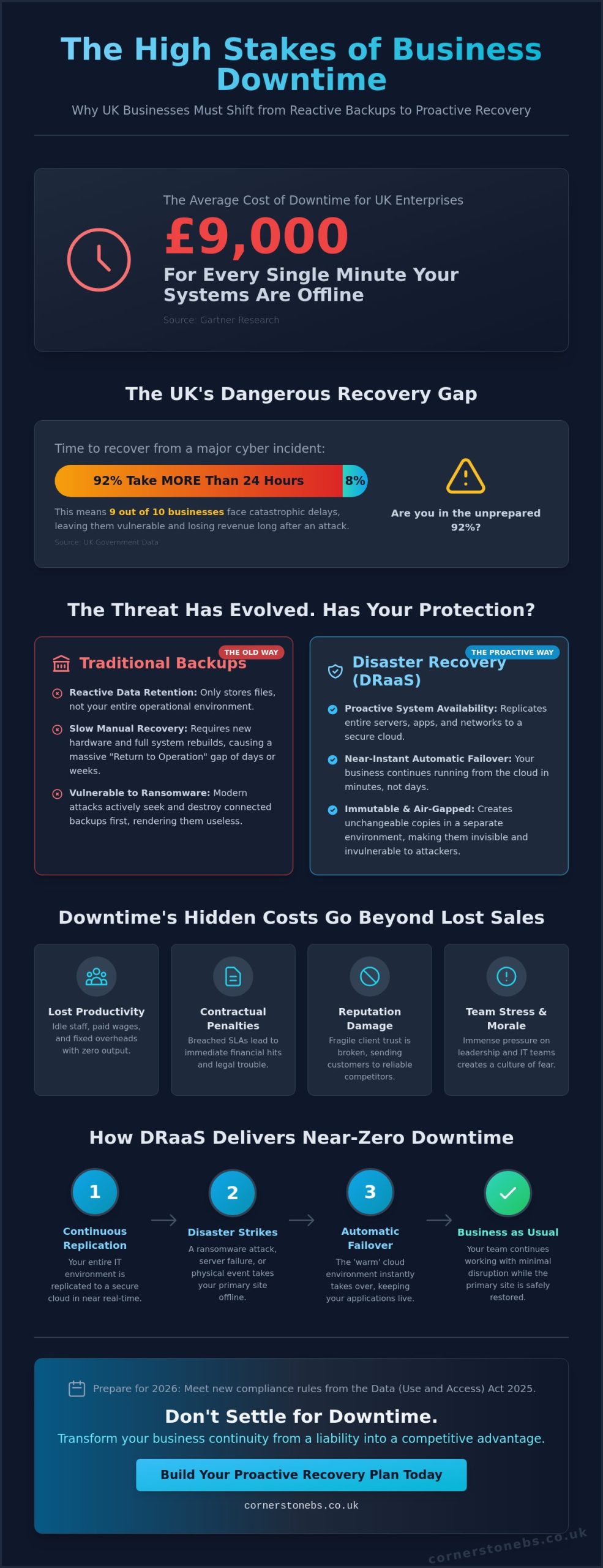
Over 90% of mid-to-large enterprises now face costs exceeding $300,000 for just a single hour of system downtime. Following the wake-up call of the October 2025 AWS outage, it’s clear that old ways of managing IT simply don’t cut it anymore. We understand the anxiety of a potential data breach or the frustration of watching a manual backup crawl while your team sits idle. You need to know your operations are safe, no matter what happens in the digital world. Using cloud computing for business continuity is no longer a luxury; it’s the operational nervous system that makes downtime optional.
As a multi-award-winning UK provider, we’re here to simplify these complex challenges and act as your dedicated long-term partner. This guide explores how to leverage cloud technology to ensure your business remains operational, secure, and resilient against any disruption. We’ll walk you through achieving a zero-friction transition to remote work during outages and the steps for near-instant recovery of your critical data. By taking a managed, proactive approach to your IT resilience, you can stop worrying about technical glitches and focus on your goals with total confidence.
Key Takeaways
Distinguish between disaster recovery and business continuity to keep your operations running smoothly during any disruption.
See how cloud computing for business continuity uses geographic redundancy to keep your data safe and accessible within secure UK-based infrastructure.
Move from unpredictable IT costs to a stable, scalable model that slashes your recovery time and gets your team back to work faster.
Learn to identify your most critical business functions and build a resilient migration strategy that prioritises long-term stability.
Discover the peace of mind that comes with proactive, managed monitoring, ensuring your security remains airtight without the complexity of DIY solutions.
Understanding the Role of Cloud Computing in Business Continuity
Many business owners confuse disaster recovery with business continuity. While they’re related, they serve different purposes. Disaster recovery focuses on getting your tech back online after it breaks. Business continuity is a broader strategy. It’s about keeping your entire operation running smoothly while the crisis is still happening. In 2026, relying on cloud computing for business continuity has become the standard for UK firms that refuse to let a technical glitch stop their progress.
Downtime is no longer just a minor inconvenience. It’s a direct threat to your brand’s reputation. UK customers now expect an “always-on” experience. If your systems go dark, your clients won’t wait; they’ll simply find a competitor who is still online. We see cloud technology as a proactive growth tool rather than a reactive safety net. It allows you to build a resilient foundation where stability is baked into your daily operations.
The Evolution of Business Resilience
The days of physical tape backups and manual rotations are behind us. These methods were slow, prone to damage, and often failed right when you needed them most. Modern resilience relies on real-time synchronisation. The widespread shift to hybrid work has also changed the landscape. Your team is no longer tied to a single office, so your data shouldn’t be either. By implementing managed cloud solutions, you ensure that your staff can access critical files from any location, keeping productivity high even if your physical headquarters is inaccessible. This flexibility is the hallmark of a modern, forward-thinking business.
Why Traditional BCP Often Fails
Traditional Business Continuity Plans (BCP) often crumble because they rely on single points of failure. A server room in your office is vulnerable to power cuts, floods, or hardware malfunctions. If that one room goes down, your whole business stops. Manual processes also introduce the “human error” factor. It’s easy for a busy employee to forget a backup schedule or misplace a drive. These gaps in IT disaster recovery strategies are why many on-premise systems fail during a real crisis. Business continuity is the ability to maintain essential functions during and after a disaster.
We believe in removing these risks through automation and geographic redundancy. Instead of hoping a manual backup worked, cloud computing for business continuity provides a managed environment where your data is constantly monitored and protected. This proactive approach doesn’t just save your data; it saves your time and your professional standing in a competitive market.
How Cloud Technology Powers Uninterrupted Operations
Cloud technology isn’t just about storage; it’s about agility and movement. When a crisis hits, your systems need to react instantly. Using cloud computing for business continuity allows your infrastructure to switch operations seamlessly through automated failover. If one server fails, another takes over without your clients ever noticing a flicker. This technology ensures that your business stays visible and operational, protecting your hard-earned reputation.
We ensure your data lives in multiple secure UK locations. This geographic redundancy means a local power cut or flood won’t take you offline. During an emergency, your resource needs might spike unexpectedly. Cloud systems offer rapid elasticity, scaling your processing power the moment you need it. This prevents system crashes during high-demand recovery periods, giving you the strength to handle any situation with confidence.
Data Redundancy and High Availability
We focus on multi-zone availability within the UK to provide the highest levels of protection. Real-time mirroring creates a live copy of your data, preventing any loss between scheduled backups. You might choose a “Hot” standby site for near-instant recovery of mission-critical systems, while a “Cold” site offers a cost-effective option for less urgent files. As highlighted by the Cloud Security Alliance, understanding this shared responsibility between you and your provider is vital for a truly robust strategy. We take the lead on this complexity so you don’t have to.
Enabling a Mobile Workforce
Modern resilience means your team stays productive from anywhere. Tools like Microsoft 365 keep communication channels open even if your physical office is forced to close. We also implement Business VoIP systems, so your team can answer client calls on their mobiles as if they were sitting at their desks. Our Managed IT Support protocols ensure every remote connection is secure, keeping your data safe while your team works from home. This virtualisation of your office ensures that a physical disruption never equals a total shutdown.
If you’re wondering how these specific tools can fit into your current setup, it’s always helpful to start a professional conversation about your long-term resilience goals.
Cloud vs. On-Premise: A Continuity Comparison
Two critical metrics define your resilience: Recovery Time Objective (RTO) and Recovery Point Objective (RPO). RTO measures how quickly you can get back to work. RPO determines how much data you can afford to lose. With cloud synchronisation, your data loss is often measured in seconds, whereas on-premise systems are limited by your last successful manual backup. While a cloud-based recovery typically takes just minutes to restore essential functions, an on-premise system often requires days of manual rebuilding and data restoration.
Legacy on-premise hardware carries hidden costs that often go overlooked. Beyond the initial purchase, you have to account for electricity, cooling, physical space, and the time your staff spends on manual maintenance. These systems also struggle to scale during a crisis. If you suddenly need more capacity to support a remote workforce, you can’t simply order more physical RAM and have it working in seconds. Cloud systems remove this friction, allowing you to scale up instantly to meet emergency demands without wasting money on idle hardware during normal operations.
Security and Compliance in 2026
There is a common myth that keeping a server in your own office is safer because you can physically see it. In reality, major cloud providers offer physical and digital security that far exceeds what most small businesses can build themselves. They employ dedicated teams to handle automatic security patching, ensuring your systems stay protected against the latest threats without you lifting a finger. Meeting UK data protection standards is much simpler when you leverage professional cyber security services integrated into your cloud environment. This managed approach ensures your business remains compliant and secure, providing the emotional and financial security you need to thrive.
Building Your Cloud-First Business Continuity Plan
Building a resilient plan doesn’t have to be overwhelming. We break it down into manageable steps that focus on your specific business needs. First, you need a Business Impact Analysis (BIA). This is simply a way to identify which parts of your business are most vulnerable to downtime. Next, identify your critical workloads. You don’t need to move every single file immediately. Focus on the data that keeps your lights on. Integrating cloud computing for business continuity ensures these vital assets are always protected.
A successful strategy often starts with a robust Microsoft 365 migration and backup plan. This ensures your team can communicate and collaborate from anywhere, regardless of what happens at your physical premises. Finally, you must commit to regular testing and employee training. A plan that only exists on paper is just a wish. Your team needs to know exactly how to access emergency protocols before a crisis hits.
Identifying Critical Business Functions
Not all data is created equal. You need to decide what must be back online within one hour and what can wait for 24 hours. While cloud systems typically offer an RTO of mere minutes, traditional on-premise systems can leave you waiting for days to recover. Mapping the dependencies between your software and hardware is vital. For example, your CRM might rely on a specific database that also needs to be in the cloud. We ensure our it company solutions are tailored to these specific workflows, so nothing gets left behind during a transition.
The “Test and Tweak” Cycle
Your Business Continuity Plan (BCP) is a living document. It shouldn’t sit on a shelf gathering dust. As your business grows, your IT needs will change. We recommend conducting “Tabletop Exercises” with your management team. These are low-stress simulations where you walk through a disaster scenario to find gaps in your protocols. This proactive approach ensures that when a real disruption occurs, your response is muscle memory rather than panic. Using cloud computing for business continuity means your strategy stays as flexible as your business. This is how you build true emotional and financial security for your organisation.
Ready to start your journey? Contact our local team for a professional conversation about your resilience strategy.
Partnering for Resilience: The Managed Cloud Advantage
Attempting a DIY approach to cloud computing for business continuity often leads to hidden security gaps that only appear during a crisis. While large global providers offer the basic tools, they don’t configure them to meet the specific risks of your unique business model. Misconfigurations can leave your data exposed to ransomware or lead to accidental deletion during a recovery attempt. We believe in taking that technical burden off your shoulders entirely. As a multi-award-winning UK provider, we don’t just sell you a software license; we build a resilient environment that protects your emotional and financial security. Our goal is to position ourselves as a dedicated long-term partner rather than just another service provider.
Proactive Monitoring vs. Reactive Repair
Most IT issues show warning signs before they become full-blown disasters. Our approach focuses on identifying these potential failures before they cause a single second of downtime. By leveraging award-winning managed IT services, you benefit from 24/7 monitoring and an expert helpdesk that knows your business by name. This proactive stance ensures your infrastructure evolves with 2026 technology trends, keeping you ahead of threats rather than just reacting to them. It’s the difference between a transactional service and a collaborative relationship designed for stability. We handle the complexity so you can focus on your core business goals.
Your Next Steps to a Resilient Future
Securing your business shouldn’t feel like a daunting technical hurdle that sits forever on your to-do list. It starts with a simple, professional conversation about your current setup and your specific goals for the future. During an initial IT resilience audit, our experts look for single points of failure and identify the most efficient cloud path for your critical workloads. We simplify the complex technical concepts so you can make informed decisions with total confidence. Our team is locally based and ready to help you build a foundation that supports your growth for years to come. This managed approach ensures that your infrastructure is always ready for whatever the future brings.
In 2026, business resilience is no longer defined by how well you react to a crisis, but by how effectively you’ve prepared for one. We’ve explored how moving away from physical hardware vulnerabilities to a flexible, automated environment is the only way to meet modern “always-on” expectations. By leveraging cloud computing for business continuity, you transform your IT from a potential point of failure into a robust engine for growth.
As a multi-award-winning IT support team with strategic partnerships with Microsoft, Cisco, and IBM, we provide the expert oversight needed to keep your systems secure. Our proactive 24/7 system monitoring identifies risks before they impact your bottom line, giving you the emotional and financial security to focus on your core goals. You don’t have to manage this complexity alone; we’re here to act as your dedicated long-term partner.
What is the difference between cloud backup and cloud business continuity?
Cloud backup is a copy of your files stored offsite, primarily used for retrieving lost or deleted data. Cloud business continuity is a more comprehensive strategy that allows your entire operation to keep running during a major outage. While a backup might take hours or days to restore to new hardware, continuity systems switch to cloud-based virtual versions of your servers almost instantly. This ensures your team stays productive without waiting for a full system rebuild.
How much does cloud-based business continuity cost for a UK SME?
Pricing for these services typically follows a predictable monthly subscription model based on the number of users or the volume of data protected. This shift from large upfront capital costs to manageable operating expenses helps UK SMEs plan their budgets with confidence. Since every organisation has different recovery requirements, we recommend a professional audit to determine the specific scale of infrastructure needed to support your unique business workflows and resilience goals.
Is cloud computing secure enough for sensitive business data in 2026?
Cloud infrastructure in 2026 offers security levels that far exceed most on-premise setups. Leading providers invest billions in physical and digital protection, including automated patching and advanced encryption. Using cloud computing for business continuity means your data is housed in high-security facilities with 24/7 monitoring. We add an extra layer of protection through our managed cyber security protocols, ensuring your sensitive information remains compliant with the latest UK data residency and privacy standards.
Can cloud computing help my business recover from a ransomware attack?
Cloud solutions are one of the most effective defences against ransomware. By maintaining immutable backups that attackers cannot modify or delete, we can roll your entire system back to a point in time just before the infection occurred. This allows you to bypass the ransom demand and restore your operations quickly. Combining proactive monitoring with a cloud-first strategy ensures that a single malicious link doesn’t result in a permanent loss of your critical business data.
Do I need a high-speed internet connection for cloud business continuity to work?
A reliable internet connection is essential for synchronising data in real-time, but it doesn’t always require ultra-fast speeds for every task. Modern systems use smart compression and deduplication to minimise the amount of data sent over the wire. If your local connection is a concern, we can implement hybrid models that keep a local cache for speed while still ensuring a full, resilient copy exists in the cloud for emergency remote access.
How fast can a business be back online after a total server failure using the cloud?
Recovery times have improved significantly, with many businesses getting back to work in under 15 minutes following a total server failure. This is possible through virtualisation, where your server is “spun up” in the cloud environment almost immediately. Instead of waiting days for new hardware to arrive and be configured, your team simply logs into the cloud version of your office and continues their work with minimal disruption to your clients.
What are the main benefits of using Microsoft Azure for disaster recovery?
Microsoft Azure provides a massive global network that ensures your data is replicated across multiple secure UK data centres. It integrates seamlessly with Microsoft 365, making it easier to manage your entire IT estate from a single platform. The primary benefit is its scalability; you can increase your recovery capacity instantly during a crisis without owning any physical hardware. This makes it a foundational tool for any modern cloud computing for business continuity strategy.
Does my business still need an on-site server if we move to a cloud continuity model?
Many UK businesses are moving toward a completely “serverless” office by hosting everything in the cloud. However, some organisations prefer a hybrid model where a small on-site device handles daily local tasks while the cloud provides the heavy lifting for resilience and remote access. We assess your specific workflow needs to decide if retiring your physical server is the right move for your efficiency, security, and long-term financial goals.
Did you know that 83% of CIOs are now planning to move at least some of their workloads back from the public cloud? It’s a striking shift that challenges the “cloud-first” mantra we’ve heard for years. As hardware costs from giants like Dell and Lenovo rise by up to 17% this year, you’re likely feeling the squeeze of balancing high-performance infrastructure with a healthy bottom line.
We understand the anxiety that comes with managing complex systems. You want a stable, scalable foundation without the constant worry of hardware failure or maintenance headaches. Choosing between a virtual server vs physical server isn’t just a technical box to tick; it’s a strategic decision that affects your long-term ROI and daily peace of mind. As a multi-award-winning IT provider, we’re here to act as your expert guide through these crossroads.
This guide provides a clear look at the technical and financial trade-offs of each path for 2026. We’ll show you how to reduce maintenance burdens and build a resilient infrastructure using modern Managed IT Support and Cloud Solutions. We’ll compare the reliability of physical hardware with the agility of Azure to ensure your business stays secure and productive.
Key Takeaways
Understand the fundamental differences between a virtual server vs physical server to determine which model aligns with your 2026 growth goals.
Discover how server consolidation through virtualization helps you do more with less hardware while significantly reducing your physical maintenance burden.
Learn why virtual snapshots are a foundational element of modern disaster recovery, providing business continuity that physical units often struggle to match.
Identify the specific scenarios, such as high-performance computing or strict regulatory compliance, where dedicated hardware remains the superior choice for your operations.
Get a clear strategy for auditing your current infrastructure and assessing your team’s capacity to manage a transition to more agile systems.
Understanding the Basics: Physical vs Virtual Server Definitions
Deciding on the right infrastructure starts with a clear look at the engine under the hood. For many years, the server was literally a box in the corner. It hummed away in a dedicated room, requiring its own air conditioning and a tangle of cables. Today, that setup is becoming a legacy concept. Modern businesses now view infrastructure as a flexible resource rather than just a piece of furniture. To make the right choice for your organisation, you need to understand the fundamental mechanics of a virtual server vs physical server.
What is a Physical Server?
A physical server, often called “bare-metal,” is a single-tenant hardware unit dedicated to one user or task. It contains all the standard physical components: a central processing unit (CPU), random access memory (RAM), and internal storage drives. Because it’s a single-tenant architecture, only one operating system runs on the hardware at any given time. This provides the user with direct access to all the machine’s resources.
While this offers raw power, it comes with physical demands that a modern office might find restrictive. You’ll need to account for:
Server rack space and the physical footprint within your building.
A consistent power supply and expensive backup generators.
Specialised cooling systems to prevent hardware degradation.
Manual hardware maintenance and the logistical challenge of part replacements.
What is a Virtual Server?
A virtual server is a software-defined instance that lives on a physical machine but operates independently. It uses a layer of software called a hypervisor to “abstract” the operating system from the hardware. This allows one physical machine to host dozens of virtual machines (VMs) simultaneously. Each VM thinks it’s a standalone server with its own dedicated resources. When comparing a virtual server vs physical server, this software layer is the key differentiator that provides the agility modern businesses crave.
This approach relies on resource pooling. Instead of one server sitting idle at 10% capacity, virtualisation allows you to share that physical power across multiple tasks. This is the core logic behind what a virtual private server is and why it’s so efficient. The hypervisor acts as a traffic controller, ensuring each VM gets exactly what it needs to run smoothly without interfering with others.
Many businesses are now moving these environments into Cloud Solutions like Microsoft Azure. This shift removes the need for on-site hardware entirely. You gain the benefits of a robust server environment without the stress of managing physical components or worrying about the office power grid. It’s about moving from owning a “box” to accessing a service that grows with you.
Performance, Cost, and Scalability: A Direct Comparison
Choosing the right path requires balancing raw power against operational agility. When we compare a virtual server vs physical server, we aren’t just looking at technical specs. We’re looking at how your business breathes and grows. Physical servers offer a dedicated “bare-metal” experience, while virtualisation provides a flexible, shared environment that adapts to your needs in real time.
The Performance and Reliability Factor
Physical servers excel in performance because they have no middleman. Your applications have direct, exclusive access to the CPU and RAM. Research indicates that the hypervisor layer required for what is virtualization typically consumes between 5% and 10% of the server’s resources. If you’re running high-frequency trading apps or massive, spiky databases, that 10% overhead might be a significant factor. However, for the vast majority of business workloads, this performance gap is barely noticeable.
Virtualisation wins on reliability and high availability. In a virtual environment, your server isn’t tied to one specific piece of hardware. If a physical component fails, our systems can automatically move your virtual server to a healthy host. This prevents the single points of failure that haunt traditional on-premise setups. Adding resources is also faster. While upgrading a physical machine requires ordering parts and scheduling downtime, we can scale a virtual server’s RAM or CPU in minutes.
TCO: The Total Cost of Ownership
The financial landscape for IT hardware changed significantly in early 2026. Hardware costs have surged. Dell increased list prices by approximately 17% in March, and a new dual-socket server now ranges between $14,000 and $18,000. These represent heavy upfront Capital Expenditures (CapEx) that lock your cash away. You also have to account for the 90-95% price hike in server DRAM contract prices seen earlier this year.
Virtual servers shift this burden to Operating Expenditure (OpEx). You avoid the “hidden” costs of physical ownership, such as high electricity bills for 24/7 cooling and the cost of physical floor space. By moving to virtualised managed IT services, you gain predictable monthly billing and a more stable ROI. This proactive approach ensures your infrastructure remains modern without the shock of sudden hardware failure costs. If you want to see how these savings apply to your specific setup, our team is ready to help you map out a cost-effective transition.
The Strategic Benefits of Virtualisation for Modern SMEs
For many business leaders, the choice between a virtual server vs physical server isn’t just a technical decision. It’s a strategic move toward agility. In a fast-paced market, you need infrastructure that acts as a catalyst for growth rather than a physical anchor. Virtualisation allows your business to consolidate multiple workloads onto a single physical machine. This means you do more with less hardware, reducing the complexity of your IT environment and the time your team spends on maintenance.
Disaster Recovery and Business Continuity
Because virtual machines are independent of the underlying hardware, we can move them between physical hosts almost instantly. If one host experiences a fault, your virtual server simply restarts on another. This rapid restoration is a foundational element of any modern disaster recovery strategy. It provides the emotional security you need to focus on your clients, knowing your systems are resilient and secure.
Flexibility for a Growing Workforce
In 2026, supporting a hybrid workforce is a standard requirement. Virtual servers provide the secure, high-performance environment your team needs to work from anywhere. When your business grows, you don’t want to wait weeks for new hardware to be delivered and configured. We can spin up new virtual instances in minutes, ensuring your new hires are productive from day one.
This flexibility also helps you manage seasonal demand. If your operations experience a peak period, we can temporarily allocate more RAM or CPU power to your virtual environment. Once the rush passes, we scale those resources back down. This ensures your infrastructure remains efficient and cost-effective, providing a better ROI on your technology spend without the waste of idle physical hardware.
Legacy and High-Performance: When Physical Servers Still Win
While the trend toward virtualisation is undeniable, physical servers remain a powerhouse for specific business needs. They aren’t going anywhere just yet. In fact, as of 2025, 45% of IT workloads were still running in corporate-owned facilities. For organisations dealing with massive databases or high-performance computing (HPC), direct access to hardware is a non-negotiable requirement. When you remove the hypervisor, you reclaim that 5-10% performance overhead we discussed earlier. This is vital when every millisecond of processing time impacts your bottom line.
Specialised Workloads and Compliance
Dedicated hardware eliminates the risk of “noisy neighbours.” In a shared virtual environment, a resource spike in one virtual machine can occasionally impact the performance of others on the same host. Physical servers provide absolute resource isolation. This is particularly important for bespoke peripheral equipment or legacy software that requires a direct connection to the hardware’s BIOS or specific ports. Some older applications simply refuse to run in a virtualised environment; this makes a physical unit the only reliable home for them.
Data sovereignty and strict regulatory compliance also play a major role. Certain industries, such as legal or financial services, may be required by law to keep specific datasets on isolated, physical hardware. This ensures a level of data isolation that virtual environments can’t always guarantee. It’s about having total control over where your data sits and who has access to the physical chassis. We provide the expert oversight needed to ensure these physical assets stay secure and efficient.
The Hybrid Infrastructure Model
The most successful organisations in 2026 don’t feel forced to choose just one side of the virtual server vs physical server debate. Instead, they adopt a hybrid model. This involves keeping core, sensitive data on a physical server while using cloud solutions to handle more flexible applications. You might even use your own physical hosts to build a private virtual cloud, giving you the security of “bare-metal” with the management ease of virtualisation.
This strategic placement allows you to scale securely without sacrificing performance. We often help our partners audit their current software lifecycle to see where physical hardware is still the smartest investment. If you’re unsure if your legacy systems are ready for the jump, speak with our local team to find the balance that secures your business continuity.
Making the Transition: Planning Your Server Infrastructure Strategy
Modernising your infrastructure requires more than just a budget; it demands a clear-eyed look at how your technology supports your daily operations. Whether you are leaning toward a virtual server vs physical server, the first step is always a thorough evaluation of your current environment. This isn’t just about the hardware in your server room. It’s about ensuring your systems are agile enough to support a hybrid workforce while remaining secure against evolving threats.
You also need to assess your internal team’s capacity. Managing physical hardware, cooling systems, and firmware updates is a time-consuming task that can pull your staff away from strategic growth projects. Moving toward a virtualised environment or a cloud-based model like Azure often simplifies management, but it requires a structured approach to avoid costly mistakes.
A 5-Step Infrastructure Audit
A successful strategy begins with data rather than guesswork. Before making a move, follow this structured audit to ensure your new setup is fit for purpose:
Step 1: Inventory all assets. Catalog every physical and virtual server to identify which units are reaching their end-of-life or warranty expiration.
Step 2: Identify software dependencies. Review your application licensing. Moving to a virtual environment can change your licensing requirements for Windows Server or SQL.
Step 3: Measure actual utilisation. Track your CPU and RAM peaks over a typical month. Many businesses find their physical servers are over-provisioned and under-utilised.
Step 4: Align with your 3-year plan. Consider your growth projections. Will you be hiring more remote staff or opening new locations that require decentralised access?
Step 5: Define your migration roadmap. Decide if your workloads are better suited for on-premises virtualisation or a public cloud solution like Microsoft Azure.
Partnering for Success
Server migrations are high-stakes projects. A “DIY” approach often leads to unexpected downtime that frustrates your team and stalls your service to clients. This is where professional managed IT support becomes a foundational asset for your business stability. We help you navigate the complexities of the virtual server vs physical server debate by providing an expert perspective tailored to your specific regional needs.
Secure Your Digital Foundation for 2026
Building a resilient business starts with choosing the right infrastructure. The debate between a virtual server vs physical server isn’t about finding a single winner; it’s about aligning technology with your operational goals. While virtualisation offers the agility and disaster recovery snapshots needed for a hybrid workforce, physical servers still provide the raw power required for high-performance databases and strict regulatory compliance.
Navigating these technical trade-offs doesn’t have to be a solo journey. As a multi-award-winning IT provider with national reach, we focus on bespoke solutions that simplify complexity. Our strategic partnerships with Microsoft, IBM, and Cisco ensure you receive world-class expertise with the personal, proactive care of a local team. We’re here to help you audit your environment and build a stable IT foundation that delivers a genuine return on your investment.
Is a virtual server more secure than a physical server?
Neither environment is inherently more secure; it’s all about how you manage it. Virtual servers offer a major advantage through isolation, as a compromise in one instance doesn’t automatically affect others on the same host. You also benefit from rapid snapshots, which allow you to roll back systems instantly after a cyber attack. We focus on a layered security approach to protect your data, regardless of the platform you choose.
How many virtual servers can run on one physical server?
The number of instances depends entirely on your hardware’s resources and the specific workload of each application. A modern server with high core counts and plenty of RAM can comfortably host dozens of lightweight virtual machines. However, resource-heavy tasks like massive databases will reduce that number. We measure your peak resource utilisation to ensure every virtual server vs physical server comparison accounts for performance overhead and future growth.
What is the cost difference between physical and virtual servers?
Physical servers require a high upfront investment, with new dual-socket units often costing between $14,000 and $18,000 in 2026. Virtualisation reduces these costs by letting you run multiple workloads on a single machine. This cuts down on hardware purchases, power usage, and cooling requirements. While you’ll have software licensing fees for hypervisors, the long-term ROI is usually much higher due to better resource efficiency across your entire estate.
Can I convert my existing physical server into a virtual one?
Yes, this process is known as Physical-to-Virtual (P2V) conversion. It involves creating a software image of your current physical machine and migrating it into a virtual environment. It’s an excellent way to preserve legacy applications while moving them onto more modern, agile hardware. Our team handles these transitions carefully to ensure your data remains intact and your applications continue to run smoothly without the need for a complete reinstallation.
Do I need a physical server to run a virtual environment?
Every virtual server must eventually sit on physical hardware. If you choose an on-premises virtual environment, you’ll still need a physical host machine in your building. However, many organisations now opt for Cloud Solutions like Microsoft Azure. In this model, the physical hardware lives in a secure data centre managed by the provider. This removes the need for you to own, power, or maintain any physical boxes yourself.
Which is better for a small business: physical or virtual?
For most small businesses, virtualisation or cloud-based environments are the superior choice. They offer a level of flexibility and disaster recovery that’s difficult to achieve with a single physical unit. You don’t have to worry about a single hardware failure bringing your entire operation to a halt. It’s an approachable way to access enterprise-grade stability and security without the massive upfront costs and complexity of managing a dedicated server room.
How does server virtualisation affect software licensing?
Virtualisation can make software licensing more complex, as vendors often have different rules for virtual environments. Some products are licensed by the number of virtual cores, while others are based on the physical host’s capacity. It’s easy to overspend or fall out of compliance if you don’t plan carefully. We provide the expert guidance needed to navigate these licensing models, ensuring you stay compliant while maximising your technology budget.
What happens if the physical host of a virtual server fails?
If a standalone physical host fails, the virtual servers running on it will go offline. This is why we recommend a “cluster” approach for business continuity. In a clustered environment, if one physical machine fails, your virtual servers automatically migrate to another healthy host in the system. This proactive setup ensures your team stays productive and your data remains accessible, providing the emotional security of knowing your systems are truly resilient.
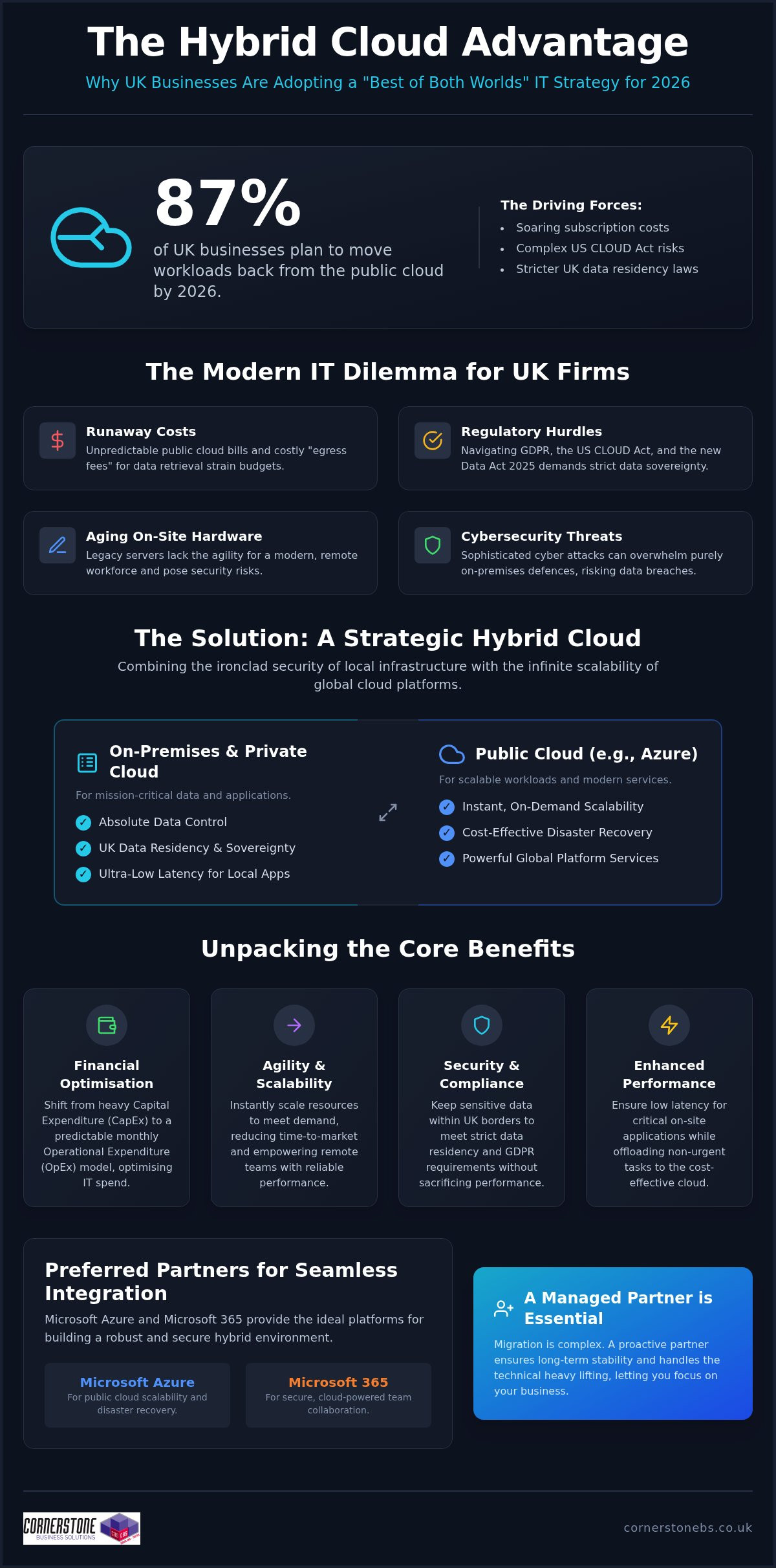
Did you know that 87% of UK businesses are planning to move at least some of their workloads back from the public cloud by the end of 2026? While the “all-in” cloud promise once seemed like the only way forward, many local firms now face soaring subscription costs and the complex jurisdictional risks of the US CLOUD Act. Understanding the hybrid cloud benefits for UK business is no longer just a technical choice. It’s a vital strategy to ensure your infrastructure remains agile and compliant in a rapidly shifting regulatory landscape.
We know how stressful it is to manage aging on-site hardware while trying to navigate the new Data (Use and Access) Act 2025. You need a system that supports your remote team without leaving your sensitive data exposed. This guide reveals how a bespoke hybrid model provides the emotional security of knowing your data is residency-compliant while slashing your capital expenditure. We’ll show you how to balance security, cost, and performance to create a scalable, bulletproof IT environment that’s ready for whatever 2026 throws your way.
Key Takeaways
Learn how a strategic mix of on-premises and private cloud systems provides the foundation for a modern, agile UK business infrastructure.
Discover the core hybrid cloud benefits for UK business, including the ability to scale resources instantly while moving from heavy CapEx to predictable monthly costs.
Understand how to keep your sensitive client data within UK borders to meet strict data residency and GDPR requirements without sacrificing performance.
Explore why Microsoft Azure and Microsoft 365 are the preferred partners for local firms looking for seamless integration and bulletproof disaster recovery.
Gain insights into why a proactive managed IT partner is the best way to handle migration complexity and ensure long-term business stability.
The Evolution of Infrastructure: Why Hybrid Cloud is the 2026 Standard
The days of the dusty server humming away in a back office cupboard are fading fast. For years, many UK SMEs relied on that “server in the corner” to run every aspect of their operations. While that model felt simple, it lacked the agility needed to support a modern, distributed workforce. By 2026, the standard has shifted toward a more sophisticated, distributed environment. One of the primary hybrid cloud benefits for UK business is the ability to maintain absolute control over sensitive data while tapping into the massive processing power of the public cloud.
When asking What is Hybrid Cloud?, it’s essentially a strategic orchestration between on-premises infrastructure, private cloud environments, and public platforms like Microsoft Azure. With 73% of organizations now running a hybrid environment, the UK market has matured significantly. Local firms are now balancing the need for seamless remote team access with the strict security demands of the Data (Use and Access) Act 2025. This model ensures you aren’t forced to choose between legacy reliability and modern innovation.
Hybrid cloud represents the “best of both worlds” for UK operational flexibility by combining the ironclad security of local hardware with the infinite scalability of global cloud platforms.
The “Best of Both Worlds” Philosophy
Public clouds are fantastic for cost-effective scalability and handling generic workloads like email or web hosting. However, mission-critical data often requires the dedicated environment of a private cloud or on-premises server to meet UK residency requirements. This hybrid bridge allows your business to pursue digital transformation without abandoning the reliable systems that have served you for years. It’s about placing the right workload in the right place to maximize efficiency and peace of mind.
Overcoming the Limitations of Single-Cloud Models
Relying 100% on a pure public cloud can lead to “egress fee” shocks. These are the hidden costs UK businesses face when trying to move their own data out of a provider’s ecosystem. Conversely, staying entirely on-premises is increasingly risky. Modern cyber threats are too sophisticated for a single local server to handle alone. A hybrid model eliminates vendor lock-in and provides the technical freedom to move data where it’s most efficient. It ensures your business isn’t held hostage by a single provider’s pricing or a single point of technical failure.
Unpacking the Core Hybrid Cloud Benefits for UK Business Growth
Performance is another area where the hybrid model shines. For latency-sensitive applications, such as local databases or heavy design software, keeping them on-site ensures your team isn’t slowed down by “lag.” Meanwhile, you can offload non-urgent tasks like disaster recovery and long-term backups to the cloud. This strategic split is one of the primary benefits of a hybrid cloud, providing speed where it’s needed and storage where it’s most cost-effective.
Operational Agility and Scalability
Optimising IT Spend and Resource Allocation
Financial stability is the backbone of any successful firm. Moving from heavy Capital Expenditure (CapEx) to a predictable, monthly Operational Expenditure (OpEx) model is a game-changer for budgeting. Many businesses discover they’ve been over-provisioning on-site servers “just in case.” A hybrid approach eliminates this waste. By using tailored cloud solutions, SMEs can finally access the same enterprise-grade technology as their larger competitors without the massive upfront price tag.
Managing this balance requires a steady hand and proactive oversight. To get the maximum ROI from these systems, many leaders choose to pair their infrastructure with professional Managed IT Support. This ensures your resources are always allocated correctly. It lets you focus on your business goals while a dedicated partner handles the technical heavy lifting. If you’re curious about how this could work for your specific setup, we’re always happy to have a quick, informal chat about your goals.
Security, Compliance, and Data Sovereignty in the UK
“Is the cloud actually safe for my sensitive client data?” This remains the most common question we hear from business owners across the UK. With PECR fines now reaching up to £17.5 million or 4% of global turnover as of February 2026, the stakes for data protection have never been higher. A hybrid approach provides the reassurance you need. It allows you to keep your most sensitive files on local, physical hardware while leveraging the cloud for general operations. This setup is a cornerstone of a modern security strategy that doesn’t compromise on speed or safety.
Data sovereignty is a major part of this conversation. Many firms don’t realize that using a standard US-based cloud provider can expose them to the US CLOUD Act. This legislation allows foreign law enforcement to request data regardless of its physical location. By using a hybrid model, you ensure your sensitive UK data stays strictly within our borders. This is vital for meeting the requirements of the Data (Use and Access) Act 2025. As of July 13, 2026, the UK government designated providers like Microsoft and Amazon as “Critical Third-Party Providers,” bringing their services under the direct oversight of the Bank of England and the FCA. Integrating robust Cyber Security Services into your hybrid environment creates a layered defence that protects your reputation.
Navigating UK GDPR and Data Residency
Knowing exactly where your data sits physically is the first step to true compliance. Hybrid models are perfect for sectors like finance, legal, and education where data residency is a legal necessity. You can store Personally Identifiable Information (PII) on-site or in a secure UK-based private cloud. This makes passing a GDPR audit much simpler. It also helps you achieve Cyber Essentials certification, proving to your clients that you take their privacy seriously. It’s about building trust through transparent, locally-focused data management.
Enhanced Disaster Recovery and Business Continuity
One of the most powerful hybrid cloud benefits for UK business is the ability to use the cloud as a high-speed “failover” site. If your local hardware fails or an office incident occurs, your team can keep working without missing a beat. Automated backups in the cloud protect you against the growing threat of ransomware by providing a clean point-in-time restore. Building a comprehensive disaster recovery plan is far easier when you aren’t relying on a single physical location. It gives you the emotional security of knowing your business is resilient, no matter what happens.
Integrating Hybrid Cloud with Microsoft 365 and Azure
For most UK firms, Microsoft Azure is the natural choice for a hybrid setup. As of July 13, 2026, Microsoft is officially designated as a Critical Third-Party Provider by the Bank of England and the FCA. This provides a level of regulatory oversight that other platforms simply cannot match. While Microsoft recently increased the price of Microsoft 365 plans, such as Business Basic rising to £5.33 and E3 to £33.48, the added value remains significant. These plans now include enhanced Microsoft 365 Copilot Chat and increased mailbox storage, making them even more central to your daily operations.
The real magic happens when you integrate Microsoft 365 with your on-premises Active Directory. This creates a “single source of truth” for your staff identities. Your team uses one login for their local PC, their email, and their cloud files. This seamless integration is one of the most practical hybrid cloud benefits for UK business, as it reduces password fatigue and closes security gaps. To ensure a smooth transition, we recommend following a structured Microsoft 365 Migration Guide to avoid data silos or sync errors.
The Synergy of Azure and On-Premises Systems
Azure Virtual Desktop (AVD) is another game-changer for the hybrid workspace. It allows your staff to access a high-performance, secure Windows environment from any device, anywhere in the UK. Your sensitive data stays safe in the cloud while your team enjoys the familiarity of their office desktop. Azure Stack essentially brings the immense processing power of the global cloud directly into your physical office, allowing you to run Azure services on your own local hardware. This ensures that even if your internet connection wavers, your core systems stay online.
Modernising Communication with Hybrid VoIP
As we approach the final stages of the UK PSTN switch-off, modernising your phone systems is no longer optional. A hybrid approach allows you to integrate cloud-based Business VoIP with your existing network infrastructure. This ensures your office phones and business mobiles work as one unified system. It provides the reliability of a physical network with the flexibility of a cloud-based exchange. You get crystal-clear calls and advanced features without having to rip and replace your entire setup.
Navigating these integrations can feel like a lot to take on alone. If you are ready to future-proof your setup, we invite you to explore our bespoke cloud solutions and see how we can build a system that works for you.
Navigating the Migration: Why a Managed Partner is Essential
Migration to a hybrid environment is a major strategic shift that requires much more than a simple “lift and shift” of your files. While the hybrid cloud benefits for UK business are clear, the process of getting there is often fraught with technical hurdles. Many firms attempt to manage this transition internally, only to be met with unexpected data loss or security misconfigurations that leave them vulnerable. A managed partner provides the expertise to map out your infrastructure correctly from day one, ensuring your move is smooth, secure, and tailored to your specific goals.
The real value of a dedicated partner lies in proactive monitoring. The old “break-fix” model, where you only call for help when a system goes down, is no longer sufficient for the fast-paced 2026 business environment. You need a team that identifies potential bottlenecks or security threats before they disrupt your operations. This proactive stance is one of the greatest hybrid cloud benefits for UK business, as it provides the emotional security of knowing your systems are resilient and your data residency is always compliant with the latest UK regulations.
Avoiding the Pitfalls of Do-It-Yourself Cloud
One of the biggest hidden costs in DIY cloud migration is the “security gap” created by misconfigured settings. Without expert oversight, it’s easy to leave sensitive directories exposed or fail to set up proper encryption for data in transit. Expert guidance ensures that legacy software continues to function in a distributed world without specific network adjustments. Investing in professional IT company solutions saves you money in the long run by avoiding these expensive mistakes and ensuring your essential tools remain fully operational throughout the transition.
The Cornerstone Business Solutions Approach: Bespoke, Award-Winning Support
At Cornerstone Business Solutions, we’re proud to be a multi-award-winning IT services provider with national UK coverage. Our approach is built on partnership rather than just transactions. We don’t just sell you a service; we become a long-term extension of your team. Our experts take the time to simplify complex technical jargon into clear, actionable business benefits, so you always know exactly what your investment is doing for you. We focus on building bespoke, reliable systems that grow alongside your firm, backed by our strong partnerships with industry leaders like Microsoft, IBM, and Cisco.
Every business infrastructure is unique, and your cloud strategy should be too. We invite you to join us for a no-obligation audit of your current IT setup. It’s a chance to have a friendly, informal conversation with our local experts about your challenges and goals. Let’s work together to build a secure, scalable foundation that keeps your business moving forward. Reach out today to start the conversation.
Future-Proofing Your Infrastructure for 2026 and Beyond
The landscape of UK business IT is moving fast. You’ve seen how a hybrid model balances the need for ironclad security with the flexibility of the public cloud. It’s the most reliable way to handle the Data (Use and Access) Act 2025 while keeping your operational costs predictable. By embracing the hybrid cloud benefits for UK business, you’re building a foundation that respects local data residency while leveraging global innovation.
As a multi-award-winning IT provider and proud partner of Microsoft, IBM, and Cisco, we specialize in building bespoke systems that fit your specific needs. We don’t believe in one-size-fits-all solutions. Instead, we focus on providing the emotional security and technical stability you need to grow your firm with confidence. Our team is ready to help you navigate the complexities of migration and proactive monitoring.
What are the main hybrid cloud benefits for UK businesses in 2026?
The primary hybrid cloud benefits for UK business include the ability to scale resources instantly while maintaining absolute control over sensitive data. This model allows you to keep mission-critical files on-site for security and speed, while offloading backups and generic workloads to the cloud to reduce capital expenditure. It is the most effective way to stay agile in a competitive market without sacrificing the stability of your local infrastructure.
How does hybrid cloud help with UK GDPR compliance?
Hybrid cloud simplifies compliance by allowing you to choose exactly where your data is stored. You can keep Personally Identifiable Information on secure, UK-based physical servers to meet strict residency requirements. This prevents your sensitive client data from being subject to foreign laws like the US CLOUD Act. It provides a transparent audit trail that makes meeting UK GDPR and Data (Use and Access) Act 2025 standards much more manageable.
Is hybrid cloud more expensive than traditional on-premises servers?
While there is an initial setup cost, hybrid cloud is often more cost-effective over time. It shifts your IT spend from heavy upfront capital expenditure to a predictable monthly operational model. You no longer need to pay for high-end hardware that sits idle most of the year. By scaling your cloud usage to match your actual workload, you eliminate the waste of over-provisioned local servers while enjoying enterprise-grade technology.
Can I use hybrid cloud if I already have Microsoft 365?
Yes, Microsoft 365 is designed to work seamlessly within a hybrid environment. You can sync your on-premises Active Directory with the cloud so your team uses a single login for everything. This integration improves security and reduces password fatigue for your staff. It allows you to keep large databases on-site for speed while your team uses cloud-based tools like Teams and Outlook for daily communication and collaboration.
What is the difference between hybrid cloud and multi-cloud?
Hybrid cloud combines your private on-premises infrastructure with a public cloud provider like Microsoft Azure. It is about bridging the gap between your local office and the digital world. Multi-cloud refers to using several different public cloud providers at once to avoid relying on a single vendor. Most UK firms find that a hybrid model offers the best balance of security and performance without the complexity of managing multiple external contracts.
How long does it take to migrate to a hybrid cloud environment?
Migration timelines vary depending on the size of your data and the complexity of your current software. A straightforward setup might take a few weeks, while a full enterprise transition could take several months. We always recommend a phased approach to ensure zero downtime for your team. This allows us to test each system thoroughly before moving to the next stage, providing a smooth experience for your staff and customers.
Do I need a managed IT partner for hybrid cloud migration?
While you could attempt it alone, a managed partner ensures your migration is secure and efficient. Partnering with experts allows you to unlock the full hybrid cloud benefits for UK business, as we handle the complex technical heavy lifting and network adjustments. A partner provides proactive monitoring that identifies potential issues before they cause downtime. This gives you the emotional security of knowing your business is in expert hands.
How does hybrid cloud improve disaster recovery for UK firms?
Hybrid cloud creates a bulletproof safety net by using the cloud as a secondary failover site. If your physical office suffers an incident, your team can switch to the cloud version of your systems instantly. Automated, point-in-time backups protect you against ransomware by providing a clean copy of your data for quick restoration. It is a foundational element of business stability that ensures your firm remains resilient against any local hardware failure.
What if your most sensitive client records walked out the front door the moment an employee handed in their notice? It’s a scenario that keeps many local business owners awake at night, and for good reason. Managing employee leavers in Microsoft 365 isn’t just a bit of admin work; it’s a critical security protocol that protects your reputation and your bank balance. We understand the frustration of paying for licenses that nobody is using or the sheer panic when you realize a former staff member still has access to the company SharePoint.
You deserve a process that’s as reliable as your best team member. This guide shows you exactly how to revoke access, secure your data, and optimize your licensing costs before the July 1, 2026 price increases take effect. We’ll also cover the vital new 93-day OneDrive retention policy to ensure you never lose important client history. By the end of this article, you’ll have a clear, repeatable offboarding plan that brings total peace of mind to your digital workspace.
Key Takeaways
Understand why a standard password reset fails to secure your data and how to properly revoke access across every connected device.
Follow our professional 5-step workflow for managing employee leavers in Microsoft 365 to preserve critical client history and maintain compliance.
Reduce your monthly overheads by using the “Shared Mailbox” method to keep important emails accessible without paying for an active license.
Learn how to remotely wipe corporate data from personal mobile devices and close security gaps in third-party “Shadow IT” applications.
Discover how partnering with Managed IT Support can automate your offboarding, removing the risk of human error and ensuring a secure, repeatable process.
The Hidden Risks of Poor Employee Offboarding in Microsoft 365
When a staff member moves on, it’s tempting to think a quick password reset solves everything. It doesn’t. In fact, relying solely on a password change is one of the most common mistakes we see when businesses are managing employee leavers in Microsoft 365. Modern cloud environments are complex. Active sessions on laptops, tablets, and phones can remain open for days or even weeks without requiring a new login. This creates a massive security gap where sensitive company data remains accessible to someone who no longer has a right to see it. It’s a risk your reputation simply can’t afford.
Beyond security, there’s a significant commercial impact to consider. With Microsoft 365 price increases taking effect on July 1, 2026, every unused license is a direct hit to your bottom line. A team of 50 on Business Standard will see costs rise by $900 per year. Paying that for an empty desk is simply bad business. From a compliance perspective, The Employee Offboarding Process must align with UK GDPR. You’re legally required to ensure personal data is handled correctly, which means you can’t just leave “zombie” accounts sitting in your tenant indefinitely.
Security Vulnerabilities and “Zombie” Accounts
Zombie accounts are identities that stay active long after the human user has left. These are prime targets for hackers because nobody is monitoring them. If you use Microsoft 365 for Single Sign-On (SSO), an ex-employee might still have access to:
Your cloud-based accounting software
Customer CRM databases
Industry-specific project tools
Internal communication channels
You must revoke active tokens and kill all sessions immediately. This forces every device to disconnect, ensuring your digital perimeter stays tight. It’s about proactive protection rather than reacting to a breach after it happens. We want to see your business stay secure and resilient through every transition.
Data Sovereignty and Client Relationships
Your data is your most valuable asset. When someone leaves, their email history in Exchange Online and their files in SharePoint must remain under your control. There’s a real danger of “orphaned” files; documents stored in a personal OneDrive that nobody else can access once the account is deleted. Under the new policy effective January 2025, OneDrive data is only kept for 93 days after a license is removed. If you don’t act fast, that intellectual property is gone forever. We help you move that data to a secure, central location so your team stays productive and your client history remains protected.
The 5-Step Workflow for Managing Leavers in Microsoft 365
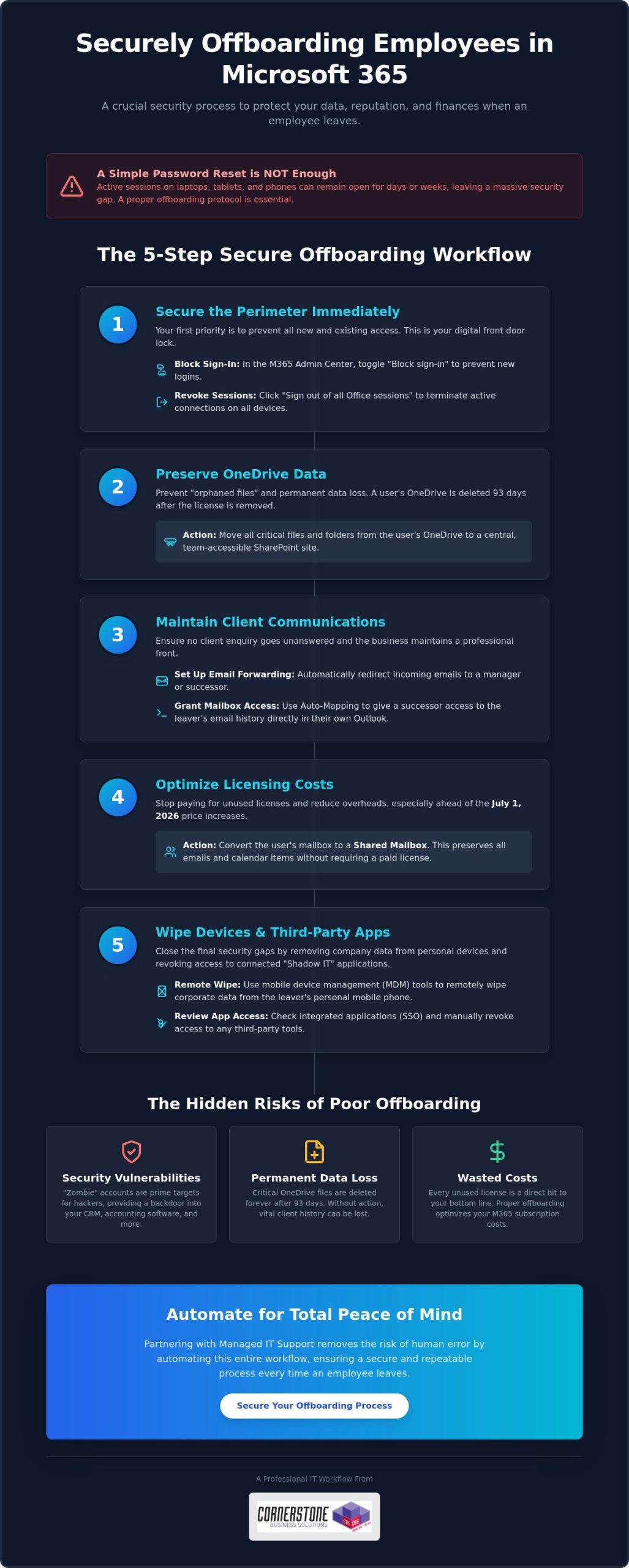
Creating a secure, repeatable process is the only way to ensure nothing slips through the cracks. This five-step workflow is the gold standard we recommend for managing employee leavers in Microsoft 365. It moves beyond simple admin tasks to provide a robust security framework that protects your business from the moment a resignation is handed in. By following these steps, you maintain control over your intellectual property while keeping your overheads lean.
Step 1: Securing the Perimeter
Your first priority is stopping unauthorized entry. Within the Microsoft 365 Admin Center, the “Block sign-in” toggle is your most effective tool for immediate defense. This prevents any new logins to the account across all services. To terminate every active session on laptops or mobile phones, simply click the “Sign out of all Office sessions” button within the user’s profile pane. For businesses with more complex setups, using Microsoft Entra ID ensures that access is revoked not just for email, but for every integrated corporate application in one go. It’s a clean, decisive way to secure your digital borders.
Step 2 & 3: Preserving Business Intelligence
Data shouldn’t stay locked in a departing user’s silo. We recommend moving vital OneDrive files to a central SharePoint site where the rest of the team can continue working without interruption. This prevents the “orphaned data” problem we discussed earlier. To keep your client relationships strong, set up email forwarding to a manager or successor so that no enquiry goes unanswered. Using a feature called Auto-Mapping is a brilliant way to grant access; it allows the successor to see the leaver’s email archive directly in their own Outlook sidebar without needing a separate login. Referencing a professional Secure Offboarding Checklist can help you stay organized during these transitions.
Step 4 & 5: Efficiency and Cost Savings
Once the data is secured, it’s time to stop the clock on your spending. Convert the leaver’s account into a Shared Mailbox. This allows you to keep all their historical emails searchable and accessible for free, provided the mailbox is under 50GB. After the conversion is complete, you can safely unassign the paid license. This reclaimed seat is then ready for your next hire, or you can remove it entirely to lower your monthly bill. If you’re looking to streamline these tasks, our Managed IT Support team can help you build an automated system that handles these steps perfectly every time. This proactive approach ensures your business remains agile, secure, and financially efficient.
Delete vs. Deactivate vs. Convert: Choosing the Right Path
Choosing the right path when a team member moves on is a balance between saving money and protecting your business intelligence. Simply hitting the delete button is often the first instinct, but it’s usually the riskiest. If you delete a user account without a plan, their mailbox is purged after 30 days. That’s a very short window to realize you’ve lost a vital client contract or a string of important project emails. For short-term or low-impact roles, deletion might be fine, but for most positions, you need a more considered approach to managing employee leavers in Microsoft 365.
We want to help you make the most cost-effective choice without leaving your data vulnerable. Whether you are dealing with a standard departure or a high-level exit, the strategy you choose today determines how easily you can recover information six months down the line. To see the technical steps for each option, you can consult Microsoft’s guide to removing a former employee, which outlines the official procedures for each path.
The Shared Mailbox Strategy
Shared mailboxes are the “gold standard” for a reason. They allow you to retain every single email from a departing staff member without paying for a monthly license. The process is straightforward: you convert the existing user mailbox into a shared one first, and only then do you remove the paid license. This keeps the data searchable and accessible for your team indefinitely.
There are a few technical rules to keep in mind. Shared mailboxes are free only if they remain under 50GB in size. If the leaver was a “power user” with a massive archive, you might need to trim the data or keep a license active. It’s also important to remember that nobody can log into a shared mailbox directly. You must grant another licensed user “Full Access” permissions to view the contents. This is a brilliant way to maintain continuity while slashing your IT spend.
Litigation Hold and eDiscovery
For directors, senior staff, or roles involving sensitive financial data, a standard conversion might not be enough. In these cases, we recommend using a Litigation Hold. This feature ensures that every item in the mailbox is preserved, even if someone tries to delete individual emails before they walk out the door. It’s an essential tool for legal compliance and internal audits.
Using these advanced features ensures your data remains searchable through the eDiscovery portal long after the user has gone. This level of data sovereignty is a core part of our Cyber Security Services, helping local businesses build resilience and achieve true peace of mind. By choosing the right path for each leaver, you protect your company’s history and its future.
A Checklist for Secure Mobile and Third-Party Offboarding
Managing Mobile Device Management (MDM)
When staff use their own phones for work, often called Bring Your Own Device or BYOD, you need a way to reclaim company data without deleting their personal photos. This is where the distinction between a “Full Wipe” and a “Selective Wipe” becomes vital. Using Microsoft Intune, you can perform a selective wipe that targets only corporate emails and files, leaving the user’s private data untouched. It’s a respectful yet secure way to handle departures. You must also revoke all Multi-Factor Authentication (MFA) app registrations. Removing these registrations ensures that a former employee cannot use their personal device to bypass security prompts if they somehow obtain a colleague’s credentials.
Beyond the Microsoft Ecosystem
Many employees sign up for third-party SaaS tools using their corporate email address. This creates “Shadow IT” that often goes unnoticed until a breach occurs. You need to audit logins for industry portals, research tools, and even shared social media accounts. Changing shared passwords immediately is a non-negotiable step for protecting your brand’s online presence. Integrating these checks into your wider Microsoft 365 Migration strategy ensures that your entire infrastructure remains clean and organized from day one.
Don’t forget the small administrative details that can lead to big headaches. To keep your communication channels clear, make sure to complete the following:
Update internal directories to reflect the current team structure.
Remove the leaver from “All Staff” and “Management” distribution groups.
Deactivate access to physical security systems or key fobs if linked to IT profiles.
Clear any delegated permissions they had over other staff mailboxes.
Taking these steps prevents sensitive internal announcements from landing in the inbox of someone who no longer works for you. It also maintains a professional, up-to-date directory for your current staff. If you’re feeling overwhelmed by these moving parts, contact our team today to discuss how we can secure your business through expert managed IT support.
How Managed IT Support Automates the Leaver Process
Manual offboarding is a high-wire act for any busy manager. Even with the best intentions, a single missed step can leave a gap in your defenses. When you’re managing employee leavers in Microsoft 365, the stakes are simply too high for “best efforts.” We’ve seen businesses accidentally leave global admin access active for months simply because it wasn’t on the primary checklist. This is where professional Managed IT Support turns a stressful manual task into a seamless, background operation that protects your business every time.
By using automated scripts, we ensure that every single action happens in the correct order. From blocking Entra ID sign-ins to converting mailboxes and wiping mobile devices, automation removes the risk of human error. This isn’t just about speed; it’s about building a fortress around your business data. You can rest easy knowing that as soon as an employee leaves, their digital presence is secured and their access is completely severed.
Peace of Mind Through Standardization
We help you create a formal “Leaver Protocol” that triggers automatically as soon as notice is given. This proactive approach prevents “access creep,” a common issue where long-term employees accumulate permissions for various folders and apps that are never fully revoked. Our expert helpdesk is always on hand to manage data requests, ensuring that managers get the files they need without compromising security. It’s about giving you the freedom to focus on your team while we handle the technical heavy lifting.
Optimising Your Cloud Investment
The commercial side of Microsoft 365 is just as important as the technical one. With the price increases effective July 1, 2026, paying for licenses that aren’t being used is a drain on your resources that no business should tolerate. We perform monthly license audits to keep your costs lean and predictable. If an employee leaves and isn’t replaced immediately, we don’t just leave the seat active. We unassign and remove it to save you money from day one.
Our team provides strategic advice on when to upgrade to tiers like Business Premium for better security or when to downgrade to save costs on low-impact roles. We position ourselves not just as a service provider, but as a long-term partner invested in your growth and stability. If you want to move away from transactional IT and toward a more secure future, we invite you to have an informal conversation about our Managed IT Services. Let’s work together to make your offboarding process a foundation of emotional and digital security.
Take Control of Your Digital Offboarding
Securing your business shouldn’t feel like a constant battle against technical complexity. By mastering the art of managing employee leavers in Microsoft 365, you protect your intellectual property while significantly reducing unnecessary licensing costs. We have explored how converting accounts to shared mailboxes and automating your revocation protocols are the most effective ways to maintain continuity without draining your budget. Closing the gaps in mobile access and third-party apps ensures your data stays exactly where it belongs: under your control.
As a multi-award-winning IT services provider and Microsoft Certified Partner, Cornerstone Business Solutions brings the clarity and expertise you need to stay ahead of regulatory and pricing changes. Our team provides 24/7 proactive system monitoring to give you total peace of mind. You don’t have to navigate these transitions alone. We are here to act as your dedicated long-term partner, ensuring every departure is handled with precision and care. Book a Microsoft 365 Security Audit with Cornerstone Business Solutions Today and let’s build a more resilient future for your business together. Your team and your data deserve nothing less than professional, local support you can trust.
Frequently Asked Questions
How long should I keep a former employee’s Microsoft 365 data?
You should generally retain data for at least 90 days to ensure a smooth transition, though your specific industry compliance rules might require longer. Under the policy effective January 2025, Microsoft only keeps OneDrive data for 93 days after a license is removed. We recommend moving vital files to SharePoint immediately to avoid losing intellectual property. This proactive step ensures your business stays compliant with UK GDPR while keeping your historical records accessible.
Can I still access a leaver’s OneDrive after I delete their account?
No, deleting the account starts a countdown that eventually purges the data forever. You cannot easily access OneDrive files once an account is fully deleted and the 30-day grace period expires. It is much safer to delegate access to a manager or move the files to a central SharePoint site before you hit delete. Managing employee leavers in Microsoft 365 effectively means securing the data first so you don’t risk losing orphaned files.
Do I need to pay for a license to keep a former employee’s email active?
You don’t need to keep paying for a license if you convert the user’s mailbox into a Shared Mailbox. This is a brilliant way to keep all historical emails searchable without the monthly overhead. As long as the mailbox stays under 50GB, Microsoft won’t charge you for the storage. It’s a simple, cost-effective strategy that helps you manage your IT budget while preserving important business intelligence for your team’s future use.
What happens to a user’s Microsoft Teams messages when they leave?
Teams messages sent within public or private channels remain visible to the rest of the team even after the user is gone. However, their one-on-one private chats are tied to their specific account and can be harder to retrieve without using advanced eDiscovery tools. We recommend setting up clear communication policies so that vital project decisions are always recorded in shared channels rather than private messages. This ensures your business continuity remains unbroken.
How do I stop a leaver from accessing the company’s mobile apps?
The most effective method is performing a selective wipe through Microsoft Intune, which targets only your business data. This removes corporate emails and files while leaving the employee’s personal photos and apps untouched. You must also revoke their Multi-Factor Authentication (MFA) tokens to prevent them from logging back in. This clean break is essential for maintaining your digital perimeter and protecting sensitive client information on the move, regardless of where the device goes.
Can I convert a former employee’s account to a Shared Mailbox after deleting them?
You must convert the account while it is still active or within the 30-day “soft delete” window. Once that period passes, the mailbox is purged and cannot be converted. Managing employee leavers in Microsoft 365 requires a specific sequence of events to be successful. We always advise our clients to convert to a Shared Mailbox as one of the very first steps in their offboarding checklist to ensure no vital data is lost.
What is the fastest way to block a disgruntled employee’s access?
The fastest route is to block their sign-in status and reset their password immediately within the Admin Center. You should also click the “Sign out of all Office sessions” button to kill any active connections on their laptops or phones. This decisive action prevents them from accessing SharePoint or sending emails within minutes. It provides the immediate security you need during sensitive departures, giving you total control over your digital environment when it matters most.
Is it possible to automate the leaver process in Microsoft 365?
Automation is the best way to ensure consistency and remove the risk of human error during offboarding. We use custom scripts that handle everything from license reclamation to data migration the moment a leaver is reported. This standardized approach means no “zombie” accounts are left active and no licenses are wasted. It’s a proactive way to manage your infrastructure, providing both emotional security for you and technical stability for your growing business.
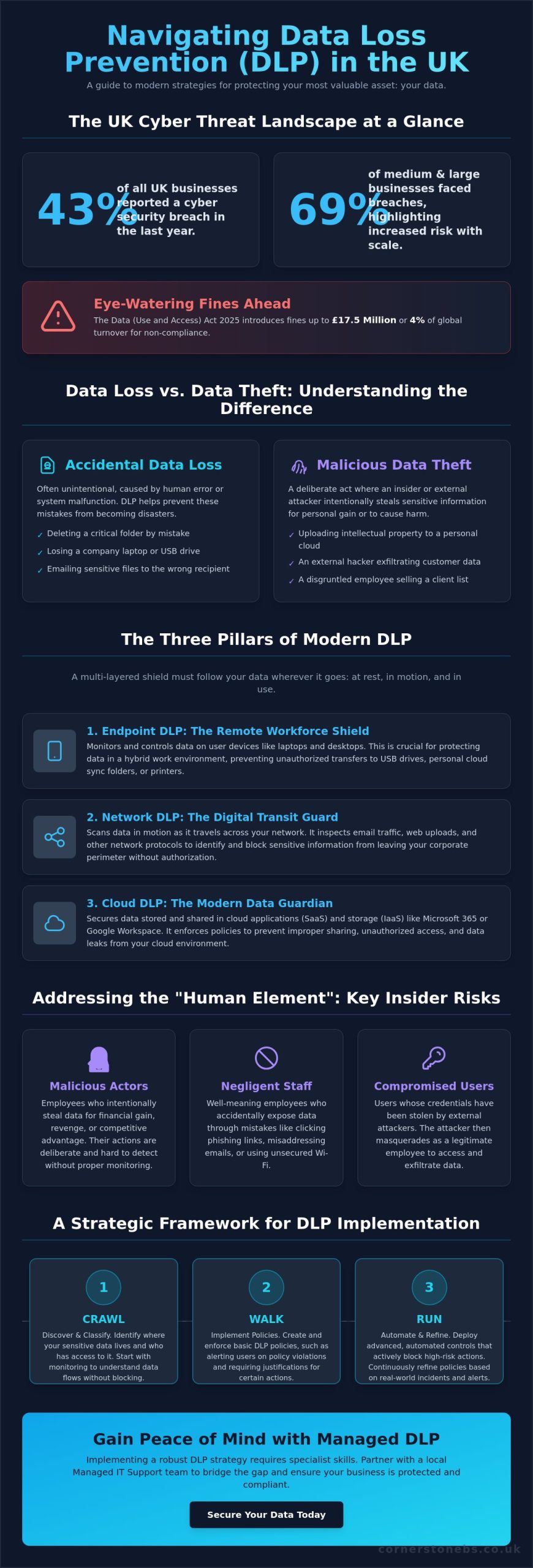
Did you know that 43% of UK businesses reported a cyber security breach over the last year? For medium and large organisations, that figure sits even higher at 69%. It’s a sobering reality that makes finding the right data loss prevention (DLP) solutions UK providers offer more than just a technical box to tick; it’s a fundamental part of your business’s survival. We understand the anxiety that comes with managing a hybrid workforce while trying to avoid the eye-watering £17.5 million fines introduced by the Data (Use and Access) Act 2025.
You shouldn’t have to choose between keeping your data safe and keeping your business moving. We believe that true security comes from having clear visibility into where your sensitive files live and how they travel, without creating hurdles for your staff. This guide will walk you through modern DLP strategies tailored specifically for our UK market. You’ll discover how to safeguard your most critical information, stay on the right side of the ICO, and finally gain the peace of mind that a single accidental click won’t lead to a major disaster.
Key Takeaways
Understand the vital distinction between accidental data loss and malicious theft to better target your security efforts.
Discover why effective data loss prevention (DLP) solutions UK businesses implement require a multi-layered approach across endpoints, networks, and the cloud.
Identify how to mitigate the “human element” by addressing the specific risks posed by malicious actors, negligent staff, and compromised users.
Learn how to use a “crawl, walk, run” framework to build a robust security strategy that protects your data without slowing down your operations.
Understanding Data Loss Prevention (DLP) in the UK Business Landscape
At its heart, Data loss prevention (DLP) software is a set of tools and processes designed to ensure that your sensitive data isn’t lost, misused, or accessed by unauthorised people. It’s about more than just building a digital wall; it’s about understanding how your data moves through your business every day. In the context of data loss prevention (DLP) solutions UK businesses need, this means having the visibility to stop a spreadsheet of customer details from being accidentally emailed to the wrong person or uploaded to a personal cloud drive. We see DLP as a proactive partner in your growth, keeping your intellectual property safe while your team focuses on what they do best.
The Regulatory Driving Force: UK GDPR and Beyond
Compliance isn’t just a box to tick; it’s a legal necessity that has become even more stringent recently. The Data (Use and Access) Act 2025, which came into force on 5 February 2026, reinforces the requirement for “appropriate technical and organisational measures” to protect data. The Information Commissioner’s Office (ICO) now expects businesses to prove they have these measures in place. If they don’t, the penalties are severe. PECR breaches can now result in fines of up to £17.5 million or 4% of global turnover. Many organisations find that implementing robust DLP controls is the most direct way to meet the requirements of Cyber Essentials Plus, which increasingly focuses on how data is handled at the endpoint.
Data Loss vs. Data Breach: Why the Distinction Matters
We often hear these terms used interchangeably, but they represent different challenges for your team. Data loss is frequently accidental, such as an employee deleting a folder or losing a laptop. Data theft, on the other hand, is a malicious act where someone intentionally exfiltrates information. Both are damaging. While a public data breach brings immediate reputational harm, “silent” data leaks of intellectual property can slowly erode your competitive advantage without you even realising it. Ultimately, DLP acts as the vital bridge between your technical security measures and your legal compliance requirements.
For the modern business owner, DLP is no longer an optional extra. It’s a foundational element of any resilient strategy. When evaluating data loss prevention (DLP) solutions UK organisations must consider how these tools integrate with their existing workflows. By monitoring data in three states (at rest, in motion, and in use) you create an environment where your team can work freely and securely. This proactive approach ensures that a simple human error doesn’t escalate into a business-ending event, providing the stability you need to scale. It’s a natural extension of our broader cyber security services, focused on keeping your local business protected and compliant.
The Three Pillars of Modern DLP: Endpoint, Network, and Cloud
Building a resilient strategy requires more than a single piece of software. It’s about creating a multi-layered shield that follows your data wherever it travels. As businesses move toward more flexible cloud solutions, the traditional “castle and moat” security model has crumbled. Today, the data loss prevention (DLP) solutions UK professionals recommend must cover three specific states of data. First is “Data at Rest”, which includes files sitting on your servers or cloud storage. Second is “Data in Motion”, which is information moving across your network. Finally, “Data in Use” refers to the data currently being handled by an employee on their device.
Modern systems use “content-aware” detection to spot sensitive strings like credit card numbers or sort codes. However, the most effective data loss prevention (DLP) solutions UK providers now implement are also “context-aware”. They don’t just see what the data is; they see who is moving it and where it’s going. This intelligence allows your team to work efficiently while the system quietly blocks risky actions in the background.
Endpoint DLP: Protecting the Modern Remote Worker
With so many of us working from home or local offices, the endpoint is often the most vulnerable point. Endpoint DLP monitors physical transfers to USB drives or external hard drives. It can even prevent a negligent employee from “copy-pasting” client details into an unauthorised web app or a personal AI tool. If a company laptop is lost on a train, robust encryption ensures that the data at rest remains unreadable to unauthorised users. We’ve seen many lessons from government data breaches where a simple lost device led to massive exposure because these endpoint controls weren’t active.
Network and Cloud DLP: Securing the Digital Perimeter
Your digital perimeter now extends far into the cloud. Network DLP scans outgoing email and web traffic for sensitive keywords or patterns. For many businesses, this protection starts with a secure Microsoft 365 migration for business UK. By integrating DLP directly into Teams and SharePoint, you can automatically block the sharing of sensitive files with external guests. This also helps identify “shadow IT”, which are the unauthorised apps your team might use without realising the security risk. If you’re looking to strengthen your defences, a quick chat with a local security partner can help clarify your next steps.
Beyond the Firewall: Addressing the ‘Human Element’ and Insider Risks
Most security incidents aren’t the result of sophisticated hackers bypassing your firewalls. They often start with a simple human error. In fact, the majority of UK data breaches involve a human element rather than a purely technical failure. This is why the most effective data loss prevention (DLP) solutions UK businesses use must look inward. We categorise these internal risks into three distinct groups. First is the Malicious Actor, someone intentionally stealing data for personal gain. Second is the Negligent Employee, who takes shortcuts or ignores policies to get work done faster. Finally, there’s the Compromised User, whose legitimate credentials have been stolen by an external attacker.
Modern DLP tools don’t just act as a digital police force; they serve as a coach. When an employee tries to upload a sensitive file to an unauthorised site, the system can provide “just-in-time” training. A simple pop-up explains the risk and suggests a safer, compliant alternative. This approach builds a culture of security without making your staff feel like they’re being constantly monitored. It’s about finding that vital balance between robust protection and employee trust. By empowering your team to make better decisions, you create a more resilient organisation from the inside out.
The ‘Accidental’ Insider: Stopping the Wrong Attachment
We’ve all had that moment of panic after hitting ‘send’ on an email. AI-driven DLP helps prevent these “oops” moments by flagging when an email recipient doesn’t match the attachment’s content. It looks for patterns that suggest a mistake is about to happen. These “nudge” factors can prevent up to 90% of accidental leaks by giving the user a second to think before the data leaves the business. Ultimately, an informed employee is a business’s strongest security layer.
Detecting Malicious Exfiltration and Unusual Behaviour
Sometimes, the risk is more intentional or the result of a hijacked account. Modern data loss prevention (DLP) solutions UK providers implement often include User and Entity Behaviour Analytics (UEBA). This technology identifies “bulk downloads” or unusual data movement that happens outside of standard UK working hours. For example, if a staff account suddenly accesses thousands of client records at 3 AM on a Sunday, the system can trigger an automatic alert or lockdown. This level of oversight is especially critical during employee offboarding or redundancy processes, ensuring that your intellectual property stays exactly where it belongs.
A Strategic Framework for Implementing DLP Solutions
Implementing data loss prevention (DLP) solutions UK businesses can trust is a marathon, not a sprint. We always advocate for a “crawl, walk, run” approach to avoid overwhelming your team. This measured pace ensures that your security grows alongside your operational needs without causing unnecessary friction. Before you commit to any it company solutions, a comprehensive data audit is essential. You need to define “Sensitive Information Types” that are unique to your industry, such as legal contracts, medical records, or specific financial data structures.
Step 1 & 2: Inventory and Classification
Step 3 & 4: Policy Creation and Monitoring
Effective policies must align with your actual business logic. For instance, your finance department may need to send encrypted documents to external partners, while your marketing team likely shouldn’t have that same requirement. We suggest starting in “Audit Only” mode. This allows you to observe how data moves through your business without blocking any legitimate work. It’s the perfect time to refine your rules and eliminate “false positives” that can frustrate your staff and slow down productivity.
Step 5: Enforcement and Continuous Optimisation
Once your policies are tuned, you can move from simple monitoring to active blocking for high-risk transfers. Regular reporting plays a vital role here, especially when demonstrating compliance to stakeholders or cyber insurers. Your DLP strategy shouldn’t be static. As your business grows and new threats emerge, your policies must evolve to keep your perimeter secure. If you’re looking for a dedicated partner to guide you through this process, we invite you to speak with our local experts today.
Why Managed DLP is the Logical Choice for Growing UK Businesses
Finding and retaining dedicated cyber security talent in the UK has become a significant challenge for many growing organisations. Most businesses simply don’t have the resources to run a 24/7 security operations centre or keep up with the rapid pace of regulatory change. This “skills gap” often leaves sensitive data vulnerable, even if you’ve already invested in security software. This is where managed data loss prevention (DLP) solutions UK providers like Cornerstone Business Solutions provide the most value. We bridge the vital gap between complex software and your actual business strategy. By choosing a managed approach, you gain proactive monitoring and immediate incident response without the overhead of a massive internal department.
Managed services turn a technical tool into a long-term partnership. We believe that security should act as a foundation for your growth, not a hurdle that slows your team down. When you work with a specialist team, you’re not just buying a license; you’re gaining a dedicated ally focused on your business continuity. This proactive oversight ensures that your data remains secure while you focus on scaling your operations and serving your customers.
The Cornerstone Business Solutions Approach: Bespoke Security, Not Off-the-Shelf
We don’t believe in one-size-fits-all security. Every business has unique operational workflows and specific goals. We align your DLP policies with how your team actually works every day. Our multi-award-winning expertise is backed by global partnerships with industry leaders like Microsoft, IBM, and Cisco. Despite these high-tech connections, we remain your local partner. We’re committed to clear, jargon-free communication. You’ll always understand exactly how we’re protecting your data and why it matters for your business’s stability. Our goal is to make complex technical concepts feel simple and manageable for every business leader.
Reducing ‘Alert Fatigue’ Through Managed Services
Most DIY DLP projects fail because of “alert fatigue.” When a system generates hundreds of false alarms every day, genuine risks get lost in the noise. It’s exhausting for a busy IT manager to investigate every single notification. Our team filters this data for you. We use our expertise to separate the noise from the genuine threats, only alerting you when a risk requires your attention. This allows your internal team to stay productive while we handle the technical heavy lifting. Investing in managed data loss prevention (DLP) solutions UK is ultimately an investment in your reputation. It ensures you remain a trusted partner for your clients. Ready to secure your data? Speak to our UK-based security experts at Cornerstone Business Solutions today to start the conversation.
Securing Your Business Legacy for 2026 and Beyond
The right data loss prevention (DLP) solutions UK businesses choose should feel like a natural extension of their daily operations. As a multi-award-winning IT provider, we combine our regional roots with global expertise through strategic partnerships with Microsoft, IBM, and Cisco. You don’t have to manage this complexity alone. Our team at Cornerstone Business Solutions provides proactive 24/7 system monitoring to filter out the noise and keep your perimeter secure. This allows you to focus on growth while we handle the technical heavy lifting.
What is the difference between DLP and a standard firewall?
A firewall acts as a digital gatekeeper, controlling who can enter or exit your network based on IP addresses and ports. In contrast, DLP inspects the actual content of the data being moved. While a firewall stops unauthorised access, DLP ensures that a legitimate user doesn’t accidentally or intentionally send a spreadsheet of customer bank details to an external recipient. It’s the difference between guarding the door and checking what’s inside the outgoing post.
Is Data Loss Prevention a legal requirement for UK businesses under GDPR?
UK GDPR and the Data (Use and Access) Act 2025 require businesses to implement “appropriate technical and organisational measures” to safeguard personal information. While the law doesn’t explicitly name specific software, the Information Commissioner’s Office (ICO) expects robust controls. Using data loss prevention (DLP) solutions UK organisations trust is a standard way to prove you’ve taken necessary steps to prevent a breach, helping you avoid heavy fines.
Will implementing a DLP solution slow down my employees’ computers or internet?
You won’t notice a significant impact on your computer’s speed or internet performance with modern systems. Older tools were often resource-heavy, but today’s cloud-native agents are designed to be incredibly lightweight. They perform most of their analysis in the background or within the cloud itself. This ensures your team stays productive and focused on their tasks without the frustration of a lagging device or slow file transfers.
How much does a DLP solution typically cost for a UK SME?
Pricing for DLP is typically structured on a per-user, per-month subscription model. This makes it highly scalable for growing SMEs, as you only pay for the protection you actually need. The total investment depends on whether you require endpoint, network, or full cloud integration. We recommend a conversation to assess your specific risks, allowing us to find a cost-effective path that balances robust security with your business budget.
Can DLP protect data stored in personal cloud accounts like Dropbox or personal Gmail?
Yes, endpoint-based DLP provides visibility and control over data movement to personal accounts. It can prevent employees from dragging company files into a personal Dropbox folder or copy-pasting sensitive text into a personal Gmail window. This protection stays active even when staff are working remotely. It ensures that your business-critical information doesn’t bypass your security perimeter through “shadow IT” or personal web applications.
What happens if the DLP software incorrectly blocks a legitimate business email?
False positives can occur, but they are manageable with the right strategy. During the initial “Audit Only” phase, we identify these instances and refine the rules to match your actual workflows. If a legitimate email is blocked once enforcement is live, the system usually allows the employee to provide a business justification to release it. This creates an audit trail while ensuring that vital business communication never grinds to a halt.
How does DLP help with Cyber Essentials certification?
DLP significantly strengthens your application for Cyber Essentials and Cyber Essentials Plus. These certifications require evidence that you control how data is accessed and shared. By implementing data loss prevention (DLP) solutions UK providers recommend, you demonstrate a proactive approach to data security. It provides the technical proof that auditors look for, showing that you’ve mitigated the risk of accidental data leaks and unauthorised exfiltration.
Do I need a dedicated server to run a modern DLP solution?
You don’t need a dedicated on-site server to run modern DLP. Most contemporary solutions are cloud-delivered, meaning the management console and policy engines live in a secure data centre. This removes the need for expensive hardware maintenance and local storage. It’s an ideal setup for hybrid workforces, as it protects devices wherever they are located without requiring a constant connection to a central office server.
Could your business survive a bill of £9,000 for every single minute your systems stay offline? For many UK enterprises, that is the staggering cost of downtime according to Gartner research. Despite this, recent government data shows that 92% of UK businesses still require more than 24 hours to recover from a major cyber incident. You shouldn’t have to settle for that kind of risk. By adopting a proactive strategy for disaster recovery as a service (DRaaS) UK, you can transform a potential catastrophe into a minor hiccup with near-instant recovery.
We understand the anxiety that comes with rising ransomware threats and the frustration of paying for expensive standby hardware that just sits idle. It’s a complex landscape to manage alone, especially with the Data (Use and Access) Act 2025 now introducing strict new requirements for 2026. This guide will show you how to achieve near-zero downtime through automatic cloud failover. We’ll explain how a managed approach keeps your data secure and compliant; allowing a dedicated local partner to handle the technical heavy lifting while you focus on your business.
Key Takeaways
Understand the true financial impact of downtime and why modern ransomware threats require a more resilient approach than traditional backups.
Learn the core mechanics of continuous data replication and how it keeps your business running during a primary system failure.
Discover how to set precise recovery targets that align with the latest 2026 data sovereignty rules for disaster recovery as a service (DRaaS) UK.
Follow a step-by-step implementation roadmap, starting with a Business Impact Analysis to identify and protect your most critical IT infrastructure.
Shift from a reactive “break-fix” mentality to a proactive managed partnership that prioritises your long-term business continuity and growth.
The High Stakes of Downtime: Why UK Businesses Need DRaaS in 2026
The digital environment in 2026 has moved faster than many local businesses could have predicted. While traditional backup methods like physical tapes or basic offsite storage were once the gold standard, they simply cannot keep up with modern operational speeds. If your servers fail today, waiting days to retrieve data from a physical location isn’t just an inconvenience; it’s a business-ending event. This is why more organisations are turning to disaster recovery as a service (DRaaS) UK to bridge the gap between failure and restoration. You need a solution that doesn’t just store data but restores your entire work environment in minutes.
Ransomware: The Primary Driver for Disaster Recovery
Cyber threats have become industrialised. Ransomware-as-a-Service (RaaS) allows even low-level criminals to launch sophisticated attacks that easily bypass traditional perimeter defences. These modern breaches don’t just encrypt your files; they actively seek out and destroy your backups first. To counter this, a “recovery-first” mindset is essential. We focus on immutable backups, which are data copies that cannot be altered or deleted by any external threat. Understanding What is Recovery as a Service helps clarify how these cloud-native tools provide a secure, separate environment. This allows your business to reboot almost instantly while your primary site is scrubbed clean, ensuring you don’t have to pay a ransom to get back to work.
The True Cost of Business Interruption
Most business owners think of downtime in terms of lost sales. However, the “hidden costs” are often much more damaging to your bottom line. You have to consider staff productivity. When your systems are dark, your team sits idle while you continue to pay their wages and fixed overheads. In B2B environments, the stakes are even higher. A prolonged outage often triggers contractual penalties or breaches of Service Level Agreements (SLAs). These lead to immediate financial hits and potential legal headaches that can haunt a company for years.
Beyond the balance sheet, there is a heavy psychological toll. The stress placed on leadership and IT teams during a total system collapse is immense. It erodes morale and creates a culture of fear. Perhaps most importantly, client trust is fragile. If a customer can’t access your services, they won’t just wait; they’ll look for a competitor who invested in a more reliable infrastructure. We believe your business deserves better than a “best effort” recovery. You need a proactive strategy that treats continuity as a foundational element of your brand’s reputation and emotional security.
What is Disaster Recovery as a Service (DRaaS)? Definition and Core Mechanics
In simple terms, disaster recovery as a service (DRaaS) UK is a cloud computing model that creates a virtual safety net for your entire IT infrastructure. Unlike traditional methods that only save individual files, DRaaS replicates your servers, applications, and networking configurations to a secure, third-party cloud environment. This shift moves your business away from heavy capital expenditure (CAPEX) on idle standby hardware. Instead, you benefit from a predictable operational expense (OPEX) model. You only pay for the protection you actually need, ensuring your budget stays as resilient as your data.
DRaaS vs. Cloud Backup: Understanding the Critical Difference
It’s a common mistake to assume that having a backup means you have a disaster recovery plan. Backup is primarily about data retention; it’s your digital filing cabinet. If your primary site fails, a standard backup requires you to find new hardware and manually reinstall every piece of software. This creates a massive “Return to Operation” (RTO) gap that can keep your business offline for days. In contrast, DRaaS is about system availability. It ensures that your critical applications stay live even if your physical office is inaccessible. For a truly robust cloud solutions strategy, you need both: backups for long-term records and DRaaS for immediate survival.
How DRaaS Works in Real-Time
The process relies on a powerful replication engine. Rather than taking occasional “point-in-time” snapshots that might miss several hours of work, modern engines send data to the cloud in near real-time. This keeps your secondary site “warm” and ready to take over at a moment’s notice. As highlighted in IBM’s guide to DRaaS, this involves a sophisticated orchestration layer. This layer automates the boot order of your complex applications, ensuring your databases start before your front-end software to prevent system errors.
When a disaster strikes, you initiate a “failover.” This is the digital switch that redirects your users to the cloud-based replica. Your team continues working via their standard internet connections, often without even noticing a change in the underlying infrastructure. Once your primary site is repaired, a “failback” process synchronises any new data back to your local servers. This ensures a seamless return to normal operations without data gaps. If you’re ready to move beyond basic backups, our disaster recovery experts are here to help you build a plan that fits your specific regional needs.
Strategic Planning: RTO, RPO, and UK Data Sovereignty
Planning for the worst doesn’t have to be a dark or daunting task. Instead, think of it as defining the boundaries of your business’s resilience. To build an effective strategy for disaster recovery as a service (DRaaS) UK, you must first master two critical metrics: Recovery Time Objective (RTO) and Recovery Point Objective (RPO). RTO is your stopwatch. It measures how many minutes or hours your business can realistically stay offline before the damage becomes irreversible. RPO is your history book. It determines how much data loss you can tolerate. For a professional services firm, losing an hour of billable work might be a crisis. For a local retailer, a few minutes of transaction data could be the limit. We work with you to find the sweet spot where protection meets your specific budget.
Data Sovereignty and UK Regulations
UK businesses face a unique set of rules in 2026. Since the full implementation of the Data (Use and Access) Act 2025 in June 2026, where your data lives matters more than ever. If your DR provider stores your replicas in a different jurisdiction, you might inadvertently breach UK GDPR or the latest NIS2 standards. Choosing a partner with UK-based data centres ensures your information remains under local legal protection. This isn’t just about avoiding fines; it’s about maintaining cyber security services compliance that your clients expect. A local infrastructure also reduces latency, meaning your systems can failover faster when every second counts.
Setting Realistic Recovery Targets
Not all data is created equal. You shouldn’t pay the same premium to protect archived emails as you do for your live ERP system. We suggest tiering your workloads. Assign aggressive RTOs to your mission-critical applications while allowing more relaxed targets for non-essential systems. This tiered approach keeps costs manageable without sacrificing safety. It’s also vital to check your business insurance policy. Many modern providers now require documented RTO and RPO targets as a condition of coverage.
You can research how other firms handle these technical challenges by looking at Gartner DRaaS market reviews. Finally, remember that your office bandwidth dictates your RPO. If your internet connection is slow, replicating large volumes of data in real-time becomes difficult. We’ll help you audit your current infrastructure to ensure your recovery goals stay realistic and achievable. By aligning your technical settings with your business needs, you create a recovery plan that is both powerful and practical.
A Roadmap to Implementing DRaaS for Your Business
Implementing a strategy for disaster recovery as a service (DRaaS) UK requires more than just signing a contract. It’s a structured journey that starts with a deep dive into how your business actually functions. You can’t protect what you haven’t mapped out. We recommend starting with a thorough audit of your existing it company solutions and hardware. Are your current servers reaching end-of-life? Is your network infrastructure capable of handling high-speed replication? A proactive audit prevents technical bottlenecks from stalling your recovery when you need it most.
The Business Impact Analysis (BIA)
A Business Impact Analysis is the cornerstone of any disaster recovery plan. This process identifies the complex dependencies between different software and departments. For instance, your sales team might be unable to process orders if the inventory database stays down, even if their email is working. By estimating the financial impact of downtime per department, you can prioritise which systems must come back online first. This ensures your budget is spent protecting the areas that keep your revenue flowing.
Testing and Validation Protocols
In 2026, a static recovery document is a liability rather than an asset. You need active validation to ensure your plan actually works. Sandboxed testing allows us to spin up your recovery environment in a secure bubble. This lets us verify that every application boots correctly without affecting your live production data. Automated testing schedules are now the industry standard, ensuring your plan stays valid as your infrastructure evolves. We always review and update the DR plan after any significant infrastructure changes to maintain your resilience.
Choosing the right partner is the final piece of the puzzle. You should ask potential providers specific questions about their support levels and the frequency of their recovery drills. A partner who understands the unique challenges of UK businesses will prioritise proactive monitoring over a simple “break-fix” response. They should act as an extension of your team, not just another vendor. If you’re ready to secure your business future with a trusted local expert, reach out to us today to discuss our disaster recovery solutions.
The Cornerstone Approach: DRaaS as a Partnership for Growth
We believe that disaster recovery as a service (DRaaS) UK is far more than a technical insurance policy. It is a commitment to your business’s long-term growth and stability. Many providers treat disaster recovery as a transactional, set-and-forget product. We take a different path. We move entirely beyond the outdated “break-fix” mentality. Instead, we prioritise proactive system monitoring to identify and resolve potential vulnerabilities before they ever result in an outage. This forward-thinking approach integrates perfectly with our managed IT services. It creates a unified shield for your digital assets, providing the total peace of mind you need to focus on your core operations.
Choosing a multi-award-winning UK partner means you benefit from enterprise-level expertise delivered with genuine regional warmth. We’re proud of our geographical roots and our reputation for clarity. We speak the language of business owners, not just IT technicians. You get a dedicated UK team you can actually talk to; professionals who understand the local market and the specific pressures facing SMEs in 2026. This human connection is what transforms a service provider into a trusted ally.
Bespoke Solutions for Every Business
A “one size fits all” strategy is often the fastest route to failure in disaster recovery. Your workflows, data dependencies, and compliance needs are unique to your organisation. We specialise in customising DRaaS for complex hybrid environments. Whether you’re balancing on-premise hardware with cloud applications or finalising a Microsoft 365 migration strategy, we tailor the replication to fit. We ensure your recovery plan evolves alongside your infrastructure, so you’re never left with an obsolete safety net.
24/7/365 Proactive Resilience
Our helpdesk serves as the frontline of your business survival. We don’t just wait for an alarm to go off. We leverage our high-level global partnerships with industry leaders like Microsoft and Cisco to bring world-class resilience tools to your local doorstep. This provides a layer of emotional security that a simple backup drive can’t match. You’ll know that if the worst happens, an expert team is already executing a proven plan to get you back online. We see technical support as a foundational element of your business stability. It’s about more than just fixing servers; it’s about protecting your livelihood. We invite you to start a conversation with our friendly, local team today to see how a proactive disaster recovery as a service (DRaaS) UK strategy can secure your future.
Securing Your Business Future with Confidence
The digital landscape of 2026 doesn’t leave room for “what-ifs.” We’ve explored how the high costs of downtime and the complexity of new UK data regulations make a robust strategy for disaster recovery as a service (DRaaS) UK a necessity rather than a luxury. By defining clear recovery targets and moving to a managed cloud model, you shift the technical burden to a partner dedicated to your survival.
As a multi-award-winning IT services provider, we take pride in our regional identity and our ability to simplify complex infrastructure. We leverage strategic partnerships with industry leaders like Microsoft, IBM, and Cisco to deliver world-class resilience. Our team provides proactive monitoring and support to ensure your systems remain stable, no matter what challenges the future holds. We believe technical support is a foundational element of your business stability and emotional security.
Don’t wait for a crisis to test your business’s limits. We invite you to Book a Disaster Recovery Audit with our UK experts today and gain the security of a proven recovery plan. Let’s work together to keep your business moving forward.
Frequently Asked Questions
Is DRaaS the same as cloud backup?
No, they serve very different roles in your business continuity plan. Cloud backup is designed for long-term data retention; it’s where you go to find a file deleted three months ago. Disaster recovery as a service (DRaaS) UK is about system availability and speed. While backup requires you to manually rebuild your servers, DRaaS allows you to switch your entire operation to the cloud in minutes. It’s the difference between having a backup of your files and having a second, virtual office ready to go.
How much does DRaaS cost for a UK SME?
Pricing is always bespoke because it depends on your specific infrastructure. Factors that influence the cost include the number of servers you need to protect, the total volume of data being replicated, and your required recovery speed. Because this model uses a subscription-based OPEX structure, you don’t have to worry about the massive capital costs of purchasing and maintaining spare hardware. We provide a clear, predictable monthly fee that scales as your business grows.
Will DRaaS protect my business from ransomware?
Yes, it’s one of the most effective ways to recover from a sophisticated cyber-attack. If ransomware locks your primary systems, we can initiate a failover to a clean version of your environment from a point in time before the breach. This allows your staff to keep working while our experts sanitise your local network. By using immutable backups within the DRaaS framework, we ensure that your recovery data remains safe from encryption or deletion by hackers.
How often should we test our disaster recovery plan?
You should aim to test your plan at least twice a year, though many of our clients prefer quarterly drills. Regular testing is vital because your IT environment isn’t static; software updates and new hardware can change how your systems interact. We perform automated, sandboxed tests that don’t disrupt your live operations. These drills give you the confidence that your boot sequences and data links will work perfectly when a real emergency strikes.
Does my data have to stay in the UK for compliance?
What is a good RTO (Recovery Time Objective) for a small business?
A good RTO depends entirely on how much an hour of downtime costs your specific business. For mission-critical systems like your payment gateway or primary database, you should aim for an RTO of less than 30 minutes. Less vital systems, such as archived files, might have a longer window of several hours. We help you categorise your workloads so you don’t pay for premium recovery speeds on data that isn’t essential for your immediate survival.
Can DRaaS handle both physical and virtual servers?
Yes, modern disaster recovery as a service (DRaaS) UK solutions are built for the hybrid reality of today’s businesses. We can replicate data from physical on-site servers, virtual machines, and even existing cloud platforms into a unified recovery environment. This ensures that no matter where your applications live, they can be restored together in the correct order. This holistic approach is the only way to guarantee that your complex business workflows will actually function during a failover.
How long does it take to implement a full DRaaS solution?
A typical implementation usually takes between four and eight weeks from the initial audit to the first successful test. This time allows us to conduct a proper Business Impact Analysis and configure the replication engine to match your specific needs. We don’t believe in cutting corners when it comes to your business survival. Once the initial setup and validation are complete, your systems are protected by proactive monitoring that stays active every second of the year.
With Microsoft ending support for Windows 10 on 14 October 2025, approximately 240 million PCs worldwide risk becoming security liabilities if they aren’t transitioned correctly. You likely understand that sticking with an outdated OS isn’t an option, yet the fear of legacy software failing or your team facing hours of downtime is a genuine concern. It’s frustrating to face hardware hurdles like TPM 2.0 when you just want your tech to work. Our award-winning team at Cornerstone believes technology should empower your growth, which is why we’ve simplified the process of how to upgrade to windows 11 for our local partners.
We’ve designed this guide to show you a proactive, step-by-step approach that prioritises your data security and operational stability. You’ll discover a clear path to a modern, robust infrastructure that delivers total peace of mind for your North East business well into 2026. We will walk you through hardware compatibility checks, software testing protocols, and the deployment strategies we use to ensure a seamless transition for every client we support.
Key Takeaways
Understand why remaining on Windows 10 is a critical security risk and how transitioning to Windows 11 provides the award-winning protection your business deserves.
Master the technical steps of how to upgrade to windows 11 safely, prioritising the most seamless routes for UK-based small and medium enterprises.
Move beyond basic backups with a “Cornerstone Philosophy” approach to disaster recovery, ensuring your migration results in zero downtime and total peace of mind.
Boost your team’s productivity instantly by navigating new interface features like Snap Layouts and securing your infrastructure with proactive post-upgrade checks.
Discover how a managed deployment with a trusted North East partner eliminates the hidden costs and stress of large-scale business migrations.
Assessing Your Business Readiness for Windows 11 in 2026
Cornerstone, your award-winning North East IT partner, understands that 2026 represents a critical crossroads for your firm’s technology. The Windows 11 operating system is no longer a “new” release; it is the established standard for secure, modern business computing. If your team still relies on Windows 10, they are working on an OS that is now a significant security liability. Transitioning to the current standard provides immediate gains in system speed and a streamlined interface designed for hybrid work. Learning how to upgrade to windows 11 now ensures your business avoids the high costs of emergency migrations and hardware shortages.
To qualify for the upgrade, your hardware must meet specific benchmarks. In plain English, your computers need a relatively modern processor (Intel 8th Gen or newer), at least 4GB of RAM, and 64GB of storage. While these specs seem modest, the security requirements are where most older business fleets struggle. Proactive planning allows you to audit your devices and budget for replacements without disrupting your daily operations.
The Hardware Hurdle: TPM 2.0 and UEFI
The most common barrier to a seamless upgrade is TPM 2.0. This is a dedicated chip that provides hardware-based security functions, acting as a vault for your encryption keys and user credentials. It is the backbone of Windows 11 security. You can verify your fleet’s compatibility using the Microsoft PC Health Check app, which gives a clear “pass” or “fail” for every device. For machines older than 2018, the “repair vs replace” debate is usually simple. Replacing an ageing laptop is often more cost-effective than trying to bypass security requirements, as newer hardware delivers the 20 percent increase in efficiency that modern applications demand.
Windows 10 End-of-Life: The Risk of Inaction
Microsoft has officially retired Windows 10, making it a “legacy” system. End of Life is the date Microsoft ceases all security patches. Operating past this date means your business is exposed to zero-day exploits that hackers specifically design to target unsupported systems. This creates a massive hole in your cybersecurity posture. Beyond the technical risk, inaction impacts your legal and financial standing. Many UK business insurance providers will not pay out for data breaches if the firm was running unsupported software. Similarly, failing to maintain your OS can lead to non-compliance with UK GDPR, resulting in heavy fines. Our team focuses on your peace of mind by ensuring your infrastructure remains robust and fully supported.
Starting a conversation about your transition today prevents a crisis tomorrow. We believe in a partnership that keeps your North East business ahead of the curve, rather than just catching up. Understanding how to upgrade to windows 11 is the first step toward a more secure and efficient workplace.
Strategic Preparation: Ensuring Zero Downtime
Before moving a single live machine, we recommend auditing your entire software stack. Identifying legacy applications early prevents “day one” productivity crashes. We suggest creating a pilot group consisting of roughly 10% of your non-critical workstations. This allows you to test the environment in a controlled way without risking your primary revenue streams. Following the official Microsoft deployment guidance ensures your rollout aligns with industry standards for stability and security. It’s a proactive approach that turns a potentially stressful migration into a seamless transition.
The Pre-Upgrade Audit Checklist
Our award-winning team uses a rigorous checklist to ensure every machine is ready for the switch. You’ll need at least 64GB of available disk space and a stable, high-speed internet connection to download the 4GB+ installation files. Ensure you have full administrative privileges before starting the process. It’s also vital to verify that your cyber security services remain compatible with the Windows 11 kernel to avoid leaving your network exposed. Always secure your critical data to a resilient cloud environment before the installation begins. This provides an essential safety net for your business intelligence.
Managing Legacy Software Compatibility
Most modern apps run perfectly on the new OS, but older bespoke tools might require extra care. You can often use Compatibility Mode to trick older software into thinking it’s still on Windows 10. For mission-critical apps that simply won’t run natively, we often implement Azure Virtual Desktop. This keeps your legacy tools accessible while your main hardware stays secure. Don’t forget to check your printer and peripheral drivers; hardware manufacturers often release specific updates for the 2026 environment. Understanding how to upgrade to windows 11 includes managing these smaller details that keep an office running. If you’re feeling overwhelmed by the technical requirements, feel free to chat with our local experts for a tailored assessment.
Step-by-Step: How to Update to Windows 11 Safely
Upgrading your business infrastructure shouldn’t feel like a gamble. At Cornerstone, our award-winning team helps North East firms manage this transition with zero fuss. To understand how to upgrade to windows 11 without losing a day of productivity, you need to choose the right path for your specific hardware. We typically recommend three primary methods: Windows Update, the Installation Assistant, or the Media Creation Tool.
Windows Update remains the preferred, most seamless route for SMEs. It’s the most stable option because Microsoft only pushes the notification once your specific hardware configuration is verified. Before you start, plug in an Ethernet cable. Relying on Wi-Fi for a 4GB to 6GB download is risky; a single signal drop can corrupt the installer and cause boot errors. For larger firms managing dozens of machines, consulting Microsoft’s official deployment guide provides deeper technical insights into fleet-wide rollouts and compatibility checks.
The actual installation phase is what we call the “Point of No Return.” Once your PC reboots and the blue installation screen appears, the system begins overwriting the old OS architecture. If power is lost here, the machine may become unbootable. Ensure your laptops are plugged into a power source and your desktops are on a stable circuit before you begin the final phase.
Method 1: Using the Windows Update Feature
This is the “set and forget” method that preserves your files and specialised software settings. Open your “Settings” app, click “Update & Security,” and select “Windows Update.” You’ll see one of two things. A blue “Upgrade to Windows 11 is ready” banner means your hardware passed every check. A “This PC doesn’t currently meet all system requirements” message indicates a hardware block, likely your TPM 2.0 chip or an older CPU. If you see the green light, click download and install to keep every spreadsheet and saved password exactly where you left it.
Method 2: The Windows 11 Installation Assistant
Use the Assistant tool manually if the update hasn’t appeared automatically in your settings. This happens often with newer machines that haven’t cycled through the update queue yet. You must run this tool as a local Administrator to avoid permission loops that can stall the process at 99%. After you click “Accept and Install,” the tool handles the heavy lifting in the background. Once the “Restart Now” prompt appears, save your work immediately. The PC will reboot several times as it configures your new desktop environment, so don’t be tempted to force a shutdown if the screen stays black for a few moments.
Post-Upgrade Optimization: Security and Productivity
Completing the initial steps of how to upgrade to windows 11 is only half the battle. To truly see a return on your investment, you need to fine-tune the environment for your specific workflow. Our award-winning team at Cornerstone finds that a standard “out of the box” setup often leaves performance on the table. Start by mastering the centered Taskbar and Start menu. These aren’t just cosmetic changes; they’re designed to reduce mouse travel and eye strain. Use Snap Layouts to organize your screen into quadrants instantly. Research from Microsoft suggests these interface improvements can boost multitasking efficiency by up to 40% for power users.
Performance depends on a clean system. New installations often include pre-installed “bloatware” or trial software that consumes background RAM. Removing these apps can improve boot times by as much as 15%. Once the clutter is gone, ensure your setup is fully integrated with your Microsoft 365 environment. This creates a seamless flow between your local files and the cloud, providing the peace of mind that your team can collaborate from anywhere in the North East or beyond. While the technical process of how to upgrade to windows 11 is straightforward, the post-install configuration determines your long-term stability.
Hardening Your New OS
Security is the foundation of business continuity. You must verify that BitLocker drive encryption is active to protect data if a device is stolen. We recommend enabling Multi-Factor Authentication (MFA) at the OS level immediately. Microsoft’s 2023 Digital Defense Report confirms that MFA blocks 99.9% of identity-based attacks. For your mobile workforce, configure “Find My Device” and test remote wipe capabilities through your management console. Check your privacy settings to ensure diagnostic data sharing aligns with your company’s GDPR compliance policies.
Productivity Hacks for Business Users
Windows 11 introduces “Focus Sessions” within the Clock app. This feature silences notifications and integrates with Spotify to help staff stay in a “flow state” during complex tasks. You can also use Multiple Desktops to separate your “Finance” workspace from your “Client Meetings” setup. This mental compartmentalization reduces burnout. Don’t forget to train your staff on the new Teams integration built directly into the taskbar. It allows for one-click video calls, which is essential for maintaining that local, human connection in a hybrid world.
Upgrading an entire fleet of workstations isn’t as simple as clicking a “check for updates” button. For UK firms, DIY approaches often lead to hidden costs that spiral out of control. A 2023 industry report suggested that poorly managed migrations can cost businesses up to £1,200 per workstation in lost productivity and emergency fixes. This is why partnering with an award-winning team like Cornerstone makes sense for your long-term strategy. We handle the technical heavy lifting so your staff can stay productive. Our managed IT services provide the proactive monitoring required to keep your operations stable long after the initial switch. We understand the North East business landscape, and we know how to protect your continuity during a major transition.
Scalability and Bulk Deployment
Managing a handful of devices is easy, but scaling that process to 50 or 500 machines requires a professional strategy. We use advanced tools like Microsoft Intune to facilitate “Zero Touch” deployment. This allows hardware to arrive at your office, connect to the network, and automatically configure itself with the correct software and security policies. We create standardised images to ensure every staff member has the exact same setup. This consistency eliminates common compatibility issues between different departments. By outsourcing this process, you free your internal team to focus on business growth rather than troubleshooting how to upgrade to windows 11 across dozens of different hardware configurations.
Reduced Downtime: Automated deployment means machines are ready in minutes, not hours.
Consistency: Every device meets your specific corporate security and software standards.
Resource Efficiency: Your IT staff can focus on high-value projects instead of manual installs.
Ongoing Support and Peace of Mind
The first week after a new OS rollout is the most critical period for any business. Even with perfect planning, users will have questions about the new interface or specific application behaviours. Our 24/7 helpdesk provides immediate access to experts who can resolve post-upgrade driver conflicts or simple “how-to” queries instantly. We don’t just install the software and walk away. We stay by your side as a dedicated partner to ensure the transition is seamless. Security is a major part of this peace of mind. Windows 11 requires specific hardware features like TPM 2.0 to be active. We verify these settings on every single device to keep your business data safe from modern threats.
Don’t risk your business continuity on a gamble. If you want to know exactly how to upgrade to windows 11 without the technical headache or the risk of data loss, we are here to help. Chat with our expert team today and let’s get your North East business ready for the 2026 deadline with a robust, professional migration plan.
Future-Proof Your North East Business Today
Windows 10 reached its official end-of-life in October 2025, leaving any remaining legacy systems exposed to critical security threats. By now, you’ll understand that how to upgrade to windows 11 safely involves more than just a simple software update; it requires a strategic audit of hardware and a robust plan for zero downtime. We’ve outlined the essential steps to ensure your transition is seamless, from verifying TPM 2.0 requirements to optimizing your new environment for peak productivity.
As a multi-award-winning IT provider and Microsoft Gold Partner, Cornerstone Business Solutions brings expert clarity to these complex migrations. We provide proactive 24/7 system monitoring to catch issues before they impact your workflow, giving you total peace of mind. Our team is rooted right here in the North East, and we’re ready to act as your dedicated technology partner. Don’t leave your business continuity to chance. Book a consultation with our award-winning IT team for a tailored deployment plan. Let’s make your next big upgrade your easiest one yet.
Frequently Asked Questions
Is the Windows 11 upgrade free for my business in 2026?
Yes, the upgrade remains free for businesses using genuine Windows 10 Pro licenses on compatible hardware. Microsoft hasn’t set a final expiry date for this offer, even though Windows 10 reaches its end-of-support on 14th October 2025. Our award-winning team helps you navigate these licensing requirements to ensure your North East business stays compliant without extra costs.
What happens if my business PC does not meet the minimum hardware requirements?
You won’t be able to install the operating system officially on devices that lack TPM 2.0 or supported processors. If your hardware fails the check, you’ll need to replace the machine or pay for Extended Security Updates, which cost approximately £50 per device for the first year. We suggest a proactive hardware refresh to avoid these recurring fees and keep your operations running smoothly.
How long does the Windows 11 upgrade process actually take?
The installation typically takes between 30 and 120 minutes depending on your office internet speed and the specific hardware in your machines. Older laptops with traditional hard drives will take longer than modern devices with fast SSDs. Learning how to upgrade to windows 11 properly involves scheduling these updates outside of core hours to prevent any disruption to your daily workflow.
Can I go back to Windows 10 if my business software doesn’t work?
You have a 10-day window to use the built-in “Go Back” feature if your legacy applications struggle with the new environment. This process reverts your system to its previous state while keeping your files intact. We always recommend testing your critical software in a controlled environment first. This approach provides total peace of mind for business owners before a company-wide rollout.
Do I need to back up my files before upgrading to Windows 11?
Yes, you must perform a full backup of all business data before starting any major OS transition. While the upgrade is designed to preserve your files, unexpected power cuts or hardware glitches can lead to data corruption. Our local experts use robust cloud backup solutions to ensure your information is 100% secure before we begin the installation process.
What is the “PC Health Check” app and where do I find it?
The PC Health Check app is a free utility from Microsoft that verifies if your hardware meets the necessary security and performance standards. You can download it directly from the official Microsoft Windows website to get an instant compatibility report. Using this tool is the most reliable way to start your journey of how to upgrade to windows 11 across your entire fleet.
Will Windows 11 make my older business laptop run slower?
Windows 11 actually improves performance on most hardware because it prioritises active apps and manages memory more efficiently. If your laptop meets the minimum specs, you’ll likely notice faster wake times and snappier responses. We’ve helped many North East firms see a 25% boost in system stability after moving away from cluttered Windows 10 installations.
Is Windows 11 more secure than Windows 10 for remote working?
Windows 11 provides a much higher level of security for remote staff by mandating hardware-level protections like TPM 2.0 and Secure Boot. Microsoft data shows a 60% reduction in malware reports on devices using these modern security features. As your trusted local partner, we configure these settings to create a seamless, secure connection for your team, no matter where they’re logged in.