Your IT team shouldn’t have to touch a new laptop to get it ready for a new hire. For many local businesses, the traditional imaging process is a hidden drain on productivity. It involves high shipping costs to bring devices to headquarters and hours of manual software installation. You’ve likely felt the frustration of a new starter waiting around because their device wasn’t configured correctly or didn’t arrive on time. It’s a clunky way to work in a world that demands speed and reliability.
We believe technology should empower your growth, not slow it down. By setting up Microsoft Autopilot, you can transform your hardware deployment into a seamless, zero-touch cloud process that works from anywhere. This complete 2026 guide will show you how to reduce IT overhead and ensure every employee enjoys a perfect “day one” experience. We’ll walk through the latest Windows 11 26H1 requirements, the new Device Preparation method, and how to navigate the July 2026 licensing changes. You’ll gain a clear roadmap to a more efficient, cloud-native future for your business infrastructure.
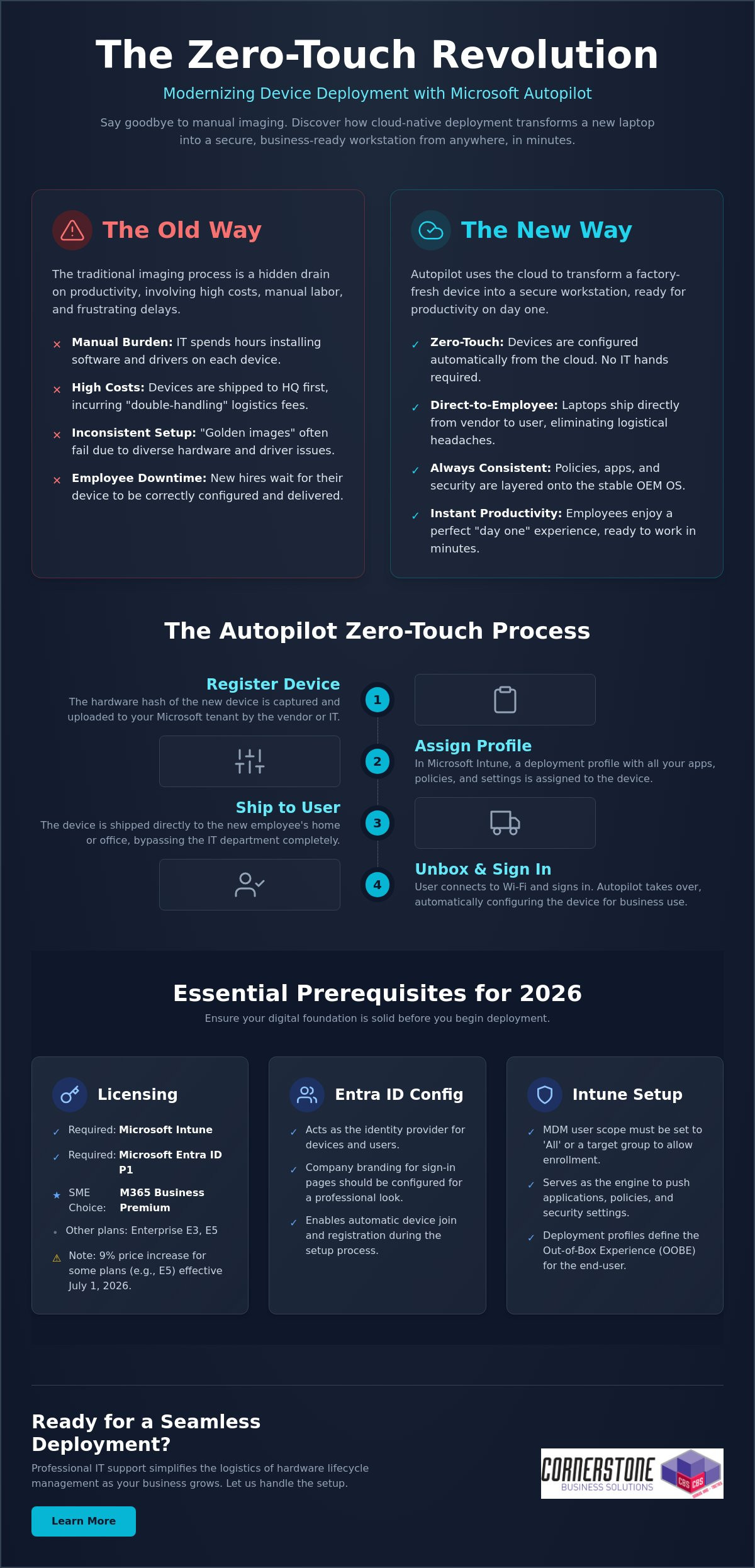
Microsoft Autopilot isn’t just another IT tool; it represents a fundamental shift in how we handle business hardware. Traditionally, IT teams spent days “imaging” laptops. They would wipe the factory software and manually install a custom build. Windows Autopilot changes this entirely by using the cloud to configure the device that’s already in the box. When you’re setting up Microsoft Autopilot, you’re moving away from manual labor toward a dynamic, automated system. It turns a generic laptop into a secure, business-ready workstation in minutes. This process is proactive and designed for the speed of modern commerce.
The Death of Traditional Device Imaging
Maintaining “Golden Images” or WIM files used to be a full-time job. IT managers had to capture a perfect snapshot of a system and force it onto every new machine. This worked when every laptop was the same model, but today’s hardware fleets are diverse. Driver compatibility issues often break these static images, leading to blue screens and wasted hours. Autopilot kills this cycle. It leaves the OEM-installed Windows version intact and simply layers your apps, settings, and security policies on top. It’s cleaner, faster, and far more resilient for your team.
The Zero-Touch Deployment Concept
The “zero-touch” dream is now a reality for businesses across our region. Imagine ordering a laptop from a vendor and having it shipped directly to a new hire’s home. They open the lid, connect to Wi-Fi, and sign in. The cloud takes over from there. It automatically installs Microsoft 365, applies your Cyber Security protocols, and configures your Network Infrastructure access. There’s no need for the device to ever visit your office first. This removes the “middleman” of the IT department for basic setup tasks. It’s the gold standard for hybrid teams because it ensures every device is consistent, regardless of where it’s unboxed.
By 2026, the transition to Windows 11 is largely complete for most professional organizations. With the 2025 end-of-life for older systems now in the rearview mirror, the focus has shifted to modern management. Setting up Microsoft Autopilot is the final piece of that modernization puzzle. It reduces shipping costs by eliminating “double-handling” and ensures your team stays productive from their very first hour on the job. We see this as a foundational element of business stability and emotional security for your employees. They get a premium “day one” experience, and you get the peace of mind that their device is secure and ready for work.
Before you begin setting up Microsoft Autopilot, you need to ensure your digital foundation is rock solid. It’s incredibly frustrating to start a deployment only to hit a licensing wall or a network block halfway through. We focus on getting these details right from the start to ensure your transition to modern management is predictable and stress-free. Think of this as the “site prep” before you build your new cloud-native office. It’s about creating a stable environment where your technology works for you, not the other way around.
Navigating the Microsoft Licensing Maze
Microsoft offers several paths to unlock Autopilot, but they aren’t all created equal for small and medium enterprises. While Enterprise E3 and E5 plans are robust, Microsoft 365 Business Premium is often the most cost-effective choice for our regional partners. It bundles Intune, Entra ID P1, and advanced security features into one cohesive package. You should also be aware that several Microsoft 365 plans, including Enterprise E5, are scheduled for a 9% price increase effective July 1, 2026. To use Autopilot in 2026, you must have a subscription that includes both Microsoft Intune and Microsoft Entra ID P1. You can find the full list of Autopilot software and licensing requirements on the official documentation site to double-check your specific tenant.
Configuring Your Entra ID and Intune Environment
Your identity provider is the brain of the operation. Microsoft Entra ID handles the device identity while Intune acts as the engine that pushes your apps and policies. You’ll need to set your MDM user scope to “All” or a specific group within the Intune portal to allow devices to enroll automatically. This ensures that when a user signs in for the first time, the system recognizes them and triggers the deployment profile. If you’re feeling overwhelmed by these backend configurations, our team specializes in tailored cloud solutions that take the complexity out of the process.
Network stability and hardware compatibility are your final hurdles. Your firewall must allow traffic to Microsoft’s deployment endpoints; otherwise, the process will stall during the initial handshake. Finally, ensure your hardware is running a professional version of Windows 11, such as Pro, Enterprise, or Education. Home editions don’t support the management features required for a true zero-touch experience. Getting these prerequisites in order provides the emotional security of knowing your systems are built on a firm foundation. If you’d like an expert eye to review your current environment, we’re always here for a friendly conversation about your IT strategy.
The journey from a boxed laptop to a fully configured workstation follows a specific, logical path. When you’re setting up Microsoft Autopilot, clarity is your best friend. By breaking the process into manageable steps, you ensure that no security policy or application is left behind. We often help local firms bridge the gap between technical theory and practical implementation, ensuring their IT systems are as reliable as a firm handshake. Follow this structured workflow to get your deployment off the ground:
Step 1: Gathering and uploading device Hardware Hashes. This is the unique digital fingerprint for every laptop.
Step 2: Creating and assigning Autopilot Deployment Profiles. These profiles define exactly how the device behaves when it’s first turned on.
Step 3: Configuring the Enrollment Status Page (ESP). This provides a visual progress bar for the user while apps and policies install.
Step 4: Assigning devices to specific user groups. Use Entra ID groups to ensure the right people get the right software.
Step 5: Testing the deployment with a “pilot” device. Never roll out to the whole team without a successful dry run.
Creating Your First Deployment Profile
Your deployment profile is the blueprint for the user experience. For most professional environments, “User-driven” mode is the standard choice. It allows the employee to sign in with their own credentials while the system handles the rest. If you’re configuring shared kiosks or digital signage, “Self-deploying” mode is better. You can use these profiles to hide tedious Out-of-Box Experience (OOBE) steps like privacy settings and EULAs. You can even automate device naming conventions, such as “UK-LAPTOP-%SERIAL%”, to keep your inventory organized without manual data entry.
Managing Hardware Hashes and OEM Partnerships
The “Hardware Hash” is often the biggest hurdle for IT managers. For devices you already own, you can use a PowerShell script, specifically Get-WindowsAutopilotInfo, to extract this data into a CSV file for upload. However, the most efficient way to manage this is through an OEM partnership. Major vendors like Dell, HP, and Lenovo can upload hashes directly to your tenant when you purchase new IT Hardware. Once a device shows as “Autopilot Registered” in your Intune portal, it’s officially linked to your organization. This proactive approach eliminates manual registration and ensures that even if a device is wiped, it will always return to your business’s control. It provides a level of emotional security that traditional imaging simply cannot match.
Testing is the final, vital piece of the puzzle. Grab a spare laptop, reset it to factory settings, and walk through the process as if you were a new hire. This allows you to spot any network timeouts or missing app dependencies before they affect your staff. If the pilot goes smoothly, you’re ready to scale your zero-touch deployment across the entire company.
Even with a solid plan, technology sometimes throws a curveball. We know how frustrating it is when a “seamless” process hits a snag. Troubleshooting isn’t just about reading logs; it’s about understanding the logic of the system. Most issues when setting up Microsoft Autopilot stem from three areas: network stability, app packaging, or timing out during the Enrollment Status Page (ESP). By identifying these early, you can keep your deployment moving without losing hours to guesswork. Our goal is to provide the reassurance that every technical hurdle has a logical solution.
One common headache is the network timeout. If a user is on a slow home connection, the device might give up before the essential apps finish downloading. You can optimize this by only requiring “critical” apps during the initial setup. Push non-essential software or secondary creative tools to install in the background after the user reaches the desktop. This simple shift speeds up the “day one” experience and gets your team working faster. It’s a proactive way to manage expectations and reduce the emotional friction of a new tech rollout.
The “Red Screen” of Death: Fixing ESP Failures
If you see a red screen during setup, don’t panic. This usually means a specific policy or app failed to install within the allotted time. First, determine if it’s a software or a configuration issue. You can use the “Shift+F10” shortcut at any time during the process to open a Command Prompt. This allows you to check local logs or even run a quick ping test to ensure the device still has an active internet connection. We recommend setting the “Block device use until all apps are installed” feature only for a handful of mission-critical applications. This prevents the entire process from hanging just because one minor update failed to sync. It’s a small change that makes a massive difference in reliability.
Best Practices for App Deployment
Consistency is the foundation of business stability. We recommend using Microsoft 365 Apps for Enterprise as your primary productivity layer. For more complex software, the Intune Management Extension is your best friend. It allows you to package Win32 apps, such as custom accounting software or legacy tools, so they deploy just as smoothly as a modern cloud app. Getting this mix right is a key part of our it company solutions, ensuring your infrastructure is both flexible and secure. We focus on these technical details so you can focus on running your business.
If you’re seeing persistent error codes like 0x800705b4, it’s often a sign that your security baselines are conflicting with the Autopilot profile. These technical hurdles are exactly why many local firms partner with us to manage their deployment lifecycle. If you want to ensure your next hardware rollout is error-free and professionally managed, reach out to our local team today for expert support.
While setting up Microsoft Autopilot provides a powerful foundation, maintaining that momentum as your company grows requires a different level of oversight. Many local businesses find that managing hardware hashes and complex deployment profiles becomes a significant drain on internal resources. We see IT management as a dedicated partnership where we handle the technical heavy lifting so you can focus on your regional growth. A managed approach ensures that your device deployment isn’t just a one-time project, but a sustainable, secure part of your business continuity plan.
We take the stress out of the hardware lifecycle by managing the direct relationships with major OEMs. Whether you’re ordering five laptops or fifty, we ensure they’re registered in your tenant before they even leave the warehouse. This proactive coordination is the secret to our “Ready to Work” device guarantee. It means your employees receive a machine that is fully configured and integrated with our cyber security services, providing emotional security for your team from the moment they power on. You get the confidence of an expert-led rollout without the typical IT headaches.
Beyond Setup: Ongoing Management and Security
True stability comes from what happens after the unboxing. We use advanced Intune reporting to monitor device health and compliance in real-time. If a security patch fails or a device falls out of sync, we often know about it before your user does. This level of automation is a natural extension of a successful Microsoft 365 migration for business UK, turning your digital infrastructure into a silent, reliable engine of productivity. We manage the updates and the security baselines so your systems remain as strong as the day they were deployed.
Partnering with Cornerstone for Your Microsoft Strategy
As a multi-award-winning team with deep roots in our local community, we pride ourselves on being more than just a service provider. We’re your dedicated technology partner. We bring the clarity of an expert to the complexities of setting up Microsoft Autopilot, ensuring your business stays ahead of the 2026 technology curve. Our proactive attitude means we’re always looking for ways to streamline your operations and strengthen your hardware defenses. We invite you to experience this level of care firsthand by booking a no-obligation technology audit with our local experts. Let’s have a friendly conversation about how we can make your next hardware deployment your easiest one yet.
As a multi-award-winning Microsoft Certified Partner, we’re here to ensure your technology works as hard as you do. We provide the proactive 24/7 monitoring and expert support needed to keep your systems stable and your employees productive. You don’t have to navigate these technical complexities alone. We’d love to help you build a deployment strategy that feels effortless and secure. Book a Free Microsoft 365 Strategy Session with Cornerstone today and let’s get your business moving forward. Your journey to a more streamlined IT environment starts with a simple conversation. We’re ready when you are.
What is the difference between Microsoft Autopilot and Intune?
Autopilot is the technology used to customise the initial unboxing and setup experience, while Intune is the engine that manages the device once it’s running. Think of Autopilot as the automated process that prepares the laptop for work and Intune as the ongoing manager that pushes updates and security policies. They work together to ensure your hardware is always compliant and secure without manual IT intervention.
Can I use Microsoft Autopilot with existing older laptops?
You can use Autopilot with existing devices as long as they support a compatible version of Windows 11. Since these older machines weren’t registered by the manufacturer at the time of purchase, you’ll need to manually harvest their hardware hashes using a PowerShell script. This is an excellent way to modernise your current fleet and bring older kit under a unified, cloud-native management system.
Do I need a specific Microsoft 365 license to use Autopilot?
Yes, you must have a subscription that includes both Microsoft Intune and Microsoft Entra ID P1. For the local businesses we support, Microsoft 365 Business Premium is usually the most cost-effective path. Other valid options include Microsoft 365 Enterprise E3 or E5, and various Academic or Frontline worker licenses. These plans provide the foundational security and management features required for a professional deployment.
How long does a typical Microsoft Autopilot setup take for a user?
A typical deployment usually takes between 20 and 60 minutes from the moment the user connects to Wi-Fi. The exact duration depends on the speed of their internet connection and the total volume of apps you’ve assigned. By only requiring mission-critical software during the initial phase, you can get your employees to their desktop quickly while secondary tools install quietly in the background.
What happens if a device is stolen? Can Autopilot help?
Autopilot provides a powerful layer of theft protection by hard-coding the device to your organisation’s tenant. Even if a thief performs a full factory reset, the laptop will automatically recognize it belongs to your business as soon as it hits the internet. When setting up Microsoft Autopilot, you gain the peace of mind that you can remotely wipe sensitive data and keep the hardware locked to your company.
Can I deploy non-Microsoft apps like Zoom or Chrome via Autopilot?
You can deploy almost any third-party application your team relies on, including Chrome, Zoom, or bespoke industry software. These are typically packaged as Win32 apps and pushed through the Intune management extension. This ensures that every tool your staff needs for their specific role is pre-installed and ready to go, creating a seamless “day one” experience for every new hire.
Is Microsoft Autopilot available for Mac or only Windows?
Microsoft Autopilot is a Windows-only technology designed for PC deployment. While you can manage Mac devices using Intune, the specific “zero-touch” unboxing experience for Apple hardware requires a different system called Apple Business Manager. We often help our partners integrate both platforms to ensure their entire hardware fleet is managed through a single, cohesive cloud strategy.
What is a hardware hash and why is it necessary for Autopilot?
A hardware hash is a unique digital fingerprint generated from a device’s internal components. It acts as a secure identifier that tells Microsoft’s servers that a specific machine belongs to your business. This is a critical step in setting up Microsoft Autopilot because it allows the cloud to trigger your custom deployment profile the moment the device is powered on for the first time.
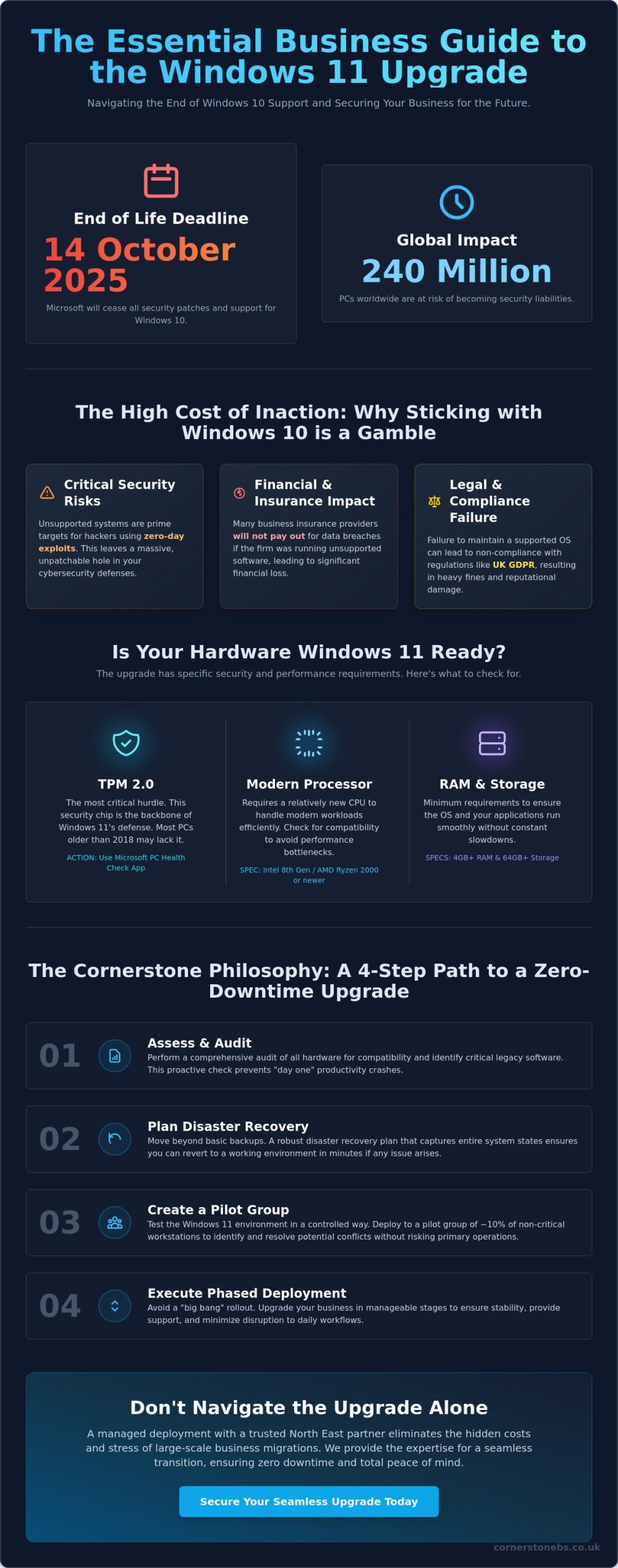
With Microsoft ending support for Windows 10 on 14 October 2025, approximately 240 million PCs worldwide risk becoming security liabilities if they aren’t transitioned correctly. You likely understand that sticking with an outdated OS isn’t an option, yet the fear of legacy software failing or your team facing hours of downtime is a genuine concern. It’s frustrating to face hardware hurdles like TPM 2.0 when you just want your tech to work. Our award-winning team at Cornerstone believes technology should empower your growth, which is why we’ve simplified the process of how to upgrade to windows 11 for our local partners.
We’ve designed this guide to show you a proactive, step-by-step approach that prioritises your data security and operational stability. You’ll discover a clear path to a modern, robust infrastructure that delivers total peace of mind for your North East business well into 2026. We will walk you through hardware compatibility checks, software testing protocols, and the deployment strategies we use to ensure a seamless transition for every client we support.
Key Takeaways
Understand why remaining on Windows 10 is a critical security risk and how transitioning to Windows 11 provides the award-winning protection your business deserves.
Master the technical steps of how to upgrade to windows 11 safely, prioritising the most seamless routes for UK-based small and medium enterprises.
Move beyond basic backups with a “Cornerstone Philosophy” approach to disaster recovery, ensuring your migration results in zero downtime and total peace of mind.
Boost your team’s productivity instantly by navigating new interface features like Snap Layouts and securing your infrastructure with proactive post-upgrade checks.
Discover how a managed deployment with a trusted North East partner eliminates the hidden costs and stress of large-scale business migrations.
Assessing Your Business Readiness for Windows 11 in 2026
Cornerstone, your award-winning North East IT partner, understands that 2026 represents a critical crossroads for your firm’s technology. The Windows 11 operating system is no longer a “new” release; it is the established standard for secure, modern business computing. If your team still relies on Windows 10, they are working on an OS that is now a significant security liability. Transitioning to the current standard provides immediate gains in system speed and a streamlined interface designed for hybrid work. Learning how to upgrade to windows 11 now ensures your business avoids the high costs of emergency migrations and hardware shortages.
To qualify for the upgrade, your hardware must meet specific benchmarks. In plain English, your computers need a relatively modern processor (Intel 8th Gen or newer), at least 4GB of RAM, and 64GB of storage. While these specs seem modest, the security requirements are where most older business fleets struggle. Proactive planning allows you to audit your devices and budget for replacements without disrupting your daily operations.
The Hardware Hurdle: TPM 2.0 and UEFI
The most common barrier to a seamless upgrade is TPM 2.0. This is a dedicated chip that provides hardware-based security functions, acting as a vault for your encryption keys and user credentials. It is the backbone of Windows 11 security. You can verify your fleet’s compatibility using the Microsoft PC Health Check app, which gives a clear “pass” or “fail” for every device. For machines older than 2018, the “repair vs replace” debate is usually simple. Replacing an ageing laptop is often more cost-effective than trying to bypass security requirements, as newer hardware delivers the 20 percent increase in efficiency that modern applications demand.
Windows 10 End-of-Life: The Risk of Inaction
Microsoft has officially retired Windows 10, making it a “legacy” system. End of Life is the date Microsoft ceases all security patches. Operating past this date means your business is exposed to zero-day exploits that hackers specifically design to target unsupported systems. This creates a massive hole in your cybersecurity posture. Beyond the technical risk, inaction impacts your legal and financial standing. Many UK business insurance providers will not pay out for data breaches if the firm was running unsupported software. Similarly, failing to maintain your OS can lead to non-compliance with UK GDPR, resulting in heavy fines. Our team focuses on your peace of mind by ensuring your infrastructure remains robust and fully supported.
Starting a conversation about your transition today prevents a crisis tomorrow. We believe in a partnership that keeps your North East business ahead of the curve, rather than just catching up. Understanding how to upgrade to windows 11 is the first step toward a more secure and efficient workplace.
Strategic Preparation: Ensuring Zero Downtime
Before moving a single live machine, we recommend auditing your entire software stack. Identifying legacy applications early prevents “day one” productivity crashes. We suggest creating a pilot group consisting of roughly 10% of your non-critical workstations. This allows you to test the environment in a controlled way without risking your primary revenue streams. Following the official Microsoft deployment guidance ensures your rollout aligns with industry standards for stability and security. It’s a proactive approach that turns a potentially stressful migration into a seamless transition.
The Pre-Upgrade Audit Checklist
Our award-winning team uses a rigorous checklist to ensure every machine is ready for the switch. You’ll need at least 64GB of available disk space and a stable, high-speed internet connection to download the 4GB+ installation files. Ensure you have full administrative privileges before starting the process. It’s also vital to verify that your cyber security services remain compatible with the Windows 11 kernel to avoid leaving your network exposed. Always secure your critical data to a resilient cloud environment before the installation begins. This provides an essential safety net for your business intelligence.
Managing Legacy Software Compatibility
Most modern apps run perfectly on the new OS, but older bespoke tools might require extra care. You can often use Compatibility Mode to trick older software into thinking it’s still on Windows 10. For mission-critical apps that simply won’t run natively, we often implement Azure Virtual Desktop. This keeps your legacy tools accessible while your main hardware stays secure. Don’t forget to check your printer and peripheral drivers; hardware manufacturers often release specific updates for the 2026 environment. Understanding how to upgrade to windows 11 includes managing these smaller details that keep an office running. If you’re feeling overwhelmed by the technical requirements, feel free to chat with our local experts for a tailored assessment.
Step-by-Step: How to Update to Windows 11 Safely
Upgrading your business infrastructure shouldn’t feel like a gamble. At Cornerstone, our award-winning team helps North East firms manage this transition with zero fuss. To understand how to upgrade to windows 11 without losing a day of productivity, you need to choose the right path for your specific hardware. We typically recommend three primary methods: Windows Update, the Installation Assistant, or the Media Creation Tool.
Windows Update remains the preferred, most seamless route for SMEs. It’s the most stable option because Microsoft only pushes the notification once your specific hardware configuration is verified. Before you start, plug in an Ethernet cable. Relying on Wi-Fi for a 4GB to 6GB download is risky; a single signal drop can corrupt the installer and cause boot errors. For larger firms managing dozens of machines, consulting Microsoft’s official deployment guide provides deeper technical insights into fleet-wide rollouts and compatibility checks.
The actual installation phase is what we call the “Point of No Return.” Once your PC reboots and the blue installation screen appears, the system begins overwriting the old OS architecture. If power is lost here, the machine may become unbootable. Ensure your laptops are plugged into a power source and your desktops are on a stable circuit before you begin the final phase.
Method 1: Using the Windows Update Feature
This is the “set and forget” method that preserves your files and specialised software settings. Open your “Settings” app, click “Update & Security,” and select “Windows Update.” You’ll see one of two things. A blue “Upgrade to Windows 11 is ready” banner means your hardware passed every check. A “This PC doesn’t currently meet all system requirements” message indicates a hardware block, likely your TPM 2.0 chip or an older CPU. If you see the green light, click download and install to keep every spreadsheet and saved password exactly where you left it.
Method 2: The Windows 11 Installation Assistant
Use the Assistant tool manually if the update hasn’t appeared automatically in your settings. This happens often with newer machines that haven’t cycled through the update queue yet. You must run this tool as a local Administrator to avoid permission loops that can stall the process at 99%. After you click “Accept and Install,” the tool handles the heavy lifting in the background. Once the “Restart Now” prompt appears, save your work immediately. The PC will reboot several times as it configures your new desktop environment, so don’t be tempted to force a shutdown if the screen stays black for a few moments.
Post-Upgrade Optimization: Security and Productivity
Completing the initial steps of how to upgrade to windows 11 is only half the battle. To truly see a return on your investment, you need to fine-tune the environment for your specific workflow. Our award-winning team at Cornerstone finds that a standard “out of the box” setup often leaves performance on the table. Start by mastering the centered Taskbar and Start menu. These aren’t just cosmetic changes; they’re designed to reduce mouse travel and eye strain. Use Snap Layouts to organize your screen into quadrants instantly. Research from Microsoft suggests these interface improvements can boost multitasking efficiency by up to 40% for power users.
Performance depends on a clean system. New installations often include pre-installed “bloatware” or trial software that consumes background RAM. Removing these apps can improve boot times by as much as 15%. Once the clutter is gone, ensure your setup is fully integrated with your Microsoft 365 environment. This creates a seamless flow between your local files and the cloud, providing the peace of mind that your team can collaborate from anywhere in the North East or beyond. While the technical process of how to upgrade to windows 11 is straightforward, the post-install configuration determines your long-term stability.
Hardening Your New OS
Security is the foundation of business continuity. You must verify that BitLocker drive encryption is active to protect data if a device is stolen. We recommend enabling Multi-Factor Authentication (MFA) at the OS level immediately. Microsoft’s 2023 Digital Defense Report confirms that MFA blocks 99.9% of identity-based attacks. For your mobile workforce, configure “Find My Device” and test remote wipe capabilities through your management console. Check your privacy settings to ensure diagnostic data sharing aligns with your company’s GDPR compliance policies.
Productivity Hacks for Business Users
Windows 11 introduces “Focus Sessions” within the Clock app. This feature silences notifications and integrates with Spotify to help staff stay in a “flow state” during complex tasks. You can also use Multiple Desktops to separate your “Finance” workspace from your “Client Meetings” setup. This mental compartmentalization reduces burnout. Don’t forget to train your staff on the new Teams integration built directly into the taskbar. It allows for one-click video calls, which is essential for maintaining that local, human connection in a hybrid world.
Upgrading an entire fleet of workstations isn’t as simple as clicking a “check for updates” button. For UK firms, DIY approaches often lead to hidden costs that spiral out of control. A 2023 industry report suggested that poorly managed migrations can cost businesses up to £1,200 per workstation in lost productivity and emergency fixes. This is why partnering with an award-winning team like Cornerstone makes sense for your long-term strategy. We handle the technical heavy lifting so your staff can stay productive. Our managed IT services provide the proactive monitoring required to keep your operations stable long after the initial switch. We understand the North East business landscape, and we know how to protect your continuity during a major transition.
Scalability and Bulk Deployment
Managing a handful of devices is easy, but scaling that process to 50 or 500 machines requires a professional strategy. We use advanced tools like Microsoft Intune to facilitate “Zero Touch” deployment. This allows hardware to arrive at your office, connect to the network, and automatically configure itself with the correct software and security policies. We create standardised images to ensure every staff member has the exact same setup. This consistency eliminates common compatibility issues between different departments. By outsourcing this process, you free your internal team to focus on business growth rather than troubleshooting how to upgrade to windows 11 across dozens of different hardware configurations.
Reduced Downtime: Automated deployment means machines are ready in minutes, not hours.
Consistency: Every device meets your specific corporate security and software standards.
Resource Efficiency: Your IT staff can focus on high-value projects instead of manual installs.
Ongoing Support and Peace of Mind
The first week after a new OS rollout is the most critical period for any business. Even with perfect planning, users will have questions about the new interface or specific application behaviours. Our 24/7 helpdesk provides immediate access to experts who can resolve post-upgrade driver conflicts or simple “how-to” queries instantly. We don’t just install the software and walk away. We stay by your side as a dedicated partner to ensure the transition is seamless. Security is a major part of this peace of mind. Windows 11 requires specific hardware features like TPM 2.0 to be active. We verify these settings on every single device to keep your business data safe from modern threats.
Don’t risk your business continuity on a gamble. If you want to know exactly how to upgrade to windows 11 without the technical headache or the risk of data loss, we are here to help. Chat with our expert team today and let’s get your North East business ready for the 2026 deadline with a robust, professional migration plan.
Future-Proof Your North East Business Today
Windows 10 reached its official end-of-life in October 2025, leaving any remaining legacy systems exposed to critical security threats. By now, you’ll understand that how to upgrade to windows 11 safely involves more than just a simple software update; it requires a strategic audit of hardware and a robust plan for zero downtime. We’ve outlined the essential steps to ensure your transition is seamless, from verifying TPM 2.0 requirements to optimizing your new environment for peak productivity.
As a multi-award-winning IT provider and Microsoft Gold Partner, Cornerstone Business Solutions brings expert clarity to these complex migrations. We provide proactive 24/7 system monitoring to catch issues before they impact your workflow, giving you total peace of mind. Our team is rooted right here in the North East, and we’re ready to act as your dedicated technology partner. Don’t leave your business continuity to chance. Book a consultation with our award-winning IT team for a tailored deployment plan. Let’s make your next big upgrade your easiest one yet.
Frequently Asked Questions
Is the Windows 11 upgrade free for my business in 2026?
Yes, the upgrade remains free for businesses using genuine Windows 10 Pro licenses on compatible hardware. Microsoft hasn’t set a final expiry date for this offer, even though Windows 10 reaches its end-of-support on 14th October 2025. Our award-winning team helps you navigate these licensing requirements to ensure your North East business stays compliant without extra costs.
What happens if my business PC does not meet the minimum hardware requirements?
You won’t be able to install the operating system officially on devices that lack TPM 2.0 or supported processors. If your hardware fails the check, you’ll need to replace the machine or pay for Extended Security Updates, which cost approximately £50 per device for the first year. We suggest a proactive hardware refresh to avoid these recurring fees and keep your operations running smoothly.
How long does the Windows 11 upgrade process actually take?
The installation typically takes between 30 and 120 minutes depending on your office internet speed and the specific hardware in your machines. Older laptops with traditional hard drives will take longer than modern devices with fast SSDs. Learning how to upgrade to windows 11 properly involves scheduling these updates outside of core hours to prevent any disruption to your daily workflow.
Can I go back to Windows 10 if my business software doesn’t work?
You have a 10-day window to use the built-in “Go Back” feature if your legacy applications struggle with the new environment. This process reverts your system to its previous state while keeping your files intact. We always recommend testing your critical software in a controlled environment first. This approach provides total peace of mind for business owners before a company-wide rollout.
Do I need to back up my files before upgrading to Windows 11?
Yes, you must perform a full backup of all business data before starting any major OS transition. While the upgrade is designed to preserve your files, unexpected power cuts or hardware glitches can lead to data corruption. Our local experts use robust cloud backup solutions to ensure your information is 100% secure before we begin the installation process.
What is the “PC Health Check” app and where do I find it?
The PC Health Check app is a free utility from Microsoft that verifies if your hardware meets the necessary security and performance standards. You can download it directly from the official Microsoft Windows website to get an instant compatibility report. Using this tool is the most reliable way to start your journey of how to upgrade to windows 11 across your entire fleet.
Will Windows 11 make my older business laptop run slower?
Windows 11 actually improves performance on most hardware because it prioritises active apps and manages memory more efficiently. If your laptop meets the minimum specs, you’ll likely notice faster wake times and snappier responses. We’ve helped many North East firms see a 25% boost in system stability after moving away from cluttered Windows 10 installations.
Is Windows 11 more secure than Windows 10 for remote working?
Windows 11 provides a much higher level of security for remote staff by mandating hardware-level protections like TPM 2.0 and Secure Boot. Microsoft data shows a 60% reduction in malware reports on devices using these modern security features. As your trusted local partner, we configure these settings to create a seamless, secure connection for your team, no matter where they’re logged in.
What if the biggest threat to your North East business in 2026 isn’t a competitor, but the operating system your team uses every single day? You likely know that Windows 10 reached its official end of life on 14 October 2025, yet many organisations still feel the pressure of that transition. It’s natural to worry about legacy software breaking or the potential for costly downtime during a windows 11 upgrade. We understand that your priority is keeping your team productive and your data secure without unnecessary headaches.
As an award-winning IT partner, we believe technology should empower your growth rather than create hurdles. We’ve designed this comprehensive guide to give you total peace of mind during your migration. You’ll learn how to navigate hardware requirements and secure your infrastructure without the risk of system failures. We’ll walk you through a proven, step-by-step process to modernise your workplace while keeping your daily operations completely undisrupted.
Key Takeaways
Understand why the 2026 Windows 10 end-of-life makes a windows 11 upgrade a critical security necessity rather than just a cosmetic update.
Navigate the non-negotiable TPM 2.0 hardware requirements and learn why this “chip-to-cloud” security is vital for protecting your business data.
Discover a secure step-by-step migration roadmap, from essential system backups to auditing your line-of-business software for total compatibility.
Evaluate the ROI of repairing existing hardware versus replacing it, ensuring you make the most cost-effective decision for your firm’s budget.
Learn how an award-winning proactive approach can provide the peace of mind needed to transition your entire team without the risk of downtime.
Why Upgrading to Windows 11 is Critical for Business in 2026
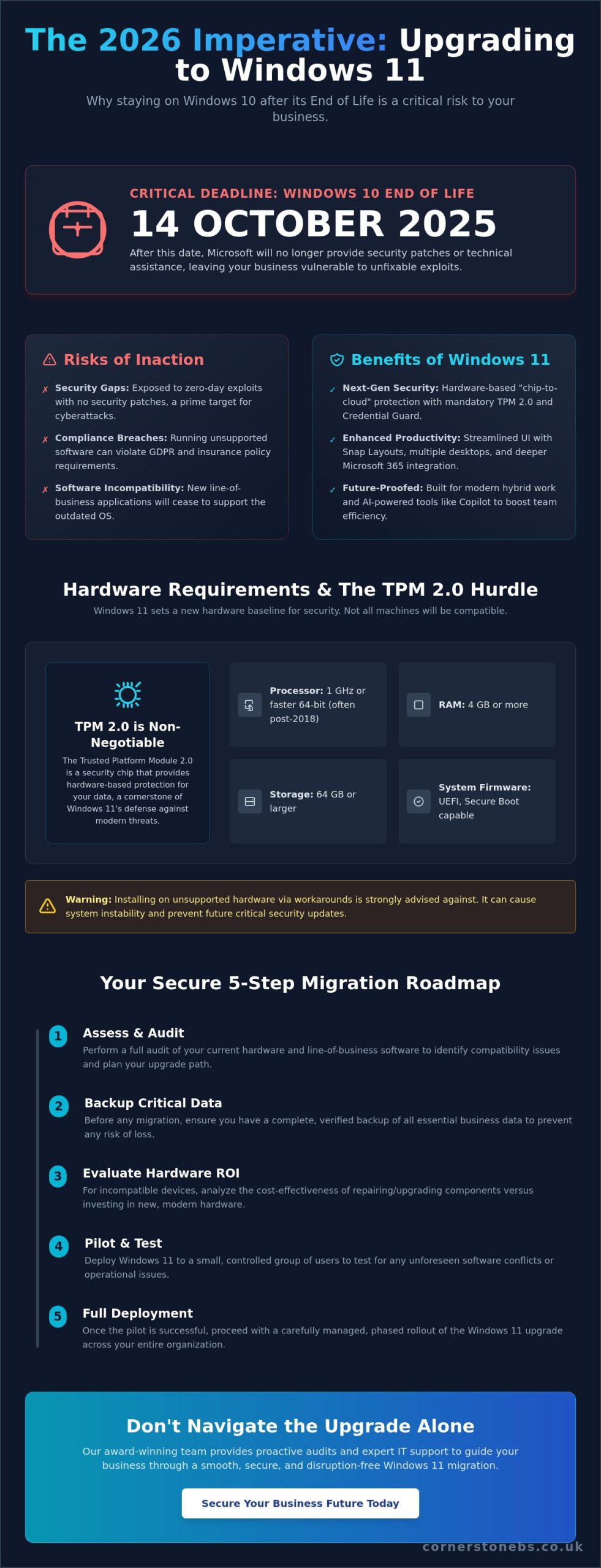
By 2026, the grace period for legacy systems has officially ended. Microsoft retired Windows 10 on 14 October 2025, meaning any business still running the older OS is now operating without a safety net. This windows 11 upgrade isn’t a cosmetic choice or a simple UI refresh. It’s a fundamental security mandate for any UK firm that values its data. Operating on an unsupported system in 2026 leaves your entire network open to zero-day exploits that will never receive a patch. We’ve seen how quickly vulnerabilities are exploited once official support vanishes. This Windows 11 overview details the foundational hardware shifts that make this new level of protection possible.
Staying on legacy systems doesn’t just invite hackers; it kills your compliance status. For businesses handling sensitive client information, running end-of-life software often breaches insurance requirements and industry regulations like GDPR. Our award-winning team at Cornerstone knows that proactive migration is the only way to maintain peace of mind. We don’t just look at the software; we look at how modern it company solutions integrate with your OS to drive performance. A seamless transition ensures your team stays protected while benefiting from a system built for the 2026 threat landscape.
The Security Advantage: Beyond the Interface
Windows 11 shifts the security baseline by mandating TPM 2.0 hardware. This creates a hardware-based root of trust that’s much harder for malware to bypass than software-only solutions. UK firms benefit from enhanced phishing protection and Credential Guard, which isolate secrets so only privileged system software can access them. These features are vital for preventing the credential theft that leads to most modern data breaches.
End of Life definition: In the context of OS support, End of Life marks the point where a developer stops providing security patches and technical assistance, creating significant business risk through unfixable system vulnerabilities.
Productivity Gains in a Hybrid World
Efficiency is the engine of any North East business. Windows 11 introduces snap layouts and multiple desktops that allow your staff to tailor their workspace for specific tasks. This reduces the cognitive load of switching between apps. Integration with Microsoft 365 is now deeper and more intuitive, ensuring your cloud tools and local files work in total harmony.
In 2026, AI is no longer a futuristic concept but a daily tool. Copilot is baked directly into the Windows 11 ecosystem to help your team automate routine admin and find information faster. This windows 11 upgrade gives your staff the tools they need to stay competitive in a fast-moving market. We’re here to help you make the switch smoothly, acting as your long-term partner rather than just a one-off service provider. Let’s have a chat about how we can secure your business future today.
Understanding Hardware Requirements and the TPM 2.0 Hurdle
Upgrading your business fleet isn’t just about clicking a button anymore. Microsoft set a higher bar for the windows 11 upgrade to ensure your data stays safe. Every machine in your office needs a compatible 64-bit processor, at least 4GB of RAM, and 64GB of storage. You can find the full list of minimum hardware requirements on the official Microsoft documentation site. While these specs seem modest, the processor compatibility list is strict, often excluding CPUs released before 2018.
The real sticking point for many North East firms is the TPM 2.0 requirement. This Trusted Platform Module is a dedicated chip on the motherboard that handles cryptographic keys. It provides “chip-to-cloud” security, protecting user identities and sensitive data at the hardware level. Since 2025, cyber threats have become more sophisticated; this hardware-based security is now a non-negotiable layer of protection for your business continuity.
Don’t guess which machines are ready for the transition. Use the PC Health Check app to scan your devices individually. If you’re managing a larger fleet across multiple sites, our award-winning team can perform a proactive audit to map out your migration path. We’ve seen some users attempt workarounds to install Windows 11 on unsupported hardware. We strongly advise against this. These “hacks” often result in system instability and, more importantly, may prevent your systems from receiving critical security updates. For a professional environment, the risk to your data isn’t worth the temporary cost saving.
The Role of UEFI and Secure Boot
Legacy BIOS served the industry well for decades, but it lacks the security features needed for 2026’s threat environment. Windows 11 requires Unified Extensible Firmware Interface (UEFI) and Secure Boot. This technology ensures your PCs only boot using software trusted by the manufacturer. It effectively blocks rootkits and boot-level malware from hijacking your system before the antivirus even loads. Check our ultimate business IT hardware guide for a deeper look at the specs that drive performance.
Virtualisation and Modern Infrastructure
Windows 11 relies heavily on hardware virtualisation to isolate sensitive OS functions from potential attacks. This is a game-changer for remote teams who need to access company resources securely from various locations. If you’re running older hardware, you might find that enabling these features impacts system speed. For those managing older on-site hardware, it’s helpful to understand what is a virtual server and how modern infrastructure supports your OS migration. If you’re worried about your hardware’s lifespan, chat with our local experts to find a tailored solution.
Step-by-Step: How to Perform a Secure Windows 11 Upgrade
Upgrading your fleet isn’t just about clicking a button; it’s about protecting your business continuity. At Cornerstone, our award-winning team follows a strict protocol to ensure your windows 11 upgrade is seamless and secure. We focus on getting it right the first time so your staff stay productive.
Step 1: Secure your data. Never start a migration without a full system backup. We recommend an off-site, encrypted copy of all critical files. If the power fails or a hardware glitch occurs during installation, you need a way to roll back instantly without losing a single invoice or client record.
Step 2: Audit your software stack. Check that your line-of-business applications are fully compatible. While 99.7% of Windows 10 apps work on the new OS according to Microsoft, that 0.3% could include your bespoke CRM or legacy accounting software. Verify this with your vendors before you commit.
Step 3: Choose your deployment route. Small offices might use the Installation Assistant for a single machine. Larger North East firms usually require ISO files or managed deployment tools to handle multiple machines simultaneously. This ensures every device receives the same configuration and security baseline.
Step 4: Time the execution. Run your upgrades during off-peak hours. A typical windows 11 upgrade can take between 30 minutes and two hours depending on the hardware. Schedule this for an evening or weekend to avoid stopping your team mid-task and losing billable hours.
Step 5: Conduct a post-migration audit. Once the desktop appears, the job isn’t done. Verify that drivers for specialist hardware are active, security settings like BitLocker are engaged, and user access permissions remain intact. This final check provides the peace of mind that your “new” machines are just as secure as the old ones.
Pre-Migration Checklist for UK SMEs
Success lies in the details. Before you start, verify these three critical factors to avoid common pitfalls:
Bandwidth check: Each download is roughly 4GB or more. If you’re upgrading ten PCs on a standard 30Mbps connection, your office internet will crawl. Plan for staggered downloads or use a local distribution point.
Administrator rights: You’ll need full local admin permissions to change the OS. Ensure your IT lead or partner has these credentials ready before starting the process.
Peripheral compatibility: Don’t assume your five-year-old plotter or label printer will just work. Check the manufacturer’s website for Windows 11 drivers today.
Managed vs. Manual Deployment
Manual upgrades are risky for any North East business with more than 5 devices. Handling each machine individually leads to “version drift,” where different PCs run different updates. This makes troubleshooting a nightmare for your support team and leaves gaps in your cybersecurity.
Our proactive approach uses Remote Monitoring and Management (RMM) tools. This technology lets us push the update to your entire fleet at once from our local base. It ensures every laptop in your company is on the same version, providing a uniform security posture across the whole organization. We view this as a partnership, ensuring your technology supports your growth rather than slowing it down.
The ROI Dilemma: Repairing Hardware vs. Replacing for Windows 11
Deciding whether to patch up your current fleet or invest in new kit is the biggest hurdle for a successful windows 11 upgrade. By 2026, many North East businesses will face the “TPM 2.0 wall.” This security requirement is non-negotiable. If your processors date back to before 2018, Microsoft simply won’t let you install the OS. You’re looking at a hard ceiling where “making do” isn’t just frustrating; it’s a security risk. Our award-winning team often sees firms trying to squeeze life out of 2019-era machines, only to find the cost of downtime far exceeds the price of a new device.
The hidden costs of aging hardware are silent profit killers. Battery degradation alone can drop mobile productivity by 30% for field-based staff. Relying on legacy hardware creates a productivity tax that costs UK businesses approximately £2,700 per employee every year in wasted wait times. We recommend a phased hardware refresh to spread these costs. By replacing 25% of your oldest machines every quarter, you balance your cash flow while ensuring your migration stays on track for the October 2025 Windows 10 end-of-life deadline.
When to Repair Existing Laptops
Repairing is a smart move if your device is under 3 years old and already houses a compatible CPU. A simple RAM boost to 16GB or a fresh NVMe SSD can make a 2023 model feel brand new for a fraction of the cost of a replacement. This approach also supports your ESG goals. Extending hardware life reduces e-waste, which is a growing priority for businesses across the UK. Read our guide on repairing vs replacing laptop hardware for a full ROI breakdown.
The Case for a Clean Start with New Hardware
New hardware delivers immediate peace of mind through manufacturer warranties. This drastically reduces helpdesk tickets, as our local support team spends less time fixing hardware failures and more time on proactive strategy. Modern 2026-spec laptops are also roughly 40% more energy-efficient than 2020 models. This lowers your office energy bills and supports a more mobile workforce. A seamless transition to new devices ensures your team stays happy and focused on growth.
Navigating Your Business Transition with Cornerstone’s Expert Support
A successful windows 11 upgrade shouldn’t keep you awake at night. At Cornerstone Business Solutions, we provide a peace of mind approach that turns a complex technical shift into a smooth business improvement. Our North East team takes full ownership of the process, acting as your dedicated long term partner rather than a one-off contractor. We understand that every hour of downtime costs your business money, so we focus on proactive stability.
Our award-winning proactive monitoring tools are central to this strategy. We don’t wait for things to break; we identify hardware and software compatibility issues before they reach your end users. By 2026, legacy systems will face increased security risks, making this foresight vital. We build bespoke technology solutions that align your new OS environment with your specific industry requirements, whether you’re in manufacturing, finance, or retail. This tailored fit ensures your team has the exact tools they need from day one.
Seamless Migration with Zero Downtime
We eliminate the risk of operational paralysis through our night-shift deployment strategy. Our engineers perform your windows 11 upgrade while your office is empty, ensuring your team arrives to fully functional workstations. We back this with a total data integrity guarantee. Every file, email, and database remains secure and accessible throughout the transition. To bridge the gap between the old and new, we provide hands-on user training. We help your staff master the new interface quickly, turning potential frustration into immediate productivity gains.
Night-Shift Deployment: Upgrades completed outside of your core business hours.
Data Integrity: Tiered backup protocols to prevent any loss of company information.
Interface Training: Guided sessions to familiarise staff with the new Windows 11 layout.
Ready for a Modern Business Environment?
The 14th of October 2025 marks the end of support for Windows 10, making 2026 the critical year to finalise your digital transformation. Staying on unsupported software leaves your business vulnerable to cyber threats that cost UK SMEs an average of £4,200 per attack. Cornerstone simplifies this transition by managing your licensing, hardware procurement, and comprehensive cyber security audits. We ensure your infrastructure is robust enough to handle modern demands. We’d love to help you plan your next steps. Let’s have a chat about your specific migration roadmap and how we can support your growth.
Our Migration Support Includes:
Full hardware compatibility audits across your entire fleet.
Procurement of Windows 11 ready devices at competitive UK rates.
Strategic licensing reviews to reduce unnecessary software spend.
Post-migration support from our local, award-winning service desk.
Secure Your Business Success Beyond 2025
The October 14, 2025, end-of-life date for Windows 10 isn’t just a technical milestone; it’s a firm deadline for your business continuity. Navigating a windows 11 upgrade requires a proactive approach to hardware audits and TPM 2.0 requirements to avoid sudden capital expenditure or security vulnerabilities. By planning your migration now, you turn a potential IT headache into a competitive advantage through faster performance and robust, modern features.
At Cornerstone, we’re more than just a multi-award-winning IT services provider. As a Microsoft Gold Partner with deep North East roots, we act as your long-term partner to simplify complex transitions. Our team provides proactive 24/7 system monitoring, ensuring your move to new infrastructure is seamless and secure. We’ll help you decide whether to repair or replace, keeping your budget on track while delivering total peace of mind. Let’s have a chat and get your migration moving today.
Is the Windows 11 upgrade still free for businesses in 2026?
Yes, your Windows 11 upgrade remains free for eligible business devices already running a genuine version of Windows 10. Microsoft hasn’t set an official expiry date for this transition yet. You’ll simply need to ensure your hardware meets the minimum specifications. Our award-winning team suggests checking your fleet early to avoid the rush. It’s a straightforward way to keep your North East business secure without extra licensing costs.
What happens if I continue to use Windows 10 after the 2026 deadline?
You’ll stop receiving free security patches and technical support because Microsoft ended standard support on 14 October 2025. Running unsupported software exposes your business to 3x higher cyberattack risks according to industry data. You can pay for Extended Security Updates (ESU), which start at approximately £50 per device for the first year. However, this is a temporary fix. Upgrading ensures your systems stay robust and compliant.
Can I downgrade back to Windows 10 if my business apps don’t work?
You have a 10-day window to roll back to Windows 10 while keeping your files and data. This built-in recovery feature allows you to test critical software without risk. If you miss this 10-day period, a clean installation is required to go back. We recommend testing your bespoke business apps on a single machine first. Our proactive approach ensures your peace of mind before a full rollout across your office.
How long does the Windows 11 installation actually take for a standard office PC?
A standard installation typically takes between 30 and 60 minutes on a modern office PC with an SSD. This timing excludes the initial download, which depends on your local North East internet speeds. You can continue working while the update downloads in the background. We schedule these updates out of hours for our partners to ensure zero downtime. It’s an efficient way to modernise your workspace without disruption.
Do I need to buy new Microsoft 365 licenses when I upgrade to Windows 11?
No, your existing Microsoft 365 subscriptions carry over seamlessly to your new operating system. Windows 11 is designed to integrate with your current Business Standard or Premium plans without any price hikes. You’ll gain better performance in apps like Teams and Outlook. We help local firms manage these licenses to ensure you’re getting the best value. Your digital tools will feel faster and more reliable after the switch.
Will Windows 11 slow down my older business laptops?
Your laptops won’t slow down if they meet the 8th Gen Intel or AMD Ryzen 2000 processor requirements. Windows 11 actually manages memory 20% more efficiently than its predecessor. This means your apps wake from sleep faster and respond more quickly. If your hardware is older than 2018, it might struggle or fail the compatibility check. We’ll provide a tailored audit of your current kit to ensure everything stays fast.
What is the ‘Installation Assistant’ and is it safe for business use?
The Installation Assistant is an official Microsoft tool designed for manual upgrades on individual PCs. It’s safe for small businesses, but we don’t recommend it for larger fleets. Manually updating 20 or 30 machines is time-consuming and prone to human error. For a more robust solution, use managed deployment tools. Our award-winning experts prefer a centralised approach to keep your North East operations running smoothly and securely.
How do I check if my PC has a TPM 2.0 chip enabled?
Press the Windows Key + R, type “tpm.msc”, and hit enter to see your status. You’ll see “Specification Version: 2.0” if your device is ready for the windows 11 upgrade. If it says “Compatible TPM cannot be found,” it might just be disabled in your BIOS settings. Most business-grade PCs built after 2018 include this chip as standard. We can help you verify this across your entire network for total confidence.