

With the UK’s Public Switched Telephone Network (PSTN) set to permanently switch off in January 2027, over 26 million users worldwide have already migrated to Microsoft Teams Phone to keep their businesses connected. It’s completely natural to feel a bit overwhelmed by the technical jargon surrounding this transition. Between various licenses, calling plans, and connectivity methods, trying to pin down the actual Microsoft Teams phone system cost UK can often feel like chasing a moving target. You need a reliable system that works without fail, especially since research shows 85% of customers won’t call back if their first attempt goes unanswered.
We’ve created this guide to strip away the complexity and provide a transparent look at the total cost of ownership for 2026. Our goal is to help you build a clear, per-user budget that makes sense for your specific business size and goals. We’ll break down the differences between Direct Routing and Calling Plans, highlight the hidden implementation costs you need to watch out for, and provide a practical roadmap for a seamless transition that protects your business continuity and growth.
Key Takeaways
- Learn how to navigate the three-tier pricing structure to understand the true Microsoft Teams phone system cost UK beyond the basic license fee.
- Compare the simplicity of Microsoft Calling Plans against the cost-efficiency and flexibility of Direct Routing through a trusted UK carrier.
- Spot hidden implementation fees early by budgeting for critical steps like number porting and ensuring your office network is voice-ready.
- Discover how consolidating your communication tools into one platform reduces technical debt and simplifies your long-term IT management.
- Gain a clear roadmap for the 2027 PSTN switch-off to protect your business continuity without overspending on unnecessary features.
Understanding the Components of Microsoft Teams Phone System Costs
The January 2027 deadline for the UK PSTN switch-off is approaching fast. It’s a hard stop for traditional analogue lines. This shift forces every business to reconsider how they handle voice calls. Copper lines and rigid maintenance contracts are becoming relics of the past. By moving your telephony to the Microsoft Teams platform, you’re not just upgrading software; you’re future-proofing your business infrastructure. However, the Microsoft Teams phone system cost UK isn’t always a single figure on an invoice. It’s a modular structure designed to scale. You pay for what you use, but you must account for every layer of the stack to avoid surprises. We’ve seen many businesses focus only on the license, only to realize later that connectivity and setup require their own budget.
The Three Pillars: Licenses, Connectivity, and Hardware
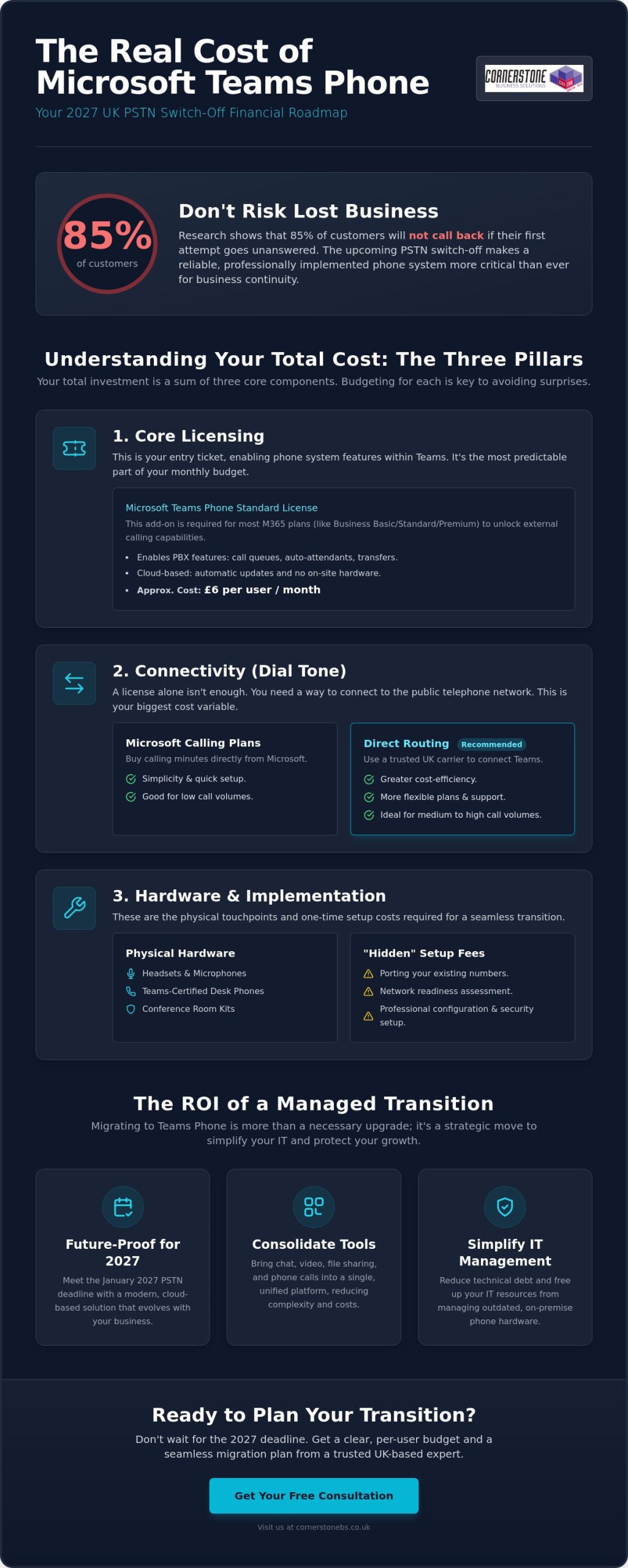
Think of your phone system in three distinct layers. The license is your entry ticket. It enables the software features within Teams, like call transfers, auto-attendants, and voicemail. However, a license alone doesn’t give you a dial tone. That’s where connectivity comes in. You can choose to buy minutes directly from Microsoft or connect through a specialist UK carrier using Direct Routing. This choice is often where the biggest cost variations happen. If your team makes a high volume of calls, a third-party carrier often provides better value than standard plans.
Finally, don’t forget the physical touchpoints. While many staff are happy using a laptop with a headset, others might require dedicated desk phones or conference room kits. Teams-certified hardware ensures call quality and reliability. We also recommend a professional services layer for configuration. This covers the initial porting of your existing UK numbers and the security setup. It ensures your team hits the ground running without technical hiccups or dropped calls during the transition.
Microsoft 365 vs. Office 365: Where Does Teams Phone Fit?
The licensing landscape can be a bit confusing at first glance. Most UK small and medium enterprises use Microsoft 365 Business Basic, Standard, or Premium. These plans are fantastic for collaboration, but they don’t include telephony features by default. You’ll need to add the “Teams Phone Standard” license to these tiers to unlock the dial pad. It’s a simple add-on, but it’s a critical component of the total Microsoft Teams phone system cost UK.
For larger organizations, the Enterprise E5 license is a popular choice because it often includes the phone system natively. If you’re on E1 or E3, you’ll still need that add-on. We always look at your existing stack first. Sometimes, a simple license upgrade is more cost-effective than adding individual features. It’s about finding the balance that supports your growth while keeping your monthly budget predictable and lean. This proactive approach ensures you aren’t paying for features you don’t use while maintaining the professional authority your customers expect.
Core Licensing: Breaking Down the Monthly Subscription Fees
Licensing fees represent the most predictable part of your monthly IT budget. While connectivity costs can vary based on your call volume, your subscription fees remain fixed. This clarity is vital for UK SMEs looking to maintain tight control over their overheads. Understanding how these licenses stack up is the first step in calculating the true Microsoft Teams phone system cost UK for your specific team size.
The Microsoft Teams Phone Standard License
The Teams Phone Standard license is the absolute prerequisite for all external calling. It unlocks the professional PBX features that modern businesses expect. You get access to call queues, auto-attendants, and intelligent call transfers without needing a physical server in your office. In 2026, this add-on license is approximately £6 per user per month. This price has shown great stability, allowing you to scale your team up or down without worrying about fluctuating subscription rates.
This license acts as the digital brain of your phone system. It manages how calls are routed and how your team interacts with clients. Because it’s a cloud-based service, updates and new features are rolled out automatically. You don’t have to worry about manual software patches or hardware maintenance. It’s a “set and forget” solution that lets you focus on your business while the technology works quietly in the background.
Bundled Options: Microsoft 365 E5 and Business Voice
If your organisation is already using Microsoft 365 Business Basic, Standard, or Premium, the Phone Standard add-on is your primary path to voice connectivity. For those in the Enterprise tier, the choice becomes more strategic. The Microsoft 365 E5 license includes the phone system natively. We often find that for businesses requiring advanced security and compliance tools, moving to E5 is more cost-effective than buying individual add-ons. The older “Business Voice” bundles are a thing of the past. Microsoft has replaced them with this modular system to give you more flexibility. You can read more about aligning your licenses in our guide to Microsoft 365 migration for business UK.
Don’t overlook the common areas of your building. Lobbies, kitchens, and warehouses often need a handset but don’t require a full user account. The “Shared Device License” is a specialized, lower-cost option for these specific scenarios. It ensures every corner of your business stays connected without the price tag of a full executive seat. For larger UK organisations with over 300 users, volume licensing agreements are also on the table. These can significantly lower the per-seat Microsoft Teams phone system cost UK through negotiated enterprise agreements.
Getting your licensing right from day one prevents overspending. If you’re unsure which tier fits your current team structure, feel free to reach out for a quick chat with our local experts. We’ll help you map out a subscription plan that grows alongside your business.
Connectivity Options: Microsoft Calling Plans vs. Direct Routing
Once you’ve secured your licenses, you need to provide your team with a dial tone. This is the connectivity layer. It’s the most flexible part of the Microsoft Teams phone system cost UK, but it’s also where many businesses overspend if they don’t choose wisely. You have three main paths: Microsoft’s own plans, Direct Routing, or Operator Connect. Each has a specific profile for cost and complexity. Our role is to help you identify which path provides the strongest ROI for your current setup and future growth.
Microsoft Calling Plans: The “All-in-Cloud” Convenience
Microsoft Calling Plans are the simplest way to get started. You buy your minutes directly from Microsoft, and they act as your carrier. For a UK domestic plan, you’ll typically pay between £5 and £9 per user each month. If your team needs to reach international clients, those plans usually range from £12 to £20. There’s also a pay-as-you-go model available for low-volume users who rarely pick up the phone. It’s a quick, convenient setup that works well for very small teams.
However, convenience comes at a premium. While it’s easy to manage through the Microsoft 365 admin centre, this is often the most expensive way to run your phone system. If your staff spend significant time on the phone, the fixed minute bundles can become restrictive. You might find yourself paying for minutes you don’t use, or facing higher costs than necessary compared to the competitive rates offered by independent UK carriers.
Direct Routing and Operator Connect: Cost Savings for Larger Teams
For organisations with more than 20 users, Direct Routing is usually the most cost-effective choice. It allows you to connect Teams to a third-party UK carrier of your choice. This method offers much better rates, with calling capabilities typically costing between £2 and £8 per user per month plus competitive per-minute rates. It also lets you keep your existing telecom relationships and negotiate bespoke minute bundles that fit your actual usage patterns. It’s about having the flexibility to build a system that respects your budget.
Direct Routing does require a bit more technical setup. You’ll need a Session Border Controller (SBC) to manage the connection. Setting this up involves an initial investment, often ranging from £500 to £3,000 depending on your requirements. If you want a middle ground, Operator Connect is an excellent alternative. Approved carriers like BT or Gamma connect directly to your Teams environment. It costs between £4 and £12 per user, providing a simpler interface than Direct Routing while still offering better value than Microsoft’s standard plans. We’ll help you weigh these options to ensure your Microsoft Teams phone system cost UK stays lean and effective.
The “Hidden” Implementation Costs You Need to Budget For
Monthly subscriptions and calling minutes are only half the story. To get a true picture of the Microsoft Teams phone system cost UK, you have to look at the work happening behind the scenes. Moving your business to the cloud isn’t just a software switch; it’s a migration of your identity and your infrastructure. If you don’t budget for the initial setup, you might find yourself facing unexpected hurdles that delay your rollout or impact your call quality. We’ve seen many organisations overlook these steps, only to realize that a “cheap” DIY setup often leads to costly downtime.
Number Porting and Initial Configuration
Your business phone numbers are your lifeline. Moving your existing UK 01, 02, or 03 numbers into Teams involves a process called porting. This requires a “Letter of Authority” to be sent to your current provider. It sounds simple, but legacy carriers often charge administrative fees for this, and they can reject requests for the smallest data mismatch. These rejections often carry their own penalties, adding to the total Microsoft Teams phone system cost UK if not managed correctly.
Once your numbers are in the system, you need to build the logic that handles your calls. This includes setting up auto-attendants, hunt groups, and complex call flows. It’s about ensuring that when a customer calls, they reach the right person every time. Professional it company solutions typically include these configuration hours in a fixed project fee. This approach gives you the peace of mind that your system is built to a high standard from day one, without hourly rates spiralling out of control.
Hardware Requirements: Teams-Certified Headsets and Handsets
It’s a common misconception that old VoIP phones will work with Teams. Most legacy handsets lack the necessary firmware to communicate with the Microsoft cloud. Teams-certified hardware is different. These devices feature a dedicated “Teams Button” for instant call control and meeting access. You have a choice here based on your team’s work style. Entry-level certified headsets are a cost-effective way to get staff started, while executive desk phones represent a higher investment for those who prefer a traditional setup.
Many local businesses now opt for a “Mobile-First” strategy. By using the Teams app on business mobiles, you can eliminate the need for desk phones entirely. This significantly lowers your upfront hardware spend while giving your team the freedom to work from anywhere. However, don’t forget your office network. Voice calls are incredibly sensitive to network stability. If your broadband is struggling, your call quality will suffer. If you’re concerned about your current setup, we can help you with a full network infrastructure assessment to ensure your office is voice-ready.
Finally, budget for staff training. The internal cost of a failed rollout is high. If your team doesn’t know how to transfer a call or set their status, they’ll revert to old habits. A few hours of expert-led training ensures high adoption rates and protects your professional reputation. It’s a small investment that pays dividends in long-term efficiency and employee satisfaction.
Calculating Your ROI: Why Managed Teams Phone Systems Win
Calculating the true Microsoft Teams phone system cost UK requires looking beyond the monthly bill. It’s about the total value of a unified environment. When you consolidate your IT and communications under one managed partner, you eliminate the friction of dealing with multiple vendors. This streamlined approach reduces administrative overhead and ensures your technology stack works as a single, cohesive unit. It’s not just a phone system; it’s a foundation for business stability and growth.
Consolidating Your Comms: Eliminating Legacy PBX Costs
Several legacy expenses vanish the moment you switch to a cloud-based model. You no longer need to budget for expensive on-site maintenance contracts for physical PBX hardware or separate analogue line rental fees. Call-out charges for hardware repairs become a thing of the past. By centralising your voice, video, and chat into one secure platform, you also eliminate the hidden expense of “Shadow IT.” This happens when staff use unmanaged personal apps for business calls because their office tools are too clunky.
The productivity gains for remote UK workers are equally significant. The Teams mobile app allows your team to take their office extension anywhere, ensuring they never miss a vital client call. This level of flexibility is a core component of modern managed IT services, providing the broader support context needed to keep your team connected. It moves telephony from a static utility to a dynamic tool that supports your business continuity.
The Cornerstone Advantage: Proactive Management and Support
Navigating the modular world of Microsoft pricing shouldn’t be your full-time job. We act as your dedicated partner, simplifying the licensing and connectivity layers so you can focus on your clients. Our proactive monitoring detects potential network issues before they impact your call quality. This prevents the significant cost of downtime that often plagues DIY cloud migrations. We understand the local landscape and the specific needs of UK SMEs, ensuring your Microsoft Teams phone system cost UK remains predictable and lean.
We manage the entire porting and configuration process to ensure a right-first-time migration. You get the peace of mind that comes with a UK-based helpdesk ready to provide immediate telephony support whenever you need it. We treat your business stability as our top priority, framing technical support as a foundational element of your success. If you’re ready to see how much your business could save by modernising your comms, we invite you to Book a Comms Audit with our expert team. Let’s build a roadmap that secures your business connectivity for 2026 and beyond.
Future-Proof Your Business Communications Today
The modular nature of modern telephony means you finally have the power to pay only for what you actually use. By selecting the right connectivity path and auditing your network readiness early, you can keep your Microsoft Teams phone system cost UK lean while significantly improving your team’s flexibility. This transition is about more than just software; it’s about building a stable foundation for your business growth as the 2027 PSTN switch-off approaches. We’re here to help you get it right.
As a multi-award-winning IT provider and proud Microsoft Gold Partner, we pride ourselves on being more than just a service provider. We act as your dedicated long-term technology partner. Our expert UK-based support desk is always on hand to ensure your migration is seamless and your daily operations remain uninterrupted. We invite you to have a conversation with our local team to see how we can tailor a solution to your specific needs.
Get a Personalised Microsoft Teams Phone Quote
We look forward to helping you stay connected with your customers and your community.
Frequently Asked Questions
Do I need a special license to make external calls on Microsoft Teams?
Yes, you require the Teams Phone Standard license to make and receive external calls. This add-on enables the PBX features within your existing Microsoft 365 environment. While Enterprise E5 users have this included, most Business Standard or Premium users need to add this specific license to unlock the dial pad. It’s a straightforward subscription that ensures your team can reach any UK mobile or landline directly from their laptop or mobile device.
Can I keep my existing UK business phone numbers when moving to Teams?
You can certainly keep your existing numbers through a process called porting. We manage the transition of your current UK landline or VoIP numbers into the Microsoft cloud to ensure zero disruption for your customers. This involves a Letter of Authority and coordination with your legacy carrier. Once ported, your team can use their familiar business numbers from any location, maintaining your professional identity and local presence without needing to update marketing materials.
Is Microsoft Teams Phone cheaper than a traditional VoIP system?
In many cases, it’s more cost-effective because it eliminates the need for separate telephony hardware and maintenance contracts. By consolidating your communications, you reduce the total Microsoft Teams phone system cost UK by removing redundant line rentals and “Shadow IT” subscriptions. You benefit from a single monthly bill and a unified platform for chat, video, and voice, which significantly lowers administrative overhead and simplifies your long-term budgeting.
What is the difference between a Calling Plan and Direct Routing?
Calling Plans allow you to buy minutes directly from Microsoft, offering a simple but often more expensive all-in-one solution. Direct Routing connects Teams to an independent UK voice carrier instead. This second option typically provides more competitive rates and greater flexibility for businesses with higher call volumes. Choosing Direct Routing allows you to negotiate bespoke minute bundles and maintain existing telecom relationships while using the familiar Teams interface for all your calls.
Do I need to buy new desk phones for my staff to use Teams Phone?
You don’t necessarily need physical desk phones to use the system effectively. Many businesses adopt a mobile-first strategy using the Teams app on laptops and smartphones. However, if your staff prefer a traditional setup, you will need Teams-certified handsets. Legacy VoIP phones generally lack the firmware required to connect to the Microsoft cloud. High-quality certified headsets are often the most popular and cost-effective choice for modern, flexible working environments.
How much does it cost to add a new user to my Teams Phone system?
Adding a new user is a simple matter of assigning the appropriate licenses and a phone number. You’ll pay the monthly subscription fee for the Teams Phone Standard license plus your chosen connectivity plan. Because the system is entirely cloud-based, there are no hardware installation costs or physical wiring requirements for new starters. This scalability makes it incredibly easy to grow your team while keeping your Microsoft Teams phone system cost UK predictable and manageable.
What happens to my Teams Phone system if the internet goes down?
Your phone system remains active in the cloud even if your office internet fails. Because Teams is a cloud-native platform, calls can be automatically routed to the Teams app on your staff’s mobile devices using 4G or 5G data. This built-in disaster recovery ensures your customers can always reach you. We also recommend a network infrastructure assessment to ensure your office broadband has the necessary resilience and backup options for mission-critical voice traffic.
Is there a minimum number of users required for Microsoft Teams Phone?
There is no minimum user requirement for the system. Whether you’re a sole trader needing a professional presence or a large organisation with hundreds of staff, the platform scales to fit your needs perfectly. You can start with a single user and add more as your business expands. This flexibility allows small enterprises to access enterprise-grade telephony features, like auto-attendants and call queues, without a massive upfront investment or long-term hardware commitments.
Tags: Business Communications, Direct Routing, Microsoft Teams, Phone System Pricing, PSTN switch-off, Teams Phone, UK business, VoIP