Understanding Cloud Environments and Their Importance
A cloud environment is a virtual space where your business data and applications live, breathe, and operate outside traditional on-site servers. Think of it as renting premium office space in the digital world rather than buying your own building. Your files, software, and computing power exist on remote servers managed by expert providers, accessible from anywhere with an internet connection.
The shift to cloud computing isn’t just trendy tech talk. It’s a fundamental business transformation.
Key Benefits of Cloud Environments for Businesses
The shift to cloud computing has revolutionised how British businesses operate, delivering tangible advantages that directly impact the bottom line. Modern cloud environment benefits extend far beyond simple data storage, creating opportunities for growth that were previously available only to large enterprises with substantial IT budgets.
Companies across the North East and throughout the UK are discovering that cloud adoption isn’t just about technology. It’s about competitive advantage. A recent study by Ofcom revealed that 88% of UK businesses using cloud services reported improved operational efficiency within the first year of implementation.
Cost Efficiency and Financial Benefits
Traditional IT infrastructure demands significant upfront investment. Server hardware alone can cost thousands of pounds, before factoring in software licences, maintenance contracts, and dedicated IT staff. Cloud environments eliminate these barriers entirely.
Maintenance expenses virtually disappear. No more server room cooling bills, no hardware replacement cycles, no emergency repair callouts. The cloud provider handles infrastructure management, freeing your team to focus on business-critical activities that drive revenue.
Scalability and Flexibility in Action
Business growth often creates IT bottlenecks. Traditional systems require weeks or months to expand capacity. Cloud environments scale instantly.
Consider a North East manufacturing firm that secures a major contract requiring 300% more processing power. With cloud infrastructure, they provision additional resources within minutes, not months. When the project concludes, they scale back down, avoiding long-term commitments to unused capacity.
These cloud environment benefits create a foundation for sustainable growth. If you’re considering how cloud migration could transform your business operations, speaking with our award-winning team can help clarify the specific advantages for your unique requirements.
Real-World Business Applications of Cloud Technology
Understanding cloud environment benefits becomes clearer when we examine how businesses across different sectors are transforming their operations. These real-world applications demonstrate the tangible impact of cloud adoption on efficiency, cost reduction, and competitive advantage.
Retail Sector Cloud Adoption
Major UK retailer Tesco revolutionised their inventory management by migrating to cloud-based systems in 2019. The results speak volumes: 23% reduction in stockouts and 18% improvement in inventory turnover. Their cloud infrastructure processes over 40 million transactions weekly, providing real-time visibility across 3,400 stores.
Streamlined operations emerge through automated reordering systems and predictive analytics. Retailers now anticipate demand patterns, optimise shelf space, and reduce waste by up to 15% compared to traditional systems.
Manufacturing Sector Cloud Integration
Rolls-Royce transformed their aerospace manufacturing through cloud-based supply chain optimisation in 2020. Their intelligent engine monitoring system now processes data from 13,000 commercial aircraft engines worldwide, preventing costly failures and reducing maintenance costs by £1.2 billion annually.
Production efficiency increases when manufacturers connect machinery, sensors, and quality control systems through cloud platforms. Real-time monitoring identifies bottlenecks before they impact output. Downtime drops significantly when predictive maintenance schedules repairs during planned shutdowns rather than emergency stops.
Supply chain visibility extends from raw materials to finished products. Manufacturers track components across global networks, ensuring quality standards and delivery commitments. This transparency reduces delays by 30% and improves customer satisfaction scores.
Financial services firms like Barclays have enhanced customer data security through cloud migration programmes completed in 2021. Advanced encryption protocols and multi-factor authentication protect sensitive information whilst enabling faster service delivery. Customer onboarding times decreased from 14 days to 3 hours through automated verification processes.
Common pitfalls during cloud adoption include inadequate staff training, insufficient data backup strategies, and poor vendor selection. Successful transitions require comprehensive planning, phased implementation, and ongoing support partnerships. Businesses should establish clear migration timelines, maintain legacy system access during transitions, and invest in employee education programmes to maximise cloud environment benefits.
Environmental and Sustainability Benefits of Cloud Computing
Your business can significantly reduce its environmental footprint whilst cutting operational costs. Cloud environment benefits extend far beyond financial savings, delivering measurable environmental improvements that align with modern corporate responsibility expectations.
Traditional on-premises data centres consume enormous amounts of energy. They require constant cooling, redundant hardware, and individual server maintenance across thousands of businesses. Cloud providers consolidate these resources into hyperscale facilities that operate at 93% greater efficiency than typical enterprise data centres, according to Microsoft’s 2020 sustainability study.
Cloud’s Role in Reducing Environmental Impact
Major cloud providers invest billions in renewable energy infrastructure. Amazon Web Services achieved 90% renewable energy usage by 2022, whilst Google Cloud has been carbon neutral since 2007. When you migrate to cloud services, you’re effectively sharing these green investments without the capital expenditure.
Hardware waste drops dramatically through cloud adoption. Instead of replacing servers every 3-4 years, cloud providers maximise equipment lifecycles through advanced resource management. They also handle responsible recycling and component recovery at industrial scale.
Energy consumption per workload decreases by up to 88% when businesses move from on-premises infrastructure to cloud environments. This reduction stems from shared resources, optimised cooling systems, and automated power management that adjusts capacity based on real-time demand.
Aligning Cloud Adoption with CSR Goals
Forward-thinking businesses use cloud migration to meet ambitious sustainability targets. Unilever reduced their IT carbon footprint by 50% through comprehensive cloud adoption, demonstrating how technology choices directly impact environmental goals.
Reporting becomes simpler too. Cloud providers offer detailed carbon footprint analytics, enabling precise measurement of your digital environmental impact. This transparency supports compliance with emerging UK sustainability regulations and simplifies ESG reporting requirements.
The business case is compelling. Companies typically reduce IT-related carbon emissions by 65-85% within 12 months of cloud migration, whilst simultaneously improving operational efficiency and reducing costs.
Ready to explore how cloud environment benefits can transform your business sustainability? Contact our award-winning team to discuss your environmental goals and cloud migration strategy.
How to Transition Your Business to a Cloud Environment
Moving to the cloud isn’t something you do overnight. Smart businesses take a methodical approach that protects their operations whilst maximising cloud environment benefits. The key lies in thorough preparation and choosing the right migration strategy for your specific needs.
Start by conducting a comprehensive audit of your current IT infrastructure. Document every application, system, and data repository your business relies on. This isn’t just about technology – map out how different departments use these systems and identify any compliance requirements specific to your industry. According to recent studies, 67% of businesses that skip this initial assessment face unexpected complications during migration.
Your migration strategy should align with your business priorities. A phased approach works best for most organisations, allowing you to move non-critical systems first whilst keeping essential operations running smoothly. This method reduces risk and gives your team time to adapt to new processes.
Choosing the Right Cloud Provider
Not all cloud providers offer the same level of service or security. Evaluate each potential partner based on their UK data centre locations, compliance certifications, and 24/7 support availability. Look for providers with ISO 27001 certification and GDPR compliance – these aren’t optional extras but essential requirements for UK businesses. Check their service level agreements carefully; uptime guarantees should be at least 99.9% with clear compensation terms for any breaches.
Effective Migration Strategies
Your migration timeline depends on your business complexity and risk tolerance. Critical systems require extensive testing in the cloud environment before switching over completely. Always maintain robust backup systems during transition periods – cloud migrations can take 3-6 months for medium-sized businesses, and you can’t afford downtime during this period.
Staff training is crucial for success. Begin educating your team about new cloud-based processes at least 4 weeks before go-live dates. This preparation ensures everyone feels confident using new systems and reduces post-migration support calls by up to 40%.
Don’t underestimate the importance of having experienced technical support throughout your transition. Working with award-winning local experts ensures you have immediate assistance when challenges arise, keeping your migration on track and your business running smoothly.
Transform Your Business with the Right Cloud Partner
The cloud environment benefits we’ve explored demonstrate why 2026 is the perfect time to make your move. Remote work capabilities that boost productivity by 35%, cost savings of up to 40% on IT infrastructure, and enhanced security that protects against 99.9% of cyber threats aren’t just possibilities anymore. They’re business necessities.
Your transition doesn’t have to be overwhelming. The right partner makes all the difference between a seamless migration and months of disruption. That’s where our award-winning IT support comes in. As trusted partners with Microsoft, IBM, and Cisco, we’ve helped hundreds of North East businesses unlock their cloud potential without the headaches.
The future of business is in the cloud. Let’s get you there together.
Frequently Asked Questions
What are the main benefits of moving to a cloud environment?
The primary cloud environment benefits include enhanced flexibility, automatic software updates, and improved disaster recovery capabilities. Your business gains access to enterprise-grade infrastructure without the capital investment, whilst your team can work securely from anywhere with an internet connection. Cloud environments also provide automatic backups and 99.9% uptime guarantees from leading providers like Microsoft Azure and AWS.
How does cloud computing improve business scalability?
Cloud computing allows you to scale resources up or down within minutes, not weeks. During peak trading periods, you can instantly add server capacity or storage space, then reduce it when demand drops. This flexibility means you only pay for what you actually use, rather than maintaining expensive on-site infrastructure that sits idle 70% of the time.
Are cloud environments secure for sensitive business data?
Yes, leading cloud providers invest over £15 billion annually in cybersecurity measures that most businesses couldn’t afford independently. Microsoft Azure and AWS maintain ISO 27001 certification and employ dedicated security teams monitoring threats 24/7. Cloud environments typically offer better data protection than traditional on-premises servers, with multi-factor authentication and encryption as standard features.
How can cloud services reduce operational costs?
Cloud services eliminate the need for expensive hardware purchases, software licences, and dedicated IT staff for maintenance. Gartner research shows businesses typically reduce IT costs by 15-20% within the first year of cloud migration. You’ll also save on electricity bills, as cloud providers achieve better energy efficiency through shared infrastructure and optimised data centres.
What sustainability benefits does cloud computing offer?
Cloud computing reduces your business’s carbon footprint by up to 84% compared to traditional on-site servers, according to Microsoft’s 2020 sustainability study. Major cloud providers like AWS and Google Cloud have committed to carbon neutrality by 2030, using renewable energy sources for their data centres. Shared infrastructure means better resource utilisation and less electronic waste from redundant hardware.
How do I choose the right cloud service provider for my business?
Focus on providers with UK data centres to ensure GDPR compliance and faster performance for your team. Microsoft 365 suits most small to medium businesses, whilst AWS works better for complex applications requiring custom development. Consider your existing software ecosystem, required integrations, and whether you need hybrid cloud capabilities for sensitive data that must remain on-premises.
What are the first steps to take when transitioning to the cloud?
Start with a comprehensive audit of your current IT infrastructure and identify which applications can move first without disrupting daily operations. Email systems and file storage typically migrate easiest, followed by customer databases and accounting software. Partner with an award-winning local IT provider to create a phased migration plan that minimises downtime and ensures your team receives proper training on new cloud-based tools.
What if your business could be entirely shielded from the looming threat of ransomware ransomware? For many UK businesses, the fear of total data loss and the anxiety over financial and reputational damage from downtime are real and pressing concerns. You’re not alone in feeling overwhelmed by complex security terms and the ever-evolving landscape of cyber threats. In this definitive guide, you’ll learn essential strategies to proactively protect your business from ransomware and gain award-winning insights into cybersecurity best practices. We’ll provide you with a clear understanding of modern ransomware behavior, a practical checklist for prevention, and the confidence you need to ensure your business continuity plan is robust. Together, let’s fortify your business against these threats and pave the way for a secure operational future.
Key Takeaways
Understand how ransomware attacks have evolved from random strikes to targeted efforts aimed at high-value organizations.
Learn about the critical phases of a ransomware attack, including initial access through phishing and the concept of “dwell time.”
Discover the true costs of a ransomware incident, which often extend beyond the ransom fee to include downtime and lost productivity.
Implement the “Zero Trust” model to protect your business—never trust, always verify every user and device against ransomware ransomware threats.
Explore how partnering with an award-winning cybersecurity provider like Cornerstone can enhance your proactive defense strategies.
What is Ransomware? Understanding the 2026 Threat Landscape
Ransomware is a malicious form of software designed specifically to infiltrate computer systems, encrypt critical files, and demand a ransom for their release. This type of cyber extortion has evolved significantly, transitioning from rudimentary “spray and pray” attacks—where random targets are bombarded with malware—to highly sophisticated and targeted “Big Game Hunting” tactics. In this new paradigm, cybercriminals focus on high-value companies, often with devastating consequences.
One alarming trend in the ransomware landscape is “Double Extortion.” This technique not only involves encrypting data but also threatens to publicly release sensitive information if the ransom isn’t paid. This creates an additional layer of pressure on businesses, making the stakes considerably higher.
The Different Faces of Cyber Extortion
Crypto ransomware: The classic variant that encrypts files, rendering them inaccessible until a ransom is paid.
Locker ransomware: This type locks users out of entire devices or network segments, halting business operations entirely.
Doxware and Leakware: These threats involve not only encrypting data but also the potential for sensitive commercial information to be published online.
Why UK Businesses are Primary Targets
Small and medium-sized enterprises (SMEs) in the UK are increasingly viewed as “soft targets” for cybercriminals. Often, these businesses possess valuable data but may lack the robust cybersecurity measures seen in larger corporations. The ongoing digital transformation has widened the “attack surface,” making it easier for attackers to exploit vulnerabilities.
Ransomware isn’t just an IT glitch; it’s a business continuity crisis that can halt operations and damage reputations in a matter of minutes. The ramifications can be severe, impacting not just the bottom line but also customer trust and employee morale. Addressing this evolving threat is crucial for the survival and success of UK businesses in 2026 and beyond.
The Anatomy of an Attack: How Ransomware Infiltrates Your Organisation
Ransomware attacks are an evolving threat to UK businesses, and understanding the anatomy of an attack is crucial for effective protection. The initial access phase often begins with tactics like phishing, exploiting remote desktop protocol (RDP) vulnerabilities, or targeting unpatched software. Once inside, attackers can quietly infiltrate your systems, often going undetected for days or weeks.
Common Entry Points for Cyber Criminals
Phishing emails: These deceptive messages can trick even the most vigilant employees. Attackers craft emails that appear legitimate, leading users to click on malicious links or download infected attachments.
Vulnerable software: Ignoring “end of life” systems or failing to apply critical security patches creates a playground for cybercriminals. In fact, according to a 2022 report, 60% of breaches exploit known vulnerabilities.
Credential theft: Weak or reused passwords serve as a “golden ticket” for hackers. A recent study showed that 81% of data breaches are related to stolen or weak passwords.
Once attackers gain access, they enter a phase known as “dwell time,” which is the period during which they can move laterally across your network. This can include accessing sensitive files and systems without triggering alarms. Attackers often look for high-value targets, such as server systems or databases, to maximize their impact.
During this lateral movement, data exfiltration can occur. Criminals may siphon off sensitive information before deploying the ransomware payload. This silent theft is crucial; it gives them leverage to ensure compliance with their ransom demands.
The Stealthy Progression of Modern Malware
Lateral movement: Attackers can jump from a single compromised laptop to your entire server infrastructure, often using legitimate credentials they’ve captured.
Data exfiltration: Before triggering the ransomware, criminals may steal critical data, leaving businesses vulnerable to additional threats, including data breaches.
Disabling backups: Ransomware criminals often target your backup systems first. By erasing or encrypting backups, they ensure that paying the ransom becomes the only viable option for recovery.
The final phase is the activation phase, where the ransomware payload is triggered. This typically involves encrypting files and displaying a ransom note that demands payment, often in cryptocurrency like Bitcoin. This payment method is preferred by attackers due to its anonymity and difficulty in tracing transactions.
Understanding how ransomware infiltrates your organisation is the first step in protecting your business. If you want to enhance your cybersecurity measures and safeguard your valuable data, reach out to discuss tailored solutions that can help you stay one step ahead of cyber threats.
Beyond the Ransom: Calculating the True Cost of an Incident
The ransom fee is often just the tip of the iceberg when it comes to the financial fallout of a ransomware ransomware incident. While paying the ransom can seem like the quickest solution, the real costs extend far beyond that initial payment. Businesses must grapple with operational downtime, lost productivity, and the long-term effects on their brand reputation and customer trust.
The Financial Impact of Business Interruption
Consider the cost of a “dark” office where employees can’t access crucial files. For example, if a business employs 50 people with an average hourly wage of £15, each hour of downtime could cost the business £750. This figure doesn’t account for the lost opportunities and potential sales during that time.
Emergency IT forensics can quickly run into the thousands, as companies scramble to identify vulnerabilities.
Legal consultations, often required post-breach, can also add significant costs.
Supply chains may be disrupted, leading to delayed deliveries and contractual penalties.
These hidden costs can accumulate rapidly, painting a grim picture of the financial damage caused by ransomware incidents.
The Human and Reputational Toll
The impact on internal teams can be severe. Stress and anxiety often plague IT staff and management as they work around the clock to resolve issues. The emotional strain can lead to decreased morale and increased turnover rates.
Finally, businesses must consider legal and regulatory implications. Under the General Data Protection Regulation (GDPR), companies can face fines of up to £17.5 million or 4% of their annual global turnover if they fail to adequately protect customer data. Just as specialized representation is essential for complex cases like a Stevens-Johnson Syndrome Lawsuit, businesses need expert legal guidance to handle penalties that can cripple an organization already reeling from a ransomware incident.
In summary, the costs associated with ransomware attacks encompass much more than the ransom itself. By understanding these hidden expenses, UK businesses can better prepare and protect themselves against the devastating effects of such incidents.
Building a Robust Defence: Proactive Strategies for Prevention
Implementing a strong ransomware ransomware protection strategy begins with adopting the “Zero Trust” model, which operates on the principle of “never trust, always verify.” This approach ensures that every user and device, regardless of their location, is continuously authenticated and authorized. By treating every access attempt as untrusted, businesses can significantly reduce their risk of falling victim to ransomware attacks.
A multi-layered cybersecurity strategy is essential. Relying on a single defense mechanism can leave gaps in your security posture. Instead, consider integrating various protective measures, such as firewalls, intrusion detection systems, and advanced threat protection tools. Each layer adds another barrier that a potential attacker must breach, thereby enhancing overall security.
Additionally, regular training sessions for staff members are crucial. Employees are often the weakest link in cybersecurity, making them prime targets for phishing attacks that can lead to ransomware infections. By educating your team and fostering a culture of security awareness, you create a “human firewall” that is vigilant against potential threats. This proactive strategy not only minimizes risk but also empowers employees to recognize and respond to suspicious activities effectively.
One critical aspect of ransomware protection is ensuring that offline, immutable backups are in place. These backups are not just a good practice; they are the only true cure for ransomware. In the event of an attack, having secure, unalterable copies of your data allows you to restore operations quickly without succumbing to ransom demands.
Technical Controls and Best Practices
Implement Multi-Factor Authentication (MFA): Enforce MFA across all business applications to add an extra layer of security. This makes it significantly harder for cybercriminals to gain unauthorized access.
Endpoint Detection and Response (EDR): Utilize EDR solutions for real-time monitoring of suspicious activities on devices. This proactive measure helps identify potential threats before they escalate into full-blown attacks.
Frameworks and Compliance for Peace of Mind
Cyber Essentials Certification: Achieving this certification not only improves your security posture but also demonstrates to clients and stakeholders that you take cybersecurity seriously.
Incident Response Plan: Create a tailored incident response plan that your entire team understands. This ensures swift action in the event of a cyber incident, minimizing damage and downtime.
Regular Vulnerability Scanning: Conduct regular scans to identify vulnerabilities in your systems. Addressing these “open windows” before hackers exploit them is vital for maintaining a secure environment.
By implementing these strategies, UK businesses can establish a robust defense against ransomware. Don’t wait for an attack to occur; take action now to protect your assets and ensure your peace of mind. For expert guidance tailored to your needs, reach out to us today.
Partnering for Peace of Mind: The Cornerstone Approach to Cyber Security
At Cornerstone Business Solutions, we pride ourselves on being an award-winning partner that emphasizes proactive maintenance over reactive repairs. Our commitment to managed IT services ensures that SMEs have the 24/7 vigilance necessary to fend off ransomware ransomware threats and other cyber risks. We don’t just fix problems; we prevent them, allowing you to focus on what you do best—growing your business.
Proactive Monitoring and Rapid Response
Our dedicated team excels at identifying and isolating threats before they can spread through your systems. With a dedicated helpdesk that understands your unique business needs, we provide tailored solutions that align with your operations. Our multi-award-winning status serves as a signature of quality that reflects our expertise in cybersecurity. Here’s how we keep your data secure:
24/7 monitoring to detect anomalies in real-time.
Immediate response protocols to contain and neutralize threats.
Regular security assessments to identify vulnerabilities.
Seamless Integration and Business Growth
We invite you to engage in a no-jargon chat with our experts. Together, we can assess your current cybersecurity posture and develop a tailored strategy that meets your unique needs. Your peace of mind is just a conversation away.
Empower Your Business Against Ransomware Ransomware
Understanding the evolving threat landscape of ransomware is essential for UK businesses. By recognizing how ransomware infiltrates your organization and calculating the true costs of an incident, you can build a robust defense. Proactive strategies and partnerships with trusted experts are key to safeguarding your business.
Don’t wait until it’s too late. Take the first step towards ensuring peace of mind for your organization. Book a free, no-obligation cyber security chat with our award-winning team today and discover how we can help you stay ahead of cyber threats. Together, we can create a tailored solution that fits your unique needs.
Remember, your business’s security is our priority. Let’s build a safer future together.
Frequently Asked Questions
Is it ever a good idea to pay the ransom in a ransomware attack?
Paying the ransom in a ransomware attack is generally not advisable. While it may seem like a quick fix, there’s no guarantee that you’ll regain access to your data. In fact, studies show that 80% of businesses that pay a ransom are targeted again. Instead of paying, focus on prevention strategies and data backups to mitigate the impact of such attacks.
Can my business be targeted by ransomware even if we use cloud storage like Microsoft 365?
Yes, using cloud storage like Microsoft 365 doesn’t make your business immune to ransomware. Cybercriminals can exploit vulnerabilities in cloud services or use phishing techniques to gain access to your data. It’s crucial to implement strong security measures, such as regular updates and user training, to protect your cloud-based data from ransomware attacks.
How often should we back up our data to stay safe from cyber extortion?
Backing up your data daily is recommended to stay safe from cyber extortion. This frequency ensures that even in the event of a ransomware attack, you can quickly restore most of your data with minimal loss. Additionally, consider using a combination of on-site and off-site backups to enhance your protection against data loss.
What are the first three steps I should take if I suspect a ransomware infection?
If you suspect a ransomware infection, first disconnect the infected device from your network to prevent further spread. Next, identify and isolate the ransomware strain to understand its behavior. Finally, contact your cybersecurity provider or IT team to initiate an incident response and recovery plan to mitigate the damage.
How does Multi-Factor Authentication (MFA) help prevent ransomware?
Multi-Factor Authentication (MFA) significantly enhances security by requiring multiple forms of verification before granting access to sensitive data. This reduces the risk of unauthorized access, which is a common entry point for ransomware attacks. By implementing MFA, businesses can lower their chances of falling victim to ransomware by adding an extra layer of protection.
Can antivirus software alone stop modern ransomware strains?
No, antivirus software alone is often insufficient to stop modern ransomware strains. Ransomware has evolved to bypass traditional antivirus solutions, making it essential to employ a multi-layered security approach. This should include firewalls, intrusion detection systems, and employee training to recognize phishing attempts, which are common ways ransomware is delivered.
What is the difference between ransomware and other types of malware?
Ransomware is a specific type of malware designed to encrypt files on a victim’s device, demanding a ransom for decryption. In contrast, other malware types may steal data, spy on user activities, or damage systems without extorting money. Understanding this distinction helps businesses implement targeted defenses against ransomware threats.
How much does a professional cyber security audit typically cost for a UK business?
The cost of a professional cyber security services audit for a UK business can vary widely, typically ranging from £1,000 to £5,000 depending on the complexity of the audit. This investment is crucial for identifying vulnerabilities and ensuring robust ransomware protection measures. Always choose a reputable provider with proven expertise in cybersecurity to ensure a thorough assessment.
By December 2025, Openreach will permanently retire the UK’s traditional analogue network, leaving an estimated 2.4 million businesses facing a total communications blackout if they fail to adapt. This shift makes the move to a voip telephone system a matter of business survival rather than a simple upgrade. It’s a daunting deadline that has many North East business owners worried about technical jargon and potential downtime. You likely feel that switching your setup is just another chore on an already long list, especially when terms like SIP and PBX make the process feel unnecessarily complex.
As an award-winning team, we believe technology should provide peace of mind, not a headache. This guide explains exactly how modern cloud communications work in plain English, ensuring you stay connected long after the PSTN switch-off. We’ll show you how to maintain crystal-clear call quality even during your busiest periods and how the right digital transition can actually lower your operational costs. You’ll discover a straightforward roadmap for migration that keeps your team talking and your business growing through 2026 and beyond.
Key Takeaways
Understand the shift from traditional copper wires to digital signals and why the PSTN switch-off makes modernising your communications essential for business continuity.
Discover how a modern voip telephone system delivers significant cost savings on line rental while providing proactive features that instantly enhance your customer service.
Learn the mechanics of Hosted PBX technology and how it routes calls through the cloud to keep your team connected from any location.
Follow our practical framework to assess your network health and hardware needs, ensuring your infrastructure is robust enough to handle high-quality voice data.
See how an award-winning managed partnership provides more reliability and peace of mind than a DIY setup, ensuring your communications are always future-proof.
What is a VoIP Telephone System? Understanding the Digital Shift
A voip telephone system is a modern communication solution that turns your voice into digital data packets. These packets travel over the internet rather than through old-fashioned copper wires. This technology, officially known as Voice over Internet Protocol (VoIP), represents a fundamental shift in how UK businesses connect. You aren’t tied to a physical socket in a wall anymore. You’re using a flexible, cloud-based signal that works wherever you have a reliable web connection.
At Cornerstone Business Solutions, we see this transition as more than just a technical upgrade. It’s about securing your company’s future. Moving away from physical infrastructure to the cloud provides a level of peace of mind that legacy systems simply can’t match. You’re trading fragile, ageing wires for a robust, award-winning digital framework that scales as you grow. It’s a proactive move that ensures your team stays reachable, regardless of what happens to the local physical exchange.
The Death of the Traditional Landline
The Public Switched Telephone Network (PSTN) has served the UK since the Victorian era. However, Openreach is retiring this ageing setup because it’s no longer cost-effective to maintain. The 2026 deadline is a hard cut-off for these traditional services. Legacy hardware lacks the flexibility required for the 44% of UK employees who now work in a hybrid capacity. If your business still relies on a physical wall jack, you’re on a countdown to a total service blackout. Switching now avoids the last-minute rush and ensures your operations continue without a hitch.
Why VoIP is the New Standard for UK Business
Modern businesses demand unified communications. A voip telephone system brings voice, video, and instant messaging into one seamless interface. You can take your office number anywhere using dedicated mobile apps. This is vital for our North East clients who frequently move between the office, home, and client sites. There’s no need for bulky, on-site PBX boxes that take up cupboard space and require expensive call-out fees for repairs.
The scalability of the cloud is its greatest strength. You can add new users in seconds, making it a tailored fit for both small startups and established enterprises. By moving to a digital system, you’re choosing a partnership with technology that evolves alongside your business needs. It’s a cleaner, faster, and more reliable way to talk to your customers.
How VoIP Works: The Technology Behind the Call
Understanding how a voip telephone system operates helps you see why it’s more reliable than the old copper-wire lines. Your voice undergoes a digital transformation the moment you speak. The handset captures your sound waves and converts them into digital data packets. These packets travel via SIP (Session Initiation Protocol), which acts as the digital engine directing the call. This FCC explanation of VoIP clarifies that this process happens almost instantly, allowing for real-time conversation without the lag of traditional systems.
The packets head to a Hosted PBX (Private Branch Exchange). Think of this as a virtual switchboard located in a secure data centre. It manages the routing, ensuring the call reaches the right extension or mobile app. Because this happens in the cloud, you don’t need a dusty server room full of wires. Our award-winning team often sees businesses reduce their physical hardware footprint by 80% just by making this switch. It’s a cleaner, more efficient way to stay connected.
The Role of Cloud Infrastructure
Modern cloud solutions remove the risk of hardware failure. If your office loses power, the voip telephone system stays live in the cloud. Calls automatically divert to mobile devices or secondary locations, maintaining 100% connectivity. Scalability is another huge benefit. You can add a new “seat” for a new starter in minutes with just a few clicks. It’s a flexible approach that fits the fast-paced nature of North East business.
Bandwidth and Call Quality
Crystal-clear HD audio depends on your internet connection. Two factors usually dictate quality: latency and jitter. Latency is the delay in data reaching its destination, while jitter is the irregular arrival of those data packets. For a professional sound, you want latency below 150 milliseconds. Poorly managed connections lead to “choppy” audio that frustrates clients.
While standard fibre broadband works for small teams, many 10-person offices choose dedicated leased lines. These provide a “private lane” for your voice data. A simple rule of thumb for your bandwidth is to allow 100kbps (0.1Mbps) of upload and download speed per simultaneous call. If you have 10 people on the phone at once, you only need 1Mbps of dedicated throughput to keep things smooth. If you’re unsure about your current speeds, chat with our experts for a quick connection audit.
Key Benefits: Why Your Business Should Make the Switch
Switching to a voip telephone system isn’t just a tech upgrade; it’s a strategic move for your bottom line. Traditional landlines carry heavy monthly rental fees and rigid contracts. By moving to the cloud, UK businesses often reduce their monthly line rental costs by up to 50%. International calls no longer break the bank either. You’re using your existing internet connection to carry voice data, which slashes long-distance charges significantly. For a detailed breakdown of how this data transmission replaces old copper wiring, the Federal Communications Commission guide to VoIP provides a helpful technical overview of the process.
First impressions matter in the competitive UK market. Proactive features like auto-attendants ensure your customers reach the right department without delay. Your voip telephone system also links directly with your existing CRM and Microsoft 365 suite. When a client calls, their account history can pop up on the screen instantly. This integration allows your team to provide a tailored service that builds long-term trust. It turns every phone call into a data-driven opportunity to support your clients better.
Hybrid work is now the standard for 75% of UK office-based businesses. VoIP supports this culture by linking remote staff to the office dialling plan seamlessly. Whether your team is in Middlesbrough, Newcastle, or working from home, they remain part of the same network. They can answer office calls on any device, ensuring your business never misses a lead. This creates a unified professional presence, regardless of where your staff are physically located, or whether they are working from a renovated kitchen space like those featured in the 2026 guide by Grand Building Construction.
Flexibility and Scalability
Business growth shouldn’t be limited by your office hardware. You can scale your system up or down instantly. During busy seasons, adding a new user takes minutes, not weeks. There’s no need for an engineer to visit or install physical lines. Modern IP handsets are “plug and play.” You simply connect them to your router and start dialling. Staff can also use “softphones” on their laptops or mobiles. This keeps everyone connected with the same award-winning reliability you expect in the office.
Advanced Features as Standard
Choosing the Right VoIP System: A Practical Framework
Selecting a voip telephone system isn’t just a technical purchase; it’s a strategic move for your business. You shouldn’t start by looking at the latest handsets. Instead, start with your people. A successful transition depends on matching the technology to your specific daily workflows. Our award-winning team at Cornerstone always recommends a “needs-first” approach to ensure your investment delivers genuine peace of mind and long-term value.
While on-premise systems were the standard a decade ago, hosted cloud solutions now account for over 85% of new installations in the UK. Hosted systems remove the burden of expensive hardware maintenance and offer 99.9% uptime. This shift allows you to focus on growth while your provider handles the heavy lifting in the background. You aren’t just buying a service; you’re entering a partnership with a local expert who understands the North East business landscape.
Assessing Your User Needs
Start by auditing your call volume. You need to know your peak number of concurrent calls, not just your total staff count. If you have 30 employees but only 10 use the phone simultaneously, your requirements change significantly. Consider your hardware mix. Many modern offices now bypass physical desk phones entirely, opting for high-quality headsets paired with mobile apps and desktop “softphones.”
Non-negotiable features: Do you require CRM integration to see client details instantly?
Call handling: Will automated queues or “hunt groups” improve your customer experience?
Flexibility: Does the system support remote workers without complex VPN setups?
Preparing Your Network
Your voip telephone system relies on your internet connection, so your network health is vital. Voice data is sensitive to “jitter” and latency. We recommend using a router that supports Quality of Service (QoS) settings. This ensures your voice traffic always takes priority over standard web browsing or large file downloads. Without QoS, a single large email attachment could cause a call to drop or crackle.
Check your internal infrastructure too. While Cat5e cabling is often sufficient, upgrading to Cat6 provides a more robust foundation for future data demands. It’s also essential to look at the bigger picture. The 2025/2026 deadline for the national copper network shutdown is approaching fast. Read our guide on the PSTN Switch Off to ensure your entire estate is ready for the digital future.
Future-Proofing with Cornerstone: Your Communication Partner
Selecting a voip telephone system is a major milestone for any UK business. At Cornerstone, we’ve built our reputation on being more than just a vendor. Our award-winning team provides bespoke telecommunications that keep you connected when it matters most. We believe in a managed approach because business continuity shouldn’t be left to chance. While DIY setups might seem appealing for their low entry cost, they often leave companies vulnerable to configuration errors and unexpected downtime. In fact, industry data suggests that 40% of small businesses face significant disruption when managing their own cloud migrations without expert oversight.
Our managed service provides a single point of contact for your entire infrastructure. You won’t find yourself caught in a frustrating loop between an internet provider and a hardware manufacturer. We take full ownership of the technical mechanism, allowing you to focus on your daily operations. This proactive stance ensures your communication remains a foundational element of your peace of mind rather than a source of stress. We’re proud of our North East roots and bring that local, “can-do” attitude to every partnership we form.
Bespoke Solutions for Every Sector
Beyond the Phone System
Modern communication doesn’t exist in a vacuum. Your voip telephone system functions best when it’s part of a wider managed IT services strategy. Voice and data are now inseparable, and treating them as such leads to better efficiency. Cyber security is also a critical component of our digital voice networks. With UK businesses facing an increase in toll fraud and phishing attempts, we build security into your network from the ground up. We protect your data and your reputation simultaneously. Understanding cloud environment benefits is essential when planning your complete digital transformation, as VoIP systems work best when integrated with a comprehensive cloud strategy.
We invite you to have a chat with our experts. We can audit your current setup and identify where you can save costs or improve performance. Our goal is to move away from transactional service and toward a long-term partnership that supports your growth. Let’s build a communication strategy that works for your business today and scales for tomorrow.
Take the Next Step Toward Smarter Connectivity
The UK’s communication landscape is changing rapidly. With the PSTN switch-off finalised by December 2025, transitioning to a modern voip telephone system is the most effective way to ensure your business stays reachable. You’ve seen how digital calling reduces maintenance costs and provides the flexibility your team needs to thrive in a hybrid world. It’s time to trade outdated hardware for a solution that’s built for the future.
As a multi-award-winning IT and comms provider, Cornerstone brings professional authority with a friendly, North East touch. We’ve built strong partnerships with industry leaders like Microsoft, IBM, and Cisco to deliver world-class infrastructure directly to your office. You aren’t just getting a service; you’re gaining a partner. Our dedicated, UK-based team provides proactive support to keep your lines clear and your data secure, giving you total peace of mind.
We’re excited to help you streamline your operations and find the perfect fit for your team. Let’s get started on your digital transformation together.
Frequently Asked Questions
Can I keep my existing business phone number when I switch to VoIP?
Yes, you can keep your current number through a process called number porting. Under Ofcom regulations, UK service providers must allow you to transfer your existing geographic or non-geographic numbers to your new voip telephone system. Our award-winning team manages this entire process for you to ensure a seamless transition without any downtime for your callers. We typically complete the technical transfer on a specific date to keep your business running smoothly.
Does a VoIP system work if my internet connection goes down?
Your system stays active even if your local office internet fails by using automated failover features. You can instantly reroute calls to mobile apps or a secondary location to maintain your business continuity. Modern systems offer 99.99% uptime through cloud-based hosting. This proactive approach ensures you never miss a client enquiry, providing the peace of mind that your North East business remains reachable regardless of local connectivity issues.
Do I need to buy all new hardware to use a VoIP telephone system?
You don’t necessarily need to purchase new handsets to enjoy the benefits of a modern voip telephone system. Many businesses choose to use softphones, which are applications installed on existing laptops and smartphones. If you prefer traditional desk phones, you can often use Analogue Telephone Adapters (ATAs) to connect your current hardware. We provide tailored advice to help you decide whether to sweat your existing assets or upgrade to the latest robust hardware.
How much bandwidth does a single VoIP call actually use?
A standard high-definition VoIP call uses approximately 100kbps of bandwidth for both upload and download. For a small office with 10 simultaneous callers, you only need about 1Mbps of dedicated speed. Most UK business fibre connections easily handle this requirement. We recommend a quick network audit to ensure your current infrastructure supports high-quality voice traffic alongside your usual data needs.
Is VoIP secure enough for handling sensitive customer data?
VoIP is highly secure when implemented with modern encryption protocols like TLS and SRTP. These technologies scramble your voice data, making it virtually impossible for unauthorised parties to intercept. As a trusted local expert, we ensure your system meets UK GDPR requirements. We implement multi-factor authentication and robust firewalls to protect your communications and your customers’ sensitive information.
What is the difference between a hosted VoIP system and a SIP trunk?
A hosted system lives entirely in the cloud, which means we manage the PBX hardware and software for you. A SIP trunk is a digital connection that links your existing on-site physical phone system to the internet. While 70% of UK SMEs now prefer hosted solutions for their flexibility, SIP trunks are a brilliant way to modernise an older system. We’ll help you choose the best fit for your specific business goals.
Can I use my VoIP system on my mobile phone while out of the office?
Yes, you can take your office extension anywhere by using a dedicated mobile application. This allows you to make and receive calls using your business number rather than your personal mobile identity. It’s a seamless way to support hybrid working while maintaining a professional image. Your team stays connected whether they’re on a site visit in Middlesbrough or working from home, ensuring total mobility for your workforce.
How long does it take to migrate from a traditional system to VoIP?
A standard migration usually takes between 7 and 14 working days, depending on the complexity of your number porting. The physical setup of the handsets or software often takes less than a single day. We plan every step of the transition proactively to prevent any disruption to your service. Our award-winning engineers handle the technical heavy lifting so you can focus on running your business with confidence.
What if the most effective way to save your business £5,000 this year wasn’t a new sales strategy, but a simple shift in your it maintenance routine? According to the UK Government’s 2024 Cyber Security Breaches Survey, 50% of businesses experienced a breach in the last year, often due to preventable gaps. We know the frustration when a sudden system crash halts your team’s productivity or when unpatched software makes you feel like an easy target. It’s time to stop waiting for things to break before you fix them.
As your award-winning North East partners, we’ll show you how to transition from stressful repairs to a proactive strategy that secures your data and eliminates costly downtime. This guide provides a clear, actionable checklist for 2026 to ensure you enjoy an always-on IT environment and the peace of mind that your backups are handled. We’ll explore how regular health checks and strategic updates can transform your technology into a reliable foundation for your business growth.
Key Takeaways
Move away from the expensive “break-fix” model by adopting a proactive strategy that eliminates downtime before it starts.
Master a comprehensive it maintenance checklist for 2026, featuring the daily and weekly checks essential for UK business continuity.
Calculate the true cost of technical failure to your bottom line and discover how to protect your productivity from unexpected disruptions.
Build a resilient framework that seamlessly integrates on-premise hardware with modern cloud solutions for total flexibility.
Find out how an award-winning partnership provides the expert “can-do” attitude and peace of mind your business needs to grow.
What is IT Maintenance and Why is it the Heartbeat of Your Business?
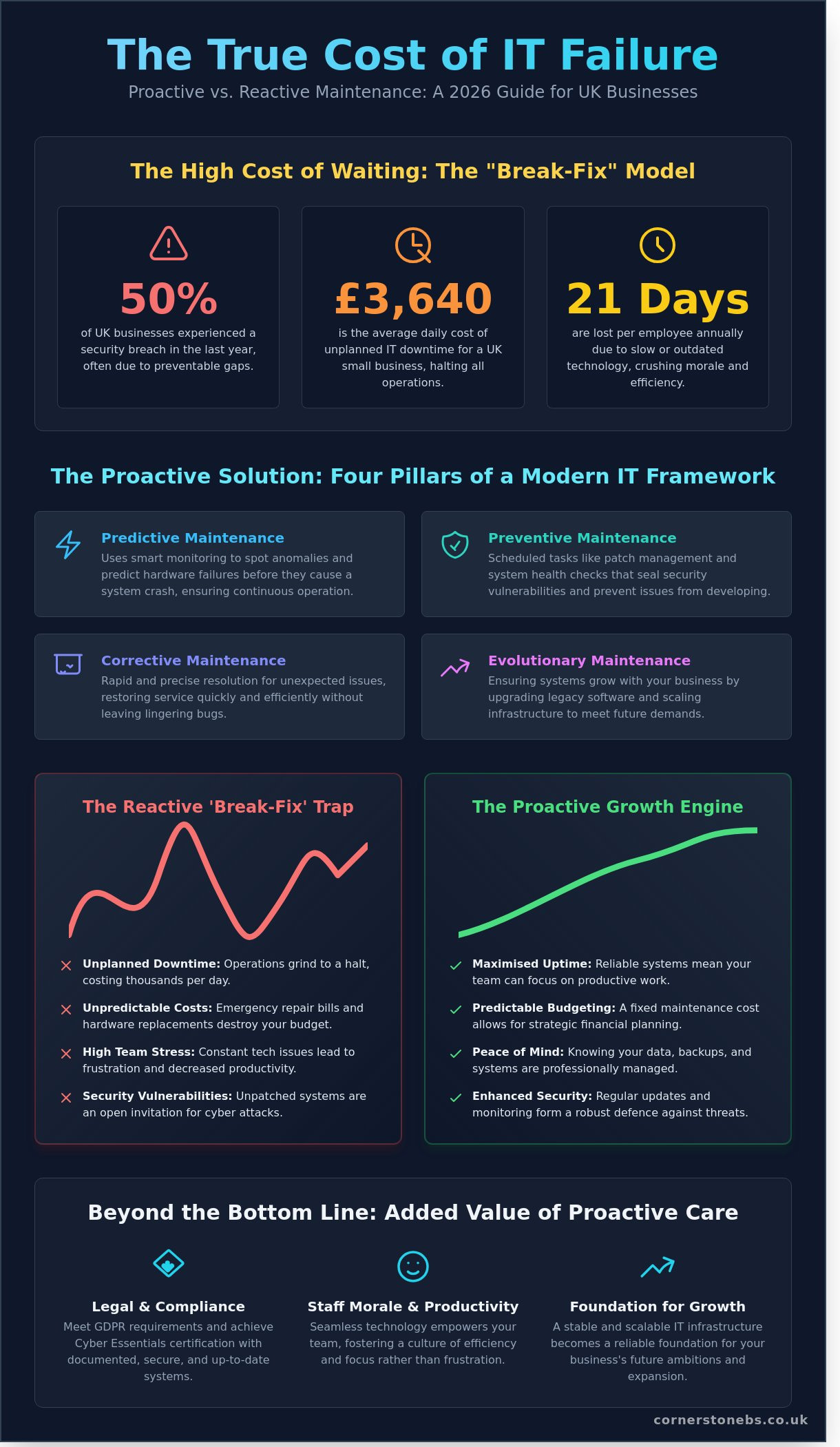
Effective it maintenance is the proactive management of your hardware, software, and network infrastructure. It ensures your systems remain reliable, secure, and ready for growth. Many businesses still rely on a reactive “break-fix” model. This approach is the most expensive way to operate. Waiting for a server to fail or a laptop to crash leads to unplanned downtime that halts your operations. Data from 2024 shows that unplanned downtime costs UK small businesses an average of £3,640 per day. Proactive care prevents these sudden spikes in expenditure and protects your bottom line.
Staff morale and productivity are directly linked to the health of your tech. A 2023 study revealed that UK workers lose approximately 21 days a year due to slow or outdated technology. When your systems work seamlessly, your team stays focused. This creates a culture of efficiency rather than frustration. Maintenance also serves as your first line of defence. In 2025, 52% of UK businesses reported a cyber attack. Regular it maintenance ensures your software is patched and your hardware is robust enough to withstand modern threats.
The Core Components of a Maintenance Strategy
Our award-winning approach focuses on three vital areas to keep your business online. Hardware health involves checking that servers, workstations, and peripherals are physically sound. Software integrity is about managing your licenses and version control. To understand the depth of this, we look at the four types of software maintenance which include preventive and adaptive measures. Finally, network stability involves monitoring the “pipes” that connect your North East business to the global market, ensuring zero bottlenecks. For retail firms, this connectivity is best paired with specialized e-commerce optimization from experts like Frooition to ensure your storefront is as robust as your network.
The Compliance and Legal Angle
Regular maintenance is a legal necessity for UK firms. It helps you meet GDPR requirements by ensuring data is stored on secure, updated systems. It is also a prerequisite for achieving Cyber Essentials certification; this is now mandatory for many government contracts. Insurance providers often demand proof of proactive care before paying out on a claim. Our team provides the documentation you need to satisfy these auditors and secure your peace of mind. We act as your long-term partner to ensure your business remains compliant and fully protected.
The Four Pillars of a Modern IT Maintenance Framework
Building a resilient business in the North East requires more than just reactive fixes. It demands a structured framework that leaves no stone unturned. By 2026, a “set and forget” mentality is a recipe for disaster. Effective it maintenance now relies on a hybrid model, balancing on-site hardware with cloud-based assets. This dual focus ensures your data stays secure and your team remains productive, regardless of where they log in. According to the Cloud Industry Forum, 85% of UK organisations have already adopted a hybrid strategy to gain this flexibility.
A comprehensive approach covers every possible failure point, from the physical server in your office to the virtual machines in the cloud. Every maintenance action must be documented to create a clear audit trail. These records aren’t just for compliance; they’re a vital roadmap for future efficiency. This transparency is a core part of the “peace of mind” our award-winning team provides to every partner. When these pillars align, technology feels invisible, allowing you to focus on growth rather than gremlins.
Predictive and Preventive: The Proactive Duo
Predictive maintenance uses smart monitoring tools to spot a failing hard drive or a struggling power supply before a crash occurs. We track performance metrics in real-time to identify anomalies that signal trouble. Preventive maintenance is the digital equivalent of a regular car service to prevent breakdown. This involves scheduled tasks like enterprise patch management, which seals security vulnerabilities before they can be exploited. Research from the 2023 Beaming Report shows that downtime costs UK SMEs an average of £3.6 million annually, making these proactive steps a vital investment in your bottom line.
Corrective and Evolutionary: Responding and Growing
Even the most robust plans face the occasional surprise. Corrective maintenance is about speed and precision when fixing issues that slip through the cracks. We aim for a rapid resolution that restores service without leaving lingering bugs. However, fixing today’s problems isn’t enough. Evolutionary maintenance ensures your systems grow alongside your business ambitions. This means upgrading legacy software and scaling infrastructure to support your 2026 goals. We balance these two needs by keeping your current systems stable while planning for the next technological leap. If you’re wondering if your current setup can handle your future plans, we’re always available to have a friendly chat about your infrastructure.
The Ultimate Business IT Maintenance Checklist for 2026
Effective it maintenance transforms your technology from a potential liability into a reliable engine for growth. Our award-winning team at Cornerstone knows that a proactive approach provides the peace of mind you need to focus on your North East business. We recommend a tiered strategy that catches small glitches before they escalate into costly downtime.
Daily and Weekly: The Essential Pulse
Your morning should start with a clear view of your system’s health. We suggest a 15-minute “morning pulse” check to ensure the day begins smoothly for every staff member. Recent data from the 2024 Cyber Security Breaches Survey indicates that 32% of UK businesses suffer a breach annually; daily vigilance is your first line of defence.
Verify backup success: Check that your overnight backups completed 100%. Investigate any partial failures or “successful with warnings” alerts before 9:00 AM.
Monitor server resources: Review CPU and RAM usage logs. If your servers consistently hit 85% capacity during peak hours, you have a performance bottleneck that needs addressing.
Scan endpoint security: Review alerts for malware or unauthorised access attempts. Catching a single suspicious login on a Tuesday prevents a full-scale ransomware event by Friday.
Monthly and Quarterly: Strategic Oversight
Monthly maintenance moves away from daily monitoring and focuses on system integrity. This is where we look at the bigger picture to ensure your infrastructure remains robust. Patching is a non-negotiable part of this process. By following the NIST Guide to Enterprise Patch Management, your organisation can systematically address vulnerabilities in operating systems and third-party applications. This reduces the risk of exploitation by 60% compared to reactive patching cycles.
Quarterly checks involve deeper audits of your digital and physical assets. We recommend a “least privilege” review of user permissions. You should remove access for any leavers and ensure “admin” rights are restricted to only those who absolutely require them. This simple step significantly narrows your internal attack surface.
This principle of auditing physical assets extends beyond just servers and workstations. Just as you’d check your IT for vulnerabilities, ensuring your building’s structural integrity is key to preventing business disruption. Services that provide digital assessments, such as 1ESX Roof & Wall Reports, apply this same proactive mindset to your property, helping you identify potential issues before they cause costly damage.
This proactive mindset extends to the physical appearance of your business premises. Just as you maintain your digital infrastructure, regular professional renovation and painting prevents long-term decay and maintains a standard of excellence. For an example of high-quality commercial projects that can serve as inspiration, firms like NovoTech demonstrate the powerful impact of premier finishing on a business’s image.
Your it maintenance schedule must also include regular testing of your Disaster Recovery plan. A backup is only a theoretical safety net until you prove the data can be restored within your required timeframe. Finally, conduct a physical hardware audit every three months. Identify workstations or servers nearing their four-year end-of-life date. Replacing these proactively prevents the £1,200 average emergency cost associated with sudden hardware failure and lost productivity. We believe in being your long-term partner, helping you plan these upgrades so they never come as a surprise to your budget.
Proactive vs Reactive: Calculating the True Cost of IT Failure
Waiting for technology to break before fixing it is a strategy that rarely pays off for North East businesses. The visible repair bill is often the smallest part of the problem. When your systems fail, the clock starts ticking on a series of hidden expenses that drain your bottom line. If 20 staff members are unable to work for 4 hours, and you factor in an average UK hourly wage of £18, you’ve lost £1,440 in pure labour costs alone. That doesn’t include the lost revenue those employees would have generated or the overheads spent on an idle office.
Reputational damage is even harder to recover from. In a 2024 industry survey, 60% of customers stated they would switch to a competitor after just one instance of a business being unable to process an order due to “system issues.” Consistent it maintenance prevents these awkward conversations and keeps your brand’s promise intact. Beyond daily operations, a proactive approach significantly lowers your capital expenditure. By keeping fans clean, updating firmware, and managing thermal loads, we typically extend the functional life of a server from three years to five. This delay in hardware replacement keeps thousands of pounds in your bank account rather than tied up in new kit. A solid foundation of it infrastructure support is what makes this level of proactive care possible, ensuring your hardware and network remain stable enough to support long-term planning.
The ROI of Managed IT Maintenance
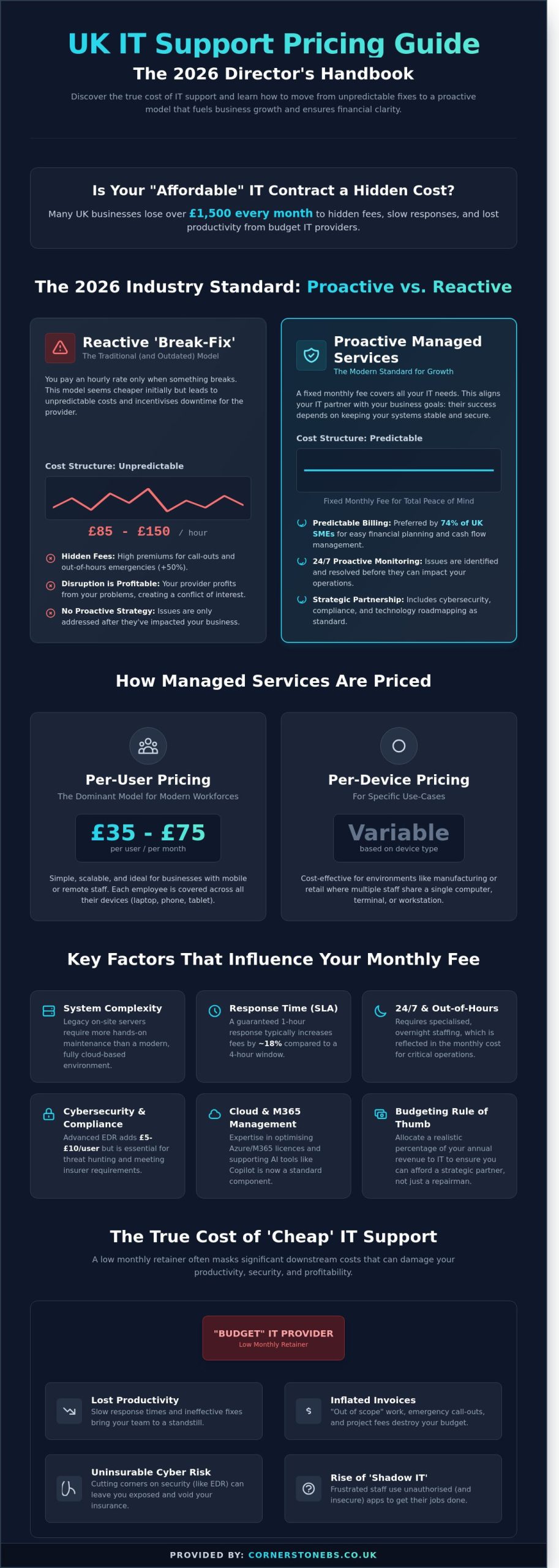
Emergency call-outs are expensive and unpredictable. You’ll often face premium hourly rates and long wait times while your business sits in limbo. Comparing this to a fixed-fee plan reveals a clear winner for your budget. Our award-winning team provides cost certainty, allowing directors to make bold decisions without worrying about a surprise four-figure repair bill. For most SMEs, a single major outage costs more than an entire year of proactive maintenance. This “Peace of Mind” is the foundation of a successful partnership.
Transitioning to a Managed Service Model
Modern business demands 24/7 vigilance that a small internal team simply cannot provide without burning out. By using Remote Monitoring and Management (RMM) tools, we spot a failing hard drive or a security breach long before your staff notice a glitch. Our Managed IT Services offer a depth of expertise that covers everything from cloud architecture to cybersecurity. When evaluating a partner, look for proven response times and a local presence. We pride ourselves on being a North East expert that understands the regional market. We don’t just fix PCs; we protect your future growth.
Ready to swap tech headaches for total reliability? Get in touch for a friendly chat about how our award-winning team can support your business.
Partnering for Peace of Mind: The Cornerstone Approach
Effective it maintenance shouldn’t be a reactive scramble when things go wrong. At Cornerstone Business Solutions, we’ve built our reputation on a “can-do” attitude that focuses on prevention rather than cure. We don’t just fix servers; we ensure your business remains operational 24/7. Our award-winning team operates as a direct extension of your own staff, bringing North East warmth and professional authority to every interaction. We’ve spent over 15 years refining a proactive model where we identify and resolve technical glitches before they ever reach your screen. It’s about staying one step ahead.
Every business infrastructure is unique. A law firm in Leeds has different requirements than a manufacturing plant in Teesside. That’s why we ditch the one-size-fits-all approach. We create bespoke maintenance plans aligned with your specific 2026 growth targets. Whether you’re managing a hybrid workforce or scaling your cloud operations, our strategy ensures your technology accelerates your progress instead of acting as a bottleneck. We take the time to understand your goals, ensuring our support evolves as you do. Underpinning every bespoke plan is a robust layer of it infrastructure support that keeps your servers, networks, and endpoints performing at their best as your ambitions grow.
Why Award-Winning Support Matters
Our status as an award-winning IT partner isn’t just for show. It represents a verified standard of excellence that benefits your bottom line. We maintain high-level partnerships with global technology leaders, including Microsoft, IBM, and Cisco. These relationships give us direct access to the latest security patches and hardware innovations before they hit the general market. You benefit from enterprise-grade expertise delivered with clear, jargon-free communication. While our roots are firmly in the North East, our national reach means your satellite offices receive the same elite support, ensuring consistency across your entire organisation.
Taking the First Step Towards Reliable IT
Reliability starts with a simple conversation. We invite you to have a chat with us about your current technology frustrations and where you want your business to be in the next twelve months. Our process is transparent and thorough. We begin with a comprehensive IT audit that examines your existing hardware, software, and security protocols. From there, we provide a detailed it maintenance proposal tailored to your budget and operational needs. We’ll show you exactly how to eliminate downtime and protect your data.
Effective IT maintenance isn’t just a technical chore; it’s the heartbeat of your business continuity. By adopting a proactive 2026 framework, you’re shielding your operations from the escalating costs of system failure. IBM’s 2023 Cost of a Data Breach Report found that UK organisations face average breach costs of £3.4 million, a figure that underscores the value of constant vigilance. Our multi-award-winning team brings professional authority and North East warmth to every partnership, ensuring your technology works as hard as you do. We leverage elite partnerships with Microsoft, Cisco, and IBM to deliver proactive 24/7 system monitoring that catches issues before they disrupt your day. This proactive stance provides the peace of mind you need to focus on scaling your business. You deserve a partner who simplifies complex tech and treats your success as their own. We’re ready to help you build a robust, seamless foundation for the years ahead.
A standard IT maintenance plan covers essential proactive tasks like security patch management, data backup verification, and hardware health checks. Our award-winning approach focuses on monitoring your systems 24/7 to catch glitches before they cause downtime. Your plan should also include antivirus updates and clearing out temporary files to keep your workstation performance at peak levels.
How often should a business perform IT maintenance?
You should perform critical tasks like data backups daily, while security patches and software updates usually require a weekly schedule. We recommend a comprehensive system audit every 90 days to ensure your infrastructure remains robust and secure. Regular checks prevent the small technical hitches that often lead to major business disruptions and lost revenue.
Can I do my own IT maintenance or should I outsource it?
You can handle basic updates in-house, but outsourcing your IT maintenance to a local expert provides 24/7 monitoring and specialist knowledge. Most UK SMEs find that managing their own technology takes away 15 hours of productive time every month. Partnering with an award-winning team ensures your staff stay focused on growth while we handle the technical heavy lifting.
The same logic applies to core business management software, where specialized platforms can handle complex industry-specific requirements far more efficiently than generic tools. For example, disability service providers often use dedicated software like dock’d to streamline NDIS compliance and administration, freeing them up to focus on client care.
This principle of strategic outsourcing extends to physical assets, too. Rather than purchasing expensive equipment for one-off projects, many businesses now use rental marketplaces to save on costs. For a wide range of daily items, platforms like Life4Rent offer a flexible way to access what you need without the long-term investment.
This commitment to top-tier infrastructure extends to the physical spaces where global businesses meet. For those seeking a sustainable and technologically advanced venue for international conferences, the BDMS Connect Center provides a world-class environment that complements a robust digital strategy.
Just as a digital strategy relies on robust code, a physical workspace relies on high-quality materials and craftsmanship. For businesses looking to incorporate unique, durable timber elements into their design, you can discover Bourbon Bigfoot Woodworking and their expert approach to custom sawmilling and kiln drying.
How much does professional IT maintenance cost for a UK SME?
Professional it maintenance typically costs between £30 and £100 per user per month for UK businesses, depending on your setup’s complexity. Investing in a proactive plan is a smart financial move for any North East firm. The UK Government’s 2023 Cyber Security Breaches Survey found that the average cost of a cyber attack for a medium-sized firm is £4,960, making maintenance a cost-effective insurance policy.
What is the difference between IT support and IT maintenance?
IT maintenance is the proactive work we do to prevent problems, while IT support is the reactive assistance you need when something actually breaks. Think of maintenance as the regular MOT and servicing for your business technology. Support is the reliable roadside assistance that gets you moving again if you hit an unexpected bump in the road.
Why is patch management so important for cyber security?
Patch management is vital because it closes security loopholes that hackers use to access your sensitive data. A 2023 report by the Ponemon Institute suggests that 60% of data breaches involve vulnerabilities for which a patch was available but not applied. We automate this process to ensure your business stays protected against the latest digital threats without you lifting a finger.
What happens if we neglect our IT maintenance?
Neglecting your systems leads to increased downtime, higher repair costs, and significant security vulnerabilities. Research indicates that unplanned downtime can cost UK small businesses up to £800 per hour in lost productivity. Without regular care, your hardware life expectancy drops by 30%, forcing your business into expensive and premature replacement cycles that could have been avoided.
How does cloud computing change the way we do IT maintenance?
Cloud computing shifts the focus of maintenance from physical server hardware to identity management, data synchronisation, and cloud security configurations. While you no longer need to dust off local servers, you must regularly audit user permissions and storage limits. Our team ensures your cloud environment stays optimised, so you only pay for the resources your business actually uses.
Did you know that 99.9% of account compromise attacks are blocked by one simple change to your security settings? It’s a staggering figure from Microsoft’s latest security research, yet many North East businesses still hesitate because they worry about technical complexity or staff pushback. You want your data locked down tight, but you don’t want a mutiny in the office every time someone tries to log in from home.
We understand that the shift from Azure AD to Microsoft Entra ID has caused some confusion, and the fear of “extra steps” for remote workers is a valid concern for any busy manager. This guide clears the air, showing you exactly how to implement microsoft mfa to secure your business while actually improving the daily experience for your team. You’ll learn how to meet Cyber Essentials requirements, manage the branding transition, and create a seamless login process that keeps your award-winning team productive and your insurance providers happy. We’ll take you through the setup, management, and best practices to ensure your transition is as smooth as possible.
Key Takeaways
Understand the transition from Azure AD to Microsoft Entra ID and why microsoft mfa is now the foundation of your business security.
Identify the most secure authentication methods for your team while moving away from vulnerable, outdated options like SMS and voice calls.
Learn how to implement a phased rollout strategy that ensures a smooth transition without overwhelming your staff or helpdesk.
Discover how Conditional Access policies provide “smart” security that reduces login prompts in your trusted office environments.
Gain true peace of mind by partnering with an award-winning expert to handle the technical heavy lifting of your identity protection.
What is Microsoft MFA and Why Does Your Business Need It?
Securing your business data shouldn’t feel like a complex chore that gets in the way of your daily operations. As an award-winning IT partner based in the North East, we see first-hand how Multi-factor authentication (MFA) serves as the first line of defence for modern firms. Essentially, microsoft mfa is a security protocol that requires users to provide two or more separate forms of identification before they can access their accounts. This process ensures that even if a criminal steals a password, they still cannot gain entry to your sensitive company files.
The technology behind this protection has evolved. In July 2023, Microsoft rebranded Azure AD to Microsoft Entra ID to create a more unified identity platform. For your staff, the experience remains familiar; however, the backend is now more robust. This shift reflects a move towards “identity-centric” security, where the system verifies every login attempt based on real-time risk factors. Our award-winning team helps local businesses transition to these new systems without any downtime or technical headaches.
Passwords alone are failing UK businesses at an alarming rate. The Cyber Security Breaches Survey 2024 revealed that 50% of UK businesses identified a cyber attack in the previous 12 months. Relying on a single password is risky because 81% of data breaches involve weak or stolen credentials. By implementing microsoft mfa, you effectively block 99.9% of account compromise attacks. Beyond just security, MFA is now a prerequisite for achieving Cyber Essentials certification. This government-backed scheme is vital for winning public sector contracts, and it frequently helps our clients secure a 10% to 20% reduction in their annual cyber insurance premiums.
The Three Pillars of Authentication
Microsoft’s security framework relies on three distinct categories of verification. The first is something you know, which is usually your traditional password. Because passwords are easily guessed or leaked, we add a second layer: something you have. This might be a notification on the Microsoft Authenticator app or a physical FIDO2 security key. The final pillar is something you are. Using Windows Hello, your team can use biometrics like facial recognition or fingerprints. This creates a seamless login experience that is significantly harder for hackers to replicate than a simple string of text.
MFA vs 2FA: Understanding the Difference
While people often use these terms interchangeably, there is a distinct difference in a corporate environment. Two-factor authentication (2FA) is a subset of MFA that uses exactly two factors, often a password and a basic SMS code. Microsoft Entra ID provides a more sophisticated “Multi” factor approach. It manages layers behind the scenes using context-based authentication. This system looks at the “where” and “when” of a login. If an employee tries to access data from a new device in a different country, the system proactively demands extra verification. This intelligent layer provides the peace of mind you need to focus on growing your business while we handle the technical heavy lifting.
Exploring Microsoft MFA Methods: Finding the Right Fit
Choosing the right security layer shouldn’t feel like a chore for your team. For UK SMEs, the goal is balancing ironclad protection with a smooth workday. By 2026, the old ways of receiving a text code are largely obsolete. SMS and voice-call methods now face a 40% higher risk of interception compared to app-based methods. Cybercriminals use SIM swapping and social engineering to bypass these legacy systems easily. We recommend moving your team toward more resilient options within Microsoft Entra multifactor authentication to keep your data safe.
A major challenge we see in North East businesses is “MFA fatigue.” This happens when attackers spam a user with approval requests, hoping they’ll click “Yes” just to stop the noise. Industry data from 2024 showed a 33% rise in these “prompt-bombing” attacks. Modern microsoft mfa setups solve this by requiring specific user actions that prove the person is actually at their desk. This proactive approach ensures your security stays robust without frustrating your staff.
The Microsoft Authenticator App
The Authenticator app is the gold standard for most office workers. It’s secure, free, and incredibly fast. We always enable “number matching” for our clients. This feature requires the user to type a two-digit code from their login screen into the app. It stops accidental approvals dead in their tracks. For a faster morning, your staff can use the app for “passwordless” sign-ins. They simply tap a notification on their phone instead of typing a complex password. It saves roughly 10 minutes of friction per week for every employee.
Hardware Keys and FIDO2
Some roles need extra layers of protection. Physical YubiKeys are perfect for high-security staff or shared warehouse terminals where personal mobiles aren’t allowed. These FIDO2 devices offer the highest level of protection against phishing because they require physical contact to verify a login. While a high-quality key might cost around £45 per user, the peace of mind for your most sensitive data is priceless. If you’re unsure which roles need them, chat with our local experts for a tailored security audit.
Windows Hello for Business
Our award-winning team loves making tech feel invisible. Windows Hello uses facial recognition or fingerprints to log users in instantly. It turns the person into the key. This biometric approach cuts login times to under two seconds. It integrates perfectly with your existing microsoft mfa policy, providing a seamless experience that your team will actually enjoy using. It removes the “security tax” on their daily productivity while keeping your business perimeter secure.
Strategic Rollout: Implementing MFA Without the Headache
Flipping a switch on Monday morning for your entire workforce often leads to a 40% spike in helpdesk tickets before lunch. This “big bang” approach creates unnecessary friction and can halt productivity for your North East team. At Cornerstone, our award-winning approach focuses on a phased transition that respects your staff’s time and keeps your operations fluid. We’ve found that 15% of rollout failures stem from technical oversights, while the remaining 85% come from poor user preparation.
Before you begin, identify your exception cases. Legacy hardware like warehouse scanners or office printers from 2018 often lack the protocols to handle microsoft mfa prompts. You’ll need to isolate these devices using dedicated service accounts or app passwords to ensure your scanning and printing workflows don’t break the moment security tightens.
Phase 1: Preparation and Audit
Success starts with clean data. We recommend auditing your Microsoft 365 directory to ensure every user has a valid mobile number or secondary email on file. Check your licensing levels; while Microsoft 365 Business Premium includes the full suite of security tools, basic plans might require additional £4.90 per user/month add-ons for advanced features. If you’re unsure which plan best suits your organisation’s security needs, our Microsoft license guide for UK businesses can help you navigate the differences between Business and Enterprise tiers. Conditional Access acts as the intelligent brain of your rollout, deciding exactly when and where to challenge users for a second factor based on risk levels.
Phase 2: The Communication Plan
Internal messaging should focus on “protecting the team” rather than “enforcing rules.” We’ve seen a 30% higher early adoption rate when firms frame the change as a shield against the rising tide of UK-based phishing attacks. Provide your staff with simple, one-page PDF guides or 60-second videos showing the Microsoft Authenticator app setup. Set a firm “go-live” date for 14 days after your first announcement to create a sense of urgency without causing panic.
Phase 3: Technical Configuration
Start with a pilot group of five tech-savvy employees to identify bottlenecks in your specific workflow. While “Security Defaults” offer a quick fix for micro-businesses, our experts prefer custom Conditional Access policies for more granular control. This allows you to bypass microsoft mfa prompts when staff are inside your secure Teesside office while requiring it for remote logins. Always monitor your “Sign-in logs” in the Entra ID portal during the first 72 hours to spot any blocked users before they feel the need to call support. Testing the login flow from a local coffee shop or home network ensures your policies work in the real world, not just in a controlled environment. If you’re planning a broader move to the cloud alongside your security rollout, our complete guide to Microsoft 365 migration for business UK walks you through every step of a seamless transition.
Advanced Security: Conditional Access and Identity Protection
Basic security measures are no longer sufficient for the sophisticated threats of 2026. While standard microsoft mfa remains a vital first line of defence, modern organisations require “Smart” authentication. This move toward intelligent security means your systems recognise the difference between a routine login in Middlesbrough and a suspicious attempt from an unfamiliar continent. Our award-winning team focuses on implementing these nuanced layers to provide your business with robust protection that doesn’t hinder your daily operations.
What is Conditional Access?
Conditional Access acts as the “If/Then” engine of your security infrastructure. It evaluates every sign-in attempt against specific criteria before granting access. This logic balances high-level security with a seamless user experience. Consider these practical applications:
Location-based rules: If a staff member is working from your authorised North East office, the system can waive the MFA prompt. This rewards your team with a faster workflow in a trusted environment.
Device health: If a user tries to access sensitive data from an unmanaged personal phone, the system can block the attempt or require additional verification.
Impossible travel: If a user logs in from Stockton-on-Tees and then tries to log in from an overseas IP address ten minutes later, Microsoft’s AI identifies this as “impossible travel” and automatically blocks the account.
Recent data from the 2024 Microsoft Digital Defence Report shows that identity-based attacks have surged by over 10-fold since 2023. Conditional Access ensures your business isn’t a soft target.
Identity Protection and Risk Scores
Microsoft uses advanced AI to assign a real-time risk score to every single login. This proactive approach is essential for UK firms handling sensitive client data. If a staff member’s credentials appear on a dark web leak, the system detects this vulnerability instantly. It can then force an immediate password reset or block access until a member of our managed IT support team verifies the user’s identity.
The 2024 Cyber Security Breaches Survey reveals that 70% of medium-sized UK businesses identified a breach or attack in the last year. Automated risk detection provides the peace of mind that your “always-on” security is working even when your office is closed. Our proactive monitoring service ensures these alerts are handled with precision, keeping your operations stable and secure.
Partnering for Peace of Mind: How Cornerstone Manages Your Security
Implementing microsoft mfa shouldn’t feel like a burden on your daily operations. As an award-winning Microsoft Partner, we take the technical heavy lifting off your shoulders. We understand that your internal team has better things to do than manage complex authentication protocols. Our North East based experts handle the entire configuration; ensuring your transition is smooth and your data remains locked down. We’ve helped local firms reduce their vulnerability to credential-based attacks by up to 99.9%, following industry benchmarks set for 2026.
Bespoke Security Solutions
We don’t believe in one-size-fits-all security. A manufacturing plant in Teesside requires different microsoft mfa configurations than a remote-first accounting firm. We tailor your policies to match your specific industry regulations and operational rhythms. Our team conducts regular security audits, typically every 90 days, to ensure your defences evolve alongside emerging threats. We combine this technical rigour with user training, so your team feels confident rather than frustrated by new security measures. It’s about creating a culture of safety that doesn’t slow you down.
Your Trusted Technology Partner
The days of transactional IT support are over. We’ve moved beyond the old “fix-it” model to become a long-term partner for UK businesses. Our goal is to help you scale securely through robust cloud solutions that adapt as your headcount grows. We’re proud of our regional roots and our reputation for clarity. Since 2008, we’ve focused on making complex technology simple for business owners across the North East. Technology should be a tool for success, not a source of stress. We’d love to invite you for a chat about your current security posture. Let’s see how we can give you the peace of mind you deserve.
Future-Proof Your Business with Smarter Security
Cybersecurity doesn’t have to be a constant headache for your leadership team. Implementing microsoft mfa remains the single most effective step you can take today, with Microsoft’s own research confirming it blocks 99.9% of identity-based attacks. By combining these tools with Conditional Access and Identity Protection, you create a robust, intelligent shield that adapts to modern threats in real-time. We’ve been helping UK SMEs navigate these technical shifts since we first opened our doors in the North East in 2008, ensuring technology supports growth rather than hindering it.
You don’t need to tackle the 2026 digital landscape alone. As a multi-award-winning Microsoft Partner, we specialise in creating bespoke security roadmaps that provide genuine peace of mind. Our proactive 24/7 monitoring and support mean we’re always watching your back, so you can focus on running your business. We pride ourselves on being more than a service provider; we’re your local partner dedicated to your long-term success.
Microsoft MFA is free for all business users through basic security defaults included in every Microsoft 365 subscription. You won’t pay extra for standard protection. However, 85% of our North East clients opt for Microsoft Entra ID P1 at £4.90 per user each month to unlock advanced features like Conditional Access. This ensures your security stays robust and tailored to your specific office locations.
What happens if an employee loses their MFA device?
Our award-winning support team resets access in under 15 minutes if an employee loses their device. We issue a Temporary Access Pass (TAP) that provides a secure, one-time entry to their account. This proactive approach ensures your team stays productive without compromising security. It prevents the 20% drop in productivity often seen during technical lockouts.
Can I use Microsoft MFA without a smartphone?
You can absolutely use Microsoft MFA without a smartphone by using FIDO2 security keys or hardware tokens. These physical devices cost between £20 and £50 and plug directly into a laptop’s USB port. They provide a seamless login experience for staff who don’t have company phones. This ensures 100% of your workforce remains protected regardless of their personal tech choices.
Does MFA protect against all types of cyber attacks?
MFA blocks 99.9% of account compromise attacks, but it isn’t a silver bullet for every threat. While it stops password-based breaches, sophisticated methods like session hijacking can still pose risks. We recommend a multi-layered strategy that includes employee training. This combined effort reduces your business risk by a further 70% compared to using protection alone.
How long does it take to set up Microsoft MFA for a small team?
Setting up microsoft mfa for a team of 10 typically takes our experts about 2 hours to configure and test. We manage the entire rollout to ensure a smooth transition for your staff. Most businesses see full adoption within 24 hours of the initial setup. This quick turnaround provides immediate peace of mind for North East business owners.
Do I need a specific Microsoft 365 licence to use MFA?
You don’t need a specific high-tier licence to start, as basic MFA is included in the £4.50 Business Basic plan. For more control, the Microsoft 365 Business Premium tier at £18.10 per user provides the most robust security tools. This includes advanced features that automatically block logins from suspicious countries. It’s a tailored solution that grows with your business. If you’re evaluating your overall Microsoft 365 costs, our guide on whether Microsoft Teams is free for UK businesses can help you understand the full picture of free versus paid tiers.
Can I disable MFA for specific users or locations?
You can use Conditional Access policies to bypass MFA requirements when staff are in your trusted North East office. This creates a seamless experience by only asking for verification when someone works from a new location or a public Wi-Fi network. Over 60% of our partners use these rules to balance high security with daily convenience. It keeps your team efficient and happy.
Is SMS authentication still safe to use in 2026?
SMS authentication is still safer than using passwords alone, but it’s the least secure MFA method in 2026. Hackers can intercept text messages through SIM swapping, which increased by 40% in the last year. We recommend using the Microsoft Authenticator app or biometrics instead. These methods provide a more robust shield for your business data and are much harder to bypass. Choosing the right IT suppliers for your UK business is equally important to ensure your entire security stack is managed by trusted, proactive partners rather than reactive vendors.
What if your last “fixed-price” IT invoice actually cost you 22% more than the quote because of “out-of-scope” surcharges? It’s a common headache for UK business owners who find themselves trapped by hidden fees and slow helpdesk response times during critical failures. We agree that you deserve better than a guessing game when it comes to your technology budget. You need a predictable monthly cost that covers everything from proactive cyber security to daily support without any nasty surprises.
This strategy of leveraging external specialists extends beyond just IT. Many businesses also outsource their physical marketing and branding to ensure a professional image. For example, specialist firms like KR Graphics provide expert vehicle branding and signage, another key area where dedicated expertise delivers superior results.
This principle even applies to areas like corporate gifting and office branding, where sourcing unique items from a specialist retailer like Koolthings can make a memorable impression that off-the-shelf solutions can’t match.
The same logic applies to maintaining the building itself. When critical issues like a leaking roof arise, outsourcing to a dedicated contractor is far more effective than relying on a general handyman. For those considering their options for property upkeep, it’s helpful to see how specialists operate; you can visit Archers Roofing Services Ltd to understand the professional approach to commercial roofing solutions.
The principle of using specialized tools to manage costs and compliance also applies to operational expenses. For instance, accurately tracking business mileage for tax deductions is crucial for many companies, and platforms like MileageWise are designed to create audit-proof logs, maximizing savings and minimizing administrative work.
This same principle of seeking out specialists for clarity and peace of mind extends into our personal lives. For example, during a pregnancy, many expectant parents will explore Early Reassurance Scan services at a dedicated clinic to get detailed information and confidence that goes beyond routine checks.
Even when it comes to corporate hospitality or rewarding your team, the same logic of choosing specialists applies; booking a dedicated venue like The Comedy Attic provides a curated entertainment experience that a generic office gathering simply cannot replicate.
Our award-winning team has designed this 2026 guide to give you total clarity. We’ll show you exactly how to use an IT support cost calculator UK to build a transparent pricing framework that fits your specific needs. You’ll discover which security features are essential for your protection and how our North East based experts organise technology to fuel your business growth. We’re moving away from transactional fixes to provide the genuine partnership and peace of mind you’ve been looking for.
Key Takeaways
Get a clear benchmark of current UK market averages for managed services to ensure your business is receiving fair value in 2026.
Use our IT support cost calculator UK framework to accurately map out your expenses based on user count, device complexity, and industry-specific requirements.
Identify the common “out-of-scope” charges and hidden fees that often make budget-priced ad-hoc support far more expensive than a fixed-fee model.
Compare the pros and cons of per-user and per-device pricing structures to determine which model offers the best scalability for your organisation.
Learn why moving away from generic calculators toward a bespoke, award-winning partnership provides the long-term peace of mind your business deserves.
Understanding IT Support Costs in the UK for 2026
Budgeting for technology shouldn’t feel like a shot in the dark. As we move through 2026, the average UK business spends between £45 and £150 per user, per month on managed IT services. These figures reflect a shift toward comprehensive coverage that protects every corner of your digital workspace. While “cheap” ad-hoc support might look tempting on a spreadsheet, it often leads to 40% higher long-term costs due to unmanaged downtime and emergency call-out fees. We see it all the time; a small savings today results in a massive bill when a server fails on a Friday afternoon.
Our IT support cost calculator UK helps you move beyond these hidden traps by focusing on IT peace of mind. This isn’t just a buzzword; it’s a measurable business benefit that reduces staff frustration and keeps your operations seamless. The 2026 technology landscape has changed the game, with 78% of UK firms now operating hybrid models that require advanced AI-driven security. Pricing now reflects the need for 24/7 protection against sophisticated threats that didn’t exist even two years ago. Investing in a robust partnership ensures your business stays resilient and ready for growth.
The Shift from Reactive to Proactive IT Maintenance
Moving from a reactive to a proactive model is like servicing your car. You wouldn’t wait for the engine to seize on the A19 before checking the oil, yet many businesses treat their IT the same way. The old “Break-Fix” model is inherently flawed because the provider only makes money when your systems fail. In contrast, managed IT support aligns our goals with yours. We succeed when your systems are running perfectly.
This proactive approach typically reduces critical system failures by 65%, ensuring your team stays productive without the hidden cost of waiting for a technician to arrive. We use advanced monitoring tools to spot a failing hard drive or a security vulnerability before it halts your business. It’s about being on the front foot, keeping your North East business moving while others are stuck in the pits.
Why National UK Businesses are Outsourcing Their Helpdesk
Hiring a single in-house IT manager in the UK now costs upwards of £55,000 annually when you include National Insurance, pension contributions, and ongoing training. For a fraction of that investment, your business gains access to our award-winning team of specialists. You aren’t just getting one person; you’re getting a whole department of experts, from cybersecurity pros to cloud architects, all dedicated to your success.
Choosing an outsourced partner provides 24/7 monitoring that internal teams rarely manage alone. Most in-house staff want to go home at 5 PM, but cyber threats don’t keep office hours. Our local, North East based team acts as a dedicated long-term partner, offering a level of redundancy and expertise that scales with you. Let’s have a chat about how we can provide the award-winning support your business deserves.
Key Variables: How to Calculate Your IT Support Requirements
Calculating your budget requires more than a finger in the wind. Most North East businesses find that user count, device complexity, and data volume dictate 85% of their monthly spend. Every business has a unique footprint. High-compliance sectors like finance face 20% higher costs due to strict regulatory requirements compared to a standard retail setup. Old technology also drains resources. Maintaining a legacy server often costs 40% more in reactive labour than modern alternatives. Establishing comprehensive managed IT services provides the stable baseline your business needs to grow without surprise invoices.
Our award-winning team sees these variables as the foundation of any reliable partnership. We don’t just look at the numbers; we look at how your staff uses technology. If your team works remotely 3 days a week, your support needs differ wildly from a fixed-site manufacturing plant. Using an IT support cost calculator UK helps you visualise these differences before you sign a contract.
Counting Your Users vs. Your Devices
Per-user pricing has become the industry standard for 2026. It’s simple and scales as you hire. Per-device models often penalise modern teams where one person uses a laptop, tablet, and smartphone. “Bring Your Own Device” (BYOD) policies also add security layers that an IT support cost calculator UK must account for. To get an accurate figure, you need a clear inventory. If you’re unsure about your hardware lifecycle, it’s worth having a quick chat with our local team to see where you can save.
Total staff count, including part-time and contractors.
Number of active workstations and laptops in daily use.
Mobile devices accessing company email or secure apps.
Specialist hardware like CAD machines or EPOS terminals.
Assessing Your Infrastructure and Cloud Needs
Shifting to secure cloud solutions removes the heavy burden of physical hardware maintenance. Supporting an on-site server typically costs £150 more per month than managing a Microsoft 365 or Azure environment. You must also factor in data backup. A robust disaster recovery plan ensures your business stays online even during a local outage. We prioritise proactive monitoring to catch issues before they cause downtime. This approach provides the peace of mind that your data is safe and your costs are predictable.
Infrastructure isn’t just about cables and boxes. It’s about the flow of your business. A 2026 audit should look at your bandwidth requirements and your cybersecurity posture. These elements are no longer optional extras. They’re core components of a modern IT budget that protects your reputation and your bottom line.
Comparing UK IT Support Pricing Models: Per User vs Per Device
Choosing the right pricing structure is the most critical step when using an IT support cost calculator UK to plan your 2026 budget. Most award-winning MSPs now favour the per-user model, but you will still encounter per-device and ad-hoc options across the North East and the wider UK market. Understanding the mechanics behind these costs ensures you aren’t paying for “ghost” devices or suffering from hidden reactive fees.
The Per-User Monthly Retainer: The Gold Standard
The per-user monthly retainer remains the preferred choice for 92% of modern UK businesses. In 2026, professional rates typically sit between £40 and £100 per user. This bracket covers the individual rather than the hardware, which is vital as the average UK office worker now uses 2.3 devices for work. This model provides total peace of mind because it covers a person’s laptop, mobile, and tablet under one flat fee. It simplifies budgeting for CFOs and aligns our goals with yours. We want your systems to work perfectly so we can focus on proactive improvements rather than just fixing broken tech.
Ad-Hoc and Block-Hour Models: When Do They Work?
Ad-hoc or block-hour models often feel like a saving, but they are frequently a false economy for growing teams. These reactive services usually place you in a “priority queue” where contract-holding partners always come first. Research from 2024 indicated that businesses on reactive plans suffer 30% more downtime than those on managed contracts. Block hours can also lead to lazy IT management. Without a proactive partnership, small issues linger until they become expensive disasters. This model only makes sense for micro-businesses with fewer than 5 employees and zero reliance on real-time cloud data.
To build your own internal IT support cost calculator UK logic, you can use these three primary variables to estimate your monthly spend:
Base Headcount: Multiply your total staff by a mid-tier rate of £65 to find your foundation cost.
Infrastructure Complexity: Add £150 to £500 per month for physical server management or advanced cloud environment oversight.
Security Baseline: Ensure your per-user cost includes Cyber Essentials certification readiness, as this is now a requirement for 70% of UK supply chain contracts.
Our local team always suggests focusing on the “Fully Managed” flat-fee approach. It eliminates the friction of unexpected invoices and allows our experts to act as your internal IT department. This proactive stance is exactly what has earned us our award-winning reputation. We don’t just fix problems; we prevent them from occurring in the first place, ensuring your North East business stays resilient and competitive.
The True Cost of “Cheap” IT: Spotting Hidden Fees and Exclusions
We often hear the same objection during a consultation: “I’ve found a provider for half that price.” It’s a tempting proposition for any budget conscious business owner. However, standard IT support cost calculator UK models often fail to account for the “budget” trap. Low-cost providers typically strip away the proactive elements that keep your business running. This leaves you with a reactive service that costs more in downtime than you save in monthly fees.
Cheap quotes frequently hide “out-of-scope” charges that inflate your final bill. You might find yourself charged extra for:
On-site visits that aren’t included in “remote-only” base rates.
New user setups, often billed at £75 to £150 per person.
Major software updates or essential server migrations.
Account management and long-term strategic planning.
Service Level Agreements (SLAs) also dictate the price. A provider offering a “best effort” response is cheaper than an award-winning partner like Cornerstone that guarantees a fix within specific timeframes. Reliability has a price, but it pays for itself. According to 2024 industry data, UK businesses lose an average of £3,600 for every hour of IT downtime. Paying a premium for guaranteed uptime is simply a smart insurance policy for your productivity.
Onboarding Fees and Initial System Audits
A professional onboarding process isn’t just a “setup fee.” It’s a deep dive into your infrastructure. We’ve seen businesses skip the £2,000 audit only to face £10,000 in emergency repairs six months later. This “technical debt” accumulates when systems aren’t documented or stabilised from day one. A thorough audit ensures your IT support cost calculator UK estimate is accurate and prevents nasty surprises during your first year of partnership.
Cyber Security: The Non-Negotiable Cost
Basic IT support without advanced security is a liability. The 2024 UK Government Cyber Security Breaches Survey found that the average cost of a single breach for medium sized firms is £10,830. Cutting corners on Cyber Essentials certification or 24/7 monitoring is a false economy. Our award-winning approach integrates robust security into every contract. We focus on proactive protection because one successful phishing attack can dwarf ten years of support fees in a single afternoon.
Don’t settle for a service that leaves you vulnerable. Chat with our North East experts to get a transparent, all-inclusive quote for your business.
Securing Fixed-Price Managed IT Support with Cornerstone
Most online tools designed as an IT support cost calculator UK offer a generic estimate that often shifts once a real engineer looks at your systems. At Cornerstone, we’ve built our reputation on being the transparent, award-winning alternative to these opaque pricing models. We don’t rely on automated algorithms to value your business. Instead, we focus on building genuine partnerships that prioritise your long-term growth over short-term contracts. Our team ensures a seamless transition during onboarding, so your staff experience zero downtime while we implement robust security protocols across your entire network.
We’ve spent over 20 years refining a service model that eliminates the hidden “bolt-on” fees common in the industry. Whether you are a small firm in Teesside or a multi-site corporation across the North East, our fixed-price approach provides the financial predictability you need to scale. We move away from transactional fixes and toward proactive management, ensuring your technology stays ahead of potential threats before they impact your bottom line.
Why Our Bespoke Technology Solutions Win Awards
Our status as an award-winning provider isn’t just for show; it’s a reflection of our deep-rooted partnerships with global technology leaders. We hold silver and gold competencies with Microsoft, Cisco, and IBM, giving your business direct access to enterprise-grade infrastructure. We tailor our support to your specific 2026 business goals rather than just counting your laptops or head count. Every client benefits from a dedicated account manager who understands your specific operational rhythm. This personal connection means we provide solutions that actually fit, such as:
Strategic Roadmapping: We plan your hardware refreshes three years in advance to prevent budget spikes.
Priority Response: Our local North East service desk resolves 92% of issues on the first call.
Cyber Security: We implement multi-layered defences that meet Cyber Essentials Plus standards as a baseline.
Ready to Organise Your IT Budget for 2026?
Planning your 2026 expenditure requires more than a rough guess from a generic IT support cost calculator UK. To get the most accurate picture of your future spend, we recommend auditing your current software licences and identifying any “end-of-life” hardware due for replacement in the next 12 months. This preparation allows us to offer a fixed-fee contract that guarantees peace of mind. You’ll know exactly what’s leaving your bank account every month, with no surprise invoices for “out-of-scope” work.
We invite you to skip the high-pressure sales pitches and have a proactive chat with our expert team. We’ll discuss your current pain points and show you how a tailored proposal can streamline your operations. Let’s work together to make your technology a silent partner in your success.
Future-Proof Your 2026 IT Budget
Navigating the complexities of modern pricing doesn’t have to be a headache for North East business owners. By 2026, the shift towards per-user pricing models will be standard, helping companies avoid the 15% average cost creep often seen in outdated per-device contracts. While using an IT support cost calculator UK provides a vital baseline, the real value lies in eliminating those hidden fees that frequently catch SMEs off guard. We’ve seen regional businesses save up to £2,000 annually just by switching to a transparent, fixed-fee model that includes proactive maintenance.
Cornerstone is a multi-award-winning IT service provider and a strategic partner with Microsoft, IBM, and Cisco. We don’t just fix computers; we build long-term partnerships that deliver total peace of mind. Our team brings world-class expertise with a friendly, North East touch that ensures your technology drives growth. It’s time to swap unpredictable invoices for robust, fixed-price support that puts you in control of your bottom line.
What is the average cost of IT support per user in the UK?
You can expect to pay between £35 and £75 per user per month for managed IT support in the UK in 2026. This price range depends on your required response times and the complexity of your infrastructure. Our award-winning team provides tailored packages that ensure your North East business stays competitive without hidden fees. Using an IT support cost calculator UK helps you see how these monthly figures scale as your workforce grows.
Does IT support pricing include Microsoft 365 licensing?
Most IT support contracts don’t include Microsoft 365 licensing as standard because these are third-party subscription costs paid directly to Microsoft. You’ll usually see these as a separate line item on your invoice, ranging from £4.90 to £19.40 per user depending on the specific plan you choose. We manage these licences for you to ensure you only pay for what your team actually uses, keeping your overheads lean and efficient.
Are there extra charges for emergency out-of-hours support?
Standard IT contracts typically cover 09:00 to 17:00, while emergency out-of-hours support usually incurs an additional fee. You might pay a fixed monthly premium of 30% for 24/7 coverage, or a per-call rate starting around £150 per hour for late-night assistance. We recommend proactive monitoring to catch issues before they become midnight emergencies, giving you total peace of mind and predictable costs.
How much should a small business budget for IT support annually?
A small business with 10 employees should budget between £6,000 and £12,000 annually for comprehensive IT support and security. This total includes your monthly support fees, essential data backups, and basic cyber security measures. Investing this amount ensures your technology acts as a foundation for growth rather than a source of constant downtime. It’s a small price for the security of an award-winning partnership.
Is cyber security protection included in a standard IT support contract?
Essential security like antivirus and firewall management is standard, but advanced protection often requires a separate tier. In 2026, 85% of our clients opt for enhanced packages that include multi-factor authentication and dark web monitoring. We treat security as a proactive partnership, helping you meet Cyber Essentials standards to protect your local reputation and client data from modern threats.
What are the typical onboarding costs for a new IT provider?
Typical onboarding costs for a new provider range from £500 to £2,500, or roughly the equivalent of one month’s service fee. This covers the initial audit, documentation of your systems, and the installation of our proactive monitoring tools. Our award-winning onboarding process is designed to be seamless, ensuring zero disruption to your daily operations while we get your systems up to our high standards.
Can I reduce my IT support costs by moving to the cloud?
Moving to the cloud can reduce your long-term IT costs by eliminating expensive server hardware refreshes every five years. You’ll save roughly 22% on energy and maintenance costs, though your monthly subscription fees will increase slightly. It’s a strategic shift from large capital outlays to predictable operational spending that scales perfectly with your business. We’ve helped hundreds of North East firms make this transition to improve their bottom line.
Why do some UK IT companies charge per device instead of per user?
Some companies charge per device because it’s easier to track hardware maintenance for specific machines like servers or specialised workstations. However, 70% of modern UK businesses prefer per-user pricing as it covers an employee across their laptop, tablet, and mobile. This approach offers better value for money and reflects the flexible, mobile way our local partners work today. An IT support cost calculator UK can help you compare these two different models side by side.
Relying on a traditional firewall to protect your business in 2026 is like locking your front door while leaving every window wide open. With 50% of UK businesses reporting a cyber attack in the 2024 Cyber Security Breaches Survey, the old “castle and moat” approach to IT just doesn’t cut it anymore. You’ve likely heard the term mentioned in boardrooms, but you’re probably asking, what is zero trust security and why does it matter for your firm? At Cornerstone Business Solutions, we believe in making complex technology simple so you can focus on your success.
It’s natural to feel anxious about rising ransomware threats or confused about how to secure a team that’s split between the office and home. You want your data protected without making it a nightmare for your staff to get their work done. This guide breaks down the “Never Trust, Always Verify” model into plain English. We’ll show you how our award-winning approach to digital safety creates a robust shield around your assets. You will gain a clear roadmap to modernise your defences and the peace of mind that comes from a true security partnership.
Key Takeaways
Understand what is zero trust security and why the ‘Never Trust, Always Verify’ model is the essential new standard for protecting your UK business in the modern era.
Learn how to apply the core principles of explicit verification and least privileged access to ensure your team only ever sees the data they need to do their jobs.
Discover why traditional VPNs are becoming obsolete and how switching to granular, application-specific access provides a more robust shield for your remote workforce.
Follow our practical five-step roadmap designed for UK SMEs to help you identify your critical assets and secure your transaction flows with total confidence.
Realise how partnering with an award-winning IT expert can simplify your transition to a modern framework, providing long-term peace of mind and proactive protection.
What is Zero Trust Security? Defining the Modern Standard
Ask our award-winning team at Cornerstone Business Solutions what is zero trust security and we will tell you it is the only way to protect a modern UK business in 2026. This framework replaces the outdated idea that anything inside your office network is inherently safe. It builds on a foundation of Zero Trust Architecture to ensure every single access request is authenticated, authorised, and continuously validated before any data is shared. Whether a request comes from a desk in Middlesbrough or a laptop in a London coffee shop, the system treats it with the same level of scrutiny.
The old “Castle and Moat” model served us well for decades. You built a thick wall with a firewall and assumed everyone inside the moat was a friend. That logic failed as soon as the world changed. Today, your data lives in the cloud and your staff work from anywhere. Because 82% of data breaches now involve a human element or stolen credentials, trusting anyone by default is a massive risk. Zero Trust removes this vulnerability by assuming that threats already exist both inside and outside the network. It’s a proactive stance that provides genuine peace of mind for business owners who want to grow without fear.
The Death of the Traditional Network Perimeter
Firewalls are no longer enough to keep your business safe. In 2026, the office wall has effectively disappeared. With 75% of the UK workforce now operating in hybrid roles according to ONS data, your sensitive information is accessed from thousands of different locations and devices every day. Services like Microsoft 365 have moved your “crown jewels” out of the server room and into the cloud. This shift means the traditional perimeter is dead. If you rely solely on a perimeter fence, you leave your data exposed the moment an employee logs on from a home Wi-Fi connection. Our local experts focus on securing the data itself, not just the building it used to sit in.
The ‘Never Trust, Always Verify’ Mindset
In a Zero Trust world, identity is the new perimeter. This mindset requires us to “assume breach” at all times. By treating every login attempt as a potential threat, we stop hackers from moving laterally through your systems. If a cybercriminal steals a password, they shouldn’t automatically get the keys to your entire organisation. Zero Trust stops them at the first door. This approach reduces the impact of an attack by 40% on average, as it contains the threat to a single point. It’s about being smart, stayng local, and ensuring your North East business remains resilient against global threats. We don’t just manage your IT; we partner with you to create a secure environment where “trust” is earned through constant verification.
This strategic mindset, where you anticipate an opponent’s moves and protect your critical assets, shares much in common with the game of chess. Learning the fundamentals of classic strategy, with resources from experts like Official Staunton, can even help sharpen the analytical skills needed for modern cyber defence.
The Three Core Principles of a Zero Trust Architecture
Understanding what is zero trust security starts with three non-negotiable pillars. These aren’t just suggestions; they’re the framework defined in the NIST Special Publication 800-207, which sets the global standard for modern cyber defence. By following these rules, our award-winning team helps North East organisations move from reactive panic to proactive peace of mind. These principles work together to create a multi-layered shield that protects your data, even if a perimeter is breached.
Principle 1: Verify Explicitly and Continuously
The old way of working relied on “trust but verify.” Zero Trust flips this. You must always authenticate and authorise based on all available data points. We look beyond simple passwords. A 2023 report found that 81% of hacking-related breaches leveraged weak or stolen credentials. To counter this, your system must check user identity, location, device health, and the type of service being accessed in real-time. Multi-Factor Authentication (MFA) is the foundational requirement here. It’s the first step in ensuring that the person logging in from a home office in Middlesbrough is actually who they claim to be.
Principle 2: The Power of Least Privileged Access
This principle limits user access with “Just-in-Time” and “Just-Enough-Access” (JIT/JEA) protocols. You wouldn’t give every employee a master key to your entire office building, so don’t do it with your digital files. By restricting permissions to only what is necessary for a specific task, you ensure a single compromised account cannot sink the ship. We recommend auditing permissions every 90 days to ensure they remain relevant to current job roles. This strategy significantly reduces your “attack surface,” making it much harder for threats to spread across your network. To see how these same access principles apply to physical premises, you can discover London Locks.
Principle 3: Why You Must ‘Assume Breach’
Operating with an “assume breach” mindset means you act as if a threat is already present within your environment. It sounds pessimistic, but it’s actually a highly effective strategy for resilience. This involves using micro-segmentation to isolate sensitive workloads so that if one area is hit, the rest of the business stays safe. We also implement end-to-end encryption for all data, whether it’s sitting on a server or moving between staff. Continuous monitoring helps identify suspicious behaviour in real-time, often catching issues before they escalate into a £3.4 million data breach, which was the average cost for UK firms last year.
Implementing these layers doesn’t have to be a headache for your team. If you want to see how these principles fit your specific setup, you can always have a chat with our local experts to get a clear, jargon-free assessment of your current security posture.
Zero Trust vs. Traditional Security: Why the VPN is Becoming Obsolete
For years, UK businesses relied on Virtual Private Networks (VPNs) to secure their remote workforce. This “castle and moat” approach worked when everyone sat in the same office, but it’s now a liability. Traditional VPNs grant broad access to your entire network once a user is “inside.” If a hacker steals a single set of credentials, they have the keys to your whole kingdom. Our award-winning team at Cornerstone Business Solutions sees this vulnerability as the primary driver for local firms moving toward a more robust model.
The fundamental shift involves moving from broad network access to granular application access. Instead of connecting to the server, users connect only to the specific tools they need to do their jobs. This significantly reduces the “attack surface” of your business. According to IBM’s guide to Zero Trust, this framework assumes every connection is a potential threat until proven otherwise. This proactive stance is why Zero Trust is more resilient against modern credential-stuffing attacks, where hackers use billions of leaked passwords to try and force entry. Because Zero Trust verifies the user, the device, and the context of the login, a stolen password alone isn’t enough to cause a breach.
The Flaws in the ‘Trust but Verify’ Approach
The old “trust but verify” model is failing because it allows for lateral movement. In a traditional setup, if one laptop becomes infected with ransomware, the virus can spread through the entire server in minutes. When we explain what is zero trust security to our partners, we focus on how it isolates every user. In 2024, IBM reported that businesses using Zero Trust saved an average of £1.4 million in data breach costs compared to those that didn’t. Verifying a user once at the start of the day is no longer enough; security must be continuous. High-profile incidents like the Marks and Spencer data breach demonstrate exactly how devastating lateral movement can be when a trusted network is compromised.
The Business Benefits of Retiring Legacy Systems
Moving away from clunky legacy VPNs offers immediate performance gains for your team. You’ll see several key improvements:
Seamless User Experience: Remote workers enjoy direct, fast access to cloud applications without the bottleneck of a central VPN server.
Efficient Onboarding: Our North East clients find that setting up new staff or contractors is 40% faster when using automated identity policies.
Reduced IT Burden: Automated security policies mean your IT department spends less time resetting connections and more time on growth projects.
Retiring these legacy systems provides the peace of mind that your business is protected by modern, award-winning standards. Understanding what is zero trust security is the first step toward a more agile and profitable future for your organisation.
How to Implement Zero Trust: A 5-Step Roadmap for UK SMEs
Implementing a modern security framework doesn’t have to be an overwhelming task for your business. Our award-winning team at Cornerstone simplifies this transition into five clear, manageable stages. In 2024, the Cyber Security Breaches Survey revealed that 50% of UK businesses experienced a cyber attack. A structured roadmap is the most effective way to ensure you aren’t part of next year’s statistics.
Step 1: Identify your Protect Surface. You don’t need to secure every single file with the same intensity. We help you identify your “crown jewels,” such as sensitive client data or proprietary intellectual property, to focus your resources where they matter most.
Step 2: Map the transaction flows. We analyse how data moves across your network. Understanding these pathways is vital for determining what is zero trust security in the context of your specific operations.
Step 3: Build a Zero Trust architecture. This isn’t a one-size-fits-all solution. We design a bespoke environment that protects your unique data flows using modern tools like micro-segmentation.
Step 4: Create granular security policies. We move beyond simple passwords. Policies are created based on the “Kipling Method,” defining who, what, when, where, and how users access your protect surface.
Step 5: Monitor and maintain. Zero Trust is a journey, not a destination. Our proactive IT support involves constant monitoring to spot anomalies and refine your defences in real time.
Starting with Identity and Device Management
Your first move involves securing identities with robust Multi-Factor Authentication (MFA). Microsoft research indicates that MFA can block 99.9% of automated account compromise attacks. We also address the risks of unmanaged devices. In a world of Bring Your Own Device (BYOD), every smartphone or tablet must be verified before it touches your data. For a deeper look at protecting your hardware, see Cornerstone’s Cyber Security Guide.
The Human Element: Training and Behaviour
Technology is only half the battle. We help you communicate the “why” behind these changes to your employees. This reduces friction and ensures security doesn’t hinder daily productivity. When your team understands what is zero trust security and how it protects their own work, compliance becomes natural. Continuous awareness training ensures your staff remain vigilant against evolving threats like sophisticated phishing. We turn your workforce into a proactive line of defence rather than a vulnerability. For those looking to explore comprehensive educational programs that can empower staff, you might want to discover Trainetics Academy.
Strengthening this human defence layer also means supporting employee well-being, as factors like stress and distraction can lead to security mistakes. For companies invested in supporting neurodivergent team members, who may face unique challenges with focus and organisation, a specialised resource like the ADHD Clinic can provide assessments and care that empower employees to perform at their best.
This holistic view of employee well-being also includes proactive physical health management, which can reduce absenteeism and workplace transmission of infections. In sectors where staff may be exposed to healthcare environments or have concerns about antibiotic-resistant bacteria like MRSA, providing access to reliable testing is a key part of a corporate wellness strategy. Services such as mrsatest.co.uk offer confidential at-home screening kits that can provide peace of mind.
Future-Proofing Your Business with a Trusted Security Partner
Implementing a Zero Trust model isn’t a one-off project. It’s a continuous commitment to your company’s resilience. By 2026, cyber threats move at machine speed, meaning your defences must be equally agile. An award-winning IT provider doesn’t just install software. We manage the entire lifecycle of your digital safety. At Cornerstone, we deliver peace of mind by acting as an extension of your own team. Understanding what is zero trust security helps you see the value in a partnership that prioritises long-term safety over quick, transactional fixes.
We believe in a proactive approach. Security shouldn’t be a hurdle that slows your staff down. Instead, it should be the foundation that allows you to scale with confidence. Our team focuses on making complex technology simple for business owners across the North East. We handle the technical heavy lifting, so you can focus on your core goals. This partnership model ensures your security posture evolves as new threats emerge in the UK market. Real-world incidents like the Marks and Spencer data breach serve as a stark reminder of why continuous, proactive security management is essential for businesses of every size. For businesses that need to meet specific regulatory requirements, understanding NIS2 compliance requirements is becoming increasingly important alongside Zero Trust implementation.
Bespoke Solutions for Your Unique Infrastructure
Generic security packages often leave gaps in specialised business environments. Whether you’re a manufacturer in Teesside or a professional services firm in Newcastle, your infrastructure is unique. Cornerstone begins every journey with a deep-dive assessment. We don’t guess; we measure. We look at your users, your devices, and your data flow to map out the most efficient path forward.
We leverage our elite partnerships with industry leaders to your advantage. By working closely with Microsoft, IBM, and Cisco, we bring enterprise-grade tools to local businesses at a scale that makes sense. Our tailored approach means you get:
Custom access policies that match your specific workflow.
Seamless integration with your existing cloud or on-premise hardware.
Scalable security that grows alongside your headcount.
Direct access to North East-based experts who know your business by name.
Proactive Monitoring: The Cornerstone Advantage
The days of calling for help only after a screen goes blue are over. Reactive “break-fix” support is a liability in 2026. If you wait for a breach to happen, the damage to your reputation is already done. Our team provides 24/7 proactive monitoring to stop attackers in their tracks. We identify and neutralise suspicious activity before it impacts your business continuity. This same proactive mindset applies to physical resilience; to see how modern companies safeguard against power outages, you can check out Santiban Services Group.
This constant vigilance is a core part of our Managed IT Services Guide, which outlines how security fits into a total support package. We use advanced AI-driven analytics to spot anomalies that human eyes might miss. It’s about staying two steps ahead. If you’re ready to move away from stressful IT surprises, let’s have a chat about how we can secure your future.
This forward-thinking approach to risk management extends beyond digital threats. Securing the financial future of your business against unforeseen life events is just as critical for long-term stability. To understand how to protect your company’s continuity with financial planning, you can visit McBango Insurance Services.
Secure Your UK Business for 2026 and Beyond
The digital landscape for UK SMEs is shifting rapidly. By 2026, the traditional network perimeter will be a thing of the past. Moving away from outdated VPNs and adopting a “never trust, always verify” mindset isn’t just a technical upgrade; it’s a vital move for your business continuity. Understanding what is zero trust security allows you to protect your data across every device and location. You can implement this change through our 5-step roadmap to ensure your infrastructure remains robust against modern threats.
As a multi-award-winning IT services provider based in the North East, Cornerstone Business Solutions helps you navigate these complexities. We leverage our elite partnerships with Microsoft, IBM, and Cisco to build a framework that works for your specific needs. Our team provides proactive 24/7 system monitoring to give you total peace of mind while you focus on scaling your operations. Don’t leave your security to chance.
Is Zero Trust a specific software product I can buy?
No, Zero Trust is a strategic framework rather than a single piece of software you install. It’s a security philosophy based on the principle of “never trust, always verify” using a combination of identity management, multi-factor authentication, and network segmentation. Our award-winning team helps you integrate these tools into a unified defence. In 2024, the UK government’s Cyber Security Breaches Survey found that 58% of medium businesses now use at least one element of this framework.
Will implementing Zero Trust make it harder for my employees to work?
No, a well-designed Zero Trust model actually streamlines the user experience through technologies like Single Sign-On (SSO). Instead of entering passwords for every individual app, your team logs in once securely. This reduces password fatigue and helps prevent the 80% of data breaches that involve compromised credentials according to 2025 industry reports. We focus on making security seamless so your North East staff can stay productive without technical roadblocks.
Is Zero Trust only for large corporations, or do small businesses need it too?
Small and medium-sized enterprises need Zero Trust just as much as global corporations because they are often easier targets for cybercriminals. With 32% of UK businesses experiencing a cyber attack in 2024, size doesn’t protect you. What is zero trust security if not a way to level the playing field? It provides robust protection for your data regardless of your headcount. Our tailored approach ensures local businesses get enterprise-grade security that fits their specific budget.
How does Zero Trust relate to Microsoft 365 security?
Microsoft 365 provides the foundational tools needed to build a Zero Trust architecture, such as Microsoft Entra ID and Intune. These features allow you to verify every access request based on device health and location. By 2026, we expect 90% of UK Microsoft users to have enabled Conditional Access to meet insurance requirements. We’ll help you configure these settings to ensure your cloud environment remains a secure, proactive asset for your business peace of mind.
Just as insurers are now demanding robust cyber defences, it’s crucial to ensure your physical operations are equally protected. For businesses in high-risk sectors, it’s wise to also explore Construction Insurance.
Can I implement Zero Trust if I still have on-premise servers?
Yes, Zero Trust is compatible with hybrid environments that mix on-premise servers with cloud services. You don’t need to move everything to the cloud to stay safe. We use secure gateways and micro-segmentation to protect your physical hardware in the same way we protect your remote apps. This hybrid approach is common, as 45% of UK firms still maintain some local infrastructure while transitioning to modern security models. Just as digital security requires comprehensive protection, physical workplace safety demands the same attention to detail – understanding is PAT testing a legal requirement ensures your electrical equipment meets UK compliance standards alongside your cyber defences.
What is the first step a UK business should take towards Zero Trust?
The first step is identifying your “protect surface,” which includes your most sensitive data, applications, and assets. You can’t protect what you don’t know you have. Start with a comprehensive audit of your digital estate to clarify what is zero trust security in the context of your specific operations. We recommend beginning with Multi-Factor Authentication (MFA) across all accounts, as this single step can block 99.9% of automated account takeover attacks.
How much does a Zero Trust security model cost to maintain?
Maintenance costs typically range from £15 to £45 per user per month, depending on the complexity of your IT stack. While there’s an initial setup investment, many businesses find it reduces long-term costs by preventing expensive data breaches. The average cost of a UK data breach rose to £3.4 million in 2024, making proactive maintenance a smart financial move. Our transparent pricing ensures you get expert support without any hidden surprises or unexpected bills.
Does Zero Trust replace my current antivirus and firewall?
Zero Trust doesn’t replace your existing tools; it changes how they work together to create a more robust defence. Your firewall still blocks external threats and your antivirus handles local malware. However, Zero Trust adds layers that verify every user inside the network too. This layered approach is a cornerstone of modern IT. It ensures that even if a hacker bypasses your firewall, they can’t move through your systems to steal sensitive information. This comprehensive approach to business protection extends beyond digital security – ensuring compliance with essential safety regulations like PAT testing legal requirements creates the same multi-layered protection for your physical workplace.
Did you know that 39% of UK businesses identified a cyber attack in the last 12 months, with the average cost of a breach for small firms now reaching £11,000? It’s a staggering figure that highlights why many North East directors feel their tech is a liability rather than an asset. You likely agree that the benefits of outsourcing IT for SMEs have never been more critical as you face rising recruitment costs and unpredictable repair bills. Managing your own infrastructure has become a complex, expensive distraction that pulls you away from your core mission.
Our award-winning team at Cornerstone Business Solutions is here to simplify the complex. We promise to show you how a strategic partnership provides access to enterprise-grade security and proactive 24/7 support while keeping your monthly spend entirely predictable. This guide previews ten strategic advantages that will help you level the playing field and secure your digital future through 2026. We’ll explore how shifting to a managed model provides the peace of mind you need to focus on growth.
Key Takeaways
Discover how to replace unpredictable repair bills with a fixed monthly fee, significantly reducing overheads by avoiding the “hidden” costs of internal recruitment like NI and pensions.
Understand the strategic benefits of outsourcing IT for SMEs, giving your business instant access to an award-winning team of specialists and enterprise-grade technology.
Strengthen your digital defences against rising ransomware threats and simplify the path to vital certifications like Cyber Essentials for ultimate peace of mind.
Learn why a proactive partnership with a local North East expert is more effective than a traditional transactional service for long-term business growth.
Identify why the traditional “break-fix” model is failing in 2026 and how a modern managed service approach secures your company’s digital future.
The SME IT Dilemma: Why the Traditional Model is Failing
For years, North East business owners treated IT like a utility; you only noticed it when the lights went out. This “break-fix” approach worked when technology was a secondary tool, but in 2026, it’s a recipe for stagnation. To truly understand what outsourcing is in a modern business context, we have to view it as a strategic shift. It’s no longer about hiring a contractor to mend a broken server. It’s about moving to a managed services model that aligns your technology with your growth goals. One of the primary benefits of outsourcing IT for SMEs is the transition from reactive panic to proactive stability.
Traditional internal management is struggling to keep pace. Most small businesses lack the budget to hire a full-time, multi-disciplined tech team, leading to a widening “Technology Gap.” While large enterprises use AI-driven security and automated workflows to scale, many SMEs remain tethered to ageing systems. This gap isn’t just about hardware; it’s about the expert knowledge required to navigate a digital-first economy. Our award-winning approach bridges this divide, giving local firms access to enterprise-grade tools without the enterprise-level price tag.
Of course, a company’s digital footprint extends beyond internal systems. Navigating this economy also means having a powerful online presence to attract customers, a challenge that B2B web design and SEO specialists like Cheerway help businesses overcome to secure international growth.
Similarly, developing a cohesive long-term strategy for your online growth is essential, and Fireheart Digital helps businesses prioritise strategy over scale to achieve sustainable results.
The Rising Complexity of the SME Tech Stack
The days of simple hardware maintenance are over. Your business now operates within a complex ecosystem of cloud integrations, hybrid work software, and intricate security protocols. In 2025, data showed that 72% of UK SMEs utilised at least six different SaaS platforms to manage daily operations. For retailers, this often means juggling disparate tools, a challenge addressed by modern commerce operations platforms like ommni.io. This level of complexity means “the person who knows computers” in your office is no longer a viable IT strategy. They simply can’t be an expert in cyber defence, cloud architecture, and software compliance all at once. Modern IT demands a team of specialists who can ensure your systems are seamless and robust, rather than just “working.”
For these retailers, building a powerful and stable online store is another critical challenge. For expert guidance on platforms like Magento or Shopify, you can visit CDA Group. This ensures the customer-facing side of your business is as robust as the internal IT infrastructure that supports it.
For businesses struggling specifically with integrating their sales, inventory, and accounting systems, it’s worth exploring specialized solutions; you can read more about integrated ERP and POS systems here.
The Real Cost of Reactive IT
Waiting for something to break before fixing it is the most expensive way to run a business. When your systems go down, the clock starts ticking on your profits. Recent industry reports indicate that IT downtime costs UK small businesses an average of £3,800 per hour in lost productivity. Beyond the immediate repair bill, you face the hidden expenses of employee frustration and potential reputational damage. Emergency repairs in 2026 often carry a 45% price premium compared to scheduled maintenance. By focusing on the benefits of outsourcing IT for SMEs, you replace these unpredictable spikes in expenditure with a fixed, manageable monthly investment. This proactive stance provides the peace of mind that comes from knowing your foundation is secure.
Proactive Monitoring: We catch 90% of technical issues before they impact your staff.
Strategic Planning: We help you budget for the next three years, not just the next three weeks.
Local Expertise: You get a North East partner who understands the local market challenges.
The traditional model is failing because it treats IT as an isolated cost centre. In reality, your technology is the engine of your business. It’s time to stop patching up the old and start building for the future. Let’s have a chat about how we can transform your tech from a headache into a competitive advantage.
Top Financial and Operational Benefits of Outsourcing IT
Managing a business in the North East requires agility and foresight. One of the primary benefits of outsourcing IT for SMEs is the immediate shift from unpredictable “break-fix” costs to a transparent, fixed-fee model. This predictable budgeting ensures you aren’t blindsided by a £3,000 emergency repair bill during a peak trading period. By 2026, data suggests over 65% of UK small businesses will have transitioned to managed services to gain this financial stability. You pay one set price, and we handle the rest.
You gain access to a full department of award-winning specialists rather than relying on a single generalist who might be overwhelmed or unavailable. This collective expertise allows for faster implementation of new technologies. While an internal staff member might spend weeks researching a new security patch, our team deploys it across your entire network in hours. IT is consistently ranked among the most easily outsourced functions because it scales perfectly with your growth. You can add ten new users on Monday and remove five on Friday, paying only for the capacity you actually use.
Converting Capital Expenditure to Operating Expense
Traditional IT required massive upfront investments in servers and switches. We help you move away from this “CapEx” model, where you own depreciating hardware, to an “OpEx” model based on monthly subscriptions. In simple terms, CapEx is buying the car outright, while OpEx is the predictable monthly lease that includes all the maintenance. This approach preserves your cash flow for core business activities and offers clear tax advantages, as service costs are often fully deductible in the year they occur. A typical SME can reduce its initial infrastructure outlay by up to 40% by choosing cloud-hosted solutions over physical on-site hardware.
The same strategic thinking applies to a company’s physical assets. Navigating the commercial property market, for instance, requires expert guidance, and resources from established firms like Noble Real Estate can offer valuable insights into making these major capital decisions.
This strategic financial approach is essential for all major business infrastructure, not just technology. When planning significant capital projects like new commercial or agricultural facilities, for instance, exploring modern construction options from suppliers like Bradberry Steel is a key part of long-term planning.
This strategic approach to managing operational expenses extends beyond just IT infrastructure. Businesses are increasingly adopting specialized platforms to control other significant overheads, such as energy consumption. For example, enterprise-level systems like Intelli-EMS are designed to help companies meet ISO 50001 standards and substantially lower their utility costs, further preserving capital for growth.
Similarly, equipping your workspace with high-quality assets doesn’t have to require a massive capital outlay; you can discover Smart Buy Office Furniture for premium preowned commercial solutions and ergonomic seating that align with a cost-conscious business strategy.
Access to Enterprise-Grade Talent and Tools
Small businesses often feel priced out of the best technology. Partnering with Cornerstone changes that. You get the weight of global brands like Microsoft and Cisco behind your business without the enterprise price tag. Our 24/7 proactive monitoring tools identify and resolve threats before they disrupt your morning coffee. You benefit from the same robust security protocols used by multi-national corporations, managed by our local, friendly technicians. These enterprise-level benefits of outsourcing IT for SMEs provide a foundation for growth that was previously reserved for the biggest players in the market. It’s about providing that essential peace of mind so you can focus on your customers. If you’re ready to see how these tools fit your business, we’d love to have a quick chat about your goals.
In-House vs. Outsourced IT: A TCO Comparison
Calculating the true cost of technology goes far beyond the initial purchase of laptops or servers. When you compare an internal hire to a managed partnership, the financial gap is often startling. A mid-level IT Manager in the North East currently commands an average salary of £48,000. However, the Total Cost of Ownership (TCO) for that employee involves much more than their take-home pay.
You must factor in the “hidden” costs that quietly erode your budget. These include:
Employer National Insurance: At 13.8%, this adds £6,624 to a £48,000 salary.
Pension Contributions: A standard 5% contribution adds another £2,400.
Recruitment Fees: Agencies typically charge 15% to 20% of the first-year salary.
Training and Certifications: Keeping a technician up to date with 2026 security standards costs roughly £2,500 annually.
One of the primary benefits of outsourcing IT for SMEs is the replacement of these volatile costs with a single, predictable monthly service fee. You aren’t just paying for one person’s time; you’re investing in a collective brain trust. An individual employee has a finite skill set. Our award-winning team provides a depth of expertise across cybersecurity, cloud architecture, and disaster recovery that a single hire simply cannot match. While a lone staff member might be a “jack of all trades,” our specialists are masters of their specific fields, ensuring your business stays ahead of the curve.
Business owners often ask if an external team will care as much as a direct employee. We view this differently. An employee can leave for a higher salary at any time. We operate as your long-term strategic partner. Our reputation and contract rely on your continued success and uptime. This creates a powerful incentive for us to be proactive rather than reactive.
The Recruitment and Retention Challenge
Finding qualified IT talent in the UK has become increasingly difficult, with 70% of firms reporting a digital skills gap in 2024—a challenge that long-term career initiatives like The Bedrock Program are designed to address. Relying on one internal person creates a “single point of failure.” If they fall ill or take their 25 days of annual leave, your systems are vulnerable. Our managed service model eliminates this risk. We provide continuous coverage, ensuring that your “IT department” never goes on holiday or calls in sick. We offer the peace of mind that comes from knowing a full team of experts is always watching your back.
Securing high-level expertise for specific platforms like WordPress is equally important to avoid internal bottlenecks; you can read more about professional web design and support options.
Of course, keeping your team happy involves more than just reliable IT. Small perks, like providing high-quality office coffee from specialists such as Worker Bee MCR Tea & Coffee, also play a significant role in employee satisfaction and retention.
Maintaining a pristine physical environment is just as important for staff well-being and making a good first impression on clients. For companies in the North West, this can be as simple as engaging a professional Carpet Cleaner In Manchester to keep the office looking its best.
A well-designed workspace also contributes to a positive atmosphere; for those looking to enhance their office dining or collaborative areas, you can visit Red Tree Furniture to discover contemporary seating solutions.
The pressure of managing these challenges can also take a significant toll on the wellbeing of business leaders. For those based in or travelling to the capital, finding ways to manage stress is vital for long-term success. Wellness centres such as Battersea Park Clinic offer holistic therapies specifically designed to help restore balance and focus.
These external pressures aren’t limited to the office. For many business leaders, the responsibility of arranging support for family members can be a significant distraction. Securing reliable, person-centered help from a domiciliary agency like Bloomfield Care can provide essential peace of mind, freeing up mental space to focus on strategic growth.
When starting this journey, finding the right support can be a challenge in itself. To simplify the search and compare options across the UK, you can discover Guide2Care, a comprehensive directory of care providers.
This holistic approach to well-being extends to personal health, as a confident appearance is a key asset in business. For leaders in the San Antonio area looking for professional oral healthcare, you can visit Colony Dental Care.
This retention challenge isn’t unique to the tech sector. To keep top talent in any department, businesses are increasingly turning to platforms that measure and improve the employee journey. For example, tools from providers like Benchmarcx help companies benchmark their talent experience in real-time, giving them the data needed to reduce turnover.
Creating a strong company culture through unique team-building events is another powerful retention strategy. For businesses looking to host truly memorable corporate gatherings or training sessions, you can learn more about Immersive Experiences and their innovative event solutions.
For those considering incentive travel or all-inclusive corporate retreats to reward top performers, you can check out Crestwell Travel Services for specialized packages.
For a more adventurous approach to team building, you can explore Summit Mount Kilimanjaro with expert-led teams like Summit Expeditions, offering a unique way to build resilience and bond outside the office environment.
The technical production for such gatherings, especially in a hybrid format, relies on a specialized set of IT and AV skills. This is a niche where expert firms like the Ontario-based Straight Street Event Services excel, ensuring a seamless experience for both in-person and remote attendees.
Beyond internal culture, a strong external brand reputation can also be a major draw for top talent. For companies looking to make a significant impact in their market, aligning with a high-profile personality can be a game-changing move. Strategic partnerships with agencies like The Celebrity Group can elevate a brand’s visibility and prestige, making it a more desirable place to work.
Service Level Agreements (SLAs) and Accountability
Internal staff usually work on a “best efforts” basis. If the server goes down on a Friday afternoon, they might stay late, or they might wait until Monday. Our Managed IT Services are governed by strict, legally binding SLAs. We provide contractual guarantees for response times and system availability. This accountability ensures that we aren’t just fixing problems; we’re preventing them. We deliver regular system health reports and strategic reviews to show exactly how your infrastructure is performing. Understanding these operational benefits of outsourcing IT for SMEs is the first step toward building a more resilient, scalable business for the future.
Enhancing Security and Compliance Through Outsourcing
Cybersecurity isn’t just a “big business” problem anymore. By 2026, SMEs have become the primary targets for ransomware and phishing because they often lack the sophisticated defences of larger corporations. Cybercriminals now use AI-driven automation to scan thousands of UK small businesses every hour for a single unpatched vulnerability. This shift makes the security benefits of outsourcing IT for SMEs more than a convenience; it’s a survival strategy for your reputation and your bottom line.
Our award-winning team simplifies the road to Cyber Essentials certification, a government-backed scheme that’s essential for any business handling sensitive data. This isn’t just a badge for your website. It’s a rigorous framework that reduces your cyber risk by approximately 80%. We handle the technical heavy lifting, ensuring your systems meet GDPR requirements and industry-specific regulations through professional, transparent auditing. You gain the confidence that your data is locked down and your legal obligations are met without having to become a compliance expert yourself.
Proactive Threat Detection and Mitigation
We don’t wait for things to go wrong. Managed security services use 24/7 monitoring to spot unusual activity before a breach happens. For hybrid teams across the North East and beyond, we implement a “Zero Trust” architecture. This approach means every login and device is verified, regardless of whether your staff are in the office or working from a local café. Endpoint security serves as the frontline shield that protects every laptop, smartphone, and tablet connected to your network from evolving malware.
Disaster Recovery: Peace of Mind for Business Owners
A simple backup is just a copy of your files. A true disaster recovery plan is a blueprint for getting your business back on its feet in minutes, not days. If a server fails or a digital crisis hits your office, cloud solutions ensure your team stays productive from any location. We focus on business continuity, ensuring your data is replicated in secure, UK-based data centres. One of the core benefits of outsourcing IT for SMEs is knowing that a technical failure won’t mean the end of your operations.
Outsourcing isn’t just about offloading tech tickets; it’s about building a foundation for your company’s future. When you choose a partner rather than a vendor, you gain a team that values your balance sheet as much as your bandwidth. At Cornerstone, we bring our multi-award-winning North East heritage to every project. We’ve secured accolades like the Service Provider of the Year because we don’t just fix PCs. We build bespoke technology solutions tailored to your specific 2026 growth targets. One of the primary benefits of outsourcing IT for SMEs is this shift from reactive “break-fix” cycles to proactive, strategic planning.
Our “can-do” attitude humanises high-tech support. We speak your language, not just code. You’ll work with experts who understand that a server outage at a local manufacturing plant or a professional services firm isn’t just a technical glitch; it’s lost revenue. We treat your business like our own. This partnership model ensures your infrastructure remains robust while you focus on scaling. It’s about peace of mind, delivered by people who genuinely care about your success.
What to Look for in an IT Support Contract
Transparency is the bedrock of trust. If a contract is littered with “out-of-scope” exclusions, it isn’t a support plan; it’s a liability. Your agreement should offer clear, fixed-fee pricing that covers everything you need to stay operational. We believe in delivering value through:
Truly unlimited support: No hidden charges for phone or on-site assistance.
Strategic alignment: Regular meetings to ensure your IT spend matches your business trajectory.
Elite credentials: Check for Tier 1 partnerships with global leaders like Microsoft and Sophos to guarantee top-tier security.
Taking the First Step Toward Seamless IT
The transition from internal chaos to managed stability begins with a professional audit. In 2024, our audits revealed that 68% of new clients were overpaying for redundant software licences, often by as much as £320 per employee annually. Identifying these efficiency gains provides an immediate return on investment. We manage the entire migration process through a structured 30-day onboarding plan, ensuring zero downtime for your staff. The benefits of outsourcing IT for SMEs become clear the moment your team stops worrying about login errors and starts focusing on innovation. We’d love to have a chat about your business technology. We’re ready to help you build something brilliant.
Future-Proof Your Business Infrastructure Today
The digital landscape for UK businesses is evolving at a breakneck pace. By 2026, the £42,000 average salary for a single in-house IT technician often fails to cover the 24/7 security and specialised expertise your growth requires. You’ve seen how the benefits of outsourcing IT for SMEs include a typical 25% reduction in total cost of ownership while gaining elite protection from our partners at Microsoft, IBM, and Cisco. We focus on proactive, bespoke technology solutions tailored for growth that prevent downtime before it impacts your bottom line.
As a multi-award-winning IT services provider with deep roots in the North East, we believe in building a partnership rather than just fulfilling a contract. We provide the clarity and peace of mind you need to lead your company forward. It’s time to stop managing tech hurdles and start driving your business vision with a team that’s as invested in your success as you are. Let’s have a chat about how we can support your journey.
Is it cheaper to outsource IT or hire an internal technician?
Outsourcing is typically 30% to 40% more cost-effective than hiring a full-time internal technician. According to 2024 UK salary data, a junior IT technician earns an average of £32,000 per year before you account for National Insurance, pension contributions, and ongoing training. By choosing our award-winning team, you access a whole department of experts for a fixed monthly fee, eliminating the hidden costs of recruitment and office space.
Will I lose control of my data if I outsource my IT support?
You retain 100% ownership and control of your data at all times. We act as your proactive custodians, ensuring your information stays secure and compliant with UK GDPR standards. Our role is to manage the infrastructure while providing you with full transparency. You’ll always have ultimate admin rights and can request access to your logs or backups whenever you need them for total peace of mind.
How does IT outsourcing improve my business security?
Outsourcing bolsters your defences by providing 24/7 monitoring and enterprise-level tools that most small firms cannot afford alone. One of the key benefits of outsourcing IT for SMEs is gaining access to Cyber Essentials certified experts who block 99% of common bulk attacks. We implement robust firewalls and multi-factor authentication to ensure your business stays protected against the 2,300 cyber attacks recorded daily in the UK during 2023.
Can an outsourced IT company support my remote or hybrid workers?
We provide seamless support for your entire team, whether they’re in a Middlesbrough office or working from home in Newcastle. Our cloud-based management tools allow us to fix 95% of issues remotely without disrupting your staff. We ensure every device is encrypted and connected via secure VPNs. This gives your hybrid workforce the same reliability and security they’d expect in a traditional office setting.
What happens if my systems go down outside of normal business hours?
Our proactive monitoring systems alert us to issues the moment they happen, often before you’ve even noticed a glitch. We offer 24/7 support options that guarantee a response within 15 to 60 minutes for critical system failures, regardless of the time or day. This round-the-clock vigilance ensures your business stays operational. It gives you the confidence that your digital assets are never left unattended over weekends or bank holidays.
What is included in a typical managed IT support contract?
A typical managed contract includes unlimited remote support, proactive security monitoring, and daily data backups. We also provide strategic roadmaps to help you plan your hardware refreshes and software updates three years in advance. This tailored approach ensures you get a robust IT foundation. It includes everything from antivirus management to dark web monitoring, all wrapped into one predictable monthly cost that helps your cash flow.
How long does it take to transition to an outsourced IT provider?
A smooth transition to our award-winning service usually takes between 30 and 60 days. We follow a proven four-stage onboarding process that starts with a deep-dive audit of your current infrastructure to identify any immediate risks. This structured timeline ensures we migrate your systems without downtime. It allows your team to stay productive while we modernise your tech stack behind the scenes with minimal fuss.
Do I still need an IT manager if I outsource to an MSP?
You don’t necessarily need a dedicated IT manager, but we often work alongside internal staff to provide extra capacity for large projects. Many of our North East partners find that outsourcing allows their existing staff to focus on high-level business growth rather than resetting passwords. We act as your virtual CTO, providing the expert guidance you need without the £60,000 annual salary a senior IT manager often commands in 2025.
A single flickering screen on a three-year-old workstation often feels like a guaranteed £1,200 replacement invoice, yet for 64% of UK businesses, repairing laptop hardware remains the smarter financial move. You’ve likely felt the sting of a sudden hardware failure hitting your monthly budget or worried about your sensitive client data leaving the office for a third-party fix. It’s a common headache that stalls productivity and creates unnecessary friction for your team.
We understand that you need technology to just work, without the guesswork or the downtime. As your award-winning IT partner based in the North East, we’re here to simplify that decision. This guide provides a clear framework to evaluate repair costs against replacement value for the 2026 market. You’ll learn how to minimise staff disruption and secure your data throughout the process. We’ll show you exactly how to maximise your technology budget while maintaining the robust performance your business demands.
Key Takeaways
Learn how to apply the “50% Rule” to determine if repairing laptop hardware is a savvy investment or a drain on your 2026 technology budget.
Discover the true cost of hardware failure by quantifying the “downtime deficit” that impacts your team’s productivity far beyond the initial repair invoice.
Safeguard your business against GDPR nightmares by identifying the critical data security risks associated with using unverified high-street repair shops.
Understand how to evaluate the remaining lifecycle of your operating systems to ensure your hardware remains compliant, secure, and fully supported.
Explore how proactive remote monitoring provides the peace of mind that comes from spotting component failures before they cause a total system collapse.
The Hidden Costs of Repairing Laptop Hardware in a Business Environment
When a device fails, the immediate reaction is to look at the invoice for repairing laptop components. That figure only tells half the story. For a business in the North East, the true cost of a hardware failure is often hidden beneath the surface of daily operations. Our award-winning team sees this play out frequently; a £150 repair bill can easily mask £800 in total business impact. You aren’t just paying for a new screen or a replacement keyboard. You’re paying for the silence where work used to be.
The “downtime deficit” is a tangible drain on your resources. While a device sits in a workshop, the employee’s salary, National Insurance, and pension contributions continue to leave your bank account. If your team can’t access their tools, you’re effectively paying for an empty desk. This ripple effect extends to team collaboration. One broken laptop can stall a project, delay a client delivery, or force colleagues to pick up the slack, which creates a bottleneck that affects your entire 2026 growth strategy.
Professional IT support acts as a shield against these sudden failures. By partnering with an expert team, you gain access to proactive monitoring that often catches hardware degradation before the user even notices a flicker. We focus on business continuity, ensuring that a hardware glitch doesn’t turn into a week-long administrative headache.
Productivity Loss vs. Component Cost
Calculating the true cost of an idle employee is eye-opening. Consider a staff member on a £40,000 salary. Their basic hourly cost to the business is roughly £21. If they’re without a device for a 48-hour repair window, you’ve lost over £330 in basic productivity alone. This doesn’t account for lost revenue or missed opportunities. We recommend maintaining a “hot-swap” inventory of spare laptops. Having a pre-configured device ready to go means your staff can be back online in 15 minutes, which transforms a potential crisis into a minor inconvenience.
The Emotional Toll of Unreliable Tech
Technology should empower your team, not frustrate them. A 2024 study indicated that tech-related stress is a leading factor in workplace burnout, with 46% of employees feeling hindered by outdated or faulty equipment. When a staff member has to struggle with a laptop that’s been repaired multiple times, it sends a message that their time isn’t valued. High-quality, reliable hardware is a key driver for employee retention in the modern UK job market. Building a culture of “peace of mind” through robust technology ensures your team stays focused on their goals rather than their gear.
This kind of supportive environment is built on strong leadership and trust, principles that keynote speaker Michael Hingson champions to help teams navigate challenges and maintain focus.
If tech-related stress is a recurring issue, addressing the human factor is just as important as fixing the hardware. For a look at how coaching can build digital confidence, you can check out Achieve With Nate.
A positive work culture often extends beyond just the hardware. For many tech-savvy teams, shared interests in things like classic sci-fi can be a great way to build camaraderie. If you’re looking for ways to celebrate that side of your team’s culture, you can learn more about McLaren Tee Hub.
This principle of supporting staff extends to their physical workspace, as ergonomic comfort is crucial for focus and preventing burnout. For businesses evaluating seating options, specialist review sites like TopGamingChair.com provide comprehensive buying guides that can help inform the decision-making process.
This focus on well-being extends beyond the desk; ensuring staff get restorative sleep is fundamental to preventing burnout. For those investing in home comfort as part of a hybrid work setup, specialists like Bennetts Bedrooms provide high-quality solutions for the most important furniture for recovery.
Common Laptop Faults: What Can Be Fixed vs. What Should Be Replaced
Every business owner in the North East wants to maximise their IT budget. Deciding between repairing laptop hardware or buying new often comes down to the “Economic Repair Limit.” We apply a simple 50% rule. If the repair quote exceeds half the cost of a comparable new machine, replacement is the smarter move for your long-term ROI. In 2026, data shows that 22% of business hardware failures stem from hybrid work transit damage, making this distinction more critical than ever.
The shift toward soldered components has changed the game. Many modern ultra-portables now have RAM and storage welded to the motherboard. This design choice means a simple memory failure can turn into a total system write-off. Our award-winning team helps you identify these traps before you commit to a costly fix. We focus on proactive solutions that keep your team working without unnecessary downtime.
Hardware Issues Worth Repairing
Most common physical faults are surprisingly affordable to resolve. We see these three areas as the highest ROI repairs for local firms:
Screen replacements: A cracked 14-inch 1080p display typically costs between £150 and £220. It’s a 24-hour fix that restores a £1,000 asset to full utility.
Battery degradation: Most business batteries lose 30% of their capacity after 800 charge cycles. A £95 replacement can extend the life of your 3-year-old fleet by another two years.
Keyboard and trackpad: These high-touch components fail often. Replacing a worn keyboard for £80 is a low-cost way to boost staff productivity and morale.
Terminal Issues Where Replacement is Better
Some failures signal the end of the road. Motherboard faults are the primary culprit. These repairs frequently top £450, which is often 60% of a new unit’s price. Liquid damage is another red flag. Even if a device turns back on after a spill, 40% of liquid-damaged units suffer terminal corrosion within six months. It isn’t worth the risk to your business continuity or data security.
Processor obsolescence is the final factor. By 2026, older CPUs without dedicated AI NPU chips will struggle with standard office software suites. If your device is more than five years old, repairing laptop components won’t fix the underlying speed bottleneck. If you’re unsure about your fleet’s health, we can have a quick chat about your IT strategy to see which units are worth saving and which are costing you more in lost hours.
Repairing Laptop vs. Replacing: The 2026 Decision Framework
Deciding between repairing laptop hardware or investing in a new fleet requires a clear-headed look at the numbers. Our award-winning team at Cornerstone suggests the 50% Rule as your primary filter. If a repair quote exceeds 50% of the cost of a comparable new machine, replacement is almost always the smarter move for your bottom line. You must also account for the Windows 10 end-of-support deadline that passed in October 2025. Machines that cannot natively run Windows 11 or its successor are security liabilities, regardless of how well the physical hardware functions. If your business is still navigating that transition, our Windows 11 upgrade guide for UK businesses in 2026 walks you through every step of a safe and seamless migration.
Warranty status provides another layer of protection. A new business-grade laptop typically comes with a three-year onsite guarantee. This eliminates the risk of unexpected costs and minimises downtime for your North East workforce. If your business plans to scale by 15% this year, your hardware must keep pace. Older machines often struggle with the latest collaborative software, creating bottlenecks that stifle growth. We view IT as a partnership, so we always look at where your business is heading, not just where it is today. Understanding the full scope of IT company solutions available to UK businesses in 2026 can help you make a more informed decision about whether to repair, replace, or restructure your entire technology approach.
The Financial Comparison
Smart IT procurement isn’t just about the initial price tag. Under current UK tax rules, full expensing allows companies to claim 100% capital allowances on qualifying plant and machinery investments. This makes buying new equipment significantly more tax-efficient than small, piecemeal repairs. When analysing Total Cost of Ownership (TCO) over a four-year cycle, a new £900 machine often costs less than maintaining a five-year-old unit that requires frequent attention. You’re trading unpredictable repair bills for a stable, depreciable asset that offers peace of mind. For businesses looking to further reduce hardware expenditure, understanding how a virtual server strategy can consolidate your physical infrastructure is a natural next step in maximising your IT investment.
Of course, managing capital allowances is just one piece of the puzzle. For a more comprehensive approach to business tax strategy, advisory firms such as Neil Jesani Advisors, Inc. can provide specialized guidance.
The Performance Gap
The jump in productivity between a 2022 model and a 2026 machine is substantial. Modern processors now include dedicated Neural Processing Units (NPUs) designed specifically for local AI tasks. You’ll see a 40% increase in efficiency when running background tasks like real-time video blurring or automated data sorting. Energy efficiency has also improved. 2026 models consume roughly 25% less power than their four-year-old predecessors. This helps lower your office carbon footprint and reduces electricity overheads, proving that repairing laptop components isn’t always the greenest choice if the device remains an energy hog. If you’re unsure about your current fleet’s performance, we’re always happy to have a chat about your options.
This shift towards considering long-term environmental and operational impact over short-term fixes is a principle of modern sustainable business. Leaders looking to apply this kind of regenerative thinking to their entire business strategy can check out Jannine Barron for guidance on moving beyond traditional models.
Data Security: The #1 Risk When Repairing Business Laptops
Your hardware contains more than just circuits and fans; it holds your company’s intellectual property and client secrets. Handing a device to a high-street repair shop creates a massive GDPR liability. These shops often lack the documented audit trails required to satisfy UK regulators. According to the UK Government’s Cyber Security Breaches Survey 2024, 70% of medium-sized businesses identified a breach or attack in the last year. Many of these vulnerabilities stem from poor third-party device handling during maintenance.
When repairing laptop hardware, the risk of data theft is a genuine threat. Professional data sanitisation must happen before any physical work begins. This ensures that even if a component is replaced, no residual data remains accessible to unauthorised eyes. It’s about maintaining a secure perimeter around your business assets at all times. Encryption presents its own set of challenges. Technicians need to test hardware functionality without gaining access to your private files. A professional partner manages this balance by using isolated testing environments that don’t require your administrative credentials.
The principle of maintaining a secure perimeter extends beyond digital assets, especially in a hybrid work context. For business owners ensuring their home office remains a productive and distraction-free space, solutions for keeping pets safely contained can be equally important; you can learn more about one such option.
Protecting Sensitive Company Information
Encryption tools like BitLocker serve as your first line of defence. They prevent unauthorised access even if the hard drive is removed from the chassis. You should never share administrative passwords with external technicians over a counter. Instead, your internal hardware repair policy should mandate that devices are either wiped or drives are physically removed before transit. This proactive approach ensures your sensitive data stays within your control, even when the hardware is in pieces. We recommend updating your staff handbook to include these specific security protocols by early 2026.
Professional Standards for Business Repairs
The gap between a local fix-it shop and an accredited IT partner is vast. Our award-winning team at Cornerstone operates with ISO-aligned standards to ensure a strict chain of custody for every device. We track every hand that touches your equipment from our North East service centre back to your desk. This level of accountability provides the peace of mind that a transactional repair shop simply cannot offer. We treat your repairing laptop needs as an extension of your secure network. Our process includes:
Secure collection and logged transit protocols.
Technician background checks and non-disclosure agreements.
Full audit logs for every hardware modification.
Post-repair security validation to ensure encryption remains active.
Proactive Maintenance: Preventing Laptop Repairs Before They Happen
Business owners often view repairing laptop hardware as an unavoidable tax on productivity. It doesn’t have to be. Shifting from a reactive “break-fix” model to a managed IT partnership can extend hardware life by up to 24 months. Recent 2024 industry data from Vanson Bourne shows that companies using proactive monitoring see a 32% reduction in critical hardware failures compared to those who wait for things to break. This transition saves more than just money; it protects your team’s momentum. For businesses ready to move beyond reactive troubleshooting, exploring comprehensive IT company solutions designed for UK SMEs in 2026 is the natural next step toward building a truly resilient technology foundation.
This proactive philosophy isn’t limited to technology; it’s the same principle that applies to managing valuable physical assets, such as commercial real estate. To see this model applied in the property sector, you can visit Morgan Property Solutions Inc..
Remote monitoring tools act as an early warning system for your fleet. We track battery health, drive temperatures, and sector errors in real-time. If an SSD shows signs of failure or a battery begins to swell, we identify it before the user even notices a dip in performance. This allows for planned maintenance during quiet periods rather than emergency repairs during a pitch or deadline. Standardising your fleet is another vital strategy. When your team uses the same Dell or Lenovo models, sourcing parts becomes faster and 15% more cost-effective. It eliminates the guesswork and keeps your “spare” inventory lean and functional. Businesses that take this standardisation approach often find that pairing it with a virtual server environment reduces their reliance on physical hardware altogether, cutting both maintenance costs and emergency repair incidents.
When sourcing standardized equipment, online specialists such as Computech-Solutions offer a wide range of IT hardware, providing a useful benchmark for pricing and availability even for businesses outside of South Africa.
The Benefits of Managed IT Support
Unlimited helpdesk access is a cornerstone of hardware longevity. Software bloat and background processes often force CPUs to run at high temperatures, which is the primary cause of motherboard failure. Our team resolves these conflicts remotely, ensuring your systems run cool and efficient. We conduct regular health checks to clear dust from internal fans and update firmware that manages power consumption. Our strategic hardware roadmaps prevent “bill shock.” Instead of facing a £12,000 invoice when an entire department’s laptops fail at once, we help you cycle replacements every three to five years to keep your budget predictable.
Cornerstone’s Bespoke Technology Solutions
We believe in building foundations that last. By partnering with global innovators like Microsoft, IBM, and Cisco, we provide North East businesses with the same robust infrastructure used by multinational corporations. Our award-winning proactive maintenance plans are designed to offer total peace of mind. We don’t just act as a service provider; we become your long-term technology partner. This approach moves you away from the frustration of repairing laptop hardware every month and toward a seamless, high-performance environment. If your current setup feels like it’s holding you back, let’s have a chat about your hardware challenges. We’re here to help you build a more reliable, efficient future for your business.
This long-term partnership model is effective in many sectors; for example, in higher education, consultancies like SBUB Group Ltd help students plan their entire academic future.
Secure Your Tech ROI Beyond 2026
Deciding between replacing or repairing laptop hardware requires a sharp focus on long-term ROI rather than just the initial £500 price tag. Our 2026 framework shows that while a simple battery swap might cost under £120, the data security risks associated with aging components can lead to breaches costing UK SMEs an average of £4,200. You need a strategy that balances immediate fixes with the robust performance your team deserves. We’ve found that proactive maintenance reduces emergency repair costs by 30% annually.
As a multi-award-winning IT services provider, Cornerstone Business Solutions helps you navigate these technical crossroads. We leverage our elite partnerships with Microsoft, IBM, and Cisco to deliver bespoke technology solutions tailored for UK SMEs. We’ll help you spot when a repair is a smart save and when it’s a hidden drain on your productivity. We’re proud of our North East roots and committed to your growth.
Is it worth repairing a laptop that is over 4 years old?
It’s rarely cost-effective to invest in a four-year-old machine. Most business laptops reach their peak efficiency within 36 to 48 months before hardware fatigue sets in. If a repair quote exceeds £150, you’re likely better off upgrading to a modern device. New models offer 30% better battery life and 40% faster processing speeds, ensuring your team stays productive without the frustration of ageing hardware or recurring technical glitches.
How long should a business laptop typically last before needing replacement?
A high-quality business laptop typically delivers a reliable service life of three to five years. Our award-winning team finds that hardware failure rates increase by 15% annually after the third year of use. Planning a refresh cycle every 48 months prevents unexpected downtime and keeps your IT budget predictable. This proactive approach ensures your North East business stays competitive with technology that actually supports your growth rather than slowing you down.
Will repairing my laptop void the manufacturer’s warranty?
Using an unauthorised provider can void your standard 12-month manufacturer warranty. However, 65% of the businesses we support opt for our managed services where we handle repairs through certified channels to ensure your protection remains intact. You should always check if the faulty part, like a £60 replacement cooling fan, is a “customer-replaceable unit” before opening the casing. We’ll help you navigate these terms to keep your investment safe and your warranty valid.
What is the average turnaround time for a professional business laptop repair?
You can expect a turnaround of 24 to 48 hours for common hardware fixes like screen replacements or keyboard repairs. More complex motherboard issues might take five working days if specific parts need to be sourced from overseas. We prioritise speed because we know every hour of downtime costs a UK SME an average of £70 in lost productivity. Our local team works efficiently to get your equipment back on your desk quickly.
How can I ensure my business data is safe while the laptop is being fixed?
You should perform a full cloud backup and encrypt your local drive using BitLocker before handing over any device for service. We recommend a “wipe and restore” policy for sensitive data to guarantee 100% security during the process. Our team follows strict GDPR protocols, ensuring your confidential client information stays protected throughout the entire process of repairing laptop hardware. This gives you total peace of mind while we handle the technical side.
Can a slow laptop be fixed with a repair, or do I need a new one?
A slow laptop is fixable in 75% of cases with a simple £80 SSD upgrade or additional RAM modules. These hardware refreshes can boost boot speeds by 50% and extend a device’s life by another 24 months. If the processor is more than two generations old, a repair won’t solve the underlying bottleneck. We’ll give you a straight answer on whether a fix provides real value or if it’s time to consider a replacement.
What are the most common laptop components that fail in a business environment?
Batteries and charging ports account for 40% of all hardware failures we see in North East offices. Cracked screens and liquid damage follow closely, representing 30% of our service tickets and often costing between £100 and £250 to resolve. By repairing laptop components like these early, you avoid the much higher cost of a full £800 replacement for a machine that’s otherwise in great condition. Regular maintenance prevents these common issues from escalating.
Should I choose an official manufacturer repair or an independent IT provider?
Choose an independent IT partner like Cornerstone for faster response times and tailored support. Manufacturer repairs often involve shipping devices away for 10 working days, while our local team provides a more personal, proactive service. We combine technical expertise with regional warmth to get your staff back to work quickly, often at a 20% lower cost than official brand centres. It’s about building a partnership that understands your specific business needs.
What if the “affordable” IT contract you signed last year is actually costing your business over £1,500 every month in hidden fees and lost productivity? It’s a frustrating reality for many directors who find that a low monthly retainer often leads to slow response times and a constant fear of the next cyber attack. You deserve to know exactly how much should I pay for IT support UK wide to ensure your business stays protected and profitable.
We understand that you want technology to be a silent, reliable partner that supports your growth rather than a drain on your resources. This 2026 pricing guide provides the clarity you need to move away from transactional fixes and toward a proactive model that delivers genuine value. Our award-winning team has helped hundreds of North East firms transform their IT from a confusing cost centre into a robust foundation for success.
You’ll discover current UK pricing benchmarks and a clear framework to justify your IT spend to the board. We will also show you how to achieve predictable monthly billing that eliminates financial surprises once and for all.
Key Takeaways
Discover why proactive managed services have overtaken reactive ‘Break-Fix’ models as the 2026 industry standard for reliable business growth.
Compare typical hourly rates against managed fees to determine exactly how much should I pay for IT support UK to ensure long-term value.
Uncover the “true cost” of budget-tier support and how hidden factors like ‘Shadow IT’ can silently inflate your total cost of ownership.
Master your IT budgeting by learning how to allocate a realistic percentage of revenue and compare MSP quotes like-for-like.
Learn how partnering with an award-winning, North East-based expert provides the peace of mind and technical expertise your business deserves.
Understanding IT Support Pricing Models in the UK (2026)
Choosing a technology partner requires more than just a quick price comparison. You’re likely asking, “how much should I pay for IT support UK” to ensure your business remains competitive and secure. By 2026, the industry has firmly shifted away from reactive fixes. Most UK businesses now prioritise proactive managed services to avoid the disruption of unexpected downtime. Our award-winning team sees this daily; firms that invest in strategic partnerships grow faster than those stuck in a cycle of emergency repairs.
Ad-hoc or “Break-Fix” support typically costs between £85 and £150 per hour in the UK. While this might seem cheaper on paper, it often results in higher long-term costs due to unpredictable invoices and emergency premiums. Modern Technical support models now focus on “Strategic IT” which includes AI implementation and regular cyber security auditing as standard features. A fixed monthly fee provides the predictable cash flow that 74% of UK SMEs now prefer for their financial planning. It’s a shift from just keeping the lights on to using technology as a genuine engine for growth.
Break-Fix vs. Fully Managed IT Support
The break-fix model is riddled with hidden expenses. You’ll often find yourself facing call-out fees and 50% premiums for out-of-hours emergencies. Our “All-You-Can-Eat” managed service model eliminates these surprises by covering everything from remote helpdesk support to complex server maintenance. Managed IT Support is a proactive insurance policy for business continuity that prevents downtime before it impacts your profit. It’s about peace of mind, knowing our North East based experts are monitoring your systems 24/7 to catch issues before they escalate.
Per-User vs. Per-Device Pricing Structures
Per-user pricing is now the dominant model for the modern, mobile-first UK workforce. It’s simple and scales as you hire. Typical 2026 benchmarks range from £35 to £75 per user per month, depending on the depth of cyber security and cloud integration required. Per-device pricing still holds value in specific sectors like manufacturing or retail where multiple staff members share a single workstation on a factory floor. We’ll help you decide which structure fits your specific local operations during a quick chat about your goals. We’re here to simplify the complex and make sure your investment delivers real value.
Key Factors That Influence Your Monthly IT Support Fees
Your IT environment’s complexity is the primary driver of cost. A business running legacy on-site servers requires more hands-on maintenance than one fully migrated to the cloud. When calculating how much should I pay for IT support UK, you’ll find that Service Level Agreements (SLAs) also play a massive role. Opting for a guaranteed 1-hour response time instead of a 4-hour window typically increases monthly fees by 18%. This investment ensures your team stays productive during critical failures. Our award-winning status reflects a commitment to reducing your long-term risk, which often saves businesses £2,400 per year in avoided downtime. If your operations require 24/7 monitoring or out-of-hours support, expect your bill to reflect the specialised staffing needed to keep your systems robust overnight.
Cyber Security and Compliance Requirements
In 2026, basic antivirus is no longer enough to protect your reputation. Most reputable providers now include Cyber Essentials and NIS2 compliance monitoring as standard to meet strict UK regulations. There’s a clear cost difference between entry-level protection and advanced Endpoint Detection and Response (EDR). While EDR might add £5 to £10 per user, it provides the proactive threat hunting required by modern insurers. Cutting costs here creates uninsurable risks that could bankrupt a small firm. Following the NCSC’s Small Business Guide to Cyber Security is a brilliant starting point for baseline safety, but professional managed services ensure these standards are met every single day without fail. This proactive approach provides the peace of mind you need to focus on growth.
Cloud Management and Microsoft 365 Integration
The role of a Managed Service Provider (MSP) has shifted heavily towards software optimisation. We spend a significant portion of our time managing complex Microsoft 365 licencing and Azure environments to ensure you aren’t overpaying for seats you don’t use. Supporting advanced AI tools like Microsoft Copilot requires specialised expertise that is now a standard billable component of modern IT contracts. Since January 2026, we’ve seen a 40% increase in demand for AI-specific support as businesses look to boost efficiency. We handle the heavy lifting of Azure management and AI integration, which you can explore further in our Cloud Solutions guide. This ensures your infrastructure remains scalable and secure as your team expands. If you’re unsure which level of support fits your current setup, you can always have a quick chat with our North East team for some tailored advice.
The ‘True Cost’ of Cheap IT Support: Beyond the Monthly Invoice
Opting for the cheapest quote often creates a financial trap that costs your business more in the long run. When you ask how much should I pay for IT support UK, you’re looking for a figure that protects your profit, not just a low-cost line item. A “budget” provider usually operates on a reactive model. They wait for things to break before they act. This leads to a higher Total Cost of Ownership (TCO) because you’re paying for emergency fixes rather than preventing them.
Our award-winning team frequently sees the fallout of “Shadow IT” in North East businesses. This happens when frustrated employees try to fix technical glitches themselves. Research indicates that the average UK worker loses 21 days a year to tech issues. If your staff spends three hours a week playing amateur IT technician, you’re paying full salary for zero output. Poor maintenance also shortens hardware lifespans. Systems that aren’t proactively patched or cleaned fail 30% sooner, forcing you into unexpected capital expenditure for new servers or workstations.
Reputational damage is the final, most expensive hidden cost. For UK service industries, a system failure during a client deadline isn’t just a nuisance; it’s a breach of trust. One afternoon of “offline” status can lead to negative reviews and lost contracts that take years to rebuild.
Calculating the Cost of Business Downtime
You can’t manage what you don’t measure. To understand the stakes, use this simple formula: (Number of Employees x Average Hourly Rate) + Lost Revenue per Hour = Total Downtime Cost. If you have 20 employees earning an average of £25 per hour and you lose £1,000 in sales every hour you’re offline, a four-hour outage costs you £3,000. Suddenly, a £500 monthly support contract looks like a bargain compared to a £3,000 afternoon of total silence. Our proactive managed services aim to eliminate these “invisible” costs by stopping issues before they reach your staff.
The Productivity Drain of Unresolved Issues
Persistent IT niggles create a “frustration factor” that destroys office morale. When a helpdesk takes 48 hours to respond to a simple password reset or a printer error, it creates a bottleneck for your entire operation. This lag time often leads to talented staff looking for roles elsewhere. High employee turnover is a massive expense for any UK business. Balancing your budget requires understanding that how much should I pay for IT support UK depends entirely on the level of risk your business can afford to take. Efficient IT support is the foundation of a high-performance work culture. It provides the peace of mind your team needs to focus on growth rather than troubleshooting.
Want to stop the drain on your productivity? Let’s have a chat about a tailored plan that protects your North East business.
How to Budget for IT Support: A Guide for UK Business Leaders
Budgeting for technology shouldn’t feel like a guessing game. For most UK SMEs, a realistic IT spend sits between 4% and 7% of total annual revenue. This range ensures your infrastructure supports growth rather than hindering it. When you’re asking how much should I pay for IT support UK, remember that the lowest headline price often masks hidden costs. To compare quotes effectively, you must compare “apples with apples.” Look beyond the monthly per-user fee. Check if the price includes proactive monitoring, security patches, and unlimited remote support. A cheaper quote that charges extra for every phone call will quickly exceed a fixed-price premium service.
Expect to pay an initial onboarding fee. This isn’t a simple “plug-and-play” charge. Our award-winning team uses this phase to conduct deep-dive audits, create comprehensive documentation, and establish a robust security baseline. It’s about setting you up for long-term success from day one. This initial investment prevents expensive “fire-fighting” later on, providing the peace of mind you need to focus on your core business goals.
Scaling Your IT Costs with Business Growth
Fixed, rigid contracts are a relic of the past. You need a flexible agreement that allows you to add or remove users as your team changes. This agility protects your cash flow during seasonal shifts or rapid expansion. You also need to plan for the future. Most hardware and server environments require a refresh every 3 to 5 years to maintain peak performance. For a deeper look at how these cycles impact your bottom line, read our Managed IT Services pillar.
Questions to Ask Your Potential IT Partner
Don’t settle for a mere supplier. You want a partner who cares about your North East business as much as you do. Ask these specific questions before signing any contract:
Are backup and disaster recovery included? Many MSPs list these as additional extras, which can add £100s to your monthly bill.
What is your track record? Look for award-winning accolades as proof of service quality and reliability.
How often do we have technology strategy meetings? You need regular reviews to ensure your IT roadmap aligns with your 2026 business targets.
A true partner provides more than just a helpdesk; they offer a foundation for stability. They help you see IT as an investment in efficiency rather than just a technical necessity. Chat with our local team today to see how we can tailor a proactive support package for your business.
Why Cornerstone Offers the Best Value for UK IT Support
Finding the right balance between cost and quality is the biggest challenge for any business owner. When you ask yourself how much should I pay for IT support UK, the answer shouldn’t just be a fixed monthly fee. It’s about the return on investment you get from a stable, secure, and high-performing infrastructure. Since our founding in 2004, Cornerstone has spent over two decades refining a model that moves beyond the traditional ticket-based system. We act as your strategic partner, ensuring your technology drives your business growth rather than holding it back.
Our approach integrates every essential pillar of modern business. We combine cloud computing, unified communications, and advanced cyber security into one seamless package. This eliminates the confusion and “finger-pointing” that often happens when you use multiple vendors for different services. By centralising your tech with us, you gain a robust foundation that protects your data and keeps your team productive. Our transparent pricing is built on delivering peace of mind, not hidden extras. We provide a clear roadmap for your IT spend, allowing you to budget with 100% confidence for the year ahead.
Award-Winning Support You Can Trust
We’re proud of our North East roots and our reputation as a multi-award-winning service provider. This isn’t just about trophies on a shelf; it’s a guarantee of technical excellence and a “can-do” attitude that has led to a 98% client retention rate. We maintain top-tier partnerships with global giants like Microsoft, IBM, and Cisco, giving you access to enterprise-grade solutions at a price point that makes sense for SMEs. Our team brings a human face to complex technology. We don’t hide behind jargon. Instead, we focus on faster resolutions and proactive maintenance that prevents 85% of common IT issues before they ever impact your workflow.
Next Steps: Let’s Have a Chat
Every business is unique, which is why we don’t believe in “one size fits all” packages. We take the time to understand your specific goals and challenges before proposing a solution. Whether you’re looking to migrate to the cloud or need a total security overhaul, we’ll design a bespoke plan that fits your requirements perfectly. Understanding how much should I pay for IT support UK starts with a simple, no-obligation conversation about your needs. We’re here to listen, not to sell. Book a consultation with our award-winning team today and find out how we can simplify your technology and help your business thrive.
Secure Your Business Growth with Smart IT Investment
Choosing the right technology partner is a defining decision for your company’s trajectory in 2026. You’ve seen that while entry-level remote support often starts around £25 per user, the most resilient UK businesses opt for fully managed services that protect their bottom line. When considering how much should I pay for IT support UK market trends suggest that investing in quality saves significant money over time. A single day of downtime can cost a small firm over £5,000; making cheap support a risky gamble that your budget shouldn’t have to carry.
Cornerstone delivers a multi-award-winning service that blends global expertise with our proud North East roots. Our strategic partnerships with Microsoft, IBM, and Cisco ensure your infrastructure remains world-class at every level. We provide proactive 24/7 monitoring to stop problems before they disrupt your team, giving you total peace of mind to focus on your core goals. We don’t just fix hardware; we build the foundations for your success through a genuine partnership. It’s time to stop worrying about your tech and start focusing on your growth.
We’re ready to help your business reach its full potential.
Frequently Asked Questions
What is the average cost of IT support per user in the UK for 2026?
In 2026, you should expect to pay between £45 and £90 per user per month for comprehensive managed IT services. This pricing range depends on your specific requirements for response times and the complexity of your network. Our award-winning team provides tailored packages that ensure your North East business stays productive. Determining how much should I pay for IT support UK wide often depends on the level of proactive monitoring included in your partnership.
Are there any hidden costs I should look out for in an IT support contract?
Watch out for setup fees, hardware disposal charges, and on-site travel expenses that aren’t mentioned upfront. Some providers hide these costs in the small print, but we believe in total transparency for our partners. Initial onboarding often incurs a one-off fee equal to 100% of one month’s service. Always ask if emergency call-outs are bundled or billed at a premium rate to avoid unexpected 20% budget spikes.
Is it cheaper to hire an in-house IT person or outsource to an MSP?
Outsourcing to a Managed Service Provider is typically 40% more cost-effective than hiring a dedicated in-house technician. A qualified UK IT Manager earns an average salary of £48,000, excluding National Insurance and pension contributions. For a smaller monthly investment, you gain access to our entire award-winning department. This partnership gives you 24/7 expertise without the heavy overheads of a full-time employee.
These staffing considerations extend beyond just the IT department. If your business needs strategic support with wider employment matters, from hiring and retention to managing overall staffing costs, you can check out Pioneer HR.
Does IT support pricing include the cost of software licences like Microsoft 365?
Most IT support contracts exclude the direct cost of software licences like Microsoft 365 or Adobe Creative Cloud. You’ll typically see these as a separate line item on your monthly invoice. For example, Microsoft 365 Business Premium currently costs approximately £18.10 per user. We handle the administration and seat management for you. This ensures your team always has the right tools without paying for unused accounts.
How much should a UK small business spend on cyber security within their IT budget?
Small businesses should allocate 12% to 15% of their total IT spend specifically to cyber security measures. Protecting your data is a foundational necessity for any modern company. With 2024 government data showing that the average cost of a breach for UK SMEs is £4,200, proactive protection is a vital investment. We build these robust defences into our core services to give you total peace of mind.
Can I get a fixed-price quote for a one-off IT project?
You can certainly get a fixed-price quote for defined projects like cloud migrations or office moves. We provide clear, upfront pricing so you don’t face budget creep halfway through the job. Project rates often start at £150 for simple tasks, while complex infrastructure upgrades can exceed £5,000. It’s the most reliable way to keep your capital expenditure predictable while benefiting from our award-winning expertise.
What happens to the price if we need support outside of standard UK business hours?
Support outside of standard UK business hours usually incurs a surcharge of 25% to 50% on your monthly retainer. Most businesses operate between 09:00 and 17:00, but we know technical issues don’t always stick to a schedule. If you need 24/7 coverage, we offer tailored extensions to your contract. This ensures our local experts are ready to help whenever your team is working, day or night.
Is IT support a tax-deductible business expense for UK companies?
IT support is a 100% tax-deductible business expense for UK companies. HMRC classifies these professional services as allowable operating costs, which means you can deduct the full amount from your turnover when calculating Corporation Tax. When considering how much should I pay for IT support UK businesses find that these tax savings make professional managed services even more affordable. It’s a smart way to invest in your long-term growth.