

What if the greatest threat to your business data isn’t a hacker in a distant country, but a poorly secured printer in your employee’s spare room? As we move into 2026, the traditional office walls have dissolved, leaving many business owners feeling exposed to ransomware and the complexities of managing personal devices. We know that securing remote worker IT access is no longer just a “nice-to-have” feature; it is the backbone of your operational stability. We understand the frustration of slow VPNs that hinder productivity and the fear that a single home Wi-Fi connection could compromise years of hard work.
You likely agree that your team should be able to work from anywhere with the same speed and safety they enjoy at their desks. This guide promises to show you how to protect your sensitive information while empowering a truly productive, mobile workforce. We will preview the shift toward Zero Trust architectures, the role of modern authentication, and a practical roadmap to achieving a “set and forget” security posture that keeps you compliant with UK data standards. Let’s explore how to make your remote setup your strongest asset.
Key Takeaways
- Learn why the old office perimeter is a dead concept and how to adopt a modern framework that protects data wherever your team chooses to work.
- Discover why Zero Trust Network Access is the essential successor to slow VPNs, offering both better protection and a faster experience for your staff.
- Explore the concept of “Seamless Security” to provide a background layer of protection that keeps employees productive without constant technical hurdles.
- Follow our practical 5-step roadmap for securing remote worker IT access, including how to audit your systems and roll out multi-factor authentication.
- See how award-winning managed IT support can take the security burden off your shoulders, giving you the freedom to focus on growing your business.
Understanding Secure Remote IT Access in a Post-Perimeter World
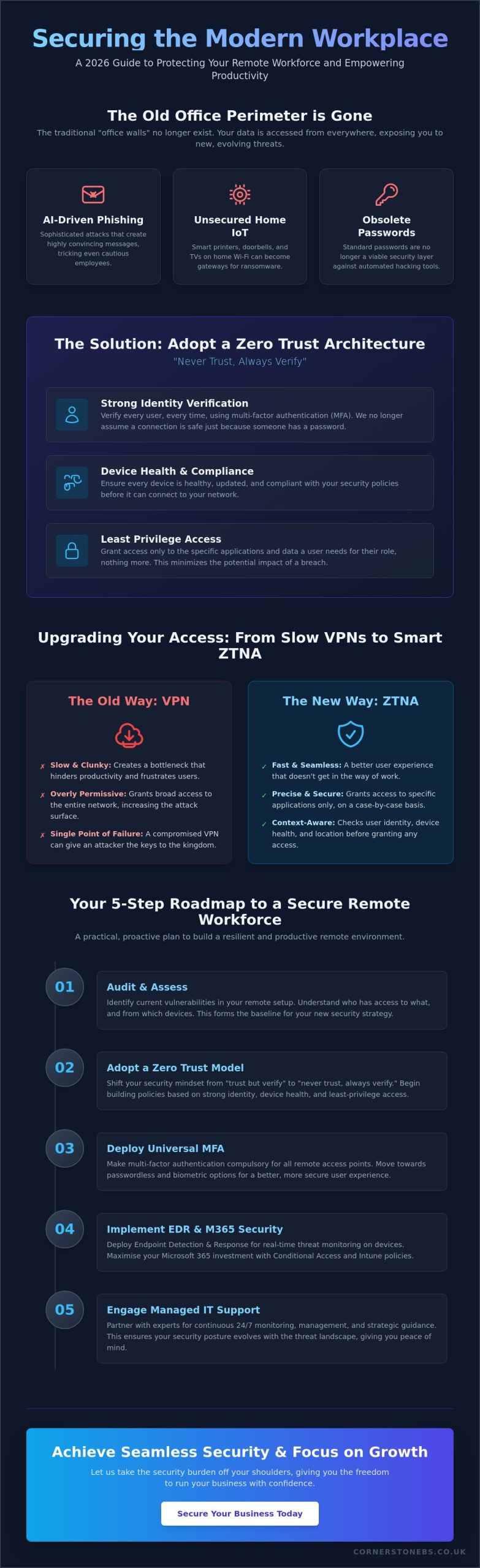
The concept of the “office perimeter” is officially a relic of the past. In 2026, your business network doesn’t stop at the front door; it extends to every home office, transit hub, and client site where your team logs in. Securing remote worker IT access is the comprehensive framework designed to protect your data the moment it leaves your physical server. It isn’t just about encryption anymore. It is about creating a consistent, safe environment for your staff, regardless of their postcode or the time of day they choose to work. This proactive stance ensures that your business remains resilient in a world where the traditional boundaries of the workplace have dissolved.
This modern approach stands on three essential pillars: Identity, Device, and Data. We no longer assume a connection is safe just because someone has the right password. Instead, we verify the person’s identity through multiple layers, check that their laptop is healthy and updated, and ensure the data they are accessing is appropriate for their role. This is the shift from “trust but verify” to “never trust, always verify.” It sounds strict, but it actually provides the emotional security you need to let your team work flexibly without staying up at night worrying about a breach. By verifying every request in real-time, we turn security into a silent, reliable partner in your daily operations.
The Evolution of Remote Work Risks in 2026
The landscape has shifted dramatically. AI-driven phishing attacks now use sophisticated frontier models to create highly convincing messages that can fool even the most cautious employees. We also see a rise in risks from domestic IoT devices. A smart doorbell or a home printer on an unsecured network can act as a silent gateway for ransomware. Because of these evolving threats, standard passwords are no longer a viable security layer. They are simply too easy to bypass in a world where automated hacking tools are constantly scanning for weaknesses. Keeping your team safe requires a move toward more robust, biometric-based protections.
Why a Strategic Approach Outperforms Ad-Hoc Solutions
Many businesses fall into the trap of “bolting on” security features only after a problem occurs. This ad-hoc approach is often more expensive and less effective than a unified strategy. A proactive plan for securing remote worker IT access actually improves your business continuity and can lead to lower cyber insurance premiums. We position security as a foundational element of your growth, not a barrier to it. When your systems are built with resilience in mind, you have the freedom to scale your team and your operations with total confidence. It is about building a stable platform for your future success.
The Core Technologies Powering Secure Remote Work
Building a resilient remote environment doesn’t require a massive enterprise budget; it requires the right tools used correctly. In 2026, the traditional VPN is fading away. It often grants too much access and slows down your team, creating a bottleneck for productivity. Instead, we recommend Zero Trust Network Access (ZTNA). Think of ZTNA as a smart digital bouncer. It checks who is trying to connect, which device they’re using, and their current location before granting access to specific apps. It’s precise, fast, and far more secure than older methods that once relied on a single point of entry.
Multi-factor authentication (MFA) is no longer optional. By 2025, 91% of companies had already made MFA compulsory for all remote access points. We’re now seeing a shift toward biometrics and passwordless logins, which are harder to hack and far easier for your staff to use. To keep a constant eye on things, we deploy Endpoint Detection and Response (EDR). These systems monitor laptops in real-time, catching threats before they can spread to your main network. For businesses managing custom cloud-native applications, using CleanStart for verified, zero-CVE container images adds a vital layer of security to the software supply chain. This proactive monitoring is a foundational element of business stability, ensuring that securing remote worker IT access is handled with the highest level of technical precision.
Maximising Microsoft 365 for Remote Security
Most UK businesses already use Microsoft 365, but few use its full security potential. We help you set up Conditional Access policies, which allow you to block logins from suspicious locations or from devices that aren’t fully updated. Microsoft Intune takes this further by letting you manage every mobile and laptop from a central dashboard. A professional Microsoft 365 migration for business UK simplifies remote management by ensuring your cloud environment is built for security from the ground up. It turns a standard productivity tool into a powerful shield for your data.
Secure Hardware: Beyond the Software
Software is only half the battle. Securing remote worker IT access also depends on the physical kit your team uses. Business-grade laptops featuring TPM (Trusted Platform Module) chips provide hardware-level encryption that consumer models often lack. While “Bring Your Own Device” (BYOD) seems cost-effective, it is often a security nightmare. We find that company-issued hardware, pre-configured with encryption and security software, is the safest route. It ensures every device is protected the second it leaves the box. If you’re unsure if your current tech stack is up to the challenge, our team is happy to review your remote infrastructure and offer practical, local advice.
Balancing Robust Security with Employee Productivity
Many business owners worry that adding layers of protection will grind daily work to a halt. We’ve all heard the grumbles about slow VPNs or forgotten passwords that lock people out for hours. But securing remote worker IT access shouldn’t be a barrier to getting things done. We aim for “Seamless Security.” This means protection happens quietly in the background, allowing your staff to focus on their roles instead of wrestling with tech. By using Single Sign-On (SSO), we eliminate password fatigue. Your team logs in once and gains secure entry to all their essential business applications. It’s faster for them; it’s safer for you.
For cloud-heavy businesses, latency is the enemy. Modern access solutions provide much lower latency than legacy systems. This ensures that a staff member working from home in the morning feels just as connected as if they were sitting in your main office. A strategic approach to securing remote worker IT access prioritises the user experience just as much as the data protection protocols.
Reducing Friction with Modern Authentication
Moving to biometrics is a total game changer for staff morale. Using a fingerprint or facial recognition via Windows Hello or Touch ID is nearly instant and far more secure than a written password. We also implement context-aware security. If an employee is on a known device at their usual home address, the system stays quiet. It only prompts for extra verification if it detects something unusual, such as a login attempt from a different country. This reduces “verification fatigue” and keeps the workflow smooth and uninterrupted.
The Human Element: Training as a Security Layer
Even the best software can’t stop every mistake. That’s why we treat training as a vital security layer rather than a box-ticking exercise. We help you roll out bite-sized, regular cyber awareness training that fits into a busy day. It’s about building a culture where staff feel empowered, not policed. When your team understands the “why” behind the rules, they become your strongest line of defence. We encourage an open environment where reporting a suspicious email is met with a “thank you” rather than a reprimand. This collaborative approach is a foundational element of business stability and emotional security. If you’re concerned about how security is impacting your team’s output, we invite you to start a conversation with our local team today.
A 5-Step Roadmap to Securing Your Remote Workforce
Securing remote worker IT access shouldn’t feel like a guessing game. While the technology involves sophisticated layers, the path to implementation is straightforward when broken down into logical steps. We have developed a 5-step roadmap to help you move from a reactive posture to a resilient, modern framework that protects your team and your data without getting in the way of their work. This is about building a foundation for stability and growth.
Step 1: The Audit and Policy Phase
You can’t protect what you don’t know exists. We start by identifying “Shadow IT,” which often involves well-meaning staff using unapproved apps like personal Dropbox or WhatsApp to share sensitive business files. Clear remote work policies are vital. They define exactly what is expected of your team and how they should handle company data outside the office. Reviewing our cyber security services is a great way to benchmark your current posture against 2026 standards and identify where your biggest risks lie.
Step 2: Implement MFA. With 91% of companies now making multi-factor authentication compulsory, this is your baseline defence. It’s the simplest way to stop a stolen password from becoming a full-blown data breach.
Step 3: Standardise Hardware and Cloud. We recommend moving away from the “bring your own device” nightmare. Using company-issued, encrypted hardware and secure cloud platforms like Microsoft 365 ensures every device is managed under the same high standards.
Step 4: Deploy a Zero Trust Framework. It’s time to retire the legacy VPN. Replacing it with Zero Trust Network Access (ZTNA) ensures that your staff only access the specific files they need, keeping the rest of your network isolated and safe.
Step 5: Proactive Monitoring and Response
The final step is establishing ongoing oversight. Since your team might work irregular hours, 24/7 monitoring is essential to catch threats while you sleep. This isn’t just a “set and forget” task. It involves proactive threat hunting to stop attackers before they gain a foothold. Our managed IT services Teesside provide this level of national-standard protection with a friendly, local face. We act as your long-term partner, ensuring your systems stay healthy and your business remains compliant with UK data standards. If you are ready to move toward a more secure future, we invite you to book a remote security audit with our expert team today.
Why Managed IT Support is the Key to Long-Term Remote Security
Managing securing remote worker IT access in-house is a significant burden for most SMEs. It requires constant attention to emerging threats, software updates, and user support that can easily overwhelm a small team. When you partner with us, you gain access to award-winning expertise that stays ahead of the 2026 threat landscape. We act as your single point of contact for IT hardware, cloud infrastructure, and cyber security. This unified approach eliminates the gaps that often appear when using multiple different providers. It ensures that every part of your digital ecosystem is working in harmony to protect your business data.
24/7 Support for a 24/7 Workforce
Remote workers don’t always stick to a traditional nine-to-five schedule. Whether they are catching up on emails late at night or starting early to beat the school run, they need help that matches their rhythm. Our expert helpdesk provides immediate assistance regardless of where your staff are located. This level of support does more than just fix tech problems. It boosts remote employee morale by proving that they have the same reliable tools and backing as those in the office. Our tailored cloud solutions and managed support go hand-in-hand to ensure your digital workspace is always available and always secure.
Your Partner in Secure Growth
We don’t just set up your systems and walk away. We are here as your long-term partner to ensure securing remote worker IT access remains robust as your business evolves. As your remote team grows, we scale your security protocols and hardware deployment to match. There is a deep sense of reassurance that comes from working with a multi-award-winning IT provider deeply rooted in our local community. We take pride in our regional identity and our reputation for reliability. We handle the technical mechanisms so you can focus on your core business goals. We invite you to start a no-obligation conversation with our local team today about your remote setup.
Future-Proof Your Remote Strategy Today
Remote work is no longer a temporary fix. It’s a permanent pillar of modern business. We’ve seen how the old office perimeter has vanished and why a Zero Trust model is now the gold standard for protection. By focusing on identity and device health rather than just outdated passwords, you create a “seamless security” environment that keeps your team productive and your data safe. Implementing a clear 5-step roadmap ensures you aren’t just reacting to threats but building a resilient foundation for long-term growth.
Securing remote worker IT access is a journey that requires the right partner by your side. As a multi-award-winning IT services provider and official partners with Microsoft, IBM, and Cisco, we bring world-class expertise directly to our local community. Our proactive 24/7 system monitoring means we catch risks before they become breaches. We invite you to take the first step toward a more stable and secure future for your business.
Book a Free Remote Security Audit with our Award-Winning Team. We look forward to helping you build a workplace that is safe, efficient, and ready for whatever comes next.
Frequently Asked Questions
What is the most secure way for remote employees to access the company network?
Zero Trust Network Access (ZTNA) is the gold standard for remote security in 2026. It operates on the principle of “least privilege,” meaning staff only gain access to the specific applications they need for their roles. By verifying every user and device identity before granting entry, it prevents hackers from moving laterally through your systems. This granular control is far more effective than traditional perimeter-based security methods.
Is a VPN still enough for remote work security in 2026?
A traditional VPN is rarely sufficient on its own for modern business needs. While they provide an encrypted tunnel, older VPNs often grant broad access to the entire network once a user is authenticated. This creates a significant risk if a single set of credentials is stolen. We recommend moving toward ZTNA or SASE models that offer more precise, identity-centric protection and better performance for your team.
How do I secure remote workers using their own personal laptops (BYOD)?
The most effective way to manage “Bring Your Own Device” (BYOD) is through Microsoft Intune and virtual desktop solutions. These tools allow you to create a secure, encrypted workspace on a personal laptop that is entirely separate from the employee’s private files. You can enforce strict security policies and wipe business data remotely if the device is lost, all without invading the staff member’s personal privacy.
What are the biggest security risks for employees working from home?
Unsecured home Wi-Fi and domestic smart devices are the primary vulnerabilities we see today. Many home routers use outdated encryption, and “backdoor” entries through smart doorbells or printers are becoming common. Securing remote worker IT access requires a focus on these domestic weak points. We help you implement stronger encryption standards and provide awareness training so your team can identify AI-generated phishing attempts before they cause damage.
Does securing remote access slow down internet speeds for my staff?
Modern security solutions actually tend to improve internet performance for your team. Older VPNs often “backhaul” all data through a central office server, which creates a frustrating bottleneck. Newer cloud-native frameworks connect your staff directly to their applications via the nearest secure data centre. This results in a faster, more responsive experience that feels just like being in the office, even when working from home.
How much does it cost to implement a secure remote access strategy?
The investment required depends on your current technology stack and the size of your remote workforce. We find that many UK businesses already own the necessary tools through their existing Microsoft 365 subscriptions but haven’t configured them for maximum safety. Our approach focuses on maximising your current assets first. We work with you to build a customised, scalable strategy that provides long-term stability without unnecessary overheads.
What is the difference between MFA and 2FA for remote logins?
Multi-Factor Authentication (MFA) is a more robust evolution of Two-Factor Authentication (2FA). While 2FA requires two forms of evidence, MFA uses three or more independent factors, such as a password, a physical security key, and a biometric scan. This layered approach is vital for securing remote worker IT access because it makes it statistically much harder for an attacker to bypass your defences, even if they steal a password.
Can I monitor my remote workers’ IT security without invading their privacy?
You can maintain a high security posture without monitoring your employees’ personal activities. We use endpoint detection tools that focus on identifying malicious software and unusual system behaviours rather than tracking individual user actions. This protects your business from threats while respecting the trust you’ve built with your team. It’s a proactive way to ensure business continuity while maintaining a healthy, positive workplace culture for everyone.
Tags: Business Strategy, Cybersecurity, Data Protection, Hybrid Work, IT Security, Remote Work, Zero Trust, ZTNA