

Would your business survive if a sophisticated AI-powered phishing attack bypassed your team’s defenses tomorrow morning? It’s a sobering thought that keeps many UK business owners awake at night. As the Data (Use and Access) Act 2025 introduces stricter requirements for handling data protection complaints, the stakes for your digital infrastructure have never been higher. You likely already know that Microsoft’s own data shows MFA blocks over 99% of account compromise attacks, yet managing these settings across a remote workforce feels increasingly complex. We believe that robust security is the foundation of your emotional and business stability. That’s why we’ve developed this guide to microsoft 365 security best practices, designed to help you build a resilient environment that protects your team and your reputation.
You’ll gain a clear, expert-led roadmap to navigate the complexities of modern identity protection and evolving UK cyber standards. We’ll walk you through the non-negotiable settings you need right now, including the mandatory April 2026 Cyber Essentials MFA requirements and the shift toward passwordless authentication. By the end of this guide, you’ll have a proactive strategy to secure your data and the confidence of a long-term partner standing by your side. Let’s simplify these technical challenges and turn your security into a source of strength.
Key Takeaways
- Secure your digital perimeter by shifting to phishing-resistant authentication that meets the latest UK Cyber Essentials standards.
- Manage the Data (Use and Access) Act 2025 with confidence by aligning your governance policies with current UK legal requirements.
- Implement microsoft 365 security best practices to protect your team from sophisticated, AI-generated deepfake phishing attacks.
- Automate your data protection with sensitivity labels to ensure your confidential information stays secure across Teams, email, and SharePoint.
- Partner with a multi-award-winning team to transform your IT from a simple helpdesk into a proactive security foundation that provides true peace of mind.
Why Microsoft 365 Security is No Longer Optional in 2026
The traditional castle-and-moat security model is officially a relic of the past. In our hybrid work era, the office walls no longer define your security boundary. Your team works from home, local hubs, and on the move, which makes identity the new perimeter. Relying on the standard, out-of-the-box setup of the Microsoft 365 platform leaves gaps that modern attackers are incredibly quick to exploit. We’ve seen many businesses assume that a subscription alone equals safety. It doesn’t. Microsoft provides the tools, but you remain responsible for the configuration.
By 2026, the threat landscape has shifted gears. We’re now seeing a surge in AI-driven phishing that’s virtually indistinguishable from legitimate business emails. Automated credential harvesting tools can test thousands of stolen passwords in seconds, looking for any crack in your armor. If you’re still using default settings, you’re essentially leaving your front door unlocked. Implementing microsoft 365 security best practices is the only way to ensure your business stays resilient against these evolving tactics.
A breach isn’t just a technical headache. It’s a financial and reputational crisis that can halt your operations overnight. For a UK business, the fallout includes recovery costs, lost client trust, and potential fines under the Data (Use and Access) Act 2025. We believe that robust security is the foundation of your emotional and business stability. It’s about protecting the hard work you’ve put into your company and ensuring your team feels safe while they work.
The Concept of Zero Trust in Microsoft 365
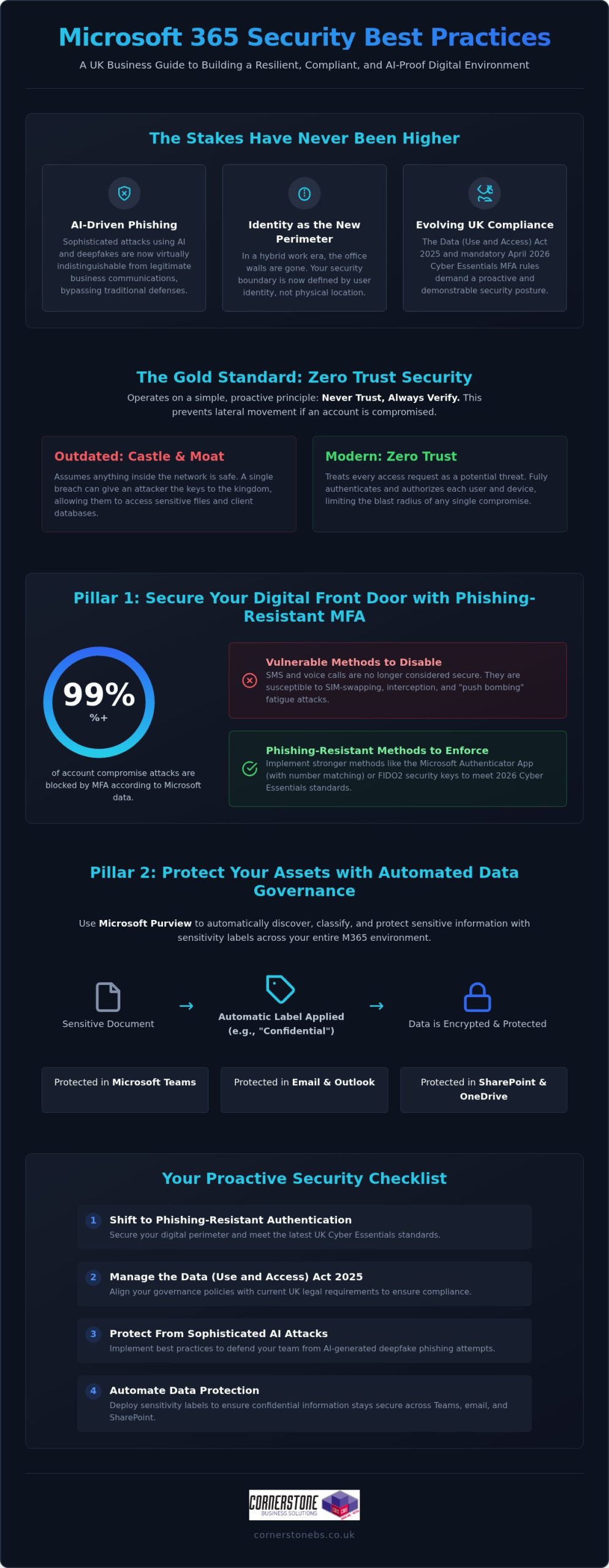
Zero Trust is the gold standard for modern protection. It operates on a simple, proactive principle: never trust, always verify. Trust is a risk. Every access request, regardless of where it originates, is fully authenticated and authorized before any data is shared. This approach is vital because it prevents lateral movement within your network. If one account is compromised, the attacker can’t easily jump to your most sensitive financial files or client databases. It creates the layered defense you need for true peace of mind. You can find more detail on this in our guide on Zero Trust security.
Compliance Requirements for UK Businesses
Securing the Digital Front Door: Identity and Access Management
Identity is the master key that unlocks your entire business. In 2026, it’s no longer enough to guard your network; you must guard the person behind the screen. Microsoft Entra ID provides the centralised control you need to manage every user, device, and application from a single, secure location. This visibility is essential for maintaining microsoft 365 security best practices while ensuring your team stays productive. We understand that adding security can sometimes feel like adding friction. However, with the right setup, you can protect your data without slowing down your people. It’s about creating a environment where safety and efficiency work hand in hand.
Implementing Phishing-Resistant MFA
Standard Multi-Factor Authentication (MFA) using SMS is no longer the gold standard. Attackers have found ways to intercept codes or trick users into approving fake prompts through “push bombing.” To meet the April 2026 Cyber Essentials mandate, MFA must be active on all cloud services that support it. Following CISA’s security recommendations, we suggest moving toward phishing-resistant methods to prevent credential theft.
- Step 1: Audit current methods. Identify which users are still relying on vulnerable SMS or voice call authentication.
- Step 2: Disable legacy protocols. Turn off older authentication methods that allow attackers to bypass your MFA prompts entirely.
- Step 3: Move to Authenticator or FIDO2. Roll out the Microsoft Authenticator app or physical FIDO2 keys for a more secure, passwordless experience.
- Step 4: Educate your team. Train users to recognise “MFA fatigue” so they don’t accidentally approve a fraudulent login attempt.
Conditional Access: The Smart Way to Manage Risk
Conditional Access is the intelligent bouncer for your business data. Instead of a simple “yes or no” to a password, it evaluates every login attempt in real-time based on specific signals. You can create policies that check user location, device health, and login risk levels before granting access. For instance, you can automatically block logins from high-risk countries or prevent access from unmanaged devices that haven’t been patched. This proactive approach ensures that only the right people, on the right devices, get to your sensitive information. If you’re looking for a partner to help configure these complex settings, our experts at Cornerstone can design a bespoke framework that fits your unique workflow. Implementing these microsoft 365 security best practices creates a foundation of trust that allows your business to grow without fear.
Protecting Your Assets: Data Governance and DLP Strategies
Once you’ve secured the digital front door, you must ensure the data inside doesn’t slip out the back. Accidental data leaks through email, Teams, or SharePoint are often the result of simple human error rather than malice. To prevent this, we recommend following a prioritized security roadmap that focuses on automated protection. Sensitivity labels are a cornerstone of this approach. They allow you to classify documents based on their level of confidentiality, ensuring that a “Highly Confidential” file cannot be shared with external stakeholders without proper encryption and authorization. This creates a safety net that protects your team while they focus on their daily tasks.
Securing your data is about more than just preventing leaks; it’s about ensuring your business can bounce back if the worst happens. Our team focuses on building microsoft 365 security best practices into the very fabric of your organization. This includes integrating robust cloud solutions and backup strategies to ensure business continuity. When your data is protected and backed up, you gain the emotional security of knowing your hard work is safe from both cyber threats and accidental deletion.
Licensing for Security: Business Premium vs. Enterprise
Choosing the right license is a strategic decision for your business stability. For most UK small and medium enterprises, Microsoft 365 Business Premium is the “sweet spot” for security. It includes essential tools like Intune for device management and Defender for Business, which were previously only available in more expensive Enterprise tiers. The ROI is clear: the cost of a higher-tier license is a fraction of the potential financial fallout from a single data breach.
| Feature | Business Standard | Business Premium | Enterprise (E5) |
|---|---|---|---|
| Conditional Access | No | Yes | Yes |
| Intune Device Management | No | Yes | Yes |
| Defender for Business | No | Yes | Yes |
| Data Loss Prevention (DLP) | Basic | Full | Advanced |
| Sensitivity Labels | Manual | Automated | Advanced AI |
Data Loss Prevention (DLP) Policies That Work
DLP policies act as a silent guardian for your sensitive information. You can configure rules that automatically detect and block the sharing of National Insurance numbers or credit card data across your microsoft 365 security best practices framework. We favor using “Override” options where appropriate. This allows a user to share data if they provide a valid business reason, turning a potential security block into a teachable moment that improves awareness without halting productivity. It’s about being proactive and supportive, rather than just restrictive.
Defending Against AI-Driven Threats and Phishing
By 2026, the days of spotting a phishing attempt by its poor grammar or blurry logos are long gone. Attackers now use generative AI to create perfectly written, highly personalised spear-phishing emails that can fool even the most tech-savvy professionals. We’re also seeing a rise in “Deepfake” phishing, where AI-generated audio or video mimics a senior leader to authorise urgent wire transfers. Staying ahead of these sophisticated tactics requires more than just luck. It demands the consistent application of microsoft 365 security best practices to build a multi-layered defence that protects your team and your assets.
The integration of Microsoft Copilot brings incredible productivity gains, but it also introduces new risks. AI tools are exceptionally good at finding and summarising information, which means they can inadvertently surface sensitive data to unauthorised users if your permissions aren’t tight. This is known as the “over-sharing” problem. Before you fully embrace AI, you must audit your internal permissions to ensure users only have access to the data they truly need for their roles. Establishing clear company policies for Generative AI use is a vital step in your microsoft 365 security best practices framework, ensuring your innovation doesn’t come at the cost of your security.
Phishing Simulations and Staff Training
Technology alone isn’t enough to stop a determined attacker. We’ve found that monthly phishing simulations are far more effective than annual training sessions. These brief, realistic exercises keep security at the front of your team’s minds, helping them recognise the subtle signs of modern social engineering. We encourage a “no-blame” culture where staff feel comfortable reporting suspicious activity immediately, rather than hiding a potential mistake out of fear. This transparency is essential for a quick response and long-term resilience. The Human Firewall is the final line of defence against modern social engineering.
Building a secure environment is a journey we take together as partners. If you want to ensure your AI tools are configured safely and your team is ready for 2026 threats, contact our expert team at Cornerstone for a bespoke security review. We’re here to provide the professional authority and regional warmth you need to feel truly secure.
Implementing a Proactive Security Posture with Cornerstone
Security isn’t a one-time project; it’s a continuous commitment to your business’s future. While we’ve discussed the technical aspects of microsoft 365 security best practices, the real challenge lies in consistent, expert management. This is where Cornerstone steps in. We don’t just act as a reactive helpdesk that waits for things to break. Instead, we position ourselves as your dedicated long-term partner, providing the proactive oversight needed to keep your operations stable. Our multi-award-winning approach to managed IT services ensures that your digital infrastructure is built on a foundation of strength and reliability.
Every business has unique risks. A generic checklist won’t provide the protection you deserve. We conduct bespoke security audits to tailor Microsoft 365 to your specific operational needs. Our team provides 24/7 proactive monitoring, allowing us to identify and neutralise threats before they can impact your team. This rapid incident response is designed to give you total peace of mind, knowing that national-level experts are watching over your data around the clock. We’re proud of our Microsoft Solutions Partner status, which reflects our deep expertise and commitment to quality.
Our Microsoft 365 Management Framework
We use a structured framework to maintain your security posture. This includes regular reviews of your Microsoft Secure Score, where we identify and implement optimisations to harden your environment. If you’re currently using older systems, we provide comprehensive M365 migration support to move your team to a more secure, modern platform safely. Beyond the technical setup, we host ongoing strategy sessions. These meetings ensure your leadership team understands the evolving threat landscape and how microsoft 365 security best practices can support your long-term growth.
Next Steps: Secure Your Business Today
Ready to move beyond basic protection? Getting started is as simple as scheduling a professional security audit. We’ll look under the hood of your current configuration, identify any gaps in your “Human Firewall,” and provide a clear roadmap for improvement. The Cornerstone promise is simple: we provide reliable, award-winning expertise with a friendly, accessible face. We’re a national provider with deep roots, and we’re genuinely interested in the success of your business. We’d love to invite you to a friendly, informal conversation about your IT needs. Let’s work together to build a secure foundation that gives you the confidence to lead your team forward.
Securing Your Business Future with Confidence
Securing your business in 2026 is about more than just checking boxes. It’s about building a resilient environment where your team can thrive without the constant fear of a data breach. We’ve explored how shifting to identity-based protection and automating your data governance through microsoft 365 security best practices creates a solid foundation for growth. By staying ahead of AI-driven phishing and deepfake threats, you protect not just your files, but your reputation and your team’s hard work.
As a multi-award-winning IT provider and Microsoft Solutions Partner, we’re here to turn these complex technical challenges into a clear roadmap for success. Our proactive 24/7 monitoring ensures that your systems remain stable, giving you the emotional security to focus on what you do best. We’d love to help you take the next step toward a more secure digital future. Please Book a Microsoft 365 Security Audit with Our Award-Winning Team today. Let’s start a friendly conversation about how we can protect your business together. You’ve built something great; let’s make sure it’s built to last.
Frequently Asked Questions
Is Microsoft 365 secure enough for my business by default?
Microsoft 365 is not fully secure by default because of the shared responsibility model. While Microsoft protects the physical datacenters and underlying software, you are responsible for securing your data, devices, and user identities. Leaving settings at their factory defaults often leaves doors open for attackers. We work with you to configure microsoft 365 security best practices that close these gaps and ensure your environment is tailored to your specific business needs.
What is the single most important security setting in Microsoft 365?
Multi-factor authentication (MFA) is the single most important security setting you can enable. It blocks over 99% of account compromise attacks by requiring a second form of verification. In 2026, we recommend moving beyond simple SMS codes to phishing-resistant methods like the Microsoft Authenticator app or physical FIDO2 keys. This simple step provides an immediate and massive boost to your overall business stability and provides true peace of mind.
How much does it cost to implement professional M365 security?
The cost of implementing professional security depends on your current licensing and the complexity of your team’s setup. Many UK businesses find that upgrading to Microsoft 365 Business Premium offers the best value, as it bundles advanced tools like Intune and Defender into a single monthly cost. Investing in a managed partnership ensures these tools are actually configured correctly, which is far more cost-effective than dealing with the fallout of a breach.
Will MFA make it harder for my staff to do their jobs?
MFA shouldn’t hinder your team’s productivity if you use Conditional Access policies correctly. These smart settings only prompt for a second factor when something changes, such as a login from a new device or an unusual location. For a standard day at the office on a trusted machine, your staff won’t be constantly interrupted. It’s about finding that perfect balance between high-level security and a smooth, efficient workflow for your busy professionals.
What is the difference between Microsoft 365 Business Standard and Premium security?
Microsoft 365 Business Premium is the baseline for security-conscious organisations. While Business Standard provides core productivity apps, Premium adds essential protection layers like Microsoft Intune for device management and Defender for Business for advanced threat protection. It also includes Conditional Access, which acts as an intelligent bouncer for your data. For most UK SMEs, the additional security features in Premium provide a much higher return on investment and greater business resilience.
Can Microsoft 365 protect my business from ransomware?
Yes, Microsoft 365 provides several layers of protection against ransomware. Microsoft Defender for Office 365 scans attachments for malicious code, while OneDrive and SharePoint include versioning features that allow you to roll back files to a point before they were encrypted. However, technology alone isn’t a silver bullet. A proactive strategy that includes regular backups and staff training is essential to ensure your business can recover quickly from any sophisticated attack.
How do I know if my Microsoft 365 environment has already been compromised?
You can identify a compromise by monitoring your Entra ID sign-in logs for unusual activity, such as “impossible travel” logins. Other red flags include:
- Unexpected mailbox forwarding rules.
- Sudden drops in your Microsoft Secure Score.
- Unfamiliar devices appearing in your management portal.
Our proactive 24/7 monitoring service tracks these signals in real-time, allowing us to neutralise unauthorised access before any significant damage is done to your business.
Do I still need a separate antivirus if I use Microsoft Defender?
You typically don’t need a separate antivirus if you’re using Microsoft Defender, as it’s consistently ranked as a leading endpoint detection and response (EDR) solution. It provides robust, built-in protection that’s deeply integrated with the rest of the microsoft 365 security best practices framework. The real value comes from having a professional partner monitor the alerts Defender generates, ensuring that potential threats are investigated and resolved with the expert authority your business requires.
Tags: AI security, Cyber Essentials, Cybersecurity, Data Protection, MFA, Microsoft 365, Phishing Protection, UK business